
DITA for e Learning Content Development Brian Driscoll
DITA for e. Learning Content Development Brian Driscoll Soft. Assist, Inc.
INTRODUCTION
What Is DITA? DITA, or Darwin Information Typing Architecture, is a W 3 C standard for organizing content by concept, topic, and task. First created by IBM, DITA is now an open-source standard that has wide support across many different industries.
The Purpose of DITA • Create modular, topic-based content. • Single-Sourcing • Multiple Delivery Points
A (very) Brief History of DITA • • • 1960 s 1970 s 1980 s 1990 s 2000 s
Who Uses It Now? DITA is used primarily in the technical writing and publishing communities, where it receives a great deal of support. However, in recent years the DITA standard has received attention from the training industry, from which the DITA Learning Specialization is a result.
THE TRADITIONAL E-LEARNING DEVELOPMENT MODEL
Content-Presentation-Logic (CPL)
Model Overview • Content created and styled, then added to Presentation layer. • Logic provides functionality for navigation, interaction. • Widely used and supported method; common for e. Learning produced in Power. Point, Articulate, Captivate, HTML, and Flash.
CPL Model Advantages • • Training created with familiar tools/languages, making it easy to create/edit training. Many vendors provide SCORM support and can produce a SCORM package. Third-party developers provide ready-made interactions, layout templates, etc to make it even easier to create good-looking training. Generally no need for a developer unless creating a complex module or complex interactions. Disadvantages • Content and Presentation, and sometimes Logic, are inextricably linked - which severely limits reuse without significant additional effort.
Proprietary Models
Proprietary Models Advantages • Can be tailored to the needs of the organization • Content can be reused within the model • Inherently supported by organization Disadvantages • Requires significant capital investment, technical expertise • Not necessarily user-friendly for course authors • Content may not be reusable outside of the model • No community of practice outside the building
USING DITA FOR E-LEARNING CONTENT
John Hunt’s Proposition • Use DITA standard to create e. Learning content that allows authors to: – Minimize duplicate effort – Use material from alternate sources – Supply course topics to alternate deliverables – Build to company-wide standardized methods – Create custom courses quickly
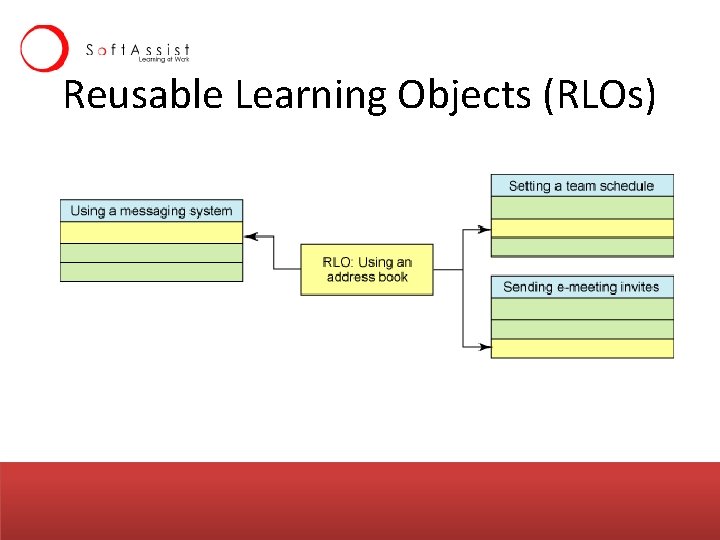
Reusable Learning Objects (RLOs)
SCORM • Provides standard packaging mechanism for Reusable Learning Objects as launchable assets • Wide adoption by LMS and LCMS vendors • But, only works for web based e. Learning content - a single delivery point. . . • And, content packaging occurs at the course/lesson levels, meaning that the smallest reusable piece of content is actually quite large (an entire lesson!) • There is no standardized content model (so the e. Learning content could be built from CPL model or a proprietary model, or something else altogether. . . )
DITA • DITA provides a structured model for content (and thus content reuse) at a more granular level (topic rather than lesson) • Allows content-only reuse, meaning that presentation and logic are completely separate • Allows content to be reused and/or repurposed across different delivery media (print, online, CDROM, etc)
SCORM + DITA • DITA provides content model and structure for topic sequencing • SCORM provides delivery structure and packaging
DITA TOOLS FOR CONTENT AUTHORING AND PUBLISHING
Authoring Tools • Can use any text editor to write DITA XML directly – only good for those who are comfortable writing XML • Use a DITA-aware editor, such as: – XMLMind (Personal Edition is free) http: //www. xmlmind. com/ – DITA Open Platform Editor (Free, but requires Eclipse) – Many retail/enterprise editors like XMeta. L, DITAStorm, XMLMind Professional, <o. Xygen/>, Arbortext. . .
Publishing Tools • DITA Open Toolkit • Retail/Enterprise Authoring Tools w/ Publishing built in (XMeta. L, XMLMind, DITAStorm)
(the end) FIN.
Talk To Me, Goose • Email: briand@softassist. com • Phone: (610) 265 -8484 x 11 • Twitter: briand_at_SA (http: //twitter. com/briand_at_SA)
- Slides: 23