
Distribution ED 01 English OS 7 x 00
Distribution ED 01 English OS 7 x 00 no MGI Solution Introduction March, 2009
R 2. No MGI Solution Introduction 1
Contents MPS Feature SIP Embedded SBC Feature Video Phone Feature 2
MPS 3
Sub-Content Feature Definition Feature Description How to Configure Check Point 4
Feature Definition MPS Means “Media Proxy Server” Supported in OAS and OS 7100/7030/7070 Feature Media Transmission NAT Traversal RFC 2833 DTMF Detection for MOBEX 5
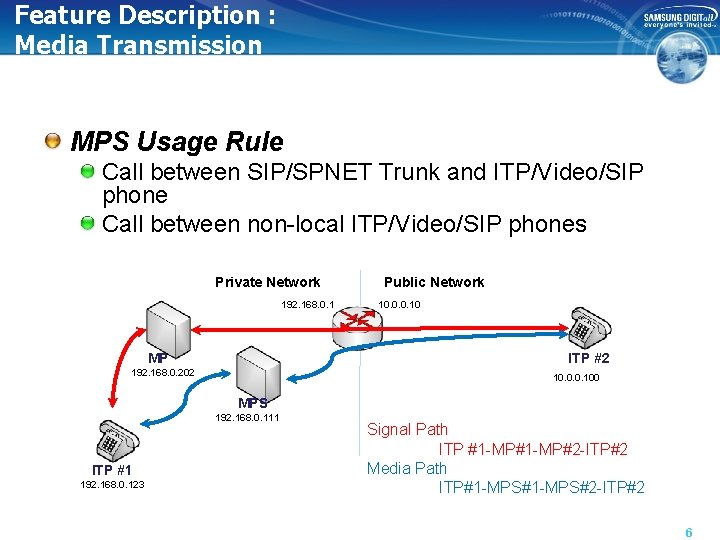
Feature Description : Media Transmission MPS Usage Rule Call between SIP/SPNET Trunk and ITP/Video/SIP phone Call between non-local ITP/Video/SIP phones Private Network 192. 168. 0. 1 MP Public Network 10. 0. 0. 10 ITP #2 192. 168. 0. 202 10. 0. 0. 100 MPS 192. 168. 0. 111 ITP #1 192. 168. 0. 123 Signal Path ITP #1 -MP#2 -ITP#2 Media Path ITP#1 -MPS#2 -ITP#2 6
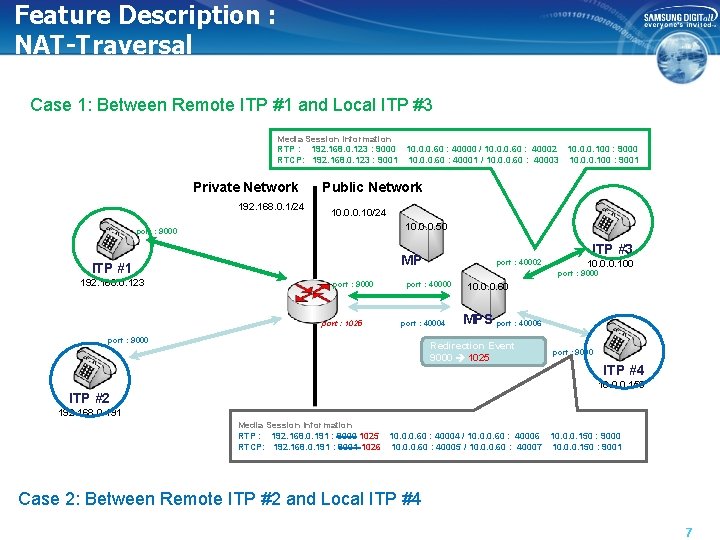
Feature Description : NAT-Traversal Case 1: Between Remote ITP #1 and Local ITP #3 Media Session Information RTP : 192. 168. 0. 123 : 9000 10. 0. 0. 60 : 40000 / 10. 0. 0. 60 : 40002 10. 0. 0. 100 : 9000 RTCP: 192. 168. 0. 123 : 9001 10. 0. 0. 60 : 40001 / 10. 0. 0. 60 : 40003 10. 0. 0. 100 : 9001 Private Network 192. 168. 0. 1/24 Public Network 10. 0. 0. 10/24 10. 0. 0. 50 port : 9000 ITP #1 192. 168. 0. 123 ITP #3 MP port : 40002 10. 0. 0. 100 port : 9000 port : 1025 port : 40000 port : 40004 port : 9000 10. 0. 0. 60 MPS port : 40006 Redirection Event 9000 1025 port : 9000 ITP #4 10. 0. 0. 150 ITP #2 192. 168. 0. 191 Media Session Information RTP : 192. 168. 0. 191 : 9000 1025 10. 0. 0. 60 : 40004 / 10. 0. 0. 60 : 40006 10. 0. 0. 150 : 9000 RTCP: 192. 168. 0. 191 : 9001 1026 10. 0. 0. 60 : 40005 / 10. 0. 0. 60 : 40007 10. 0. 0. 150 : 9001 Case 2: Between Remote ITP #2 and Local ITP #4 7
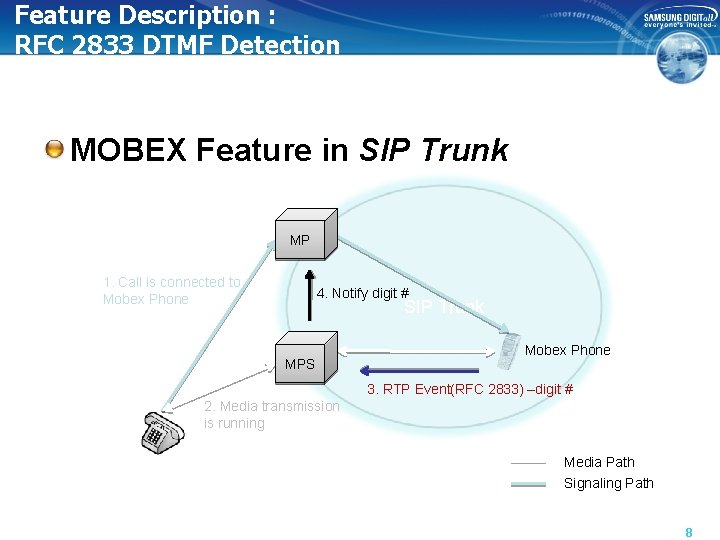
Feature Description : RFC 2833 DTMF Detection MOBEX Feature in SIP Trunk MP 1. Call is connected to Mobex Phone 4. Notify digit # SIP Trunk MPS Mobex Phone 3. RTP Event(RFC 2833) –digit # 2. Media transmission is running Media Path Signaling Path 8
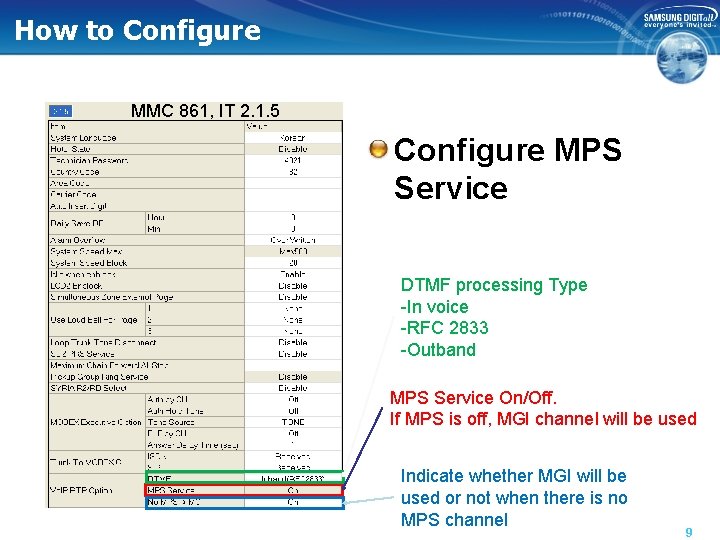
How to Configure MMC 861, IT 2. 1. 5 Configure MPS Service DTMF processing Type -In voice -RFC 2833 -Outband MPS Service On/Off. If MPS is off, MGI channel will be used Indicate whether MGI will be used or not when there is no MPS channel 9
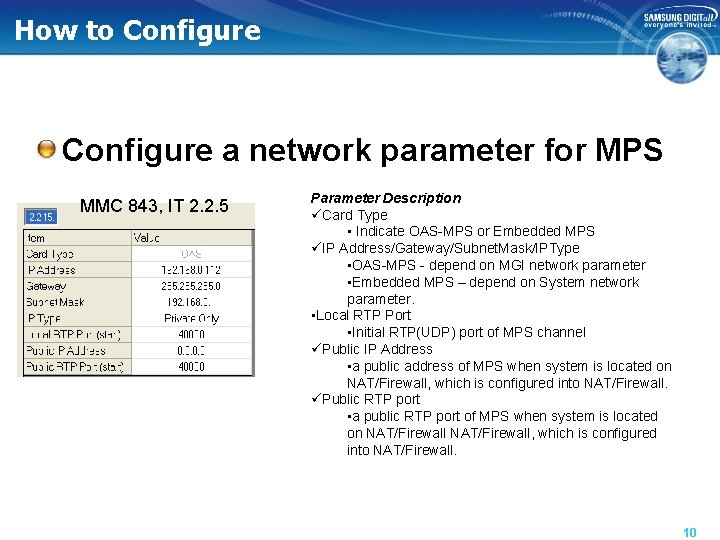
How to Configure a network parameter for MPS MMC 843, IT 2. 2. 5 Parameter Description üCard Type • Indicate OAS-MPS or Embedded MPS üIP Address/Gateway/Subnet. Mask/IPType • OAS-MPS - depend on MGI network parameter • Embedded MPS – depend on System network parameter. • Local RTP Port • Initial RTP(UDP) port of MPS channel üPublic IP Address • a public address of MPS when system is located on NAT/Firewall, which is configured into NAT/Firewall. üPublic RTP port • a public RTP port of MPS when system is located on NAT/Firewall, which is configured into NAT/Firewall. 10
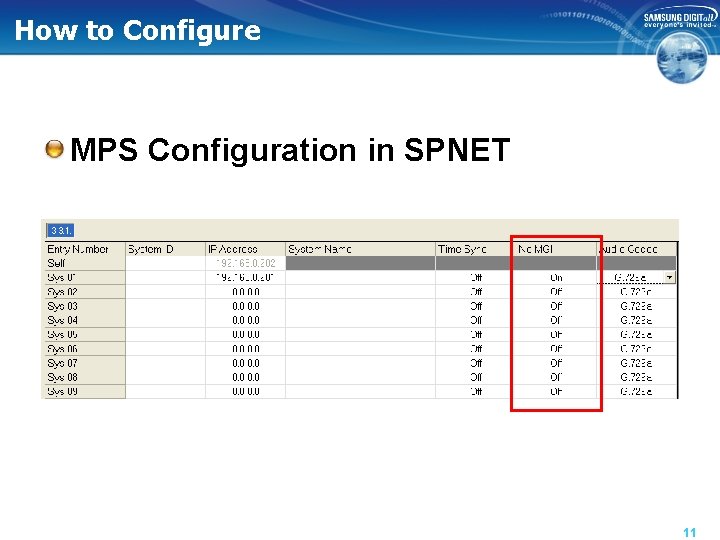
How to Configure MPS Configuration in SPNET 11
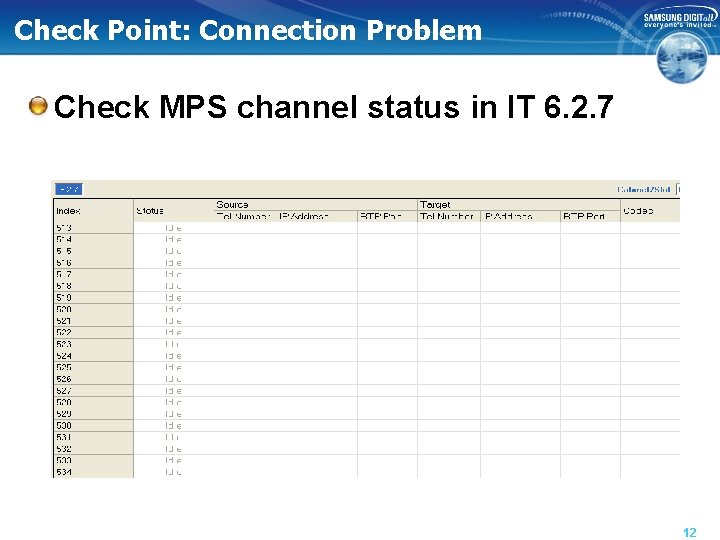
Check Point: Connection Problem Check MPS channel status in IT 6. 2. 7 12
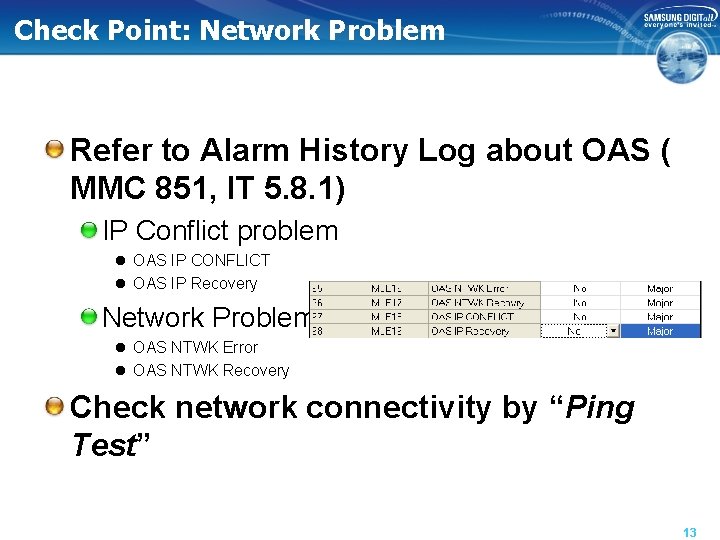
Check Point: Network Problem Refer to Alarm History Log about OAS ( MMC 851, IT 5. 8. 1) IP Conflict problem l OAS IP CONFLICT l OAS IP Recovery Network Problem l OAS NTWK Error l OAS NTWK Recovery Check network connectivity by “Ping Test” 13
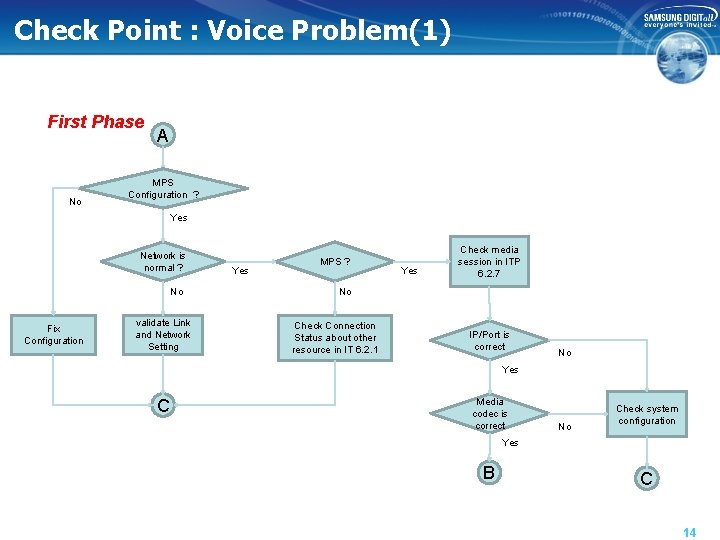
Check Point : Voice Problem(1) First Phase No A MPS Configuration ? Yes Network is normal ? No Fix Configuration validate Link and Network Setting Yes MPS ? Yes Check media session in ITP 6. 2. 7 No Check Connection Status about other resource in IT 6. 2. 1 IP/Port is correct No Yes C Media codec is correct No Check system configuration Yes B C 14
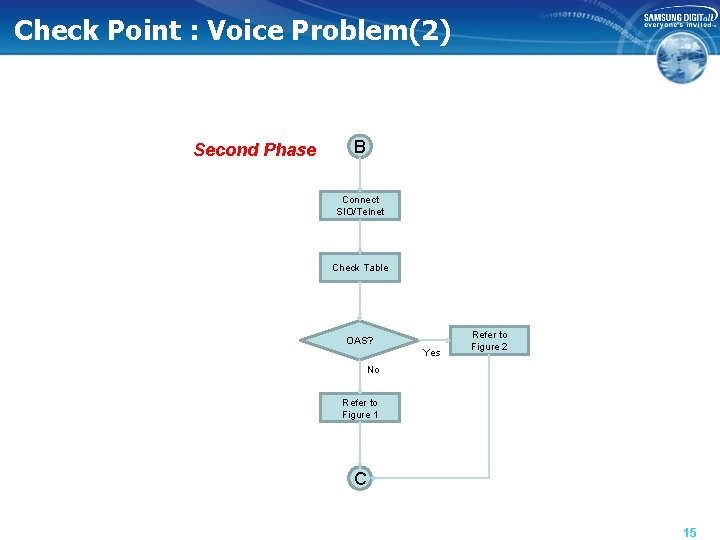
Check Point : Voice Problem(2) Second Phase B Connect SIO/Telnet Check Table OAS? Yes Refer to Figure 2 No Refer to Figure 1 C 15
Check Point: Voice Problem Third Phase Control Trace l MPS log trace – OAS » Mps. Set. Log. Level(4, 3) » Mps. Set. Log. Level(5, 3) » Try to call and Save Log information – Embedded MPS » . /mps_cli 127. 0. 0. 1 » mps » set » add msg ipt » add msg chan » Try to call and Save Log information Media Trace l By Ethereal 16
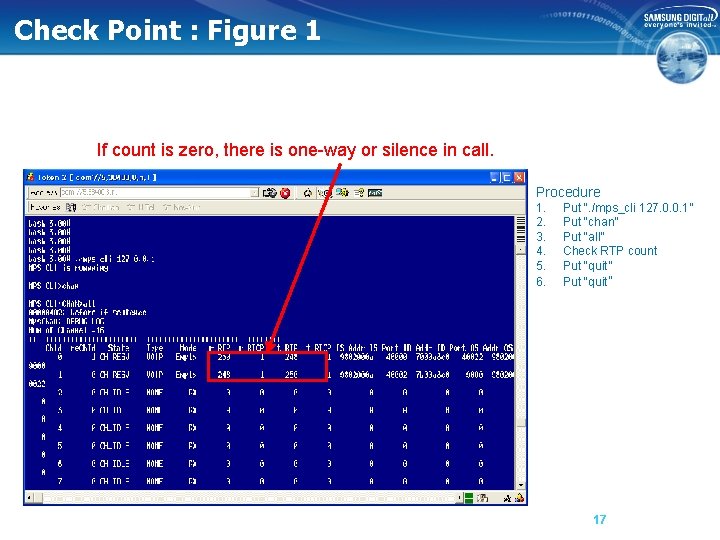
Check Point : Figure 1 If count is zero, there is one-way or silence in call. Procedure 1. 2. 3. 4. 5. 6. Put “. /mps_cli 127. 0. 0. 1” Put “chan” Put “all” Check RTP count Put “quit” 17
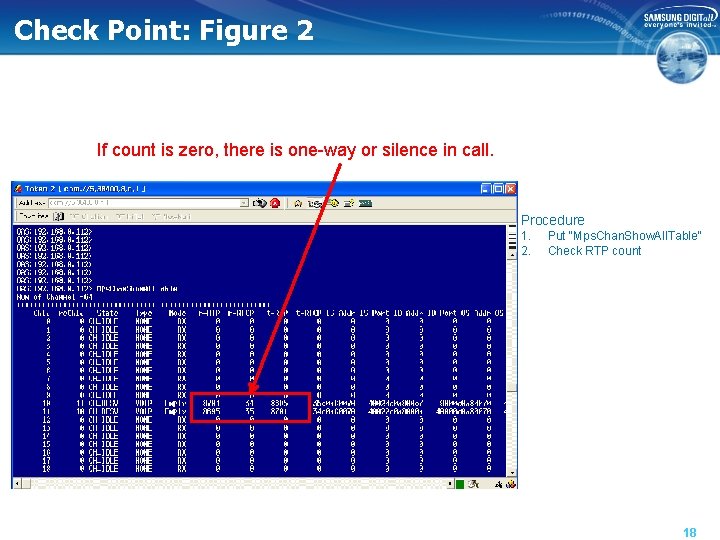
Check Point: Figure 2 If count is zero, there is one-way or silence in call. Procedure 1. 2. Put “Mps. Chan. Show. All. Table” Check RTP count 18
Embedded SBC for SIP Station behind NAT 19
Sub-Content Introduction Feature Description System Configuration 20
Introduction (I) Embedded SBC Embedded l support one of SBC features without an external device SBC Feature l Support SIP phone in NAT/Firewall Network 21
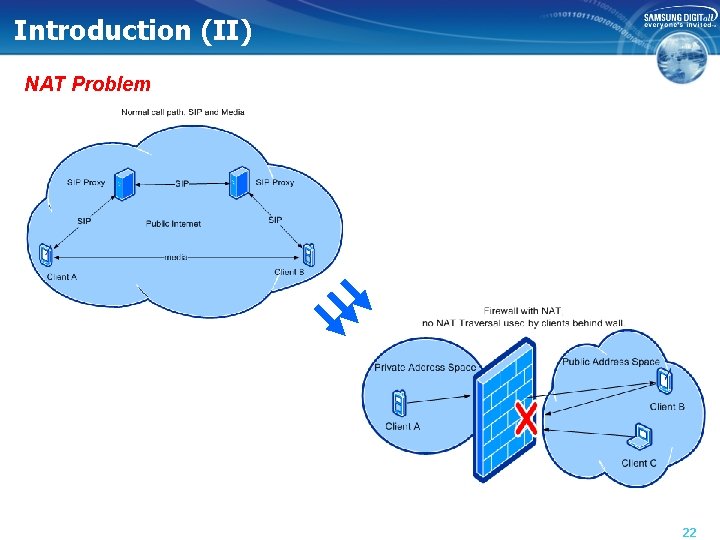
Introduction (II) NAT Problem 22
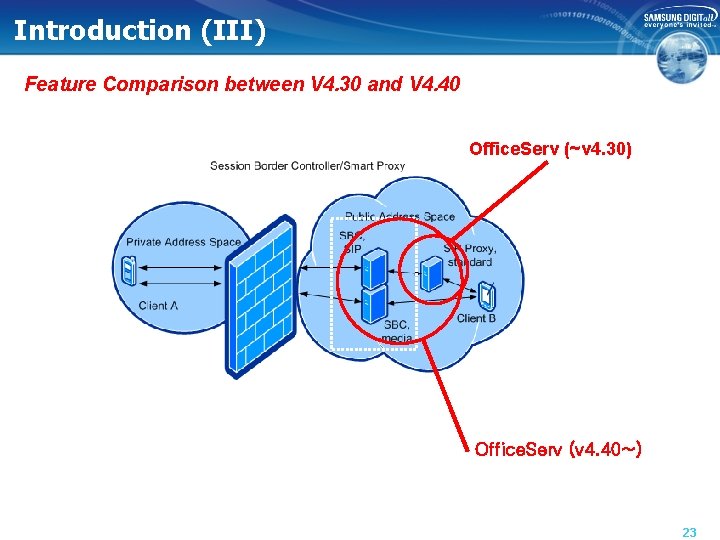
Introduction (III) Feature Comparison between V 4. 30 and V 4. 40 Office. Serv (~v 4. 30) Office. Serv (v 4. 40~) 23
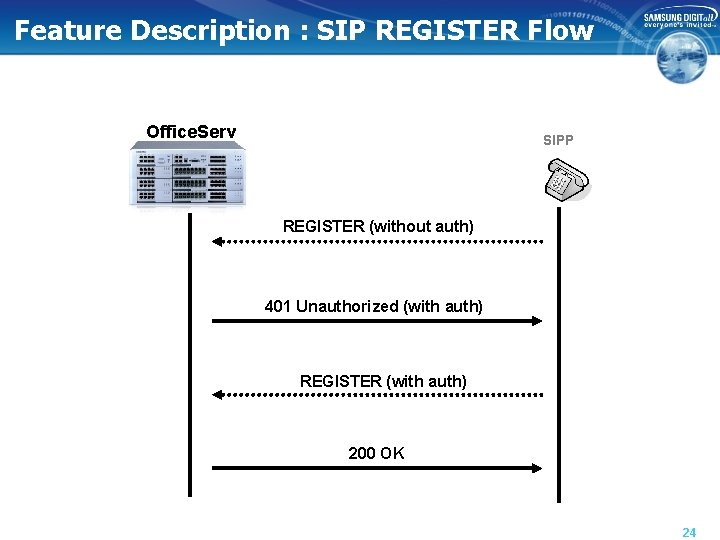
Feature Description : SIP REGISTER Flow Office. Serv SIPP REGISTER (without auth) 401 Unauthorized (with auth) REGISTER (with auth) 200 OK 24
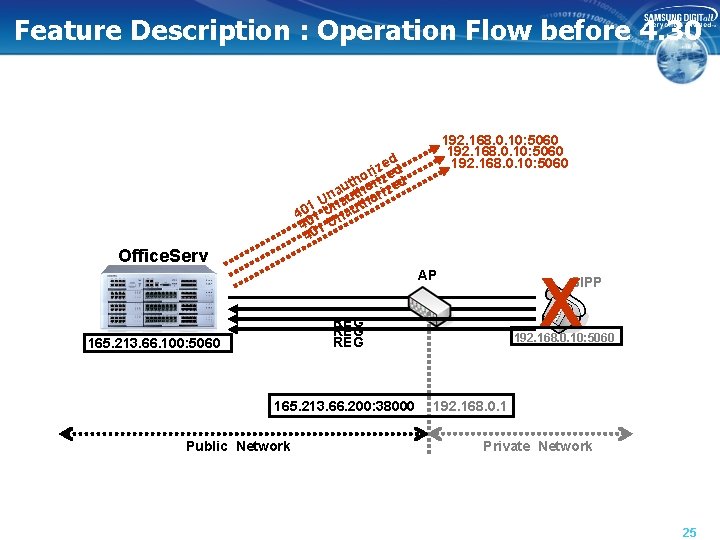
Feature Description : Operation Flow before 4. 30 192. 168. 0. 10: 5060 d ze d i r e thoorizzed u a h i Unnaut thor 1 4001 U nau 4 1 U 40 Office. Serv X AP SIPP REG REG 165. 213. 66. 100: 5060 165. 213. 66. 200: 38000 Public Network 192. 168. 0. 10: 5060 192. 168. 0. 1 Private Network 25
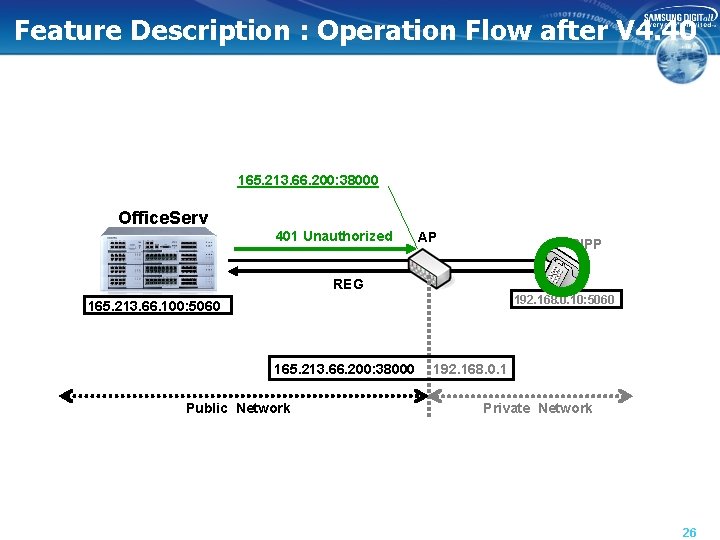
Feature Description : Operation Flow after V 4. 40 165. 213. 66. 200: 38000 Office. Serv 401 Unauthorized O AP SIPP REG 192. 168. 0. 10: 5060 165. 213. 66. 100: 5060 165. 213. 66. 200: 38000 Public Network 192. 168. 0. 1 Private Network 26
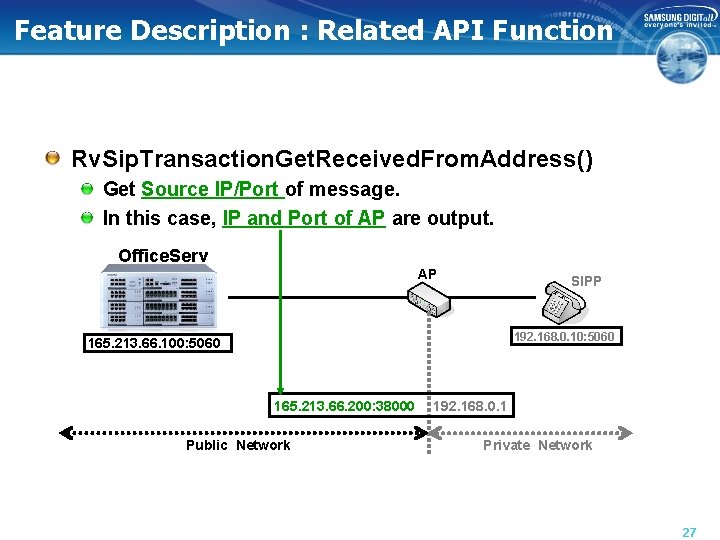
Feature Description : Related API Function Rv. Sip. Transaction. Get. Received. From. Address() Get Source IP/Port of message. In this case, IP and Port of AP are output. Office. Serv AP SIPP 192. 168. 0. 10: 5060 165. 213. 66. 100: 5060 165. 213. 66. 200: 38000 Public Network 192. 168. 0. 1 Private Network 27
Feature Description: SBC Usage Condition MPS Enable. The necessity of MPS = “RTP Port Redirection” 28
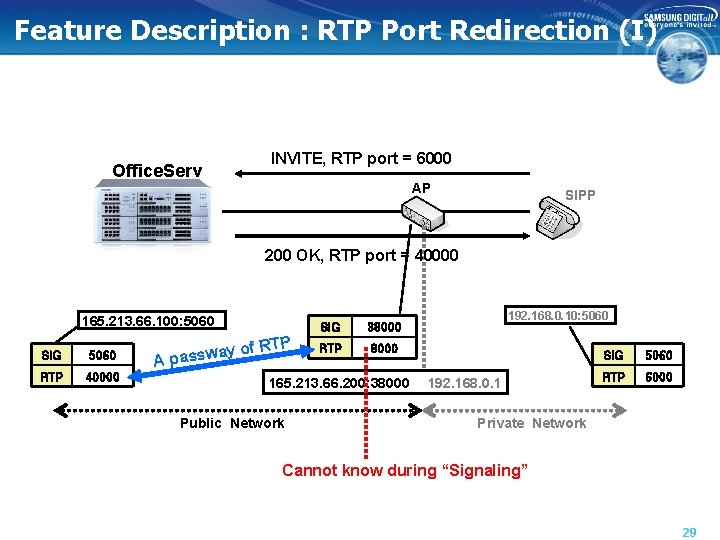
Feature Description : RTP Port Redirection (I) Office. Serv INVITE, RTP port = 6000 AP SIPP 200 OK, RTP port = 40000 165. 213. 66. 100: 5060 SIG 5060 RTP 40000 ay A passw of RTP SIG 38000 RTP 8000 165. 213. 66. 200: 38000 Public Network 192. 168. 0. 10: 5060 192. 168. 0. 1 SIG 5060 RTP 6000 Private Network Cannot know during “Signaling” 29
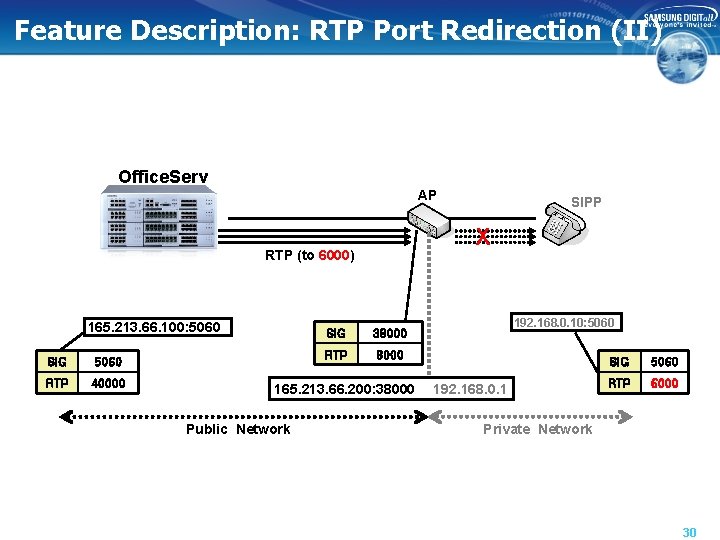
Feature Description: RTP Port Redirection (II) Office. Serv AP X RTP (to 6000) 165. 213. 66. 100: 5060 SIG 5060 RTP 40000 SIG 38000 RTP 8000 165. 213. 66. 200: 38000 Public Network SIPP 192. 168. 0. 10: 5060 192. 168. 0. 1 SIG 5060 RTP 6000 Private Network 30
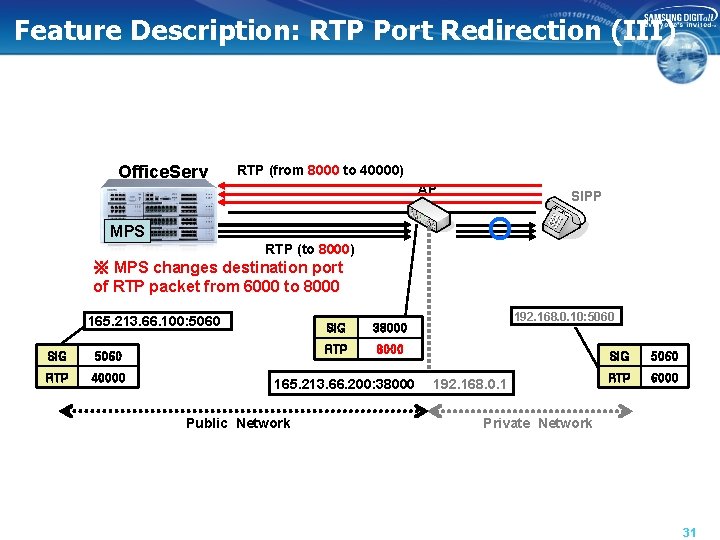
Feature Description: RTP Port Redirection (III) Office. Serv RTP (from 8000 to 40000) AP SIPP O MPS RTP (to 8000) ※ MPS changes destination port of RTP packet from 6000 to 8000 165. 213. 66. 100: 5060 SIG 5060 RTP 40000 SIG 38000 RTP 8000 165. 213. 66. 200: 38000 Public Network 192. 168. 0. 10: 5060 192. 168. 0. 1 SIG 5060 RTP 6000 Private Network 31
System Configuration Be sure that the MPS is set to Enable at MMC 861 first. At MMC 842, ‘IP ADDRESS’ != ‘PUB IP ADDR’ l SIP terminal is in NAT ‘IP ADDRESS’ == ‘PUB IP ADDR’ l SIP terminal is NOT in NAT 32
Video Phone 33
Introduction Refer to Feature Guide 34
- Slides: 35