
Distributed Systems CS 15 440 Virtualization Part II
Distributed Systems CS 15 -440 Virtualization- Part II Lecture 24, Dec 7, 2011 Majd F. Sakr, Mohammad Hammoud and. Vinay Kolar 1
Today… § Last session § Virtualization- Part I § Today’s session § Virtualization – Part II § Announcements: § PS 4 is due today by 11: 59 PM § Project 4 is due on Dec 13 by 11: 59 PM (No deadline extension) § On Monday Dec 12, each team will present its work on project 4 2
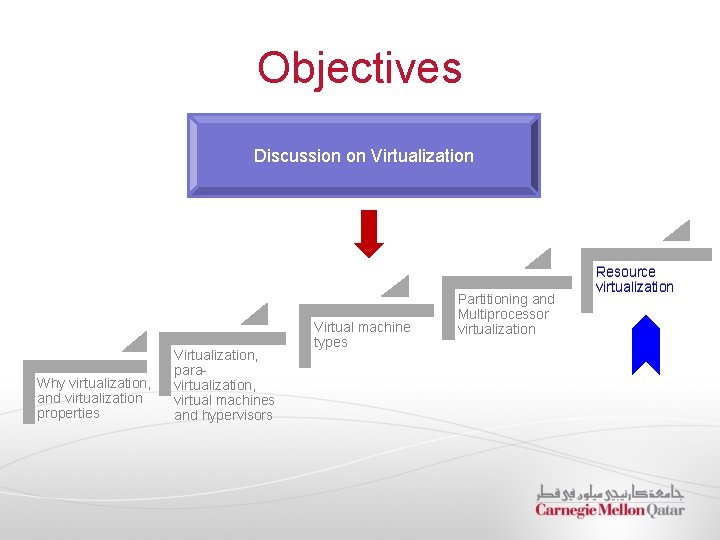
Objectives Discussion on Virtualization Why virtualization, and virtualization properties Virtualization, paravirtualization, virtual machines and hypervisors Virtual machine types Partitioning and Multiprocessor virtualization Resource virtualization
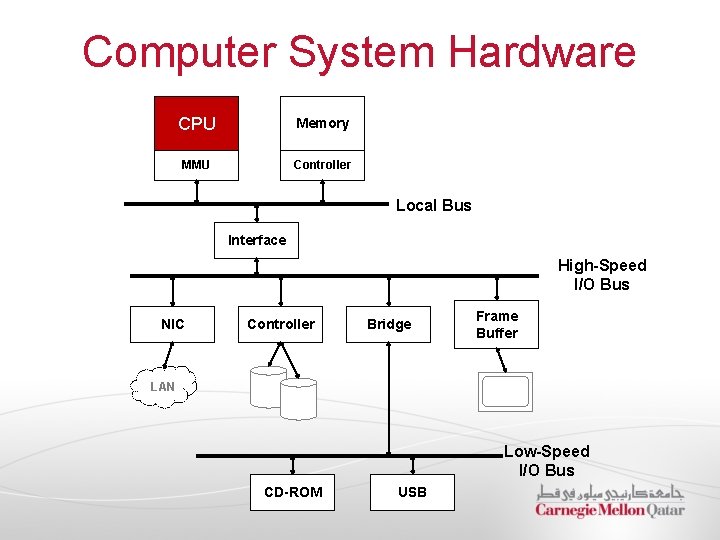
Computer System Hardware CPU Memory MMU Controller Local Bus Interface High-Speed I/O Bus NIC Controller Bridge Frame Buffer LAN Low-Speed I/O Bus CD-ROM USB

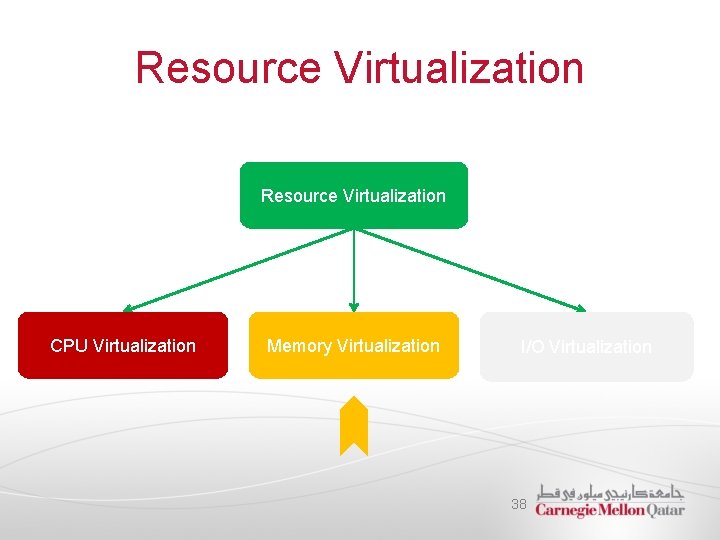
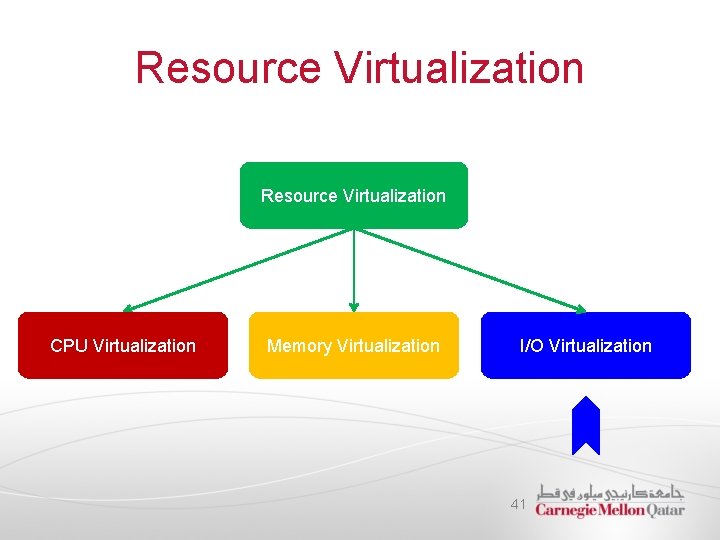
Resource Virtualization CPU Virtualization Memory Virtualization I/O Virtualization 5
CPU Virtualization § Interpretation and Binary Translation § Virtualizable ISAs
CPU Virtualization § Interpretation and Binary Translation § Virtualizable ISAs
Instruction Set Architecture § Typically, the architecture of a processor defines: 1. A set of storage resources (e. g. , registers and memory) 2. A set of instructions that manipulate data held in storage resources § The definition of the storage resources and the instructions that manipulate data are documented in what is referred to as Instruction Set Architecture (ISA) § Two parts in the ISA are important in the definition of VMs: 1. User ISA: visible to user programs 2. System ISA: visible to supervisor software (e. g. , OS)
Ways to Virtualize CPUs § The key to virtualize a CPU lies in the execution of the guest instructions, including both system-level and user-level instructions § Virtualizing a CPU can be achieved in one of two ways: 1. Emulation: the only processor virtualization mechanism available when the ISA of the guest is different from the ISA of the host 2. Direct native execution: possible only if the ISA of the host is identical to the ISA of the guest
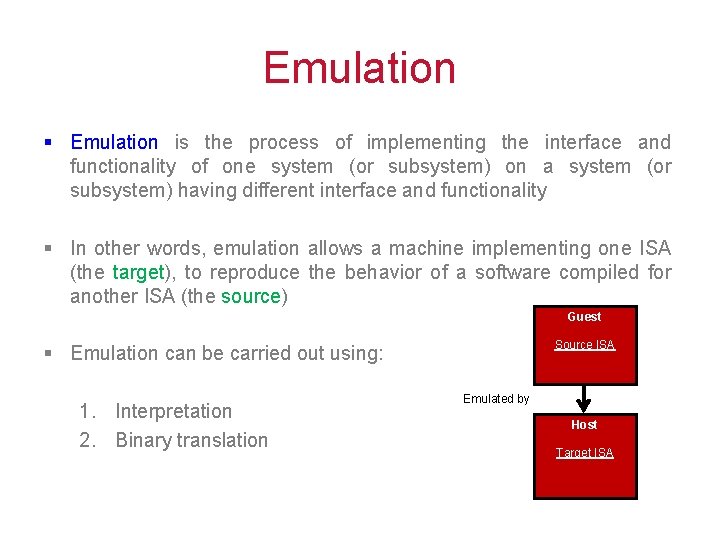
Emulation § Emulation is the process of implementing the interface and functionality of one system (or subsystem) on a system (or subsystem) having different interface and functionality § In other words, emulation allows a machine implementing one ISA (the target), to reproduce the behavior of a software compiled for another ISA (the source) Guest Source ISA § Emulation can be carried out using: 1. Interpretation 2. Binary translation Emulated by Host Target ISA
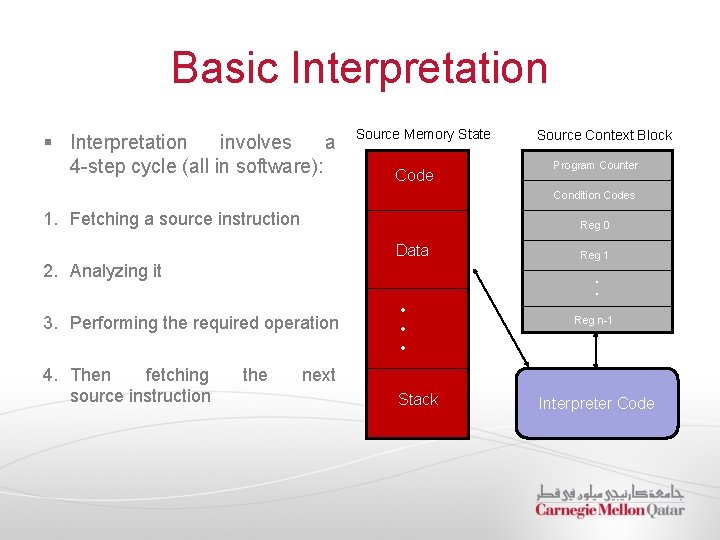
Basic Interpretation § Interpretation involves a 4 -step cycle (all in software): Source Memory State Code Source Context Block Program Counter Condition Codes 1. Fetching a source instruction Reg 0 Data 2. Analyzing it • • 3. Performing the required operation 4. Then fetching source instruction Reg 1 the • • • Reg n-1 next Stack Interpreter Code
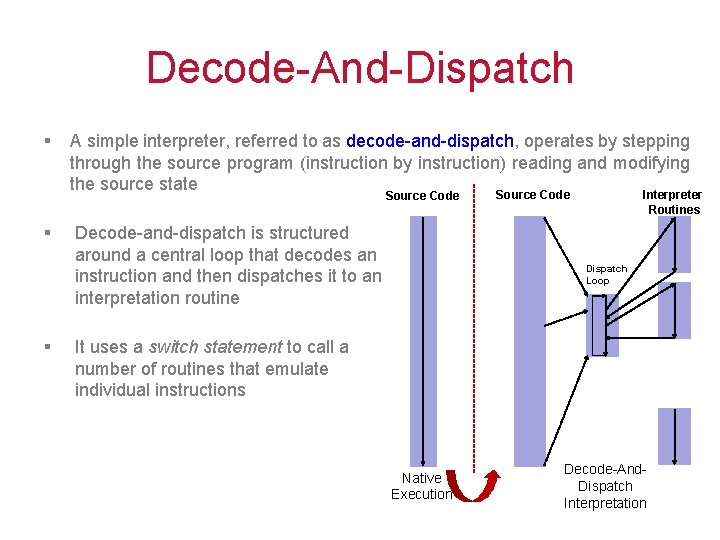
Decode-And-Dispatch § A simple interpreter, referred to as decode-and-dispatch, operates by stepping through the source program (instruction by instruction) reading and modifying the source state Source Code § § Decode-and-dispatch is structured around a central loop that decodes an instruction and then dispatches it to an interpretation routine Source Code Interpreter Routines Dispatch Loop It uses a switch statement to call a number of routines that emulate individual instructions Native Execution Decode-And. Dispatch Interpretation
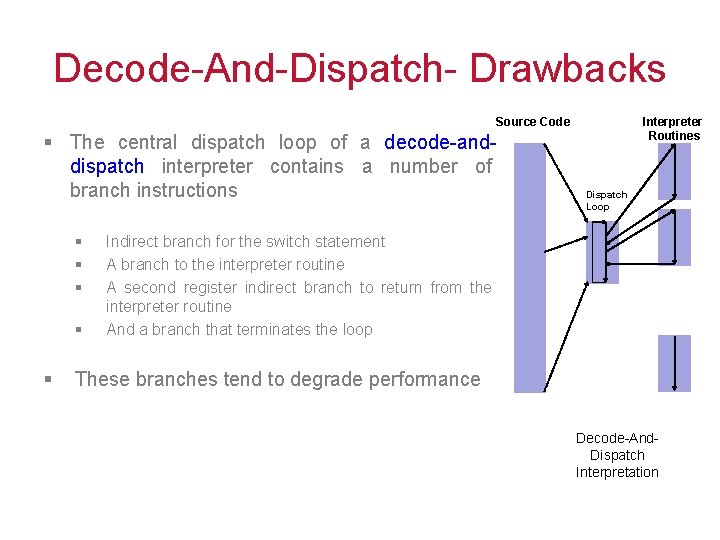
Decode-And-Dispatch- Drawbacks Source Code § The central dispatch loop of a decode-anddispatch interpreter contains a number of branch instructions § § § Interpreter Routines Dispatch Loop Indirect branch for the switch statement A branch to the interpreter routine A second register indirect branch to return from the interpreter routine And a branch that terminates the loop These branches tend to degrade performance Decode-And. Dispatch Interpretation
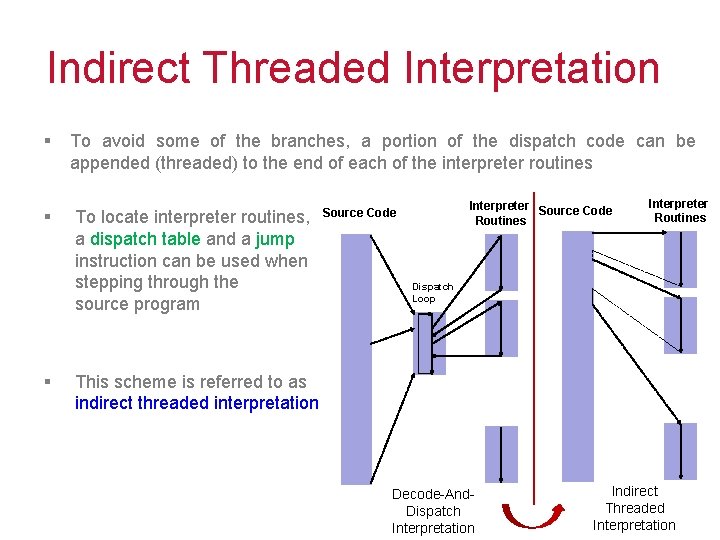
Indirect Threaded Interpretation § § § To avoid some of the branches, a portion of the dispatch code can be appended (threaded) to the end of each of the interpreter routines To locate interpreter routines, a dispatch table and a jump instruction can be used when stepping through the source program Interpreter Source Code Routines Source Code Interpreter Routines Dispatch Loop This scheme is referred to as indirect threaded interpretation Decode-And. Dispatch Interpretation Indirect Threaded Interpretation
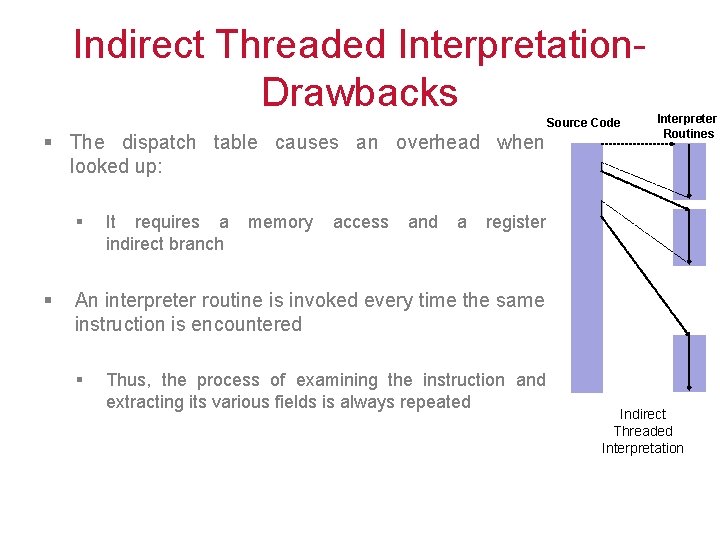
Indirect Threaded Interpretation. Drawbacks Source Code § The dispatch table causes an overhead when looked up: § § It requires a indirect branch memory access and a Interpreter Routines register An interpreter routine is invoked every time the same instruction is encountered § Thus, the process of examining the instruction and extracting its various fields is always repeated Indirect Threaded Interpretation
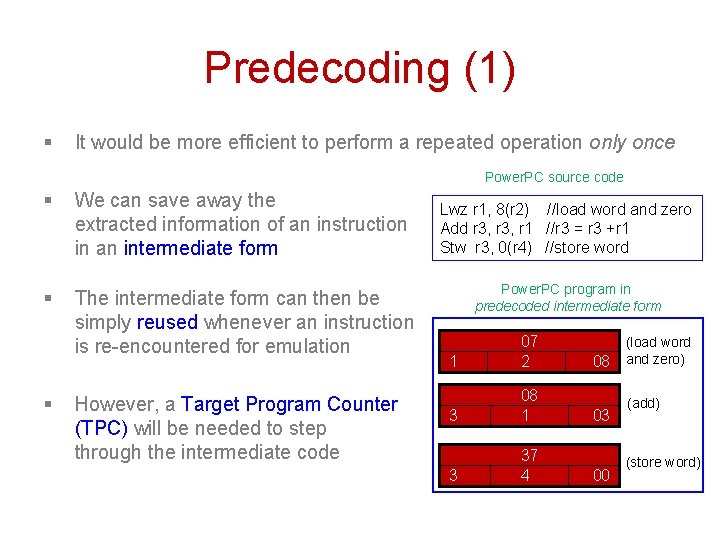
Predecoding (1) § It would be more efficient to perform a repeated operation only once Power. PC source code § We can save away the extracted information of an instruction in an intermediate form § The intermediate form can then be simply reused whenever an instruction is re-encountered for emulation § However, a Target Program Counter (TPC) will be needed to step through the intermediate code Lwz r 1, 8(r 2) //load word and zero Add r 3, r 1 //r 3 = r 3 +r 1 Stw r 3, 0(r 4) //store word Power. PC program in predecoded intermediate form 1 07 2 08 3 08 1 03 3 37 4 00 (load word and zero) (add) (store word)
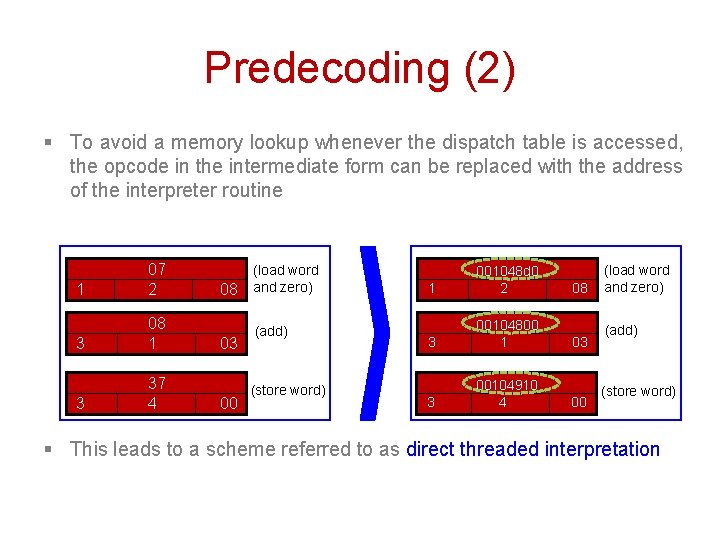
Predecoding (2) § To avoid a memory lookup whenever the dispatch table is accessed, the opcode in the intermediate form can be replaced with the address of the interpreter routine 1 07 2 3 08 1 3 37 4 08 03 00 (load word and zero) (add) (store word) 1 001048 d 0 2 08 3 00104800 1 03 3 00104910 4 00 (load word and zero) (add) (store word) § This leads to a scheme referred to as direct threaded interpretation
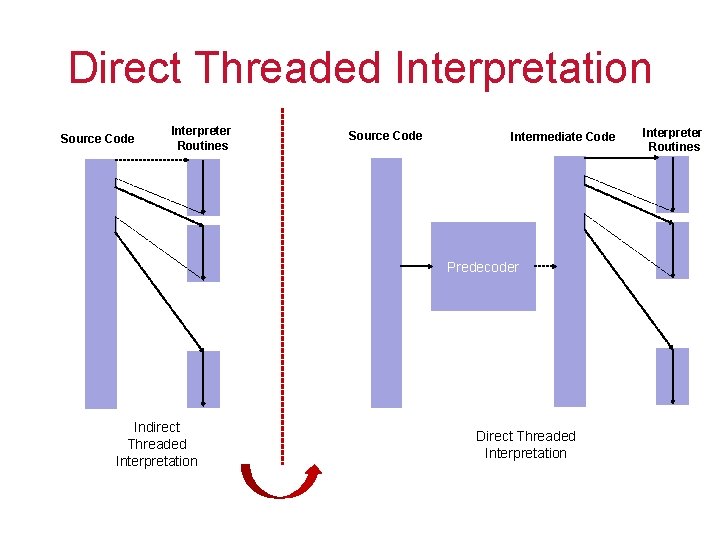
Direct Threaded Interpretation Source Code Interpreter Routines Source Code Intermediate Code Predecoder Indirect Threaded Interpretation Direct Threaded Interpretation Interpreter Routines
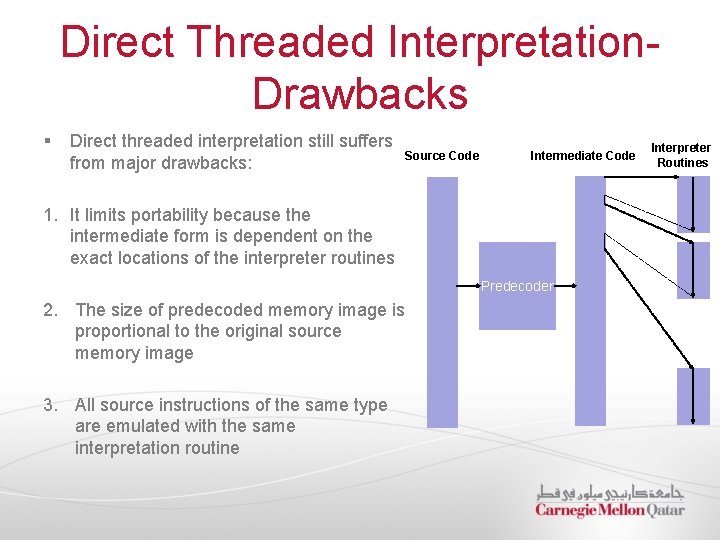
Direct Threaded Interpretation. Drawbacks § Direct threaded interpretation still suffers from major drawbacks: Source Code Intermediate Code 1. It limits portability because the intermediate form is dependent on the exact locations of the interpreter routines Predecoder 2. The size of predecoded memory image is proportional to the original source memory image 3. All source instructions of the same type are emulated with the same interpretation routine Interpreter Routines
Binary Translation § Performance can be significantly enhanced by mapping each individual source binary instruction to its own customized target code § This process of converting the source binary program into a target binary program is referred to as binary translation § Binary translation attempts to amortize the fetch and analysis costs by: 1. Translating a block of source instructions to a block of target instructions 2. Caching the translated code for repeated use
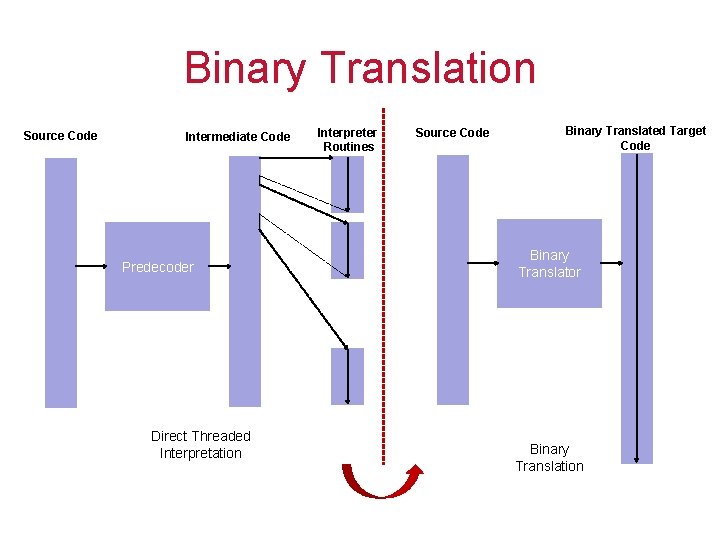
Binary Translation Source Code Intermediate Code Predecoder Direct Threaded Interpretation Interpreter Routines Source Code Binary Translated Target Code Binary Translator Binary Translation
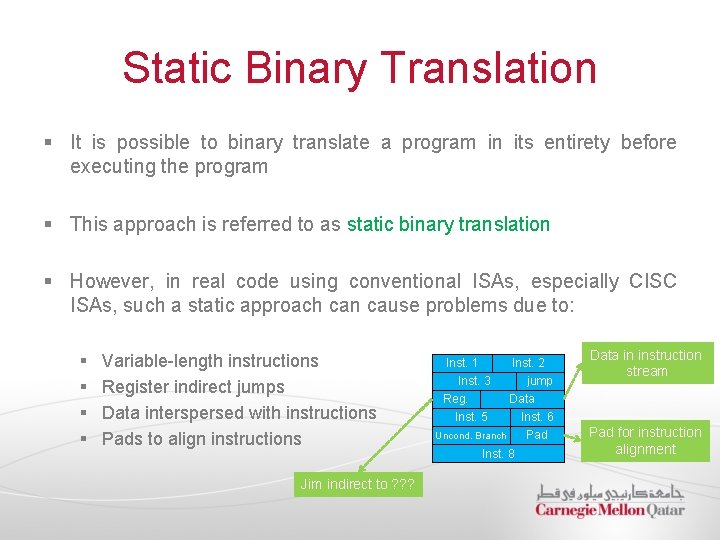
Static Binary Translation § It is possible to binary translate a program in its entirety before executing the program § This approach is referred to as static binary translation § However, in real code using conventional ISAs, especially CISC ISAs, such a static approach can cause problems due to: § § Variable-length instructions Register indirect jumps Data interspersed with instructions Pads to align instructions Jim indirect to ? ? ? Inst. 1 Inst. 3 Reg. Inst. 5 Inst. 2 jump Data Inst. 6 Uncond. Branch Pad Inst. 8 Data in instruction stream Pad for instruction alignment
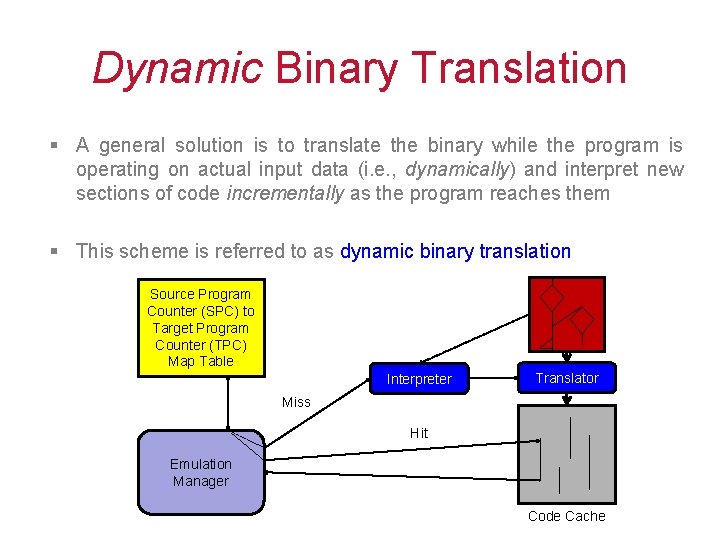
Dynamic Binary Translation § A general solution is to translate the binary while the program is operating on actual input data (i. e. , dynamically) and interpret new sections of code incrementally as the program reaches them § This scheme is referred to as dynamic binary translation Source Program Counter (SPC) to Target Program Counter (TPC) Map Table Interpreter Translator Miss Hit Emulation Manager Code Cache
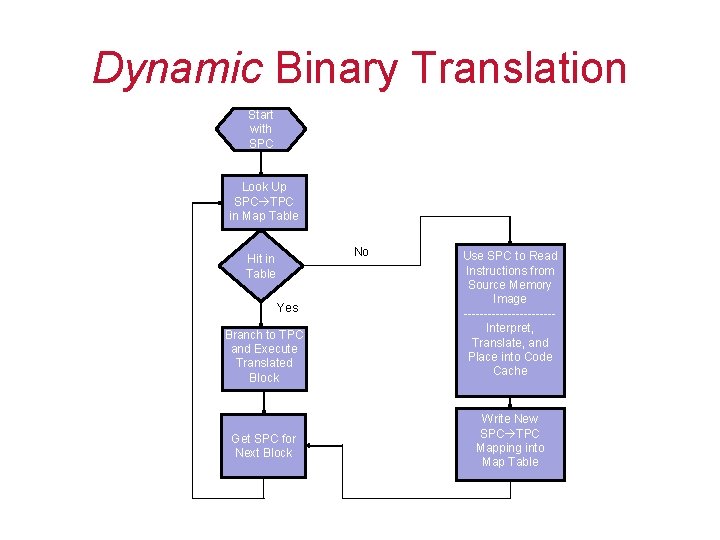
Dynamic Binary Translation Start with SPC Look Up SPC TPC in Map Table No Hit in Table Yes Branch to TPC and Execute Translated Block Get SPC for Next Block Use SPC to Read Instructions from Source Memory Image -----------Interpret, Translate, and Place into Code Cache Write New SPC TPC Mapping into Map Table
CPU Virtualization § Interpretation and Binary Translation § Virtualizable ISAs
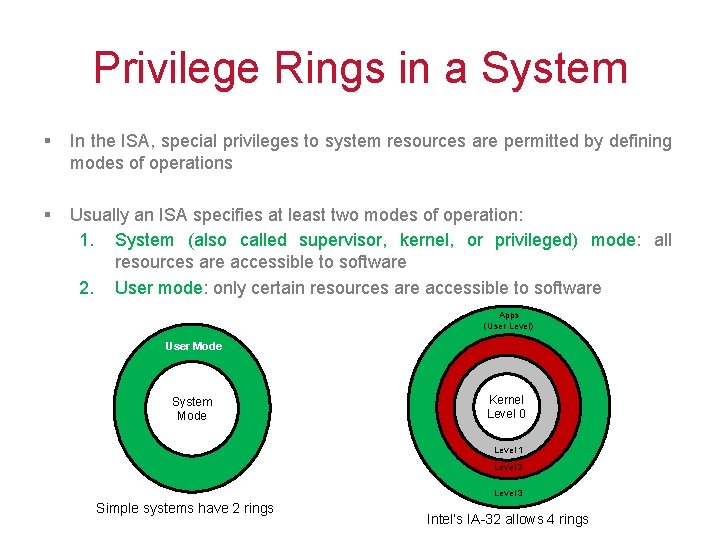
Privilege Rings in a System § In the ISA, special privileges to system resources are permitted by defining modes of operations § Usually an ISA specifies at least two modes of operation: 1. System (also called supervisor, kernel, or privileged) mode: all resources are accessible to software 2. User mode: only certain resources are accessible to software Apps (User Level) User Mode System Mode Kernel Level 0 Level 1 Level 2 Level 3 Simple systems have 2 rings Intel’s IA-32 allows 4 rings
Conditions for ISA Virtualizability § In a native system VM, the VMM runs in system mode, and all other software run in user mode § A privileged instruction is defined as one that traps if the machine is in user mode and does not trap if the machine is in system mode § Examples of Privileged Instructions are: § Load PSW: If it can be accessed in user mode, a malicious user program can put itself in system mode and get control of the system § Set CPU Timer: If it can be accessed in user mode, a malicious user program can change the amount of time allocated to it before getting context switched
Types of Instructions § Instructions that interact with hardware can be classified into three categories: 1. Control-sensitive: Instructions that attempt to change the configuration of resources in the system (e. g. , memory assigned to a program) 2. Behavior-sensitive: Instructions whose behaviors or results depend on the configuration of resources 3. Innocuous: Instructions that are neither control-sensitive nor behavior -sensitive
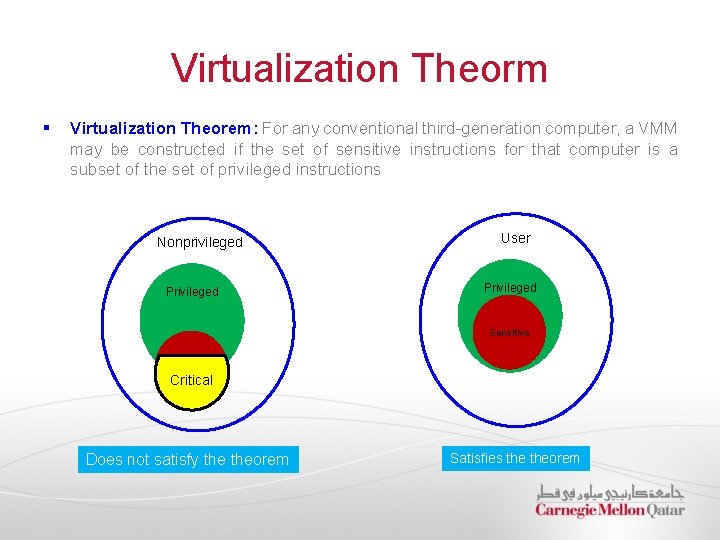
Virtualization Theorm § Virtualization Theorem: For any conventional third-generation computer, a VMM may be constructed if the set of sensitive instructions for that computer is a subset of the set of privileged instructions Nonprivileged Privileged User Privileged Sensitive Critical Does not satisfy theorem Satisfies theorem
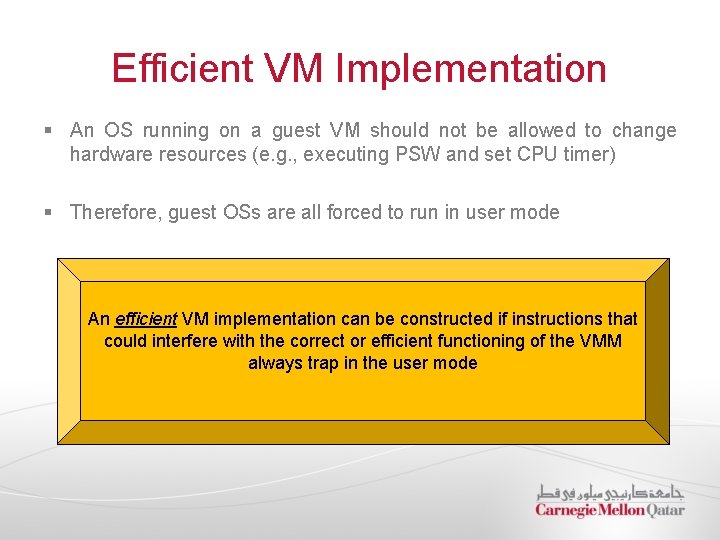
Efficient VM Implementation § An OS running on a guest VM should not be allowed to change hardware resources (e. g. , executing PSW and set CPU timer) § Therefore, guest OSs are all forced to run in user mode An efficient VM implementation can be constructed if instructions that could interfere with the correct or efficient functioning of the VMM always trap in the user mode
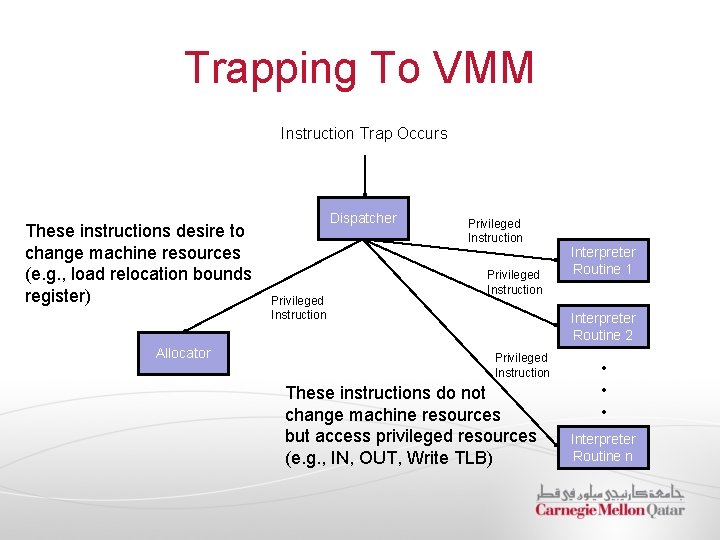
Trapping To VMM Instruction Trap Occurs These instructions desire to change machine resources (e. g. , load relocation bounds register) Allocator Dispatcher Privileged Instruction Interpreter Routine 1 Interpreter Routine 2 Privileged Instruction These instructions do not change machine resources but access privileged resources (e. g. , IN, OUT, Write TLB) • • • Interpreter Routine n
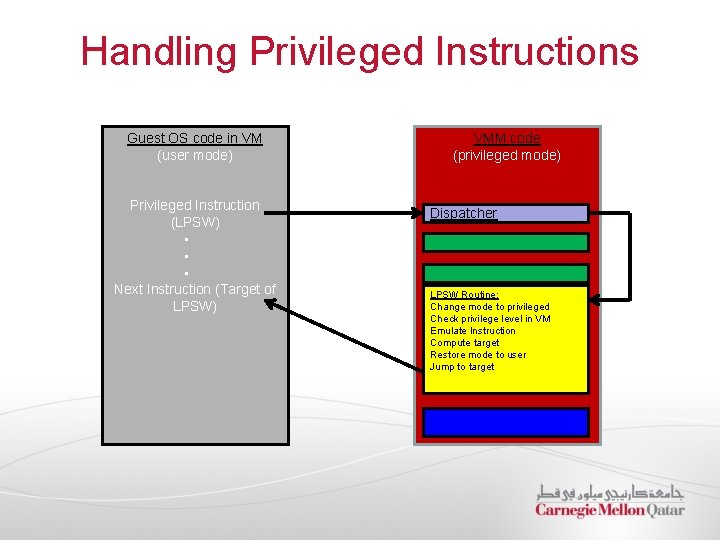
Handling Privileged Instructions Guest OS code in VM (user mode) Privileged Instruction (LPSW) • • • Next Instruction (Target of LPSW) VMM code (privileged mode) Dispatcher LPSW Routine: Change mode to privileged Check privilege level in VM Emulate Instruction Compute target Restore mode to user Jump to target
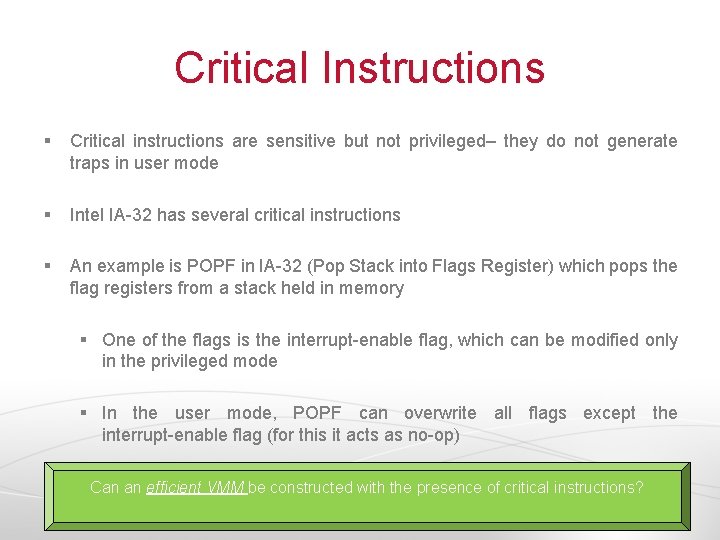
Critical Instructions § Critical instructions are sensitive but not privileged– they do not generate traps in user mode § Intel IA-32 has several critical instructions § An example is POPF in IA-32 (Pop Stack into Flags Register) which pops the flag registers from a stack held in memory § One of the flags is the interrupt-enable flag, which can be modified only in the privileged mode § In the user mode, POPF can overwrite all flags except the interrupt-enable flag (for this it acts as no-op) Can an efficient VMM be constructed with the presence of critical instructions?
Handling Critical Instructions § Critical Instructions are problematic and they inhibit the creation of an efficient VMM § However, if an ISA is not efficiently virtualizable, this does not mean we cannot create a VMM § The VMM can scan the guest code before execution, discover all critical instructions, and replace them with traps (system calls) to the VMM § This replacement process is known as patching § Even if an ISA contains only ONE critical instruction, patching will be required
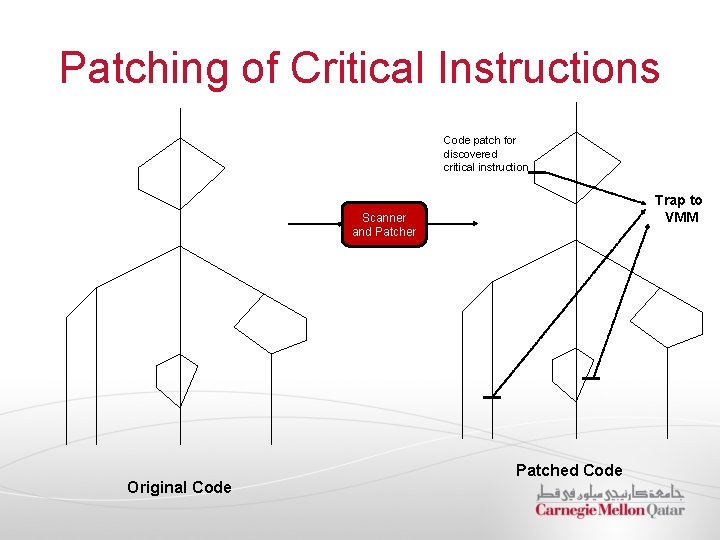
Patching of Critical Instructions Code patch for discovered critical instruction Trap to VMM Scanner and Patcher Original Code Patched Code
Code Caching § Some of the critical instructions might require interpretation that trap to the VMM § Interpretation overhead might slow down the VMM especially if the frequency of critical instructions requiring interpretations increases § To reduce overhead, interpreted instructions can be cached, using a strategy known as code caching § Code caching is done on a block of instructions surrounding the critical instruction (larger blocks lend themselves better to optimization)
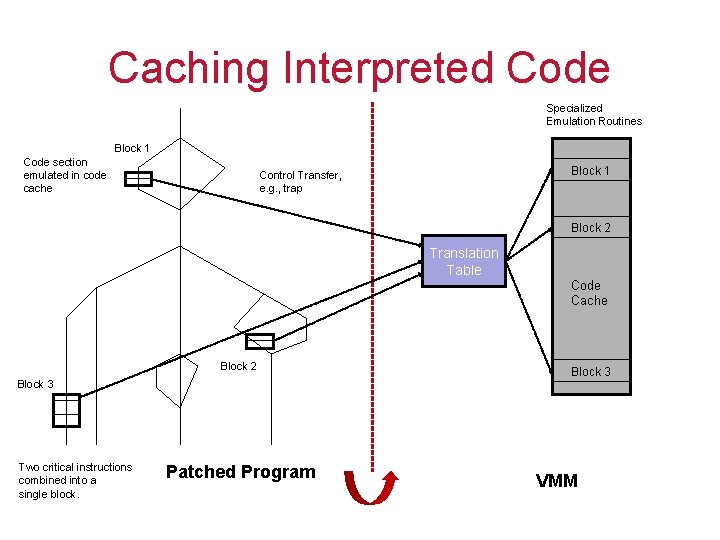
Caching Interpreted Code Specialized Emulation Routines Block 1 Code section emulated in code cache Block 1 Control Transfer, e. g. , trap Block 2 Translation Table Code Cache Block 2 Block 3 Two critical instructions combined into a single block. Patched Program Block 3 VMM
Resource Virtualization CPU Virtualization Memory Virtualization I/O Virtualization 38
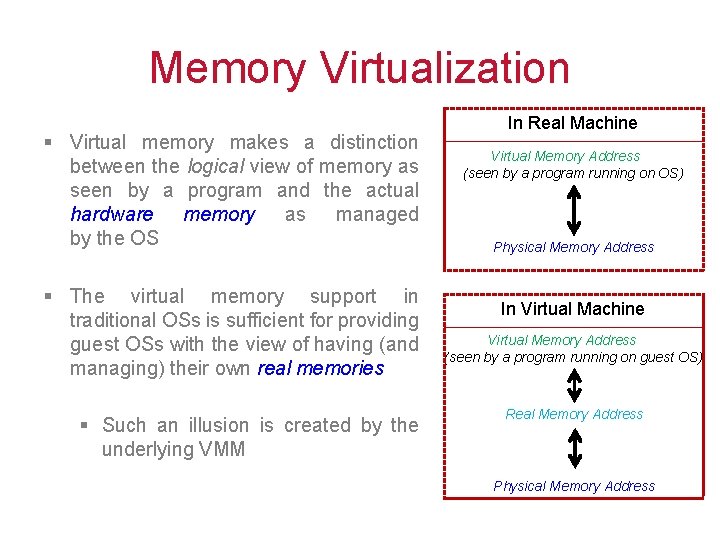
Memory Virtualization § Virtual memory makes a distinction between the logical view of memory as seen by a program and the actual hardware memory as managed by the OS § The virtual memory support in traditional OSs is sufficient for providing guest OSs with the view of having (and managing) their own real memories § Such an illusion is created by the underlying VMM In Real Machine Virtual Memory Address (seen by a program running on OS) Physical Memory Address In Virtual Machine Virtual Memory Address (seen by a program running on guest OS) Real Memory Address Physical Memory Address
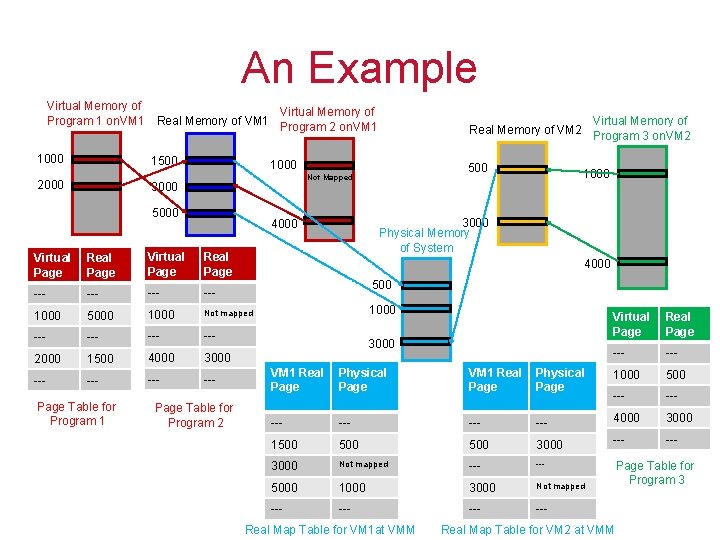
An Example Virtual Memory of Program 1 on. VM 1 1000 Virtual Memory of Real Memory of VM 1 Program 2 on. VM 1 1500 2000 1000 500 Not Mapped 3000 5000 Real Page Virtual Page Real Page --- --- 1000 5000 1000 Not mapped --- --- 2000 1500 4000 3000 --- --- Page Table for Program 2 1000 3000 Physical Memory of System 4000 Virtual Page Table for Program 1 Virtual Memory of Real Memory of VM 2 Program 3 on. VM 2 4000 500 1000 3000 Virtual Page Real Page --- VM 1 Real Page Physical Page 1000 500 --- --- --- 4000 3000 1500 500 3000 --- 3000 Not mapped --- 5000 1000 3000 Not mapped --- --- Real Map Table for VM 1 at VMM Real Map Table for VM 2 at VMM Page Table for Program 3
Resource Virtualization CPU Virtualization Memory Virtualization I/O Virtualization 41
I/O Virtualization § The virtualization strategy for a given I/O device type consists of: 1. Constructing a virtual version of the device 2. Virtualizing the I/O activities directed to the device § A virtual device given to a guest VM is typically (but not necessarily) supported by a similar, underlying physical device § When a guest VM makes a request to use the virtual device, the request is intercepted by the VMM § The VMM converts the request to the equivalent request understood by the underlying physical device and sends it out
Virtualizing Devices § The technique that is used to virtualize an I/O device depends on whether the device is shared and, if so, the ways in which it can be shared § The common categories of devices are: § § Dedicated devices Partitioned devices Shared devices Spooled devices
Dedicated Devices § Some I/O devices must be dedicated to a particular guest VM or at least switched from one guest to another on a very long time scale § Examples of dedicated devices are: the display, mouse, and speakers of a VM user § A dedicated device does not necessarily have to be virtualized § Requests to and from a dedicated device in a VM can theoretically bypass the VMM § However, in practice these requests go through the VMM because the guest OS runs in a non-privileged user mode
Partitioned Devices § For some devices it is convenient to partition the available resources among VMs § For example, a disk can be partitioned into several smaller virtual disks that are then made available to VMs as dedicated devices § A location on a magnetic disk is defined in terms of cylinders, heads, and sectors (CHS) § The physical disk firmware § The disk firmware transforms the CHS addresses into consecutively numbered logical blocks for use by host and guest OSs properties of the disk are virtualized by the
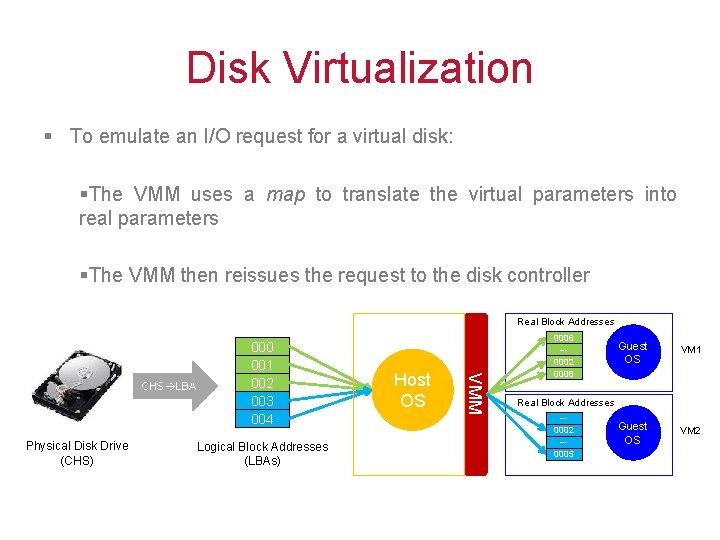
Disk Virtualization § To emulate an I/O request for a virtual disk: §The VMM uses a map to translate the virtual parameters into real parameters §The VMM then reissues the request to the disk controller Real Block Addresses Physical Disk Drive (CHS) Logical Block Addresses (LBAs) Host OS VMM CHS LBA 000 001 002 003 004 0006 --0002 0008 Guest OS VM 1 Guest OS VM 2 Real Block Addresses --0002 --0005
Shared Devices § Some devices, such as a network adapter, can be shared among a number of guest VMs at a fine time granularity § For example, every VM can have its own virtual network address maintained by the VMM § A request by a VM to use the network is translated by the VMM to a request on a physical network port § To make this happen, the VMM uses its own physical network address and a virtual device driver § Similarly, incoming requests through various ports are translated into requests for virtual network addresses associated with different VMs
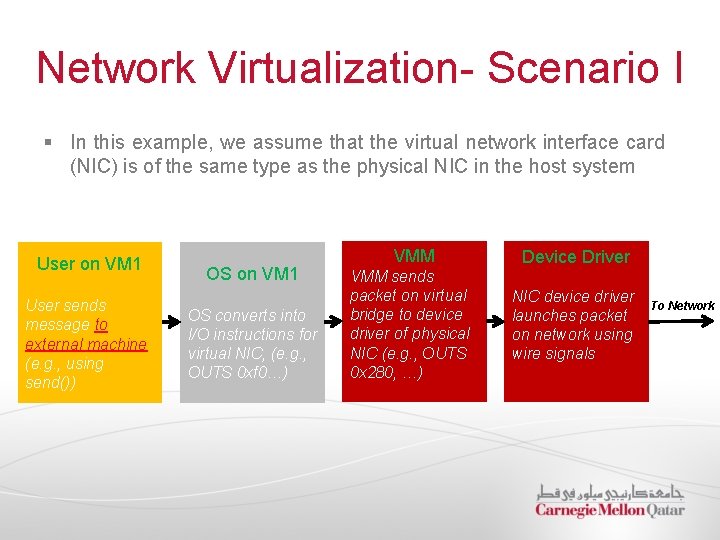
Network Virtualization- Scenario I § In this example, we assume that the virtual network interface card (NIC) is of the same type as the physical NIC in the host system User on VM 1 User sends message to external machine (e. g. , using send()) OS on VM 1 OS converts into I/O instructions for virtual NIC, (e. g. , OUTS 0 xf 0…) VMM Device Driver VMM sends packet on virtual bridge to device driver of physical NIC (e. g. , OUTS 0 x 280, …) NIC device driver launches packet on network using wire signals To Network
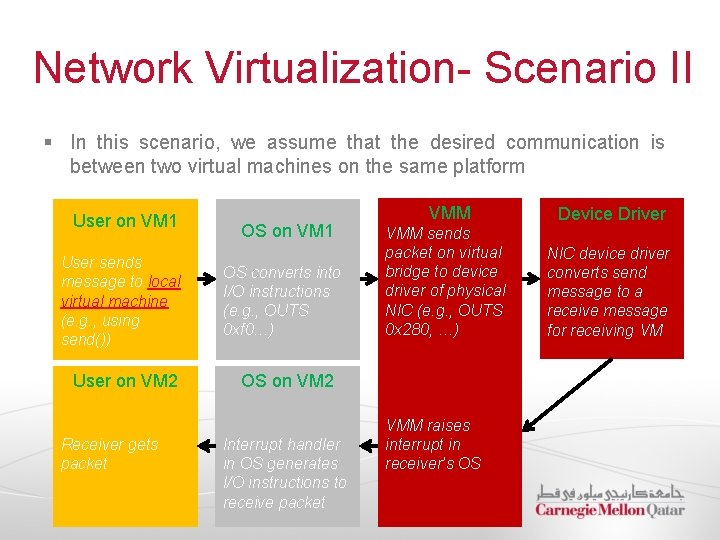
Network Virtualization- Scenario II § In this scenario, we assume that the desired communication is between two virtual machines on the same platform User on VM 1 User sends message to local virtual machine (e. g. , using send()) User on VM 2 Receiver gets packet OS on VM 1 OS converts into I/O instructions (e. g. , OUTS 0 xf 0…) VMM Device Driver VMM sends packet on virtual bridge to device driver of physical NIC (e. g. , OUTS 0 x 280, …) NIC device driver converts send message to a receive message for receiving VM OS on VM 2 Interrupt handler in OS generates I/O instructions to receive packet VMM raises interrupt in receiver’s OS
Spooled Devices § A spooled device, such as a printer, is shared, but at a much higher granularity than a device such as a network adapter § Virtualization of spooled devices can be performed by using a two-level spool table approach: § Level 1 is within the guest OS, with one table for each active process § Level 2 is within the VMM, with one table for each guest OS § A request from a guest OS to print a spool buffer is intercepted by the VMM, which copies the buffer into one of its own spool buffers § This allows the VMM to schedule requests from different guest OSs on the same printer

Thank You! 51
- Slides: 51