
Distributed Systems by Dr Ramesh Shahabadkar Professor Department
Distributed Systems by Dr. Ramesh Shahabadkar Professor Department of Computer Science and Engineering Ambo University Woliso Campus Ethiopia 1
Introduction to Distributed Systems Computer systems are undergoing a revolution. From 1945, when the modern computer era began, until about 1985, computers were large and expensive. Even minicomputers normally cost tens of thousands of dollars each. As a result, most organizations had only a handful of computers, and for lack of a way to connect them, these operated independently from one another. Starting in the mid-1980 s, however, two advances in technology began to change that situation. The first was the development of powerful microprocessors. Initially, these were 8 -bit machines, but soon 16, 32, and even 64 -bit CPUs became common. Many of these had the computing power of a decent-sized mainframe (i. e. , large) computer, but for a fraction of the price. 2
Introduction to Distributed Systems The amount of improvement that has occurred in computer technology in the past half century is truly staggering and totally unprecedented in other industries. From a machine that cost 10 million dollars and executed 1 instruction per second, we have come to machines that cost 1000 dollars and execute 10 million instructions per second, a price/performance gain of 10 11. If cars had improved at this rate in the same time period, a Rolls Royce would now cost 10 dollars and get a billion miles per gallon. (Unfortunately, it would probably also have a 200 -page manual telling how to open the door. ) The second development was the invention of high-speed computer networks. The local area networks or LANs allow dozens, or even hundreds, of machines within a building to be connected in such a way that small amounts of information can be transferred between machines in a millisecond or so. 3
Introduction to Distributed Systems Larger amounts of data can be moved between machines at rates of 10 to 100 million bits/sec and sometimes more. The wide area networks or WANs allow millions of machines all over the earth to be connected at speeds varying from 64 Kbps (kilobits per second) to gigabits per second for some advanced experimental networks. The result of these technologies is that it is now not only feasible, but easy, to put together computing systems composed of large numbers of CPUs connected by a high-speed network. They are usually called distributed systems, in contrast to the previous centralized systems (or single-processor systems) consisting of a single CPU, its memory, peripherals, and some terminals. There is only one fly in the ointment: software. Distributed systems need radically different software than centralized systems do. In particular, the necessary operating systems are only beginning to emerge. 4
Introduction to Distributed Systems WHAT IS A DISTRIBUTED SYSTEM? A distributed system is a collection of independent computers that appear to the users of the system as a single computer. This definition has two aspects. The first one deals with hardware: the machines are autonomous. The second one deals with software: the users think of the system as a single computer. Examples 1) consider a network of workstations in a university or company department. In addition to each user's personal workstation, there might be a pool of processors in the machine room that are not assigned to specific users but are allocated dynamically as needed. Such a system might have a single file system, with all files accessible from all machines in the same way and using the same path name. Furthermore, when a user typed a command, the system could look for the best place to execute that command, possibly on the user's own workstation, possibly on an idle workstation belonging to someone else, and possibly on one of the unassigned processors in the machine room. If the system as a whole looked and acted like a classical singleprocessor timesharing system, it would qualify as a distributed system. 5
Introduction to Distributed Systems 2) consider a factory full of robots, each containing a powerful computer for handling vision, planning, communication, and other tasks. When a robot on the assembly line notices that a part it is supposed to install is defective, it asks another robot in the parts department to bring it a replacement. If all the robots act like peripheral devices attached to the same central computer and the system can be programmed that way, it too counts as a distributed system. 3) consider a large bank with hundreds of branch offices all over the world. Each office has a master computer to store local accounts and handle local transactions. In addition, each computer has the ability to talk to all other branch computers and with a central computer at headquarters. If transactions can be done without regard to where a customer or account is, and the users do notice any difference between this system and the old centralized mainframe that it replaced, it too would be considered a distributed system. 6
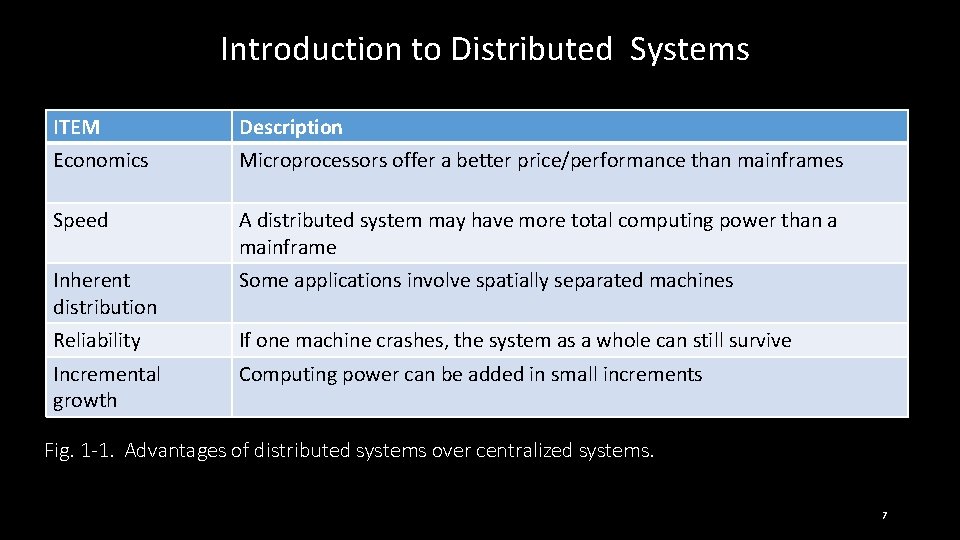
Introduction to Distributed Systems ITEM Description Economics Microprocessors offer a better price/performance than mainframes Speed A distributed system may have more total computing power than a mainframe Inherent distribution Some applications involve spatially separated machines Reliability If one machine crashes, the system as a whole can still survive Incremental growth Computing power can be added in small increments Fig. 1 -1. Advantages of distributed systems over centralized systems. 7
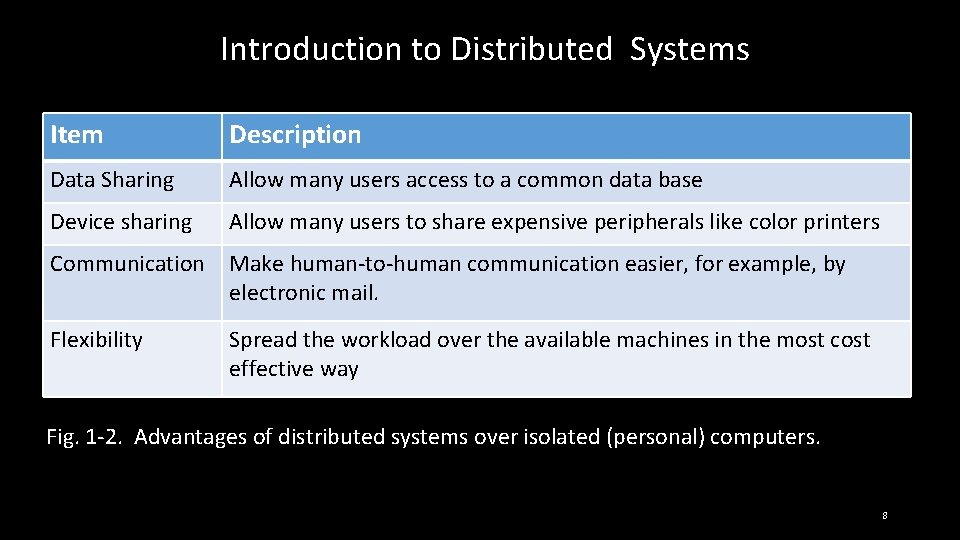
Introduction to Distributed Systems Item Description Data Sharing Allow many users access to a common data base Device sharing Allow many users to share expensive peripherals like color printers Communication Make human-to-human communication easier, for example, by electronic mail. Flexibility Spread the workload over the available machines in the most cost effective way Fig. 1 -2. Advantages of distributed systems over isolated (personal) computers. 8
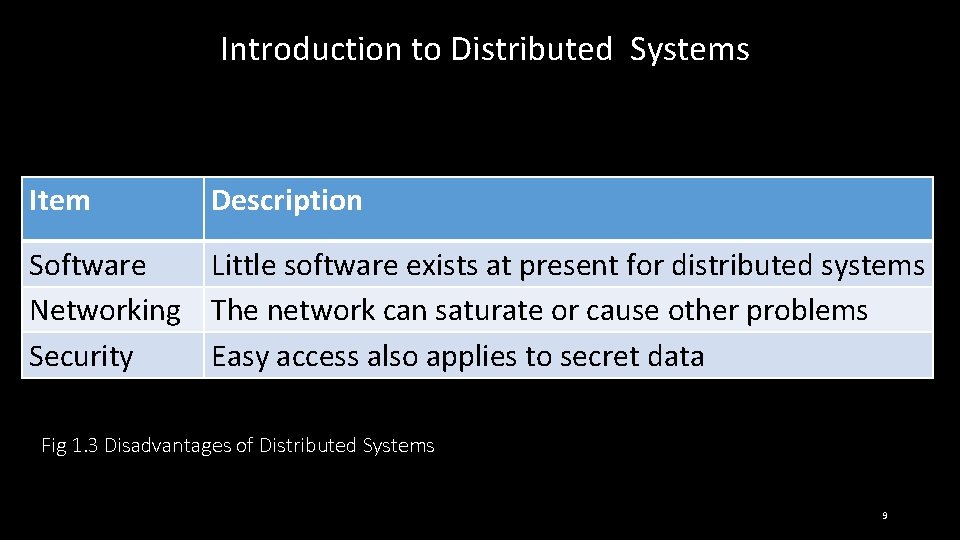
Introduction to Distributed Systems Item Description Software Little software exists at present for distributed systems Networking The network can saturate or cause other problems Security Easy access also applies to secret data Fig 1. 3 Disadvantages of Distributed Systems 9
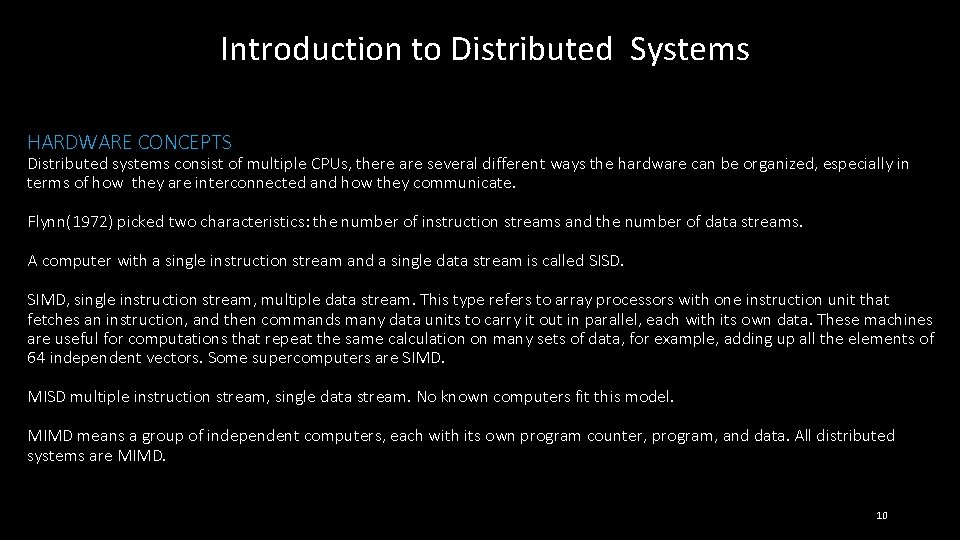
Introduction to Distributed Systems HARDWARE CONCEPTS Distributed systems consist of multiple CPUs, there are several different ways the hardware can be organized, especially in terms of how they are interconnected and how they communicate. Flynn(1972) picked two characteristics: the number of instruction streams and the number of data streams. A computer with a single instruction stream and a single data stream is called SISD. SIMD, single instruction stream, multiple data stream. This type refers to array processors with one instruction unit that fetches an instruction, and then commands many data units to carry it out in parallel, each with its own data. These machines are useful for computations that repeat the same calculation on many sets of data, for example, adding up all the elements of 64 independent vectors. Some supercomputers are SIMD. MISD multiple instruction stream, single data stream. No known computers fit this model. MIMD means a group of independent computers, each with its own program counter, program, and data. All distributed systems are MIMD. 10
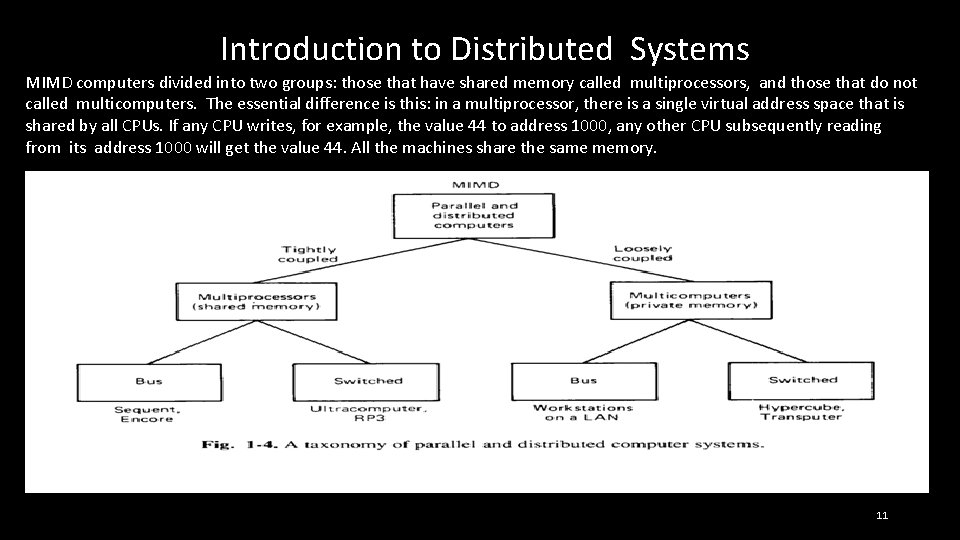
Introduction to Distributed Systems MIMD computers divided into two groups: those that have shared memory called multiprocessors, and those that do not called multicomputers. The essential difference is this: in a multiprocessor, there is a single virtual address space that is shared by all CPUs. If any CPU writes, for example, the value 44 to address 1000, any other CPU subsequently reading from its address 1000 will get the value 44. All the machines share the same memory. 11
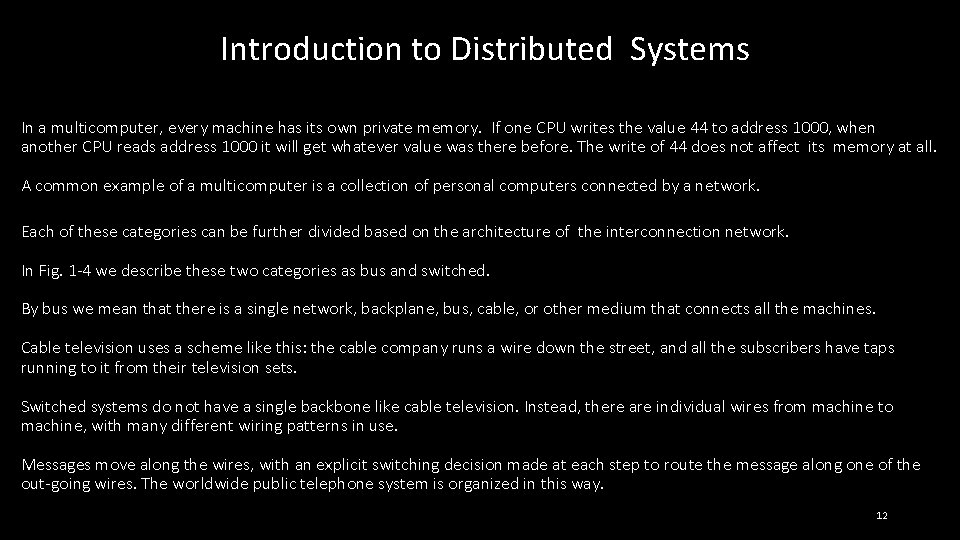
Introduction to Distributed Systems In a multicomputer, every machine has its own private memory. If one CPU writes the value 44 to address 1000, when another CPU reads address 1000 it will get whatever value was there before. The write of 44 does not affect its memory at all. A common example of a multicomputer is a collection of personal computers connected by a network. Each of these categories can be further divided based on the architecture of the interconnection network. In Fig. 1 -4 we describe these two categories as bus and switched. By bus we mean that there is a single network, backplane, bus, cable, or other medium that connects all the machines. Cable television uses a scheme like this: the cable company runs a wire down the street, and all the subscribers have taps running to it from their television sets. Switched systems do not have a single backbone like cable television. Instead, there are individual wires from machine to machine, with many different wiring patterns in use. Messages move along the wires, with an explicit switching decision made at each step to route the message along one of the out-going wires. The worldwide public telephone system is organized in this way. 12
Introduction to Distributed Systems are tightly coupled and in others they are loosely coupled. In a tightly-coupled system, the delay experienced when a message is sent from one computer to another is short, and the data rate is high; that is, the number of bits per second that can be transferred is large. In a loosely-coupled system, the opposite is true: the intermachine message delay is large and the data rate is low. For example, two CPU chips on the same printed circuit board and connected by wires etched onto the board are likely to be tightly coupled, whereas two computers connected by a 2400 bit/sec modem over the telephone system are certain to be loosely coupled. 13
Introduction to Distributed Systems Tightly-coupled systems tend to be used more as parallel systems (working on a single problem) and loosely-coupled ones tend to be used as distributed systems (working on many unrelated problems), although this is not always true. One famous counterexample is a project in which hundreds of computers all over the world worked together trying to factor a huge number (about 100 digits). Each computer was assigned a different range of divisors to try, and they all worked on the problem in their spare time, reporting the results back by electronic mail when they finished. 14
Introduction to Distributed Systems Multiprocessors tend to be more tightly coupled than multi-computers, because they can exchange data at memory speeds, but some fiber-optic based multicomputers can also work at memory speeds. Four categories of Fig. 1 -4 are: Bus multiprocessors, Switched multiprocessors, Bus multicomputers, and Switched multicomputers. 15
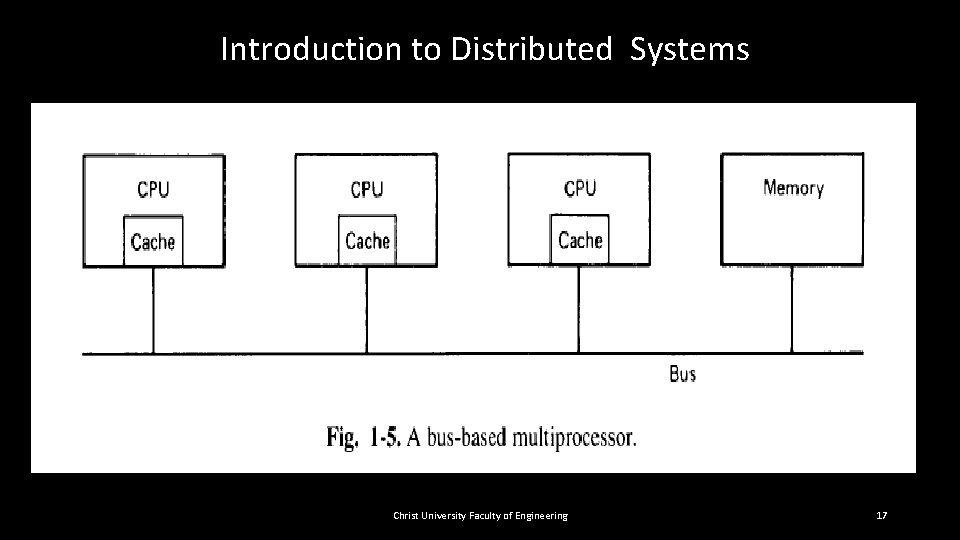
Introduction to Distributed Systems Bus-Based Multiprocessors Bus-based multiprocessors consist of some number of CPUs all connected to a common bus, along with a memory module. A simple configuration is to have a high-speed backplane or motherboard into which CPU and memory cards can be inserted. A typical bus has 32 or 64 address lines, 32 or 64 data lines, and perhaps 32 or more control lines, all of which operate in parallel. To read a word of memory, a CPU puts the address of the word it wants on the bus address lines, then puts a signal on the appropriate control lines to indicate that it wants to read. The memory responds by putting the value of the word on the data lines to allow the requesting CPU to read it in. Writes work in a similar way. Since there is only one memory, if CPU A writes a word to memory and then CPU B reads that word back a microsecond later, B will get the value just written. A memory that has this property is said to be coherent. 16
Introduction to Distributed Systems Christ University Faculty of Engineering 17
Introduction to Distributed Systems Bus-Based Multiprocessors The problem with this scheme is that with as few as 4 or 5 CPUs, the bus will usually be overloaded and performance will drop drastically. The solution is to add a high-speed cache memory between the CPU and the bus, as shown in Fig. 1 -5. The cache holds the most recently accessed words. All memory requests go through the cache. If the word requested is in the cache, the cache itself responds to the CPU, and no bus request is made. If the cache is large enough, the probability of success, called the hit rate, will be high, and the amount of bus traffic per CPU will drop dramatically, allowing many more CPUs in the system. Cache sizes of 64 K to 1 M are common, which often gives a hit rate of 90 percent or more. 18
Introduction to Distributed Systems Bus-Based Multiprocessors However, the introduction of caches also brings a serious problem with it. Suppose that two CPUs, A and B, each read the same word into their respective caches. Then A overwrites the word. When B next reads that word, it gets the old value from its cache, not the value A just wrote. The memory is now incoherent, and the system is difficult to program. Many researchers have studied this problem, and various solutions are known. Below we will sketch one of them. Suppose that the cache memories are designed so that whenever a word is written to the cache, it is written through to memory as well. Such a cache is, called a write-through cache. In this design, cache hits for reads do not cause bus traffic, but cache misses for reads, and all writes, hits and misses, cause bus traffic. 19
Introduction to Distributed Systems Bus-Based Multiprocessors All caches constantly monitor the bus. Whenever a cache sees a write occurring to a memory address present in its cache, it either removes that entry from its cache or updates the cache entry with the new value. Such a cache is called a snoopy cache (or sometimes, a snooping cache) because it is always "snooping" (eavesdropping) on the bus. A design consisting of snoopy write-through caches is coherent and is invisible to the programmer. 20
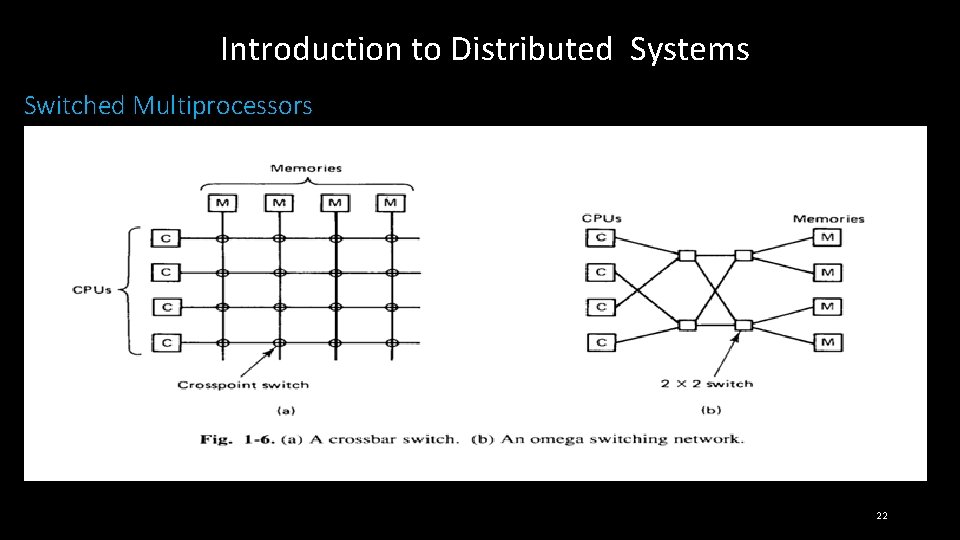
Introduction to Distributed Systems Switched Multiprocessors To build a multiprocessor with more than 64 processors, a different method is needed to connect the CPUs with the memory. One possibility is to divide the memory up into modules and connect them to the CPUs with a crossbar switch, as shown in Fig. 1 -6(a). Each CPU and each memory has a connection coming out of it, as shown. At every intersection is a tiny electronic crosspoint switch that can be opened and closed in hardware. When a CPU wants to access a particular memory, the crosspoint switch connecting them is closed momentarily, to allow the access to take place. The virtue of the crossbar switch is that many CPUs can be accessing memory at the same time, although if two CPUs try to access the same memory simultaneously, one of them will have to wait. 21
Introduction to Distributed Systems Switched Multiprocessors 22
Introduction to Distributed Systems Switched Multiprocessors The downside of the crossbar switch is that with n CPUs and n memories, n 2 crosspoint switches are needed. For large n, this number can be prohibitive. The omega network of Fig. 1 -6(b) contains four 2 x 2 switches, each having two inputs and two outputs. In the general case, with n CPUs and n memories, the omega network requires log 2 n switching stages, each containing n/2 switches, for a total of (n log 2 n)/2 switches. For large n this is much better than n 2. There is another problem: delay. For example, for n = 1024, there are 10 switching stages from the CPU to the memory, and another 10 for the word requested to come back. Suppose that the CPU is a modern RISC chip running at 100 MIPS; that is, the instruction execution time is 10 nsec. If a memory request is to traverse a total of 20 switching stages (10 outbound and 10 back) in 10 nsec, the switching time must be 500 picosec (0. 5 nsec). The complete multiprocessor will need (1024 X 5 = 5120) 5120 500 -picosec switches. This is not going to be cheap. 23
Introduction to Distributed Systems Switched Multiprocessors People have attempted to reduce the cost by going to hierarchical systems. Some memory is associated with each CPU. Each CPU can access its own local memory quickly, but accessing anybody else's memory is slower. This design gives rise to what is known as a NUMA (Non. Uniform Memory Access) machine. NUMA machines have better average access times than machines based on omega networks, they have the new complication that the placement of the programs and data becomes critical in order to make most access go to the local memory. 24
Introduction to Distributed Systems Switched Multiprocessors To summarize, bus-based multiprocessors, even with snoopy caches, are limited by the amount of bus capacity to about 64 CPUs at most. To go beyond that requires a switching network, such as a crossbar switch, an omega switching network, or something similar. Large crossbar switches are very expensive, and large omega networks are both expensive and slow. NUMA machines require complex algorithms for good software placement. The conclusion is clear: building a large, tightly-coupled, shared memory multiprocessor is possible, but is difficult and expensive. 25
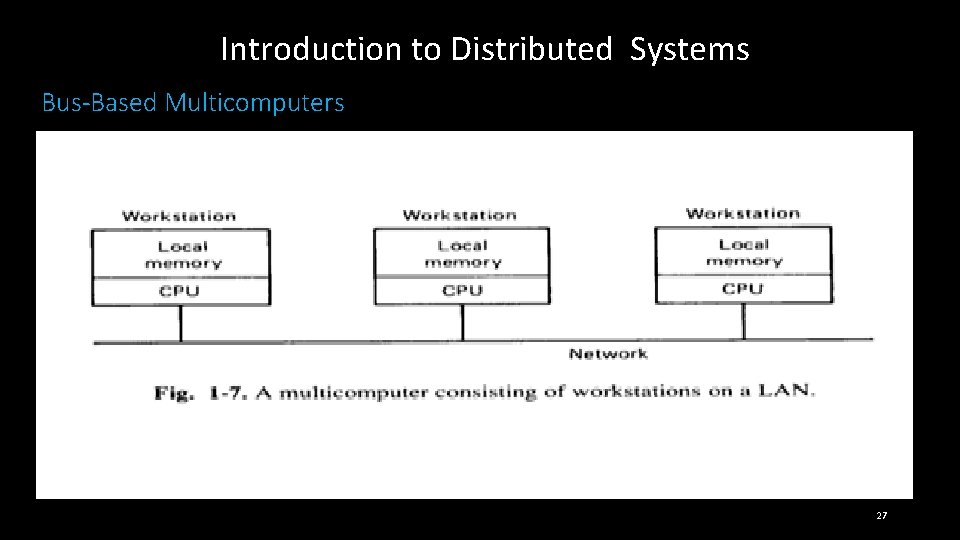
Introduction to Distributed Systems Bus-Based Multicomputers Building a multicomputer (i. e. , no shared memory) is easy. Each CPU has a direct connection to its own local memory. The only problem left is how the CPUs communicate with each other. Some interconnection scheme is needed here, too, but since it is only for CPU-to-CPU communication, the volume of traffic will be several orders of magnitude lower than when the interconnection network is also used for CPU-to-memory traffic. In Fig. 1 -7 we see a bus-based multicomputer. It looks topologically similar to the bus-based multiprocessor, but since there will be much less traffic over it, it need not be a high-speed backplane bus. It can be a much lower speed LAN (typically, 10 -100 Mbps, compared to 300 Mbps and up for a backplane bus). Thus Fig. 1 -7 is more often a collection of workstations on a LAN than a collection of CPU cards inserted into a fast bus (although the latter configuration is definitely a possible design). 26
Introduction to Distributed Systems Bus-Based Multicomputers 27
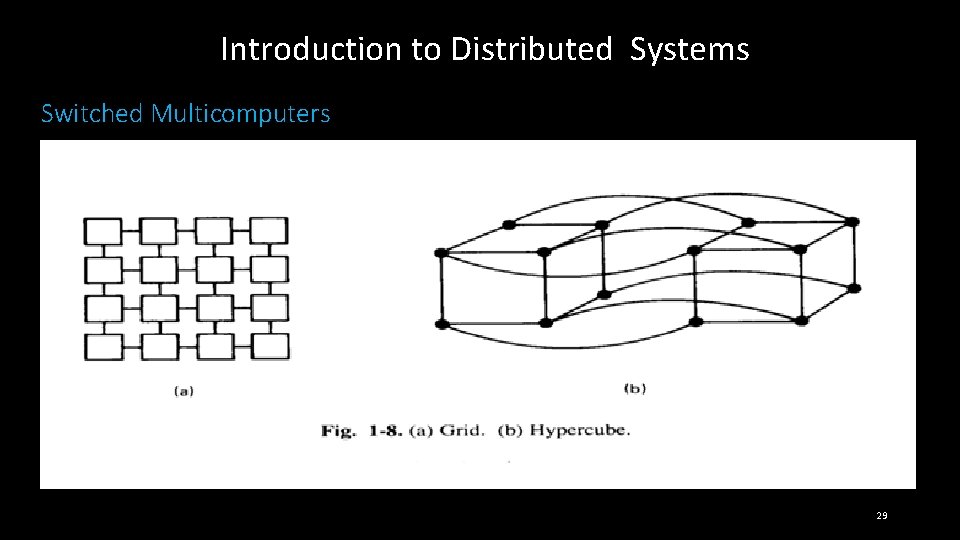
Introduction to Distributed Systems Switched Multicomputers Our last category consists of switched multicomputers. Various interconnection networks have been proposed and built, but all have the property that each CPU has direct and exclusive access to its own, private memory. Figure 1 -8 shows two popular topologies, a grid and a hypercube. Grids are easy to understand lay out on printed circuit boards. They are best suited to problems that have an inherent two-dimensional nature, such as graph theory or vision (e. g. , robot eyes or analyzing photographs). 28
Introduction to Distributed Systems Switched Multicomputers 29
Introduction to Distributed Systems Switched Multicomputers A hypercube is an n-dimensional cube. The hypercube of Fig. 1 -8(b) is four-dimensional. It can be thought of as two ordinary cubes, each with 8 vertices and 12 edges. Each vertex is a CPU. Each edge is a connection between two CPUs. The corresponding vertices in each of the two cubes are connected. To expand the hypercube to five dimensions, we would add another set of two interconnected cubes to the figure, connect the corresponding edges in the two halves, and so on. For an n-dimensional hypercube, each CPU has n connections to other CPUs. Thus the complexity of the wiring increases only logarithmically with the size. Since only nearest neighbors are connected, many messages have to make several hops to reach their destination. However, the longest possible path also grows logarithmically with the size, in contrast to the grid, where it grows as the square root of the number of CPUs. Hypercubes with 1024 CPUs have been commercially available for several years, and hypercubes with as many as 16, 384 CPUs are starting to become available. 30
Introduction to Distributed Systems SOFTWARE CONCEPTS Although the hardware is important, the software is even more important. The image that a system presents to its users, and how they think about the system, is largely determined by the operating system software, not the hardware. In this section we will introduce the various types of operating systems for the multiprocessors and multicomputers we have just studied, and discuss which kind of software goes with which kind of hardware. Operating systems cannot be put into nice, neat pigeonholes like hardware. By nature software is vague and amorphous. It is more-or-less possible to distinguish two kinds of operating systems for multiple CPU systems: loosely coupled and tightly coupled. 31
Introduction to Distributed Systems SOFTWARE CONCEPTS Loosely-coupled software allows machines and users of a distributed system to be fundamentally independent of one another, but still to interact to a limited degree where that is necessary. Consider a group of personal computers, each of which has its own CPU, its own memory, its own hard disk, and its own operating system, but which share some resources, such as laser printers and databases, over a LAN. This system is loosely coupled, since the individual machines are clearly distinguishable, each with its own job to do. If the network should go down for some reason, the individual machines can still continue to run to a considerable degree, although some functionality may be lost (e. g. , the ability to print files). To show difficult it is to make definitions in this area, now consider the same system as above, but without the network. To print a file, the user writes the file on a floppy disk, carries it to the machine with the printer, reads it in, and then prints it. Is this still a distributed system, only now even more loosely coupled? It's hard to say. From a fundamental point of view, there is not really any theoretical difference between communicating over a LAN and communicating by carrying floppy disks around. At most one can say that the delay and data rate are worse in the second example. 32
Introduction to Distributed Systems SOFTWARE CONCEPTS At the other extreme we might find a multiprocessor dedicated to running a single chess program in parallel. Each CPU is assigned a board to evaluate, and it spends its time examining that board and all the boards that can be generated from it. When the evaluation is finished, the CPU reports back the results and is given a new board to work on. The software for this system, both the application program and the operating system required to support it, is clearly much more tightly coupled than in our previous example. We have now seen four kinds of distributed hardware and two kinds of distributed software. In theory, there should be eight combinations of hardware and software. In fact, only four are worth distinguishing, because to the user, the interconnection technology is not visible. 33
Introduction to Distributed Systems Network Operating Systems Let us start with loosely-coupled software on loosely-coupled hardware, since this is probably the most common combination at many organizations. A typical example is a network of workstations connected by a LAN. In this model, each user has a workstation for his exclusive use. It may or may not have a hard disk. It definitely has its own operating system. All commands are normally run locally, right on the workstation. However, it is sometimes possible for a user to log into another workstation remotely by using a command such as rlogin machine The effect of this command is to turn the user's own workstation into a remote terminal logged into the remote machine. Commands typed on the keyboard are sent to the remote machine, and output from the remote machine is displayed on the screen. To switch to a different remote machine, it is necessary first to log out, then to use the rlogin command to connect to another machine. At any instant, only one machine can be used, and the selection of the machine is entirely manual. 34
Introduction to Distributed Systems Network Operating Systems Networks of workstations often also have a remote copy command to copy files from one machine to another. For example, a command like rcp machinel: filel machine 2: file 2 might copy the file 1 from machine 1 to machine 2 and give it the name file 2 there. Again here, the movement of files is explicit and requires the user to be completely aware of where all files are located and where all commands are being executed. 35
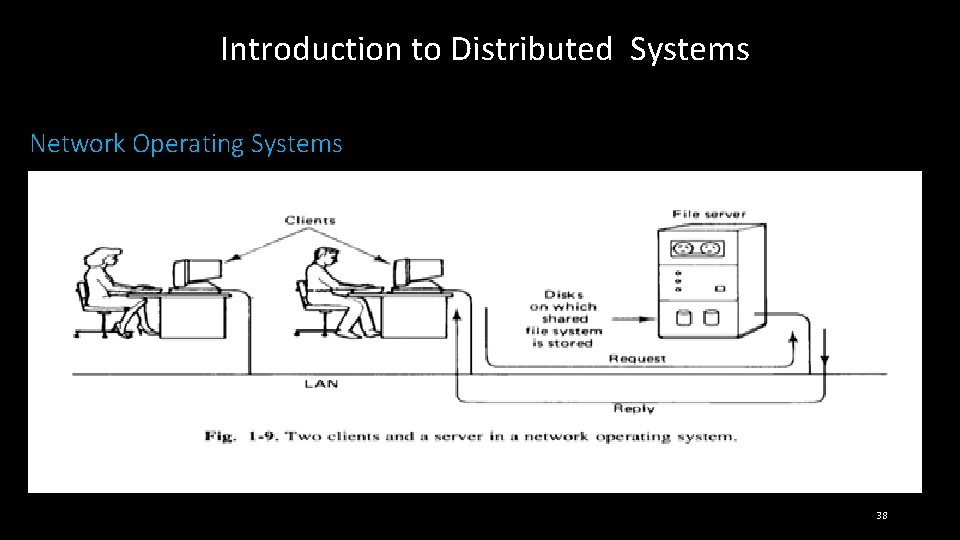
Introduction to Distributed Systems Network Operating Systems While better than nothing, this form of communication is extremely primitive and has led system designers to search for more convenient forms of communication and information sharing. One approach is to provide a shared, global file system accessible from all the workstations. The file system is sup-ported by one or more machines called file servers. The file servers accept requests from user programs running on the other (nonserver) machines, called clients, to read and write files. Each incoming request is examined and executed, and the reply is sent back, as illustrated in Fig. 1 -9. 36
Introduction to Distributed Systems Network Operating Systems While better than nothing, this form of communication is extremely primitive and has led system designers to search for more convenient forms of communication and information sharing. One approach is to provide a shared, global file system accessible from all the workstations. The file system is supported by one or more machines called file servers. The file servers accept requests from user programs running on the other (nonserver) machines, called clients, to read and write files. Each incoming request is examined and executed, and the reply is sent back, as illustrated in Fig. 1 -9. 37
Introduction to Distributed Systems Network Operating Systems 38
Introduction to Distributed Systems Network Operating Systems File servers generally maintain hierarchical file systems, each with a root directory containing subdirectories and files. Workstations can import or mount these file systems, augmenting their local file systems with those located on the servers. For example, in Fig. 1 -10, two file servers are shown. One has a directory called games, while the other has a directory called work. These directories each contain several files. Both of the clients shown have mounted both of the servers, but they have mounted them in different places in their respective file systems. Client 1 has mounted them in its root directory, and can access them as /games and /work, respectively. Client 2, like client 1, has mounted games in its root directory, but regarding the reading of mail and news as a kind of game, has created a directory /games/work and mounted work there. Consequently, it can access news using the path /games/work/news rather than /work/news. 39
Introduction to Distributed Systems Network Operating Systems File servers generally maintain hierarchical file systems, each with a root directory containing subdirectories and files. Workstations can import or mount these file systems, augmenting their local file systems with those located on the servers. For example, in Fig. 1 -10, two file servers are shown. One has a directory called games, while the other has a directory called work. These directories each contain several files. Both of the clients shown have mounted both of the servers, but they have mounted them in different places in their respective file systems. Client 1 has mounted them in its root directory, and can access them as /games and /work, respectively. Client 2, like client 1, has mounted games in its root directory, but regarding the reading of mail and news as a kind of game, has created a directory /games/work and mounted work there. Consequently, it can access news using the path /games/work/news rather than /work/news. 40
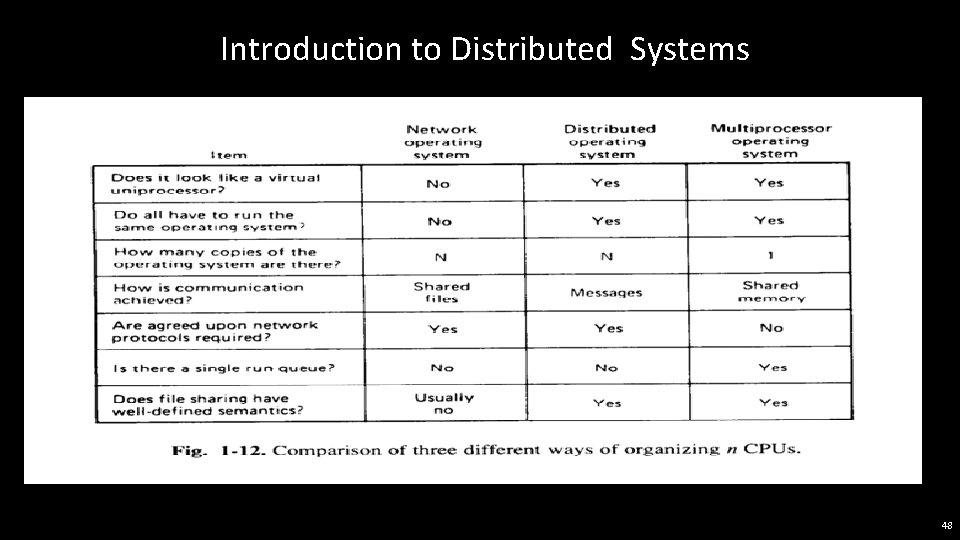
Introduction to Distributed Systems Network Operating Systems While it does not matter where a client mounts a server in its directory hierarchy, it is important to notice that different clients can have a different view of the file system. The name of a file depends on where it is being accessed from, and how that machine has set up its file system. Because each workstation operates relatively independently of the others, there is no guarantee that they all present the same directory hierarchy to their programs. The operating system that is used in this kind of environment must manage the individual workstations and file servers and take care of the communication between them. It is possible that the machines all run the same operating system, but this is not required. If the clients and servers run on different systems, as a bare minimum they must agree on the format and meaning of all the messages that they may potentially exchange. In a situation like this, where each machine has a high degree of autonomy and there are few system-wide requirements, people usually speak of a network operating system. 41
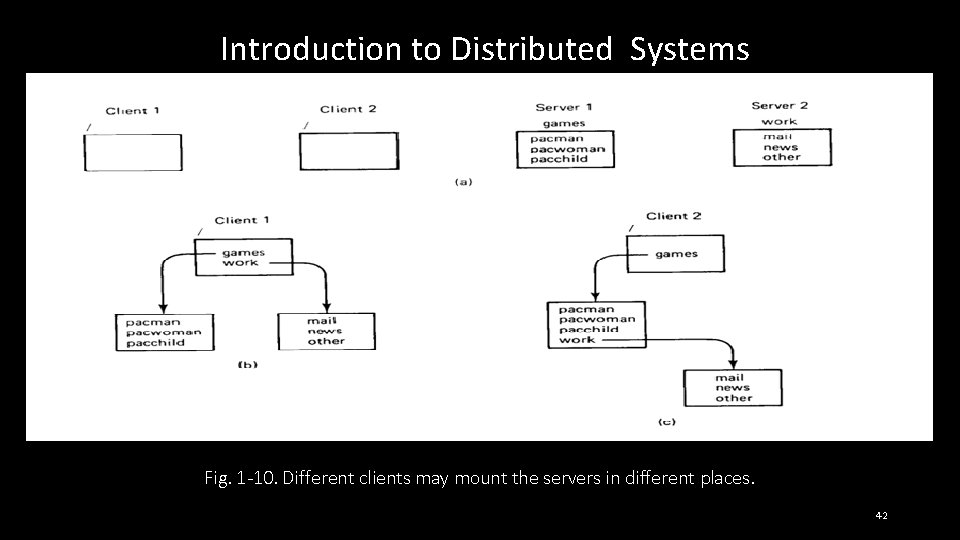
Introduction to Distributed Systems Fig. 1 -10. Different clients may mount the servers in different places. 42
Introduction to Distributed Systems True Distributed Systems Distributed systems are tightly-coupled software on the same loosely-coupled (i. e. , multicomputer) hardware. The goal of such a system is to create the illusion in the minds of the users that the entire network of computers is a single timesharing system, rather than a collection of distinct machines. Some authors refer to this property as the single-system image. Others put it slightly differently, saying that a distributed system is one that runs on a collection of networked machines but acts like a virtual uniprocessor. No matter how it is expressed, the essential idea is that the users should not have to be aware of the existence of multiple CPUs in the system. No current system fulfills this requirement entirely, but a number of candidates are on the horizon. 43
Introduction to Distributed Systems True Distributed Systems What are some characteristics of a distributed system? To start with, there must be a single, global interprocess communication mechanism so that any process can talk to any other process. It will not do to have different mechanisms on different machines or different mechanisms for local communication and remote communication. There must also be a global protection scheme. Mixing access control lists, the UNIX protection bits, and capabilities will not give a single system image. The file system must look the same everywhere, too. Having file names restricted to 11 characters in some locations and being unrestricted in others is undesirable. Also, every file should be visible at every location, subject to protection and security constraints. Nevertheless, each kernel can have considerable control over its own local resources. For example, since there is no shared memory, it is logical to allow each kernel to manage its own memory. For example, if swapping or paging is used, the kernel on each CPU is the logical place to determine what to swap or page. There is no reason to centralize this authority. Similarly, if multiple processes are running on some CPU, it makes sense to do the scheduling right there, too. 44
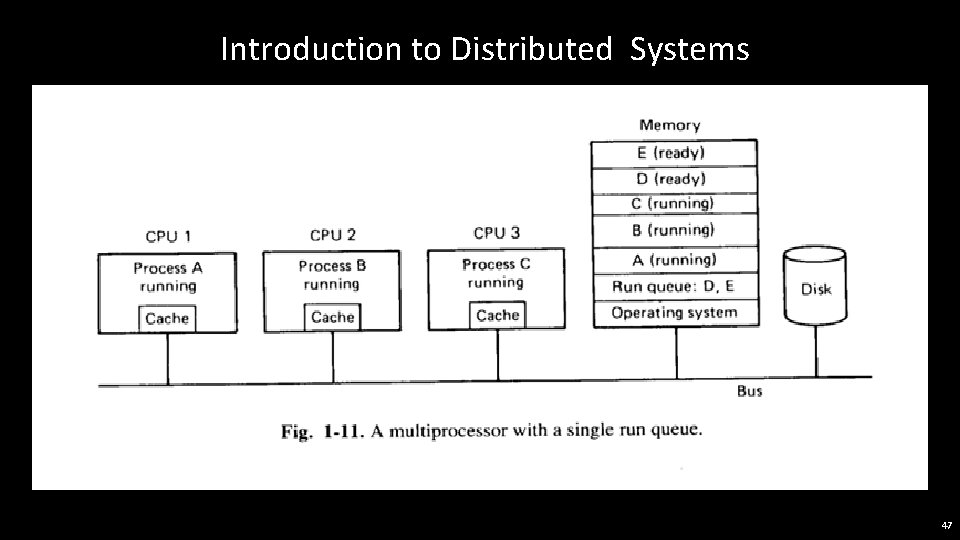
Introduction to Distributed Systems Multiprocessor Timesharing Systems The last combination we wish to discuss is tightly-coupled software on tightly-coupled hardware. While various special-purpose machines exist in this category (such as dedicated data base machines), the most common general-purpose examples are multiprocessors that are operated as a UNIX timesharing system, but with multiple CPUs instead of one CPU. To the outside world, a multiprocessor with 32 30 -MIPS CPUs acts very much like a single 960 -MIPS CPU (this is the singlesystem image). Except that implementing it on a multiprocessor makes life much easier, since the entire design can be centralized. The key characteristic of this class of system is the existence of a single run queue: a list of all the processes in the system that are logically unblocked and ready to run. The run queue is a data structure kept in the shared memory. As an example, consider the system of Fig. 1 -11, which has three CPUs and five processes that are ready to run. All five processes are located in the shared memory, and three of them are currently executing: process A on CPU 1, process B on CPU 2, and process C on CPU 3. The other two processes, D and E, are also in memory, waiting their turn. 45
Introduction to Distributed Systems Multiprocessor Timesharing Systems Now suppose that process B blocks waiting for I/O or its quantum runs out. Either way, CPU 2 must suspend it, and find another process to run. CPU 2 will normally begin executing operating system code (located in the shared memory). After having saved all of B's registers, it will enter a critical region to run the scheduler to look for another process to run. It is essential that the scheduler be run as a critical region to prevent two CPUs from choosing the same process to run next. The necessary mutual exclusion can be achieved by using monitors, semaphores, or any other standard construction used in single processor systems. Once CPU 2 has gained exclusive access to the run queue, it can remove the first entry, D, exit from the critical region, and begin executing D. Initially, execution will be slow, since CPU 2's cache is full of words belonging to that part of the shared memory containing process B, but after a little while, these will have been purged and the cache will be full of D's code and data, so execution will speed up. 46
Introduction to Distributed Systems 47
Introduction to Distributed Systems 48
- Slides: 48