
Distributed Mobile Cloud Computing with Avatars Cristian Borcea
Distributed Mobile Cloud Computing with Avatars Cristian Borcea Department of Computer Science New Jersey Institute of Technology
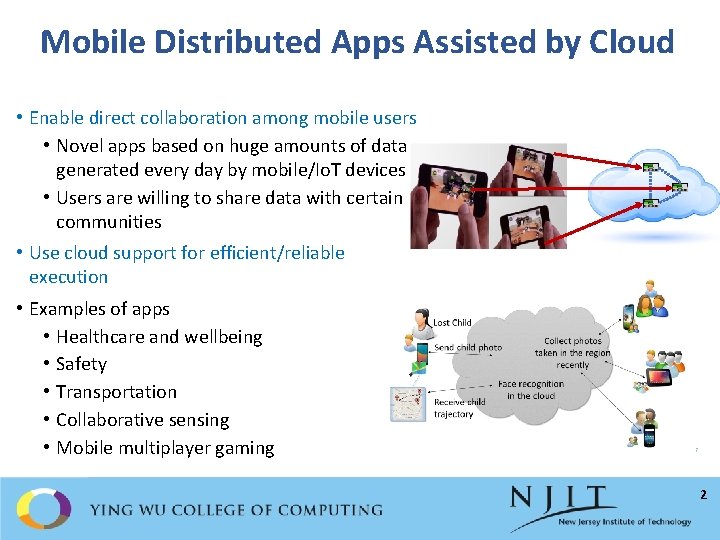
Mobile Distributed Apps Assisted by Cloud • Enable direct collaboration among mobile users • Novel apps based on huge amounts of data generated every day by mobile/Io. T devices • Users are willing to share data with certain communities • Use cloud support for efficient/reliable execution • Examples of apps • Healthcare and wellbeing • Safety • Transportation • Collaborative sensing • Mobile multiplayer gaming 2
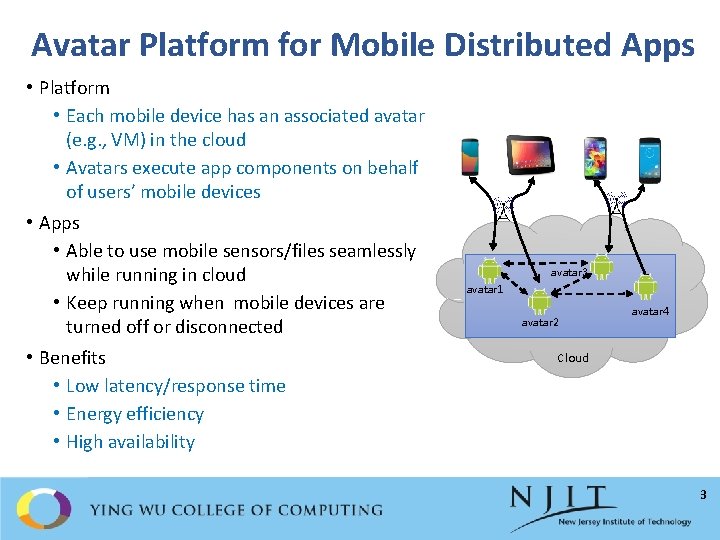
Avatar Platform for Mobile Distributed Apps • Platform • Each mobile device has an associated avatar (e. g. , VM) in the cloud • Avatars execute app components on behalf of users’ mobile devices • Apps • Able to use mobile sensors/files seamlessly while running in cloud • Keep running when mobile devices are turned off or disconnected • Benefits • Low latency/response time • Energy efficiency • High availability avatar 3 avatar 1 avatar 2 avatar 4 Cloud 3
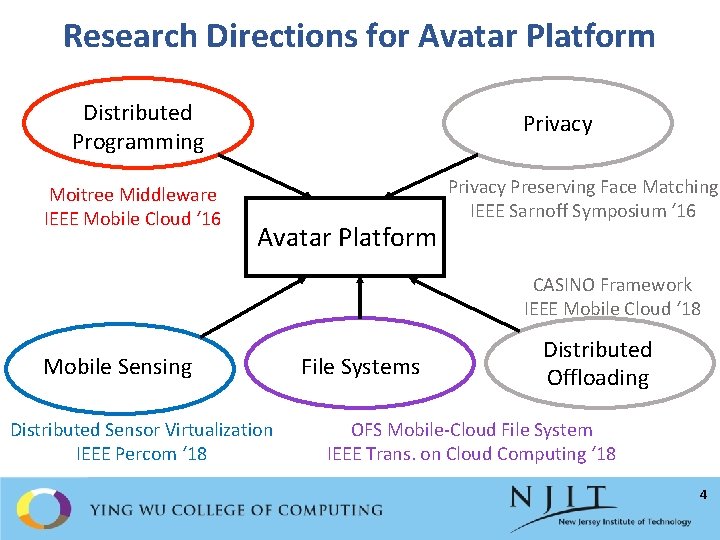
Research Directions for Avatar Platform Distributed Programming Moitree Middleware IEEE Mobile Cloud ‘ 16 Privacy Avatar Platform Privacy Preserving Face Matching IEEE Sarnoff Symposium ‘ 16 CASINO Framework IEEE Mobile Cloud ‘ 18 Mobile Sensing Distributed Sensor Virtualization IEEE Percom ‘ 18 File Systems Distributed Offloading OFS Mobile-Cloud File System IEEE Trans. on Cloud Computing ‘ 18 4
Moitree: A Middleware for Distributed Mobile-Cloud Apps 5
Programming Challenges for Avatar Platform • How to provide an API to transparently use mobile-avatar pairs in apps? • What programming abstractions are needed to write apps over distributed mobile-avatar pairs? • How to integrate dynamic context such as location, time, and social relationships into the programming abstractions? • How to offload mobile-to-mobile communication to the cloud? 6
Moitree Middleware for Avatar Platform • Provides an API that implements a high-level distributed programming model for developing Avatar apps • Communication end-points are mapped transparently to mobileavatar pairs • Common app execution environment on mobiles and avatars allows seamless offloading of app components • Context-aware group-based abstractions to manage user collaboration • Abstract communication channels to offload mobile-to-mobile communication to the cloud 7
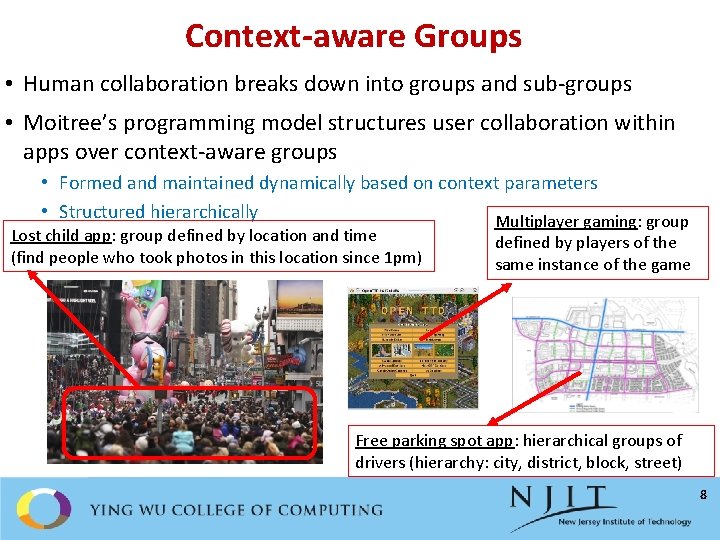
Context-aware Groups • Human collaboration breaks down into groups and sub-groups • Moitree’s programming model structures user collaboration within apps over context-aware groups • Formed and maintained dynamically based on context parameters • Structured hierarchically Multiplayer gaming: group Lost child app: group defined by location and time (find people who took photos in this location since 1 pm) defined by players of the same instance of the game Free parking spot app: hierarchical groups of drivers (hierarchy: city, district, block, street) 8
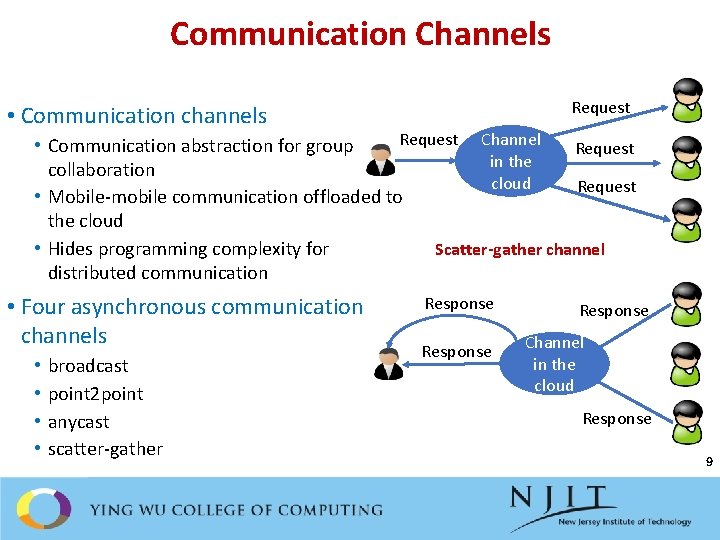
Communication Channels Request • Communication channels Request Channel • Communication abstraction for group Request in the collaboration cloud Request • Mobile-mobile communication offloaded to the cloud • Hides programming complexity for Scatter-gather channel distributed communication • Four asynchronous communication channels • • broadcast point 2 point anycast scatter-gather Response Channel in the cloud Response 9
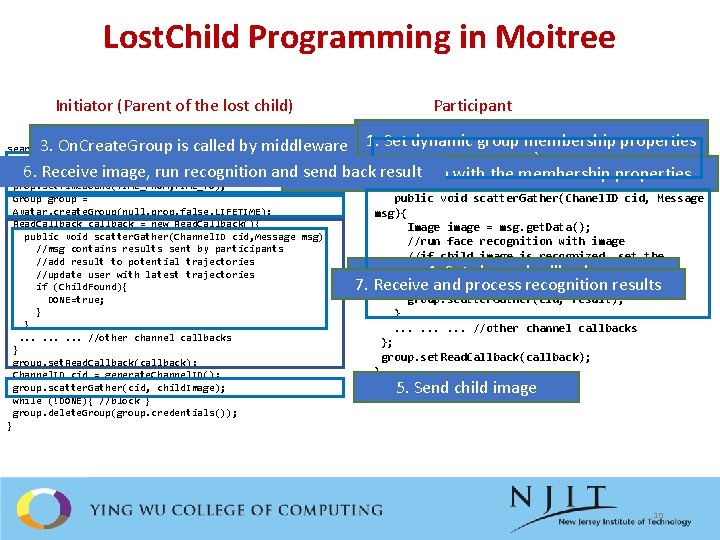
Lost. Child Programming in Moitree Participant Initiator (Parent of the lost child) Set dynamic group membership properties 3. On. Create. Group is called by middleware 1. on. Create. Group(Group group){ ` Read. Callback callback = new Read. Callback(){ 6. Receive image, run recognition and send back result 2. Call create. Group with the membership properties search. For. Lost. Child(){ Membership. Properties prop = new Membership. Properties(); prop. set. Location. Bound(LOCATION, RADIUS); prop. set. Time. Bound(TIME_FROM, TIME_TO); Group group = Avatar. create. Group(null, prop, false, LIFETIME); Read. Callback callback = new Read. Callback(){ public void scatter. Gather(Channel. ID cid, Message msg){ //msg contains results sent by participants //add result to potential trajectories //update user with latest trajectories if (Child. Found){ DONE=true; } }. . //other channel callbacks } group. set. Read. Callback(callback); Channel. ID cid = generate. Channel. ID(); group. scatter. Gather(cid, child. Image); while (!DONE){ //block } group. delete. Group(group. credentials()); } 7. public void scatter. Gather(Chanel. ID cid, Message msg){ Image image = msg. get. Data(); //run face recognition with image //if child image is recognized, set the location 4. and associated with the matching Settime channel callbacks photo in result Receive and process recognition results group. scatter. Gather(cid, result); }. . //other channel callbacks }; group. set. Read. Callback(callback); } 5. Send child image 10
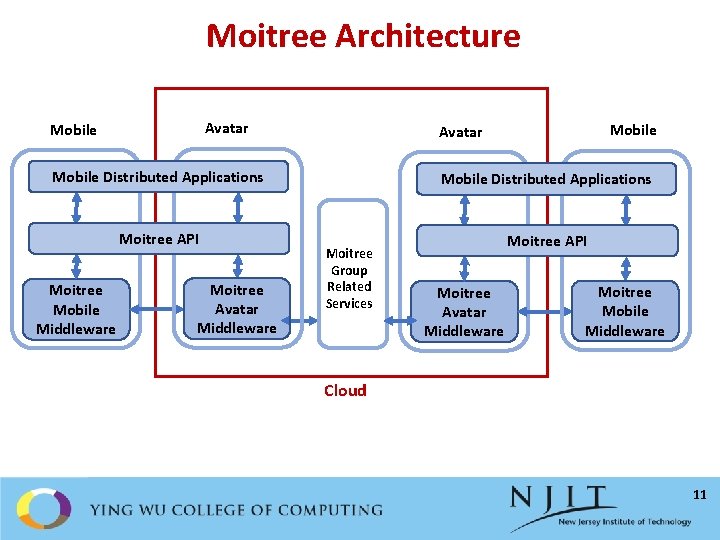
Moitree Architecture Avatar Mobile Distributed Applications Moitree API Moitree Mobile Middleware Moitree Avatar Middleware Mobile Avatar Mobile Distributed Applications Moitree Group Related Services Moitree API Moitree Avatar Middleware Moitree Mobile Middleware Cloud 11
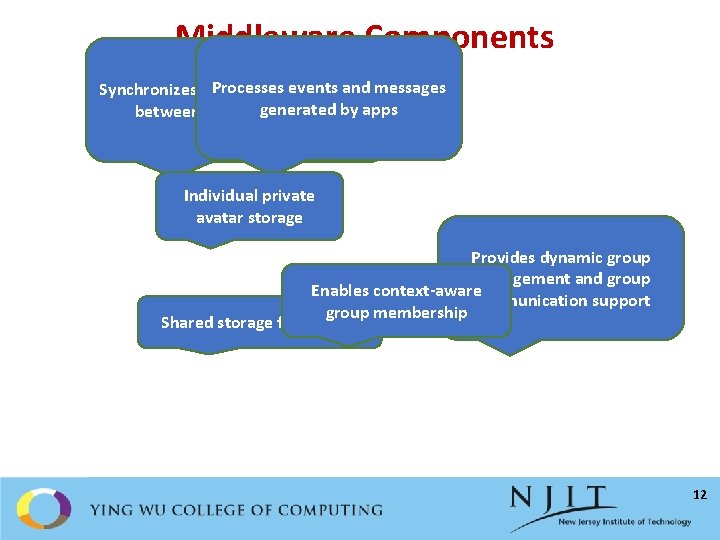
Middleware Components Processes events and messages Synchronizes user generated content between mobile generated and avatarby apps Individual private avatar storage Provides dynamic group management and group Enables context-aware communication support group membership Shared storage for avatars 12
Prototype Implementation • Android-based implementation • Nexus 5 and Nexus 6 mobile devices • Built Openstack-based cloud to host avatar VMs • Each avatar is Android-x 86 VM • Implemented Lost. Child and Face. Date apps • Face detection and face recognition implemented using Open. CV 2. 4. 10 • Number of lines of code reduced significantly when using Moitree vs. native Android implementation 13
Face. Date Overview • Enables a user to match nearby users based on their looks • Matching is done in real-time and it has to be mutual • Face recognition algorithm finds similarity between photos of persons that the user likes and profile pictures of nearby users • Profile pictures are displayed to users only when there is a match to protect user privacy • Implemented and evaluated with Android-based devices and Android x 86 VMs • Results demonstrate that Face. Date is practical • Good end-to-end latency • Good scalability 14
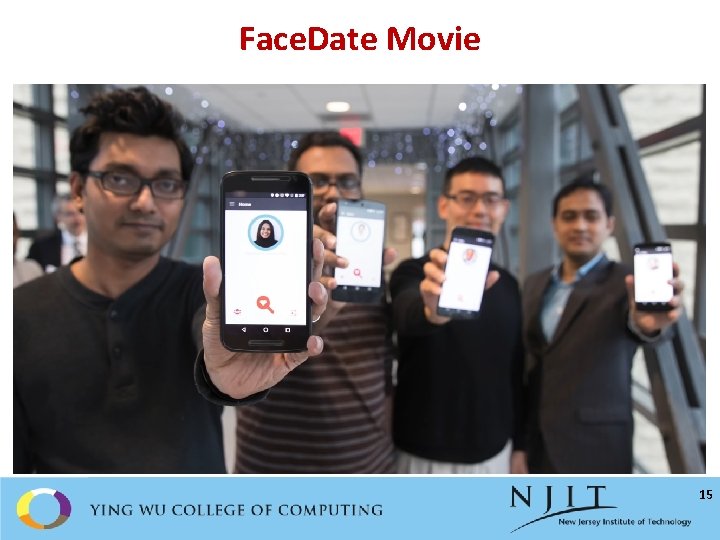
Face. Date Movie 15
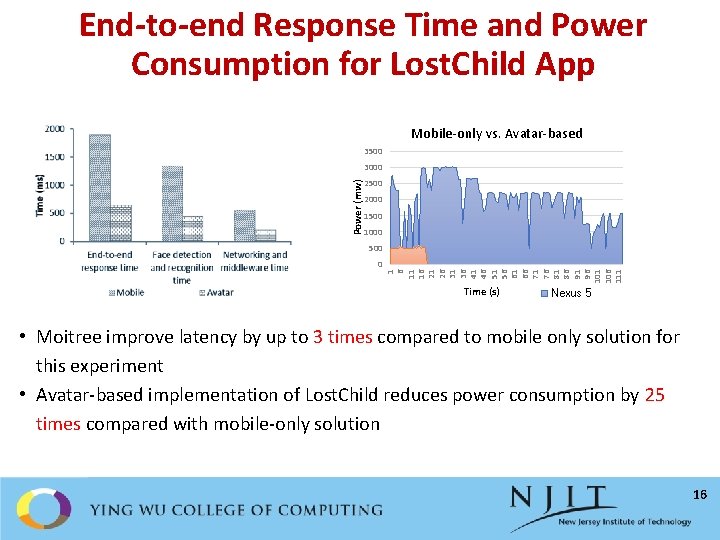
End-to-end Response Time and Power Consumption for Lost. Child App Mobile-only vs. Avatar-based 3500 Power (mw) 3000 2500 2000 1500 1000 0 1 6 11 16 21 26 31 36 41 46 51 56 61 66 71 76 81 86 91 96 101 106 111 500 Time (s) Nexus 5 • Moitree improve latency by up to 3 times compared to mobile only solution for this experiment • Avatar-based implementation of Lost. Child reduces power consumption by 25 times compared with mobile-only solution 16
Sentio: Distributed Sensor Virtualization for Mobile-Cloud Apps 17
Goal: Mobile Apps Access Distributed Sensors Seamlessly • Mobile apps running on a device may need to • Access sensors on other devices in real-time (e. g. , mobile health, mobile gaming) • Sensor fusion • Cross-validation of data • Choosing “best” sensor when several sensors of same type are available • Access sensors from cloud when app components are offloaded • Existing mobile sensing frameworks do not provide these features • Difficult for apps to leverage the collective power of sensors on other devices • Limited benefits from offloading context-aware apps that need sensor access 18
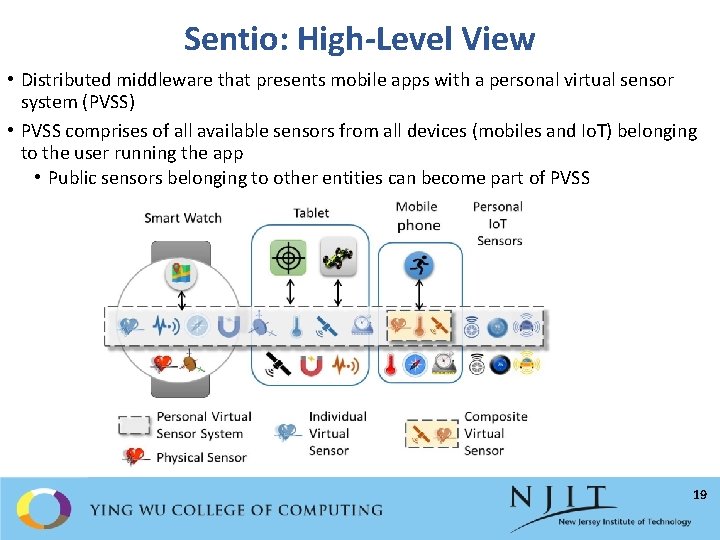
Sentio: High-Level View • Distributed middleware that presents mobile apps with a personal virtual sensor system (PVSS) • PVSS comprises of all available sensors from all devices (mobiles and Io. T) belonging to the user running the app • Public sensors belonging to other entities can become part of PVSS 19
Sentio: Features • Common API for apps no matter where they run • Offers support for creating individual and composite virtual sensors • Provides access to virtual sensors in the same way with access to local sensors • Allows programmers to specify a sensing mode, and then map the virtual sensor to the most suitable physical sensor for that mode • Modes: accuracy, real-time, energy efficiency • Middleware hides low-level communication and sensor management • Supports real-time access to remote sensor data • Maintains seamless connectivity to the physical sensor even after offloading app components to the cloud • Adapts to context changes by re-mapping a virtual sensor to a more suitable physical sensor • Does not require modifications to operating system 20
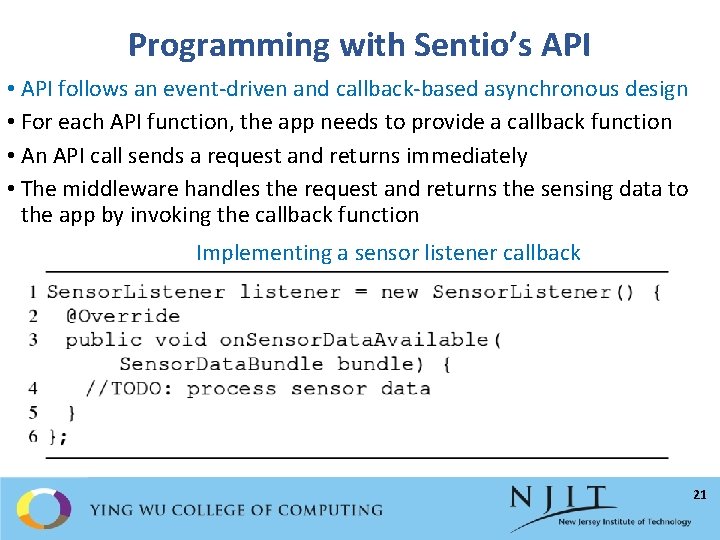
Programming with Sentio’s API • API follows an event-driven and callback-based asynchronous design • For each API function, the app needs to provide a callback function • An API call sends a request and returns immediately • The middleware handles the request and returns the sensing data to the app by invoking the callback function Implementing a sensor listener callback 21
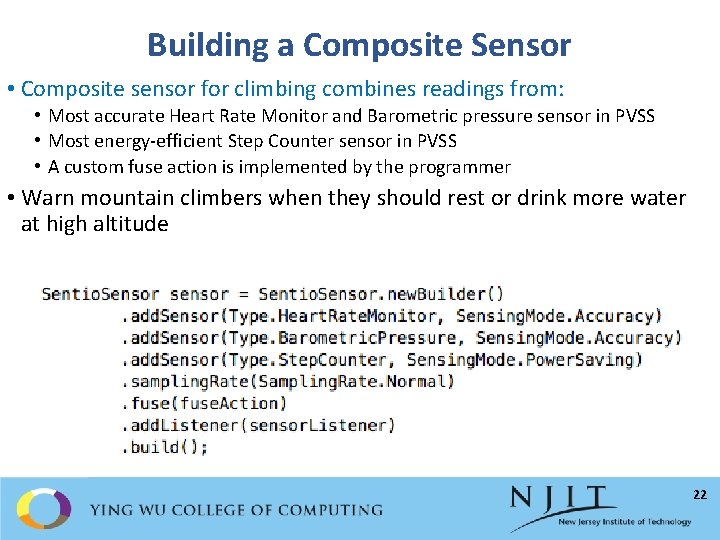
Building a Composite Sensor • Composite sensor for climbing combines readings from: • Most accurate Heart Rate Monitor and Barometric pressure sensor in PVSS • Most energy-efficient Step Counter sensor in PVSS • A custom fuse action is implemented by the programmer • Warn mountain climbers when they should rest or drink more water at high altitude 22
Middleware Architecture • Distributed middleware: instances run on every participating device • Manages sensor registration, data collection, sensor mapping • Instance in Avatar maintains global registry and sensor state • Ad hoc networking is used for failover: primary device (smart phone) periodically synchronizes with the cloud instance to be able to take over in case of failures 23
Middleware Design 24
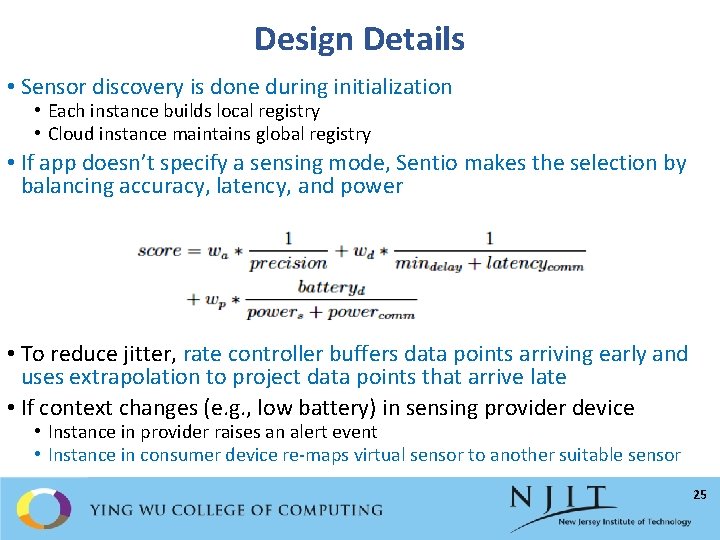
Design Details • Sensor discovery is done during initialization • Each instance builds local registry • Cloud instance maintains global registry • If app doesn’t specify a sensing mode, Sentio makes the selection by balancing accuracy, latency, and power • To reduce jitter, rate controller buffers data points arriving early and uses extrapolation to project data points that arrive late • If context changes (e. g. , low battery) in sensing provider device • Instance in provider raises an alert event • Instance in consumer device re-maps virtual sensor to another suitable sensor 25
Prototype and Apps • Implemented for Android and Android Wear OS • 3, 127 Lo. C for the SDK • 3, 726 Lo. C for the Android middleware • 561 additional Lo. C for the Android Wear middleware • Implemented two proof-of-concept apps (Sentio. App and Sentio. Fit) • Modified two open source games (Space Shooting and Tilt Control) to use Sentio API • Only 6 Lo. C needed to be modified to use remote accelerometer on smart phone or smart watch • Tested using Nexus 6, Nexus 5 X, Moto X smart phones and Samsung Gear Live smart watch • Bluetooth and Wi. Fi used for data communication • Android x 86 64 -bit VM is used as the cloud entity 26
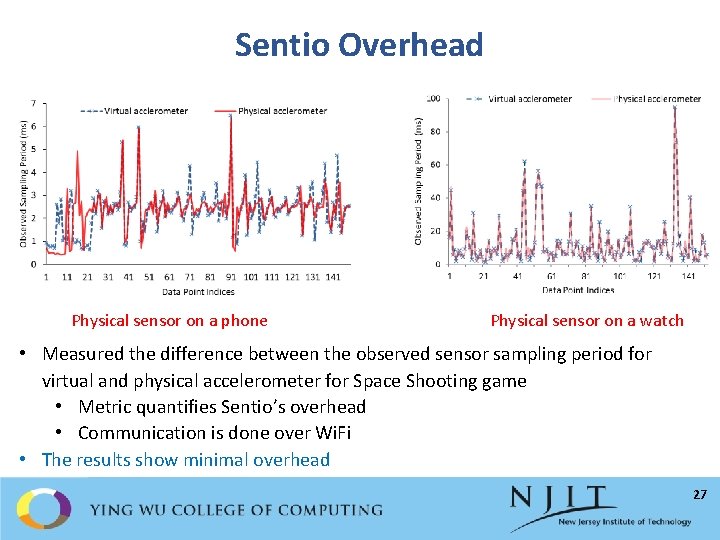
Sentio Overhead Physical sensor on a phone Physical sensor on a watch • Measured the difference between the observed sensor sampling period for virtual and physical accelerometer for Space Shooting game • Metric quantifies Sentio’s overhead • Communication is done over Wi. Fi • The results show minimal overhead 27
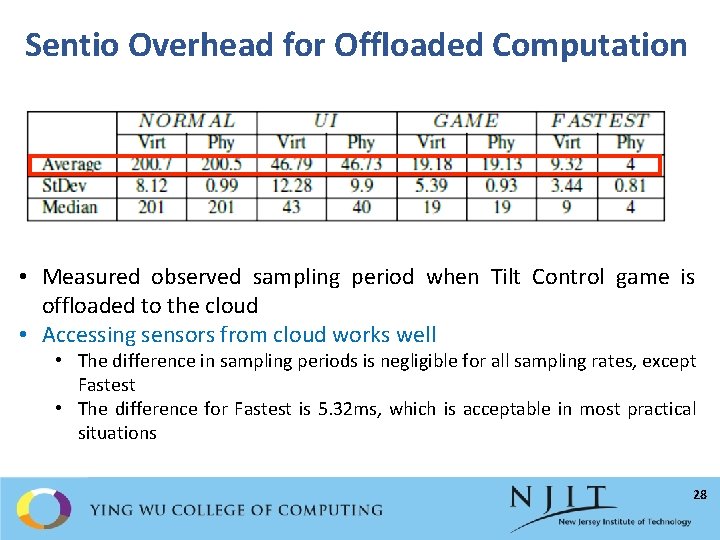
Sentio Overhead for Offloaded Computation • Measured observed sampling period when Tilt Control game is offloaded to the cloud • Accessing sensors from cloud works well • The difference in sampling periods is negligible for all sampling rates, except Fastest • The difference for Fastest is 5. 32 ms, which is acceptable in most practical situations 28
OFS: An Overlay File System for Mobile-Cloud Apps 29
Existing Offloading Systems Cannot Handle File I/O Efficiently • Some systems don’t support offloading tasks that perform file operations • COMET [OSDI ’ 12] • Some other systems lack support for consistent remote file access • MAUI [Mobi. Sys ’ 10], Think. Air [Infocom ’ 12], Clone. Cloud [Euro. Sys ’ 11], Sapphire [OSDI ’ 14] • How to provide efficient and consistent file access for offloaded tasks? 30
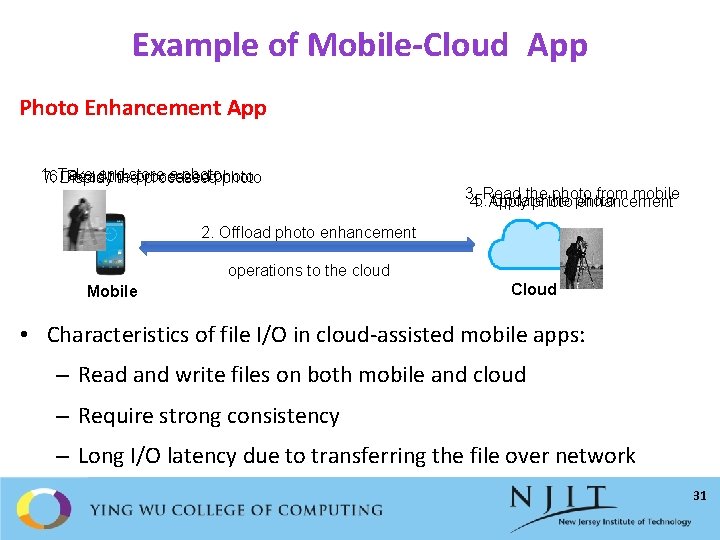
Example of Mobile-Cloud App Photo Enhancement App 1. store a photo Readand the processed photo 7. 6. Take Display the processed photo 3. the photo from mobile 5. Read Update the photo 4. Apply photo enhancement 2. Offload photo enhancement operations to the cloud Mobile Cloud • Characteristics of file I/O in cloud-assisted mobile apps: – Read and write files on both mobile and cloud – Require strong consistency – Long I/O latency due to transferring the file over network 31
File System Requirements for Mobile-Cloud Apps • Location transparency • Access remote files as though they were local • Maintain file sessions during task offloading • Consistency • Ensure correct execution of tasks distributed across mobiles and cloud • Performance • Provide low latency with little network overhead to save energy and network bandwidth • Ease of deployment • Require minimal privileges in addition to those needed to run task • No need to save to-be-accessed files before application runs 32
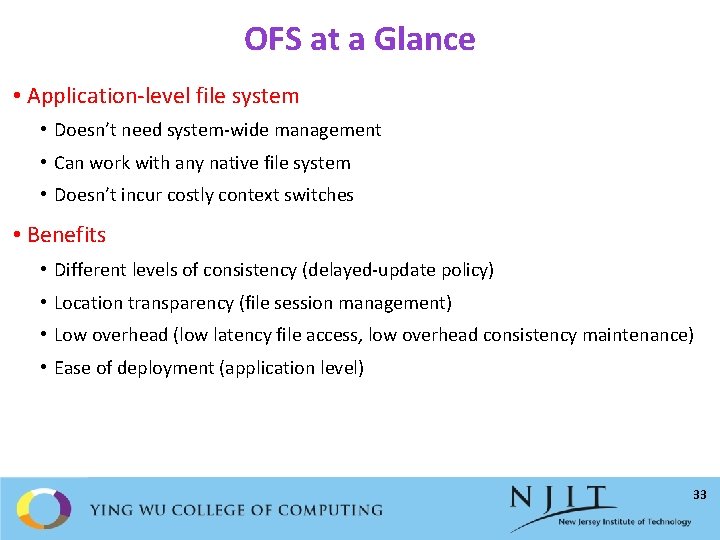
OFS at a Glance • Application-level file system • Doesn’t need system-wide management • Can work with any native file system • Doesn’t incur costly context switches • Benefits • Different levels of consistency (delayed-update policy) • Location transparency (file session management) • Low overhead (low latency file access, low overhead consistency maintenance) • Ease of deployment (application level) 33
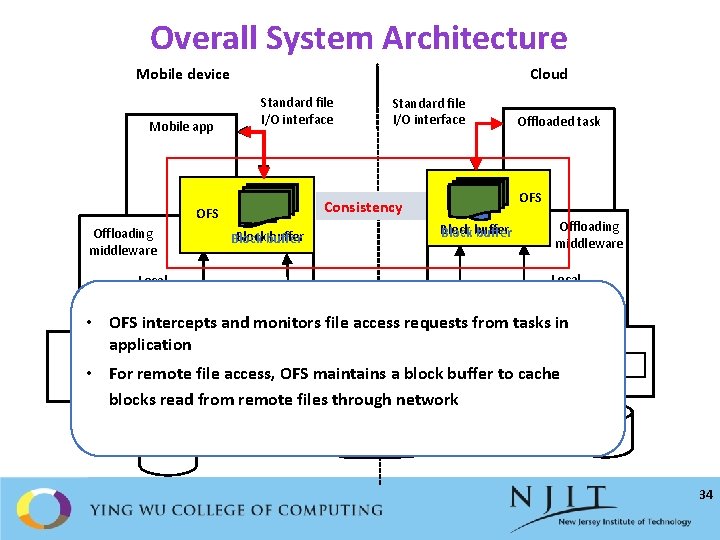
Overall System Architecture Mobile device Mobile app Cloud Standard file I/O interface Block buffer Blockbuffer Block Offloaded task OFS Consistency OFS Offloading middleware Standard file I/O interface Offloading middleware Local accesses • OFS intercepts and monitors file access requests from tasks in application OS OS Native File System • For. Native remote file access, OFS maintains a block buffer to cache blocks read from remote files through network Unbuffered remote accesses 34
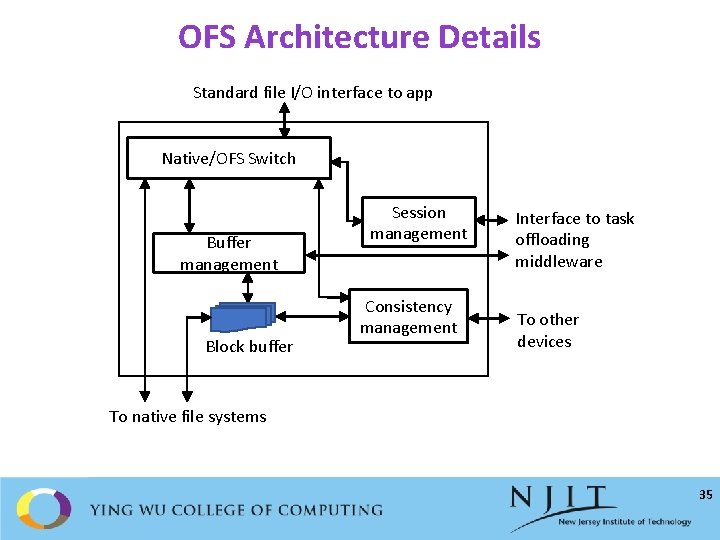
OFS Architecture Details Standard file I/O interface to app Native/OFS Switch Buffer management Block buffer Session management Consistency management Interface to task offloading middleware To other devices To native file systems 35
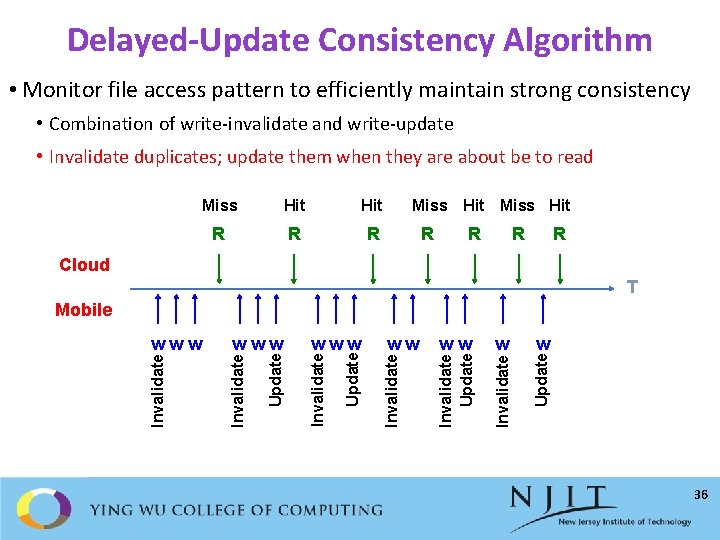
Delayed-Update Consistency Algorithm • Monitor file access pattern to efficiently maintain strong consistency • Combination of write-invalidate and write-update • Invalidate duplicates; update them when they are about be to read Miss Hit R R R Miss Hit R R Cloud T w Update w Invalidate ww Invalidate Update Invalidate www Update www Invalidate Mobile 36
OFS Implementation • Implemented in Java on Android OS • Uses an Android-x 86 VM to run offloaded tasks • Uses Kryonet, an NIO-based TCP library, for network communication • Decoupled from task offloading systems: • Increases compatibility with different offloading systems • Reduces development efforts • Implemented as separate system running a set of Android services • OFS stub linked into each app to interface between app and OFS 37
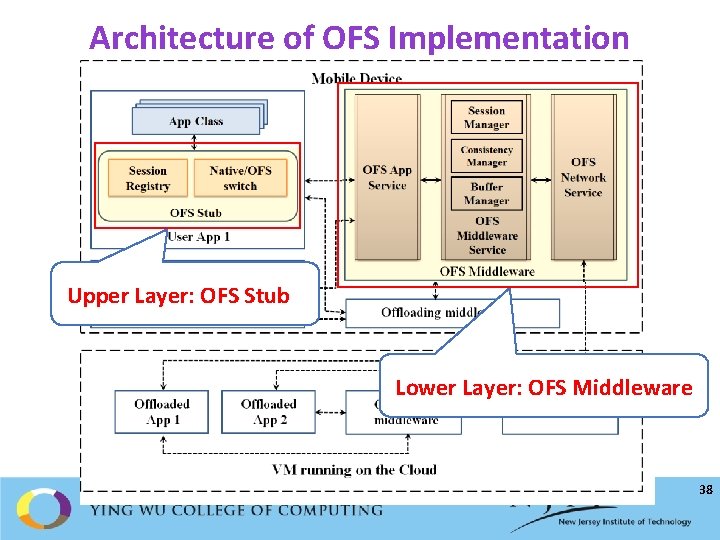
Architecture of OFS Implementation Upper Layer: OFS Stub Lower Layer: OFS Middleware 38
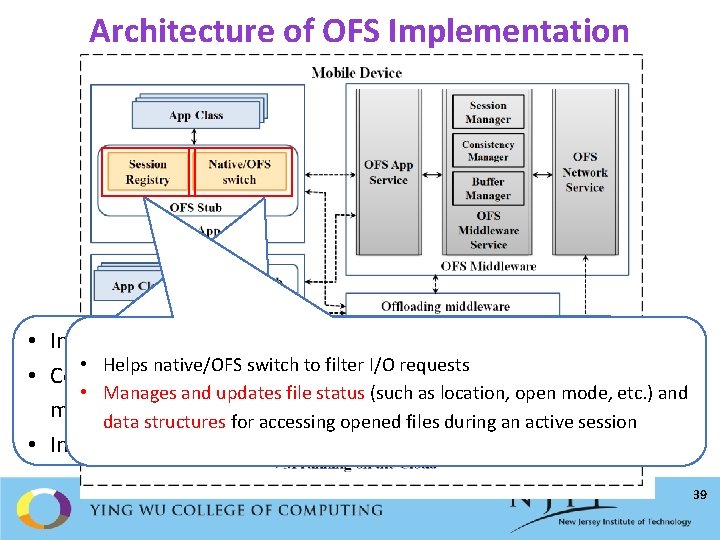
Architecture of OFS Implementation • Intercept I/O requests using Aspect. J • Helps native/OFS switch to filter I/O requests • Code to analyze I/O requests and to call appropriate • Manages and updates file status (such as location, open mode, etc. ) and methods is injected with the weaving mechanism data structures for accessing opened files during an active session • Inject the code during compile time 39
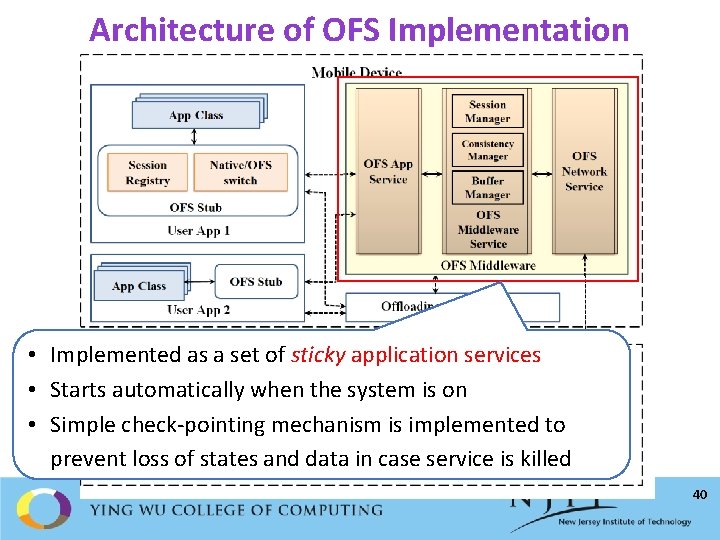
Architecture of OFS Implementation • Implemented as a set of sticky application services • Starts automatically when the system is on • Simple check-pointing mechanism is implemented to prevent loss of states and data in case service is killed 40
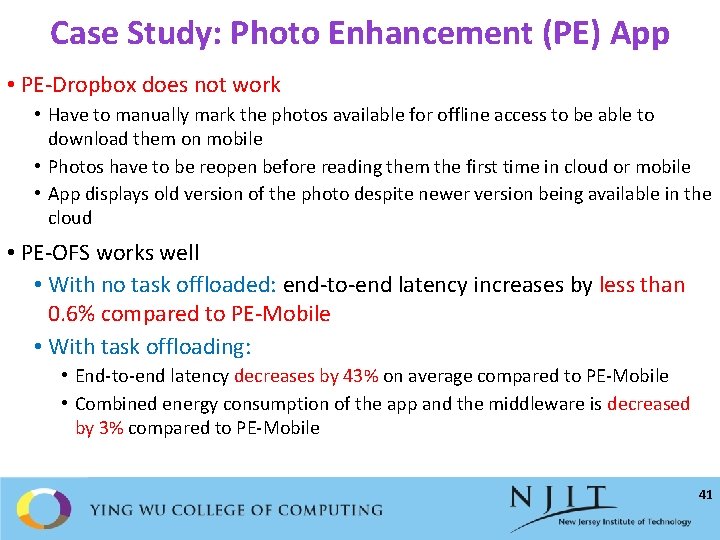
Case Study: Photo Enhancement (PE) App • PE-Dropbox does not work • Have to manually mark the photos available for offline access to be able to download them on mobile • Photos have to be reopen before reading them the first time in cloud or mobile • App displays old version of the photo despite newer version being available in the cloud • PE-OFS works well • With no task offloaded: end-to-end latency increases by less than 0. 6% compared to PE-Mobile • With task offloading: • End-to-end latency decreases by 43% on average compared to PE-Mobile • Combined energy consumption of the app and the middleware is decreased by 3% compared to PE-Mobile 41
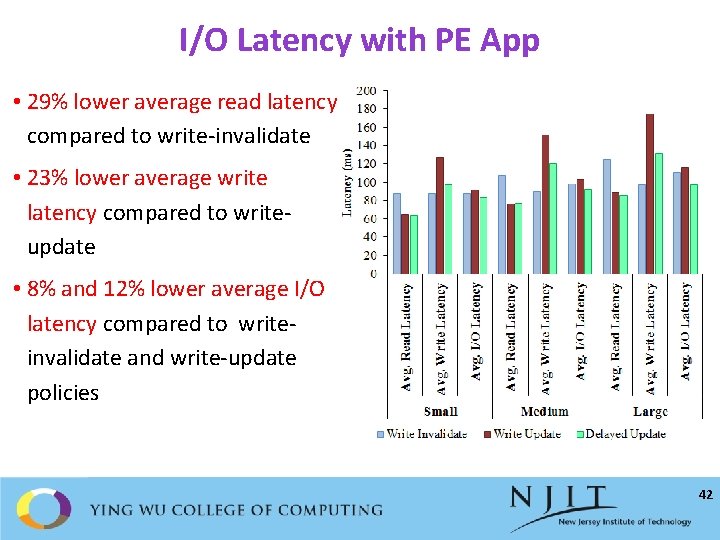
I/O Latency with PE App • 29% lower average read latency compared to write-invalidate • 23% lower average write latency compared to writeupdate • 8% and 12% lower average I/O latency compared to writeinvalidate and write-update policies 42
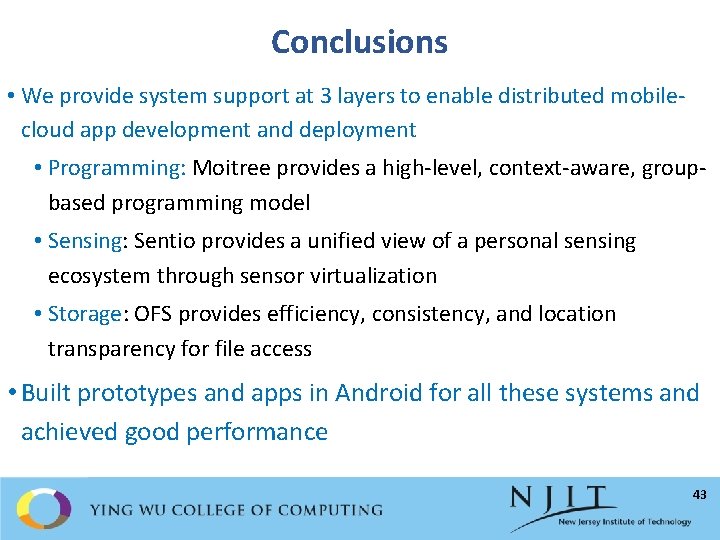
Conclusions • We provide system support at 3 layers to enable distributed mobilecloud app development and deployment • Programming: Moitree provides a high-level, context-aware, groupbased programming model • Sensing: Sentio provides a unified view of a personal sensing ecosystem through sensor virtualization • Storage: OFS provides efficiency, consistency, and location transparency for file access • Built prototypes and apps in Android for all these systems and achieved good performance 43
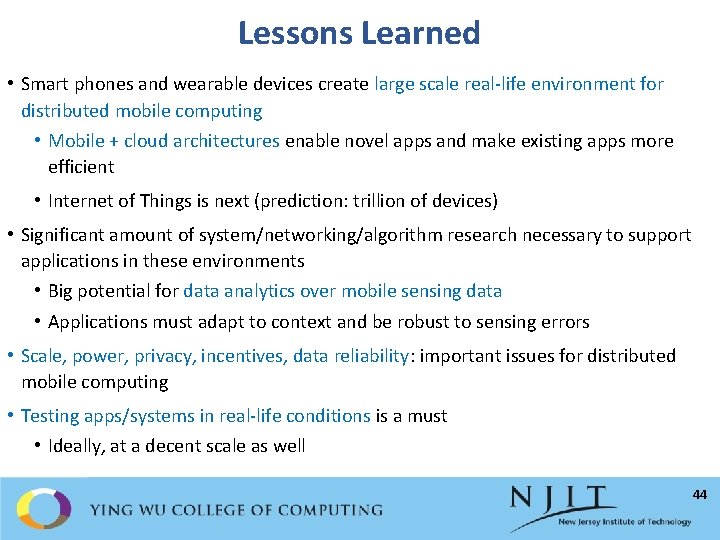
Lessons Learned • Smart phones and wearable devices create large scale real-life environment for distributed mobile computing • Mobile + cloud architectures enable novel apps and make existing apps more efficient • Internet of Things is next (prediction: trillion of devices) • Significant amount of system/networking/algorithm research necessary to support applications in these environments • Big potential for data analytics over mobile sensing data • Applications must adapt to context and be robust to sensing errors • Scale, power, privacy, incentives, data reliability: important issues for distributed mobile computing • Testing apps/systems in real-life conditions is a must • Ideally, at a decent scale as well 44
Thanks! http: //cs. njit. edu/~borcea/ • Acknowledgment: • NSF Grants No. CNS 1409523 and DGE 1565478 • Students: Hillol Debnath, Nafize Paiker, Mohammad Khan, Jianchen Shan, and Pradyumna Neog • Colleagues: Reza Curtmola, Xiaoning Ding, Narain Gehani
- Slides: 45