
Distributed Cloud Computing Course Instructor Babu Ram Dawadi
Distributed & Cloud Computing Course Instructor: Babu Ram Dawadi Unit 1: Introduction. 10 Hrs Understanding distributed system and its goals, Hardware, Software concepts and design issues of distributed system, Concepts of cloud computing, Cloud Architecture, SAAS, PAAS, IAAS and others, Organizational Scenarios of Clouds, Types of Clouds: Private, Public & Hybrid, Comparing the various cloud architectures, Benefits and Limitations of Clouds, Challenges of Cloud Computing. 1
Defining Distributed Systems § Various definition of distributed systems have been given in the literature, for example: Ø A collection of logically related data that is distributed over different processing nodes of computer network. § Definition above does not provide all characteristics of distributed systems. 2
Defining Distributed Systems § It is difficult to find a definition that provides all characteristics of distributed systems. § Another way is a definition that gives a loose characterization for distributed systems such as: Ø A distributed system is a collection of independent computers that appear to the users of the system as a single computer. § With any definition, sharing of resources is a main motivation for constructing distributed systems. 3
Defining Distributed Systems § In this course, we define distributed systems more precisely as : Ø A distributed system is one in which hardware or software components located at networked computers communicate and coordinate their actions only by message passing. § Definition above covers the entire range of distributed systems in which networked computers can usefully be deployed. 4

Defining Distributed Systems § Networks of computers are everywhere! § Examples of networks of computers are: Ø Mobile phone networks Ø Corporate networks Ø Factory networks Ø Campus networks Ø Home networks Ø In-car networks Ø On board networks in aero planes and trains 5
Defining Distributed Systems § Our definition of distributed systems has the following significant consequences: Ø Concurrency v Tasks carry out independently Ø No global clock v Tasks coordinate their actions by exchanging messages 6
Defining Distributed Systems Ø Independent Failures v Faults in the network result in the isolation of the computers that are connected to it. v Each component of the system can fail independently, leaving the others still running. 7

Design Challenges of Distributed Systems n Designers of distributed systems need to take the following challenges into account: Ø Heterogeneity v Heterogeneous components must be able to interoperate. Ø Openness v Interfaces should allow components to be added or replaced. Ø Security v The system should only be used in the way intended. 8
Design Challenges of Distributed Systems Ø Scalability v System should work efficiently with an increasing number of users. v System performance should increase with inclusion of additional resources. Ø Failure handling v Failure of a component (partial failure) should not result in failure of the whole system. Ø Transparency v Distribution should be hidden from the user as much as possible. 9
Heterogeneity § Heterogeneous components that must be able to interoperate, apply to all of the following: Ø Networks Ø Hardware architectures Ø Operating systems Ø Programming languages 10
Heterogeneity § Examples that mask differences in network, operating systems, hardware and software to provide heterogeneity are Ø Middleware Ø Internet protocols Ø Mobile code 11
CHARACTERIZATION OF DISTRIBUTED SYSTEMS Heterogeneity Ø Middleware v Middleware applies to a software layer. v Middleware provides a programming abstraction. v Middleware masks the heterogeneity of the underlying networks, hardware, operating systems and programming languages. v The Common Object Request Broker (CORBA) is a middleware example. 12
Heterogeneity Ø Mobile code v Mobile code is the code that can be sent from one computer to another and run at the destination. v Java applets are the example of mobile codes. Ø Virtual machine/Container v Virtual machine provides a way of making code executable on any hardware. 13
Openness § Distributed systems must be extensible. § Openness of a computer system is the characteristic that determines whether the system can be extended and re-implemented in various ways. § The first step in openness is publishing the documentation of software components and interfaces of the components to make them available to software developers 14
Security § Security of a computer system is the characteristic that the resources are accessible to authorized users and used in the way they are intended. § Security for information resources has three components: Ø Confidentiality v Protection against disclosure to unauthorized individual. 15
Security Ø Integrity v Protection against alteration or corruption. Ø Authenticity v Protection against interference with the means to access the resources. § Security Mechanisms are: Ø Encryption Ø Authentication Ø Authorization 16
Scalability § Scalable distributed systems operate effectively and efficiently at many different scales, ranging from a small Intranet to the Internet. § Scalable distributed systems remain effective when there is a significant increase in the number of resources and the number of users. 17
Scalability § Challenges of designing scalable distributed systems are: Ø Controlling the cost of physical resources v Cost should linearly increase with the system size. Ø Controlling the performance loss v For example, in hierarchically structured data, search performance loss due to data growth should not be beyond O(log n), where n is the size of data. 18
Scalability Ø Preventing software resources running out v An example is the numbers used as Internet addresses (IP)(32 bit->128 -bit) v Y 2 K like problem. Ø Avoiding performance bottlenecks v Using decentralized algorithms to avoid having performance bottlenecks. § Caching and replication in Web are examples of providing scalability. 19
Failure handling § Failures in distributed systems are partial, that is some components fail while others continue to function. § Techniques for dealing with failures: Ø Detecting failures v E. g. Checksums Ø Masking failures v E. g. Retransmission of corrupt messages v E. g. File redundancy 20
Failure handling Ø Tolerating failures v E. g. Exception handling v E. g. Timeouts Ø Recovery from Failure v E. g. Rollback mechanisms Ø Redundancy v E. g. Redundant components 21
Concurrency § With concurrency, services and applications can be shared by clients in a distributed system. § For an object to be safe in a concurrent environment, its operations must be synchronized in such a way that its data remains consistent. § Concurrency can be achieved by standard techniques such as semaphores, which are used in most operating systems. 22
Transparency § Transparency is defined as the hiding of the separation of components in a distributed systems from the user and the application programmer. § With transparency the system is perceived as a whole rather than a collection of independent components. 23
Transparency § Forms of transparencies: Ø Access transparency v Enables local and remote resources to be accessed using identical operations. Ø Location transparency v Enables resources to be accessed without knowledge of their physical or network location (for example, which building or IP address). 24
Transparency Ø Concurrency transparency v Enables several processes to operate concurrently using shared resources without interference between them. Ø Replication transparency v Enables multiple instances of resources to be used to increase reliability and performance without knowledge of the replicas by users or application programmers. 25
Transparency Ø Failure transparency v Enables the concealment of faults, allowing users and application programs to complete their tasks despite the failure of hardware or software components. Ø Mobility transparency v Allows the movement of resources and clients within a system without affecting the operation of users or programs. 26
Transparency Ø Performance transparency v Allows the system to be reconfigured to improve performance as loads vary. Ø Scaling transparency v Allows the system and applications to expand in scale without change to the system structure or the application algorithms. 27
Cloud Computing Overview Credit: http: //ntcap. nic. in/Cloudarc 01. ppt, Mark Baker 28
What is Cloud Computing? § Cloud Computing is a general term used to describe a new class of network based computing that takes place over the Internet, Ø basically a step on from Utility Computing Ø a collection/group of integrated and networked hardware, software and Internet infrastructure (called a platform). Ø Using the Internet for communication and transport provides hardware, software and networking services to clients § These platforms hide the complexity and details of the underlying infrastructure from users and applications by providing very simple graphical interface or API (Applications Programming Interface). 29
What is Cloud Computing? § In addition, the platform provides on demand services, that are always on, anywhere, anytime and any place. § Pay for use and as needed, elastic Ø scale up and down in capacity and functionalities § The hardware and software services are available to Ø general public, enterprises, corporations and businesses markets 30
Cloud Computing… § High performance networks and advanced development of internet is the basis for cloud computing. § Cloud computing has started taking shape incorporating virtualization and on demand deployment and internet delivery of services. 31
Cloud Computing… § Cloud is a pool of virtualized computer resources networked, which can: Ø Host a variety of workloads. Ø Batch-style back-end jobs. Ø Interactive user-facing applications. Ø Workloads can be deployed and scaled out quickly through the rapid provisioning of virtual machines or physical machines. Ø Support redundant, self recovering, highly scalable programming models that allow workloads to recover from many unavoidable hardware / software failures. Ø Monitor resource use in real time to enable rebalancing of allocations when needed. 32
Cloud Computing… § Cloud computing is an umbrella term used to refer to Internet based development and services § A number of characteristics define cloud data, applications services and infrastructure: Ø Remotely hosted: Services or data are hosted on remote infrastructure. Ø Ubiquitous: Services or data are available from anywhere. Ø Commoditized: The result is a utility computing model similar to traditional that of traditional utilities, like gas and electricity - you pay for what you would want! 33
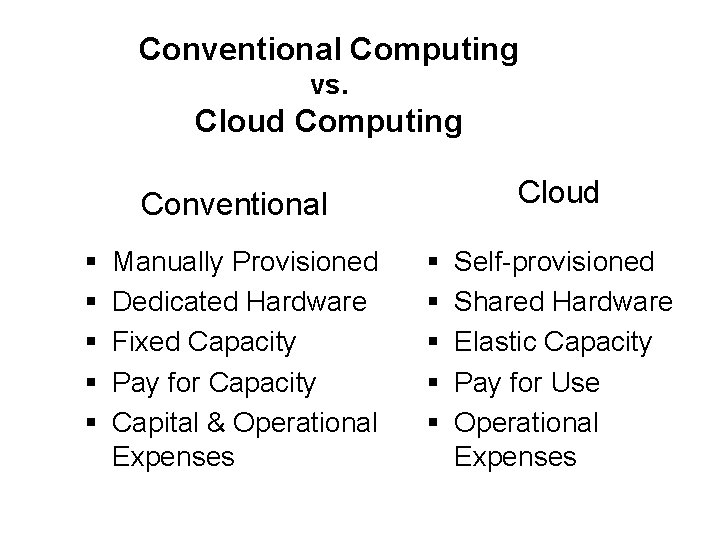
Conventional Computing vs. Cloud Computing Cloud Conventional § § § Manually Provisioned Dedicated Hardware Fixed Capacity Pay for Capacity Capital & Operational Expenses § § § Self-provisioned Shared Hardware Elastic Capacity Pay for Use Operational Expenses
Basic Cloud Characteristics § The “no-need-to-know” in terms of the underlying details of infrastructure, applications interface with the infrastructure via the APIs. § The “flexibility and elasticity” allows these systems to scale up and down at will Ø utilising the resources of all kinds v CPU, storage, server capacity, load balancing, and databases § The “pay as much as used and needed” type of utility computing and the “always on!, anywhere and any place” type of network-based computing. 35
Basic Cloud Characteristics § Clouds are transparent to users and applications, they can be built in multiple ways Ø branded products, proprietary open source, hardware or software, or just off-the-shelf PCs. § In general, they are built on clusters of PC servers and off-the-shelf components plus Open Source software combined with in-house applications and/or system software. 36
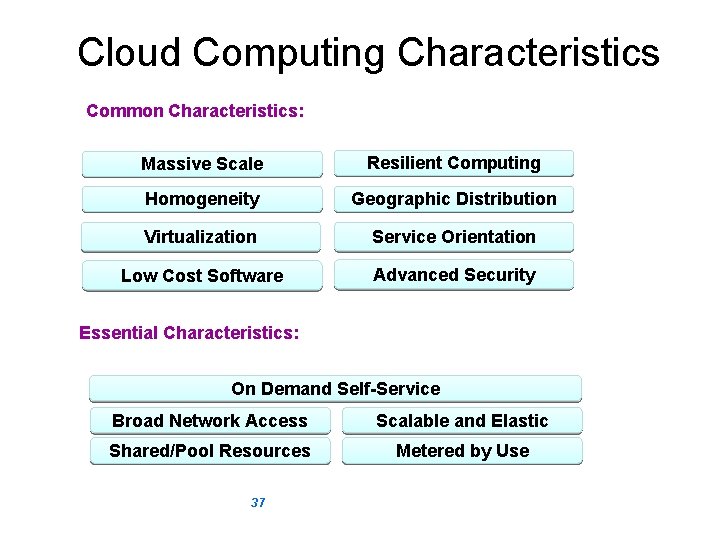
Cloud Computing Characteristics Common Characteristics: Massive Scale Resilient Computing Homogeneity Geographic Distribution Virtualization Service Orientation Low Cost Software Advanced Security Essential Characteristics: On Demand Self-Service Broad Network Access Scalable and Elastic Shared/Pool Resources Metered by Use 37 Adopted from: Effectively and Securely Using the Cloud Computing Paradigm by peter Mell, Tim Grance
Shared / Pooled Resources: § Resources are drawn from a common pool § Common resources build economies of scale § Common infrastructure runs at high efficiency Broad Network Access: § Open standards and APIs § Almost always IP, HTTP, and REST § Available from anywhere with an internet connection
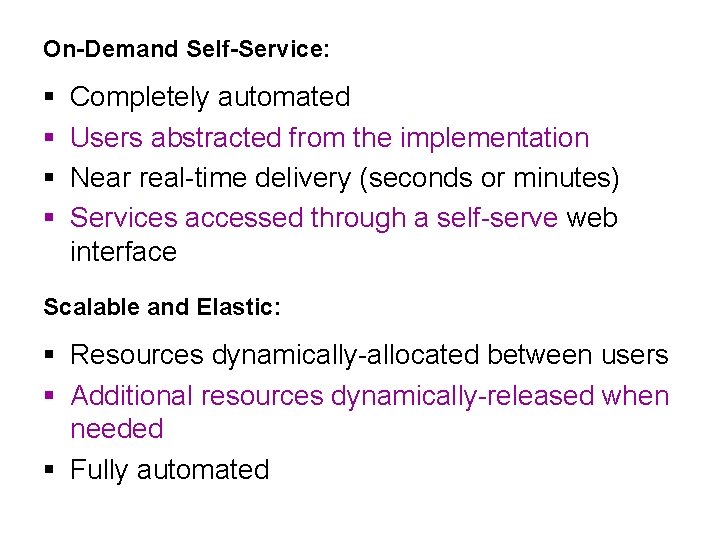
On-Demand Self-Service: § § Completely automated Users abstracted from the implementation Near real-time delivery (seconds or minutes) Services accessed through a self-serve web interface Scalable and Elastic: § Resources dynamically-allocated between users § Additional resources dynamically-released when needed § Fully automated
Metered by Use: § Services are metered, like a utility § Users pay only for services used § Services can be cancelled at any time
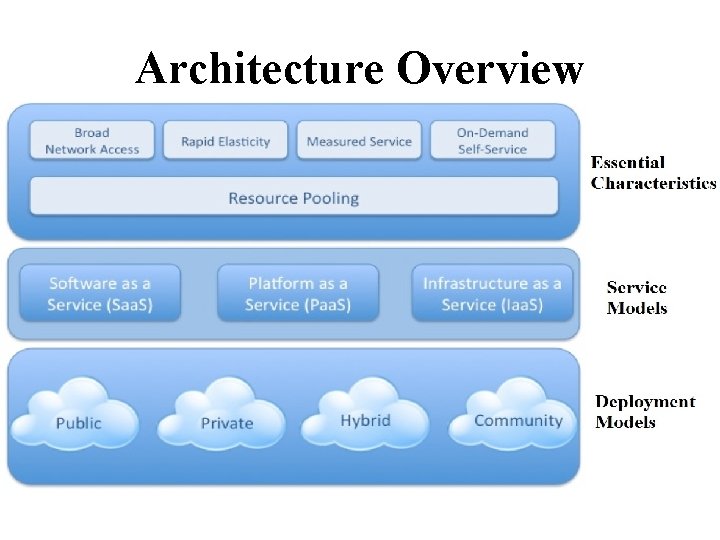
Architecture Overview
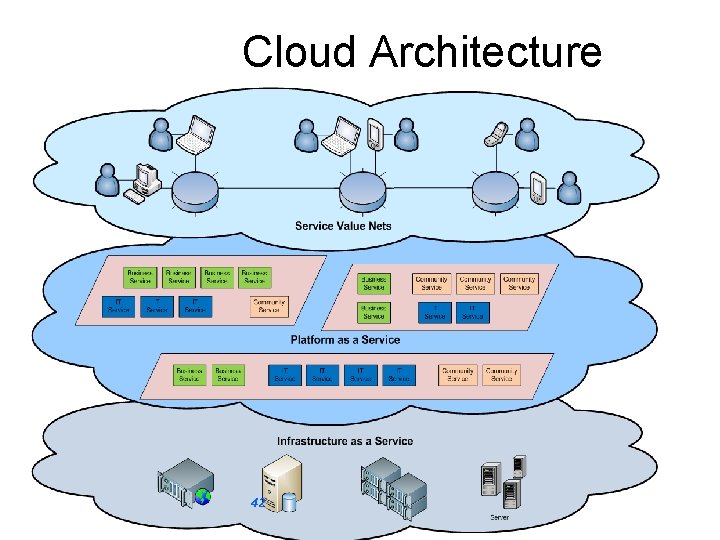
Cloud Architecture 42
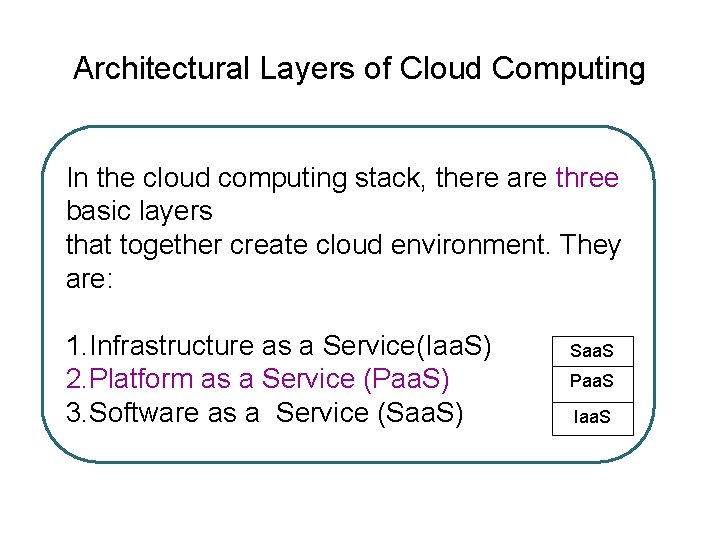
Architectural Layers of Cloud Computing In the cloud computing stack, there are three basic layers that together create cloud environment. They are: 1. Infrastructure as a Service(Iaa. S) 2. Platform as a Service (Paa. S) 3. Software as a Service (Saa. S) Saa. S Paa. S Iaa. S
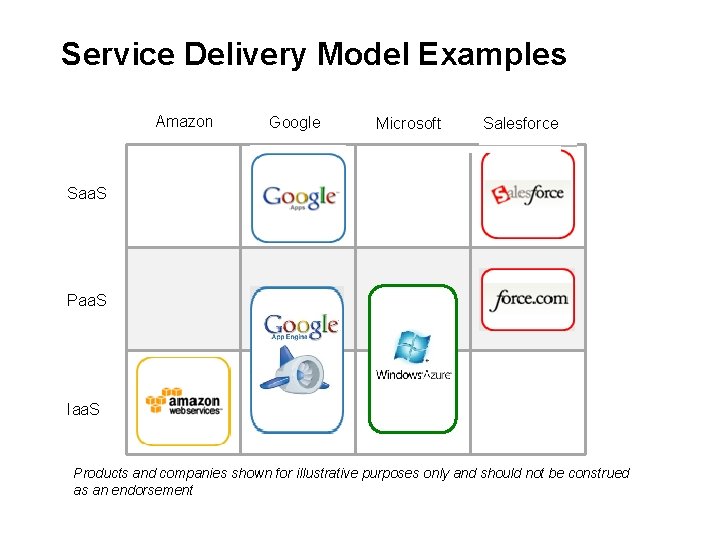
Service Delivery Model Examples Amazon Google Microsoft Salesforce Saa. S Paa. S Iaa. S Products and companies shown for illustrative purposes only and should not be construed as an endorsement
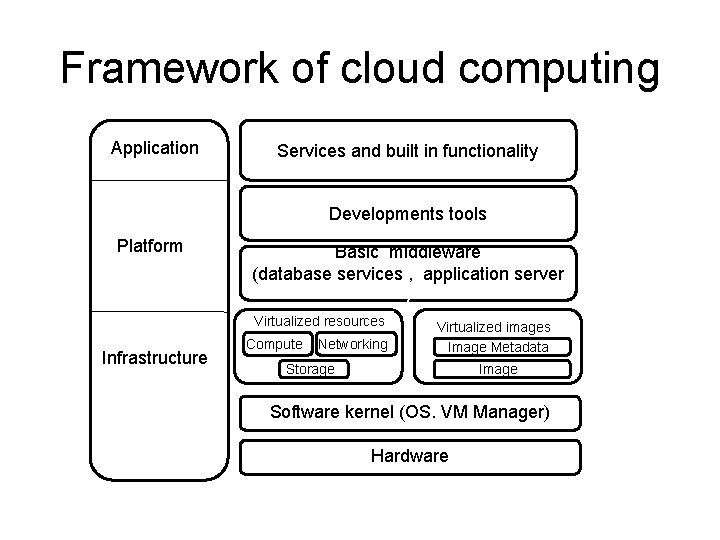
Framework of cloud computing Application Services and built in functionality Developments tools Platform Basic middleware (database services , application server ) Virtualized resources Infrastructure Compute Networking Virtualized images Image Metadata Storage Image Software kernel (OS. VM Manager) Hardware
Virtual infrastructure management and Cloud Computing ØFor building the cloud environment a variety of requirements must be met to provide a uniform and homogeneous view of the virtualized resources. ØVirtual Infrastructure Management is the key component to build the cloud environment which does the dynamic orchestration of virtual machines on a pool of physical resources. ØVirtual infrastructure management provide primitives to schedule and manage VMs across multiple physical hosts ØCloud management provide remote and secure interface for creating controlling and monitoring virtualized resources on Iaa. S
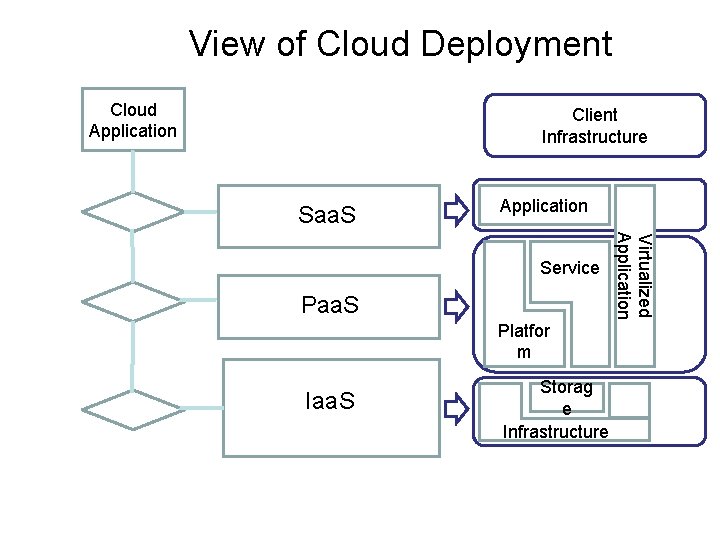
View of Cloud Deployment Cloud Application Client Infrastructure Saa. S Application Paa. S Platfor m Iaa. S Storag e Infrastructure Virtualized Application Service
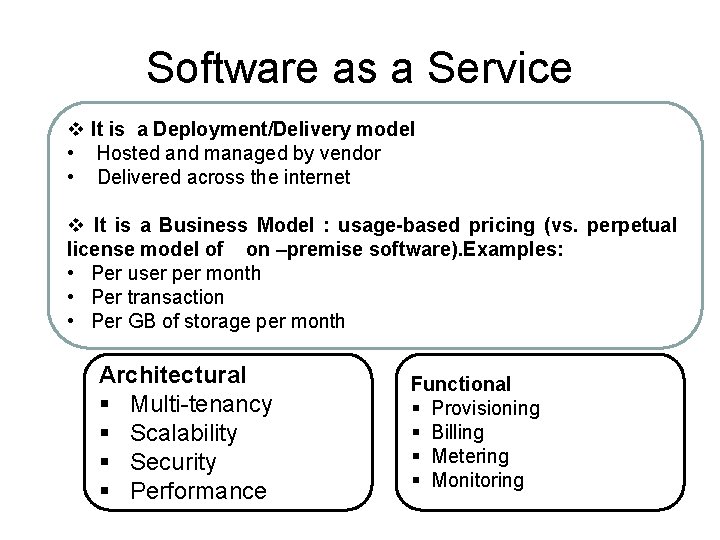
Software as a Service v It is a Deployment/Delivery model • Hosted and managed by vendor • Delivered across the internet v It is a Business Model : usage-based pricing (vs. perpetual license model of on –premise software). Examples: • Per user per month • Per transaction • Per GB of storage per month Architectural § Multi-tenancy § Scalability § Security § Performance Functional § Provisioning § Billing § Metering § Monitoring
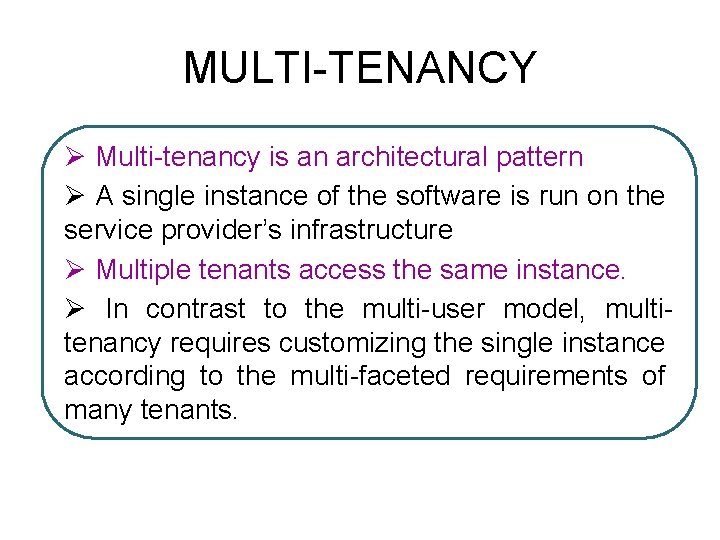
MULTI-TENANCY Ø Multi-tenancy is an architectural pattern Ø A single instance of the software is run on the service provider’s infrastructure Ø Multiple tenants access the same instance. Ø In contrast to the multi-user model, multitenancy requires customizing the single instance according to the multi-faceted requirements of many tenants.
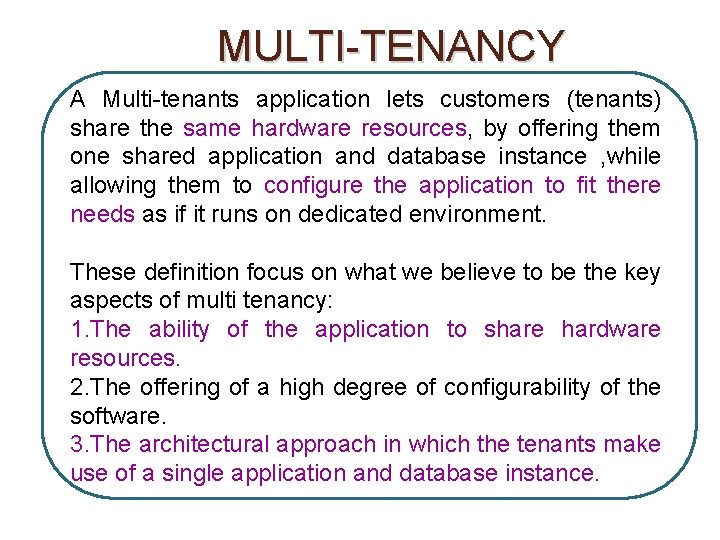
MULTI-TENANCY A Multi-tenants application lets customers (tenants) share the same hardware resources, by offering them one shared application and database instance , while allowing them to configure the application to fit there needs as if it runs on dedicated environment. These definition focus on what we believe to be the key aspects of multi tenancy: 1. The ability of the application to share hardware resources. 2. The offering of a high degree of configurability of the software. 3. The architectural approach in which the tenants make use of a single application and database instance.
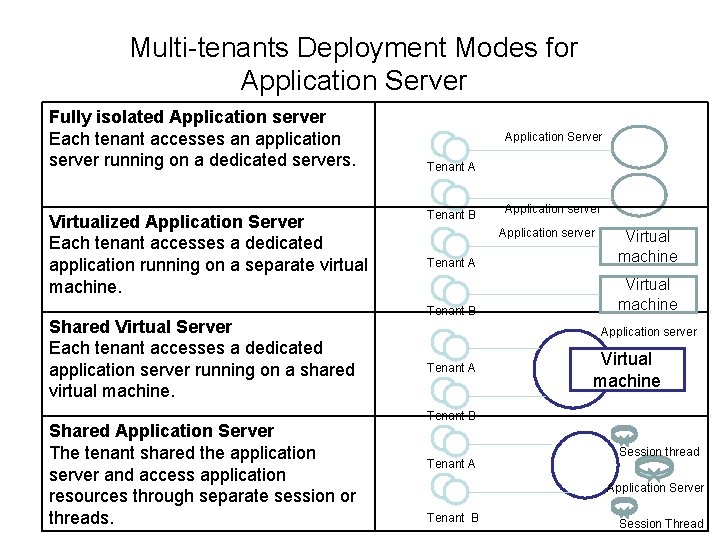
Multi-tenants Deployment Modes for Application Server Fully isolated Application server Each tenant accesses an application server running on a dedicated servers. Virtualized Application Server Each tenant accesses a dedicated application running on a separate virtual machine. Shared Virtual Server Each tenant accesses a dedicated application server running on a shared virtual machine. Shared Application Server The tenant shared the application server and access application resources through separate session or threads. Application Server Tenant A Tenant B Application server Tenant A Virtual machine Tenant B Virtual machine Application server Tenant A Virtual machine Tenant B Tenant A Session thread Application Server Tenant B Session Thread
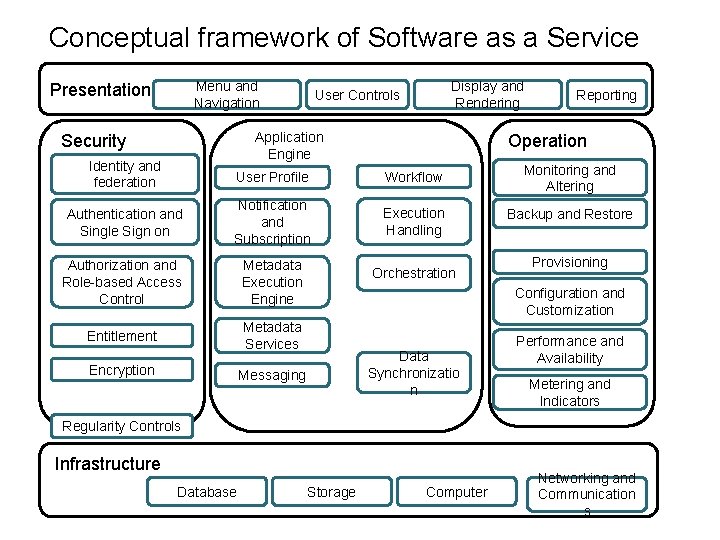
Conceptual framework of Software as a Service Menu and Navigation Presentation Display and Rendering User Controls Application Engine Security Operation Identity and federation User Profile Workflow Authentication and Single Sign on Notification and Subscription Execution Handling Authorization and Role-based Access Control Metadata Execution Engine Entitlement Metadata Services Encryption Reporting Orchestration Monitoring and Altering Backup and Restore Provisioning Configuration and Customization Data Synchronizatio n Messaging Performance and Availability Metering and Indicators Regularity Controls Infrastructure Database Storage Computer Networking and Communication s
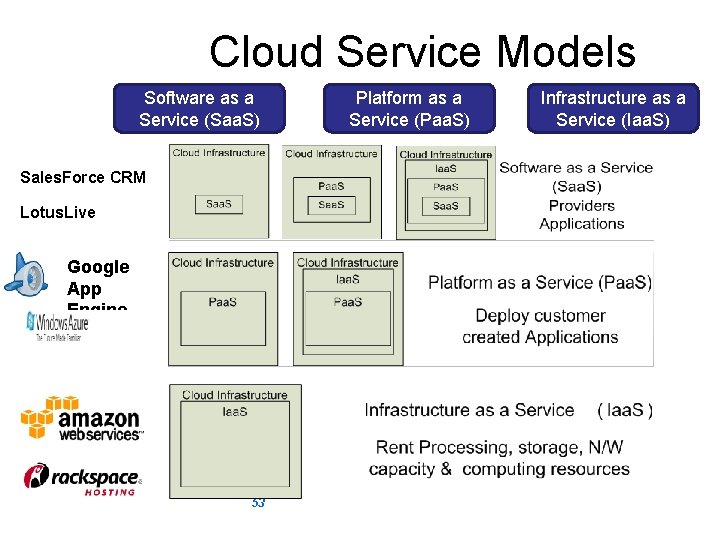
Cloud Service Models Software as a Service (Saa. S) Platform as a Service (Paa. S) Sales. Force CRM Lotus. Live Google App Engine 53 Adopted from: Effectively and Securely Using the Cloud Computing Paradigm by peter Mell, Tim Grance Infrastructure as a Service (Iaa. S)
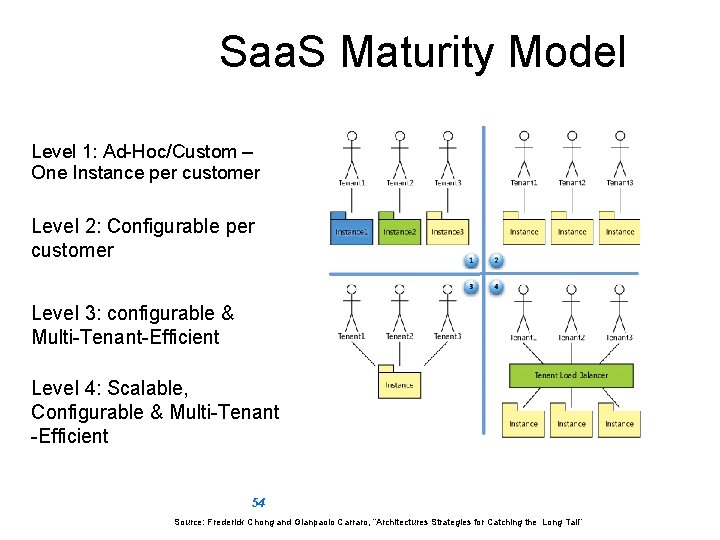
Saa. S Maturity Model Level 1: Ad-Hoc/Custom – One Instance per customer Level 2: Configurable per customer Level 3: configurable & Multi-Tenant-Efficient Level 4: Scalable, Configurable & Multi-Tenant -Efficient 54 Source: Frederick Chong and Gianpaolo Carraro, “Architectures Strategies for Catching the Long Tail”
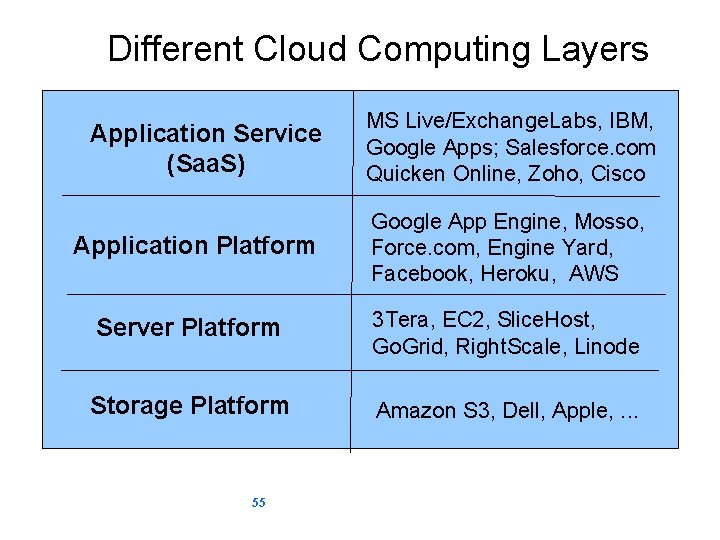
Different Cloud Computing Layers Application Service (Saa. S) MS Live/Exchange. Labs, IBM, Google Apps; Salesforce. com Quicken Online, Zoho, Cisco Application Platform Google App Engine, Mosso, Force. com, Engine Yard, Facebook, Heroku, AWS Server Platform 3 Tera, EC 2, Slice. Host, Go. Grid, Right. Scale, Linode Storage Platform Amazon S 3, Dell, Apple, . . . 55
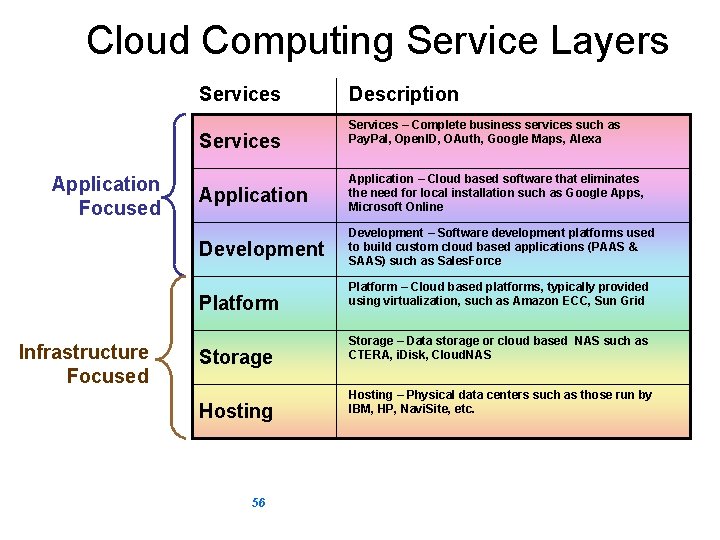
Cloud Computing Service Layers Services Application Focused Services – Complete business services such as Pay. Pal, Open. ID, OAuth, Google Maps, Alexa Application – Cloud based software that eliminates the need for local installation such as Google Apps, Microsoft Online Development – Software development platforms used to build custom cloud based applications (PAAS & SAAS) such as Sales. Force Platform Infrastructure Focused Description Storage Hosting 56 Platform – Cloud based platforms, typically provided using virtualization, such as Amazon ECC, Sun Grid Storage – Data storage or cloud based NAS such as CTERA, i. Disk, Cloud. NAS Hosting – Physical data centers such as those run by IBM, HP, Navi. Site, etc.
Software as a Service (Saa. S) § Saa. S is a model of software deployment where an application is hosted as a service provided to customers across the Internet. § Saas alleviates the burden of software maintenance/support Ø but users relinquish control over software versions and requirements. § Terms that are used in this sphere include Ø Platform as a Service (Paa. S) and Ø Infrastructure as a Service (Iaa. S) 57

Virtualization § Virtual workspaces: Ø An abstraction of an execution environment that can be made dynamically available to authorized clients by using well-defined protocols, Ø Resource quota (e. g. CPU, memory share), Ø Software configuration (e. g. O/S, provided services). § Implement on Virtual Machines (VMs): Ø Abstraction of a physical host machine, Ø Hypervisor intercepts and emulates instructions from VMs, and allows management of VMs, App § Provide infrastructure API: Ø Plug-ins to hardware/support structures OS OS App OS Hypervisor Hardware Virtualized Stack
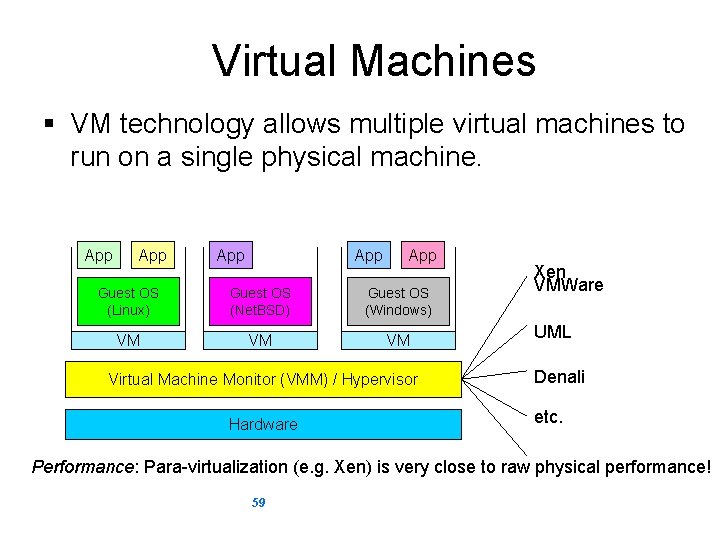
Virtual Machines § VM technology allows multiple virtual machines to run on a single physical machine. App App App Guest OS (Linux) Guest OS (Net. BSD) Guest OS (Windows) VM VM VM Virtual Machine Monitor (VMM) / Hypervisor Hardware Xen VMWare UML Denali etc. Performance: Para-virtualization (e. g. Xen) is very close to raw physical performance! 59
What is the purpose and benefits? § Cloud computing enables companies and applications, which are system infrastructure dependent, to be infrastructure-less. § By using the Cloud infrastructure on “pay as used and on demand”, all of us can save in capital and operational investment! § Clients can: Ø Put their data on the platform instead of on their own desktop PCs and/or on their own servers. Ø They can put their applications on the cloud and use the servers within the cloud to do processing and data manipulations etc. 60
Cloud-Sourcing § Why is it becoming a Big Deal: Ø Using high-scale/low-cost providers, Ø Any time/place access via web browser, Ø Rapid scalability; incremental cost and load sharing, Ø Can forget need to focus on local IT. § Concerns: Ø Performance, reliability, and SLAs, Ø Control of data, and service parameters, Ø Application features and choices, Ø Interaction between Cloud providers, Ø No standard API – mix of SOAP and REST! Ø Privacy, security, compliance, trust… 61
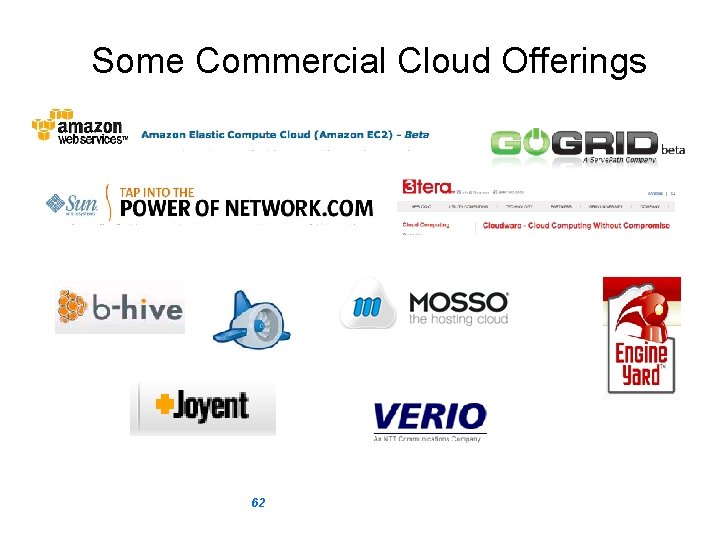
Some Commercial Cloud Offerings 62
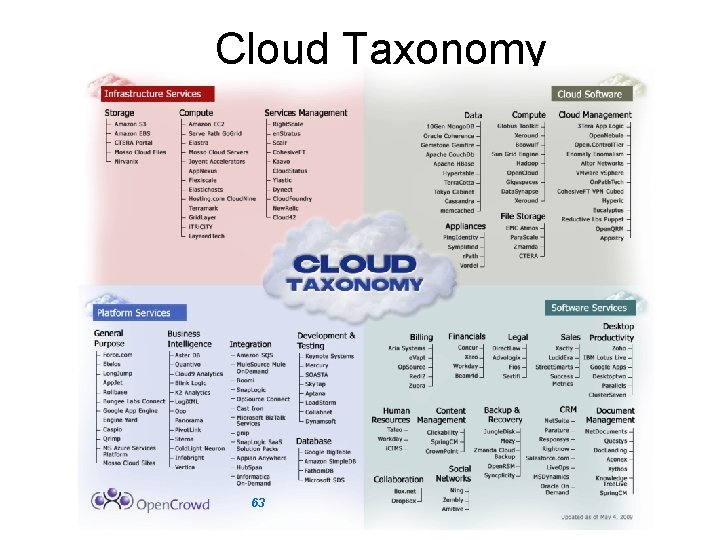
Cloud Taxonomy 63
Cloud Storage § Several large Web companies are now exploiting the fact that they have data storage capacity that can be hired out to others. Ø allows data stored remotely to be temporarily cached on desktop computers, mobile phones or other Internet-linked devices. § Amazon’s Elastic Compute Cloud (EC 2) and Simple Storage Solution (S 3) are well known examples 64
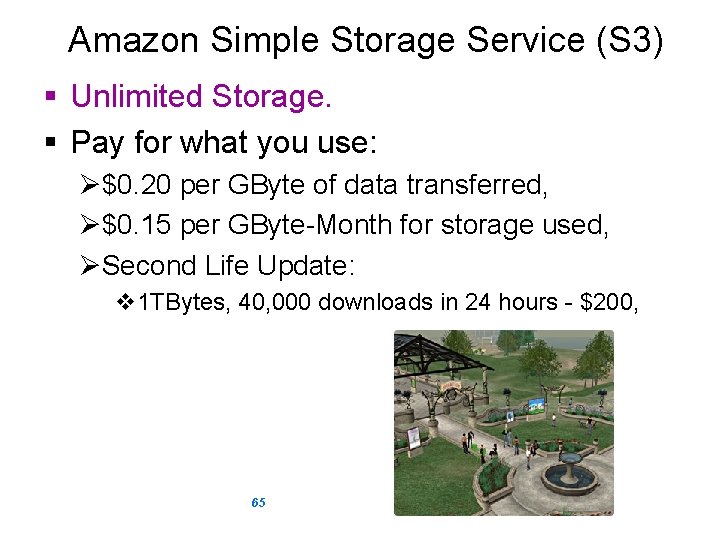
Amazon Simple Storage Service (S 3) § Unlimited Storage. § Pay for what you use: Ø$0. 20 per GByte of data transferred, Ø$0. 15 per GByte-Month for storage used, ØSecond Life Update: v 1 TBytes, 40, 000 downloads in 24 hours - $200, 65
Utility Computing – EC 2 § Amazon Elastic Compute Cloud (EC 2): Ø Elastic, marshal 1 to 100+ PCs via WS, Ø Machine Specs…, Ø Fairly cheap! § Powered by Xen – a Virtual Machine: Ø Different from Vmware and VPC as uses “para-virtualization” where the guest OS is modified to use special hyper-calls: Ø Supports “Live Migration” of a virtual machine between hosts. § Linux, Windows, Open. Solaris § Management Console/AP 66
EC 2 – The Basics § Load your image onto S 3 and register it. § Boot your image from the Web Service. § Open up required ports for your image. § Connect to your image through SSH. § Execute you application… 67
Opportunities and Challenges § The use of the cloud provides a number of opportunities: Ø It enables services to be used without any understanding of their infrastructure. Ø Cloud computing works using economies of scale: v. It potentially lowers the outlay expense for start up companies, as they would no longer need to buy their own software or servers. v. Cost would be by on-demand pricing. v. Vendors and Service providers claim costs by establishing an ongoing revenue stream. Ø Data and services are stored remotely but accessible from “anywhere”. 68
Opportunities and Challenges § In parallel there has been backlash against cloud computing: Ø Use of cloud computing means dependence on others and that could possibly limit flexibility and innovation: v The others are likely become the bigger Internet companies like Google and IBM, who may monopolise the market. v Some argue that this use of supercomputers is a return to the time of mainframe computing that the PC was a reaction against. Ø Security could prove to be a big issue: v It is still unclear how safe out-sourced data is and when using these services ownership of data is not always clear. Ø There also issues relating to policy and access: v If your data is stored abroad whose policy do you adhere to? v What happens if the remote server goes down? v How will you then access files? v There have been cases of users being locked out of accounts and 69 losing access to data.
Advantages of Cloud Computing § Lower computer costs: Ø You do not need a high-powered and high-priced computer to run cloud computing web-based applications. Ø Since applications run in the cloud, not on the desktop PC, your desktop PC does not need the processing power or hard disk space demanded by traditional desktop software. Ø When you are using web-based applications, your PC can be less expensive, with a smaller hard disk, less memory, more efficient processor. . . Ø In fact, your PC in this scenario does not even need a CD or DVD drive, as no software programs have to be loaded and no document files need to be saved. 70
Advantages of Cloud Computing § Improved performance: Ø With few large programs hogging your computer's memory, you will see better performance from your PC. Ø Computers in a cloud computing system boot and run faster because they have fewer programs and processes loaded into memory… § Reduced software costs: Ø Instead of purchasing expensive software applications, you can get most of what you need for free-ish! v most cloud computing applications today, such as the Google Docs suite. Ø better than paying for similar commercial software v which alone may be justification for switching to cloud applications. 71
Advantages of Cloud Computing § Instant software updates: Ø Another advantage to cloud computing is that you are no longer faced with choosing between obsolete software and high upgrade costs. Ø When the application is web-based, updates happen automatically v available the next time you log into the cloud. Ø When you access a web-based application, you get the latest version v without needing to pay for or download an upgrade. § Improved document format compatibility. Ø You do not have to worry about the documents you create on your machine being compatible with other users' applications or OSes Ø There are potentially no format incompatibilities when everyone is sharing documents and applications in the cloud. 72
Advantages of Cloud Computing § Unlimited storage capacity: Ø Cloud computing offers virtually limitless storage. Ø Your computer's current 1 Tbyte hard drive is small compared to the hundreds of Pbytes available in the cloud. § Increased data reliability: Ø Unlike desktop computing, in which if a hard disk crashes and destroy all your valuable data, a computer crashing in the cloud should not affect the storage of your data. v if your personal computer crashes, all your data is still out there in the cloud, still accessible Ø In a world where few individual desktop PC users back up their data on a regular basis, cloud computing is a data-safe computing platform! 73
Advantages of Cloud Computing § Universal document access: Ø That is not a problem with cloud computing, because you do not take your documents with you. Ø Instead, they stay in the cloud, and you can access them whenever you have a computer and an Internet connection Ø Documents are instantly available from wherever you are § Latest version availability: Ø When you edit a document at home, that edited version is what you see when you access the document at work. Ø The cloud always hosts the latest version of your documents v as long as you are connected, you are not in danger of having an outdated version 74
Advantages of Cloud Computing § Easier group collaboration: Ø Sharing documents leads directly to better collaboration. Ø Many users do this as it is an important advantages of cloud computing v multiple users can collaborate easily on documents and projects § Device independence. Ø Changes to computers, applications and documents follow you through the cloud. Ø Move to a portable device, and your applications and documents are still available. 75
Disadvantages of Cloud Computing § Requires a constant Internet connection: Ø Cloud computing is impossible if you cannot connect to the Internet. Ø Since you use the Internet to connect to both your applications and documents, if you do not have an Internet connection you cannot access anything, even your own documents. Ø A dead Internet connection means no work and in areas where Internet connections are few or inherently unreliable, this could be a deal-breaker. 76
Disadvantages of Cloud Computing § Does not work well with low-speed connections: Ø Similarly, a low-speed Internet connection, such as that found with dial-up services, makes cloud computing painful at best and often impossible. Ø Web-based applications require a lot of bandwidth to download, as do large documents. § Features might be limited: Ø This situation is bound to change, but today many web-based applications simply are not as full-featured as their desktopbased applications. v For example, you can do a lot more with Microsoft Power. Point than with Google Presentation's web-based offering 77
Disadvantages of Cloud Computing § Can be slow: Ø Even with a fast connection, web-based applications can sometimes be slower than accessing a similar software program on your desktop PC. Ø Everything about the program, from the interface to the current document, has to be sent back and forth from your computer to the computers in the cloud. Ø If the cloud servers happen to be backed up at that moment, or if the Internet is having a slow day, you would not get the instantaneous access you might expect from desktop applications. 78
Disadvantages of Cloud Computing § Stored data might not be secure: Ø With cloud computing, all your data is stored on the cloud. v. The questions is How secure is the cloud? Ø Can unauthorised users gain access to your confidential data? § Stored data can be lost: Ø Theoretically, data stored in the cloud is safe, replicated across multiple machines. Ø But on the off chance that your data goes missing, you have no physical or local backup. v. Put simply, relying on the cloud puts you at risk if the cloud lets you down. 79
Disadvantages of Cloud Computing § HPC Systems: Ø Not clear that you can run compute-intensive HPC applications Ø Scheduling is important with this type of application v as you want all the VM to be co-located to minimize communication latency! § General Concerns: Ø Each cloud systems uses different protocols and different APIs v may not be possible to run applications between cloud based systems Ø Amazon has created its own DB system (not SQL 92), and workflow system (many popular workflow systems out there) v so your normal applications will have to be adapted to execute on these platforms. 80
Advantages and Disadvantages: Summary § Advantages Ø Ø Ø § Disadvantages Ø Lower computer cost Improved performance Ø Reduced software cost Instant software update Ø Improved doc. Format Ø compatibility Unlimited capacity Increased data reliability Universal doc. Access Version control and availability Easy group collaboration Portability, device independence Requires const. internet connection Bad performance with low speed connection Limited features Security and data loss issues 81
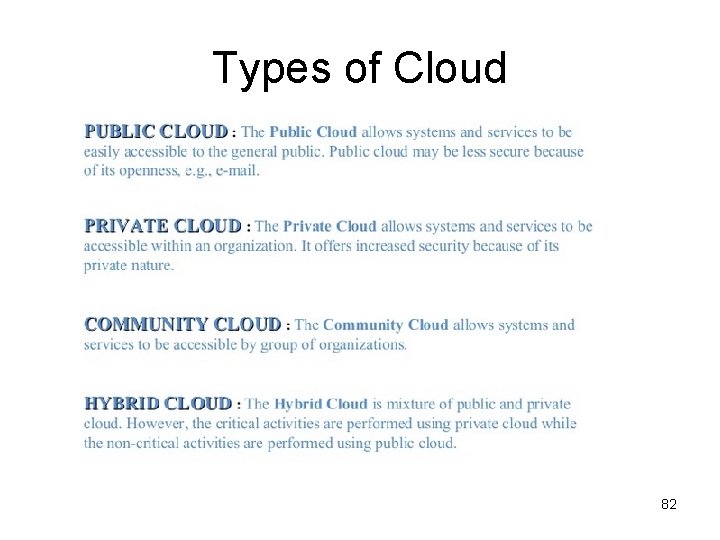
Types of Cloud 82
Public Cloud § A public cloud is one in which the services and infrastructure are provided off-site over the Internet. These clouds offer the greatest level of efficiency in shared resources; however, they are also more vulnerable than private clouds. A public cloud is the obvious choice when § Your standardized workload for applications is used by lots of people, such as e-mail. § You need to test and develop application code. § You have Saa. S (Software as a Service) applications from a vendor who has a well-implemented security strategy. § You need incremental capacity (the ability to add computer capacity for peak times). § You’re doing collaboration projects. § You’re doing an ad-hoc software development project using a Platform as a Service (Paa. S) offering cloud. 83
Private Cloud § A private cloud is one in which the services and infrastructure are maintained on a private network. These clouds offer the greatest level of security and control, but they require the company to still purchase and maintain all the software and infrastructure, which reduces the cost savings. A private cloud is the obvious choice when § Your business is your data and your applications. Therefore, control and security are paramount. § Your business is part of an industry that must conform to strict security and data privacy issues. § Your company is large enough to run a next generation cloud data center efficiently and effectively on its own. 84
Hybrid Cloud § A hybrid cloud includes a variety of public and private options with multiple providers. By spreading things out over a hybrid cloud, you keep each aspect at your business in the most efficient environment possible. The downside is that you have to keep track of multiple different security platforms and ensure that all aspects of your business can communicate with each other. Here a couple of situations where a hybrid environment is best. § Your company wants to use a Saa. S application but is concerned about security. Your Saa. S vendor can create a private cloud just for your company inside their firewall. They provide you with a virtual private network (VPN) for additional security. § Your company offers services that are tailored for different vertical markets. You can use a public cloud to interact with the clients but keep their data secured within a private cloud. 85
Cloud Categories § Many IT department executives are concerned about public cloud security and reliability. Take extra time to ensure that you have security and governance issues well planned, or the short-term cost savings could turn into a long-term nightmare. § To complicate things, the lines between private and public clouds are blurring. For example, some public cloud companies are now offering private versions of their public clouds. Some companies that only offered private cloud technologies are now offering public versions of those same capabilities. § The management requirements of cloud computing become much more complex when you need to manage private, public, and traditional data centers all together. You'll need to add capabilities for federating these environments. 86
- Slides: 86