
Discovering Computers 2008 Chapter 4 The Components of

- Slides: 53
Discovering Computers 2008 Chapter 4 The Components of the System Unit
Chapter 4 Objectives Differentiate among various styles of system units Differentiate among the various types of memory Identify chips, adapter cards, and other components of a motherboard Describe the types of expansion slots and adapter cards Describe the components of a processor and how they complete a machine cycle Explain the differences among a serial port, a parallel port, a USB port, a Fire. Wire port, and other ports Identify characteristics of various personal computer processors on the market today Describe how buses contribute to a computer’s processing speed Define a bit and describe how a series of bits represents data Identify components in mobile computers and mobile devices Explain how programs transfer in and out of memory Understand how to clean a system unit Next
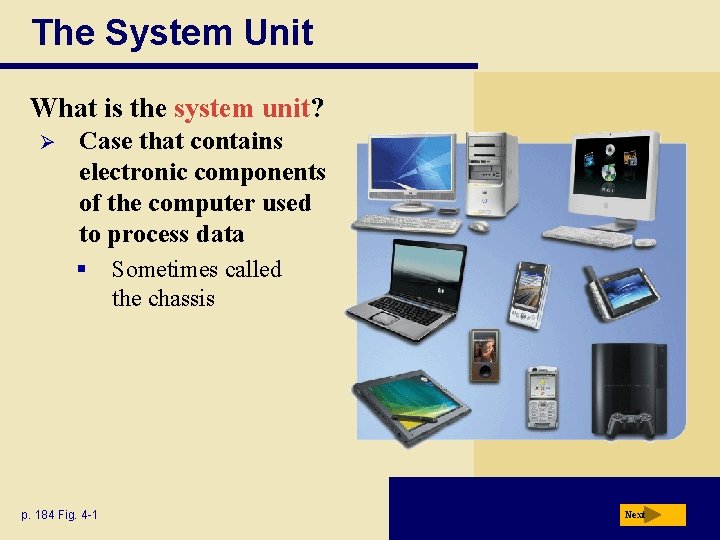
The System Unit What is the system unit? Ø Case that contains electronic components of the computer used to process data § p. 184 Fig. 4 -1 Sometimes called the chassis Next
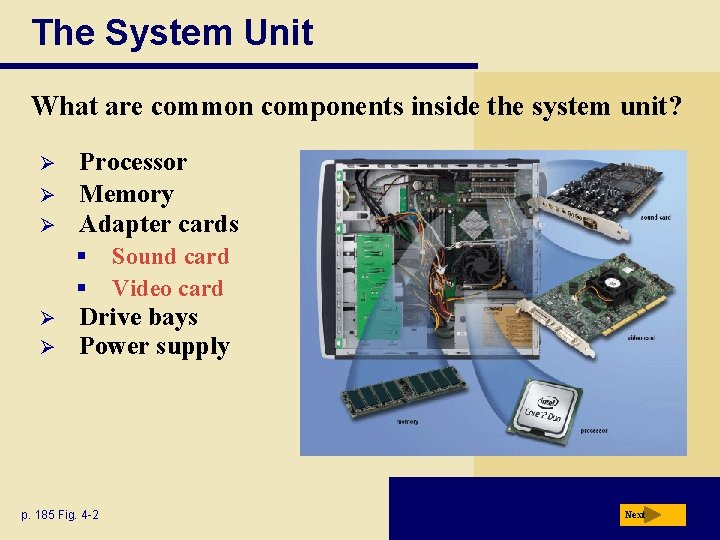
The System Unit What are common components inside the system unit? Ø Ø Ø Processor Memory Adapter cards § § Ø Ø Sound card Video card Drive bays Power supply p. 185 Fig. 4 -2 Next
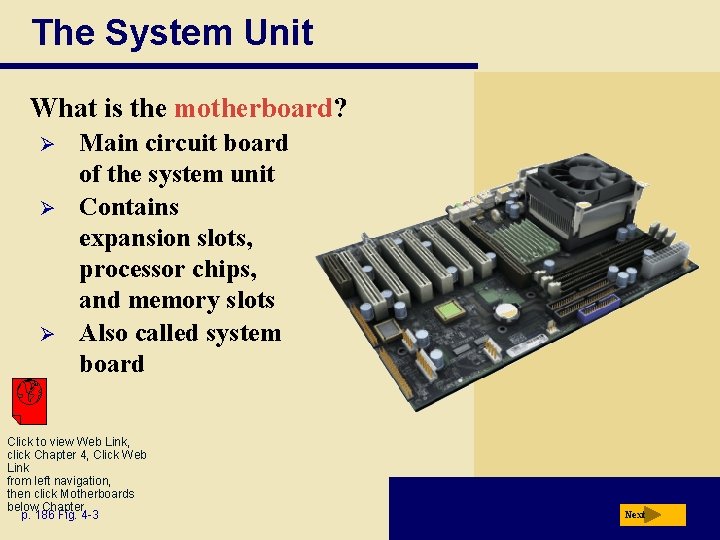
The System Unit What is the motherboard? Ø Ø Ø Main circuit board of the system unit Contains expansion slots, processor chips, and memory slots Also called system board Click to view Web Link, click Chapter 4, Click Web Link from left navigation, then click Motherboards below Chapter p. 186 Fig. 4 -3 Next
The System Unit What is a chip? Ø Ø p. 186 Small piece of semi-conducting material on which integrated circuits are etched § Integrated circuits contain many microscopic pathways capable of carrying electrical current Chips are packaged so they can be attached to a circuit board Next
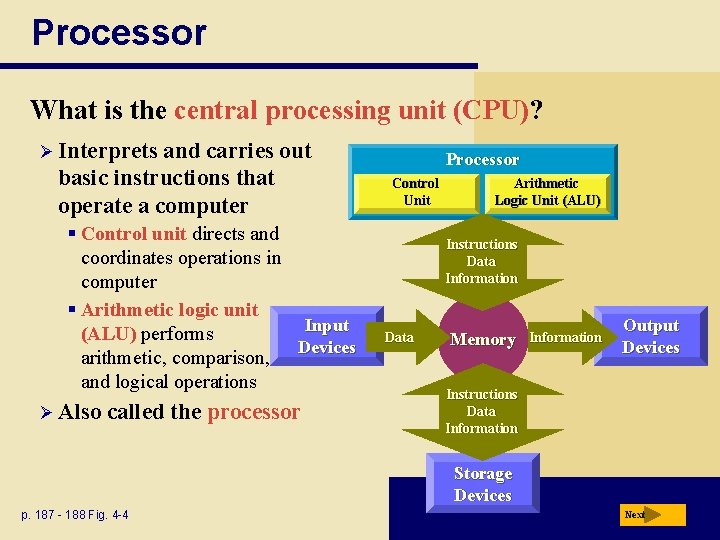
Processor What is the central processing unit (CPU)? Ø Interprets and carries out basic instructions that operate a computer § Control unit directs and coordinates operations in computer § Arithmetic logic unit Input (ALU) performs Devices arithmetic, comparison, and logical operations Ø Also called the processor Processor Control Unit Arithmetic Logic Unit (ALU) Logic Instructions Data Information Data Memory Information Output Devices Instructions Data Information Storage Devices p. 187 - 188 Fig. 4 -4 Next
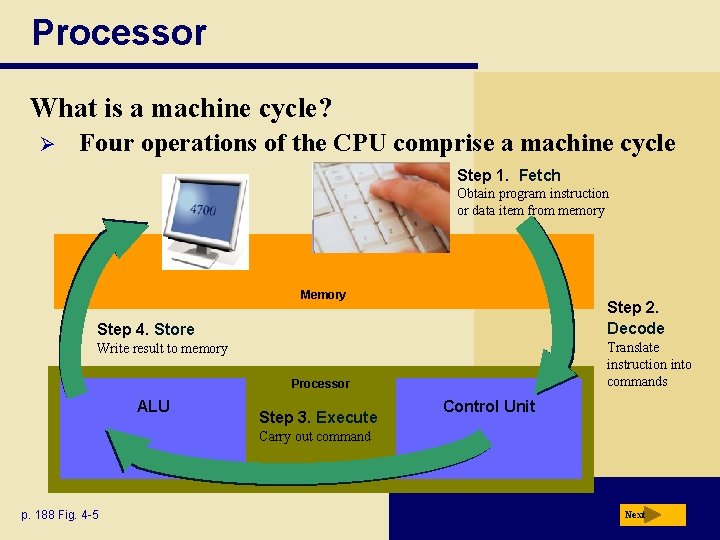
Processor What is a machine cycle? Ø Four operations of the CPU comprise a machine cycle Step 1. Fetch Obtain program instruction or data item from memory Memory Step 2. Decode Step 4. Store Translate instruction into commands Write result to memory Processor ALU Step 3. Execute Control Unit Carry out command p. 188 Fig. 4 -5 Next
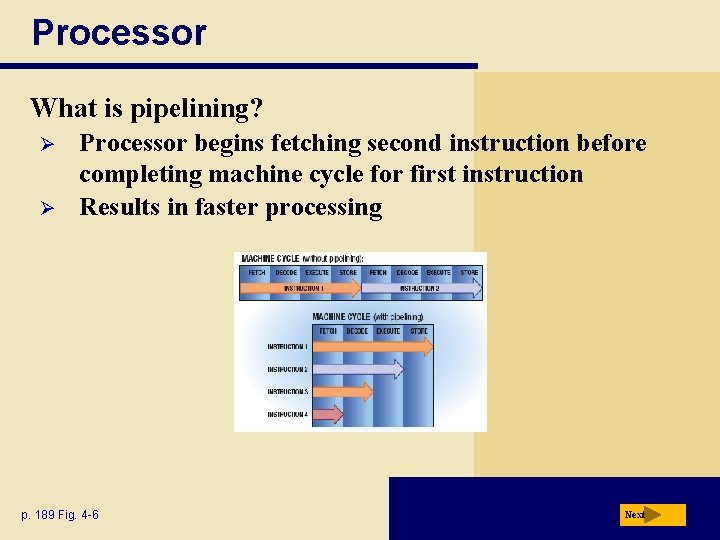
Processor What is pipelining? Ø Ø Processor begins fetching second instruction before completing machine cycle for first instruction Results in faster processing p. 189 Fig. 4 -6 Next
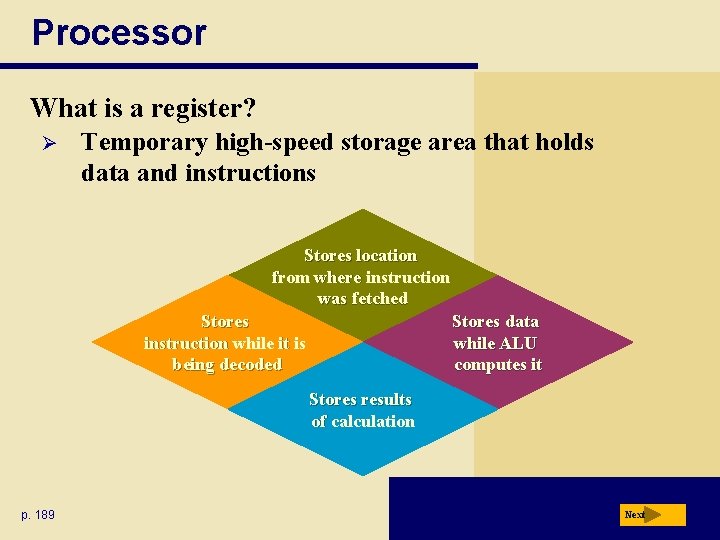
Processor What is a register? Ø Temporary high-speed storage area that holds data and instructions Stores location from where instruction was fetched Stores instruction while it is being decoded Stores data while ALU computes it Stores results of calculation p. 189 Next
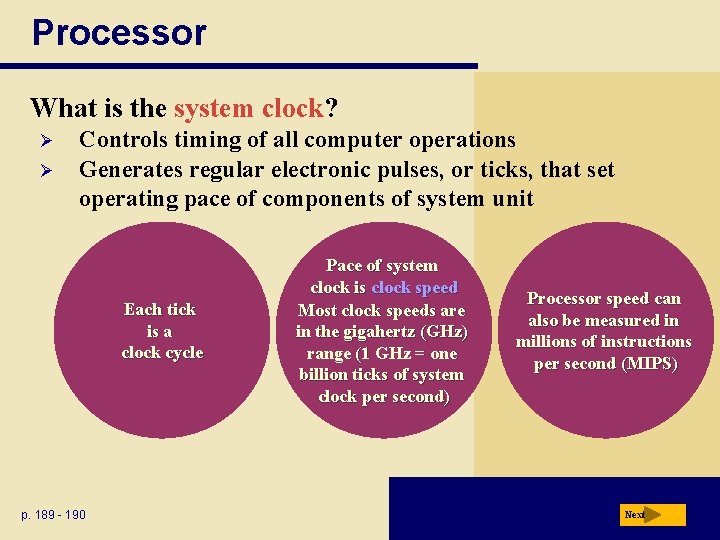
Processor What is the system clock? Ø Ø Controls timing of all computer operations Generates regular electronic pulses, or ticks, that set operating pace of components of system unit Each tick is a clock cycle p. 189 - 190 Pace of system clock is clock speed Most clock speeds are in the gigahertz (GHz) range (1 GHz = one billion ticks of system clock per second) Processor speed can also be measured in millions of instructions per second (MIPS) Next
Processor What are dual-core and multi-core processors? Ø A dual-core processor is a single chip that contains two separate processors Ø A multi-core processor is a chip with two or more separate processors Ø Each processor on a dual-core/multi-core chip generally runs at a slower clock speed, but increase overall performance Click to view Web Link, click Chapter 4, Click Web Link from left navigation, then click Multi-Core Processors below p. 1904 Chapter Next
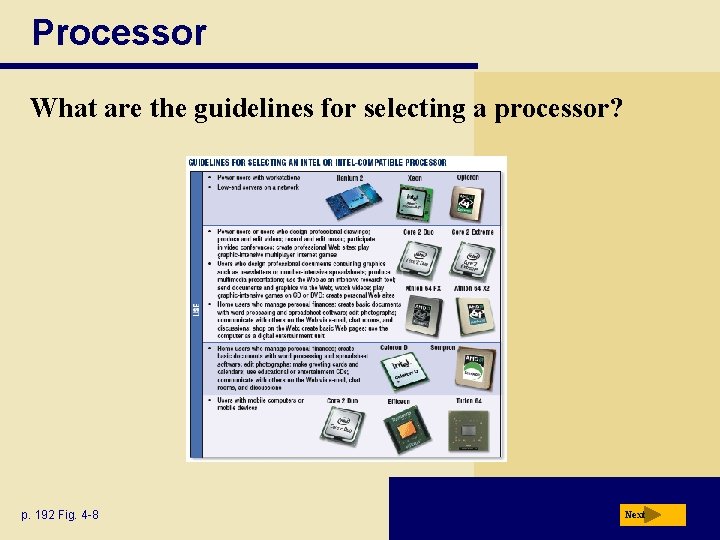
Processor What are the guidelines for selecting a processor? p. 192 Fig. 4 -8 Next
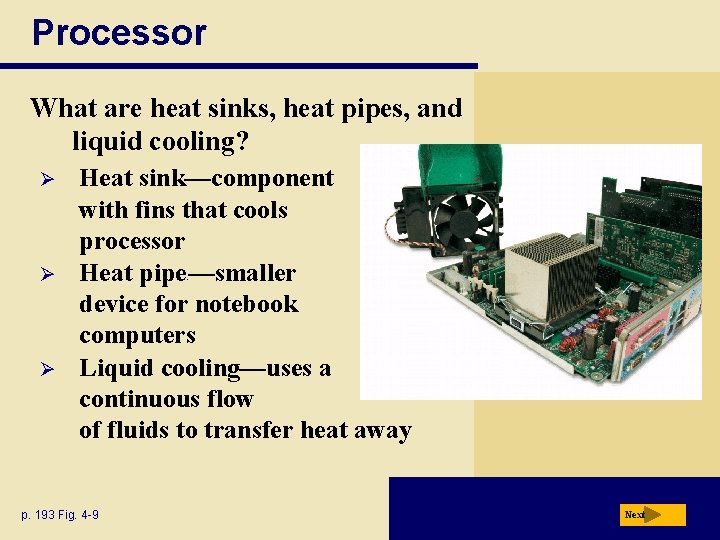
Processor What are heat sinks, heat pipes, and liquid cooling? Ø Ø Ø Heat sink—component with fins that cools processor Heat pipe —smaller device for notebook computers Liquid cooling—uses a continuous flow of fluids to transfer heat away p. 193 Fig. 4 -9 e Next
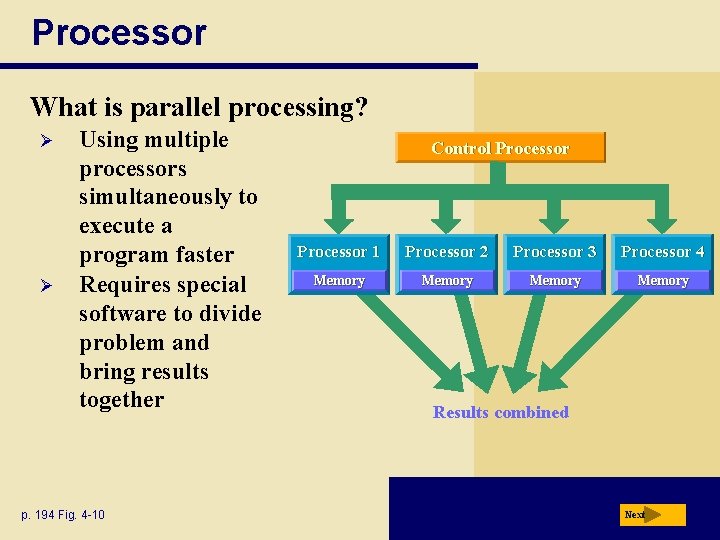
Processor What is parallel processing? Ø Ø Using multiple processors simultaneously to execute a program faster Requires special software to divide problem and bring results together p. 194 Fig. 4 -10 Control Processor 1 Processor 2 Processor 3 Processor 4 Memory Results combined Next
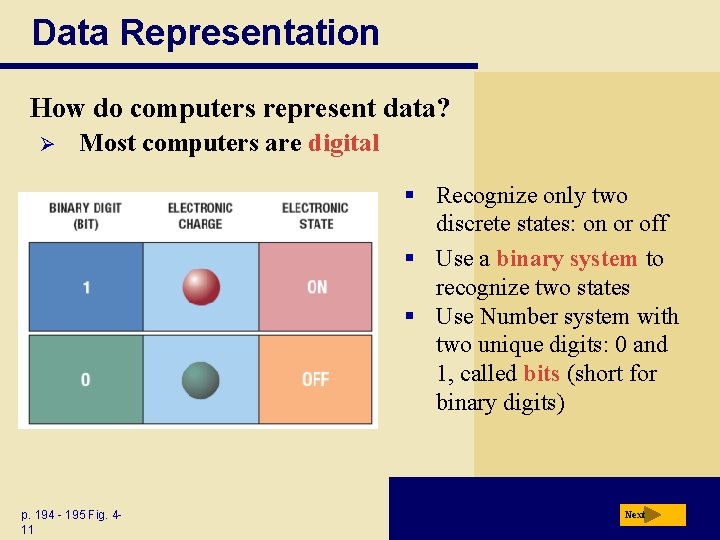
Data Representation How do computers represent data? Ø Most computers are digital § Recognize only two discrete states: on or off § Use a binary system to recognize two states § Use Number system with two unique digits: 0 and 1, called bits (short for binary digits) p. 194 - 195 Fig. 411 Next
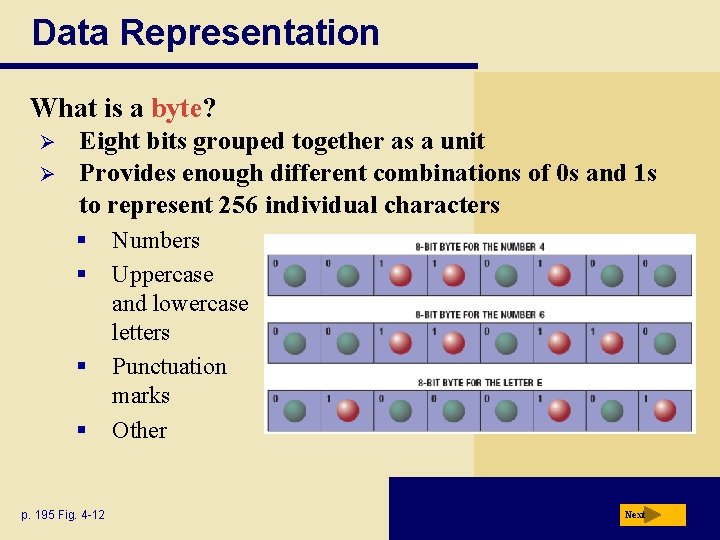
Data Representation What is a byte? Ø Ø Eight bits grouped together as a unit Provides enough different combinations of 0 s and 1 s to represent 256 individual characters § § p. 195 Fig. 4 -12 Numbers Uppercase and lowercase letters Punctuation marks Other Next
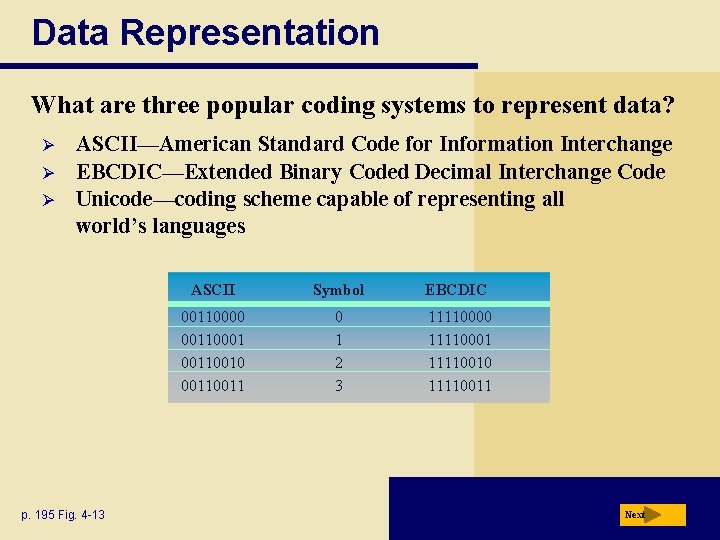
Data Representation What are three popular coding systems to represent data? Ø Ø Ø ASCII—American Standard Code for Information Interchange EBCDIC—Extended Binary Coded Decimal Interchange Code Unicode—coding scheme capable of representing all world’s languages p. 195 Fig. 4 -13 ASCII Symbol EBCDIC 00110000 00110001 00110010 0011 0 1 2 3 11110000 11110001 11110010 11110011 Next
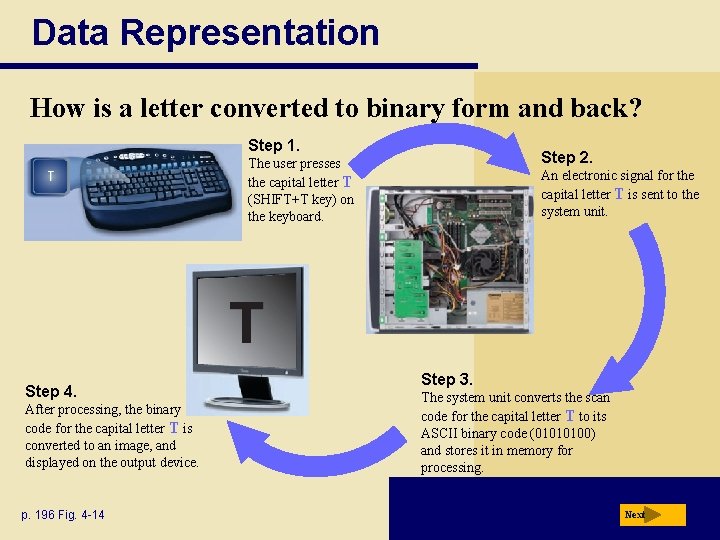
Data Representation How is a letter converted to binary form and back? Step 1. Step 2. The user presses the capital letter T (SHIFT+T key) on the keyboard. An electronic signal for the capital letter T is sent to the system unit. T Step 4. After processing, the binary code for the capital letter T is converted to an image, and displayed on the output device. p. 196 Fig. 4 -14 Step 3. The system unit converts the scan code for the capital letter T to its ASCII binary code (01010100) and stores it in memory for processing. Next
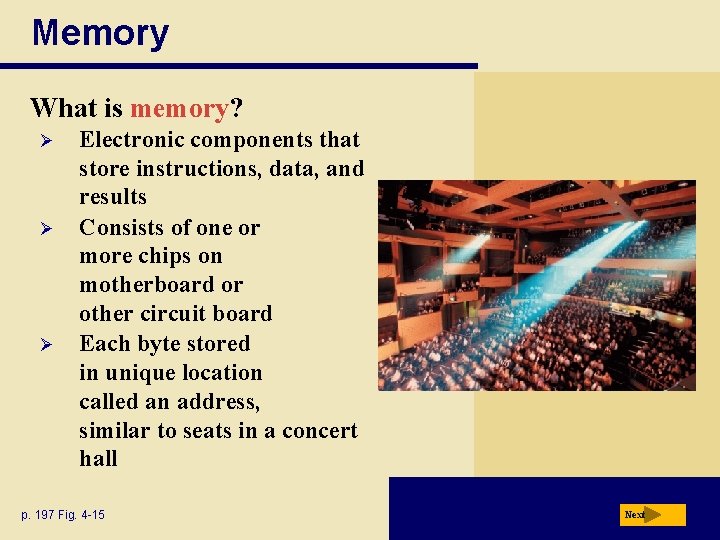
Memory What is memory? Ø Ø Ø Electronic components that store instructions, data, and results Consists of one or more chips on motherboard or other circuit board Each byte stored in unique location called an address, similar to seats in a concert hall p. 197 Fig. 4 -15 Next
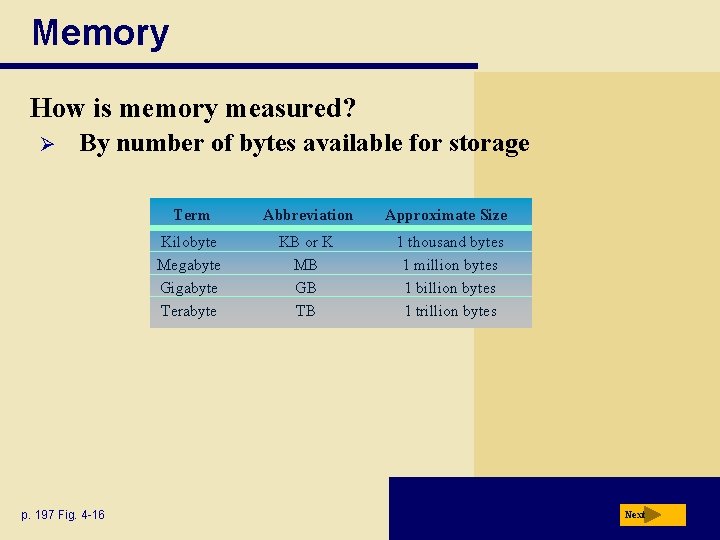
Memory How is memory measured? Ø By number of bytes available for storage p. 197 Fig. 4 -16 Term Abbreviation Approximate Size Kilobyte Megabyte Gigabyte Terabyte KB or K MB GB TB 1 thousand bytes 1 million bytes 1 billion bytes 1 trillion bytes Next
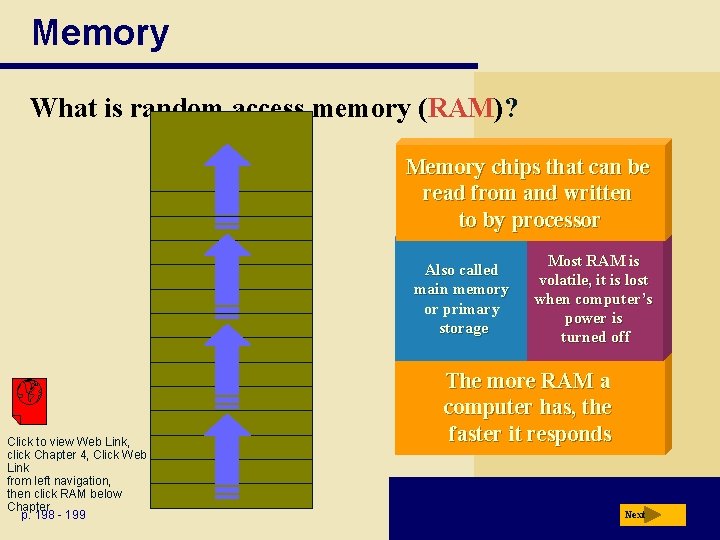
Memory What is random access memory (RAM)? Memory chips that can be read from and written to by processor Also called main memory or primary storage Click to view Web Link, click Chapter 4, Click Web Link from left navigation, then click RAM below Chapter p. 198 - 199 Most RAM is volatile, it is lost when computer’s power is turned off The more RAM a computer has, the faster it responds Next
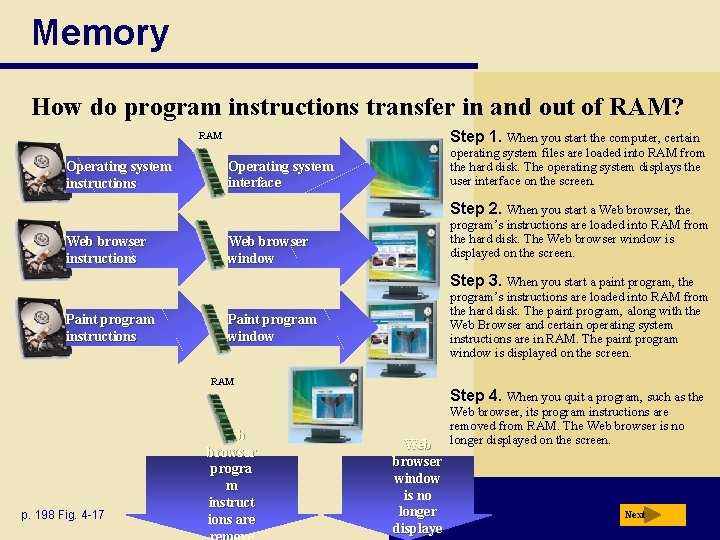
Memory How do program instructions transfer in and out of RAM? Step 1. When you start the computer, certain RAM Operating system instructions operating system files are loaded into RAM from the hard disk. The operating system displays the user interface on the screen. Operating system interface Step 2. When you start a Web browser, the Web browser instructions program’s instructions are loaded into RAM from the hard disk. The Web browser window is displayed on the screen. Web browser window Step 3. When you start a paint program, the Paint program instructions program’s instructions are loaded into RAM from the hard disk. The paint program, along with the Web Browser and certain operating system instructions are in RAM. The paint program window is displayed on the screen. Paint program window RAM p. 198 Fig. 4 -17 Web browser progra m instruct ions are Step 4. When you quit a program, such as the Web browser window is no longer displaye Web browser, its program instructions are removed from RAM. The Web browser is no longer displayed on the screen. Next
Memory Video: The Leopard with a Time Machine CLICK TO START Next
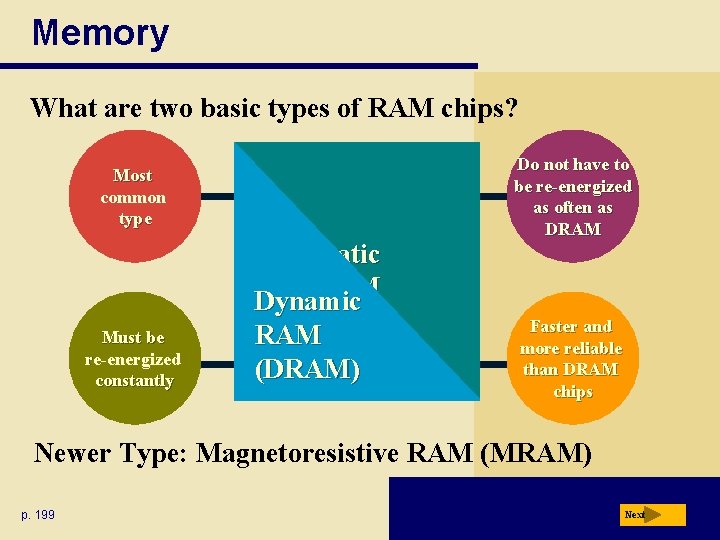
Memory What are two basic types of RAM chips? Most common type Must be re-energized constantly Static RAM Dynamic (SRAM) RAM (DRAM) Do not have to be re-energized as often as DRAM Faster and more reliable than DRAM chips Newer Type: Magnetoresistive RAM (MRAM) p. 199 Next
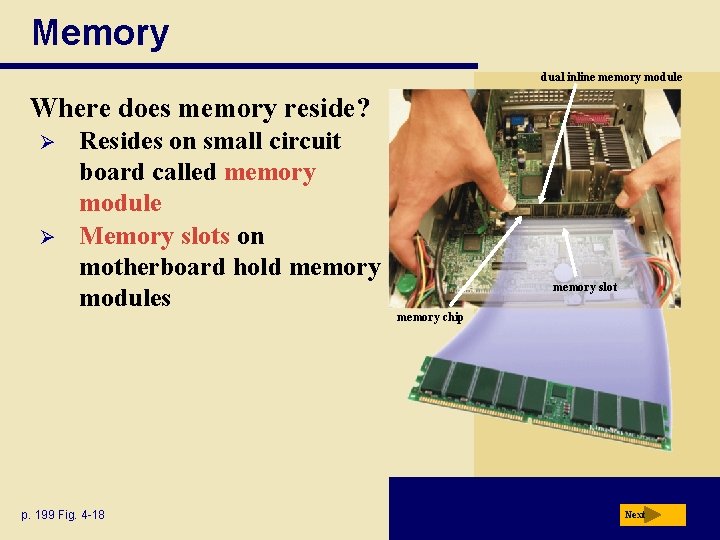
Memory dual inline memory module Where does memory reside? Ø Ø Resides on small circuit board called memory module Memory slots on motherboard hold memory modules p. 199 Fig. 4 -18 memory slot memory chip Next
Memory How much RAM does an application require? Ø Ø p. 199 Depends on the types of software you plan to use For optimal performance, you need more than minimum specifications Next
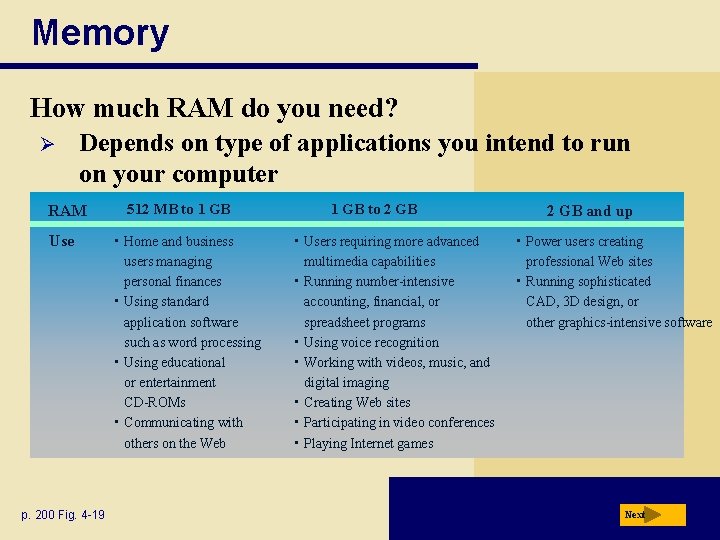
Memory How much RAM do you need? Ø Depends on type of applications you intend to run on your computer RAM Use p. 200 Fig. 4 -19 512 MB to 1 GB • Home and business users managing personal finances • Using standard application software such as word processing • Using educational or entertainment CD-ROMs • Communicating with others on the Web 1 GB to 2 GB • Users requiring more advanced multimedia capabilities • Running number-intensive accounting, financial, or spreadsheet programs • Using voice recognition • Working with videos, music, and digital imaging • Creating Web sites • Participating in video conferences • Playing Internet games 2 GB and up • Power users creating professional Web sites • Running sophisticated CAD, 3 D design, or other graphics-intensive software Next
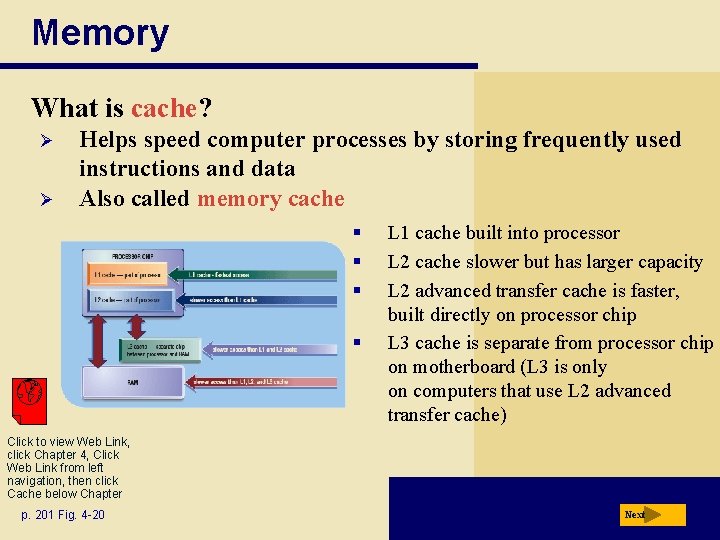
Memory What is cache? Ø Ø Helps speed computer processes by storing frequently used instructions and data Also called memory cache § § L 1 cache built into processor L 2 cache slower but has larger capacity L 2 advanced transfer cache is faster, built directly on processor chip L 3 cache is separate from processor chip on motherboard (L 3 is only on computers that use L 2 advanced transfer cache) Click to view Web Link, click Chapter 4, Click Web Link from left navigation, then click Cache below Chapter p. 201 Fig. 4 -20 Next
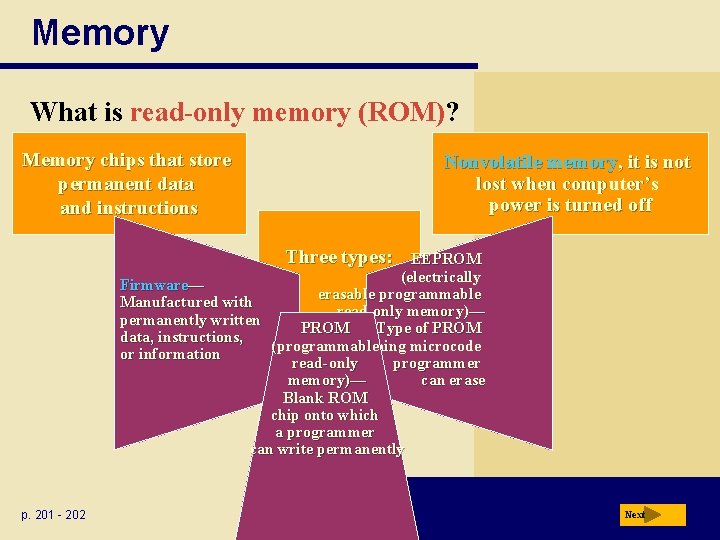
Memory What is read-only memory (ROM)? Memory chips that store permanent data and instructions Nonvolatile memory, it is not lost when computer’s power is turned off Three types: EEPROM (electrically Firmware— erasable programmable Manufactured with read-only memory)— permanently written PROM Type of PROM data, instructions, (programmable containing microcode or information read-only programmer memory)— can erase Blank ROM chip onto which a programmer can write permanently p. 201 - 202 Next
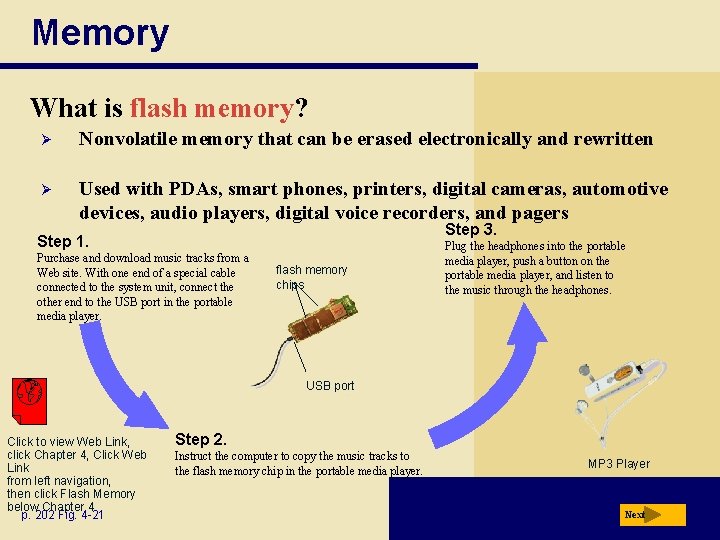
Memory What is flash memory? Ø Nonvolatile memory that can be erased electronically and rewritten Ø Used with PDAs, smart phones, printers, digital cameras, automotive devices, audio players, digital voice recorders, and pagers Step 3. Step 1. Purchase and download music tracks from a Web site. With one end of a special cable connected to the system unit, connect the other end to the USB port in the portable media player. flash memory chips Plug the headphones into the portable media player, push a button on the portable media player, and listen to the music through the headphones. USB port Click to view Web Link, click Chapter 4, Click Web Link from left navigation, then click Flash Memory below Chapter 4 p. 202 Fig. 4 -21 Step 2. Instruct the computer to copy the music tracks to the flash memory chip in the portable media player. MP 3 Player Next
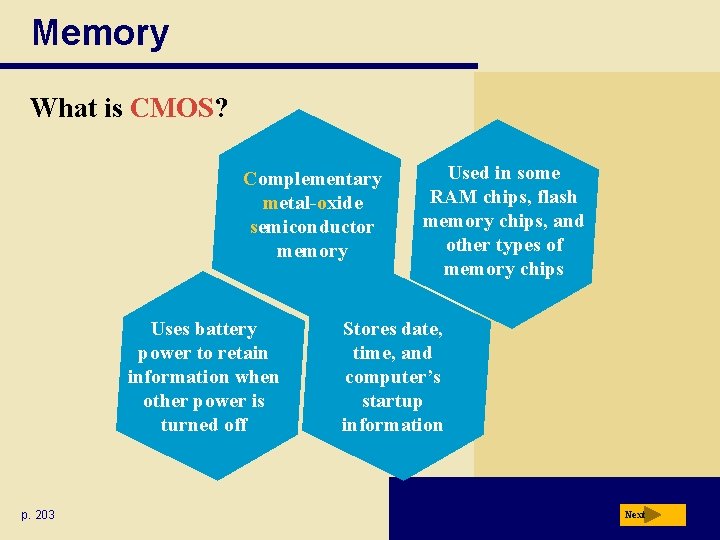
Memory What is CMOS? Complementary metal-oxide semiconductor memory Uses battery power to retain information when other power is turned off p. 203 Used in some RAM chips, flash memory chips, and other types of memory chips Stores date, time, and computer’s startup information Next
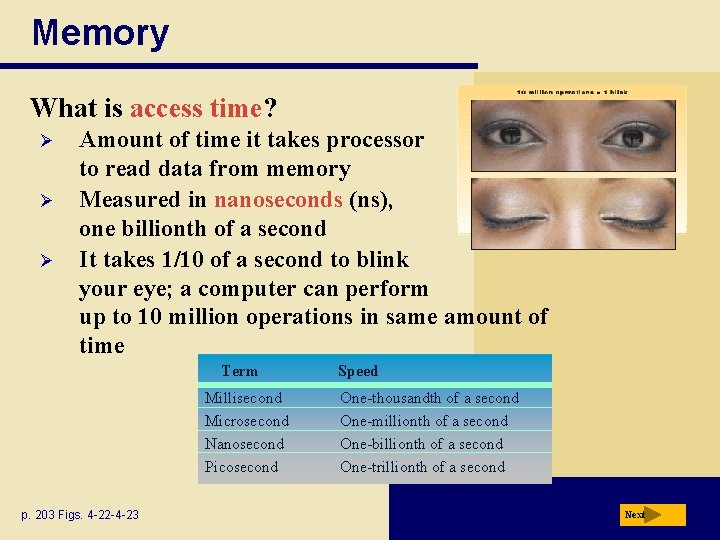
Memory What is access time? Ø Ø Ø Amount of time it takes processor to read data from memory Measured in nanoseconds (ns), one billionth of a second It takes 1/10 of a second to blink your eye; a computer can perform up to 10 million operations in same amount of time Term Millisecond Microsecond Nanosecond Picosecond p. 203 Figs. 4 -22 -4 -23 Speed One-thousandth of a second One-millionth of a second One-billionth of a second One-trillionth of a second Next
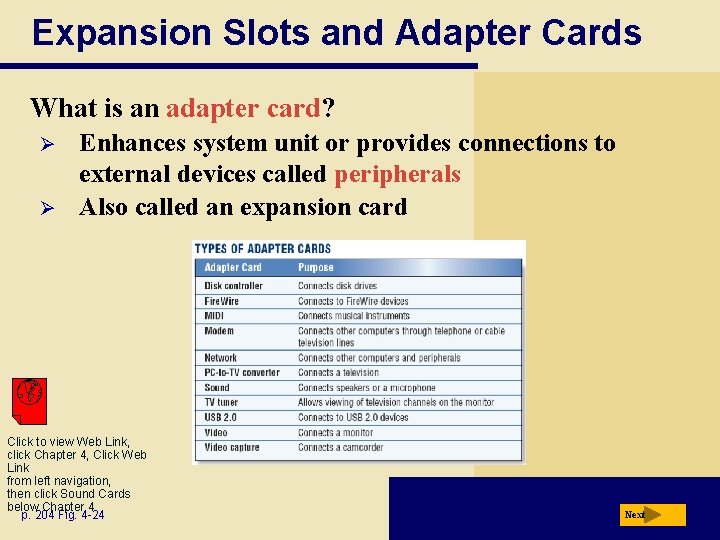
Expansion Slots and Adapter Cards What is an adapter card? Ø Ø Enhances system unit or provides connections to external devices called peripherals Also called an expansion card Click to view Web Link, click Chapter 4, Click Web Link from left navigation, then click Sound Cards below Chapter 4 p. 204 Fig. 4 -24 Next
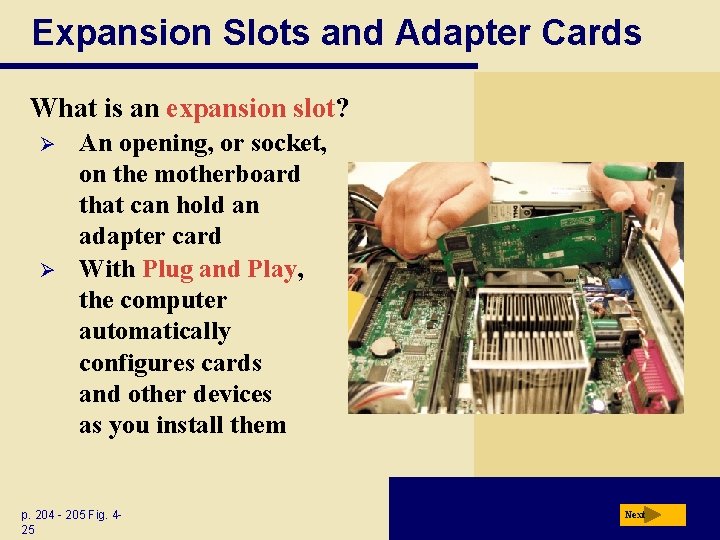
Expansion Slots and Adapter Cards What is an expansion slot? Ø Ø An opening, or socket, on the motherboard that can hold an adapter card With Plug and Play, the computer automatically configures cards and other devices as you install them p. 204 - 205 Fig. 425 Next
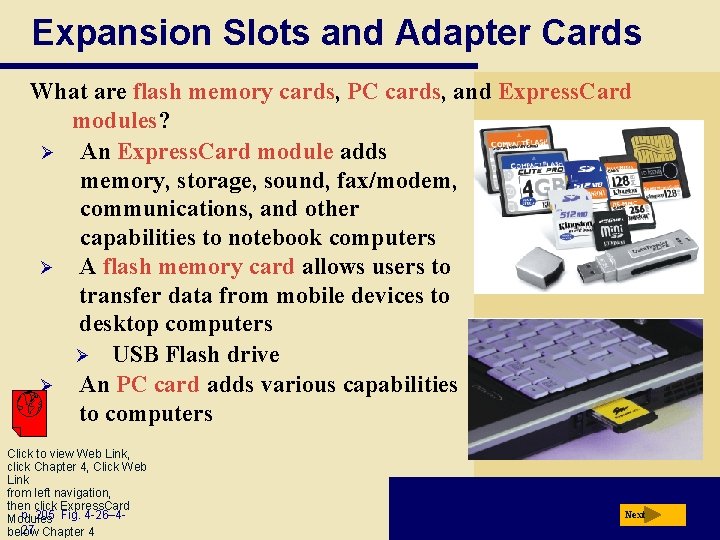
Expansion Slots and Adapter Cards What are flash memory cards, PC cards, and Express. Card modules? Ø An Express. Card module adds memory, storage, sound, fax/modem, communications, and other capabilities to notebook computers Ø A flash memory card allows users to transfer data from mobile devices to desktop computers Ø USB Flash drive Ø An PC card adds various capabilities to computers Click to view Web Link, click Chapter 4, Click Web Link from left navigation, then click Express. Card p. 205 Fig. 4 -26– 4 Modules 27 Chapter 4 below Next
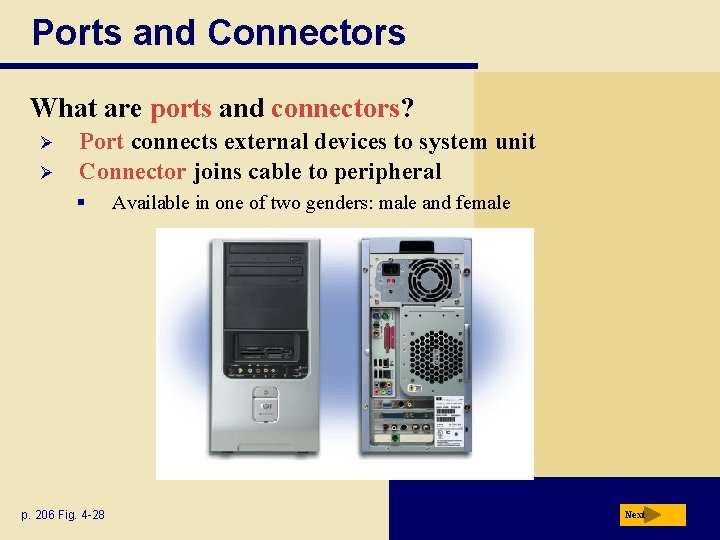
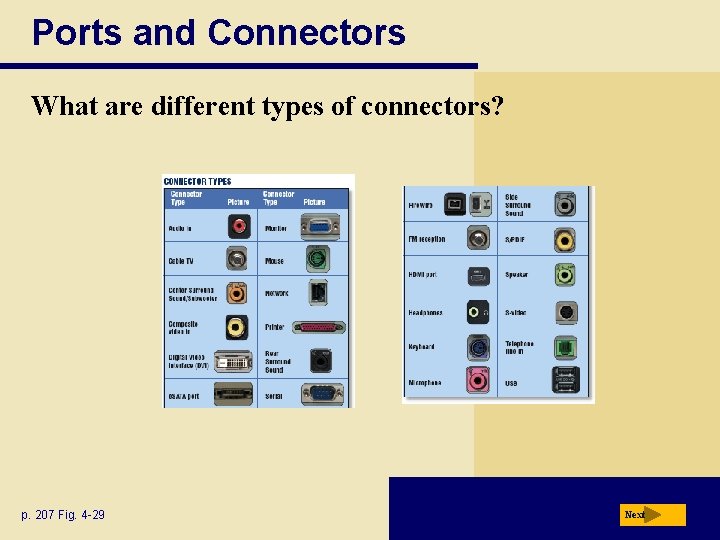
Ports and Connectors What are ports and connectors? Ø Ø Port connects external devices to system unit Connector joins cable to peripheral § p. 206 Fig. 4 -28 Available in one of two genders: male and female Next
Ports and Connectors What are different types of connectors? p. 207 Fig. 4 -29 Next
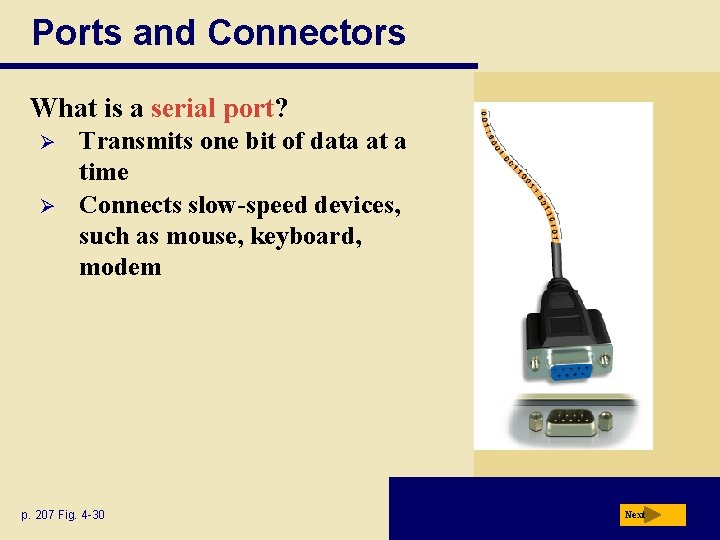
Ports and Connectors What is a serial port? Ø Ø Transmits one bit of data at a time Connects slow-speed devices, such as mouse, keyboard, modem p. 207 Fig. 4 -30 Next
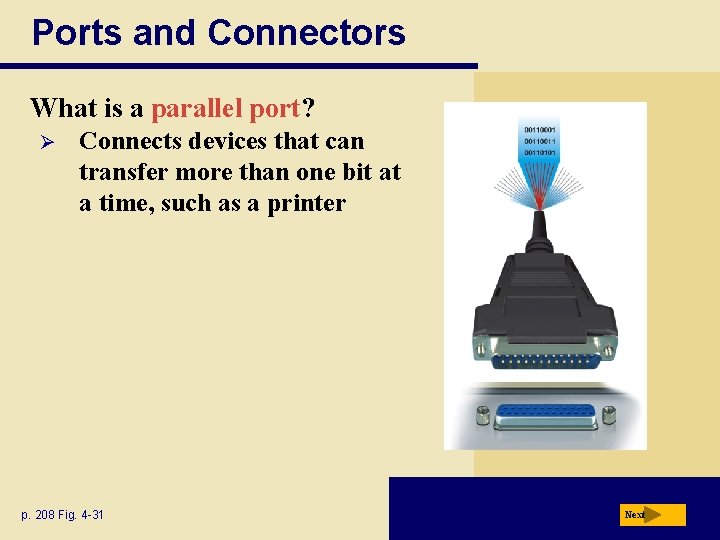
Ports and Connectors What is a parallel port? Ø Connects devices that can transfer more than one bit at a time, such as a printer p. 208 Fig. 4 -31 Next
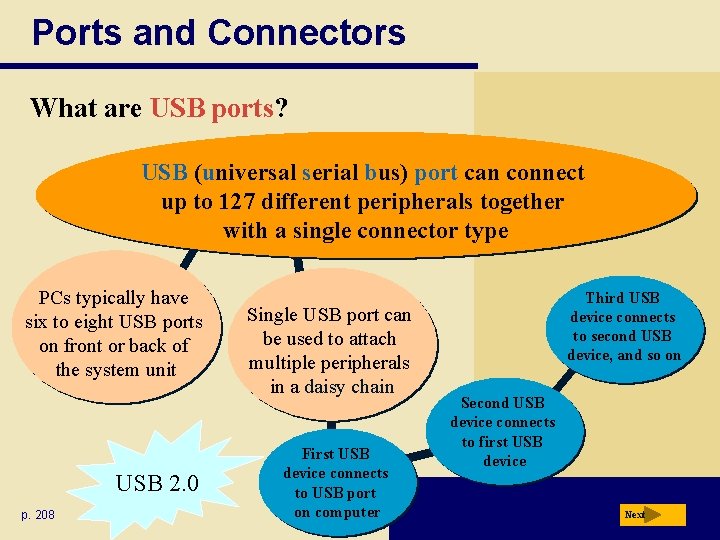
Ports and Connectors What are USB ports? USB (universal serial bus) port can connect up to 127 different peripherals together with a single connector type PCs typically have six to eight USB ports on front or back of the system unit USB 2. 0 p. 208 Single USB port can be used to attach multiple peripherals in a daisy chain First USB device connects to USB port on computer Third USB device connects to second USB device, and so on Second USB device connects to first USB device Next
Ports and Connectors What are Fire. Wire ports? Ø Ø Connects multiple types of devices that require faster data transmission speeds Allows you to connect up to 63 devices together Click to view Web Link, click Chapter 4, Click Web Link from left navigation, then click Fire. Wire Ports below Chapter 4 p. 209 Next
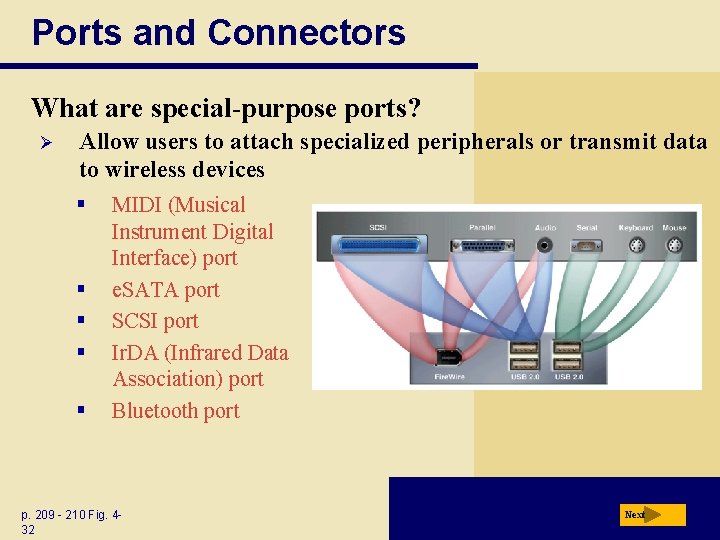
Ports and Connectors What are special-purpose ports? Ø Allow users to attach specialized peripherals or transmit data to wireless devices § § § MIDI (Musical Instrument Digital Interface) port e. SATA port SCSI port Ir. DA (Infrared Data Association) port Bluetooth port p. 209 - 210 Fig. 432 Next
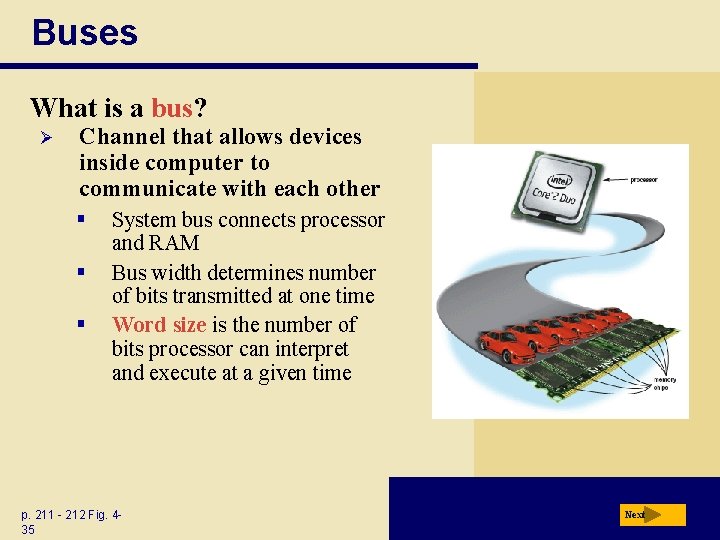
Buses What is a bus? Ø Channel that allows devices inside computer to communicate with each other § § § System bus connects processor and RAM Bus width determines number of bits transmitted at one time Word size is the number of bits processor can interpret and execute at a given time p. 211 - 212 Fig. 435 Next
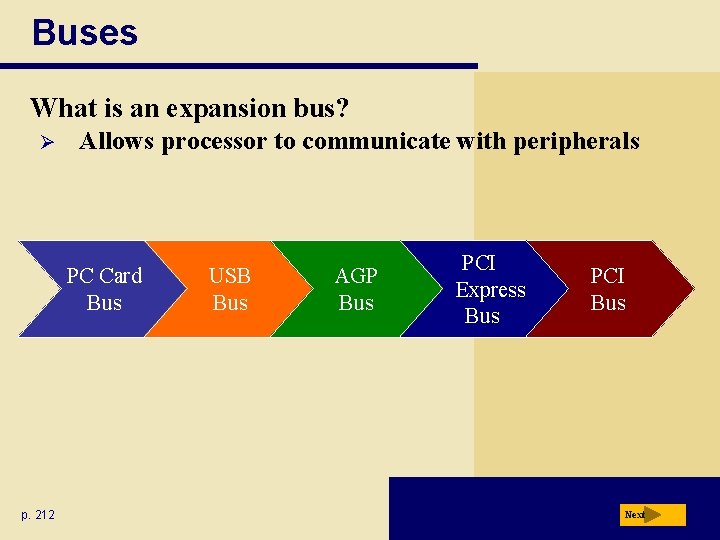
Buses What is an expansion bus? Ø Allows processor to communicate with peripherals PC Card Bus p. 212 USB Bus AGP Bus PCI Express Bus PCI Bus Next
Bays What is a bay? Ø Ø Opening inside system unit used to install additional equipment Drive bays typically hold disk drives p. 212 Fig. 4 -36 Next
Power Supply What is a power supply? Converts AC Power into DC Power Fan keeps system unit components cool External peripherals might use an AC adapter, which is an external power supply p. 213 Next
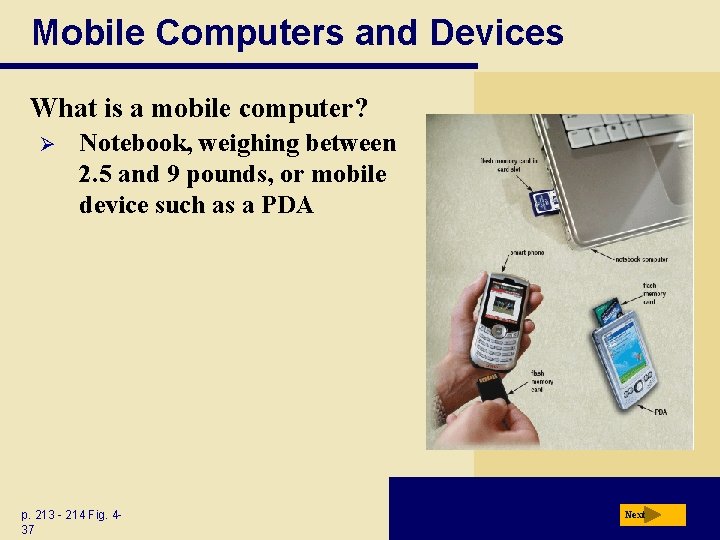
Mobile Computers and Devices What is a mobile computer? Ø Notebook, weighing between 2. 5 and 9 pounds, or mobile device such as a PDA p. 213 - 214 Fig. 437 Next
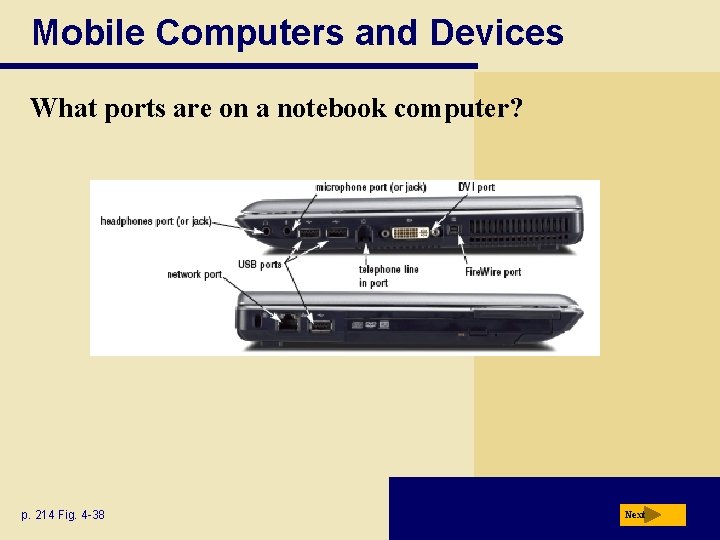
Mobile Computers and Devices What ports are on a notebook computer? p. 214 Fig. 4 -38 Next
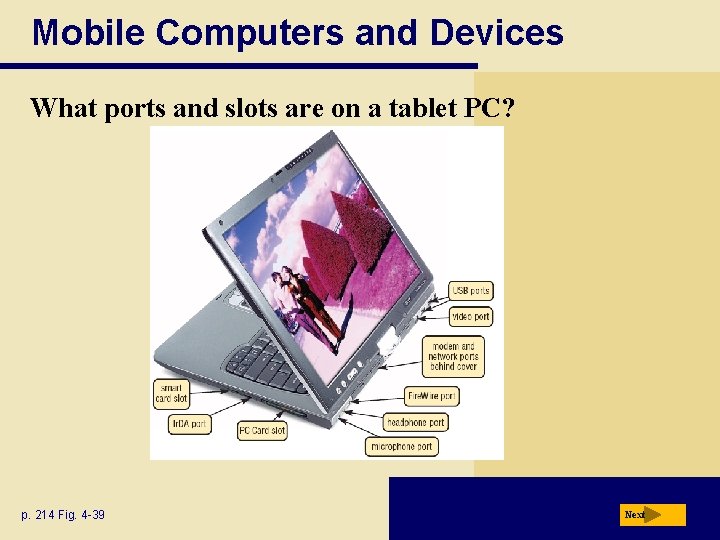
Mobile Computers and Devices What ports and slots are on a tablet PC? p. 214 Fig. 4 -39 Next
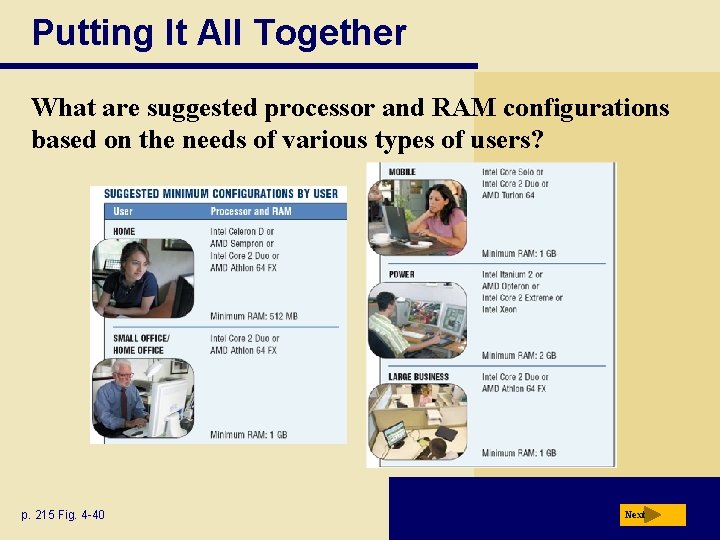
Putting It All Together What are suggested processor and RAM configurations based on the needs of various types of users? p. 215 Fig. 4 -40 Next
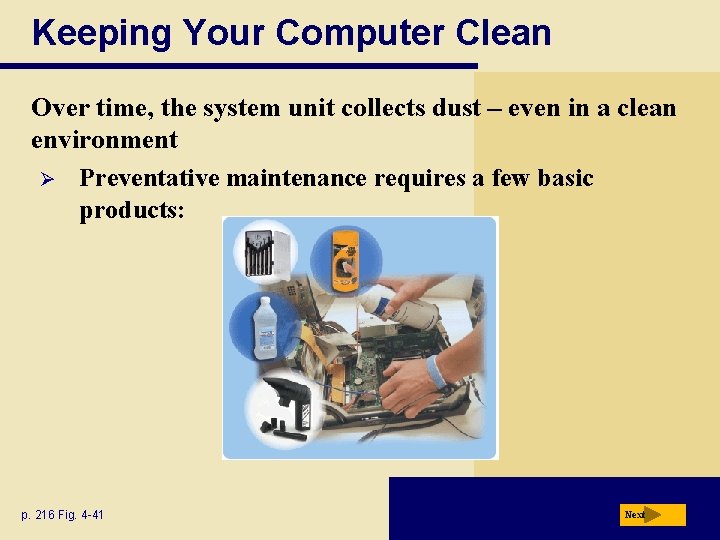
Keeping Your Computer Clean Over time, the system unit collects dust – even in a clean environment Ø Preventative maintenance requires a few basic products: p. 216 Fig. 4 -41 Next
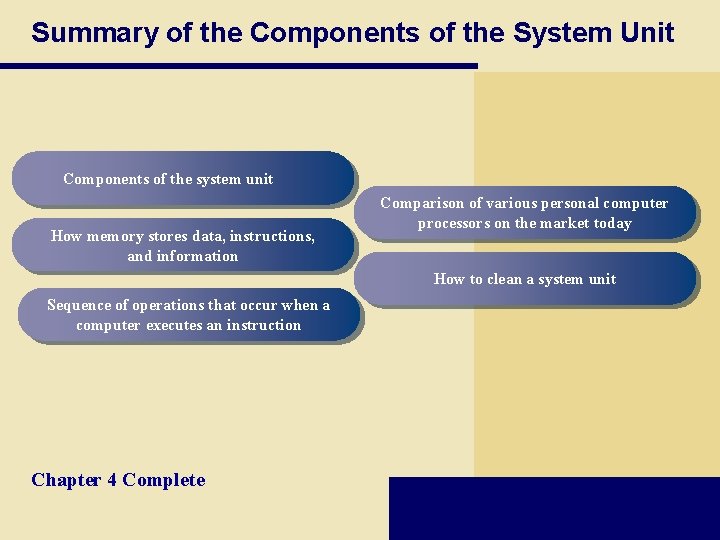
Summary of the Components of the System Unit Components of the system unit How memory stores data, instructions, and information Comparison of various personal computer processors on the market today How to clean a system unit Sequence of operations that occur when a computer executes an instruction Chapter 4 Complete