
Diploma in Project Management Welcome Back Module Two
Diploma in Project Management Welcome Back! Module Two – Development Phase (preparing the project plan) SPL 1

Status Reports • Yourself How have you occupied yourself since Module One other than conscientiously revising module one notes, assiduously doing assignment one and studying the text book? • Assignment One (Project Charter) Where are we this little number – a work-in-progress, forgot to bring it, oops left it in the train/bus/car, or perhaps dog/cat/baby got it! Hey what assignment? You’ve finished – wow! • Anything else of interest to share? Sensitive revelations and personal confessions stay in the room – yeah right!
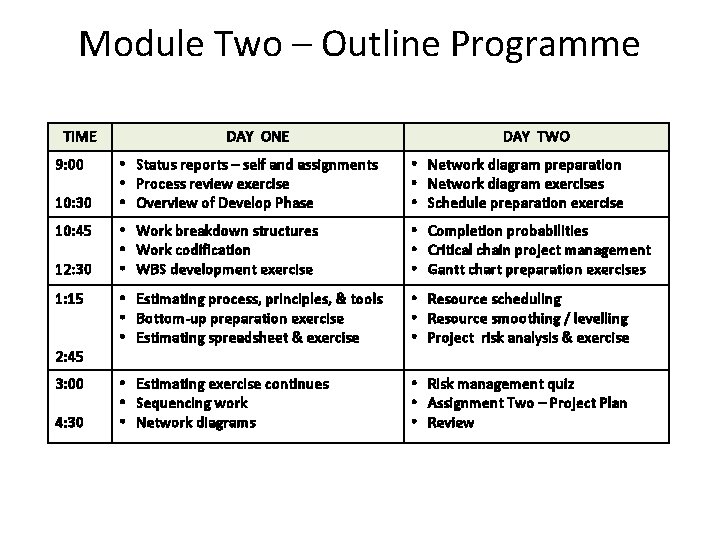
Module Two – Outline Programme TIME 9: 00 10: 30 10: 45 12: 30 1: 15 2: 45 3: 00 4: 30 DAY ONE DAY TWO • Status reports – self and assignments • Process review exercise • Overview of Develop Phase • Network diagram preparation • Network diagram exercises • Schedule preparation exercise • Work breakdown structures • Work codification • WBS development exercise • Completion probabilities • Critical chain project management • Gantt chart preparation exercises • Estimating process, principles, & tools • Bottom-up preparation exercise • Estimating spreadsheet & exercise • Resource scheduling • Resource smoothing / levelling • Project risk analysis & exercise • Estimating exercise continues • Sequencing work • Network diagrams • Risk management quiz • Assignment Two – Project Plan • Review
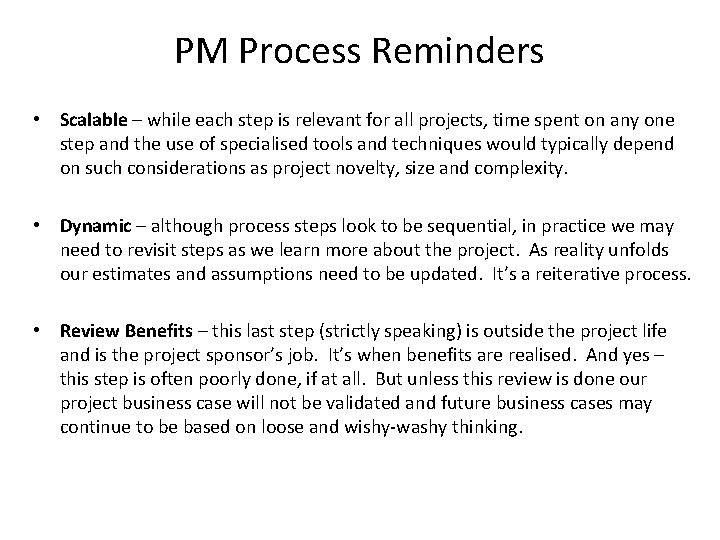
PM Process Reminders • Scalable – while each step is relevant for all projects, time spent on any one step and the use of specialised tools and techniques would typically depend on such considerations as project novelty, size and complexity. • Dynamic – although process steps look to be sequential, in practice we may need to revisit steps as we learn more about the project. As reality unfolds our estimates and assumptions need to be updated. It’s a reiterative process. • Review Benefits – this last step (strictly speaking) is outside the project life and is the project sponsor’s job. It’s when benefits are realised. And yes – this step is often poorly done, if at all. But unless this review is done our project business case will not be validated and future business cases may continue to be based on loose and wishy-washy thinking.
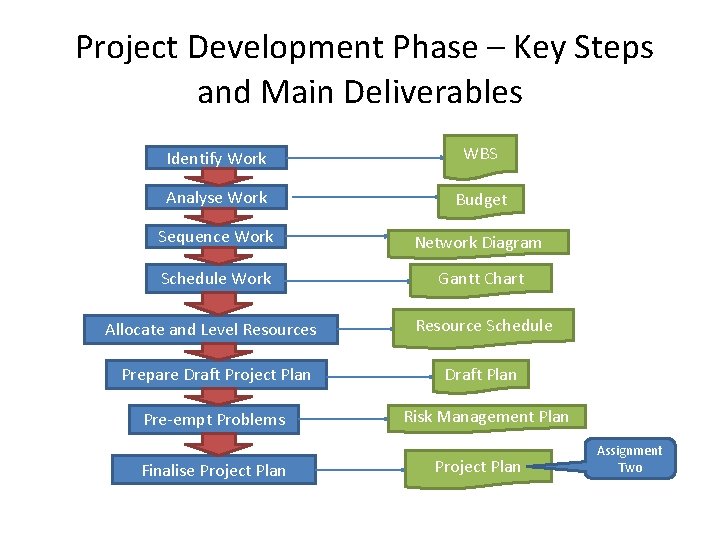
Project Development Phase – Key Steps and Main Deliverables Identify Work WBS Analyse Work Budget Sequence Work Network Diagram Schedule Work Gantt Chart Allocate and Level Resources Resource Schedule Prepare Draft Project Plan Pre-empt Problems Finalise Project Plan Draft Plan Risk Management Plan Project Plan Assignment Two
Project Plans and Planning A plan is typically a list of steps with timings and resources needed to achieve a goal, whereas planning is the process of identifying and organising the work required to achieve the goal. The input to the planning phase is a project charter and the output is the project plan, both of which need the sponsor’s and sometimes other key stakeholders’ approval. Sometimes project planning is ignored or not property completed in favour of getting on with the job. However, the value of a project plan is to ultimately save time, money, risks and issues. The expression is “fail to plan, plan to fail. ” Nevertheless, the project baseline plan is best seen as a basis for change. Amendments are invariably needed as reality is revealed during project implementation. Version control is important.
‘Develop’ Phase Once the Project Charter has been approved and our project team appointed, we are ready to enter the second phase in the project management life – the detailed planning of the project. The project plan tells everyone involved where we are going and how we are going to get there. The plan guides the project team through the execution and finish phases. It helps us manage time, cost, quality, change, team members (including external contractors), procurement and supply contracts, risk and.
Kick-off Meeting • The kick-off meeting marks the beginning of the project development phase. It may be the first opportunity for the project sponsor, project client and project manager to assemble the project planning team to explain the project purpose and goal, demonstrate their support. Team members are introduced to each other, given the opportunity to discuss their areas of expertise and how they will contribute to the project. Sometimes a project team contract is agreed. And there may some team building activities. • The project charter is distributed to the team and discussed in open forum. At the conclusion of the meeting we trust that team members will be keen to begin work – usually with the development of an initial Work Breakdown Structure (WBS). • Prior to the kick-off meeting, an agenda and presentation highlighting the contents of the charter might be prepared by the project manager. During the presentation the project manager might designate one of the team as scribe, to capture issues, decisions, and actions. SPL 8
Example Project Team Contract We will: • be open and honest with each other • decide as a team on the best way to communicate and keep each other informed • focus on problem solving; not blaming • use only constructive criticism • practise participatory planning, problem solving and decision-making • Be punctual to all meetings. SPL 9

‘Develop’ Phase Given an approved project charter, the PM usually holds a project kick-off meeting at which: 6. Identify Work 7. Analyse Work 8. Sequence Work 9. Schedule Work 10. Allocate and Level Resources 11. Prepare Draft Plan 12. Pre-empt Problems 13. Finalise Project Plan 1. Project sponsor would typically emphasise the project’s importance, and discusses the charter, planning constraints / limits of authority, issue escalation process and progress reporting. 2. Project planning team would or should determine their modus operandi, agree their team work rules (team contract) and may do some team building activities. 3. The planning team brainstorm / mindmap the work to be undertaken to achieve the project goal within the parameters stated in charter. The result is a Work Breakdown Structure (WBS), which is essentially a family tree of work chunks, each level of breakdown producing smaller chunks (ie, work packages or WPs). Post-it Notes can be used to develop and illustrate this decomposition process. Work chunks are best described in verb-noun format (eg, ‘write report’, ‘dig hole’ etc). The resultant WBS elements may then be codified for easier reference.
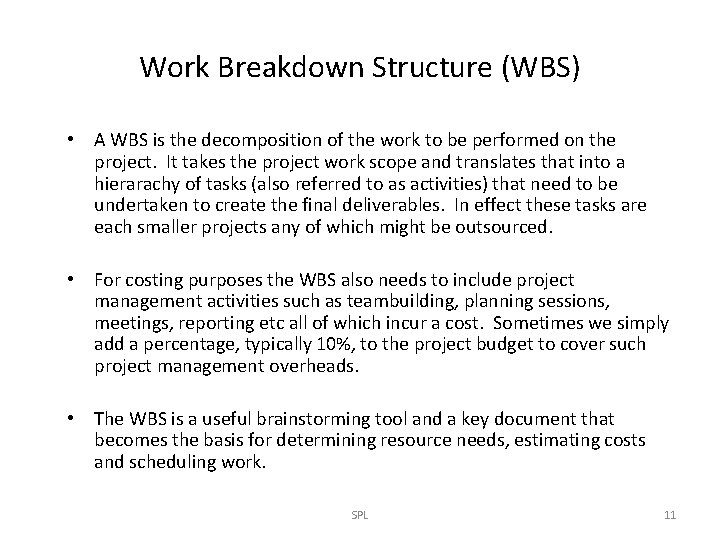
Work Breakdown Structure (WBS) • A WBS is the decomposition of the work to be performed on the project. It takes the project work scope and translates that into a hierarachy of tasks (also referred to as activities) that need to be undertaken to create the final deliverables. In effect these tasks are each smaller projects any of which might be outsourced. • For costing purposes the WBS also needs to include project management activities such as teambuilding, planning sessions, meetings, reporting etc all of which incur a cost. Sometimes we simply add a percentage, typically 10%, to the project budget to cover such project management overheads. • The WBS is a useful brainstorming tool and a key document that becomes the basis for determining resource needs, estimating costs and scheduling work. SPL 11

Example Work Breakdown Structure Build House Obtain Approvals Lay Foundations Construct House Erect Framework Level 1 Lay Out Garden Install Roof Install Plumbing Manage Project Level 2 Install Utilities Install Cladding Level 3 Install Electrics Install Gas Level 4 1. To ensure ‘project management activities’ are also costed, they may be included in the WBS, or more commonly some 10% cost is added to the budget for these activities. 2. Each work package (WP), which is the lowest level of breakdown, may be further described in a WBS dictionary.
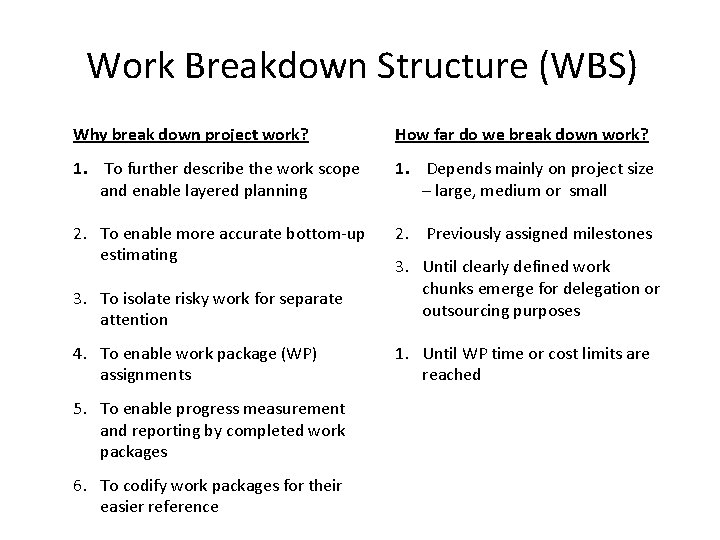
Work Breakdown Structure (WBS) Why break down project work? How far do we break down work? 1. To further describe the work scope and enable layered planning 1. Depends mainly on project size – large, medium or small 2. To enable more accurate bottom-up estimating 2. Previously assigned milestones 3. To isolate risky work for separate attention 4. To enable work package (WP) assignments 5. To enable progress measurement and reporting by completed work packages 6. To codify work packages for their easier reference 3. Until clearly defined work chunks emerge for delegation or outsourcing purposes 1. Until WP time or cost limits are reached

Codified Work Breakdown Structure Birthday Party Invite Guests 1. 0. 0 Plan Venue 2. 0. 0 Identify Options 2. 1. 0 Select Venue 2. 2. 0 Organise Transport 3. 0. 0 Arrange Food 4. 0. 0 Manage Project 5. 0. 0 Negotiate Price 2. 3. 0 A useful codification system is expandable to accommodate extra work and further breakdown. Each chunk of work is assigned a unique number for easy reference.
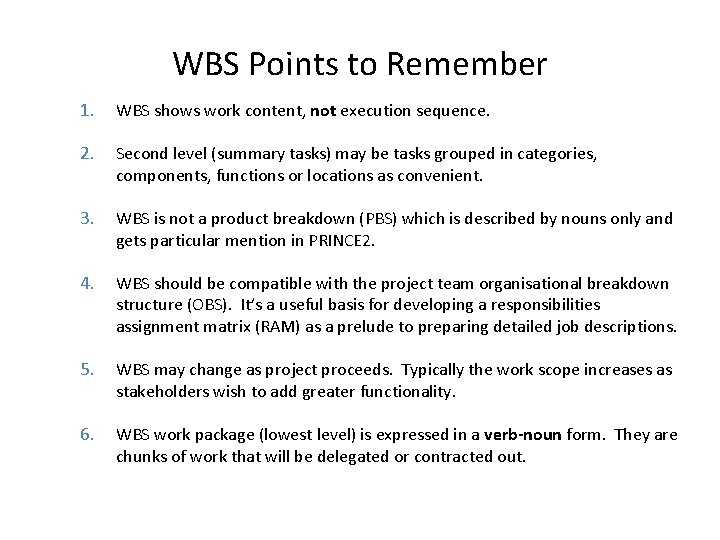
WBS Points to Remember 1. WBS shows work content, not execution sequence. 2. Second level (summary tasks) may be tasks grouped in categories, components, functions or locations as convenient. 3. WBS is not a product breakdown (PBS) which is described by nouns only and gets particular mention in PRINCE 2. 4. WBS should be compatible with the project team organisational breakdown structure (OBS). It’s a useful basis for developing a responsibilities assignment matrix (RAM) as a prelude to preparing detailed job descriptions. 5. WBS may change as project proceeds. Typically the work scope increases as stakeholders wish to add greater functionality. 6. WBS work package (lowest level) is expressed in a verb-noun form. They are chunks of work that will be delegated or contracted out.
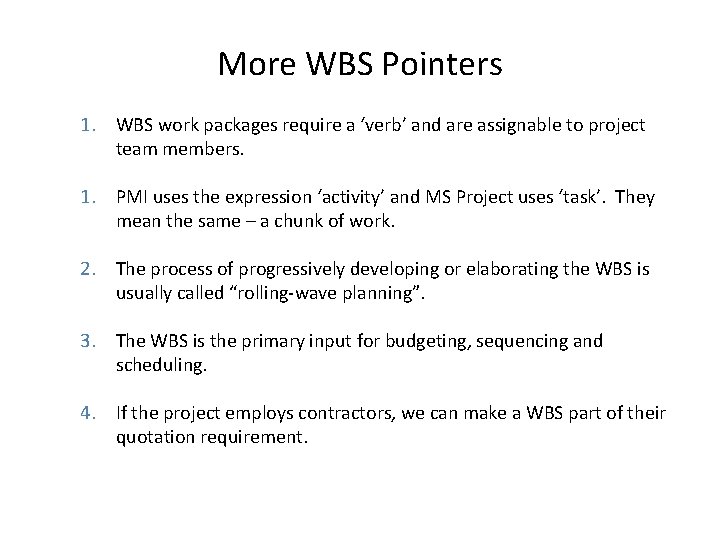
More WBS Pointers 1. WBS work packages require a ‘verb’ and are assignable to project team members. 1. PMI uses the expression ‘activity’ and MS Project uses ‘task’. They mean the same – a chunk of work. 2. The process of progressively developing or elaborating the WBS is usually called “rolling-wave planning”. 3. The WBS is the primary input for budgeting, sequencing and scheduling. 4. If the project employs contractors, we can make a WBS part of their quotation requirement.
Example Product Breakdown Structure (PBS) SPL Page 17
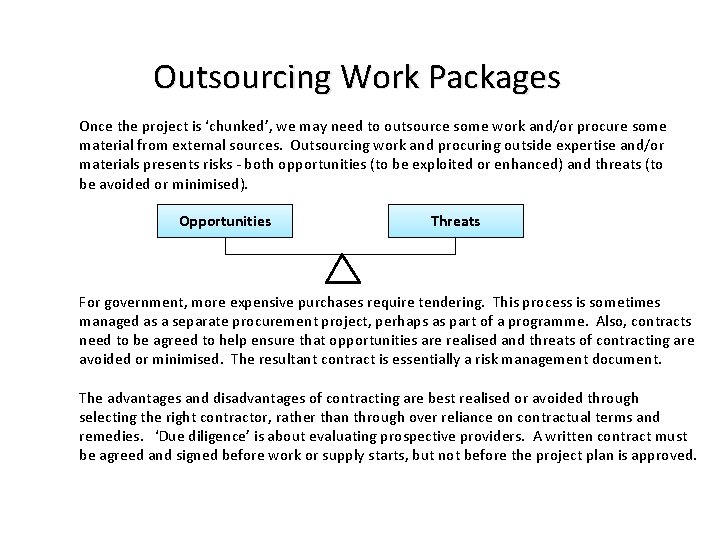
Outsourcing Work Packages Once the project is ‘chunked’, we may need to outsource some work and/or procure some material from external sources. Outsourcing work and procuring outside expertise and/or materials presents risks - both opportunities (to be exploited or enhanced) and threats (to be avoided or minimised). Opportunities Threats For government, more expensive purchases require tendering. This process is sometimes managed as a separate procurement project, perhaps as part of a programme. Also, contracts need to be agreed to help ensure that opportunities are realised and threats of contracting are avoided or minimised. The resultant contract is essentially a risk management document. The advantages and disadvantages of contracting are best realised or avoided through selecting the right contractor, rather than through over reliance on contractual terms and remedies. ‘Due diligence’ is about evaluating prospective providers. A written contract must be agreed and signed before work or supply starts, but not before the project plan is approved.
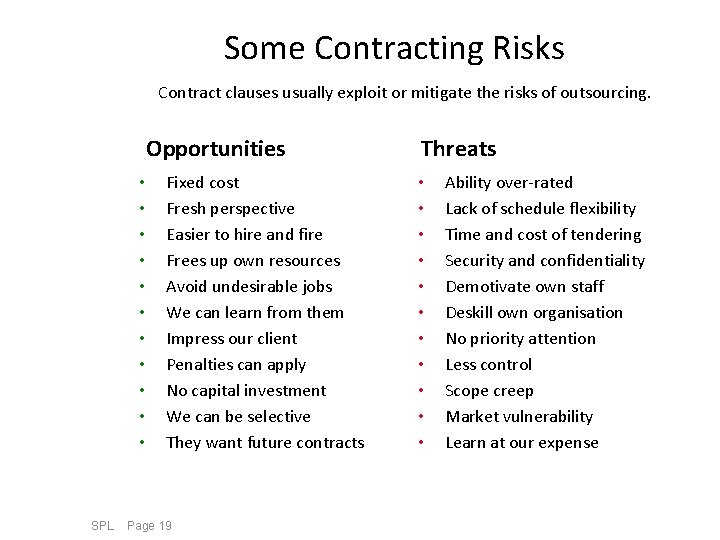
Some Contracting Risks Contract clauses usually exploit or mitigate the risks of outsourcing. Opportunities • • • SPL Fixed cost Fresh perspective Easier to hire and fire Frees up own resources Avoid undesirable jobs We can learn from them Impress our client Penalties can apply No capital investment We can be selective They want future contracts Page 19 Threats • • • Ability over-rated Lack of schedule flexibility Time and cost of tendering Security and confidentiality Demotivate own staff Deskill own organisation No priority attention Less control Scope creep Market vulnerability Learn at our expense
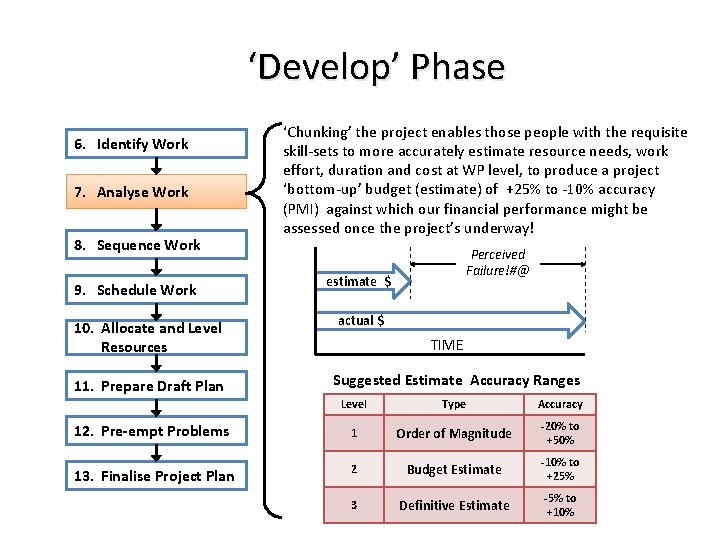
‘Develop’ Phase 6. Identify Work 7. Analyse Work 8. Sequence Work 9. Schedule Work 10. Allocate and Level Resources 11. Prepare Draft Plan ‘Chunking’ the project enables those people with the requisite skill-sets to more accurately estimate resource needs, work effort, duration and cost at WP level, to produce a project ‘bottom-up’ budget (estimate) of +25% to -10% accuracy (PMI) against which our financial performance might be assessed once the project’s underway! Perceived Failure!#@ estimate $ actual $ TIME Suggested Estimate Accuracy Ranges Level Type Accuracy 12. Pre-empt Problems 1 Order of Magnitude -20% to +50% 13. Finalise Project Plan 2 Budget Estimate -10% to +25% 3 Definitive Estimate -5% to +10%
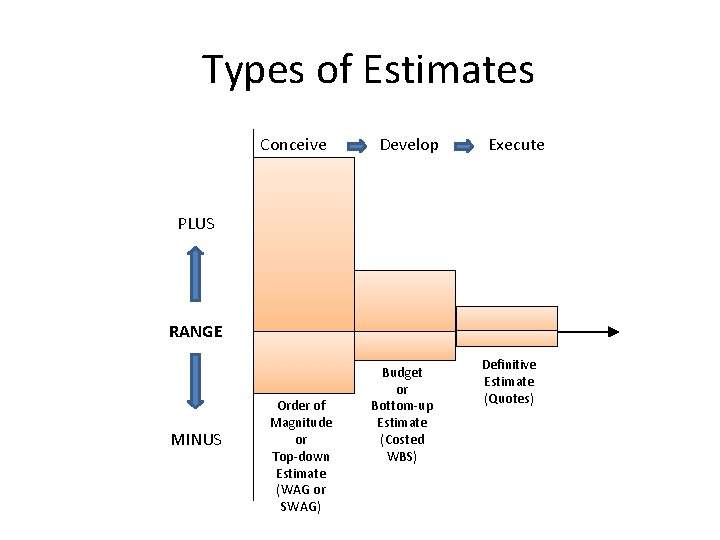
Types of Estimates Conceive Develop Execute PLUS RANGE MINUS Order of Magnitude or Top-down Estimate (WAG or SWAG) Budget or Bottom-up Estimate (Costed WBS) Definitive Estimate (Quotes)
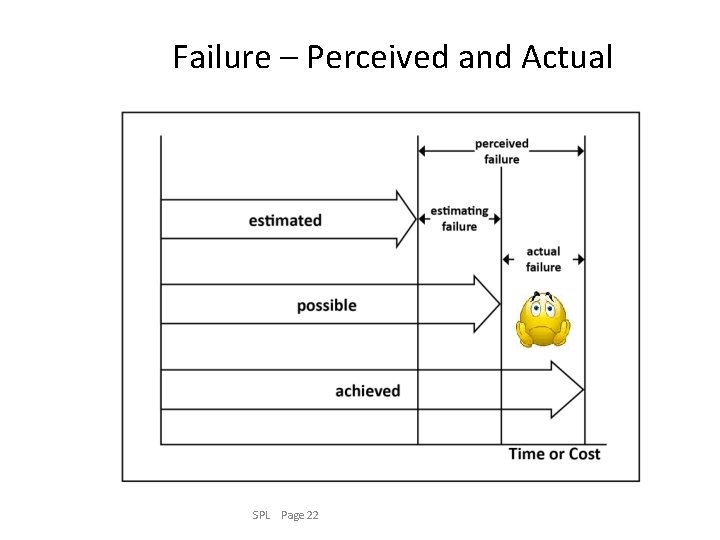
Failure – Perceived and Actual SPL Page 22
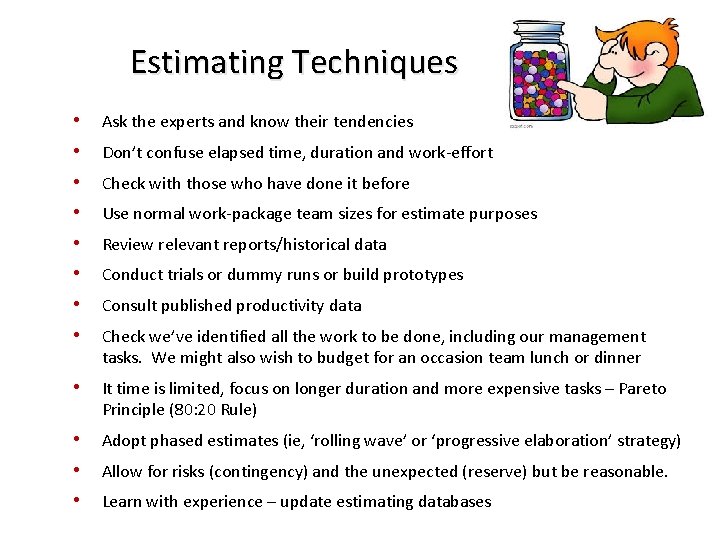
Estimating Techniques • Ask the experts and know their tendencies • Don’t confuse elapsed time, duration and work-effort • Check with those who have done it before • Use normal work-package team sizes for estimate purposes • Review relevant reports/historical data • Conduct trials or dummy runs or build prototypes • Consult published productivity data • Check we’ve identified all the work to be done, including our management tasks. We might also wish to budget for an occasion team lunch or dinner • It time is limited, focus on longer duration and more expensive tasks – Pareto Principle (80: 20 Rule) • Adopt phased estimates (ie, ‘rolling wave’ or ‘progressive elaboration’ strategy) • Allow for risks (contingency) and the unexpected (reserve) but be reasonable. • Learn with experience – update estimating databases
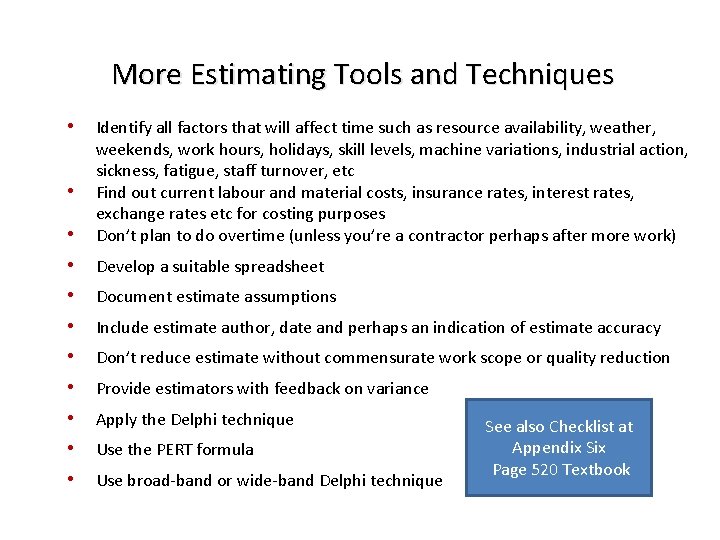
More Estimating Tools and Techniques • • Identify all factors that will affect time such as resource availability, weather, weekends, work hours, holidays, skill levels, machine variations, industrial action, sickness, fatigue, staff turnover, etc Find out current labour and material costs, insurance rates, interest rates, exchange rates etc for costing purposes Don’t plan to do overtime (unless you’re a contractor perhaps after more work) • Develop a suitable spreadsheet • Document estimate assumptions • Include estimate author, date and perhaps an indication of estimate accuracy • Don’t reduce estimate without commensurate work scope or quality reduction • Provide estimators with feedback on variance • Apply the Delphi technique • Use the PERT formula • Use broad-band or wide-band Delphi technique • See also Checklist at Appendix Six Page 520 Textbook
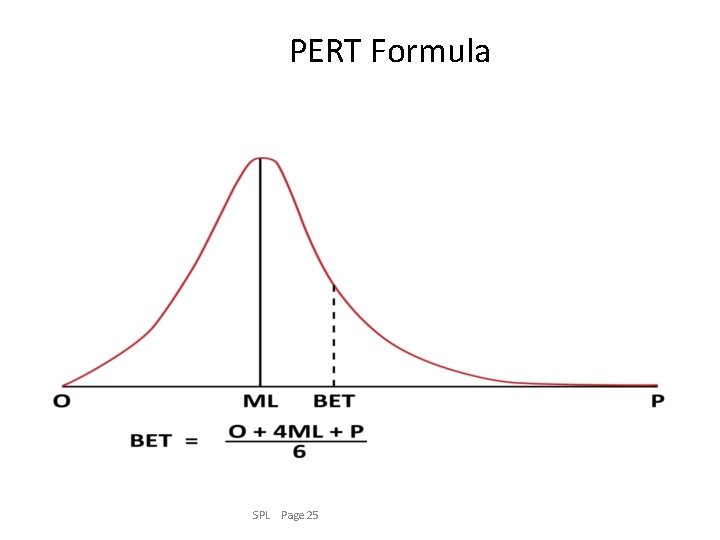
PERT Formula SPL Page 25
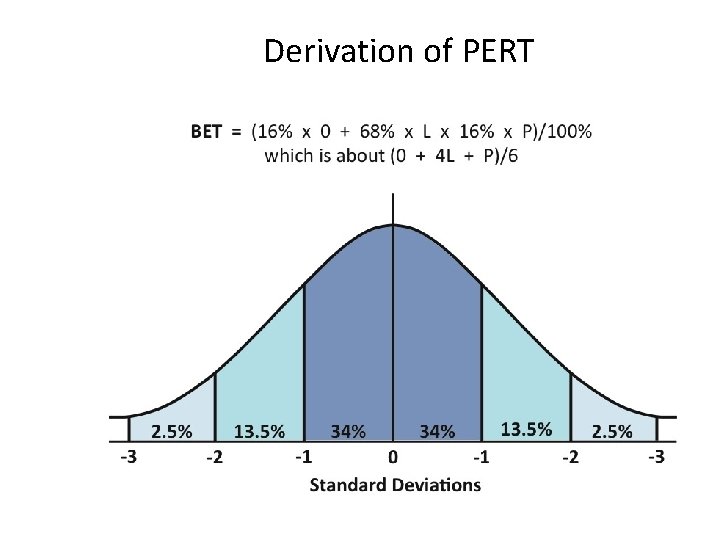
Derivation of PERT SPL Page 26
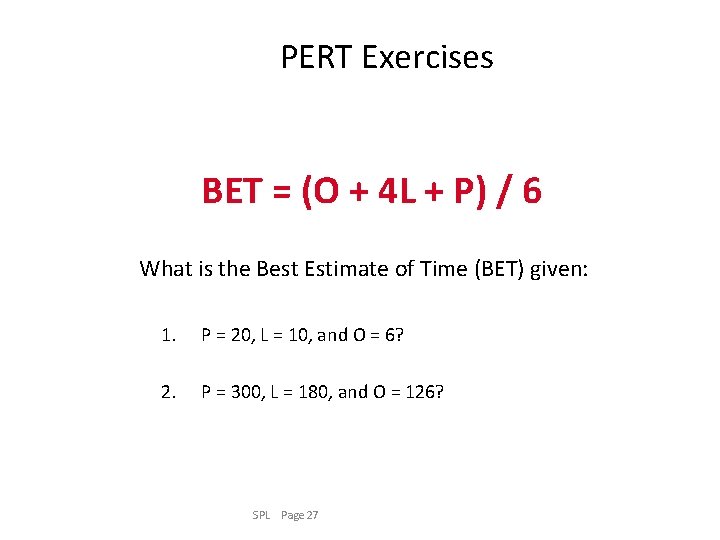
PERT Exercises BET = (O + 4 L + P) / 6 What is the Best Estimate of Time (BET) given: 1. P = 20, L = 10, and O = 6? 2. P = 300, L = 180, and O = 126? SPL Page 27
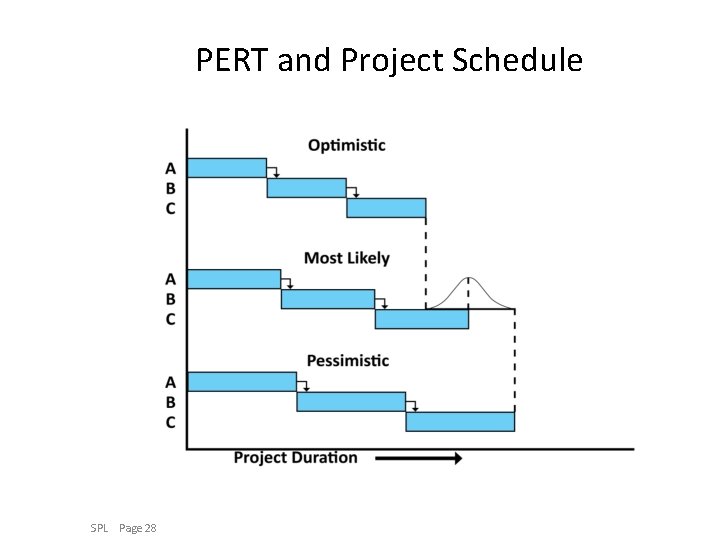
PERT and Project Schedule SPL Page 28
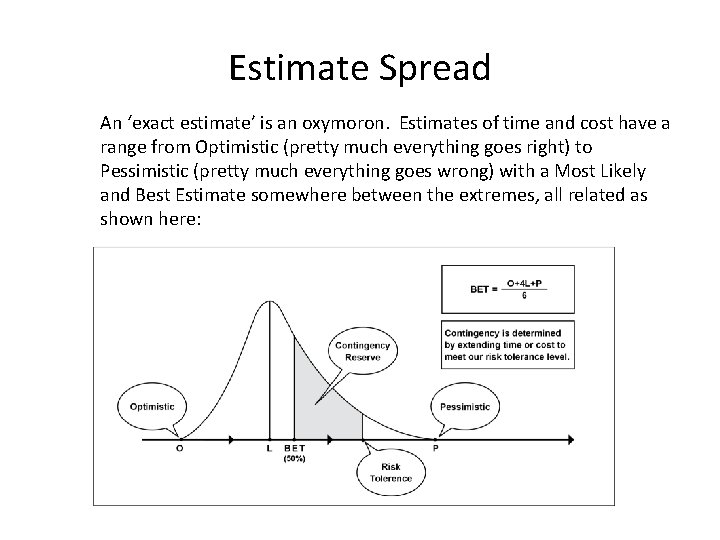
Estimate Spread An ‘exact estimate’ is an oxymoron. Estimates of time and cost have a range from Optimistic (pretty much everything goes right) to Pessimistic (pretty much everything goes wrong) with a Most Likely and Best Estimate somewhere between the extremes, all related as shown here:
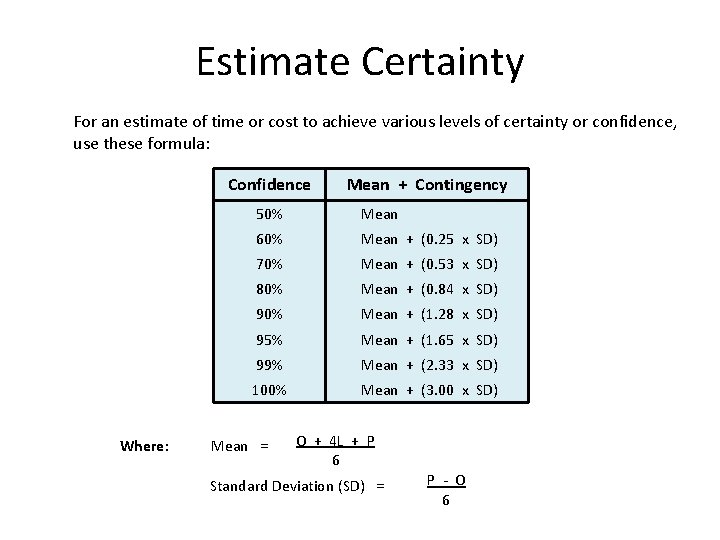
Estimate Certainty For an estimate of time or cost to achieve various levels of certainty or confidence, use these formula: Confidence Where: Mean + Contingency 50% Mean 60% Mean + (0. 25 x SD) 70% Mean + (0. 53 x SD) 80% Mean + (0. 84 x SD) 90% Mean + (1. 28 x SD) 95% Mean + (1. 65 x SD) 99% Mean + (2. 33 x SD) 100% Mean + (3. 00 x SD) Mean = O + 4 L + P 6 Standard Deviation (SD) = P - O 6
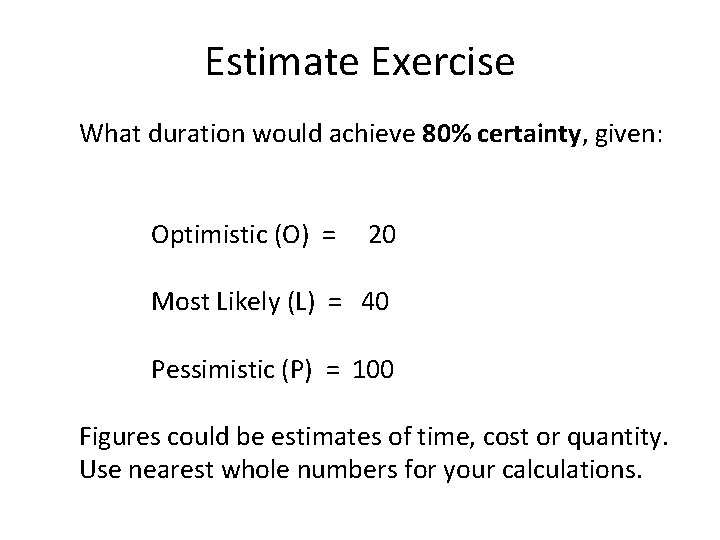
Estimate Exercise What duration would achieve 80% certainty, given: Optimistic (O) = 20 Most Likely (L) = 40 Pessimistic (P) = 100 Figures could be estimates of time, cost or quantity. Use nearest whole numbers for your calculations.
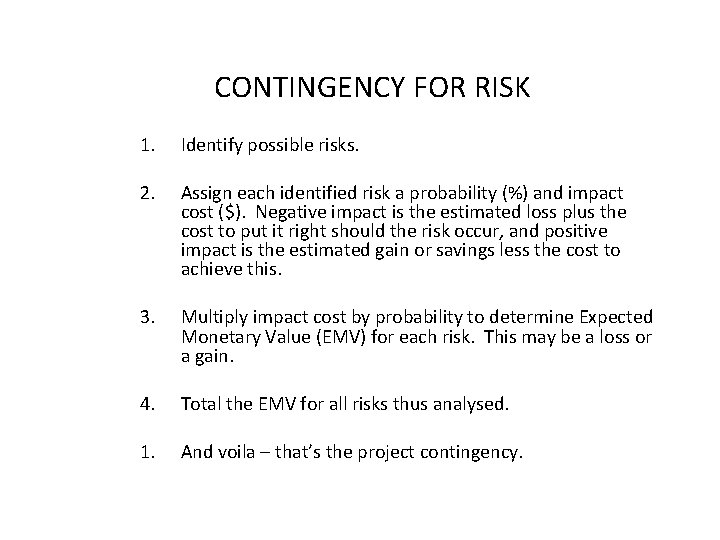
CONTINGENCY FOR RISK 1. Identify possible risks. 2. Assign each identified risk a probability (%) and impact cost ($). Negative impact is the estimated loss plus the cost to put it right should the risk occur, and positive impact is the estimated gain or savings less the cost to achieve this. 3. Multiply impact cost by probability to determine Expected Monetary Value (EMV) for each risk. This may be a loss or a gain. 4. Total the EMV for all risks thus analysed. 1. And voila – that’s the project contingency.
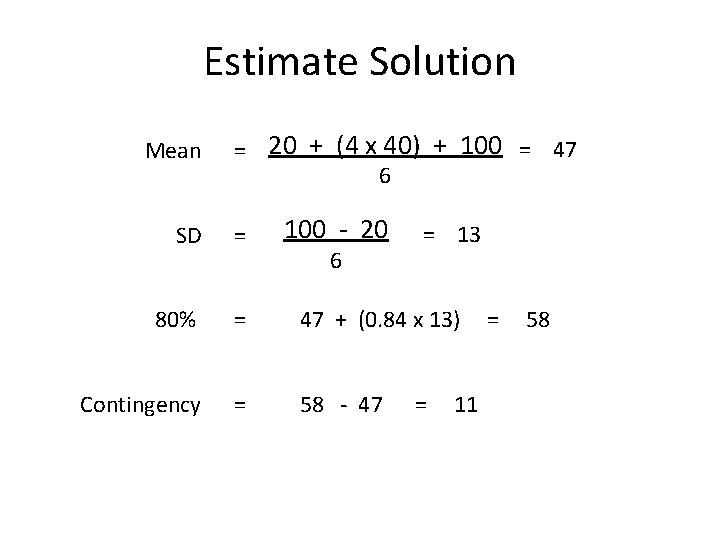
Estimate Solution Mean = 20 + (4 x 40) + 100 = 47 6 SD = 80% = Contingency = 100 - 20 6 = 13 47 + (0. 84 x 13) = 58 58 - 47 = 11
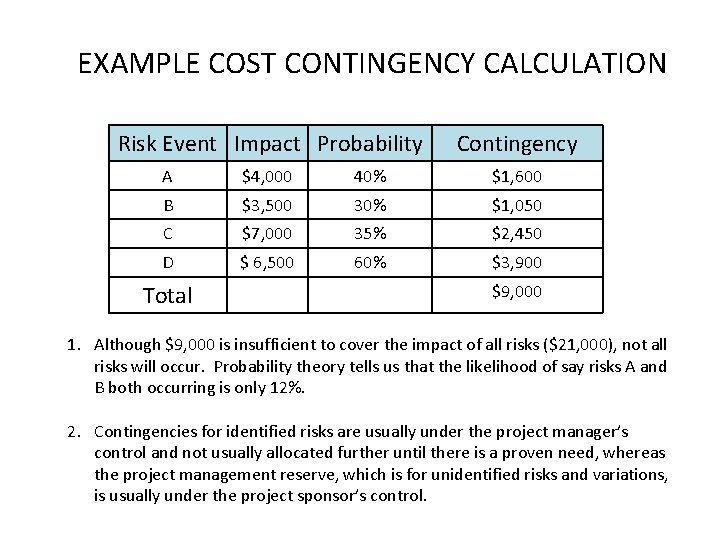
EXAMPLE COST CONTINGENCY CALCULATION Risk Event Impact Probability Contingency A $4, 000 40% $1, 600 B $3, 500 30% $1, 050 C $7, 000 35% $2, 450 D $ 6, 500 60% $3, 900 Total $9, 000 1. Although $9, 000 is insufficient to cover the impact of all risks ($21, 000), not all risks will occur. Probability theory tells us that the likelihood of say risks A and B both occurring is only 12%. 2. Contingencies for identified risks are usually under the project manager’s control and not usually allocated further until there is a proven need, whereas the project management reserve, which is for unidentified risks and variations, is usually under the project sponsor’s control.
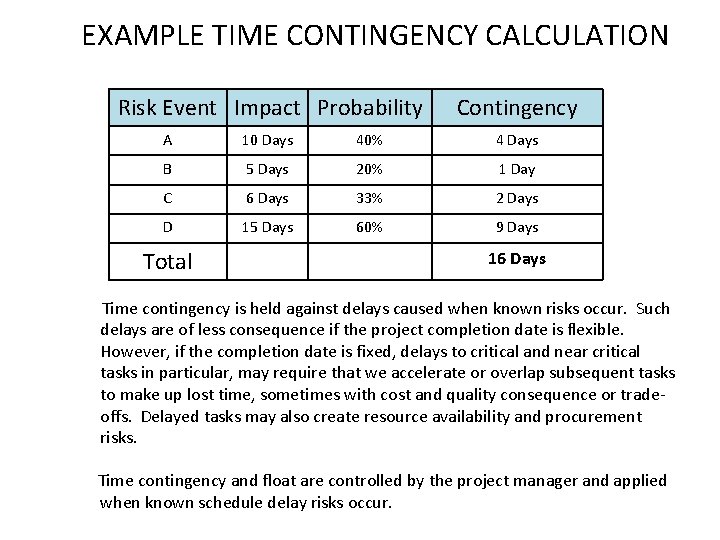
EXAMPLE TIME CONTINGENCY CALCULATION Risk Event Impact Probability Contingency A 10 Days 40% 4 Days B 5 Days 20% 1 Day C 6 Days 33% 2 Days D 15 Days 60% 9 Days Total 16 Days Time contingency is held against delays caused when known risks occur. Such delays are of less consequence if the project completion date is flexible. However, if the completion date is fixed, delays to critical and near critical tasks in particular, may require that we accelerate or overlap subsequent tasks to make up lost time, sometimes with cost and quality consequence or tradeoffs. Delayed tasks may also create resource availability and procurement risks. Time contingency and float are controlled by the project manager and applied when known schedule delay risks occur.
PARKINSON’S LAW Parkinson’s Law was a somewhat cynical adage attributed to Cyril Parkinson in 1955 based on his experiences while working in the British Civil Service: “Work expands to fit the time available. ” Thus, given three days to complete a two-day task, the task will invariable take three days. (This could be particularly so if an hourly pay rate applies rather than a fixed price !) Parkinson’s Law might also apply to expenditure. If the budget is excessive, all the money will doubtlessly be spent. For this reason contingency funds are only assigned for identified risks, and if these risks do not occur the contingency fund should be reduced proportionally (and perhaps returned to the client) to avoid irresponsible spending.
MANAGEMENT RESERVE • The project management reserve is an extra fund to cover unforeseen risks (unknown-unknowns) and unanticipated scope changes. • Organisations often set the management reserve at a percentage of the overall project budget, say 5 to 10%, or simply base it on a percentage of the contingency reserve. Setting this reserve figure is a challenge, simply because we don’t know what we don’t know. Of course the management reserve should not exceed the point where the project investment becomes uneconomical. • The best solution is to take a longer-term view. We review similar projects to see how much was actually spent on addressing unexpected problems and variations that were not foreseen. We need good risk data to do this, and since most organisations do not have this data they resort to the fixed percentage approach. • Unused reserves add to the contractor’s profit margin if project work has been outsourced under a fixed price contract. This is fair since the contractor assumed the risk. Unless required as part of the bidding process, it is unlikely that management reserves would have been separately declared by the contractor.
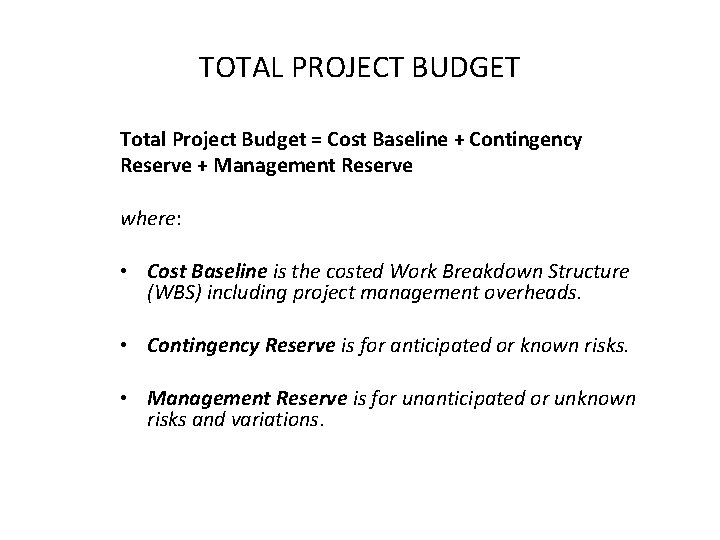
TOTAL PROJECT BUDGET Total Project Budget = Cost Baseline + Contingency Reserve + Management Reserve where: • Cost Baseline is the costed Work Breakdown Structure (WBS) including project management overheads. • Contingency Reserve is for anticipated or known risks. • Management Reserve is for unanticipated or unknown risks and variations.
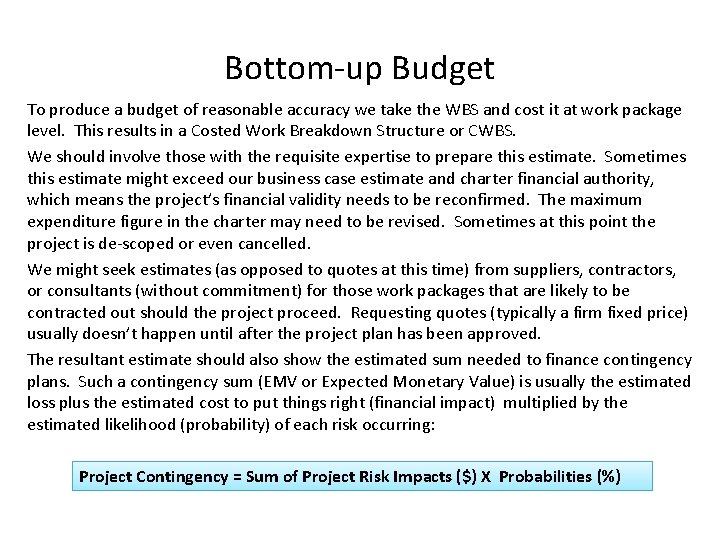
Bottom-up Budget To produce a budget of reasonable accuracy we take the WBS and cost it at work package level. This results in a Costed Work Breakdown Structure or CWBS. We should involve those with the requisite expertise to prepare this estimate. Sometimes this estimate might exceed our business case estimate and charter financial authority, which means the project’s financial validity needs to be reconfirmed. The maximum expenditure figure in the charter may need to be revised. Sometimes at this point the project is de-scoped or even cancelled. We might seek estimates (as opposed to quotes at this time) from suppliers, contractors, or consultants (without commitment) for those work packages that are likely to be contracted out should the project proceed. Requesting quotes (typically a firm fixed price) usually doesn’t happen until after the project plan has been approved. The resultant estimate should also show the estimated sum needed to finance contingency plans. Such a contingency sum (EMV or Expected Monetary Value) is usually the estimated loss plus the estimated cost to put things right (financial impact) multiplied by the estimated likelihood (probability) of each risk occurring: Project Contingency = Sum of Project Risk Impacts ($) X Probabilities (%)
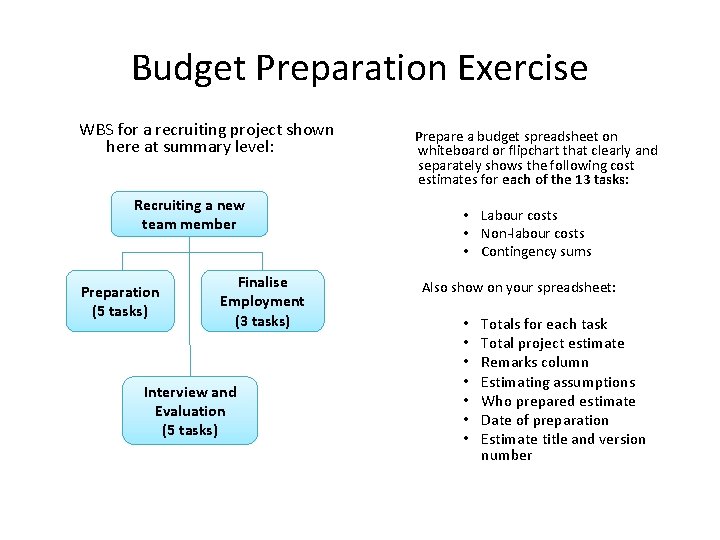
Budget Preparation Exercise WBS for a recruiting project shown here at summary level: Recruiting a new team member Preparation (5 tasks) Finalise Employment (3 tasks) Interview and Evaluation (5 tasks) Prepare a budget spreadsheet on whiteboard or flipchart that clearly and separately shows the following cost estimates for each of the 13 tasks: • Labour costs • Non-labour costs • Contingency sums Also show on your spreadsheet: • • Totals for each task Total project estimate Remarks column Estimating assumptions Who prepared estimate Date of preparation Estimate title and version number
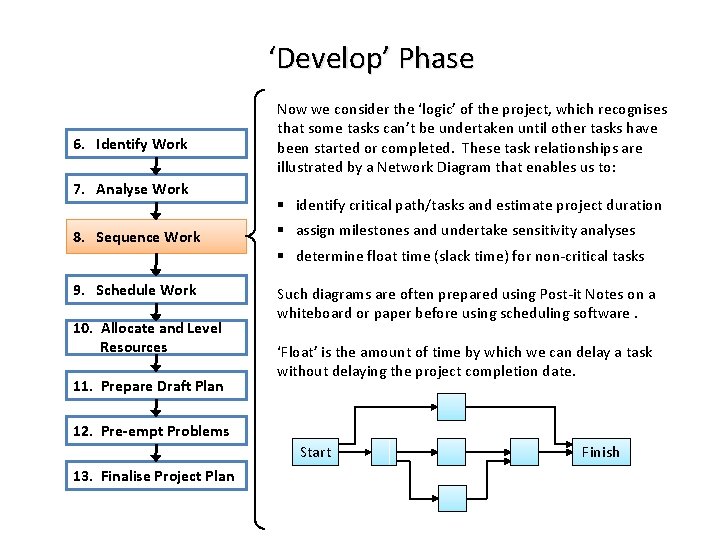
‘Develop’ Phase 6. Identify Work 7. Analyse Work Now we consider the ‘logic’ of the project, which recognises that some tasks can’t be undertaken until other tasks have been started or completed. These task relationships are illustrated by a Network Diagram that enables us to: § identify critical path/tasks and estimate project duration 8. Sequence Work § assign milestones and undertake sensitivity analyses 9. Schedule Work Such diagrams are often prepared using Post-it Notes on a whiteboard or paper before using scheduling software. 10. Allocate and Level Resources 11. Prepare Draft Plan § determine float time (slack time) for non-critical tasks ‘Float’ is the amount of time by which we can delay a task without delaying the project completion date. 12. Pre-empt Problems Start 13. Finalise Project Plan Finish
Critical Path ‘Critical path’ is a misunderstood term. It dictates project duration. A critical task is on the critical path. It is critical in terms of project completion time. Our project’s critical path is important since: It tells us the shortest time in which our project can be completed. It shows us those tasks, which if delayed, will cause a delay to our entire project. It shows us those tasks that must be completed more quickly in order to accelerate project completion. A project can have more than one critical path, and sometimes the critical path changes during project execution when actual task durations become apparent.
Network Diagrams - Points to Remember • Critical Path is the longest time route through the network diagram, which is the shortest time in which the project can be completed. • Milestones have no duration and are typically at the start or finish of an important task – especially critical tasks where arrows converge or disperse. • Decisions during the project should be assessed to determine their impact on the critical path, particularly if our project is ‘time-driven’. • Float (slack) is the amount of time by which a non-critical task can be delayed without delaying project completion. • Network Diagram is a very useful prelude to preparing a schedule. It helps ensure that task relationships (predecessors) are correct, which is otherwise a common mistake with more complicated schedules (Gantt charts).
Network Diagram Crimes • Avoid redundant arrows, loops and mixed units of time. • If we want to start the next task part-way through another task (predecessor), it is usually best to break the first task into two tasks. • Arrows start and finish at nodes. They need to be connected to the nodes. Avoid branching arrows. • No dangles. Every node must have at least one arrow coming in and one arrow coming out (going to another node). • Diagram is usually easier to read if all arrows point forwards and the critical path runs through the centre. Move boxes to achieve this.
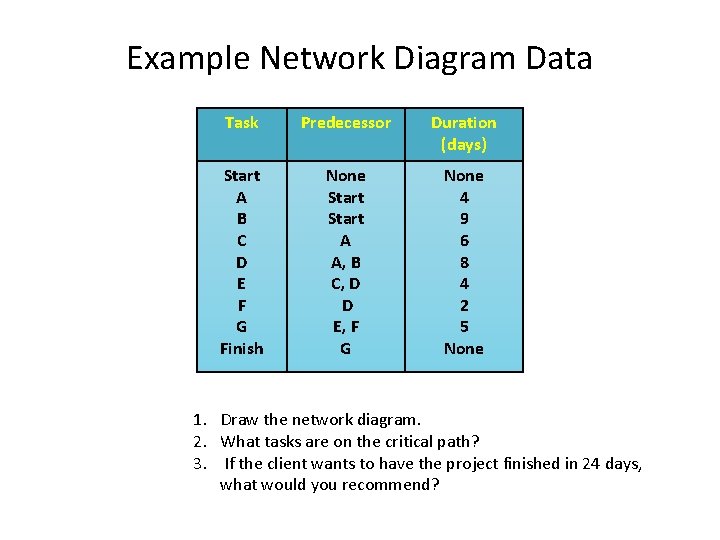
Example Network Diagram Data Task Predecessor Duration (days) Start A B C D E F G Finish None Start A A, B C, D D E, F G None 4 9 6 8 4 2 5 None 1. Draw the network diagram. 2. What tasks are on the critical path? 3. If the client wants to have the project finished in 24 days, what would you recommend?
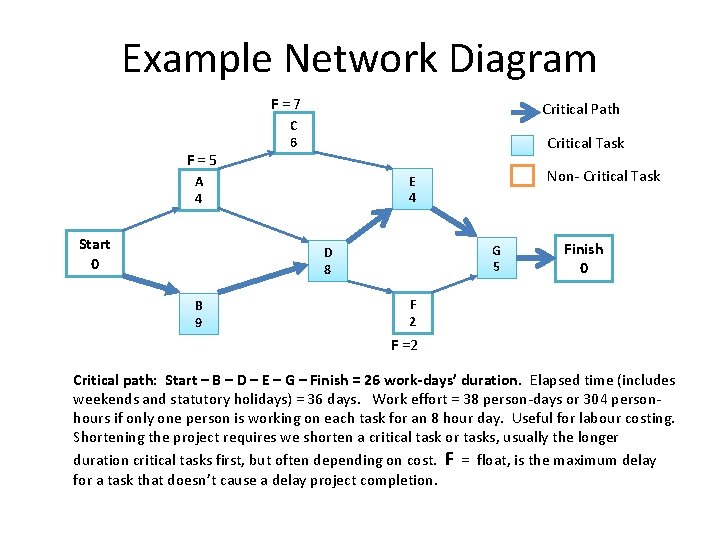
Example Network Diagram F = 7 F = 5 Critical Path C 6 Critical Task Start 0 G 5 D 8 B 9 Non- Critical Task E 4 A 4 Finish 0 F 2 F =2 Critical path: Start – B – D – E – G – Finish = 26 work-days’ duration. Elapsed time (includes weekends and statutory holidays) = 36 days. Work effort = 38 person-days or 304 personhours if only one person is working on each task for an 8 hour day. Useful for labour costing. Shortening the project requires we shorten a critical task or tasks, usually the longer duration critical tasks first, but often depending on cost. F = float, is the maximum delay for a task that doesn’t cause a delay project completion.
Welcome Back Today will go like this… Morning Session • Revise a few things from our last session • Continue with preparing network diagrams and their analysis • Estimate project completion probabilities • Apply Critical Chain Project Management (CCPM) Afternoon Session • Prepare Gantt charts • Assign, schedule and level human resources (ie, people) • Pre-empt project problems and apply risk management • Discuss project plan contents and Dip. PM Assignment Two requirement
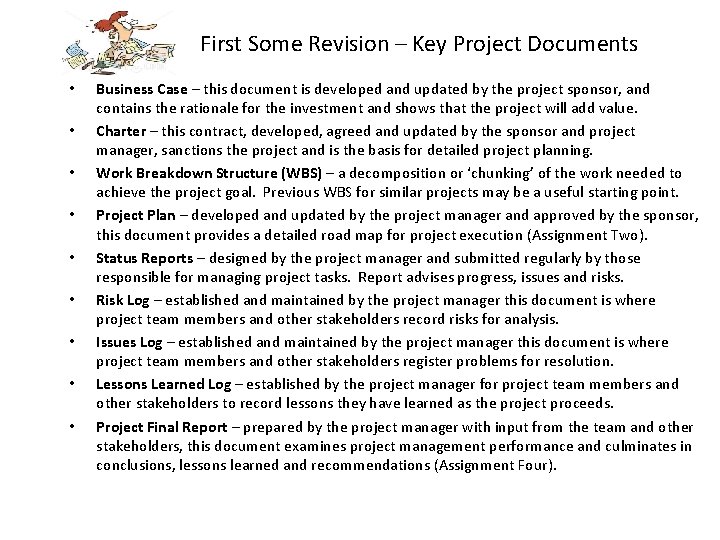
First Some Revision – Key Project Documents • • • Business Case – this document is developed and updated by the project sponsor, and contains the rationale for the investment and shows that the project will add value. Charter – this contract, developed, agreed and updated by the sponsor and project manager, sanctions the project and is the basis for detailed project planning. Work Breakdown Structure (WBS) – a decomposition or ‘chunking’ of the work needed to achieve the project goal. Previous WBS for similar projects may be a useful starting point. Project Plan – developed and updated by the project manager and approved by the sponsor, this document provides a detailed road map for project execution (Assignment Two). Status Reports – designed by the project manager and submitted regularly by those responsible for managing project tasks. Report advises progress, issues and risks. Risk Log – established and maintained by the project manager this document is where project team members and other stakeholders record risks for analysis. Issues Log – established and maintained by the project manager this document is where project team members and other stakeholders register problems for resolution. Lessons Learned Log – established by the project manager for project team members and other stakeholders to record lessons they have learned as the project proceeds. Project Final Report – prepared by the project manager with input from the team and other stakeholders, this document examines project management performance and culminates in conclusions, lessons learned and recommendations (Assignment Four).
Revision – Some Key Financial Terms Finance is an area replete with cool or perhaps scary sounding words that no one outside finance always understands. Here are some such terms used in the project management business: • Estimate, Quote and Budget – an estimate is an approximate cost, a quote is an • • offer to do a job for a price, and the budget is the approved spend. Cost-Benefit Analysis (CBA) – a project investment appraisal that compares project estimated costs and estimated benefits. For a project to add value, benefits must exceed costs, which is a key project selection criterion. Discount or Hurdle Rate – the acceptable rate of return for a project investment. It recognises the diminishing value of money over time. Risk Premium – percentage added to the discount rate to allow for uncertainty. Net Present Value (NPV) – is the total project cash flow when periodic cash flows are discounted at their opportunity cost. Opportunity Cost – is the value of the best alternative use of money other than the proposed project given the same level of risk – the lost opportunity. Payback Period – time needed to recoup the cost of a project. The earlier this breakeven the better given the increasing uncertainty of future cash. Sensitivity Analysis – with regard to project selection, this analysis is about assessing the viability of a project given different NPV discount rates.
Reminder: Project Management versus Project Success When we think of success, there is an important difference between Project Management Success and Project Success. The former is about meeting deadlines, sticking to a schedule, staying under budget and providing deliverables that are built and perform to specifications, which are all worthy and often difficult things to achieve. They require project management expertise. On the other hand, project success or perhaps better described as ‘product success’, is about benefit realisation or value created by the project's deliverables during their operational life span. Some project managers dislike a definition of project success that encompasses value created, given they are not keen to be held accountable for things over which they have little or no control. Nevertheless, it is important that we project managers understand the business case that justifies the investment, since the management of our project and the decisions and recommendations we make about project parameters (scope, time, quality, cost and risk) during the project life cycle may also impact product success (benefits).
Revision – Project Sponsors The project sponsor owns our project on behalf of our organisation. For organisations looking to ensure successful projects, sponsors can make a big the difference. Part coach, part guardian, this is the person who steps in to clear obstacles to our success as project managers. Sponsors typically identify their most important functions as: 1. Encourage, identify and recognise good ideas for projects. 2. Develop and maintain the project business case and recommend cancellation of the project if the investment is no longer justified. 3. Sanction the project charter and project plan and changes to these key documents. 4. Champion the project and obtain project funds and other resources. 5. Oversee the project management function and help manage senior stakeholders. 6. Remove roadblocks to project management success and resolve escalated issues. 7. Maximise project benefits.
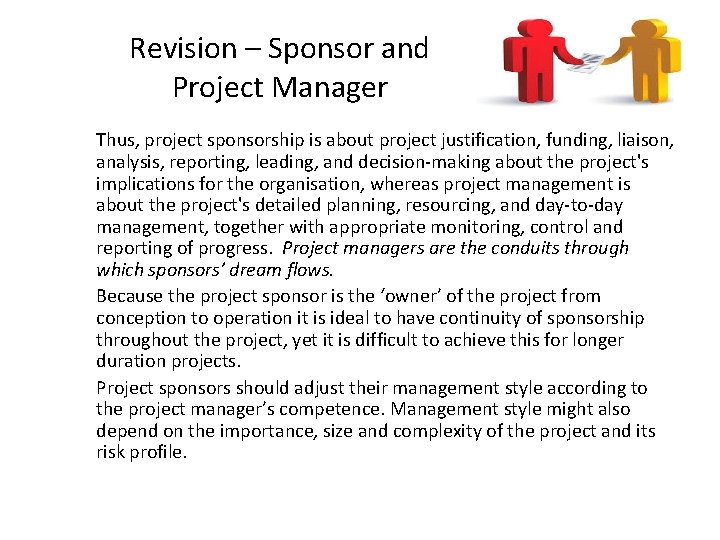
Revision – Sponsor and Project Manager Thus, project sponsorship is about project justification, funding, liaison, analysis, reporting, leading, and decision-making about the project's implications for the organisation, whereas project management is about the project's detailed planning, resourcing, and day-to-day management, together with appropriate monitoring, control and reporting of progress. Project managers are the conduits through which sponsors’ dream flows. Because the project sponsor is the ‘owner’ of the project from conception to operation it is ideal to have continuity of sponsorship throughout the project, yet it is difficult to achieve this for longer duration projects. Project sponsors should adjust their management style according to the project manager’s competence. Management style might also depend on the importance, size and complexity of the project and its risk profile.
Beware the “No Plan” Sponsor There is a problem when the project sponsor sees planning as a waste of time and wants to plan as we go – the headless chicken syndrome. A lack of planning usually causes wasted effort as we produce the wrong deliverables. Even in emergencies, to start work without a plan is dumb. A good plan reduces uncertainty and fire-fighting, increases understanding and buy-in, and improves project team productivity. The 1: 100 rule applies – the later during the project management lifecycle we make or change plans the more it costs to do so. While no project proceeds better than its plan and time spent planning is seldom wasted, we should also recognise that eventually there is a diminishing return with excessive planning – paralysis by analysis. Remember too that a project plan is a baseline for change. It would be foolish to slavishly adhere to a plan that’s proving to be wrong. Thus, plan review, revision and version control are important on-going functions. While we do our best to keep on track, sometimes we need to build new track. Of course, revised plans also need the sponsor’s approval before they are implemented.
Revision: Stakeholders may want to change things. Often the best way to handle change requests is not to resist such ideas, but to discuss possible options. We give the stakeholders choices, each of which preserves the project purpose and goal, but each of the options we present invariably has a trade-off consequence (scope, time, cost, quality, risk or benefits) that stakeholders seeking the change need to appreciate. “Yes we can add that extra feature, but we’ll need more budget and time to do so. I’ll work out just how much extra time and money will be needed and let you know. ”
Reminder: Benefits of Planning • • Planning provides direction. Planning as a team creates ‘buy-in’. Planning allows the team to proactively address risks to eliminate or reduce their likelihood impact on the project – pre-empting obstacles. Planning allows for best use of our scarce resources. Planning produces a baseline against which progress can be measured and early action taken to correct deviations (variances). Planning is a defence against unrealistic deadlines and budget cuts. Planning produces a ‘how to’ road map and delegation-size work packages for team members to focus on. Although planning is a participatory process, we project managers need to look forward and further ahead than anyone else on the project team. We do learn from the past but we don’t dwell on it. Our team members are more likely to be preoccupied with their current project tasks. And typically, we usually spend more time planning than do other team members. Yes, we need to be good planners. Let’s look ahead and nullify threats and capitalise on opportunuties towards achieve our project goal.
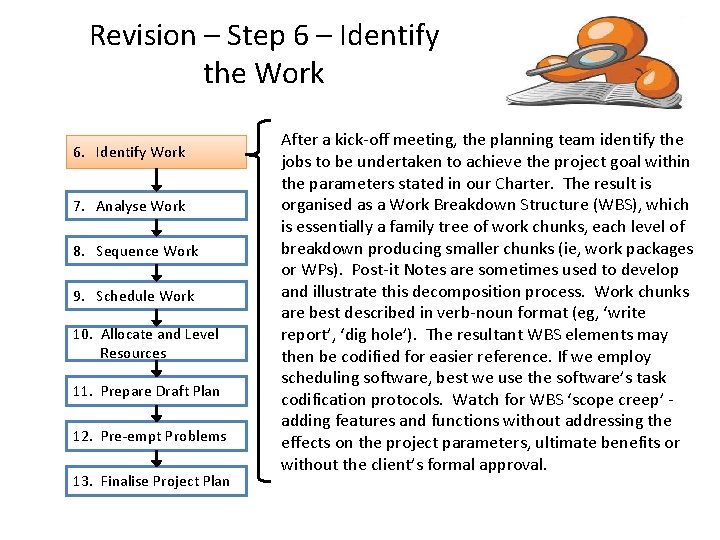
Revision – Step 6 – Identify the Work 6. Identify Work 7. Analyse Work 8. Sequence Work 9. Schedule Work 10. Allocate and Level Resources 11. Prepare Draft Plan 12. Pre-empt Problems 13. Finalise Project Plan After a kick-off meeting, the planning team identify the jobs to be undertaken to achieve the project goal within the parameters stated in our Charter. The result is organised as a Work Breakdown Structure (WBS), which is essentially a family tree of work chunks, each level of breakdown producing smaller chunks (ie, work packages or WPs). Post-it Notes are sometimes used to develop and illustrate this decomposition process. Work chunks are best described in verb-noun format (eg, ‘write report’, ‘dig hole’). The resultant WBS elements may then be codified for easier reference. If we employ scheduling software, best we use the software’s task codification protocols. Watch for WBS ‘scope creep’ - adding features and functions without addressing the effects on the project parameters, ultimate benefits or without the client’s formal approval.
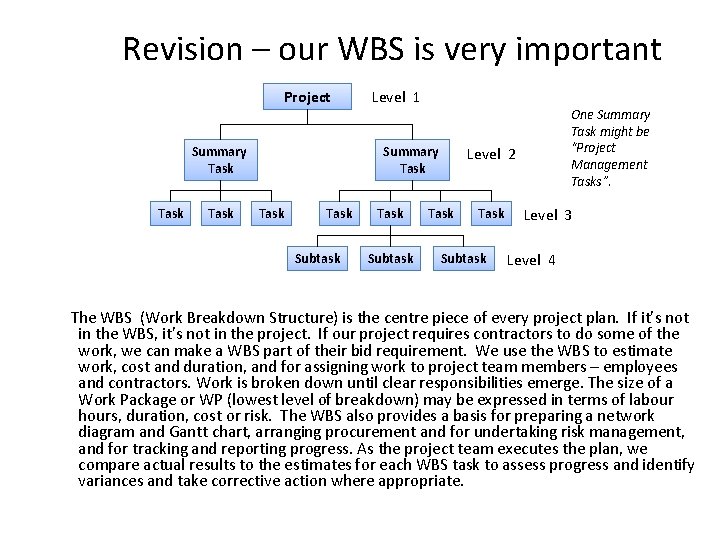
Revision – our WBS is very important Project Summary Task Level 1 Summary Task Subtask One Summary Task might be “Project Management Tasks”. Level 2 Task Subtask Level 3 Level 4 The WBS (Work Breakdown Structure) is the centre piece of every project plan. If it’s not in the WBS, it’s not in the project. If our project requires contractors to do some of the work, we can make a WBS part of their bid requirement. We use the WBS to estimate work, cost and duration, and for assigning work to project team members – employees and contractors. Work is broken down until clear responsibilities emerge. The size of a Work Package or WP (lowest level of breakdown) may be expressed in terms of labour hours, duration, cost or risk. The WBS also provides a basis for preparing a network diagram and Gantt chart, arranging procurement and for undertaking risk management, and for tracking and reporting progress. As the project team executes the plan, we compare actual results to the estimates for each WBS task to assess progress and identify variances and take corrective action where appropriate.
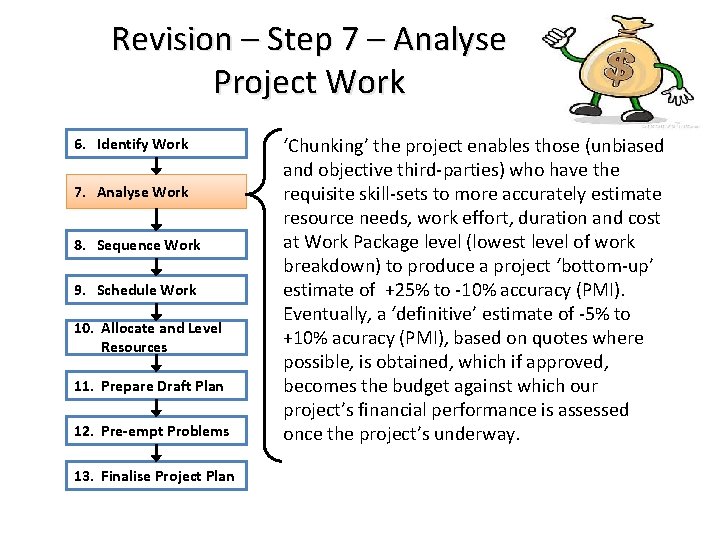
Revision – Step 7 – Analyse Project Work 6. Identify Work 7. Analyse Work 8. Sequence Work 9. Schedule Work 10. Allocate and Level Resources 11. Prepare Draft Plan 12. Pre-empt Problems 13. Finalise Project Plan ‘Chunking’ the project enables those (unbiased and objective third-parties) who have the requisite skill-sets to more accurately estimate resource needs, work effort, duration and cost at Work Package level (lowest level of work breakdown) to produce a project ‘bottom-up’ estimate of +25% to -10% accuracy (PMI). Eventually, a ‘definitive’ estimate of -5% to +10% acuracy (PMI), based on quotes where possible, is obtained, which if approved, becomes the budget against which our project’s financial performance is assessed once the project’s underway.
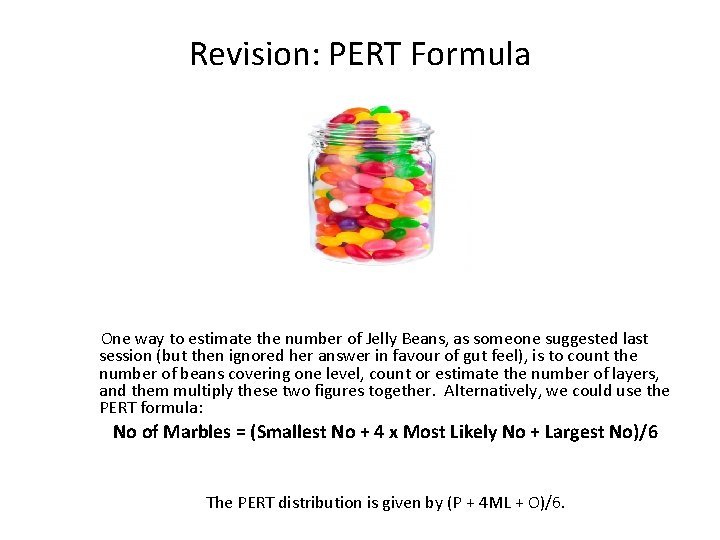
Revision: PERT Formula One way to estimate the number of Jelly Beans, as someone suggested last session (but then ignored her answer in favour of gut feel), is to count the number of beans covering one level, count or estimate the number of layers, and them multiply these two figures together. Alternatively, we could use the PERT formula: No of Marbles = (Smallest No + 4 x Most Likely No + Largest No)/6 The PERT distribution is given by (P + 4 ML + O)/6.
An ‘Exact Estimate’ is an Oxymoron Project estimates are difficult and doing them well can be the difference between project management and project success and failure. When the client asks you for project estimates, which would you respond with: 1. Sorry, no time, I’m off to a meeting. 2. We’ll be finished this year at exactly 2: 13 pm on Wednesday 7 October at a precise cost of $209, 833. 22. 3. I’m 75% confident that we can finish the project within 8 -10 months at a cost between $250, 000 and $300, 000. 4. My estimate at this point is that we’ll be done in about 9 months or so and the cost will come in at about $275, 000, but I’ll update those figures after my further analysis as our planning proceeds.
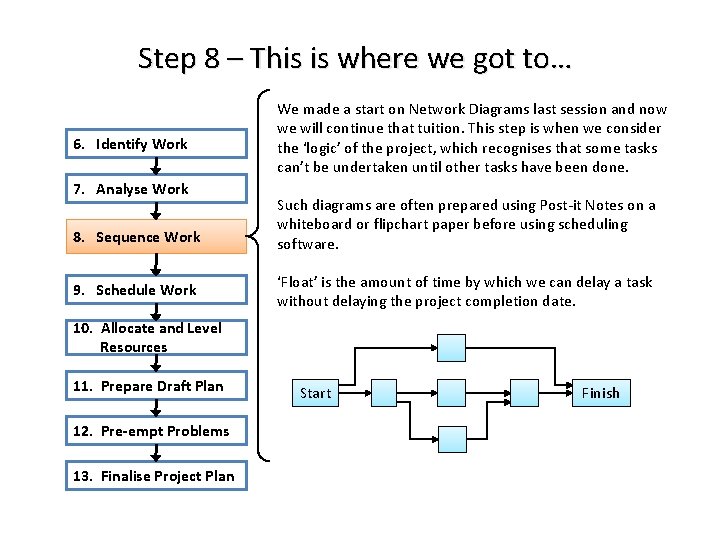
Step 8 – This is where we got to… 6. Identify Work 7. Analyse Work 8. Sequence Work 9. Schedule Work We made a start on Network Diagrams last session and now we will continue that tuition. This step is when we consider the ‘logic’ of the project, which recognises that some tasks can’t be undertaken until other tasks have been done. Such diagrams are often prepared using Post-it Notes on a whiteboard or flipchart paper before using scheduling software. ‘Float’ is the amount of time by which we can delay a task without delaying the project completion date. 10. Allocate and Level Resources 11. Prepare Draft Plan 12. Pre-empt Problems 13. Finalise Project Plan Start Finish
Revision - Network Diagram • The network diagram is a very useful tool and common prelude to preparing a schedule, particularly for a more complicated project. It helps ensure that task relationships (predecessors) are correct. • Milestones have no duration and are typically at the start and/or finish of an important task – especially critical tasks where dependencies converge or disperse. Milestone achievement might trigger a milestone report by the project manager to the sponsor. • Float is spare time available to the project manager and should not be made available to task managers who only need to know their task start and finish dates, otherwise their work will invariable expand to fill out all the time available – Parkinson’s Law. • If we want to start the next task part-way through another task (predecessor), it’s usually better to break the first task into two tasks to ensure start-to-finish continuity. The most common or default dependency is the Finish-to-Start (FS) relationship. • Arrows only start and finish at nodes. All arrows need to be physically connected to nodes. Every node, except Start and Finish, must have at least one arrow coming in and one arrow coming out (off to another node). Avoid branching arrows, redundant arrows, dangling nodes, loops and mixed units of time. Task durations are usually measured in days or weeks. • Some network diagrams may be easier to read if all arrows point forward with the critical path running through the centre. We can move task nodes to achieve this.
Revision - Critical Path ‘Critical Path’ is an often misunderstood term. It dictates project duration. The Critical Path is the longest time route through the network diagram from Start to Finish, which is the shortest time in which the project can be completed. A critical task is a task on the critical path. It is critical in terms of project completion time. Our project’s critical path is important since: It tells us the shortest time in which our project can be completed. It shows us those tasks, which if delayed, will cause a delay to our entire project. It shows us those tasks that must be completed more quickly in order to accelerate project completion. A project can have more than one critical path, and sometimes critical paths change during project execution when actual task durations become apparent. Some projects with an externally imposed finish date may not have a conventional critical path and all tasks will have float. In this situation the critical path is the path with the least float.
Revision - Types of Dependencies A network diagram shows dependencies that ensure work is executed in the proper sequence. There are three types of dependencies: 1. Mandatory - We must dig a hole before we can plant a tree. This type of dependency is sometimes described as ‘hard logic. ’ 2. Discretionary – We prefer to add milk last during our tea-making project, or we prefer to purchase the airline ticket before we arrange travel insurance. 3. External – We can’t start building the house until the necessary materials are delivered by the supplier. Such a dependency adds risk to a project. Usually, the fewer dependencies, the lesser is project duration. However, by ignoring or removing dependencies we may jeopardise project success.
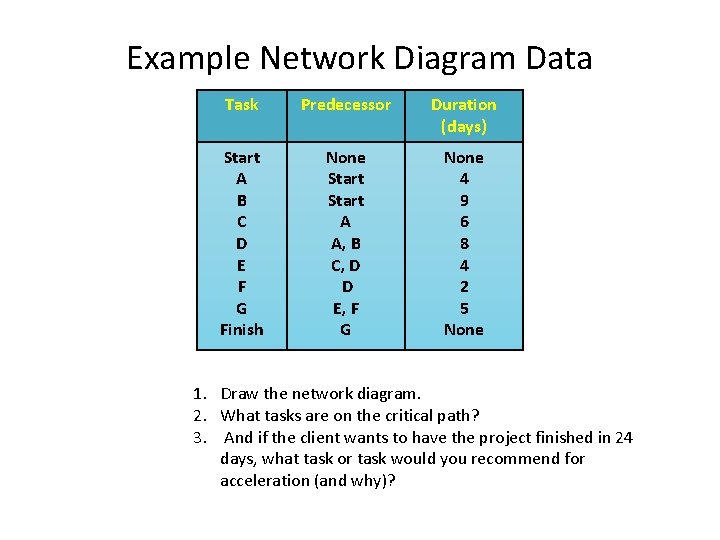
Example Network Diagram Data Task Predecessor Duration (days) Start A B C D E F G Finish None Start A A, B C, D D E, F G None 4 9 6 8 4 2 5 None 1. Draw the network diagram. 2. What tasks are on the critical path? 3. And if the client wants to have the project finished in 24 days, what task or task would you recommend for acceleration (and why)?
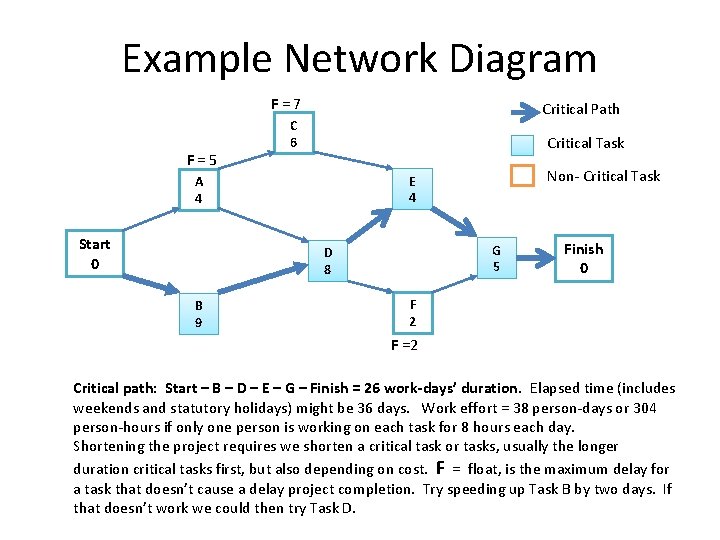
Example Network Diagram F = 7 F = 5 Critical Path C 6 Critical Task Start 0 G 5 D 8 B 9 Non- Critical Task E 4 A 4 Finish 0 F 2 F =2 Critical path: Start – B – D – E – G – Finish = 26 work-days’ duration. Elapsed time (includes weekends and statutory holidays) might be 36 days. Work effort = 38 person-days or 304 person-hours if only one person is working on each task for 8 hours each day. Shortening the project requires we shorten a critical task or tasks, usually the longer duration critical tasks first, but also depending on cost. F = float, is the maximum delay for a task that doesn’t cause a delay project completion. Try speeding up Task B by two days. If that doesn’t work we could then try Task D.
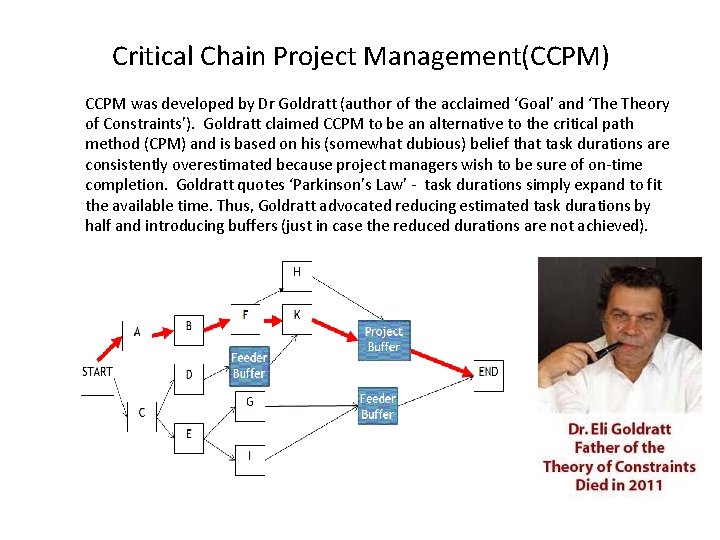
Critical Chain Project Management(CCPM) CCPM was developed by Dr Goldratt (author of the acclaimed ‘Goal’ and ‘The Theory of Constraints’). Goldratt claimed CCPM to be an alternative to the critical path method (CPM) and is based on his (somewhat dubious) belief that task durations are consistently overestimated because project managers wish to be sure of on-time completion. Goldratt quotes ‘Parkinson’s Law’ - task durations simply expand to fit the available time. Thus, Goldratt advocated reducing estimated task durations by half and introducing buffers (just in case the reduced durations are not achieved).
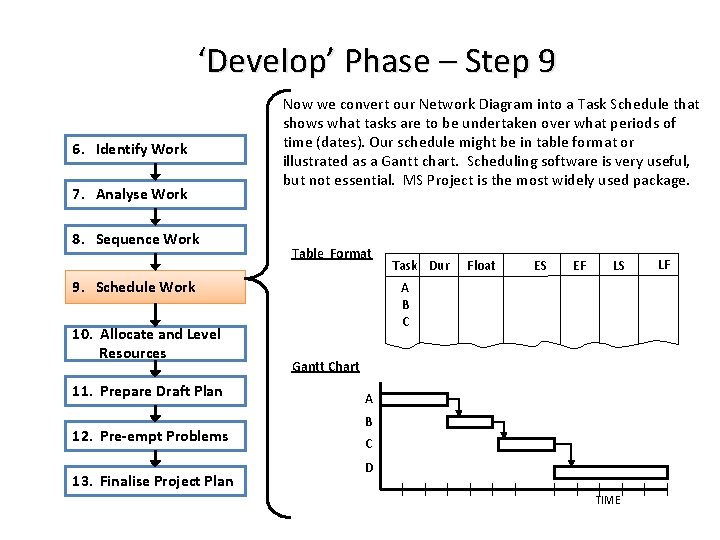
‘Develop’ Phase – Step 9 6. Identify Work 7. Analyse Work 8. Sequence Work Now we convert our Network Diagram into a Task Schedule that shows what tasks are to be undertaken over what periods of time (dates). Our schedule might be in table format or illustrated as a Gantt chart. Scheduling software is very useful, but not essential. MS Project is the most widely used package. Table Format 9. Schedule Work 10. Allocate and Level Resources 11. Prepare Draft Plan 12. Pre-empt Problems 13. Finalise Project Plan Task Dur Float ES EF LS A B C Gantt Chart A B C D TIME LF
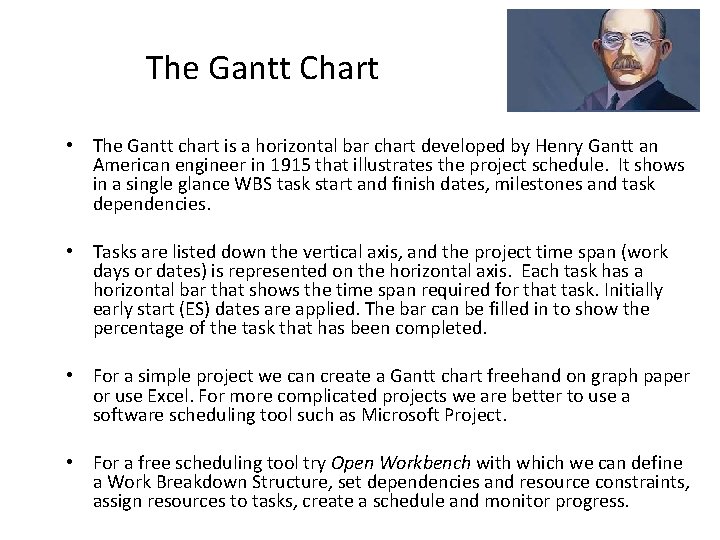
The Gantt Chart • The Gantt chart is a horizontal bar chart developed by Henry Gantt an American engineer in 1915 that illustrates the project schedule. It shows in a single glance WBS task start and finish dates, milestones and task dependencies. • Tasks are listed down the vertical axis, and the project time span (work days or dates) is represented on the horizontal axis. Each task has a horizontal bar that shows the time span required for that task. Initially early start (ES) dates are applied. The bar can be filled in to show the percentage of the task that has been completed. • For a simple project we can create a Gantt chart freehand on graph paper or use Excel. For more complicated projects we are better to use a software scheduling tool such as Microsoft Project. • For a free scheduling tool try Open Workbench with which we can define a Work Breakdown Structure, set dependencies and resource constraints, assign resources to tasks, create a schedule and monitor progress.
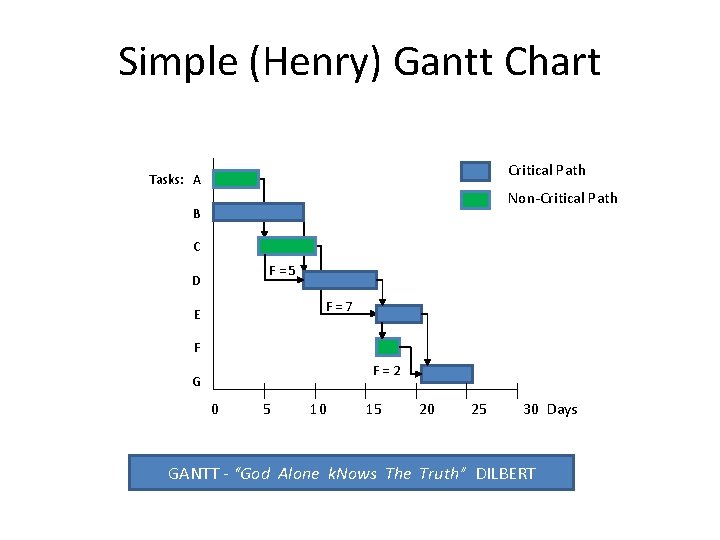
Simple (Henry) Gantt Chart Critical Path Tasks: A Non-Critical Path B C D E F = 5 F = 7 F G F = 2 0 5 10 15 20 25 30 Days GANTT - “God Alone k. Nows The Truth” DILBERT
Schedule Compression If the critical path duration takes our project's finish date too far out there a couple of techniques that we project managers can use (with caution) to compress the schedule: 1. Fast tracking - Perform some critical path tasks in parallel that were originally planned to be undertaken sequentially. However, this may increase risk and the likelihood of rework. 2. Crashing or fast-tracking – Working longer hours or assigning additional resources to critical path tasks in order to complete them more quickly. Such acceleration almost always results in increased cost and there is a point when adding more resources will actually start to slow task completion down due to congestion and the added challenges of communication, coordination, cooperation, confusion, conflict and coaching the new arrivals – all reducing productivity. And there may be a greater supervisory cost. Also, due to fatigue, longer work hours could eat into productivity.
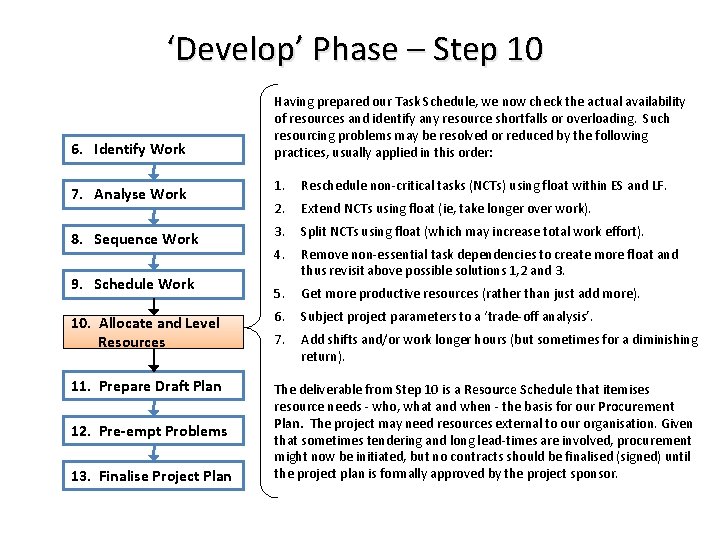
‘Develop’ Phase – Step 10 6. Identify Work Having prepared our Task Schedule, we now check the actual availability of resources and identify any resource shortfalls or overloading. Such resourcing problems may be resolved or reduced by the following practices, usually applied in this order: 1. Reschedule non-critical tasks (NCTs) using float within ES and LF. 2. Extend NCTs using float (ie, take longer over work). 3. Split NCTs using float (which may increase total work effort). 4. Remove non-essential task dependencies to create more float and thus revisit above possible solutions 1, 2 and 3. 5. Get more productive resources (rather than just add more). 10. Allocate and Level Resources 6. Subject project parameters to a ‘trade-off analysis’. 7. Add shifts and/or work longer hours (but sometimes for a diminishing return). 11. Prepare Draft Plan The deliverable from Step 10 is a Resource Schedule that itemises resource needs - who, what and when - the basis for our Procurement Plan. The project may need resources external to our organisation. Given that sometimes tendering and long lead-times are involved, procurement might now be initiated, but no contracts should be finalised (signed) until the project plan is formally approved by the project sponsor. 7. Analyse Work 8. Sequence Work 9. Schedule Work 12. Pre-empt Problems 13. Finalise Project Plan
Resource Scheduling Resources (labour, equipment and materials) are needed to complete project tasks. A project resource schedule is based on the project task schedule and documents who, what and how much is needed and when it is needed and for how long. It is the basis for staffing and procurement. See Workbook. Allocation of limited resources is usually based on project priorities. Low priority projects may need to make do with what resources are left over. They have resource-constrained schedules, which means that the availability of resources dictates project schedule duration. We also need to check: 1. 2. We haven't assigned the same person to different tasks on the same dates. Two common solutions are to re-schedule tasks so that they are done on different dates or request additional labour. If resources are not available when needed we may need to reschedule some tasks. But even if we get allocated the resources we require, there is still no guarantee work will be undertaken according to the original task schedule. There might also be employee productivity, turnover and redundancy issues. Topics of procurement and contract management will be covered when we study project execution.
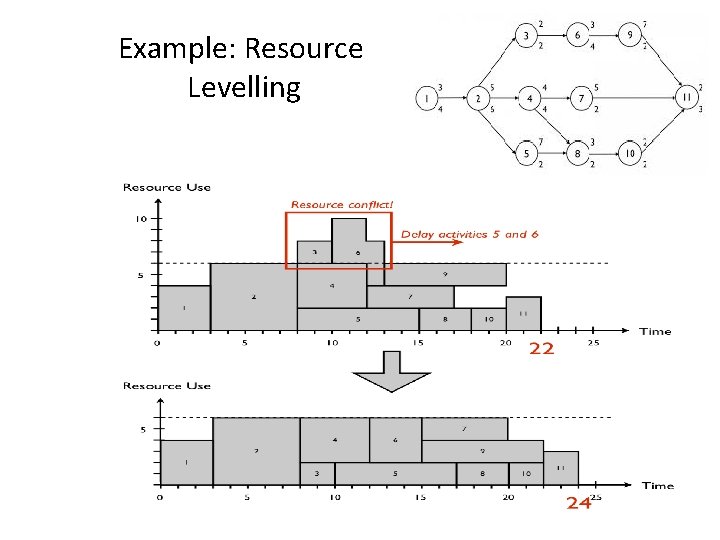
Example: Resource Levelling
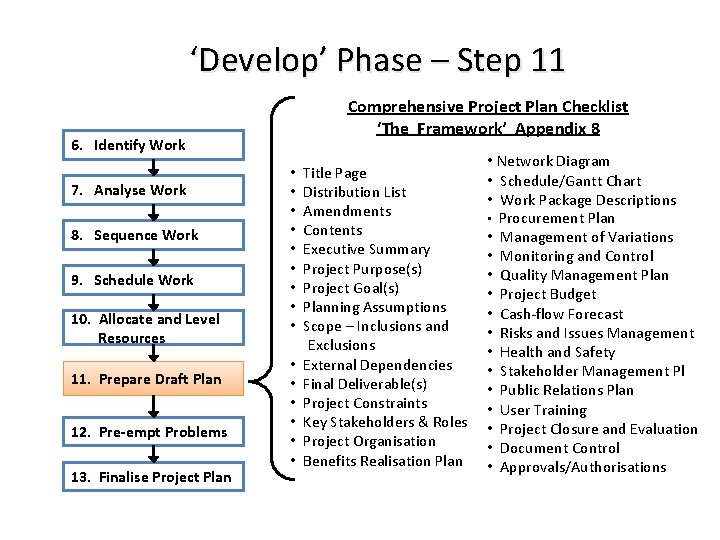
‘Develop’ Phase – Step 11 6. Identify Work 7. Analyse Work 8. Sequence Work 9. Schedule Work 10. Allocate and Level Resources 11. Prepare Draft Plan 12. Pre-empt Problems 13. Finalise Project Plan Comprehensive Project Plan Checklist ‘The Framework’ Appendix 8 • Title Page • Distribution List • Amendments • Contents • Executive Summary • Project Purpose(s) • Project Goal(s) • Planning Assumptions • Scope – Inclusions and Exclusions • External Dependencies • Final Deliverable(s) • Project Constraints • Key Stakeholders & Roles • Project Organisation • Benefits Realisation Plan • Network Diagram • Schedule/Gantt Chart • Work Package Descriptions • Procurement Plan • Management of Variations • Monitoring and Control • Quality Management Plan • Project Budget • Cash-flow Forecast • Risks and Issues Management • Health and Safety • Stakeholder Management Pl • Public Relations Plan • User Training • Project Closure and Evaluation • Document Control • Approvals/Authorisations
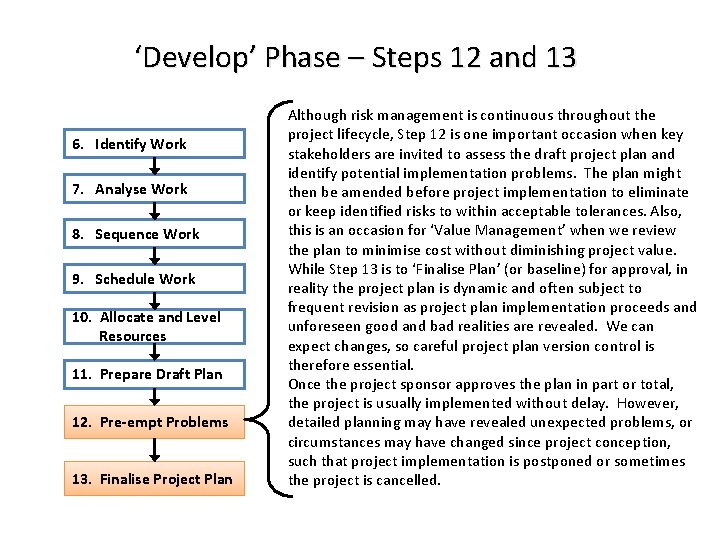
‘Develop’ Phase – Steps 12 and 13 6. Identify Work 7. Analyse Work 8. Sequence Work 9. Schedule Work 10. Allocate and Level Resources 11. Prepare Draft Plan 12. Pre-empt Problems 13. Finalise Project Plan Although risk management is continuous throughout the project lifecycle, Step 12 is one important occasion when key stakeholders are invited to assess the draft project plan and identify potential implementation problems. The plan might then be amended before project implementation to eliminate or keep identified risks to within acceptable tolerances. Also, this is an occasion for ‘Value Management’ when we review the plan to minimise cost without diminishing project value. While Step 13 is to ‘Finalise Plan’ (or baseline) for approval, in reality the project plan is dynamic and often subject to frequent revision as project plan implementation proceeds and unforeseen good and bad realities are revealed. We can expect changes, so careful project plan version control is therefore essential. Once the project sponsor approves the plan in part or total, the project is usually implemented without delay. However, detailed planning may have revealed unexpected problems, or circumstances may have changed since project conception, such that project implementation is postponed or sometimes the project is cancelled.
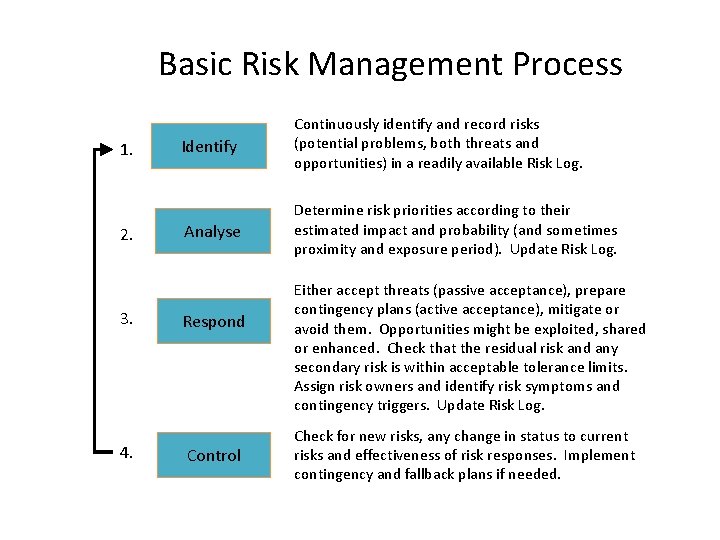
Basic Risk Management Process 1. 2. 3. 4. Identify Continuously identify and record risks (potential problems, both threats and opportunities) in a readily available Risk Log. Analyse Determine risk priorities according to their estimated impact and probability (and sometimes proximity and exposure period). Update Risk Log. Respond Control Either accept threats (passive acceptance), prepare contingency plans (active acceptance), mitigate or avoid them. Opportunities might be exploited, shared or enhanced. Check that the residual risk and any secondary risk is within acceptable tolerance limits. Assign risk owners and identify risk symptoms and contingency triggers. Update Risk Log. Check for new risks, any change in status to current risks and effectiveness of risk responses. Implement contingency and fallback plans if needed.
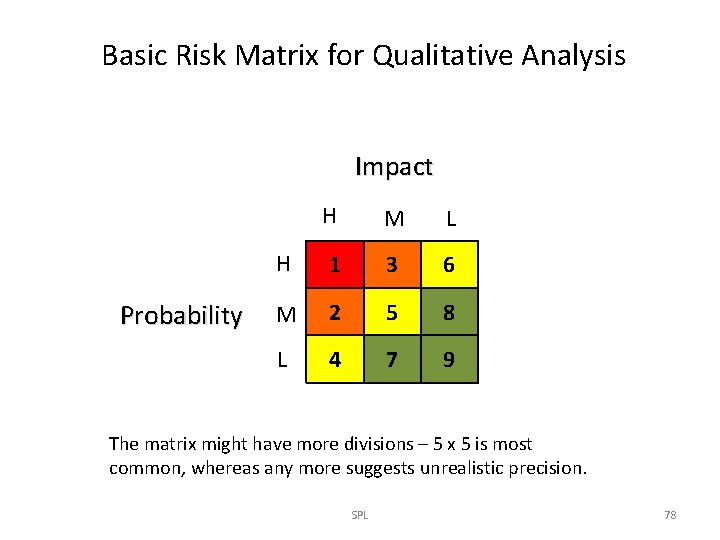
Basic Risk Matrix for Qualitative Analysis Impact Probability H M L H 1 3 6 M 2 5 8 L 4 7 9 The matrix might have more divisions – 5 x 5 is most common, whereas any more suggests unrealistic precision. SPL 78
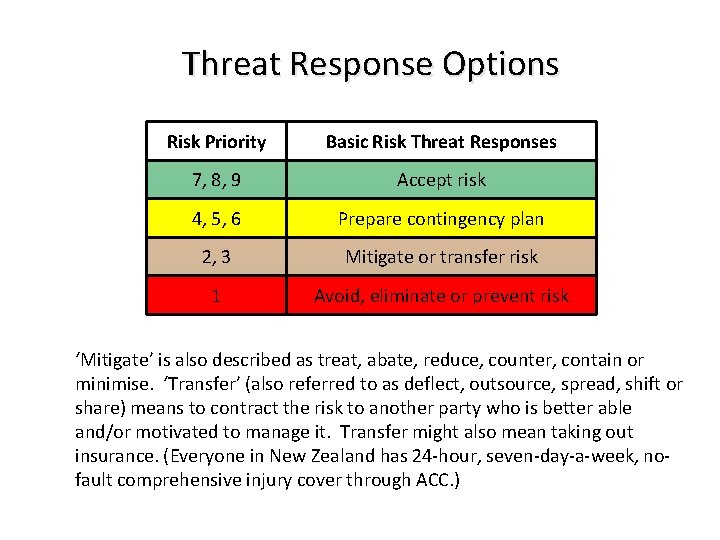
Threat Response Options Risk Priority Basic Risk Threat Responses 7, 8, 9 Accept risk 4, 5, 6 Prepare contingency plan 2, 3 Mitigate or transfer risk 1 Avoid, eliminate or prevent risk ‘Mitigate’ is also described as treat, abate, reduce, counter, contain or minimise. ‘Transfer’ (also referred to as deflect, outsource, spread, shift or share) means to contract the risk to another party who is better able and/or motivated to manage it. Transfer might also mean taking out insurance. (Everyone in New Zealand has 24 -hour, seven-day-a-week, nofault comprehensive injury cover through ACC. )
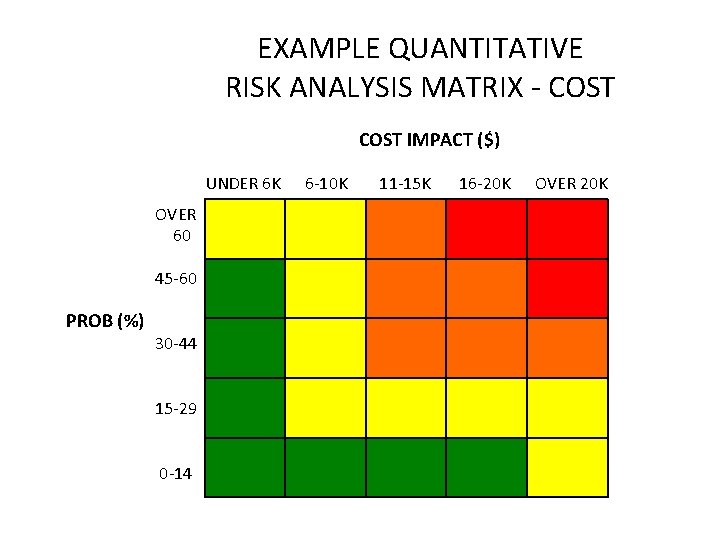
EXAMPLE QUANTITATIVE RISK ANALYSIS MATRIX - COST IMPACT ($) UNDER 6 K 6 -10 K 11 -15 K 16 -20 K OVER 60 45 -60 PROB (%) 30 -44 15 -29 0 -14
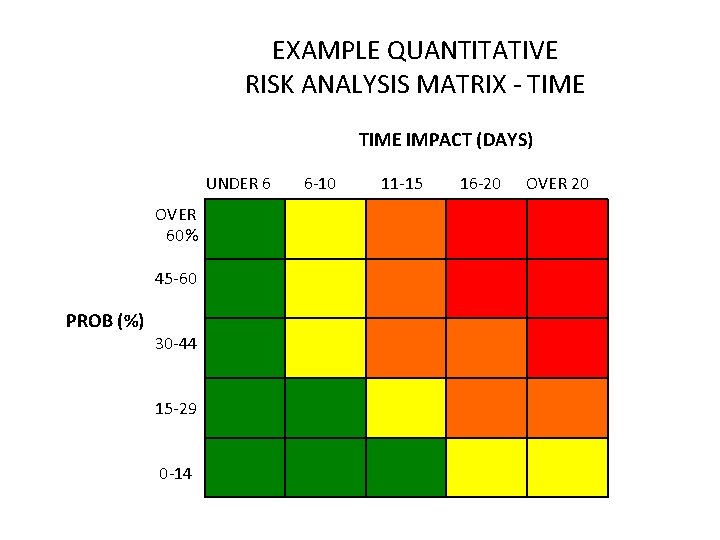
EXAMPLE QUANTITATIVE RISK ANALYSIS MATRIX - TIME IMPACT (DAYS) UNDER 6 6 -10 11 -15 16 -20 OVER 60% 45 -60 PROB (%) 30 -44 15 -29 0 -14
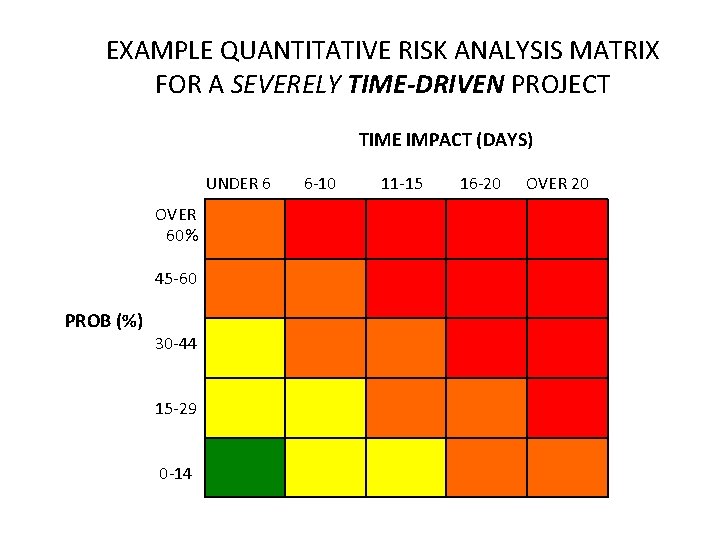
EXAMPLE QUANTITATIVE RISK ANALYSIS MATRIX FOR A SEVERELY TIME-DRIVEN PROJECT TIME IMPACT (DAYS) UNDER 6 6 -10 11 -15 16 -20 OVER 60% 45 -60 PROB (%) 30 -44 15 -29 0 -14
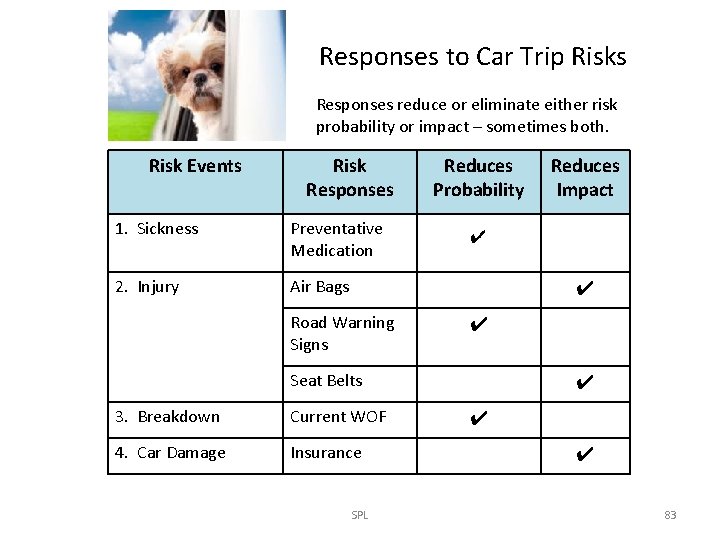
Responses to Car Trip Risks Responses reduce or eliminate either risk probability or impact – sometimes both. Risk Events Risk Responses 1. Sickness Preventative Medication 2. Injury Air Bags Reduces Probability Reduces Impact ✔ ✔ Road Warning Signs ✔ Seat Belts 3. Breakdown Current WOF 4. Car Damage Insurance SPL ✔ ✔ ✔ 83
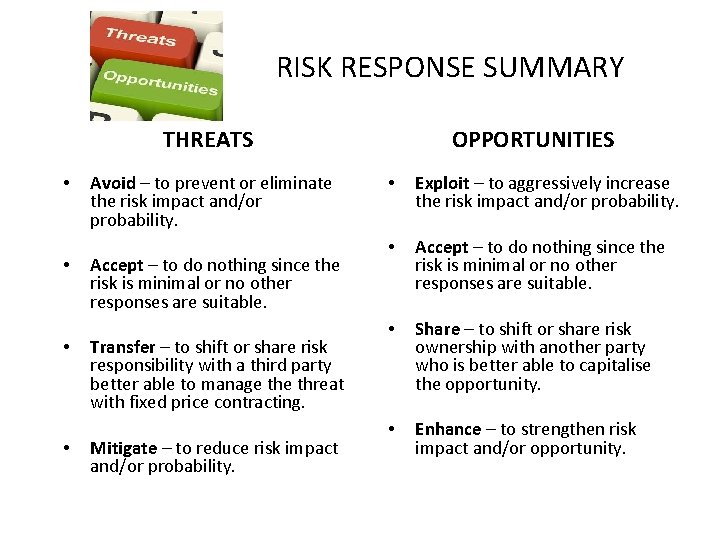
RISK RESPONSE SUMMARY THREATS • • Avoid – to prevent or eliminate the risk impact and/or probability. Accept – to do nothing since the risk is minimal or no other responses are suitable. Transfer – to shift or share risk responsibility with a third party better able to manage threat with fixed price contracting. Mitigate – to reduce risk impact and/or probability. OPPORTUNITIES • Exploit – to aggressively increase the risk impact and/or probability. • Accept – to do nothing since the risk is minimal or no other responses are suitable. • Share – to shift or share risk ownership with another party who is better able to capitalise the opportunity. • Enhance – to strengthen risk impact and/or opportunity.
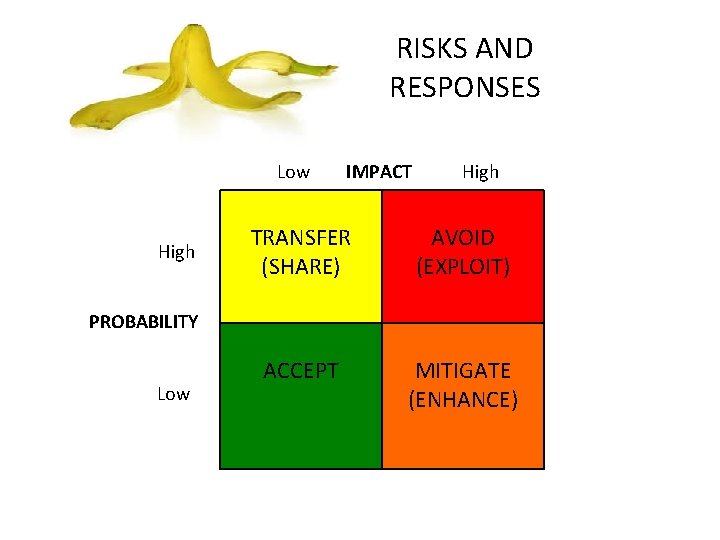
RISKS AND RESPONSES Low IMPACT High TRANSFER (SHARE) AVOID (EXPLOIT) ACCEPT MITIGATE (ENHANCE) High PROBABILITY Low
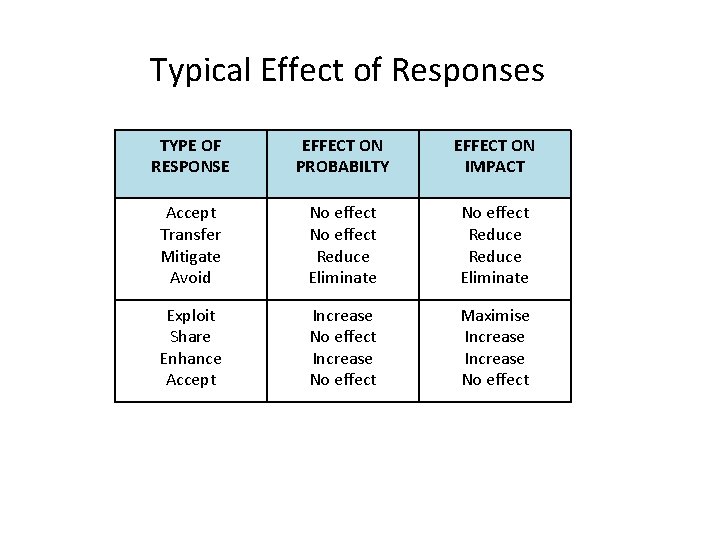
Typical Effect of Responses TYPE OF RESPONSE EFFECT ON PROBABILTY EFFECT ON IMPACT Accept Transfer Mitigate Avoid No effect Reduce Eliminate Exploit Share Enhance Accept Increase No effect Maximise Increase No effect
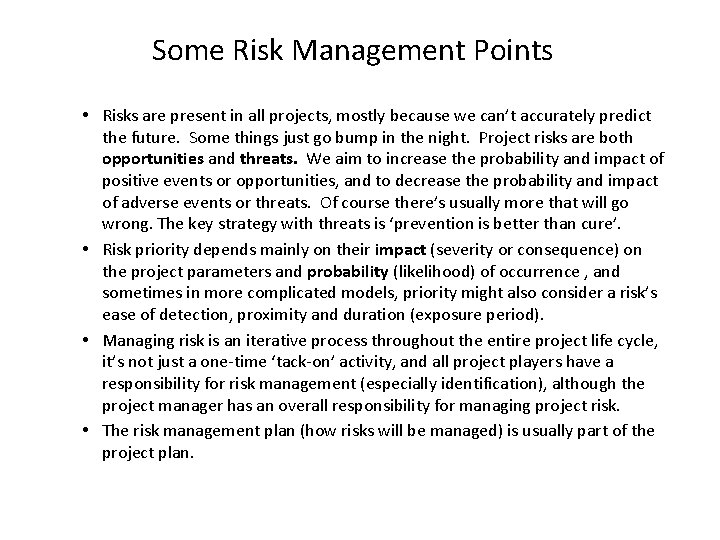
Some Risk Management Points • Risks are present in all projects, mostly because we can’t accurately predict the future. Some things just go bump in the night. Project risks are both opportunities and threats. We aim to increase the probability and impact of positive events or opportunities, and to decrease the probability and impact of adverse events or threats. Of course there’s usually more that will go wrong. The key strategy with threats is ‘prevention is better than cure’. • Risk priority depends mainly on their impact (severity or consequence) on the project parameters and probability (likelihood) of occurrence , and sometimes in more complicated models, priority might also consider a risk’s ease of detection, proximity and duration (exposure period). • Managing risk is an iterative process throughout the entire project life cycle, it’s not just a one-time ‘tack-on’ activity, and all project players have a responsibility for risk management (especially identification), although the project manager has an overall responsibility for managing project risk. • The risk management plan (how risks will be managed) is usually part of the project plan.
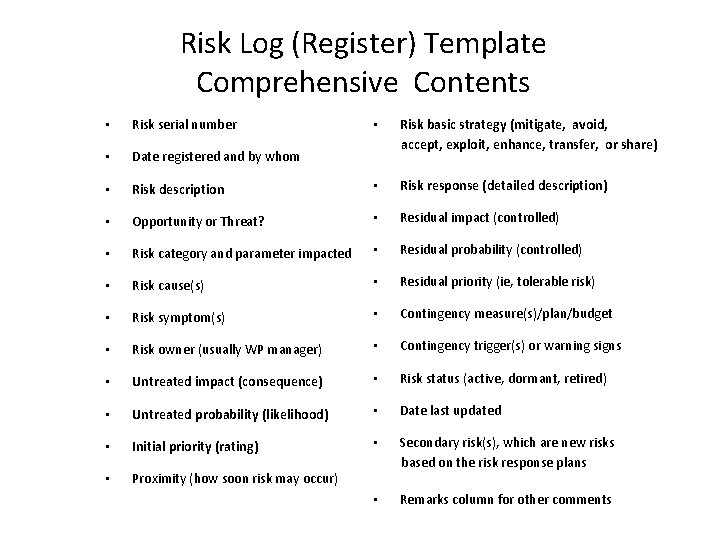
Risk Log (Register) Template Comprehensive Contents • Risk serial number • Date registered and by whom • • Risk basic strategy (mitigate, avoid, accept, exploit, enhance, transfer, or share) Risk description • Risk response (detailed description) • Opportunity or Threat? • Residual impact (controlled) • Risk category and parameter impacted • Residual probability (controlled) • Risk cause(s) • Residual priority (ie, tolerable risk) • Risk symptom(s) • Contingency measure(s)/plan/budget • Risk owner (usually WP manager) • Contingency trigger(s) or warning signs • Untreated impact (consequence) • Risk status (active, dormant, retired) • Untreated probability (likelihood) • Date last updated • Initial priority (rating) • Proximity (how soon risk may occur) • Secondary risk(s), which are new risks based on the risk response plans • Remarks column for other comments
Risk Log Considerations • The log is usually established by the project manager during the project conception phase and updated continuously throughout the project life cycle. Sometimes it’s also a record of issues and safety concerns, but it’s usually better to record these in separate logs. • Any stakeholder should be able to log risks at any time, and thus the log should be readily accessible electronically or in hard copy format at the project site office. But have only one log to avoid confusion. • Related risks should be logged separately where practicable to ensure their individual analysis. • Typically the project manager would oversee risk analysis and authorise responses to higher priority risks or recommend such responses for the project sponsor’s approval should the proposed response exceed mandated authority and constraints (Project Charter).
Project Value Management (PVM) • • Once the draft plan is prepared we might then see if we can make it more efficient through a project value management (PVM) intervention. PVM is the formal and systematic study of a project to identify ways to achieve the functionality needed at lowest cost without adding risk or without loss of performance. Some expressions equivalent to Value Management are Value Methodology, Value Analysis, Value Engineering, and Value Optimisation. It’s potentially effective for all types of projects, but best results are usually obtained with larger and more expensive construction projects. PVM usually adds greater value if applied prior to project execution, but might also be undertaken periodically during project execution. PVM intervention is in the form of a study (typically of one day’s duration) undertaken by an expert facilitator and attended by invited experts and key stakeholders from the target project. Unfortunately, PVM is often only initiated when project budgets seem insufficient or profit margins are under pressure.
Variations (Changes) During the life of most projects, changes or issues arise that cause or require changes to the project. Changes (variations) might be suggested by the client, sponsor, contractors, team members or any stakeholder at any time during project planning or execution, although the earlier that worthwhile changes are proposed, approved and implemented, usually the lesser the cost of making the change. Appreciate that poorly scoped projects invite variations and not every proposed variation should be adopted, only those that add value (ie, benefits exceed costs) or save cost without diminishing value (ie, perhaps resulting from a ‘value management’ intervention). Some changes might impact project parameters, risk and benefits and require the project plan to be amended. Variations that would cause a change to the project plan are typically documented in a Change Order approved by the project manager and/or the sponsor depending on the anticipated impact of the change. Variations that are declined might be recorded in the Issues Log for discussion with whoever requested the change.
Development (planning) Phase Review 1. Preparing a work breakdown structure (WBS) 2. Estimating work package work effort, duration and cost 3. Preparing a “bottom-up” estimate 4. Preparing network diagrams 5. Calculating project completion probabilities 6. Critical Chain theory 7. Preparing Gantt charts 8. Scheduling resources 9. Project Risk Management 10. Project Value Management (PVM) 11. Variations 12. Project Plan and Assignment Two
Project Plan • • • A project plan is “a formal, approved document used to guide project execution. ” (PMI definition) Your next assignment requires you prepare and submit a comprehensive and readily understandable written plan to guide project implementation. A common misconception is that the plan is merely a project schedule - an MS Project Gantt chart. The schedule is only one of the several parts of the plan. Also, the project manager is the custodian of the project plan, but that doesn't mean a plan is developed in isolation. Timely input from team members and other key stakeholders is always useful. If a plan is prepared by different people in a somewhat peacemeal fashion, please ensure that the finished job is a coherent publication, consistent in style, free of contradictions, duplications, and nothing pertinent is left out. The PM needs to coordinate the input and edit the entire output (before it’s published / submitted). Proofread the detail too. Once a project plan gets approval, we need to baseline the document as Version One and have a clear and transparent process in place for managing further changes (variations) to the plan during project execution.
More on Assignment Two – Project Plan • Be guided by the template / plan contents shown at Appendix Eight ‘The Framework’ pages 526 -528, which on this occasion may mean a more detailed plan than our organisation usually requires. Our plan may repeat much information from the Charter and elborate on it, but hopefully not contradict it. Sometimes a glossary may be needed to explain avoidable technical terms that are peculiar to your organisation. • Each person is to provide an electronic or securely bound hard copy. The plan need not yet be signed/approved, but appropriate signature blocks and a distribution list should be included. The document size will vary, but would typically be up to say 20 pages (A 4 size 12 font) – sufficient anyway to achieve its purpose, being to provide a clear roadmap to enable the effective and efficient execution and closure of our project (but not necessarily by ourselves).
That’s all for now thanks folks!
- Slides: 95