
Digital Video Introduction EECS 150 Spring 2007 Lab
Digital Video - Introduction EECS 150 Spring 2007 – Lab Lecture #7 Neil Warren Greg Gibeling 6/15/2021 EECS 150 Spring 2007 Lab Lecture #7 1
Today n n n n 6/15/2021 Welcome to THE PROJECT! Digital Video Administrative Info ITU-R BT. 601 ITU-R BT. 656 Video Encoder I 2 C Bus More Information EECS 150 Spring 2007 Lab Lecture #7 2
The Project n n Video conferencing system You will connect 2 stations wirelessly n n 6/15/2021 2 -way communication Display full-size color local video Display remote compressed video picture-in-picture Transmit compressed video EECS 150 Spring 2007 Lab Lecture #7 3
What’s Coming Up? n Checkpoint #1: Video Encoder n n Checkpoint #2: Video Capture/Display n n 2 weeks (spring break) Checkpoint #4: Video Conferencing n 6/15/2021 1 week Checkpoint #3: Wireless Transceiver n n 1 week 2 weeks (Extra Credit: 1 week) EECS 150 Spring 2007 Lab Lecture #7 4
Administrative Info (1) n Design Review Process n Walk your lab TA through the module n n n Errors will be pointed out, but corrections are left up to you It’s a team effort! Convince us you know what you’re doing! n 6/15/2021 Control/Datapath Top-down design with interconnections Make it neat and professional, we will be grading more harshly from now on and it will be worth more! EECS 150 Spring 2007 Lab Lecture #7 5
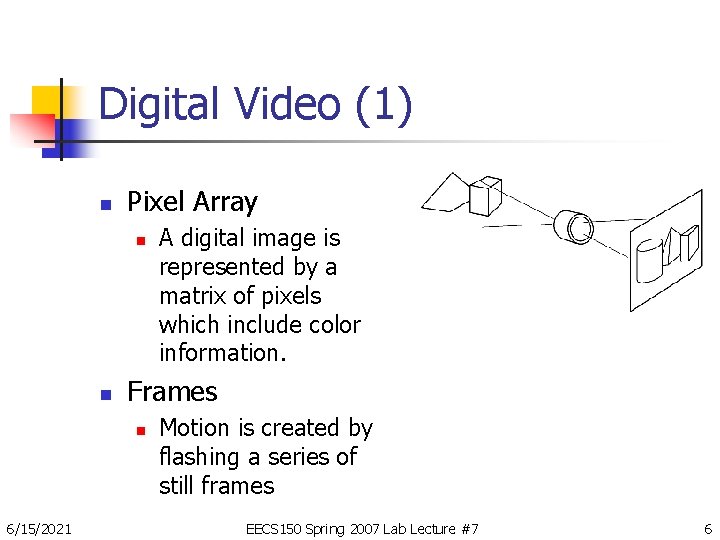
Digital Video (1) n Pixel Array n n Frames n 6/15/2021 A digital image is represented by a matrix of pixels which include color information. Motion is created by flashing a series of still frames EECS 150 Spring 2007 Lab Lecture #7 6
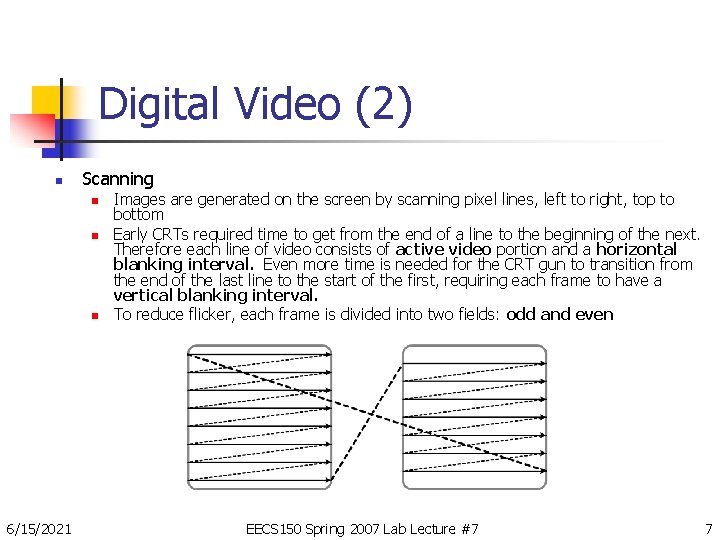
Digital Video (2) n Scanning n n n 6/15/2021 Images are generated on the screen by scanning pixel lines, left to right, top to bottom Early CRTs required time to get from the end of a line to the beginning of the next. Therefore each line of video consists of active video portion and a horizontal blanking interval. Even more time is needed for the CRT gun to transition from the end of the last line to the start of the first, requiring each frame to have a vertical blanking interval. To reduce flicker, each frame is divided into two fields: odd and even EECS 150 Spring 2007 Lab Lecture #7 7
Digital Video (3) n Colors n Usually represented as red, green and blue n n In the digital domain we could transmit 8 bits for each RGB component. Transition from Black & White n n Kept compatible with old TV sets Added separate color or “Chroma” signals n n n 6/15/2021 Y: Luma (Traditional Black and White) Cr: Chroma Red (New color signal) Cb: Chroma Blue (New color signal) EECS 150 Spring 2007 Lab Lecture #7 8

Digital Video (4) n Digital Chroma Subsampling n 6/15/2021 Human eye is more sensitive to Luma than Chroma; use this to save space and bandwidth EECS 150 Spring 2007 Lab Lecture #7 9
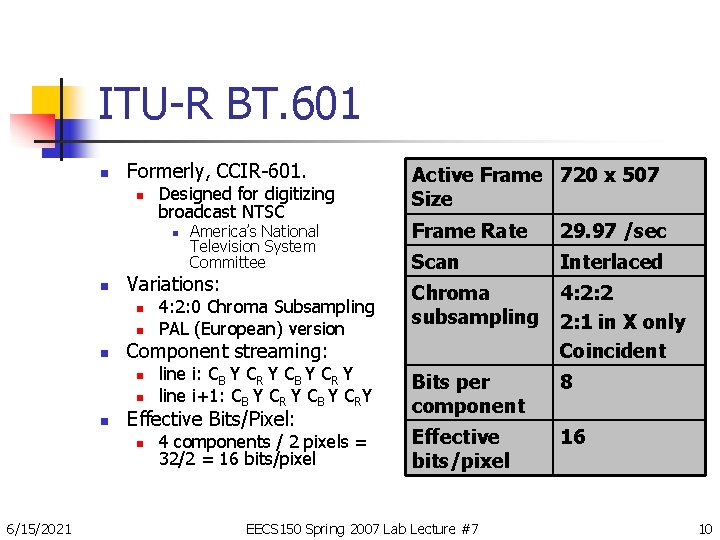
ITU-R BT. 601 n Formerly, CCIR-601. n Designed for digitizing broadcast NTSC Frame Rate 29. 97 /sec Scan Interlaced Chroma subsampling 4: 2: 2 2: 1 in X only Coincident line i: CB Y CR Y line i+1: CB Y CR Y CB Y CRY Bits per component 8 4 components / 2 pixels = 32/2 = 16 bits/pixel Effective bits/pixel 16 n n n Effective Bits/Pixel: n 6/15/2021 4: 2: 0 Chroma Subsampling PAL (European) version Component streaming: n n America’s National Television System Committee Variations: n Active Frame 720 x 507 Size EECS 150 Spring 2007 Lab Lecture #7 10
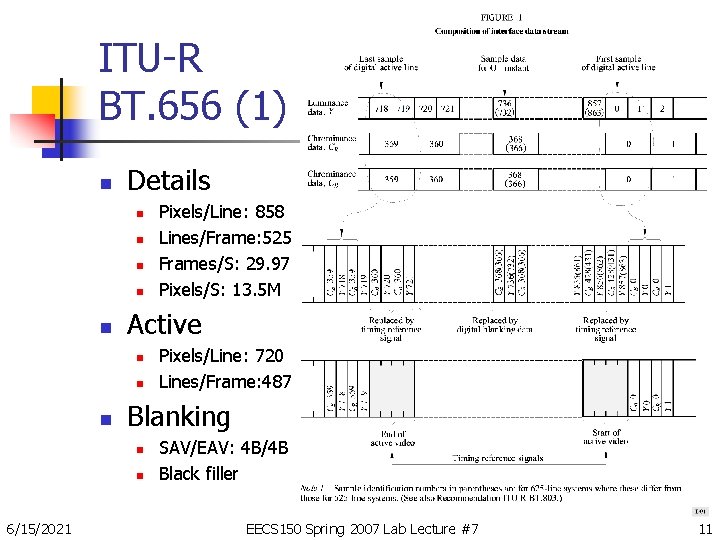
ITU-R BT. 656 (1) n Details n n n Active n n n Pixels/Line: 720 Lines/Frame: 487 Blanking n n 6/15/2021 Pixels/Line: 858 Lines/Frame: 525 Frames/S: 29. 97 Pixels/S: 13. 5 M SAV/EAV: 4 B/4 B Black filler EECS 150 Spring 2007 Lab Lecture #7 11
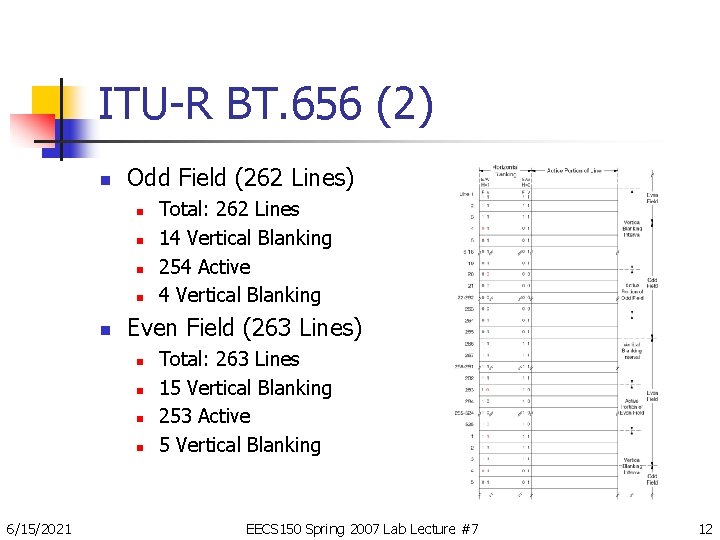
ITU-R BT. 656 (2) n Odd Field (262 Lines) n n n Even Field (263 Lines) n n 6/15/2021 Total: 262 Lines 14 Vertical Blanking 254 Active 4 Vertical Blanking Total: 263 Lines 15 Vertical Blanking 253 Active 5 Vertical Blanking EECS 150 Spring 2007 Lab Lecture #7 12
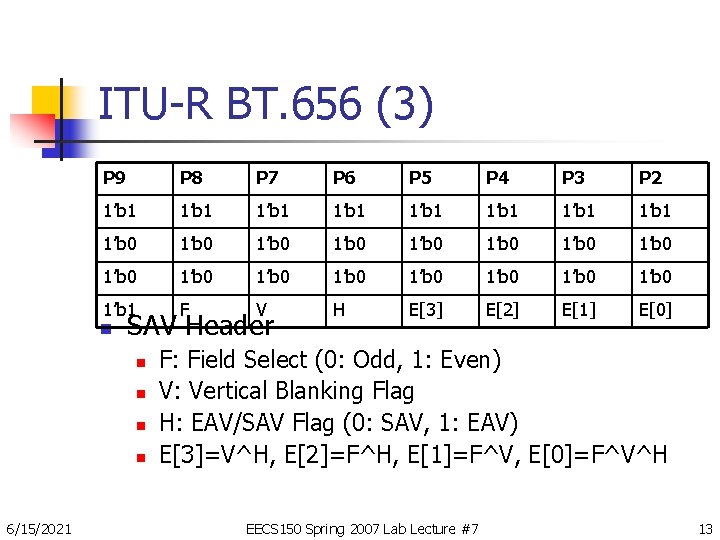
ITU-R BT. 656 (3) P 9 P 8 P 7 P 6 P 5 P 4 P 3 P 2 1’b 1 1’b 1 1’b 0 1’b 0 1’b 0 1’b 0 H E[3] E[2] E[1] E[0] 1’b 1 F V n SAV Header n n 6/15/2021 F: Field Select (0: Odd, 1: Even) V: Vertical Blanking Flag H: EAV/SAV Flag (0: SAV, 1: EAV) E[3]=V^H, E[2]=F^H, E[1]=F^V, E[0]=F^V^H EECS 150 Spring 2007 Lab Lecture #7 13
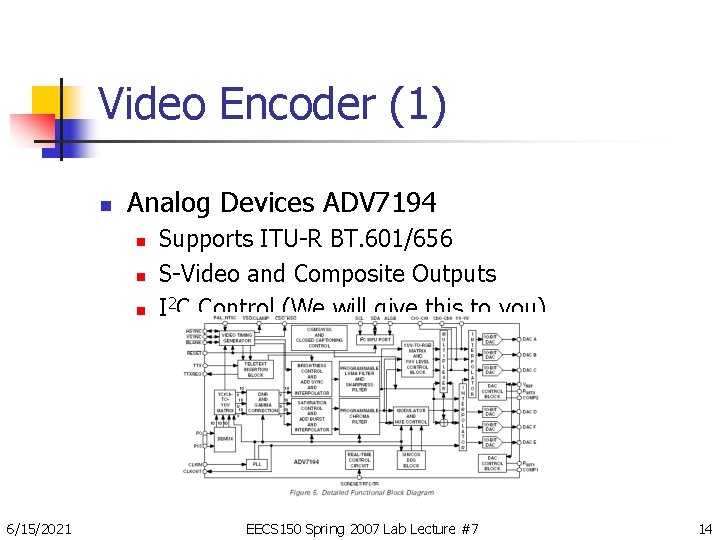
Video Encoder (1) n Analog Devices ADV 7194 n n n 6/15/2021 Supports ITU-R BT. 601/656 S-Video and Composite Outputs I 2 C Control (We will give this to you) EECS 150 Spring 2007 Lab Lecture #7 14
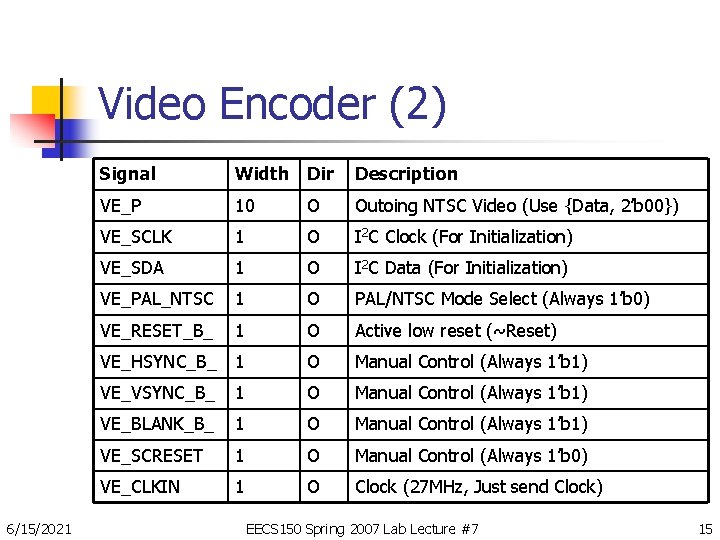
Video Encoder (2) 6/15/2021 Signal Width Dir Description VE_P 10 O Outoing NTSC Video (Use {Data, 2’b 00}) VE_SCLK 1 O I 2 C Clock (For Initialization) VE_SDA 1 O I 2 C Data (For Initialization) VE_PAL_NTSC 1 O PAL/NTSC Mode Select (Always 1’b 0) VE_RESET_B_ 1 O Active low reset (~Reset) VE_HSYNC_B_ 1 O Manual Control (Always 1’b 1) VE_VSYNC_B_ 1 O Manual Control (Always 1’b 1) VE_BLANK_B_ 1 O Manual Control (Always 1’b 1) VE_SCRESET 1 O Manual Control (Always 1’b 0) VE_CLKIN 1 O Clock (27 MHz, Just send Clock) EECS 150 Spring 2007 Lab Lecture #7 15
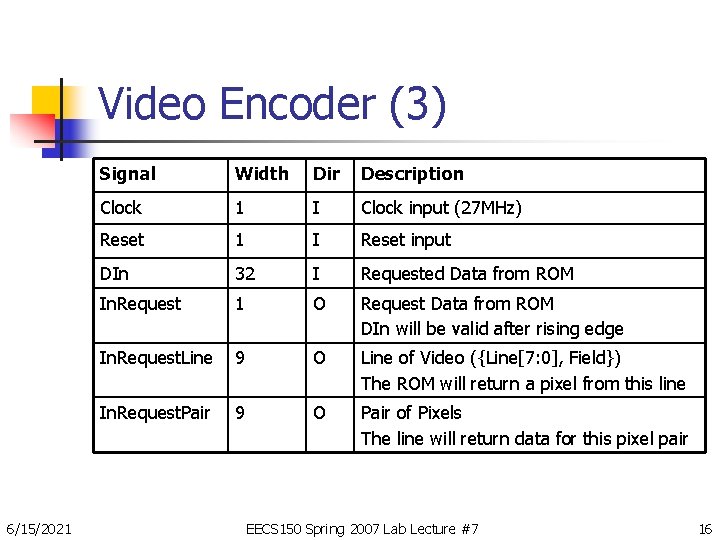
Video Encoder (3) 6/15/2021 Signal Width Dir Description Clock 1 I Clock input (27 MHz) Reset 1 I Reset input DIn 32 I Requested Data from ROM In. Request 1 O Request Data from ROM DIn will be valid after rising edge In. Request. Line 9 O Line of Video ({Line[7: 0], Field}) The ROM will return a pixel from this line In. Request. Pair 9 O Pair of Pixels The line will return data for this pixel pair EECS 150 Spring 2007 Lab Lecture #7 16
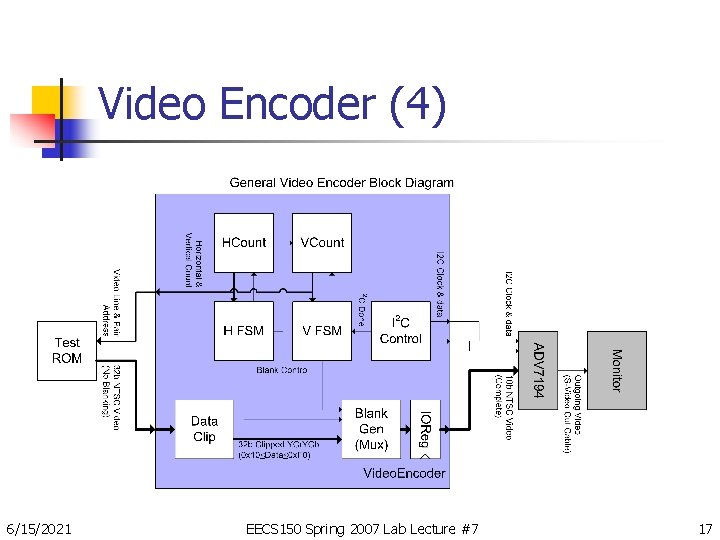
Video Encoder (4) 6/15/2021 EECS 150 Spring 2007 Lab Lecture #7 17
Video Encoder (5) n Basic Design n Stream EAV, Blank, SAV, Active Lines n n n Generate EAV/SAV/Blank using a multiplexer Register output data (Timing reasons) Request Incoming Data n n Request it the cycle before you need it Clipping data n n n 6/15/2021 Minimum data is 0 x 10 Maximum data is 0 x. F 0 Otherwise it will appear to be blanking signals EECS 150 Spring 2007 Lab Lecture #7 18
Video Encoder (6) n Testing n Test thoroughly n n n Simulation is difficult with test ROM Try using values which count, so you can see it Design your testbench early n n Perhaps one partner should design the module, one should design the testbench Ensure that you test corner cases n n 6/15/2021 First and last lines Off-by-one errors in counters EECS 150 Spring 2007 Lab Lecture #7 19
Video Encoder (7) n Caveats n n Some diagrams are not specific to the ITUR BT. 656 Standard The monitors in the lab have a tendency to clip n 6/15/2021 Make sure you are correct in simulation and it looks correct in synthesis EECS 150 Spring 2007 Lab Lecture #7 20
I 2 C (1) n ADV 7194 Initialization using I 2 C n Requires only 2 wires n n n Runs at up to 400 k. Hz Bidirectional Communication Given to you n n 6/15/2021 Serial Data (Bidirectional) Clock (Driven by master) Complicated to get right Hard to debug EECS 150 Spring 2007 Lab Lecture #7 21
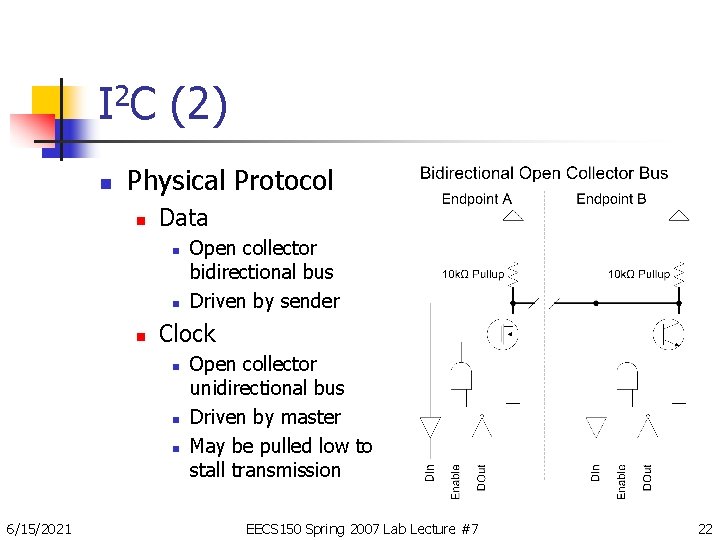
I 2 C (2) n Physical Protocol n Data n n n Clock n n n 6/15/2021 Open collector bidirectional bus Driven by sender Open collector unidirectional bus Driven by master May be pulled low to stall transmission EECS 150 Spring 2007 Lab Lecture #7 22
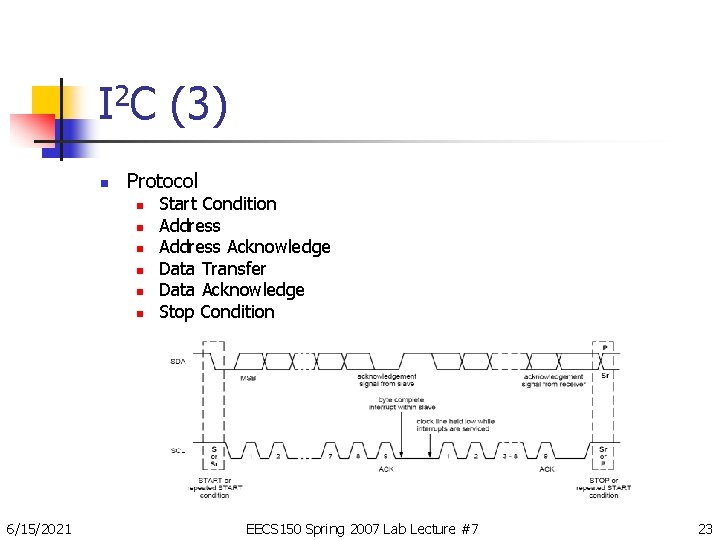
I 2 C (3) n Protocol n n n 6/15/2021 Start Condition Address Acknowledge Data Transfer Data Acknowledge Stop Condition EECS 150 Spring 2007 Lab Lecture #7 23
I 2 C (4) n Arbitration n Anyone can drive bus at any time n n n No central arbiter No short circuits (Impossible in open collector) Decentralized Arbitration n n Check data bus against value you’re sending Mismatch means someone else is transmitting n n 6/15/2021 So let them finish, and then try again Inherently gives preferences to accesses with more 1’b 1 s in them EECS 150 Spring 2007 Lab Lecture #7 24
More Information n Documents Page of the Website n n Video in a Nutshell ADV 7194 Datasheet n n ITU-R BT. 656 & ITU-R BT. 601 Standards n n n 6/15/2021 Complete ADV 7194 reference Complete video standards I 2 C Bus Specification READ THE DATASHEETS! EECS 150 Spring 2007 Lab Lecture #7 25
- Slides: 25