
Digital Trunked Radio Scanning Review in plain language
- Slides: 42
Digital Trunked Radio Scanning Review “in plain language” Developed and produced by On Target Training & Consulting, LLC Tomorrow's Solutions Today 1
Learning Goal Student ability to understand describe how scanning of trunked and simplex resources, on the ARMER trunked radio system works. Tomorrow's Solutions Today 2
Learning Objectives and Evaluation Students will be able to explain to the instructor satisfaction, the basic differences between conventional and trunked radio systems. Students will be able to explain to the instructor satisfaction, how radio site affiliation occurs on a trunked radio system. Students will be able to explain to the instructor satisfaction, how code plug programming effects scanning on a trunked radio system. Students will be able to explain to the instructor satisfaction, the basic characteristics of scanning on a trunked radio system. Students will demonstrate knowledge and retention of training material through a testing process. Tomorrow's Solutions Today 3
Table of Contents Definitions Channels Talk groups Simplex resources Trunked resources Code plug Conventional systems Trunked systems Scanning Tomorrow's Solutions Today 4
Definitions: Frequency: – A specific piece of radio spectrum exp (806. 400 MHz). Channel: – Is I a specific frequency (simplex) or pair of frequencies (repeated). Talkgroup: – Is simply a “virtual channel. ” It is a computer generated code (data). It is a place holder in the radio. It is placed into the radio as part of the code plug. Code plug: – A set of instructions or parameters that are built in a laptop and then programmed (flashed) into the radio. Tomorrow's Solutions Today 5
Definitions: Simplex resources: – Radio frequencies programmed into a radio as a fixed resource. (When you turn the selector and the radio stays on a frequency). Trunked resources: – Resources that utilize the ARMER system, what we call talkgroups. Scanning: – The ability to hear or receive a radio transmission when your radio is not selected on the same resource. Scene of Action (SOA): – Standardized name the State has assigned to statewide simplex resources. Tomorrow's Solutions Today 6
Conventional Systems: Use a dedicated radio frequency(s) for each radio channel in a system. A frequency, i. e. 155. 340 the statewide EMS frequency, is a dedicated piece of radio spectrum. Can be one frequency or simplex “point to point” like SWF or MNSEF. Can be two frequency's or repeated, you transmit on one frequency and receive on another. Each frequency is assigned to an entity (license holder). Tomorrow's Solutions Today 7
Conventional Systems cont. : Either simplex or repeated, these are typically referred to as “channels”, and a change in the selector knob, changes the frequency. If a channel is in use the radio user must wait for it to clear before being able to transmit. If you want to add a channel you must first obtain a new frequency or frequencies. If you want to listen to the radio traffic, you program the “receive” frequency into your radio or scanner. Tomorrow's Solutions Today 8
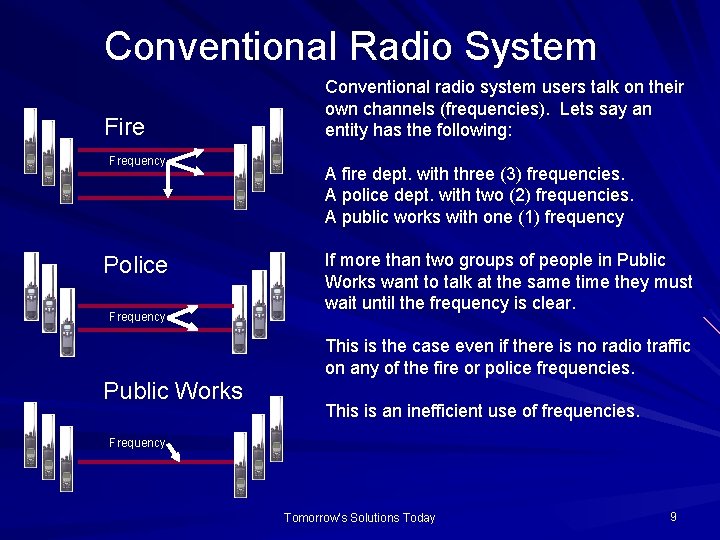
Conventional Radio System Fire Frequency Police Frequency Public Works Conventional radio system users talk on their own channels (frequencies). Lets say an entity has the following: A fire dept. with three (3) frequencies. A police dept. with two (2) frequencies. A public works with one (1) frequency If more than two groups of people in Public Works want to talk at the same time they must wait until the frequency is clear. This is the case even if there is no radio traffic on any of the fire or police frequencies. This is an inefficient use of frequencies. Frequency Tomorrow's Solutions Today 9
Trunked Systems Trunking is: The sharing of a limited number of communication paths (trunks) among many users. Think of a hospital or law enforcement facility and how their phone system works. A lot of calls on just a few phone lines. Within the context of radio, several similar frequencies are used to create a “pool” for radio system users to access. Trunked systems can be built using VHF, UHF or 700/800 MHz. Tomorrow's Solutions Today 10
Trunked Systems Cont. Within Trunking Systems: The system is managed by a computer known as the “central controller”. All subscribers (radios) on the system are computer controlled by one frequency known as the “control channel” which is routinely communicating with the subscribers (radios). Former channel (frequency) changing is now a selection on your radio referred to as a “Talk group”. Talkgroup is simply a “virtual channel”. It is a computer generated code, data. (no real change in frequency occurs). Tomorrow's Solutions Today 11
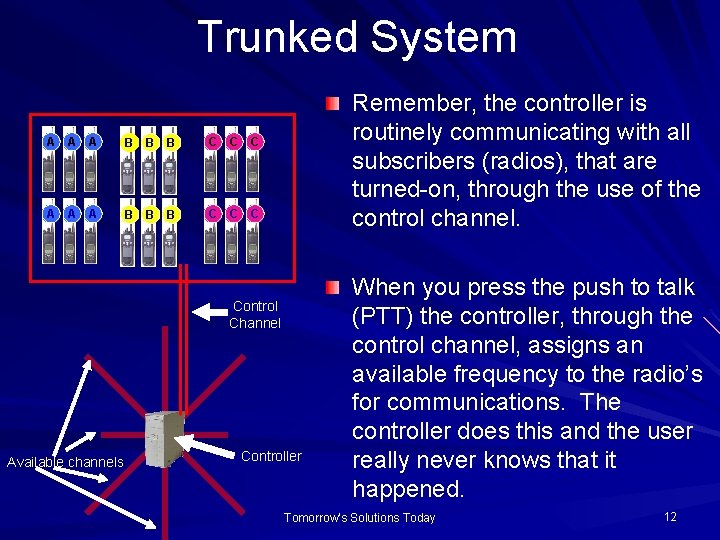
Trunked System A A A B B B C C C Remember, the controller is routinely communicating with all subscribers (radios), that are turned-on, through the use of the control channel. Control Channel Available channels Controller When you press the push to talk (PTT) the controller, through the control channel, assigns an available frequency to the radio’s for communications. The controller does this and the user really never knows that it happened. Tomorrow's Solutions Today 12
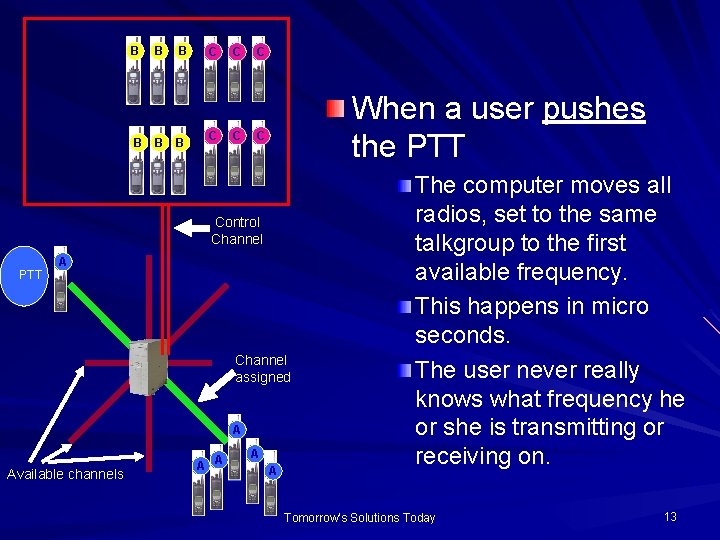
B B B C C C When a user pushes the PTT C Control Channel PTT A Channel assigned A Available channels A A The computer moves all radios, set to the same talkgroup to the first available frequency. This happens in micro seconds. The user never really knows what frequency he or she is transmitting or receiving on. Tomorrow's Solutions Today 13
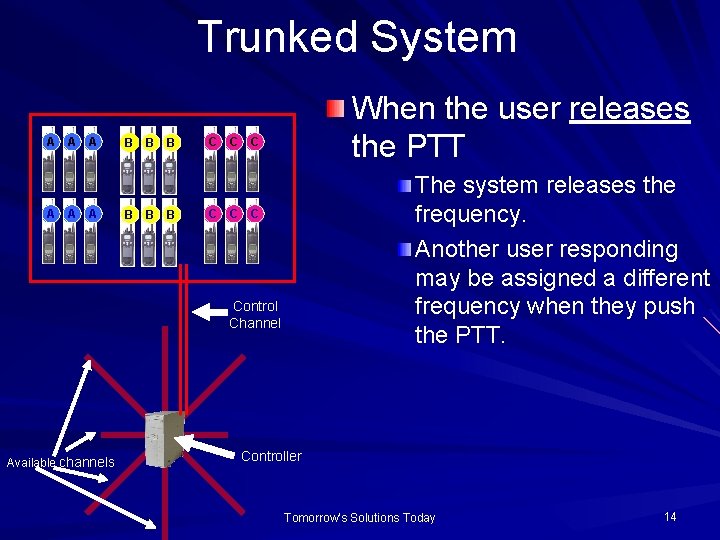
Trunked System A A A B B B C C When the user releases the PTT C The system releases the frequency. Another user responding may be assigned a different frequency when they push the PTT. C Control Channel Available channels Controller Tomorrow's Solutions Today 14
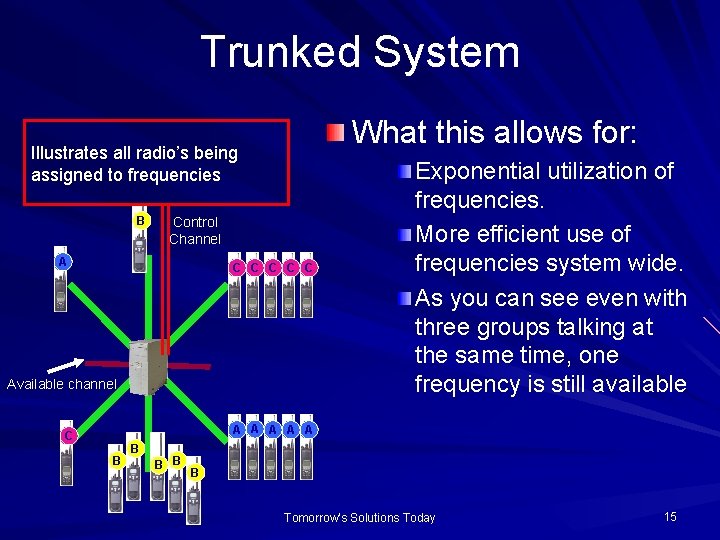
Trunked System What this allows for: Illustrates all radio’s being assigned to frequencies B Control Channel A C C C Available channel Exponential utilization of frequencies. More efficient use of frequencies system wide. As you can see even with three groups talking at the same time, one frequency is still available A A A C B B B Tomorrow's Solutions Today 15
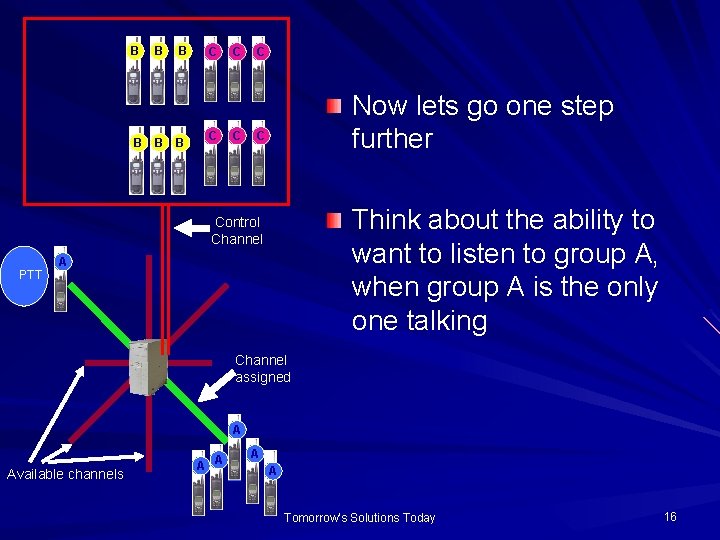
B B B C C C Now lets go one step further C Think about the ability to want to listen to group A, when group A is the only one talking Control Channel PTT A Channel assigned A Available channels A A Tomorrow's Solutions Today 16
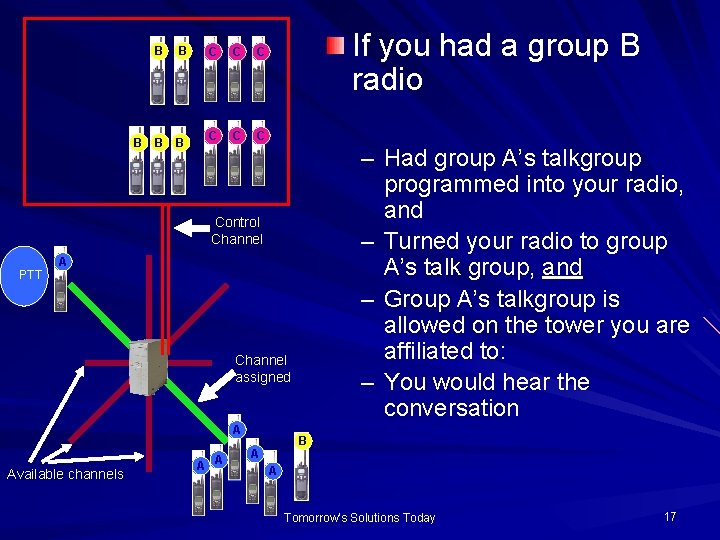
B B B C C C If you had a group B radio – Had group A’s talkgroup programmed into your radio, and – Turned your radio to group A’s talk group, and – Group A’s talkgroup is allowed on the tower you are affiliated to: – You would hear the conversation Control Channel PTT A Channel assigned A Available channels A A B A A Tomorrow's Solutions Today 17
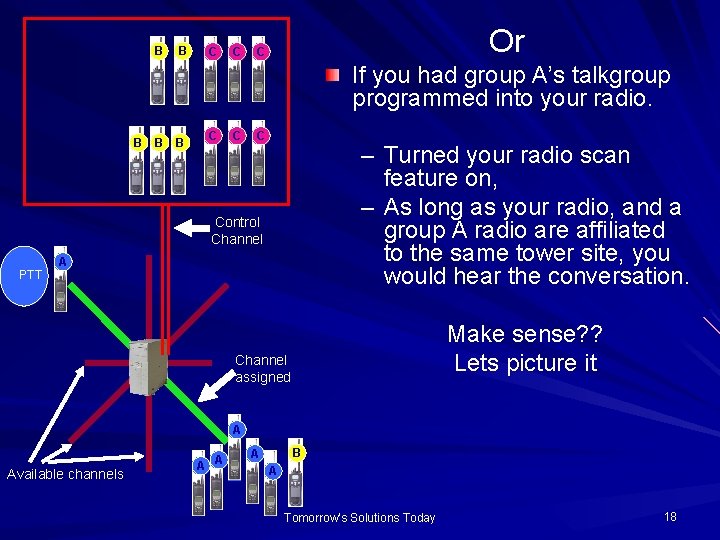
B B C C Or C If you had group A’s talkgroup programmed into your radio. B B B C C C – Turned your radio scan feature on, – As long as your radio, and a group A radio are affiliated to the same tower site, you would hear the conversation. Control Channel PTT A Make sense? ? Lets picture it Channel assigned A Available channels A A B A A Tomorrow's Solutions Today 18
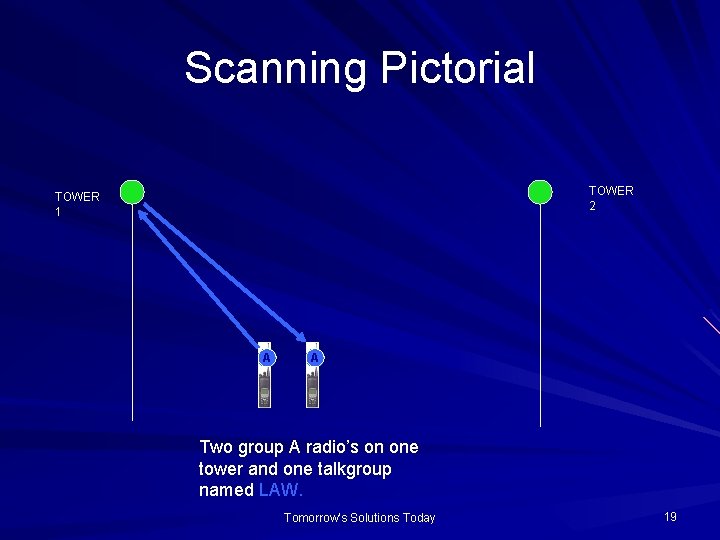
Scanning Pictorial TOWER 2 TOWER 1 A A Two group A radio’s on one tower and one talkgroup named LAW. Tomorrow's Solutions Today 19
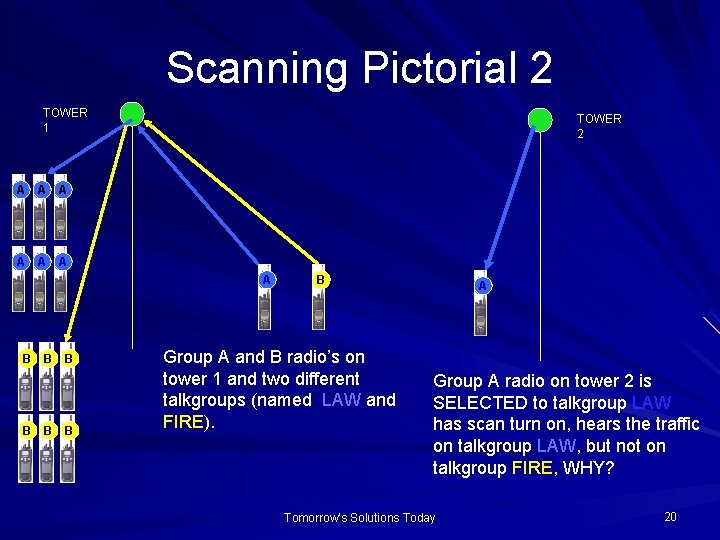
Scanning Pictorial 2 TOWER 1 A A A TOWER 2 A B B B B Group A and B radio’s on tower 1 and two different talkgroups (named LAW and FIRE). A Group A radio on tower 2 is SELECTED to talkgroup LAW has scan turn on, hears the traffic on talkgroup LAW, but not on talkgroup FIRE, WHY? Tomorrow's Solutions Today 20
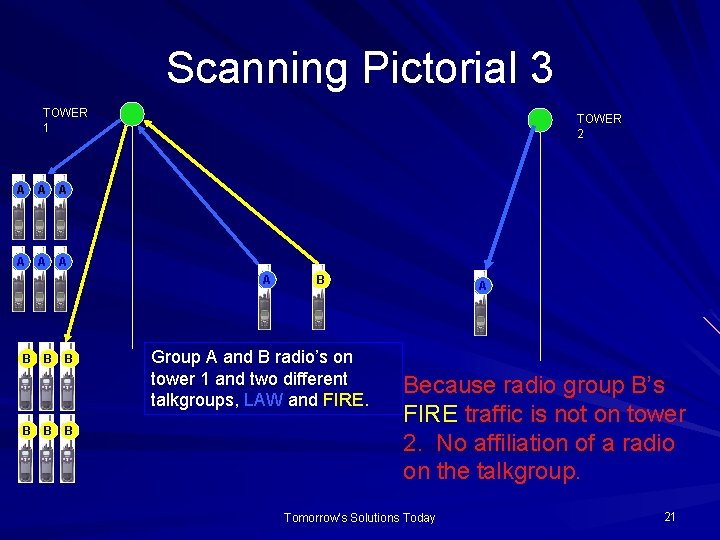
Scanning Pictorial 3 TOWER 1 A A A TOWER 2 A B B B B Group A and B radio’s on tower 1 and two different talkgroups, LAW and FIRE. A Because radio group B’s FIRE traffic is not on tower 2. No affiliation of a radio on the talkgroup. Tomorrow's Solutions Today 21
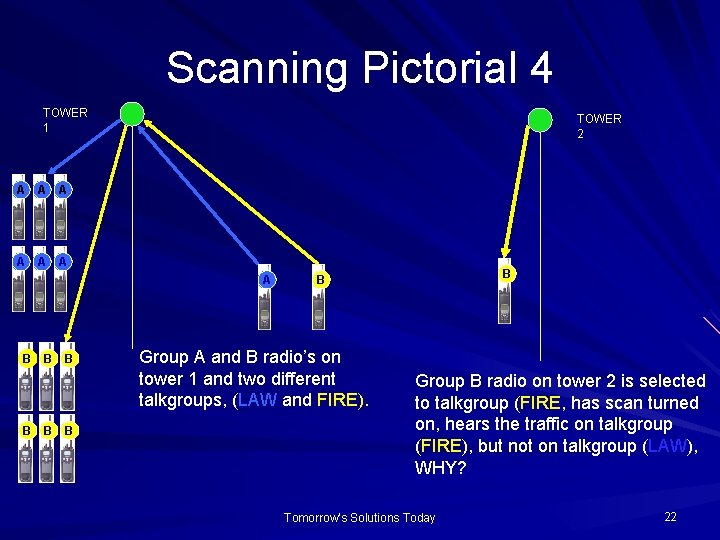
Scanning Pictorial 4 TOWER 1 A A A TOWER 2 A B B B B Group A and B radio’s on tower 1 and two different talkgroups, (LAW and FIRE). Group B radio on tower 2 is selected to talkgroup (FIRE, has scan turned on, hears the traffic on talkgroup (FIRE), but not on talkgroup (LAW), WHY? Tomorrow's Solutions Today 22
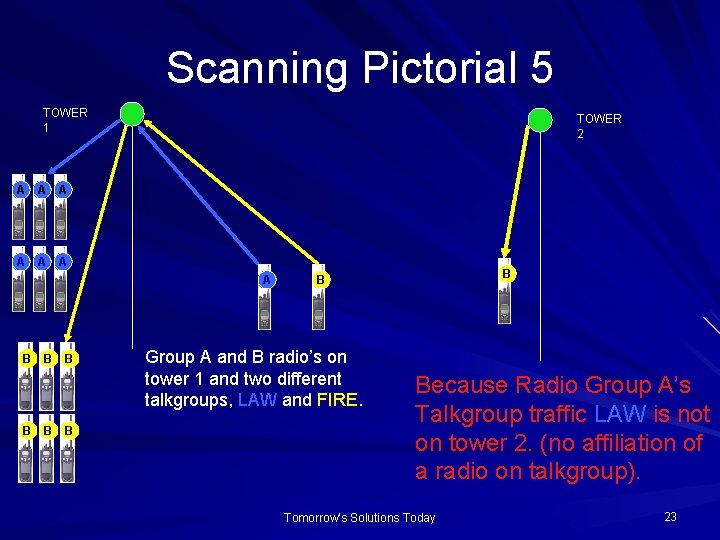
Scanning Pictorial 5 TOWER 1 A A A TOWER 2 A B B B B Group A and B radio’s on tower 1 and two different talkgroups, LAW and FIRE. Because Radio Group A’s Talkgroup traffic LAW is not on tower 2. (no affiliation of a radio on talkgroup). Tomorrow's Solutions Today 23
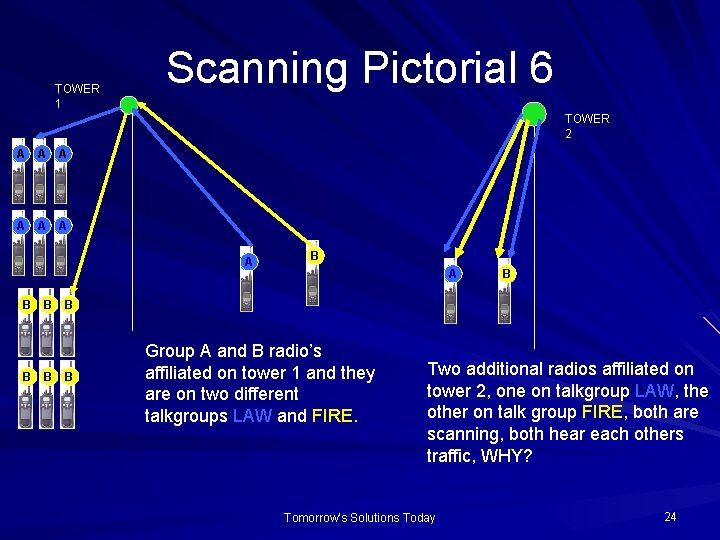
TOWER 1 Scanning Pictorial 6 TOWER 2 A A A A B B B Group A and B radio’s affiliated on tower 1 and they are on two different talkgroups LAW and FIRE. Two additional radios affiliated on tower 2, one on talkgroup LAW, the other on talk group FIRE, both are scanning, both hear each others traffic, WHY? Tomorrow's Solutions Today 24
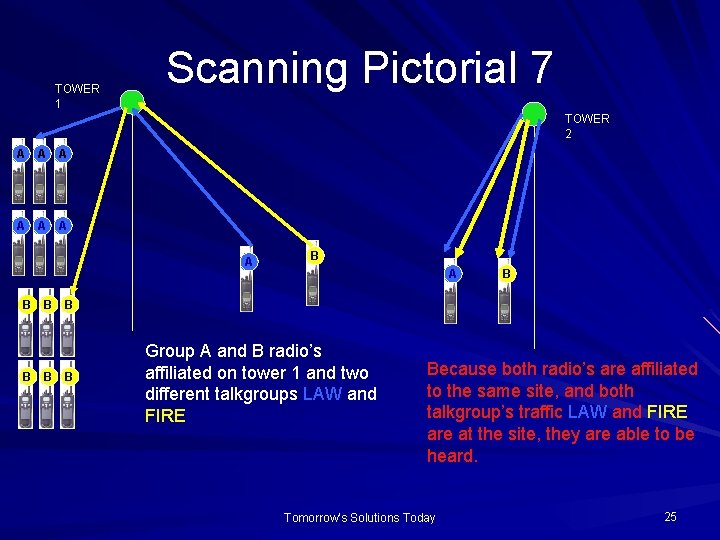
TOWER 1 Scanning Pictorial 7 TOWER 2 A A A A B B B Group A and B radio’s affiliated on tower 1 and two different talkgroups LAW and FIRE Because both radio’s are affiliated to the same site, and both talkgroup’s traffic LAW and FIRE are at the site, they are able to be heard. Tomorrow's Solutions Today 25
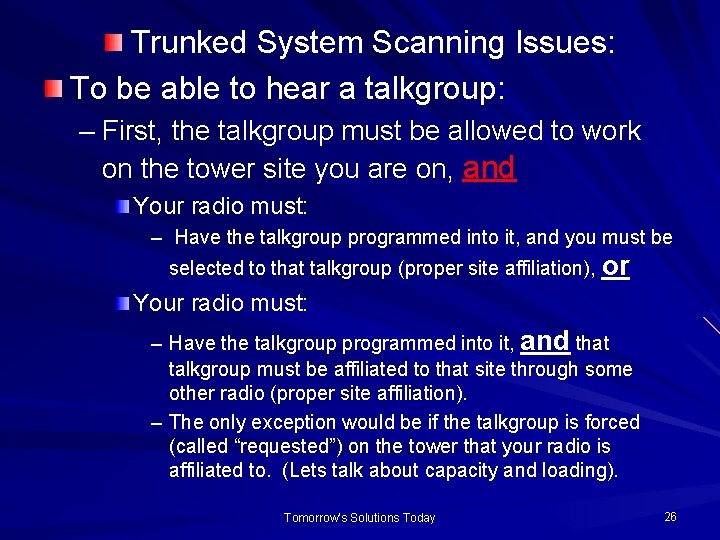
Trunked System Scanning Issues: To be able to hear a talkgroup: – First, the talkgroup must be allowed to work on the tower site you are on, and Your radio must: – Have the talkgroup programmed into it, and you must be selected to that talkgroup (proper site affiliation), or Your radio must: – Have the talkgroup programmed into it, and that talkgroup must be affiliated to that site through some other radio (proper site affiliation). – The only exception would be if the talkgroup is forced (called “requested”) on the tower that your radio is affiliated to. (Lets talk about capacity and loading). Tomorrow's Solutions Today 26
Trunked Systems Scanning Issues cont. : Beyond the use of talkgroups, the radio’s can be programmed with specific frequencies to allow for simplex (point to point) communications. When utilizing a simplex resource (point to point) you are not “on the system”, so you are not utilizing or “taking up” channels on the system. It is like using the radio as a walkie talkie. The State of Minnesota and the Federal Government already have some of these simplex resources allotted for use in the 700/800 MHz spectrum. Tomorrow's Solutions Today 27
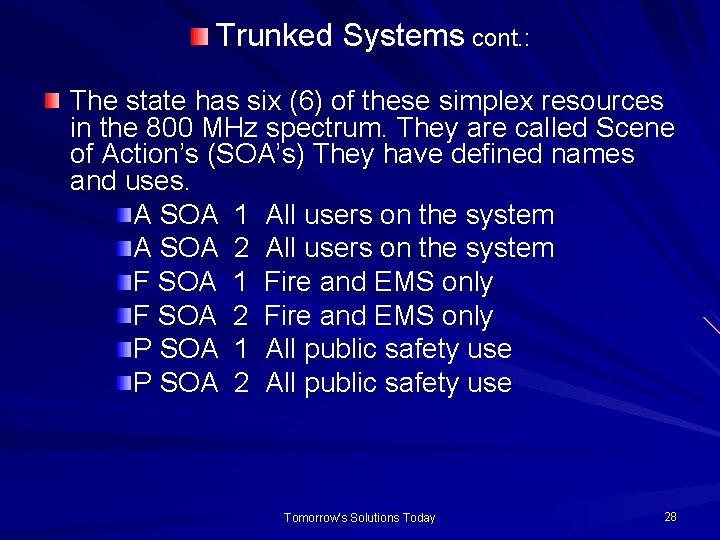
Trunked Systems cont. : The state has six (6) of these simplex resources in the 800 MHz spectrum. They are called Scene of Action’s (SOA’s) They have defined names and uses. A SOA 1 All users on the system A SOA 2 All users on the system F SOA 1 Fire and EMS only F SOA 2 Fire and EMS only P SOA 1 All public safety use P SOA 2 All public safety use Tomorrow's Solutions Today 28
Trunked Systems cont. : The Federal Government has 5 resources in the 800 MHz spectrum that you can program and use. The are called 8 CALL 90 and 8 TAC 91, 92, 93, 94. They can be utilized as simplex or repeated. (Check on whethere are repeaters in your area). The 8 CALL 90 is a hailing resource. The 8 TAC 91 -94 are tactical talk paths defined to be utilized for interoperability. Tomorrow's Solutions Today 29
Trunked Systems cont. : A benefit and concern with utilizing and scanning simplex resources is their range. They are good for about 2 to 2. 5 miles on open terrain. (Line of site on a good day). They provide for fairly good in-building coverage Remember scanning them can be done, but you must be close enough to the radio’s using them to be able to hear (point to point). Lets take a look at a pictorial Tomorrow's Solutions Today 30
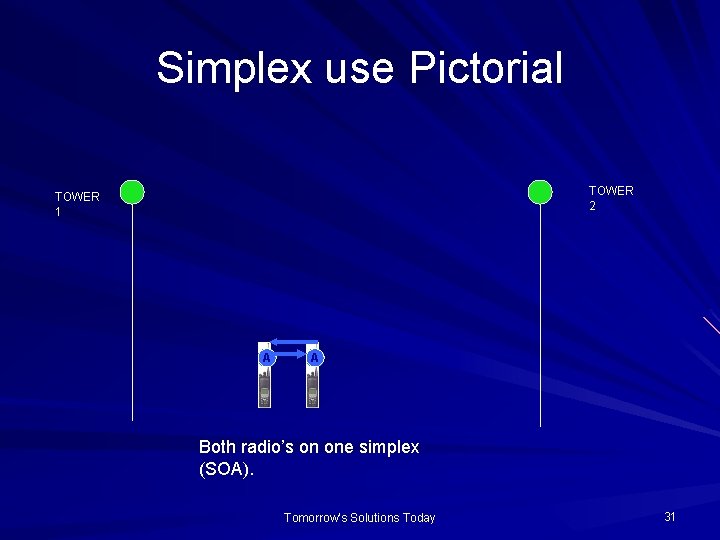
Simplex use Pictorial TOWER 2 TOWER 1 A A Both radio’s on one simplex (SOA). Tomorrow's Solutions Today 31
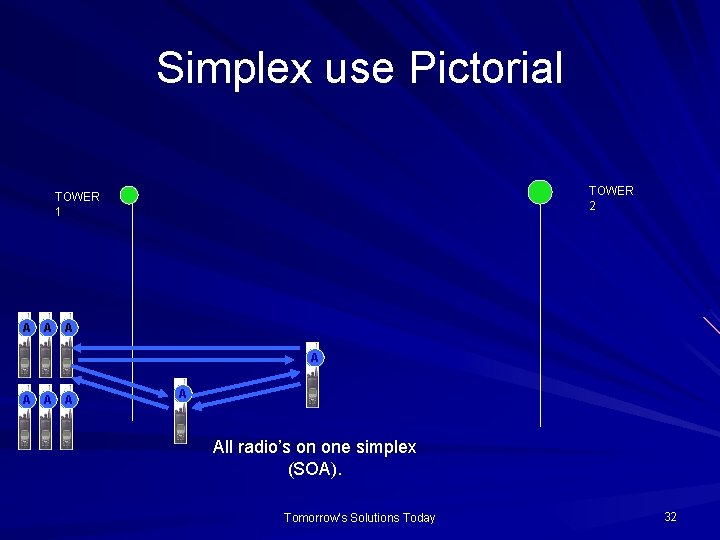
Simplex use Pictorial TOWER 2 TOWER 1 A A A A All radio’s on one simplex (SOA). Tomorrow's Solutions Today 32
Trunked System Scanning Issues: To be able to hear a simplex conventional resource: – First, the resource must be programmed into your radio – Secondly, you must be in range, and Your radio must: – Have the resource selected or Your radio must: – Have been programmed to allow for conventional scanning. Tomorrow's Solutions Today 33
Trunked System Scanning Issues cont. : Through the code plug, You may program your radio’s to scan just trunked resources, just conventional resources or both resources at the same time. The detriment to scanning both at the same time is you will lose priority monitor when doing so. Priority monitor is what allows your radio to revert back to a priority resource, anytime there is traffic on that priority resource. Tomorrow's Solutions Today 34
Wrap up and evaluation: To effectively scan within a trunked radio system there are several things that must happen what are they? Tomorrow's Solutions Today 35
Wrap up and evaluation: The resource (talkgroup or conventional/simplex) you want to scan must be programmed into your radio. Your code plug programming for scanning must account for the mode and manner in which you plan to scan. Trunked – Effects features while the radio is in the trunked mode. (Working on the system through talk groups). Conventional – Effects features while the radio is operating in the conventional (simplex) mode. Tomorrow's Solutions Today 36
Wrap up and evaluation: The talkgroup must be allowed to work at the site you are affiliated to, and your radio must be selected to that talkgroup, or Some other radio affiliated to the same site must be selected to that talkgroup, or The talkgroup is “requested” (forced) on the site you are affiliated to. Tomorrow's Solutions Today 37
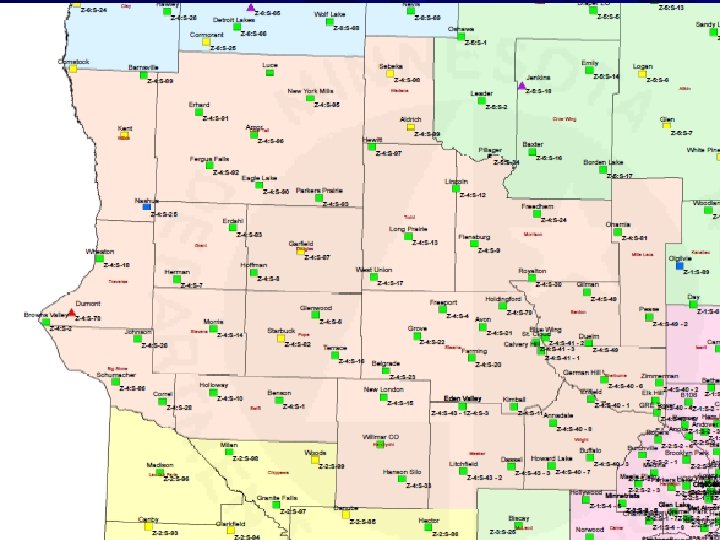
Trunked System Scanning Issues cont. : So, with all we’ve learned, looking at the following regional map, explain how scanning by tower site affiliation will function in and around the Central Region. Tomorrow's Solutions Today 38
Tomorrow's Solutions Today 39
Review Learning Goal Student ability to understand describe how scanning of trunked and simplex resources, on a Trunked Radio System works. Tomorrow's Solutions Today 40
Review Learning Objectives and Evaluation Students will be able to explain to the instructor satisfaction, the basic differences between conventional and trunked radio systems. Students will be able to explain to the instructor satisfaction, how radio site affiliation occurs on a trunked radio system. Students will be able to explain to the instructor satisfaction, how code plug programming effects scanning on a trunked radio system. Students will be able to explain to the instructor satisfaction, the basic characteristics of scanning on a trunked radio system. Students will demonstrate knowledge and retention of training material through a testing process. Tomorrow's Solutions Today 41
Thank you for taking the time to view this presentation. We hope it was helpful. Developed and produced by On Target Training & Consulting LLC Tomorrow's Solutions Today 42