
DIGITAL TECHNIQUES MICROPROCESSOR DTM 22323 Mr Yogesh J
- Slides: 50
DIGITAL TECHNIQUES & MICROPROCESSOR (DTM -22323) Mr. Yogesh J. Gaikwad #Education with. Values MAEER's MIT Polytechnic, Department of Information Technology
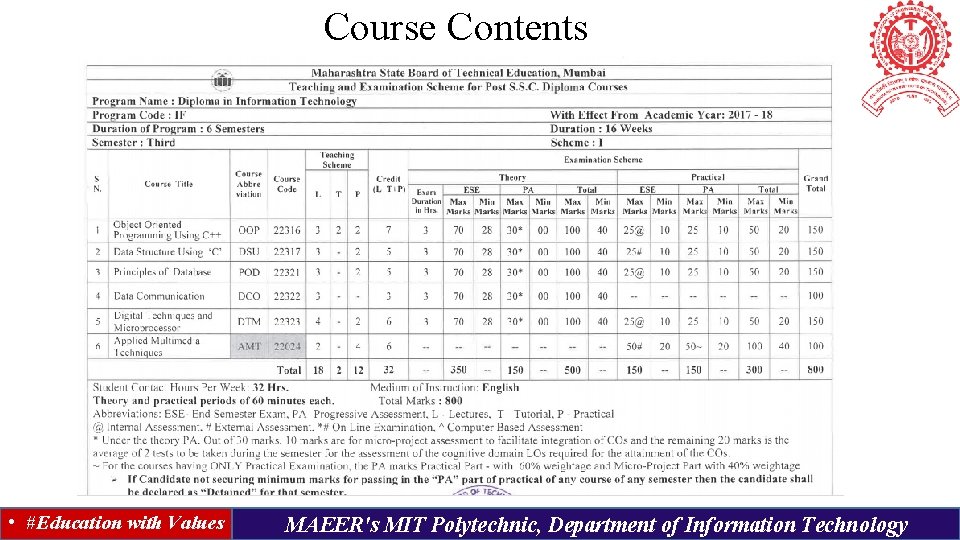
Course Contents • #Education with Values MAEER's MIT Polytechnic, Department of Information Technology
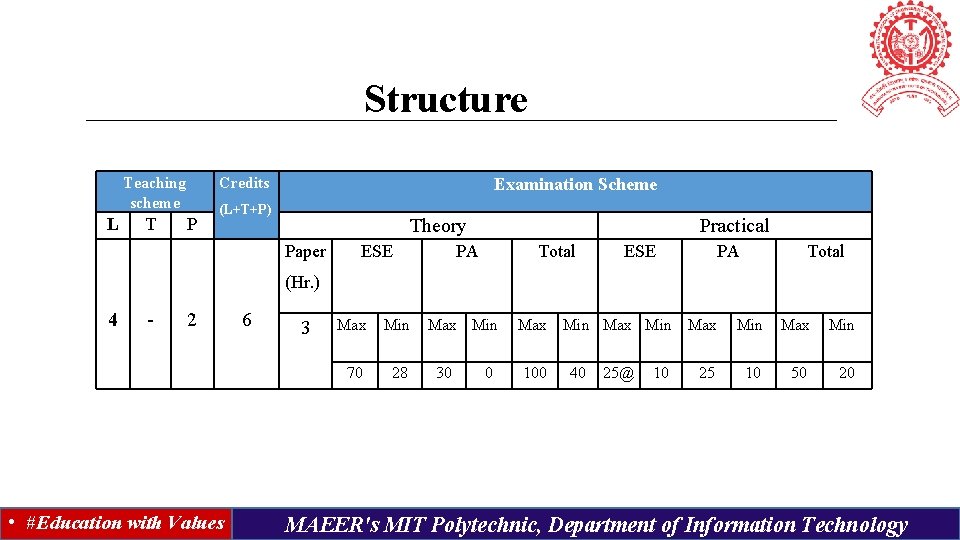
Structure Teaching scheme L T Credits P Examination Scheme (L+T+P) Theory Paper ESE Practical PA Total ESE PA Total (Hr. ) 4 - 2 • #Education with Values 6 3 Max Min 70 28 Max Min 30 0 Max Min Max 100 40 25@ 10 25 Min Max Min 10 50 20 MAEER's MIT Polytechnic, Department of Information Technology
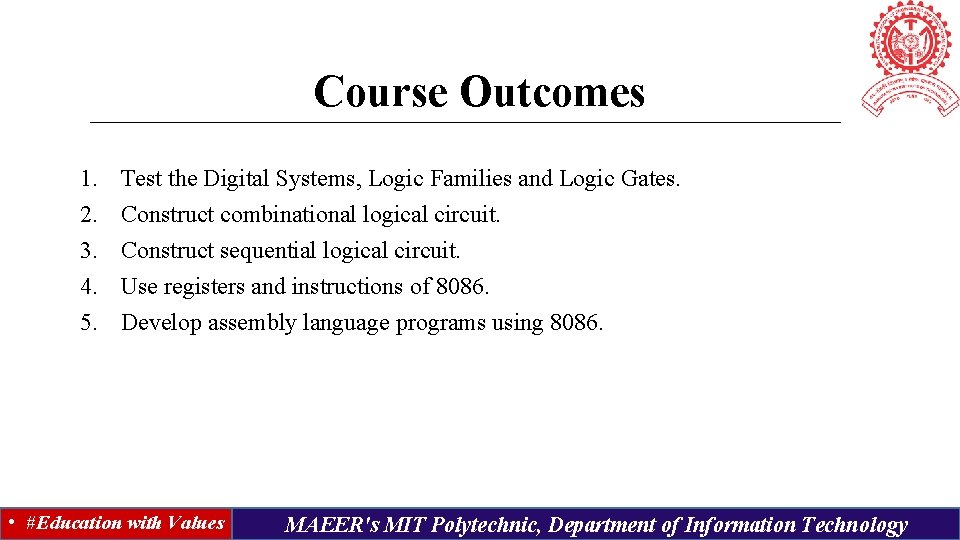
Course Outcomes 1. 2. 3. 4. 5. Test the Digital Systems, Logic Families and Logic Gates. Construct combinational logical circuit. Construct sequential logical circuit. Use registers and instructions of 8086. Develop assembly language programs using 8086. • #Education with Values MAEER's MIT Polytechnic, Department of Information Technology
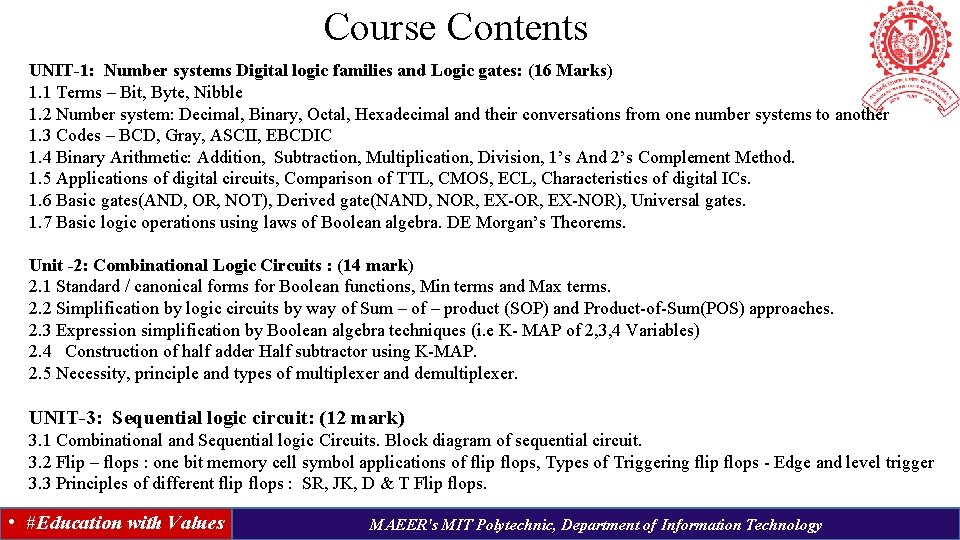
Course Contents UNIT-1: Number systems Digital logic families and Logic gates: (16 Marks) 1. 1 Terms – Bit, Byte, Nibble 1. 2 Number system: Decimal, Binary, Octal, Hexadecimal and their conversations from one number systems to another 1. 3 Codes – BCD, Gray, ASCII, EBCDIC 1. 4 Binary Arithmetic: Addition, Subtraction, Multiplication, Division, 1’s And 2’s Complement Method. 1. 5 Applications of digital circuits, Comparison of TTL, CMOS, ECL, Characteristics of digital ICs. 1. 6 Basic gates(AND, OR, NOT), Derived gate(NAND, NOR, EX-NOR), Universal gates. 1. 7 Basic logic operations using laws of Boolean algebra. DE Morgan’s Theorems. Unit -2: Combinational Logic Circuits : (14 mark) 2. 1 Standard / canonical forms for Boolean functions, Min terms and Max terms. 2. 2 Simplification by logic circuits by way of Sum – of – product (SOP) and Product-of-Sum(POS) approaches. 2. 3 Expression simplification by Boolean algebra techniques (i. e K- MAP of 2, 3, 4 Variables) 2. 4 Construction of half adder Half subtractor using K-MAP. 2. 5 Necessity, principle and types of multiplexer and demultiplexer. UNIT-3: Sequential logic circuit: (12 mark) 3. 1 Combinational and Sequential logic Circuits. Block diagram of sequential circuit. 3. 2 Flip – flops : one bit memory cell symbol applications of flip flops, Types of Triggering flip flops - Edge and level trigger 3. 3 Principles of different flip flops : SR, JK, D & T Flip flops. • #Education with Values MAEER's MIT Polytechnic, Department of Information Technology
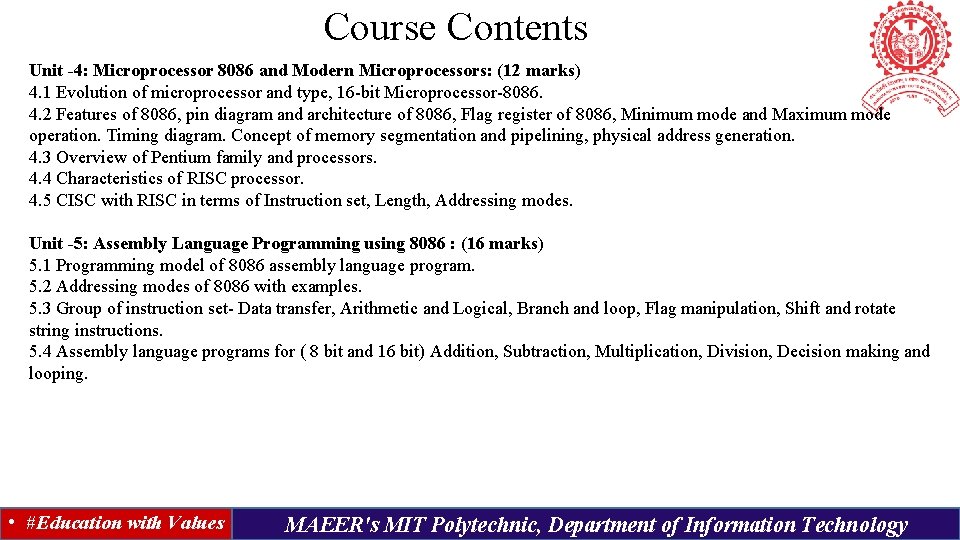
Course Contents Unit -4: Microprocessor 8086 and Modern Microprocessors: (12 marks) 4. 1 Evolution of microprocessor and type, 16 -bit Microprocessor-8086. 4. 2 Features of 8086, pin diagram and architecture of 8086, Flag register of 8086, Minimum mode and Maximum mode operation. Timing diagram. Concept of memory segmentation and pipelining, physical address generation. 4. 3 Overview of Pentium family and processors. 4. 4 Characteristics of RISC processor. 4. 5 CISC with RISC in terms of Instruction set, Length, Addressing modes. Unit -5: Assembly Language Programming using 8086 : (16 marks) 5. 1 Programming model of 8086 assembly language program. 5. 2 Addressing modes of 8086 with examples. 5. 3 Group of instruction set- Data transfer, Arithmetic and Logical, Branch and loop, Flag manipulation, Shift and rotate string instructions. 5. 4 Assembly language programs for ( 8 bit and 16 bit) Addition, Subtraction, Multiplication, Division, Decision making and looping. • #Education with Values MAEER's MIT Polytechnic, Department of Information Technology
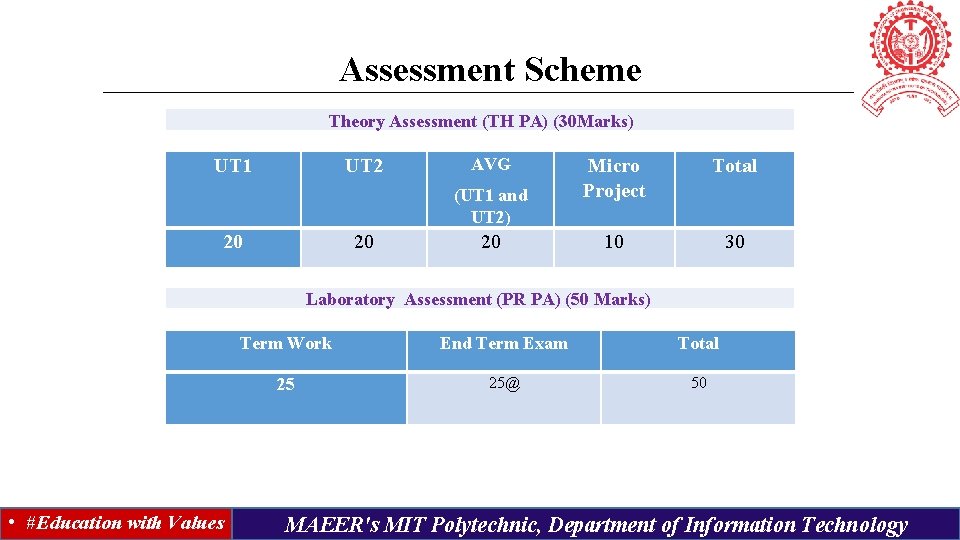
Assessment Scheme Theory Assessment (TH PA) (30 Marks) UT 1 UT 2 AVG (UT 1 and UT 2) 20 20 20 Micro Project Total 10 30 Laboratory Assessment (PR PA) (50 Marks) • #Education with Values Term Work End Term Exam Total 25 25@ 50 MAEER's MIT Polytechnic, Department of Information Technology
UNIT- I Number Systems, Digital Logic Families And Logic Gates: (16 Marks) • #Education with Values MAEER's MIT Polytechnic, Department of Information Technology
UNIT-1: Number systems Digital logic families and Logic gates: (16 Marks) 1. 1 Terms – Bit, Byte, Nibble 1. 2 Number system: Decimal, Binary, Octal, Hexadecimal and their conversations from one number systems to another 1. 3 Codes – BCD, Gray, ASCII, EBCDIC 1. 4 Binary Arithmetic: Addition, Subtraction, Multiplication, Division, 1’s And 2’s Complement Method. 1. 5 Applications of digital circuits, Comparison of TTL, CMOS, ECL, Characteristics of digital ICs. 1. 6 Basic gates(AND, OR, NOT), Derived gate(NAND, NOR, EX-NOR), Universal gates. 1. 7 Basic logic operations using laws of Boolean algebra. DE Morgan’s Theorems. • #Education with Values MAEER's MIT Polytechnic, Department of Information Technology
1. 1 Terms Bit, Byte, Nibble Bit The smallest unit of data in a computer is called Bit (Binary Digit). A bit has a single binary value, either 0 or 1. In most computer systems, there are eight bits in a byte. The value of a bit is usually stored as either above or below a designated level of electrical charge in a single capacitor within a memory device. Nibble Half a byte (four bits) is called a nibble. Byte In most computer systems, a byte is a unit of data that is eight binary digits long. A byte is a unit most computers use to represent a character such as a letter, number or typographic symbol (for example, “g”, “ 5”, or “? ”). A byte can also hold a string of bits that need to be used in some larger unit of application purposes (for example, the stream of bits that constitute a visual image for a program that displays images or the string of bits that constitutes the machine code of a computer program). • #Education with Values MAEER's MIT Polytechnic, Department of Information Technology
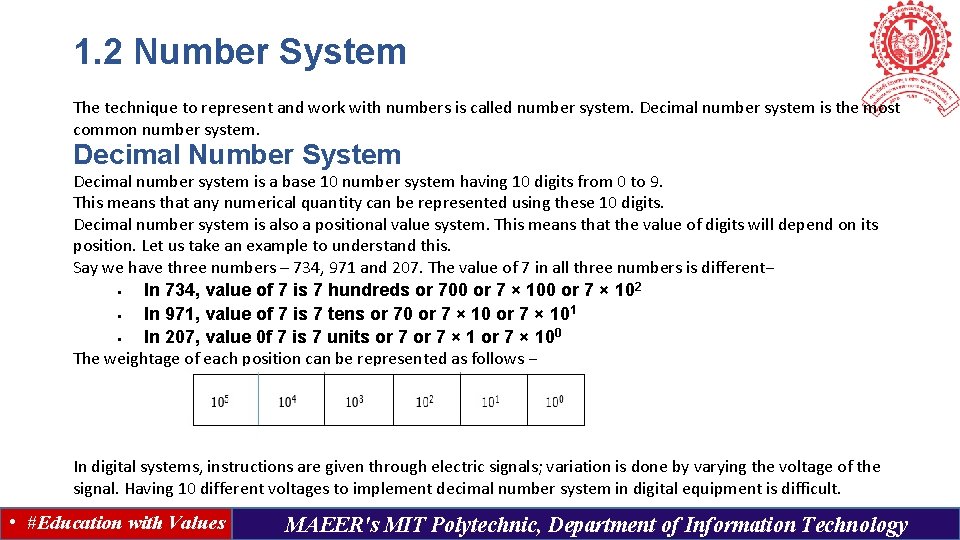
1. 2 Number System The technique to represent and work with numbers is called number system. Decimal number system is the most common number system. Decimal Number System Decimal number system is a base 10 number system having 10 digits from 0 to 9. This means that any numerical quantity can be represented using these 10 digits. Decimal number system is also a positional value system. This means that the value of digits will depend on its position. Let us take an example to understand this. Say we have three numbers – 734, 971 and 207. The value of 7 in all three numbers is different− § In 734, value of 7 is 7 hundreds or 700 or 7 × 10 2 § In 971, value of 7 is 7 tens or 70 or 7 × 101 § In 207, value 0 f 7 is 7 units or 7 × 100 The weightage of each position can be represented as follows − In digital systems, instructions are given through electric signals; variation is done by varying the voltage of the signal. Having 10 different voltages to implement decimal number system in digital equipment is difficult. • #Education with Values MAEER's MIT Polytechnic, Department of Information Technology
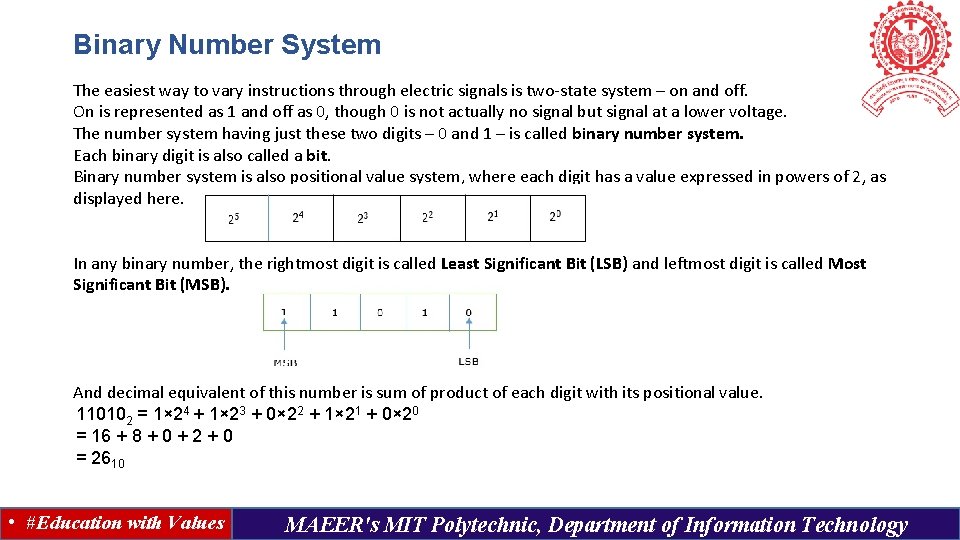
Binary Number System The easiest way to vary instructions through electric signals is two-state system – on and off. On is represented as 1 and off as 0, though 0 is not actually no signal but signal at a lower voltage. The number system having just these two digits – 0 and 1 – is called binary number system. Each binary digit is also called a bit. Binary number system is also positional value system, where each digit has a value expressed in powers of 2, as displayed here. In any binary number, the rightmost digit is called Least Significant Bit (LSB) and leftmost digit is called Most Significant Bit (MSB). And decimal equivalent of this number is sum of product of each digit with its positional value. 110102 = 1× 24 + 1× 23 + 0× 22 + 1× 21 + 0× 20 = 16 + 8 + 0 + 2 + 0 = 2610 • #Education with Values MAEER's MIT Polytechnic, Department of Information Technology
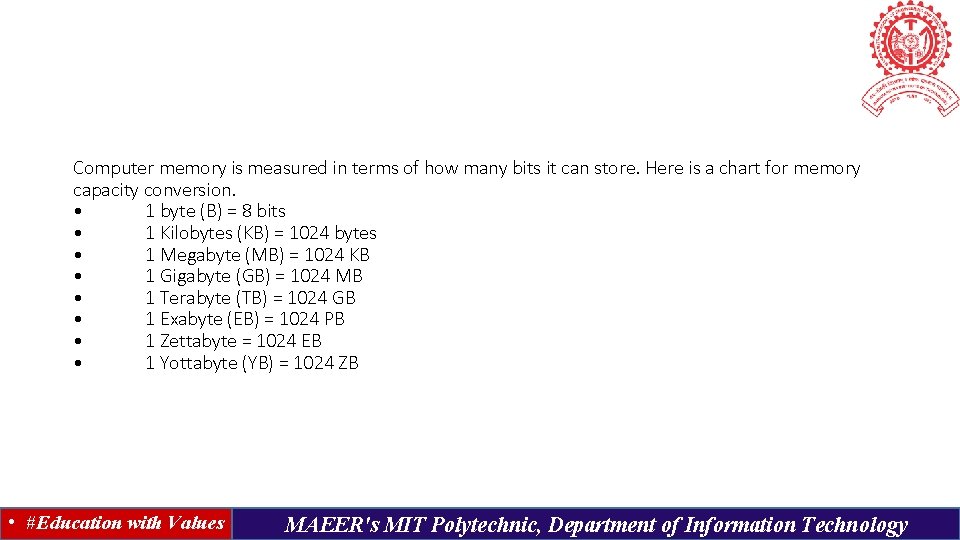
Computer memory is measured in terms of how many bits it can store. Here is a chart for memory capacity conversion. • 1 byte (B) = 8 bits • 1 Kilobytes (KB) = 1024 bytes • 1 Megabyte (MB) = 1024 KB • 1 Gigabyte (GB) = 1024 MB • 1 Terabyte (TB) = 1024 GB • 1 Exabyte (EB) = 1024 PB • 1 Zettabyte = 1024 EB • 1 Yottabyte (YB) = 1024 ZB • #Education with Values MAEER's MIT Polytechnic, Department of Information Technology
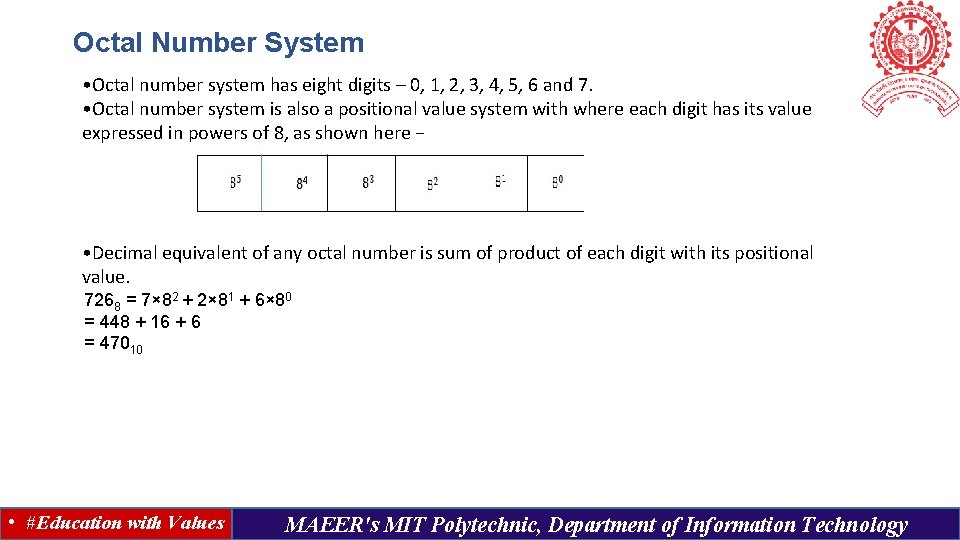
Octal Number System • Octal number system has eight digits – 0, 1, 2, 3, 4, 5, 6 and 7. • Octal number system is also a positional value system with where each digit has its value expressed in powers of 8, as shown here − • Decimal equivalent of any octal number is sum of product of each digit with its positional value. 7268 = 7× 82 + 2× 81 + 6× 80 = 448 + 16 + 6 = 47010 • #Education with Values MAEER's MIT Polytechnic, Department of Information Technology
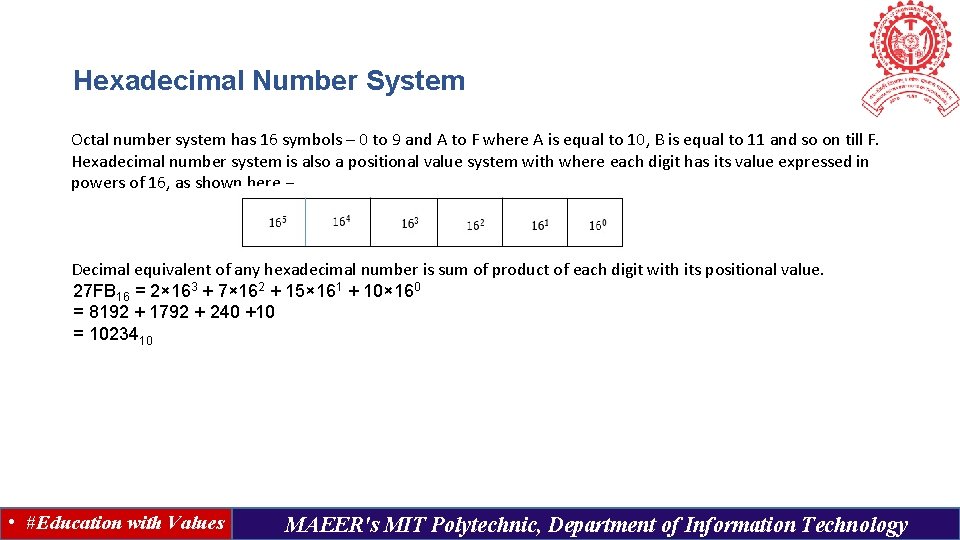
Hexadecimal Number System Octal number system has 16 symbols – 0 to 9 and A to F where A is equal to 10, B is equal to 11 and so on till F. Hexadecimal number system is also a positional value system with where each digit has its value expressed in powers of 16, as shown here − Decimal equivalent of any hexadecimal number is sum of product of each digit with its positional value. 27 FB 16 = 2× 163 + 7× 162 + 15× 161 + 10× 160 = 8192 + 1792 + 240 +10 = 1023410 • #Education with Values MAEER's MIT Polytechnic, Department of Information Technology
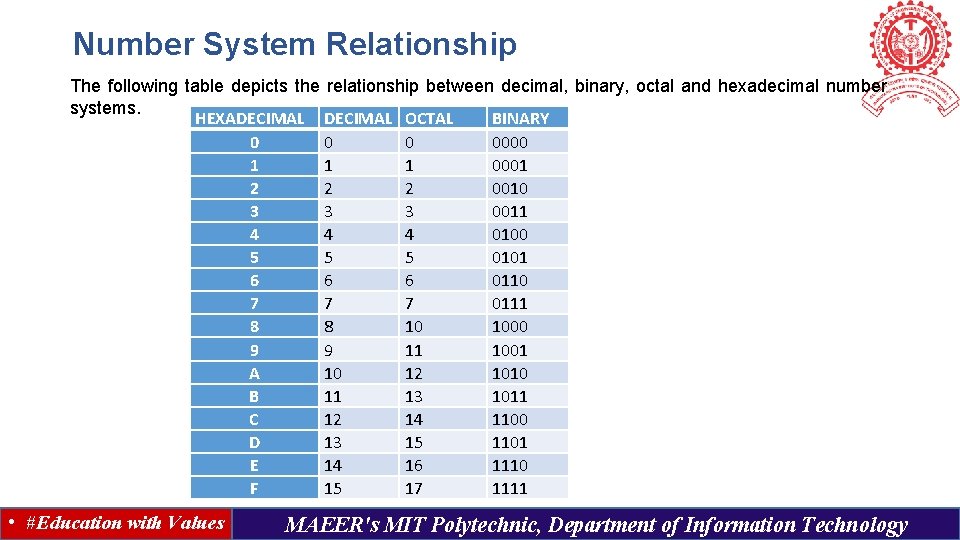
Number System Relationship The following table depicts the relationship between decimal, binary, octal and hexadecimal number systems. HEXADECIMAL OCTAL BINARY 0 0000 1 1 1 0001 2 2 2 0010 3 3 3 0011 4 4 4 0100 5 5 5 0101 6 6 6 0110 7 7 7 0111 8 8 10 1000 9 9 11 1001 A 10 12 1010 B 11 13 1011 C 12 14 1100 D 13 15 1101 E 14 16 1110 F 15 17 1111 • #Education with Values MAEER's MIT Polytechnic, Department of Information Technology
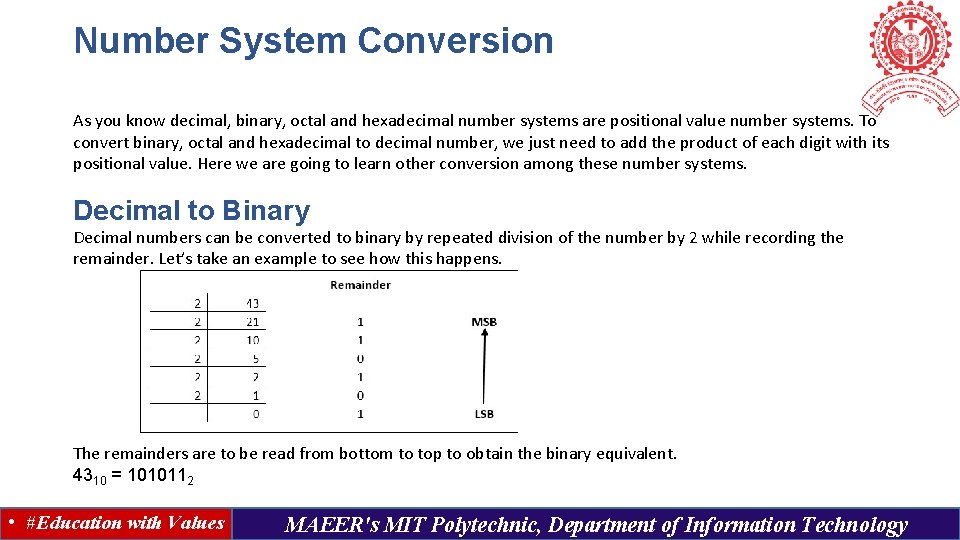
Number System Conversion As you know decimal, binary, octal and hexadecimal number systems are positional value number systems. To convert binary, octal and hexadecimal to decimal number, we just need to add the product of each digit with its positional value. Here we are going to learn other conversion among these number systems. Decimal to Binary Decimal numbers can be converted to binary by repeated division of the number by 2 while recording the remainder. Let’s take an example to see how this happens. The remainders are to be read from bottom to top to obtain the binary equivalent. 4310 = 1010112 • #Education with Values MAEER's MIT Polytechnic, Department of Information Technology
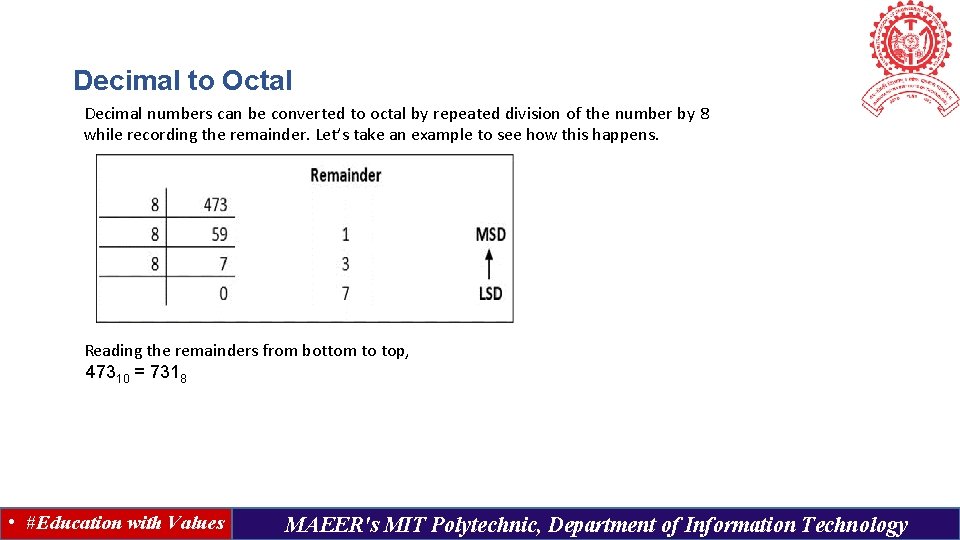
Decimal to Octal Decimal numbers can be converted to octal by repeated division of the number by 8 while recording the remainder. Let’s take an example to see how this happens. Reading the remainders from bottom to top, 47310 = 7318 • #Education with Values MAEER's MIT Polytechnic, Department of Information Technology
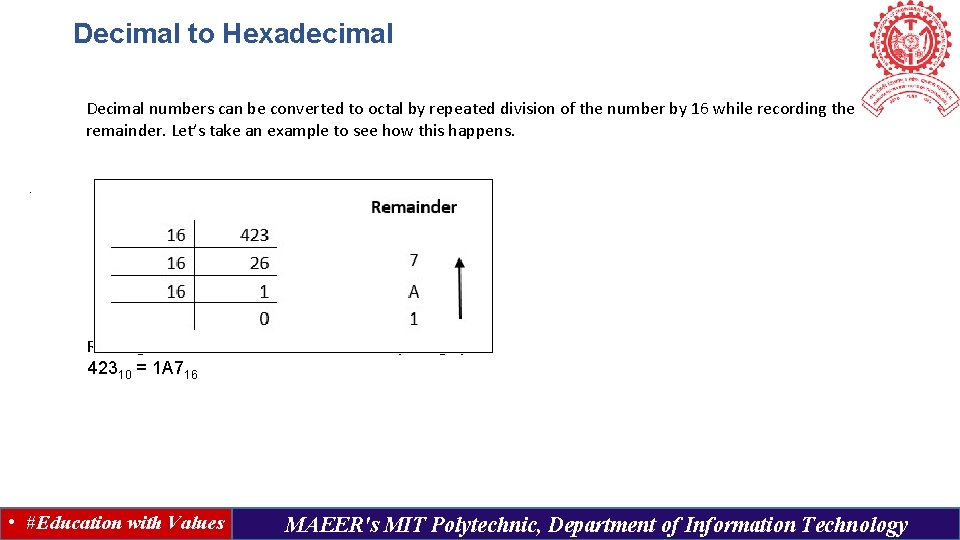
Decimal to Hexadecimal Decimal numbers can be converted to octal by repeated division of the number by 16 while recording the remainder. Let’s take an example to see how this happens. . Reading the remainders from bottom to top we get, 42310 = 1 A 716 • #Education with Values MAEER's MIT Polytechnic, Department of Information Technology
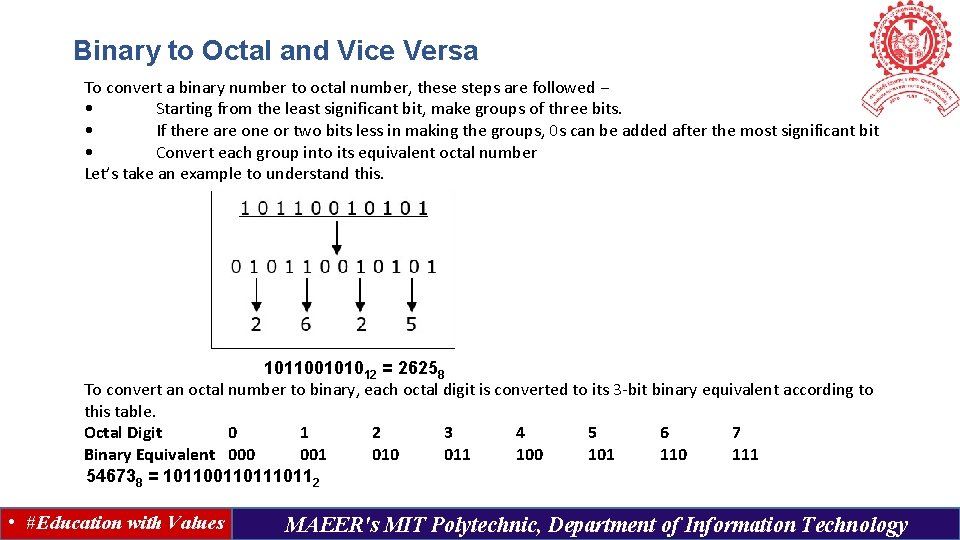
Binary to Octal and Vice Versa To convert a binary number to octal number, these steps are followed − • Starting from the least significant bit, make groups of three bits. • If there are one or two bits less in making the groups, 0 s can be added after the most significant bit • Convert each group into its equivalent octal number Let’s take an example to understand this. 101100101012 = 26258 To convert an octal number to binary, each octal digit is converted to its 3 -bit binary equivalent according to this table. Octal Digit 0 1 2 3 4 5 6 7 Binary Equivalent 000 001 010 011 100 101 110 111 546738 = 101101110112 • #Education with Values MAEER's MIT Polytechnic, Department of Information Technology
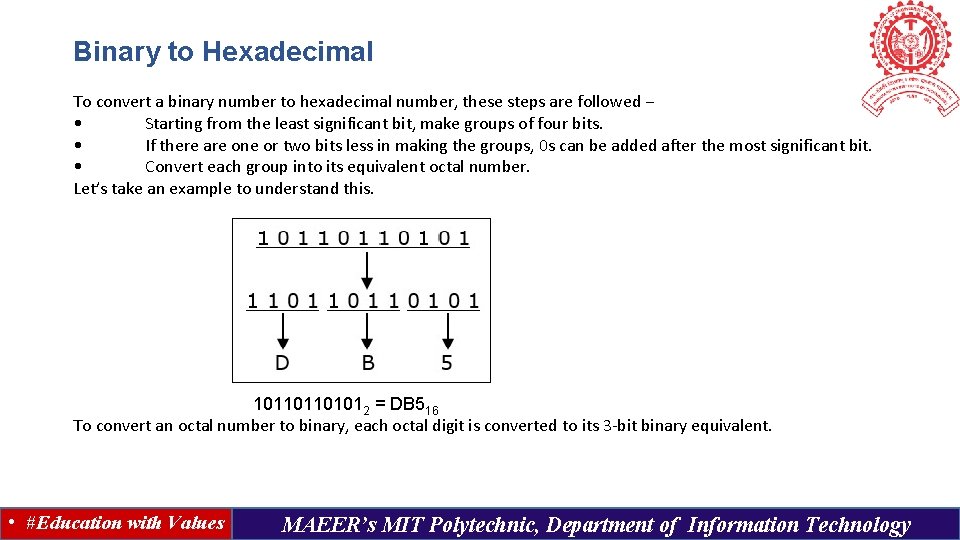
Binary to Hexadecimal To convert a binary number to hexadecimal number, these steps are followed − • Starting from the least significant bit, make groups of four bits. • If there are one or two bits less in making the groups, 0 s can be added after the most significant bit. • Convert each group into its equivalent octal number. Let’s take an example to understand this. 101101101012 = DB 516 To convert an octal number to binary, each octal digit is converted to its 3 -bit binary equivalent. • #Education with Values MAEER’s MIT Polytechnic, Department of Information Technology
Binary Number System • #Education with Values MAEER’s MIT Polytechnic, Department of Information Technology
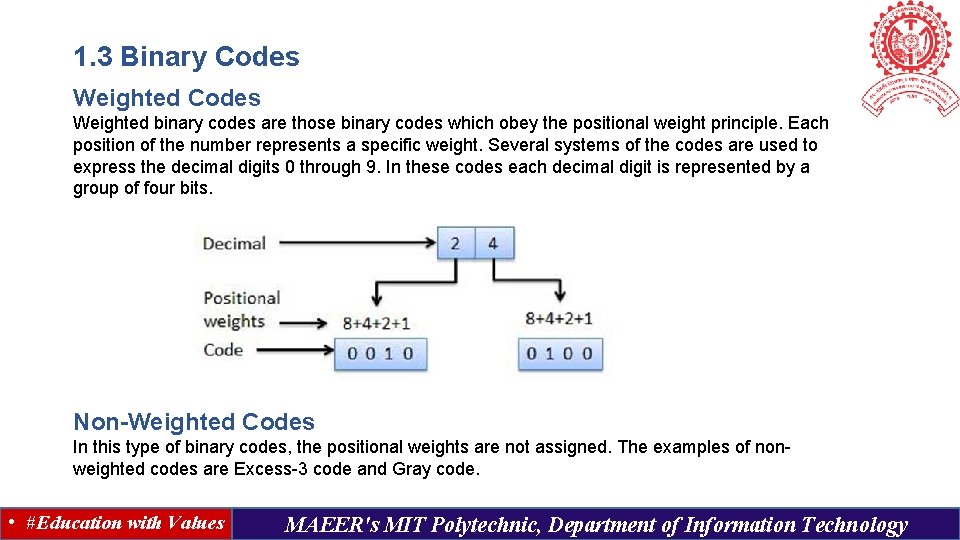
1. 3 Binary Codes Weighted binary codes are those binary codes which obey the positional weight principle. Each position of the number represents a specific weight. Several systems of the codes are used to express the decimal digits 0 through 9. In these codes each decimal digit is represented by a group of four bits. Non-Weighted Codes In this type of binary codes, the positional weights are not assigned. The examples of nonweighted codes are Excess-3 code and Gray code. • #Education with Values MAEER's MIT Polytechnic, Department of Information Technology
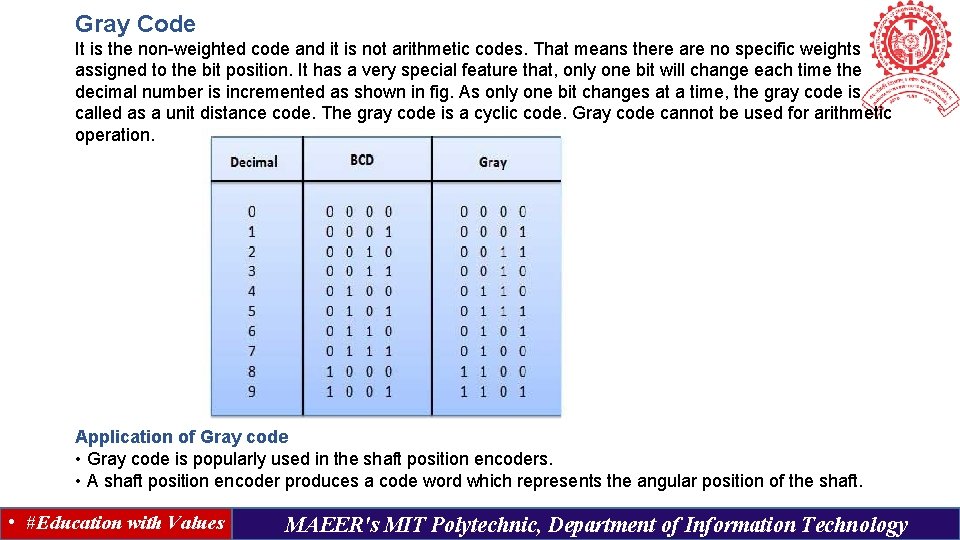
Gray Code It is the non-weighted code and it is not arithmetic codes. That means there are no specific weights assigned to the bit position. It has a very special feature that, only one bit will change each time the decimal number is incremented as shown in fig. As only one bit changes at a time, the gray code is called as a unit distance code. The gray code is a cyclic code. Gray code cannot be used for arithmetic operation. Application of Gray code • Gray code is popularly used in the shaft position encoders. • A shaft position encoder produces a code word which represents the angular position of the shaft. • #Education with Values MAEER's MIT Polytechnic, Department of Information Technology
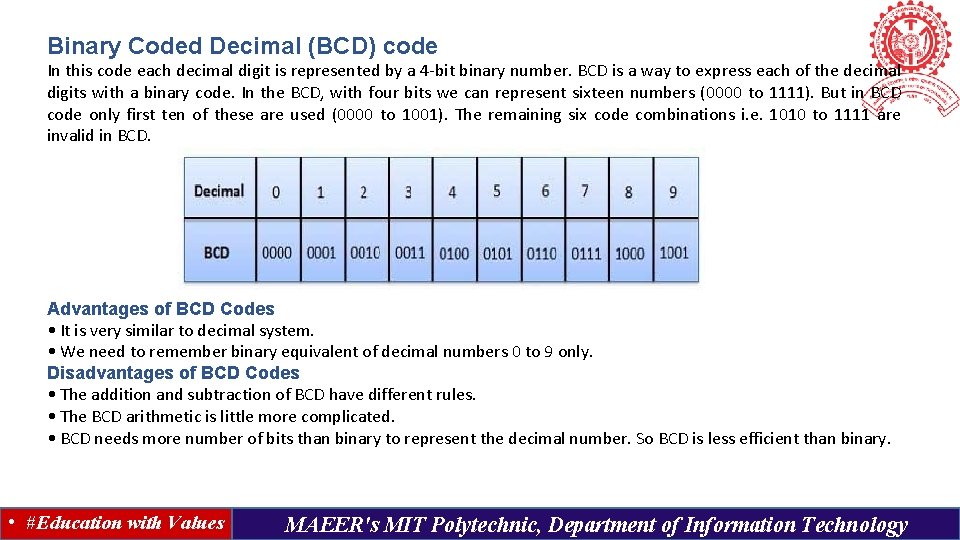
Binary Coded Decimal (BCD) code In this code each decimal digit is represented by a 4 -bit binary number. BCD is a way to express each of the decimal digits with a binary code. In the BCD, with four bits we can represent sixteen numbers (0000 to 1111). But in BCD code only first ten of these are used (0000 to 1001). The remaining six code combinations i. e. 1010 to 1111 are invalid in BCD. Advantages of BCD Codes • It is very similar to decimal system. • We need to remember binary equivalent of decimal numbers 0 to 9 only. Disadvantages of BCD Codes • The addition and subtraction of BCD have different rules. • The BCD arithmetic is little more complicated. • BCD needs more number of bits than binary to represent the decimal number. So BCD is less efficient than binary. • #Education with Values MAEER's MIT Polytechnic, Department of Information Technology
Alphanumeric Codes A binary digit or bit can represent only two symbols as it has only two states '0' or '1'. But this is not enough for communication between two computers because there we need many more symbols for communication. These symbols are required to represent 26 alphabets with capital and small letters, numbers from 0 to 9, punctuation marks and other symbols. The alphanumeric codes are the codes that represent numbers and alphabetic characters. An alphanumeric code should at least represent 10 digits and 26 letters of alphabet i. e. total 36 items. The following three alphanumeric codes are very commonly used for the data representation. American Standard Code for Information Interchange (ASCII) - 7 -bit code Extended Binary Coded Decimal Interchange Code (EBCDIC) - 8 -bit code Five bit Baudot Code. ASCII The complete alphanumeric code typically includes − • 26 upper case letters • 26 lower case letters • 10 digits • 7 punctuation marks • 20 to 40 special characters Now a computer understands only numeric values, whatever the number system used. So all characters must have a numeric equivalent called the alphanumeric code. The most widely used alphanumeric code is American Standard Code for Information Interchange (ASCII). ASCII is a 7 -bit code that has 128 (27) possible codes. • #Education with Values MAEER's MIT Polytechnic, Department of Information Technology
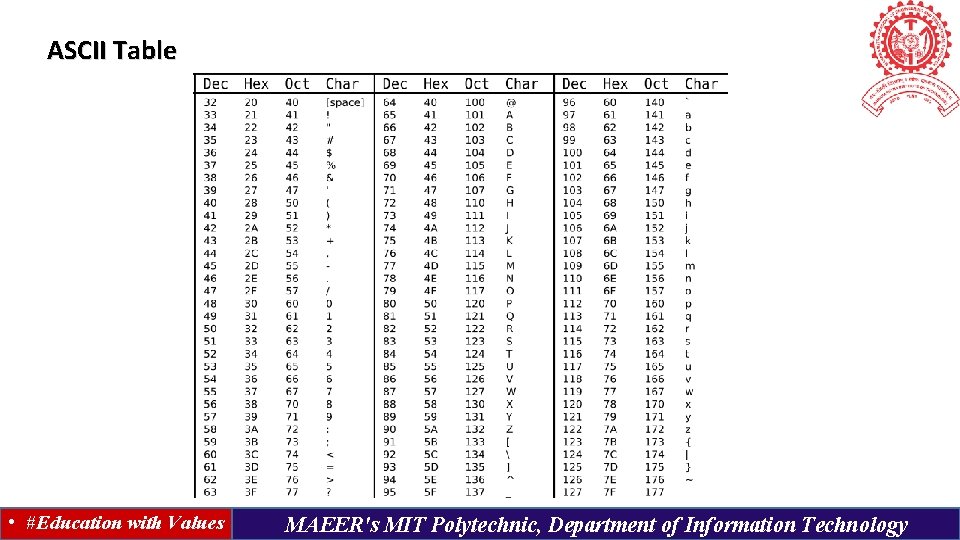
ASCII Table • #Education with Values MAEER's MIT Polytechnic, Department of Information Technology
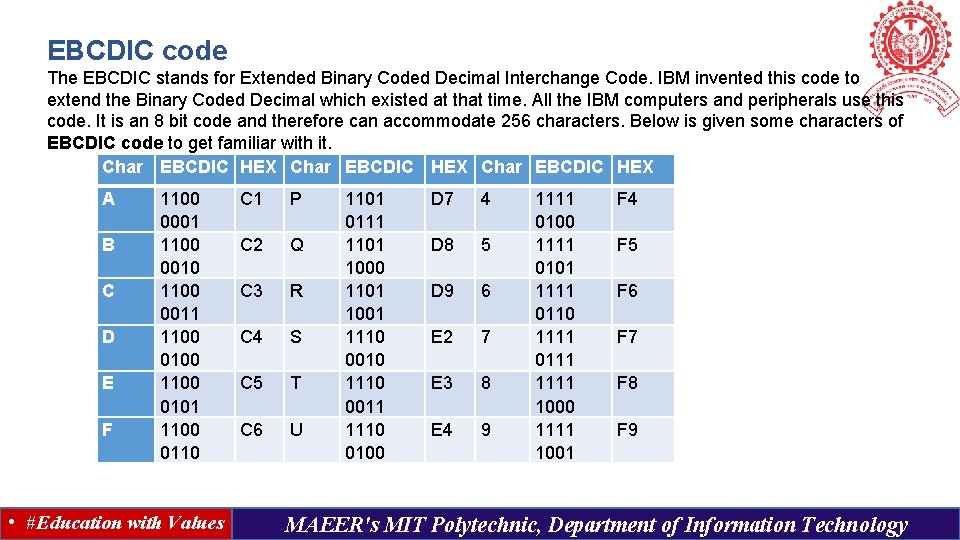
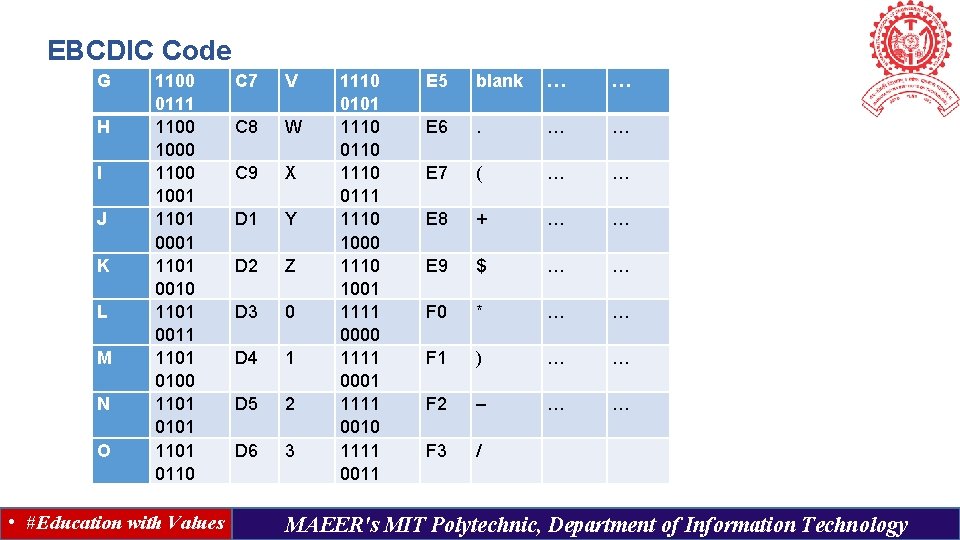
EBCDIC code The EBCDIC stands for Extended Binary Coded Decimal Interchange Code. IBM invented this code to extend the Binary Coded Decimal which existed at that time. All the IBM computers and peripherals use this code. It is an 8 bit code and therefore can accommodate 256 characters. Below is given some characters of EBCDIC code to get familiar with it. Char EBCDIC HEX A B C D E F 1100 0001 1100 0010 1100 0011 1100 0100 1100 0101 1100 0110 • #Education with Values C 1 P C 2 Q C 3 R C 4 S C 5 T C 6 U 1101 0111 1101 1000 1101 1001 1110 0010 1110 0011 1110 0100 D 7 4 D 8 5 D 9 6 E 2 7 E 3 8 E 4 9 1111 0100 1111 0101 1111 0110 1111 0111 1000 1111 1001 F 4 F 5 F 6 F 7 F 8 F 9 MAEER's MIT Polytechnic, Department of Information Technology
EBCDIC Code G H I J K L M N O 1100 0111 1100 1000 1100 1001 1101 0010 1101 0011 1101 0100 1101 0101 1101 0110 • #Education with Values C 7 V C 8 W C 9 X D 1 Y D 2 Z D 3 0 D 4 1 D 5 2 D 6 3 1110 0101 1110 0110 1110 0111 1110 1000 1110 1001 1111 0000 1111 0001 1111 0010 1111 0011 E 5 blank … … E 6 . … … E 7 ( … … E 8 + … … E 9 $ … … F 0 * … … F 1 ) … … F 2 – … … F 3 / MAEER's MIT Polytechnic, Department of Information Technology
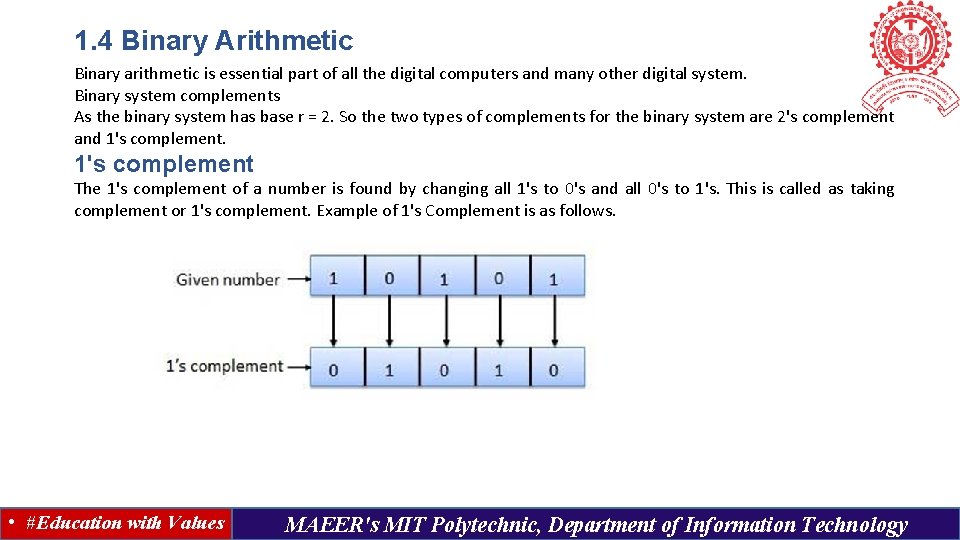
1. 4 Binary Arithmetic Binary arithmetic is essential part of all the digital computers and many other digital system. Binary system complements As the binary system has base r = 2. So the two types of complements for the binary system are 2's complement and 1's complement The 1's complement of a number is found by changing all 1's to 0's and all 0's to 1's. This is called as taking complement or 1's complement. Example of 1's Complement is as follows. • #Education with Values MAEER's MIT Polytechnic, Department of Information Technology
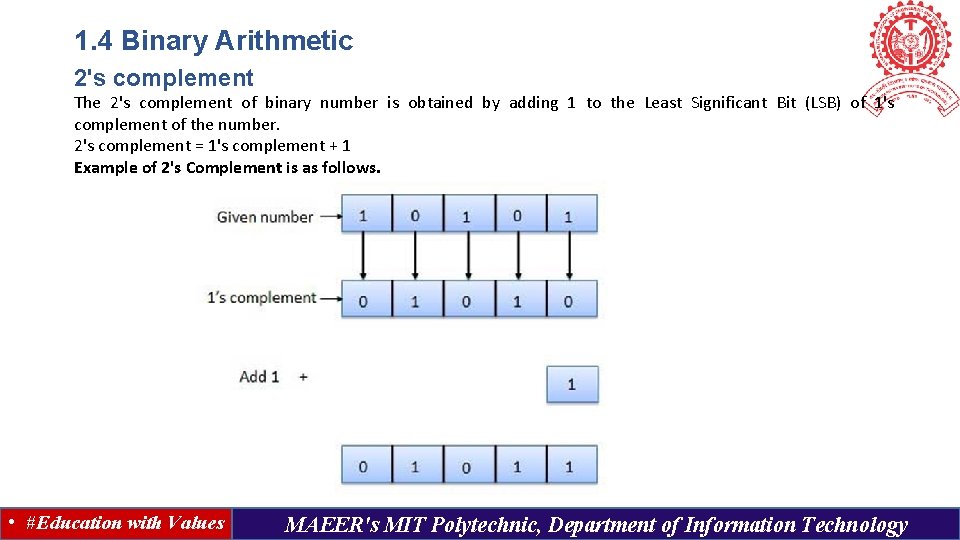
1. 4 Binary Arithmetic 2's complement The 2's complement of binary number is obtained by adding 1 to the Least Significant Bit (LSB) of 1's complement of the number. 2's complement = 1's complement + 1 Example of 2's Complement is as follows. • #Education with Values MAEER's MIT Polytechnic, Department of Information Technology
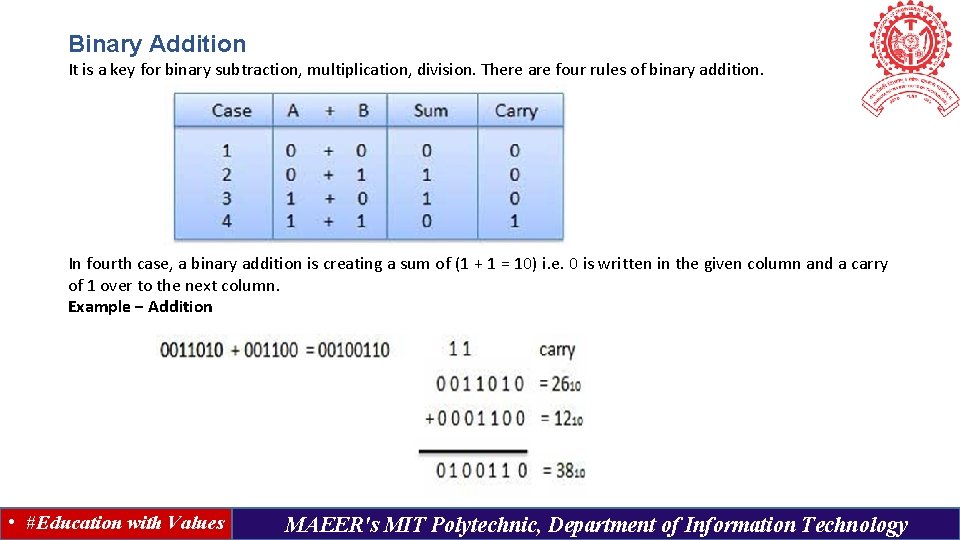
Binary Addition It is a key for binary subtraction, multiplication, division. There are four rules of binary addition. In fourth case, a binary addition is creating a sum of (1 + 1 = 10) i. e. 0 is written in the given column and a carry of 1 over to the next column. Example − Addition • #Education with Values MAEER's MIT Polytechnic, Department of Information Technology
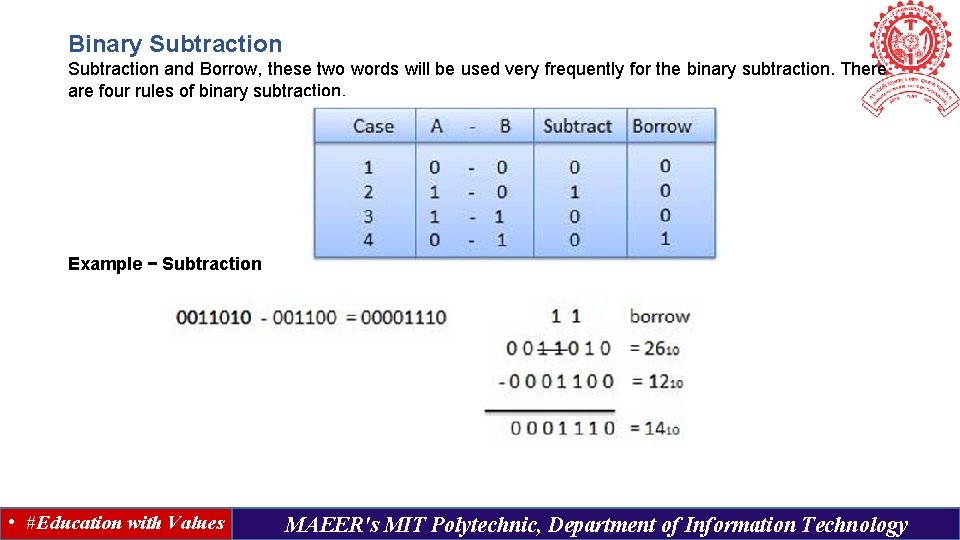
Binary Subtraction and Borrow, these two words will be used very frequently for the binary subtraction. There are four rules of binary subtraction. Example − Subtraction • #Education with Values MAEER's MIT Polytechnic, Department of Information Technology
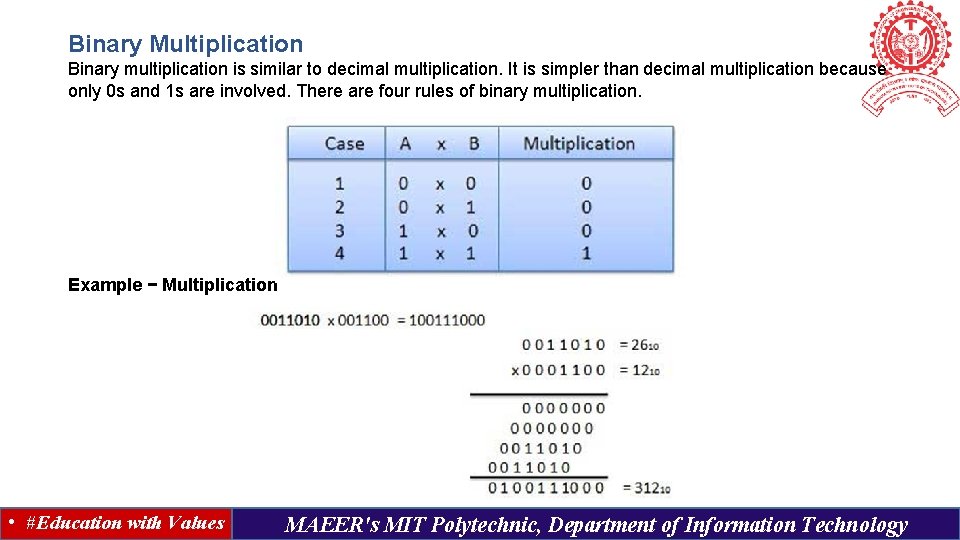
Binary Multiplication Binary multiplication is similar to decimal multiplication. It is simpler than decimal multiplication because only 0 s and 1 s are involved. There are four rules of binary multiplication. Example − Multiplication • #Education with Values MAEER's MIT Polytechnic, Department of Information Technology
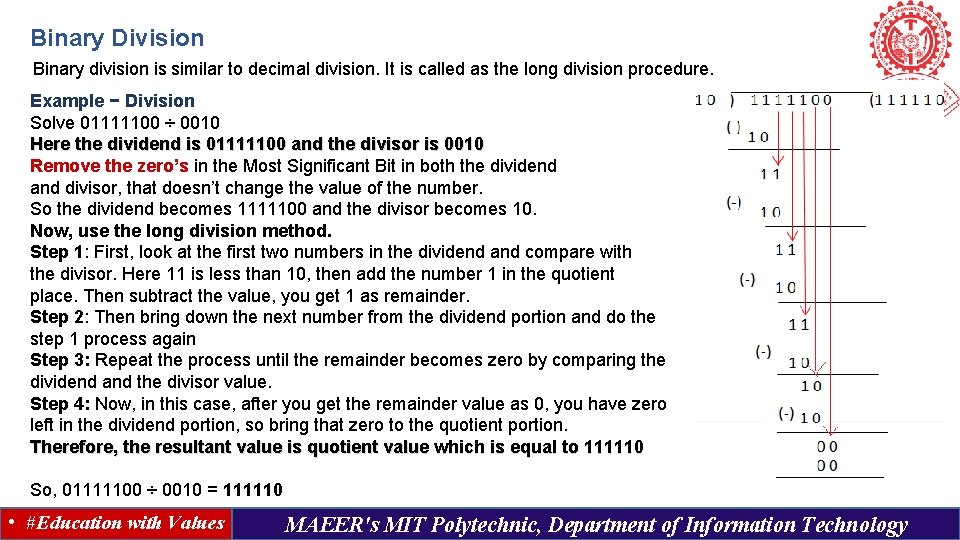
Binary Division Binary division is similar to decimal division. It is called as the long division procedure. Example − Division Solve 01111100 ÷ 0010 Here the dividend is 01111100 and the divisor is 0010 Remove the zero’s in the Most Significant Bit in both the dividend and divisor, that doesn’t change the value of the number. So the dividend becomes 1111100 and the divisor becomes 10. Now, use the long division method. Step 1: First, look at the first two numbers in the dividend and compare with the divisor. Here 11 is less than 10, then add the number 1 in the quotient place. Then subtract the value, you get 1 as remainder. Step 2: Then bring down the next number from the dividend portion and do the step 1 process again Step 3: Repeat the process until the remainder becomes zero by comparing the dividend and the divisor value. Step 4: Now, in this case, after you get the remainder value as 0, you have zero left in the dividend portion, so bring that zero to the quotient portion. Therefore, the resultant value is quotient value which is equal to 111110 So, 01111100 ÷ 0010 = 111110 • #Education with Values MAEER's MIT Polytechnic, Department of Information Technology
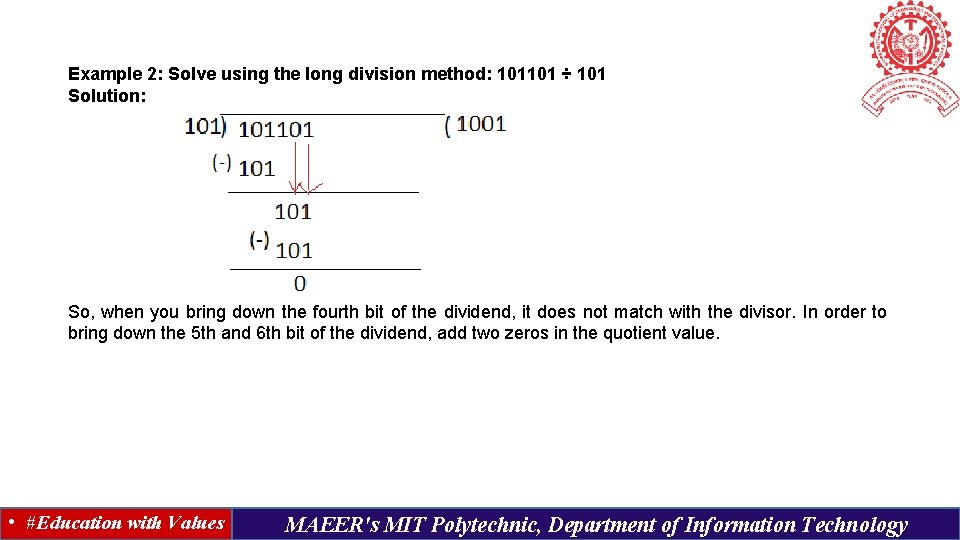
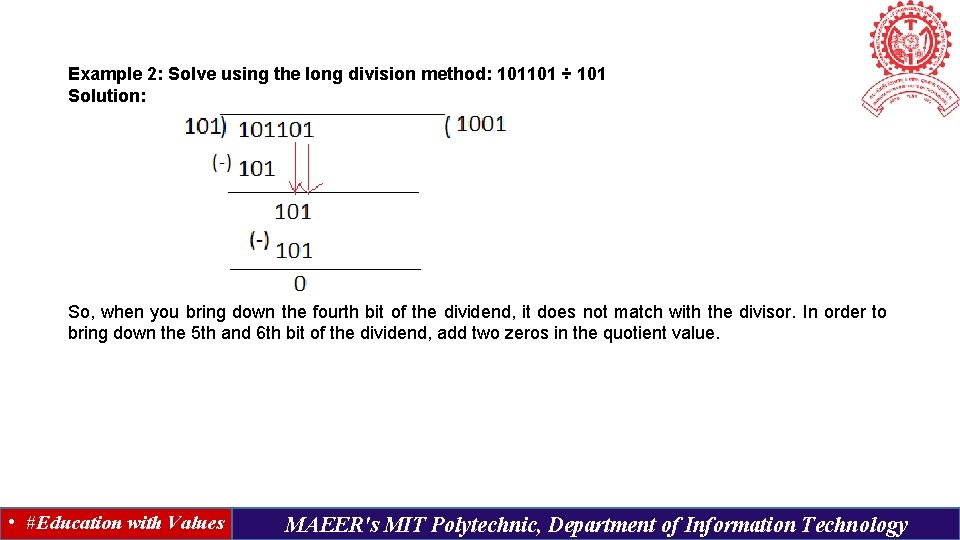
Example 2: Solve using the long division method: 101101 ÷ 101 Solution: So, when you bring down the fourth bit of the dividend, it does not match with the divisor. In order to bring down the 5 th and 6 th bit of the dividend, add two zeros in the quotient value. • #Education with Values MAEER's MIT Polytechnic, Department of Information Technology
Example 2: Solve using the long division method: 101101 ÷ 101 Solution: So, when you bring down the fourth bit of the dividend, it does not match with the divisor. In order to bring down the 5 th and 6 th bit of the dividend, add two zeros in the quotient value. • #Education with Values MAEER's MIT Polytechnic, Department of Information Technology
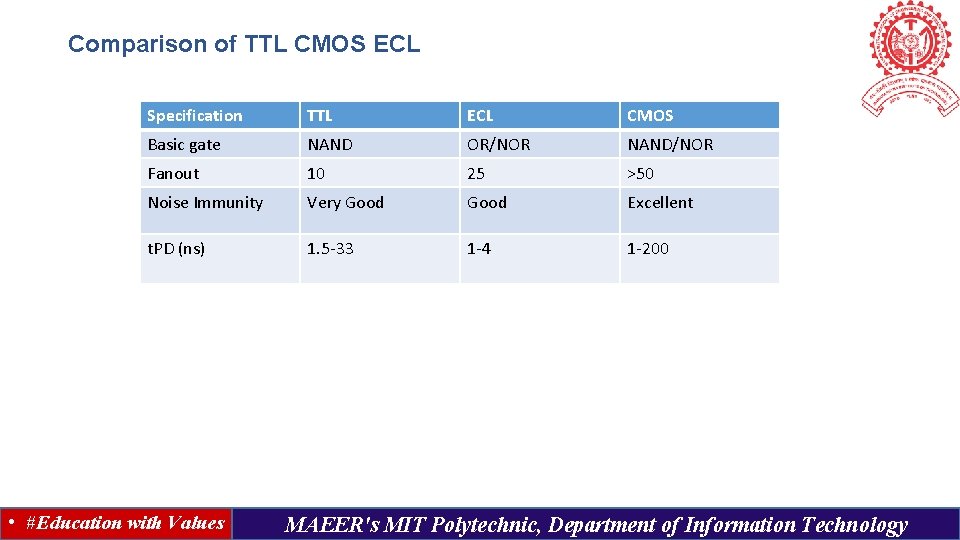
Comparison of TTL CMOS ECL Specification TTL ECL CMOS Basic gate NAND OR/NOR NAND/NOR Fanout 10 25 >50 Noise Immunity Very Good Excellent t. PD (ns) 1. 5 -33 1 -4 1 -200 • #Education with Values MAEER's MIT Polytechnic, Department of Information Technology
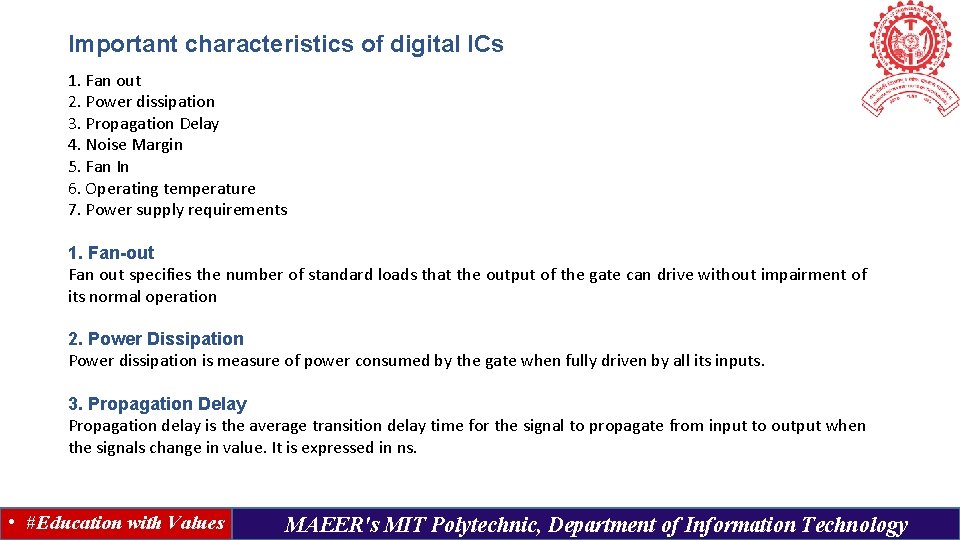
Important characteristics of digital ICs 1. Fan out 2. Power dissipation 3. Propagation Delay 4. Noise Margin 5. Fan In 6. Operating temperature 7. Power supply requirements 1. Fan-out Fan out specifies the number of standard loads that the output of the gate can drive without impairment of its normal operation 2. Power Dissipation Power dissipation is measure of power consumed by the gate when fully driven by all its inputs. 3. Propagation Delay Propagation delay is the average transition delay time for the signal to propagate from input to output when the signals change in value. It is expressed in ns. • #Education with Values MAEER's MIT Polytechnic, Department of Information Technology
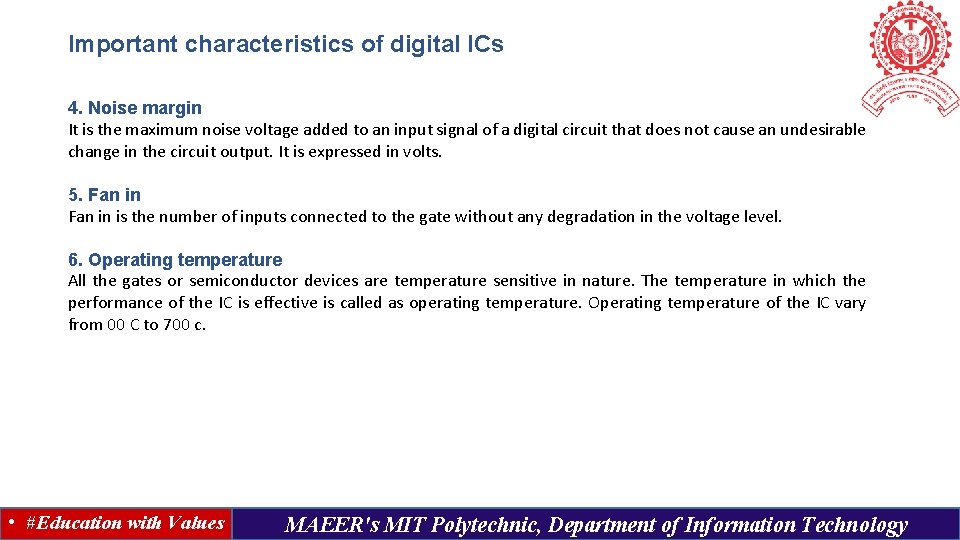
Important characteristics of digital ICs 4. Noise margin It is the maximum noise voltage added to an input signal of a digital circuit that does not cause an undesirable change in the circuit output. It is expressed in volts. 5. Fan in is the number of inputs connected to the gate without any degradation in the voltage level. 6. Operating temperature All the gates or semiconductor devices are temperature sensitive in nature. The temperature in which the performance of the IC is effective is called as operating temperature. Operating temperature of the IC vary from 00 C to 700 c. • #Education with Values MAEER's MIT Polytechnic, Department of Information Technology
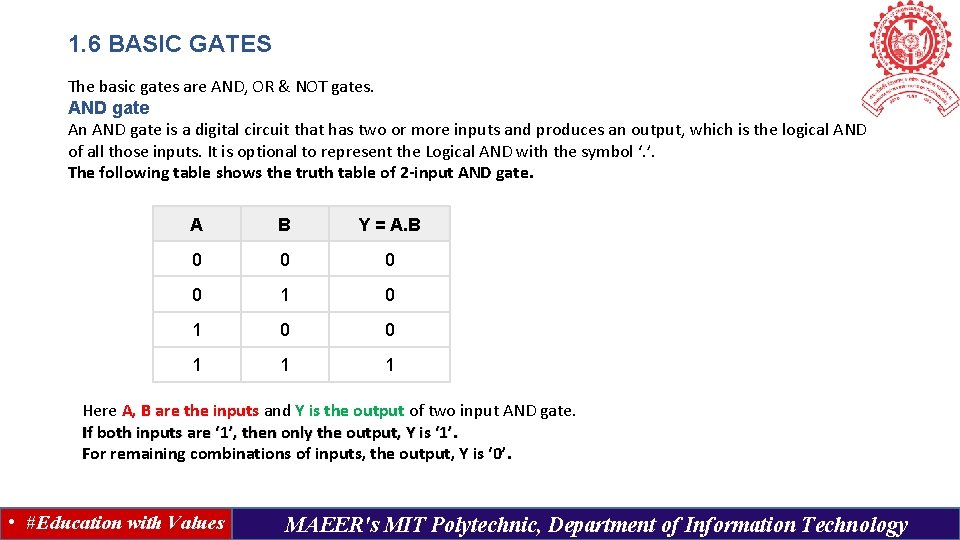
1. 6 BASIC GATES The basic gates are AND, OR & NOT gates. AND gate An AND gate is a digital circuit that has two or more inputs and produces an output, which is the logical AND of all those inputs. It is optional to represent the Logical AND with the symbol ‘. ’. The following table shows the truth table of 2 -input AND gate. A B Y = A. B 0 0 1 1 1 Here A, B are the inputs and Y is the output of two input AND gate. If both inputs are ‘ 1’, then only the output, Y is ‘ 1’. For remaining combinations of inputs, the output, Y is ‘ 0’. • #Education with Values MAEER's MIT Polytechnic, Department of Information Technology
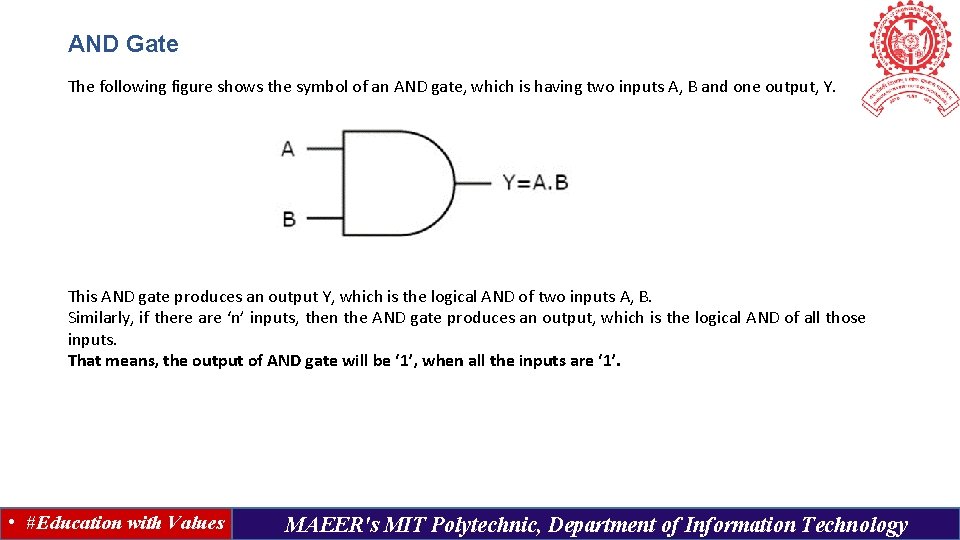
AND Gate The following figure shows the symbol of an AND gate, which is having two inputs A, B and one output, Y. This AND gate produces an output Y, which is the logical AND of two inputs A, B. Similarly, if there are ‘n’ inputs, then the AND gate produces an output, which is the logical AND of all those inputs. That means, the output of AND gate will be ‘ 1’, when all the inputs are ‘ 1’. • #Education with Values MAEER's MIT Polytechnic, Department of Information Technology
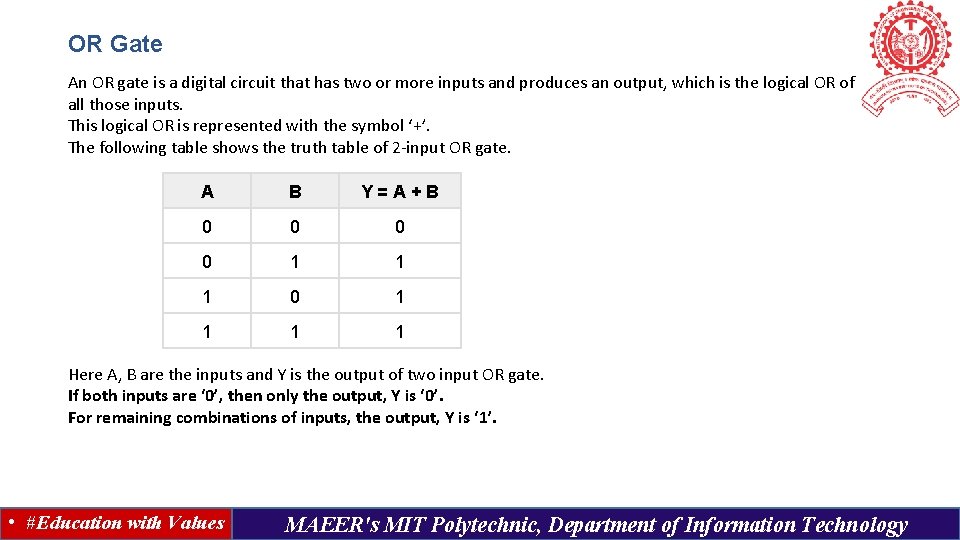
OR Gate An OR gate is a digital circuit that has two or more inputs and produces an output, which is the logical OR of all those inputs. This logical OR is represented with the symbol ‘+’. The following table shows the truth table of 2 -input OR gate. A B Y=A+B 0 0 1 1 1 0 1 1 Here A, B are the inputs and Y is the output of two input OR gate. If both inputs are ‘ 0’, then only the output, Y is ‘ 0’. For remaining combinations of inputs, the output, Y is ‘ 1’. • #Education with Values MAEER's MIT Polytechnic, Department of Information Technology
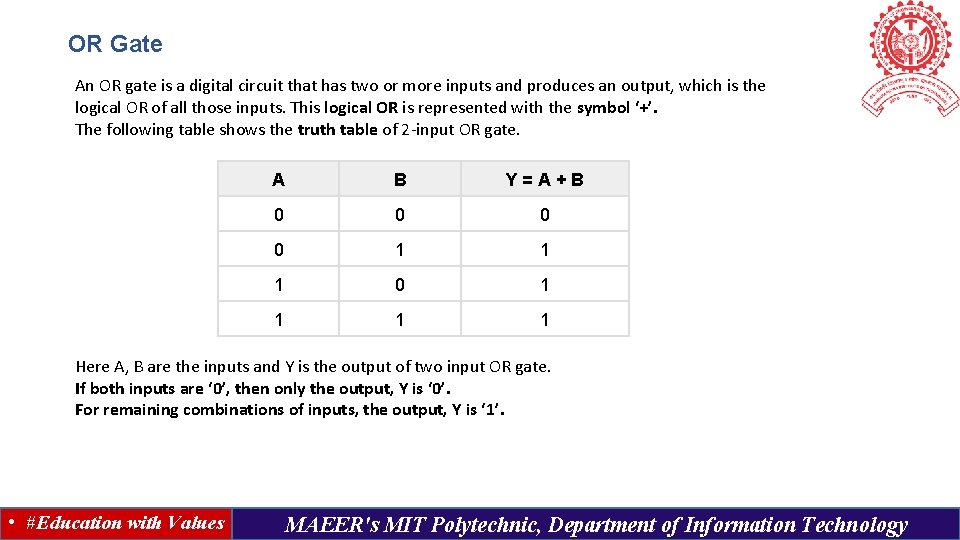
OR Gate An OR gate is a digital circuit that has two or more inputs and produces an output, which is the logical OR of all those inputs. This logical OR is represented with the symbol ‘+’. The following table shows the truth table of 2 -input OR gate. A B Y=A+B 0 0 1 1 1 0 1 1 Here A, B are the inputs and Y is the output of two input OR gate. If both inputs are ‘ 0’, then only the output, Y is ‘ 0’. For remaining combinations of inputs, the output, Y is ‘ 1’. • #Education with Values MAEER's MIT Polytechnic, Department of Information Technology
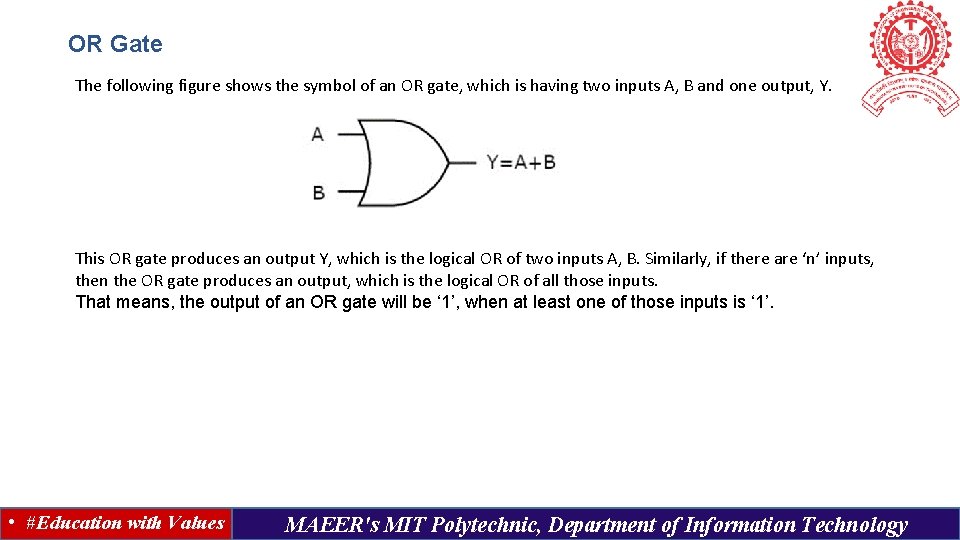
OR Gate The following figure shows the symbol of an OR gate, which is having two inputs A, B and one output, Y. This OR gate produces an output Y, which is the logical OR of two inputs A, B. Similarly, if there are ‘n’ inputs, then the OR gate produces an output, which is the logical OR of all those inputs. That means, the output of an OR gate will be ‘ 1’, when at least one of those inputs is ‘ 1’. • #Education with Values MAEER's MIT Polytechnic, Department of Information Technology
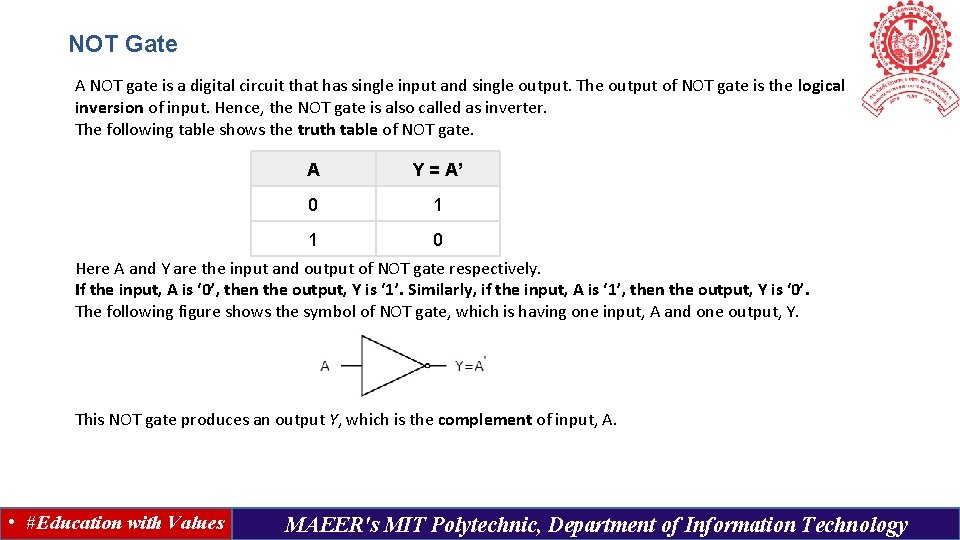
NOT Gate A NOT gate is a digital circuit that has single input and single output. The output of NOT gate is the logical inversion of input. Hence, the NOT gate is also called as inverter. The following table shows the truth table of NOT gate. A Y = A’ 0 1 1 0 Here A and Y are the input and output of NOT gate respectively. If the input, A is ‘ 0’, then the output, Y is ‘ 1’. Similarly, if the input, A is ‘ 1’, then the output, Y is ‘ 0’. The following figure shows the symbol of NOT gate, which is having one input, A and one output, Y. This NOT gate produces an output Y, which is the complement of input, A. • #Education with Values MAEER's MIT Polytechnic, Department of Information Technology
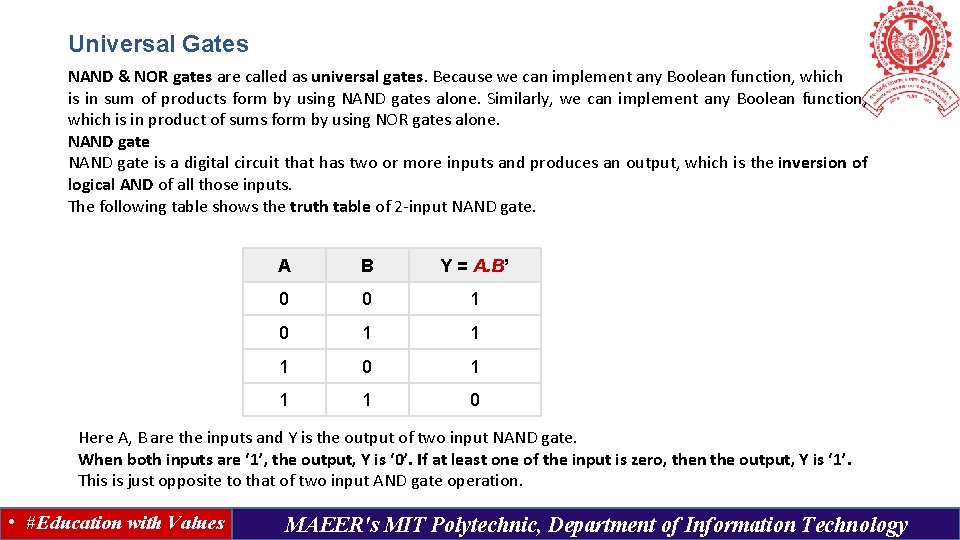
Universal Gates NAND & NOR gates are called as universal gates. Because we can implement any Boolean function, which is in sum of products form by using NAND gates alone. Similarly, we can implement any Boolean function, which is in product of sums form by using NOR gates alone. NAND gate is a digital circuit that has two or more inputs and produces an output, which is the inversion of logical AND of all those inputs. The following table shows the truth table of 2 -input NAND gate. A B Y = A. B’ 0 0 1 1 1 0 Here A, B are the inputs and Y is the output of two input NAND gate. When both inputs are ‘ 1’, the output, Y is ‘ 0’. If at least one of the input is zero, then the output, Y is ‘ 1’. This is just opposite to that of two input AND gate operation. • #Education with Values MAEER's MIT Polytechnic, Department of Information Technology
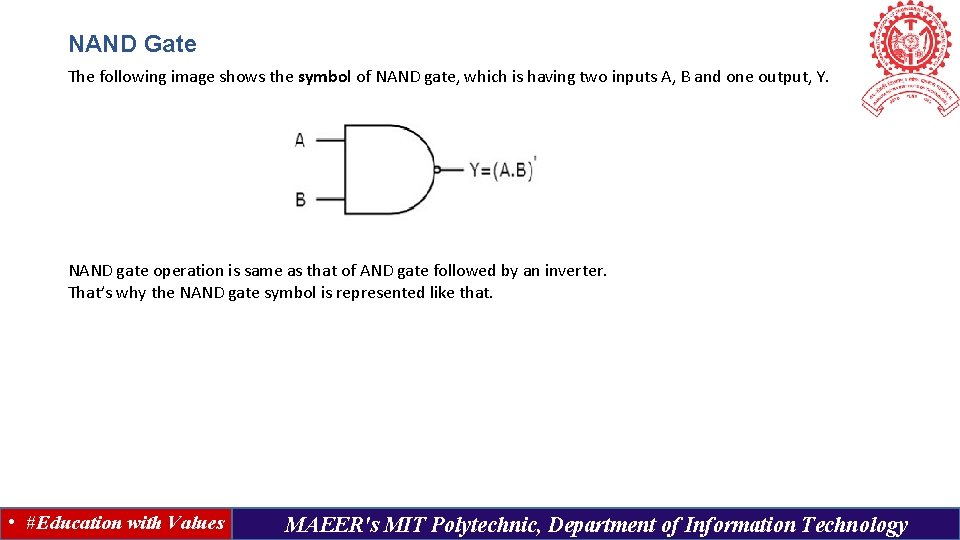
NAND Gate The following image shows the symbol of NAND gate, which is having two inputs A, B and one output, Y. NAND gate operation is same as that of AND gate followed by an inverter. That’s why the NAND gate symbol is represented like that. • #Education with Values MAEER's MIT Polytechnic, Department of Information Technology
NOR Gate NOR gate is a digital circuit that has two or more inputs and produces an output, which is the inversion of logical OR of all those inputs. The following table shows the truth table of 2 -input NOR gate A B Y = A+B’ 0 0 1 0 1 0 0 1 1 0 Here A, B are the inputs and Y is the output. If both inputs are ‘ 0’, then the output, Y is ‘ 1’. If at least one of the input is ‘ 1’, then the output, Y is ‘ 0’. This is just opposite to that of two input OR gate operation. The following figure shows the symbol of NOR gate, which is having two inputs A, B and one output, Y. NOR gate operation is same as that of OR gate followed by an inverter. That’s why the NOR gate symbol is represented like that. • #Education with Values MAEER's MIT Polytechnic, Department of Information Technology
Thank You • #Education with Values MAEER's MIT Polytechnic, Department of Information Technology