
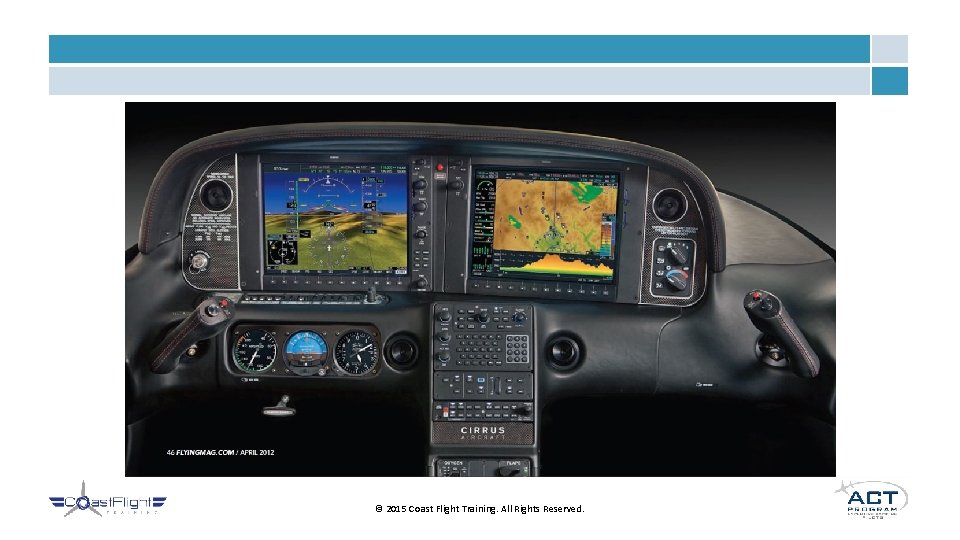
Digital Flight Instruments Basic Attitude Instrument Overview G

Digital Flight Instruments & Basic Attitude Instrument
Overview • G 1000 (Garmin Perspective) Glass Cockpit System • Basic Attitude Instrument Flying • Normal Flight Maneuvers • Abnormal Flight Maneuvers © 2015 Coast Flight Training. All Rights Reserved.
© 2015 Coast Flight Training. All Rights Reserved.
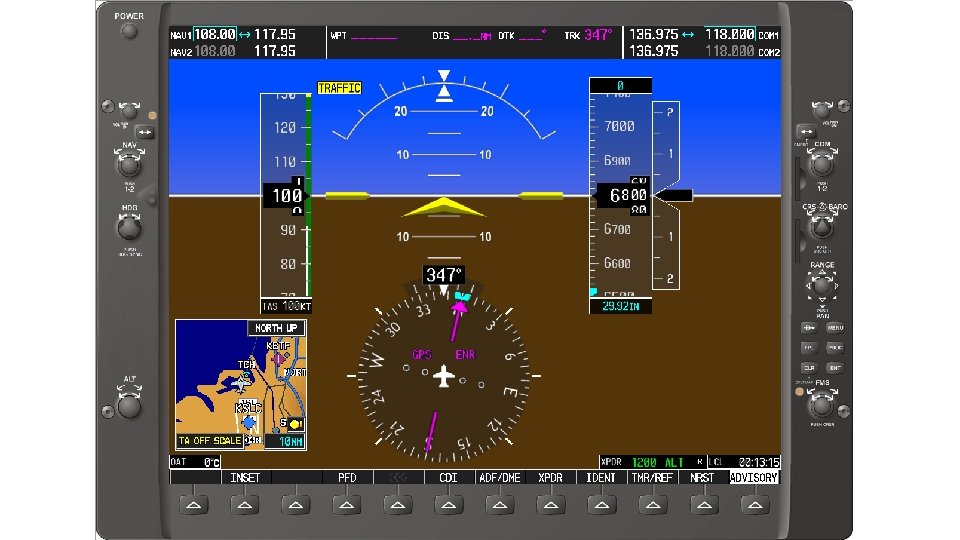
Primary Flight Display - PFD • Integrates several instruments into localized area • • • Airspeed Indicator Attitude Indicator Altimeter Vertical Speed Indicator Horizontal Situation Indicator (HSI) Turn Coordinator Transponder Waypoint Information Communication and Navigation Frequencies © 2015 Coast Flight Training. All Rights Reserved.
© 2015 Coast Flight Training. All Rights Reserved.
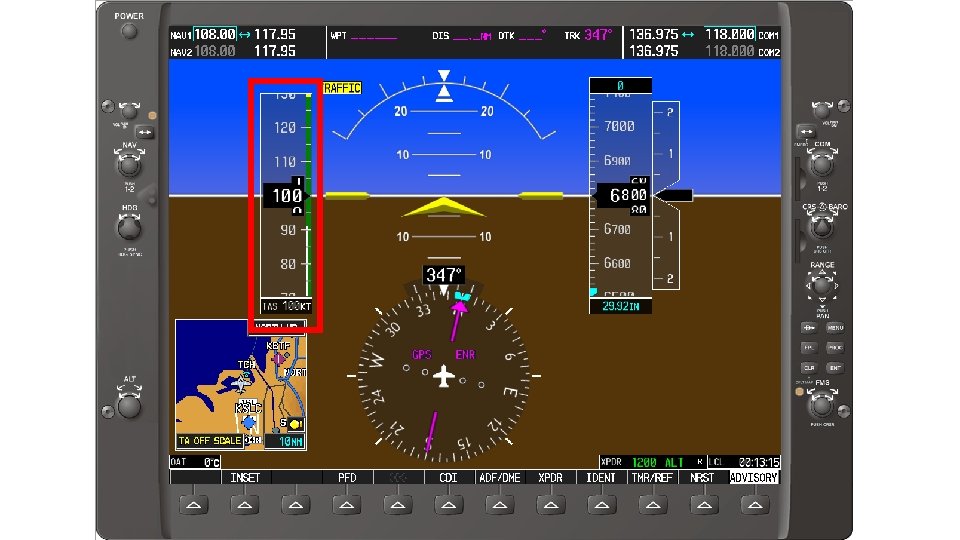
Airspeed “Tape” • Roughly ranges from 20 to 300 kts • Also has digital readout to left of tape • Color coded like old altimeter • Green, White, Yellow, etc. • May include a Trend Line (blue) • On top or bottom of digital readout • Stretches to indicate where airspeed will be at in 6 seconds if current trend continues © 2015 Coast Flight Training. All Rights Reserved.
© 2015 Coast Flight Training. All Rights Reserved.
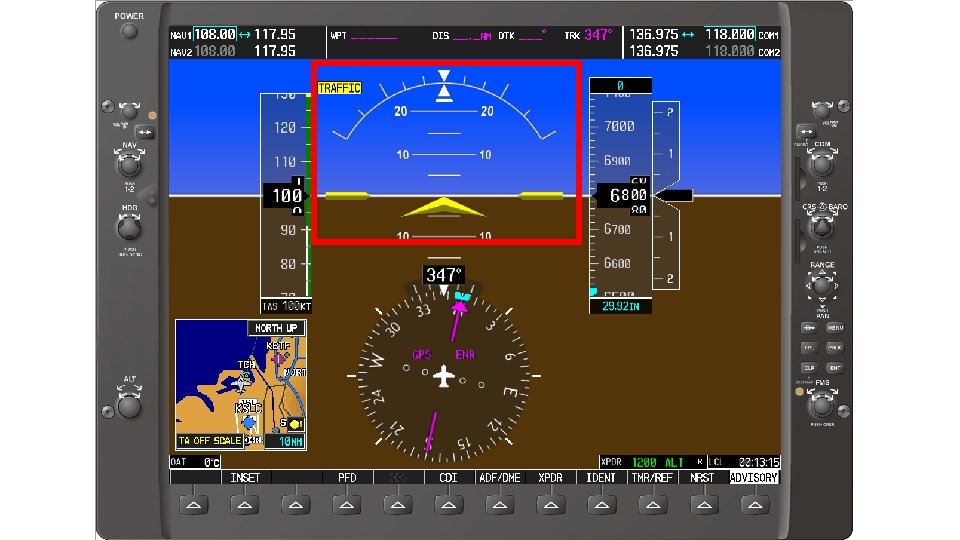
Attitude Indicator • Simple blue over brown design • May integrate Flight Director (FD) display • Use of arrow display • White indicator lines • Slip/skid indicator at top of display • Lines to indicate pitch angles • Chevrons appear when extreme pitch © 2015 Coast Flight Training. All Rights Reserved.
© 2015 Coast Flight Training. All Rights Reserved.
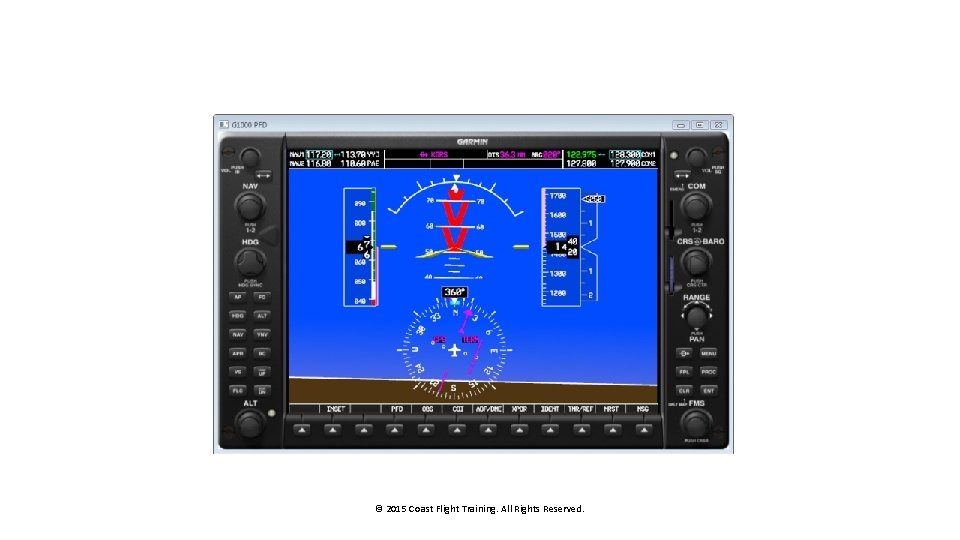
© 2015 Coast Flight Training. All Rights Reserved.
Altitude Tape • Consists of tape and digital readout • Also has trend line like airspeed indicator, showing altitude in 6 seconds • If AP installed, altitude hold bug shows on the altitude tape • Selected altimeter setting is shown below the tape © 2015 Coast Flight Training. All Rights Reserved.

© 2015 Coast Flight Training. All Rights Reserved.
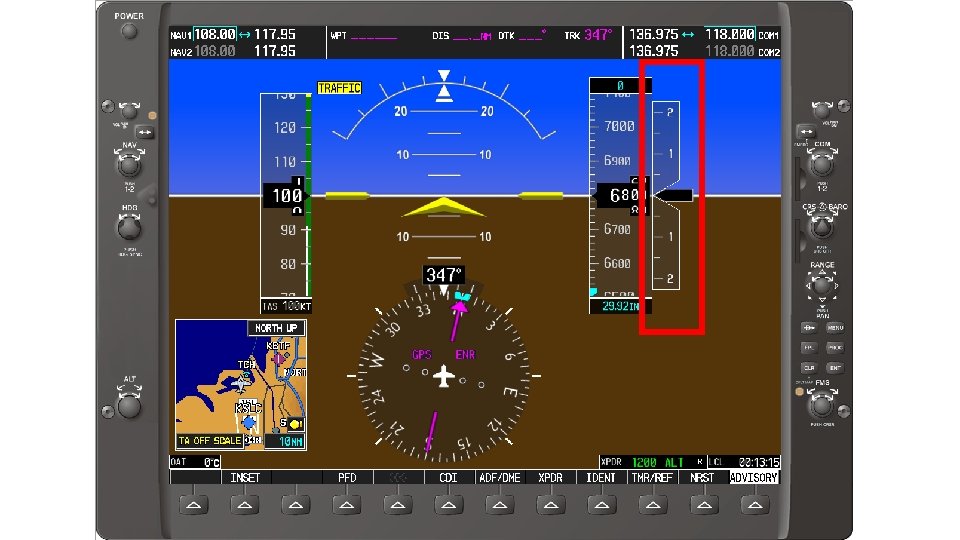
Vertical Speed Display • Ranges from +3000 to -3000 feet per minute • No digital readout • Has selector bug for autopilot © 2015 Coast Flight Training. All Rights Reserved.
© 2015 Coast Flight Training. All Rights Reserved.
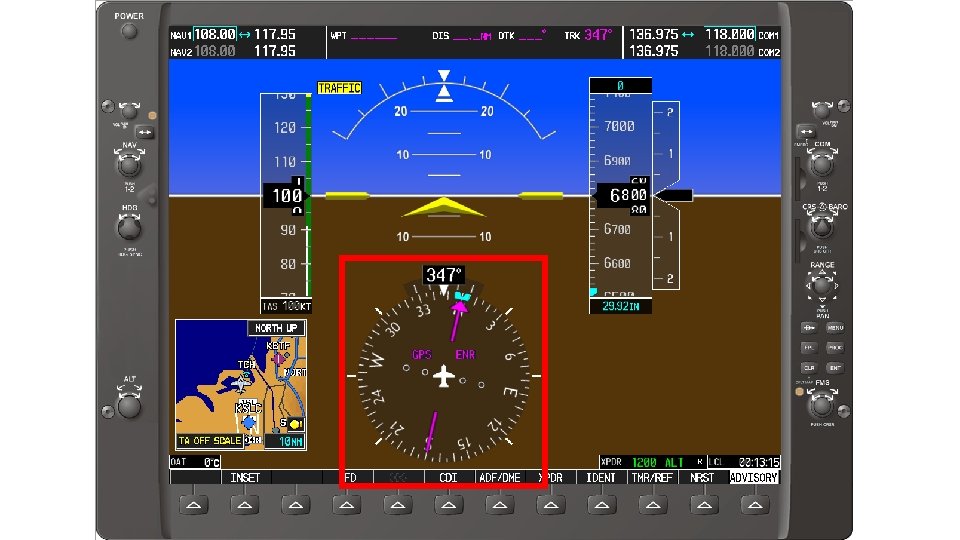
Horizontal Situation Indicator - HSI • Compass rose display with digital readout • Integrates heading indicator with a CDI and a bearing pointer • Has bug for heading select on autopilot • Turn coordinator at top of heading display © 2015 Coast Flight Training. All Rights Reserved.
© 2015 Coast Flight Training. All Rights Reserved.
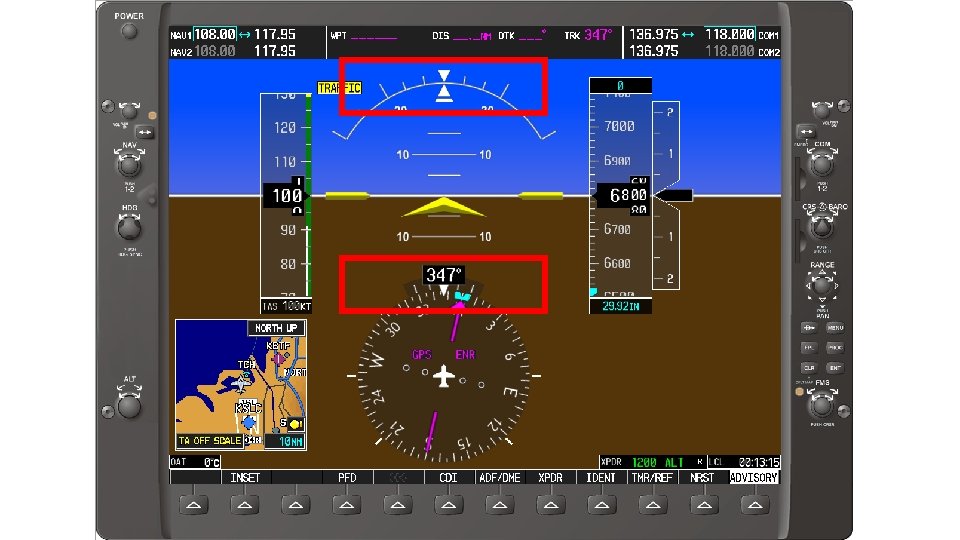
Turn Coordinator and Slip/Skid • TC is on top of HSI digital readout • Blue Line extends to half-std rate and std rate • S/S is at top of Attitude Indicator • White bottom half of triangle splits from white top half of triangle if slipping or skidding © 2015 Coast Flight Training. All Rights Reserved.
© 2015 Coast Flight Training. All Rights Reserved.
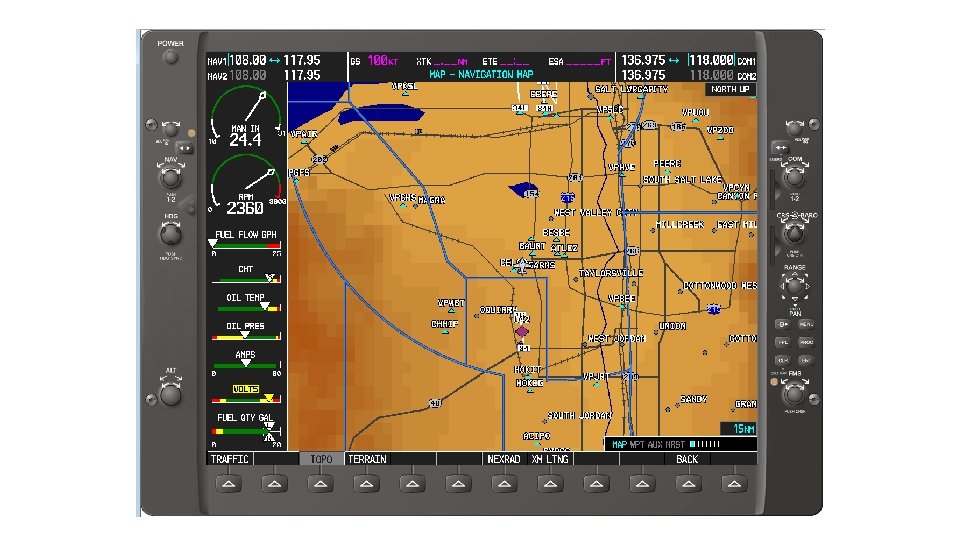
Multi-Function Display - MFD • Several pages to select • • Engine Map Chart (if installed) Trip Nearest (NRST) Auxiliary (AUX) Checklist © 2015 Coast Flight Training. All Rights Reserved.
© 2015 Coast Flight Training. All Rights Reserved.
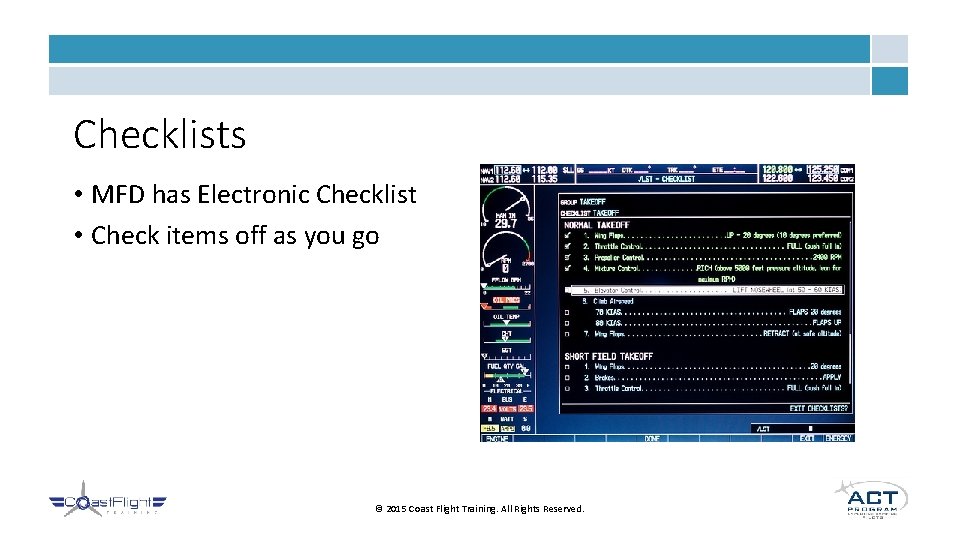
Checklists • MFD has Electronic Checklist • Check items off as you go © 2015 Coast Flight Training. All Rights Reserved.
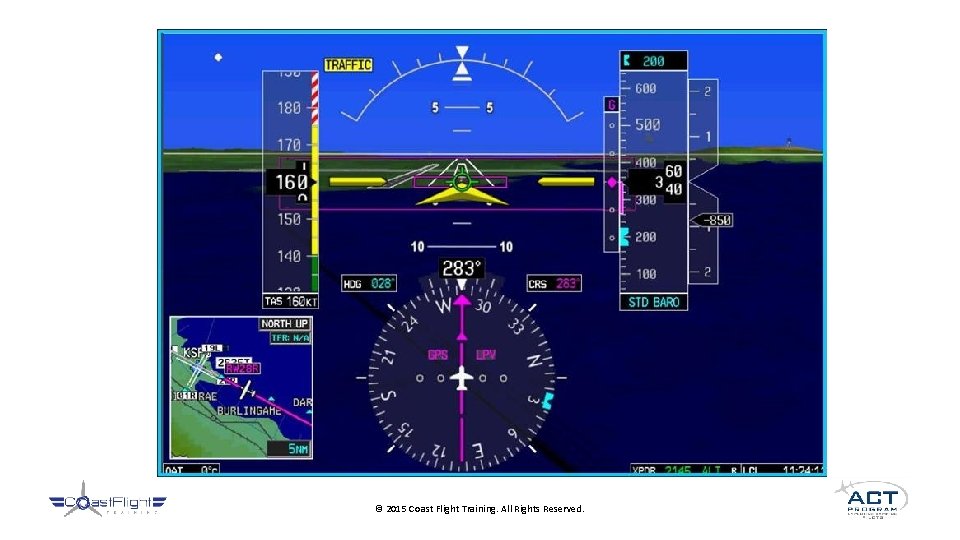
Synthetic Vision • Simulates a picture of the actual view if the pilot were out of IMC • Relatively new to General Aviation • Airlines may or may not accept • At this moment, no airline uses • “Cheating” © 2015 Coast Flight Training. All Rights Reserved.
© 2015 Coast Flight Training. All Rights Reserved.
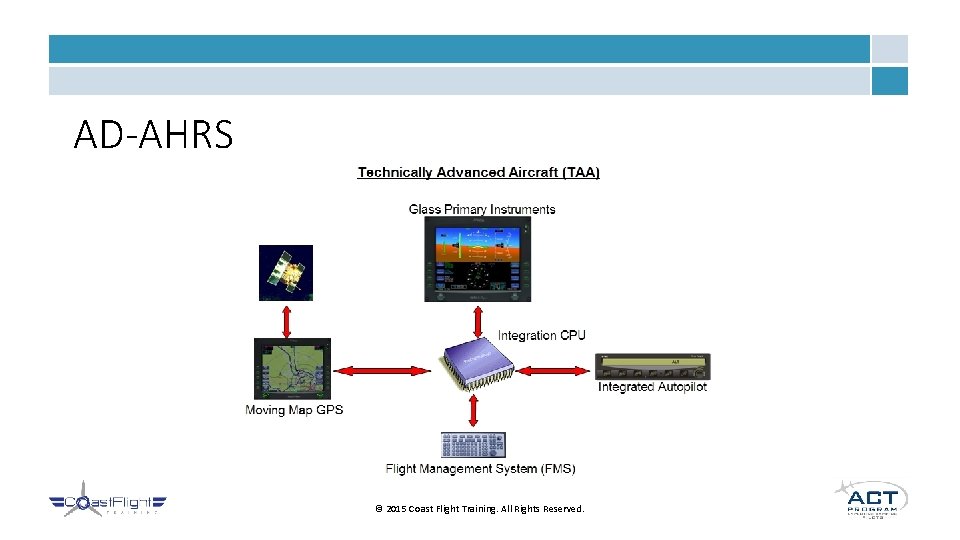
AD-AHRS © 2015 Coast Flight Training. All Rights Reserved.
Failures • AHRS Failures • Electrical System Failures • Always ensure backups work just as well! © 2015 Coast Flight Training. All Rights Reserved.
Attitude Instrument Flying • Overview • • • Fundamental Skills Common Mistakes Control and Performance Method Primary and Supporting Method Flight Maneuvers © 2015 Coast Flight Training. All Rights Reserved.
Fundamental Skills • Instrument Cross Check • Instrument Interpretation • Aircraft Control • Necessary to use all skills together • One missing skill will cause disaster © 2015 Coast Flight Training. All Rights Reserved.
Common Mistakes • Omission • Taking one or a few instruments out of the scan • Try to use all instruments together to back up each other and get the whole picture • Fixation • Even worse than omission • Only concentrating on one instrument • If that instrument is wrong, the pilot will never know © 2015 Coast Flight Training. All Rights Reserved.
Control and Performance Method • Basic idea that Pitch + Power = Performance • Utilizes a cross check which emphasizes certain instruments in conjunction © 2015 Coast Flight Training. All Rights Reserved.
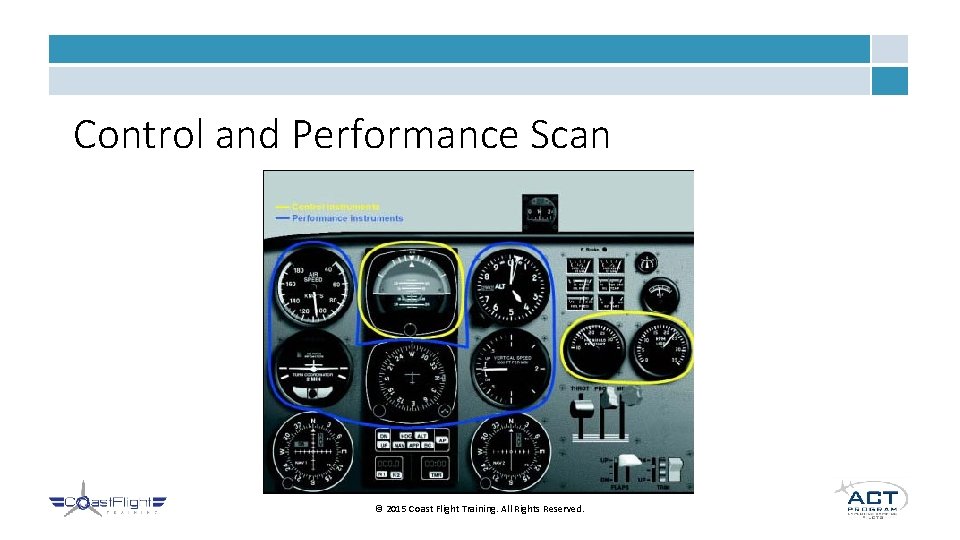
Control and Performance Scan © 2015 Coast Flight Training. All Rights Reserved.
Primary and Supporting Method • Classifies instruments into three categories • Pitch • Bank • Power • Using these instruments according to the maneuver flown helps the pilot to maintain desired control of the aircraft © 2015 Coast Flight Training. All Rights Reserved.
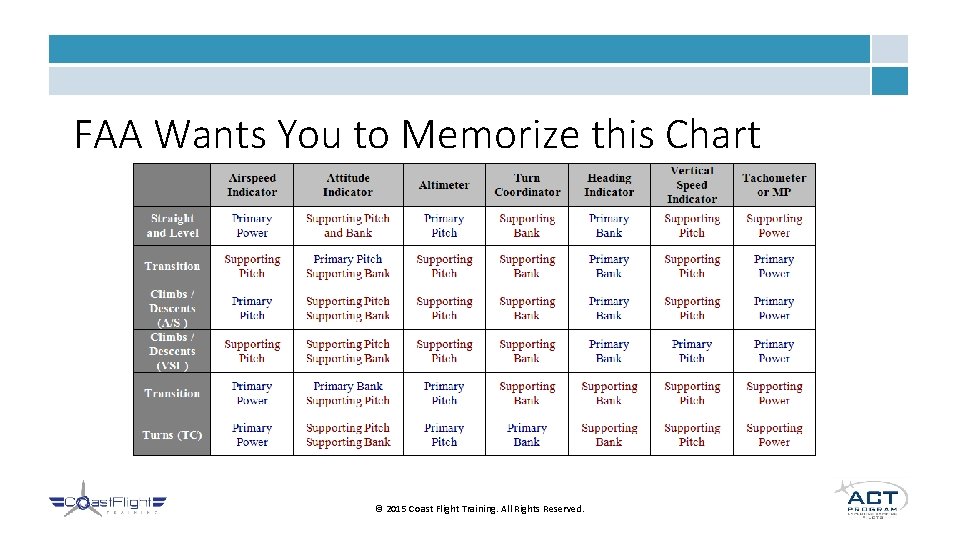
FAA Wants You to Memorize this Chart © 2015 Coast Flight Training. All Rights Reserved.
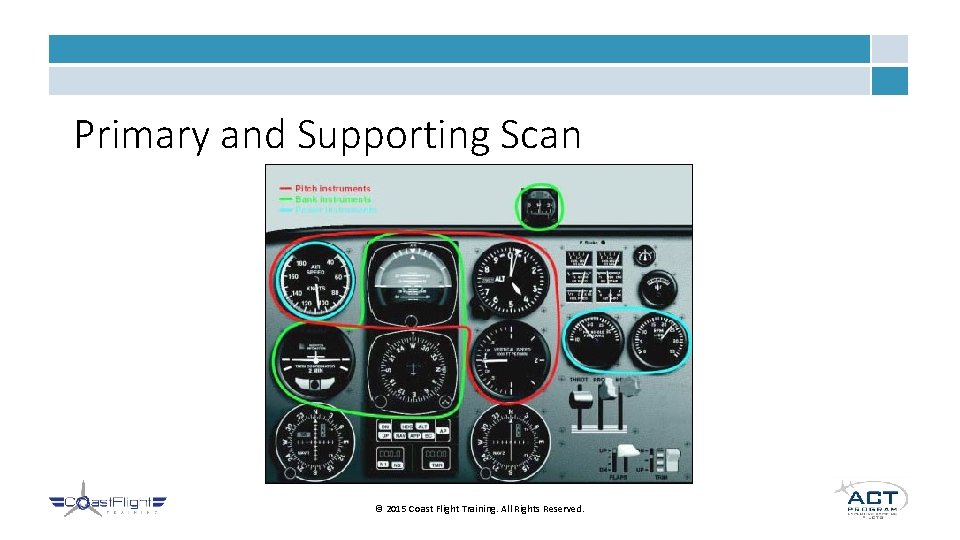
Primary and Supporting Scan © 2015 Coast Flight Training. All Rights Reserved.
Straight and Level Flight • Achieved by holding constant heading and altitude • This is the first basic flying skill learned • Important because it is the obvious default flying mode for most flights in an airplane • Especially good for cruise flight © 2015 Coast Flight Training. All Rights Reserved.
Straight Climbs and Descents • Constant Airspeed • Holding a climb or descent at the same airspeed • Pitch angle is determined by airspeed indicator • Rate of climb or descent is controlled with power • Constant Rate • Holding a climb or descent at a constant feet per minute rate • Pitch angle is determined by vertical speed indicator • Airspeed is controlled with power © 2015 Coast Flight Training. All Rights Reserved.
Turns • Standard Rate Turns • 3 degrees per second • 360 degree turn takes 2 minutes • Timed Turns • Based on 3 degrees per second • Start turn, start timer, stop turn, stop timer • Compass Turns to Magnetic Headings • Lead/Lag Compass Errors • Use location latitude to determine the lag or lead © 2015 Coast Flight Training. All Rights Reserved.
Approach to Stall • Recognize signs of approaching a stall • • Warning horn Slow speed Full aft yoke control Buffeting • Stall recovery techniques when IMC • Heading indicator and turn coordinator to control yaw • Airspeed indicator to prevent secondary stall • Attitude indicator and airspeed indicator to recover © 2015 Coast Flight Training. All Rights Reserved.
Unusual Attitude Recoveries • Identifying unusual attitudes • Nose high recovery– prevent stall • Full Power • Pitch down • Roll wings level • Nose low recovery – prevent over-speed and stress • Power idle • Roll wings level • Recover from dive © 2015 Coast Flight Training. All Rights Reserved.
Partial Panel • Loss of one or more instruments • Cover up inoperative instruments to not be confused • Use other instruments to maintain safe flight • Notify ATC of problems • Good idea to proceed with landing ASAP • Possible need for ASR or PAR approach if in IMC © 2015 Coast Flight Training. All Rights Reserved.
Instrument Takeoff • Taking off with zero visibility • Not a great idea because not able to safely land at departure airport if problem occurs • Once on runway, set heading indicator to runway heading • Use this to maintain direction on runway • Coast Flight Training Procedure © 2015 Coast Flight Training. All Rights Reserved.
References • Pilot’s Handbook of Aeronautical Knowledge • Instrument Flying Handbook • Instrument Procedures Handbook • Garmin Company Website © 2015 Coast Flight Training. All Rights Reserved.
- Slides: 41