
Digital Design A Systems Approach Lecture 4 Numbers
Digital Design: A Systems Approach Lecture 4: Numbers and Arithmetic (c) 2005 - 2012 W. J. Dally 1
Readings • L 4: Chapters 10 & 11 • L 5: Review Lectures 1 -4 (c) 2005 - 2012 W. J. Dally 2
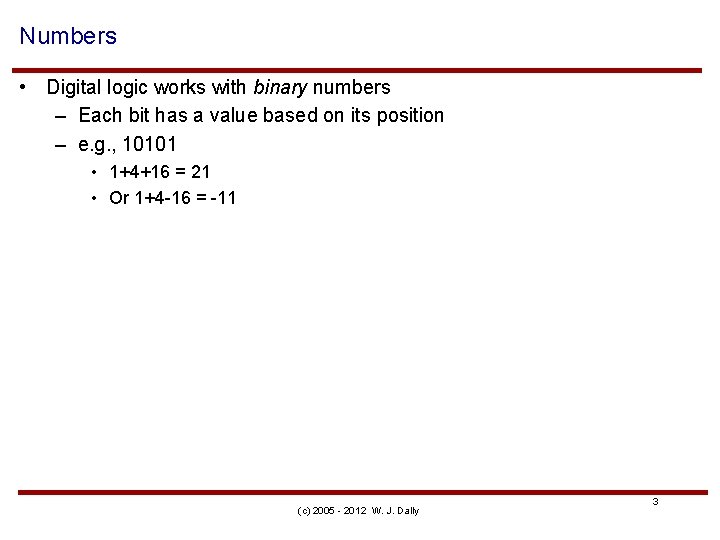
Numbers • Digital logic works with binary numbers – Each bit has a value based on its position – e. g. , 10101 • 1+4+16 = 21 • Or 1+4 -16 = -11 (c) 2005 - 2012 W. J. Dally 3
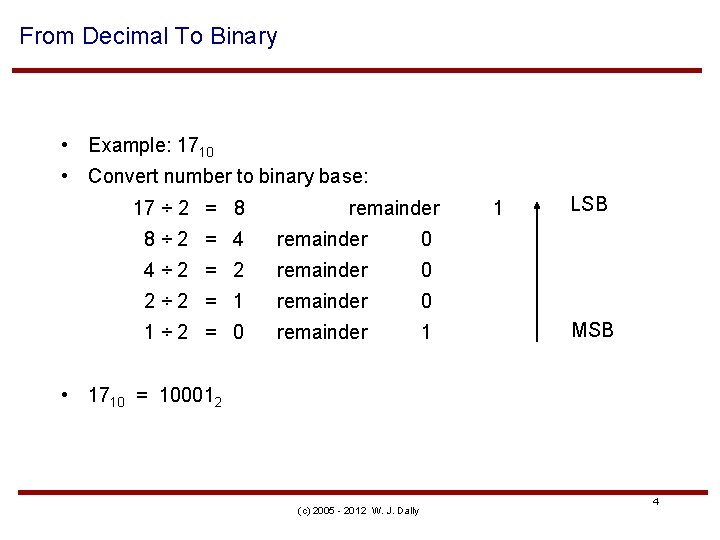
From Decimal To Binary • Example: 1710 • Convert number to binary base: 17 ÷ 2 = 8 remainder 8÷ 2 = 4 remainder 0 4÷ 2 = 2 remainder 0 2÷ 2 = 1 remainder 0 1÷ 2 = 0 remainder 1 1 LSB MSB • 1710 = 100012 (c) 2005 - 2012 W. J. Dally 4
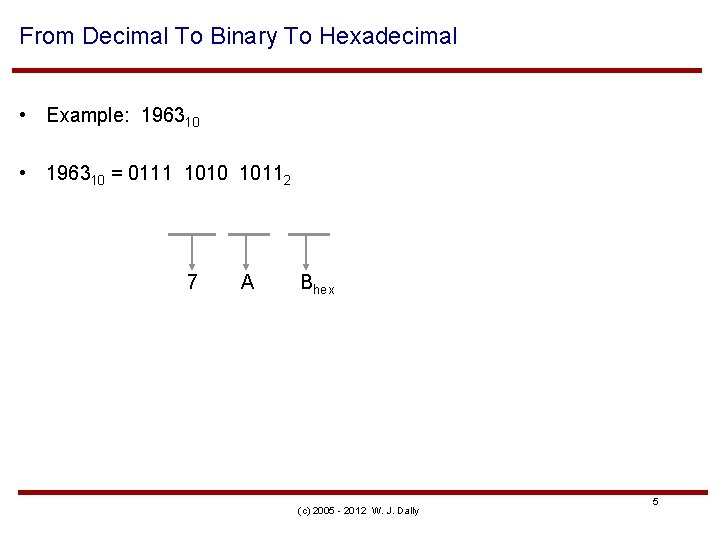
From Decimal To Binary To Hexadecimal • Example: 196310 • 196310 = 0111 1010 10112 7 A Bhex (c) 2005 - 2012 W. J. Dally 5
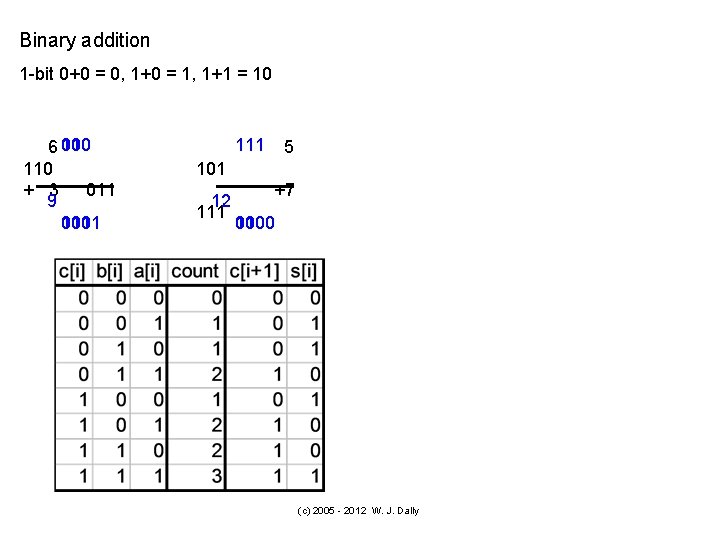
Binary addition 1 -bit 0+0 = 0, 1+0 = 1, 1+1 = 10 10_ 0_ 6 110_ 110 + 3 011 9 1 001 01 1001 1_ 111_ 5 101 12 111 +7 0 00 1100 (c) 2005 - 2012 W. J. Dally
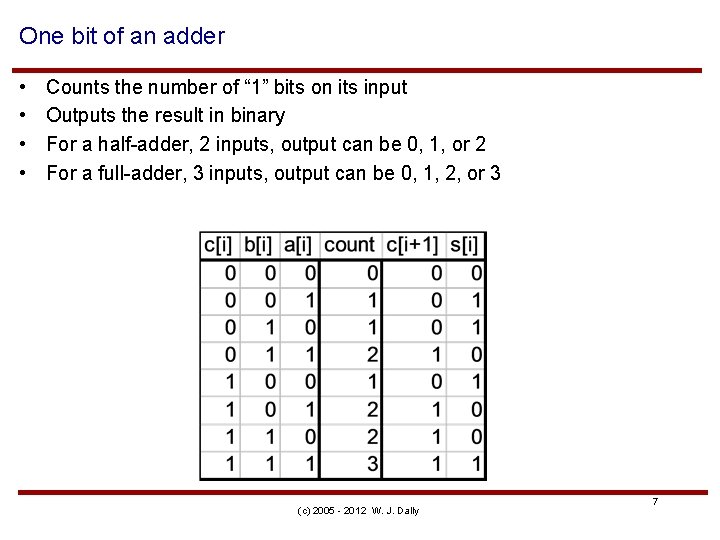
One bit of an adder • • Counts the number of “ 1” bits on its input Outputs the result in binary For a half-adder, 2 inputs, output can be 0, 1, or 2 For a full-adder, 3 inputs, output can be 0, 1, 2, or 3 (c) 2005 - 2012 W. J. Dally 7
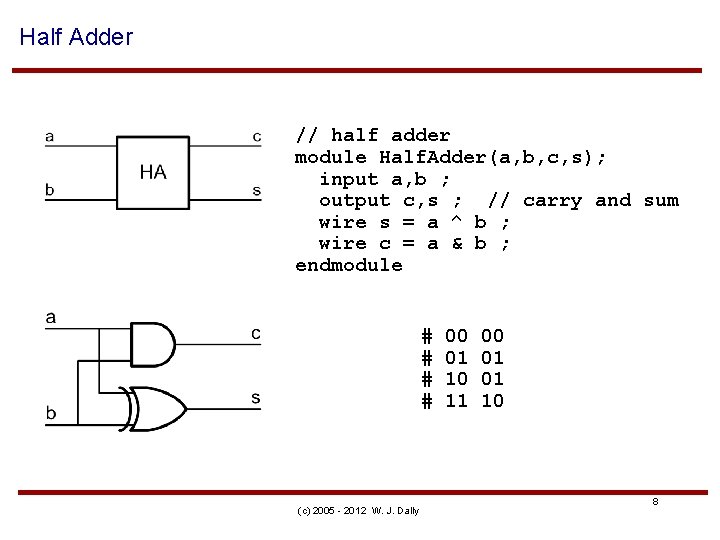
Half Adder // half adder module Half. Adder(a, b, c, s); input a, b ; output c, s ; // carry and sum wire s = a ^ b ; wire c = a & b ; endmodule # # (c) 2005 - 2012 W. J. Dally 00 01 10 11 00 01 01 10 8

// full adder - from half adders module Full. Adder 1(a, b, cin, cout, s) ; # input a, b, cin ; # output cout, s ; // carry and sum wire g, p ; // generate and propagate# # wire cp ; # Half. Adder ha 1(a, b, g, p) ; # Half. Adder ha 2(cin, p, cp, s) ; # or o 1(cout, g, cp) ; endmodule # (c) 2005 - 2012 W. J. Dally 000 001 010 011 100 101 110 111 00 01 01 10 10 11
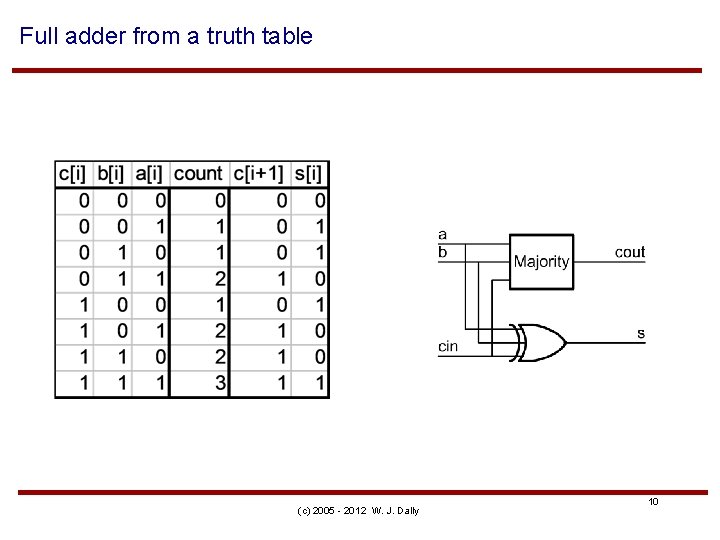
Full adder from a truth table (c) 2005 - 2012 W. J. Dally 10
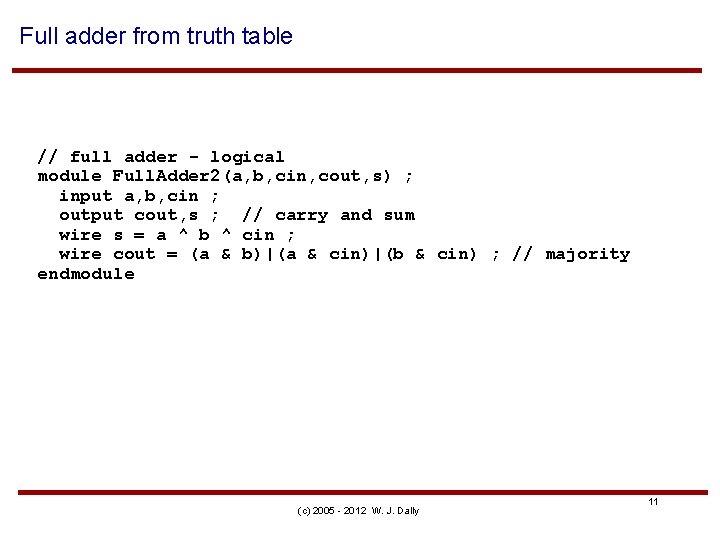
Full adder from truth table // full adder - logical module Full. Adder 2(a, b, cin, cout, s) ; input a, b, cin ; output cout, s ; // carry and sum wire s = a ^ b ^ cin ; wire cout = (a & b)|(a & cin)|(b & cin) ; // majority endmodule (c) 2005 - 2012 W. J. Dally 11
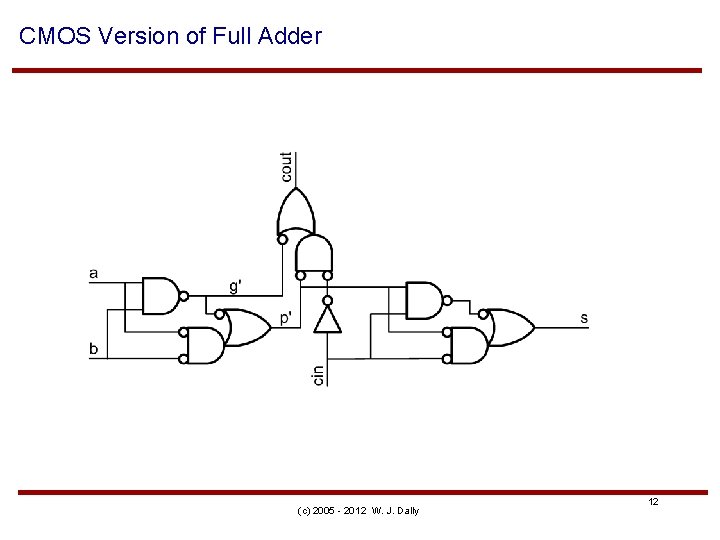
CMOS Version of Full Adder (c) 2005 - 2012 W. J. Dally 12
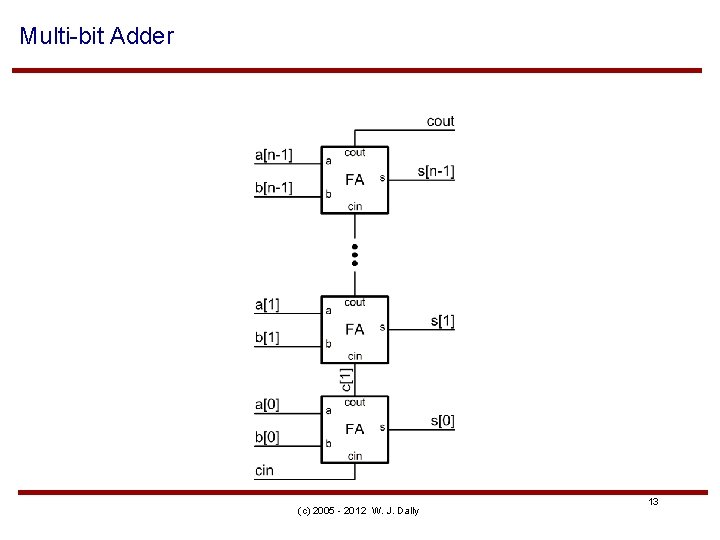
Multi-bit Adder (c) 2005 - 2012 W. J. Dally 13
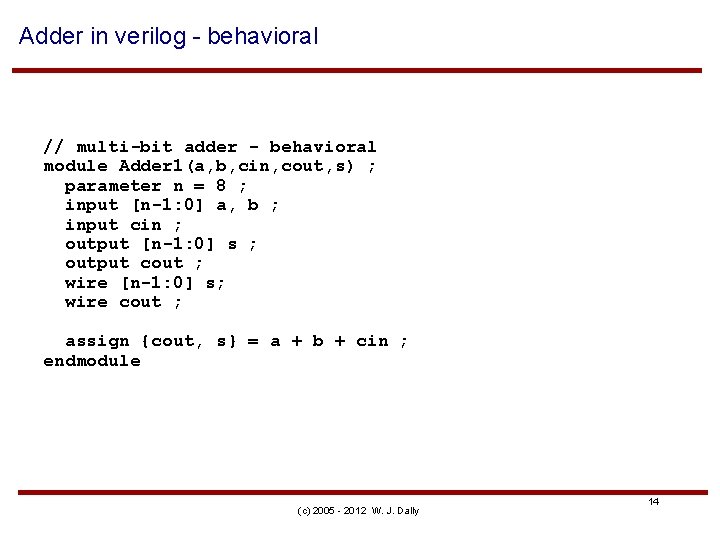
Adder in verilog - behavioral // multi-bit adder - behavioral module Adder 1(a, b, cin, cout, s) ; parameter n = 8 ; input [n-1: 0] a, b ; input cin ; output [n-1: 0] s ; output cout ; wire [n-1: 0] s; wire cout ; assign {cout, s} = a + b + cin ; endmodule (c) 2005 - 2012 W. J. Dally 14
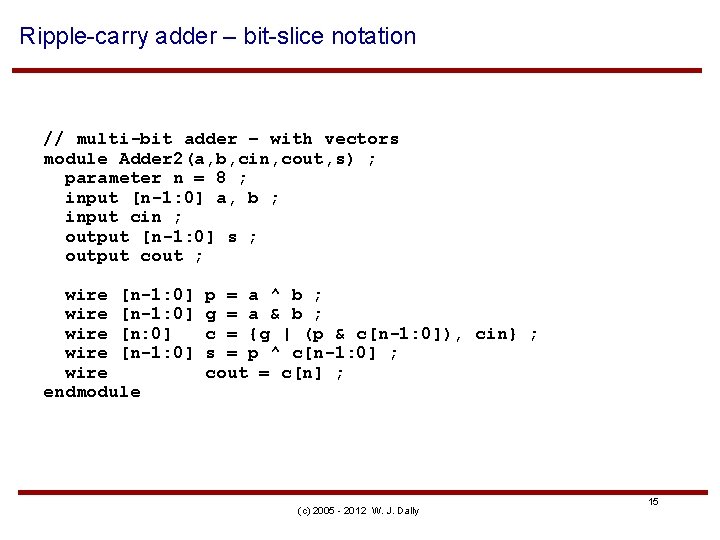
Ripple-carry adder – bit-slice notation // multi-bit adder – with vectors module Adder 2(a, b, cin, cout, s) ; parameter n = 8 ; input [n-1: 0] a, b ; input cin ; output [n-1: 0] s ; output cout ; wire [n-1: 0] wire [n: 0] wire [n-1: 0] wire endmodule p = a ^ b ; g = a & b ; c = {g | (p & c[n-1: 0]), cin} ; s = p ^ c[n-1: 0] ; cout = c[n] ; (c) 2005 - 2012 W. J. Dally 15
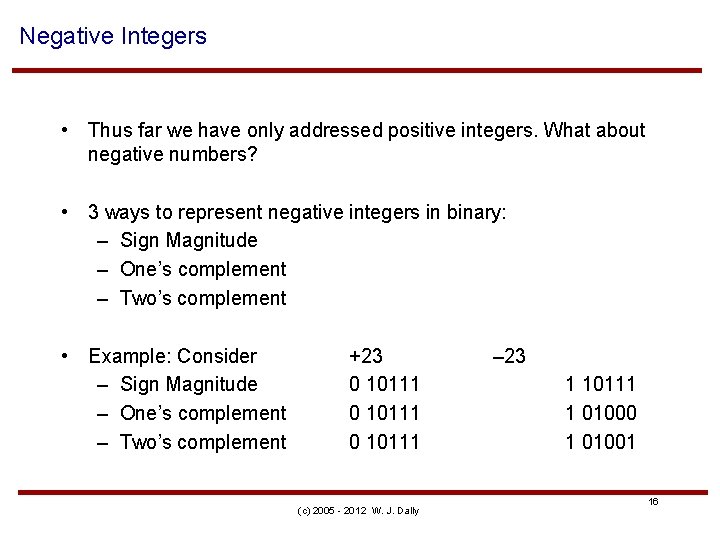
Negative Integers • Thus far we have only addressed positive integers. What about negative numbers? • 3 ways to represent negative integers in binary: – Sign Magnitude – One’s complement – Two’s complement • Example: Consider – Sign Magnitude – One’s complement – Two’s complement +23 0 10111 (c) 2005 - 2012 W. J. Dally – 23 1 10111 1 01000 1 01001 16
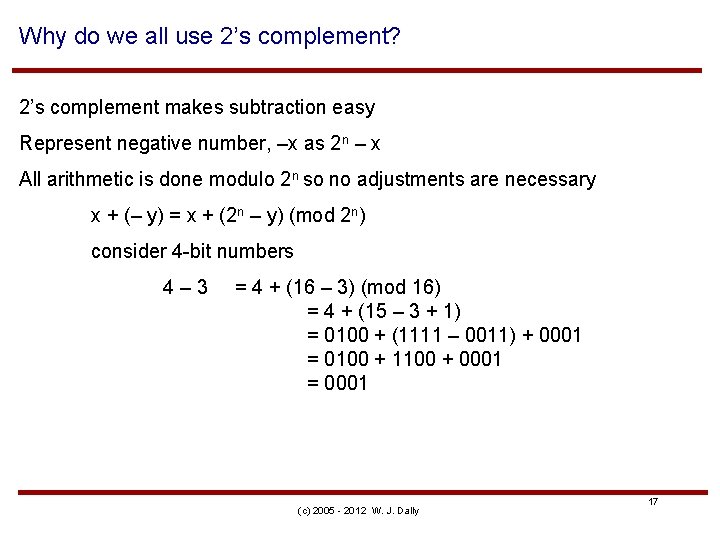
Why do we all use 2’s complement? 2’s complement makes subtraction easy Represent negative number, –x as 2 n – x All arithmetic is done modulo 2 n so no adjustments are necessary x + (– y) = x + (2 n – y) (mod 2 n) consider 4 -bit numbers 4– 3 = 4 + (16 – 3) (mod 16) = 4 + (15 – 3 + 1) = 0100 + (1111 – 0011) + 0001 = 0100 + 1100 + 0001 = 0001 (c) 2005 - 2012 W. J. Dally 17
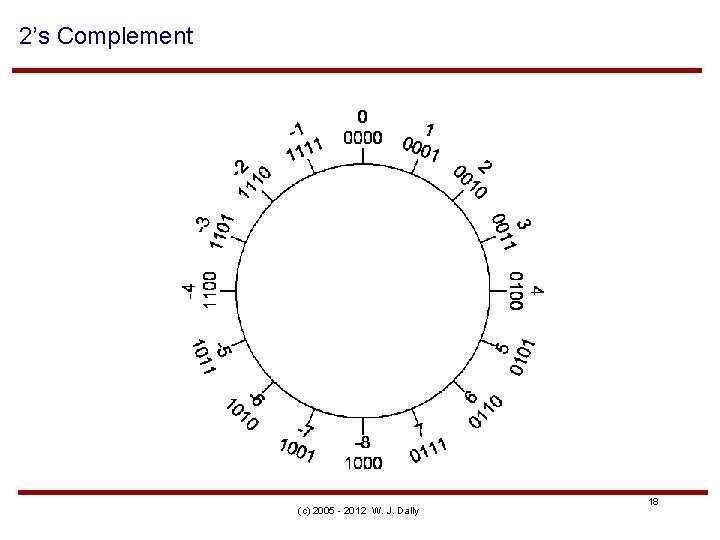
2’s Complement (c) 2005 - 2012 W. J. Dally 18
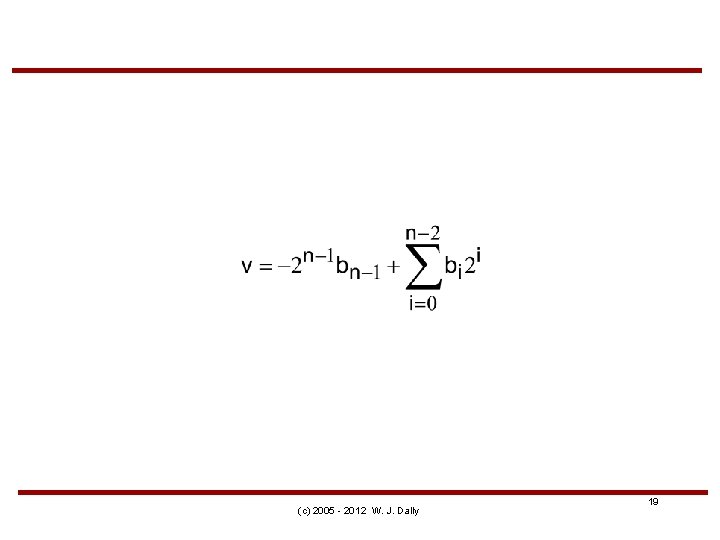
(c) 2005 - 2012 W. J. Dally 19
(c) 2005 - 2012 W. J. Dally

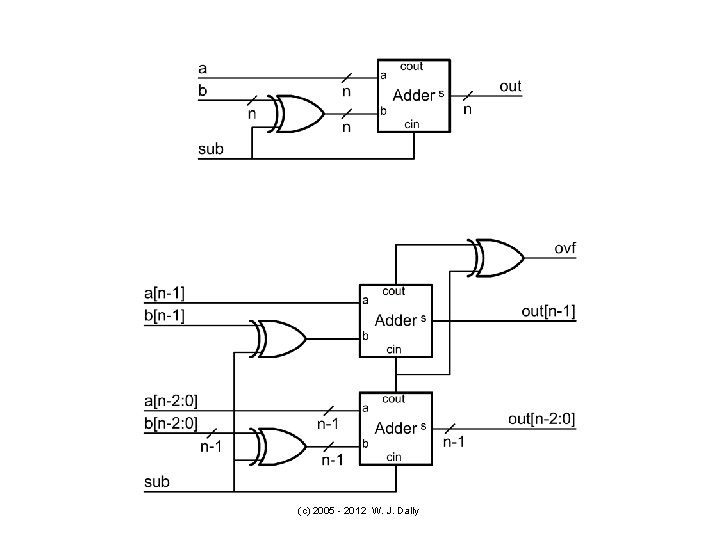
// add a+b or subtract a-b, check for overflow module Add. Sub(a, b, sub, s, ovf) ; parameter n = 8 ; input [n-1: 0] a, b ; input sub ; // subtract if sub=1, otherwise add output [n-1: 0] s ; output ovf ; // 1 if overflow wire c 1, c 2 ; // carry out of last two bits wire ovf = c 1 ^ c 2 ; // overflow if signs don't match // add non sign bits Adder 1 #(n-1) ai(a[n-2: 0], b[n-2: 0]^{n-1{sub}}, sub, c 1, s[n-2: 0]) ; // add sign bits Adder 1 #(1) as(a[n-1], b[n-1]^sub, c 1, c 2, s[n-1]) ; endmodule (c) 2005 - 2012 W. J. Dally 21
![// test script module test 2 ; reg [7: 0] in 0, in 1](http://slidetodoc.com/presentation_image/7766039ca67dc09848d9daaf3e96d2c6/image-22.jpg "// test script module test 2 ; reg [7: 0] in 0, in 1")
// test script module test 2 ; reg [7: 0] in 0, in 1 ; wire [7: 0] out ; reg sub ; wire ovf ; Add. Sub #(8) a(in 0, in 1, sub, out, ovf) ; initial begin in 0 = 8'd 87 ; in 1 = 8'd 40 ; sub = 0 ; #100 $display("%03 h + %03 h = %03 h ovf = %b", in 0, in 1, out, ovf) ; in 0 = 8'd 87 ; in 1 = 8'd 40 ; sub = 1 ; #100 $display("%03 h - %03 h = %03 h ovf = %b", in 0, in 1, out, ovf) ; in 0 = 8'd 88 ; in 1 = 8'd 40 ; sub = 0 ; #100 $display("%03 h + %03 h = %03 h ovf = %b", in 0, in 1, out, ovf) ; in 0 = 8'he 9 ; in 1 = 8'h 17 ; sub = 1 ; /* -23 - 23 */ #100 $display("%03 h - %03 h = %03 h ovf = %b", in 0, in 1, out, ovf) ; in 0 = 8'he 9 ; in 1 = 8'h 97 ; sub = 0 ; /* -23 - 105 = -128 no ovf */ #100 $display("%03 h + %03 h = %03 h ovf = %b", in 0, in 1, out, ovf) ; in 0 = 8'he 9 ; in 1 = 8'd 106 ; sub = 1 ; /* overflow */ #100 $display("%03 h - %03 h = %03 h ovf = %b", in 0, in 1, out, ovf) ; endmodule (c) 2005 - 2012 # # # W. J. Dally# 57 57 58 e 9 e 9 + + + - 28 28 28 17 97 6 a = = = 7 f 2 f 80 d 2 80 7 f ovf ovf ovf = = = 0 0 1
![reg [8: 0] ref, in 0, in 1 ; // reference result, inputs kept](http://slidetodoc.com/presentation_image/7766039ca67dc09848d9daaf3e96d2c6/image-23.jpg "reg [8: 0] ref, in 0, in 1 ; // reference result, inputs kept")
reg [8: 0] ref, in 0, in 1 ; // reference result, inputs kept longer Reg rovf ; … initial begin // generate test cases // check each against reference if(sub) ref = in 0 -in 1 ; else ref = in 0+in 1 ; rovf = (ref[8] != ref[7]) ; #100 if ((out != ref[7: 0])||(ovf != rovf)) $display("ERROR") ; // more cases end (c) 2005 - 2012 W. J. Dally
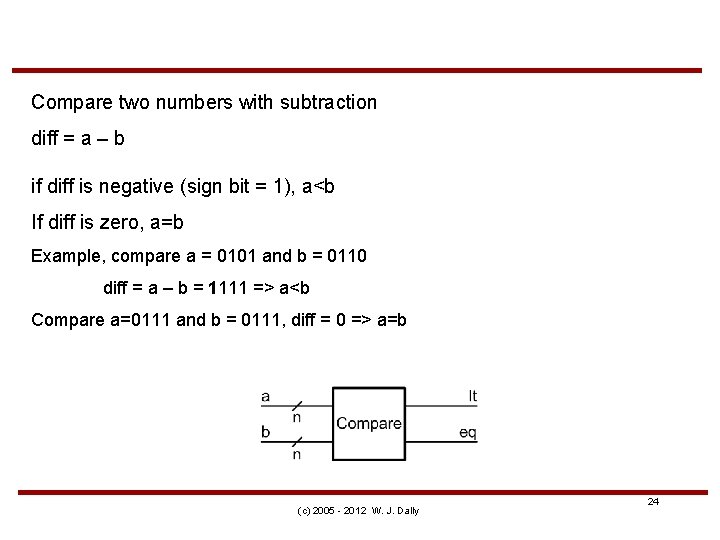
Compare two numbers with subtraction diff = a – b if diff is negative (sign bit = 1), a<b If diff is zero, a=b Example, compare a = 0101 and b = 0110 diff = a – b = 1111 => a<b Compare a=0111 and b = 0111, diff = 0 => a=b (c) 2005 - 2012 W. J. Dally 24
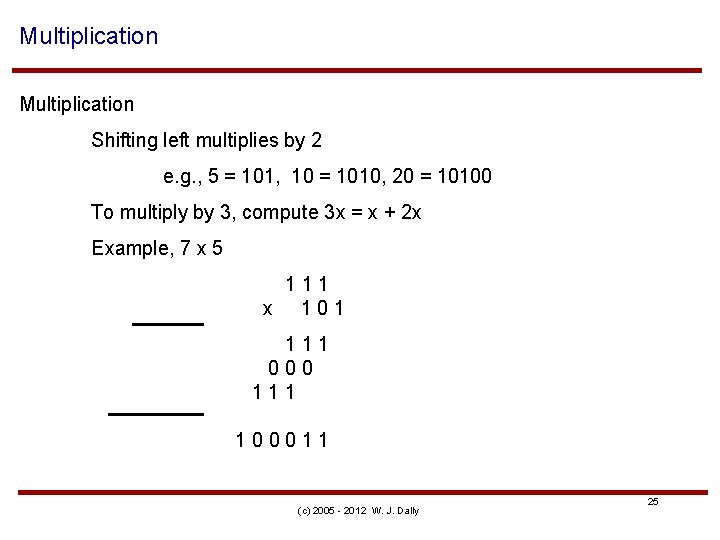
Multiplication Shifting left multiplies by 2 e. g. , 5 = 101, 10 = 1010, 20 = 10100 To multiply by 3, compute 3 x = x + 2 x Example, 7 x 5 111 x 101 111 000 111 100011 (c) 2005 - 2012 W. J. Dally 25
First generate partial products: pij = ai bj has weight i+j (c) 2005 - 2012 W. J. Dally
Then sum partial products to get sum (c) 2005 - 2012 W. J. Dally
![// 4 -bit multiplier module mul 4(a, b, p) ; input [3: 0] a,](http://slidetodoc.com/presentation_image/7766039ca67dc09848d9daaf3e96d2c6/image-28.jpg "// 4 -bit multiplier module mul 4(a, b, p) ; input [3: 0] a,")
// 4 -bit multiplier module mul 4(a, b, p) ; input [3: 0] a, b ; output [7: 0] p ; // form partial products wire [3: 0] pp 0 = a & {4{b[0]}} wire [3: 0] pp 1 = a & {4{b[1]}} wire [3: 0] pp 2 = a & {4{b[2]}} wire [3: 0] pp 3 = a & {4{b[3]}} ; ; // // x 1 x 2 x 4 x 8 // sum up partial products wire cout 1, cout 2, cout 3 ; wire [3: 0] s 1, s 2, s 3 ; Adder 1 #(4) a 1(pp 1, {0, pp 0[3: 1]}, 0, cout 1, s 1) ; Adder 1 #(4) a 2(pp 2, {cout 1, s 1[3: 1]}, 0, cout 2, s 2) ; Adder 1 #(4) a 3(pp 3, {cout 2, s 2[3: 1]}, 0, cout 3, s 3) ; // collect the result wire [7: 0] p = {cout 3, s 2[0], s 1[0], pp 0[0]} ; endmodule (c) 2005 - 2012 W. J. Dally 28
![// test script module test 3 ; reg [3: 0] in 0, in 1](http://slidetodoc.com/presentation_image/7766039ca67dc09848d9daaf3e96d2c6/image-29.jpg "// test script module test 3 ; reg [3: 0] in 0, in 1")
// test script module test 3 ; reg [3: 0] in 0, in 1 ; wire [7: 0] out ; Mul 4 mul(in 0, in 1, out) ; initial begin in 0 = 0 ; repeat (16) begin in 1 = 0 ; repeat (in 0+1) begin #100 $display("%03 d * %03 d = %03 d", in 0, in 1, out) ; in 1 = in 1 + 1 ; end in 0 = in 0 + 1 ; end endmodule (c) 2005 - 2012 W. J. Dally 29
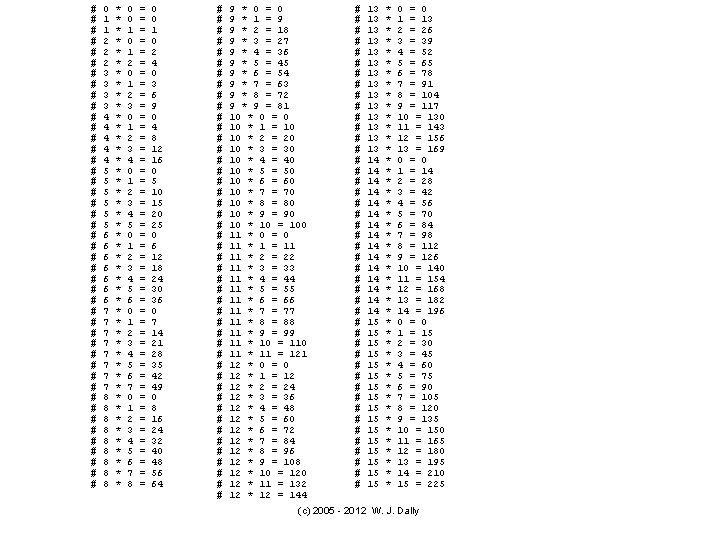
# # # # # # # # # # # # 0 1 1 2 2 2 3 3 4 4 4 5 5 5 6 6 6 6 7 7 7 7 8 8 8 8 8 * * * * * * * * * * * * 0 0 1 2 3 4 0 1 2 3 4 5 6 7 8 = = = = = = = = = = = = 0 0 1 0 2 4 0 3 6 9 0 4 8 12 16 0 5 10 15 20 25 0 6 12 18 24 30 36 0 7 14 21 28 35 42 49 0 8 16 24 32 40 48 56 64 # # # # # # # # # # # # 9 * 0 = 0 9 * 1 = 9 9 * 2 = 18 9 * 3 = 27 9 * 4 = 36 9 * 5 = 45 9 * 6 = 54 9 * 7 = 63 9 * 8 = 72 9 * 9 = 81 10 * 0 = 0 10 * 1 = 10 10 * 2 = 20 10 * 3 = 30 10 * 4 = 40 10 * 5 = 50 10 * 6 = 60 10 * 7 = 70 10 * 8 = 80 10 * 9 = 90 10 * 10 = 100 11 * 0 = 0 11 * 1 = 11 11 * 2 = 22 11 * 3 = 33 11 * 4 = 44 11 * 5 = 55 11 * 6 = 66 11 * 7 = 77 11 * 8 = 88 11 * 9 = 99 11 * 10 = 110 11 * 11 = 121 12 * 0 = 0 12 * 1 = 12 12 * 2 = 24 12 * 3 = 36 12 * 4 = 48 12 * 5 = 60 12 * 6 = 72 12 * 7 = 84 12 * 8 = 96 12 * 9 = 108 12 * 10 = 120 12 * 11 = 132 12 * 12 = 144 # # # # # # # # # # # # 13 13 13 13 14 14 14 14 15 15 15 15 * * * * * * * * * * * * 0 = 0 1 = 13 2 = 26 3 = 39 4 = 52 5 = 65 6 = 78 7 = 91 8 = 104 9 = 117 10 = 130 11 = 143 12 = 156 13 = 169 0 = 0 1 = 14 2 = 28 3 = 42 4 = 56 5 = 70 6 = 84 7 = 98 8 = 112 9 = 126 10 = 140 11 = 154 12 = 168 13 = 182 14 = 196 0 = 0 1 = 15 2 = 30 3 = 45 4 = 60 5 = 75 6 = 90 7 = 105 8 = 120 9 = 135 10 = 150 11 = 165 12 = 180 13 = 195 14 = 210 15 = 225 (c) 2005 - 2012 W. J. Dally
Accuracy Resolution (c) 2005 - 2012 W. J. Dally 31

Value and Representation functions • R(x) is binary number representing real number x • V(b) is value of binary number b • Absolute error – ea= |V(R(x)) - x| • Relative error – er = |(V(R(x)) - x)/x| (c) 2005 - 2012 W. J. Dally 32
Example • Suppose you need to represent temperatures from 0 to 100 C to 0. 1 C • What representation would you use? – What is the resolution of this representation? – What is its maximum absolute error? (c) 2005 - 2012 W. J. Dally 33
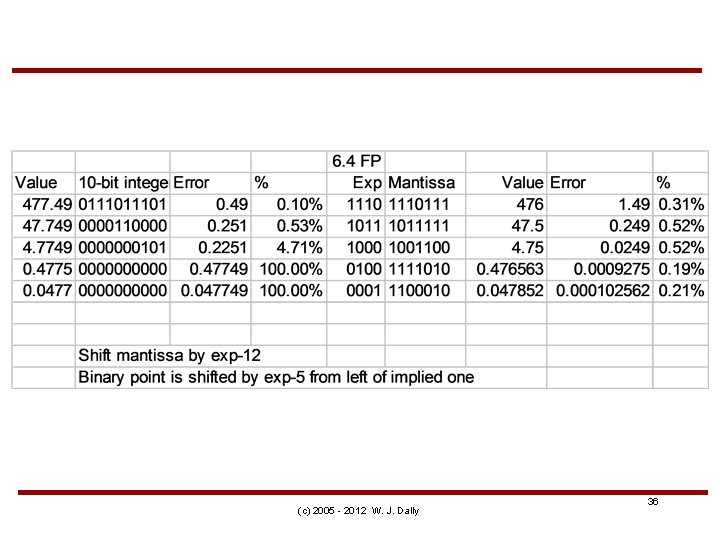
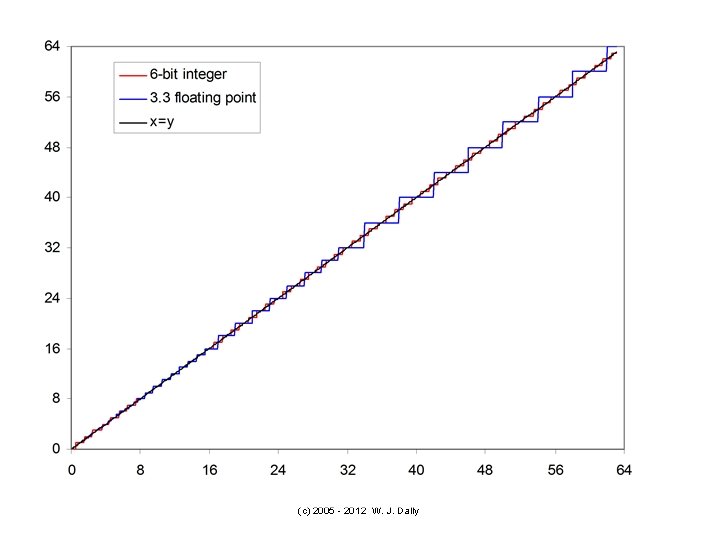
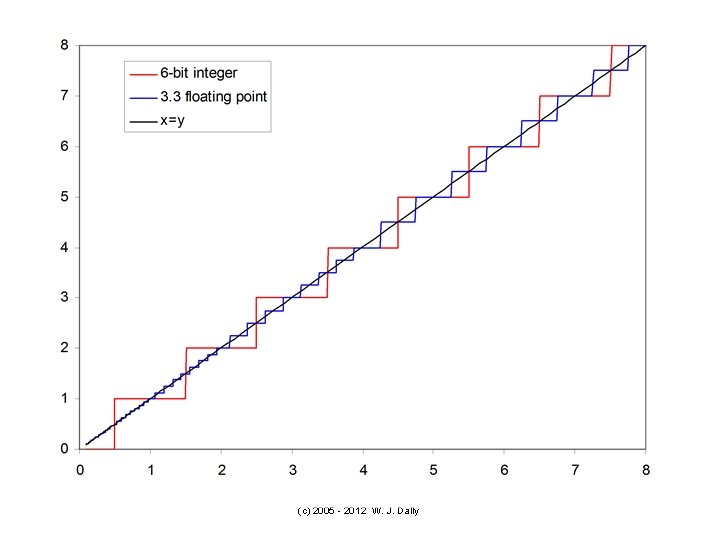
Example • Suppose you need to represent distances from 1 mm to 1 m with an accuracy of 0. 1% • How many bits are required to do this with a binary fixed-point number? • How many bits are needed with binary floating point? • What floating-point representation is needed? (c) 2005 - 2012 W. J. Dally 34
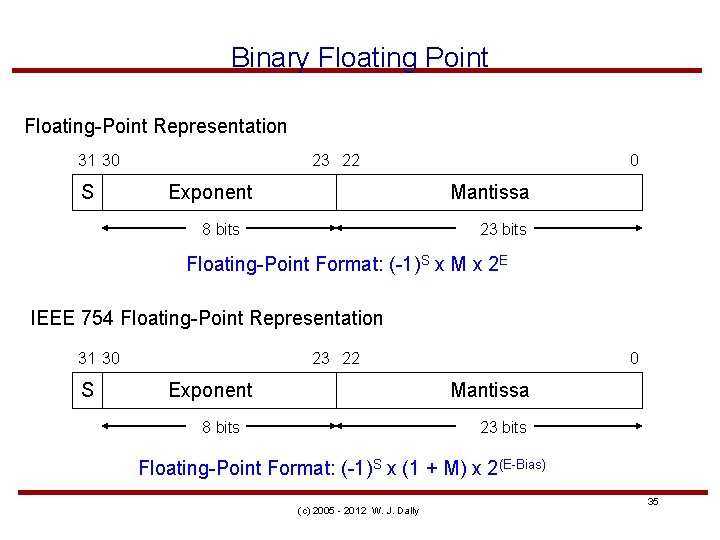
Binary Floating Point Floating-Point Representation 31 30 S 23 22 Exponent 0 Mantissa 8 bits 23 bits Floating-Point Format: (-1)S x M x 2 E IEEE 754 Floating-Point Representation 31 30 S 23 22 Exponent 0 Mantissa 8 bits 23 bits Floating-Point Format: (-1)S x (1 + M) x 2(E-Bias) (c) 2005 - 2012 W. J. Dally 35
(c) 2005 - 2012 W. J. Dally 36
(c) 2005 - 2012 W. J. Dally
(c) 2005 - 2012 W. J. Dally
Summary • • • Binary number representation Add numbers a bit at a time 2’s complement –x = (2 n – x) = (2 n – 1) – x + 1 = neg(x) + 1 Subtract by 2’s complement and add Multiply – form partial products pij and sum • Number representation – accuracy and resolution. • Fixed and floating point (c) 2005 - 2012 W. J. Dally 39
- Slides: 39