
DICOM Imaging Pipeline Model Cor loef Philips Medical




![Processing Functions(1) Non-Linear operation: Output=F(Input) DICOM: Modality LUT, VOI LUT Y[n]=F[Start Value + n-1]](https://slidetodoc.com/presentation_image/306d316c2be9dccd48c567d1b7aed8da/image-9.jpg "Processing Functions(1) Non-Linear operation: Output=F(Input) DICOM: Modality LUT, VOI LUT Y[n]=F[Start Value + n-1]")


![Processing Functions(3) Replicate: P[i] X P[i+1] Bilinear: Cubic: P[i-1] P[i+2] 19](https://slidetodoc.com/presentation_image/306d316c2be9dccd48c567d1b7aed8da/image-19.jpg "Processing Functions(3) Replicate: P[i] X P[i+1] Bilinear: Cubic: P[i-1] P[i+2] 19")


- Slides: 26
DICOM Imaging Pipeline Model Cor loef Philips Medical Systems 1
Presentation Overview • Scope • Image Processing and Viewing • DICOM Pixel Processing model • Processing Functions – Single Pixel – Pixel Set – Geometric transformations • Color representation • Annotations and view area 2
Scope • Pixel processing operations supported by DICOM concepts • Contrast and Spatial Resolution • Single image view, with annotations • Monitor display and Film printing 3
Image Processing and Viewing Image Object Annotations Viewing device Columns Rows Pixel Value Gray Level Processing Pixel Size 4
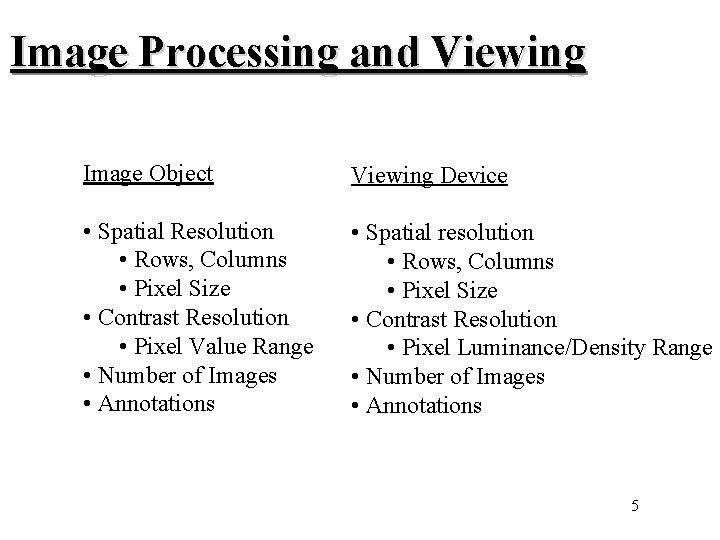
Image Processing and Viewing Image Object Viewing Device • Spatial Resolution • Rows, Columns • Pixel Size • Contrast Resolution • Pixel Value Range • Number of Images • Annotations • Spatial resolution • Rows, Columns • Pixel Size • Contrast Resolution • Pixel Luminance/Density Range • Number of Images • Annotations 5
DICOM Pixel Processing model Acquisition specific Image improvements (Non-DICOM) Acquisition processing Original Acquired Image Normalize Physical Value Modality LUT or Linear Transformation Stored Pixel Value Application dependent subrange selection VOI LUT or Linear Transformation Meaningful for Modality, manufacturer independent Normalize Perception Presentation LUT or Linear Transformation Gray Levels P-Values Photometric Intepretation: Monochrome 1: min value -> White Monochrome 2: min value -> Black Polarity: Opposite of what’s specified with Photometric Interpretation (Print) 6
Processing Functions(1) Single Pixel, Single Image Object • Spatial Resolution • Rows, Columns • Pixel Size • Contrast Resolution • Pixel Value Range • 1 Image Viewing Device = • Spatial resolution • Rows, Columns = • Pixel Size = -> • Contrast Resolution -> • Pixel Luminance/Density Range = • 1 Image Processing 7
Processing Functions(1) Single Pixel, Single Image Linear operation: Add, Subtract, Divide and Multiply by Constant Value DICOM Output Y Range Y=a. X+b Max Rescale Type Range Rescale Slope a b Output=RSx. Pixel + RI Input X Range Rescale Intercept Max Stored Pixel Value Range 8
Processing Functions(1) Non-Linear operation: Output=F(Input) DICOM: Modality LUT, VOI LUT Y[n]=F[Start Value + n-1] Output Y Range Y=F(X) Input X Range Output Y Range [0. . 2 B-1] N Number of Entries Start Value 9
Processing Functions(1) Histogram operations: Contrast Stretching, Contrast Compression Histogram is pixel intensity distribution Frequency Pixel value ( intensity ) 10
Processing Functions(1) Histogram, Contrast Stretching Applied to an Image to stretch (part of) a histogram to fill the full dynamic range of the display device. DICOM: VOI Window Width/Window Center No values Max Output Range (Dynamic Range Display Device) WC No values Max Input range WW 11
Processing Functions(1) Histogram, Contrast Compression Applied to an Image to suppress a part of the dynamic range of the display device. DICOM: VOI Window Width/Window Center Max Output Range (Dynamic Range Display Device) No values WC Max Input range WW 12
Processing Functions(2) Set Pixels, Single Image or Multiple Frames Image Object • Spatial Resolution • Rows, Columns • Pixel Size • Contrast Resolution • Pixel Value Range • >=1 Images Viewing Device = • Spatial resolution = • Rows, Columns = • Pixel Size -> • Contrast Resolution -> • Pixel Luminance/Density Range -> • 1 Image 13
Processing Functions(2) Convolution Image In Image Out P 1 P 2 P 3 X P 4 P 5 P 6 P 7 P 8 P 9 C 1 C 2 C 3 Kernel C 4 C 5 C 6 C 7 C 8 C 9 DICOM: Convolution operations not supported. Could become part of the Advanced Presentation State SOP Class. Example of Industry use: Edge Enhancement: Output=Input + Gain*(Input-Convoluted_Region) 14
Processing Functions(2) Add, Subtract and Average operations on multiple Images, Frames Operations on 1 pixel in multiple frames, and generation of output pixel based on two (processed) input pixel values. Images/Frames Sum N _ 15
Processing Functions(2) DICOM XA Multi-frame supports subtraction Mask Frames Sum N Applicable Contrast Frames _ Sum N Pixel Intensity Relationship is LOG 16
Processing Functions(3) Geometry operations: Scaling, Rotate/Flip/Displayed Area Single Image Object Viewing Device • Spatial Resolution • Rows, Columns • Pixel Size • Contrast Resolution • Pixel Value Range • 1 Image -> • Spatial resolution -> • Rows, Columns -> • Pixel Size -> • Contrast Resolution -> • Pixel Luminance/Density Range = • 1 Image 17
Processing Functions(3) Scaling, Zoom-in, Zoom-out No more 1 -to-1 mapping of pixels => “holes” and “overlaps” in pixel view area Need for interpolation. Interpolation types: Replicate, Bilinear, Cubic DICOM: Print has Magnification Type with the mentioned interpolation options. Requested Image Size, Rows/Columns and Pixel Aspect Ratio. 18
Processing Functions(3) Replicate: P[i] X P[i+1] Bilinear: Cubic: P[i-1] P[i+2] 19
Processing Functions(3) Rotate/Flip Rotate may result in rescaling operation Rotate Horizontal Flip DICOM: Presentation State has Rotate ( 90, 180, 270) and Horizontal Flip 20
Processing Functions(3) Pixel size Different pixel size may result in the need to interpolate Processing Pixel Aspect Ratio 2/1 DICOM: CT/MR has Pixel Spacing, absolute Row Height/Column Width X-Ray has Pixel Aspect Ratio, relative Row Height/Column Width and Imager Pixel Spacing ( absolute, on detector plate ) Print has Requested Image Size , x-dimension in mm of image in Image Box, and Image Display Format. Printer Pixel Spacing retrieved with new SOP Class: Printer Configuration 21
Color representation DICOM: Photometric Interpretation: - Palette Color, 1 sample value with 3 Palette Color LUTs that define R, G, B - RGB, 3 sample values for R, G, B Red-Palette Color LUT Sample pixel value Green-Palette Color LUT Blue-Palette Color LUT 22
Annotations and view area Text and Vector graphics, added to the Image pixels Currently in DICOM only Overlay and Curve. In Presentation State directly text and vector graphics, both in Image space and Display Device coordinate space. 23
Annotations Bounding Box Vector Graphics Text Polyline (Filled) (Anchor) X 24
DICOM: Overlays and Curves ( in Image space ) Overlay: ROI or Graphic Image Overlay Origin - 1 bit, on-off - Origin, Rows, Columns - Type: Graphics or ROI - Max 16 planes - May be multi-frame Curve Type: ROI or POLY - List of (x, y) coordinates 25
Annotations and view area Shutter, geometric mask applied on the image during display to neutralize the display of any pixels located outside the shutter shape. DICOM has the following shutter shapes: Rectangular, Circular, Polygonal 26