
DEVELOPING AN UNDERSTANDING OF PRESENTATION TECHNOLOGY By Amber

DEVELOPING AN UNDERSTANDING OF PRESENTATION TECHNOLOGY By Amber Slater
HOW/WHERE CAN YOU PRODUCE A PRESENTATION? Microsoft Power. Point Google Docs Kingsoft Presentation Open Office Prezi Apple Keynote Harvard Graphics Corel Presentations

WHAT ARE THE DIFFERENCES BETWEEN PRESENTATION SOFTWARE? Microsoft Power. Point Apple Keynote Developed by Microsoft Released in 1987 Runs on Microsoft Windows and Apple’s Mac OS X Focuses on entrance, emphasis, and exit of elements on a slide Transitions can be animated in a number of ways Can have moving pictures Developed by Apple Released in 2003 Can be used on i. Pad or i. Phone Includes charts, bars and tables Duel monitor support Exports to PDF, Quick. Time, JPEG, TIFF, PNG, HTML (with JPEG images) and Power. Point Supports all Quick. Time video formats
WHAT MAKES A GOOD PRESENTATION? A good presentation will have information equally distributed throughout each slide. The purpose of presentations is to easily arrange information without boring the audience. Presentations should be colourful and eye-catching, with different subjects on each slide.
HOW HAVE YOU MADE SURE YOUR PRESENTATION IS SUCCESSFUL? I have selected a colourful theme for each slide to make it eye -catching and interesting Each slide is arranged with different information to keep it organised The information is evenly distributed and is not overloaded onto a single slide The information will keep the audience interested as it answers all the questions directly
WHY WOULD YOU USE HAND-OUTS, SCREENSHOTS ETC. ? Hand-outs will help assist the audience viewing the presentation to find out additional information if they don’t understand something presented to them Screenshots will show the audience first hand what something should look like that’s being explained so they can go away and recognise what it is they need to do
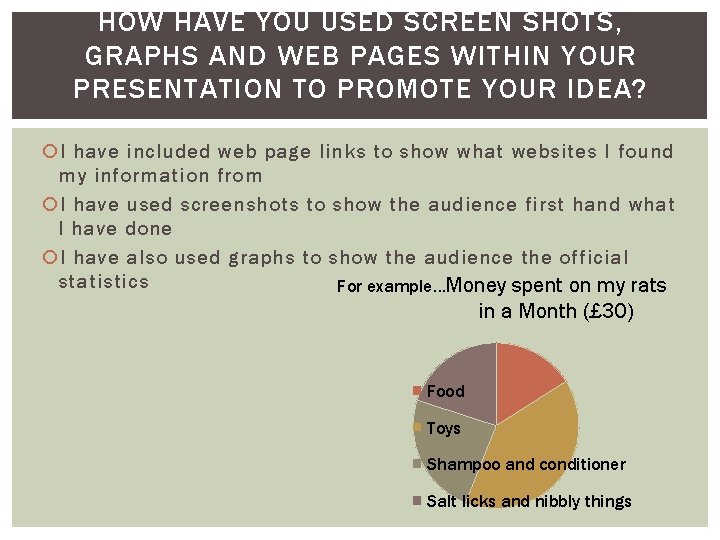
HOW HAVE YOU USED SCREEN SHOTS, GRAPHS AND WEB PAGES WITHIN YOUR PRESENTATION TO PROMOTE YOUR IDEA? I have included web page links to show what websites I found my information from I have used screenshots to show the audience first hand what I have done I have also used graphs to show the audience the official statistics For example…Money spent on my rats in a Month (£ 30) Food Toys Shampoo and conditioner Salt licks and nibbly things
WHAT COPYRIGHT ISSUES MAY ARISE IF UPLOADING YOUR WORK TO THE INTERNET? HOW DO YOU OVERCOME THIS? By uploading my work to the internet there may be several copyright issues. For example – I may have used images from the internet in my presentation. To overcome this issue I inserted a link onto my presentation showing where I got the image from and who it belongs to.
- Slides: 8