
Developing a Framework for Problem Solving Computer Coaches
Developing a Framework for Problem Solving Computer Coaches Presenter: Evan Frodermann University of Minnesota – Twin Cities Collaborators: Qing (Xu) Ryan, Kristin Crouse, Ken Heller, Leon Hsu, Jia-ling Lin, Bijaya Aryal AAPT Summer 2013 Meeting Portland, Oregon
From Version 1 (v 1) to Version 2 (v 2) • What do we want to retain? – Cognitive apprenticeship framework • Modeling, Coaching, Fading, Scaffolding • What do we want to improve? – A more flexible framework in which to build coaches. • Remove some of the technological limitations of the previous version. – We used instructor and student feedback to improve the design and structure of the coaches.
Motivation from Student Responses • Selected data from survey, End-term Spring 2013 – The computer coaches did not help improve my problem solving in this class. (135 responses) H: Heavy User (80 -100%) M: Medium User (40 -60%) L: Light user (0 -20%) Not Improve H (65) M (27) L (43) 21% 11% 34% Neither Improve 12% 15% 24% 67% 74% 41% • Selected data from survey, Midterm Spring 2013 – Free response: What do you like least about the computer coaches? • “Too repetitive” or “too long”: 49% of the 183 responses – 30 minutes – Free response: What do you like most about the computer coaches? • “Step by step” or “Guide beginning to end”: 23% of the responses. – Both free response categories were the most frequent.
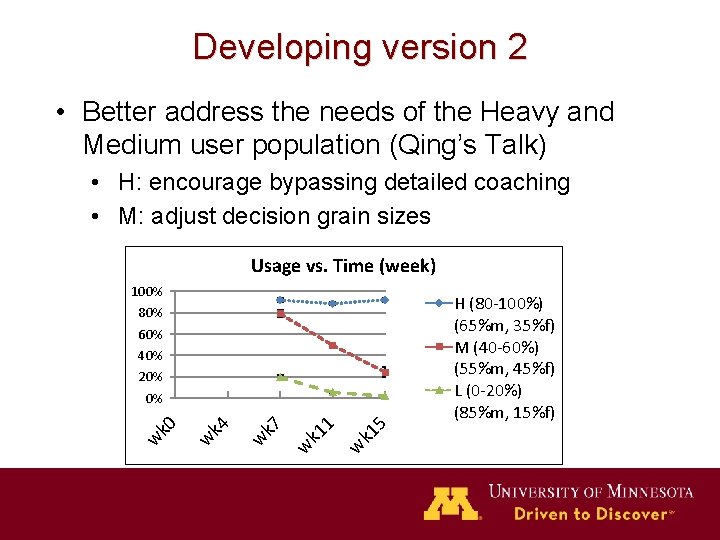
Developing version 2 • Better address the needs of the Heavy and Medium user population (Qing’s Talk) • H: encourage bypassing detailed coaching • M: adjust decision grain sizes Usage vs. Time (week) 100% H (80 -100%) (65%m, 35%f) M (40 -60%) (55%m, 45%f) L (0 -20%) (85%m, 15%f) 80% 60% 40% 20% 5 k 1 w 1 k 1 w w k 7 w k 4 w k 0 0%
Student Flexibility • Transparent student dictated solution paths. – Students are free to finish any part of the “unlocked” coach at any point. • More “human-like” coaching; • This is accomplished due to a shift towards objectoriented programming • Student adjusted grain size – Previous version either forced students into completing steps they may not need or did not give full detailed guide even if they desired. – Areas of the coaches are streamlined to reduce repetition • More detail can be accessed if desired to retain the “stepby-step” nature of the coaches.
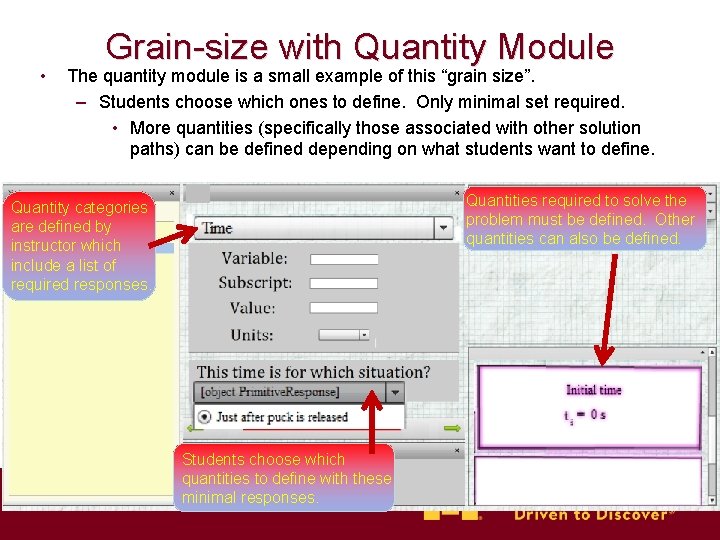
• Grain-size with Quantity Module The quantity module is a small example of this “grain size”. – Students choose which ones to define. Only minimal set required. • More quantities (specifically those associated with other solution paths) can be defined depending on what students want to define. Quantities required to solve the problem must be defined. Other quantities can also be defined. Quantity categories are defined by instructor which include a list of required responses. Students choose which quantities to define with these minimal responses.
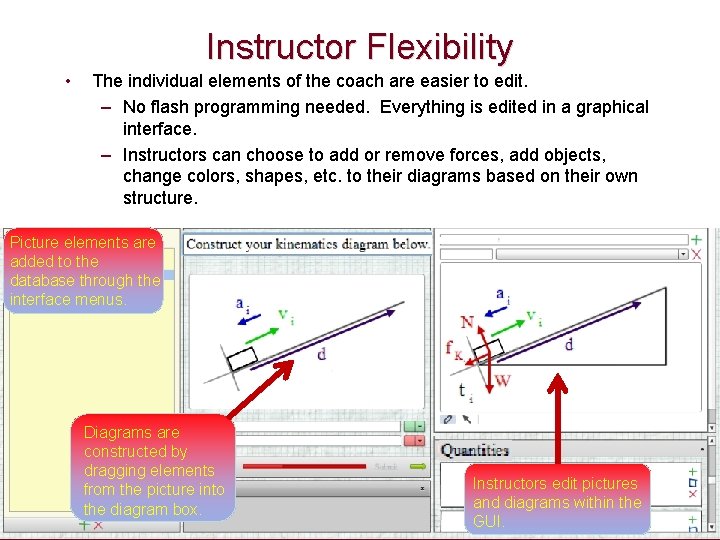
Instructor Flexibility • The individual elements of the coach are easier to edit. – No flash programming needed. Everything is edited in a graphical interface. – Instructors can choose to add or remove forces, add objects, change colors, shapes, etc. to their diagrams based on their own structure. Picture elements are added to the database through the interface menus. Diagrams are constructed by dragging elements from the picture into the diagram box. Instructors edit pictures and diagrams within the GUI.
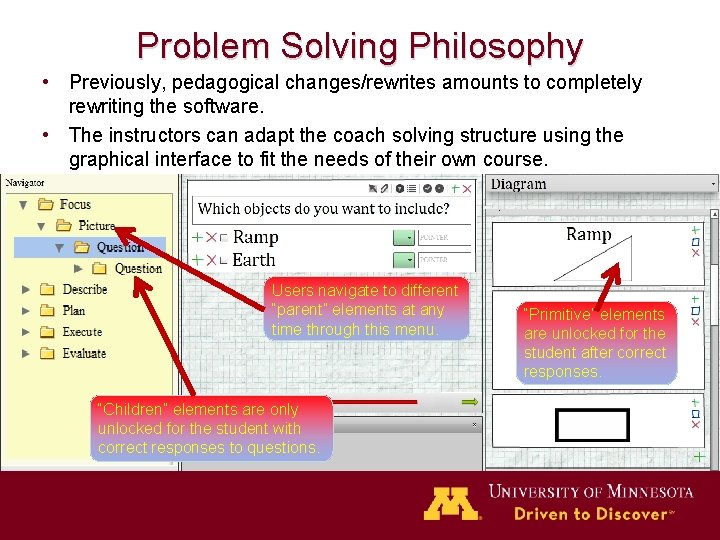
Problem Solving Philosophy • Previously, pedagogical changes/rewrites amounts to completely rewriting the software. • The instructors can adapt the coach solving structure using the graphical interface to fit the needs of their own course. Users navigate to different “parent” elements at any time through this menu. “Children” elements are only unlocked for the student with correct responses to questions. “Primitive” elements are unlocked for the student after correct responses.
Conclusions • Version 1 coaches had some limitations. • Version 2 is far more versatile. – Flexible for students with adjusting grain sizes. – Transparent freedom of choice. • More human-like coaching – Adaptable to an instructor’s individual courses. • Future work. – Develop coaches for calculus based electromagnetism course. – Explore overall usefulness for the identified populations, • More in Qing’s talk about the ID’ed population. – A new interface not using Flash (version 3 and beyond) for more general use on tablet computers.
Thanks • For a demonstration of portions of the new version of the online coaches, visit the Wednesday poster session, poster number PST 2 C 10. – Qing’s poster on usage data is PST 2 C 14 • Supported in part by National Science Foundation, DUE-1226197 and the University of MN
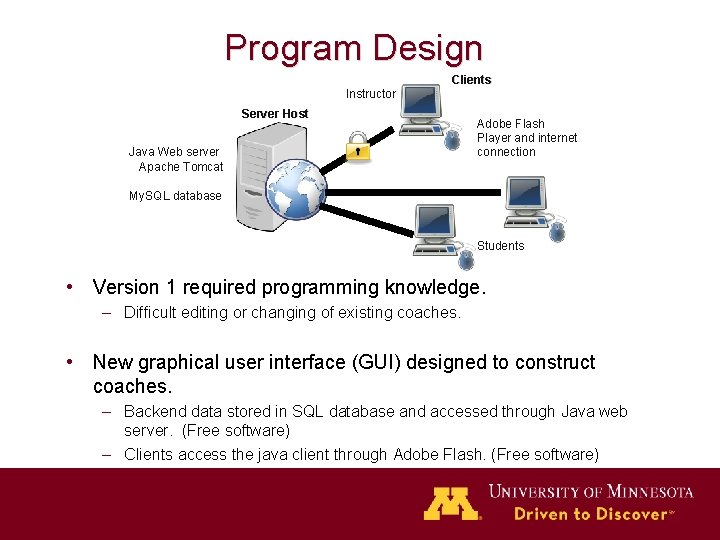
Program Design Clients Instructor Server Host Java Web server Apache Tomcat Adobe Flash Player and internet connection My. SQL database Students • Version 1 required programming knowledge. – Difficult editing or changing of existing coaches. • New graphical user interface (GUI) designed to construct coaches. – Backend data stored in SQL database and accessed through Java web server. (Free software) – Clients access the java client through Adobe Flash. (Free software)
Program Structure Layout • General terms. – “Parent” and “Children” elements • Logic for solving the problems – “Primitive” elements • Anything you would naturally write for a paper solution of a physics problem. – Coordinate system, approach, picture, diagrams, etc. • Students unlock elements by answering questions in the problem solving process.
- Slides: 12