
Detecting PCI devices On identifying the peripheral equipment
- Slides: 22
Detecting PCI devices On identifying the peripheral equipment installed in our PC
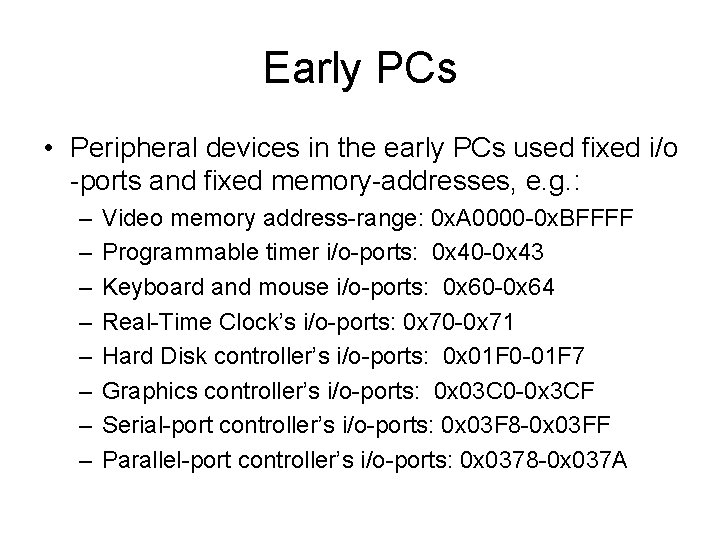
Early PCs • Peripheral devices in the early PCs used fixed i/o -ports and fixed memory-addresses, e. g. : – – – – Video memory address-range: 0 x. A 0000 -0 x. BFFFF Programmable timer i/o-ports: 0 x 40 -0 x 43 Keyboard and mouse i/o-ports: 0 x 60 -0 x 64 Real-Time Clock’s i/o-ports: 0 x 70 -0 x 71 Hard Disk controller’s i/o-ports: 0 x 01 F 0 -01 F 7 Graphics controller’s i/o-ports: 0 x 03 C 0 -0 x 3 CF Serial-port controller’s i/o-ports: 0 x 03 F 8 -0 x 03 FF Parallel-port controller’s i/o-ports: 0 x 0378 -0 x 037 A
The PC’s evolution • It became clear in the 1990 s that there would be contention among equipment vendors for ‘fixed’ resource-addresses, which of course were in limited supply • Among the goals that motivated the PCI Specification was the creation of a more flexible scheme for allocating addresses that future peripheral devices could use
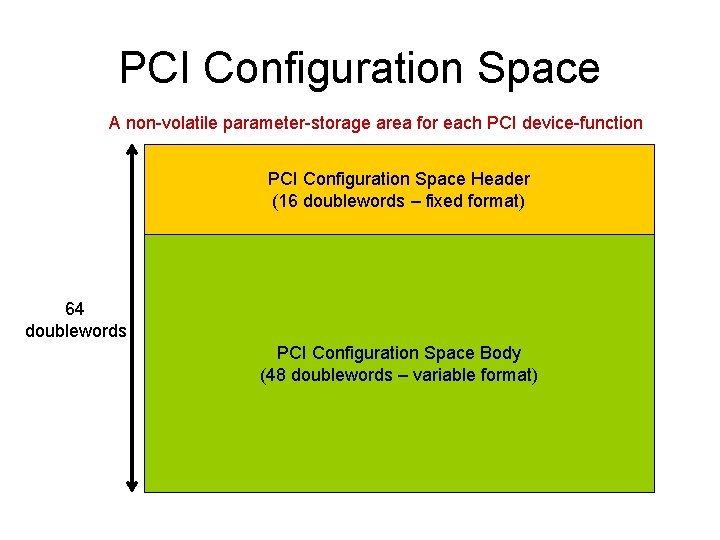
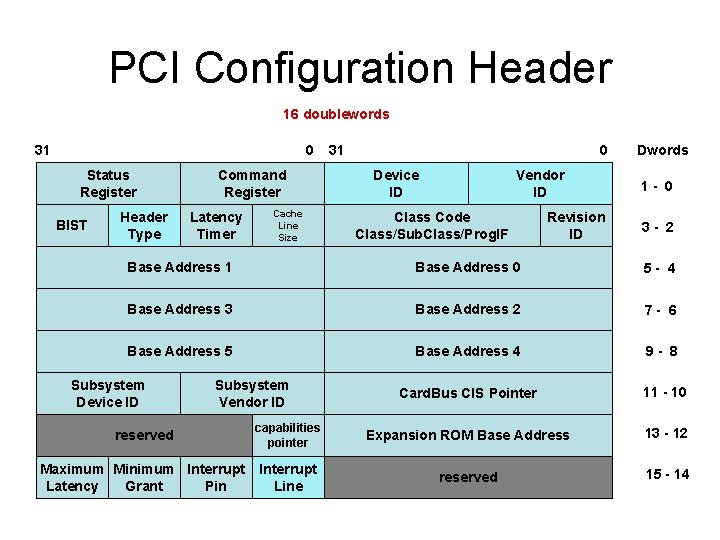
PCI Configuration Space A non-volatile parameter-storage area for each PCI device-function PCI Configuration Space Header (16 doublewords – fixed format) 64 doublewords PCI Configuration Space Body (48 doublewords – variable format)
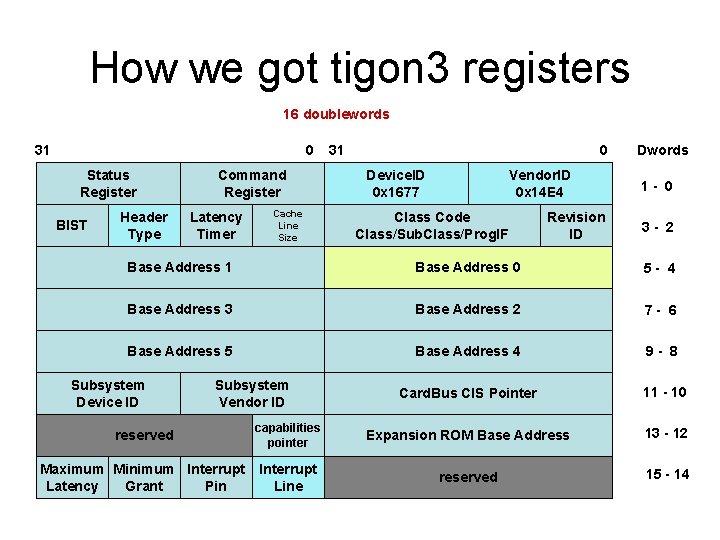
PCI Configuration Header 16 doublewords 31 0 Status Register BIST Header Type Command Register Latency Timer Cache Line Size 31 0 Device ID Vendor ID Class Code Class/Sub. Class/Prog. IF Revision ID Dwords 1 - 0 3 - 2 Base Address 1 Base Address 0 5 - 4 Base Address 3 Base Address 2 7 - 6 Base Address 5 Base Address 4 9 - 8 Card. Bus CIS Pointer 11 - 10 Subsystem Device ID Subsystem Vendor ID reserved capabilities pointer Expansion ROM Base Address 13 - 12 Maximum Minimum Interrupt Latency Grant Pin Interrupt Line reserved 15 - 14
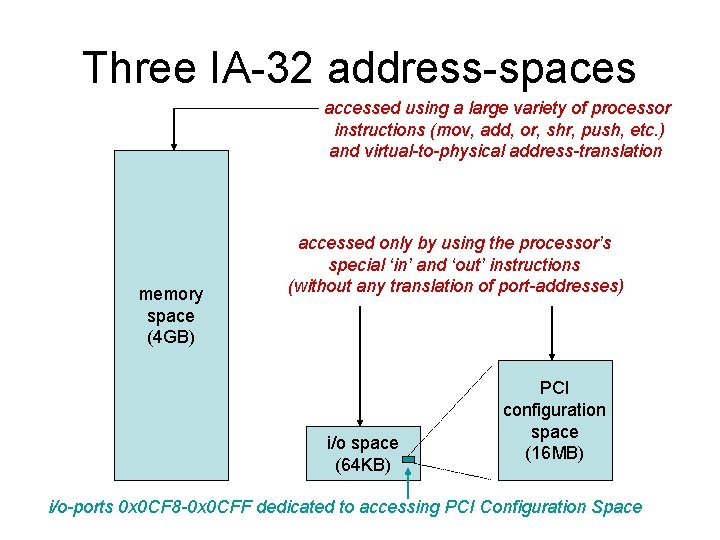
Three IA-32 address-spaces accessed using a large variety of processor instructions (mov, add, or, shr, push, etc. ) and virtual-to-physical address-translation memory space (4 GB) accessed only by using the processor’s special ‘in’ and ‘out’ instructions (without any translation of port-addresses) i/o space (64 KB) PCI configuration space (16 MB) i/o-ports 0 x 0 CF 8 -0 x 0 CFF dedicated to accessing PCI Configuration Space
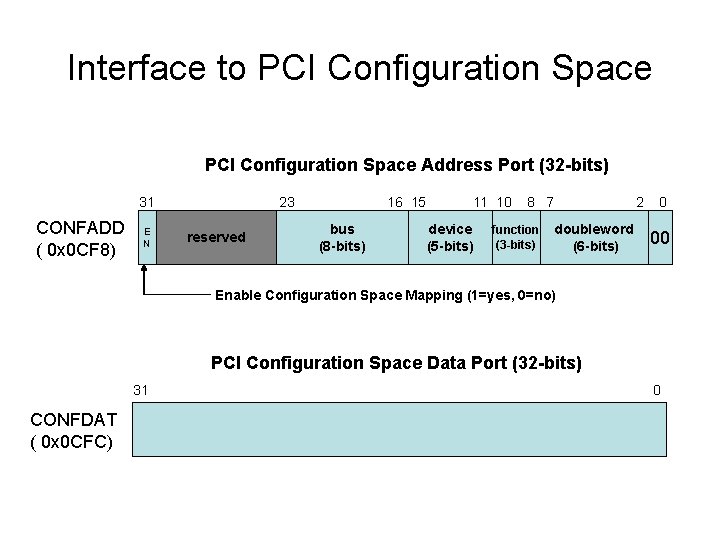
Interface to PCI Configuration Space Address Port (32 -bits) 31 CONFADD ( 0 x 0 CF 8) E N 23 reserved 16 15 bus (8 -bits) 11 10 device (5 -bits) 8 7 function (3 -bits) doubleword (6 -bits) 2 0 00 Enable Configuration Space Mapping (1=yes, 0=no) PCI Configuration Space Data Port (32 -bits) 31 CONFDAT ( 0 x 0 CFC) 0
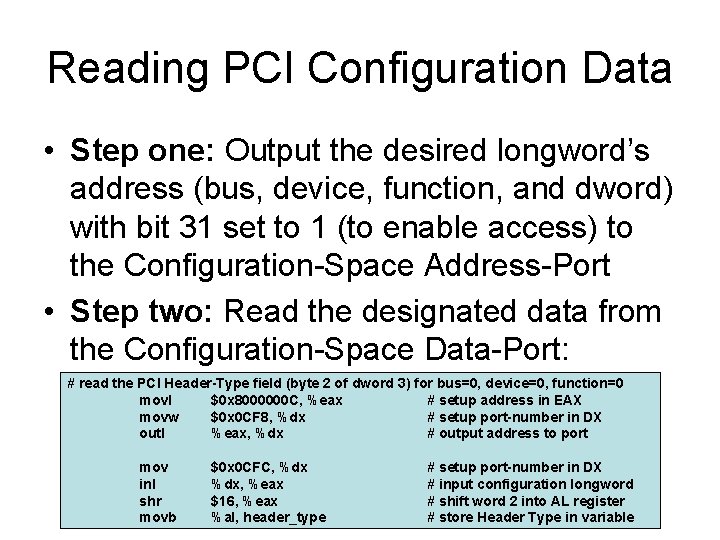
Reading PCI Configuration Data • Step one: Output the desired longword’s address (bus, device, function, and dword) with bit 31 set to 1 (to enable access) to the Configuration-Space Address-Port • Step two: Read the designated data from the Configuration-Space Data-Port: # read the PCI Header-Type field (byte 2 of dword 3) for bus=0, device=0, function=0 movl $0 x 8000000 C, %eax # setup address in EAX movw $0 x 0 CF 8, %dx # setup port-number in DX outl %eax, %dx # output address to port mov inl shr movb $0 x 0 CFC, %dx, %eax $16, %eax %al, header_type # setup port-number in DX # input configuration longword # shift word 2 into AL register # store Header Type in variable
Demo Program • We created a short Linux utility that searches for and reports all of your system’s PCI devices • It’s named “pciprobe. cpp” on our CS 635 website • It uses some C++ macros that expand to Intel input/output instructions -- which normally are ‘privileged’ instructions that a Linux applicationprogram is not allowed to execute (segfault!) • Our system administrator (Alex Fedosov) has created a utility (named “iopl 3”) that will allow your command-shell to acquire I/O privileges
Example: network interface • We identify the network interface controller in our classroom PC’s by class-code 0 x 02 • The subclass-code 0 x 00 is for ‘ethernet’ • We can identify the NIC from its VENDOR and DEVICE identification-numbers: • VENDOR_ID = 0 x 14 E 4 • DEVICE_ID = 0 x 1677 • You can use the ‘grep’ command to search for these numbers in this header-file: </usr/src/linux/include/linux/pci_ids. h>
Vendor’s identity • The VENDOR-ID 0 x 14 E 4 belongs to the Broadcom Corporation (headquarters in Irvine, California) • Information about this firm may be learned from the corporation’s website: <http: //www. broadcom. com> • The DEVICE-ID 0 x 1677 is used to signify Broadcom’s BCM 5751 ethernet product
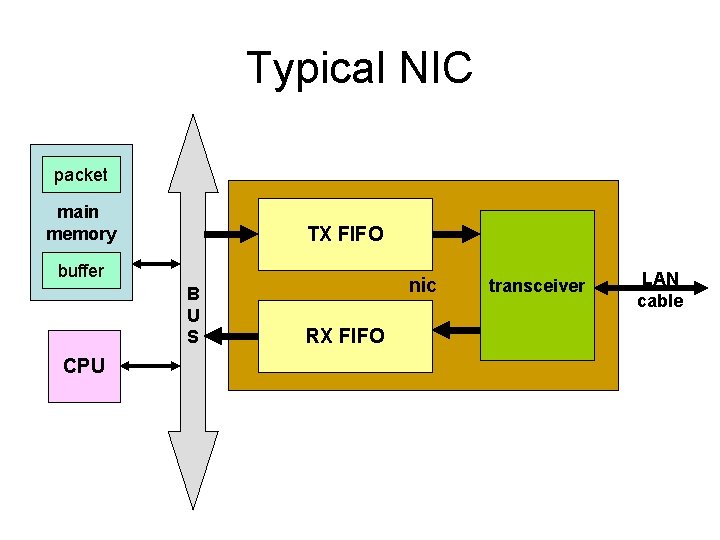
Typical NIC packet main memory TX FIFO buffer B U S CPU nic RX FIFO transceiver LAN cable
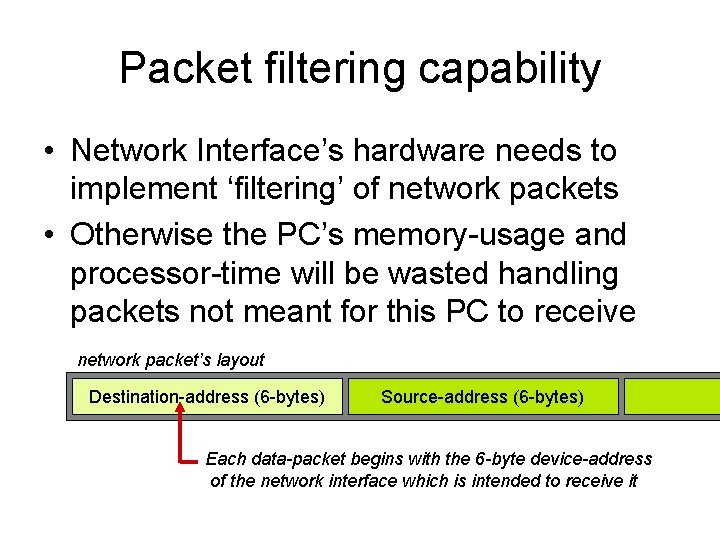
Packet filtering capability • Network Interface’s hardware needs to implement ‘filtering’ of network packets • Otherwise the PC’s memory-usage and processor-time will be wasted handling packets not meant for this PC to receive network packet’s layout Destination-address (6 -bytes) Source-address (6 -bytes) Each data-packet begins with the 6 -byte device-address of the network interface which is intended to receive it
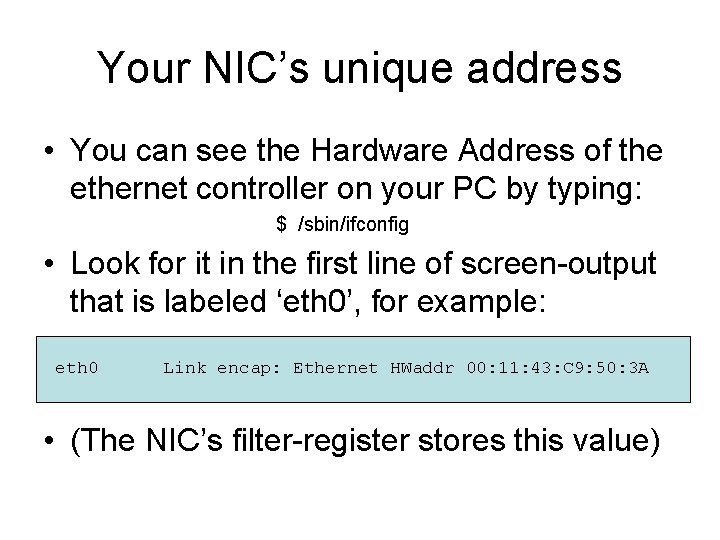
Your NIC’s unique address • You can see the Hardware Address of the ethernet controller on your PC by typing: $ /sbin/ifconfig • Look for it in the first line of screen-output that is labeled ‘eth 0’, for example: eth 0 Link encap: Ethernet HWaddr 00: 11: 43: C 9: 50: 3 A • (The NIC’s filter-register stores this value)
Our ‘tigon 3. c demo • We wrote a kernel module that lets users see certain register-values which pertain to the BCM 5751 network interface in your classroom workstation: – (1) the PCI Configuration Space registers – (2) the Media Access Controller’s address • It also shows your machine’s node-name (in case you want to save the information)
How we got the MAC-address • We do not have Broadcom’s programming datasheet -- but we do have Linux source code for the ‘tigon 3’ device-driver, which includes a header-file ‘tg 3. h’ found here: </usr/src/linux/drivers/net/> • If you scroll through the #define directives you will see the offset where the hardware address is stored in the memory-mapped register-space of the ‘tigon 3’ interface
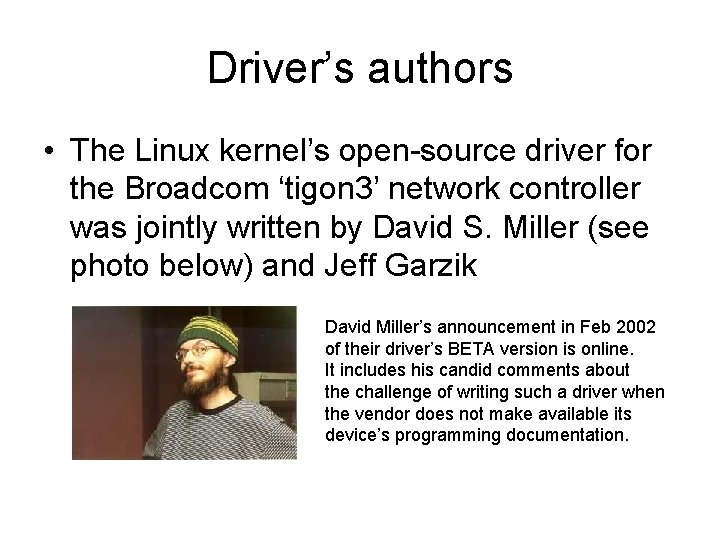
Driver’s authors • The Linux kernel’s open-source driver for the Broadcom ‘tigon 3’ network controller was jointly written by David S. Miller (see photo below) and Jeff Garzik David Miller’s announcement in Feb 2002 of their driver’s BETA version is online. It includes his candid comments about the challenge of writing such a driver when the vendor does not make available its device’s programming documentation.
How we got tigon 3 registers 16 doublewords 31 0 Status Register BIST Header Type Command Register Latency Timer Cache Line Size 31 0 Device. ID 0 x 1677 Vendor. ID 0 x 14 E 4 Class Code Class/Sub. Class/Prog. IF Revision ID Dwords 1 - 0 3 - 2 Base Address 1 Base Address 0 5 - 4 Base Address 3 Base Address 2 7 - 6 Base Address 5 Base Address 4 9 - 8 Card. Bus CIS Pointer 11 - 10 Subsystem Device ID Subsystem Vendor ID reserved capabilities pointer Expansion ROM Base Address 13 - 12 Maximum Minimum Interrupt Latency Grant Pin Interrupt Line reserved 15 - 14
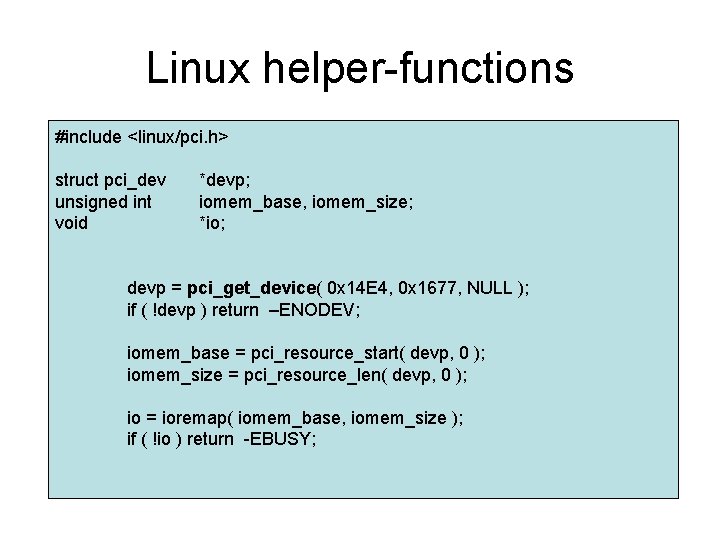
Linux helper-functions #include <linux/pci. h> struct pci_dev unsigned int void *devp; iomem_base, iomem_size; *io; devp = pci_get_device( 0 x 14 E 4, 0 x 1677, NULL ); if ( !devp ) return –ENODEV; iomem_base = pci_resource_start( devp, 0 ); iomem_size = pci_resource_len( devp, 0 ); io = ioremap( iomem_base, iomem_size ); if ( !io ) return -EBUSY;
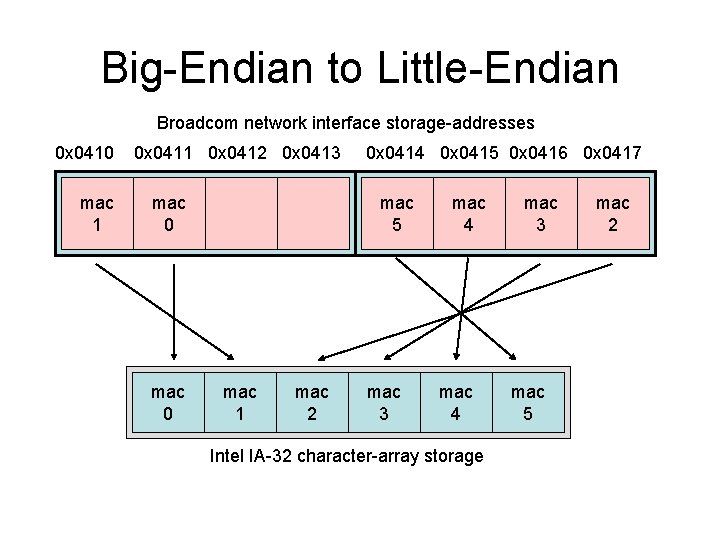
Big-Endian to Little-Endian Broadcom network interface storage-addresses 0 x 0410 mac 1 0 x 0412 0 x 0413 mac 0 0 x 0414 0 x 0415 0 x 0416 0 x 0417 mac 5 mac 1 mac 2 mac 3 mac 4 Intel IA-32 character-array storage mac 3 mac 5 mac 2
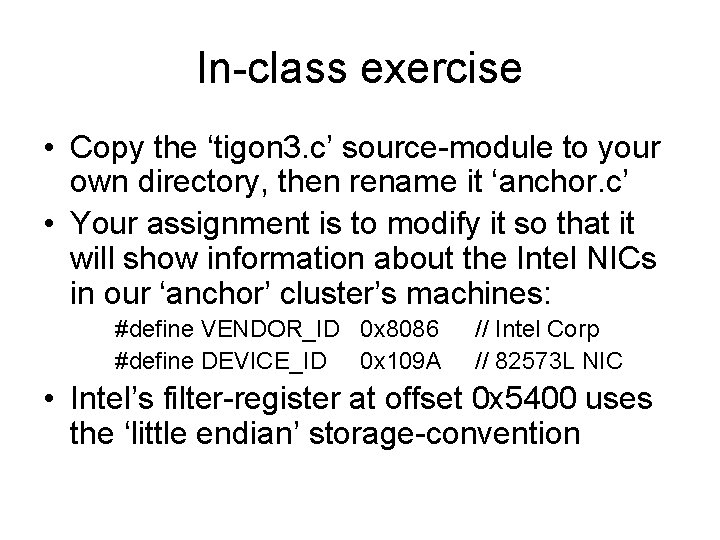
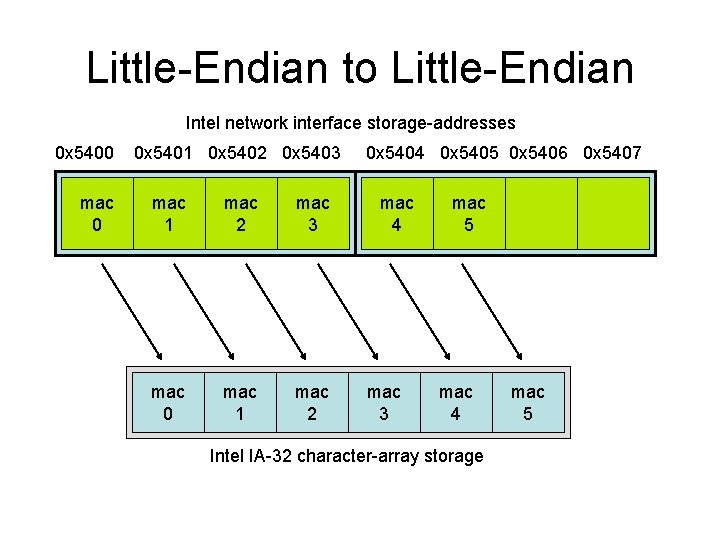
In-class exercise • Copy the ‘tigon 3. c’ source-module to your own directory, then rename it ‘anchor. c’ • Your assignment is to modify it so that it will show information about the Intel NICs in our ‘anchor’ cluster’s machines: #define VENDOR_ID 0 x 8086 #define DEVICE_ID 0 x 109 A // Intel Corp // 82573 L NIC • Intel’s filter-register at offset 0 x 5400 uses the ‘little endian’ storage-convention
Little-Endian to Little-Endian Intel network interface storage-addresses 0 x 5400 mac 0 0 x 5401 0 x 5402 0 x 5403 mac 1 mac 2 mac 3 mac 0 mac 1 mac 2 0 x 5404 0 x 5405 0 x 5406 0 x 5407 mac 4 mac 3 mac 5 mac 4 Intel IA-32 character-array storage mac 5