
Detail Design Subsystem Design Static Part VOPC 1
Detail Design Subsystem Design Static Part - VOPC 1
Subsystem Design Steps - continuing Document Subsystem Elements We have responsibilities allocated to subsystems and now responsibilities are allocated to the subsystem elements. • • We have collaborations between subsystem elements modeled via interaction diagrams. So, what’s left to do: • • • Model the realization of subsystem interfaces. This can be accommodated by design elements both within and outside the subsystem itself. First, let’s look inside subsystem to collaborations wholly contained within that realization that realize the interface. 2
Procedure: Document Internal Sub. System Structure • Create Class Diagram(s) showing contained elements and their associations. • Create State diagram? • • May be appropriate to show different states subsystem can assume. (interfaces and subsystems are “stateful”). Document any order dependencies • (i. e. , op 1 must be executed before op 2, etc. ). 3
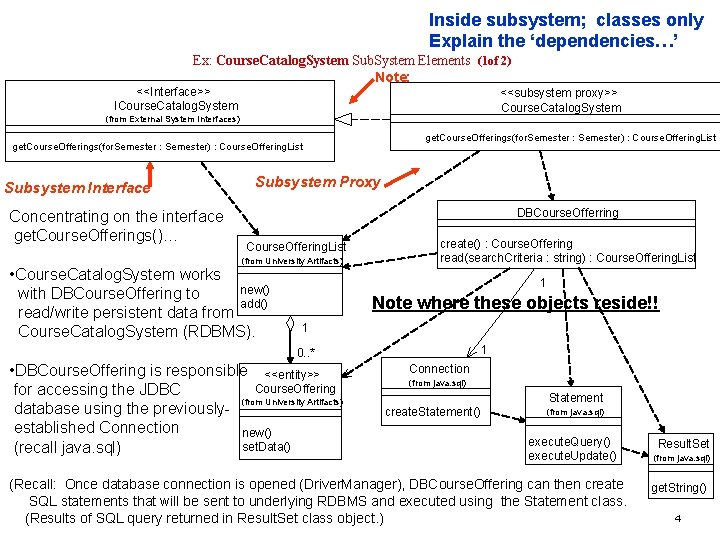
Inside subsystem; classes only Explain the ‘dependencies…’ Ex: Course. Catalog. System Sub. System Elements (1 of 2) Note: <<Interface>> ICourse. Catalog. System <<subsystem proxy>> Course. Catalog. System (from External System Interfaces) get. Course. Offerings(for. Semester : Semester) : Course. Offering. List Subsystem Interface Concentrating on the interface get. Course. Offerings()… Subsystem Proxy DBCourse. Offerring Course. Offering. List (from University Artifacts) • Course. Catalog. System works new() with DBCourse. Offering to add() read/write persistent data from Course. Catalog. System (RDBMS). create() : Course. Offering read(search. Criteria : string) : Course. Offering. List 1 Note where these objects reside!! 1 1 0. . * • DBCourse. Offering is responsible <<entity>> Course. Offering for accessing the JDBC (from University Artifacts) database using the previouslyestablished Connection new() set. Data() (recall java. sql) Connection (from java. sql) Statement create. Statement() (from java. sql) execute. Query() execute. Update() (Recall: Once database connection is opened (Driver. Manager), DBCourse. Offering can then create SQL statements that will be sent to underlying RDBMS and executed using the Statement class. (Results of SQL query returned in Result. Set class object. ) Result. Set (from java. sql) get. String() 4
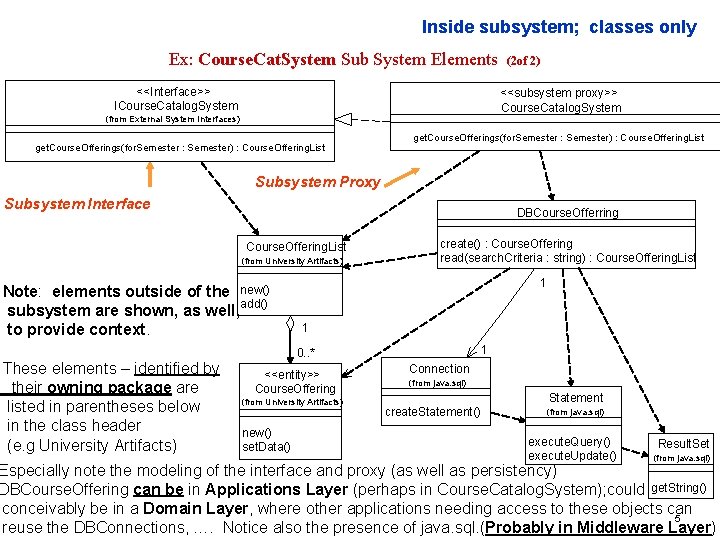
Inside subsystem; classes only Ex: Course. Cat. System Sub System Elements <<Interface>> ICourse. Catalog. System (2 of 2) <<subsystem proxy>> Course. Catalog. System (from External System Interfaces) get. Course. Offerings(for. Semester : Semester) : Course. Offering. List Subsystem Proxy Subsystem Interface DBCourse. Offerring Course. Offering. List (from University Artifacts) Note: elements outside of the new() subsystem are shown, as well, add() to provide context. These elements – identified by their owning package are listed in parentheses below in the class header (e. g University Artifacts) create() : Course. Offering read(search. Criteria : string) : Course. Offering. List 1 1 1 0. . * <<entity>> Course. Offering (from University Artifacts) new() set. Data() Connection (from java. sql) Statement create. Statement() (from java. sql) execute. Query() execute. Update() Result. Set (from java. sql) Especially note the modeling of the interface and proxy (as well as persistency) DBCourse. Offering can be in Applications Layer (perhaps in Course. Catalog. System); could get. String() conceivably be in a Domain Layer, where other applications needing access to these objects can 5 reuse the DBConnections, …. Notice also the presence of java. sql. (Probably in Middleware Layer)
Document External Subsystem Structure… • Now, must document the elements (elements external to subsystem) upon which SS depends. • Important: subsystems likely do not stand alone; they may need services of other Sub. Systems. • SS designer should feel free to use services of other model elements. 6
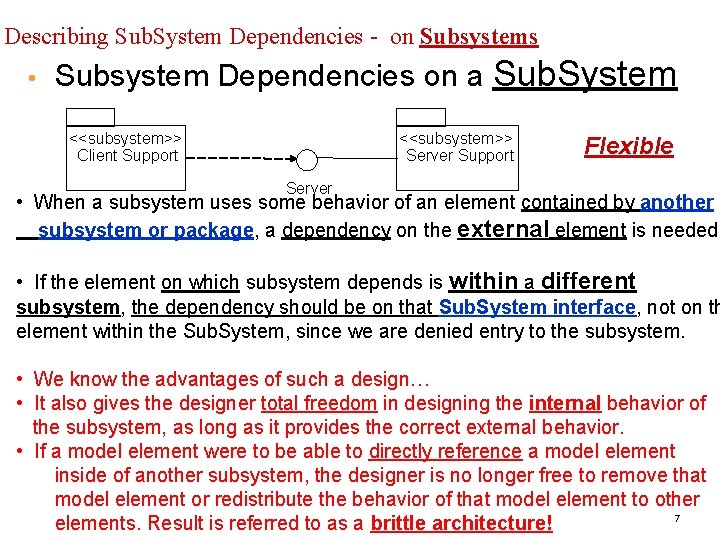
Describing Sub. System Dependencies - on Subsystems • Subsystem Dependencies on a Sub. System <<subsystem>> Client Support <<subsystem>> Server Support Flexible Server • When a subsystem uses some behavior of an element contained by another subsystem or package, a dependency on the external element is needed. • If the element on which subsystem depends is within a different subsystem, the dependency should be on that Sub. System interface, not on th element within the Sub. System, since we are denied entry to the subsystem. • We know the advantages of such a design… • It also gives the designer total freedom in designing the internal behavior of the subsystem, as long as it provides the correct external behavior. • If a model element were to be able to directly reference a model element inside of another subsystem, the designer is no longer free to remove that model element or redistribute the behavior of that model element to other 7 elements. Result is referred to as a brittle architecture!
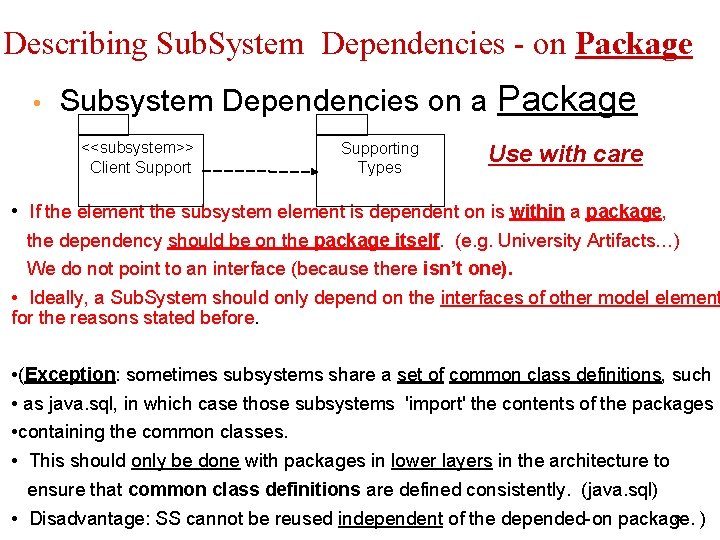
Describing Sub. System Dependencies - on Package • Subsystem Dependencies on a Package <<subsystem>> Client Supporting Types Use with care • If the element the subsystem element is dependent on is within a package, the dependency should be on the package itself. (e. g. University Artifacts…) We do not point to an interface (because there isn’t one). • Ideally, a Sub. System should only depend on the interfaces of other model element for the reasons stated before. • (Exception: sometimes subsystems share a set of common class definitions, such • as java. sql, in which case those subsystems 'import' the contents of the packages • containing the common classes. • This should only be done with packages in lower layers in the architecture to ensure that common class definitions are defined consistently. (java. sql) 8 • Disadvantage: SS cannot be reused independent of the depended-on package. )
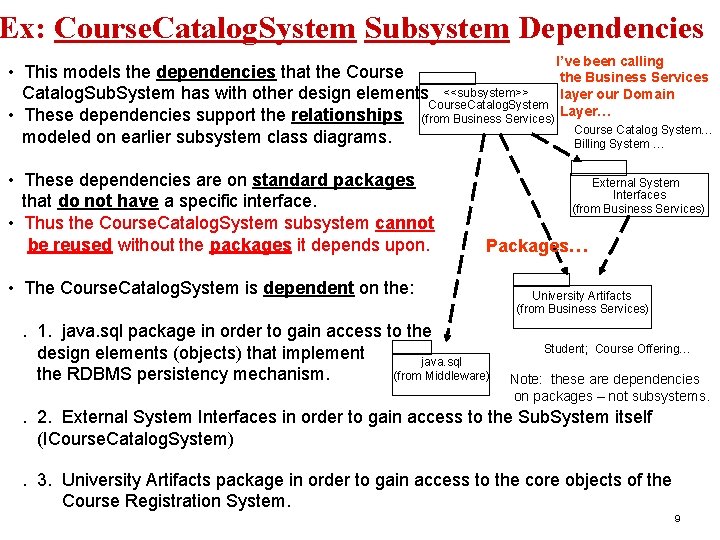
Ex: Course. Catalog. System Subsystem Dependencies I’ve been calling • This models the dependencies that the Course the Business Services layer our Domain Catalog. Sub. System has with other design elements <<subsystem>> Course. Catalog. System • These dependencies support the relationships (from Business Services) Layer… Course Catalog System… modeled on earlier subsystem class diagrams. Billing System … • These dependencies are on standard packages that do not have a specific interface. • Thus the Course. Catalog. System subsystem cannot be reused without the packages it depends upon. External System Interfaces (from Business Services) Packages… • The Course. Catalog. System is dependent on the: . 1. java. sql package in order to gain access to the design elements (objects) that implement java. sql the RDBMS persistency mechanism. (from Middleware) University Artifacts (from Business Services) Student; Course Offering… Note: these are dependencies on packages – not subsystems. . 2. External System Interfaces in order to gain access to the Sub. System itself (ICourse. Catalog. System). 3. University Artifacts package in order to gain access to the core objects of the Course Registration System. 9
Subsystem Design Steps • • • Distribute Subsystem behavior to Subsystem Elements Document Subsystem Elements Describe Subsystem Dependencies Checkpoints • It is now time to look for things when reviewing the results of your Subsystem Design efforts. 11
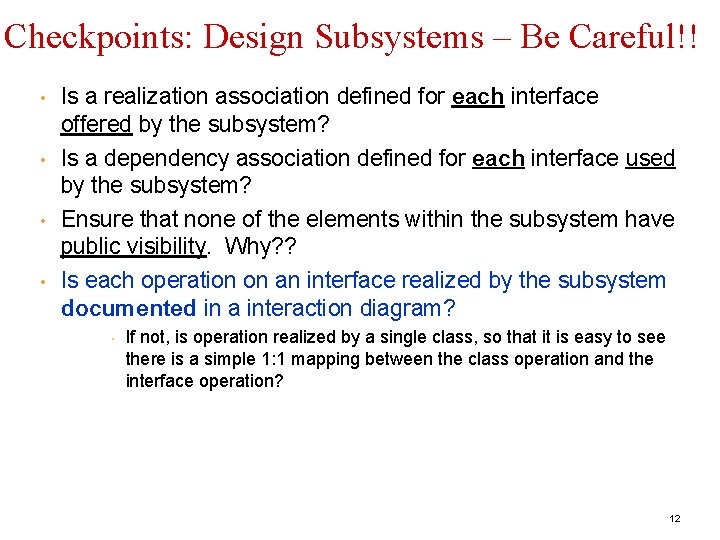
Checkpoints: Design Subsystems – Be Careful!! • • Is a realization association defined for each interface offered by the subsystem? Is a dependency association defined for each interface used by the subsystem? Ensure that none of the elements within the subsystem have public visibility. Why? ? Is each operation on an interface realized by the subsystem documented in a interaction diagram? • If not, is operation realized by a single class, so that it is easy to see there is a simple 1: 1 mapping between the class operation and the interface operation? 12
Review: Subsystem Design – Good exam questions. • • • What is the purpose of Subsystem Design? Why should dependencies on a subsystem be on the subsystem interface? Explain how dependencies are modeled on packages and on subsystems. 13
- Slides: 12