
Desktop Web UI Mobile Offline Developer Welcome Cut
Desktop ● Web UI ● Mobile ● Offline ● Developer Welcome! Cut Costs & Boost Productivity. . . The North. Western Energy Way Presenters: Donnell Kuchtyn Mark Vasquez Soshima Kocharekar © 2009 Synactive, Inc. www. Gui. XT. com
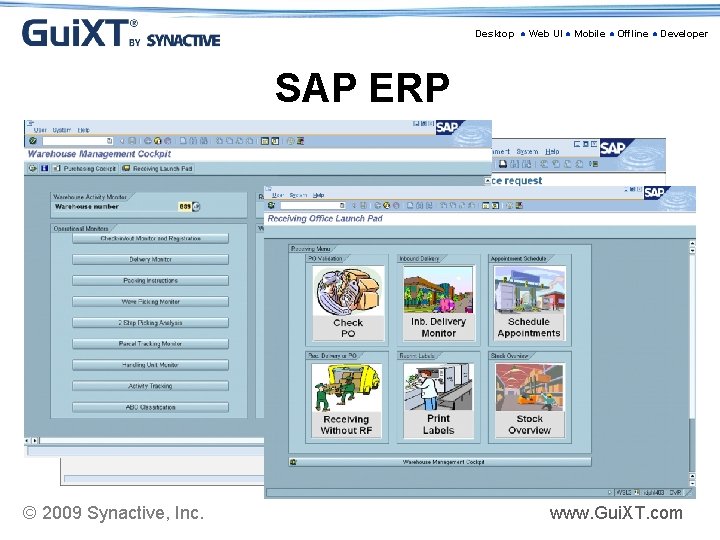
Desktop ● Web UI ● Mobile ● Offline ● Developer SAP ERP © 2009 Synactive, Inc. www. Gui. XT. com
Desktop ● Web UI ● Mobile ● Offline ● Developer Why is Usability Important? • Easy to Learn • Efficient to Use • Easy to Remember • Enjoyable to Use © 2009 Synactive, Inc. www. Gui. XT. com
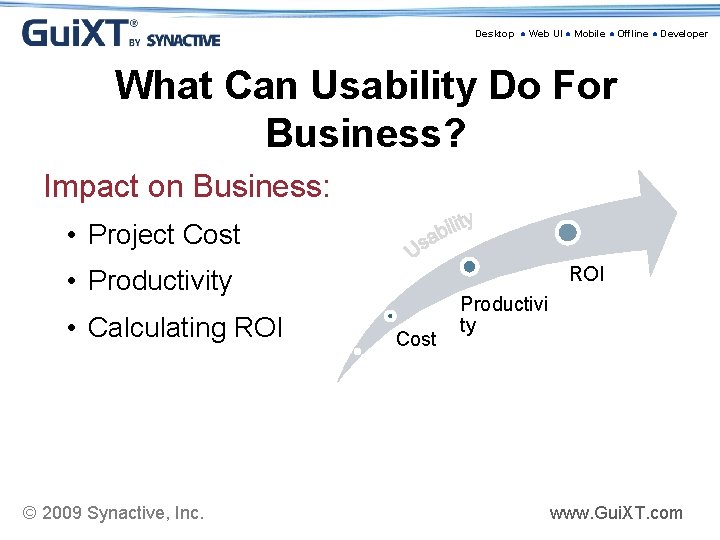
Desktop ● Web UI ● Mobile ● Offline ● Developer What Can Usability Do For Business? Impact on Business: • Project Cost ROI • Productivity • Calculating ROI © 2009 Synactive, Inc. Cost Productivi ty www. Gui. XT. com
Desktop ● Web UI ● Mobile ● Offline ● Developer How can Gui. XT Solutions improve Usability? • Remove Distractions/Confusions • Consolidate/Optimize Data Entry • Use Familiar Terms • Images to Aid Identification • Instructions for Complex or Seldom Used Procedures © 2009 Synactive, Inc. www. Gui. XT. com
Desktop ● Web UI ● Mobile ● Offline ● Developer Gui. XT Solution • • • Bundled with SAP ERP Certified by SAP for Net. Weaver Portals No backend code changes Do it faster with fewer resources Minimize Risk Maximize your SAP ERP! © 2009 Synactive, Inc. www. Gui. XT. com
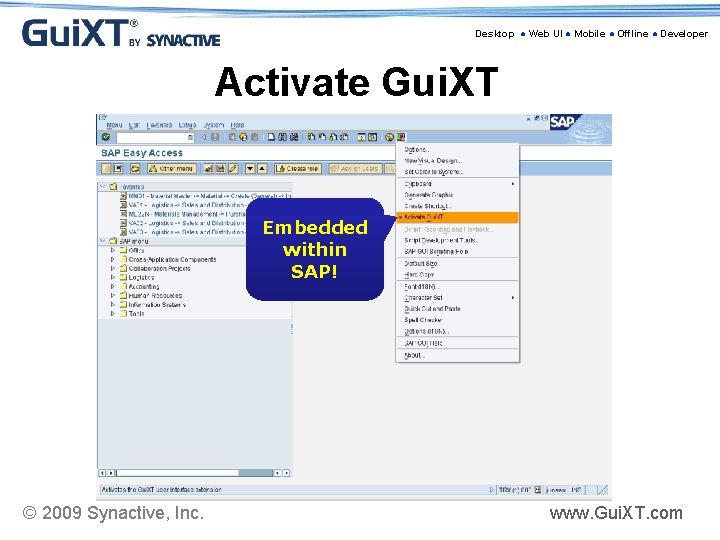
Desktop ● Web UI ● Mobile ● Offline ● Developer Activate Gui. XT Embedded within SAP! © 2009 Synactive, Inc. www. Gui. XT. com
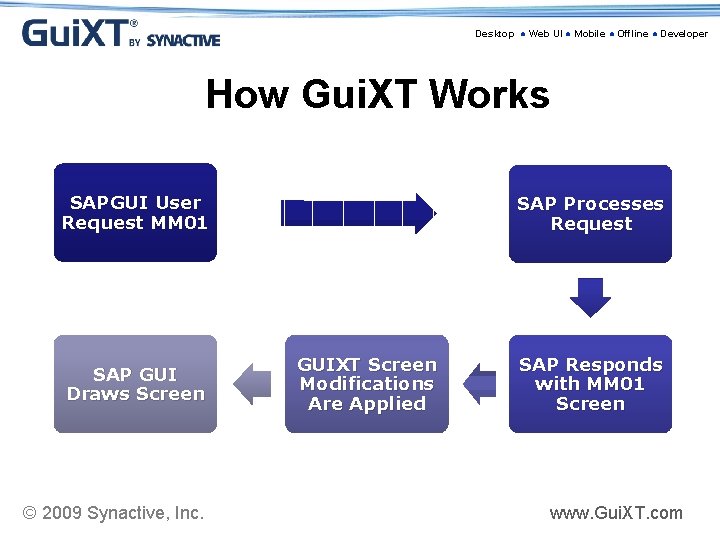
Desktop ● Web UI ● Mobile ● Offline ● Developer How Gui. XT Works SAPGUI User Request MM 01 SAP GUI Draws Screen © 2009 Synactive, Inc. SAP Processes Request GUIXT Screen Modifications Are Applied SAP Responds with MM 01 Screen www. Gui. XT. com
Desktop ● Web UI ● Mobile ● Offline ● Developer Donnell Kuchtyn • SAP PM/CS/SD Business Analyst/Configurer • Primary Liaison with the T & D Operations Division • Project Team member for original SAP implementation • North. Western Energy Employee for 27 years © 2009 Synactive, Inc. www. Gui. XT. com
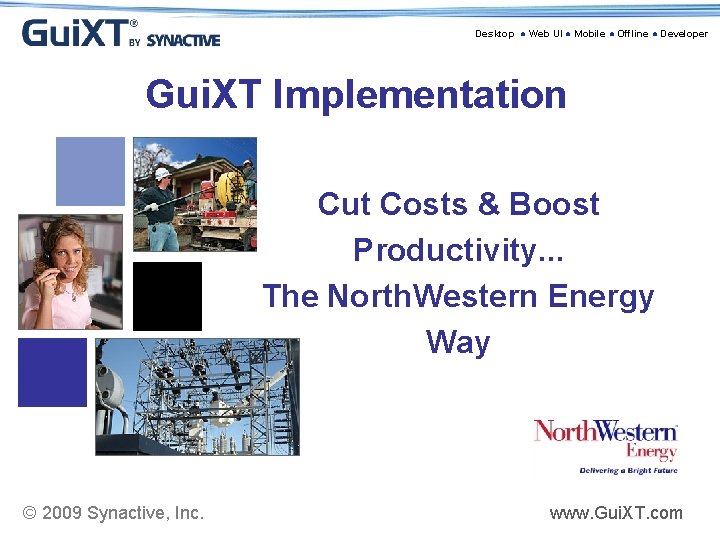
Desktop ● Web UI ● Mobile ● Offline ● Developer Gui. XT Implementation Cut Costs & Boost Productivity. . . The North. Western Energy Way © 2009 Synactive, Inc. www. Gui. XT. com
Desktop ● Web UI ● Mobile ● Offline ● Developer Talking Points: 1. 2. 3. 4. 5. 6. 7. 8. Background of Northwestern Energy SAP and Gui. XT Why Gui. XT? Let’s see some Gui. XT Results/Benefits Lessons Learned Suggestions Questions © 2009 Synactive, Inc. www. Gui. XT. com
Desktop ● Web UI ● Mobile ● Offline ● Developer About North. Western Energy (NWE) • Regional Electric & Gas Dist. & Trans. Utility • 400 K electric & 250 K natural gas customers in Montana, S. Dakota, Nebraska • Corp. Headquarters – Sioux Falls, SD • IT operations located primarily in Butte, MT • Montana operations previously know as The Montana Power Co. (MPC) until purchase by North. Western Corp. (NWE) in 2002. • MPC HQ has been in Butte since 1912. • Approx. 1, 300 employees © 2009 Synactive, Inc. www. Gui. XT. com
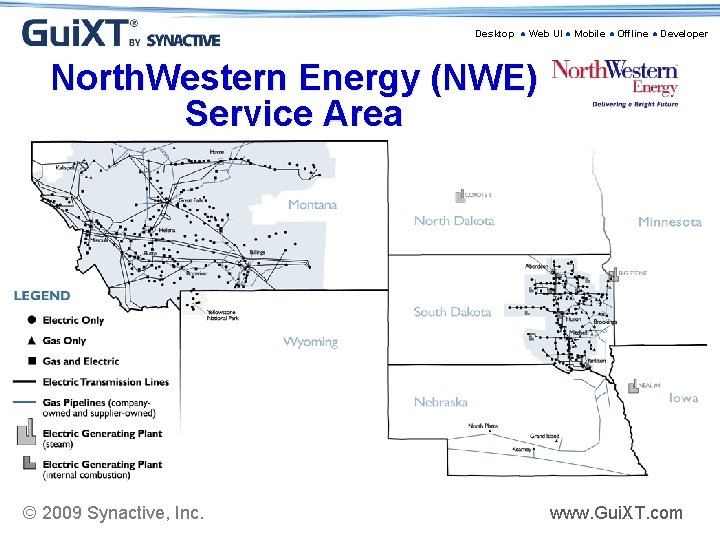
Desktop ● Web UI ● Mobile ● Offline ● Developer North. Western Energy (NWE) Service Area © 2009 Synactive, Inc. www. Gui. XT. com
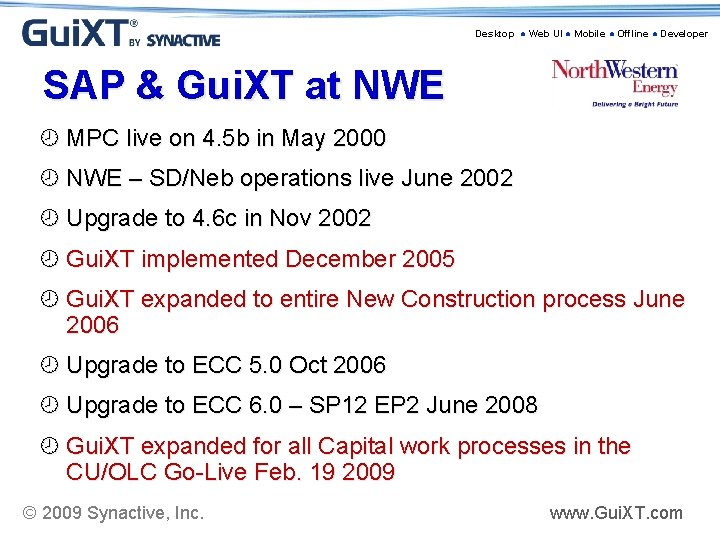
Desktop ● Web UI ● Mobile ● Offline ● Developer SAP & Gui. XT at NWE ¾ MPC live on 4. 5 b in May 2000 ¾ NWE – SD/Neb operations live June 2002 ¾ Upgrade to 4. 6 c in Nov 2002 ¾ Gui. XT implemented December 2005 ¾ Gui. XT expanded to entire New Construction process June 2006 ¾ Upgrade to ECC 5. 0 Oct 2006 ¾ Upgrade to ECC 6. 0 – SP 12 EP 2 June 2008 ¾ Gui. XT expanded for all Capital work processes in the CU/OLC Go-Live Feb. 19 2009 © 2009 Synactive, Inc. www. Gui. XT. com
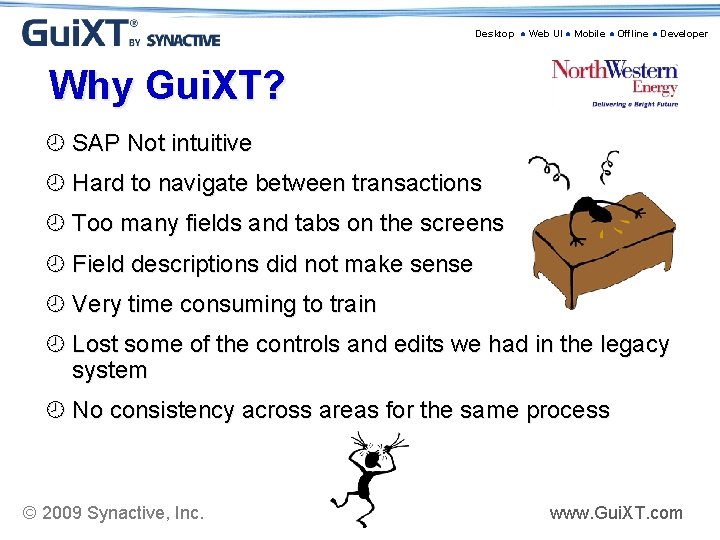
Desktop ● Web UI ● Mobile ● Offline ● Developer Why Gui. XT? ¾ SAP Not intuitive ¾ Hard to navigate between transactions ¾ Too many fields and tabs on the screens ¾ Field descriptions did not make sense ¾ Very time consuming to train ¾ Lost some of the controls and edits we had in the legacy system ¾ No consistency across areas for the same process © 2009 Synactive, Inc. www. Gui. XT. com
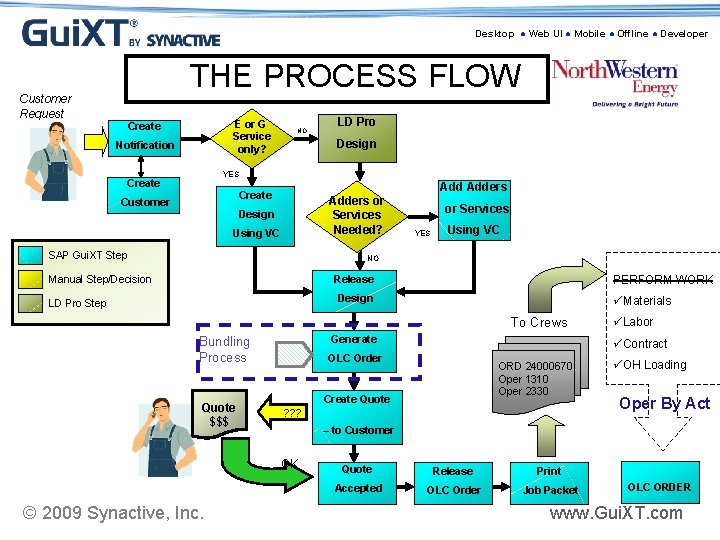
Desktop ● Web UI ● Mobile ● Offline ● Developer THE PROCESS FLOW Customer Request E or G Service only? Create Notification NO LD Pro Design YES Create Adders Create Customer Adders or Services Needed? Design Using VC SAP Gui. XT Step or Services YES Using VC NO Manual Step/Decision PERFORM WORK Release Design LD Pro Step üMaterials To Crews Generate Bundling Process Quote $$$ üContract OLC Order ORD 24000670 Oper 1310 Oper 2330 Create Quote ? ? ? üOH Loading Oper By Act – to Customer OK © 2009 Synactive, Inc. üLabor Quote Release Print Accepted OLC Order Job Packet OLC ORDER www. Gui. XT. com
Desktop ● Web UI ● Mobile ● Offline ● Developer Let’s see some Gui. XT ¾ Launch Pads » Scripting ¾ Screen Scrubbing » Standard screen vs. Gui. XT screen » Scripting ¾ Business Control » Edits within Gui. XT scripts ¾ Create Notification and Customer (screen cam) » Standard SAP » Gui. XT © 2009 Synactive, Inc. www. Gui. XT. com
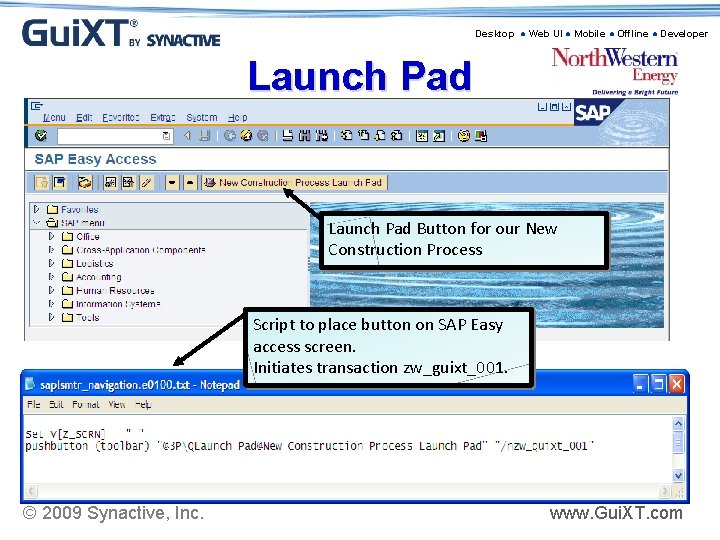
Desktop ● Web UI ● Mobile ● Offline ● Developer Launch Pad Button for our New Construction Process Script to place button on SAP Easy access screen. Initiates transaction zw_guixt_001. © 2009 Synactive, Inc. www. Gui. XT. com
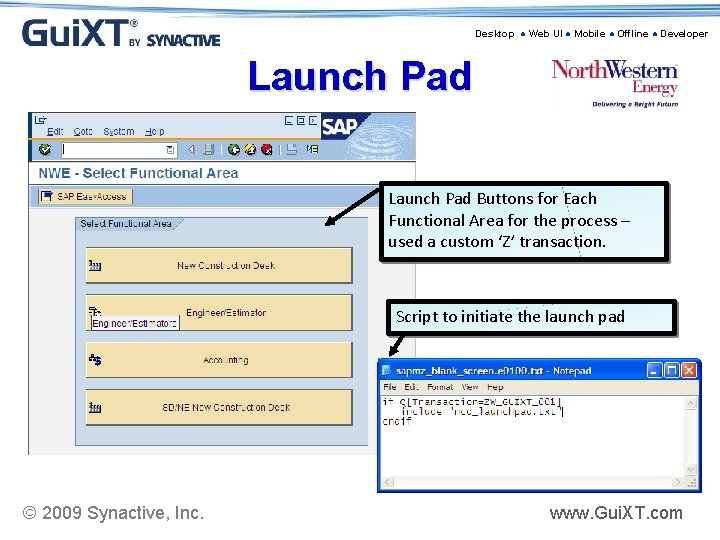
Desktop ● Web UI ● Mobile ● Offline ● Developer Launch Pad Buttons for Each Functional Area for the process – used a custom ‘Z’ transaction. Script to initiate the launch pad © 2009 Synactive, Inc. www. Gui. XT. com
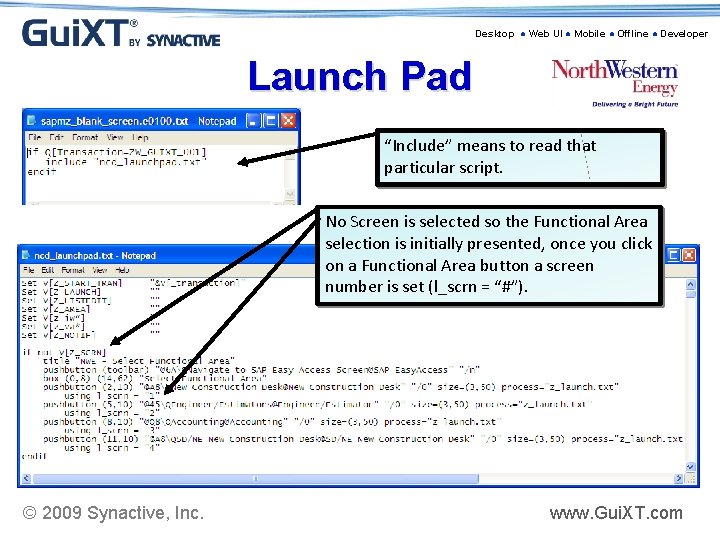
Desktop ● Web UI ● Mobile ● Offline ● Developer Launch Pad “Include” means to read that particular script. No Screen is selected so the Functional Area selection is initially presented, once you click on a Functional Area button a screen number is set (l_scrn = “#”). © 2009 Synactive, Inc. www. Gui. XT. com
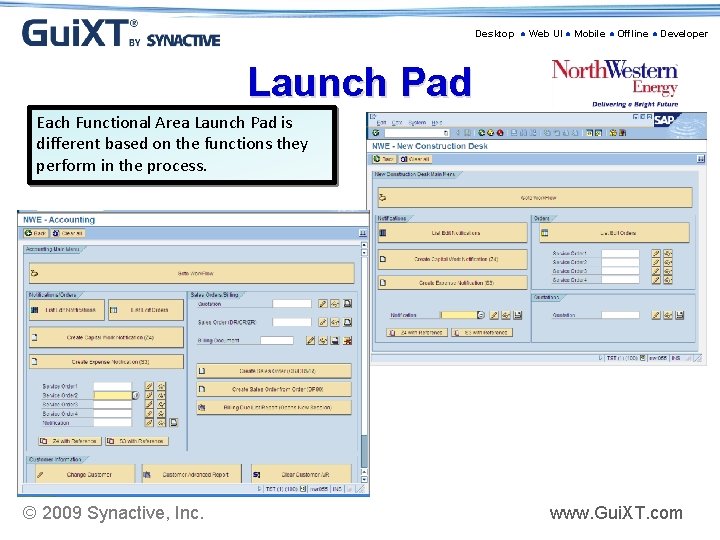
Desktop ● Web UI ● Mobile ● Offline ● Developer Launch Pad Each Functional Area Launch Pad is different based on the functions they perform in the process. © 2009 Synactive, Inc. www. Gui. XT. com
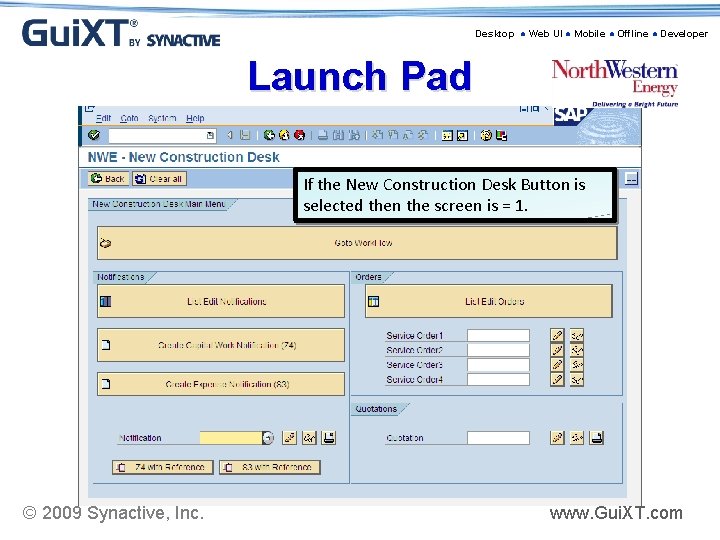
Desktop ● Web UI ● Mobile ● Offline ● Developer Launch Pad If the New Construction Desk Button is selected then the screen is = 1. © 2009 Synactive, Inc. www. Gui. XT. com
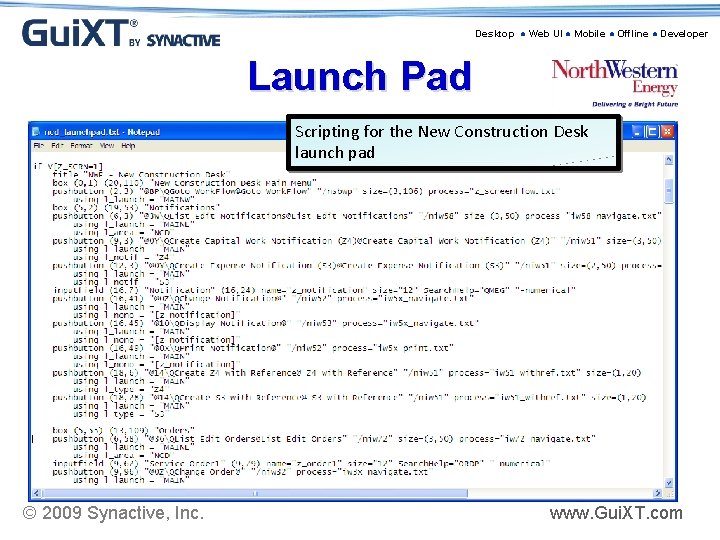
Desktop ● Web UI ● Mobile ● Offline ● Developer Launch Pad Scripting for the New Construction Desk launch pad © 2009 Synactive, Inc. www. Gui. XT. com
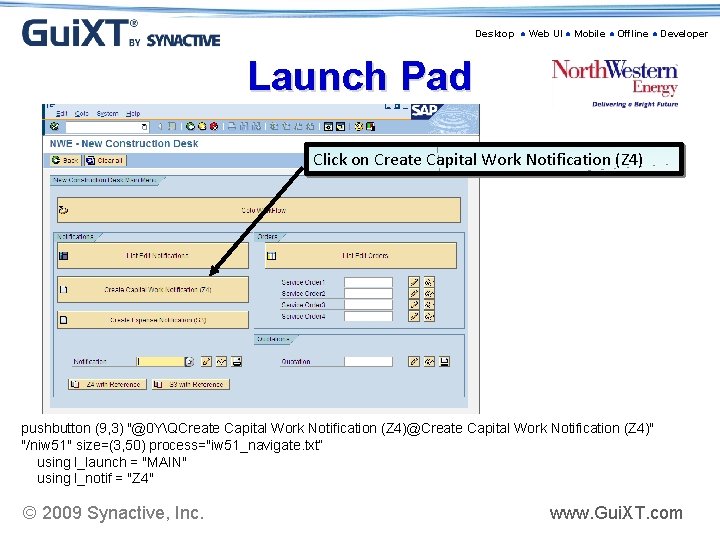
Desktop ● Web UI ● Mobile ● Offline ● Developer Launch Pad Click on Create Capital Work Notification (Z 4) pushbutton (9, 3) "@0 YQCreate Capital Work Notification (Z 4)@Create Capital Work Notification (Z 4)" "/niw 51" size=(3, 50) process="iw 51_navigate. txt“ using l_launch = "MAIN" using l_notif = "Z 4" © 2009 Synactive, Inc. www. Gui. XT. com
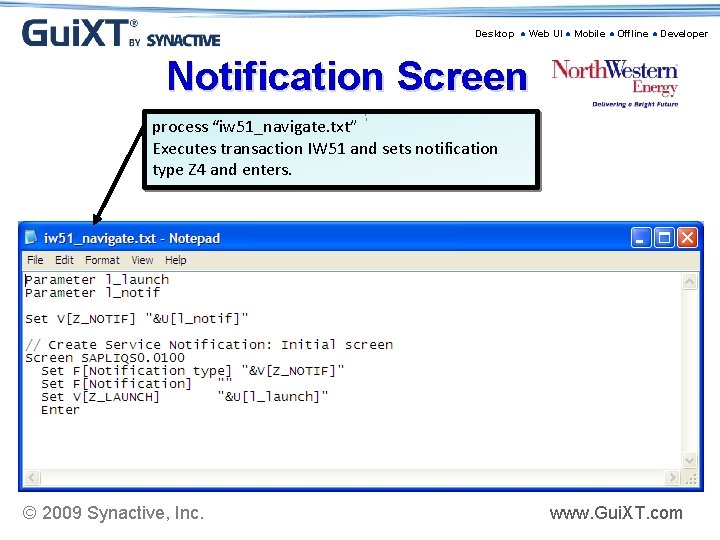
Desktop ● Web UI ● Mobile ● Offline ● Developer Notification Screen process “iw 51_navigate. txt” Executes transaction IW 51 and sets notification type Z 4 and enters. © 2009 Synactive, Inc. www. Gui. XT. com
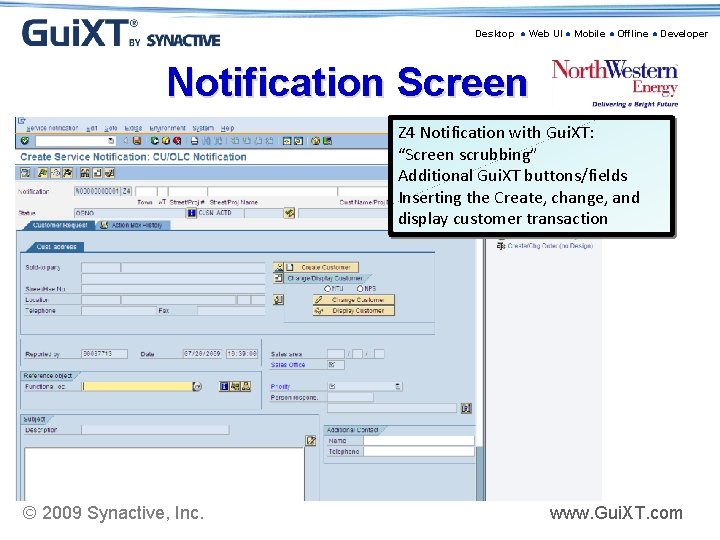
Desktop ● Web UI ● Mobile ● Offline ● Developer Notification Screen Z 4 Notification with Gui. XT: “Screen scrubbing” Additional Gui. XT buttons/fields Inserting the Create, change, and display customer transaction © 2009 Synactive, Inc. www. Gui. XT. com
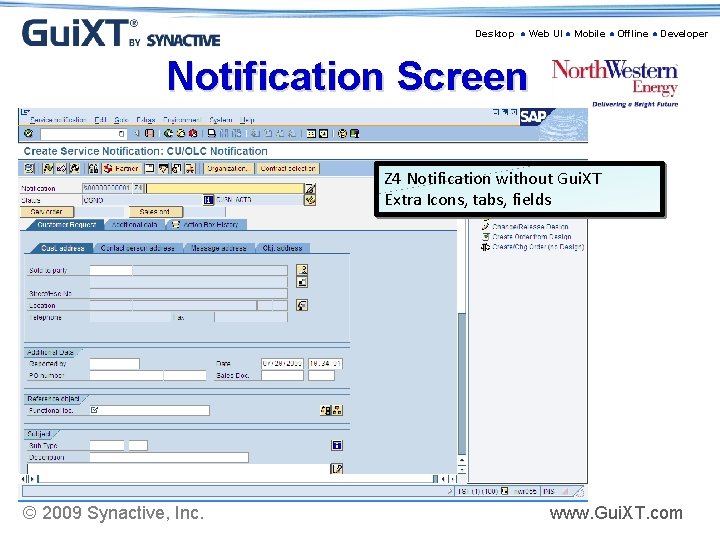
Desktop ● Web UI ● Mobile ● Offline ● Developer Notification Screen Z 4 Notification without Gui. XT Extra Icons, tabs, fields © 2009 Synactive, Inc. www. Gui. XT. com
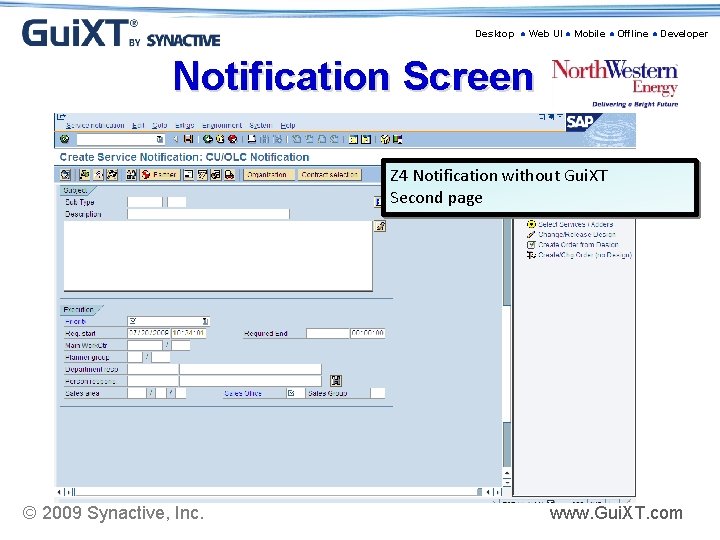
Desktop ● Web UI ● Mobile ● Offline ● Developer Notification Screen Z 4 Notification without Gui. XT Second page © 2009 Synactive, Inc. www. Gui. XT. com
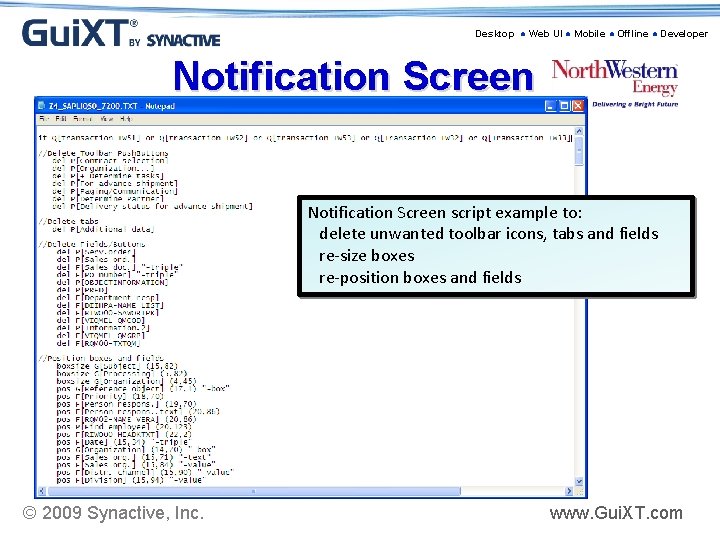
Desktop ● Web UI ● Mobile ● Offline ● Developer Notification Screen script example to: delete unwanted toolbar icons, tabs and fields re-size boxes re-position boxes and fields © 2009 Synactive, Inc. www. Gui. XT. com
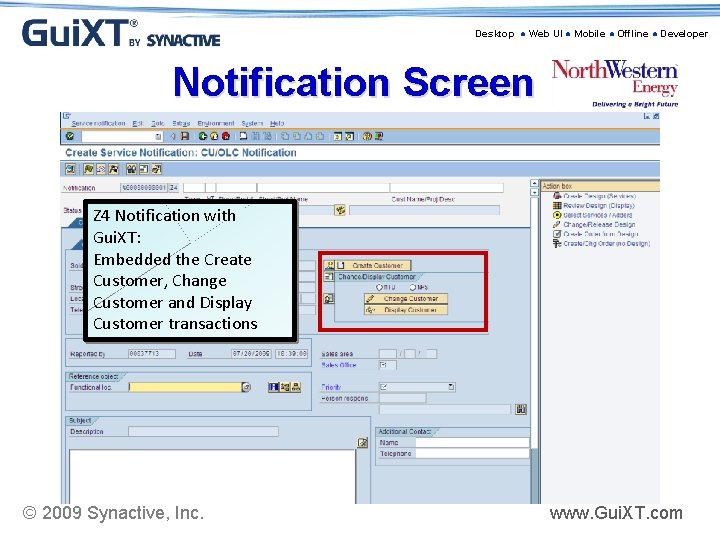
Desktop ● Web UI ● Mobile ● Offline ● Developer Notification Screen Z 4 Notification with Gui. XT: Embedded the Create Customer, Change Customer and Display Customer transactions © 2009 Synactive, Inc. www. Gui. XT. com
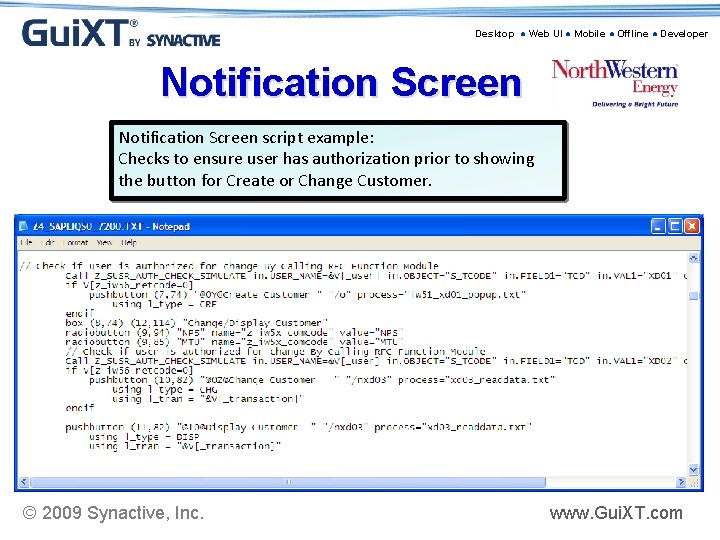
Desktop ● Web UI ● Mobile ● Offline ● Developer Notification Screen script example: Checks to ensure user has authorization prior to showing the button for Create or Change Customer. © 2009 Synactive, Inc. www. Gui. XT. com
Desktop ● Web UI ● Mobile ● Offline ● Developer Screen Cam ¾ Create Notification and Customer (screen cam) » Standard SAP » Gui. XT © 2009 Synactive, Inc. www. Gui. XT. com
Desktop ● Web UI ● Mobile ● Offline ● Developer Results Just from create notification transaction and embedding the create customer transaction: § § Decreased time from 7 ½ mins. to 4 mins. From 21 screens to 4 » Eliminated 21 navigation clicks § From 50 input fields to 42 » Defaulted 8 fields » Eliminated 9 fields not used » Organized fields in an intuitive order § § § 2 concurrent SAP sessions to only 1 In 2008 4, 900 customers created and 6, 190 notifications created Similar results achieved throughout entire notification through order completion process © 2009 Synactive, Inc. www. Gui. XT. com
Desktop ● Web UI ● Mobile ● Offline ● Developer Benefits ¾ Processes intuitive and easy to navigate » Embedded many processes and navigation between transactions with a “push of a button” ¾ Forces consistent process across organization » Auditable processes for business control ¾ Users only see fields/tabs they need to see » Data which is consistently applied is defaulted ¾ Users do not need to know transactions » Use of Launch pads and buttons ¾ Training new employees on the process is cut in half » From 6 hours to 2 hours for create notification/customer ¾ Screen changes in Upgrades are ‘invisible’ to users © 2009 Synactive, Inc. www. Gui. XT. com
Desktop ● Web UI ● Mobile ● Offline ● Developer Lessons Learned ¾ SAP upgrades » Virtually Seamless » Do Test - SAP changes field descriptions/Screens ♦ 4 field descriptions and 2 screens were changed by SAP in our last upgrade ♦ Synactive Tools make them easy to find/fix ¾ Make sure all transactions which initiate a screen are included in the script » Example: a notification can be executed from list edit or an order as well as the notification transactions. If you want all the ‘screen scrubbing’ to appear then those transactions should be included. ¾ Works best if business process analyst/configurer and ABAP persons know how to script » Easy to use, but may need ABAP assistance for more complex processes (to create custom transactions, function modules, etc) ¾ Users want more! © 2009 Synactive, Inc. www. Gui. XT. com
Desktop ● Web UI ● Mobile ● Offline ● Developer Suggestions for Roll-out ¾ Define Business process/specifications before you begin ¾ Start with just a few transactions that have big benefits » Preferably something you can build on ¾ Web repository is more efficient and offers better control ¾ Use Synactive Consultant on-site » Have a business process analyst/configurer and ABAP person with the consultant as they build the scripts ♦ Proved to be great knowledge transfer and speedy roll-out » Expertise and knowledge for troubleshooting ♦ They’ve seen it, done it and have direct contact with other Synactive folks if needed » Initial implementation literally only took 1 week to implement – money well spent!! © 2009 Synactive, Inc. www. Gui. XT. com
Desktop ● Web UI ● Mobile ● Offline ● Developer Shell Exploration “If we had implemented Gui. XT in 1998, it would have saved us millions in training. ” - John Le. Bas © 2009 Synactive, Inc. www. Gui. XT. com
Desktop ● Web UI ● Mobile ● Offline ● Developer Butler Supply “Our custom point-of-sale Cash Solution, developed in ABAP, would be unusable without Gui. XT. ” - Bill Immer © 2009 Synactive, Inc. www. Gui. XT. com
Desktop ● Web UI ● Mobile ● Offline ● Developer Louisville and Jefferson County Metropolitan Sewer District “I’ve never been so excited about software in my life” - Kathy Lynch © 2009 Synactive, Inc. www. Gui. XT. com
Desktop ● Web UI ● Mobile ● Offline ● Developer About Synactive • • • Founders Bundled since 1998 Certified by SAP Support Portal Full complement of Professional Services Enterprise functionality in use by >250, 000 end-users © 2009 Synactive, Inc. www. Gui. XT. com
Desktop ● Web UI ● Mobile ● Offline ● Developer 5 Points to Take-Away • Certified, Proven and Bundled with SAP ERP • A Super-Charger approach to make changes to the SAP interface • Minimal maintenance & avoids/minimizes problems with future SAP upgrades • SAP employees worldwide • NO losing support from SAP © 2009 Synactive, Inc. www. Gui. XT. com
Desktop ● Web UI ● Mobile ● Offline ● Developer Questions? © 2009 Synactive, Inc. www. Gui. XT. com
Desktop ● Web UI ● Mobile ● Offline ● Developer For More Information: Synactive, Inc. www. Gui. XT. com Tel. +1 -650 -341 -3310 rfi@guixt. com Survey at the end of the meeting © 2009 Synactive, Inc. www. Gui. XT. com
- Slides: 43