
Desktop Web UI Mobile Offline Developer Gui XT

Desktop ● Web UI ● Mobile ● Offline ● Developer Gui. XT We will be starting the webinar at 10: 00 AM (PST). Presenters Matt Tesvich – Global ABAP Lead Aparna Desai – SE Manager © 2009 Synactive, Inc. www. Gui. XT. com
Desktop ● Web UI ● Mobile ● Offline ● Developer Complement your ABAP Skills… • Are you overwhelmed with management’s requests to add functionality and create new reports in SAP? • Do you have a lot of usability improvement projects on your plate? • Are your users resistant to SAP system because of the complexity of the screens? • Are efficiency and productivity affected? © 2009 Synactive, Inc. www. Gui. XT. com
Desktop ● Web UI ● Mobile ● Offline ● Developer Gui. XT® Solution • A scripting technology—bundled with SAP ERP (SAP GUI) versions & certified by SAP for Net. Weaver. • Minimize backend code changes • Do it faster with fewer resources • Less risk—NO modifications to SAP programs or dynpros, and easily upgradeable to new SAP releases. • Leverage—take full advantage of the SAP functionality • Maximize your SAP ERP! Automate all your transactions with one solution. © 2009 Synactive, Inc. www. Gui. XT. com
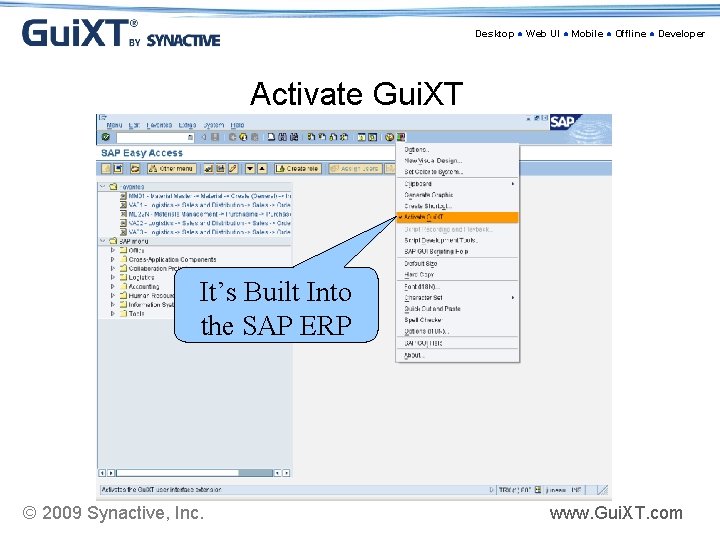
Desktop ● Web UI ● Mobile ● Offline ● Developer Activate Gui. XT It’s Built Into the SAP ERP © 2009 Synactive, Inc. www. Gui. XT. com
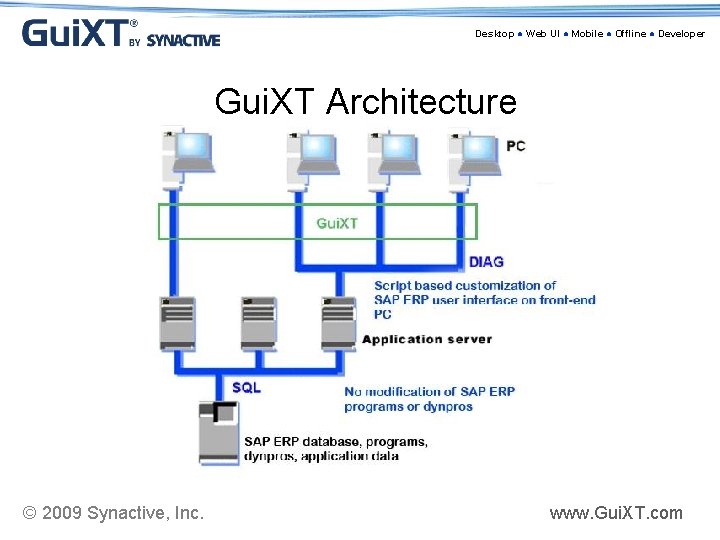
Desktop ● Web UI ● Mobile ● Offline ● Developer Gui. XT Architecture © 2009 Synactive, Inc. www. Gui. XT. com
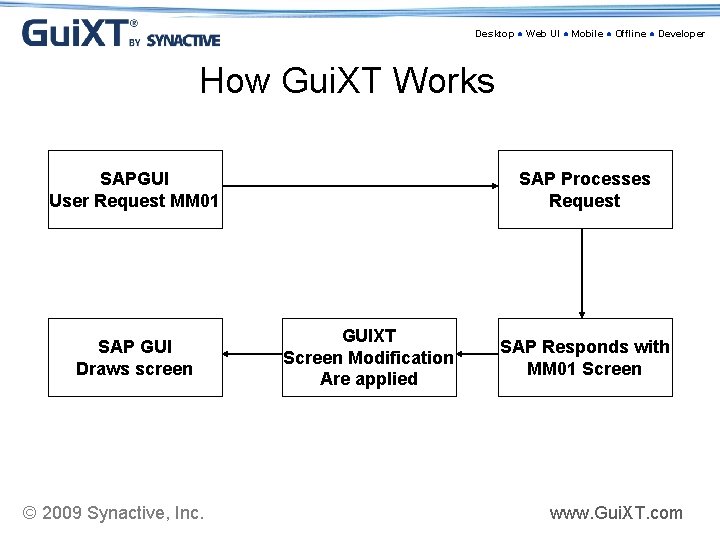
Desktop ● Web UI ● Mobile ● Offline ● Developer How Gui. XT Works SAPGUI User Request MM 01 SAP GUI Draws screen © 2009 Synactive, Inc. SAP Processes Request GUIXT Screen Modification Are applied SAP Responds with MM 01 Screen www. Gui. XT. com
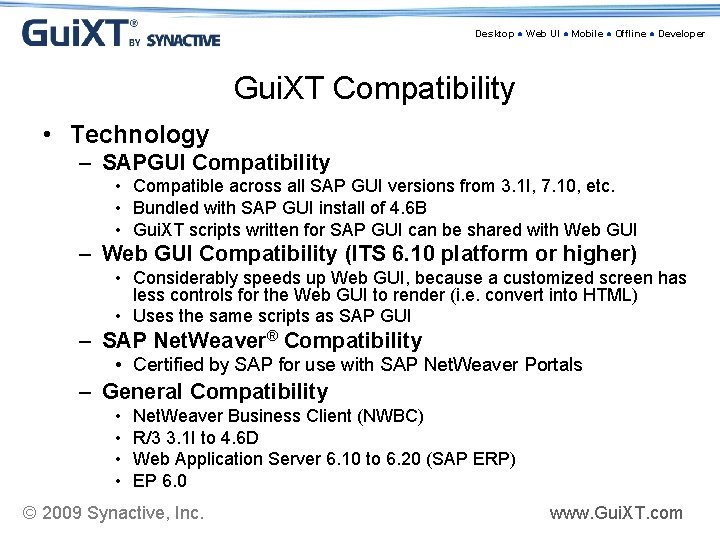
Desktop ● Web UI ● Mobile ● Offline ● Developer Gui. XT Compatibility • Technology – SAPGUI Compatibility • Compatible across all SAP GUI versions from 3. 1 I, 7. 10, etc. • Bundled with SAP GUI install of 4. 6 B • Gui. XT scripts written for SAP GUI can be shared with Web GUI – Web GUI Compatibility (ITS 6. 10 platform or higher) • Considerably speeds up Web GUI, because a customized screen has less controls for the Web GUI to render (i. e. convert into HTML) • Uses the same scripts as SAP GUI – SAP Net. Weaver® Compatibility • Certified by SAP for use with SAP Net. Weaver Portals – General Compatibility • • Net. Weaver Business Client (NWBC) R/3 3. 1 I to 4. 6 D Web Application Server 6. 10 to 6. 20 (SAP ERP) EP 6. 0 © 2009 Synactive, Inc. www. Gui. XT. com
Desktop ● Web UI ● Mobile ● Offline ● Developer Matt Tesvich • Over 12 years of IT Experience • Worked at CIBA VISION since 2000 • Worked on CIBA's SAP implementation since the start of project in 2004 • Global ABAP Lead for 2. 5 years • MBA - Finance in May 2007 from Georgia State University © 2009 Synactive, Inc. www. Gui. XT. com
Desktop ● Web UI ● Mobile ● Offline ● Developer ABAP • Advancing technology on ABAP workbench • ABAP is constantly evolving; better object oriented coding in the ECC 6. 0 version • Estimated 2. 5 M ABAP objects in new version of SAP • New version of Debugger • Newly built Net. Weaver PI (process integration) functionality also uses ABAP technology © 2009 Synactive, Inc. www. Gui. XT. com
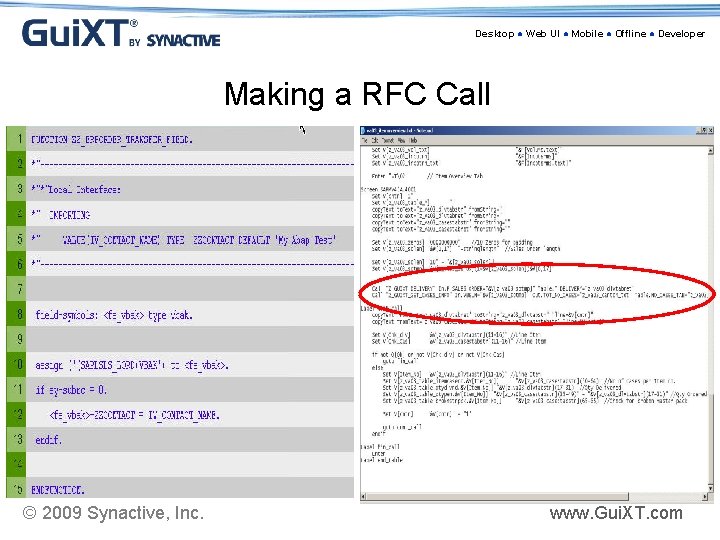
Desktop ● Web UI ● Mobile ● Offline ● Developer Making a RFC Call © 2009 Synactive, Inc. www. Gui. XT. com
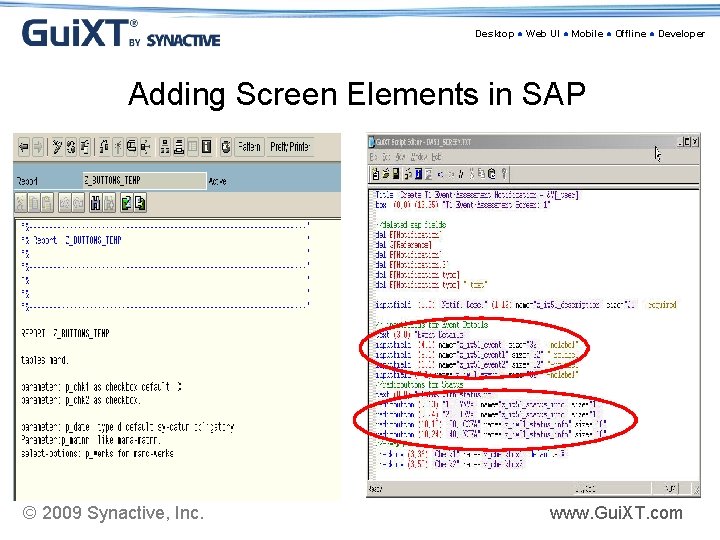
Desktop ● Web UI ● Mobile ● Offline ● Developer Adding Screen Elements in SAP © 2009 Synactive, Inc. www. Gui. XT. com
Desktop ● Web UI ● Mobile ● Offline ● Developer About CIBA VISION • With worldwide headquarters in Atlanta, CIBA VISION develops and manufactures contact lenses and lens care products to meet people’s evolving lifestyles. • Key products: – AIR OPTIX™ family of highly breathable lenses – DAILIES® family of daily disposable lenses – Fresh. Look® color contact lenses – Highly effective lens care products for comfort, performance and convenience © 2009 Synactive, Inc. www. Gui. XT. com
Desktop ● Web UI ● Mobile ● Offline ● Developer Why we chose Gui. XT? • • • Every second on an order adds significant cost Needed to speed up standard SAP Order process Decided against a complete rewrite of MV 45 A Avoids core mods and allows future SAP upgrades CIBA team members had used Gui. XT successfully in many prior projects • Saved large consulting fees, easy maintenance • Clean & Concise solution integrated into SAP © 2009 Synactive, Inc. www. Gui. XT. com
Desktop ● Web UI ● Mobile ● Offline ● Developer CIBA VISION using Gui. XT in Dev in late 2004 • Synactive did initial Gui. XT training • 1. 5 CIBA Developers started effort • Also using Synactive’s Desktop Suite (Input. Assistant) • Finished 1 st version in early 2005 & went live • Used Synactive consultant for 2 weeks to help review scripts pre-Go Live • Currently have over 100 scripts • Very stable & efficient © 2009 Synactive, Inc. www. Gui. XT. com
Desktop ● Web UI ● Mobile ● Offline ● Developer Current SAP Version Unicode version of SAP 4. 7 Before & After Pictures Order Entry Overview screen (SAPMV 45 A 4001) © 2009 Synactive, Inc. www. Gui. XT. com
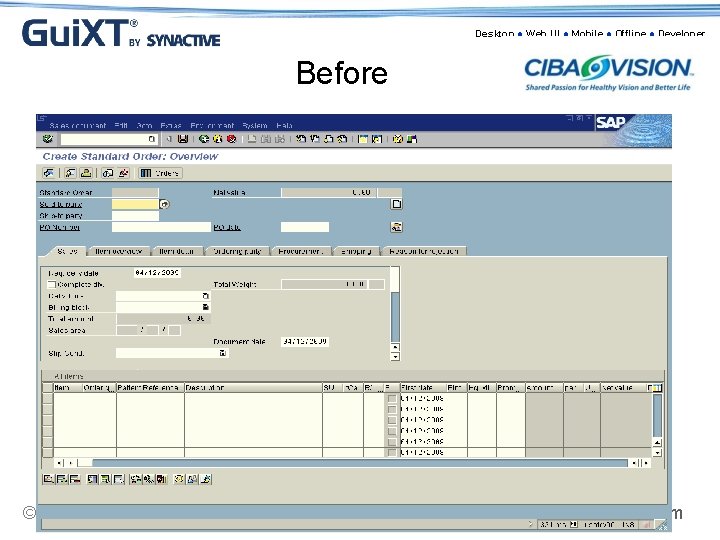
Desktop ● Web UI ● Mobile ● Offline ● Developer Before © 2009 Synactive, Inc. www. Gui. XT. com
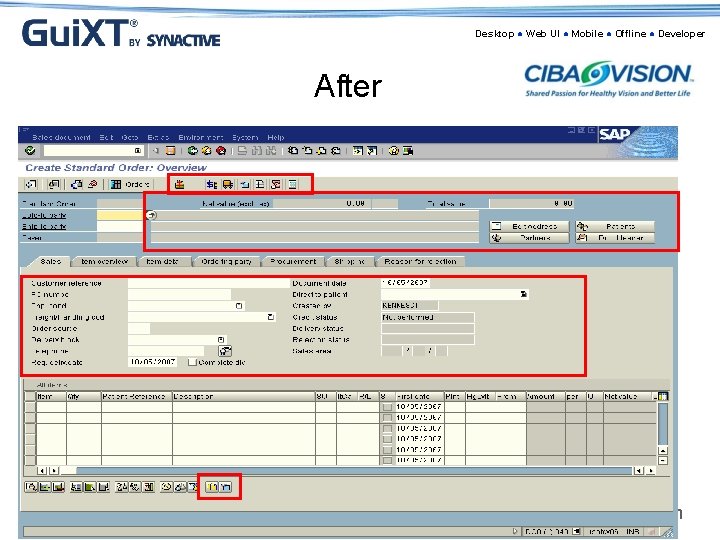
Desktop ● Web UI ● Mobile ● Offline ● Developer After © 2009 Synactive, Inc. www. Gui. XT. com
Desktop ● Web UI ● Mobile ● Offline ● Developer Header Tabs • 95% of fields in Order Entry are in Overview Screen and this “Header Add” tab • “Header Add” is built from the Header – Sales tab, but includes fields from 5 separate tabs • Payment Method field comes from Accounting Tab • Provides extremely efficient order tab • Will show before and after of Header Tabs © 2009 Synactive, Inc. www. Gui. XT. com
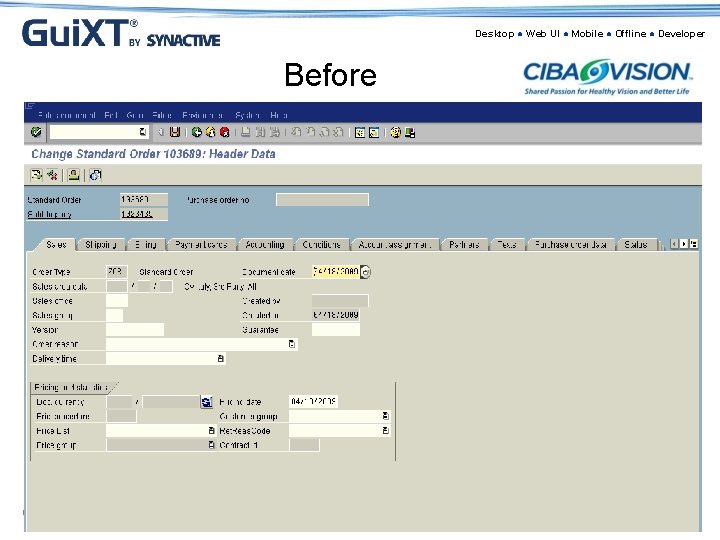
Desktop ● Web UI ● Mobile ● Offline ● Developer Before © 2009 Synactive, Inc. www. Gui. XT. com
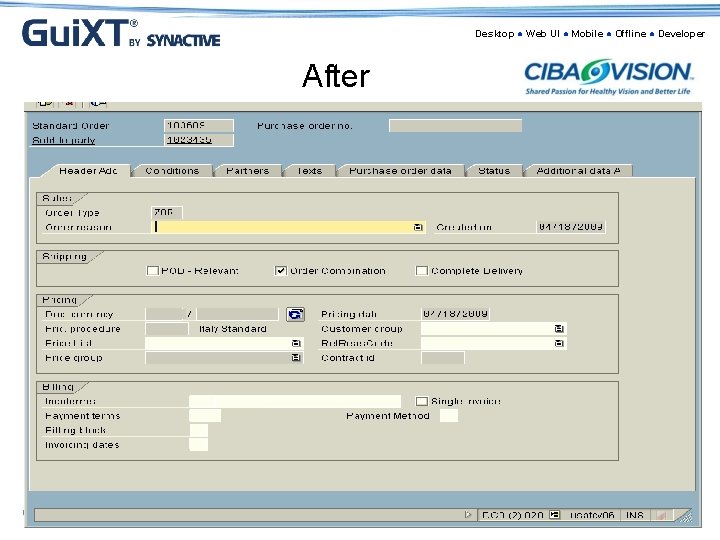
Desktop ● Web UI ● Mobile ● Offline ● Developer After © 2009 Synactive, Inc. www. Gui. XT. com
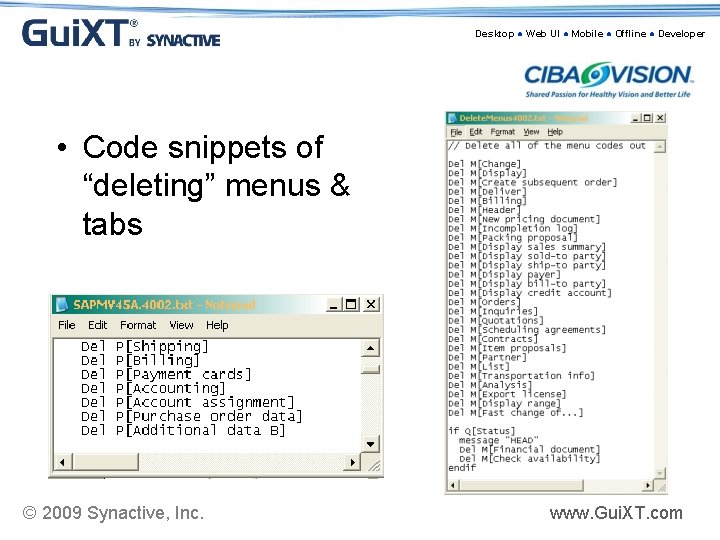
Desktop ● Web UI ● Mobile ● Offline ● Developer • Code snippets of “deleting” menus & tabs © 2009 Synactive, Inc. www. Gui. XT. com
Desktop ● Web UI ● Mobile ● Offline ● Developer Advanced Topics • Gui. XT & SAP ABAP operate in separate memory spaces – therefore internal tables in ABAP are not available in Gui. XT • Example on using function calls from Gui. XT • Needed custom ABAP function for the SAP side, and then the call from an IA script • Ties into ABAP via function call to update customer master address © 2009 Synactive, Inc. www. Gui. XT. com
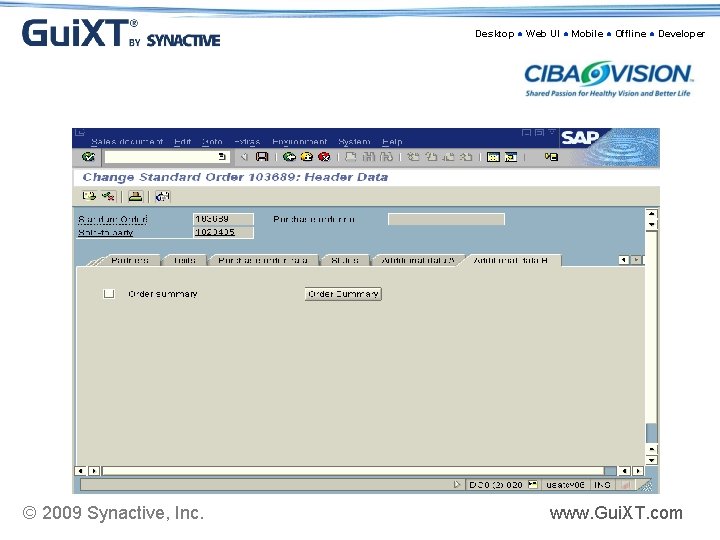
Desktop ● Web UI ● Mobile ● Offline ● Developer Advanced Topics • We built ABAP enhancements that are called via Order Entry • IA scripts are triggered via buttons which go to the Additional Data B screen exit (Hdr Data) • This gives us fastest performance, and access to copy control routines • Visual display of the Additional Data B (which is invisible to the users) • Switch tabs simply in the IA scripts as follows: Screen SAPMV 45 A. 4002 Enter "=T5" © 2009 Synactive, Inc. www. Gui. XT. com
Desktop ● Web UI ● Mobile ● Offline ● Developer © 2009 Synactive, Inc. www. Gui. XT. com
Desktop ● Web UI ● Mobile ● Offline ● Developer Common Usage of Gui. XT • Enhancement to SAP user interface • Simplify the SAP screens by hiding unwanted screen elements • Creating Launch-pad/Transactions • Restricting user input by setting defaults to input fields or radio buttons • Creating different UI for different group of users for the same transaction • Consolidation of data entry points/fields from multiple tabs • Combining multiple business related transactions into one seamless process © 2009 Synactive, Inc. www. Gui. XT. com
Desktop ● Web UI ● Mobile ● Offline ● Developer Common Usage of ABAP • • Adding New Functionalities Adding more fields and data points Create/Modify Reports Create Work-Flows Create Function Modules (RFC) Modifying ALV Grids User exits, Idocs, Forms © 2009 Synactive, Inc. www. Gui. XT. com
Desktop ● Web UI ● Mobile ● Offline ● Developer Gui. XT Suite of Solutions • • • Gui. XT Desktop Suite Gui. XT Web UI Suite Gui. XT Offline Suite Gui. XT Mobile Suite Gui. XT Developer Suite © 2009 Synactive, Inc. www. Gui. XT. com
Desktop ● Web UI ● Mobile ● Offline ● Developer Gui. XT Functionality • Combining screen elements from multiple tabs/transactions onto one simplified screen • Flexibility in extending all SAP GUI screens to portal and mobile • Batch data processing from/to MS Excel or flat file • Enables you to integrate rtf and html files in SAP Gui screens • Centralized mechanism to deploy Gui. XT to named users without updating client PC’s • Access SAP transactions anytime and anywhere © 2009 Synactive, Inc. www. Gui. XT. com
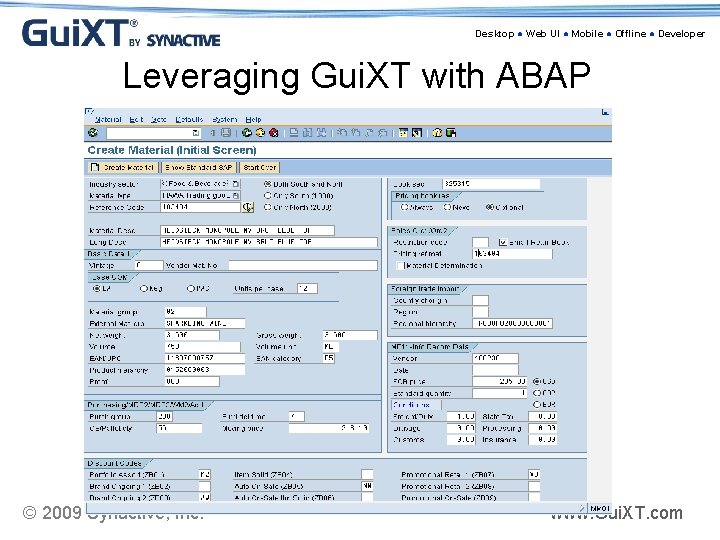
Desktop ● Web UI ● Mobile ● Offline ● Developer Leveraging Gui. XT with ABAP © 2009 Synactive, Inc. www. Gui. XT. com
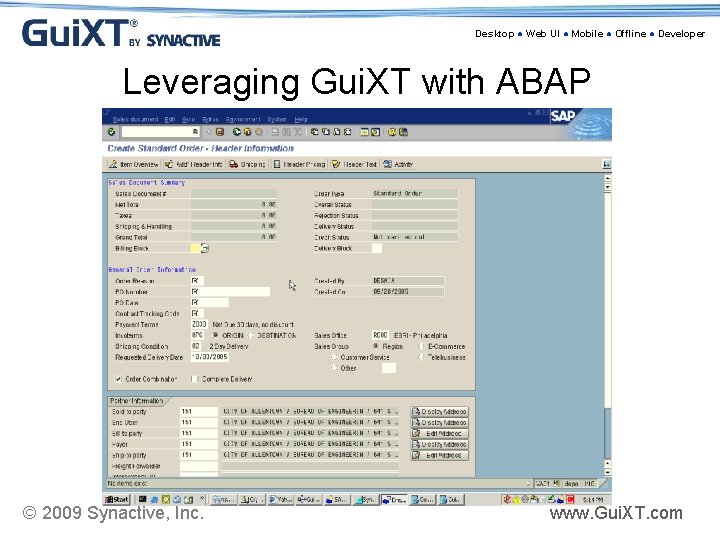
Desktop ● Web UI ● Mobile ● Offline ● Developer Leveraging Gui. XT with ABAP © 2009 Synactive, Inc. www. Gui. XT. com
Desktop ● Web UI ● Mobile ● Offline ● Developer Gui. XT Developer Suite A fast, easy, and flexible way to make changes to the SAP interface instead of modifying the SAP back-end by: Ø Speeding up the development process by utilizing a WYSIWYG editor tool for Gui. XT that makes changes via the computer mouse instead of manually writing the Gui. XT scripts Ø Helping to organize Gui. XT scripts that are generated throughout a project in case you have large amounts of Gui. XT code. It can also scan your Gui. XT scripts to detect any errors in your code © 2009 Synactive, Inc. www. Gui. XT. com
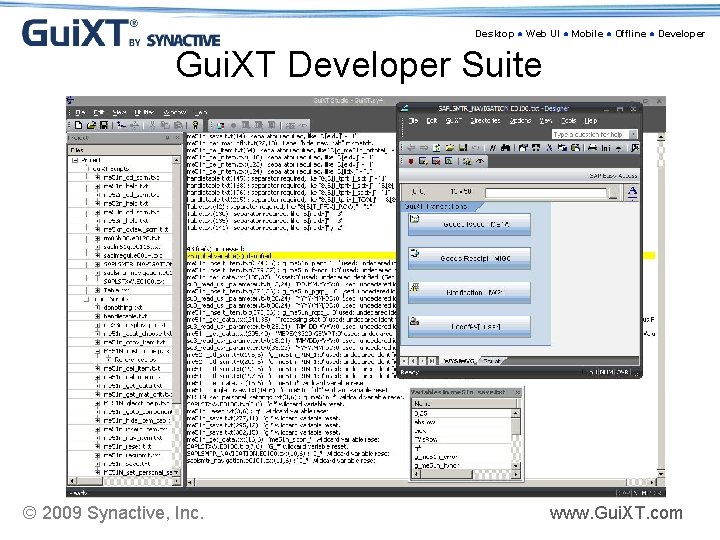
Desktop ● Web UI ● Mobile ● Offline ● Developer Gui. XT Developer Suite © 2009 Synactive, Inc. www. Gui. XT. com
Desktop ● Web UI ● Mobile ● Offline ● Developer Benefits of Developer Suite • Automatically generates Gui. XT scripts by using WYSIWYG tool; spend less time in development phase • By using radio buttons you can restrict the user selection • Clarify the SAP screens by hiding unwanted screen elements • Linking an external application to an image helps user to open it from the same user interface (e. g; help document) • Scans Gui. XT scripts to detect errors that typically go unnoticed • Creates an organized project structure that is visually easier to work with; improve script quality © 2009 Synactive, Inc. www. Gui. XT. com
Desktop ● Web UI ● Mobile ● Offline ● Developer UI Simplification Demo • Using developer suite © 2009 Synactive, Inc. www. Gui. XT. com
Desktop ● Web UI ● Mobile ● Offline ● Developer Selective Deployment: Create Specific User Interface • Dynamically display screens based on a user’s SAP Role or SAP profile • Display different screens based on work profile Examples: Ø Planner and Plant Engineers get different screens than an Electrician working on a plant floor Ø Plant in Arlington uses a different business process than Plant in Richmond Ø Restrict data view for certain users Ø If Q[Role=XYZ] ……. endif © 2009 Synactive, Inc. www. Gui. XT. com
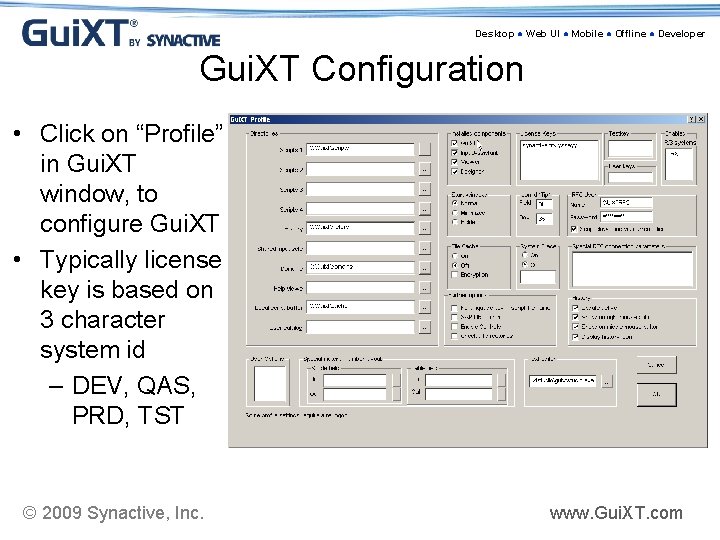
Desktop ● Web UI ● Mobile ● Offline ● Developer Gui. XT Configuration • Click on “Profile” in Gui. XT window, to configure Gui. XT • Typically license key is based on 3 character system id – DEV, QAS, PRD, TST © 2009 Synactive, Inc. www. Gui. XT. com
Desktop ● Web UI ● Mobile ● Offline ● Developer Scripts Deployment • Options for Script Storage: Ø SAP Web Repository (SMW 0) (Recommended) (Integrated with SAP; uses SAP transport mechanism) Ø Network Server/File Share Ø FTP/HTTP Server Ø Local Machine (Developers) © 2009 Synactive, Inc. www. Gui. XT. com
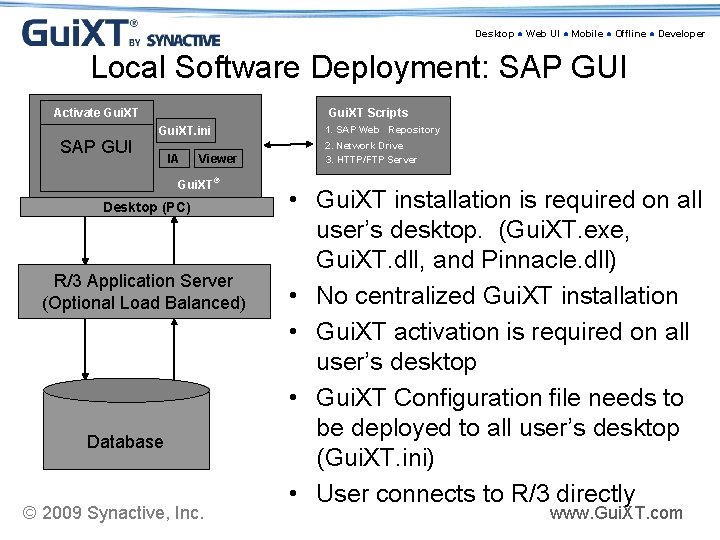
Desktop ● Web UI ● Mobile ● Offline ● Developer Local Software Deployment: SAP GUI Activate Gui. XT SAP GUI Gui. XT Scripts Gui. XT. ini IA Viewer Gui. XT® Desktop (PC) R/3 Application Server (Optional Load Balanced) Database © 2009 Synactive, Inc. 1. SAP Web Repository 2. Network Drive 3. HTTP/FTP Server • Gui. XT installation is required on all user’s desktop. (Gui. XT. exe, Gui. XT. dll, and Pinnacle. dll) • No centralized Gui. XT installation • Gui. XT activation is required on all user’s desktop • Gui. XT Configuration file needs to be deployed to all user’s desktop (Gui. XT. ini) • User connects to R/3 directly www. Gui. XT. com
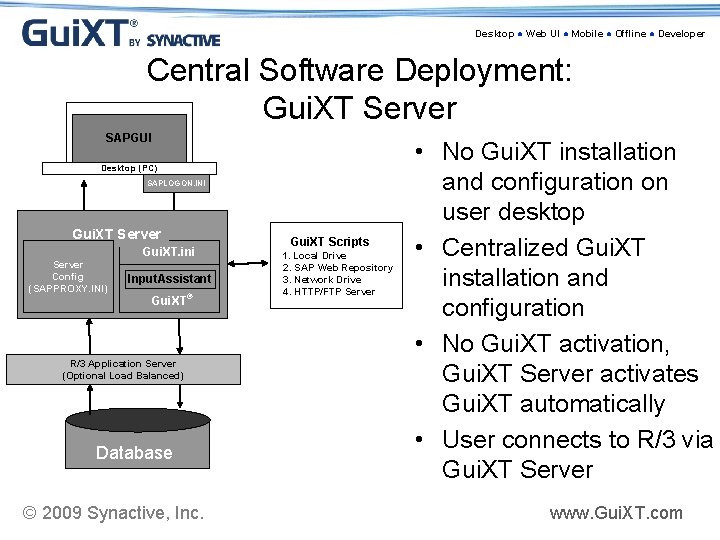
Desktop ● Web UI ● Mobile ● Offline ● Developer Central Software Deployment: Gui. XT Server SAPGUI Desktop (PC) SAPLOGON. INI Gui. XT Server Config (SAPPROXY. INI) Gui. XT. ini Input. Assistant Gui. XT® R/3 Application Server (Optional Load Balanced) Database © 2009 Synactive, Inc. Gui. XT Scripts 1. Local Drive 2. SAP Web Repository 3. Network Drive 4. HTTP/FTP Server • No Gui. XT installation and configuration on user desktop • Centralized Gui. XT installation and configuration • No Gui. XT activation, Gui. XT Server activates Gui. XT automatically • User connects to R/3 via Gui. XT Server www. Gui. XT. com
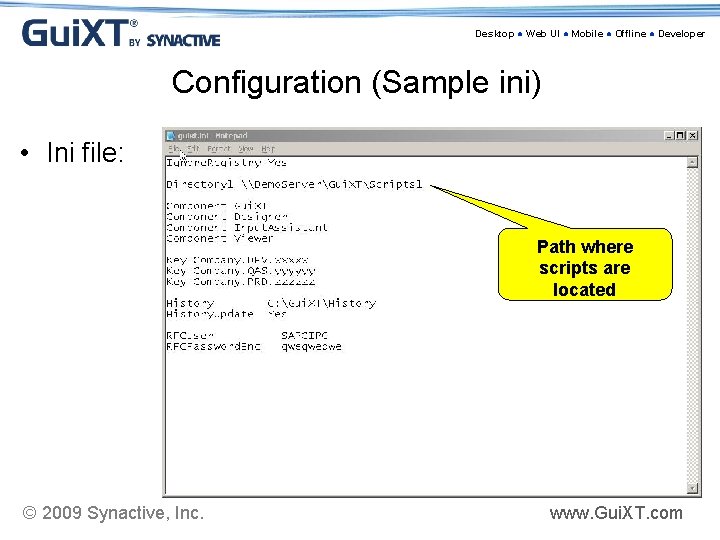
Desktop ● Web UI ● Mobile ● Offline ● Developer Configuration (Sample ini) • Ini file: Path where scripts are located © 2009 Synactive, Inc. www. Gui. XT. com
Desktop ● Web UI ● Mobile ● Offline ● Developer About Synactive • Founded by Dr. Gerhard Rodé and Thomas Ewe in 1998. • Core runtime bundled with SAP AG since 1998 SAP (4. 6 B) initiative • Certified by SAP in SAP GUI & Net. Weaver Portals • Supported in the SAP Support Portal • Full complement of Professional Services • Enterprise functionality in use by >250, 000 end-users © 2009 Synactive, Inc. www. Gui. XT. com
Desktop ● Web UI ● Mobile ● Offline ● Developer Who has implemented Gui. XT? © 2009 Synactive, Inc. www. Gui. XT. com
Desktop ● Web UI ● Mobile ● Offline ● Developer 7 Points to Take-Away • Speed - development and deployment • The Power of SAP ERP with the ease of using Gui. XT scripting language • Proven and bundled with SAP ERP • Requires minimal maintenance and avoids/minimizes problems with future SAP upgrades • A Super-Charger approach to make changes to the SAP interface since it only consist of 55 - 60 commands. • Voice-of-customer research shows that ABAPer’s with Gui. XT skills are invaluable assets to their employers! • NO hardcode changes; so no losing support from SAP © 2009 Synactive, Inc. www. Gui. XT. com
Desktop ● Web UI ● Mobile ● Offline ● Developer FAQ • • • Does Gui. XT cause any performance problems? Will Gui. XT interact properly with our user exits, validations and security? What are the upgrade issues? How do we fix Gui. XT scripts and what is the impact on users/processes? How big is the footprint for Gui. XT? Is there a Certification process for the developers? © 2009 Synactive, Inc. www. Gui. XT. com
Desktop ● Web UI ● Mobile ● Offline ● Developer Next Steps 1. Download test version of Designer 2. Attend free training in May 3. Partnering opportunities © 2009 Synactive, Inc. www. Gui. XT. com
Desktop ● Web UI ● Mobile ● Offline ● Developer Download Gui. XT & Designer • Download the free trial of Designer: • http: //updates. guixt. com/abapwebinar/guixtsetup. exe • http: //updates. guixt. com/abapwebinar/designersetup. exe – Username: abap – Password: guixt © 2009 Synactive, Inc. www. Gui. XT. com
Desktop ● Web UI ● Mobile ● Offline ● Developer Gui. XT Training • • 2 hour online developer training Thursday, May 7 th Basics of Gui. XT - Utilizing free functionality Enroll by answering the survey questions at the end of the webinar • Send email to rfi@guixt. com with subject line “ 2 hr training” © 2009 Synactive, Inc. www. Gui. XT. com
Desktop ● Web UI ● Mobile ● Offline ● Developer Partnering Opportunities For more information contact: Mark Hornor Business Development Executive Americas Email: mark. hornor@guixt. com or partners@guixt. com Tel: 650 -341 -3310 x 136 © 2009 Synactive, Inc. www. Gui. XT. com
Desktop ● Web UI ● Mobile ● Offline ● Developer For More Information: Synactive, Inc. www. Gui. XT. com Tel. +1 -650 -341 -3310 rfi@guixt. com © 2009 Synactive, Inc. www. Gui. XT. com
Desktop ● Web UI ● Mobile ● Offline ● Developer Gui. XT: SAP Your Way… Questions & Answers © 2009 Synactive, Inc. www. Gui. XT. com
- Slides: 50