
Desktop Publication Operator DTPO CTS Sl No 1
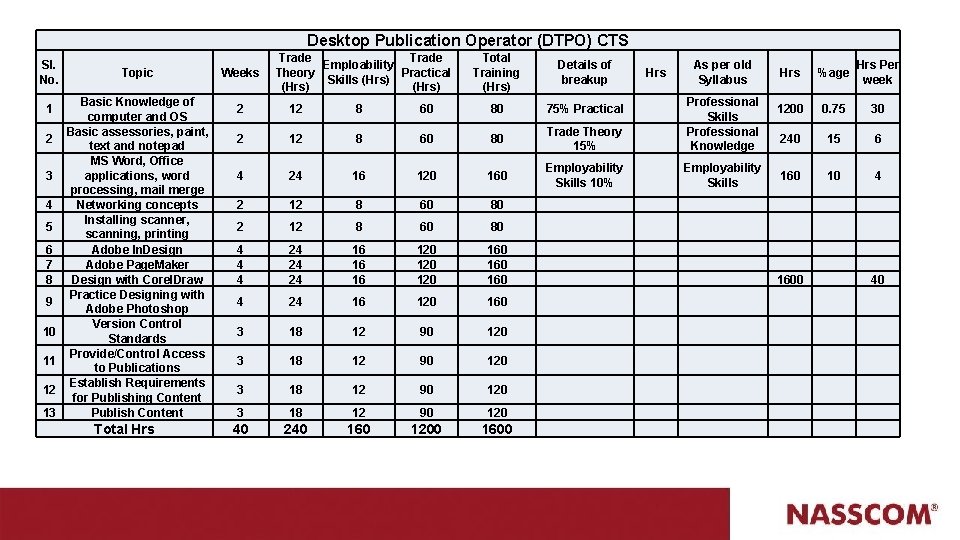
Desktop Publication Operator (DTPO) CTS Sl. No. 1 2 3 4 5 6 7 8 9 10 11 12 13 Topic Basic Knowledge of computer and OS Basic assessories, paint, text and notepad MS Word, Office applications, word processing, mail merge Networking concepts Installing scanner, scanning, printing Adobe In. Design Adobe Page. Maker Design with Corel. Draw Practice Designing with Adobe Photoshop Version Control Standards Provide/Control Access to Publications Establish Requirements for Publishing Content Publish Content Total Hrs Weeks Trade Emploability Theory Practical Skills (Hrs) Total Training (Hrs) Details of breakup Hrs As per old Syllabus 2 12 8 60 80 75% Practical 2 12 8 60 80 Trade Theory 15% Professional Skills Professional Knowledge 4 24 16 120 160 Employability Skills 10% Employability Skills 2 12 8 60 80 4 4 4 24 24 24 16 16 16 120 120 160 160 4 24 16 120 160 3 18 12 90 120 40 240 160 1200 1600 Hrs %age Hrs Per week 1200 0. 75 30 240 15 6 160 10 4 1600 40
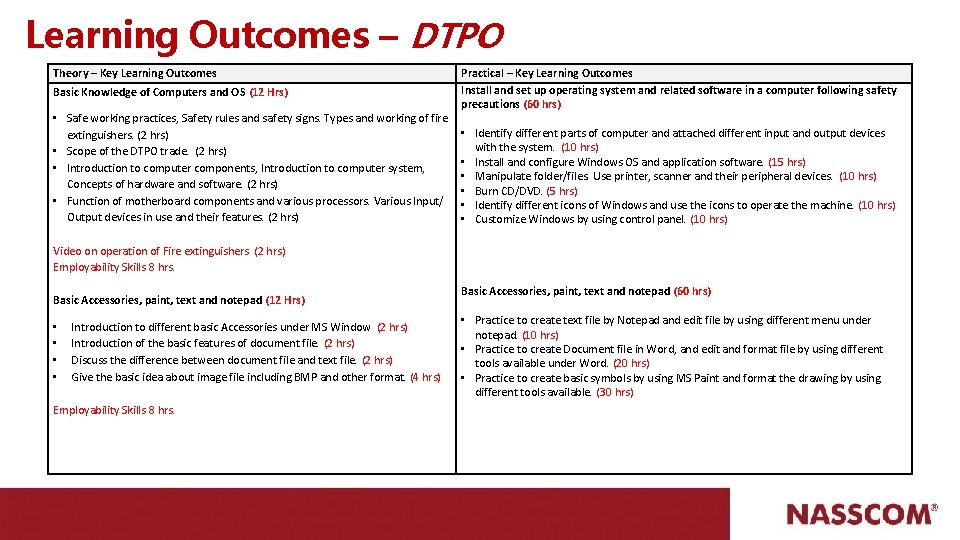
Learning Outcomes – DTPO Theory – Key Learning Outcomes Basic Knowledge of Computers and OS (12 Hrs) • Safe working practices, Safety rules and safety signs. Types and working of fire extinguishers. (2 hrs) • Scope of the DTPO trade. (2 hrs) • Introduction to computer components, Introduction to computer system, Concepts of hardware and software. (2 hrs) • Function of motherboard components and various processors. Various Input/ Output devices in use and their features. (2 hrs) Practical – Key Learning Outcomes Install and set up operating system and related software in a computer following safety precautions (60 hrs) • Identify different parts of computer and attached different input and output devices with the system. (10 hrs) • Install and configure Windows OS and application software. (15 hrs) • Manipulate folder/files. Use printer, scanner and their peripheral devices. (10 hrs) • Burn CD/DVD. (5 hrs) • Identify different icons of Windows and use the icons to operate the machine. (10 hrs) • Customize Windows by using control panel. (10 hrs) Video on operation of Fire extinguishers (2 hrs) Employability Skills 8 hrs. Basic Accessories, paint, text and notepad (12 Hrs) • • Introduction to different basic Accessories under MS Window (2 hrs) Introduction of the basic features of document file. (2 hrs) Discuss the difference between document file and text file. (2 hrs) Give the basic idea about image file including BMP and other format. (4 hrs) Employability Skills 8 hrs. Basic Accessories, paint, text and notepad (60 hrs) • Practice to create text file by Notepad and edit file by using different menu under notepad. (10 hrs) • Practice to create Document file in Word, and edit and format file by using different tools available under Word. (20 hrs) • Practice to create basic symbols by using MS Paint and format the drawing by using different tools available. (30 hrs)
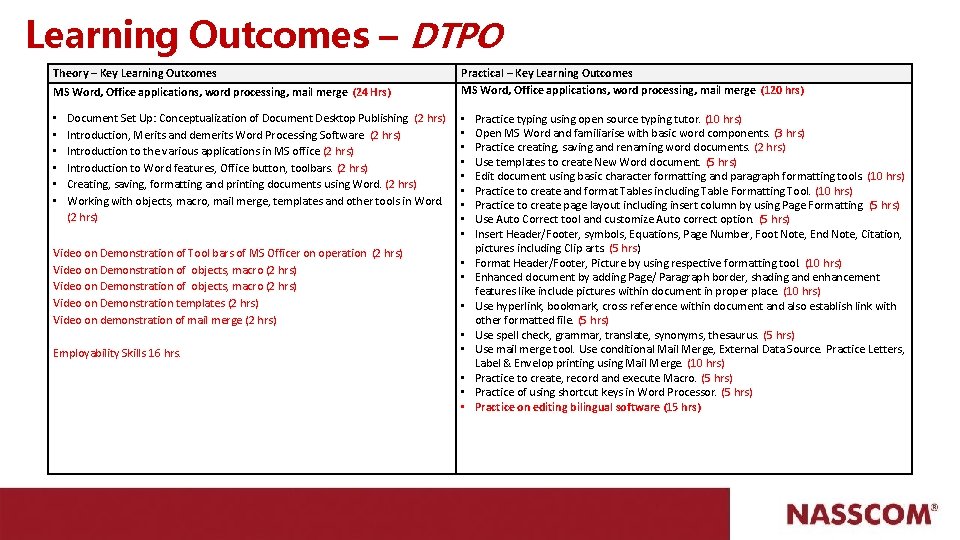
Learning Outcomes – DTPO Theory – Key Learning Outcomes MS Word, Office applications, word processing, mail merge (24 Hrs) • • • Document Set Up: Conceptualization of Document Desktop Publishing (2 hrs) Introduction, Merits and demerits Word Processing Software (2 hrs) Introduction to the various applications in MS office (2 hrs) Introduction to Word features, Office button, toolbars. (2 hrs) Creating, saving, formatting and printing documents using Word. (2 hrs) Working with objects, macro, mail merge, templates and other tools in Word. (2 hrs) Video on Demonstration of Tool bars of MS Officer on operation (2 hrs) Video on Demonstration of objects, macro (2 hrs) Video on Demonstration templates (2 hrs) Video on demonstration of mail merge (2 hrs) Employability Skills 16 hrs. Practical – Key Learning Outcomes MS Word, Office applications, word processing, mail merge (120 hrs) • • • • • Practice typing using open source typing tutor. (10 hrs) Open MS Word and familiarise with basic word components. (3 hrs) Practice creating, saving and renaming word documents. (2 hrs) Use templates to create New Word document. (5 hrs) Edit document using basic character formatting and paragraph formatting tools. (10 hrs) Practice to create and format Tables including Table Formatting Tool. (10 hrs) Practice to create page layout including insert column by using Page Formatting. (5 hrs) Use Auto Correct tool and customize Auto correct option. (5 hrs) Insert Header/Footer, symbols, Equations, Page Number, Foot Note, End Note, Citation, pictures including Clip arts. (5 hrs) Format Header/Footer, Picture by using respective formatting tool. (10 hrs) Enhanced document by adding Page/ Paragraph border, shading and enhancement features like include pictures within document in proper place. (10 hrs) Use hyperlink, bookmark, cross reference within document and also establish link with other formatted file. (5 hrs) Use spell check, grammar, translate, synonyms, thesaurus. (5 hrs) Use mail merge tool. Use conditional Mail Merge, External Data Source. Practice Letters, Label & Envelop printing using Mail Merge. (10 hrs) Practice to create, record and execute Macro. (5 hrs) Practice of using shortcut keys in Word Processor. (5 hrs) Practice on editing bilingual software (15 hrs)

Learning Outcomes – DTPO Theory – Key Learning Outcomes Practical – Key Learning Outcomes Network Concepts (12 hrs) Network concepts (60 hrs) • Introduction to Computer Networks, Necessity and advantages. Client Server and peer to peer networking concepts. Network topologies. Introduction to LAN, WAN and MAN. (2 hrs) • Network components, viz. Modem, Hub, Switch, Router, Bridge, Gateway etc. , Network Cables, Wireless networks and Blue Tooth technology. (2 hrs) • Introduction to www, Concept of internet, web browsers, internet servers and search engines. (2 hrs) • Concepts of Domain naming Systems and email communication. (2 hrs) • Introduction to video chatting tools and social networking concepts. (4 hrs) 1. 2. 3. 4. (8 hrs. Employability Skills) Install and setup scanner and scan the documents and images. (12 hrs) • Principle of scanning , Types of scanner (flatbed & drum) and its use, Resolutions, DPI, LPI, PPI (2 hrs) • Graphics drawings inputs of pictures, sketches etc. (2 hrs) • Preparation of Optical Character Recognition (OCR). (2 hrs) Video Demonstration - (6 hrs) (8 hrs. Employability Skills) Install network printer. (5 hrs) Use of file and printer sharing in peer to peer connection. (5 hrs) Browse the Internet for information (use at least 3 popular browsers). (5 hrs) Practice to create and use e-mail for communication with attachment, priority setting, address book. (5 hrs) 5. Communicate with text, video chatting and social networking sites. (5 hrs) 6. Use online dictionary, translation software, storage space, share files with e-mail links (5 hrs) 7. Download manager, download & upload You. Tube files, google map & earth etc. Update windows & other software. (5 hrs) 8. Configure Outlook, mail service in mobile phones. Use tools like Skype, Google etc. (5 hrs) 9. Download different font Networking Concepts (5 hrs) 10. Desktop Publishing Operator file and install it in local machine. (5 hrs) 11. Download different type of suitable image and insert within publication. (10 hrs) Install and setup scanner and scan the documents and images. (60 hrs) • Install scanner and use scanner to scan picture (5 hrs) • line drawing and document. (10 hrs) • Select scanner resolution and adjust highlights, middle tone, shadow, contrast, brightness, saturation. (15 hrs) • Read colour strip and do colour correction. (15 hrs) • Making of OCR. (15 hrs)
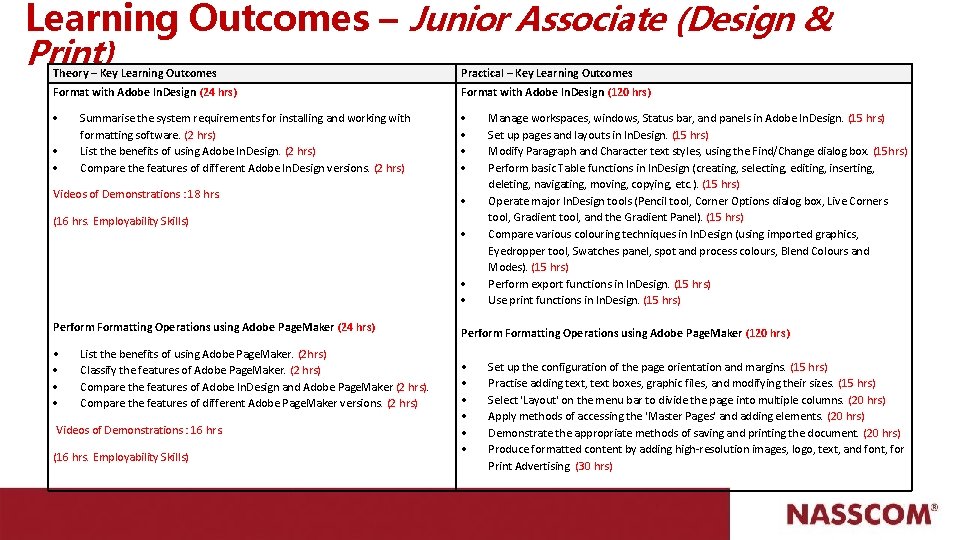
Learning Outcomes – Junior Associate (Design & Print) Theory – Key Learning Outcomes Practical – Key Learning Outcomes Format with Adobe In. Design (24 hrs) Format with Adobe In. Design (120 hrs) Summarise the system requirements for installing and working with formatting software. (2 hrs) List the benefits of using Adobe In. Design. (2 hrs) Compare the features of different Adobe In. Design versions. (2 hrs) Videos of Demonstrations : 18 hrs. (16 hrs. Employability Skills) Perform Formatting Operations using Adobe Page. Maker (24 hrs) • List the benefits of using Adobe Page. Maker. (2 hrs) Classify the features of Adobe Page. Maker. (2 hrs) Compare the features of Adobe In. Design and Adobe Page. Maker (2 hrs). Compare the features of different Adobe Page. Maker versions. (2 hrs) Videos of Demonstrations : 16 hrs. (16 hrs. Employability Skills) Manage workspaces, windows, Status bar, and panels in Adobe In. Design. (15 hrs) Set up pages and layouts in In. Design. (15 hrs) Modify Paragraph and Character text styles, using the Find/Change dialog box. (15 hrs) Perform basic Table functions in In. Design (creating, selecting, editing, inserting, deleting, navigating, moving, copying, etc. ). (15 hrs) Operate major In. Design tools (Pencil tool, Corner Options dialog box, Live Corners tool, Gradient tool, and the Gradient Panel). (15 hrs) Compare various colouring techniques in In. Design (using imported graphics, Eyedropper tool, Swatches panel, spot and process colours, Blend Colours and Modes). (15 hrs) Perform export functions in In. Design. (15 hrs) Use print functions in In. Design. (15 hrs) Perform Formatting Operations using Adobe Page. Maker (120 hrs) • • • Set up the configuration of the page orientation and margins. (15 hrs) Practise adding text, text boxes, graphic files, and modifying their sizes. (15 hrs) Select 'Layout' on the menu bar to divide the page into multiple columns. (20 hrs) Apply methods of accessing the 'Master Pages' and adding elements. (20 hrs) Demonstrate the appropriate methods of saving and printing the document. (20 hrs) Produce formatted content by adding high-resolution images, logo, text, and font, for Print Advertising. (30 hrs)
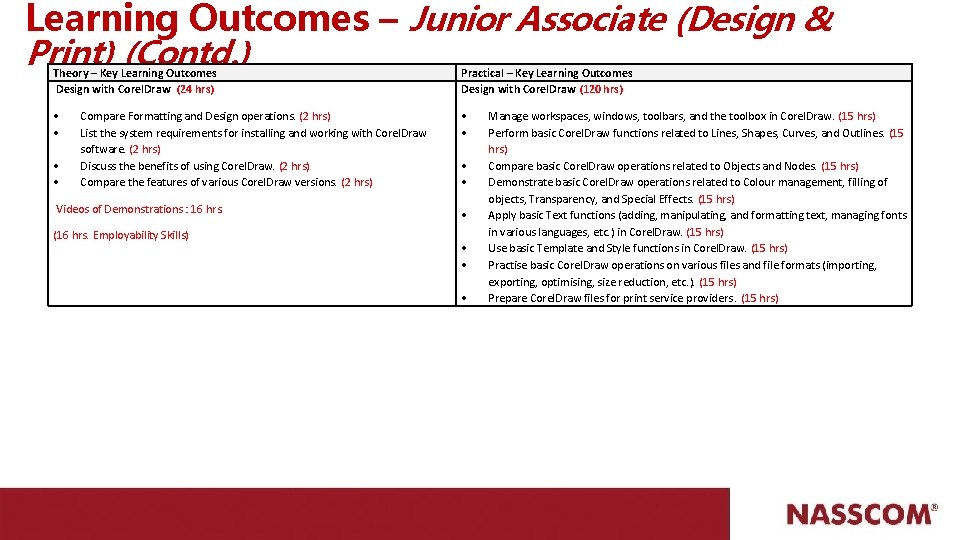
Learning Outcomes – Junior Associate (Design & Print) (Contd. ) Theory – Key Learning Outcomes Design with Corel. Draw (24 hrs) Practical – Key Learning Outcomes Design with Corel. Draw (120 hrs) • • • Compare Formatting and Design operations. (2 hrs) List the system requirements for installing and working with Corel. Draw software. (2 hrs) Discuss the benefits of using Corel. Draw. (2 hrs) Compare the features of various Corel. Draw versions. (2 hrs) Videos of Demonstrations : 16 hrs. (16 hrs. Employability Skills) • • • Manage workspaces, windows, toolbars, and the toolbox in Corel. Draw. (15 hrs) Perform basic Corel. Draw functions related to Lines, Shapes, Curves, and Outlines. (15 hrs) Compare basic Corel. Draw operations related to Objects and Nodes. (15 hrs) Demonstrate basic Corel. Draw operations related to Colour management, filling of objects, Transparency, and Special Effects. (15 hrs) Apply basic Text functions (adding, manipulating, and formatting text, managing fonts in various languages, etc. ) in Corel. Draw. (15 hrs) Use basic Template and Style functions in Corel. Draw. (15 hrs) Practise basic Corel. Draw operations on various files and file formats (importing, exporting, optimising, size reduction, etc. ). (15 hrs) Prepare Corel. Draw files for print service providers. (15 hrs)
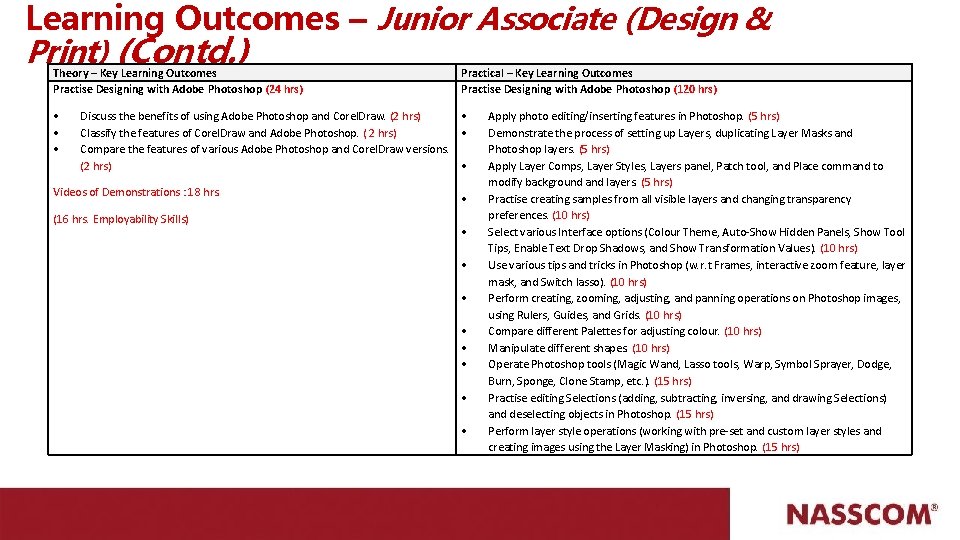
Learning Outcomes – Junior Associate (Design & Print) (Contd. ) Theory – Key Learning Outcomes Practise Designing with Adobe Photoshop (24 hrs) • • • Practical – Key Learning Outcomes Practise Designing with Adobe Photoshop (120 hrs) Discuss the benefits of using Adobe Photoshop and Corel. Draw. (2 hrs) • Classify the features of Corel. Draw and Adobe Photoshop. ( 2 hrs) • Compare the features of various Adobe Photoshop and Corel. Draw versions. (2 hrs) • Videos of Demonstrations : 18 hrs. (16 hrs. Employability Skills) • • • Apply photo editing/inserting features in Photoshop. (5 hrs) Demonstrate the process of setting up Layers, duplicating Layer Masks and Photoshop layers. (5 hrs) Apply Layer Comps, Layer Styles, Layers panel, Patch tool, and Place command to modify background and layers. (5 hrs) Practise creating samples from all visible layers and changing transparency preferences. (10 hrs) Select various Interface options (Colour Theme, Auto-Show Hidden Panels, Show Tool Tips, Enable Text Drop Shadows, and Show Transformation Values). (10 hrs) Use various tips and tricks in Photoshop (w. r. t Frames, interactive zoom feature, layer mask, and Switch lasso). (10 hrs) Perform creating, zooming, adjusting, and panning operations on Photoshop images, using Rulers, Guides, and Grids. (10 hrs) Compare different Palettes for adjusting colour. (10 hrs) Manipulate different shapes. (10 hrs) Operate Photoshop tools (Magic Wand, Lasso tools, Warp, Symbol Sprayer, Dodge, Burn, Sponge, Clone Stamp, etc. ). (15 hrs) Practise editing Selections (adding, subtracting, inversing, and drawing Selections) and deselecting objects in Photoshop. (15 hrs) Perform layer style operations (working with pre-set and custom layer styles and creating images using the Layer Masking) in Photoshop. (15 hrs)
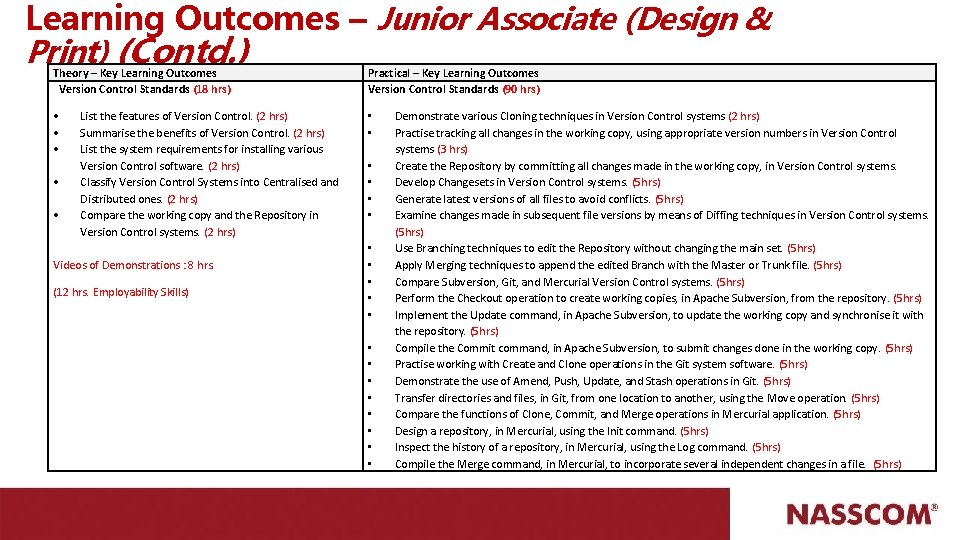
Learning Outcomes – Junior Associate (Design & Print) (Contd. ) Theory – Key Learning Outcomes Version Control Standards (18 hrs) Practical – Key Learning Outcomes Version Control Standards (90 hrs) • • List the features of Version Control. (2 hrs) Summarise the benefits of Version Control. (2 hrs) List the system requirements for installing various Version Control software. (2 hrs) Classify Version Control Systems into Centralised and Distributed ones. (2 hrs) Compare the working copy and the Repository in Version Control systems. (2 hrs) Videos of Demonstrations : 8 hrs. (12 hrs. Employability Skills) • • • • • Demonstrate various Cloning techniques in Version Control systems (2 hrs) Practise tracking all changes in the working copy, using appropriate version numbers in Version Control systems (3 hrs) Create the Repository by committing all changes made in the working copy, in Version Control systems. Develop Changesets in Version Control systems. (5 hrs) Generate latest versions of all files to avoid conflicts. (5 hrs) Examine changes made in subsequent file versions by means of Diffing techniques in Version Control systems. (5 hrs) Use Branching techniques to edit the Repository without changing the main set. (5 hrs) Apply Merging techniques to append the edited Branch with the Master or Trunk file. (5 hrs) Compare Subversion, Git, and Mercurial Version Control systems. (5 hrs) Perform the Checkout operation to create working copies, in Apache Subversion, from the repository. (5 hrs) Implement the Update command, in Apache Subversion, to update the working copy and synchronise it with the repository. (5 hrs) Compile the Commit command, in Apache Subversion, to submit changes done in the working copy. (5 hrs) Practise working with Create and Clone operations in the Git system software. (5 hrs) Demonstrate the use of Amend, Push, Update, and Stash operations in Git. (5 hrs) Transfer directories and files, in Git, from one location to another, using the Move operation. (5 hrs) Compare the functions of Clone, Commit, and Merge operations in Mercurial application. (5 hrs) Design a repository, in Mercurial, using the Init command. (5 hrs) Inspect the history of a repository, in Mercurial, using the Log command. (5 hrs) Compile the Merge command, in Mercurial, to incorporate several independent changes in a file. (5 hrs)
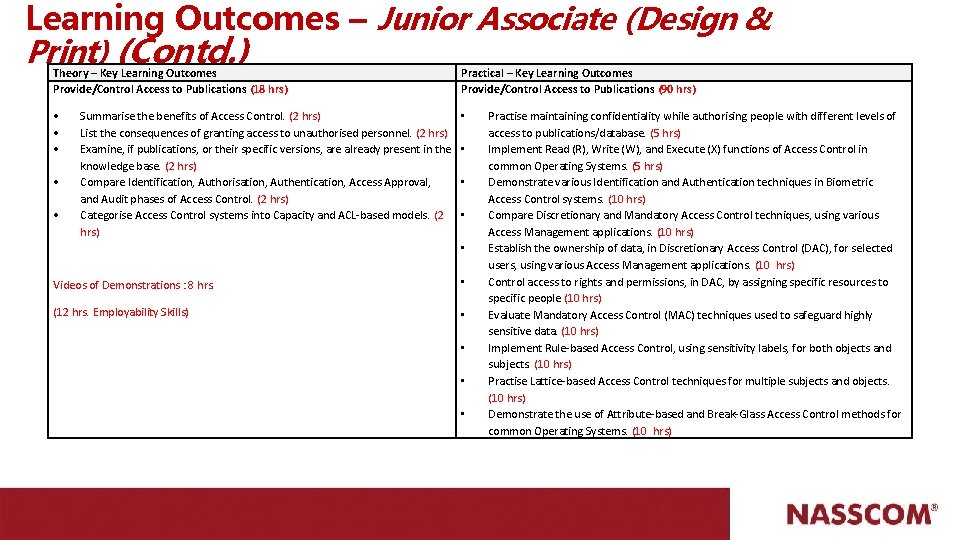
Learning Outcomes – Junior Associate (Design & Print) (Contd. ) Theory – Key Learning Outcomes Provide/Control Access to Publications (18 hrs) Practical – Key Learning Outcomes Provide/Control Access to Publications (90 hrs) • • • Summarise the benefits of Access Control. (2 hrs) List the consequences of granting access to unauthorised personnel. (2 hrs) Examine, if publications, or their specific versions, are already present in the knowledge base. (2 hrs) Compare Identification, Authorisation, Authentication, Access Approval, and Audit phases of Access Control. (2 hrs) Categorise Access Control systems into Capacity and ACL-based models. (2 hrs) • • Videos of Demonstrations : 8 hrs. • (12 hrs. Employability Skills) • • Practise maintaining confidentiality while authorising people with different levels of access to publications/database. (5 hrs) Implement Read (R), Write (W), and Execute (X) functions of Access Control in common Operating Systems. (5 hrs) Demonstrate various Identification and Authentication techniques in Biometric Access Control systems. (10 hrs) Compare Discretionary and Mandatory Access Control techniques, using various Access Management applications. (10 hrs) Establish the ownership of data, in Discretionary Access Control (DAC), for selected users, using various Access Management applications. (10 hrs) Control access to rights and permissions, in DAC, by assigning specific resources to specific people (10 hrs) Evaluate Mandatory Access Control (MAC) techniques used to safeguard highly sensitive data. (10 hrs) Implement Rule-based Access Control, using sensitivity labels, for both objects and subjects. (10 hrs) Practise Lattice-based Access Control techniques for multiple subjects and objects. (10 hrs) Demonstrate the use of Attribute-based and Break-Glass Access Control methods for common Operating Systems. (10 hrs)
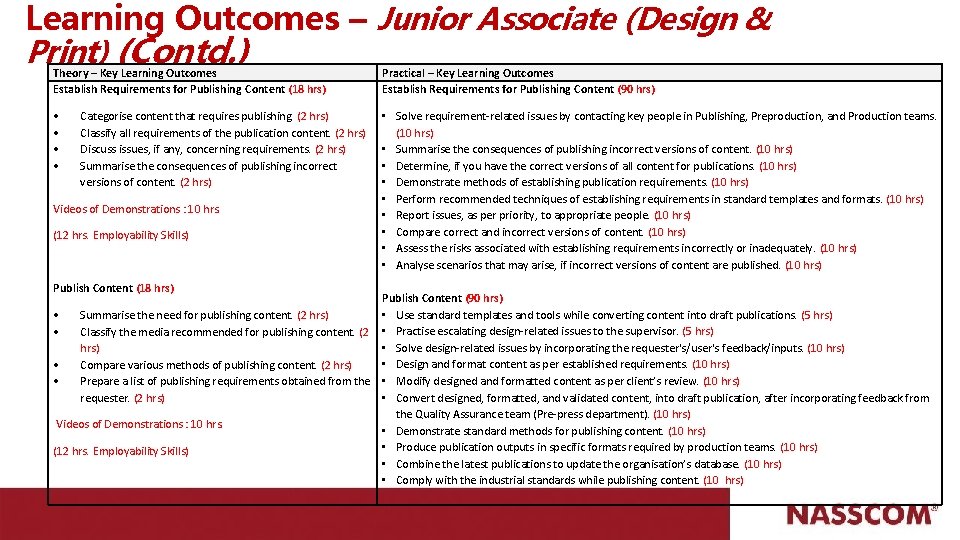
Learning Outcomes – Junior Associate (Design & Print) (Contd. ) Theory – Key Learning Outcomes Establish Requirements for Publishing Content (18 hrs) Practical – Key Learning Outcomes Establish Requirements for Publishing Content (90 hrs) • • • Solve requirement-related issues by contacting key people in Publishing, Preproduction, and Production teams. (10 hrs) • Summarise the consequences of publishing incorrect versions of content. (10 hrs) • Determine, if you have the correct versions of all content for publications. (10 hrs) • Demonstrate methods of establishing publication requirements. (10 hrs) • Perform recommended techniques of establishing requirements in standard templates and formats. (10 hrs) • Report issues, as per priority, to appropriate people. (10 hrs) • Compare correct and incorrect versions of content. (10 hrs) • Assess the risks associated with establishing requirements incorrectly or inadequately. (10 hrs) • Analyse scenarios that may arise, if incorrect versions of content are published. (10 hrs) Categorise content that requires publishing. (2 hrs) Classify all requirements of the publication content. (2 hrs) Discuss issues, if any, concerning requirements. (2 hrs) Summarise the consequences of publishing incorrect versions of content. (2 hrs) Videos of Demonstrations : 10 hrs. (12 hrs. Employability Skills) Publish Content (18 hrs) Publish Content (90 hrs) • Use standard templates and tools while converting content into draft publications. (5 hrs) • Summarise the need for publishing content. (2 hrs) • Classify the media recommended for publishing content. (2 • Practise escalating design-related issues to the supervisor. (5 hrs) • Solve design-related issues by incorporating the requester's/user's feedback/inputs. (10 hrs) • Design and format content as per established requirements. (10 hrs) • Compare various methods of publishing content. (2 hrs) • Prepare a list of publishing requirements obtained from the • Modify designed and formatted content as per client’s review. (10 hrs) • Convert designed, formatted, and validated content, into draft publication, after incorporating feedback from requester. (2 hrs) the Quality Assurance team (Pre-press department). (10 hrs) Videos of Demonstrations : 10 hrs. • Demonstrate standard methods for publishing content. (10 hrs) • Produce publication outputs in specific formats required by production teams. (10 hrs) (12 hrs. Employability Skills) • Combine the latest publications to update the organisation’s database. (10 hrs) • Comply with the industrial standards while publishing content. (10 hrs)
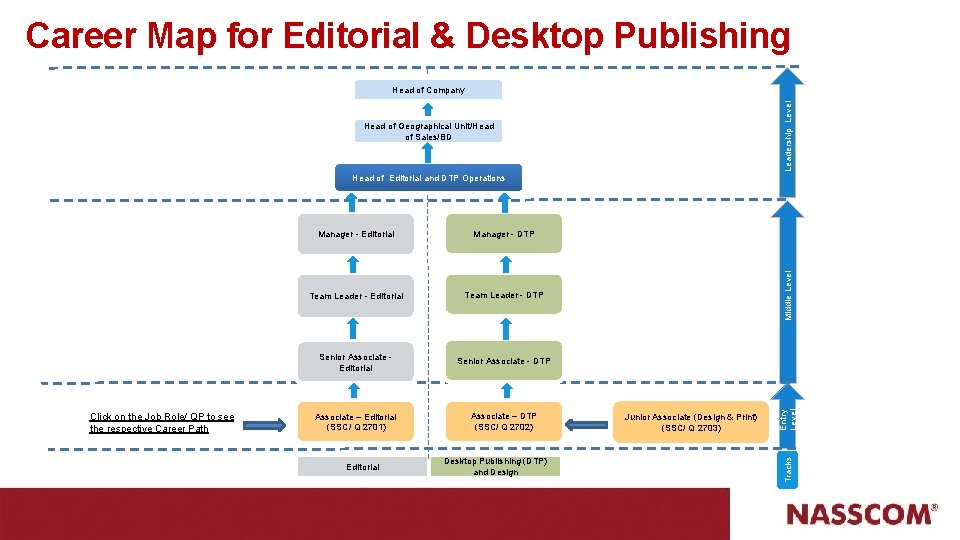
Career Map for Editorial & Desktop Publishing Leadership Level Head of Company Head of Geographical Unit/Head of Sales/BD Team Leader - Editorial Team Leader - DTP Senior Associate Editorial Senior Associate - DTP Associate – Editorial (SSC/ Q 2701) Associate – DTP (SSC/ Q 2702) Editorial Desktop Publishing (DTP) and Design Junior Associate (Design & Print) (SSC/ Q 2703) Entry Level Manager - DTP Tracks Click on the Job Role/ QP to see the respective Career Path Manager - Editorial Middle Level Head of Editorial and DTP Operations
- Slides: 11