
Designing Boundary Classes Based on Chapter 17 of
Designing Boundary Classes Based on Chapter 17 of Bennett, Mc. Robb and Farmer: Object Oriented Systems Analysis and Design Using UML, (2 nd Edition), Mc. Graw Hill, 2002. 03/12/2001 © Bennett, Mc. Robb and Farmer 2002 1
In This Lecture You Will Learn: n n n What we mean by the presentation layer How prototyping can be applied to user interface design How to add boundary classes to the class model How to model boundary classes in sequence diagrams How design patterns can be applied to the user interface How to model control using statecharts © Bennett, Mc. Robb and Farmer 2002 2
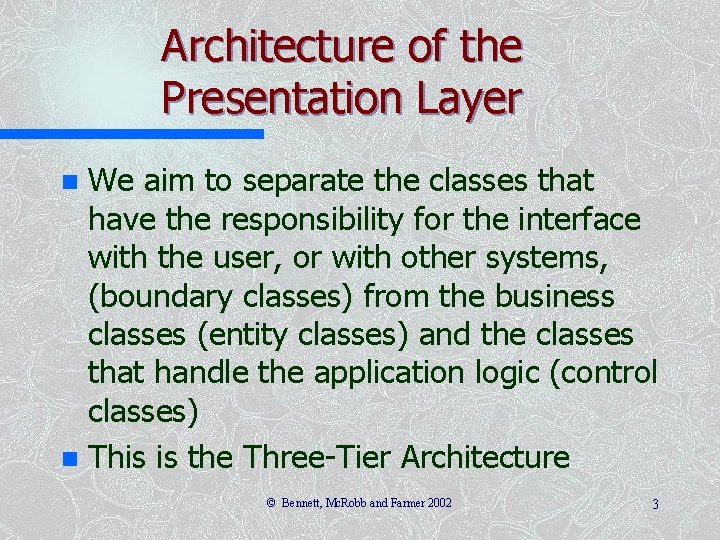
Architecture of the Presentation Layer We aim to separate the classes that have the responsibility for the interface with the user, or with other systems, (boundary classes) from the business classes (entity classes) and the classes that handle the application logic (control classes) n This is the Three-Tier Architecture n © Bennett, Mc. Robb and Farmer 2002 3
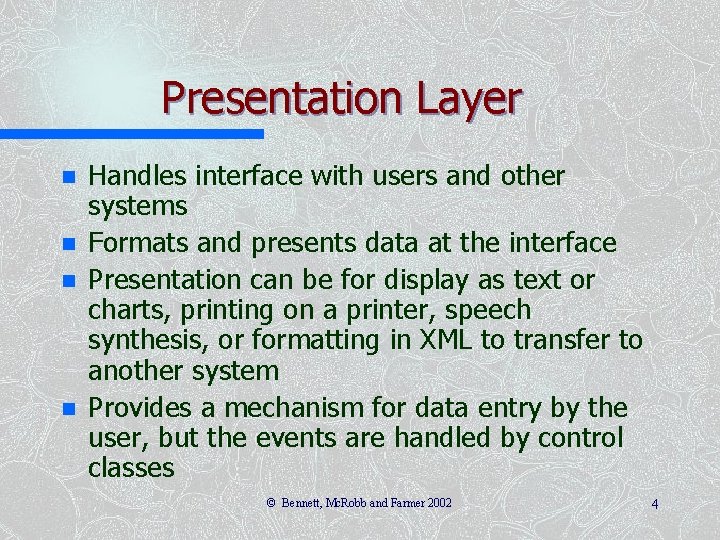
Presentation Layer n n Handles interface with users and other systems Formats and presents data at the interface Presentation can be for display as text or charts, printing on a printer, speech synthesis, or formatting in XML to transfer to another system Provides a mechanism for data entry by the user, but the events are handled by control classes © Bennett, Mc. Robb and Farmer 2002 4

Presentation Layer Does not contain business classes— Clients, Campaigns, Adverts, Invoices, Staff etc. n Does not contain the business logic— rules like ‘A Campaign must have one and only one Campaign Manager’. n Doesn’t handle validation, beyond perhaps simple checks on formatting n © Bennett, Mc. Robb and Farmer 2002 5
Reasons for the 3 -Tier Architecture Logical design The project team may be producing analysis and design models that are independent of the hardware and software environment in which they are to be implemented. For this reason, the entity classes, which provide the functionality of the application, will not include details of how they will be displayed. Interface independence Even if display methods could be added to classes in the application, it would not make sense to do so. Object instances of any one class will be used in many different use cases: sometimes their attributes will be displayed on screen, sometimes printed by a printer. There will not necessarily be any standard layout of the attributes that can be built into the class definition, so presentation of the attributes is usually handled by another class. Reuse One of the aims is to produce classes that can be reused in different applications. For this to be possible, the classes should not be tied to a particular implementation environment or to a particular way of displaying the attribute values of instances. © Bennett, Mc. Robb and Farmer 2002 6
3 -Tier Architecture n Different authors have used different terms – Boundary , Entity, Control – Model, View, Controller – Human Interaction Component, Problem Domain Component, Task Management Component (not necessarily in the same order) © Bennett, Mc. Robb and Farmer 2002 7
Developing Boundary Classes Prototype the user interface n Design the classes n Model the interaction involved in the interface n Model the control of the interface using statechart diagrams (if necessary) n © Bennett, Mc. Robb and Farmer 2002 8
Prototyping the User Interface A prototype is a model that looks, and partly behaves, like the finished product but lacks certain features n A prototype of the user interface is a horizontal prototype—it prototypes one layer of the system n A vertical prototype takes a sub-system and prototypes all the layers n © Bennett, Mc. Robb and Farmer 2002 9
Prototyping the User Interface n Distinction between – prototypes developed in an iterative process that are elaborated to become part of the eventual system and – prototypes developed to test out design ideas that are thrown away rather than being further enhanced (actually, they are not really thrown away, as they form part of the design) © Bennett, Mc. Robb and Farmer 2002 10
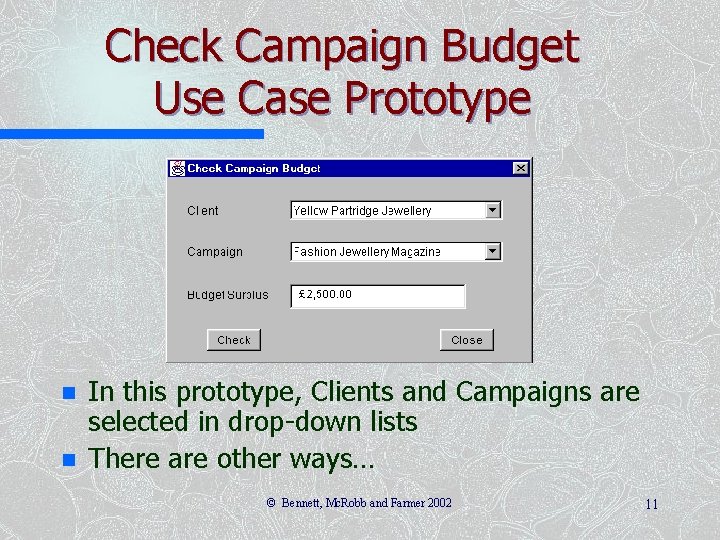
Check Campaign Budget Use Case Prototype n n In this prototype, Clients and Campaigns are selected in drop-down lists There are other ways… © Bennett, Mc. Robb and Farmer 2002 11
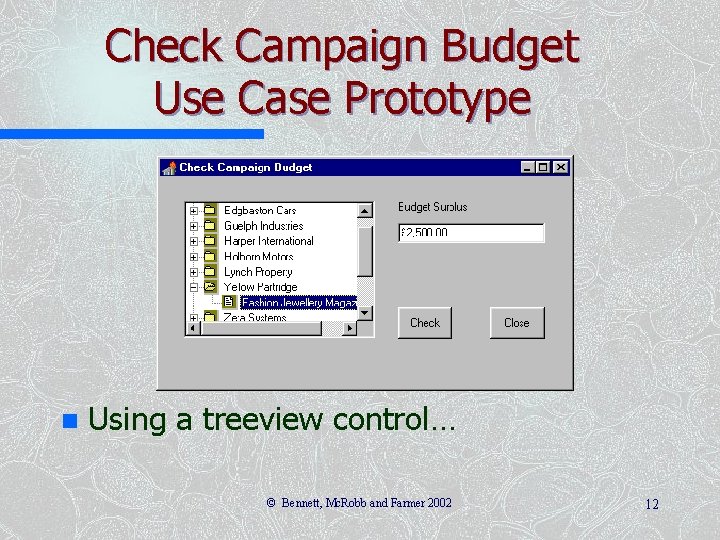
Check Campaign Budget Use Case Prototype n Using a treeview control… © Bennett, Mc. Robb and Farmer 2002 12
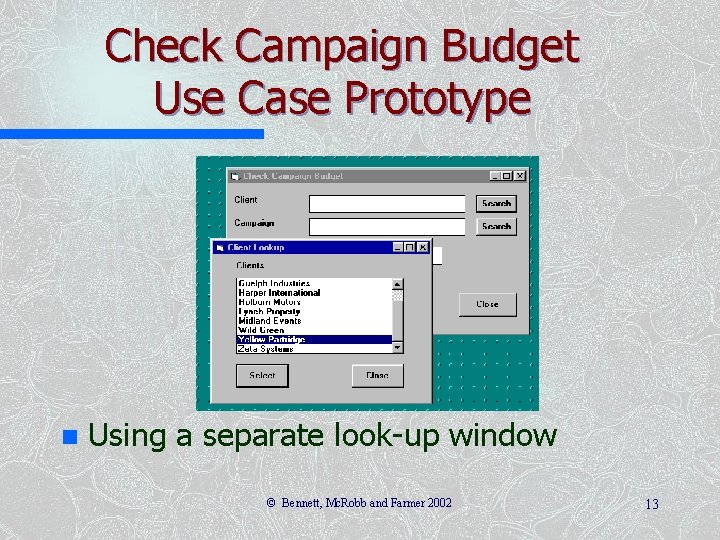
Check Campaign Budget Use Case Prototype n Using a separate look-up window © Bennett, Mc. Robb and Farmer 2002 13
Check campaign budget Use Case Prototype n n n Choice of approach is part of the style guidelines discussed in Chapter 16 We are going to use the first approach, with drop-down lists Although in Chapter 6, we looked at use cases for ‘Find campaign’, ‘Find client’ etc. as separate look-up windows, this approach is not what the Agate users want © Bennett, Mc. Robb and Farmer 2002 14
Designing Classes n n n Start with the collaborations from the analysis model Elaborate the collaborations to include necessary boundary, entity and control classes Rosenberg and Scott (1999) treat control classes as placeholders—they represent some responsibility that has to be handled somewhere, but it may become an operation of another class © Bennett, Mc. Robb and Farmer 2002 15
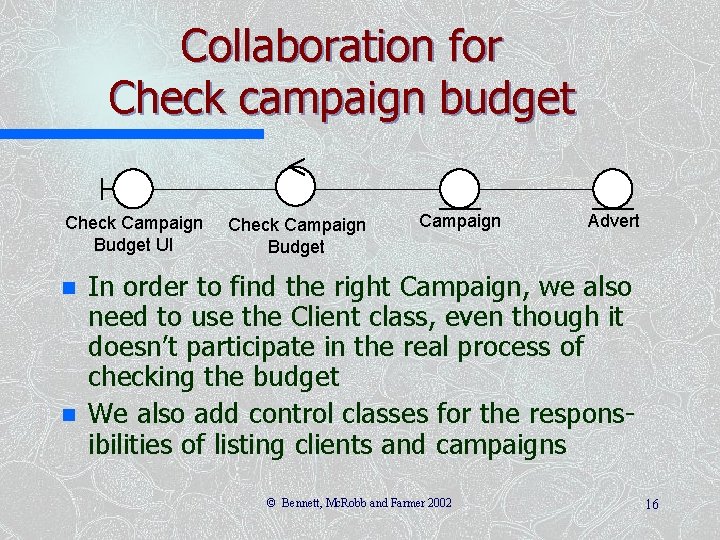
Collaboration for Check campaign budget Check Campaign Budget UI n n Check Campaign Budget Campaign Advert In order to find the right Campaign, we also need to use the Client class, even though it doesn’t participate in the real process of checking the budget We also add control classes for the responsibilities of listing clients and campaigns © Bennett, Mc. Robb and Farmer 2002 16
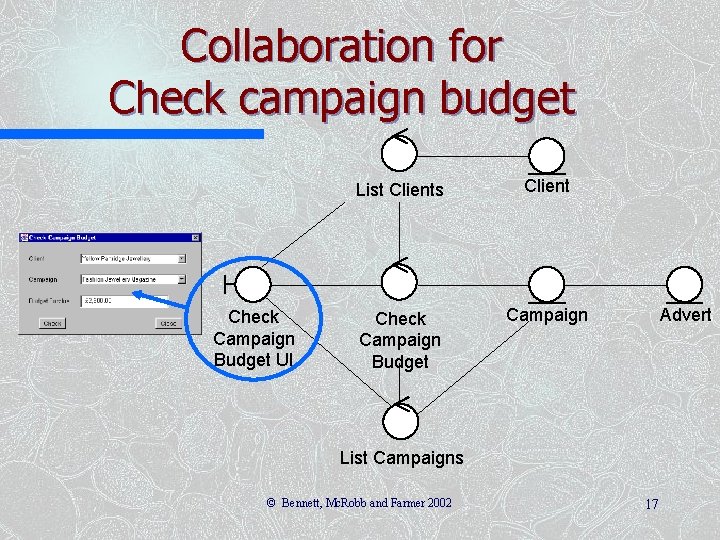
Collaboration for Check campaign budget Check Campaign Budget UI List Clients Client Check Campaign Budget Campaign Advert List Campaigns © Bennett, Mc. Robb and Farmer 2002 17
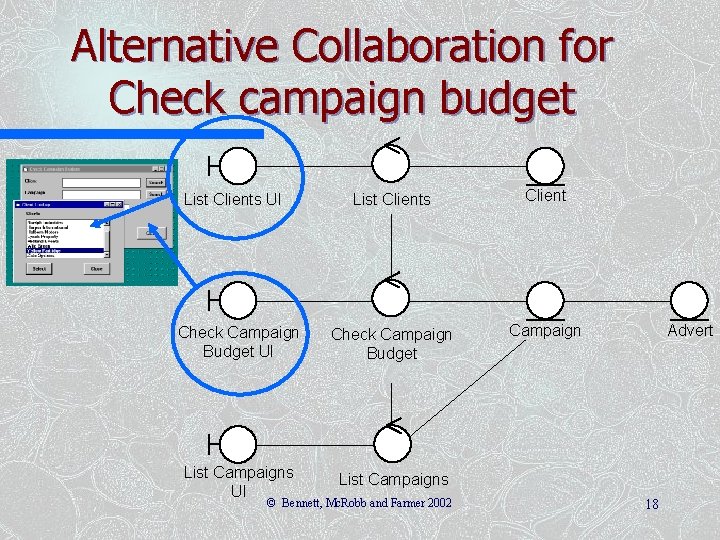
Alternative Collaboration for Check campaign budget List Clients Client Check Campaign Budget UI Check Campaign Budget Campaign List Campaigns UI List Campaigns List Clients UI © Bennett, Mc. Robb and Farmer 2002 Advert 18
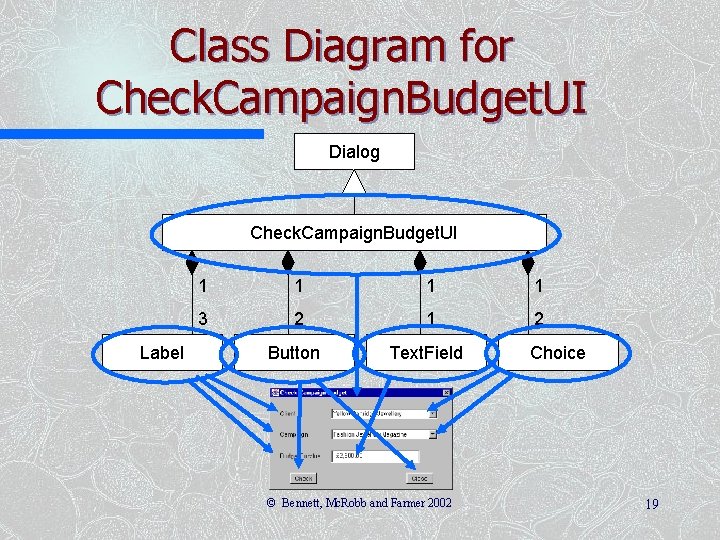
Class Diagram for Check. Campaign. Budget. UI Dialog Check. Campaign. Budget. UI Label 1 1 3 2 1 2 Button Text. Field © Bennett, Mc. Robb and Farmer 2002 Choice 19
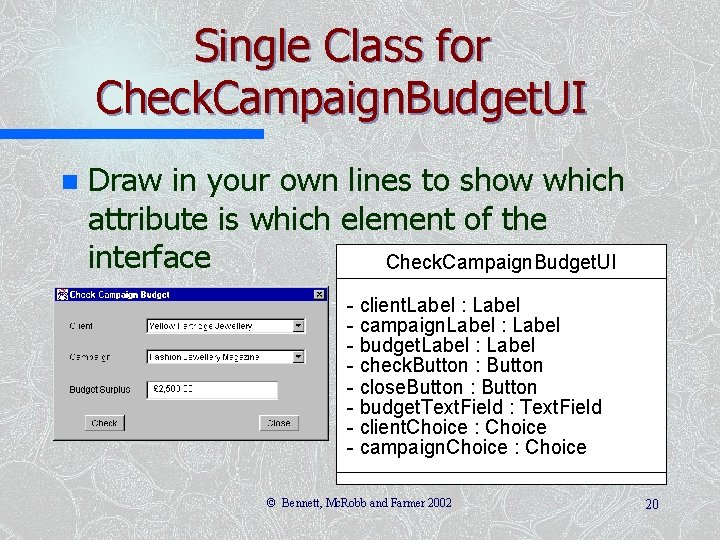
Single Class for Check. Campaign. Budget. UI n Draw in your own lines to show which attribute is which element of the interface Check. Campaign. Budget. UI - client. Label : Label - campaign. Label : Label - budget. Label : Label - check. Button : Button - close. Button : Button - budget. Text. Field : Text. Field - client. Choice : Choice - campaign. Choice : Choice © Bennett, Mc. Robb and Farmer 2002 20
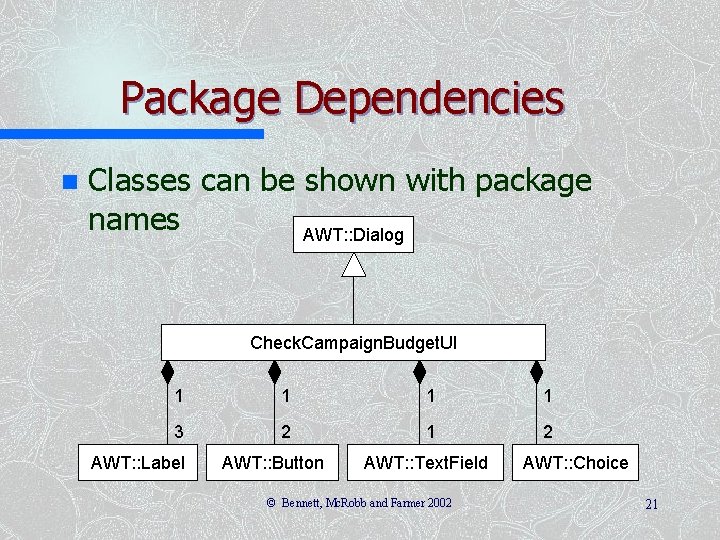
Package Dependencies n Classes can be shown with package names AWT: : Dialog Check. Campaign. Budget. UI 1 1 3 2 1 2 AWT: : Label AWT: : Button AWT: : Text. Field © Bennett, Mc. Robb and Farmer 2002 AWT: : Choice 21
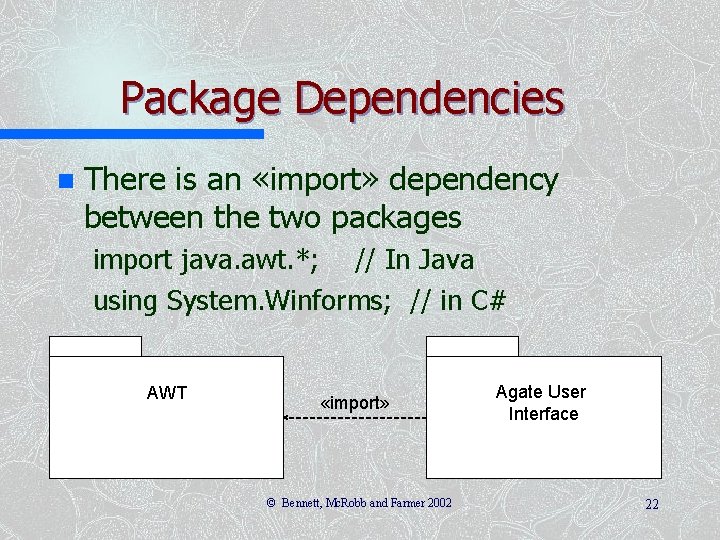
Package Dependencies n There is an «import» dependency between the two packages import java. awt. *; // In Java using System. Winforms; // in C# AWT «import» © Bennett, Mc. Robb and Farmer 2002 Agate User Interface 22
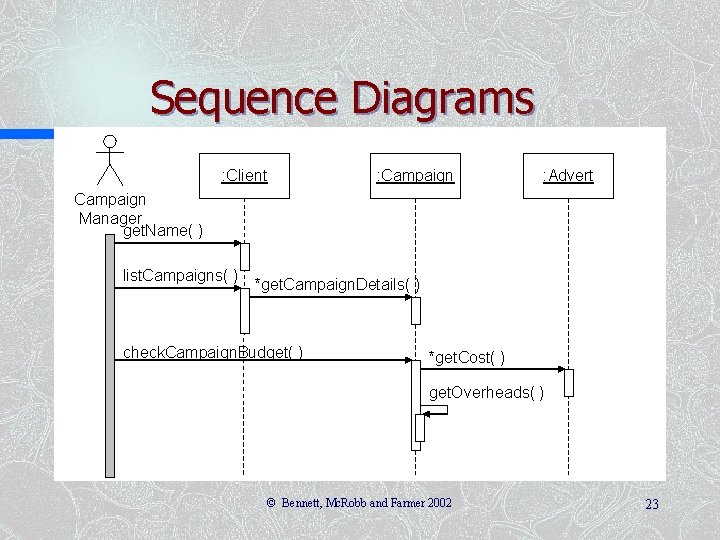
Sequence Diagrams : Client : Campaign : Advert Campaign Manager get. Name( ) list. Campaigns( ) *get. Campaign. Details( ) check. Campaign. Budget( ) *get. Cost( ) get. Overheads( ) © Bennett, Mc. Robb and Farmer 2002 23
Sequence Diagrams The sequence diagram on the previous slide just shows the entity classes n We also have the collaboration diagram from an earlier slide showing the control and boundary classes n We now need to model the interaction more detail n © Bennett, Mc. Robb and Farmer 2002 24
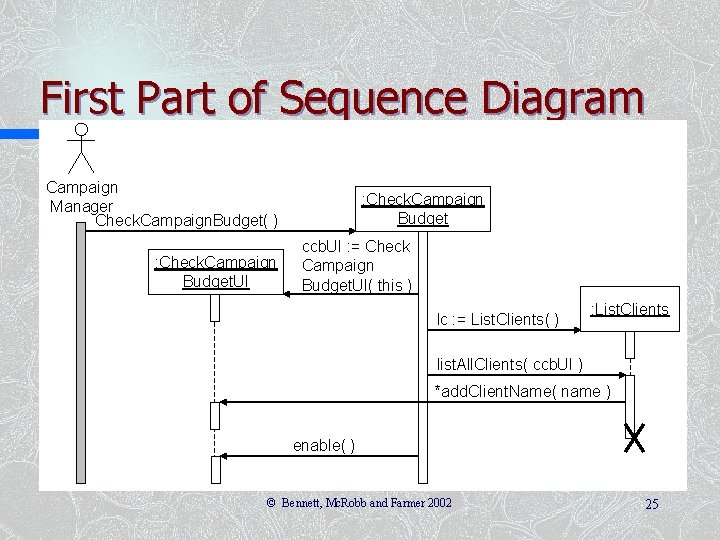
First Part of Sequence Diagram Campaign Manager Check. Campaign. Budget( ) : Check. Campaign Budget. UI : Check. Campaign Budget ccb. UI : = Check Campaign Budget. UI( this ) lc : = List. Clients( ) : List. Clients list. All. Clients( ccb. UI ) *add. Client. Name( name ) enable( ) © Bennett, Mc. Robb and Farmer 2002 25
First Part of Sequence Diagram n The control class – creates the instance of the boundary class – creates the instance of the List. Clients control class – passes to : List. Clients a reference to the boundary class – : List. Clients then sets the name of each client in turn into the boundary class by calling add. Clientname(name) repeatedly © Bennett, Mc. Robb and Farmer 2002 26
Using Interfaces n n We don’t mean user interfaces! Many boundary classes will need to list clients to allow the user to select a client The List. Clients control class doesn’t need to know how the boundary class lists them The boundary class needs to implement the Client. Lister interface and provide an implementation of the operation add. Client. Name(String) © Bennett, Mc. Robb and Farmer 2002 27
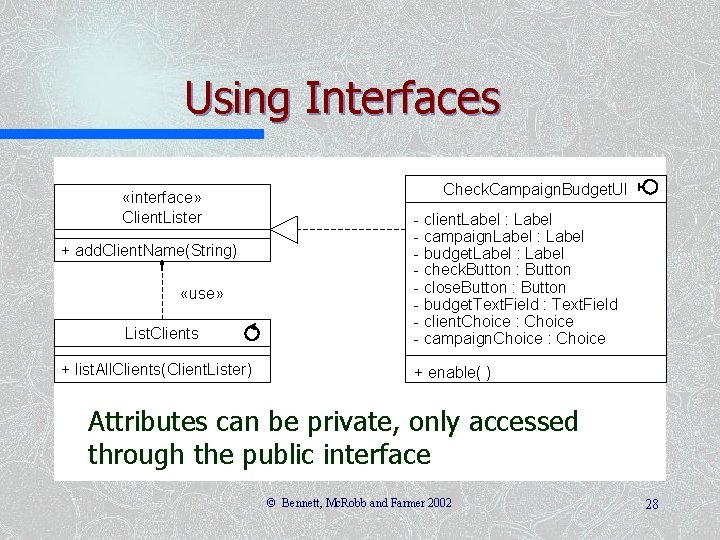
Using Interfaces «interface» Client. Lister + add. Client. Name(String) «use» List. Clients + list. All. Clients(Client. Lister) Check. Campaign. Budget. UI - client. Label : Label - campaign. Label : Label - budget. Label : Label - check. Button : Button - close. Button : Button - budget. Text. Field : Text. Field - client. Choice : Choice - campaign. Choice : Choice + enable( ) Attributes can be private, only accessed through the public interface © Bennett, Mc. Robb and Farmer 2002 28
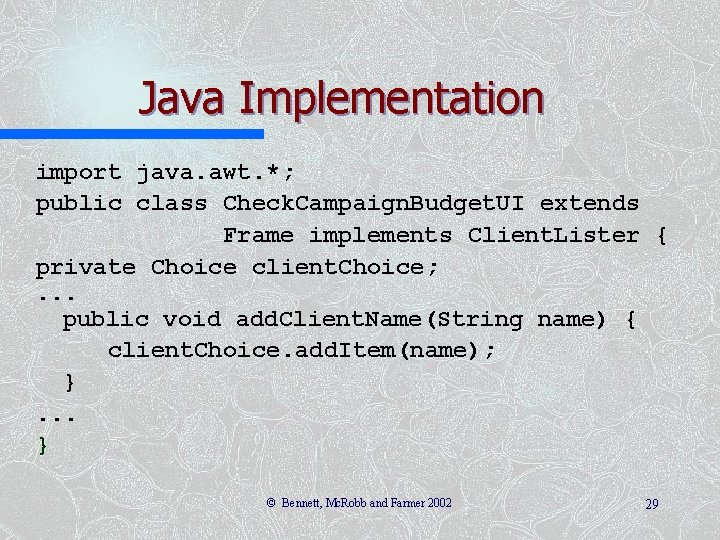
Java Implementation import java. awt. *; public class Check. Campaign. Budget. UI extends Frame implements Client. Lister { private Choice client. Choice; . . . public void add. Client. Name(String name) { client. Choice. add. Item(name); }. . . } © Bennett, Mc. Robb and Farmer 2002 29
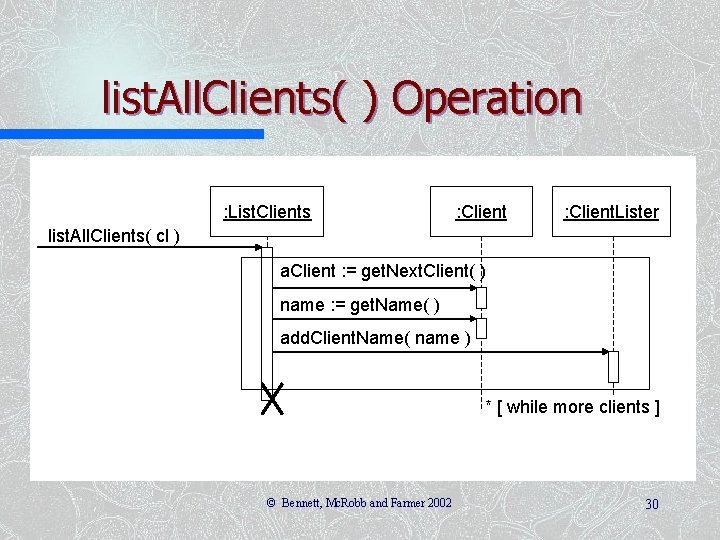
list. All. Clients( ) Operation : List. Clients : Client cl: Client. Lister list. All. Clients( cl ) a. Client : = get. Next. Client( ) name : = get. Name( ) add. Client. Name( name ) * [ while more clients ] © Bennett, Mc. Robb and Farmer 2002 30
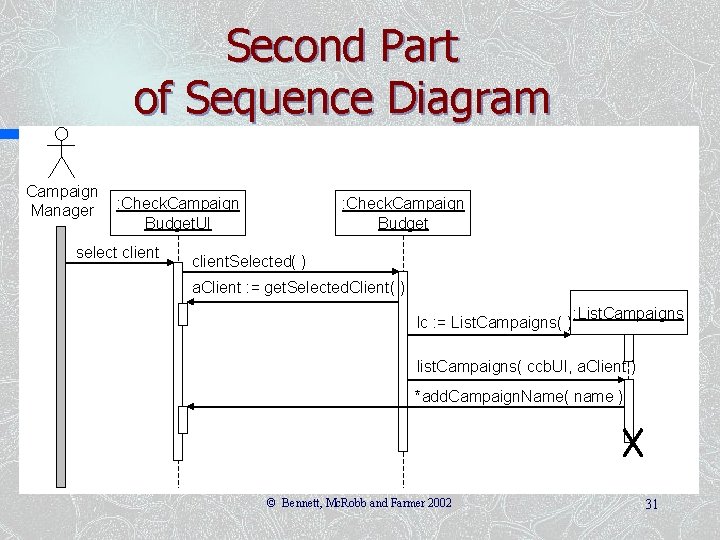
Second Part of Sequence Diagram Campaign Manager : Check. Campaign Budget. UI select client : Check. Campaign Budget client. Selected( ) a. Client : = get. Selected. Client( ) lc : = List. Campaigns( ) : List. Campaigns list. Campaigns( ccb. UI, a. Client ) *add. Campaign. Name( name ) © Bennett, Mc. Robb and Farmer 2002 31
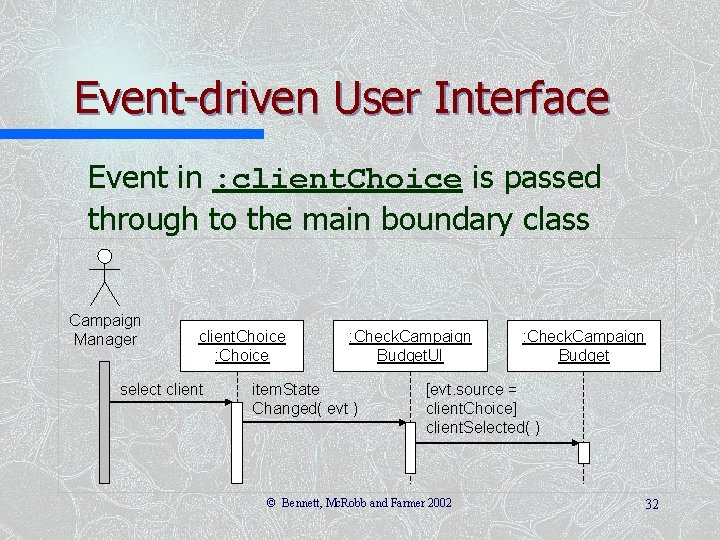
Event-driven User Interface Event in : client. Choice is passed through to the main boundary class Campaign Manager client. Choice : Choice select client : Check. Campaign Budget. UI item. State Changed( evt ) : Check. Campaign Budget [evt. source = client. Choice] client. Selected( ) © Bennett, Mc. Robb and Farmer 2002 32
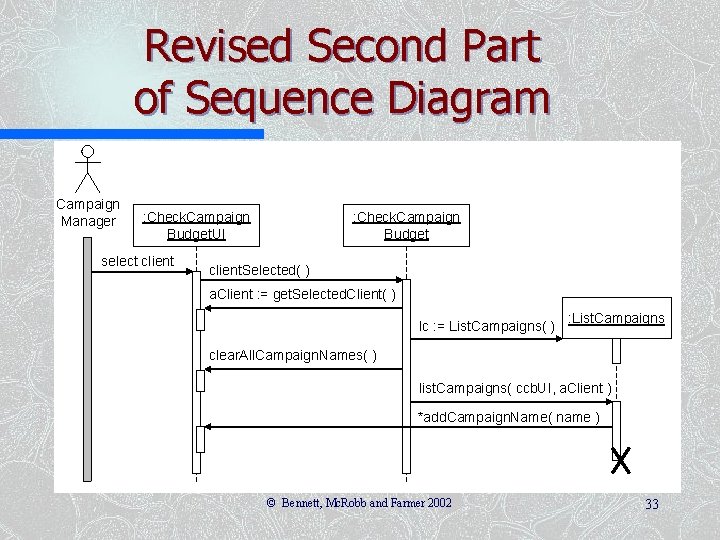
Revised Second Part of Sequence Diagram Campaign Manager : Check. Campaign Budget. UI select client : Check. Campaign Budget client. Selected( ) a. Client : = get. Selected. Client( ) lc : = List. Campaigns( ) : List. Campaigns clear. All. Campaign. Names( ) list. Campaigns( ccb. UI, a. Client ) *add. Campaign. Name( name ) © Bennett, Mc. Robb and Farmer 2002 33
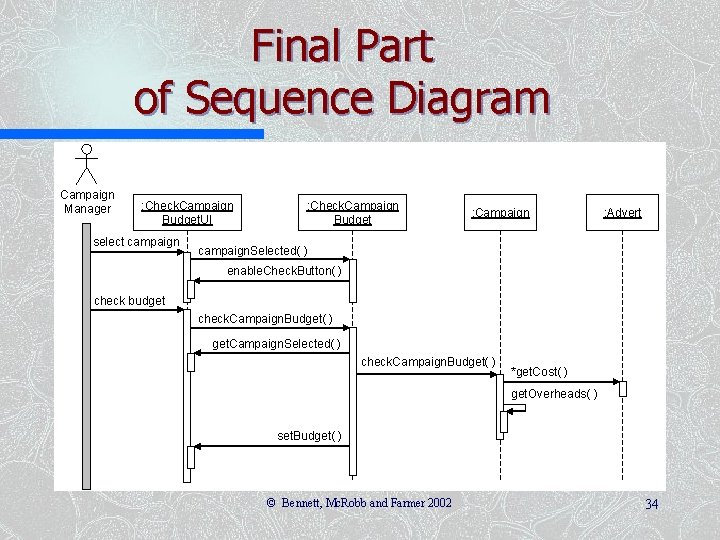
Final Part of Sequence Diagram Campaign Manager : Check. Campaign Budget. UI select campaign : Check. Campaign Budget : Campaign : Advert campaign. Selected( ) enable. Check. Button( ) check budget check. Campaign. Budget( ) get. Campaign. Selected( ) check. Campaign. Budget( ) *get. Cost( ) get. Overheads( ) set. Budget( ) © Bennett, Mc. Robb and Farmer 2002 34
Adding to the Class Diagram n n From the sequence diagrams, we can see that the Check. Campaign. Budget. UI class needs to implement both the Client. Lister and the Campaign. Lister interfaces There also additional operations that have been introduced, some of which will apply to any class that implements these interfaces (and therefore belong to the interfaces), and some of which belong to the Check. Campaign. Budget. UI class © Bennett, Mc. Robb and Farmer 2002 35
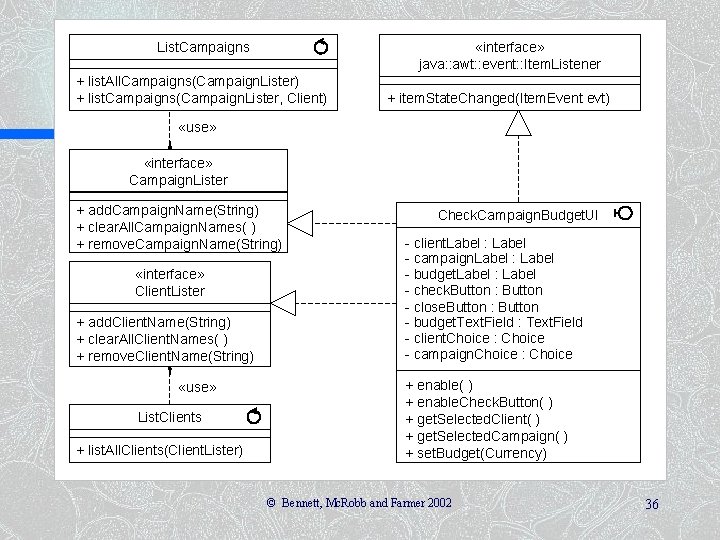
«interface» java: : awt: : event: : Item. Listener List. Campaigns + list. All. Campaigns(Campaign. Lister) + list. Campaigns(Campaign. Lister, Client) + item. State. Changed(Item. Event evt) «use» «interface» Campaign. Lister + add. Campaign. Name(String) + clear. All. Campaign. Names( ) + remove. Campaign. Name(String) «interface» Client. Lister + add. Client. Name(String) + clear. All. Client. Names( ) + remove. Client. Name(String) «use» List. Clients + list. All. Clients(Client. Lister) Check. Campaign. Budget. UI - client. Label : Label - campaign. Label : Label - budget. Label : Label - check. Button : Button - close. Button : Button - budget. Text. Field : Text. Field - client. Choice : Choice - campaign. Choice : Choice + enable( ) + enable. Check. Button( ) + get. Selected. Client( ) + get. Selected. Campaign( ) + set. Budget(Currency) © Bennett, Mc. Robb and Farmer 2002 36
Using Design Patterns n n n More and more, libraries of classes are built around design patterns In Smalltalk, the Model–View–Controller architecture is widely used In Java, an approach is used in which objects register an interest in events, then when an event occurs all the objects that have registered are notified of the event © Bennett, Mc. Robb and Farmer 2002 37
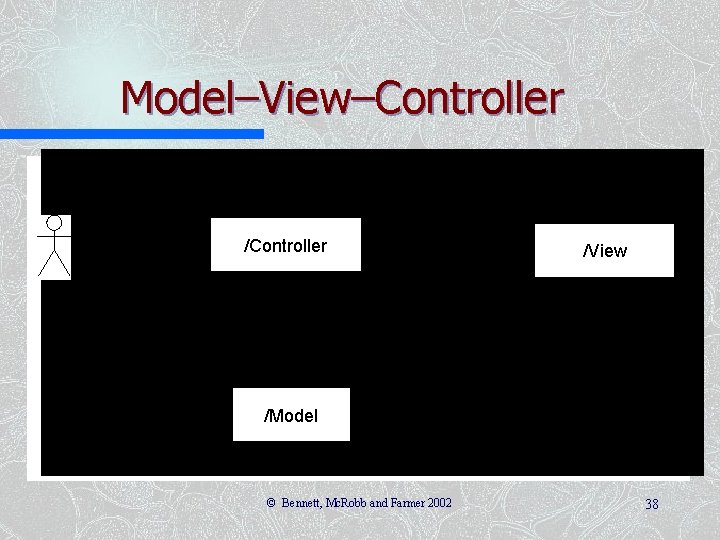
Model–View–Controller /View /Model © Bennett, Mc. Robb and Farmer 2002 38
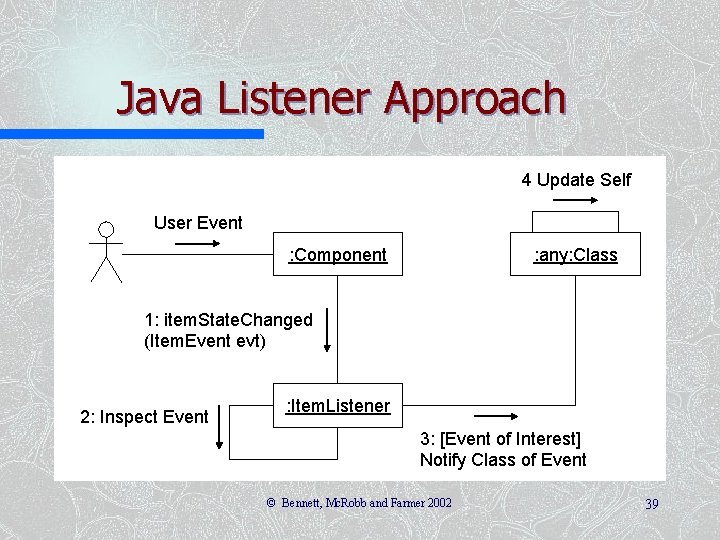
Java Listener Approach 4 Update Self User Event : Component : any: Class 1: item. State. Changed (Item. Event evt) 2: Inspect Event : Item. Listener 3: [Event of Interest] Notify Class of Event © Bennett, Mc. Robb and Farmer 2002 39
Java Approach n Various listeners for different kinds of user interface components – Mouse. Listener – Item. Listener – Action. Listener n All subinterfaces of Event. Listener © Bennett, Mc. Robb and Farmer 2002 40
Java 2 Enterprise Edition (J 2 EE) Approach J 2 EE is used for N-Tier distributed systems based on Enterprise Java Beans (EJB) n J 2 EE Core Patterns provides a pattern catalogue that uses the Model–View– Controller architecture n © Bennett, Mc. Robb and Farmer 2002 41
Modelling the User Interface in Statechart Diagrams n Different approaches to using statecharts – Browne (1994), which was used in the 1 st edition – Horrocks (1999) used here – Both based on the original work of Harel (1987) – Recent work of Harel and Politi (1998) © Bennett, Mc. Robb and Farmer 2002 42
Horrocks’ Approach n Five tasks: – describe the high-level requirements and main user tasks – describe the user interface behaviour – define user interface rules – draw the statechart (and successively refine it) – prepare an event action table © Bennett, Mc. Robb and Farmer 2002 43
High-level Requirements The requirement here is that the users must be able to check whether the budget for an advertising campaign has been exceeded or not. This is calculated by summing the cost of all the adverts in a campaign, adding a percentage for overheads and subtracting the result from the planned budget. A negative value indicates that the budget has been overspent. This information is used by a campaign manager. © Bennett, Mc. Robb and Farmer 2002 44
User Interface Behaviour n n n The client dropdown displays a list of clients. When a client is selected, their campaigns will be displayed in the campaign dropdown. The campaign dropdown displays a list of campaigns belonging to the client selected in the client dropdown. When a campaign is selected the check button is enabled. The budget textfield displays the result of the calculation to check the budget. The check button causes the calculation of the budget balance to take place. The close button closes the window and exits the use case. © Bennett, Mc. Robb and Farmer 2002 45
Define User Interface Rules n User interface behaviour objects with constant – The client dropdown has constant behaviour. Whenever a client is selected, a list of campaigns is loaded into the campaign dropdown – The budget textfield is initially empty. It is cleared whenever a new client is selected or a new campaign is selected. It is not editable – The close button may be pressed at any time to close the window © Bennett, Mc. Robb and Farmer 2002 46
Define User Interface Rules n User interface objects with varying behaviour – The campaign dropdown is initially disabled. No campaign can be selected until a client has been selected. Once it has been loaded with a list of campaigns it is enabled – The check button is initially disabled. It is enabled when a campaign is selected. It is disabled whenever a new client is selected © Bennett, Mc. Robb and Farmer 2002 47
Define User Interface Rules n Entry and exit events – The window is entered from the main window when the Check Campaign Budget menu item is selected – When the close button is clicked, an alert dialogue is displayed. This asks ‘Close window? Are you sure? ’ and displays two buttons labelled ‘OK’ and ‘Cancel’. If ‘OK’ is clicked the window is exited; if ‘Cancel’ is clicked then it carries on in the state it was in before the close button was clicked © Bennett, Mc. Robb and Farmer 2002 48
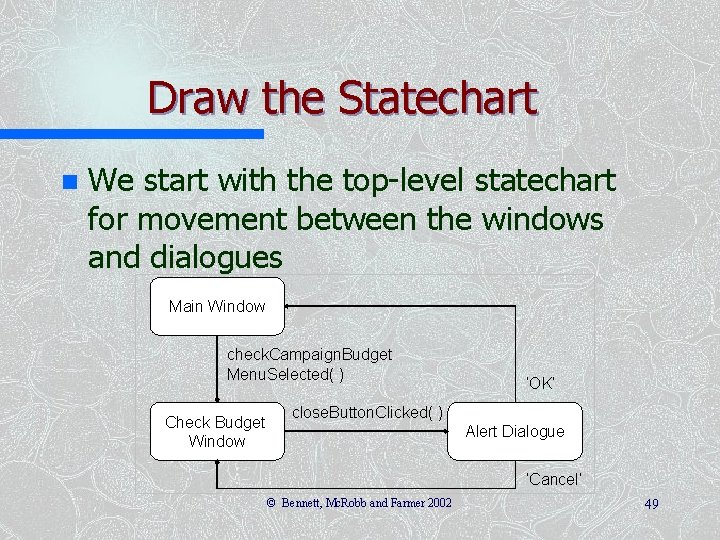
Draw the Statechart n We start with the top-level statechart for movement between the windows and dialogues Main Window check. Campaign. Budget Menu. Selected( ) Check Budget Window ‘OK’ close. Button. Clicked( ) Alert Dialogue ‘Cancel’ © Bennett, Mc. Robb and Farmer 2002 49
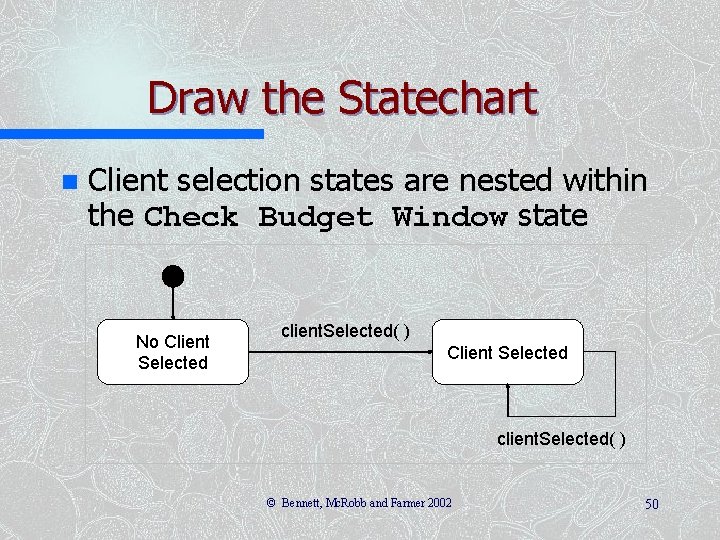
Draw the Statechart n Client selection states are nested within the Check Budget Window state No Client Selected client. Selected( ) © Bennett, Mc. Robb and Farmer 2002 50
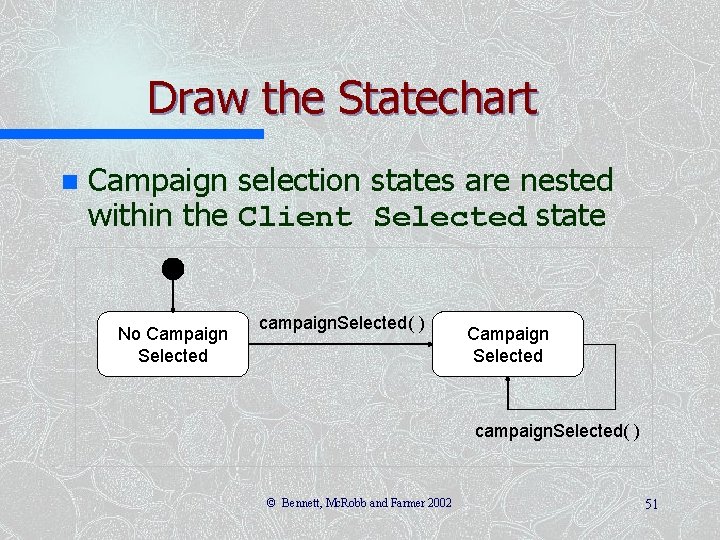
Draw the Statechart n Campaign selection states are nested within the Client Selected state No Campaign Selected campaign. Selected( ) © Bennett, Mc. Robb and Farmer 2002 51
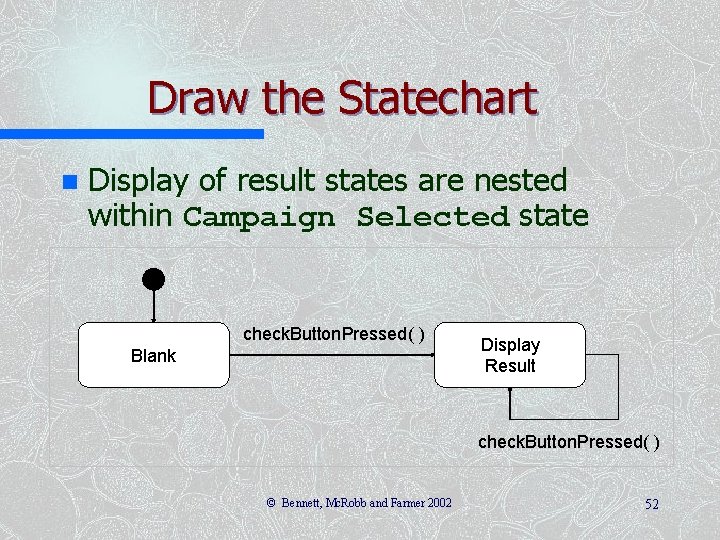
Draw the Statechart n Display of result states are nested within Campaign Selected state check. Button. Pressed( ) Blank Display Result check. Button. Pressed( ) © Bennett, Mc. Robb and Farmer 2002 52
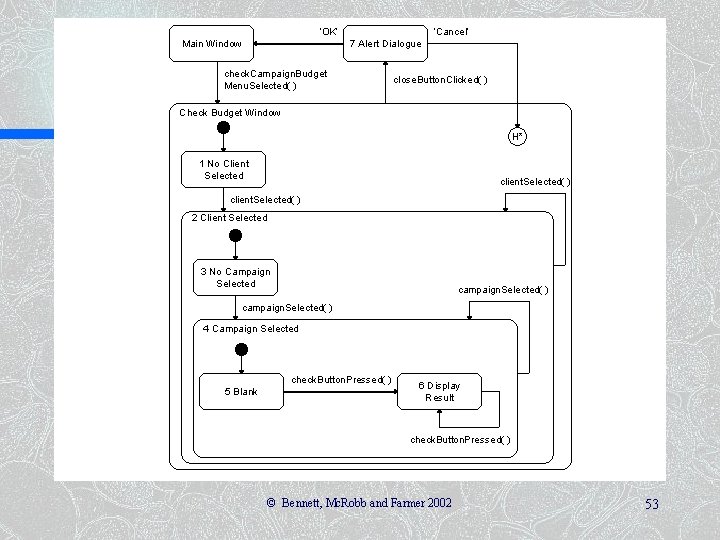
‘OK’ Main Window ‘Cancel’ 7 Alert Dialogue check. Campaign. Budget Menu. Selected( ) close. Button. Clicked( ) Check Budget Window H* 1 No Client Selected client. Selected( ) 2 Client Selected 3 No Campaign Selected campaign. Selected( ) 4 Campaign Selected check. Button. Pressed( ) 5 Blank 6 Display Result check. Button. Pressed( ) © Bennett, Mc. Robb and Farmer 2002 53
Draw the Statechart n Non-UML features: – Horrocks numbers the states – State variables can be shown in square brackets n n Statechart can be simplified (as on next slide) Rather than try to add all messages associated with transitions into the diagram, an Event–Action table can be used © Bennett, Mc. Robb and Farmer 2002 54
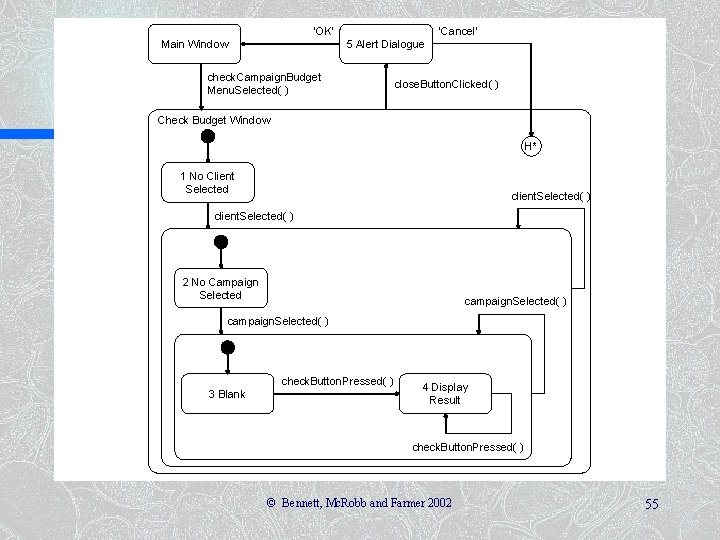
‘OK’ Main Window ‘Cancel’ 5 Alert Dialogue check. Campaign. Budget Menu. Selected( ) close. Button. Clicked( ) Check Budget Window H* 1 No Client Selected client. Selected( ) 2 No Campaign Selected campaign. Selected( ) check. Button. Pressed( ) 3 Blank 4 Display Result check. Button. Pressed( ) © Bennett, Mc. Robb and Farmer 2002 55
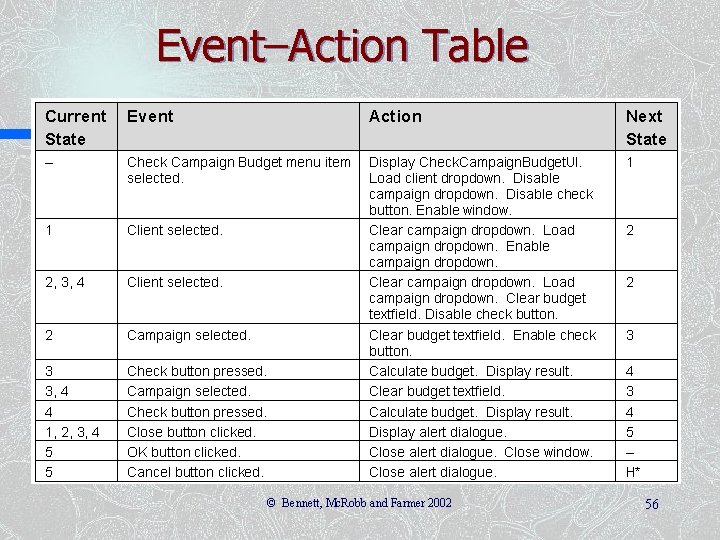
Event–Action Table © Bennett, Mc. Robb and Farmer 2002 56
Revising the Sequence Diagrams and Class Diagrams Producing the statechart diagram and the event–action table has identified some additional messages that will be sent to the user interface to control it n These will need to be added to the sequence diagrams and to the class diagram as operations of the UI class or of the lister interfaces n © Bennett, Mc. Robb and Farmer 2002 57
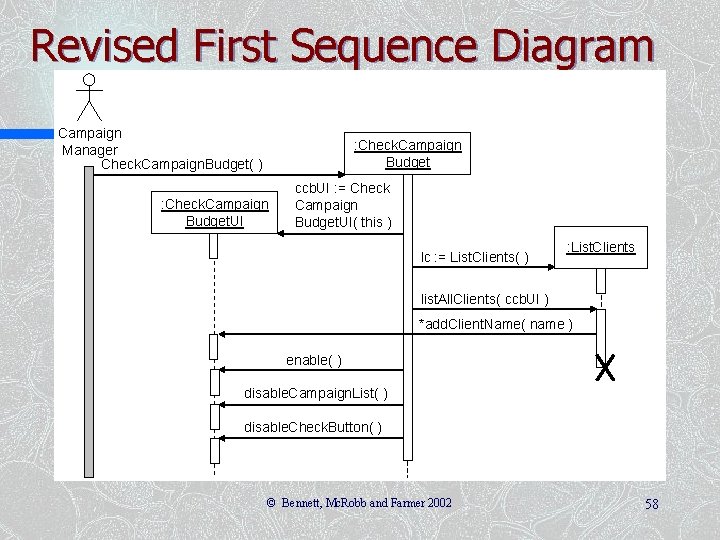
Revised First Sequence Diagram Campaign Manager Check. Campaign. Budget( ) : Check. Campaign Budget. UI ccb. UI : = Check Campaign Budget. UI( this ) lc : = List. Clients( ) : List. Clients list. All. Clients( ccb. UI ) *add. Client. Name( name ) enable( ) disable. Campaign. List( ) disable. Check. Button( ) © Bennett, Mc. Robb and Farmer 2002 58
Summary In this lecture you have learned about: n n n What we mean by the presentation layer How prototyping can be applied to user interface design How to add boundary classes to the class model How to model boundary classes in sequence diagrams How design patterns can be applied to the user interface How to model control using statecharts © Bennett, Mc. Robb and Farmer 2002 59
References Horrocks (1999) n Browne (1994) n Harel (1987) n Gamma et al. (1995) n (For full bibliographic details, see Bennett, Mc. Robb and Farmer) © Bennett, Mc. Robb and Farmer 2002 60
- Slides: 60