
Designing Accurate Data Entry Procedures Systems Analysis and

- Slides: 65
Designing Accurate Data Entry Procedures Systems Analysis and Design, 7 e Kendall & Kendall © 2008 Pearson Prentice Hall 15
Learning Objectives • Understand the uses of effective coding to • • • support users in accomplishing their tasks Design effective and efficient data capture approaches for people and systems Recognize how to ensure data quality through validation Articulate accuracy advantages of user input on ecommerce Web sites Kendall & Kendall 2
Accurate Data-Entry Objectives • Effective coding • Efficient data capture • Effective data capture • Assuring data quality through validation Kendall & Kendall 3
Major Topics • Effective coding • Types of codes • Guidelines for coding • Validation methods • Check digits • Ecommerce accuracy Kendall & Kendall 4
Effective Coding • Data that are coded require less time to enter • Coding helps to reduce the number of items entered • Coding can help in sorting of data during the data transformation process • Coded data can save valuable memory and storage space Kendall & Kendall 5
Human Purposes for Coding • Keeps track of something • Classifies information • Conceals information • Reveals information • Requests appropriate action Kendall & Kendall 6
Keeping Track of Something • Simple sequence code • Alphabetic derivation codes Kendall & Kendall 7
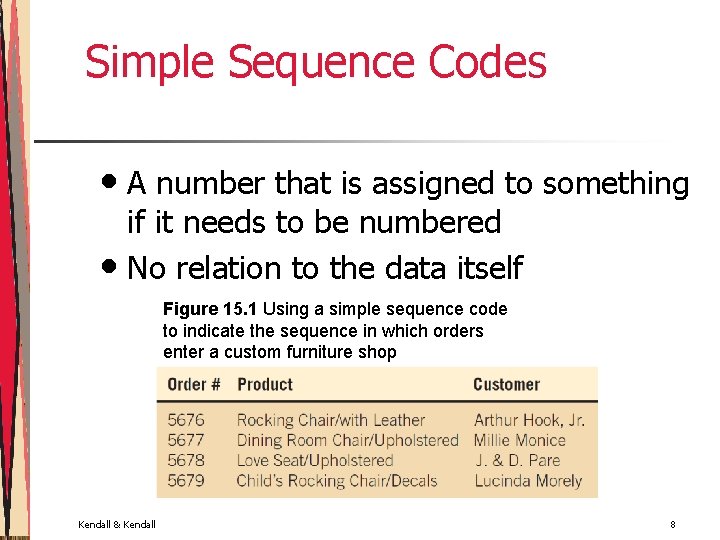
Simple Sequence Codes • A number that is assigned to something if it needs to be numbered • No relation to the data itself Figure 15. 1 Using a simple sequence code to indicate the sequence in which orders enter a custom furniture shop Kendall & Kendall 8
Simple Sequence Codes (Advantages) • Eliminates the possibility of assigning the same number • It gives users an approximation of when the order was received Kendall & Kendall 9
Simple Sequence Codes (Disadvantages) • When you do not wish to have someone read the code to figure out how many numbers have been assigned • When a more complex code is desirable to avoid a costly mistake Kendall & Kendall 10
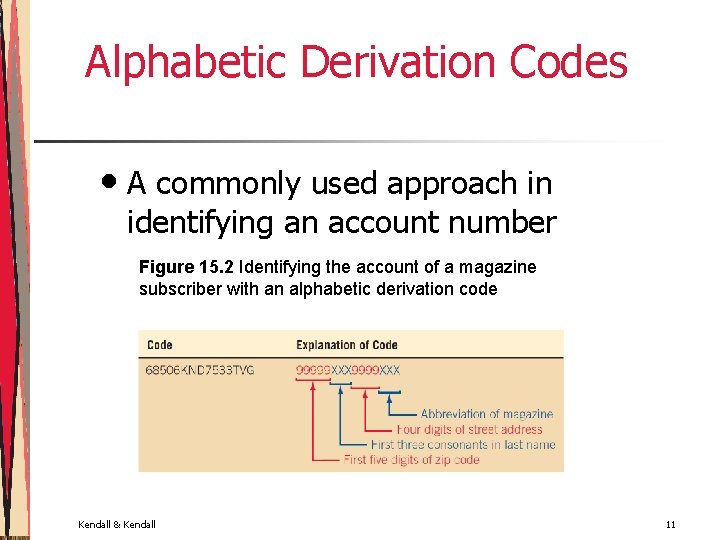
Alphabetic Derivation Codes • A commonly used approach in identifying an account number Figure 15. 2 Identifying the account of a magazine subscriber with an alphabetic derivation code Kendall & Kendall 11
Alphabetic Derivation Codes (Disadvantages) • When the alphabetic portion is small or when the name contains fewer consonants than the code requires • Names like ROE - become RXX • Some of the data may change Kendall & Kendall 12
Classification Information • Affords the ability to distinguish between classes of items • Must be mutually exclusive • Classification codes • Block sequence codes Kendall & Kendall 13
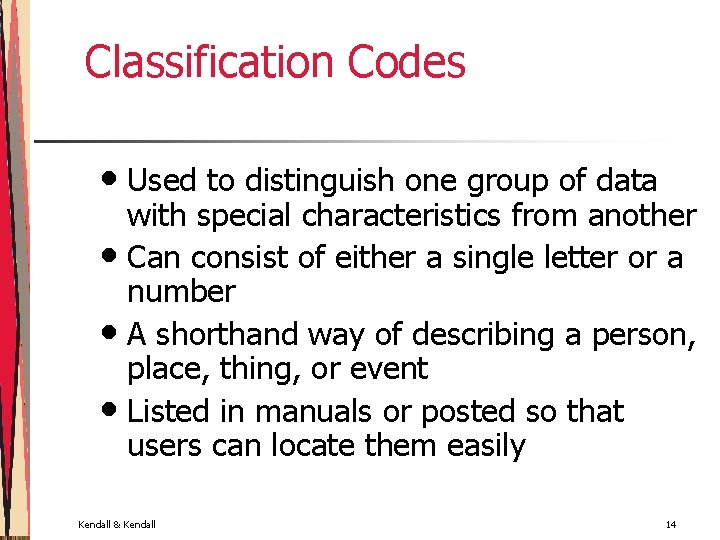
Classification Codes • Used to distinguish one group of data with special characteristics from another • Can consist of either a single letter or a number • A shorthand way of describing a person, place, thing, or event • Listed in manuals or posted so that users can locate them easily Kendall & Kendall 14
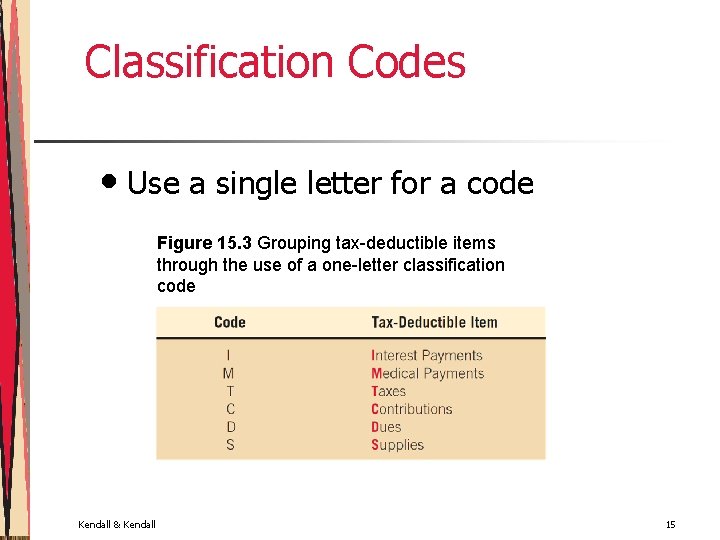
Classification Codes • Use a single letter for a code Figure 15. 3 Grouping tax-deductible items through the use of a one-letter classification code Kendall & Kendall 15
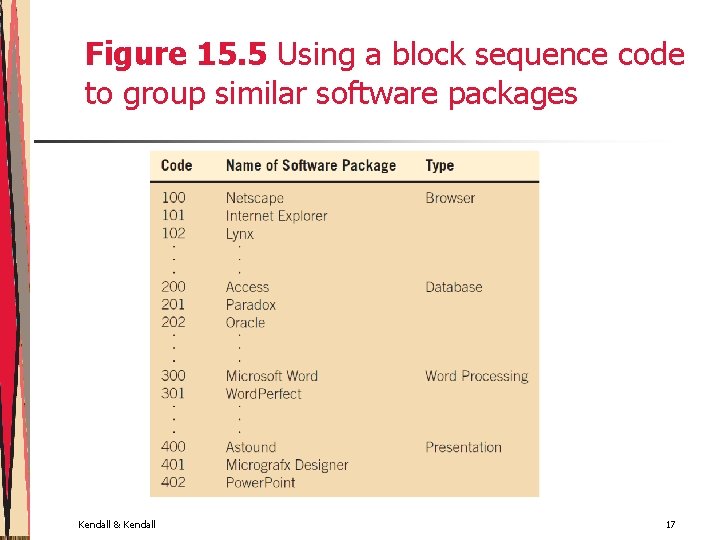
Block Sequence Codes • An extension of the sequence code • Data are grouped according to common characteristics • Simplicity of assigning the next available number (within the block) to the next item needing identification Kendall & Kendall 16
Figure 15. 5 Using a block sequence code to group similar software packages Kendall & Kendall 17
Concealing Information • Codes may be used to conceal or disguise information • Cipher Codes Kendall & Kendall 18
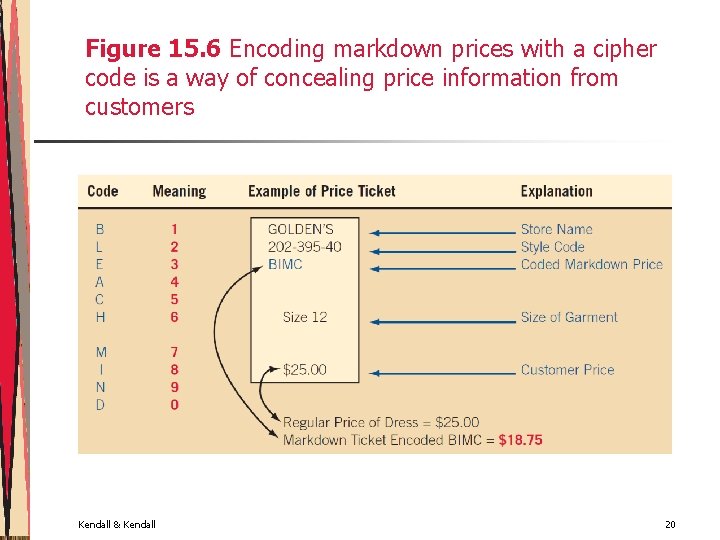
Cipher Codes • The direct substitution of one letter for another, one number for another, or one letter for a number Kendall & Kendall 19
Figure 15. 6 Encoding markdown prices with a cipher code is a way of concealing price information from customers Kendall & Kendall 20
Revealing Information • Sometimes it is desirable to reveal information to specific users through a code • Makes the data entry more meaningful for humans • Significant-Digit subset codes • Mnemonic codes • Unicode Kendall & Kendall 21
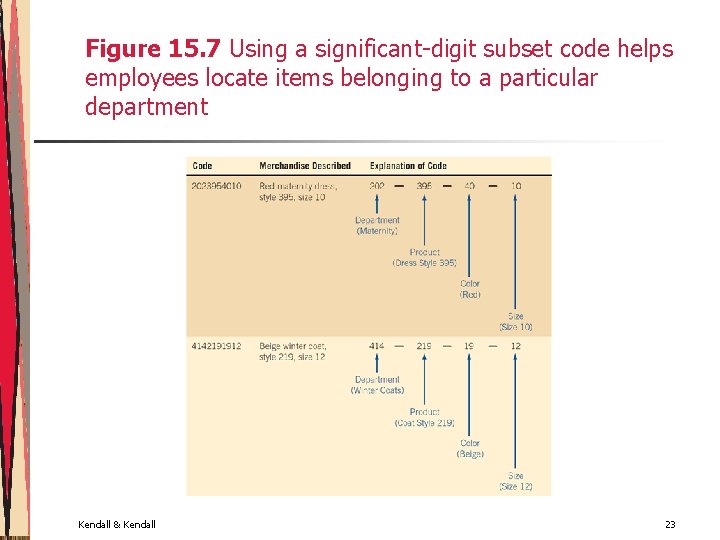
Significant-Digit Subset Codes • Used to help describe a product by virtue of its membership in many subgroups • Possible to locate items that belong to a certain group or class • Inquiries may be performed on a portion of the code • Useful for a marketing product Kendall & Kendall 22
Figure 15. 7 Using a significant-digit subset code helps employees locate items belonging to a particular department Kendall & Kendall 23
Mnemonic Codes • • • A mnemonic (pronounced nî-môn'-ïk) is a human memory aid Any code that helps the data-entry person remember how to enter the data or the user remember how to use the information is a mnemonic Using a combination of letters and symbols affords a clear way to code a product so that the code is easily seen and understood Kendall & Kendall 24
Figure 15. 8 Mnemonic codes function as memory aids by using a meaningful combination of letters and numbers Kendall & Kendall 25
Unicode • Includes all standard language symbols • Has room for 65, 535 characters • The full set of Unicode characters are grouped by language and may be found at www. unicode. org Kendall & Kendall 26
Requesting Appropriate Action • Instruct either the computer or the decision maker about what action to take • Function codes Kendall & Kendall 27
Function Codes • Short numeric or alphanumeric codes used to spell out precisely what activities are to be accomplished Kendall & Kendall 28
Figure 15. 9 Function codes compactly capture functions that the computer must perform Kendall & Kendall 29
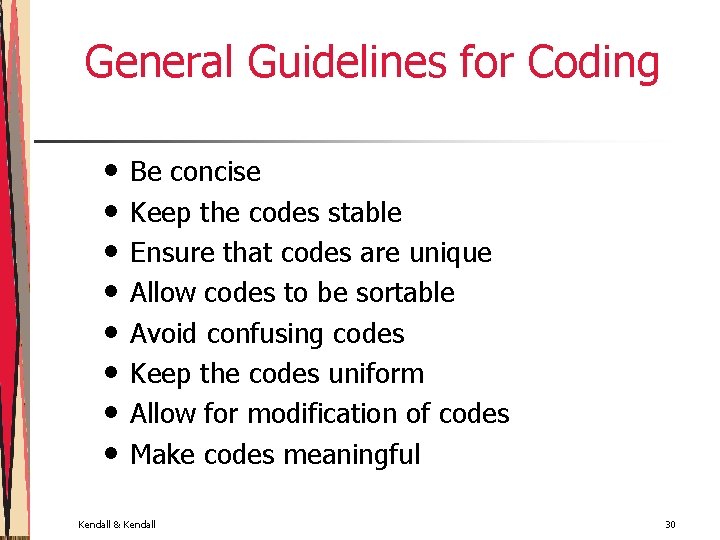
General Guidelines for Coding • • Be concise Keep the codes stable Ensure that codes are unique Allow codes to be sortable Avoid confusing codes Keep the codes uniform Allow for modification of codes Make codes meaningful Kendall & Kendall 30
Be Concise • • Overly long codes mean more keystrokes and consequently more errors Long codes also mean that storing the information in a database will require more memory Short codes are easier for people to remember and easier to enter If codes must be long, they should be broken up into subcodes Kendall & Kendall 31
Keep the Codes Stable • Stability means that the identification code for a customer should not change each time new data are received • Don’t change the codes in a mnemonic system Kendall & Kendall 32
Ensure That Codes Are Unique • For codes to work, they must be unique • Do not assign the same code number or name to the same items Kendall & Kendall 33
Allow Codes to Be Sortable • Make sure that users can do what you intend to do with the codes you create • Numerical codes are much easier to sort than alphanumeric data Kendall & Kendall 34
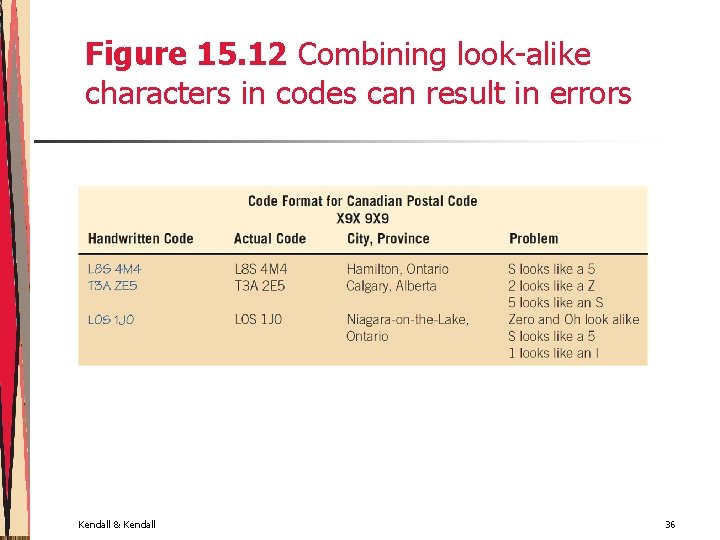
Avoid Confusing Codes • Avoid using coding characters that look or sound alike Kendall & Kendall 35
Figure 15. 12 Combining look-alike characters in codes can result in errors Kendall & Kendall 36
Keep the Codes Uniform • Need to follow readily perceived forms • Keep codes uniform among as well as within programs Kendall & Kendall 37
Allow for Modification of Codes • The system will evolve over time • The coding system should be able to encompass change Kendall & Kendall 38
Make Codes Meaningful • Effective codes contain information • Should make sense to people using them • Easier to understand, work with, and recall Kendall & Kendall 39
Using Codes • Validation programs • Report and inquiry programs • GUI programs Kendall & Kendall 40
Effective and Efficient Data Capture • Deciding what to capture • Letting the computer do the rest • Avoiding bottlenecks and extra steps • Starting with a good form • Choosing a data-entry method Kendall & Kendall 41
Deciding What to Capture • Data that change or vary with every transaction • Data that concisely differentiate the particular item being processed from all other items Kendall & Kendall 42
Letting the Computer Do the Rest • Recording the time of the transaction • Calculating new values from input • Storing and retrieving data on demand Kendall & Kendall 43
Avoiding Bottlenecks and Extra Steps • • Data are poured rapidly into the wide mouth of the system only to be slowed in its “neck” because of an artificially created instance of insufficient processing for the volume or detail of the data being entered The fewer steps involved in inputting data, the fewer chances there are for the introduction of errors Kendall & Kendall 44
Starting with a Good Form • With effective forms, it is not necessary to reenter information that the computer has already stored, or data such as time or date of entry that the computer can determine automatically Kendall & Kendall 45
Choosing a Data-Entry Method • Keyboards • Optical character recognition • Magnetic ink character recognition • Mark-sense forms • Bar codes • RFID Kendall & Kendall 46
Keyboards • Special function keys to open programs • Keys used to scroll and explore the Web • Keys that can be programmed with macros to reduce the number of keystrokes required • Ergonomic keyboards and infrared or Bluetooth-enabled keyboards Kendall & Kendall 47
Optical Character Recognition • • Increased speed Eliminates many of the time-consuming and error-fraught steps of other input devices Decentralizes responsibility for quality data directly to the unit that is generating it The transformation of faxes into documents that can be edited Kendall & Kendall 48
Magnetic Ink Character Recognition • • • A reliable and high-speed method that is not susceptible to accepting stray marks If it is required on all withdrawal checks, it serves as a security measure against bad checks Data entry personnel can see the numbers making up the code if it is necessary to verify it Kendall & Kendall 49
Mark-Sense Forms • • • Little training of entry personnel is necessary A high volume of forms can be processed quickly Stray marks on form can be entered as incorrect data Choices are limited to the answers provided Difficulty in capturing alphanumeric data Easy to get confused and put a mark in an incorrect position Kendall & Kendall 50
Bar Codes • Affords a high degree of accuracy for data entry • Saves labor costs • Allows the automatic capturing of data • Tracking of credit card purchases Kendall & Kendall 51
Figure 15. 17 Bar coding, as shown on this label for grocery product, affords highly accurate data entry. Used with the permission of the Uniform Code Council, Dayton, Ohio Kendall & Kendall 52
RFID • Allows the automatic collection of data using RFID tags that contain a chip and an antenna • Passive RFID tags • Active RFID tags • Privacy is a concern Kendall & Kendall 53
Ensuring Data Quality through Input Validation • The critical importance of catching errors during input, prior to processing and storage cannot be overemphasized • Potential problems • Validating input transactions • Validating input data Kendall & Kendall 54
Figure 15. 18 Validating input is important to ensure that most potential problems with data are eliminated early Kendall & Kendall 55
Validating Input Transactions • Submitting the wrong data • Submitting of data by an unauthorized person • Asking the system to perform an unacceptable function Kendall & Kendall 56
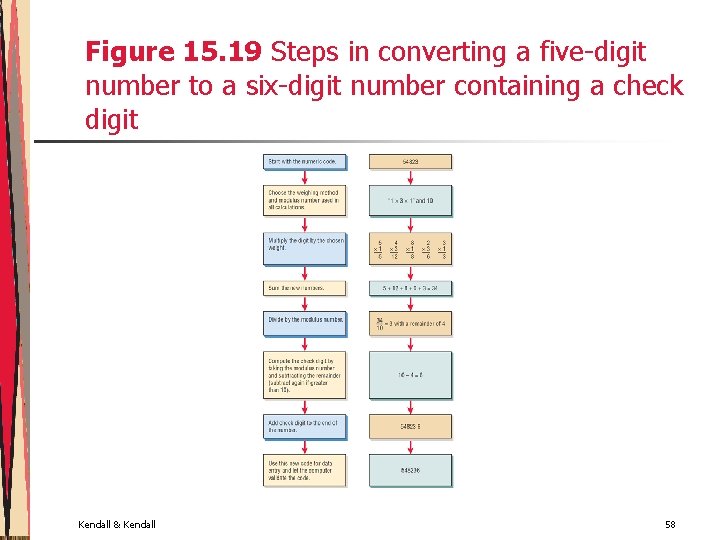
Validating Input Data • • Test for missing data Test for correct field length Test for class or composition Test for range or reasonableness Test for invalid values Cross-reference checks Test for comparison with stored data Setting up self-validating codes (check digit) Kendall & Kendall 57
Figure 15. 19 Steps in converting a five-digit number to a six-digit number containing a check digit Kendall & Kendall 58
The Process of Validation • Check first for missing data • Check the syntax • Check the semantics • GUI screens can help to reduce the number of human input errors when they incorporate radio buttons, check boxes and drop-down lists Kendall & Kendall 59
The Process of Validation (Continued) • Regular expressions • Validating XML documents • DTD • Schema Kendall & Kendall 60
Figure 15. 22 These characters are used in regular expression (pattern) validation Kendall & Kendall 61
Accuracy Advantages in Ecommerce Environments • • Customers generally key or enter data themselves Data entered by customers are stored for later use Data entered at the point of sale are reused throughout the entire order fulfillment process Information is used as feedback to customers Kendall & Kendall 62
Summary • Quality of data • Effective coding • Effective and efficient data capture • Validation of data Kendall & Kendall 63
Summary (Continued) • Coding • Sequence codes • Alphabetic derivation codes • Classification codes • Block sequence codes • Cipher codes • Significant-digit subset codes • Mnemonic codes • Uniform character set • Function codes Kendall & Kendall 64
Summary (Continued) • Input devices • Input validation • Ecommerce • Keyboards • OCR • MICR • Mark-sense forms • Bar codes • Input transaction • Input data Kendall & Kendall 65