
Design of Digital Circuits Lecture 10 b Assembly

Design of Digital Circuits Lecture 10 b: Assembly Programming Prof. Onur Mutlu ETH Zurich Spring 2019 22 March 2019
Agenda for Today & Next Few Lectures n LC-3 and MIPS Instruction Set Architectures n LC-3 and MIPS assembly and programming n n Introduction to microarchitecture and single-cycle microarchitecture Multi-cycle microarchitecture 2
Required Readings n This week q Von Neumann Model, LC-3, and MIPS n n q Programming n q n P&P, Chapters 4, 5 H&H, Chapter 6 P&P, Appendices A and C (ISA and microarchitecture of LC-3) H&H, Appendix B (MIPS instructions) P&P, Chapter 6 Recommended: H&H Chapter 5, especially 5. 1, 5. 2, 5. 4, 5. 5 Next week q Introduction to microarchitecture and single-cycle microarchitecture n n q H&H, Chapter 7. 1 -7. 3 P&P, Appendices A and C Multi-cycle microarchitecture n n H&H, Chapter 7. 4 P&P, Appendices A and C 3
What Will We Learn Today? n Assembly Programming q q q Programming constructs Debugging Conditional statements and loops in MIPS assembly Arrays in MIPS assembly Function calls n The stack 4

Recall: The Von Neumann Model MEMORY Mem Addr Reg Mem Data Reg INPUT Keyboard, Mouse, Disk… PROCESSING UNIT ALU TEMP OUTPUT Monitor, Printer, Disk… CONTROL UNIT PC or IP Inst Register 5

Recall: LC-3: A Von Neumann Machine 6

Recall: The Instruction Cycle q q q FETCH DECODE EVALUATE ADDRESS FETCH OPERANDS EXECUTE STORE RESULT 7
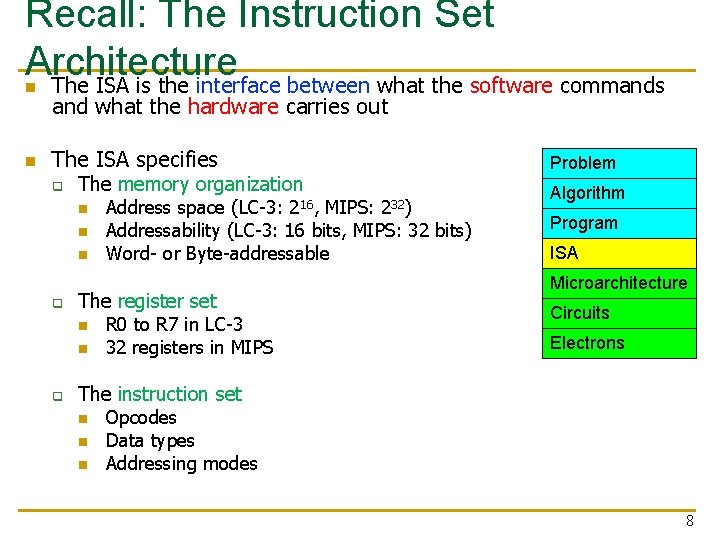
Recall: The Instruction Set Architecture The ISA is the interface between what the software commands n n and what the hardware carries out The ISA specifies q The memory organization n q Address space (LC-3: MIPS: Addressability (LC-3: 16 bits, MIPS: 32 bits) Word- or Byte-addressable The register set n n q 216, Problem R 0 to R 7 in LC-3 32 registers in MIPS 232) Algorithm Program ISA Microarchitecture Circuits Electrons The instruction set n n n Opcodes Data types Addressing modes 8
Our First LC-3 Program: Use of Conditional Branches for Looping 9
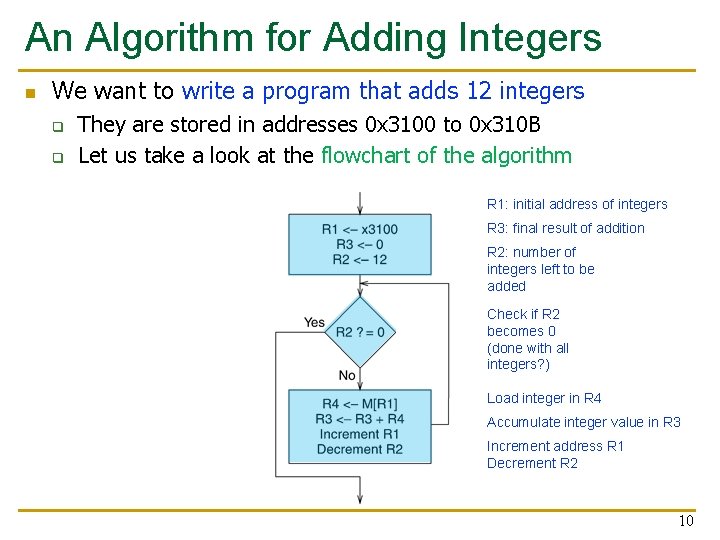
An Algorithm for Adding Integers n We want to write a program that adds 12 integers q q They are stored in addresses 0 x 3100 to 0 x 310 B Let us take a look at the flowchart of the algorithm R 1: initial address of integers R 3: final result of addition R 2: number of integers left to be added Check if R 2 becomes 0 (done with all integers? ) Load integer in R 4 Accumulate integer value in R 3 Increment address R 1 Decrement R 2 10
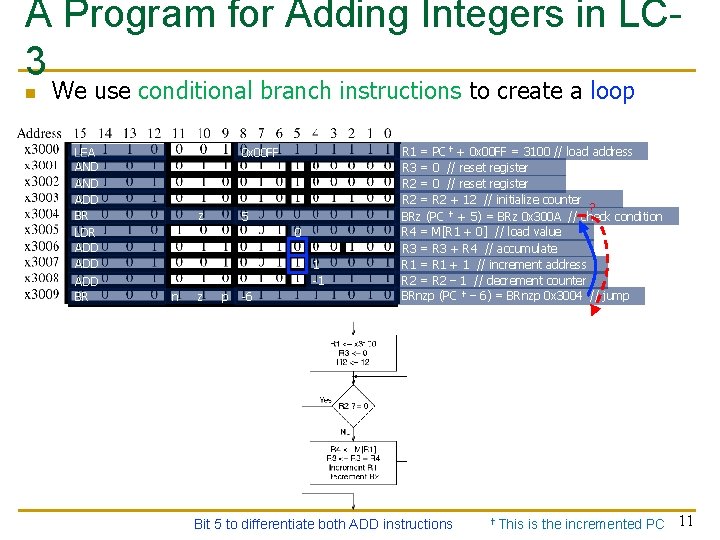
A Program for Adding Integers in LC 3 n We use conditional branch instructions to create a loop LEA AND ADD BR LDR ADD ADD BR 0 x 00 FF z 5 0 1 -1 n z p -6 R 1 = PC✝ + 0 x 00 FF = 3100 // load address R 3 = 0 // reset register R 2 = R 2 + 12 // initialize counter ? BRz (PC ✝ + 5) = BRz 0 x 300 A // check condition R 4 = M[R 1 + 0] // load value R 3 = R 3 + R 4 // accumulate R 1 = R 1 + 1 // increment address R 2 = R 2 – 1 // decrement counter BRnzp (PC ✝ – 6) = BRnzp 0 x 3004 // jump Bit 5 to differentiate both ADD instructions ✝This is the incremented PC 11
The LC-3 Data Path Revisited 12
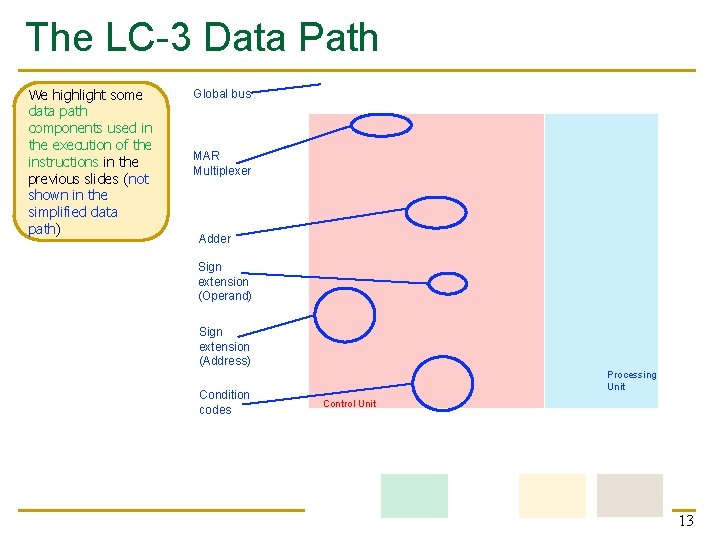
The LC-3 Data Path We highlight some data path components used in the execution of the instructions in the previous slides (not shown in the simplified data path) Global bus MAR Multiplexer Adder Sign extension (Operand) Sign extension (Address) Condition codes Processing Unit Control Unit 13
(Assembly) Programming 14
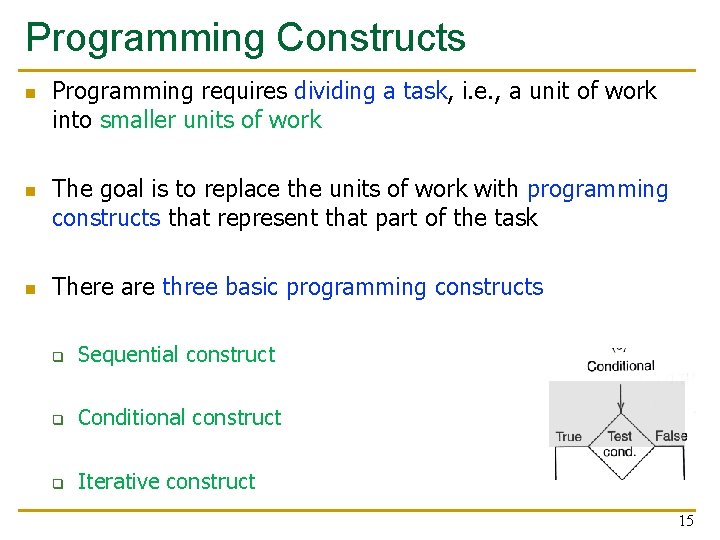
Programming Constructs n n n Programming requires dividing a task, i. e. , a unit of work into smaller units of work The goal is to replace the units of work with programming constructs that represent that part of the task There are three basic programming constructs q Sequential construct q Conditional construct q Iterative construct 15
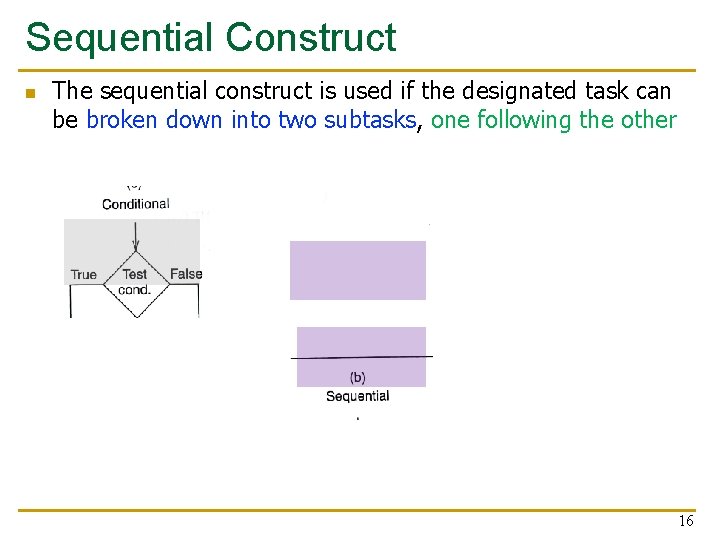
Sequential Construct n The sequential construct is used if the designated task can be broken down into two subtasks, one following the other 16

Conditional Construct n The conditional construct is used if the designated task consists of doing one of two subtasks, but not both Is the condition “true” or “false”? q q n Either subtask may be ”do nothing” After the correct subtask is completed, the program moves onward E. g. , if-else statement, switch-case statement 17
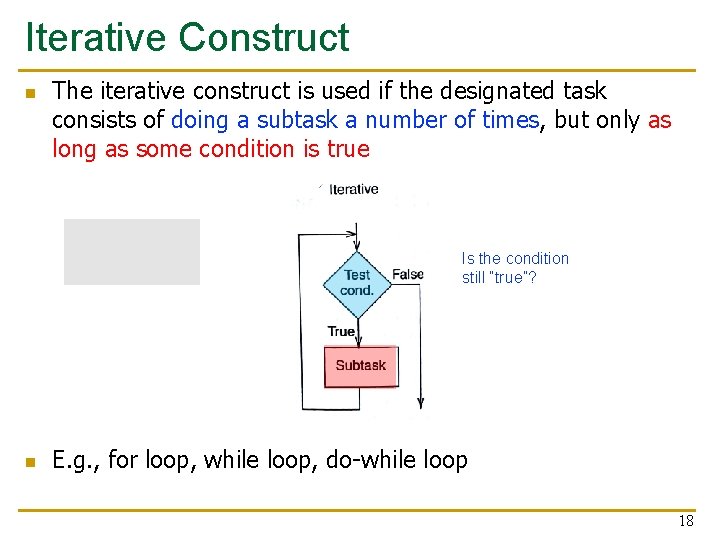
Iterative Construct n The iterative construct is used if the designated task consists of doing a subtask a number of times, but only as long as some condition is true Is the condition still “true”? n E. g. , for loop, while loop, do-while loop 18
Constructs in an Example Program n n Let us see how to use the programming constructs in an example program The example program counts the number of occurrences of a character in a text file It uses sequential, conditional, and iterative constructs We will see how to write conditional and iterative constructs with conditional branches 19
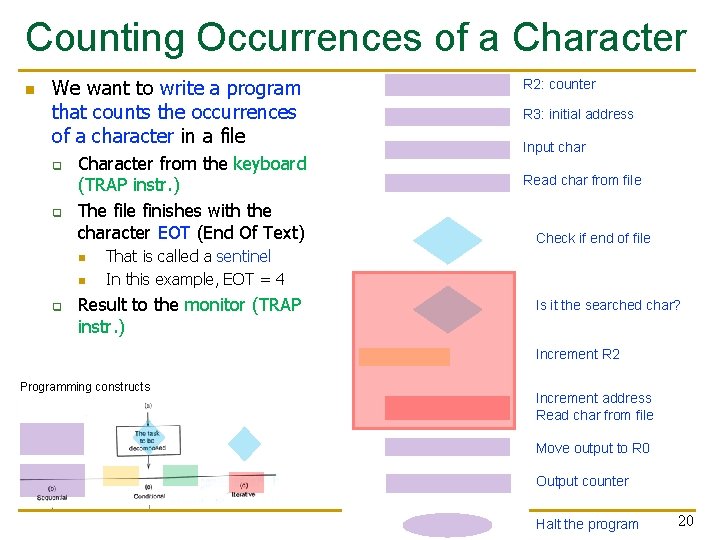
Counting Occurrences of a Character n We want to write a program that counts the occurrences of a character in a file q q Character from the keyboard (TRAP instr. ) The file finishes with the character EOT (End Of Text) n n q R 2: counter R 3: initial address Input char Read char from file Check if end of file That is called a sentinel In this example, EOT = 4 Result to the monitor (TRAP instr. ) Is it the searched char? Increment R 2 Programming constructs Increment address Read char from file Move output to R 0 Output counter Halt the program 20
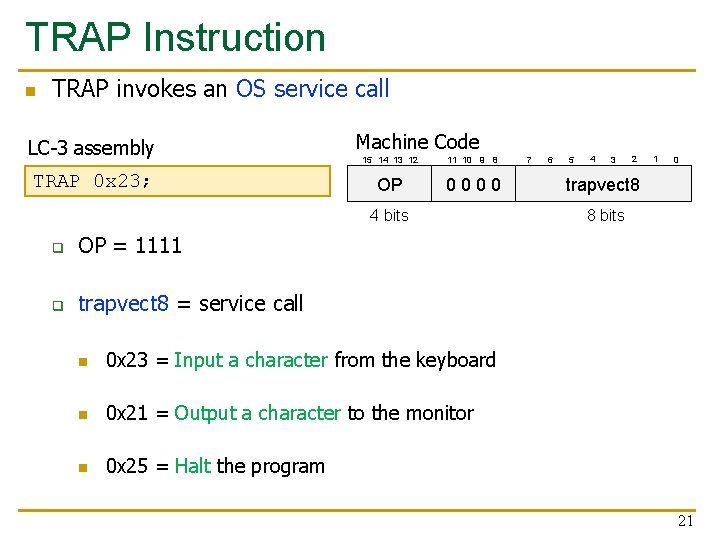
TRAP Instruction n TRAP invokes an OS service call LC-3 assembly TRAP 0 x 23; Machine Code 15 14 13 12 11 10 9 8 OP 0000 4 bits q OP = 1111 q trapvect 8 = service call n 0 x 23 = Input a character from the keyboard n 0 x 21 = Output a character to the monitor n 0 x 25 = Halt the program 7 6 5 4 3 2 1 0 trapvect 8 8 bits 21
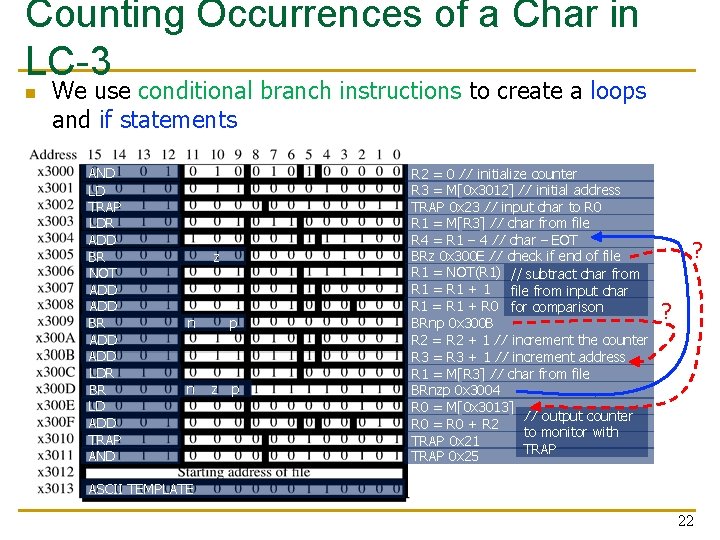
Counting Occurrences of a Char in LC-3 n We use conditional branch instructions to create a loops and if statements AND LD TRAP LDR ADD BR NOT ADD BR ADD LDR BR LD ADD TRAP AND z n p n z p R 2 = 0 // initialize counter R 3 = M[0 x 3012] // initial address TRAP 0 x 23 // input char to R 0 R 1 = M[R 3] // char from file R 4 = R 1 – 4 // char – EOT BRz 0 x 300 E // check if end of file R 1 = NOT(R 1) // subtract char from R 1 = R 1 + 1 file from input char R 1 = R 1 + R 0 for comparison BRnp 0 x 300 B R 2 = R 2 + 1 // increment the counter R 3 = R 3 + 1 // increment address R 1 = M[R 3] // char from file BRnzp 0 x 3004 R 0 = M[0 x 3013] // output counter R 0 = R 0 + R 2 to monitor with TRAP 0 x 21 TRAP 0 x 25 ? ? ASCII TEMPLATE 22
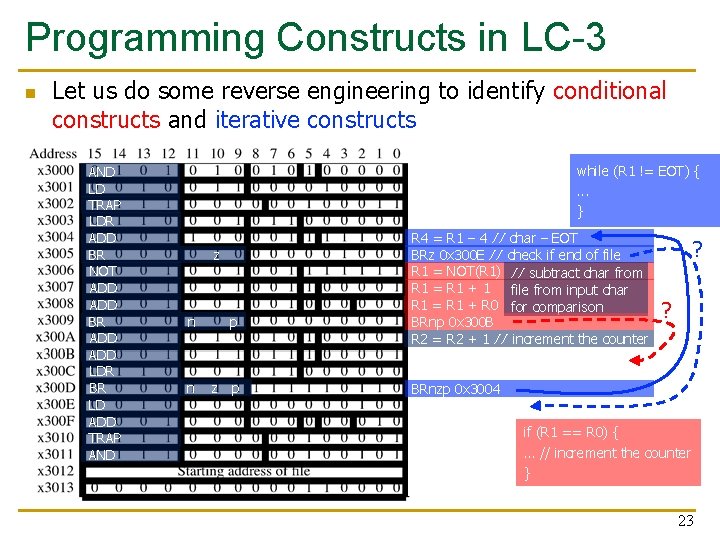
Programming Constructs in LC-3 n Let us do some reverse engineering to identify conditional constructs and iterative constructs AND LD TRAP LDR ADD BR NOT ADD BR ADD LDR BR LD ADD TRAP AND while (R 1 != EOT) {. . . } z n p n z p R 4 = R 1 – 4 // char – EOT BRz 0 x 300 E // check if end of file R 1 = NOT(R 1) // subtract char from R 1 = R 1 + 1 file from input char R 1 = R 1 + R 0 for comparison BRnp 0 x 300 B R 2 = R 2 + 1 // increment the counter ? ? BRnzp 0 x 3004 if (R 1 == R 0) { … // increment the counter } 23

Debugging 24
Debugging n n n Debugging is the process of removing errors in programs It consists of tracing the program, i. e. , keeping track of the sequence of instructions that have been executed and the results produced by each instruction A useful technique is to partition the program into parts, often referred to as modules, and examine the results computed in each module High-level language (e. g. , C programming language) debuggers: dbx, gdb, Visual Studio debugger Machine code debugging: Elementary interactive debugging operations 25
Interactive Debugging n When debugging interactively, it is important to be able to q q 1. Deposit values in memory and in registers, in order to test the execution of a part of a program in isolation 2. Execute instruction sequences in a program by using n n q 3. Stop execution when desired n q RUN command: execute until HALT instruction or a breakpoint STEP N command: execute a fixed number (N) of instructions SET BREAKPOINT command: stop execution at a specific instruction in a program 4. Examine what is in memory and registers at any point in the program 26
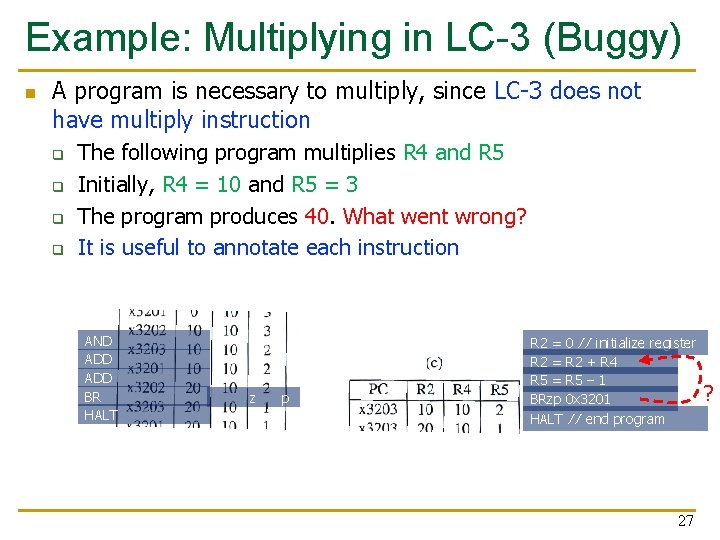
Example: Multiplying in LC-3 (Buggy) n A program is necessary to multiply, since LC-3 does not have multiply instruction q q The following program multiplies R 4 and R 5 Initially, R 4 = 10 and R 5 = 3 The program produces 40. What went wrong? It is useful to annotate each instruction AND ADD BR HALT z p R 2 = 0 // initialize register R 2 = R 2 + R 4 R 5 = R 5 – 1 BRzp 0 x 3201 HALT // end program 27 ?
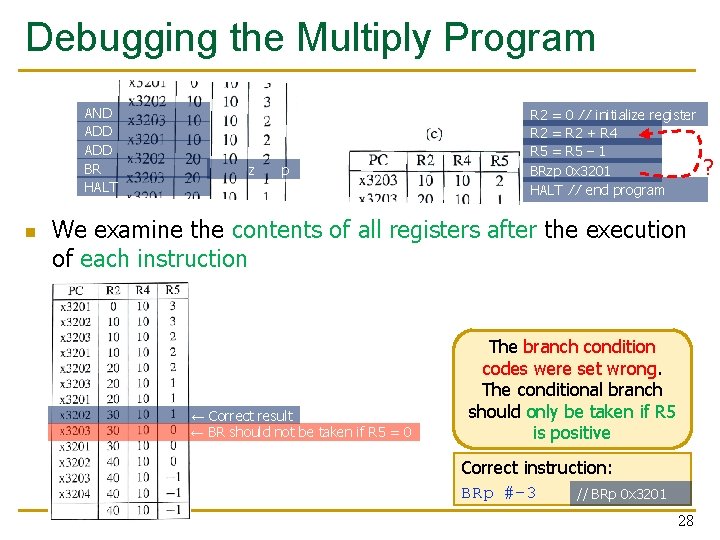
Debugging the Multiply Program AND ADD BR HALT n z p R 2 = 0 // initialize register R 2 = R 2 + R 4 R 5 = R 5 – 1 BRzp 0 x 3201 HALT // end program We examine the contents of all registers after the execution of each instruction ← Correct result ← BR should not be taken if R 5 = 0 The branch condition codes were set wrong. The conditional branch should only be taken if R 5 is positive Correct instruction: BRp #-3 // BRp 0 x 3201 28 ?
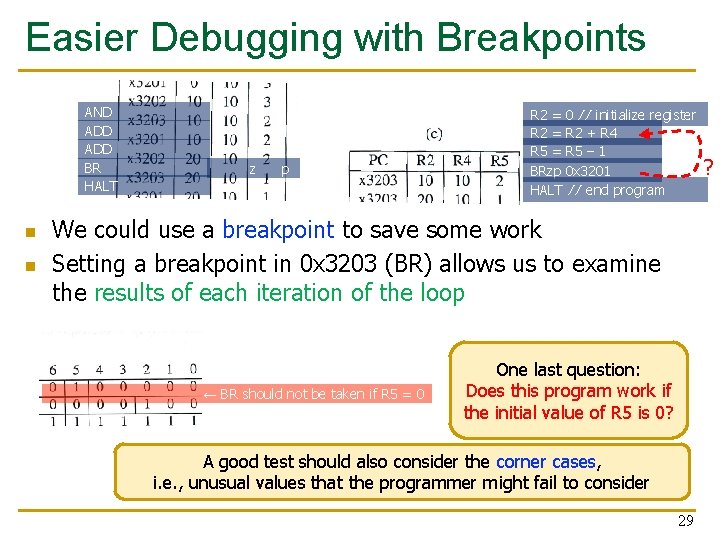
Easier Debugging with Breakpoints AND ADD BR HALT n n z p R 2 = 0 // initialize register R 2 = R 2 + R 4 R 5 = R 5 – 1 BRzp 0 x 3201 HALT // end program We could use a breakpoint to save some work Setting a breakpoint in 0 x 3203 (BR) allows us to examine the results of each iteration of the loop ← BR should not be taken if R 5 = 0 One last question: Does this program work if the initial value of R 5 is 0? A good test should also consider the corner cases, i. e. , unusual values that the programmer might fail to consider 29 ?
Conditional Statements and Loops in MIPS Assembly 30
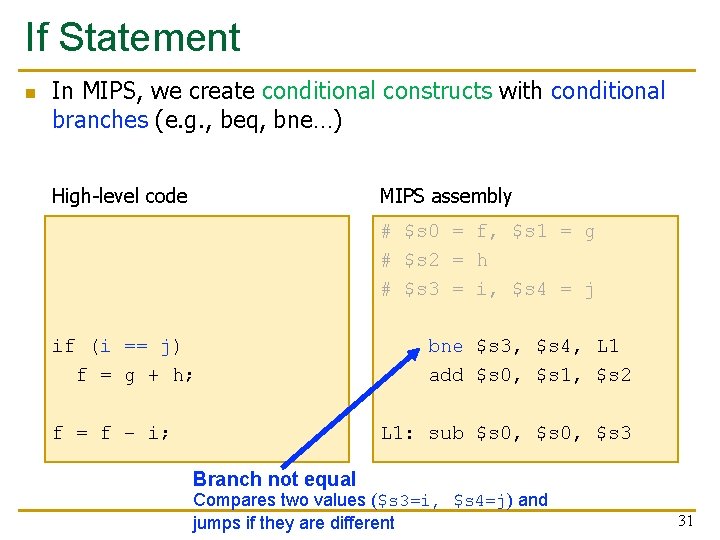
If Statement n In MIPS, we create conditional constructs with conditional branches (e. g. , beq, bne…) High-level code MIPS assembly # $s 0 = f, $s 1 = g # $s 2 = h # $s 3 = i, $s 4 = j if (i == j) f = g + h; f = f – i; bne $s 3, $s 4, L 1 add $s 0, $s 1, $s 2 L 1: sub $s 0, $s 3 Branch not equal Compares two values ($s 3=i, $s 4=j) and jumps if they are different 31
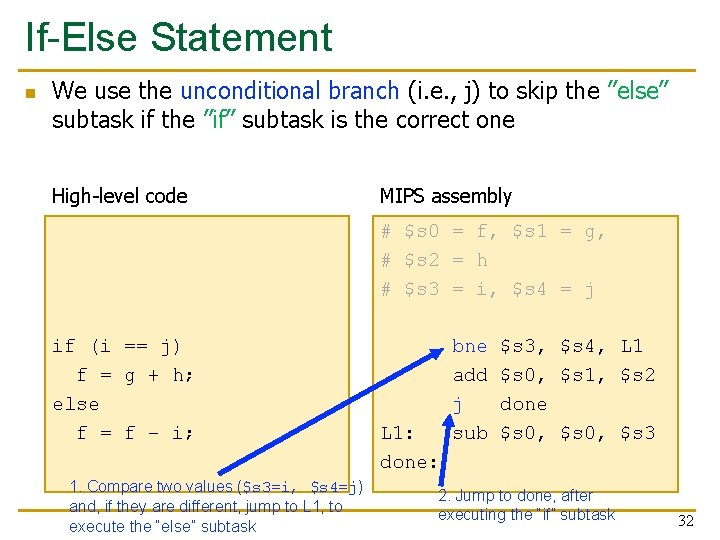
If-Else Statement n We use the unconditional branch (i. e. , j) to skip the ”else” subtask if the ”if” subtask is the correct one High-level code MIPS assembly # $s 0 = f, $s 1 = g, # $s 2 = h # $s 3 = i, $s 4 = j if (i == j) f = g + h; else f = f – i; 1. Compare two values ($s 3=i, $s 4=j) and, if they are different, jump to L 1, to execute the “else” subtask L 1: done: bne add j sub $s 3, $s 4, L 1 $s 0, $s 1, $s 2 done $s 0, $s 3 2. Jump to done, after executing the “if” subtask 32
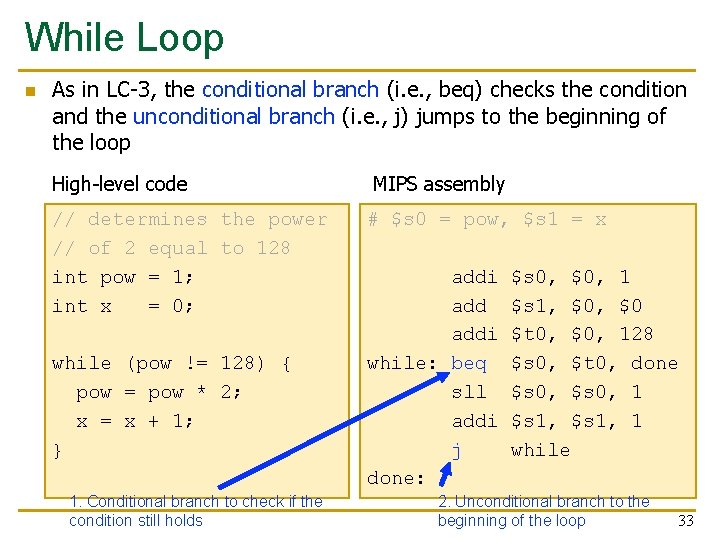
While Loop n As in LC-3, the conditional branch (i. e. , beq) checks the condition and the unconditional branch (i. e. , j) jumps to the beginning of the loop High-level code MIPS assembly // determines the power // of 2 equal to 128 int pow = 1; int x = 0; # $s 0 = pow, $s 1 = x while (pow != 128) { pow = pow * 2; x = x + 1; } 1. Conditional branch to check if the condition still holds addi while: beq sll addi j done: $s 0, $0, 1 $s 1, $0 $t 0, $0, 128 $s 0, $t 0, done $s 0, 1 $s 1, 1 while 2. Unconditional branch to the beginning of the loop 33
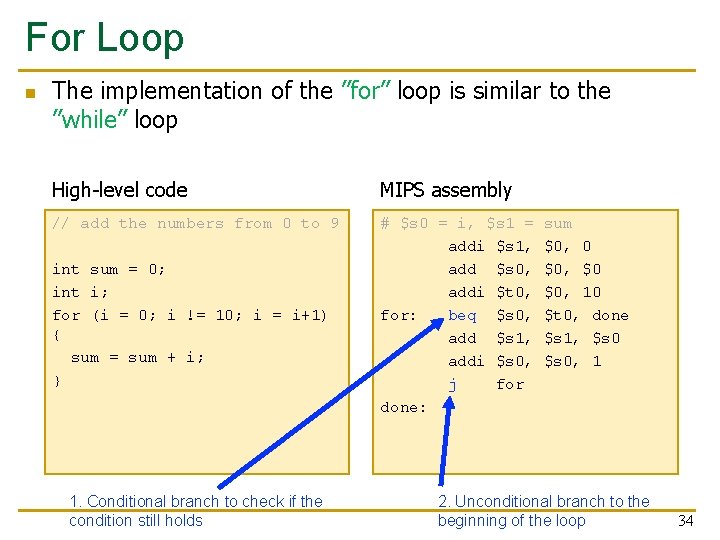
For Loop n The implementation of the ”for” loop is similar to the ”while” loop High-level code MIPS assembly // add the numbers from 0 to 9 # $s 0 = i, $s 1 = addi $s 1, add $s 0, addi $t 0, for: beq $s 0, add $s 1, addi $s 0, j for done: int sum = 0; int i; for (i = 0; i != 10; i = i+1) { sum = sum + i; } 1. Conditional branch to check if the condition still holds sum $0, 0 $0, $0 $0, 10 $t 0, done $s 1, $s 0, 1 2. Unconditional branch to the beginning of the loop 34
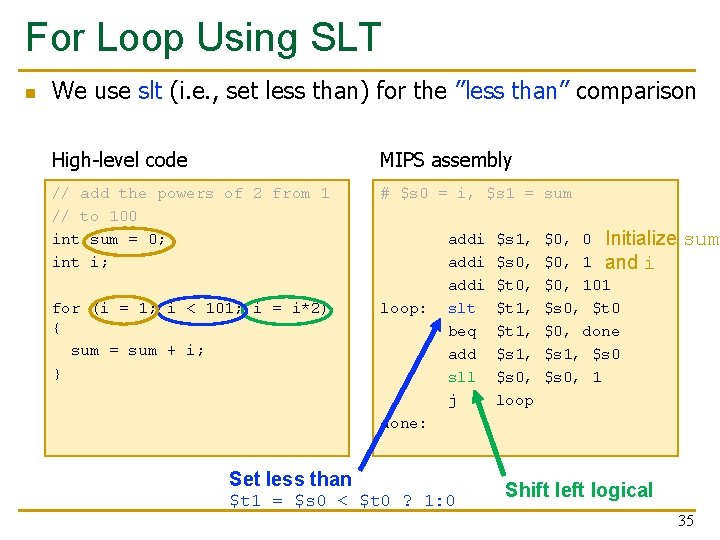
For Loop Using SLT n We use slt (i. e. , set less than) for the ”less than” comparison High-level code MIPS assembly // add the powers of 2 from 1 // to 100 int sum = 0; int i; # $s 0 = i, $s 1 = sum for (i = 1; i < 101; i = i*2) { sum = sum + i; } loop: addi slt beq add sll j $s 1, $s 0, $t 1, $s 0, loop $0, 0 Initialize $0, 1 and i $0, 101 $s 0, $t 0 $0, done $s 1, $s 0, 1 sum done: Set less than $t 1 = $s 0 < $t 0 ? 1: 0 Shift left logical 35
Arrays in MIPS 36
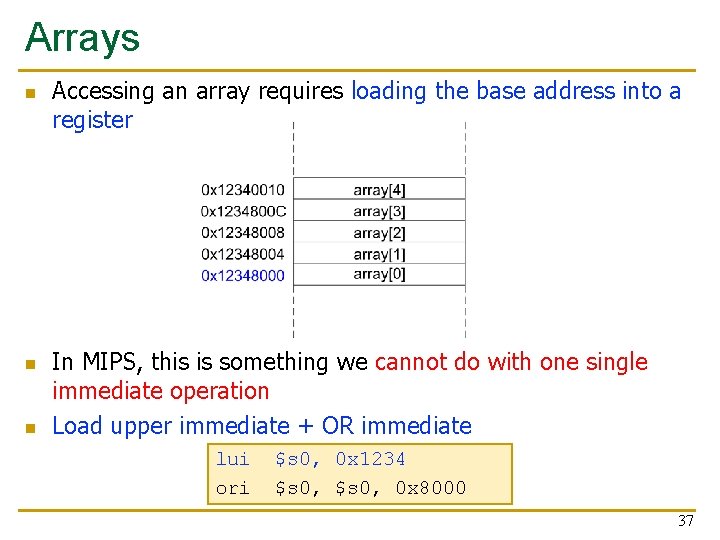
Arrays n n n Accessing an array requires loading the base address into a register In MIPS, this is something we cannot do with one single immediate operation Load upper immediate + OR immediate lui ori $s 0, 0 x 1234 $s 0, 0 x 8000 37
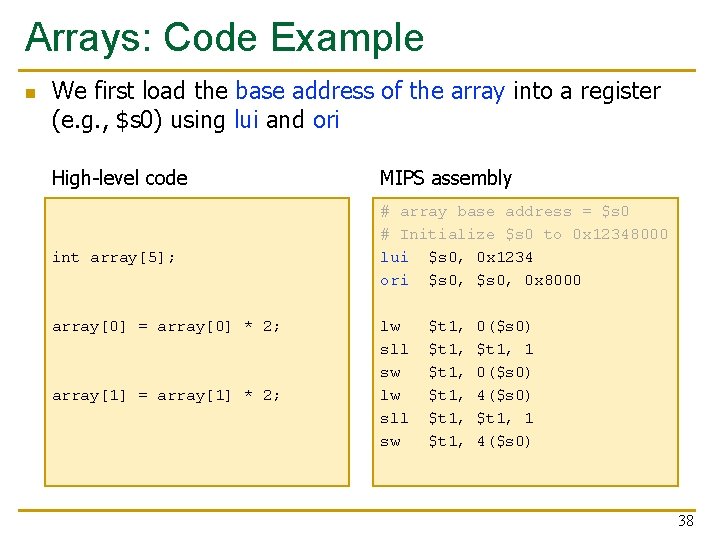
Arrays: Code Example n We first load the base address of the array into a register (e. g. , $s 0) using lui and ori High-level code int array[5]; array[0] = array[0] * 2; array[1] = array[1] * 2; MIPS assembly # array base address = $s 0 # Initialize $s 0 to 0 x 12348000 lui $s 0, 0 x 1234 ori $s 0, 0 x 8000 lw sll sw $t 1, $t 1, 0($s 0) $t 1, 1 0($s 0) 4($s 0) $t 1, 1 4($s 0) 38
Function Calls 39
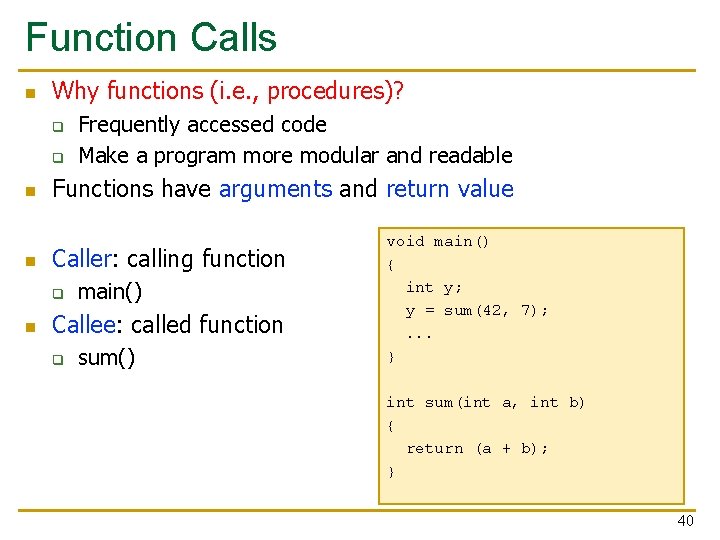
Function Calls n Why functions (i. e. , procedures)? q q n n Functions have arguments and return value Caller: calling function q n Frequently accessed code Make a program more modular and readable main() Callee: called function q sum() void main() { int y; y = sum(42, 7); . . . } int sum(int a, int b) { return (a + b); } 40
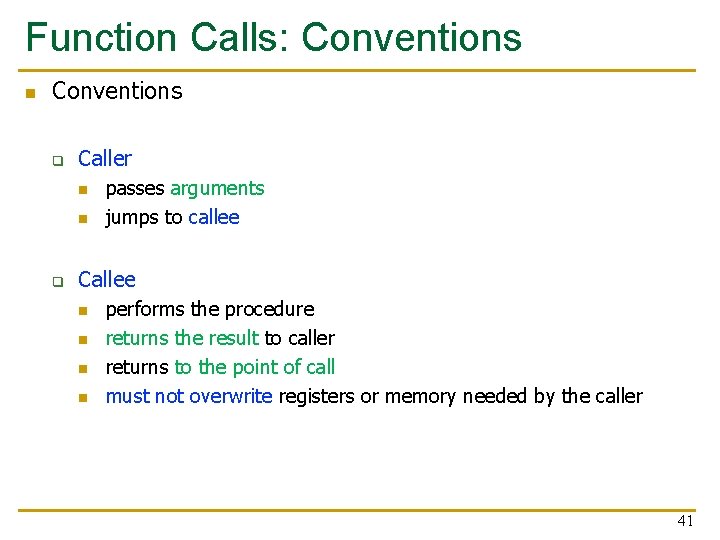
Function Calls: Conventions n Conventions q Caller n n q passes arguments jumps to callee Callee n n performs the procedure returns the result to caller returns to the point of call must not overwrite registers or memory needed by the caller 41
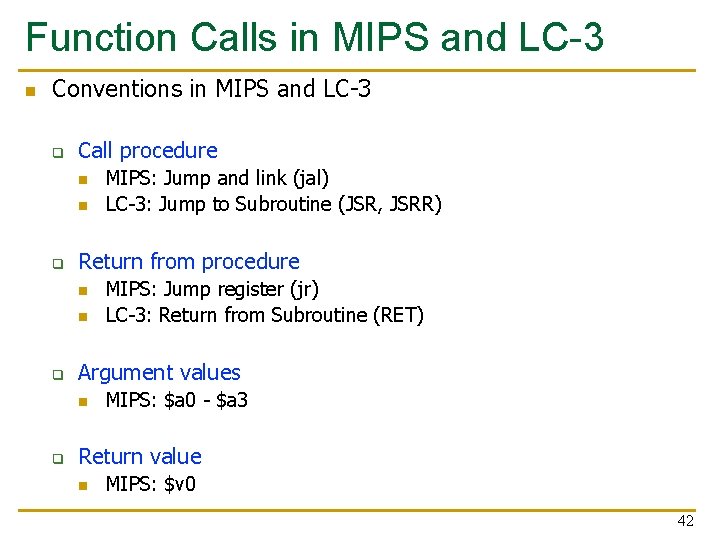
Function Calls in MIPS and LC-3 n Conventions in MIPS and LC-3 q Call procedure n n q Return from procedure n n q MIPS: Jump register (jr) LC-3: Return from Subroutine (RET) Argument values n q MIPS: Jump and link (jal) LC-3: Jump to Subroutine (JSR, JSRR) MIPS: $a 0 - $a 3 Return value n MIPS: $v 0 42
We did not cover the following slides in lecture. These are for your preparation for the next lecture
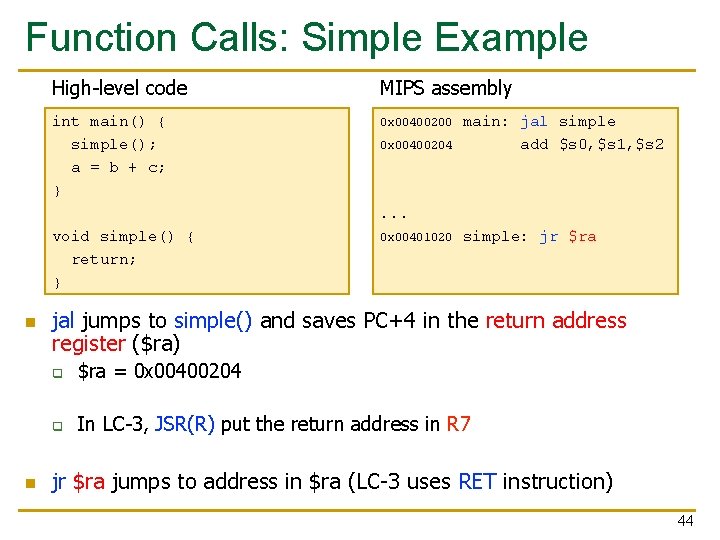
Function Calls: Simple Example High-level code MIPS assembly int main() { simple(); a = b + c; } 0 x 00400200 0 x 00400204 main: jal simple add $s 0, $s 1, $s 2 . . . void simple() { return; } n n 0 x 00401020 simple: jr $ra jal jumps to simple() and saves PC+4 in the return address register ($ra) q $ra = 0 x 00400204 q In LC-3, JSR(R) put the return address in R 7 jr $ra jumps to address in $ra (LC-3 uses RET instruction) 44
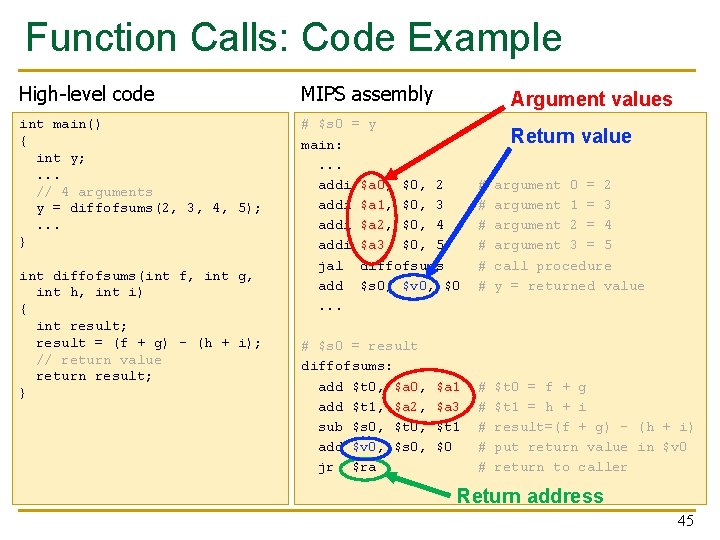
Function Calls: Code Example High-level code MIPS assembly int main() { int y; . . . // 4 arguments y = diffofsums(2, 3, 4, 5); . . . } # $s 0 = y main: . . . addi $a 0, $0, 2 addi $a 1, $0, 3 addi $a 2, $0, 4 addi $a 3, $0, 5 jal diffofsums add $s 0, $v 0, $0. . . int diffofsums(int f, int g, int h, int i) { int result; result = (f + g) - (h + i); // return value return result; } # $s 0 = result diffofsums: add $t 0, $a 0, add $t 1, $a 2, sub $s 0, $t 0, add $v 0, $s 0, jr $ra Argument values $a 1 $a 3 $t 1 $0 Return value # # # argument 0 = 2 argument 1 = 3 argument 2 = 4 argument 3 = 5 call procedure y = returned value # # # $t 0 = f + g $t 1 = h + i result=(f + g) - (h + i) put return value in $v 0 return to caller Return address 45
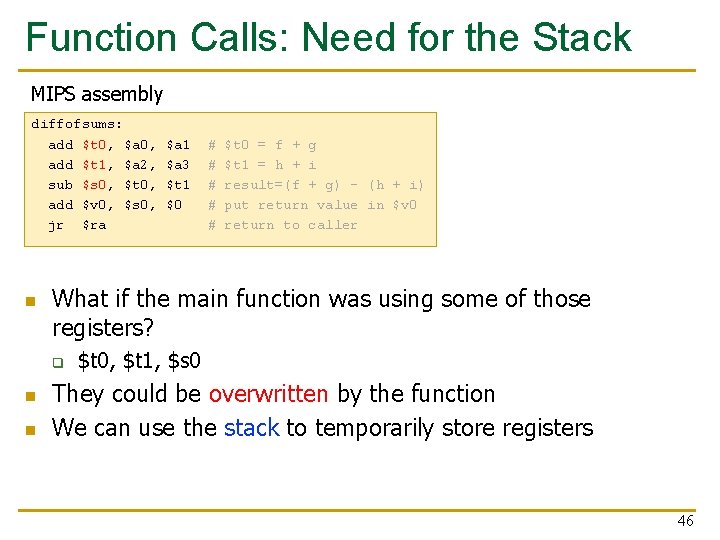
Function Calls: Need for the Stack MIPS assembly diffofsums: add $t 0, $a 0, add $t 1, $a 2, sub $s 0, $t 0, add $v 0, $s 0, jr $ra n n # # # $t 0 = f + g $t 1 = h + i result=(f + g) - (h + i) put return value in $v 0 return to caller What if the main function was using some of those registers? q n $a 1 $a 3 $t 1 $0 $t 0, $t 1, $s 0 They could be overwritten by the function We can use the stack to temporarily store registers 46
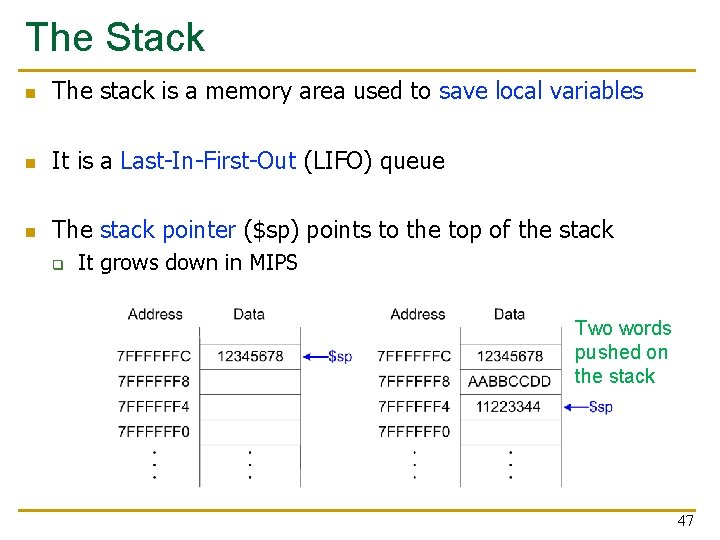
The Stack n The stack is a memory area used to save local variables n It is a Last-In-First-Out (LIFO) queue n The stack pointer ($sp) points to the top of the stack q It grows down in MIPS Two words pushed on the stack 47
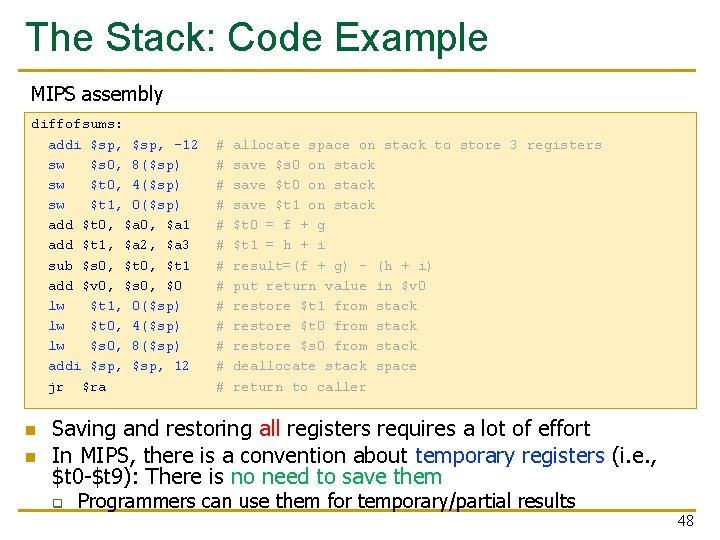
The Stack: Code Example MIPS assembly diffofsums: addi $sp, -12 sw $s 0, 8($sp) sw $t 0, 4($sp) sw $t 1, 0($sp) add $t 0, $a 1 add $t 1, $a 2, $a 3 sub $s 0, $t 1 add $v 0, $s 0, $0 lw $t 1, 0($sp) lw $t 0, 4($sp) lw $s 0, 8($sp) addi $sp, 12 jr $ra n n # # # # allocate space on stack to store 3 registers save $s 0 on stack save $t 1 on stack $t 0 = f + g $t 1 = h + i result=(f + g) - (h + i) put return value in $v 0 restore $t 1 from stack restore $t 0 from stack restore $s 0 from stack deallocate stack space return to caller Saving and restoring all registers requires a lot of effort In MIPS, there is a convention about temporary registers (i. e. , $t 0 -$t 9): There is no need to save them q Programmers can use them for temporary/partial results 48
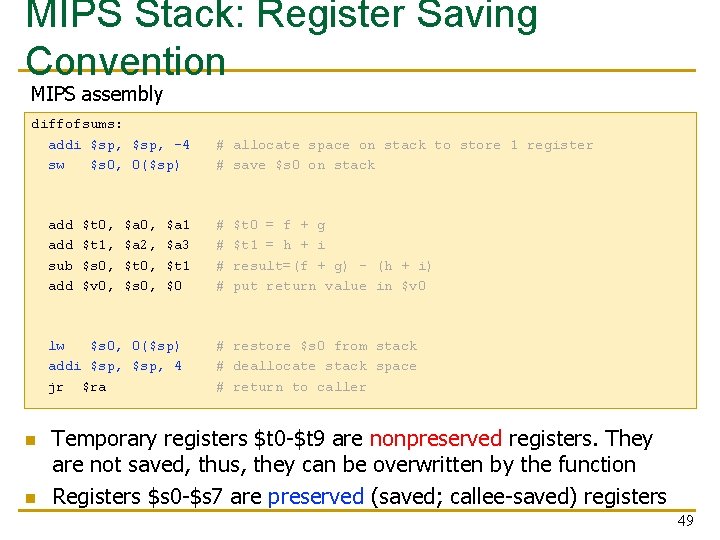
MIPS Stack: Register Saving Convention MIPS assembly diffofsums: addi $sp, -4 sw $s 0, 0($sp) add sub add $t 0, $t 1, $s 0, $v 0, $a 0, $a 2, $t 0, $s 0, $a 1 $a 3 $t 1 $0 lw $s 0, 0($sp) addi $sp, 4 jr $ra n n # allocate space on stack to store 1 register # save $s 0 on stack # # $t 0 = f + g $t 1 = h + i result=(f + g) - (h + i) put return value in $v 0 # restore $s 0 from stack # deallocate stack space # return to caller Temporary registers $t 0 -$t 9 are nonpreserved registers. They are not saved, thus, they can be overwritten by the function Registers $s 0 -$s 7 are preserved (saved; callee-saved) registers 49
Lecture Summary n Assembly Programming q q q Programming constructs Debugging Conditional statements and loops in MIPS assembly Arrays in MIPS assembly Function calls n The stack 50

Design of Digital Circuits Lecture 10 b: Assembly Programming Prof. Onur Mutlu ETH Zurich Spring 2019 22 March 2019
- Slides: 51