
Design Model Creating Design Class Diagrams 1 When
- Slides: 13
Design Model: Creating Design Class Diagrams 1
When to create DCDs • Once the interaction diagrams have been completed it is possible to identify the specification for the software classes and interfaces. • A class diagram differs from a Domain Model by showing software entities rather than real-world concepts. • The UML has notation to define design details in static structure, or class diagrams. 2
DCD and UP Terminology • Typical information in a DCD includes: • • • Classes, associations and attributes Interfaces (with operations and constants) Methods Attribute type information Navigability Dependencies • The DCD depends upon the Domain Model and interaction diagrams. • The UP defines a Design Model which includes interaction and class diagrams. 3
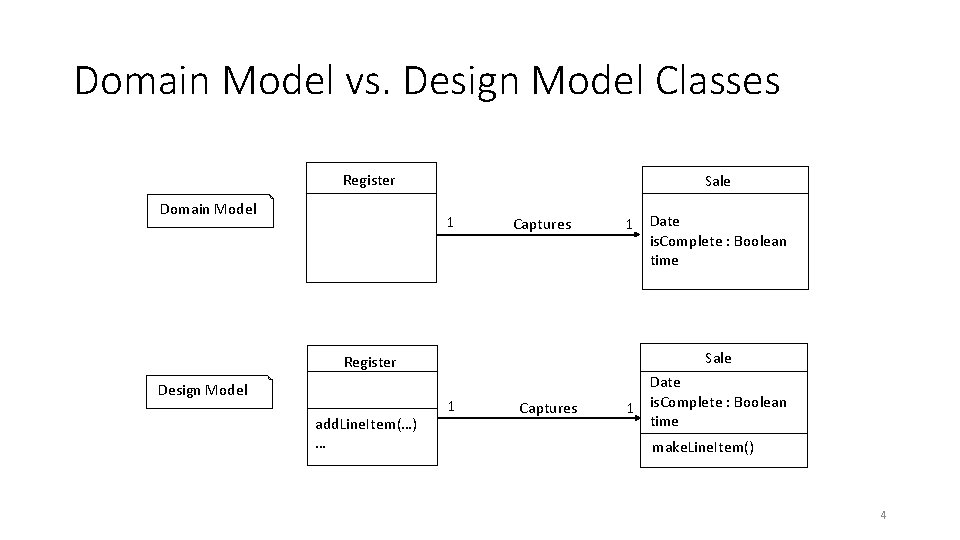
Domain Model vs. Design Model Classes Register Domain Model Sale 1 Captures Sale Register Design Model add. Line. Item(…) … 1 Date is. Complete : Boolean time 1 Captures Date 1 is. Complete : Boolean time make. Line. Item() 4
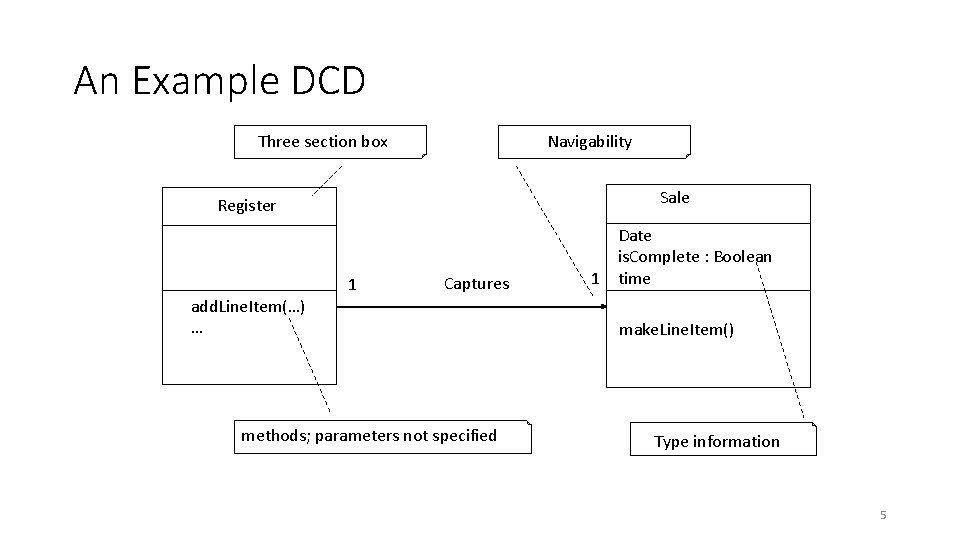
An Example DCD Three section box Navigability Sale Register add. Line. Item(…) … 1 Captures methods; parameters not specified Date is. Complete : Boolean 1 time make. Line. Item() Type information 5
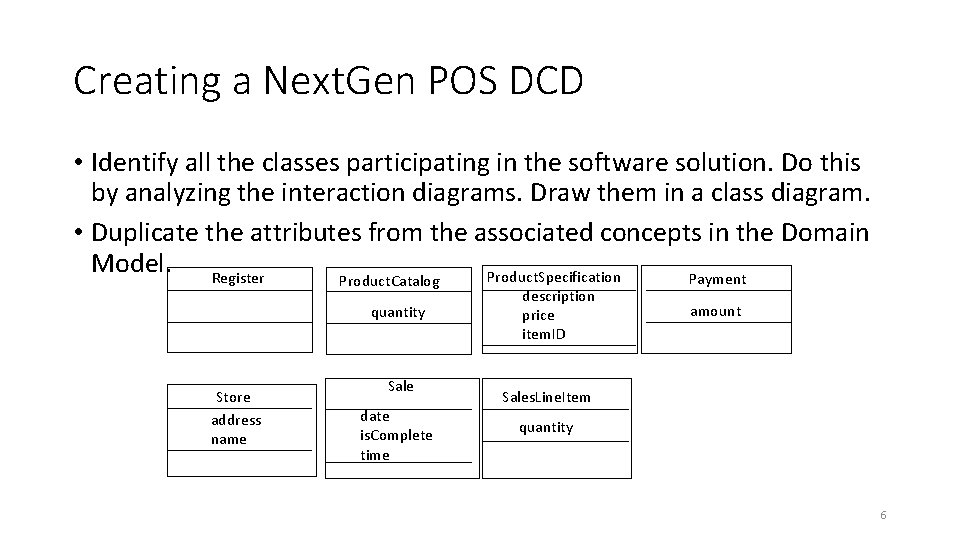
Creating a Next. Gen POS DCD • Identify all the classes participating in the software solution. Do this by analyzing the interaction diagrams. Draw them in a class diagram. • Duplicate the attributes from the associated concepts in the Domain Model. Register Product. Specification Payment Product. Catalog quantity Store address name Sale date is. Complete time description price item. ID amount Sales. Line. Item quantity 6
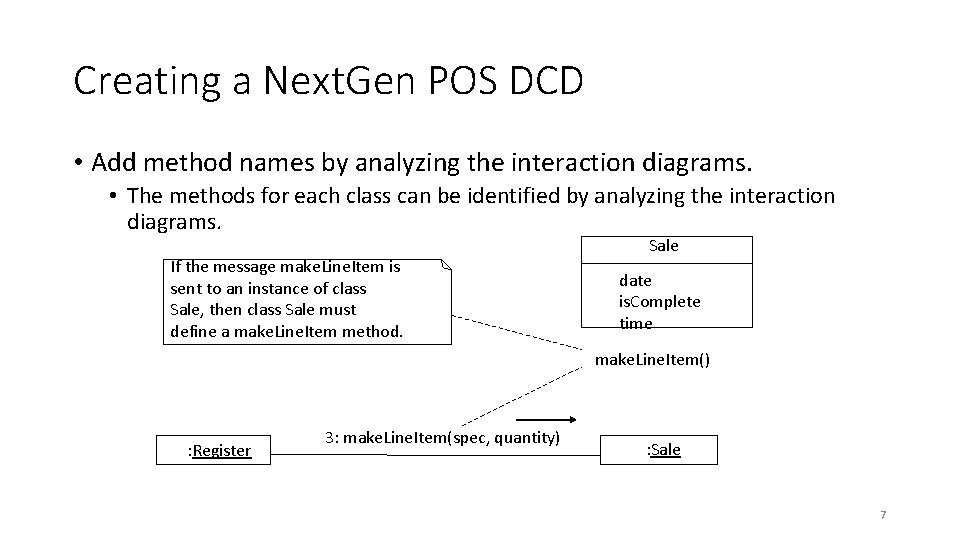
Creating a Next. Gen POS DCD • Add method names by analyzing the interaction diagrams. • The methods for each class can be identified by analyzing the interaction diagrams. If the message make. Line. Item is sent to an instance of class Sale, then class Sale must define a make. Line. Item method. Sale date is. Complete time make. Line. Item() : Register 3: make. Line. Item(spec, quantity) : Sale 7
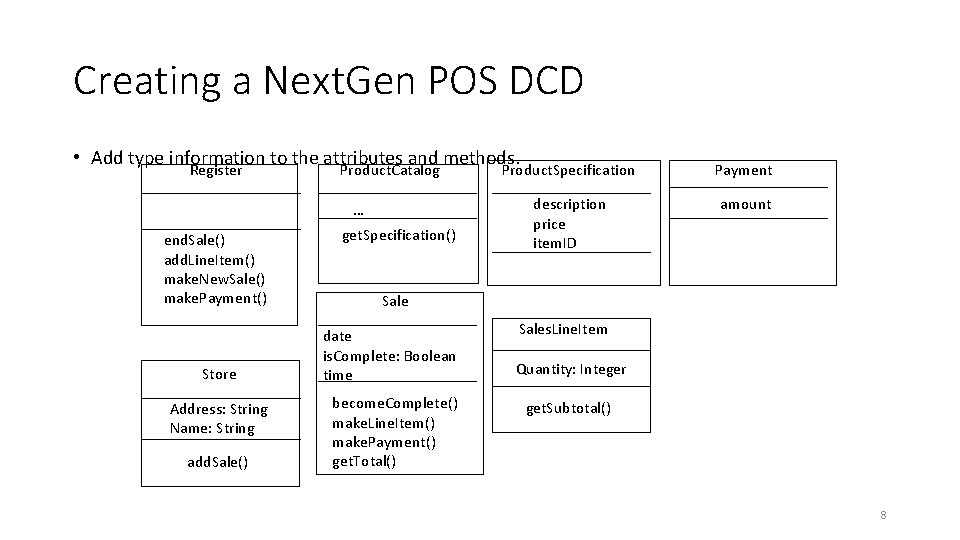
Creating a Next. Gen POS DCD • Add type information to the attributes and methods. Register Product. Catalog … end. Sale() add. Line. Item() make. New. Sale() make. Payment() Store Address: String Name: String add. Sale() get. Specification() Product. Specification Payment description price item. ID amount Sale date is. Complete: Boolean time become. Complete() make. Line. Item() make. Payment() get. Total() Sales. Line. Item Quantity: Integer get. Subtotal() 8
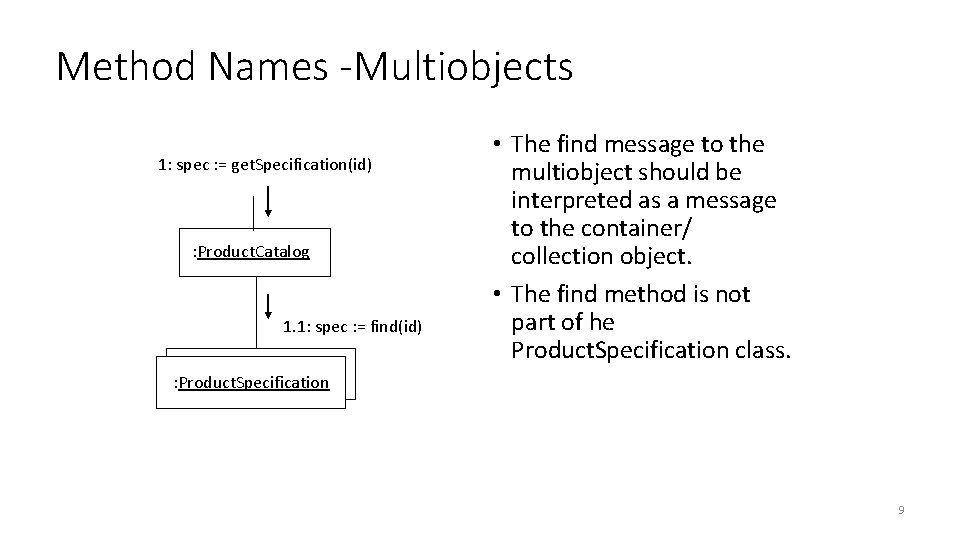
Method Names -Multiobjects 1: spec : = get. Specification(id) : Product. Catalog 1. 1: spec : = find(id) • The find message to the multiobject should be interpreted as a message to the container/ collection object. • The find method is not part of he Product. Specification class. : Product. Specification 9
Associations, Navigability, and Dependency Relationships • Add the associations necessary to support the required attribute visibility. • Each end of an association is called a role. • Navigability is a property of the role implying visibility of the source to target class. • Attribute visibility is implied. • Add navigability arrows to the associations to indicate the direction of attribute visibility where applicable. • Common situations suggesting a need to define an association with navigability from A to B: • A sends a message to B. • A creates an instance of B. • A needs to maintain a connection to B • Add dependency relationship lines to indicate non-attribute visibility. 10
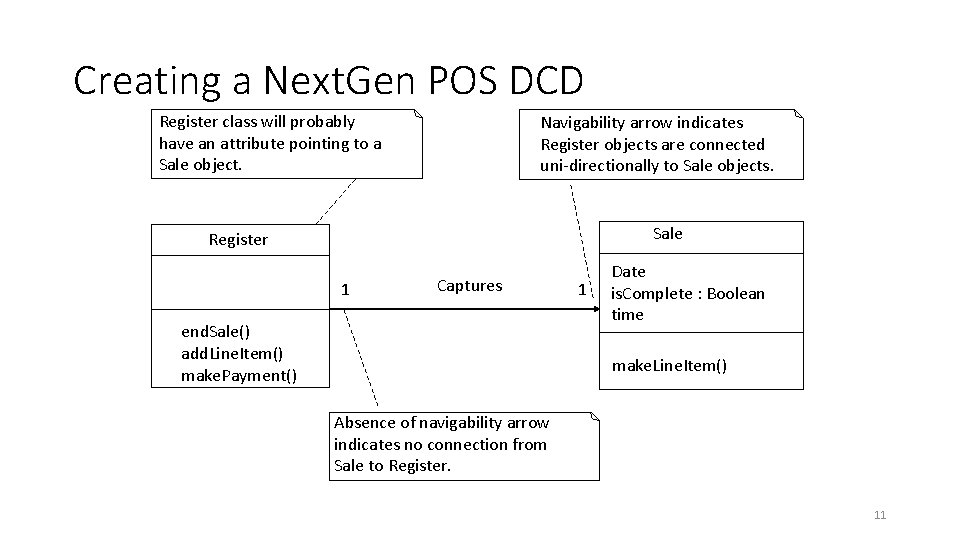
Creating a Next. Gen POS DCD Register class will probably have an attribute pointing to a Sale object. Navigability arrow indicates Register objects are connected uni-directionally to Sale objects. Sale Register 1 Captures end. Sale() add. Line. Item() make. Payment() 1 Date is. Complete : Boolean time make. Line. Item() Absence of navigability arrow indicates no connection from Sale to Register. 11
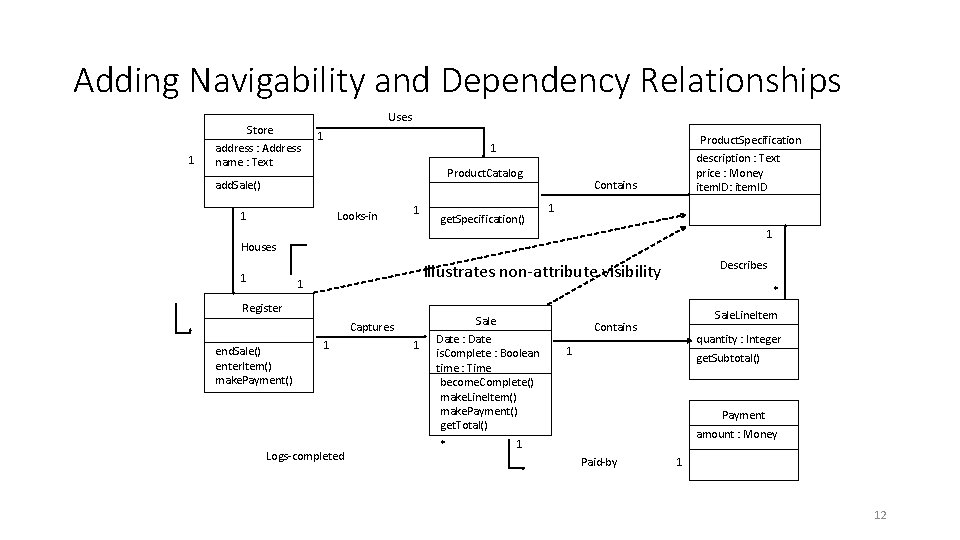
Adding Navigability and Dependency Relationships 1 Store address : Address name : Text Uses 1 Product. Specification 1 Product. Catalog add. Sale() 1 Looks-in 1 get. Specification() description : Text price : Money item. ID: item. ID Contains 1 1 Houses 1 1 * Register Sale Captures end. Sale() enter. Item() make. Payment() Describes Illustrates non-attribute visibility 1 Logs-completed 1 Date : Date is. Complete : Boolean time : Time become. Complete() make. Line. Item() make. Payment() get. Total() * Sale. Line. Item Contains quantity : Integer 1 get. Subtotal() Payment amount : Money 1 Paid-by 1 12
Sources • Visual Paradigm Class Diagrams: https: //www. visualparadigm. com/guide/uml-unified-modeling-language/what-is-classdiagram/ • Good explanation on visibility: https: //tonnygaric. com/blog/visibilitybetween-objects-in-a-uml-class-diagram