
Deployment Diagram L 7 9 3 2020 Deployment

- Slides: 22
Deployment Diagram L 7 9 -3 -2020
Deployment Diagram Deployment diagram is a static UML diagram which shows execution architecture of software systems that represent the assignment (deployment) of software artifacts to deployment targets (usually nodes).
Nodes and Artifacts • Nodes represent either hardware devices or software execution environments. They could be connected through communication paths to create network systems of arbitrary complexity. • Artifacts represent concrete elements in the physical world that are the result of a development process and are deployed on nodes.
How to use? In UML 2. x artifacts are deployed to nodes, and artifacts could manifest (implement) components. So components are now deployed to nodes indirectly through artifacts.
Components of Deployment diagram The following nodes and edges are typically drawn in a UML deployment diagram: • Deployment, • Artifact, • Association Between Artifacts, • Dependency Between Artifacts, • Component, • Manifestation, • Node, • Device, • Execution Environment, • Composition Of Nodes, • Communication Path, • Deployment Specification Dependency, • Deployment Specification Association.
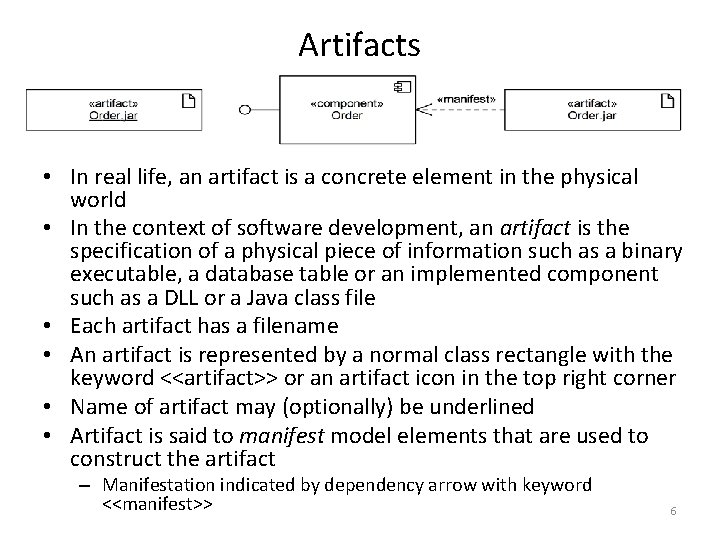
Artifacts • In real life, an artifact is a concrete element in the physical world • In the context of software development, an artifact is the specification of a physical piece of information such as a binary executable, a database table or an implemented component such as a DLL or a Java class file • Each artifact has a filename • An artifact is represented by a normal class rectangle with the keyword <<artifact>> or an artifact icon in the top right corner • Name of artifact may (optionally) be underlined • Artifact is said to manifest model elements that are used to construct the artifact – Manifestation indicated by dependency arrow with keyword <<manifest>> 6
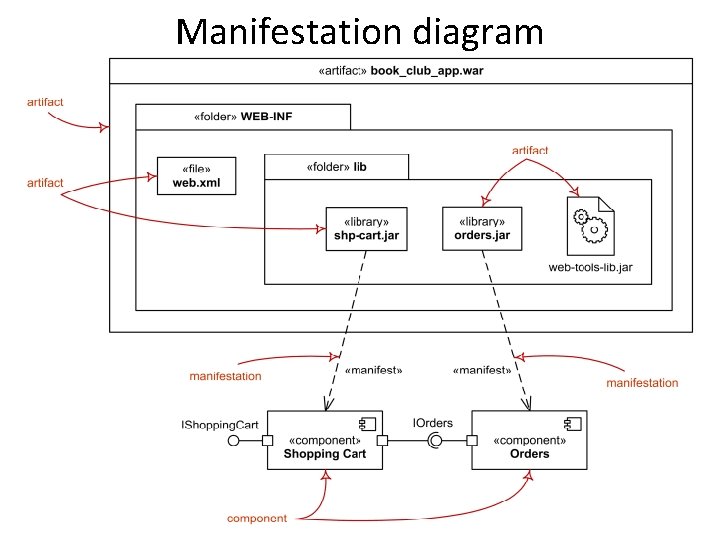
Manifestation is an abstraction relationship which represents concrete physical rendering (implementation) of one or more model elements by an artifact In UML 2. 0 and above, artifacts can manifest any package able elements (e. g. , components)
• A manifestation is notated in the same way as abstraction, i. e. as a dashed line with an open arrow head directed from artifact to packageable element, (e. g. to component or package) and is labeled with the keyword «manifest» .
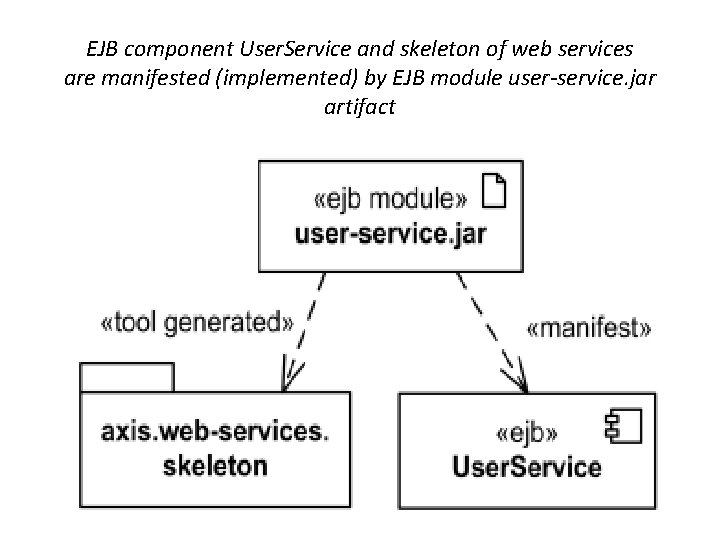
EJB component User. Service and skeleton of web services are manifested (implemented) by EJB module user-service. jar artifact
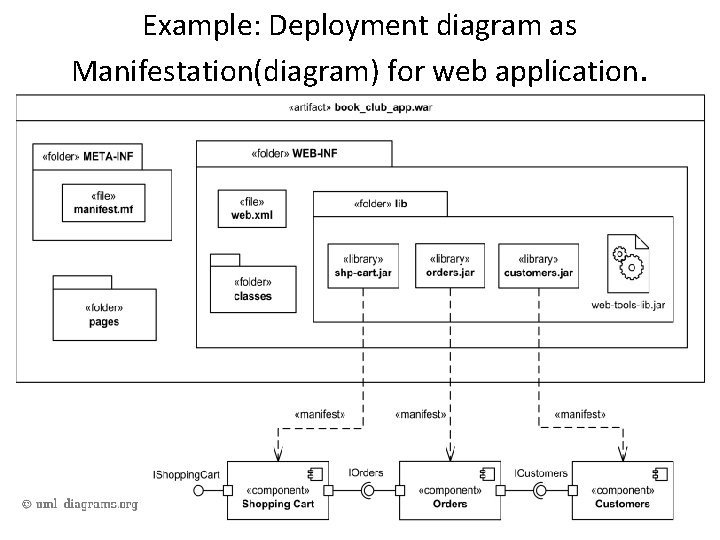
Manifest diagram as a deployment diagram While component diagrams show components and relationships between components , and deployment diagrams show deployments of artifacts to deployment targets, some missing intermediate diagram is manifestation diagram to be used to show manifestation (implementation) of components by artifacts and internal structure of artifacts.
Manifestation diagram
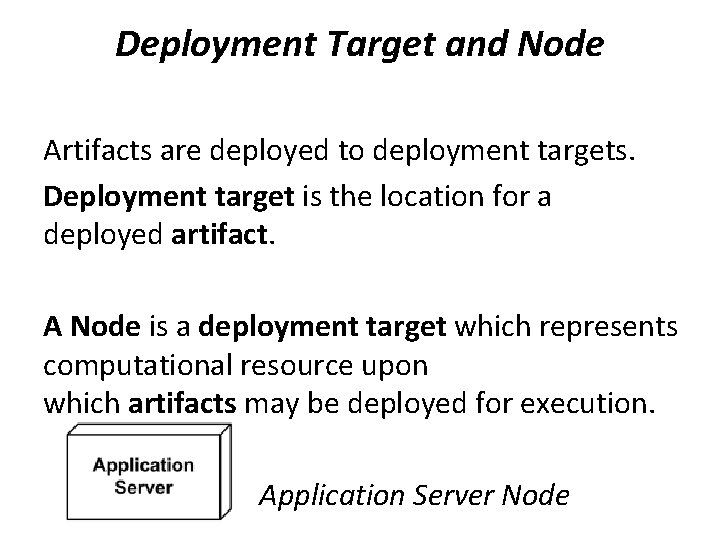
Deployment Target and Node Artifacts are deployed to deployment targets. Deployment target is the location for a deployed artifact. A Node is a deployment target which represents computational resource upon which artifacts may be deployed for execution. Application Server Node
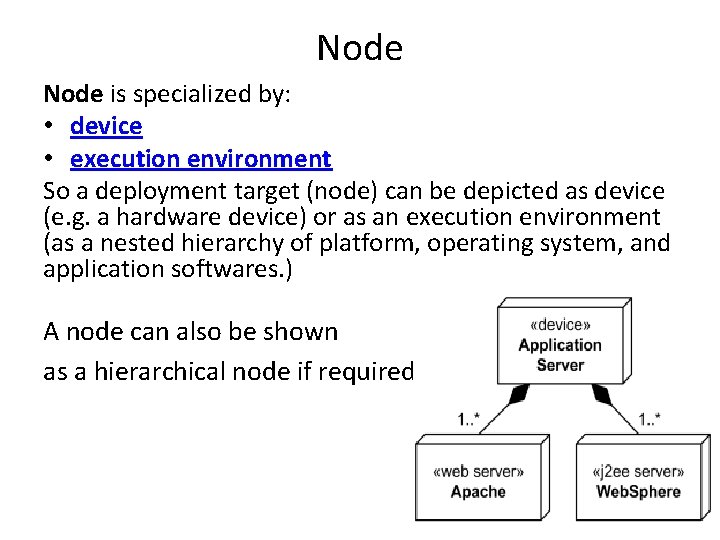
Node is specialized by: • device • execution environment So a deployment target (node) can be depicted as device (e. g. a hardware device) or as an execution environment (as a nested hierarchy of platform, operating system, and application softwares. ) A node can also be shown as a hierarchical node if required
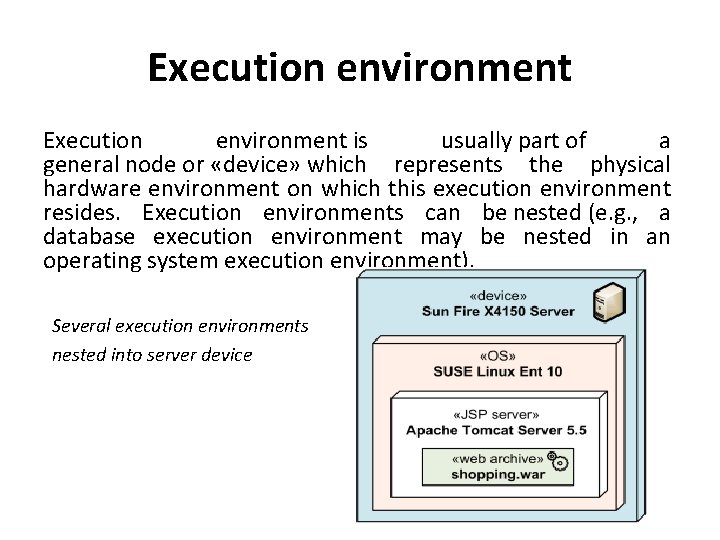
Execution environment is usually part of a general node or «device» which represents the physical hardware environment on which this execution environment resides. Execution environments can be nested (e. g. , a database execution environment may be nested in an operating system execution environment). Several execution environments nested into server device
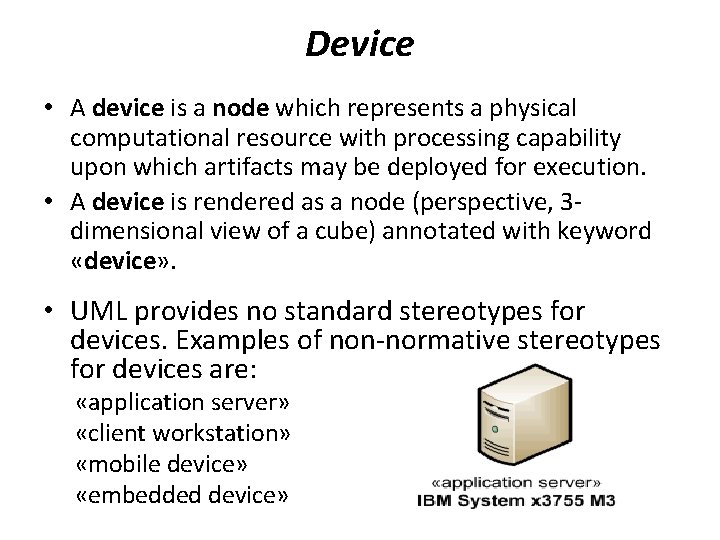
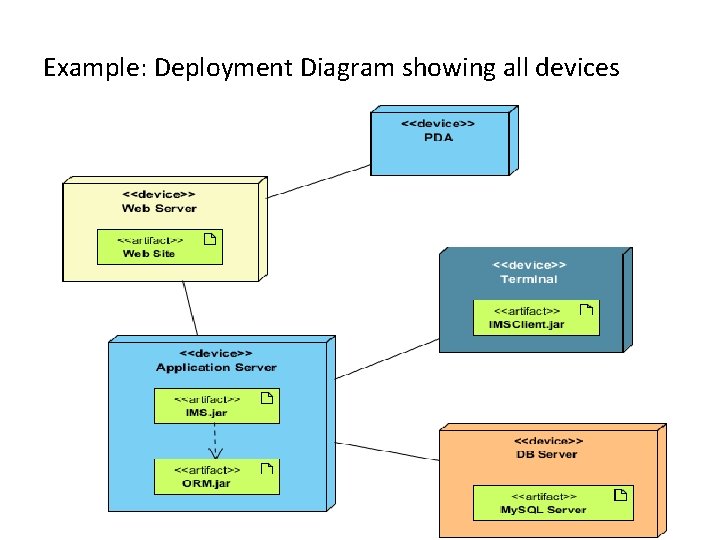
Device • A device is a node which represents a physical computational resource with processing capability upon which artifacts may be deployed for execution. • A device is rendered as a node (perspective, 3 dimensional view of a cube) annotated with keyword «device» . • UML provides no standard stereotypes for devices. Examples of non-normative stereotypes for devices are: «application server» «client workstation» «mobile device» «embedded device»
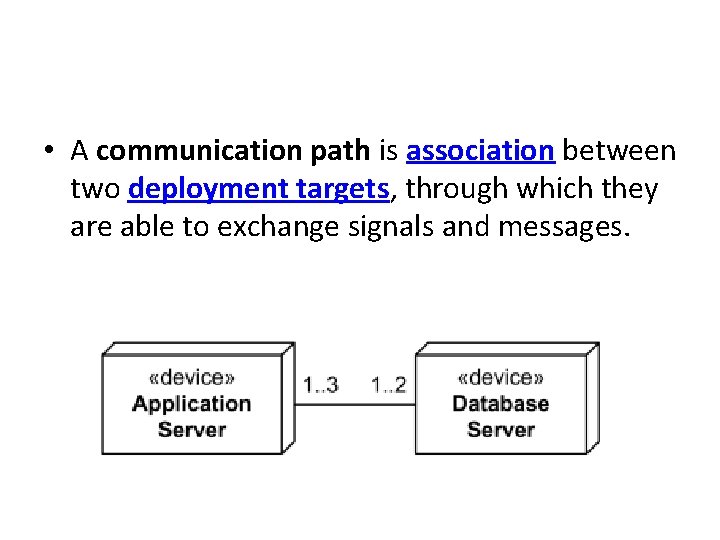
• A communication path is association between two deployment targets, through which they are able to exchange signals and messages.
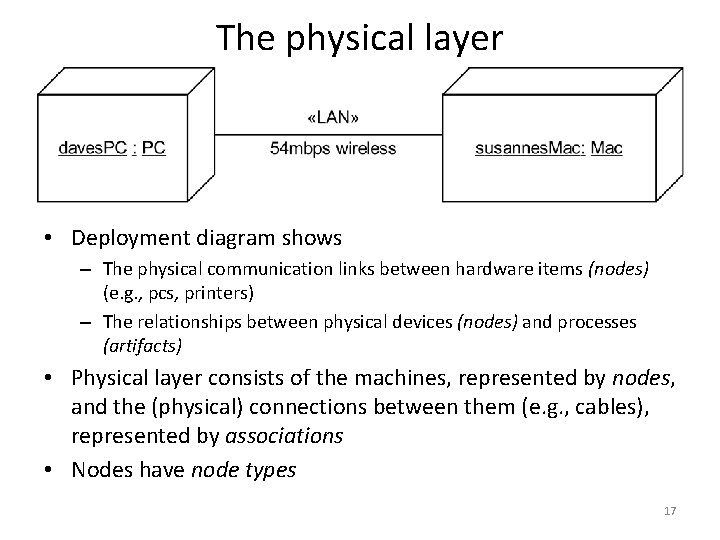
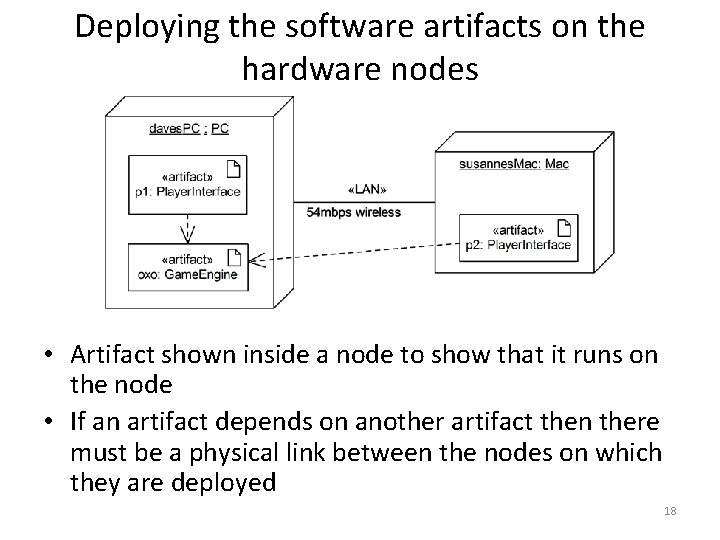
The physical layer • Deployment diagram shows – The physical communication links between hardware items (nodes) (e. g. , pcs, printers) – The relationships between physical devices (nodes) and processes (artifacts) • Physical layer consists of the machines, represented by nodes, and the (physical) connections between them (e. g. , cables), represented by associations • Nodes have node types 17
Deploying the software artifacts on the hardware nodes • Artifact shown inside a node to show that it runs on the node • If an artifact depends on another artifact then there must be a physical link between the nodes on which they are deployed 18
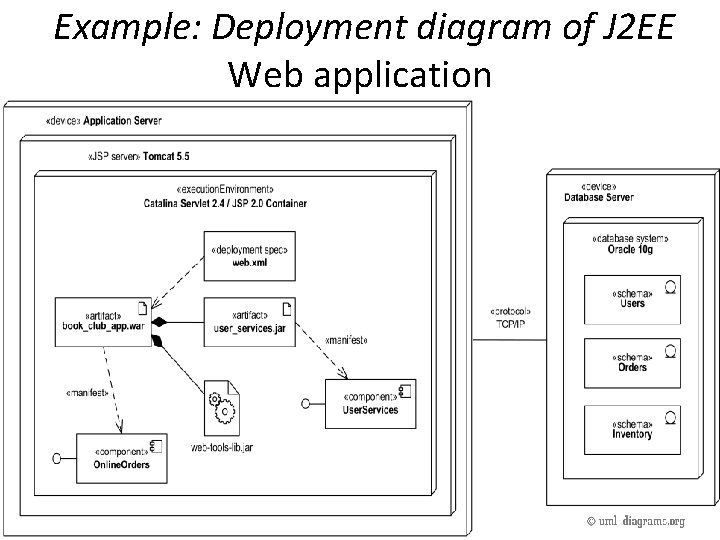
Example: Deployment diagram of J 2 EE Web application
Example: Deployment diagram as Manifestation(diagram) for web application.
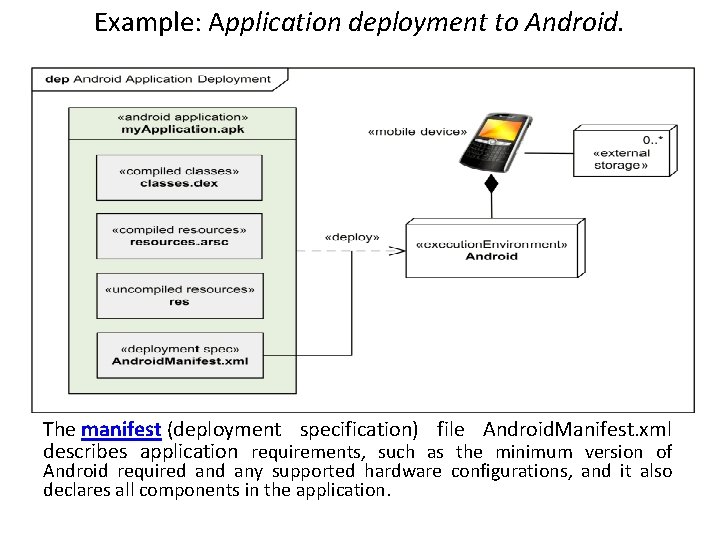
Example: Application deployment to Android. The manifest (deployment specification) file Android. Manifest. xml describes application requirements, such as the minimum version of Android required any supported hardware configurations, and it also declares all components in the application.
Example: Deployment Diagram showing all devices