
Department of Florida Membership Training OnLine Reporting AMVETS
Department of Florida Membership Training On-Line Reporting Ø AMVETS National has spent millions developing an online membership program Ø Department of Florida and California are not online Ø Commander authorized a test of online membership reporting Ø Congratulations your post was identified for the test Ø Let the training begin! AMVETS National Membersh ip 10/28/2020 Moving to the 21 st Century 1
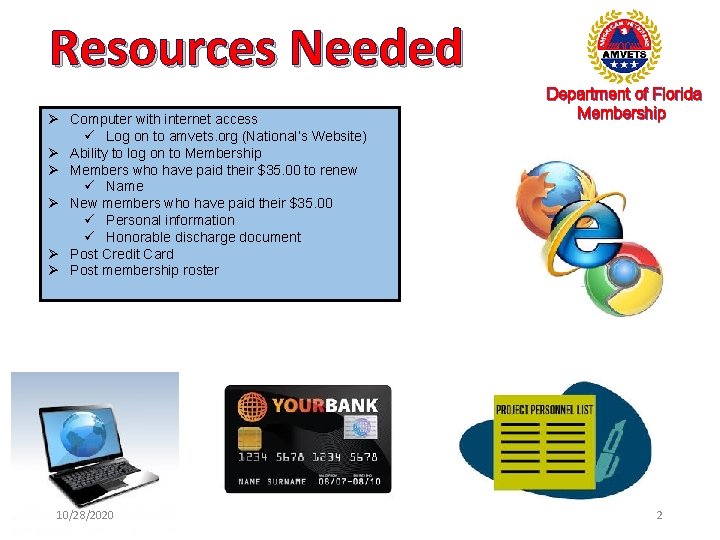
Resources Needed Ø Computer with internet access ü Log on to amvets. org (National’s Website) Ø Ability to log on to Membership Ø Members who have paid their $35. 00 to renew ü Name Ø New members who have paid their $35. 00 ü Personal information ü Honorable discharge document Ø Post Credit Card Ø Post membership roster 10/28/2020 Department of Florida Membership 2
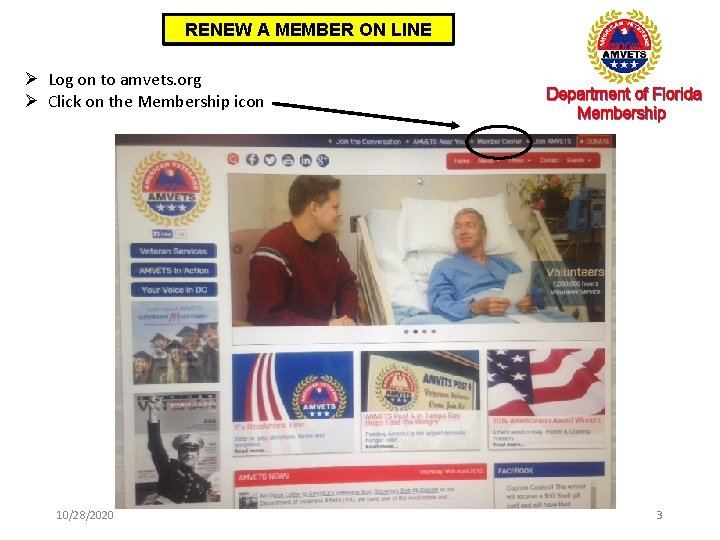
RENEW A MEMBER ON LINE Ø Log on to amvets. org Ø Click on the Membership icon 10/28/2020 Department of Florida Membership 3
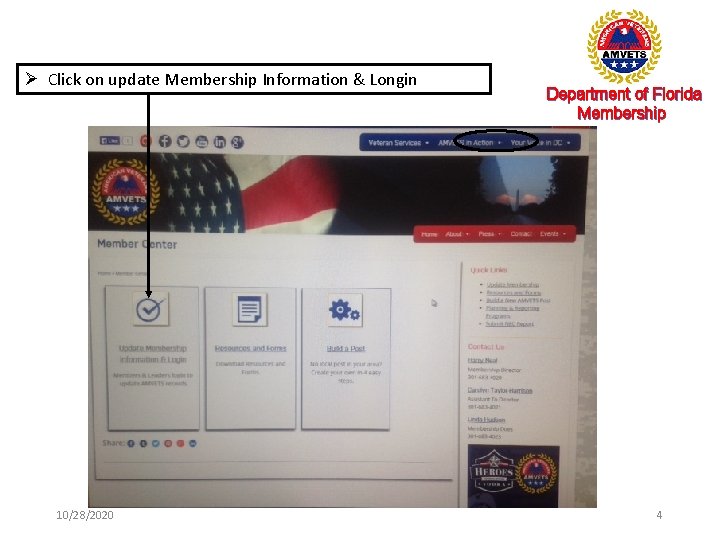
Ø Click on update Membership Information & Longin 10/28/2020 Department of Florida Membership 4

Ø Enter your membership number in both blocks Department of Florida Membership Caution If you are unable to log in with your membership number contact Harry Neal, Director Membership at National Headquarters. Your membership number Must be Commander 1 st Vice Commander or Adjutant 10/28/2020 5
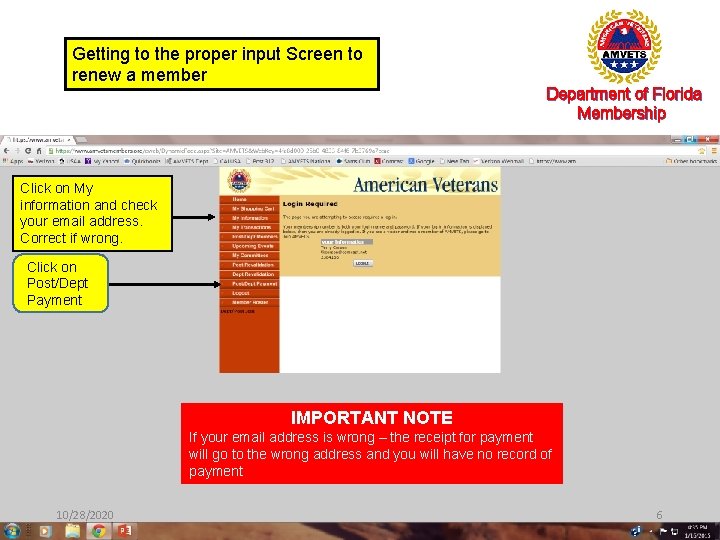
Getting to the proper input Screen to renew a member Department of Florida Membership Click on My information and check your email address. Correct if wrong. Click on Post/Dept Payment IMPORTANT NOTE If your email address is wrong – the receipt for payment will go to the wrong address and you will have no record of payment 10/28/2020 6
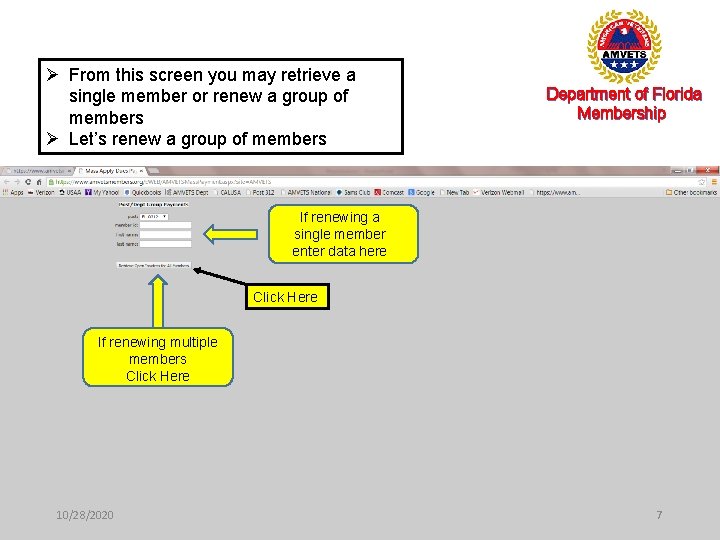
Ø From this screen you may retrieve a single member or renew a group of members Ø Let’s renew a group of members Department of Florida Membership If renewing a single member enter data here Click Here If renewing multiple members Click Here 10/28/2020 7
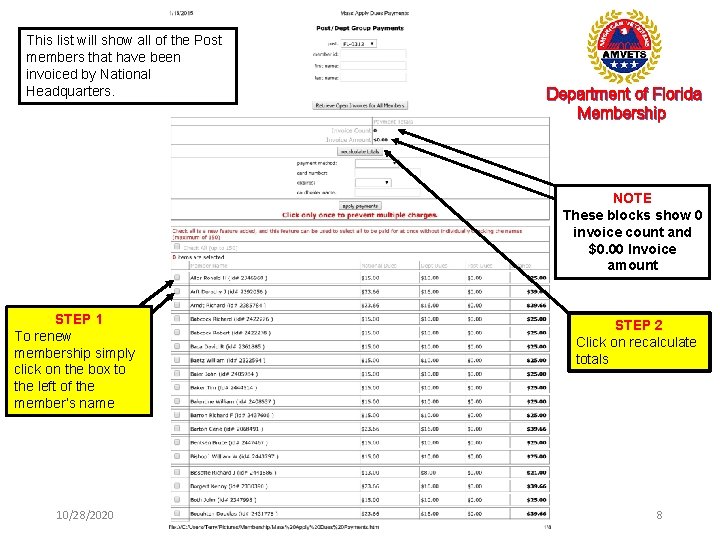
This list will show all of the Post members that have been invoiced by National Headquarters. Department of Florida Membership NOTE These blocks show 0 invoice count and $0. 00 Invoice amount STEP 1 To renew membership simply click on the box to the left of the member’s name 10/28/2020 STEP 2 Click on recalculate totals 8
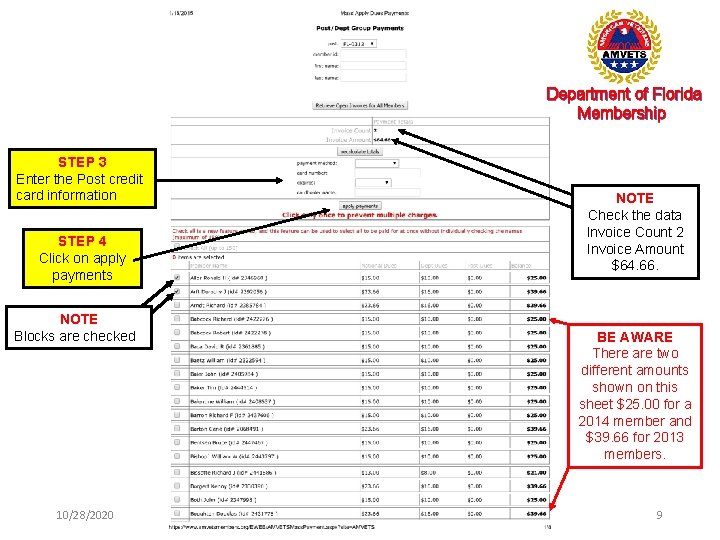
Department of Florida Membership STEP 3 Enter the Post credit card information STEP 4 Click on apply payments NOTE Blocks are checked 10/28/2020 NOTE Check the data Invoice Count 2 Invoice Amount $64. 66. BE AWARE There are two different amounts shown on this sheet $25. 00 for a 2014 member and $39. 66 for 2013 members. 9
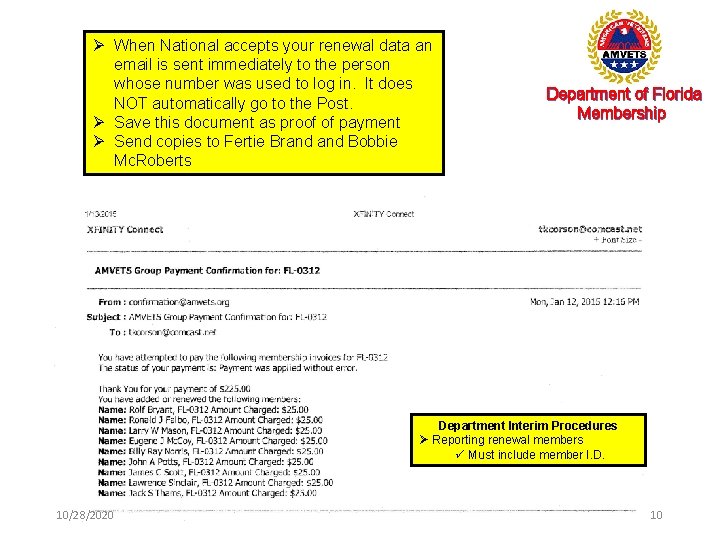
Ø When National accepts your renewal data an email is sent immediately to the person whose number was used to log in. It does NOT automatically go to the Post. Ø Save this document as proof of payment Ø Send copies to Fertie Brand Bobbie Mc. Roberts Department of Florida Membership Department Interim Procedures Ø Reporting renewal members ü Must include member I. D. 10/28/2020 10
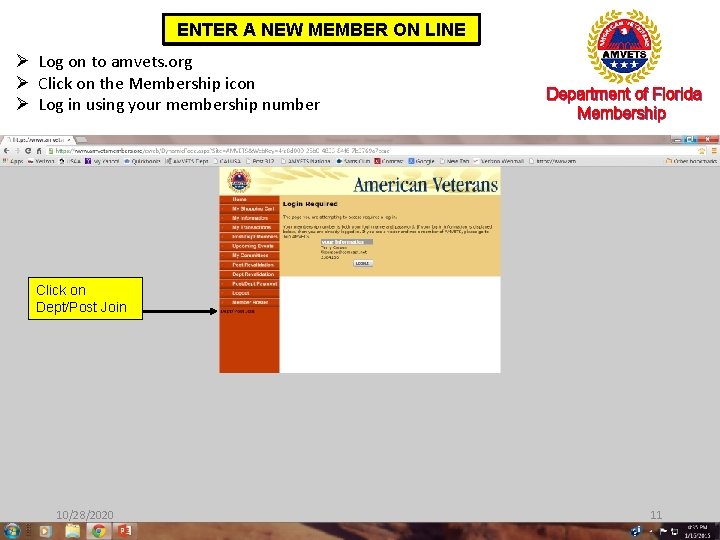
ENTER A NEW MEMBER ON LINE Ø Log on to amvets. org Ø Click on the Membership icon Ø Log in using your membership number Department of Florida Membership Click on Dept/Post Join 10/28/2020 11
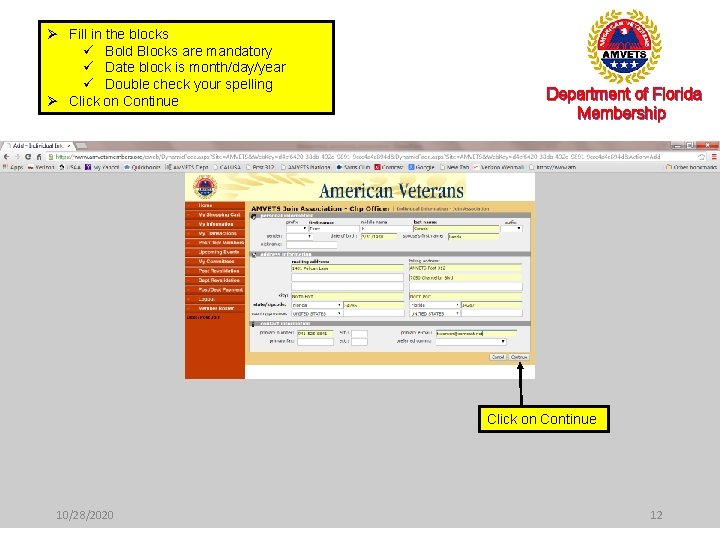
Ø Fill in the blocks ü Bold Blocks are mandatory ü Date block is month/day/year ü Double check your spelling Ø Click on Continue Department of Florida Membership Click on Continue 10/28/2020 12
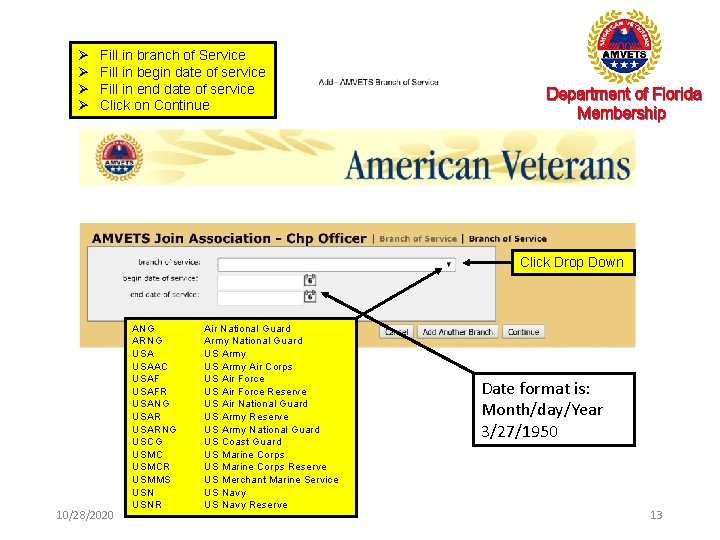
Ø Ø Fill in branch of Service Fill in begin date of service Fill in end date of service Click on Continue Department of Florida Membership Click Drop Down 10/28/2020 ANG ARNG USAAC USAFR USANG USARNG USCG USMCR USMMS USNR Air National Guard Army National Guard US Army Air Corps US Air Force Reserve US Air National Guard US Army Reserve US Army National Guard US Coast Guard US Marine Corps Reserve US Merchant Marine Service US Navy Reserve Date format is: Month/day/Year 3/27/1950 13
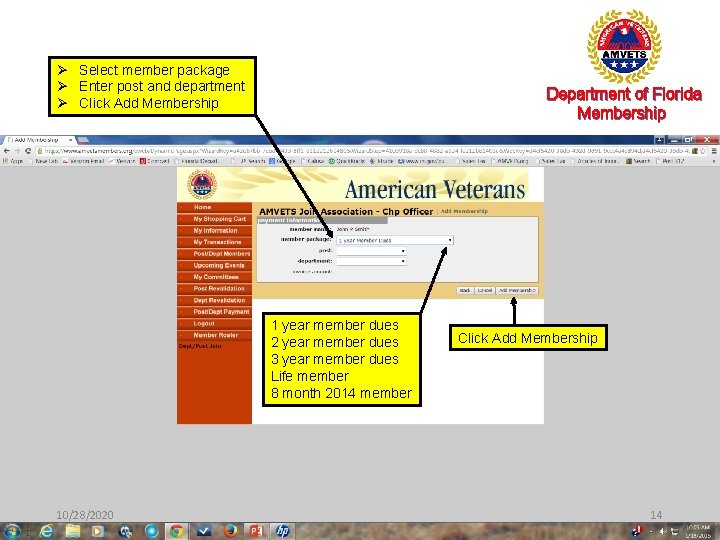
Ø Select member package Ø Enter post and department Ø Click Add Membership Department of Florida Membership 1 year member dues 2 year member dues 3 year member dues Life member 8 month 2014 member 10/28/2020 Click Add Membership 14
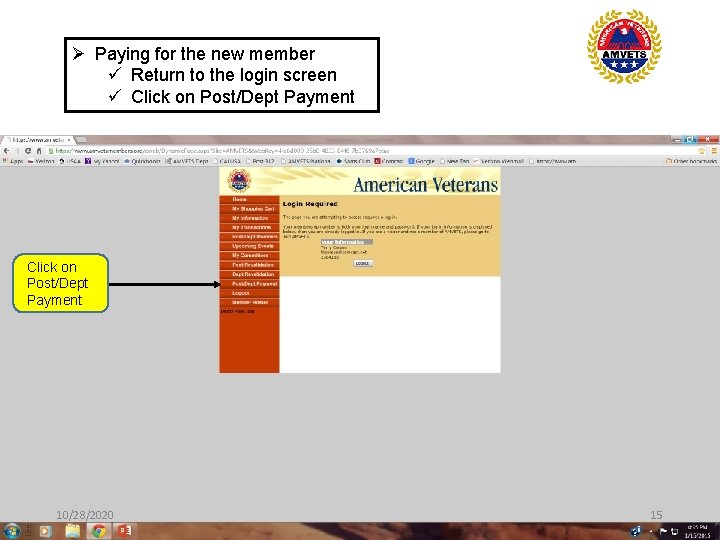
Ø Paying for the new member ü Return to the login screen ü Click on Post/Dept Payment 10/28/2020 15
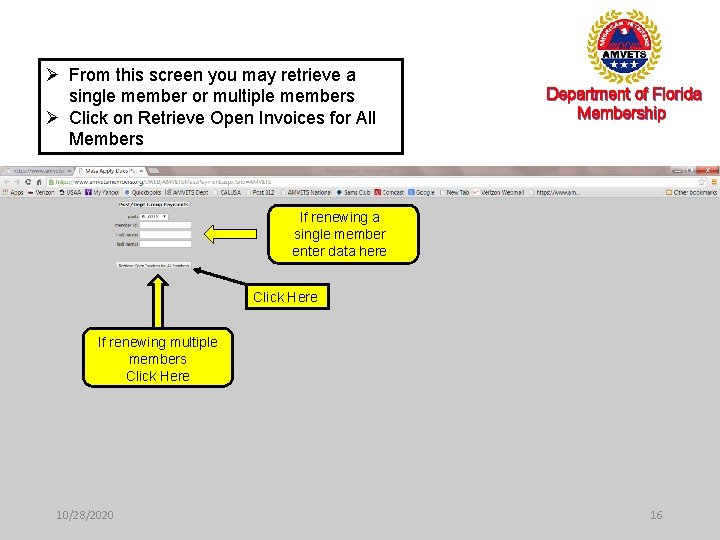
Ø From this screen you may retrieve a single member or multiple members Ø Click on Retrieve Open Invoices for All Members Department of Florida Membership If renewing a single member enter data here Click Here If renewing multiple members Click Here 10/28/2020 16
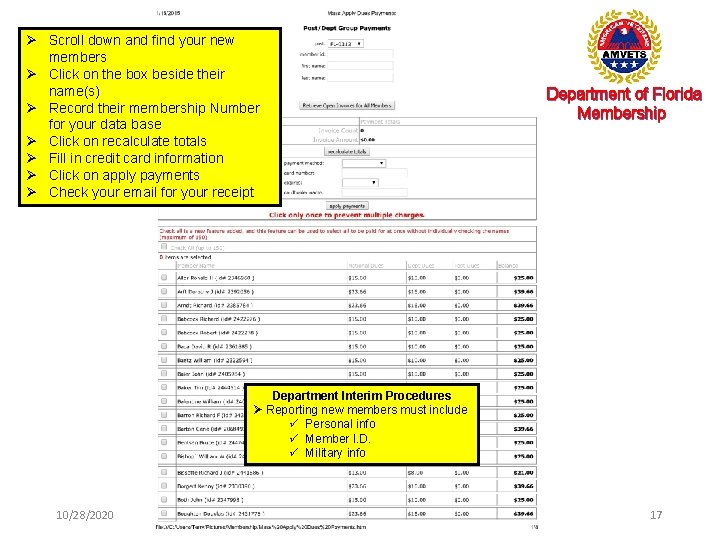
Ø Scroll down and find your new members Ø Click on the box beside their name(s) Ø Record their membership Number for your data base Ø Click on recalculate totals Ø Fill in credit card information Ø Click on apply payments Ø Check your email for your receipt Department of Florida Membership Department Interim Procedures Ø Reporting new members must include ü Personal info ü Member I. D. ü Military info 10/28/2020 17
Road Map to Success Department of Florida Membership online Department of Florida Membership Where do we go from here Ø I will furnish a copy of the National Roster Ø You already have your post roster ü Compare the two rosters. You are only concerned with 2015 and life members. Don’t get bogged down on any member prior to 2015 § Develop a list of anyone that is not on all two rosters making a notation of which rosters they are on § Check the Post reporting records to ensure you have backup information on any member on the post list that is not on National § Forward a copy of your final list to Bobbie Mc. Roberts, Asst. Membership Processor Ø Let’s work together to get our membership rosters corrected 10/28/2020 18
WHAT CAN’T I DO ONLINE? Ø Process transfers online ü HOWEVER - Command Transfer v Member requests a transfer v New Post accepts member v Accepting Post notifies loosing post v Email sent to hneal@amvets. org or staff (sample email) (NY-22 accepts Jim Strand (62355186) as a member. AZ-55’s 1 st Vice, Smith, was notified by phone and does not object) Ø Process deceased members Ø 10/28/2020 ü National Headquarter is working this issue Delete information (ie. A member that did not pay last year’s dues and wants to pay membership. Choice is to pay last year and new year ($60. 66) or pay new year $35. 00). If rejoin as a new member, the member will get new membership number and be listed twice. Send email to Harry Neal to delete old membership number. 19
The Department maintains a data base of all membership. We must do all possible to maintain this data base. When you enter membership online, you must keep the membership processor aware of all entries in the National Membership Database. 1. Forward a copy of the emails showing the members renewing 2. Forward a copy of the emails showing new members joining along with the updated personal and military information that was entered into the National Data Base. 3. Provide copies of Command transfer emails to the Department 10/28/2020 20
What are your questions? ? Contact Terry Corson (941) 525 -8841 10/28/2020 21
- Slides: 21