
Delivery Forwarding and Routing of IP Packets Objectives
Delivery, Forwarding, and Routing of IP Packets Objectives Upon completion you will be able to: • Understand the different types of delivery and the connection • Understand forwarding techniques in classful addressing • Understand forwarding techniques in classless addressing • Understand how a routing table works • Understand the structure of a router TCP/IP Protocol Suite 1
Note: In classful addressing we can have a routing table with three columns; in classless addressing, we need at least four columns. TCP/IP Protocol Suite 2
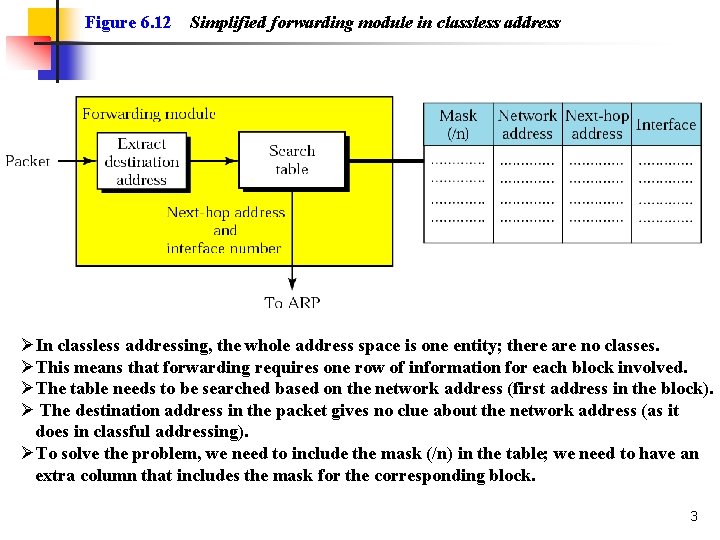
Figure 6. 12 Simplified forwarding module in classless address ØIn classless addressing, the whole address space is one entity; there are no classes. ØThis means that forwarding requires one row of information for each block involved. ØThe table needs to be searched based on the network address (first address in the block). Ø The destination address in the packet gives no clue about the network address (as it does in classful addressing). ØTo solve the problem, we need to include the mask (/n) in the table; we need to have an extra column that includes the mask for the corresponding block. 3
Example 7 Make a routing table for router R 1 using the configuration in Figure 6. 13. See Next Slide Solution Table 6. 1 shows the corresponding table. See the table after the figure. TCP/IP Protocol Suite 4
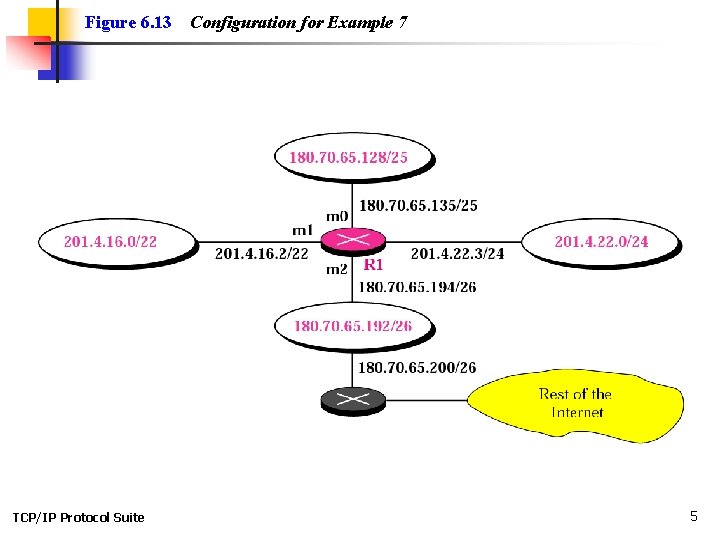
Figure 6. 13 TCP/IP Protocol Suite Configuration for Example 7 5
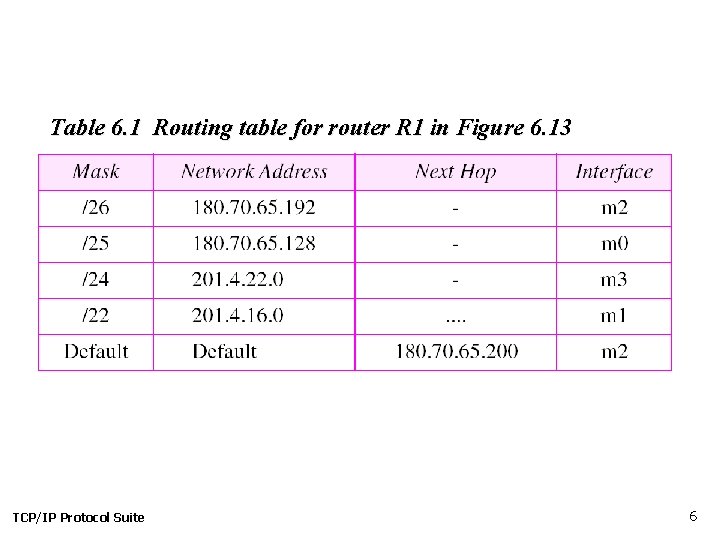
Table 6. 1 Routing table for router R 1 in Figure 6. 13 TCP/IP Protocol Suite 6
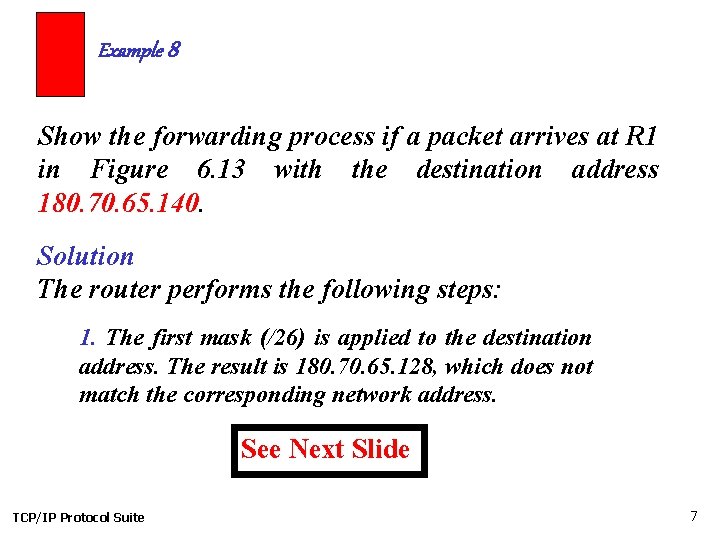
Example 8 Show the forwarding process if a packet arrives at R 1 in Figure 6. 13 with the destination address 180. 70. 65. 140. Solution The router performs the following steps: 1. The first mask (/26) is applied to the destination address. The result is 180. 70. 65. 128, which does not match the corresponding network address. See Next Slide TCP/IP Protocol Suite 7
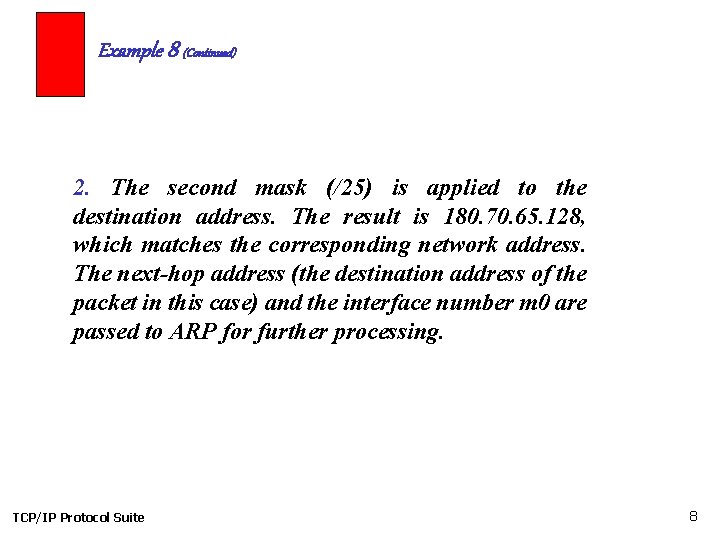
Example 8 (Continued) 2. The second mask (/25) is applied to the destination address. The result is 180. 70. 65. 128, which matches the corresponding network address. The next-hop address (the destination address of the packet in this case) and the interface number m 0 are passed to ARP for further processing. TCP/IP Protocol Suite 8
Example 9 Show the forwarding process if a packet arrives at R 1 in Figure 6. 13 with the destination address 201. 4. 22. 35. Solution The router performs the following steps: See Next Slide TCP/IP Protocol Suite 9

Example 9 (Continued) 1. The first mask (/26) is applied to the destination address. The result is 201. 4. 22. 0, which does not match the corresponding network address (row 1). 2. The second mask (/25) is applied to the destination address. The result is 201. 4. 22. 0, which does not match the corresponding network address (row 2). 3. The third mask (/24) is applied to the destination address. The result is 201. 4. 22. 0, which matches the corresponding network address. The destination address of the package and the interface number m 3 are passed to ARP. TCP/IP Protocol Suite 10
Example 10 Show the forwarding process if a packet arrives at R 1 in Figure 6. 13 with the destination address 18. 24. 32. 78. Solution This time all masks are applied to the destination address, but no matching network address is found. When it reaches the end of the table, the module gives the next-hop address 180. 70. 65. 200 and interface number m 2 to ARP. This is probably an outgoing package that needs to be sent, via the default router, to some place else in the Internet. TCP/IP Protocol Suite 11
Example 11 Now let us give a different type of example. Can we find the configuration of a router, if we know only its routing table? The routing table for router R 1 is given in Table 6. 2. Can we draw its topology? See Next Slide TCP/IP Protocol Suite 12
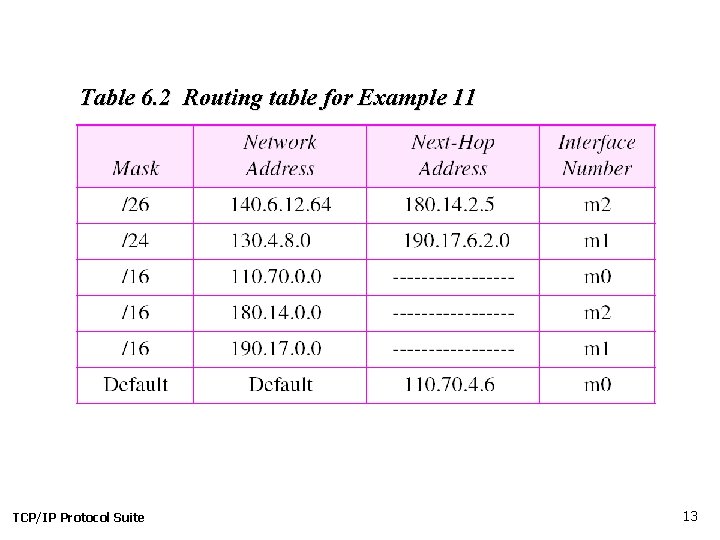
Table 6. 2 Routing table for Example 11 TCP/IP Protocol Suite 13
Example 11 (Continued) Solution We know some facts but we don’t have all for a definite topology. We know that router R 1 has three interfaces: m 0, m 1, and m 2. We know that there are three networks directly connected to router R 1. We know that there are two networks indirectly connected to R 1. There must be at least three other routers involved (see next-hop column). We know to which networks these routers are connected by looking at their IP addresses. So we can put them at their appropriate place. TCP/IP Protocol Suite See Next Slide 14
Example 11 (Continued) We know that one router, the default router, is connected to the rest of the Internet. But there is some missing information. We do not know if network 130. 4. 8. 0 is directly connected to router R 2 or through a point-to-point network (WAN) and another router. We do not know if network 140. 6. 12. 64 is connected to router R 3 directly or through a point-to-point network (WAN) and another router. Point-to-point networks normally do not have an entry in the routing table because no hosts are connected to them. Figure 6. 14 shows our guessed topology. See Next Slide 15
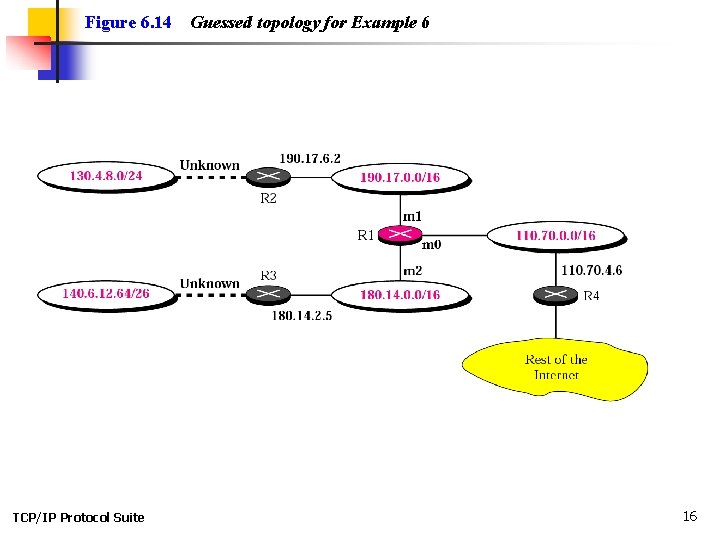
Figure 6. 14 TCP/IP Protocol Suite Guessed topology for Example 6 16
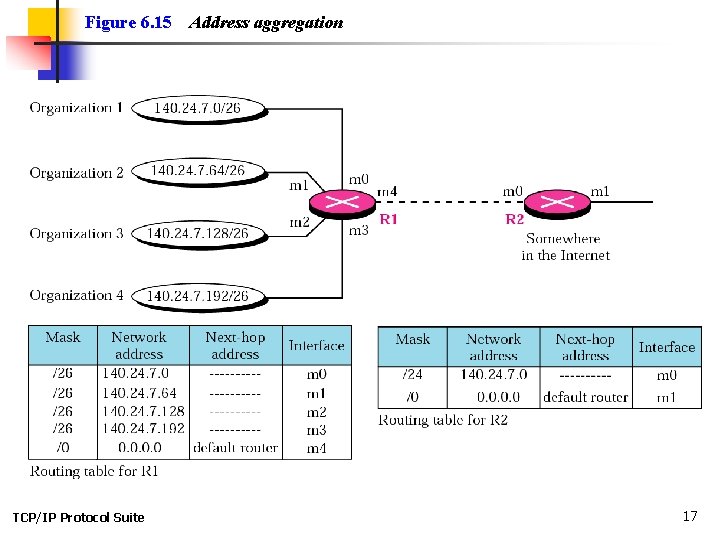
Figure 6. 15 TCP/IP Protocol Suite Address aggregation 17
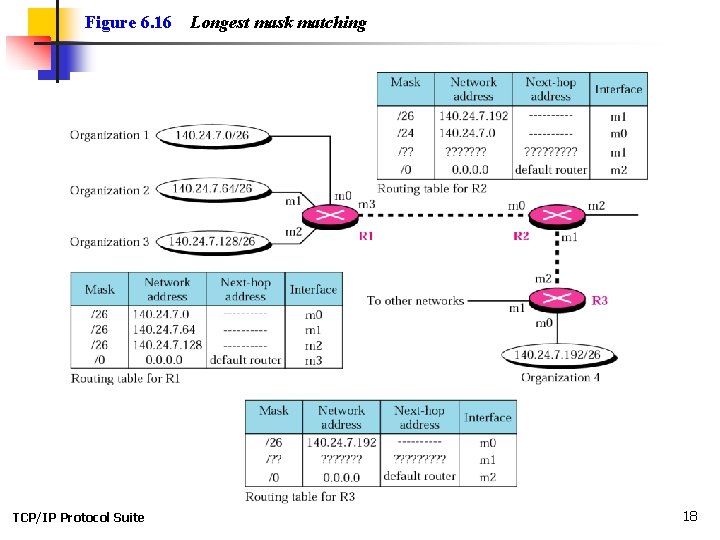
Figure 6. 16 TCP/IP Protocol Suite Longest mask matching 18
Example 12 As an example of hierarchical routing, let us consider Figure 6. 17. A regional ISP is granted 16384 addresses starting from 120. 14. 64. 0. The regional ISP has decided to divide this block into four subblocks, each with 4096 addresses. Three of these subblocks are assigned to three local ISPs, the second subblock is reserved for future use. Note that the mask for each block is /20 because the original block with mask /18 is divided into 4 blocks. See Next Slide 19
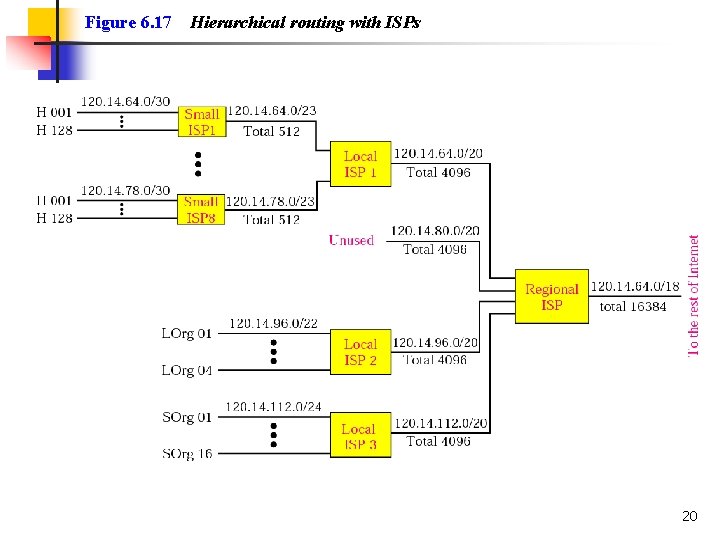
Figure 6. 17 Hierarchical routing with ISPs 20
Example 12 (Continued) The first local ISP has divided its assigned subblock into 8 smaller blocks and assigned each to a small ISP. Each small ISP provides services to 128 households (H 001 to H 128), each using four addresses. Note that the mask for each small ISP is now /23 because the block is further divided into 8 blocks. Each household has a mask of /30, because a household has only 4 addresses (232− 30 is 4). The second local ISP has divided its block into 4 blocks and has assigned the addresses to 4 large organizations (LOrg 01 to LOrg 04). Note that each large organization has 1024 addresses and the mask is /22. See Next Slide 21
Example 12 (Continued) The third local ISP has divided its block into 16 blocks and assigned each block to a small organization (SOrg 01 to SOrg 15). Each small organization has 256 addresses and the mask is /24. There is a sense of hierarchy in this configuration. All routers in the Internet send a packet with destination address 120. 14. 64. 0 to 120. 14. 127. 255 to the regional ISP. The regional ISP sends every packet with destination address 120. 14. 64. 0 to 120. 14. 79. 255 to Local ISP 1 sends every packet with destination address 120. 14. 64. 0 to 120. 14. 64. 3 to H 001. 22
Forwarding Based on Label n n In 1980 s, an effort started to somehow change IP to behave like a connection-oriented protocol in which the routing is replaced by switching. In a connectionless network (datagram approach), a router forwards a packet based on the destination address in the header of packet. On the other hand, in a connection-oriented network (virtual-circuit approach), a switch forwards a packet based on the label attached to a packet. Routing is normally based on searching the contents of a table; switching can be done by accessing a table using an index. In other words, routing involves searching; switching involves accessing. Later IETF approved a standard that is called Multi-Protocol Label Switching. In this standard, some conventional routers in the Internet can be replaced by MPLS routers that can behave like a router and a switch. When behaving like a router, MPLS can forward the packet based on the destination address; when behaving 23 like a switch, it can forward a packet based on the label.
6. 4 STRUCTURE OF A ROUTER We represent a router as a black box that accepts incoming packets from one of the input ports (interfaces), uses a routing table to find the departing output port, and sends the packet from this output port. The topics discussed in this section include: Components 24
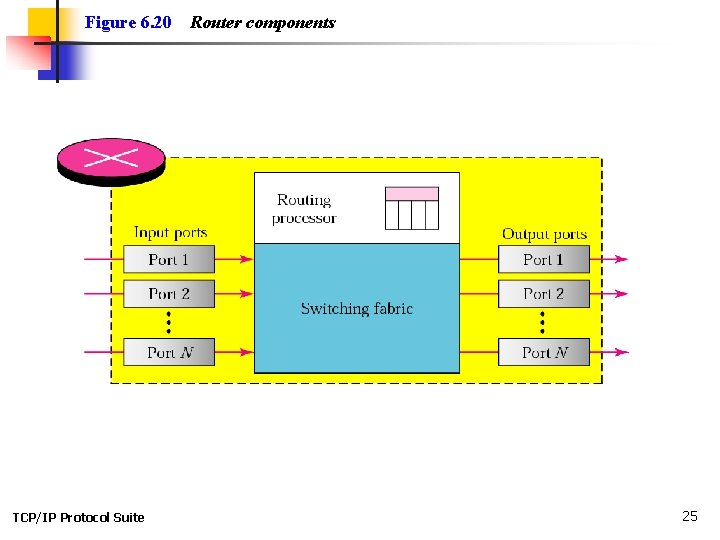
Figure 6. 20 TCP/IP Protocol Suite Router components 25
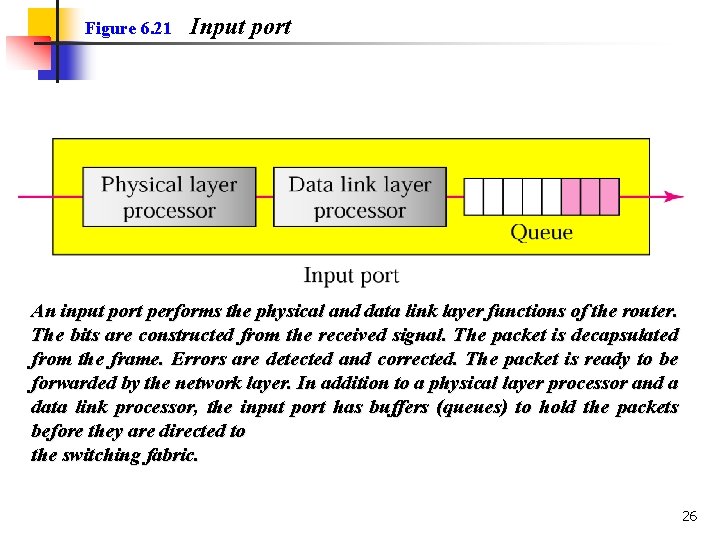
Figure 6. 21 Input port An input port performs the physical and data link layer functions of the router. The bits are constructed from the received signal. The packet is decapsulated from the frame. Errors are detected and corrected. The packet is ready to be forwarded by the network layer. In addition to a physical layer processor and a data link processor, the input port has buffers (queues) to hold the packets before they are directed to the switching fabric. 26
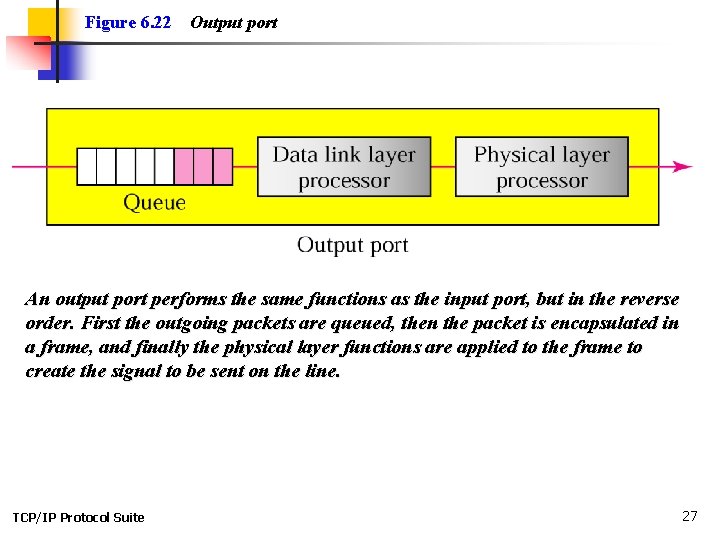
Figure 6. 22 Output port An output port performs the same functions as the input port, but in the reverse order. First the outgoing packets are queued, then the packet is encapsulated in a frame, and finally the physical layer functions are applied to the frame to create the signal to be sent on the line. TCP/IP Protocol Suite 27
Figure 6. 22 Routing and Switching part Routing Processor The routing processor performs the functions of the network layer. The destination address is used to find the address of the next hop and, at the same time, the output port number from which the packet is sent out. Switching Fabrics The most difficult task in a router is to move the packet from the input queue to the output queue. The speed with which this is done affects the size of the input/output queue and the overall delay in packet delivery. TCP/IP Protocol Suite 28
- Slides: 28