
DCODS Boundary Activity Data Extraction from Tables and
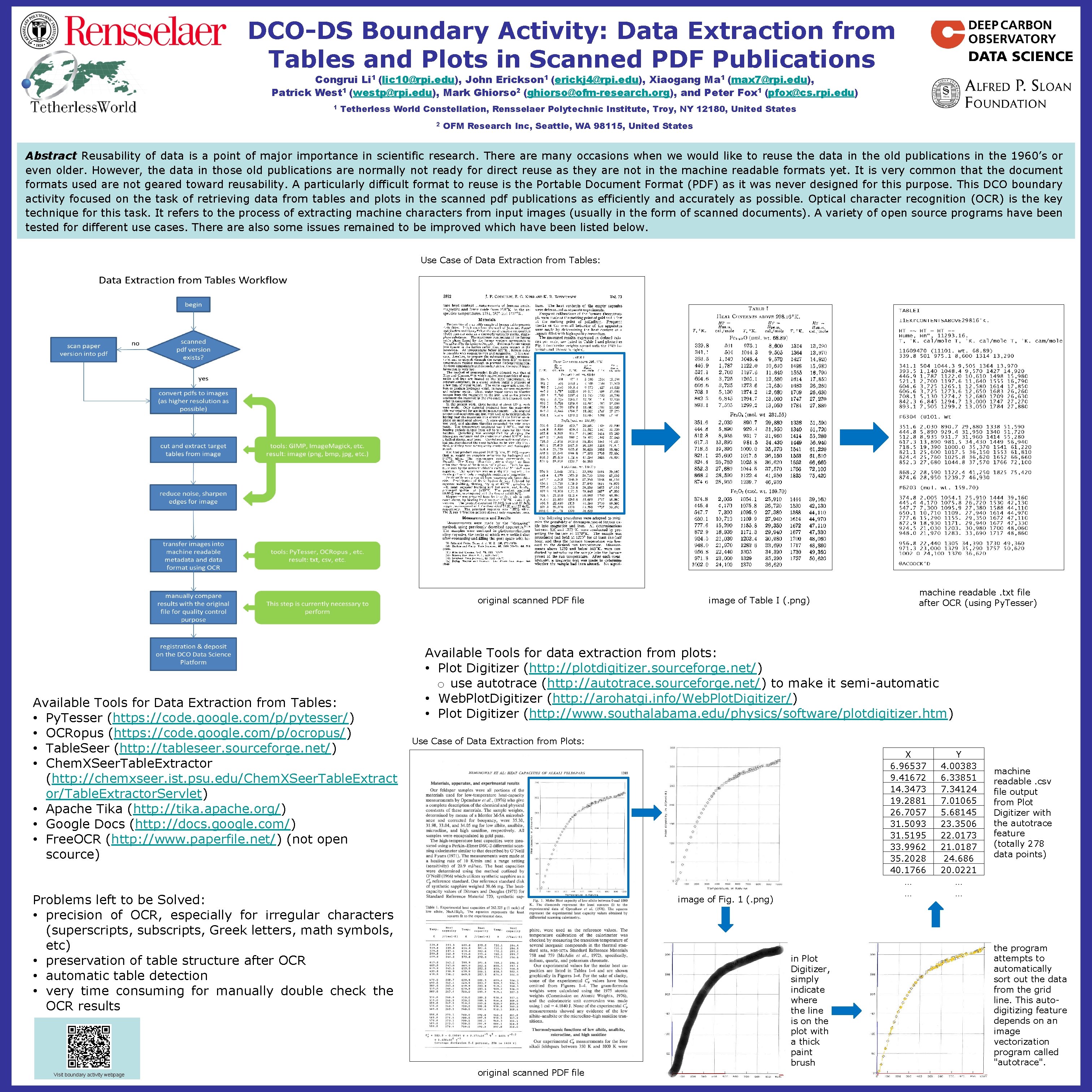
DCO-DS Boundary Activity: Data Extraction from Tables and Plots in Scanned PDF Publications Congrui Li 1 (lic 10@rpi. edu), John Erickson 1 (erickj 4@rpi. edu), Xiaogang Ma 1 (max 7@rpi. edu), Patrick West 1 (westp@rpi. edu), Mark Ghiorso 2 (ghiorso@ofm-research. org), and Peter Fox 1 (pfox@cs. rpi. edu) 1 Tetherless World Constellation, Rensselaer Polytechnic Institute, Troy, NY 12180, United States 2 OFM Research Inc, Seattle, WA 98115, United States Abstract Reusability of data is a point of major importance in scientific research. There are many occasions when we would like to reuse the data in the old publications in the 1960’s or even older. However, the data in those old publications are normally not ready for direct reuse as they are not in the machine readable formats yet. It is very common that the document formats used are not geared toward reusability. A particularly difficult format to reuse is the Portable Document Format (PDF) as it was never designed for this purpose. This DCO boundary activity focused on the task of retrieving data from tables and plots in the scanned pdf publications as efficiently and accurately as possible. Optical character recognition (OCR) is the key technique for this task. It refers to the process of extracting machine characters from input images (usually in the form of scanned documents). A variety of open source programs have been tested for different use cases. There also some issues remained to be improved which have been listed below. Use Case of Data Extraction from Tables: original scanned PDF file Available Tools for Data Extraction from Tables: • Py. Tesser (https: //code. google. com/p/pytesser/) • OCRopus (https: //code. google. com/p/ocropus/) • Table. Seer (http: //tableseer. sourceforge. net/) • Chem. XSeer. Table. Extractor (http: //chemxseer. ist. psu. edu/Chem. XSeer. Table. Extract or/Table. Extractor. Servlet) • Apache Tika (http: //tika. apache. org/) • Google Docs (http: //docs. google. com/) • Free. OCR (http: //www. paperfile. net/) (not open scource) Available Tools for data extraction from plots: • Plot Digitizer (http: //plotdigitizer. sourceforge. net/) o use autotrace (http: //autotrace. sourceforge. net/) to make it semi-automatic • Web. Plot. Digitizer (http: //arohatgi. info/Web. Plot. Digitizer/) • Plot Digitizer (http: //www. southalabama. edu/physics/software/plotdigitizer. htm) Use Case of Data Extraction from Plots: Problems left to be Solved: • precision of OCR, especially for irregular characters (superscripts, subscripts, Greek letters, math symbols, etc) • preservation of table structure after OCR • automatic table detection • very time consuming for manually double check the OCR results Visit boundary activity webpage image of Table I (. png) machine readable. txt file after OCR (using Py. Tesser) X 6. 96537 9. 41672 14. 3473 19. 2881 26. 7057 31. 5093 31. 5195 33. 9962 35. 2028 40. 1766 … … image of Fig. 1 (. png) original scanned PDF file in Plot Digitizer, simply indicate where the line is on the plot with a thick paint brush Y 4. 00383 6. 33851 7. 34124 7. 01065 5. 68145 23. 3506 22. 0173 21. 0187 24. 686 20. 0221 … … machine readable. csv file output from Plot Digitizer with the autotrace feature (totally 278 data points) the program attempts to automatically sort out the data from the grid line. This autodigitizing feature depends on an image vectorization program called "autotrace".
- Slides: 1