
DBMS TUNING DBMSs are complex systems with many
DBMS TUNING DBMSs are complex systems with many tunable options that control nearly all aspects of their runtime operation. Presenter: Anupam Sanghi
Postgre. SQL Configuration “Knobs” • File Locations (data dir, auth-file, …) • Connections and Authentication Some knobs are useless • Resource Usage • Write Ahead Log • Query Tuning • Runtime Statistics • Replication, Lock Management, Error Reporting and Logging, Customized Options… 2
Postgre. SQL Configuration “Knobs” • File Locations • Connections and Authentication (max_connections, auth timeout, …) • Resource Usage • Write Ahead Log Increasing max_connections costs ~400 bytes of shared memory per connection slot, plus lock space • Query Tuning • Runtime Statistics • Replication, Lock Management, Error Reporting and Logging, Customized Options… 3
Postgre. SQL Configuration “Knobs” • File Locations • Connections and Authentication • Resource Usage • Memory (shared buffers, temp buffers, work mem, autovacuum work mem, …) • Disk (temp file limit) • Kernel Resource Usage (max files per process, …) • Background Writer (bgwriter delay, bgwriter lru maxpages, …) • Asynchronous Behavior (effective io concurrency, max worker processes) • Write Ahead Log • Query Tuning • Runtime Statistics • Replication, Lock Management, Error Reporting and Logging, Customized Options… 4
Postgre. SQL Configuration “Knobs” • File Locations • Connections and Authentication • Resource Usage • Write Ahead Log • Settings (buffers, level, commit delay, …) • Checkpoints (segments, timeout, warning, …) • Query Tuning • Runtime Statistics • Replication, Lock Management, Error Reporting and Logging, Customized Options… 5
Postgre. SQL Configuration “Knobs” • File Locations • Connections and Authentication • Resource Usage • Write Ahead Log • Query Tuning • Planner Method Configuration • Planner cost constants (also includes effective cache size) • Genetic Query Optimizer, … • Runtime Statistics • Replication, Lock Management, Error Reporting and Logging, Customized Options… 6
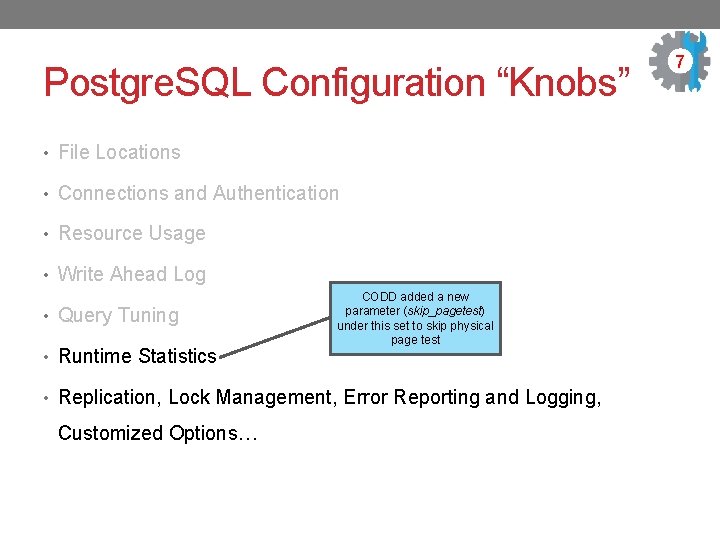
Postgre. SQL Configuration “Knobs” • File Locations • Connections and Authentication • Resource Usage • Write Ahead Log • Query Tuning • Runtime Statistics CODD added a new parameter (skip_pagetest) under this set to skip physical page test • Replication, Lock Management, Error Reporting and Logging, Customized Options… 7
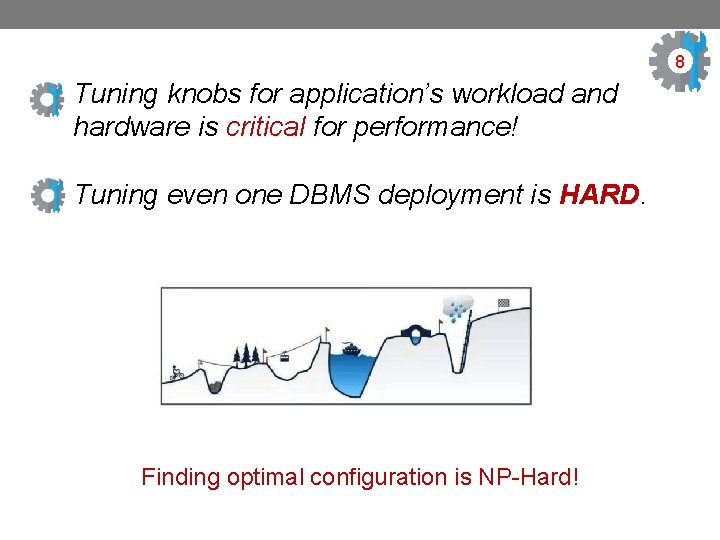
8 Tuning knobs for application’s workload and hardware is critical for performance! Tuning even one DBMS deployment is HARD. Finding optimal configuration is NP-Hard!
What is currently done in practice? • Hire expensive experts to configure the knobs for the expected workload. • Personnel is estimated to be ~50% of the total ownership cost of a large-scale DBMS! • Many DBAs spend nearly 25% of their time on tuning! • With growing complexity of the database and applications, optimizing a DBMS has surpassed the abilities of humans. 40% of engagement requests are for tuning and knob configurations issues. 9

On databases with reasonable logical and physical design AUTOMATIC TUNING THROUGH MACHINE LEARNING SIGMOD 2017 Based on presentation material sourced from the following: (a) blogs: i. https: //blog. acolyer. org/2017/08/11/automatic-database-management-system-tuning-through-large-scalemachine-learning/ ii. https: //aws. amazon. com/blogs/machine-learning/tuning-your-dbms-automatically-with-machine-learning/ (b) presentation: i. https: //www. percona. com/live/e 17/sites/default/files/slides/Automatic%20 Database%20 Management%2 0 System%20 Tuning%20 Through%20 Large-Scale%20 Machine%20 Learning%20 -%20 File. Id%20%20118513. pdf ii. https: //pdfs. semanticscholar. org/1 f 1 f/47 da 8 fff 8 da 53589 d 7 eab 36 d 6 bae 32 b 2 c 3 d 2. pdf
11 Authors Dana Van Aken Advised by Co-advised by Bohan Zhang RA under Andrew Pavlo Geoffrey J. Gordon CMU
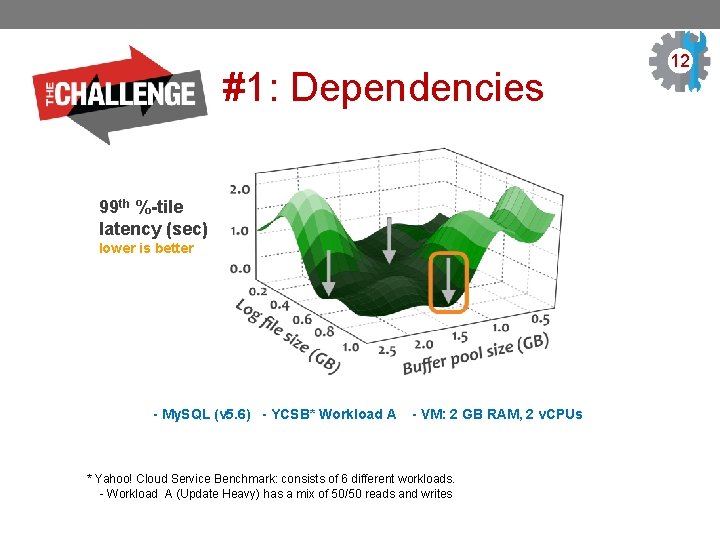
#1: Dependencies 99 th %-tile latency (sec) lower is better - My. SQL (v 5. 6) - YCSB* Workload A - VM: 2 GB RAM, 2 v. CPUs * Yahoo! Cloud Service Benchmark: consists of 6 different workloads. - Workload A (Update Heavy) has a mix of 50/50 reads and writes 12 8
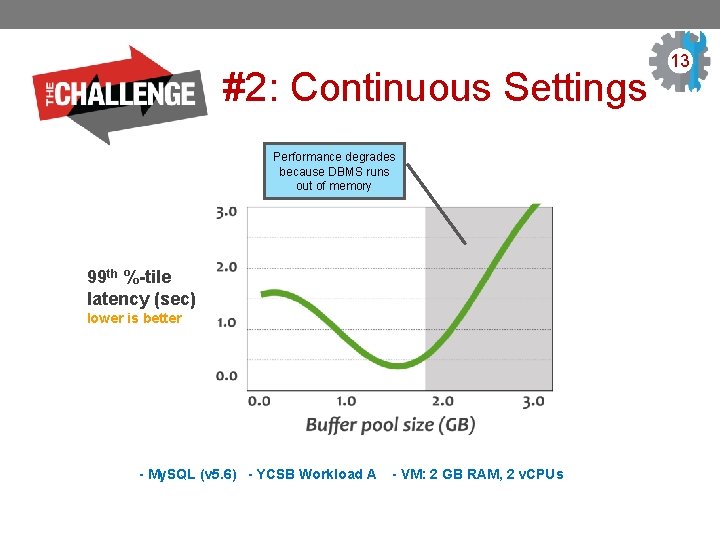
#2: Continuous Settings Performance degrades because DBMS runs out of memory 99 th %-tile latency (sec) lower is better - My. SQL (v 5. 6) - YCSB Workload A - VM: 2 GB RAM, 2 v. CPUs 13 9
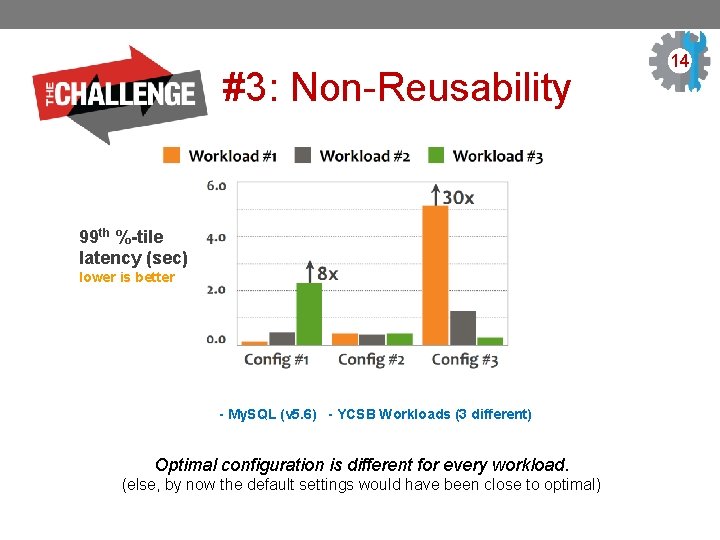
#3: Non-Reusability 99 th %-tile latency (sec) lower is better - My. SQL (v 5. 6) - YCSB Workloads (3 different) Optimal configuration is different for every workload. (else, by now the default settings would have been close to optimal) 14
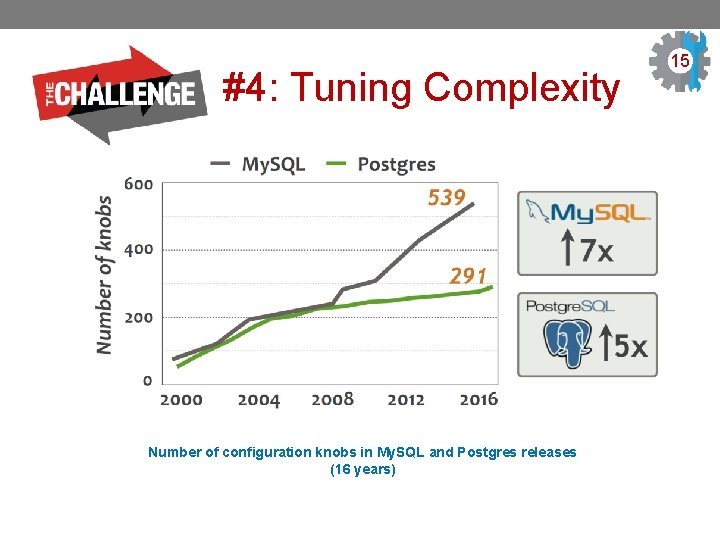
#4: Tuning Complexity Number of configuration knobs in My. SQL and Postgres releases (16 years) 15 3
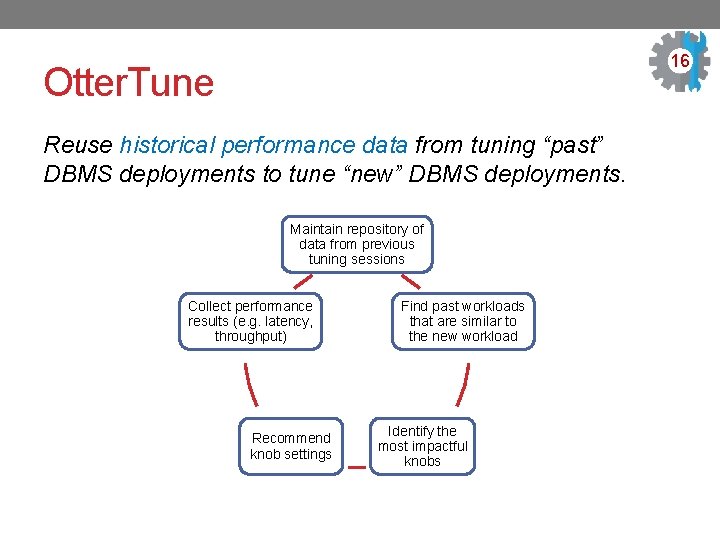
16 3 Otter. Tune Reuse historical performance data from tuning “past” DBMS deployments to tune “new” DBMS deployments. Maintain repository of data from previous tuning sessions Collect performance results (e. g. latency, throughput) Recommend knob settings Find past workloads that are similar to the new workload Identify the most impactful knobs
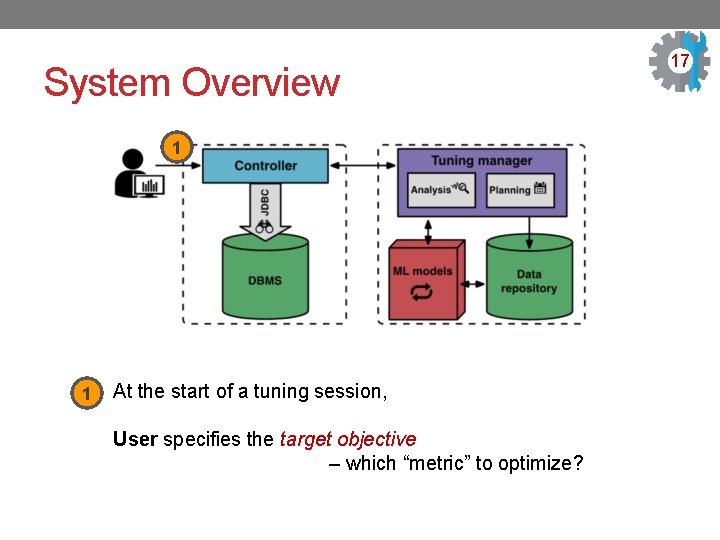
System Overview 1 1 At the start of a tuning session, User specifies the target objective – which “metric” to optimize? 17 3
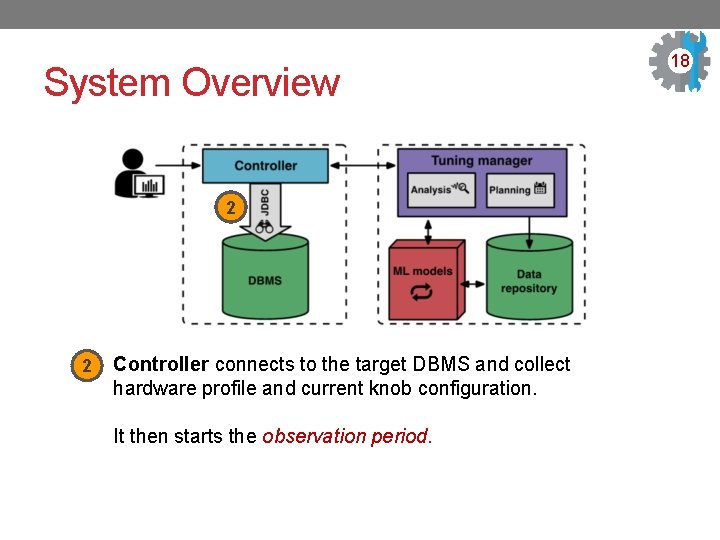
System Overview 2 2 Controller connects to the target DBMS and collect hardware profile and current knob configuration. It then starts the observation period. 18 3
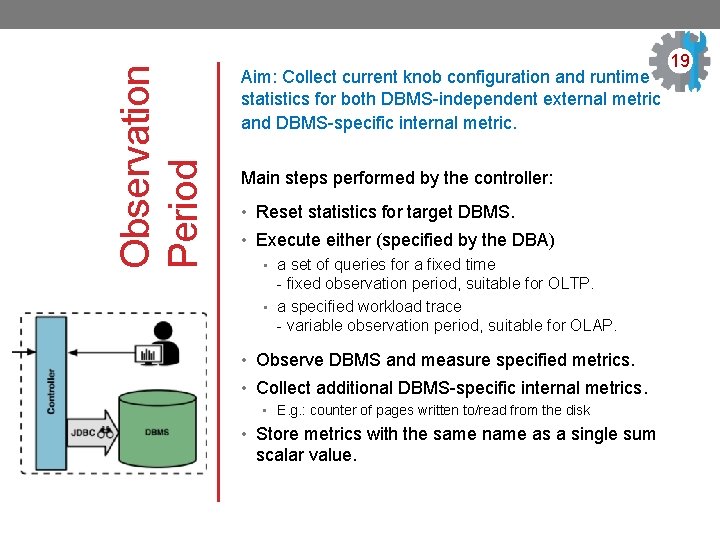
Observation Period Aim: Collect current knob configuration and runtime statistics for both DBMS-independent external metric and DBMS-specific internal metric. Main steps performed by the controller: • Reset statistics for target DBMS. • Execute either (specified by the DBA) • a set of queries for a fixed time - fixed observation period, suitable for OLTP. • a specified workload trace - variable observation period, suitable for OLAP. • Observe DBMS and measure specified metrics. • Collect additional DBMS-specific internal metrics. • E. g. : counter of pages written to/read from the disk • Store metrics with the same name as a single sum scalar value. 19 3
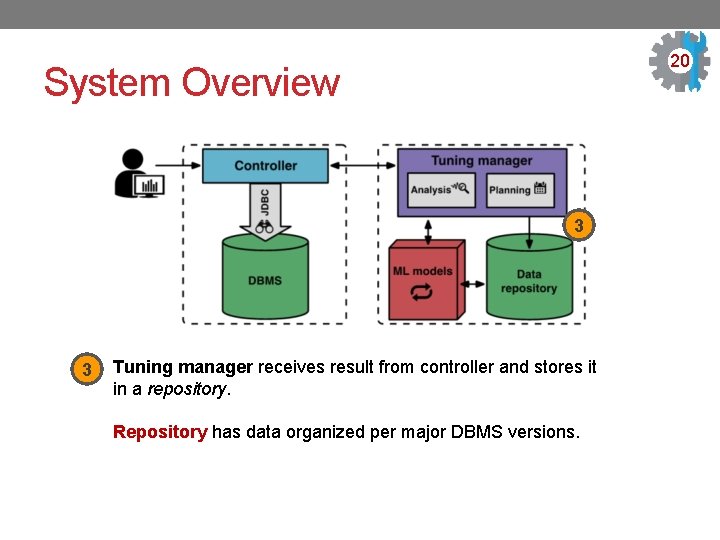
20 3 System Overview 3 3 Tuning manager receives result from controller and stores it in a repository. Repository has data organized per major DBMS versions.
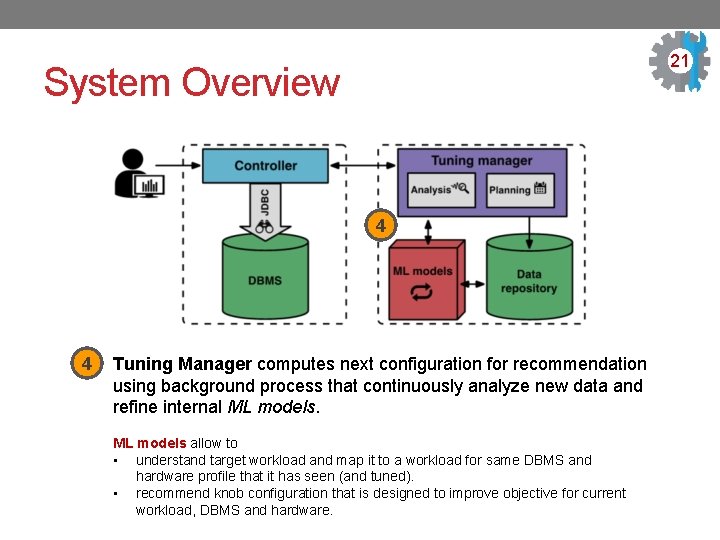
21 3 System Overview 4 4 Tuning Manager computes next configuration for recommendation using background process that continuously analyze new data and refine internal ML models allow to • understand target workload and map it to a workload for same DBMS and hardware profile that it has seen (and tuned). • recommend knob configuration that is designed to improve objective for current workload, DBMS and hardware.
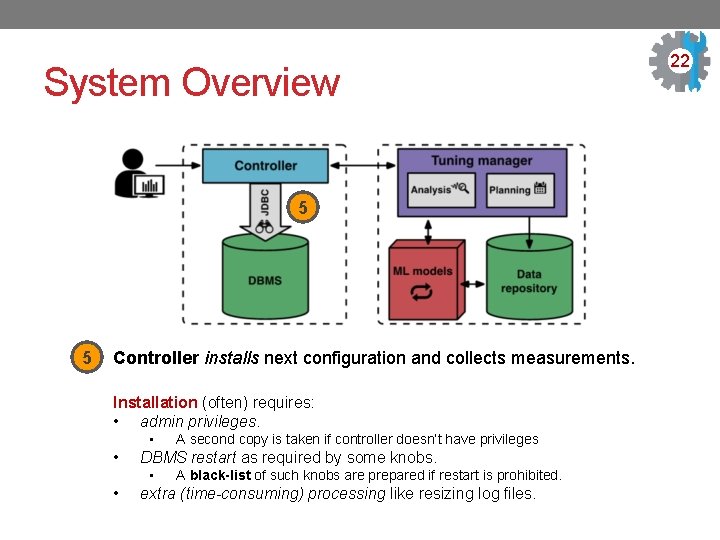
System Overview 5 5 Controller installs next configuration and collects measurements. Installation (often) requires: • admin privileges. • • DBMS restart as required by some knobs. • • A second copy is taken if controller doesn’t have privileges A black-list of such knobs are prepared if restart is prohibited. extra (time-consuming) processing like resizing log files. 22 3
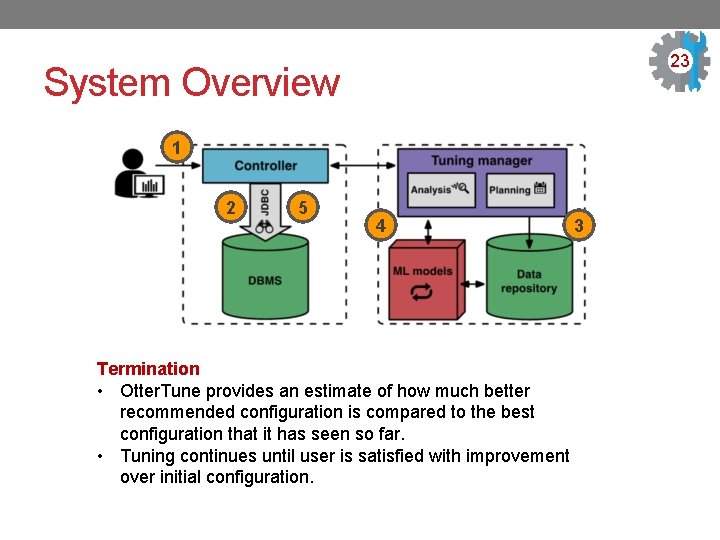
23 3 System Overview 1 2 5 4 3 Termination • Otter. Tune provides an estimate of how much better recommended configuration is compared to the best configuration that it has seen so far. • Tuning continues until user is satisfied with improvement over initial configuration.
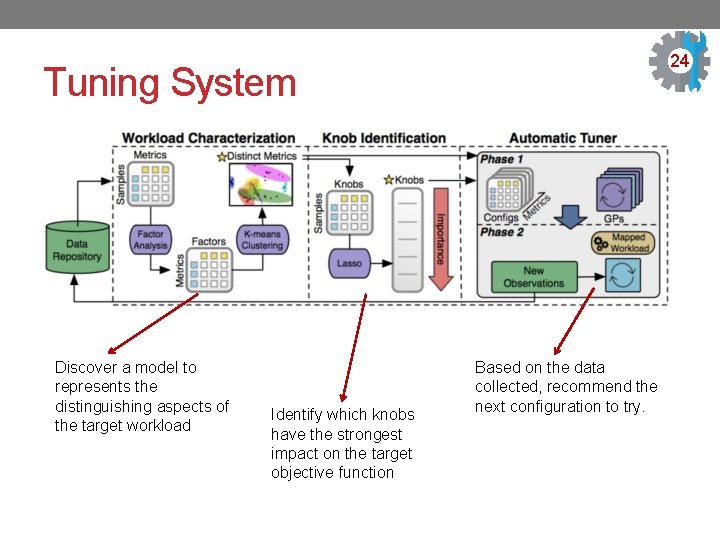
24 3 Tuning System Discover a model to represents the distinguishing aspects of the target workload Identify which knobs have the strongest impact on the target objective function Based on the data collected, recommend the next configuration to try.
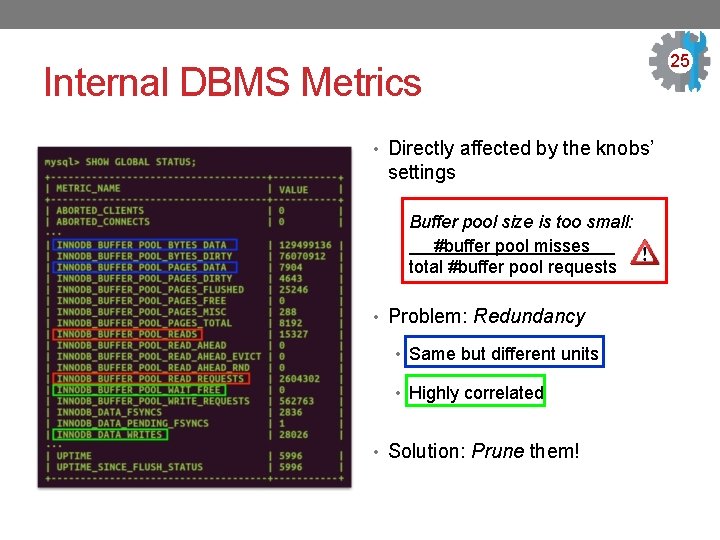
Internal DBMS Metrics • Directly affected by the knobs’ settings Buffer pool size is too small: #buffer pool misses . total #buffer pool requests • Problem: Redundancy • Same but different units • Highly correlated • Solution: Prune them! 25 3

Prune Redundant Metrics Construct smallest set of metrics that capture the variability in performance and distinguishing characteristics for different workloads. Factor Analysis • Pre-processing step. • Dimensionality reduction. • Reduce the noise in the data. • Find groups of metrics similar to each other. K-means • Select one metric from each group. Clustering 26 3
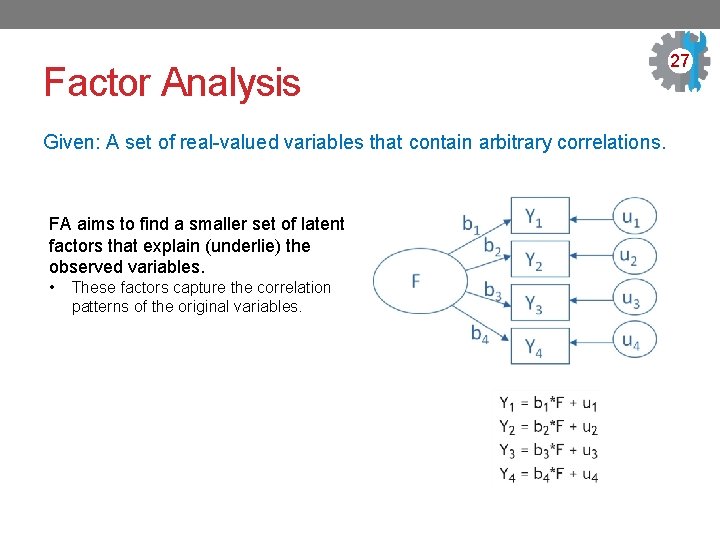
Factor Analysis Given: A set of real-valued variables that contain arbitrary correlations. FA aims to find a smaller set of latent factors that explain (underlie) the observed variables. • These factors capture the correlation patterns of the original variables. 27 3
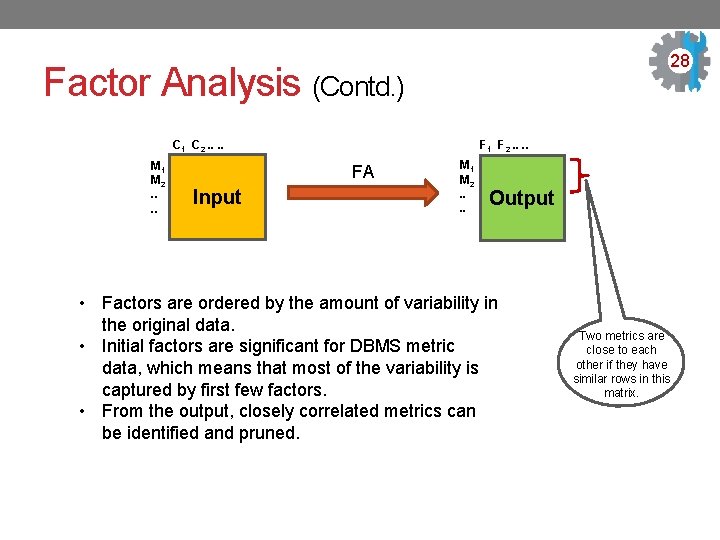
28 3 Factor Analysis (Contd. ) C 1 C 2. . M 1 M 2. . F 1 F 2. . FA Input M 1 M 2. . Output • Factors are ordered by the amount of variability in the original data. • Initial factors are significant for DBMS metric data, which means that most of the variability is captured by first few factors. • From the output, closely correlated metrics can be identified and pruned. Two metrics are close to each other if they have similar rows in this matrix.
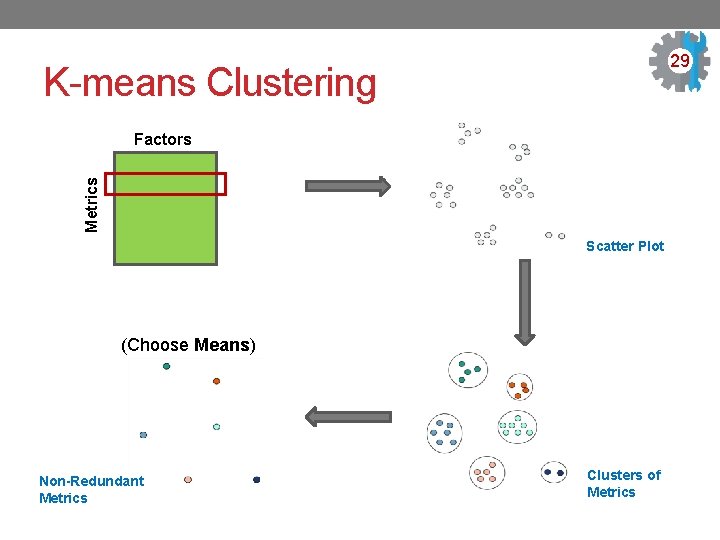
29 3 K-means Clustering Metrics Factors Scatter Plot (Choose Means) Non-Redundant Metrics Clusters of Metrics
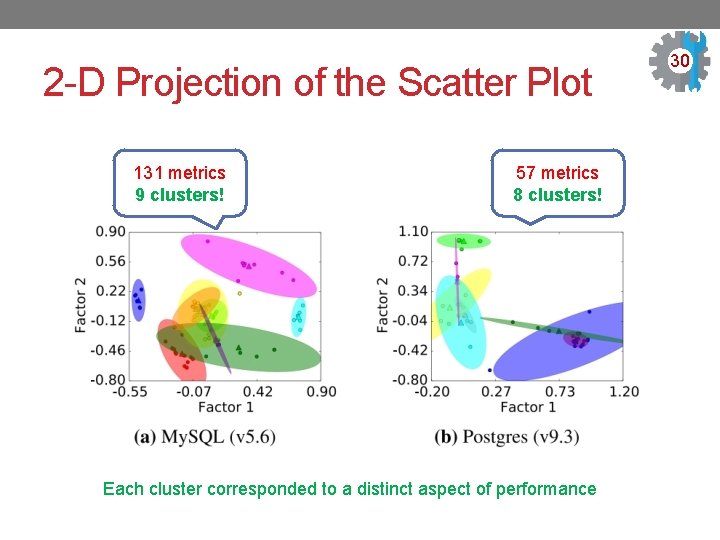
2 -D Projection of the Scatter Plot 131 metrics 9 clusters! 57 metrics 8 clusters! Each cluster corresponded to a distinct aspect of performance 30 3
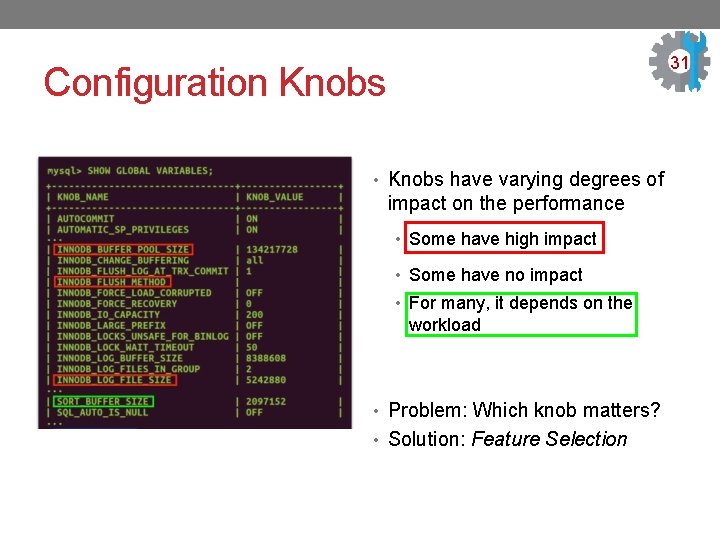
31 Configuration Knobs • Knobs have varying degrees of impact on the performance • Some have high impact • Some have no impact • For many, it depends on the workload • Problem: Which knob matters? • Solution: Feature Selection
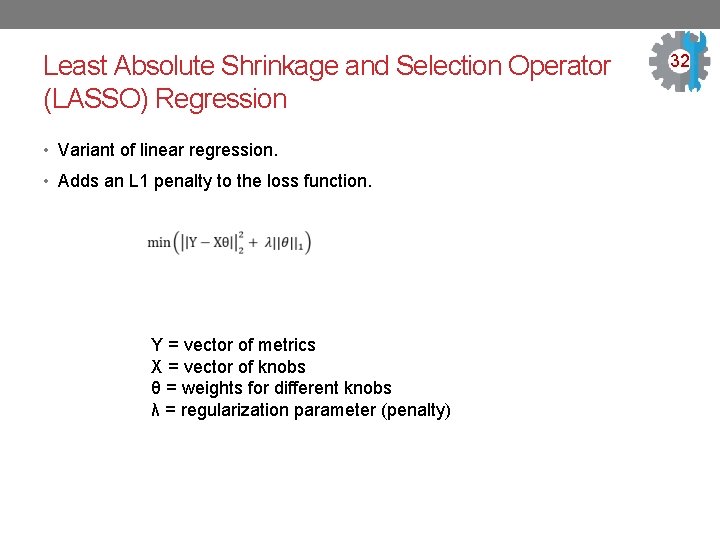
Least Absolute Shrinkage and Selection Operator (LASSO) Regression • Variant of linear regression. • Adds an L 1 penalty to the loss function. Y = vector of metrics X = vector of knobs θ = weights for different knobs λ = regularization parameter (penalty) 32
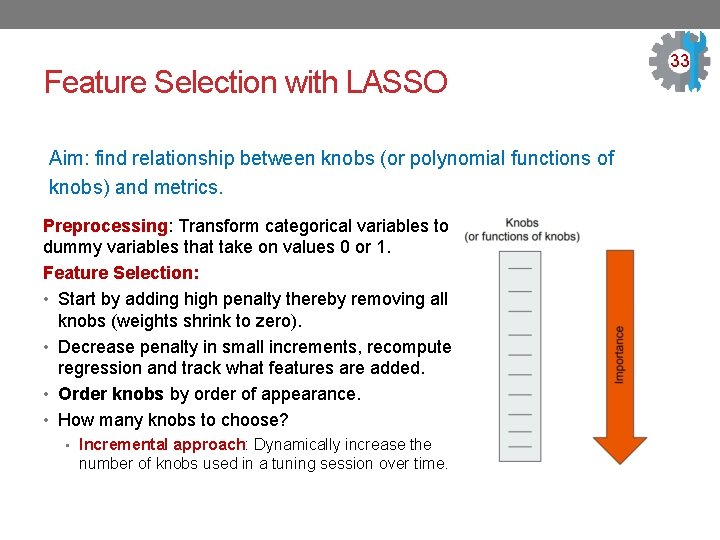
Feature Selection with LASSO Aim: find relationship between knobs (or polynomial functions of knobs) and metrics. Preprocessing: Transform categorical variables to dummy variables that take on values 0 or 1. Feature Selection: • Start by adding high penalty thereby removing all knobs (weights shrink to zero). • Decrease penalty in small increments, recompute regression and track what features are added. • Order knobs by order of appearance. • How many knobs to choose? • Incremental approach: Dynamically increase the number of knobs used in a tuning session over time. 33
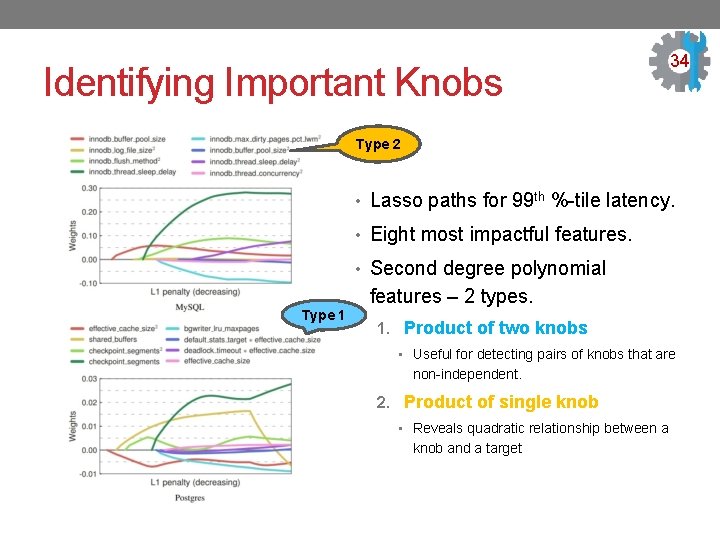
Identifying Important Knobs 34 Type 2 • Lasso paths for 99 th %-tile latency. • Eight most impactful features. • Second degree polynomial Type 1 features – 2 types. 1. Product of two knobs • Useful for detecting pairs of knobs that are non-independent. 2. Product of single knob • Reveals quadratic relationship between a knob and a target
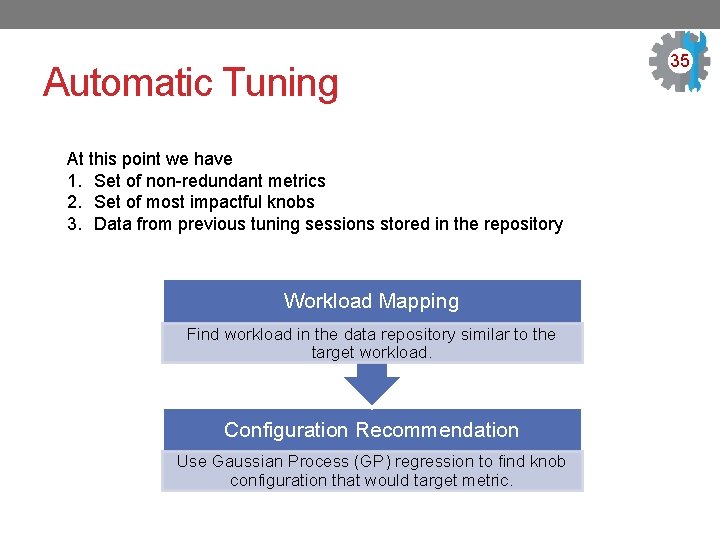
Automatic Tuning At this point we have 1. Set of non-redundant metrics 2. Set of most impactful knobs 3. Data from previous tuning sessions stored in the repository Workload Mapping Find workload in the data repository similar to the target workload. Configuration Recommendation Use Gaussian Process (GP) regression to find knob configuration that would target metric. 35 3
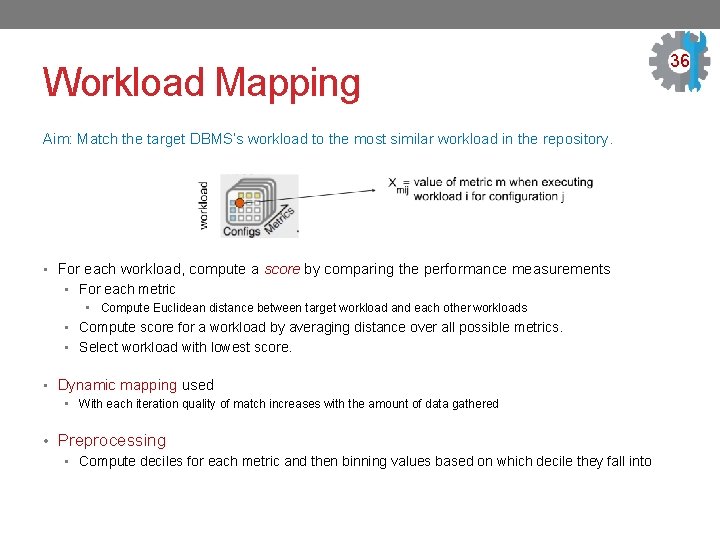
Workload Mapping Aim: Match the target DBMS’s workload to the most similar workload in the repository. • For each workload, compute a score by comparing the performance measurements • For each metric • Compute Euclidean distance between target workload and each other workloads • Compute score for a workload by averaging distance over all possible metrics. • Select workload with lowest score. • Dynamic mapping used • With each iteration quality of match increases with the amount of data gathered • Preprocessing • Compute deciles for each metric and then binning values based on which decile they fall into 36
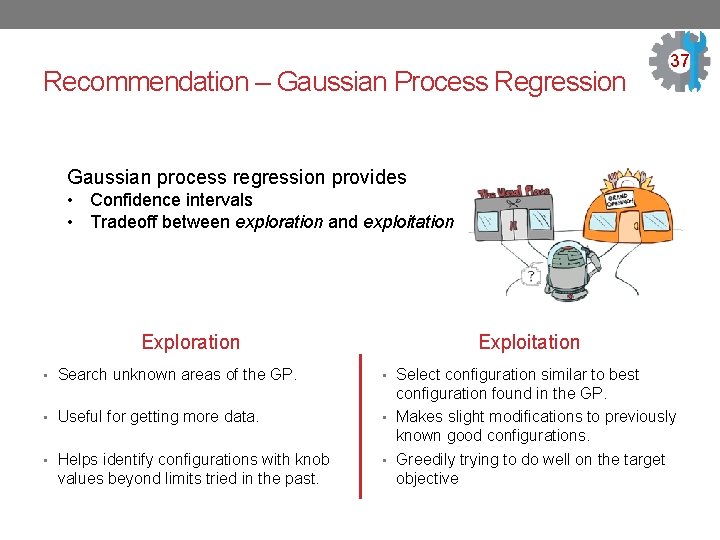
Recommendation – Gaussian Process Regression 37 Gaussian process regression provides • Confidence intervals • Tradeoff between exploration and exploitation Exploration • Search unknown areas of the GP. • Useful for getting more data. • Helps identify configurations with knob values beyond limits tried in the past. Exploitation • Select configuration similar to best configuration found in the GP. • Makes slight modifications to previously known good configurations. • Greedily trying to do well on the target objective
Configuration Recommendation 38 Aim: Recommend configurations in order to optimize the target metric over the entire tuning session • Reuse data from the similar workload to train a statistical model and use it to optimize the next configuration to try • Use data from mapped workload to train a GP model. • Update model by adding observed metrics from target workload. • Predict the latency & variance for a sample set of possible configurations • Optimize the next configuration to try, trading off between Exploration and Exploitation. • Over time, the expected improvement in the model’s predictions drops as the number of unknown regions decreases. • Preprocessing • to ensure features are continuous and of same scale • to encode categorical features with dummy variables
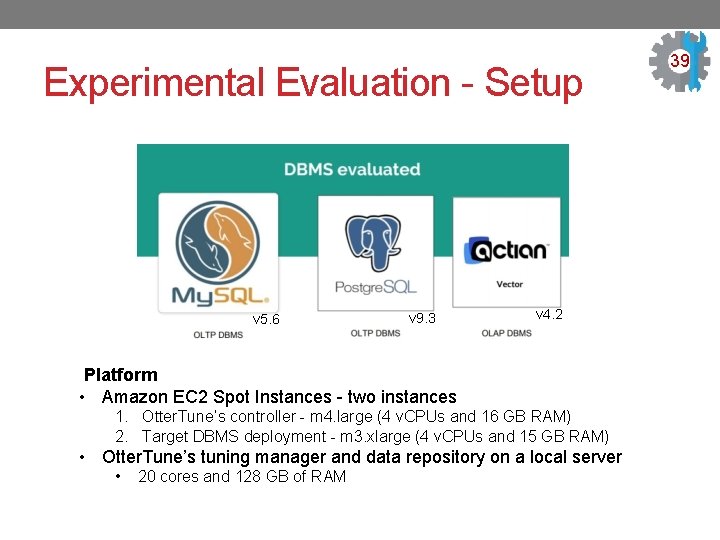
Experimental Evaluation - Setup v 5. 6 v 9. 3 v 4. 2 Platform • Amazon EC 2 Spot Instances - two instances 1. Otter. Tune’s controller - m 4. large (4 v. CPUs and 16 GB RAM) 2. Target DBMS deployment - m 3. xlarge (4 v. CPUs and 15 GB RAM) • Otter. Tune’s tuning manager and data repository on a local server • 20 cores and 128 GB of RAM 39
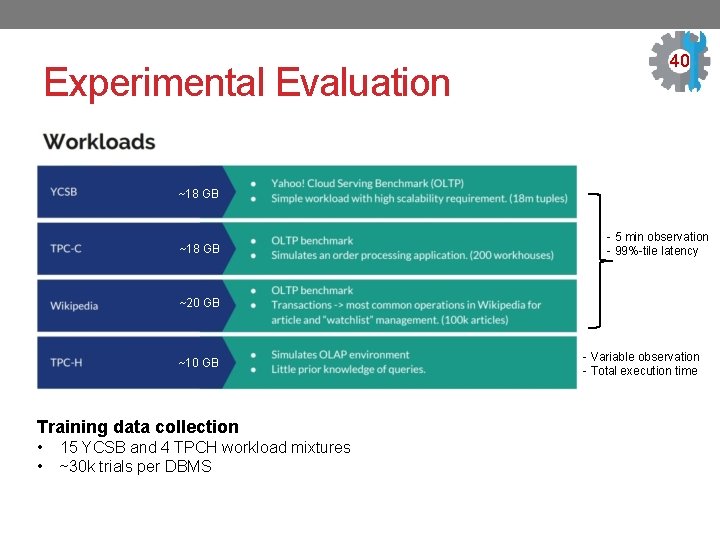
Experimental Evaluation 40 ~18 GB - 5 min observation - 99%-tile latency ~20 GB ~10 GB Training data collection • • 15 YCSB and 4 TPCH workload mixtures ~30 k trials per DBMS - Variable observation - Total execution time
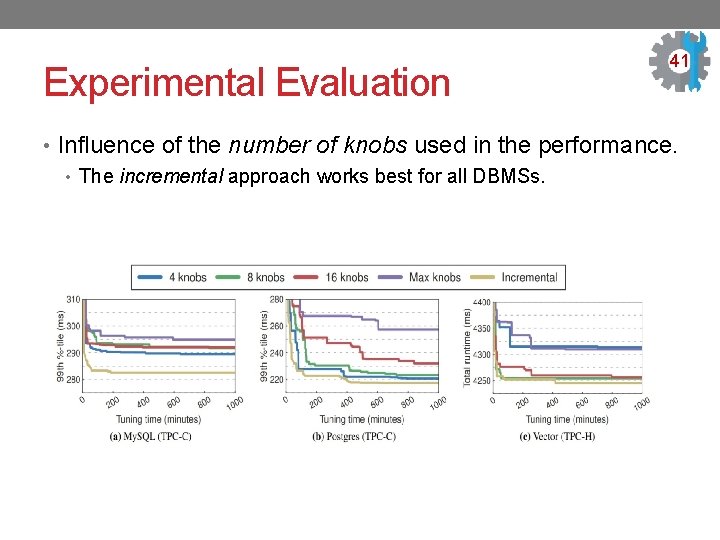
Experimental Evaluation 41 • Influence of the number of knobs used in the performance. • The incremental approach works best for all DBMSs.
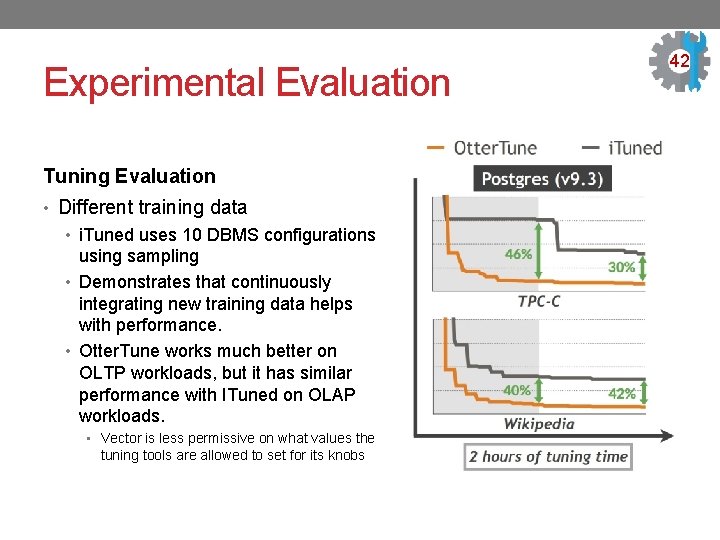
Experimental Evaluation Tuning Evaluation • Different training data • i. Tuned uses 10 DBMS configurations using sampling • Demonstrates that continuously integrating new training data helps with performance. • Otter. Tune works much better on OLTP workloads, but it has similar performance with ITuned on OLAP workloads. • Vector is less permissive on what values the tuning tools are allowed to set for its knobs 42
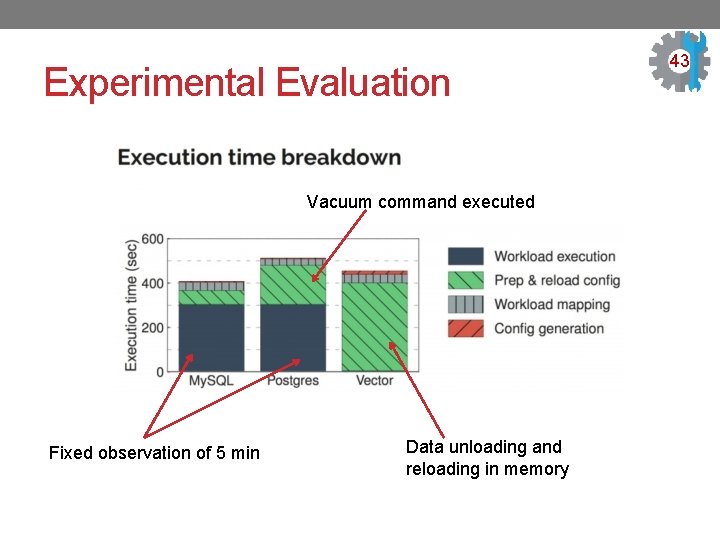
Experimental Evaluation Vacuum command executed Fixed observation of 5 min Data unloading and reloading in memory 43
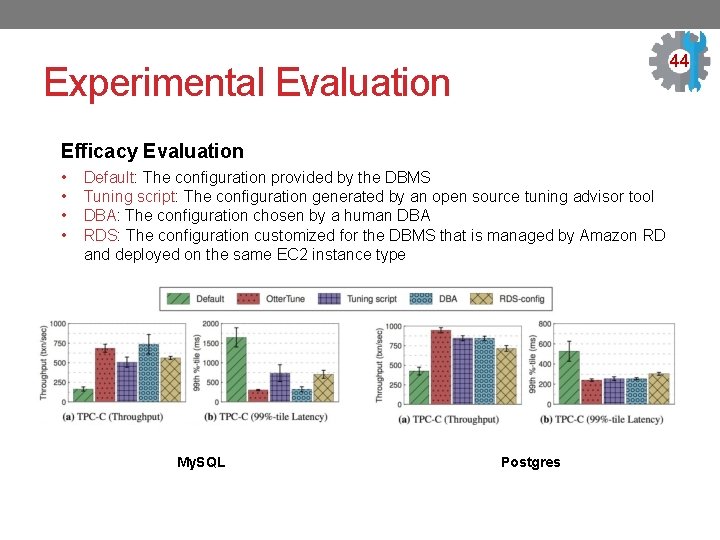
44 Experimental Evaluation Efficacy Evaluation • • Default: The configuration provided by the DBMS Tuning script: The configuration generated by an open source tuning advisor tool DBA: The configuration chosen by a human DBA RDS: The configuration customized for the DBMS that is managed by Amazon RD and deployed on the same EC 2 instance type My. SQL Postgres
Conclusion Otter. Tune leverages machine learning techniques and data from past configurations to • find good configurations for a larger number of knobs. • identify dependencies between knobs. • recommend configurations. But, still needs a DBA. Thank You 45
- Slides: 45