
DB 2 Security The usage of digital certificates
DB 2 Security - The usage of digital certificates in a customer environment Jim Pickel, IBM Roland Tessars, VW Date: Wednesday, 18 November 2015 Time: 08: 30 – 09: 30 Code: B 10
Agenda • DB 2 Other Authentication Mechanisms - Jim • DB 2 Authentication using PKI Smartcards - Roland 2
Strong Authentication Methods • • Password Phrases Kerberos Pass. Tickets Certificates

Jim Pickel, IBM SVL Password Phrase Kerberos Pass. Ticket 4
Password Phrase Authentication • A password phrase is a max of 100 character string consisting of mixed-case letters, numbers, and special characters including blanks • Password phrases have security advantages over passwords in that they are long enough to withstand most hacking attempts yet are unlikely to be written down because they are so easy to remember • DB 2 invokes RACROUTE REQUEST=VERIFY, PHRASE=“for strings greater than 8 characters”
Kerberos Authentication • Kerberos does not require passwords to flow in clear text because it uses encrypted tickets that contain authentication information for the user. • Remote users need to issue their Kerberos name and password to access DB 2. • A remote user who is authenticated to DB 2 by means of Kerberos authentication must be registered in RACF profiles. • DB 2 uses the IRRSPK 00 (R_ticketserv) to extract the principal names from a GSS-API context token and then IRRSIM 00 (R_usermap) to determine the RACF user ID associated with the principal name
Pass. Ticket Authentication • RACF Pass. Tickets are cryptographically-generated, singleuse, short-lifespan password substitutes. They are inherently more secure than passwords • Typically requires reply detection to be disabled • APPLDATA('NO REPLAY PROTECTION') - permits reuse of the same Pass. Ticket multiple times.
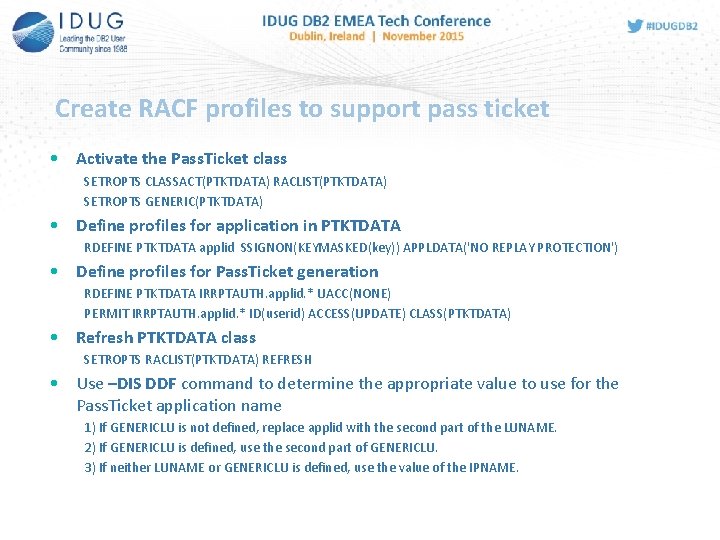
Create RACF profiles to support pass ticket • Activate the Pass. Ticket class SETROPTS CLASSACT(PTKTDATA) RACLIST(PTKTDATA) SETROPTS GENERIC(PTKTDATA) • Define profiles for application in PTKTDATA RDEFINE PTKTDATA applid SSIGNON(KEYMASKED(key)) APPLDATA('NO REPLAY PROTECTION') • Define profiles for Pass. Ticket generation RDEFINE PTKTDATA IRRPTAUTH. applid. * UACC(NONE) PERMIT IRRPTAUTH. applid. * ID(userid) ACCESS(UPDATE) CLASS(PTKTDATA) • Refresh PTKTDATA class SETROPTS RACLIST(PTKTDATA) REFRESH • Use –DIS DDF command to determine the appropriate value to use for the Pass. Ticket application name 1) If GENERICLU is not defined, replace applid with the second part of the LUNAME. 2) If GENERICLU is defined, use the second part of GENERICLU. 3) If neither LUNAME or GENERICLU is defined, use the value of the IPNAME.
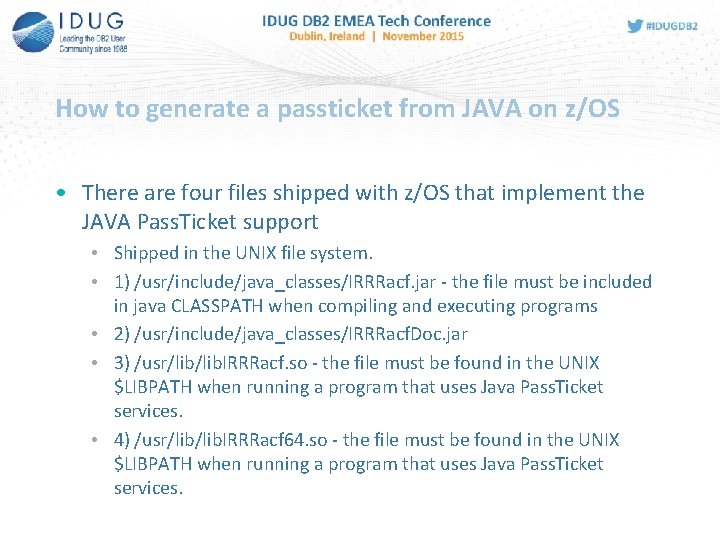
How to generate a passticket from JAVA on z/OS • There are four files shipped with z/OS that implement the JAVA Pass. Ticket support • Shipped in the UNIX file system. • 1) /usr/include/java_classes/IRRRacf. jar - the file must be included in java CLASSPATH when compiling and executing programs • 2) /usr/include/java_classes/IRRRacf. Doc. jar • 3) /usr/lib. IRRRacf. so - the file must be found in the UNIX $LIBPATH when running a program that uses Java Pass. Ticket services. • 4) /usr/lib. IRRRacf 64. so - the file must be found in the UNIX $LIBPATH when running a program that uses Java Pass. Ticket services.
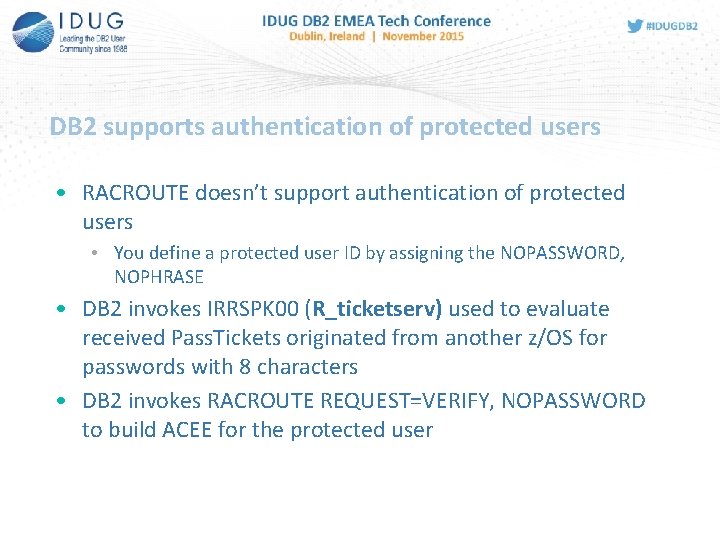
DB 2 supports authentication of protected users • RACROUTE doesn’t support authentication of protected users • You define a protected user ID by assigning the NOPASSWORD, NOPHRASE • DB 2 invokes IRRSPK 00 (R_ticketserv) used to evaluate received Pass. Tickets originated from another z/OS for passwords with 8 characters • DB 2 invokes RACROUTE REQUEST=VERIFY, NOPASSWORD to build ACEE for the protected user
Roland Tessars, VW Certificate Based Authentication 11
A brief flow through Client Authentication with Certificate 12
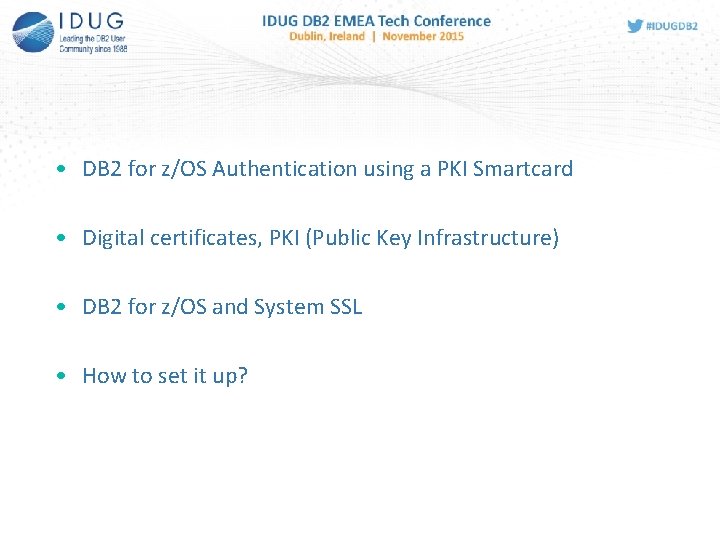
• DB 2 for z/OS Authentication using a PKI Smartcard • Digital certificates, PKI (Public Key Infrastructure) • DB 2 for z/OS and System SSL • How to set it up?
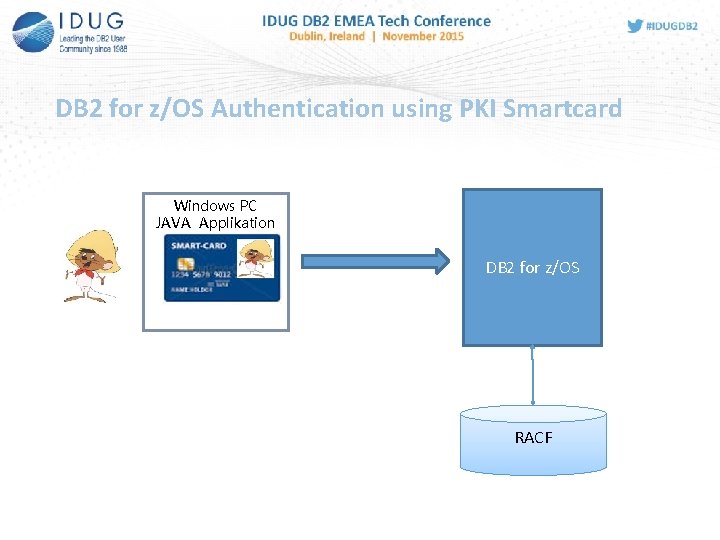
DB 2 for z/OS Authentication using PKI Smartcard Windows PC JAVA Applikation Userid / Passwort DB 2 for z/OS RACF
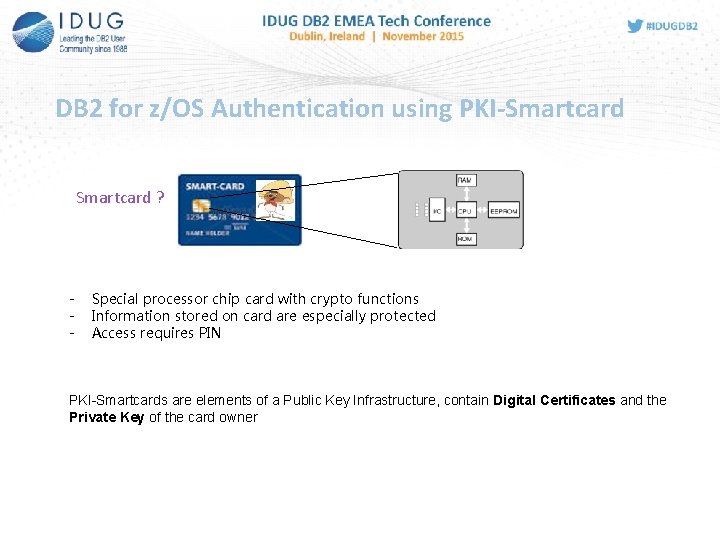
DB 2 for z/OS Authentication using PKI-Smartcard ? - Special processor chip card with crypto functions Information stored on card are especially protected Access requires PIN PKI-Smartcards are elements of a Public Key Infrastructure, contain Digital Certificates and the Private Key of the card owner
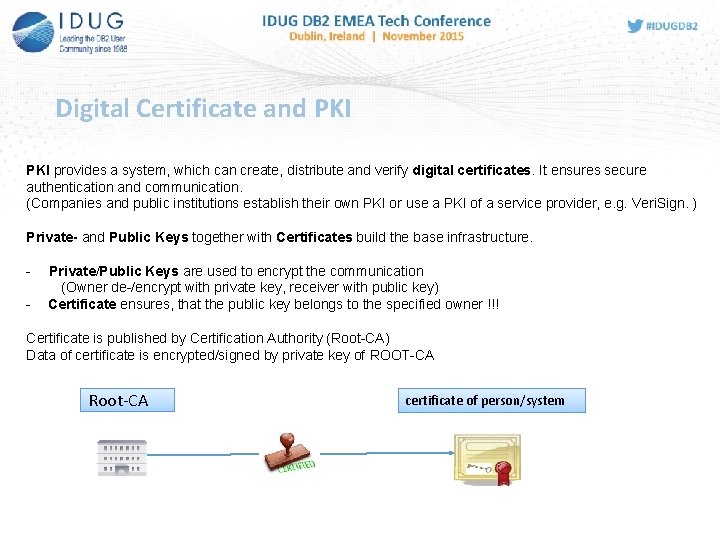
Digital Certificate and PKI provides a system, which can create, distribute and verify digital certificates. It ensures secure authentication and communication. (Companies and public institutions establish their own PKI or use a PKI of a service provider, e. g. Veri. Sign. ) Private- and Public Keys together with Certificates build the base infrastructure. - Private/Public Keys are used to encrypt the communication (Owner de-/encrypt with private key, receiver with public key) Certificate ensures, that the public key belongs to the specified owner !!! Certificate is published by Certification Authority (Root-CA) Data of certificate is encrypted/signed by private key of ROOT-CA Root-CA certificate of person/system
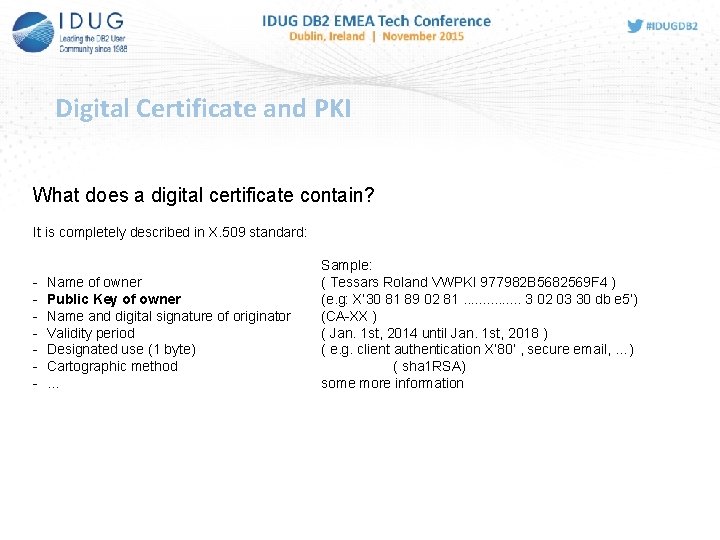
Digital Certificate and PKI What does a digital certificate contain? It is completely described in X. 509 standard: - Name of owner Public Key of owner Name and digital signature of originator Validity period Designated use (1 byte) Cartographic method … Sample: ( Tessars Roland VWPKI 977982 B 5682569 F 4 ) (e. g: X‘ 30 81 89 02 81. . . . 3 02 03 30 db e 5’) (CA-XX ) ( Jan. 1 st, 2014 until Jan. 1 st, 2018 ) ( e. g. client authentication X‘ 80‘ , secure email, …) ( sha 1 RSA) some more information
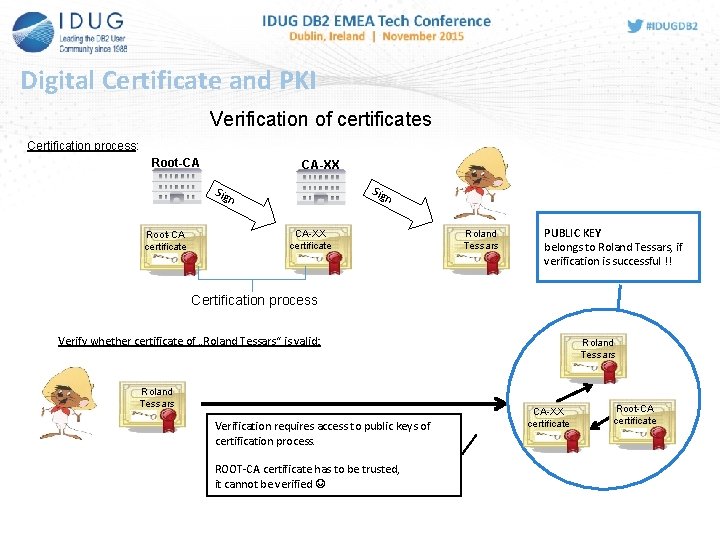
Digital Certificate and PKI Verification of certificates Certification process: Root-CA CA-XX Sig n Root-CA certificate CA-XX certificate Roland Tessars PUBLIC KEY belongs to Roland Tessars, if verification is successful !! Certification process Verify whether certificate of „Roland Tessars“ is valid: Roland Tessars Verification requires access to public keys of certification process. ROOT-CA certificate has to be trusted, it cannot be verified Roland Tessars CA-XX certificate Root-CA certificate
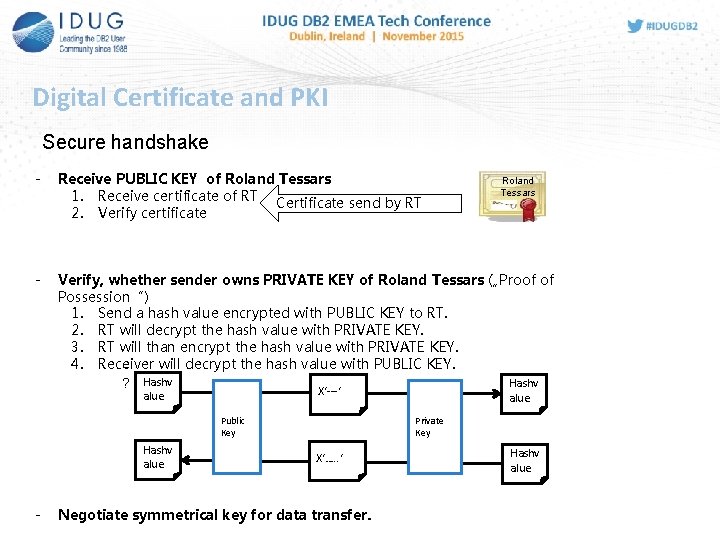
Digital Certificate and PKI Secure handshake - Receive PUBLIC KEY of Roland Tessars 1. Receive certificate of RT Certificate send by RT 2. Verify certificate - Verify, whether sender owns PRIVATE KEY of Roland Tessars („Proof of Possession“) 1. Send a hash value encrypted with PUBLIC KEY to RT. 2. RT will decrypt the hash value with PRIVATE KEY. 3. RT will than encrypt the hash value with PRIVATE KEY. 4. Receiver will decrypt the hash value with PUBLIC KEY. = Hashv ? Hashv X‘---‘ alue Public Key Hashv alue - Roland Tessars Private Key X‘…. . ‘ Negotiate symmetrical key for data transfer. Hashv alue
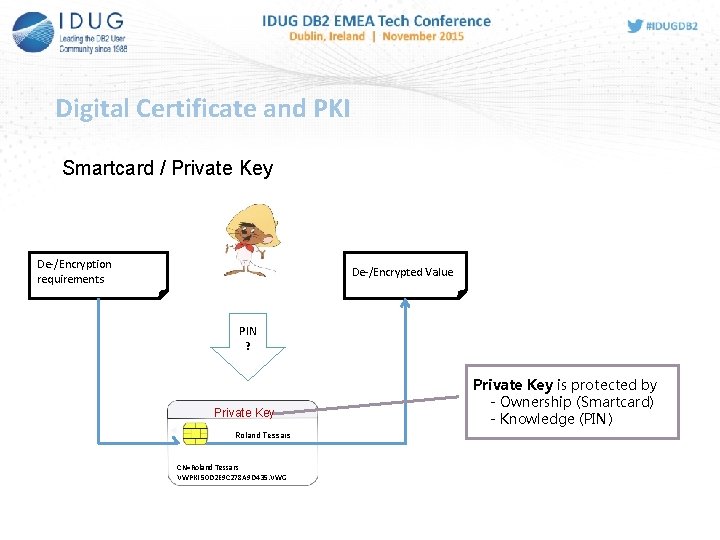
Digital Certificate and PKI Smartcard / Private Key De-/Encryption requirements De-/Encrypted Value PIN ? Private Key Roland Tessars CN=Roland Tessars VWPKI 50 D 2 E 9 C 278 A 9 D 435. VWG Private Key is protected by - Ownership (Smartcard) - Knowledge (PIN)
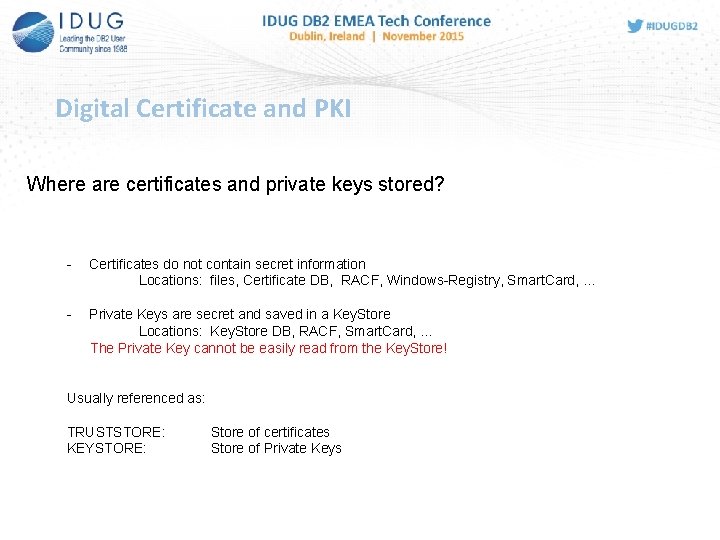
Digital Certificate and PKI Where are certificates and private keys stored? - Certificates do not contain secret information Locations: files, Certificate DB, RACF, Windows-Registry, Smart. Card, … - Private Keys are secret and saved in a Key. Store Locations: Key. Store DB, RACF, Smart. Card, … The Private Key cannot be easily read from the Key. Store! Usually referenced as: TRUSTSTORE: KEYSTORE: Store of certificates Store of Private Keys
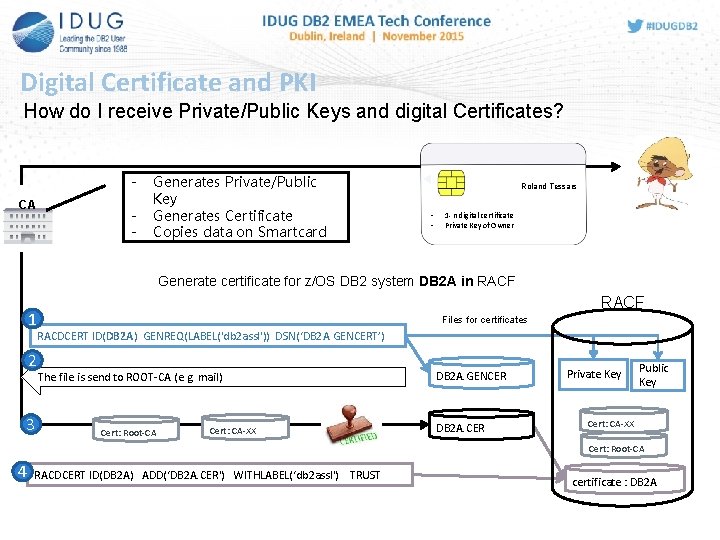
Digital Certificate and PKI How do I receive Private/Public Keys and digital Certificates? CA - Generates Private/Public Key Generates Certificate Copies data on Smartcard Roland Tessars - 1 - n digital certificate Private Key of Owner Generate certificate for z/OS DB 2 system DB 2 A in RACF 1 2 3 RACF Files for certificates RACDCERT ID(DB 2 A) GENREQ(LABEL('db 2 assl')) DSN(‘DB 2 A. GENCERT’) The file is send to ROOT-CA (e. g. mail) Cert: Root-CA Cert: CA-XX DB 2 A. GENCER DB 2 A. CER Private Key Public Key Cert: CA-XX Cert: Root-CA 4 RACDCERT ID(DB 2 A) ADD(‘DB 2 A. CER') WITHLABEL(‘db 2 assl') TRUST certificate : DB 2 A
DB 2 for z/OS and System SSL • System SSL means, that TCP/IP will take care about SSL encryption. • The application doesn‘t notice ( if it is the intention ) • DB 2 for z/OS V 9 supports SSL connections via TCP/IP with handshake at SERVER. • The SSL protocol requires, that the server ( DB 2 A ) authenticates with SSL certificate at Client • Data will be encrypted over the network • DB 2 for z/OS V 10 additionally supports client authentication with certificate via SSL at server (DB 2 A).
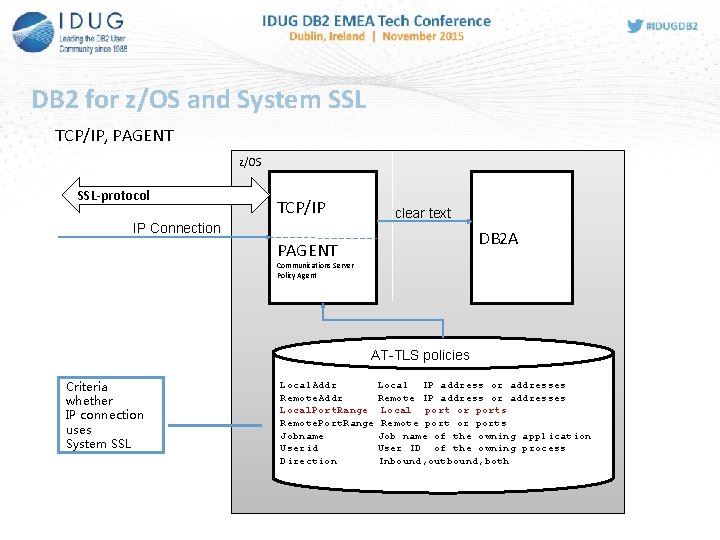
DB 2 for z/OS and System SSL TCP/IP, PAGENT z/OS SSL-protocol TCP/IP IP Connection clear text DB 2 A PAGENT Communications Server Policy Agent AT-TLS policies Criteria whether IP connection uses System SSL Local. Addr Local IP address or addresses Remote. Addr Remote IP address or addresses Local. Port. Range Local port or ports Remote. Port. Range Remote port or ports Jobname Job name of the owning application Userid User ID of the owning process Direction Inbound, outbound, both
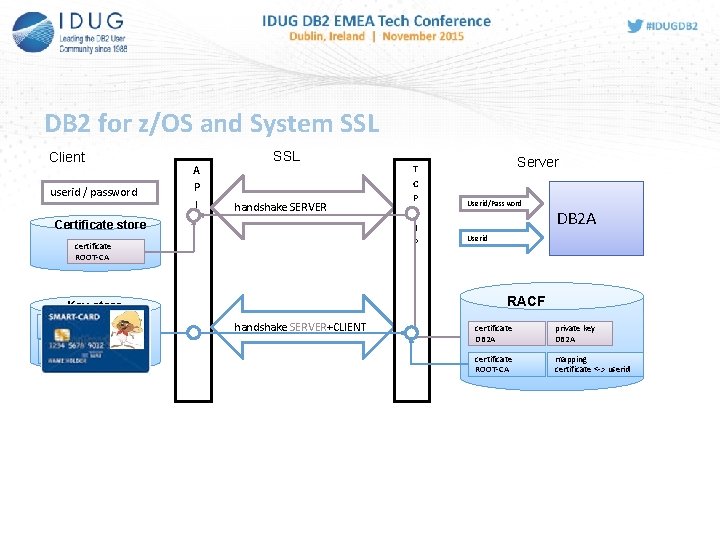
DB 2 for z/OS and System SSL Client userid / password A P I SSL handshake SERVER Certificate store certificate ROOT-CA private key Roland Tessars Server Userid/Password DB 2 A Userid RACF Key store certificate Roland Tessars T C P / I P handshake SERVER+CLIENT certificate DB 2 A private key DB 2 A certificate ROOT-CA mapping certificate <-> userid
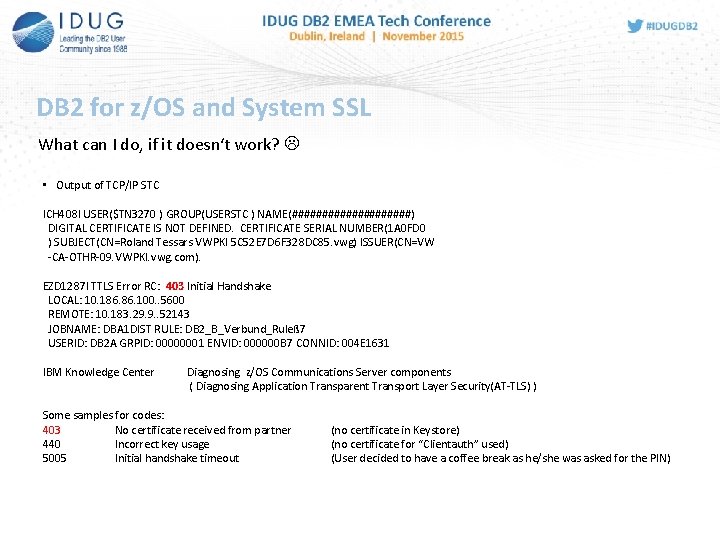
DB 2 for z/OS and System SSL What can I do, if it doesn‘t work? • Output of TCP/IP STC ICH 408 I USER($TN 3270 ) GROUP(USERSTC ) NAME(##########) DIGITAL CERTIFICATE IS NOT DEFINED. CERTIFICATE SERIAL NUMBER(1 A 0 FD 0 ) SUBJECT(CN=Roland Tessars VWPKI 5 C 52 E 7 D 6 F 328 DC 85. vwg) ISSUER(CN=VW -CA-OTHR-09. VWPKI. vwg. com). EZD 1287 I TTLS Error RC: 403 Initial Handshake LOCAL: 10. 186. 100. . 5600 REMOTE: 10. 183. 29. 9. . 52143 JOBNAME: DBA 1 DIST RULE: DB 2_B_Verbund_Ruleß 7 USERID: DB 2 A GRPID: 00000001 ENVID: 000000 B 7 CONNID: 004 E 1631 IBM Knowledge Center Diagnosing z/OS Communications Server components ( Diagnosing Application Transparent Transport Layer Security(AT-TLS) ) Some samples for codes: 403 No certificate received from partner 440 Incorrect key usage 5005 Initial handshake timeout (no certificate in Keystore) (no certificate for “Clientauth” used) (User decided to have a coffee break as he/she was asked for the PIN)
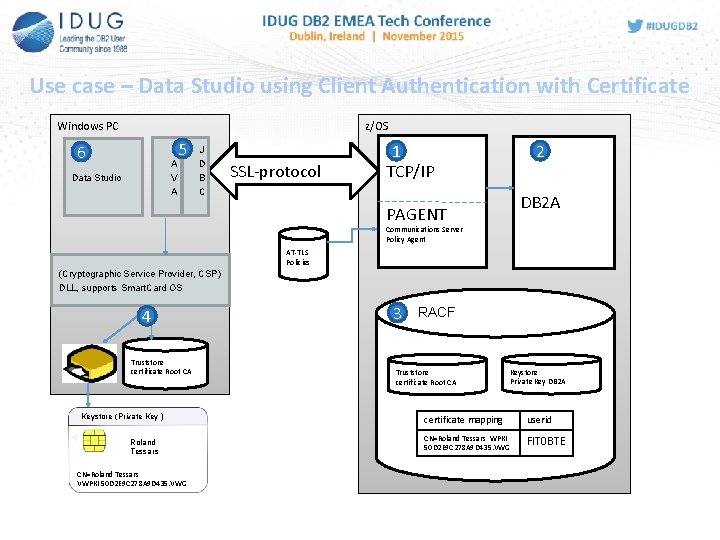
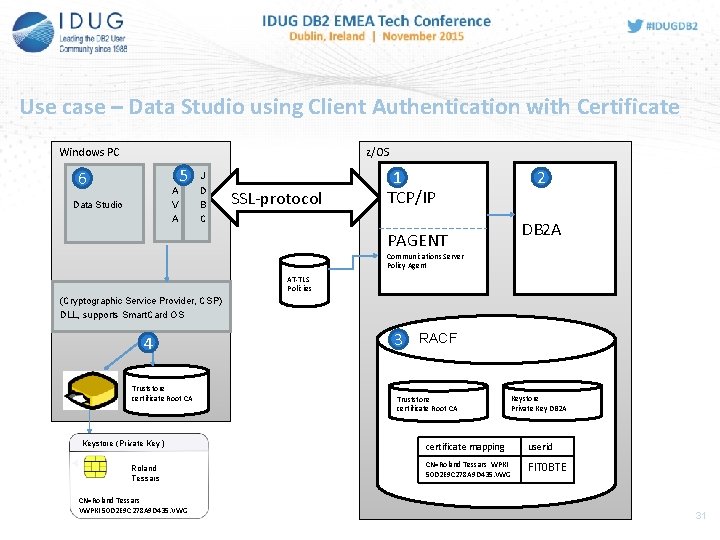
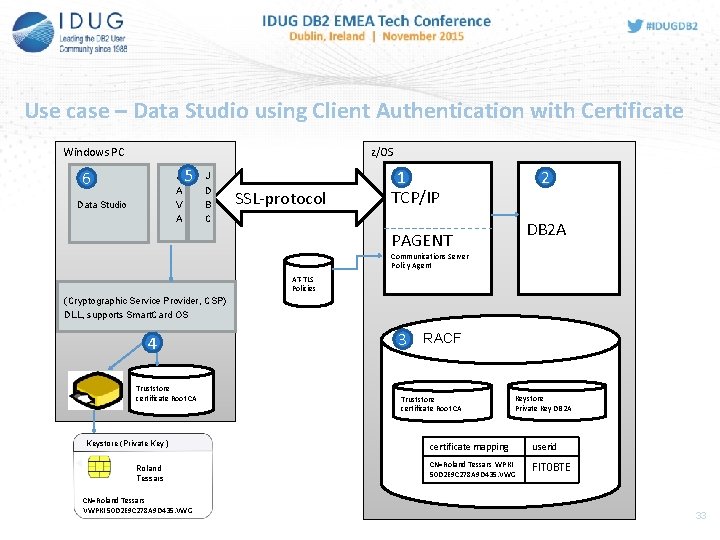
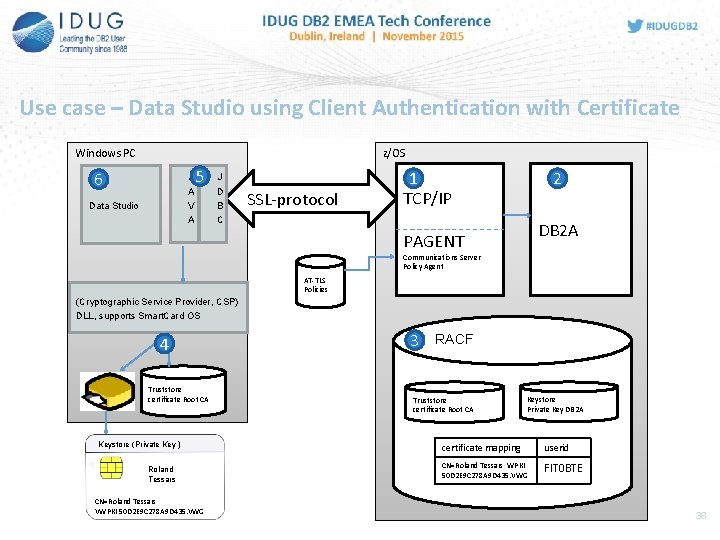
Use case – Data Studio using Client Authentication with Certificate Windows PC z/OS 6 J A V A Data Studio 5 J D B C SSL-protocol 1 TCP/IP 2 DB 2 A PAGENT Communications Server Policy Agent AT-TLS Policies (Cryptographic Service Provider, CSP) DLL, supports Smart. Card OS 4 Truststore certificate Root CA Keystore (Private Key ) Roland Tessars CN=Roland Tessars VWPKI 50 D 2 E 9 C 278 A 9 D 435. VWG 3 RACF Truststore certificate Root CA Keystore Private Key DB 2 A certificate mapping userid CN=Roland Tessars WPKI 50 D 2 E 9 C 278 A 9 D 435. VWG FIT 0 BTE
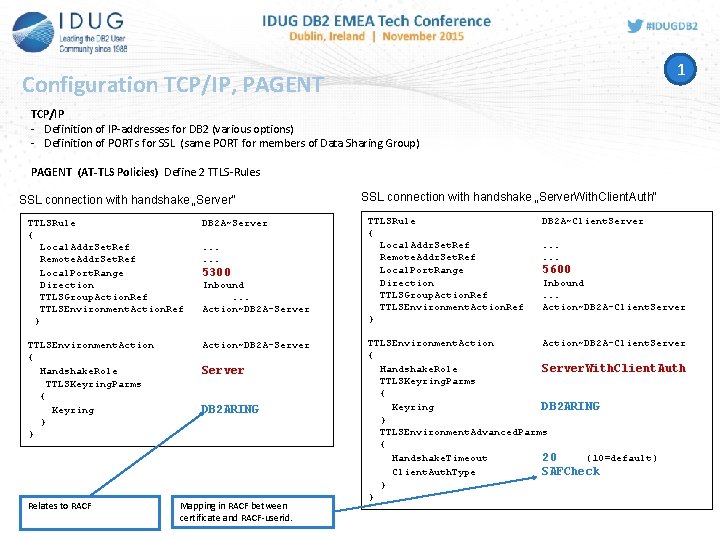
1 Configuration TCP/IP, PAGENT TCP/IP - Definition of IP-addresses for DB 2 (various options) - Definition of PORTs for SSL (same PORT for members of Data Sharing Group) PAGENT (AT-TLS Policies) Define 2 TTLS-Rules SSL connection with handshake „Server“ TTLSRule { Local. Addr. Set. Ref Remote. Addr. Set. Ref Local. Port. Range Direction TTLSGroup. Action. Ref TTLSEnvironment. Action. Ref } DB 2 A~Server TTLSEnvironment. Action { Handshake. Role TTLSKeyring. Parms { Keyring } } Action~DB 2 A-Server Relates to RACF . . . 5300 Inbound. . . Action~DB 2 A-Server DB 2 ARING Mapping in RACF between certificate and RACF-userid. SSL connection with handshake „Server. With. Client. Auth“ TTLSRule { Local. Addr. Set. Ref Remote. Addr. Set. Ref Local. Port. Range Direction TTLSGroup. Action. Ref TTLSEnvironment. Action. Ref } DB 2 A~Client. Server. . . 5600 Inbound. . . Action~DB 2 A-Client. Server TTLSEnvironment. Action~DB 2 A-Client. Server { Handshake. Role Server. With. Client. Auth TTLSKeyring. Parms { Keyring DB 2 ARING } TTLSEnvironment. Advanced. Parms { Handshake. Timeout 20 (10=default) Client. Auth. Type SAFCheck } }
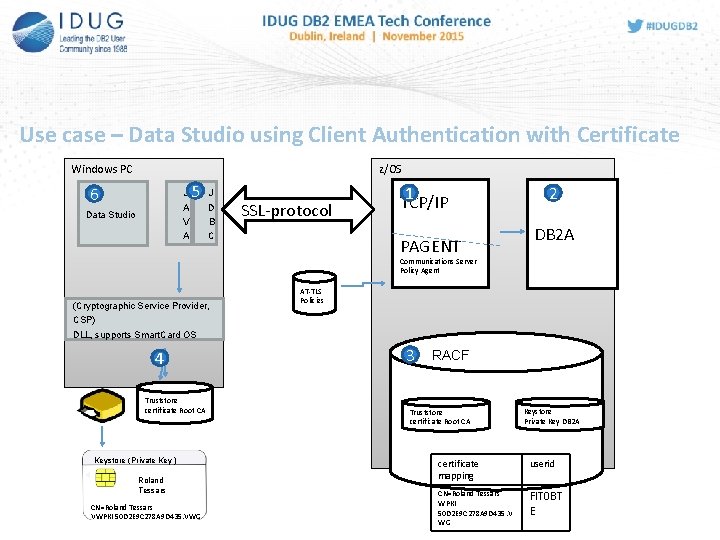
Use case – Data Studio using Client Authentication with Certificate Windows PC z/OS 6 J A V A Data Studio 5 J D B C SSL-protocol 1 TCP/IP PAGENT 2 DB 2 A Communications Server Policy Agent (Cryptographic Service Provider, CSP) DLL, supports Smart. Card OS 4 Truststore certificate Root CA Keystore (Private Key ) Roland Tessars CN=Roland Tessars VWPKI 50 D 2 E 9 C 278 A 9 D 435. VWG AT-TLS Policies 3 RACF Truststore certificate Root CA Keystore Private Key DB 2 A certificate mapping userid CN=Roland Tessars WPKI 50 D 2 E 9 C 278 A 9 D 435. V WG FIT 0 BT E
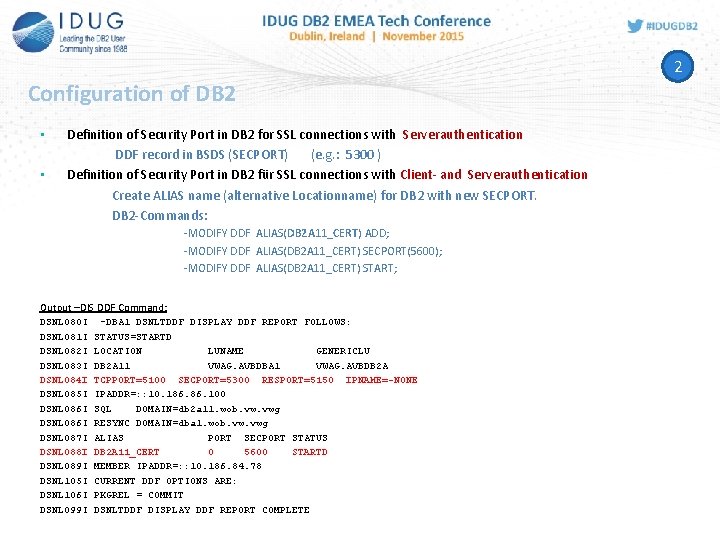
2 Configuration of DB 2 • • Definition of Security Port in DB 2 for SSL connections with Serverauthentication DDF record in BSDS (SECPORT) (e. g. : 5300 ) Definition of Security Port in DB 2 für SSL connections with Client- and Serverauthentication Create ALIAS name (alternative Locationname) for DB 2 with new SECPORT. DB 2 -Commands: -MODIFY DDF ALIAS(DB 2 A 11_CERT) ADD; -MODIFY DDF ALIAS(DB 2 A 11_CERT) SECPORT(5600); -MODIFY DDF ALIAS(DB 2 A 11_CERT) START; Output –DIS DDF Command: DSNL 080 I DSNL 081 I DSNL 082 I DSNL 083 I DSNL 084 I DSNL 085 I DSNL 086 I DSNL 087 I DSNL 088 I DSNL 089 I DSNL 105 I DSNL 106 I DSNL 099 I -DBA 1 DSNLTDDF DISPLAY DDF REPORT FOLLOWS: STATUS=STARTD LOCATION LUNAME GENERICLU DB 2 A 11 VWAG. AVBDBA 1 VWAG. AVBDB 2 A TCPPORT=5100 SECPORT=5300 RESPORT=5150 IPNAME=-NONE IPADDR=: : 10. 186. 100 SQL DOMAIN=db 2 a 11. wob. vwg RESYNC DOMAIN=dba 1. wob. vwg ALIAS PORT SECPORT STATUS DB 2 A 11_CERT 0 5600 STARTD MEMBER IPADDR=: : 10. 186. 84. 78 CURRENT DDF OPTIONS ARE: PKGREL = COMMIT DSNLTDDF DISPLAY DDF REPORT COMPLETE
Use case – Data Studio using Client Authentication with Certificate Windows PC z/OS 6 J A V A Data Studio 5 J D B C SSL-protocol 1 TCP/IP 2 DB 2 A PAGENT Communications Server Policy Agent AT-TLS Policies (Cryptographic Service Provider, CSP) DLL, supports Smart. Card OS 4 Truststore certificate Root CA Keystore (Private Key ) Roland Tessars CN=Roland Tessars VWPKI 50 D 2 E 9 C 278 A 9 D 435. VWG 3 RACF Truststore certificate Root CA Keystore Private Key DB 2 A certificate mapping userid CN=Roland Tessars WPKI 50 D 2 E 9 C 278 A 9 D 435. VWG FIT 0 BTE 31
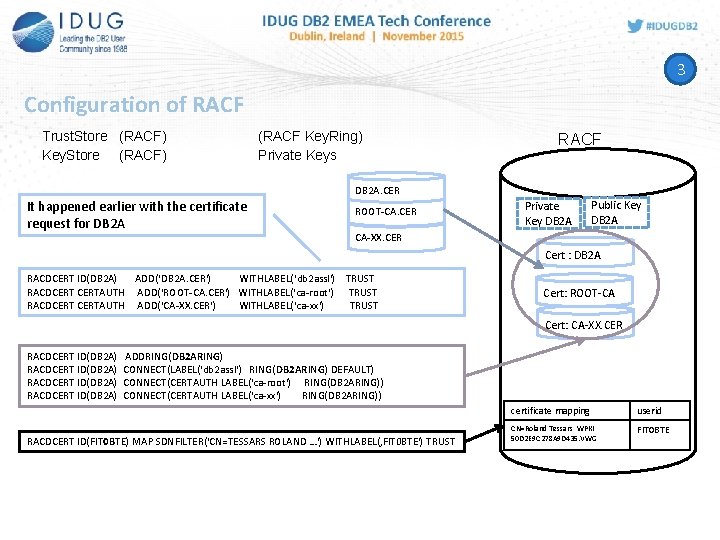
3 Configuration of RACF Trust. Store (RACF) Key. Store (RACF) (RACF Key. Ring) Private Keys RACF DB 2 A. CER It happened earlier with the certificate request for DB 2 A ROOT-CA. CER Private Key DB 2 A Public Key DB 2 A CA-XX. CER Cert : DB 2 A RACDCERT ID(DB 2 A) ADD(‘DB 2 A. CER') WITHLABEL(‘db 2 assl') TRUST RACDCERTAUTH ADD(‘ROOT-CA. CER') WITHLABEL(‘ca-root') TRUST RACDCERTAUTH ADD(‘CA-XX. CER') WITHLABEL(‘ca-xx') TRUST Cert: ROOT-CA Cert: CA-XX. CER RACDCERT ID(DB 2 A) ADDRING(DB 2 ARING) CONNECT(LABEL('db 2 assl') RING(DB 2 ARING) DEFAULT) CONNECT(CERTAUTH LABEL('ca-root') RING(DB 2 ARING)) CONNECT(CERTAUTH LABEL('ca-xx') RING(DB 2 ARING)) RACDCERT ID(FIT 0 BTE) MAP SDNFILTER('CN=TESSARS ROLAND …') WITHLABEL(‚FIT 0 BTE') TRUST certificate mapping userid CN=Roland Tessars WPKI 50 D 2 E 9 C 278 A 9 D 435. VWG FIT 0 BTE
Use case – Data Studio using Client Authentication with Certificate Windows PC z/OS 6 J A V A Data Studio 5 J D B C SSL-protocol 1 TCP/IP 2 DB 2 A PAGENT Communications Server Policy Agent AT-TLS Policies (Cryptographic Service Provider, CSP) DLL, supports Smart. Card OS 4 Truststore certificate Root CA Keystore (Private Key ) Roland Tessars CN=Roland Tessars VWPKI 50 D 2 E 9 C 278 A 9 D 435. VWG 3 RACF Truststore certificate Root CA Keystore Private Key DB 2 A certificate mapping userid CN=Roland Tessars WPKI 50 D 2 E 9 C 278 A 9 D 435. VWG FIT 0 BTE 33
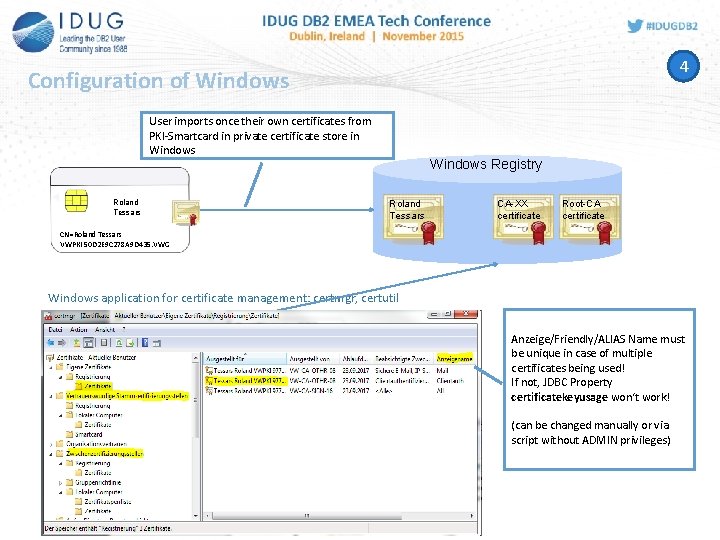
4 Configuration of Windows User imports once their own certificates from PKI-Smartcard in private certificate store in Windows Roland Tessars Windows Registry Roland Tessars CA-XX certificate Root-CA certificate CN=Roland Tessars VWPKI 50 D 2 E 9 C 278 A 9 D 435. VWG Windows application for certificate management: certmgr, certutil Anzeige/Friendly/ALIAS Name must be unique in case of multiple certificates being used! If not, JDBC Property certificatekeyusage won‘t work! (can be changed manually or via script without ADMIN privileges)
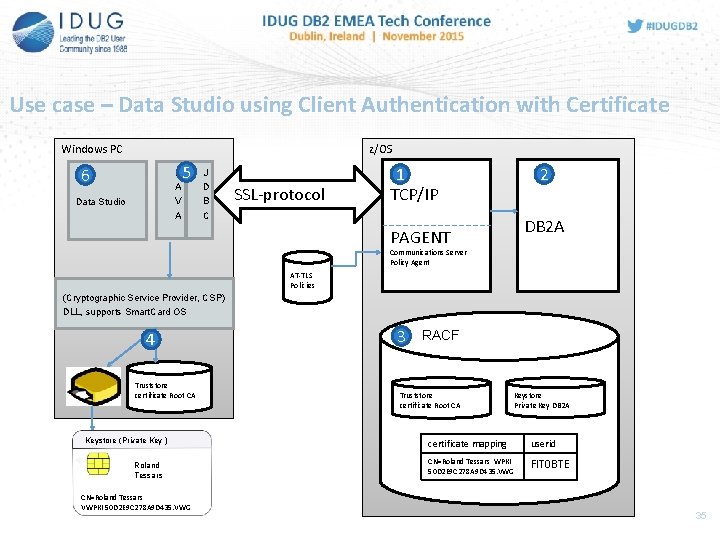
Use case – Data Studio using Client Authentication with Certificate z/OS Windows PC 6 J A V A Data Studio 5 J D B C SSL-protocol 1 TCP/IP 2 DB 2 A PAGENT Communications Server Policy Agent AT-TLS Policies (Cryptographic Service Provider, CSP) DLL, supports Smart. Card OS 4 Truststore certificate Root CA Keystore (Private Key ) Roland Tessars CN=Roland Tessars VWPKI 50 D 2 E 9 C 278 A 9 D 435. VWG 3 RACF Truststore certificate Root CA Keystore Private Key DB 2 A certificate mapping userid CN=Roland Tessars WPKI 50 D 2 E 9 C 278 A 9 D 435. VWG FIT 0 BTE 35
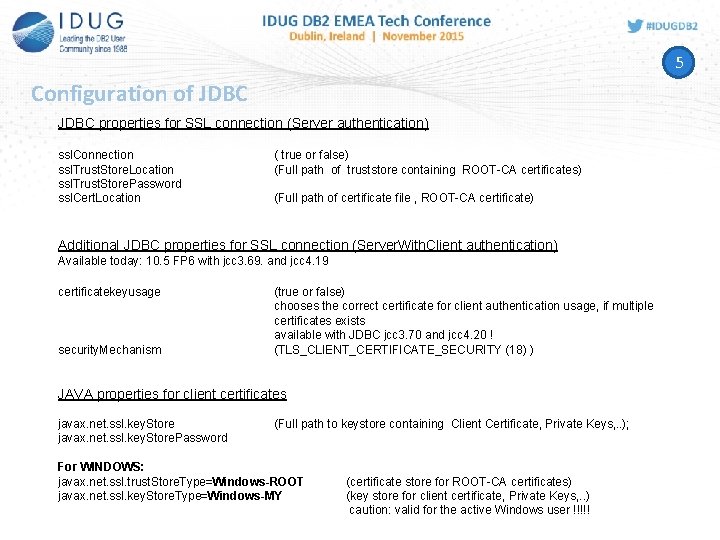
5 Configuration of JDBC properties for SSL connection (Server authentication) ssl. Connection ssl. Trust. Store. Location ssl. Trust. Store. Password ssl. Cert. Location ( true or false) (Full path of truststore containing ROOT-CA certificates) (Full path of certificate file , ROOT-CA certificate) Additional JDBC properties for SSL connection (Server. With. Client authentication) Available today: 10. 5 FP 6 with jcc 3. 69. and jcc 4. 19 certificatekeyusage security. Mechanism (true or false) chooses the correct certificate for client authentication usage, if multiple certificates exists available with JDBC jcc 3. 70 and jcc 4. 20 ! (TLS_CLIENT_CERTIFICATE_SECURITY (18) ) JAVA properties for client certificates javax. net. ssl. key. Store. Password (Full path to keystore containing Client Certificate, Private Keys, . . ); For WINDOWS: javax. net. ssl. trust. Store. Type=Windows-ROOT javax. net. ssl. key. Store. Type=Windows-MY (certificate store for ROOT-CA certificates) (key store for client certificate, Private Keys, . . ) caution: valid for the active Windows user !!!!!
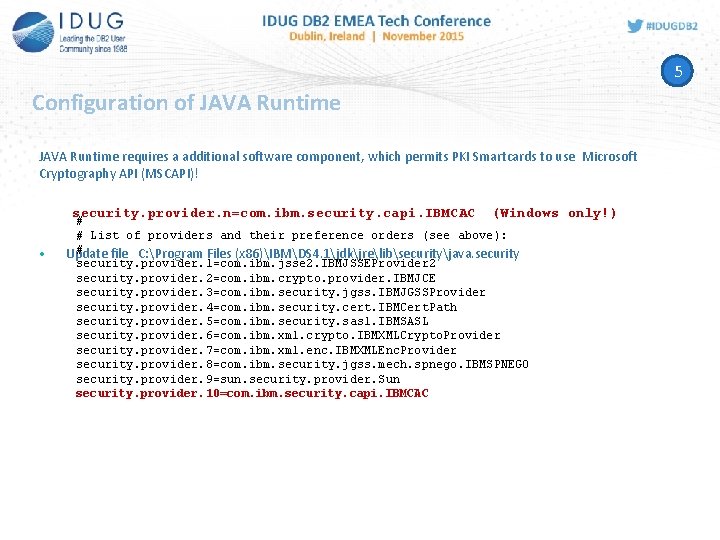
5 Configuration of JAVA Runtime requires a additional software component, which permits PKI Smartcards to use Microsoft Cryptography API (MSCAPI)! security. provider. n=com. ibm. security. capi. IBMCAC • (Windows only!) # # List of providers and their preference orders (see above): # Update file C: Program Files (x 86)IBMDS 4. 1jdkjrelibsecurityjava. security. provider. 1=com. ibm. jsse 2. IBMJSSEProvider 2 security. provider. 2=com. ibm. crypto. provider. IBMJCE security. provider. 3=com. ibm. security. jgss. IBMJGSSProvider security. provider. 4=com. ibm. security. cert. IBMCert. Path security. provider. 5=com. ibm. security. sasl. IBMSASL security. provider. 6=com. ibm. xml. crypto. IBMXMLCrypto. Provider security. provider. 7=com. ibm. xml. enc. IBMXMLEnc. Provider security. provider. 8=com. ibm. security. jgss. mech. spnego. IBMSPNEGO security. provider. 9=sun. security. provider. Sun security. provider. 10=com. ibm. security. capi. IBMCAC
Use case – Data Studio using Client Authentication with Certificate Windows PC z/OS 6 J A V A Data Studio 5 J D B C SSL-protocol 1 TCP/IP 2 DB 2 A PAGENT Communications Server Policy Agent AT-TLS Policies (Cryptographic Service Provider, CSP) DLL, supports Smart. Card OS 4 Truststore certificate Root CA Keystore (Private Key ) Roland Tessars CN=Roland Tessars VWPKI 50 D 2 E 9 C 278 A 9 D 435. VWG 3 RACF Truststore certificate Root CA Keystore Private Key DB 2 A certificate mapping userid CN=Roland Tessars WPKI 50 D 2 E 9 C 278 A 9 D 435. VWG FIT 0 BTE 38
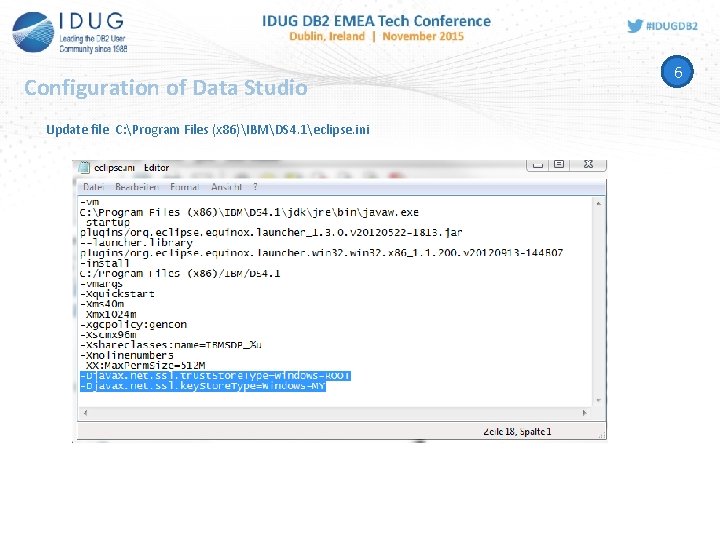
Configuration of Data Studio Update file C: Program Files (x 86)IBMDS 4. 1eclipse. ini 6
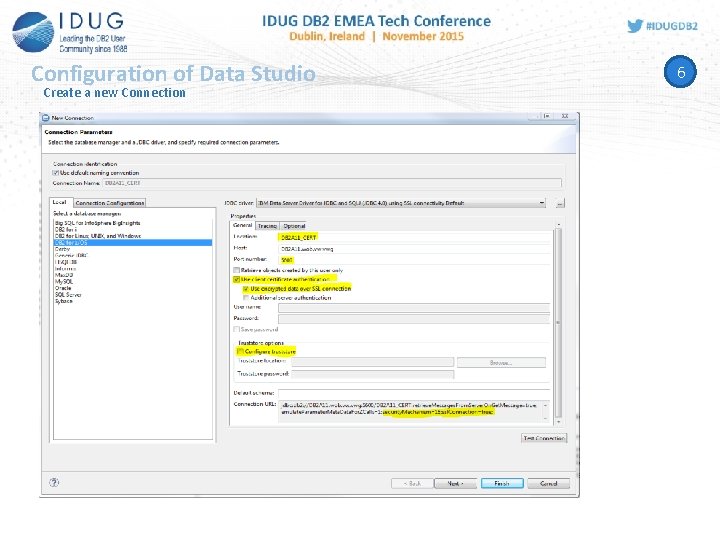
Configuration of Data Studio Create a new Connection 6
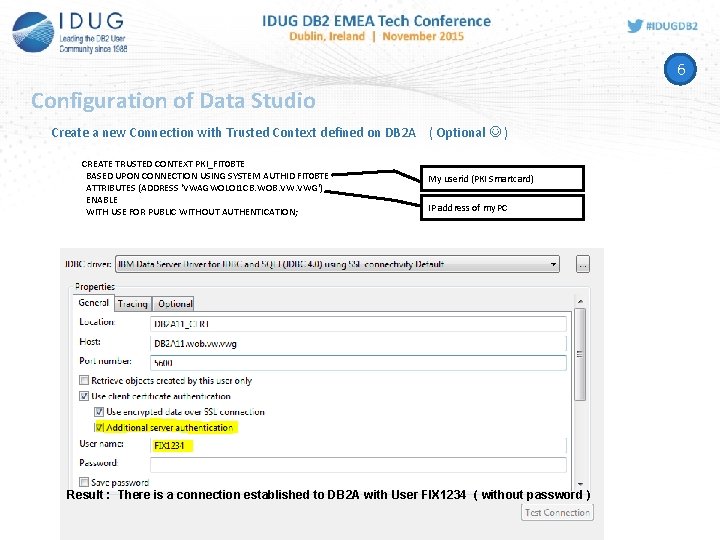
6 Configuration of Data Studio Create a new Connection with Trusted Context defined on DB 2 A ( Optional ) CREATE TRUSTED CONTEXT PKI_FIT 0 BTE BASED UPON CONNECTION USING SYSTEM AUTHID FIT 0 BTE ATTRIBUTES (ADDRESS 'VWAGWOLOI 1 CB. WOB. VWG') ENABLE WITH USE FOR PUBLIC WITHOUT AUTHENTICATION; My userid (PKI Smartcard) IP address of my PC Result : There is a connection established to DB 2 A with User FIX 1234 ( without password )
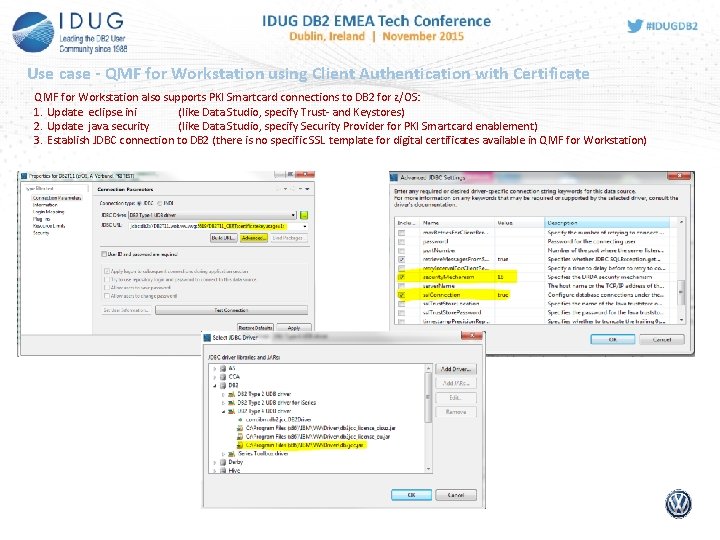
Use case - QMF for Workstation using Client Authentication with Certificate QMF for Workstation also supports PKI Smartcard connections to DB 2 for z/OS: 1. Update eclipse. ini (like Data Studio, specify Trust- and Keystores) 2. Update java. security (like Data Studio, specify Security Provider for PKI Smartcard enablement) 3. Establish JDBC connection to DB 2 (there is no specific SSL template for digital certificates available in QMF for Workstation)
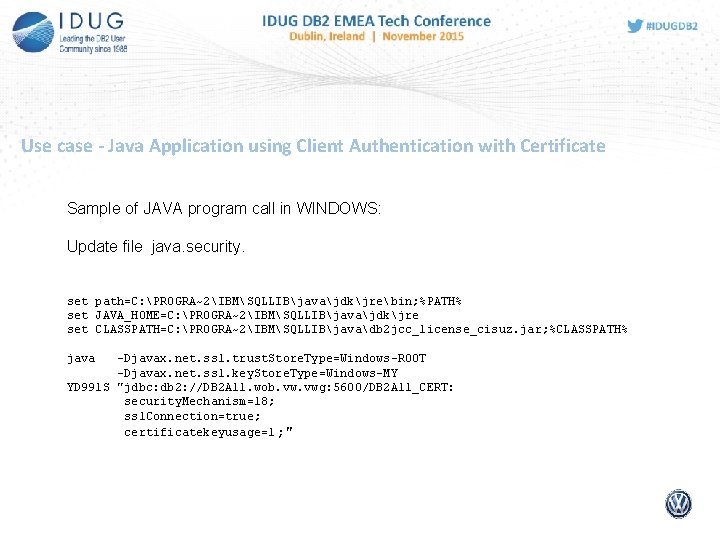
Use case - Java Application using Client Authentication with Certificate Sample of JAVA program call in WINDOWS: Update file java. security. set path=C: PROGRA~2IBMSQLLIBjavajdkjrebin; %PATH% set JAVA_HOME=C: PROGRA~2IBMSQLLIBjavajdkjre set CLASSPATH=C: PROGRA~2IBMSQLLIBjavadb 2 jcc_license_cisuz. jar; %CLASSPATH% java -Djavax. net. ssl. trust. Store. Type=Windows-ROOT -Djavax. net. ssl. key. Store. Type=Windows-MY YD 991 S "jdbc: db 2: //DB 2 A 11. wob. vwg: 5600/DB 2 A 11_CERT: security. Mechanism=18; ssl. Connection=true; certificatekeyusage=1 ; "
Hints & Tips for documentation IBM Redpaper Wikipedia DB 2 for z/OS: Configuring TLS/SSL for Secure Client-Server Communications (Chris Meyer, Paolo Bruni) Contains samples and describes the infrastructure, software components https: //de. wikipedia. org/wiki/Public-Key-Infrastruktur Used software components at VW for Po. C: - DB 2 z/OS Version 10/11 z/OS 2. 1 Windows 7 Enterprise Edition Card OS v 4. 1 (Smart. Card) trust. Ware CSP+ v 1. 1. 0. 2 Data Studio 4. 1. 1 (APAR 2 for SSL templates) QMF for Workstation V 11. 1 FP 3 Contact: Roland Tessars Telephone: 05361 / 921309 Email: roland. tessars@volkswagen. de
Jim Pickel, IBM pickel@us. ibm. com Roland Tessars, VW roland. tessars@volkswagen. de DB 2 Security - The usage of digital certificates in a customer environment Please fill out your session evaluation before leaving!
- Slides: 45