
DataDatabases Storage and IO Computers Networks Tools Systems

Data/Databases Storage and I/O Computers Networks Tools Systems Software *
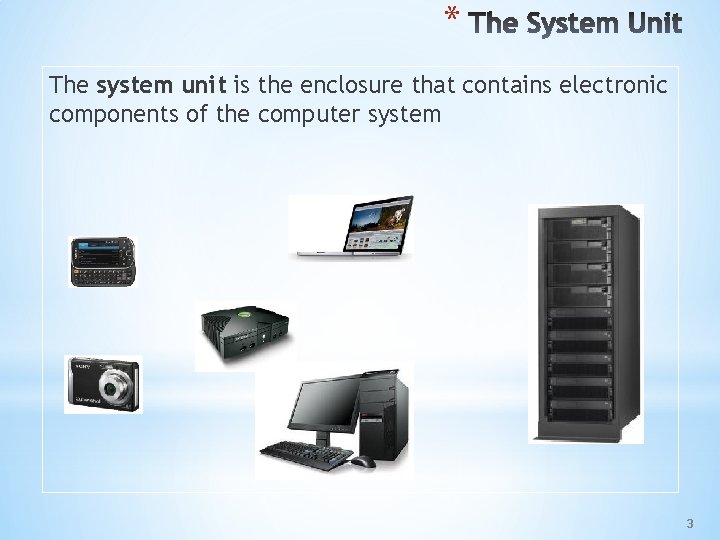
* The system unit is the enclosure that contains electronic components of the computer system 3

* The system unit includes: *Motherboard *Processor(s) *Memory *Buses *Adapters/Expansion Slots *Drive Bays and Drives *Power Supply 4
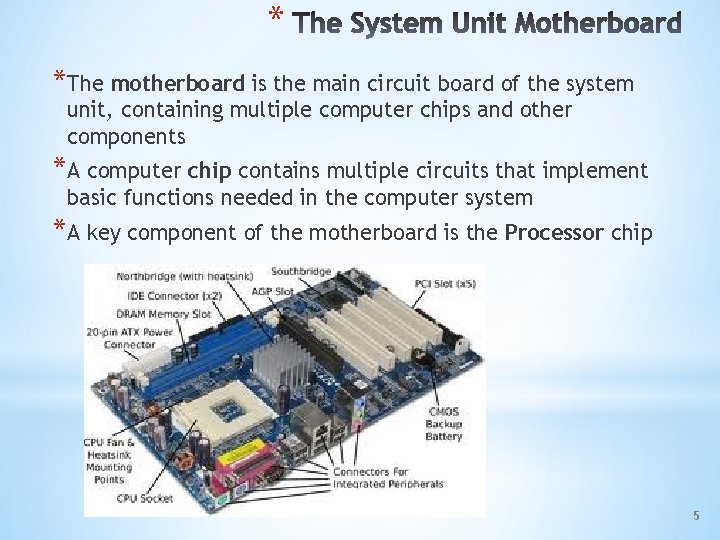
* *The motherboard is the main circuit board of the system unit, containing multiple computer chips and other components *A computer chip contains multiple circuits that implement basic functions needed in the computer system *A key component of the motherboard is the Processor chip 5
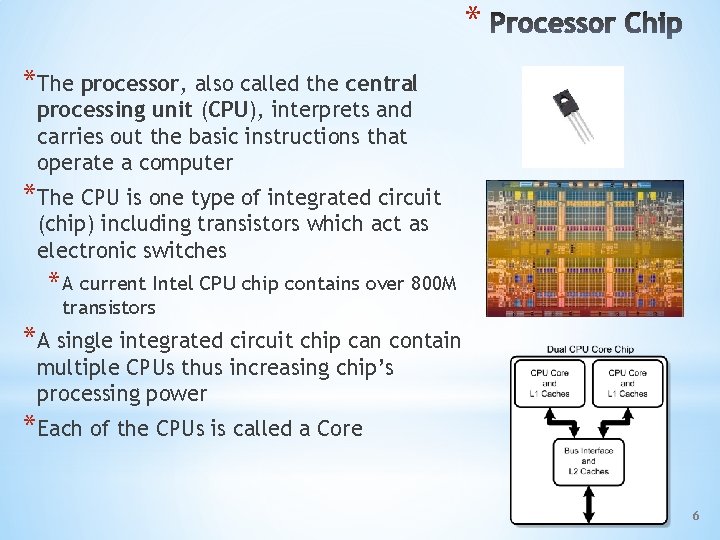
* *The processor, also called the central processing unit (CPU), interprets and carries out the basic instructions that operate a computer *The CPU is one type of integrated circuit (chip) including transistors which act as electronic switches * A current Intel CPU chip contains over 800 M transistors *A single integrated circuit chip can contain multiple CPUs thus increasing chip’s processing power *Each of the CPUs is called a Core 6
* *The control unit is the component of the processor that interprets, directs and coordinates most of the operations in the computer *The arithmetic logic unit (ALU) performs arithmetic, comparison, and other operations 7
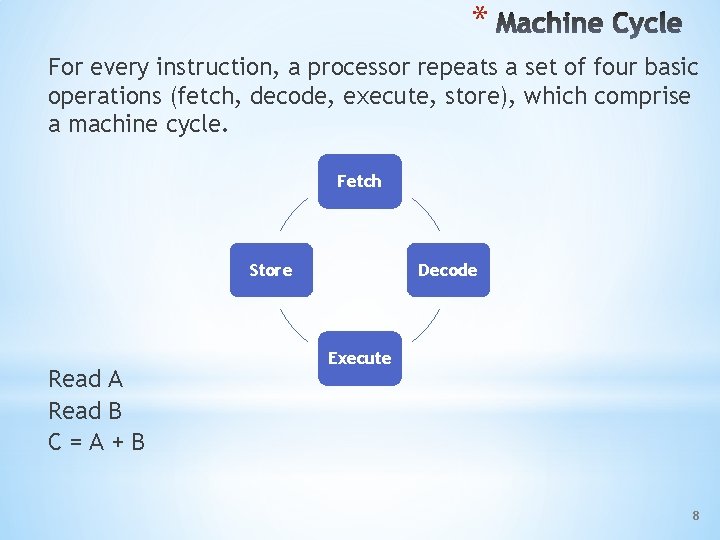
* For every instruction, a processor repeats a set of four basic operations (fetch, decode, execute, store), which comprise a machine cycle. Fetch Store Read A Read B C=A+B Decode Execute 8
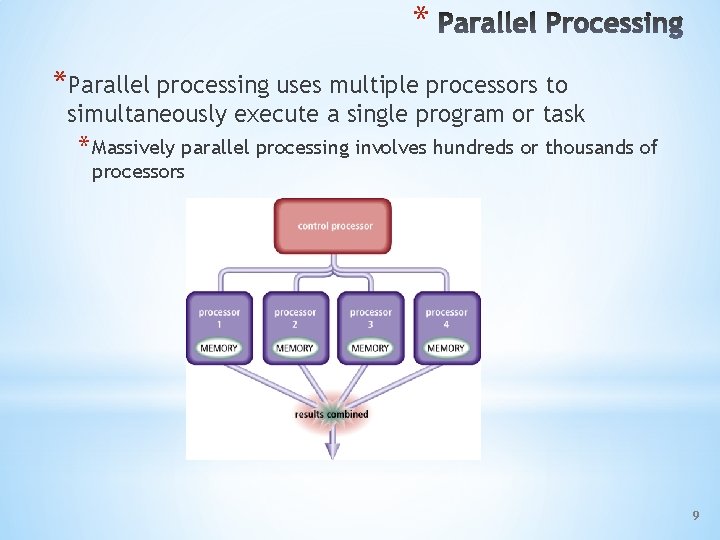
* *Parallel processing uses multiple processors to simultaneously execute a single program or task * Massively parallel processing involves hundreds or thousands of processors 9
* *Bit • The fundamental element for representing data in a computer is a bit. • • A bit can take on the value of 0 or 1 • Magnetic orientation of the poles of a magnet represent the state of a bit Electronically the presence or absence of an electrical charge represents the state of a bit *Byte • Eight bits grouped together as a unit are called a byte. • A byte can represent a single character in the computer. 10
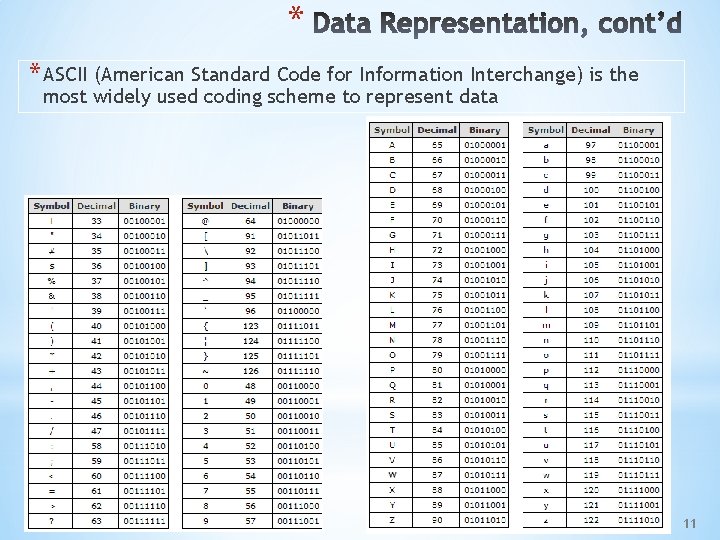
* * ASCII (American Standard Code for Information Interchange) is the most widely used coding scheme to represent data 11
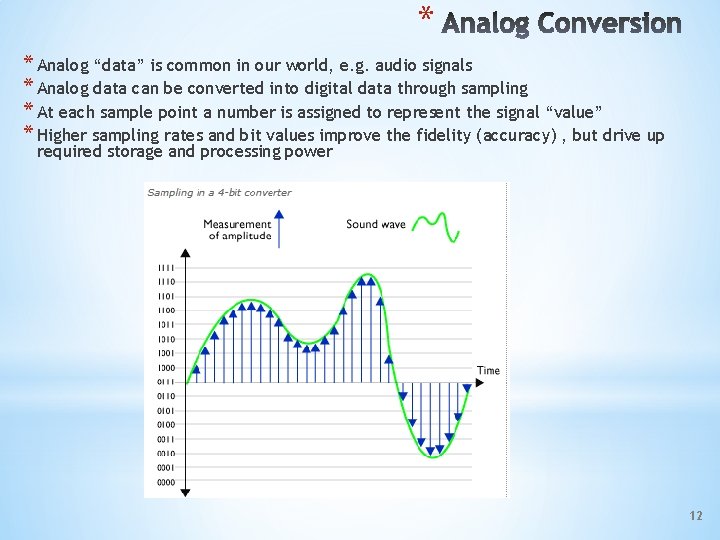
* * Analog “data” is common in our world, e. g. audio signals * Analog data can be converted into digital data through sampling * At each sample point a number is assigned to represent the signal “value” * Higher sampling rates and bit values improve the fidelity (accuracy) , but drive up required storage and processing power 12
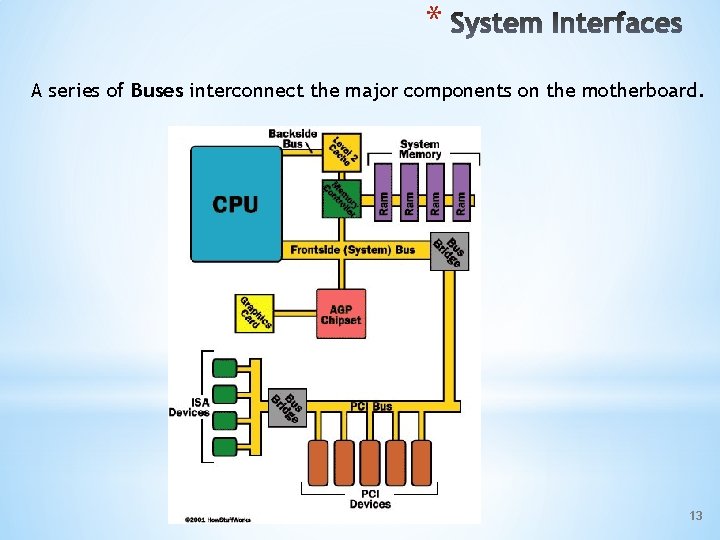
* A series of Buses interconnect the major components on the motherboard. 13
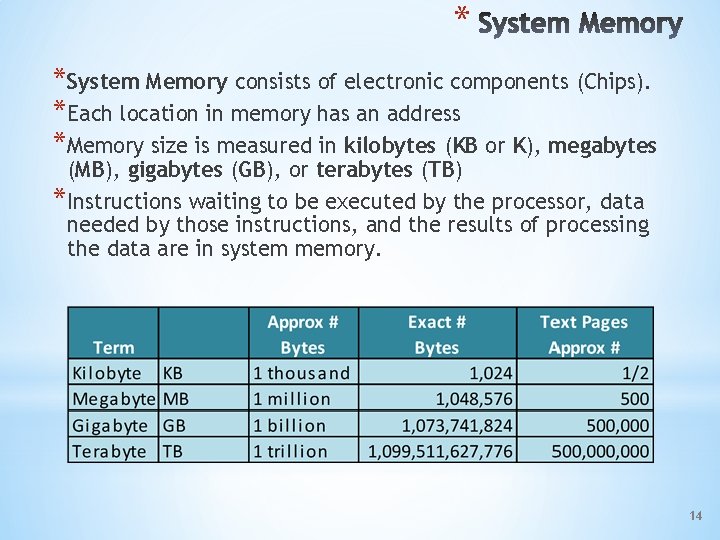
* *System Memory consists of electronic components (Chips). *Each location in memory has an address *Memory size is measured in kilobytes (KB or K), megabytes (MB), gigabytes (GB), or terabytes (TB) *Instructions waiting to be executed by the processor, data needed by those instructions, and the results of processing the data are in system memory. 14
* *The system unit contains two types of memory: Volatile *Program and data when being processed *Data lost without power Example *Random Access Memory Nonvolatile *Hold configuration information, basic startup instructions *Data retained without power Example *Read Only Memory *Programmable Read Only Memory *Flash Memory
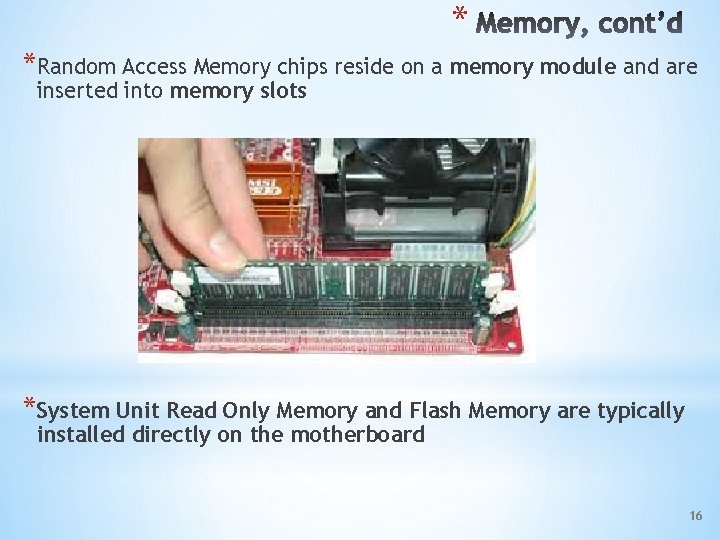
* *Random Access Memory chips reside on a memory module and are inserted into memory slots *System Unit Read Only Memory and Flash Memory are typically installed directly on the motherboard 16
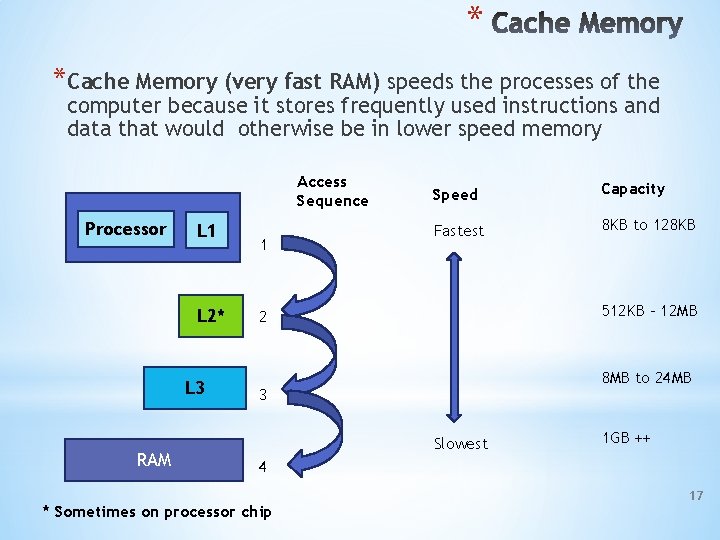
* *Cache Memory (very fast RAM) speeds the processes of the computer because it stores frequently used instructions and data that would otherwise be in lower speed memory Access Sequence Processor L 1 L 2* L 3 RAM 1 Speed Capacity Fastest 8 KB to 128 KB 512 KB – 12 MB 2 8 MB to 24 MB 3 Slowest 1 GB ++ 4 * Sometimes on processor chip 17
* * An expansion slot is a socket on the motherboard that can hold an adapter card * An adapter card enhances functions of a component of the system unit and/or provides connections to peripherals (input/output (I/O) devices) * Types - Connects * Video – Display * Network – Wi. Fi, LAN * Universal Serial Bus – Printer, Keyboard, Mouse, Camera, … * Firewire – Printer, Storage * SCSI – Disk Storage 18
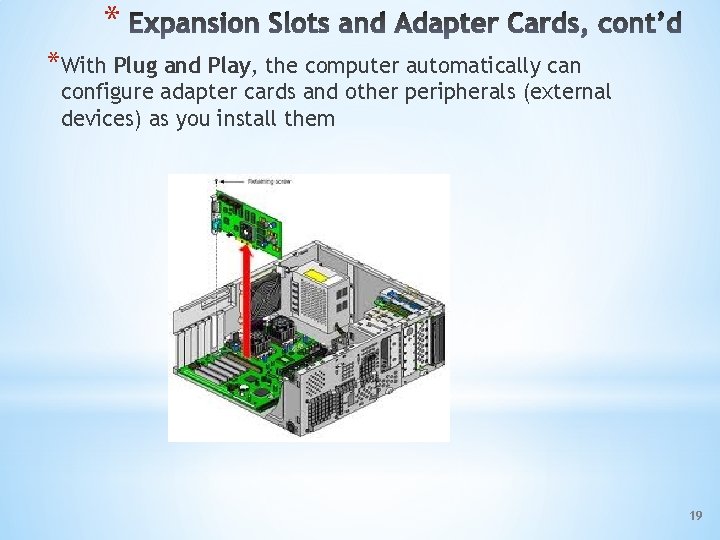
* *With Plug and Play, the computer automatically can configure adapter cards and other peripherals (external devices) as you install them 19
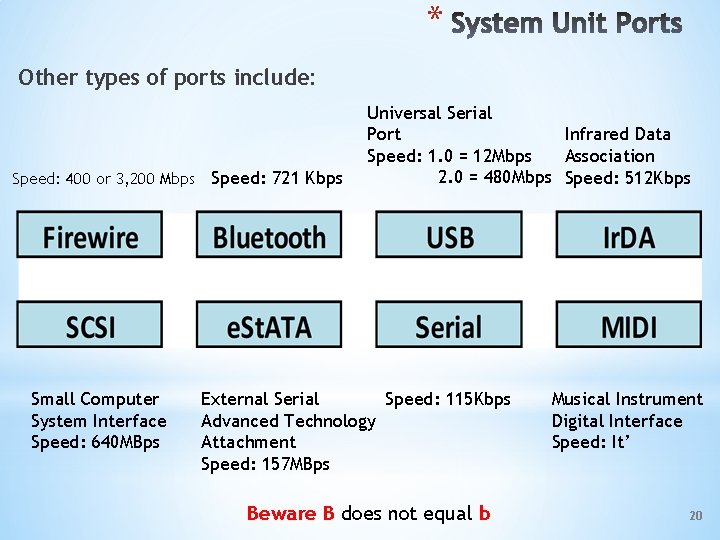
* Other types of ports include: Speed: 400 or 3, 200 Mbps Speed: 721 Kbps Small Computer System Interface Speed: 640 MBps Universal Serial Port Infrared Data Speed: 1. 0 = 12 Mbps Association 2. 0 = 480 Mbps Speed: 512 Kbps External Serial Speed: 115 Kbps Advanced Technology Attachment Speed: 157 MBps Beware B does not equal b Musical Instrument Digital Interface Speed: It’ 20
* 21
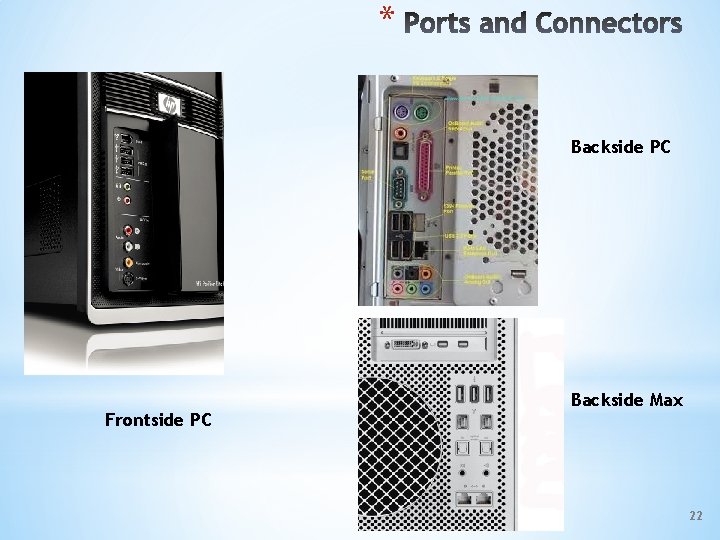
* Backside PC Frontside PC Backside Max 22
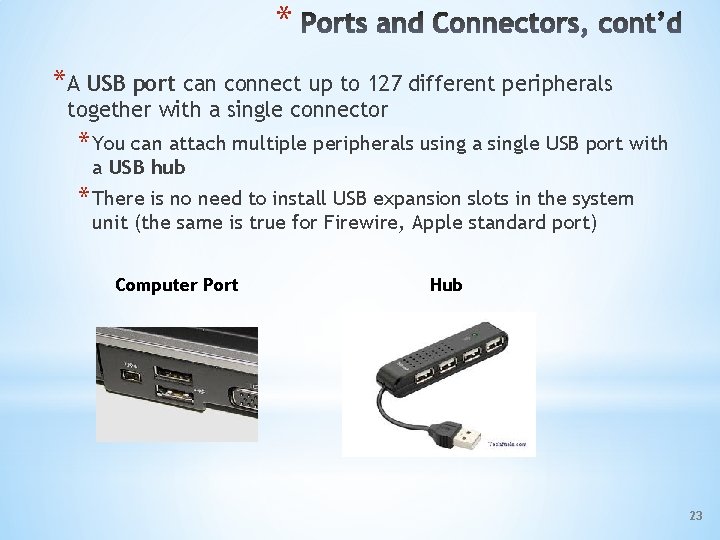
* *A USB port can connect up to 127 different peripherals together with a single connector * You can attach multiple peripherals using a single USB port with a USB hub * There is no need to install USB expansion slots in the system unit (the same is true for Firewire, Apple standard port) Computer Port Hub 23
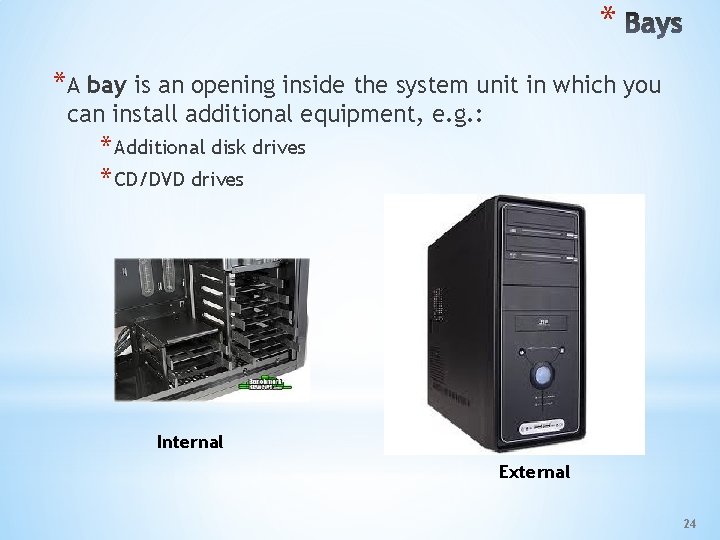
* *A bay is an opening inside the system unit in which you can install additional equipment, e. g. : * Additional disk drives * CD/DVD drives Internal External 24
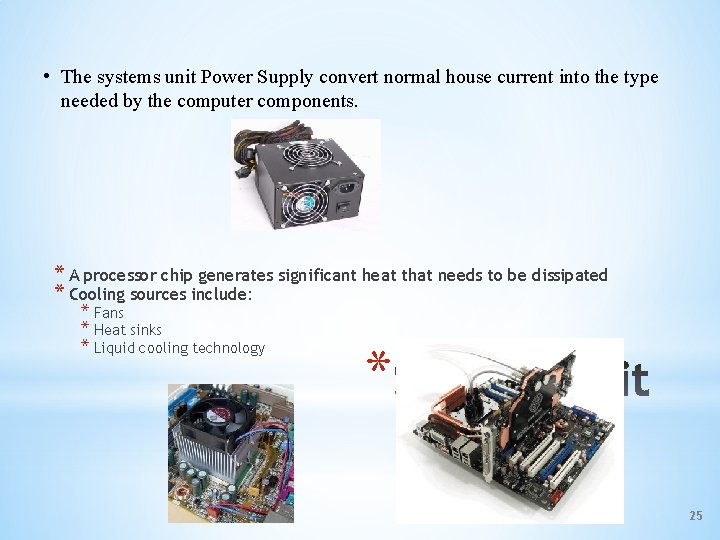
• The systems unit Power Supply convert normal house current into the type needed by the computer components. * A processor chip generates significant heat that needs to be dissipated * Cooling sources include: * Fans * Heat sinks * Liquid cooling technology * 25
* Mac Family – Understanding the Differences http: //www. apple. com/macpro/specs. html http: //www. apple. com/why-mac/compare/ 26
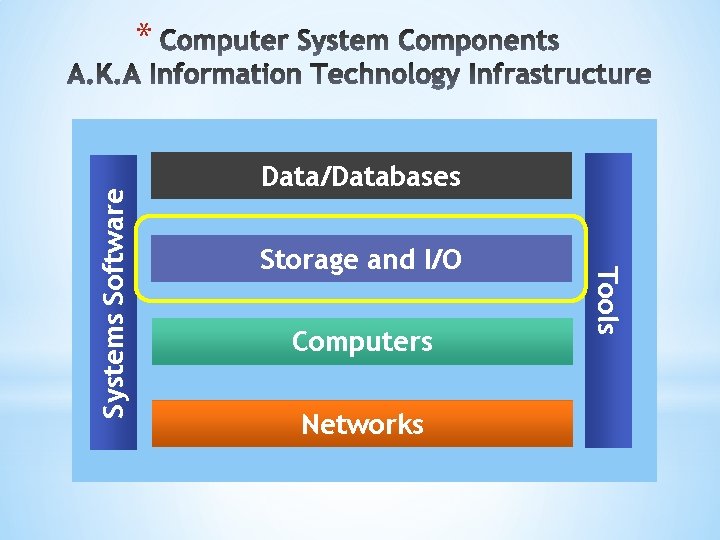
Data/Databases Storage and I/O Computers Networks Tools Systems Software *
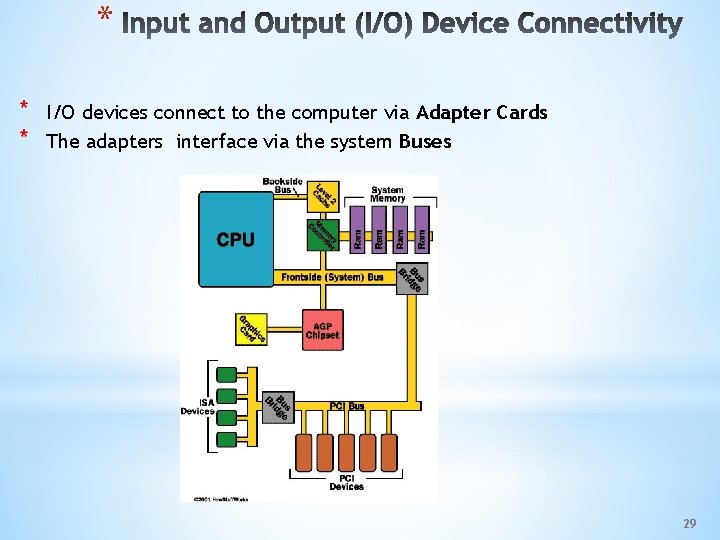
* * * I/O devices connect to the computer via Adapter Cards The adapters interface via the system Buses 29
* *Computer System Storage is used to hold data and programs * Temporarily * Permanently *The basic types of storage media are: * Chip based * Magnetic * Optical *Storage available to a Computer System can be Internal (located within the System Unit), or External *The type, speed and capacity of Storage is based on what the storage is to be used for 31
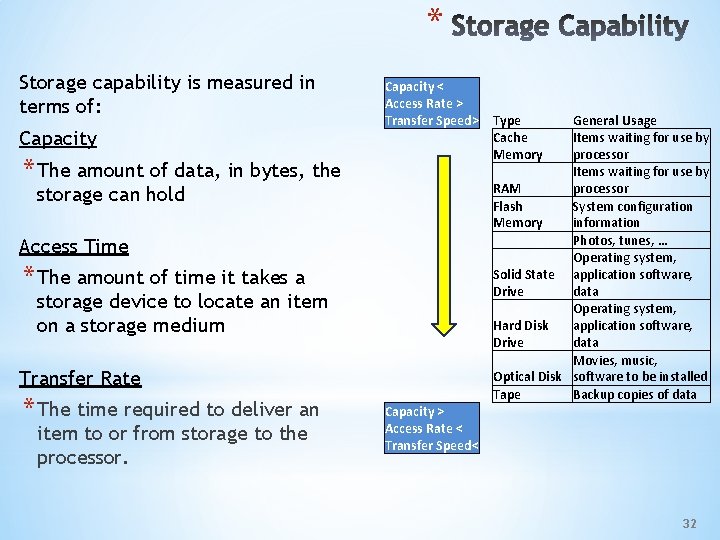
* Storage capability is measured in terms of: Capacity < Access Rate > Transfer Speed> * The amount of data, in bytes, the storage can hold Access Time * The amount of time it takes a storage device to locate an item on a storage medium Transfer Rate * The time required to deliver an item to or from storage to the processor. Type Cache Memory General Usage Items waiting for use by processor Items waiting for use by RAM processor Flash System configuration Memory information Photos, tunes, … Operating system, Solid State application software, Drive data Operating system, Hard Disk application software, Drive data Movies, music, Optical Disk software to be installed Tape Backup copies of data Capacity > Access Rate < Transfer Speed< 32
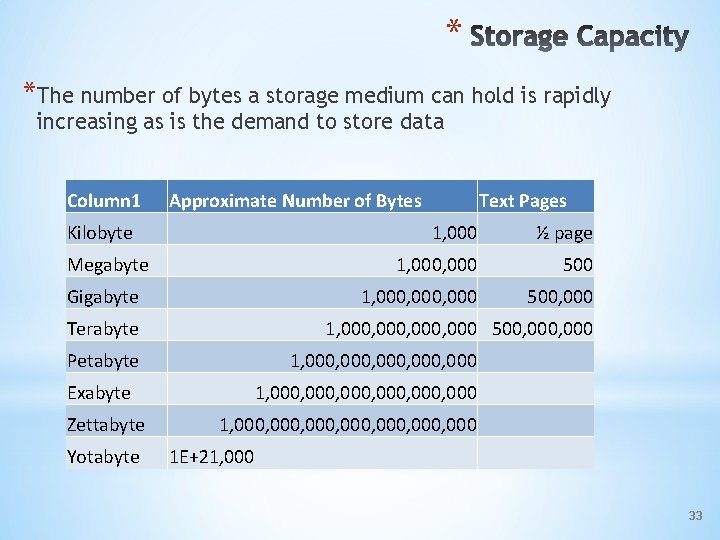
* *The number of bytes a storage medium can hold is rapidly increasing as is the demand to store data Column 1 Approximate Number of Bytes Kilobyte Megabyte Gigabyte Terabyte ½ page 1, 000 500 1, 000, 000 500, 000 1, 000, 000 Exabyte Yotabyte 1, 000, 000 500, 000 Petabyte Zettabyte Text Pages 1, 000, 000, 000, 000 1 E+21, 000 33
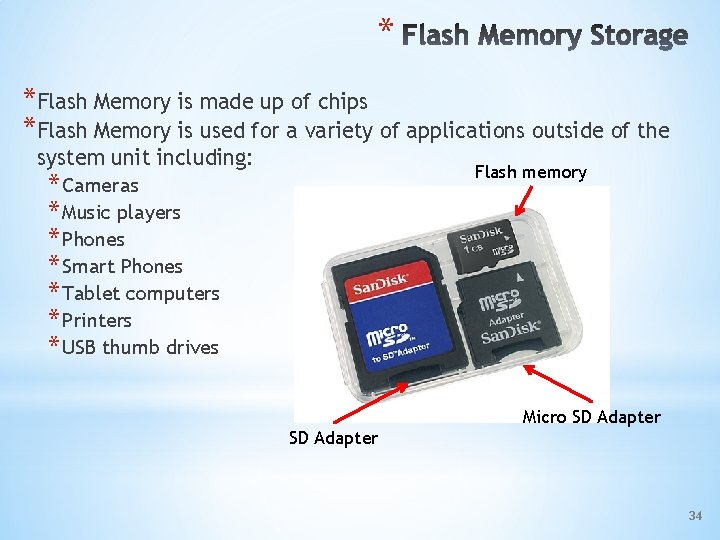
* *Flash Memory is made up of chips *Flash Memory is used for a variety of applications outside of the system unit including: Flash memory * Cameras * Music players * Phones * Smart Phones * Tablet computers * Printers * USB thumb drives Micro SD Adapter 34
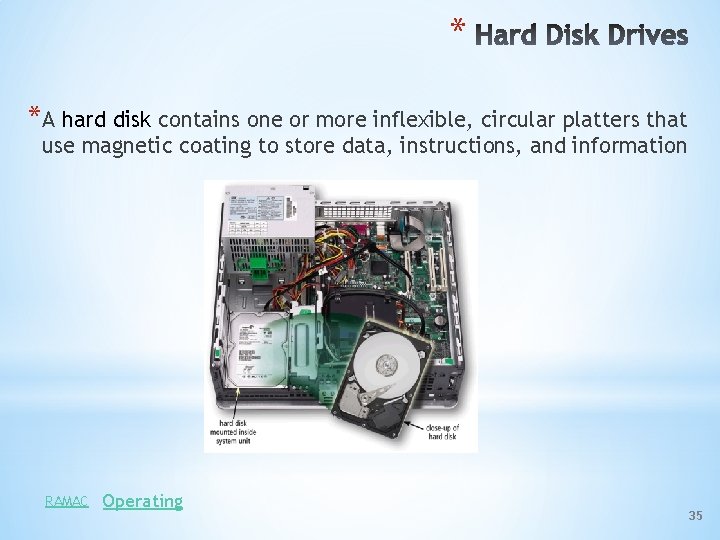
* *A hard disk contains one or more inflexible, circular platters that use magnetic coating to store data, instructions, and information RAMAC Operating 35
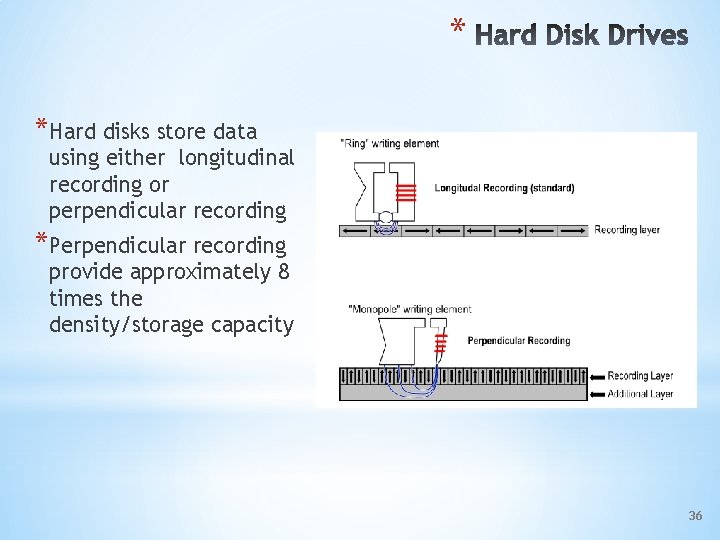
* *Hard disks store data using either longitudinal recording or perpendicular recording *Perpendicular recording provide approximately 8 times the density/storage capacity 36
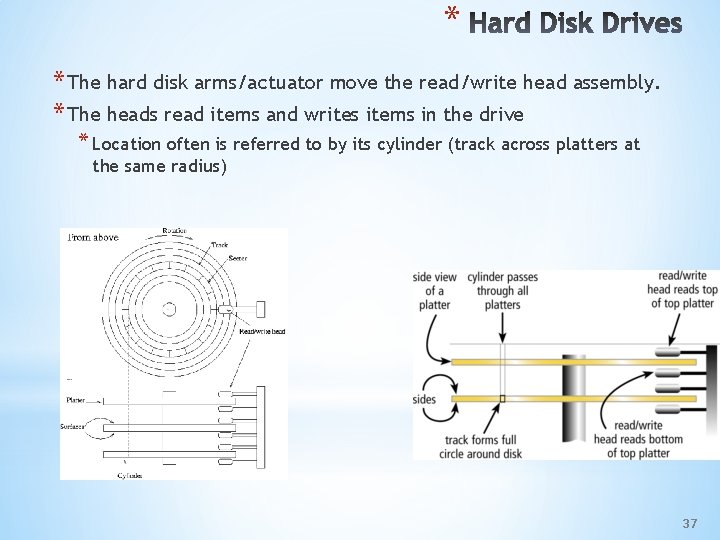
* * The hard disk arms/actuator move the read/write head assembly. * The heads read items and writes items in the drive * Location often is referred to by its cylinder (track across platters at the same radius) 37
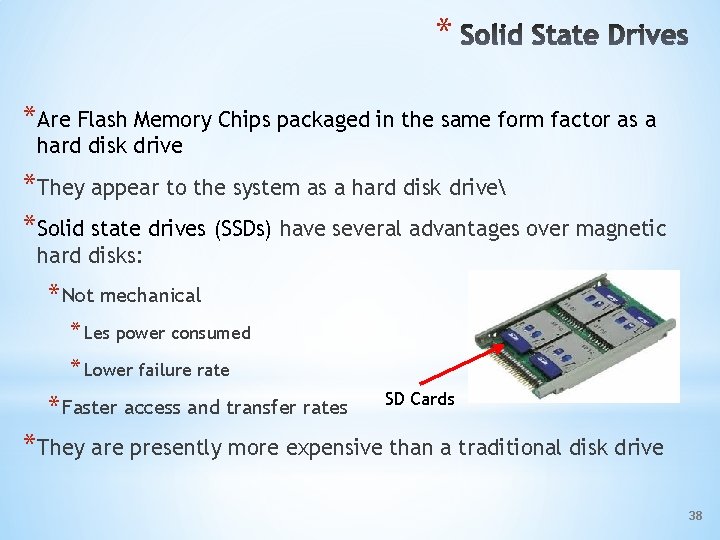
* *Are Flash Memory Chips packaged in the same form factor as a hard disk drive *They appear to the system as a hard disk drive *Solid state drives (SSDs) have several advantages over magnetic hard disks: * Not mechanical * Les power consumed * Lower failure rate * Faster access and transfer rates SD Cards *They are presently more expensive than a traditional disk drive 38
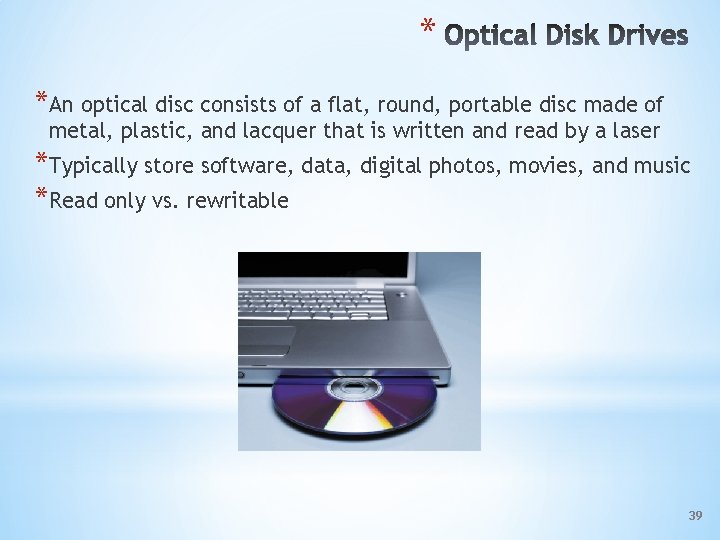
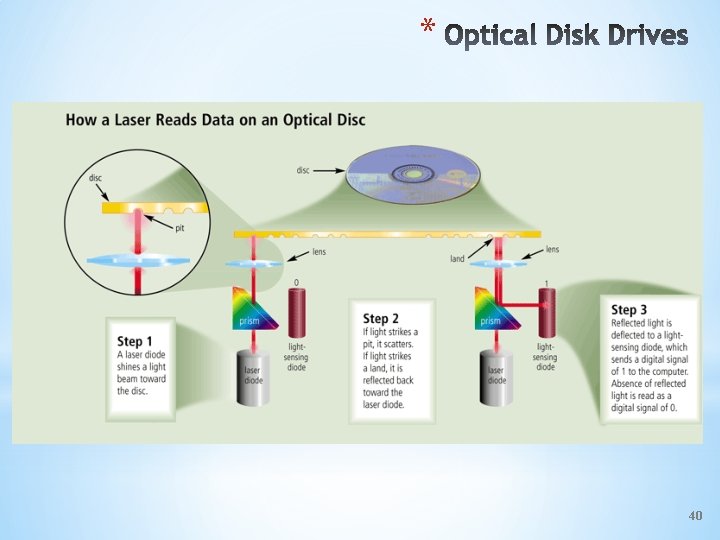
* *An optical disc consists of a flat, round, portable disc made of metal, plastic, and lacquer that is written and read by a laser *Typically store software, data, digital photos, movies, and music *Read only vs. rewritable 39
* 40
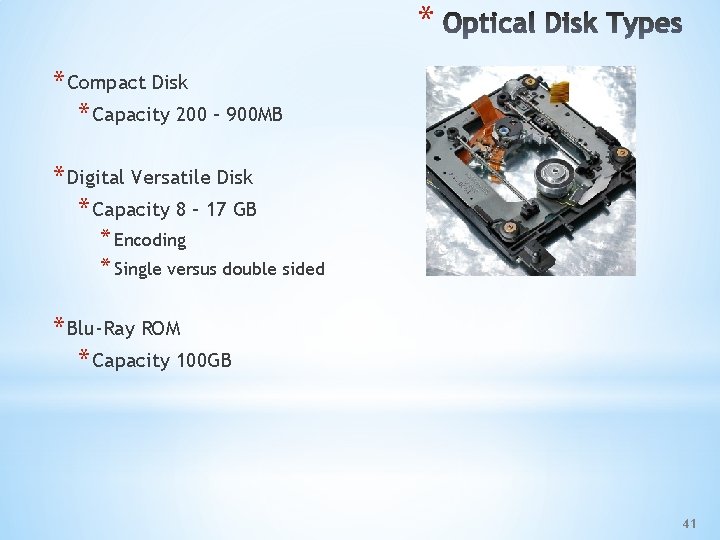
* * Compact Disk * Capacity 200 – 900 MB * Digital Versatile Disk * Capacity 8 – 17 GB * Encoding * Single versus double sided * Blu-Ray ROM * Capacity 100 GB 41
* *Storage pool provided via the network – Internet *Users have access to the storage when connected to the network *Services include: *Google via gmail and google apps *Photo sharing e. g. Snapfish, Flickr, Photobucket *Large scale storage “farms” for companies’ use – e. g. Amazon 42
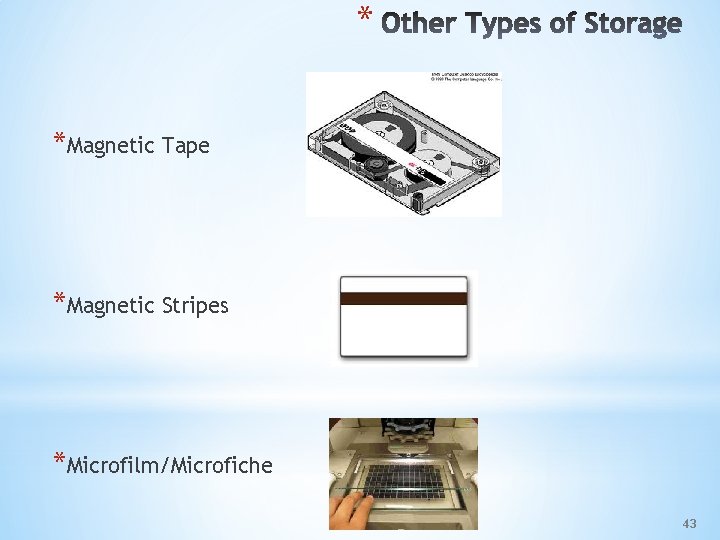
* *Magnetic Tape *Magnetic Stripes *Microfilm/Microfiche 43
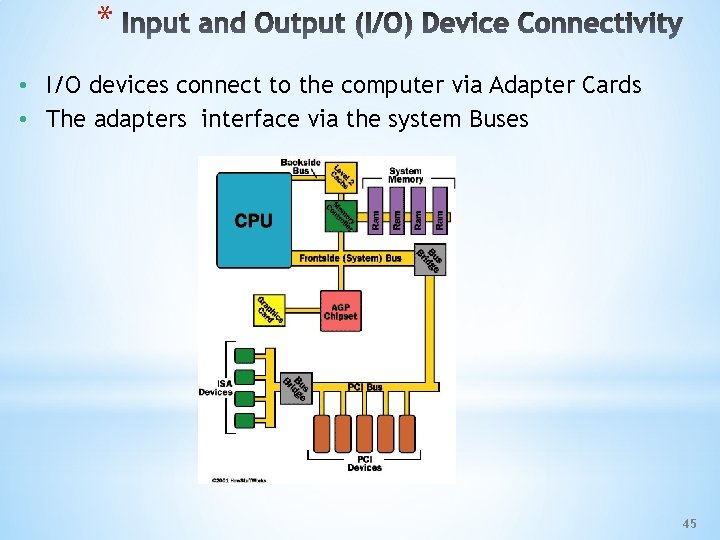
* • I/O devices connect to the computer via Adapter Cards • The adapters interface via the system Buses 45
* • I/O devices can be: – Input only – Output only – Both input and output • Storage is a form of I/O 46
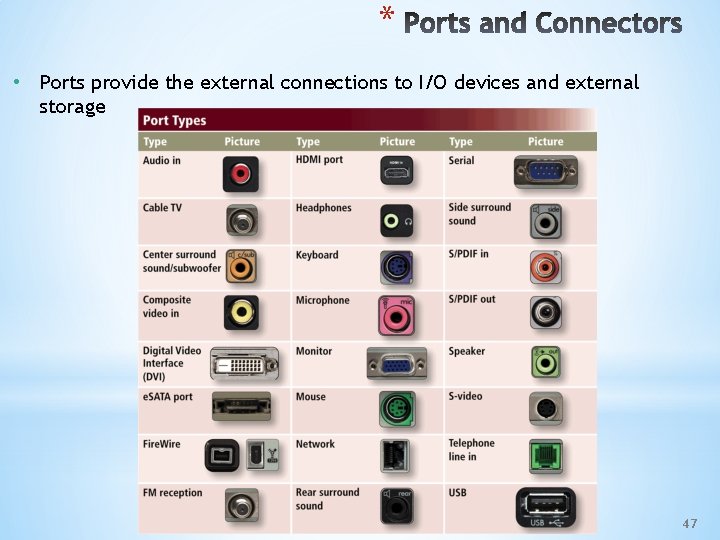
* • Ports provide the external connections to I/O devices and external storage 47
* *An Input device is any device that can accept data and transfer it to computer memory. * Examples include: * Computer, keyboard and mouse * Digital camera * Microphone * Scanner (e. g. handheld) * Sensor (e. g. traffic) *Input may be a digital or analog signal 48
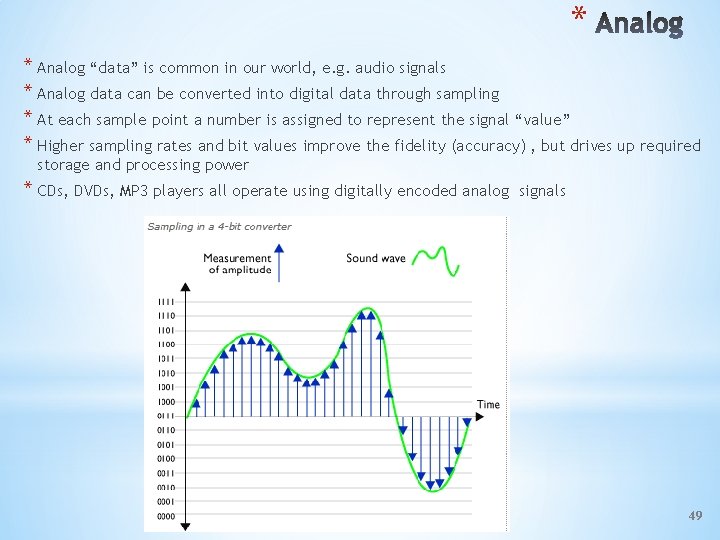
* * Analog “data” is common in our world, e. g. audio signals * Analog data can be converted into digital data through sampling * At each sample point a number is assigned to represent the signal “value” * Higher sampling rates and bit values improve the fidelity (accuracy) , but drives up required storage and processing power * CDs, DVDs, MP 3 players all operate using digitally encoded analog signals 49
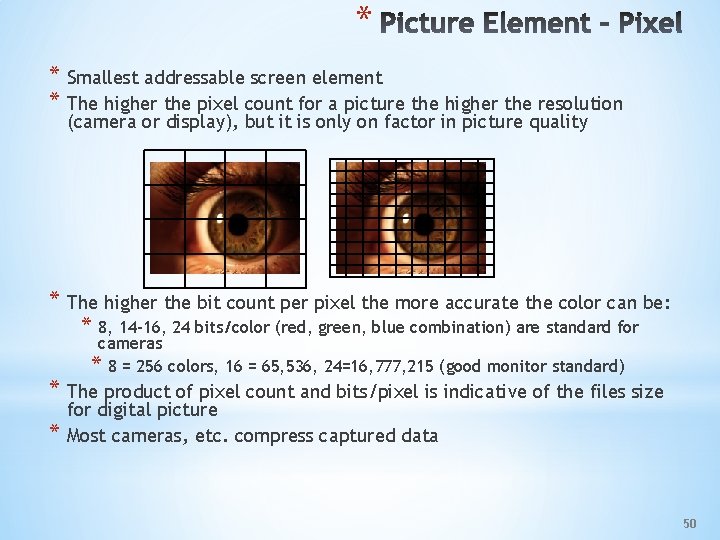
* * Smallest addressable screen element * The higher the pixel count for a picture the higher the resolution (camera or display), but it is only on factor in picture quality * The higher the bit count per pixel the more accurate the color can be: * 8, 14 -16, 24 bits/color (red, green, blue combination) are standard for cameras * 8 = 256 colors, 16 = 65, 536, 24=16, 777, 215 (good monitor standard) * The product of pixel count and bits/pixel is indicative of the files size * for digital picture Most cameras, etc. compress captured data 50
* *Digital cameras address varying needs: Point & Shoot to High End Professional *Several factors affect the quality of digital camera photos: * Resolution – The number of picture elements * Bits per Pixel – The more bits, the more color variations * Analog to Digital Conversion – Processor capabilities improve picture quality * Motion Compensation – Ability to compensate for camera movement * Lens Quality – Clarity of glass/plastic * Zoom Method- Optical versus Digital 51
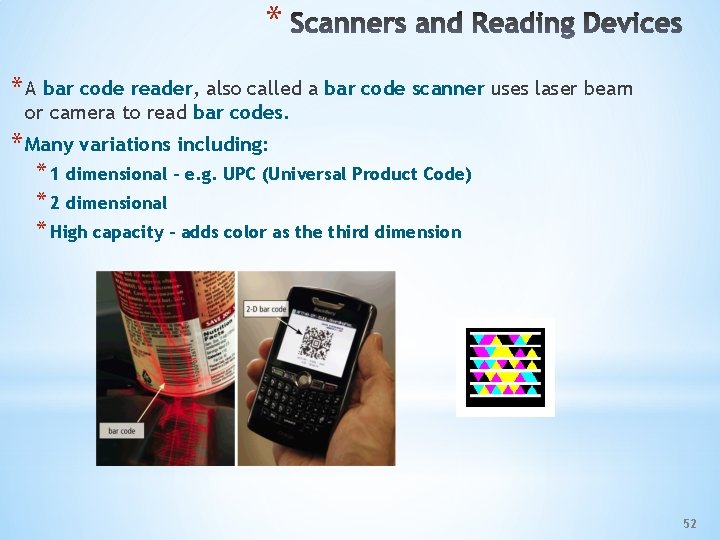
* * A bar code reader, also called a bar code scanner uses laser beam or camera to read bar codes. * Many variations including: * 1 dimensional – e. g. UPC (Universal Product Code) * 2 dimensional * High capacity – adds color as the third dimension 52
* *An output device is any type of hardware component that conveys information to one or more persons, and includes: * Displays * Printers * Speakers and headphones * Projectors * Tactile Feedback * Sensor output * Data communications port *Output can be digital, but more likely analog (why? ) 53
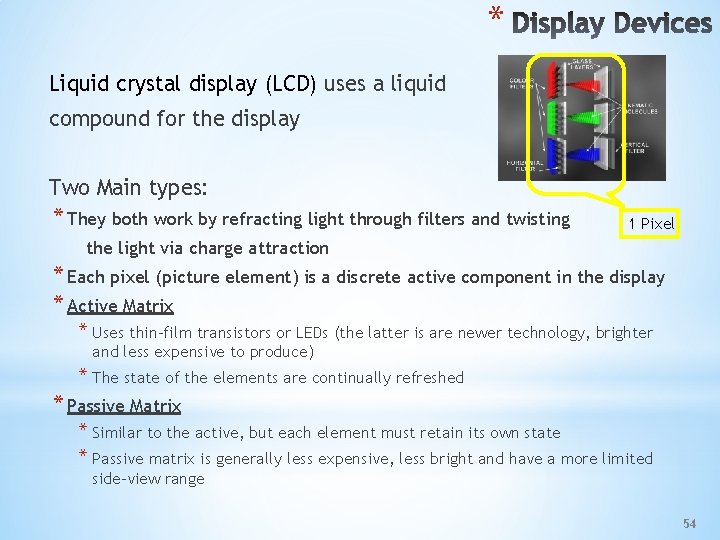
* Liquid crystal display (LCD) uses a liquid compound for the display Two Main types: * They both work by refracting light through filters and twisting 1 Pixel the light via charge attraction * Each pixel (picture element) is a discrete active component in the display * Active Matrix * Uses thin-film transistors or LEDs (the latter is are newer technology, brighter and less expensive to produce) * The state of the elements are continually refreshed * Passive Matrix * Similar to the active, but each element must retain its own state * Passive matrix is generally less expensive, less bright and have a more limited side-view range 54
* *The quality of an LCD monitor depends primarily on: * Resolution: the number of pixels per inch * Response time: time to turn a pixel on or off (generally 3 to 16 ns) * Brightness: unit of brightness per square meter, measured in nits. Typically 250 to 550 nits. * Dot pitch: Distance between pixels in millimeters (average quality is. 30 mm) * Contrast ratio: difference in light intensity between the whitest white ( and darkest black (generally in the range of 500: 1 and 2, 000: 1) 55
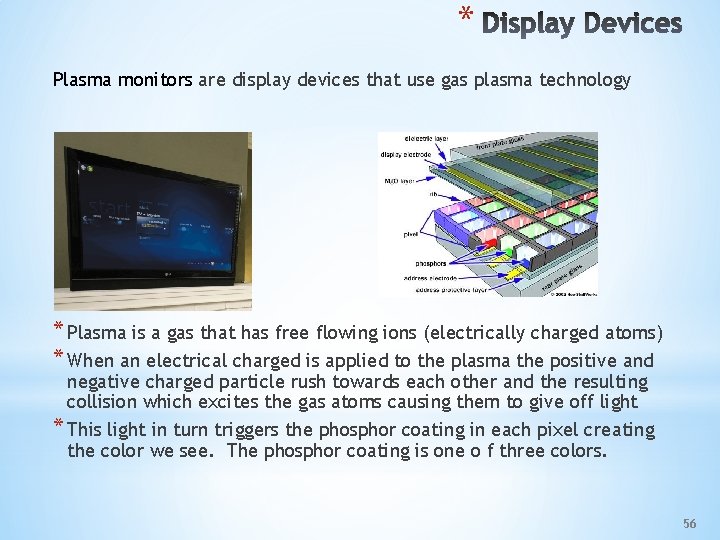
* Plasma monitors are display devices that use gas plasma technology * Plasma is a gas that has free flowing ions (electrically charged atoms) * When an electrical charged is applied to the plasma the positive and negative charged particle rush towards each other and the resulting collision which excites the gas atoms causing them to give off light * This light in turn triggers the phosphor coating in each pixel creating the color we see. The phosphor coating is one o f three colors. 56
* *Plasma Pros * Deeper blacks * Greater viewing angle range * Less blurring (than older LCDs) * Best bet for very large (60”+ sizes) *LCD Pros * Cost * Energy consumption * Generally lighter weight *All these factors are in flux 57
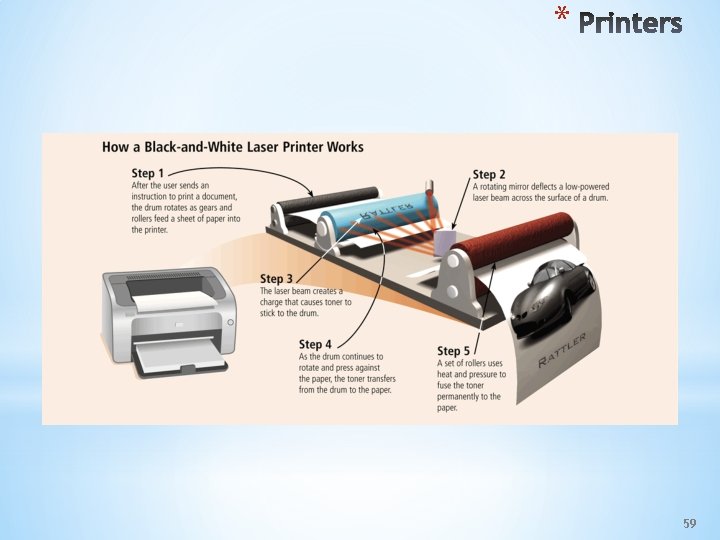
* *A printer produces text and graphics on a physical medium * Printed information is called a hard copy, or printout * Landscape or portrait orientation *Printers are no longer confined to two dimensions 3 D Printing NYT 58
* 59
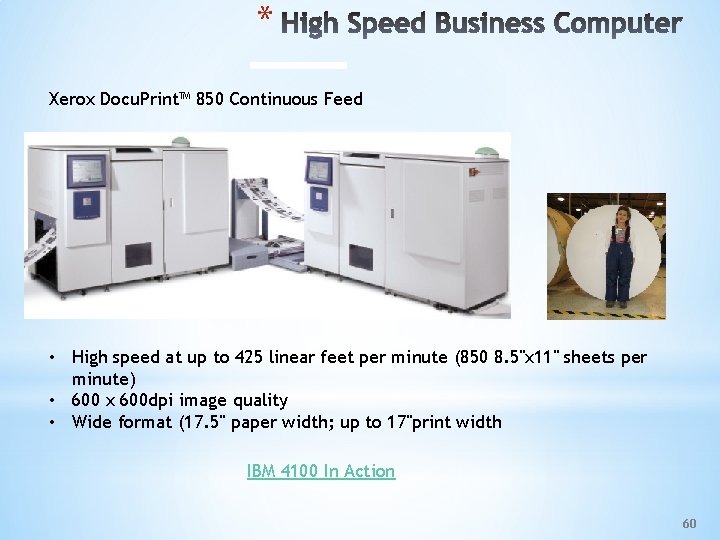
* Xerox Docu. Print™ 850 Continuous Feed • High speed at up to 425 linear feet per minute (850 8. 5''x 11'' sheets per minute) • 600 x 600 dpi image quality • Wide format (17. 5" paper width; up to 17"print width IBM 4100 In Action 60
- Slides: 60