
DATABASE SYSTEMS DBMS Languages Every DBMS must provide
DATABASE SYSTEMS • DBMS Languages – Every DBMS must provide a means of performing the three basic functions of: • Creating a database • Changing a database • Querying a database © 2006 Prentice Hall Business Publishing Accounting Information Systems, 10/e Romney/Steinbart 1 of 95
DATABASE SYSTEMS • DBMS Languages – Every DBMS must provide a means of performing the three basic functions of: • Creating a database • Changing a database • Querying a database © 2006 Prentice Hall Business Publishing Accounting Information Systems, 10/e Romney/Steinbart 2 of 95
DATABASE SYSTEMS • Creating a database: – The set of commands used to create the database is known as data definition language (DDL). DDL is used to: • Build the data dictionary • Initialize or create the database • Describe the logical views for each individual user or programmer • Specify any limitations or constraints on security imposed on database records or fields © 2006 Prentice Hall Business Publishing Accounting Information Systems, 10/e Romney/Steinbart 3 of 95
DATABASE SYSTEMS • DBMS Languages – Every DBMS must provide a means of performing the three basic functions of: • Creating a database • Changing a database • Querying a database © 2006 Prentice Hall Business Publishing Accounting Information Systems, 10/e Romney/Steinbart 4 of 95
DATABASE SYSTEMS • Changing a database – The set of commands used to change the database is known as data manipulation language (DML). DML is used for maintaining the data including: • Updating data • Inserting data • Deleting portions of the database © 2006 Prentice Hall Business Publishing Accounting Information Systems, 10/e Romney/Steinbart 5 of 95
DATABASE SYSTEMS • DBMS Languages – Every DBMS must provide a means of performing the three basic functions of: • Creating a database • Changing a database • Querying a database © 2006 Prentice Hall Business Publishing Accounting Information Systems, 10/e Romney/Steinbart 6 of 95
DATABASE SYSTEMS • Querying a database: – The set of commands used to query the database is known as data query language (DQL). DQL is used to interrogate the database, including: • • Retrieving records Sorting records Ordering records Presenting subsets of the database – The DQL usually contains easy-to-use, powerful commands that enable users to satisfy their own information needs. © 2006 Prentice Hall Business Publishing Accounting Information Systems, 10/e Romney/Steinbart 7 of 95
DATABASE SYSTEMS • Report Writer – Many DBMS packages also include a report writer, a language that simplifies the creation of reports. – Users typically specify: • What elements they want printed • How the report should be formatted – The report writer then: • Searches the database • Extracts specified data • Prints them out according to specified format © 2006 Prentice Hall Business Publishing Accounting Information Systems, 10/e Romney/Steinbart 8 of 95
DATABASE SYSTEMS • Users typically have access to both DQL and report writer. • Access to DQL and DML are typically restricted to employees with administrative and programming responsibilities. © 2006 Prentice Hall Business Publishing Accounting Information Systems, 10/e Romney/Steinbart 9 of 95
RELATIONAL DATABASES • A DBMS is characterized by the type of logical data model on which it is based. – A data model is an abstract representation of the contents of a database. – Most new DBMSs are called relational databases because they use the relational model developed by E. F. Codd in 1970. © 2006 Prentice Hall Business Publishing Accounting Information Systems, 10/e Romney/Steinbart 10 of 95
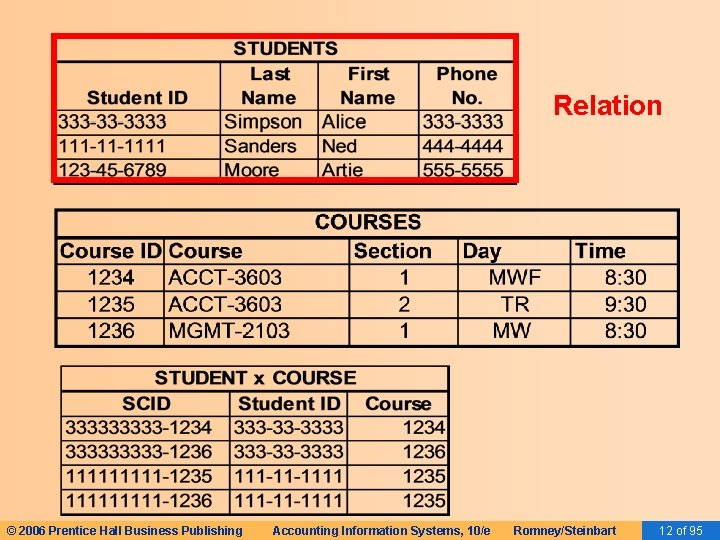
RELATIONAL DATABASES • The relational data model represents everything in the database as being stored in the forms of tables (aka, relations). © 2006 Prentice Hall Business Publishing Accounting Information Systems, 10/e Romney/Steinbart 11 of 95
Relation © 2006 Prentice Hall Business Publishing Accounting Information Systems, 10/e Romney/Steinbart 12 of 95
RELATIONAL DATABASES • This model only describes how the data appear in the conceptual- and externallevel schemas. • The data are physically stored according to the description in the internal-level schema. © 2006 Prentice Hall Business Publishing Accounting Information Systems, 10/e Romney/Steinbart 13 of 95
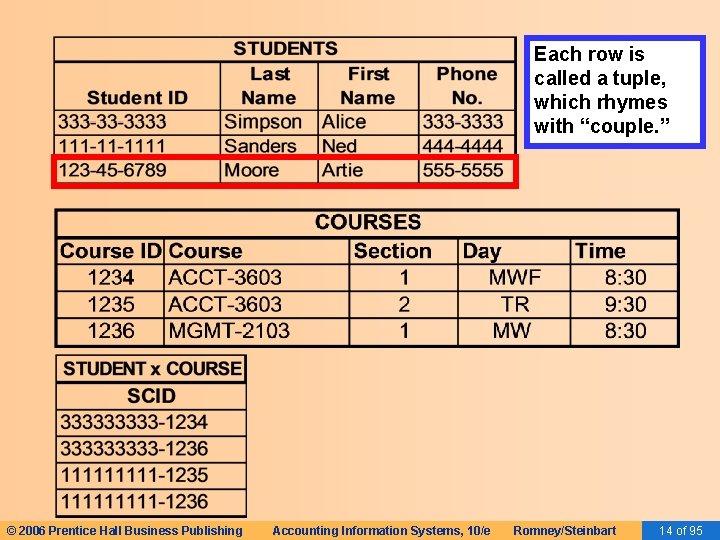
Each row is called a tuple, which rhymes with “couple. ” © 2006 Prentice Hall Business Publishing Accounting Information Systems, 10/e Romney/Steinbart 14 of 95
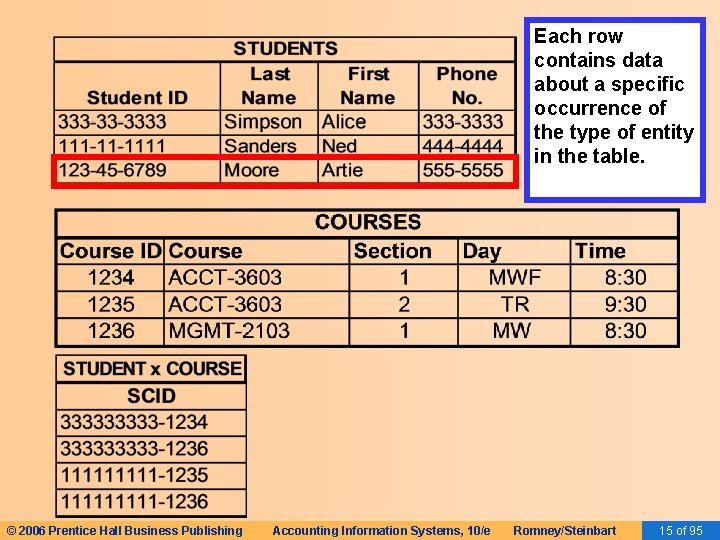
Each row contains data about a specific occurrence of the type of entity in the table. © 2006 Prentice Hall Business Publishing Accounting Information Systems, 10/e Romney/Steinbart 15 of 95
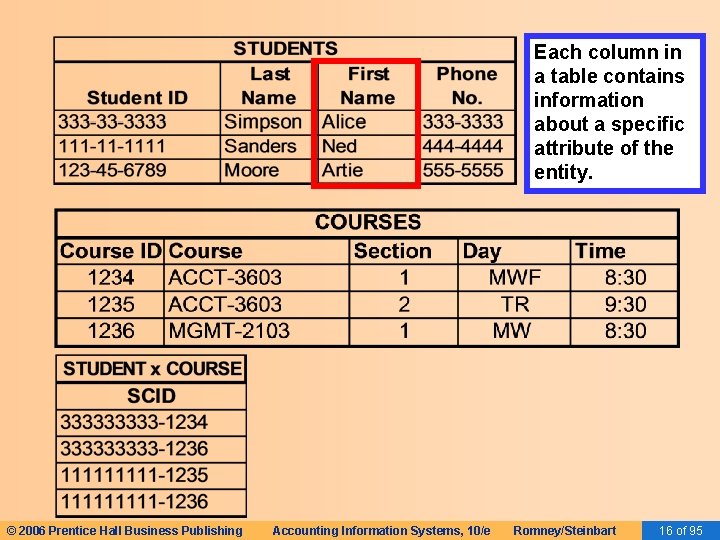
Each column in a table contains information about a specific attribute of the entity. © 2006 Prentice Hall Business Publishing Accounting Information Systems, 10/e Romney/Steinbart 16 of 95
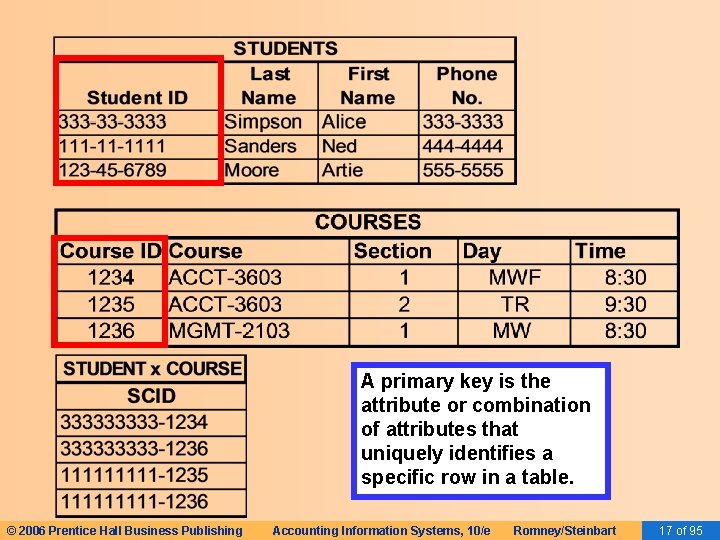
A primary key is the attribute or combination of attributes that uniquely identifies a specific row in a table. © 2006 Prentice Hall Business Publishing Accounting Information Systems, 10/e Romney/Steinbart 17 of 95
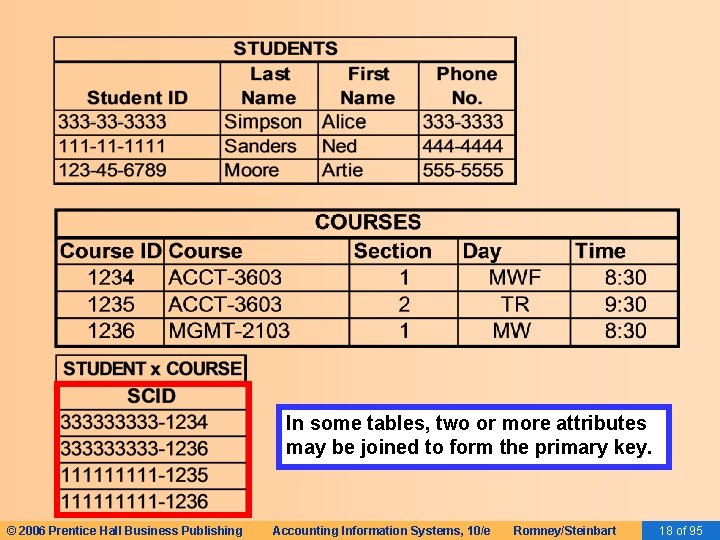
In some tables, two or more attributes may be joined to form the primary key. © 2006 Prentice Hall Business Publishing Accounting Information Systems, 10/e Romney/Steinbart 18 of 95
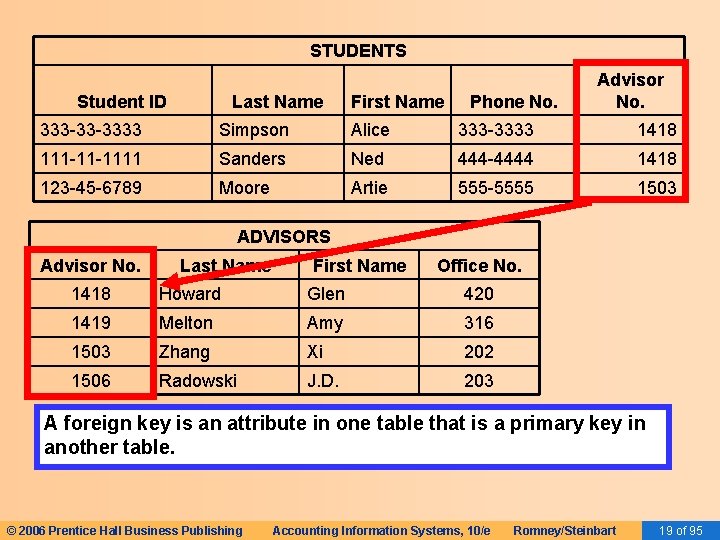
STUDENTS Student ID Last Name First Name Phone No. Advisor No. 333 -33 -3333 Simpson Alice 333 -3333 1418 111 -11 -1111 Sanders Ned 444 -4444 1418 123 -45 -6789 Moore Artie 555 -5555 1503 ADVISORS Advisor No. Last Name First Name Office No. 1418 Howard Glen 420 1419 Melton Amy 316 1503 Zhang Xi 202 1506 Radowski J. D. 203 A foreign key is an attribute in one table that is a primary key in another table. © 2006 Prentice Hall Business Publishing Accounting Information Systems, 10/e Romney/Steinbart 19 of 95
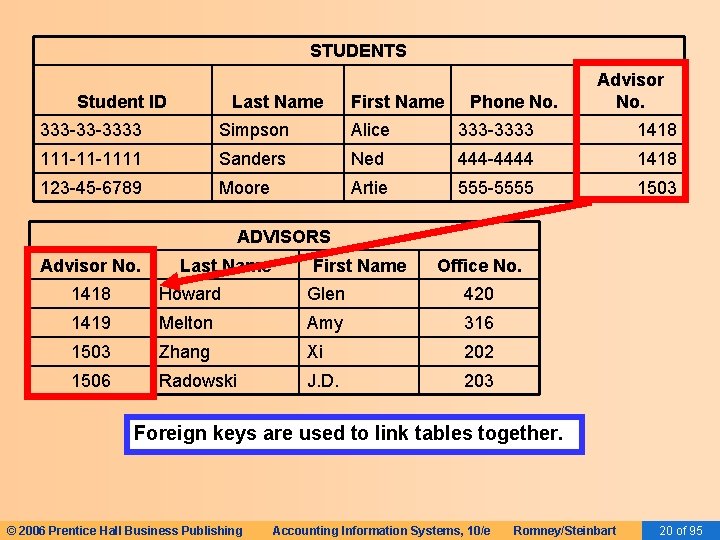
STUDENTS Student ID Last Name First Name Phone No. Advisor No. 333 -33 -3333 Simpson Alice 333 -3333 1418 111 -11 -1111 Sanders Ned 444 -4444 1418 123 -45 -6789 Moore Artie 555 -5555 1503 ADVISORS Advisor No. Last Name First Name Office No. 1418 Howard Glen 420 1419 Melton Amy 316 1503 Zhang Xi 202 1506 Radowski J. D. 203 Foreign keys are used to link tables together. © 2006 Prentice Hall Business Publishing Accounting Information Systems, 10/e Romney/Steinbart 20 of 95
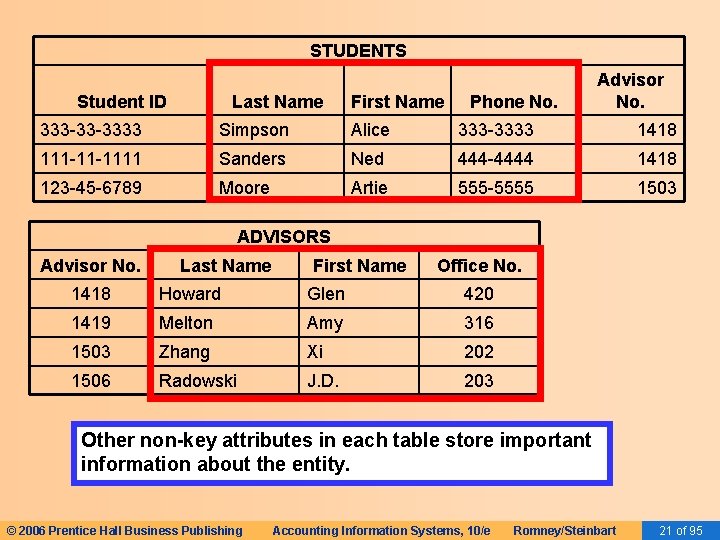
STUDENTS Student ID Last Name First Name Phone No. Advisor No. 333 -33 -3333 Simpson Alice 333 -3333 1418 111 -11 -1111 Sanders Ned 444 -4444 1418 123 -45 -6789 Moore Artie 555 -5555 1503 ADVISORS Advisor No. Last Name First Name Office No. 1418 Howard Glen 420 1419 Melton Amy 316 1503 Zhang Xi 202 1506 Radowski J. D. 203 Other non-key attributes in each table store important information about the entity. © 2006 Prentice Hall Business Publishing Accounting Information Systems, 10/e Romney/Steinbart 21 of 95
RELATIONAL DATABASES • Alternatives for Storing Data – One possible alternate approach would be to store all data in one uniform table. – For example, instead of separate tables for students and classes, we could store all data in one table and have a separate line for each student x class combination. © 2006 Prentice Hall Business Publishing Accounting Information Systems, 10/e Romney/Steinbart 22 of 95
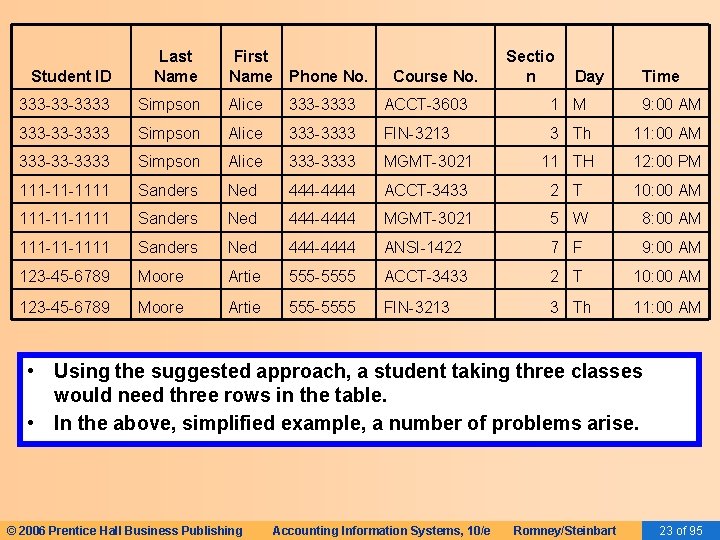
Student ID Last Name First Name Phone No. 333 -33 -3333 Simpson Alice 333 -3333 ACCT-3603 1 M 9: 00 AM 333 -33 -3333 Simpson Alice 333 -3333 FIN-3213 3 Th 11: 00 AM 333 -33 -3333 Simpson Alice 333 -3333 MGMT-3021 11 TH 12: 00 PM 111 -11 -1111 Sanders Ned 444 -4444 ACCT-3433 2 T 10: 00 AM 111 -11 -1111 Sanders Ned 444 -4444 MGMT-3021 5 W 8: 00 AM 111 -11 -1111 Sanders Ned 444 -4444 ANSI-1422 7 F 9: 00 AM 123 -45 -6789 Moore Artie 555 -5555 ACCT-3433 2 T 10: 00 AM 123 -45 -6789 Moore Artie 555 -5555 FIN-3213 3 Th 11: 00 AM Course No. Sectio n Day Time • Using the suggested approach, a student taking three classes would need three rows in the table. • In the above, simplified example, a number of problems arise. © 2006 Prentice Hall Business Publishing Accounting Information Systems, 10/e Romney/Steinbart 23 of 95
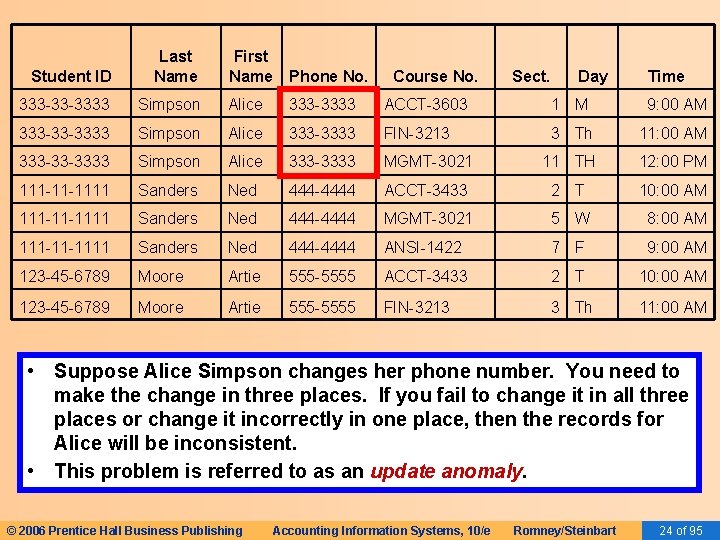
Student ID Last Name First Name Phone No. 333 -33 -3333 Simpson Alice 333 -3333 ACCT-3603 1 M 9: 00 AM 333 -33 -3333 Simpson Alice 333 -3333 FIN-3213 3 Th 11: 00 AM 333 -33 -3333 Simpson Alice 333 -3333 MGMT-3021 11 TH 12: 00 PM 111 -11 -1111 Sanders Ned 444 -4444 ACCT-3433 2 T 10: 00 AM 111 -11 -1111 Sanders Ned 444 -4444 MGMT-3021 5 W 8: 00 AM 111 -11 -1111 Sanders Ned 444 -4444 ANSI-1422 7 F 9: 00 AM 123 -45 -6789 Moore Artie 555 -5555 ACCT-3433 2 T 10: 00 AM 123 -45 -6789 Moore Artie 555 -5555 FIN-3213 3 Th 11: 00 AM Course No. Sect. Day Time • Suppose Alice Simpson changes her phone number. You need to make the change in three places. If you fail to change it in all three places or change it incorrectly in one place, then the records for Alice will be inconsistent. • This problem is referred to as an update anomaly. © 2006 Prentice Hall Business Publishing Accounting Information Systems, 10/e Romney/Steinbart 24 of 95
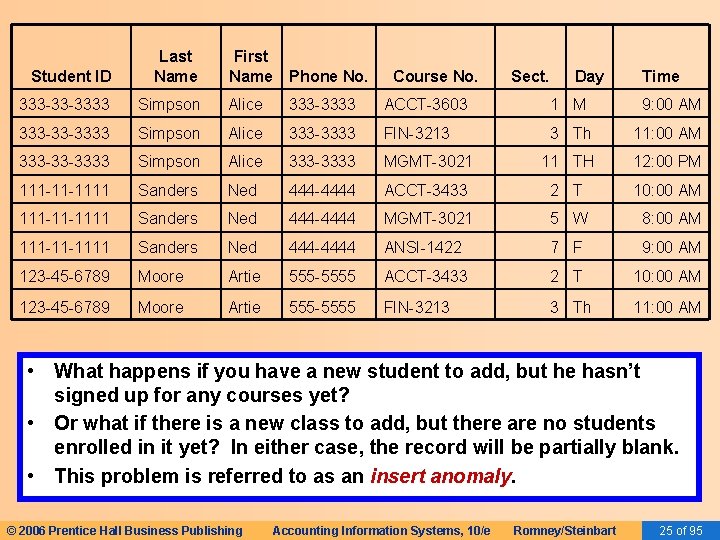
Student ID Last Name First Name Phone No. 333 -33 -3333 Simpson Alice 333 -3333 ACCT-3603 1 M 9: 00 AM 333 -33 -3333 Simpson Alice 333 -3333 FIN-3213 3 Th 11: 00 AM 333 -33 -3333 Simpson Alice 333 -3333 MGMT-3021 11 TH 12: 00 PM 111 -11 -1111 Sanders Ned 444 -4444 ACCT-3433 2 T 10: 00 AM 111 -11 -1111 Sanders Ned 444 -4444 MGMT-3021 5 W 8: 00 AM 111 -11 -1111 Sanders Ned 444 -4444 ANSI-1422 7 F 9: 00 AM 123 -45 -6789 Moore Artie 555 -5555 ACCT-3433 2 T 10: 00 AM 123 -45 -6789 Moore Artie 555 -5555 FIN-3213 3 Th 11: 00 AM Course No. Sect. Day Time • What happens if you have a new student to add, but he hasn’t signed up for any courses yet? • Or what if there is a new class to add, but there are no students enrolled in it yet? In either case, the record will be partially blank. • This problem is referred to as an insert anomaly. © 2006 Prentice Hall Business Publishing Accounting Information Systems, 10/e Romney/Steinbart 25 of 95
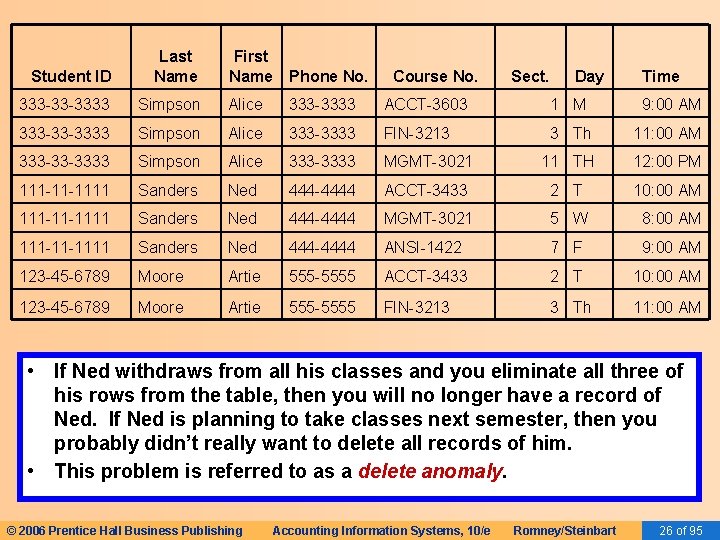
Student ID Last Name First Name Phone No. 333 -33 -3333 Simpson Alice 333 -3333 ACCT-3603 1 M 9: 00 AM 333 -33 -3333 Simpson Alice 333 -3333 FIN-3213 3 Th 11: 00 AM 333 -33 -3333 Simpson Alice 333 -3333 MGMT-3021 11 TH 12: 00 PM 111 -11 -1111 Sanders Ned 444 -4444 ACCT-3433 2 T 10: 00 AM 111 -11 -1111 Sanders Ned 444 -4444 MGMT-3021 5 W 8: 00 AM 111 -11 -1111 Sanders Ned 444 -4444 ANSI-1422 7 F 9: 00 AM 123 -45 -6789 Moore Artie 555 -5555 ACCT-3433 2 T 10: 00 AM 123 -45 -6789 Moore Artie 555 -5555 FIN-3213 3 Th 11: 00 AM Course No. Sect. Day Time • If Ned withdraws from all his classes and you eliminate all three of his rows from the table, then you will no longer have a record of Ned. If Ned is planning to take classes next semester, then you probably didn’t really want to delete all records of him. • This problem is referred to as a delete anomaly. © 2006 Prentice Hall Business Publishing Accounting Information Systems, 10/e Romney/Steinbart 26 of 95
RELATIONAL DATABASES • Alternatives for Storing Data – Another possible approach would be to store each student in one row of the table and create multiple columns to accommodate each class that he is taking. © 2006 Prentice Hall Business Publishing Accounting Information Systems, 10/e Romney/Steinbart 27 of 95
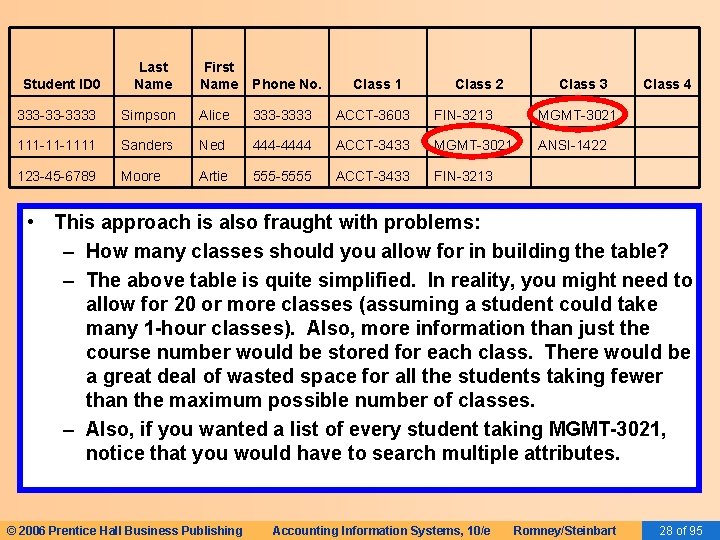
Student ID 0 Last Name First Name Phone No. Class 1 Class 2 Class 3 Class 4 333 -33 -3333 Simpson Alice 333 -3333 ACCT-3603 FIN-3213 MGMT-3021 111 -11 -1111 Sanders Ned 444 -4444 ACCT-3433 MGMT-3021 ANSI-1422 123 -45 -6789 Moore Artie 555 -5555 ACCT-3433 FIN-3213 • This approach is also fraught with problems: – How many classes should you allow for in building the table? – The above table is quite simplified. In reality, you might need to allow for 20 or more classes (assuming a student could take many 1 -hour classes). Also, more information than just the course number would be stored for each class. There would be a great deal of wasted space for all the students taking fewer than the maximum possible number of classes. – Also, if you wanted a list of every student taking MGMT-3021, notice that you would have to search multiple attributes. © 2006 Prentice Hall Business Publishing Accounting Information Systems, 10/e Romney/Steinbart 28 of 95
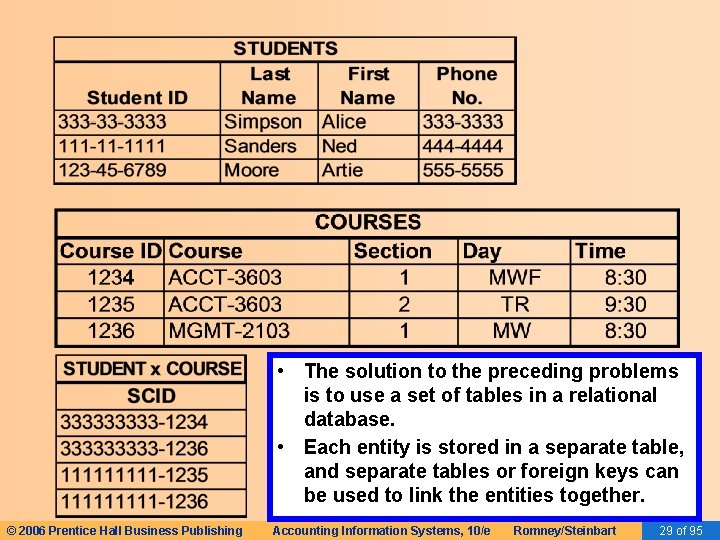
• The solution to the preceding problems is to use a set of tables in a relational database. • Each entity is stored in a separate table, and separate tables or foreign keys can be used to link the entities together. © 2006 Prentice Hall Business Publishing Accounting Information Systems, 10/e Romney/Steinbart 29 of 95
RELATIONAL DATABASES • Basic Requirements of a Relational Database – Every column in a row must be single valued. • In other words, every cell can have one and only one value. • In the student table, you couldn’t have an attribute named “Phone Number” if a student could have multiple phone numbers. • There might be an attribute named “local phone number” and an attribute named “permanent phone number. ” • You could not have an attribute named “Class” in the student table, because a student could take multiple classes. © 2006 Prentice Hall Business Publishing Accounting Information Systems, 10/e Romney/Steinbart 30 of 95
RELATIONAL DATABASES • Basic Requirements of a Relational Database – The primary key cannot be null. • The primary key uniquely identifies a specific row in the table, so it cannot be null, and it must be unique for every record. • This rule is referred to as the entity integrity rule. © 2006 Prentice Hall Business Publishing Accounting Information Systems, 10/e Romney/Steinbart 31 of 95
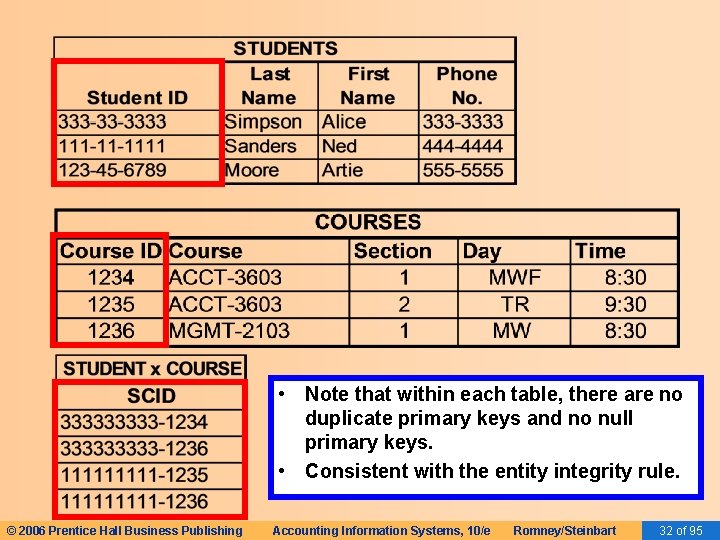
• Note that within each table, there are no duplicate primary keys and no null primary keys. • Consistent with the entity integrity rule. © 2006 Prentice Hall Business Publishing Accounting Information Systems, 10/e Romney/Steinbart 32 of 95
RELATIONAL DATABASES • Basic Requirements of a Relational Database – A foreign key must either be null or correspond to the value of a primary key in another table. • This rule is referred to as the referential integrity rule. • The rule is necessary because foreign keys are used to link rows in one table to rows in another table. © 2006 Prentice Hall Business Publishing Accounting Information Systems, 10/e Romney/Steinbart 33 of 95
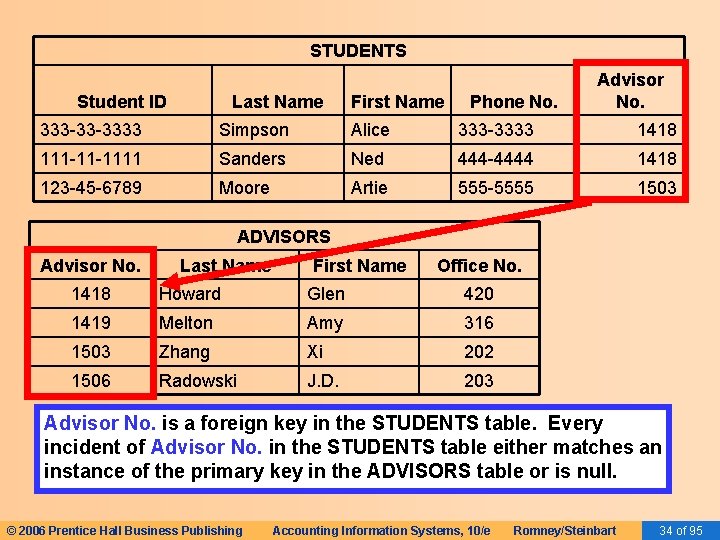
STUDENTS Student ID Last Name First Name Phone No. Advisor No. 333 -33 -3333 Simpson Alice 333 -3333 1418 111 -11 -1111 Sanders Ned 444 -4444 1418 123 -45 -6789 Moore Artie 555 -5555 1503 ADVISORS Advisor No. Last Name First Name Office No. 1418 Howard Glen 420 1419 Melton Amy 316 1503 Zhang Xi 202 1506 Radowski J. D. 203 Advisor No. is a foreign key in the STUDENTS table. Every incident of Advisor No. in the STUDENTS table either matches an instance of the primary key in the ADVISORS table or is null. © 2006 Prentice Hall Business Publishing Accounting Information Systems, 10/e Romney/Steinbart 34 of 95
RELATIONAL DATABASES • Basic Requirements of a Relational Database – All non-key attributes in a table should describe a characteristic of the object identified by the primary key. • Could nationality be a non-key attribute in the student table? • Could advisor’s nationality be a non-key attribute in the student table? © 2006 Prentice Hall Business Publishing Accounting Information Systems, 10/e Romney/Steinbart 35 of 95
RELATIONAL DATABASES • The preceding four constraints produce a wellstructured (normalized) database in which: – Data are consistent. – Redundancy is minimized and controlled. • In a normalized database, attributes appear multiple times only when they function as foreign keys. • The referential integrity rule ensures there will be no update anomaly problem with foreign keys. © 2006 Prentice Hall Business Publishing Accounting Information Systems, 10/e Romney/Steinbart 36 of 95
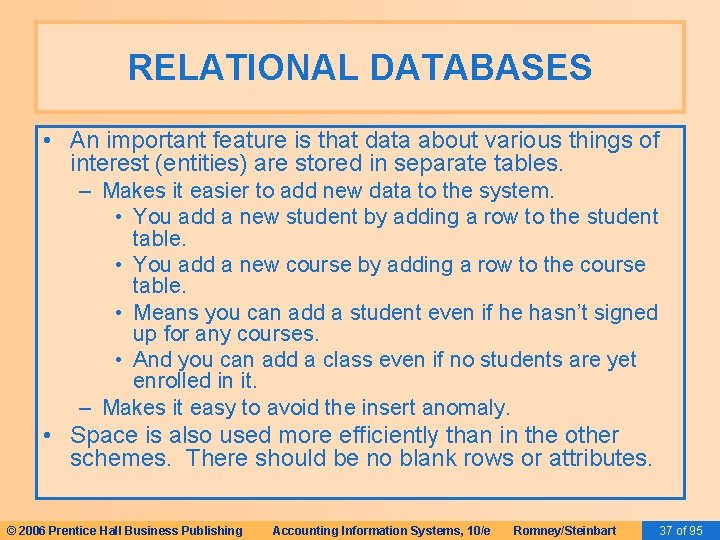
RELATIONAL DATABASES • An important feature is that data about various things of interest (entities) are stored in separate tables. – Makes it easier to add new data to the system. • You add a new student by adding a row to the student table. • You add a new course by adding a row to the course table. • Means you can add a student even if he hasn’t signed up for any courses. • And you can add a class even if no students are yet enrolled in it. – Makes it easy to avoid the insert anomaly. • Space is also used more efficiently than in the other schemes. There should be no blank rows or attributes. © 2006 Prentice Hall Business Publishing Accounting Information Systems, 10/e Romney/Steinbart 37 of 95
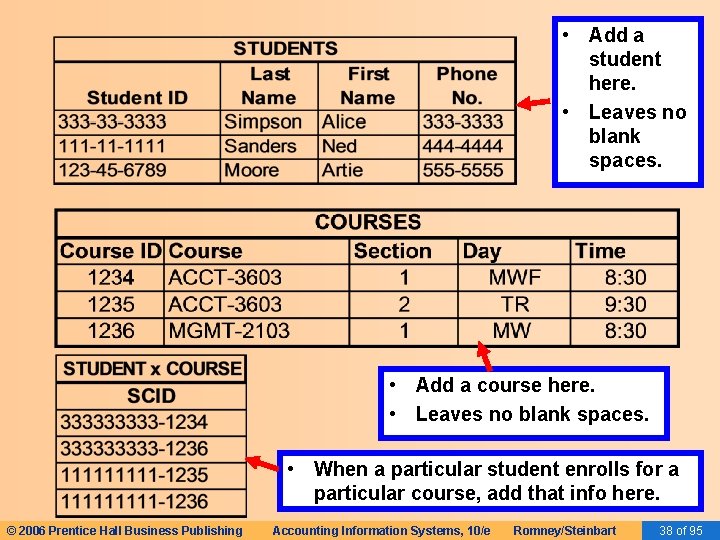
• Add a student here. • Leaves no blank spaces. • Add a course here. • Leaves no blank spaces. • When a particular student enrolls for a particular course, add that info here. © 2006 Prentice Hall Business Publishing Accounting Information Systems, 10/e Romney/Steinbart 38 of 95
RELATIONAL DATABASES • Deletion of a class for a student would cause the elimination of one record in the student x class table. – The student still exists in the student table. – The class still exists in the class table. – Avoids the delete anomaly. © 2006 Prentice Hall Business Publishing Accounting Information Systems, 10/e Romney/Steinbart 39 of 95
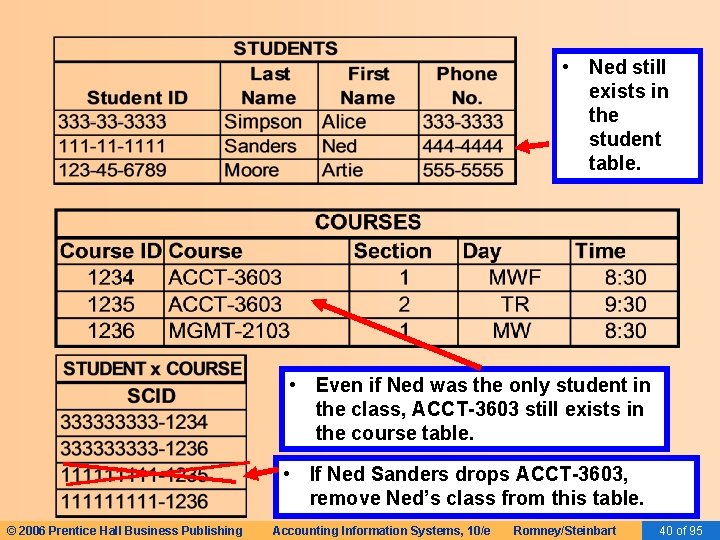
• Ned still exists in the student table. • Even if Ned was the only student in the class, ACCT-3603 still exists in the course table. • If Ned Sanders drops ACCT-3603, remove Ned’s class from this table. © 2006 Prentice Hall Business Publishing Accounting Information Systems, 10/e Romney/Steinbart 40 of 95
RELATIONAL DATABASES • There are two basic ways to design wellstructured relational databases. – Normalization – Semantic data modeling © 2006 Prentice Hall Business Publishing Accounting Information Systems, 10/e Romney/Steinbart 41 of 95
RELATIONAL DATABASES • There are two basic ways to design wellstructured relational databases. – Normalization – Semantic data modeling © 2006 Prentice Hall Business Publishing Accounting Information Systems, 10/e Romney/Steinbart 42 of 95
RELATIONAL DATABASES • Normalization – Starts with the assumption that everything is initially stored in one large table. – A set of rules is followed to decompose that initial table into a set of normalized tables. – Objective is to produce a set of tables in thirdnormal form (3 NF) because such tables are free of update, insert, and delete anomalies. – Approach is beyond the scope of this book but can be found in any database textbook. © 2006 Prentice Hall Business Publishing Accounting Information Systems, 10/e Romney/Steinbart 43 of 95
RELATIONAL DATABASES • There are two basic ways to design wellstructured relational databases. – Normalization – Semantic data modeling © 2006 Prentice Hall Business Publishing Accounting Information Systems, 10/e Romney/Steinbart 44 of 95
RELATIONAL DATABASES • Semantic data modeling (covered in detail in Chapter 15) – Database designer uses knowledge about how business processes typically work and the information needs associated with transaction processing to draw a graphical picture of what should be included in the database. – The resulting graphic is used to create a set of relational tables that are in 3 NF. © 2006 Prentice Hall Business Publishing Accounting Information Systems, 10/e Romney/Steinbart 45 of 95
RELATIONAL DATABASES • Advantages over simply following normalization rules: – Semantic data modeling uses the designer’s knowledge about business processes and practices; it therefore facilitates efficient design of transaction processing databases. – The resulting graphical model explicitly represents information about the organization’s business processes and policies and facilitates communication with intended users. © 2006 Prentice Hall Business Publishing Accounting Information Systems, 10/e Romney/Steinbart 46 of 95
RELATIONAL DATABASES • Creating Relational Database Queries – Databases store data for people and organizations. – To retrieve the data, you query the database and its tables. – Chapter 4 of your textbooks provides some samples of database queries in Microsoft Access. – Try these on your own and/or with your instructor in class. © 2006 Prentice Hall Business Publishing Accounting Information Systems, 10/e Romney/Steinbart 47 of 95
DATABASE SYSTEMS AND THE FUTURE OF ACCOUNTING • Database systems may profoundly affect the fundamental nature of accounting: – May lead to abandonment of double-entry accounting, because the redundancy of the double entry is not necessary in computer data processing. – May also alter the nature of external reporting. • EXAMPLE: External users could have access to the company’s database and manipulate the data to meet their own reporting needs. © 2006 Prentice Hall Business Publishing Accounting Information Systems, 10/e Romney/Steinbart 48 of 95
DATABASE SYSTEMS AND THE FUTURE OF ACCOUNTING • The use of accounting information in decision making will be enhanced by: – Powerful querying capabilities that accompany database packages. – The ability to accommodate multiple views of the same underlying phenomenon. – The ability to integrate financial and operational data. © 2006 Prentice Hall Business Publishing Accounting Information Systems, 10/e Romney/Steinbart 49 of 95
DATABASE SYSTEMS AND THE FUTURE OF ACCOUNTING • Accountants must become knowledgeable about databases so they can participate in developing the AIS of the future. • They must help ensure that adequate controls are included to safeguard the data and assure its reliability. © 2006 Prentice Hall Business Publishing Accounting Information Systems, 10/e Romney/Steinbart 50 of 95
SUMMARY • You’ve learned how databases differ from file-based legacy systems. • You’ve learned why databases are important and what advantages they offer. • You’ve learned how the logical and physical views of a database differ. • You’ve learned about fundamental concepts of database systems such as DBMS, schemas, the data dictionary, and DBMS languages. • You’ve learned what a relational database is and how it organizes data. • You’ve learned how tables are structured to properly store data in a relational database. © 2006 Prentice Hall Business Publishing Accounting Information Systems, 10/e Romney/Steinbart 51 of 95
- Slides: 51