
Database Security and Auditing Protecting Data Integrity and
Database Security and Auditing: Protecting Data Integrity and Accessibility Chapter 9 Auditing Database Activities Database Security & Auditing: Protecting Data Integrity &
Objectives • Use Oracle database activities • Learn how to create DLL triggers with Oracle • Audit database activities using Oracle Database Security & Auditing: Protecting Data Integrity & Accessibility 2

Objectives (continued) • Audit server activities with Microsoft SQL Server 2000 • Audit database activities using Microsoft SQL Profiler • Use SQL Server for security auditing Database Security & Auditing: Protecting Data Integrity & Accessibility 3
Using Oracle Database Activities • Several types of activities: – Application activities: SQL statements issued against application tables – Administration activities: commands issued for maintenance and administrative purposes – Database events: events that occur when a specific activity occurs Database Security & Auditing: Protecting Data Integrity & Accessibility 4
Creating DDL Triggers with Oracle • Audit program provides: – Audit trail for all activities – Opportunity for using process controls • Database activities statements (in addition to DML): – Data Definition Language (DDL) – Data Control Language – Database events – SQL statements audit trail Database Security & Auditing: Protecting Data Integrity & Accessibility 5
Creating DDL Triggers with Oracle (continued) • Use CREATE TRIGGER: – DDL statements – Database events Database Security & Auditing: Protecting Data Integrity & Accessibility 6
Example of LOGON and LOGOFF Database Events • Steps: – Log on as SYSTEM – Create the APP_AUDIT_LOGINS table – Create two triggers: • One that fires after the logon event • One that fires before the logoff event – Log on as DBSEC; disconnect after a few minutes – Log on as SYSTEM to check the auditing table Database Security & Auditing: Protecting Data Integrity & Accessibility 7
DDL Event Example • Steps: – Log on as SYSTEM – Create a trigger that fires before an ALTER statement is completed – Log on as DBSEC and alter a table • Pseudocolumns: – ora_dict_obj_name – ora_dict_obj_owner – ora_sysevent Database Security & Auditing: Protecting Data Integrity & Accessibility 8
Auditing Code with Oracle • Steps: – Log on as DBSEC – Create an auditing table – Create a table and populate it with two records – Create a trigger to track code – Update the new table – Look at the contents of the APP_AUDIT_SQLS table Database Security & Auditing: Protecting Data Integrity & Accessibility 9
Auditing Database Activities with Oracle • Oracle provides mechanisms for auditing all: – Who creates or modifies the structure – Who is granting privileges to whom • Two types of activities based on the type of SQL command statement used: – Defined by DDL (Data Definition Language) – Defined by DCL (Data Control Language) Database Security & Auditing: Protecting Data Integrity & Accessibility 10
Auditing DDL Activities • Use a SQL-based AUDIT command • Verify auditing is on: – Check the AUDIT_TRAIL parameter – Values: • • DB DB_EXTENDED OS NONE Database Security & Auditing: Protecting Data Integrity & Accessibility 11
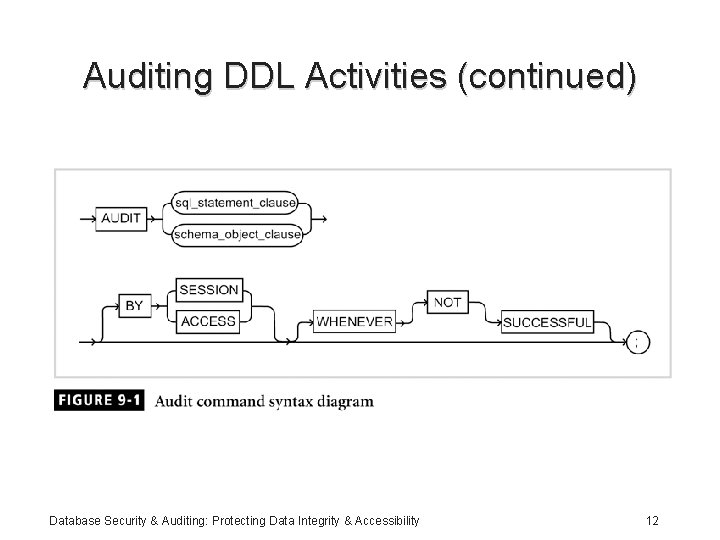
Auditing DDL Activities (continued) Database Security & Auditing: Protecting Data Integrity & Accessibility 12
DDL Activities Example 1 • Steps: – Use any user other than SYS or SYSTEM to create a table – Add three rows into the table – Log on as SYSTEM or SYS to enable auditing: For ALTER and DELETE – Log in as DBSEC: • Delete a row • Modify the structure of the table Database Security & Auditing: Protecting Data Integrity & Accessibility 13
DDL Activities Example 1 (continued) • Steps (continued): – Check the audit records – Log in as SYSTEM and view the DBA_AUDIT_TRAIL table – Turn off the auditing option – Check the content of the DBA_AUDIT_OBJECT to see auditing metadata Database Security & Auditing: Protecting Data Integrity & Accessibility 14
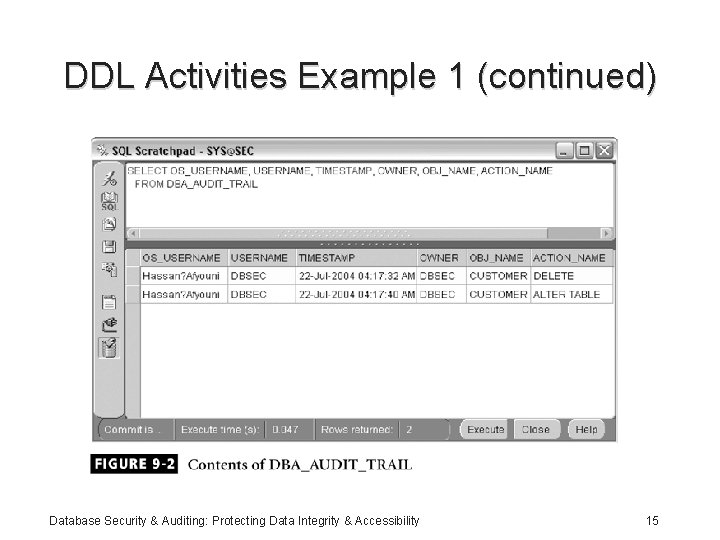
DDL Activities Example 1 (continued) Database Security & Auditing: Protecting Data Integrity & Accessibility 15
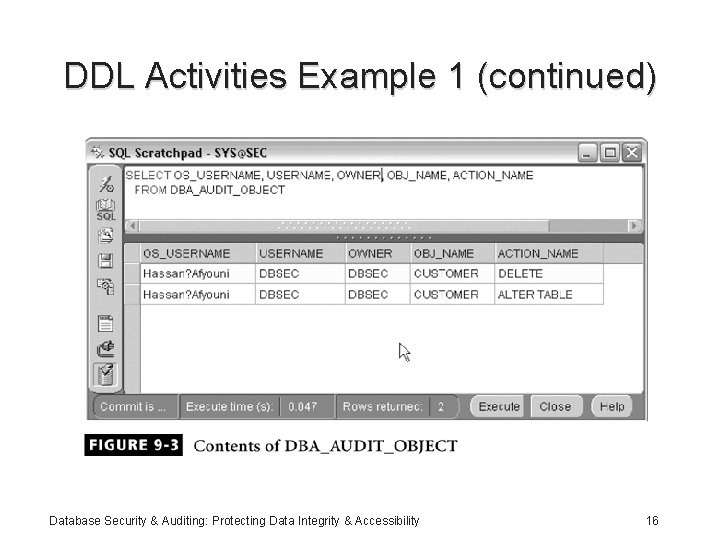
DDL Activities Example 1 (continued) Database Security & Auditing: Protecting Data Integrity & Accessibility 16
DDL Activities Example 2 • Steps: – Log in as SYSTEM or SYS to enable auditing for the TABLE statement; ALTER, CREATE, and DROP TABLE statements – Log on as DBSEC and create a table, then drop the table – Log on as SYSTEM; view the content of DBA_AUDIT_TRAIL – Turn off auditing for the TABLE statement Database Security & Auditing: Protecting Data Integrity & Accessibility 17
DCL Activities Example • Steps: – Log on as SYSTEM or SYS and issue an AUDIT statement – Log on as DBSEC and grant SELECT and UPDATE to SYSTEM – Log on as SYSTEM and display the contents of DBA_AUDIT_TRAIL – Review audit data dictionary Database Security & Auditing: Protecting Data Integrity & Accessibility 18
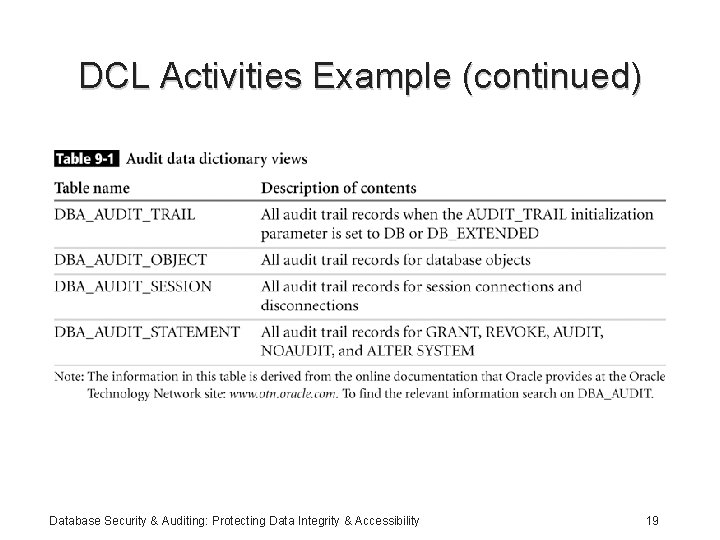
DCL Activities Example (continued) Database Security & Auditing: Protecting Data Integrity & Accessibility 19
Example of Auditing User Activities • Steps: – Log on as SYSTEM or SYS, to issue an audit statement – Log on as DBSEC and create a temporary table – Go back to SYSTEM to view the contents of DBA_AUDIT_TRAIL Database Security & Auditing: Protecting Data Integrity & Accessibility 20
Audit Trail File Destination • Steps: – Modify the initialization parameter file, INIT. ORA; set parameter AUDIT_TRAIL to the value OS – Create a folder/directory – Set AUDIT_FILE_DEST to the new directory – Shut down and restart the database – Connect as DBSEC Database Security & Auditing: Protecting Data Integrity & Accessibility 21
Oracle Alert Log • Audits database activities: – Errors: • Errors related to physical structure are recorded in the Alert log • Monitor errors every five to ten minutes; can be done using a Windows or UNIX script • Syntactical errors are not recorded – Startup and shutdown • Date and time of each occurrence Database Security & Auditing: Protecting Data Integrity & Accessibility 22
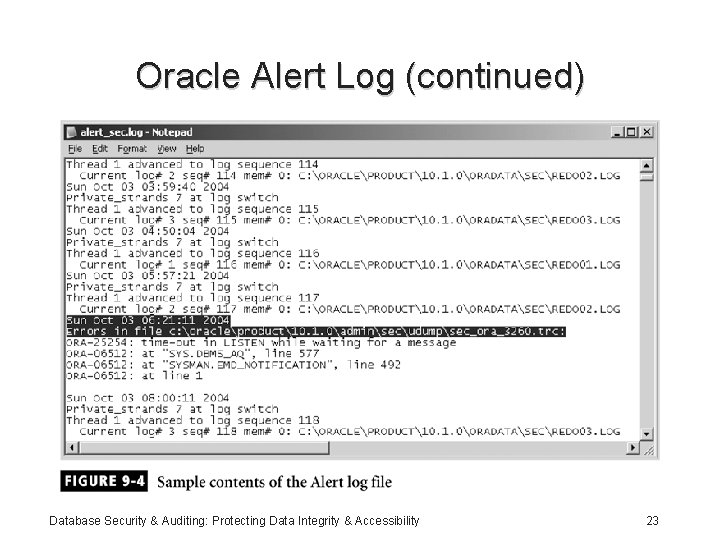
Oracle Alert Log (continued) Database Security & Auditing: Protecting Data Integrity & Accessibility 23
Oracle Alert Log (continued) • Database activities (continued): – Modified initialization parameters, each time a database is started – Checkpoints: configure Oracle to record checkpoint time – Archiving: view the timing for all redo log sequences, as well as archiving times – Physical database changes Database Security & Auditing: Protecting Data Integrity & Accessibility 24
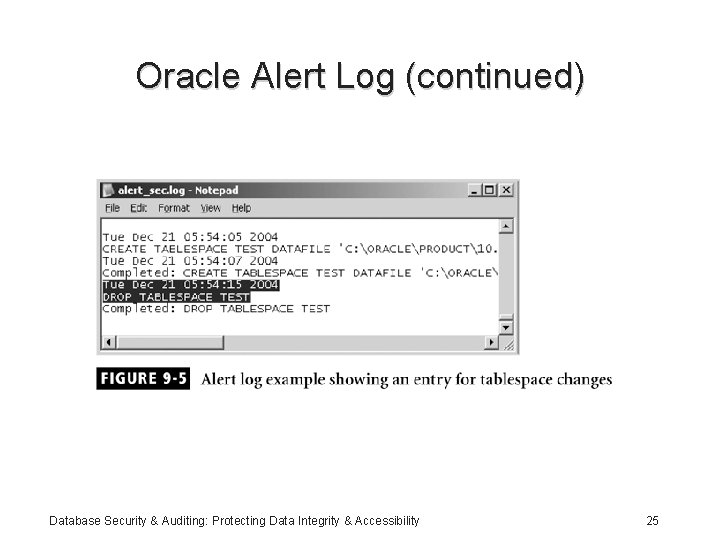
Oracle Alert Log (continued) Database Security & Auditing: Protecting Data Integrity & Accessibility 25
Auditing Server Activity with Microsoft SQL Server 2000 • Way to track and log activity for each SQL Server occurrence • Must be a member of the sysadmin fixed server role • Two types of auditing for server events: – Auditing – C 2 auditing • Auditing affects performance and can be costly Database Security & Auditing: Protecting Data Integrity & Accessibility 26
Implementing SQL Profiler • User interface for auditing events • For each event you can audit: – Date and time of the event – User who caused the event to occur – Type of event – Success or failure of the event – Origin of the request – Name of the object accessed – Text SQL statement Database Security & Auditing: Protecting Data Integrity & Accessibility 27
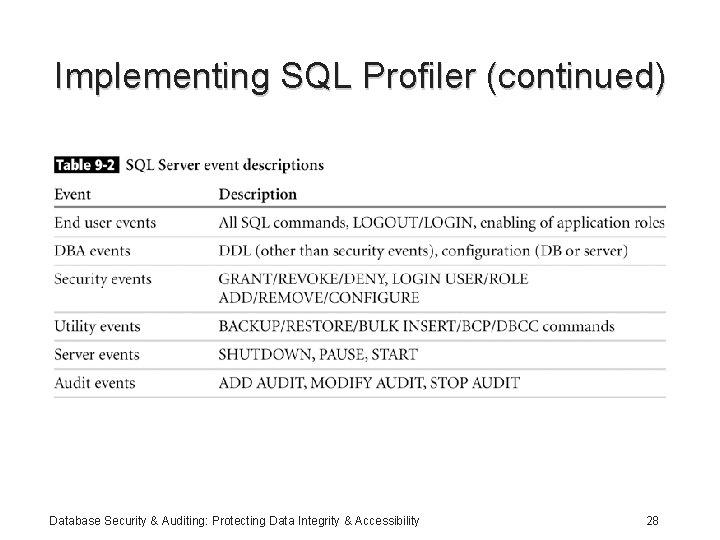
Implementing SQL Profiler (continued) Database Security & Auditing: Protecting Data Integrity & Accessibility 28
Security Auditing with SQL Server • Steps for setting security auditing level: – Open Enterprise Manager – Expand the appropriate SQL Server group – Right-click on the desired server – Click Properties – On the security tab, select the desired security level Database Security & Auditing: Protecting Data Integrity & Accessibility 29
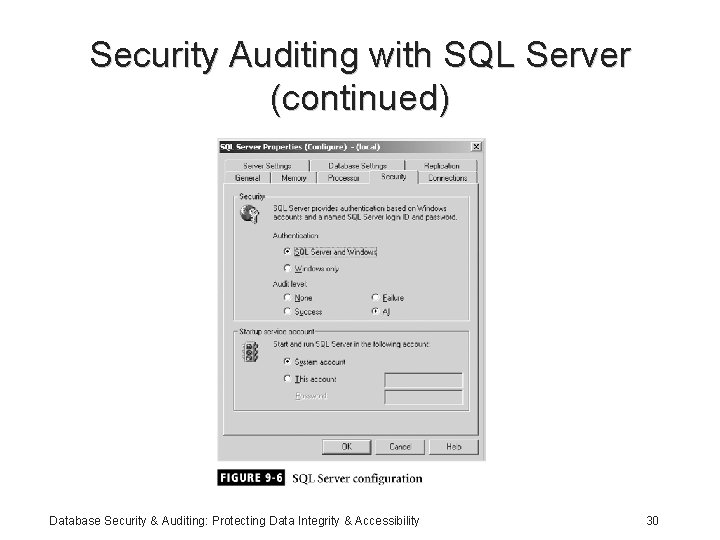
Security Auditing with SQL Server (continued) Database Security & Auditing: Protecting Data Integrity & Accessibility 30
Security Auditing with SQL Server (continued) • Auditable events: – ADD DB USER – ADD LOGIN TO SERVER ROLE – ADD MEMBER TO DB ROLE – ADD ROLE – APP ROLE CHANGE PASSWORD – BACKUP/RESTORE – CHANGE AUDIT Database Security & Auditing: Protecting Data Integrity & Accessibility 31
Security Auditing with SQL Server (continued) • Auditable events (continued): – DBCC – LOGIN – LOGOUT – LOGIN CHANGE PASSWORD – LOGIN CHANGE PROPERTY – LOGIN FAILED – Login GDR (GRANT, DENY, REVOKE) Database Security & Auditing: Protecting Data Integrity & Accessibility 32
Security Auditing with SQL Server (continued) • Auditable events (continued): – Object Derived Permissions – Object GDR – Object Permissions – Server Start and Stop – Statement GDR – Statement Permission Database Security & Auditing: Protecting Data Integrity & Accessibility 33
Security Auditing with SQL Server (continued) Database Security & Auditing: Protecting Data Integrity & Accessibility 34
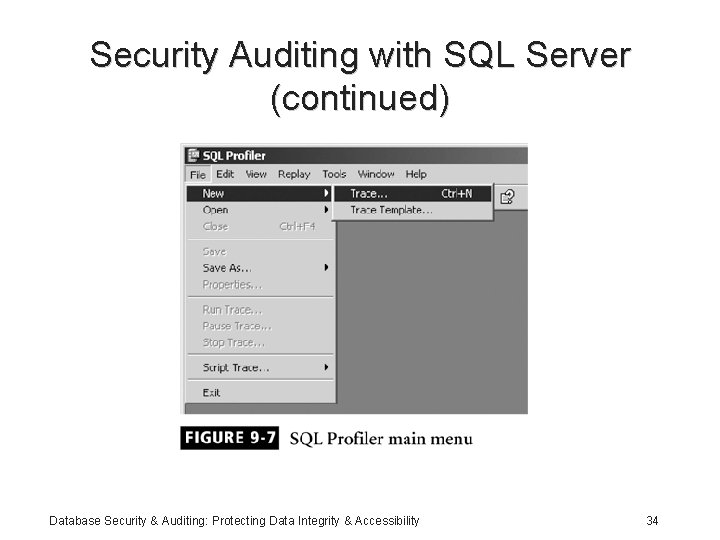
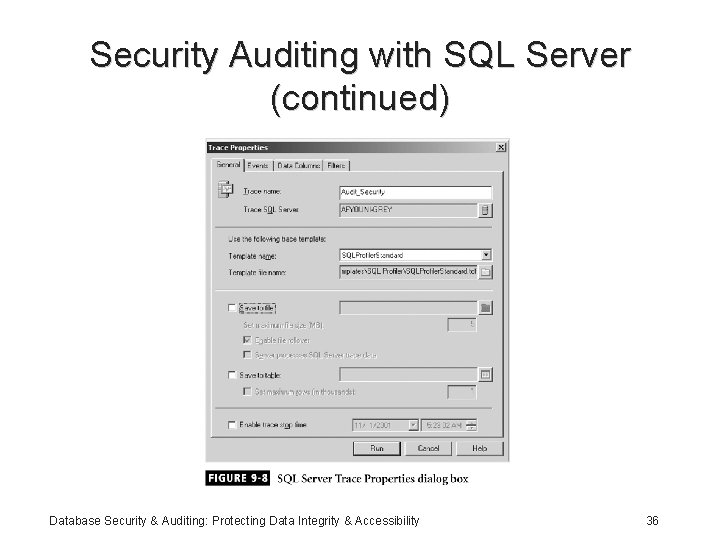
Security Auditing with SQL Server (continued) • New trace information: – A name for the trace – The server you want to audit – The base template to start with – Where to save the audit data, either to a file or to a database table – A stop time, if you don’t want the trace to run indefinitely Database Security & Auditing: Protecting Data Integrity & Accessibility 35
Security Auditing with SQL Server (continued) Database Security & Auditing: Protecting Data Integrity & Accessibility 36
Security Auditing with SQL Server (continued) Database Security & Auditing: Protecting Data Integrity & Accessibility 37
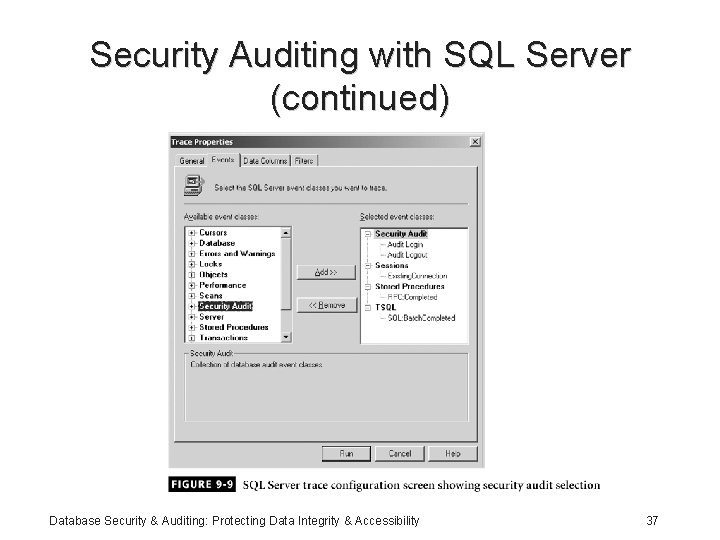
Security Auditing with SQL Server (continued) • Steps to add Login Change Password event – Expand the Security Audit node under Available event classes – Click Audit Login Change Password Event – Click the Add button Database Security & Auditing: Protecting Data Integrity & Accessibility 38
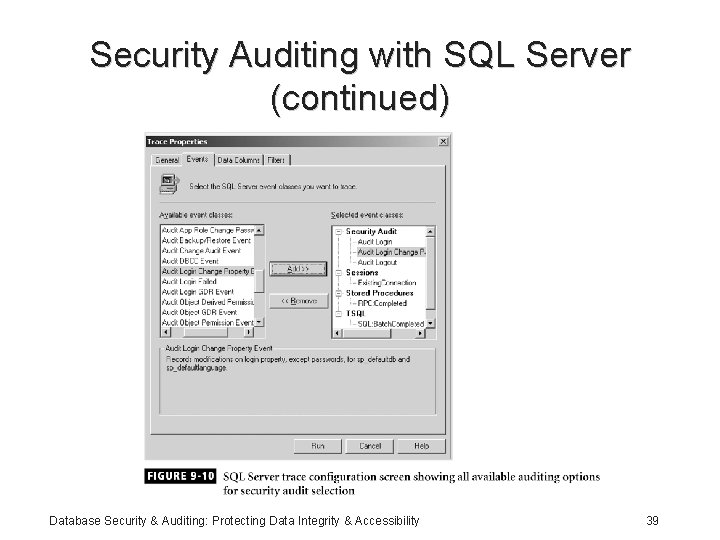
Security Auditing with SQL Server (continued) Database Security & Auditing: Protecting Data Integrity & Accessibility 39
Data Definition Auditing • Audit DDL statements: – Object: Created – Object: Deleted – Will audit all CREATE and DROP statements Database Security & Auditing: Protecting Data Integrity & Accessibility 40
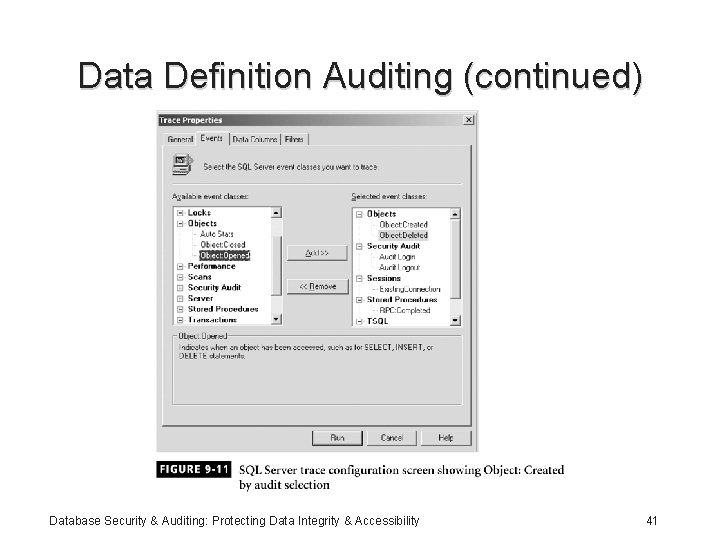
Data Definition Auditing (continued) Database Security & Auditing: Protecting Data Integrity & Accessibility 41
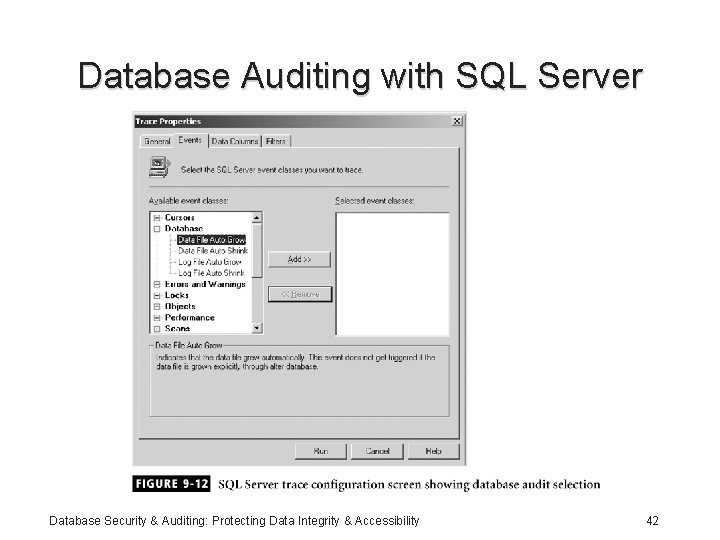
Database Auditing with SQL Server Database Security & Auditing: Protecting Data Integrity & Accessibility 42
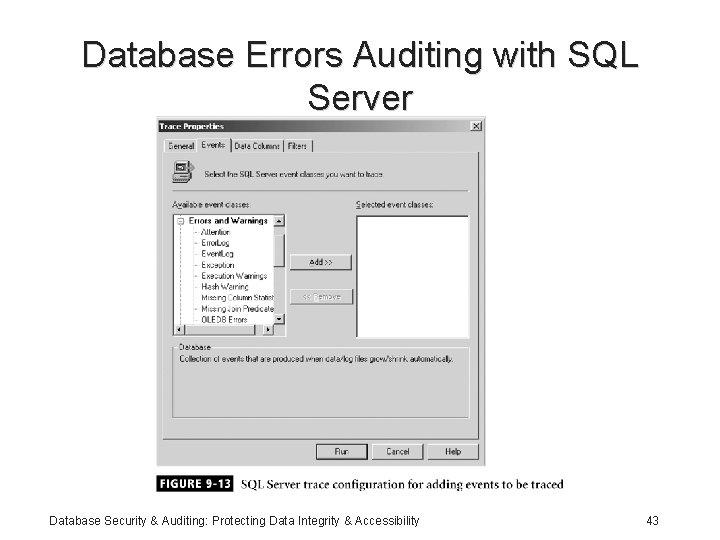
Database Errors Auditing with SQL Server Database Security & Auditing: Protecting Data Integrity & Accessibility 43
Summary • Activities types: – Application activities – Administration activities – Database events • Oracle triggers provide a way to create an audit trail • Auditable Oracle database activities: logon, logoff, startup and shutdown Database Security & Auditing: Protecting Data Integrity & Accessibility 44
Summary (continued) • Oracle provides the SQL AUDIT command: initialization parameter AUDIT_TRAIL • NOAUDIT used to stop auditing • DBA_AUDIT_TRAIL data dictionary view • Oracle Alert Log: – Database errors – Modified initialization parameters – Checkpoints Database Security & Auditing: Protecting Data Integrity & Accessibility 45
Summary (continued) • Microsoft SQL Server 2000: way to track and log SQL Server activity • Must be a member of sysadmin fixed role to enable or modify auditing • SQL Profiler: – Visualization tool – Audit errors that occur within the database Database Security & Auditing: Protecting Data Integrity & Accessibility 46
- Slides: 46