
Database Security and Auditing Protecting Data Integrity and
Database Security and Auditing: Protecting Data Integrity and Accessibility Chapter 2 Operating System Security Fundamentals Database Security & Auditing: Protecting Data Integrity &
Objectives • Explain the functions of an operating system • Describe the operating system security environment from a database perspective • List the components of an operating system security environment • Explain the differences between authentication methods Database Security & Auditing: Protecting Data Integrity & Accessibility 2
Objectives (continued) • • Outline useful user administration best practices List the criteria of strong password policies Describe operating system vulnerabilities Describe security risks posed by e-mail services Database Security & Auditing: Protecting Data Integrity & Accessibility 3
Operating System Overview • Operating system: collection of programs that allows user to operate computer hardware • Three layers: – Inner layer – Middle layer – Outer layer Database Security & Auditing: Protecting Data Integrity & Accessibility 4
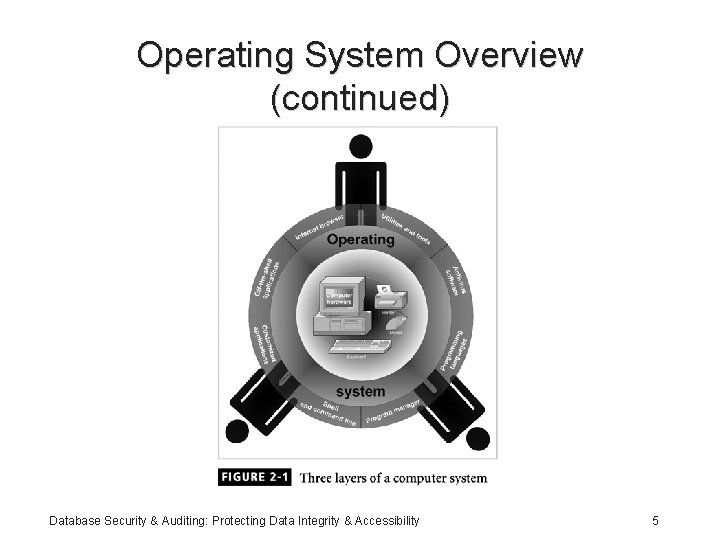
Operating System Overview (continued) Database Security & Auditing: Protecting Data Integrity & Accessibility 5
Operating System Overview (continued) • Key functions of an operating system: – Multitasking, multisharing – Computer resource management – Controls the flow of activities – Provides a user interface Database Security & Auditing: Protecting Data Integrity & Accessibility 6
Operating System Overview (continued) • Key functions of an operating system (continued): – Administers user actions and accounts – Runs software utilities and programs – Enforce security measures – Schedules jobs Database Security & Auditing: Protecting Data Integrity & Accessibility 7
The Operating System Security Environment • A compromised OS can compromise a database environment • Physically protect the computer running the OS (padlocks, chain locks, guards, cameras) • Model: – Bank building (operating system) – Safe (database) – Money (data) Database Security & Auditing: Protecting Data Integrity & Accessibility 8
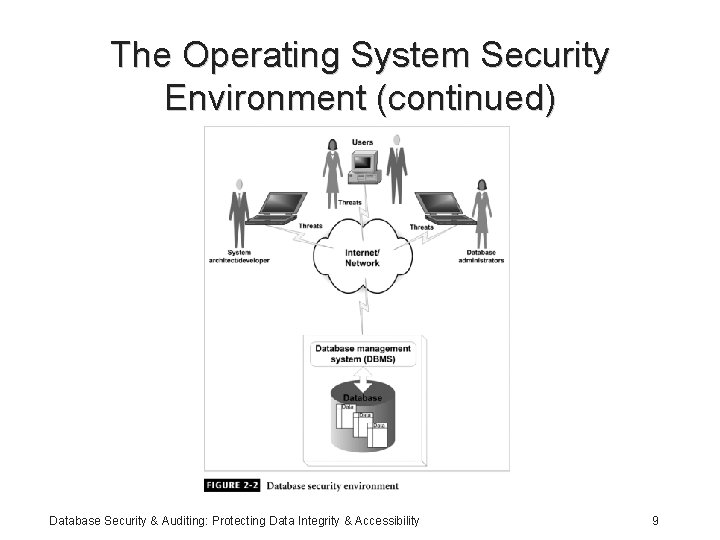
The Operating System Security Environment (continued) Database Security & Auditing: Protecting Data Integrity & Accessibility 9
The Components of an Operating System Security Environment • Used as access points to the database • Three components: – Memory – Services – Files Database Security & Auditing: Protecting Data Integrity & Accessibility 10
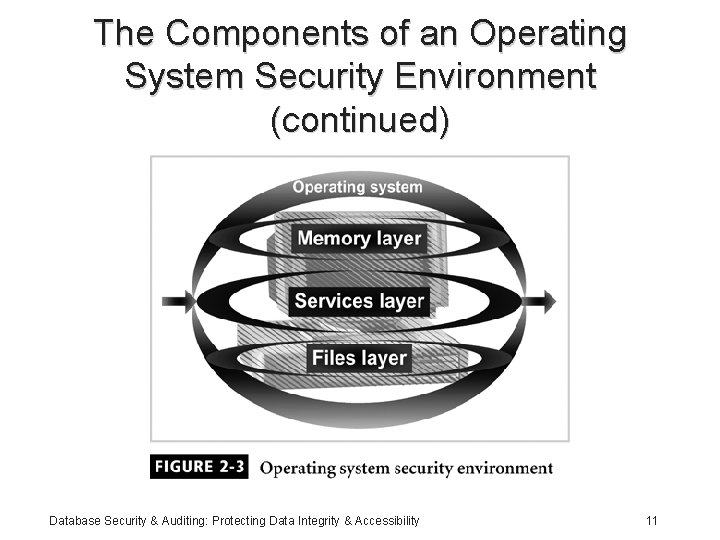
The Components of an Operating System Security Environment (continued) Database Security & Auditing: Protecting Data Integrity & Accessibility 11
Services • Main component of operating system security environment • Operating system core utilities • Used to gain access to the OS and its features • Include – User authentication – Remote access – Administration tasks – Password policies Database Security & Auditing: Protecting Data Integrity & Accessibility 12
Files • Common threats: – File permission – File sharing • Files must be protected from unauthorized reading and writing actions • Data resides in files; protecting files protects data Database Security & Auditing: Protecting Data Integrity & Accessibility 13
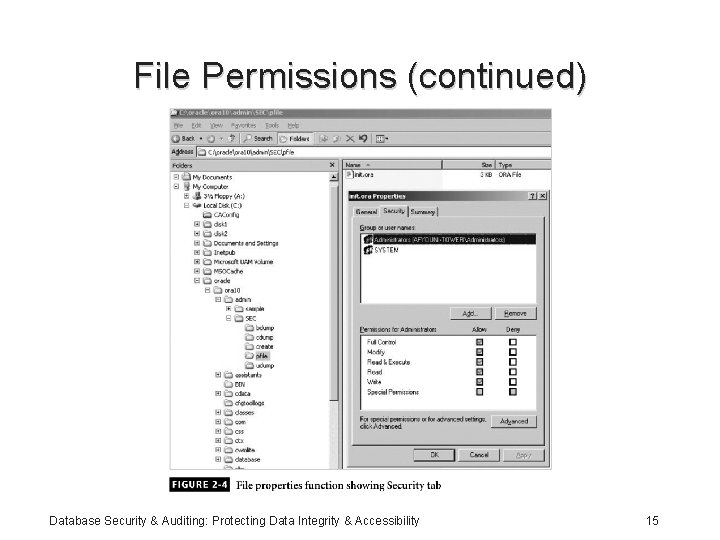
File Permissions • Read, write, and execute privileges • In Windows 2000: – Change permission on the Security tab on a file’s Properties dialog box – Allow indicates grant – Deny indicates revoke Database Security & Auditing: Protecting Data Integrity & Accessibility 14
File Permissions (continued) Database Security & Auditing: Protecting Data Integrity & Accessibility 15
File Permissions (continued) • In UNIX – Three permission settings: owner; group to which owner belongs; all other users – Each setting consist of rwx • r for reading, w for writing, and x for executing – CHMOD command used to change file permissions Database Security & Auditing: Protecting Data Integrity & Accessibility 16
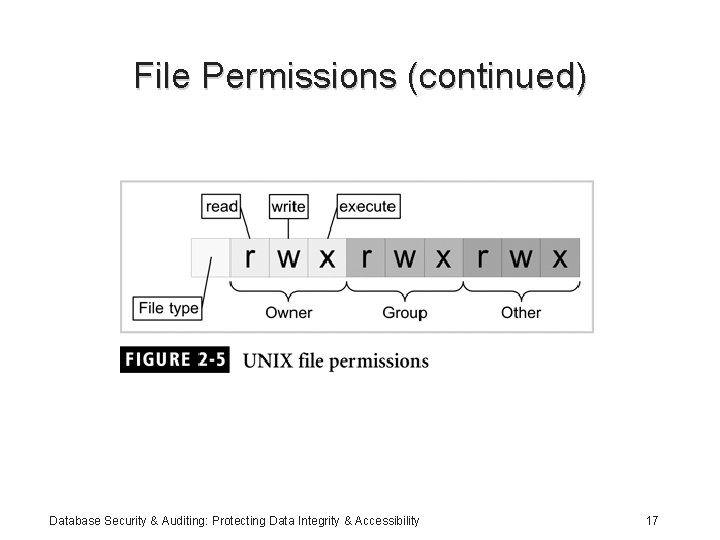
File Permissions (continued) Database Security & Auditing: Protecting Data Integrity & Accessibility 17
File Transfer • FTP (File Transfer Protocol): – Internet service for transferring files from one computer to another – Transmits usernames and passwords in plaintext – Root account cannot be used with FTP – Anonymous FTP: ability to log on to the FTP server without being authenticated Database Security & Auditing: Protecting Data Integrity & Accessibility 18
File Transfer (continued) • Best practices: – Use Secure FTP utility if possible – Make two FTP directories: • One for uploads with write permissions only • One for downloads with read permissions only – Use specific accounts with limited permissions – Log and scan FTP activities – Allow only authorized operators Database Security & Auditing: Protecting Data Integrity & Accessibility 19
Sharing Files • Naturally leads to security risks and threats • Peer-to-peer programs: allow users to share files over the Internet • Reasons for blocking file sharing: – Malicious code – Adware and spyware – Privacy and confidentiality – Pornography – Copyright issues Database Security & Auditing: Protecting Data Integrity & Accessibility 20
Memory • Hardware memory available on the system • Can be corrupted by badly written software • Two options: – Stop using the program – Apply a patch (service pack) to fix it • Can harm data integrity Database Security & Auditing: Protecting Data Integrity & Accessibility 21
Authentication Methods • Authentication: – Verifies user identity – Permits access to the operating system • Physical authentication: – Allows physical entrance to company property – Magnetic cards and biometric measures • Digital authentication: verifies user identity by digital means Database Security & Auditing: Protecting Data Integrity & Accessibility 22
Authentication Methods (continued) • Digital certificates: digital passport that identifies and verifies holder of certificate • Digital token (security token): – Small electronic device – Displays a number unique to the token holder; used with the holder’s PIN as a password – Uses a different password each time Database Security & Auditing: Protecting Data Integrity & Accessibility 23
Authentication Methods (continued) • Digital card: – Also known as a security card or smart card – Similar to a credit card; uses an electronic circuit instead of a magnetic strip – Stores user identification information • Kerberos: – Developed by MIT – Uses tickets for authentication purposes Database Security & Auditing: Protecting Data Integrity & Accessibility 24
Authentication Methods (continued) • Lightweight Directory Access Protocol (LDAP): – Developed by the University of Michigan – A centralized directory database stores: • • Users (user name and user ID) Passwords Internal telephone directory Security keys – Efficient for reading but not suited for frequently changing information Database Security & Auditing: Protecting Data Integrity & Accessibility 25
Authentication Methods (continued) • NTLM: – Developed and used by Microsoft – Employs a challenge/response authentication protocol • Public Key Infrastructure (PKI): – User keeps a private key – Authentication firm holds a public key – Encrypt and decrypt data using both keys Database Security & Auditing: Protecting Data Integrity & Accessibility 26
Authentication Methods (continued) • RADIUS: used by network devices to provide a centralized authentication mechanism • Secure Socket Layer (SSL): authentication information is transmitted over the network in an encrypted form • Secure Remote Password (SRP): – Password is not stored locally – Invulnerable to brute force or dictionary attacks Database Security & Auditing: Protecting Data Integrity & Accessibility 27
Authorization • Process that decides whether users are permitted to perform the functions they request • Authorization is not performed until the user is authenticated • Deals with privileges and rights Database Security & Auditing: Protecting Data Integrity & Accessibility 28
User Administration • • Create user accounts Set password policies Grant privileges to users Best practices: – Use a consistent naming convention – Always provide a password to an account and force the user to change it at the first logon – Protect passwords – Do not use default passwords Database Security & Auditing: Protecting Data Integrity & Accessibility 29
User Administration (continued) • Best practices (continued): – Create a specific file system for users – Educate users on how to select a password – Lock non-used accounts – Grant privileges on a per host basis – Do not grant privileges to all machines – Use ssh, scp, and Secure FTP – Isolate a system after a compromise – Perform random auditing procedures Database Security & Auditing: Protecting Data Integrity & Accessibility 30
Password Policies • First line of defense • Dictionary attack: permutation of words in dictionary • Make hard for hackers entering your systems • Best password policy: – Matches your company missions – Enforced at all level of the organization Database Security & Auditing: Protecting Data Integrity & Accessibility 31
Password Policies (continued) • Best practices: – Password aging – Password reuse – Password history – Password encryption Database Security & Auditing: Protecting Data Integrity & Accessibility 32
Password Policies (continued) • Best practices (continued): – Password storage and protection – Password complexity – Logon retries – Single sign-on Database Security & Auditing: Protecting Data Integrity & Accessibility 33
Vulnerabilities of Operating Systems • Top vulnerabilities to Windows systems: – Internet Information Services (IIS) – Microsoft SQL Server (MSSQL) – Windows Authentication – Internet Explorer (IE) – Windows Remote Access Services Database Security & Auditing: Protecting Data Integrity & Accessibility 34
Vulnerabilities of Operating Systems (continued) • Top vulnerabilities to Windows (continued): – Microsoft Data Access Components (MDAC) – Windows Scripting Host (WSH) – Microsoft Outlook and Outlook Express – Windows Peer-to-Peer File Sharing (P 2 P) – Simple Network Management Protocol (SNMP) Database Security & Auditing: Protecting Data Integrity & Accessibility 35
Vulnerabilities of Operating Systems (continued) • Top vulnerabilities to UNIX systems: – BIND Domain Name System – Remote Procedure Calls (RPC) – Apache Web Server – General UNIX authentication accounts with no passwords or weak passwords – Clear text services Database Security & Auditing: Protecting Data Integrity & Accessibility 36
Vulnerabilities of Operating Systems (continued) • Top vulnerabilities to UNIX systems (continued): – Sendmail – Simple Network Management Protocol (SNMP) – Secure Shell (SSH) – Misconfiguration of Enterprise Services NIS/NFS – Open Secure Sockets Layer (SSL) Database Security & Auditing: Protecting Data Integrity & Accessibility 37
E-mail Security • Tool must widely used by public • May be the tool must frequently used by hackers: – Viruses – Worms – Spam – Others • Used to send private and confidential data as well as offensive material Database Security & Auditing: Protecting Data Integrity & Accessibility 38
E-mail Security (continued) • Used by employees to communicate with: – Clients – Colleagues – Friends • Recommendations: – Do not configure e-mail server on the same machine were sensitive data resides – Do not disclose technical details about the e-mail server Database Security & Auditing: Protecting Data Integrity & Accessibility 39
Summary • Operating system: – Collection of programs that allows programs and users to interact with the computer resources – Main access point to the DBMS • Authentication: – Validates the identity of the user – Physical authentication – Digital authentication Database Security & Auditing: Protecting Data Integrity & Accessibility 40
Summary (continued) • Authorization: – Determines whether the user is permitted to perform the function he or she requests – Is not performed until the user is authenticated – Deals with privileges and rights that have been granted to the user Database Security & Auditing: Protecting Data Integrity & Accessibility 41
Summary (continued) • Password policy: – First line of defense – Must match your company missions – Must be enforced at all levels of the organization • Security problems with files: – File permissions – File transfer and sharing • E-mail security Database Security & Auditing: Protecting Data Integrity & Accessibility 42
- Slides: 42