
Database Design Normalization Lecture 8 Lecture Objectives n
Database Design Normalization – Lecture 8
Lecture Objectives n n n Review basic rules for converting Entities to Tables Review how to address Relationships between entities Overview of Normalization 2
Converting ERD into Relational Database Model Entities to Tables n 1. 2. 3. 4. 5. Create a separate table for each entity and consider all the attributes you defined in ERD as the table columns Define a unique identifier as the table PK. Could be an existing attribute that can be used for PK otherwise create a generic PK. Do not include derived attributes in the tables. Ensure all attributes are atomic. Create a new table to support multi-valued attributes. 3
Converting ERD into Relational Database Model Relationships n 1. 2. For 1: M connectivity, include the PK of the ’ 1’ as an FK attribute in the ‘M’ table. Add additional attributes to the ‘M’ table, as required. For M: N connectivity, create a bridge table. Include the PKs from both entities as a composite PK in the bridge table. These attributes will also be FKs in the bridge table. Add additional attributes to the bridge table, as required. 4
Converting ERD into Relational Database Model Relationships n 3. 4. For Strong-Weak relationship, include PK of strong entity as part of the PK of the weak entity, thus giving it a composite primary key. It will also be an FK in the weak entity. For Supertype/Subtype relationships, create a new entity. Attributes unique to the subtype are moved to the new table and are removed from the supertype entity. Both entities will have the same primary keys. 5
Converting ERD into Relational Database Model Relationships n 5. For recursive relationships (1: 1, 1: M), additional attributes as required. For M: N recursive relationship, create a new entity with a composite primary key. Create a primary key for the new entity and make a composite primary key using it and the primary key from the ‘ 1’ entity. The primary key from the ‘ 1’ will also be a FK in the new entity. 6
Normalization n Normalization can be used in two ways: n n As a process to validate the table structures created through the conversion of entity relationship diagrams to relational tables As a process to create entities from table structures created by user views 7
Normalization n Normalization is a process for assigning attributes to entities n n n Reduces data redundancies Helps eliminate data anomalies Produces controlled redundancies to link tables Works through a series of stages called normal forms Works with views of data 8
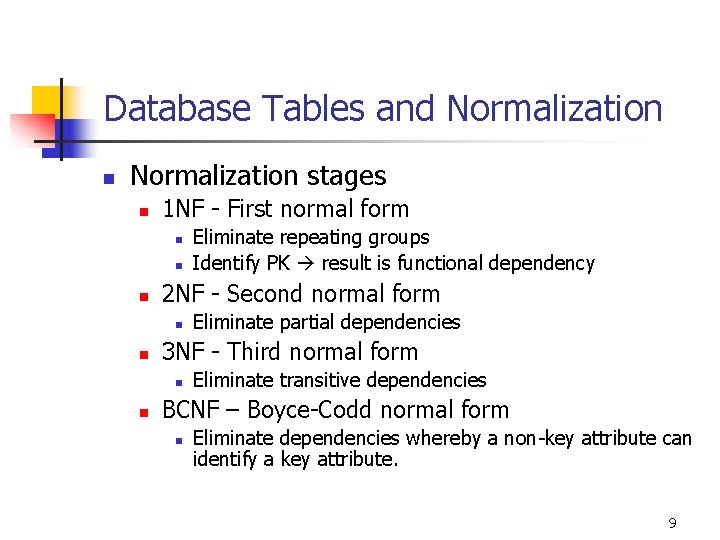
Database Tables and Normalization n Normalization stages n 1 NF - First normal form n n n 2 NF - Second normal form n n Eliminate partial dependencies 3 NF - Third normal form n n Eliminate repeating groups Identify PK result is functional dependency Eliminate transitive dependencies BCNF – Boyce-Codd normal form n Eliminate dependencies whereby a non-key attribute can identify a key attribute. 9
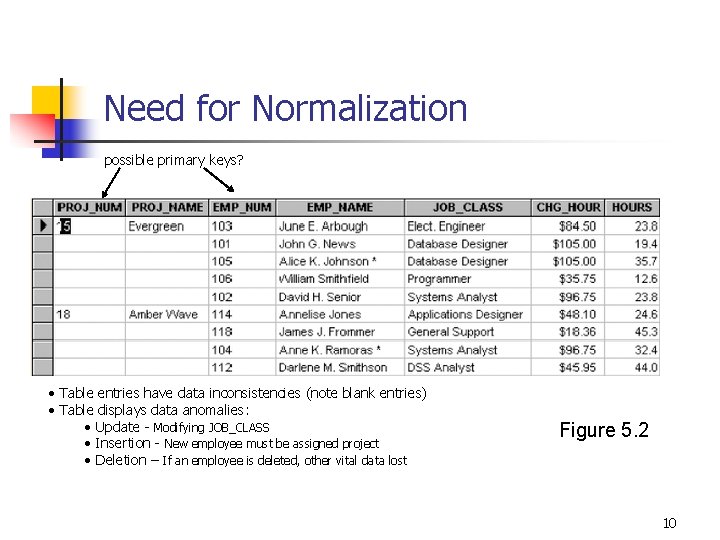
Need for Normalization possible primary keys? • Table entries have data inconsistencies (note blank entries) • Table displays data anomalies: • Update - Modifying JOB_CLASS • Insertion - New employee must be assigned project • Deletion – If an employee is deleted, other vital data lost Figure 5. 2 10
Conversion to 1 NF n Repeating groups must be eliminated n Proper primary key developed n Uniquely identifies attribute values - rows (functional dependency) 11
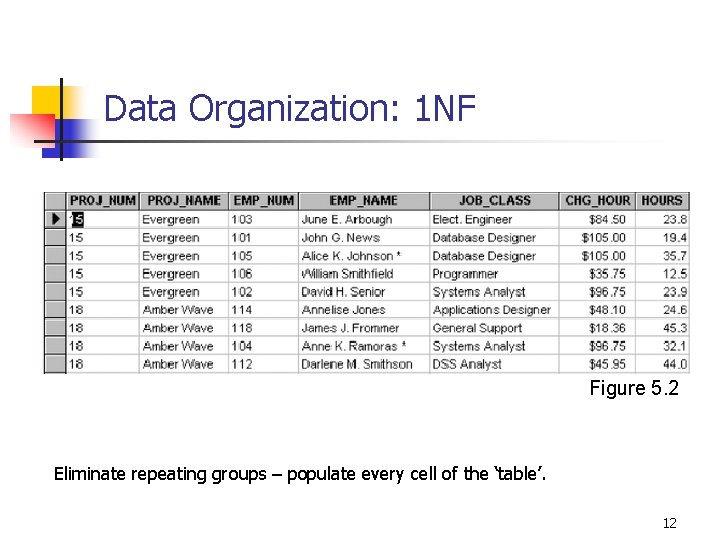
Data Organization: 1 NF Figure 5. 2 Eliminate repeating groups – populate every cell of the ‘table’. 12
Conversion to 1 NF n Identify dependencies n n Desirable dependencies based on primary key Less desirable dependencies n n Partial (later) n based on part of composite primary key Transitive (later) n one nonprime attribute depends on another nonprime attribute 13
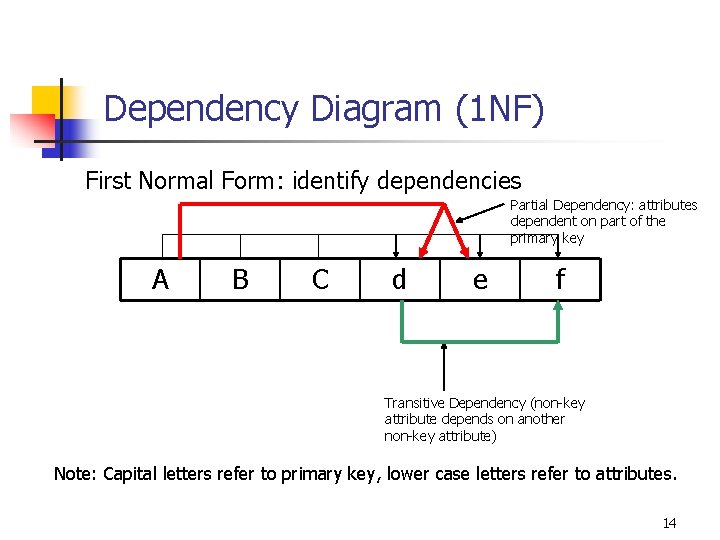
Dependency Diagram (1 NF) First Normal Form: identify dependencies Partial Dependency: attributes dependent on part of the primary key A B C d e f Transitive Dependency (non-key attribute depends on another non-key attribute) Note: Capital letters refer to primary key, lower case letters refer to attributes. 14
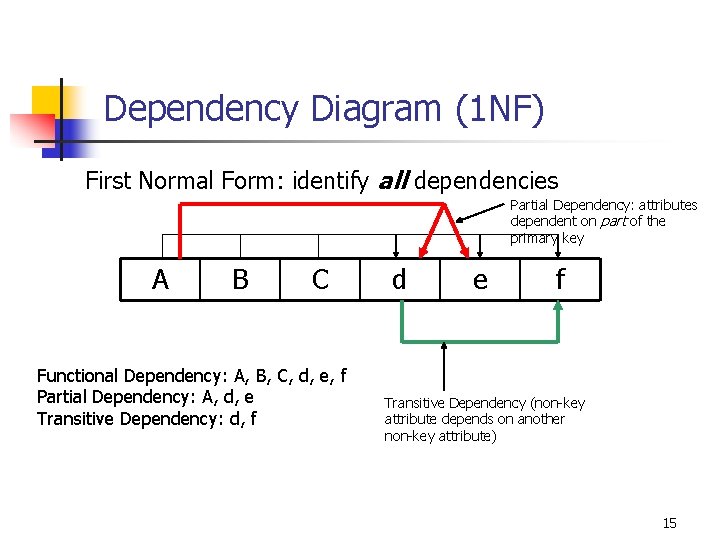
Dependency Diagram (1 NF) First Normal Form: identify all dependencies Partial Dependency: attributes dependent on part of the primary key A B C Functional Dependency: A, B, C, d, e, f Partial Dependency: A, d, e Transitive Dependency: d, f d e f Transitive Dependency (non-key attribute depends on another non-key attribute) 15
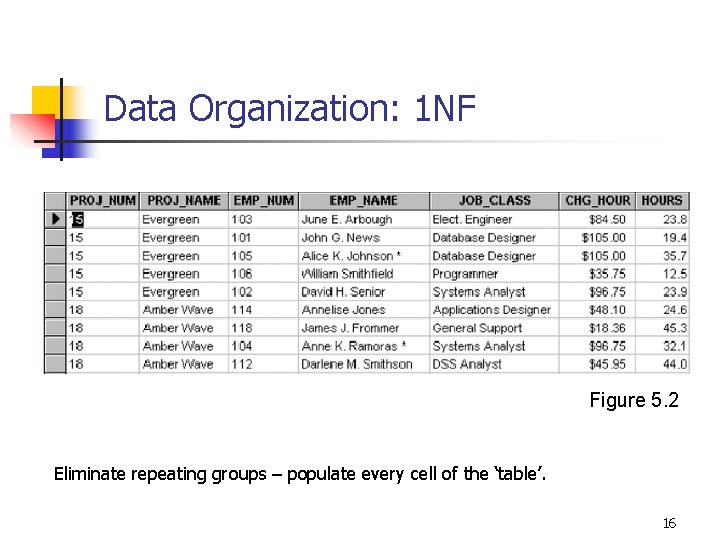
Data Organization: 1 NF Figure 5. 2 Eliminate repeating groups – populate every cell of the ‘table’. 16
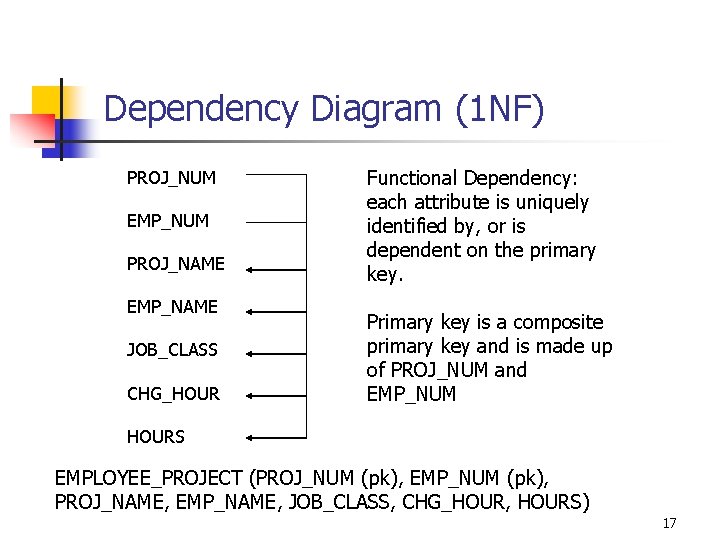
Dependency Diagram (1 NF) PROJ_NUM EMP_NUM PROJ_NAME EMP_NAME JOB_CLASS CHG_HOUR Functional Dependency: each attribute is uniquely identified by, or is dependent on the primary key. Primary key is a composite primary key and is made up of PROJ_NUM and EMP_NUM HOURS EMPLOYEE_PROJECT (PROJ_NUM (pk), EMP_NUM (pk), PROJ_NAME, EMP_NAME, JOB_CLASS, CHG_HOUR, HOURS) 17
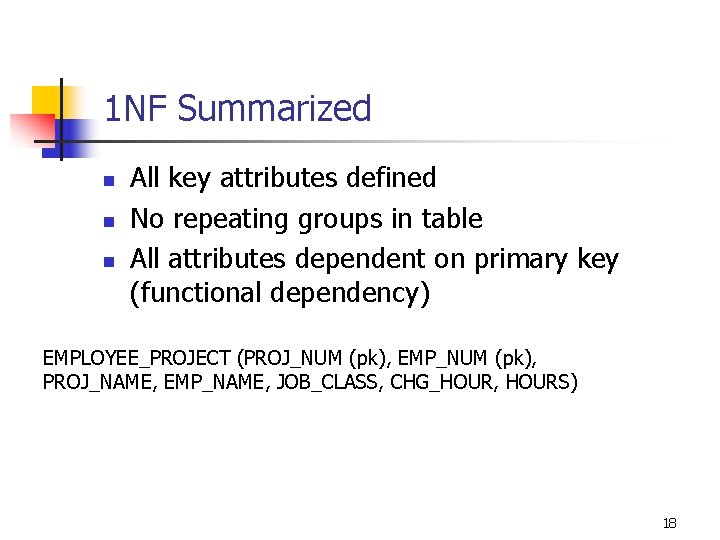
1 NF Summarized n n n All key attributes defined No repeating groups in table All attributes dependent on primary key (functional dependency) EMPLOYEE_PROJECT (PROJ_NUM (pk), EMP_NUM (pk), PROJ_NAME, EMP_NAME, JOB_CLASS, CHG_HOUR, HOURS) 18
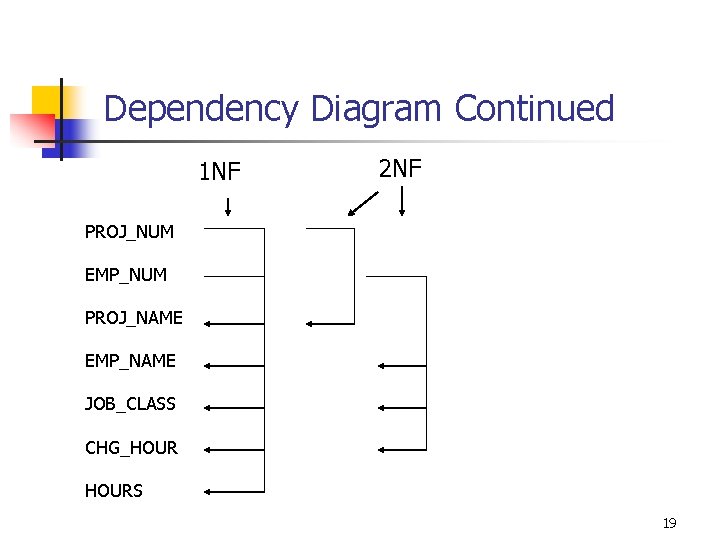
Dependency Diagram Continued 1 NF 2 NF PROJ_NUM EMP_NUM PROJ_NAME EMP_NAME JOB_CLASS CHG_HOURS 19
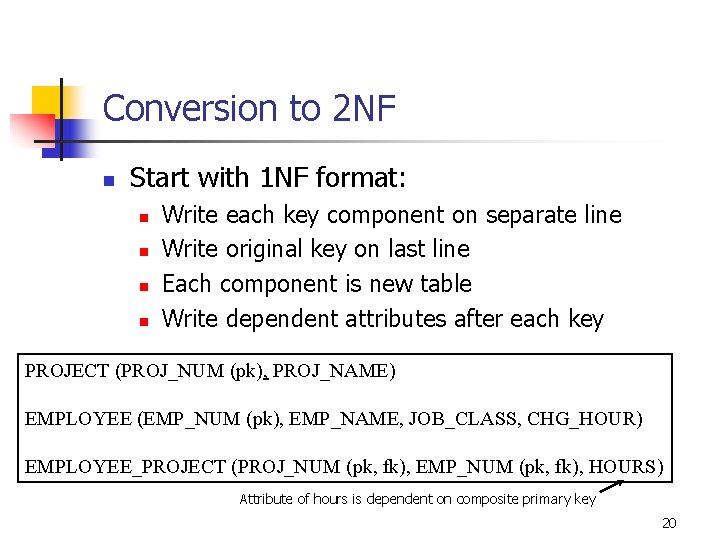
Conversion to 2 NF n Start with 1 NF format: n n Write each key component on separate line Write original key on last line Each component is new table Write dependent attributes after each key PROJECT (PROJ_NUM (pk), PROJ_NAME) EMPLOYEE (EMP_NUM (pk), EMP_NAME, JOB_CLASS, CHG_HOUR) EMPLOYEE_PROJECT (PROJ_NUM (pk, fk), EMP_NUM (pk, fk), HOURS) Attribute of hours is dependent on composite primary key 20
2 NF Summarized n n In 1 NF Includes no partial dependencies n n Attributes dependent on a portion of primary key Still possible to exhibit transitive dependency n Attributes may be functionally dependent on nonkey attributes 21
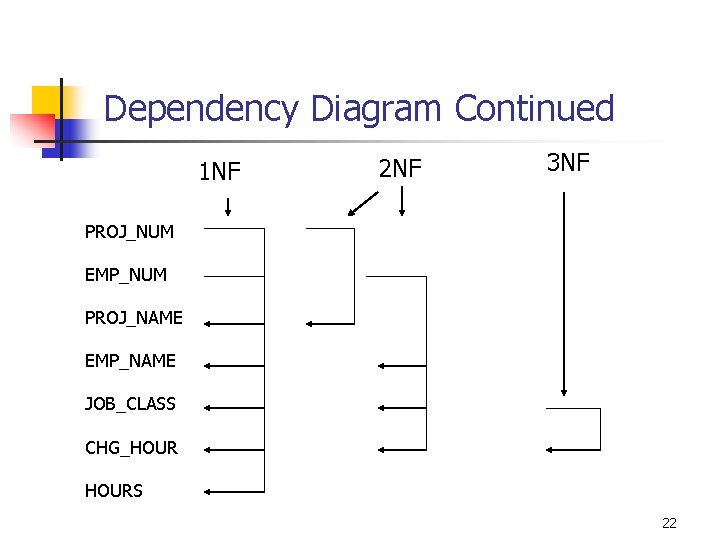
Dependency Diagram Continued 1 NF 2 NF 3 NF PROJ_NUM EMP_NUM PROJ_NAME EMP_NAME JOB_CLASS CHG_HOURS 22
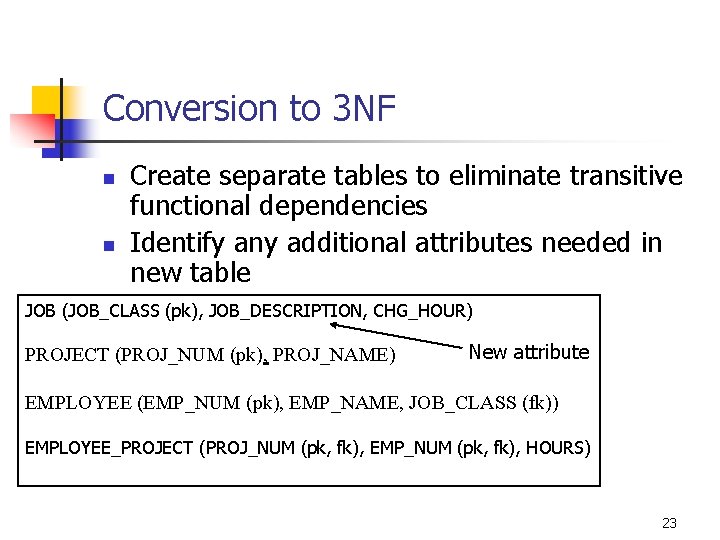
Conversion to 3 NF n n Create separate tables to eliminate transitive functional dependencies Identify any additional attributes needed in new table JOB (JOB_CLASS (pk), JOB_DESCRIPTION, CHG_HOUR) PROJECT (PROJ_NUM (pk), PROJ_NAME) New attribute EMPLOYEE (EMP_NUM (pk), EMP_NAME, JOB_CLASS (fk)) EMPLOYEE_PROJECT (PROJ_NUM (pk, fk), EMP_NUM (pk, fk), HOURS) 23
3 NF Summarized n n In 2 NF Contains no transitive dependencies 24
Normalization and Database Design n Normalization should be part of the design process E-R Diagram provides macro view Normalization provides micro view of entities n n Focuses on characteristics of specific entities May yield additional entities Difficult to separate normalization from E-R diagramming Business rules must be determined 25
Normalization Steps n 1 NF n n All key attributes are defined No repeating groups All attributes are functionally dependent on the primary key 2 NF n n Table is in 1 NF No partial dependencies 26
Normalization Steps n 3 NF n n n Table is in 2 NF No transitive dependencies New PKs identified where appropriate 27
- Slides: 27