
Database Design Lecture 5 Conceptual Data Modeling adding
Database Design – Lecture 5 Conceptual Data Modeling – adding attributes
Lecture Objectives n n n How to correctly define attributes for an entity Determining the key structure of an entity Refining relationships between entities based on Business Rules 2
Attributes n n Characteristics of entities In Chen model, attributes are represented by ovals and are connected to entity rectangle with a line Each oval contains the name of attribute it represents In Crow’s Foot model, attributes are written in attribute box below entity rectangle 3
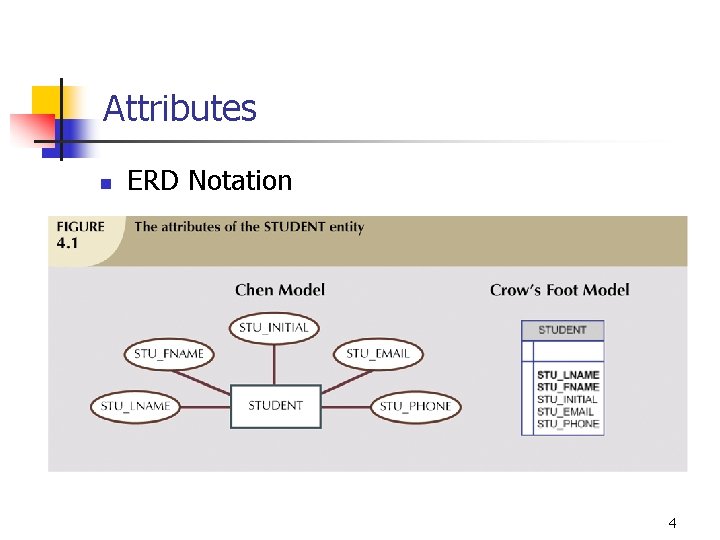
Attributes n ERD Notation 4
Attributes n n Should be meaningful Rule of thumb is to prefix attribute with entity name n n i. e. CUSTOMER_NAME versus NAME Can be single valued n An attribute that can have only a single value n n i. e. social insurance number Can be multivalued n An attribute that can have many values n i. e. an employee has many skills 5

Derived Attributes n n Attribute whose value may be calculated (derived) from other attributes Need not be physically stored within database Can be derived by using an algorithm Can show in the conceptual model 6

Derived Attributes 7
Primary Keys n n Should uniquely identify each entity instance Can not be nulls Should preferably be numeric Should have the minimum number of attributes possible 8
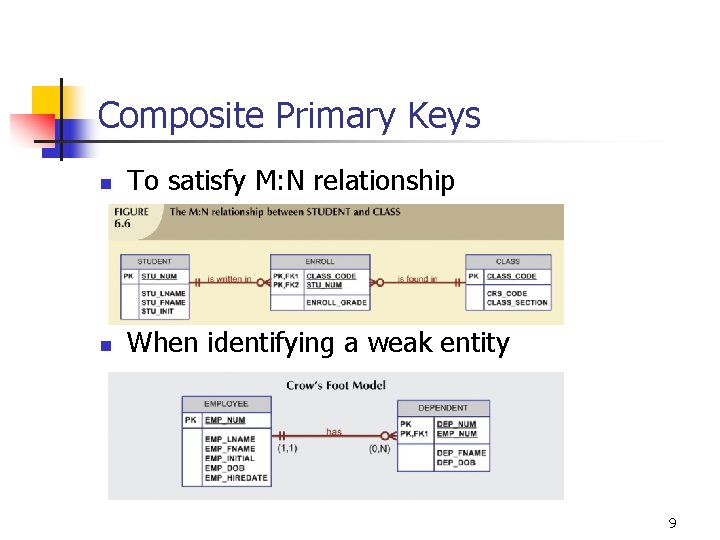
Composite Primary Keys n To satisfy M: N relationship n When identifying a weak entity 9
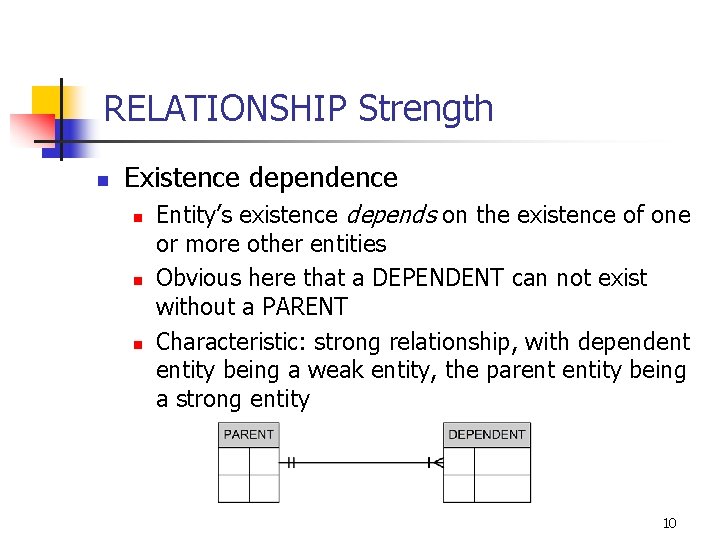
RELATIONSHIP Strength n Existence dependence n n n Entity’s existence depends on the existence of one or more other entities Obvious here that a DEPENDENT can not exist without a PARENT Characteristic: strong relationship, with dependent entity being a weak entity, the parent entity being a strong entity 10
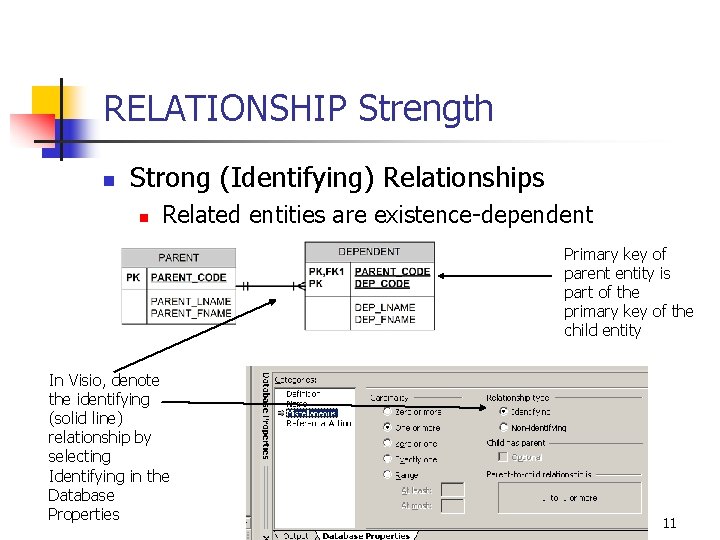
RELATIONSHIP Strength n Strong (Identifying) Relationships n Related entities are existence-dependent Primary key of parent entity is part of the primary key of the child entity In Visio, denote the identifying (solid line) relationship by selecting Identifying in the Database Properties 11
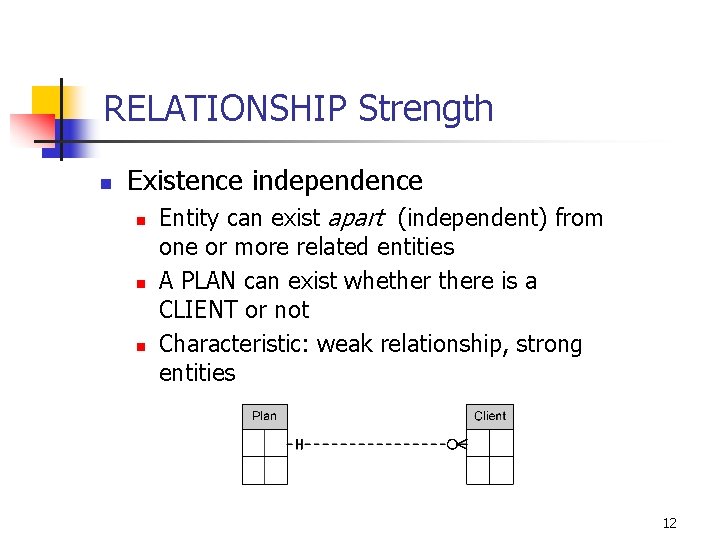
RELATIONSHIP Strength n Existence independence n n n Entity can exist apart (independent) from one or more related entities A PLAN can exist whethere is a CLIENT or not Characteristic: weak relationship, strong entities 12
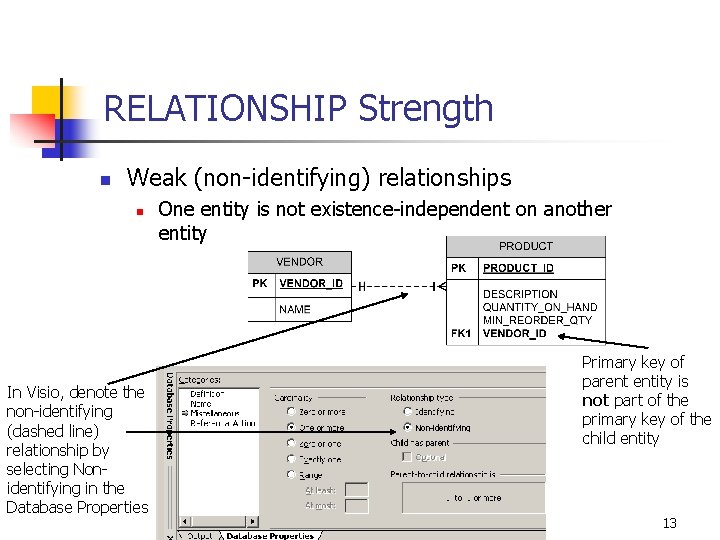
RELATIONSHIP Strength n Weak (non-identifying) relationships n In Visio, denote the non-identifying (dashed line) relationship by selecting Nonidentifying in the Database Properties One entity is not existence-independent on another entity Primary key of parent entity is not part of the primary key of the child entity 13
Relationship Participation n Optional: n n One entity occurrence does not require a corresponding entity occurrence in a particular relationship Mandatory: n One entity occurrence requires a corresponding entity occurrence in a particular relationship 14
Relationship Degree n n Indicates number of associated entities or participants Unary relationship n n Binary relationship n n Association is maintained within a single entity Two entities are associated Ternary relationship n Three entities are associated 15
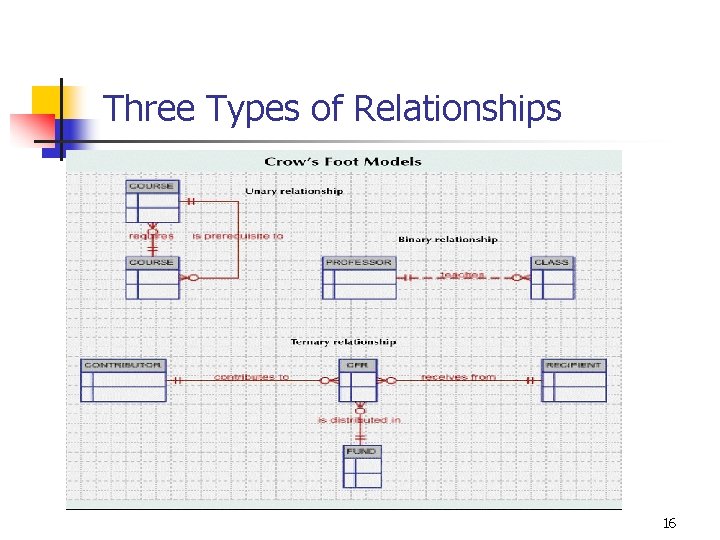
Three Types of Relationships 16
Unary (Recursive) Relationships n n n Relationship can exist between occurrences of the same entity set Naturally found within a unary relationship Can be 1: 1; 1: M or M: N 17
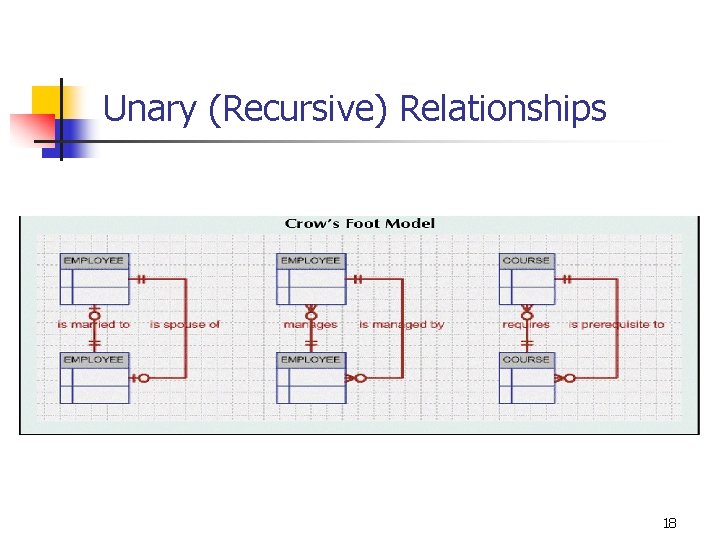
Unary (Recursive) Relationships 18
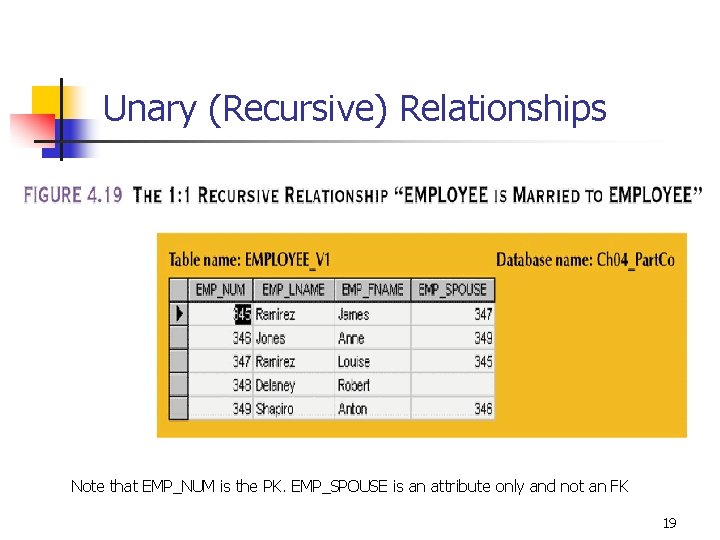
Unary (Recursive) Relationships Note that EMP_NUM is the PK. EMP_SPOUSE is an attribute only and not an FK 19
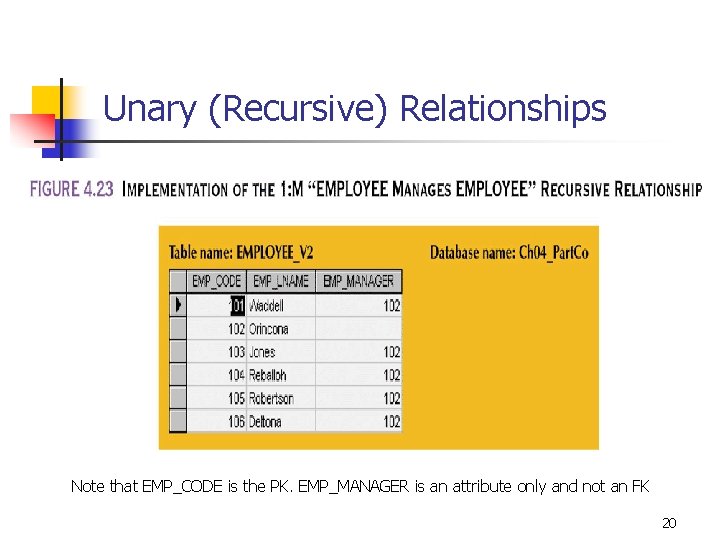
Unary (Recursive) Relationships Note that EMP_CODE is the PK. EMP_MANAGER is an attribute only and not an FK 20
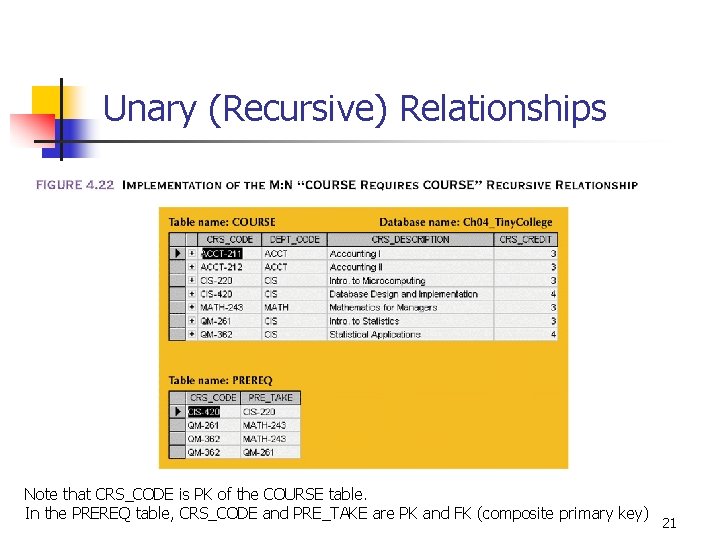
Unary (Recursive) Relationships Note that CRS_CODE is PK of the COURSE table. In the PREREQ table, CRS_CODE and PRE_TAKE are PK and FK (composite primary key) 21
Binary Relationships n n Most common type of relationship Types: n 1: 1 relationship n 1: M relationship n M: N relationships 22
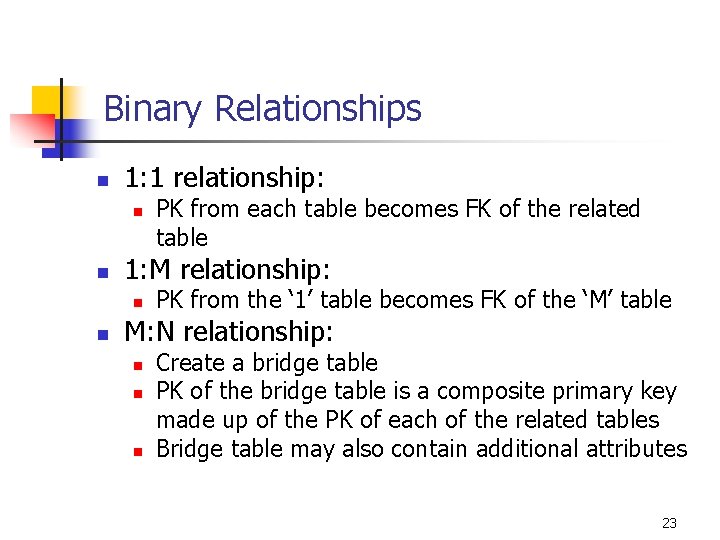
Binary Relationships n 1: 1 relationship: n n 1: M relationship: n n PK from each table becomes FK of the related table PK from the ‘ 1’ table becomes FK of the ‘M’ table M: N relationship: n n n Create a bridge table PK of the bridge table is a composite primary key made up of the PK of each of the related tables Bridge table may also contain additional attributes 23
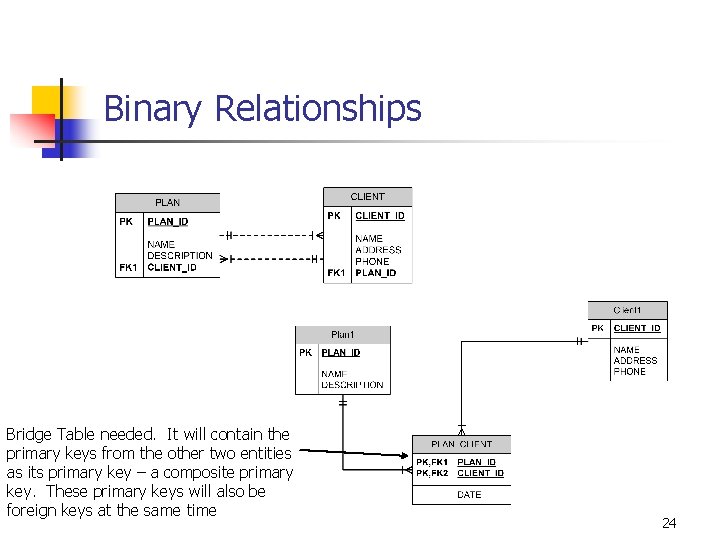
Binary Relationships Bridge Table needed. It will contain the primary keys from the other two entities as its primary key – a composite primary key. These primary keys will also be foreign keys at the same time 24
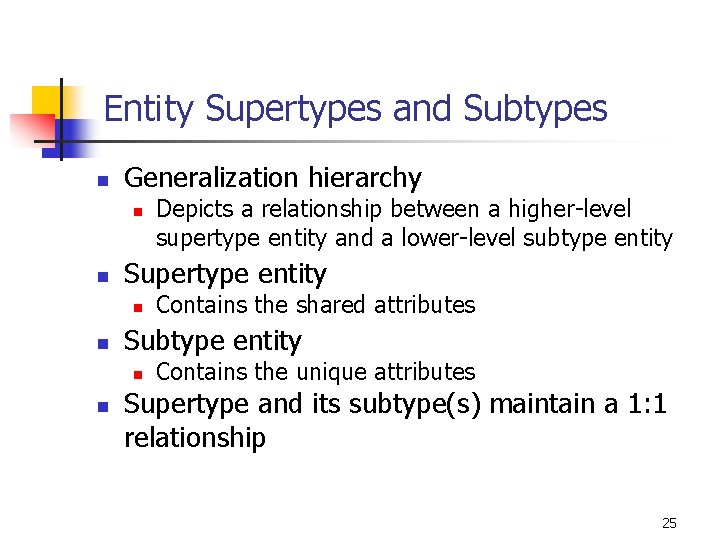
Entity Supertypes and Subtypes n Generalization hierarchy n n Supertype entity n n Contains the shared attributes Subtype entity n n Depicts a relationship between a higher-level supertype entity and a lower-level subtype entity Contains the unique attributes Supertype and its subtype(s) maintain a 1: 1 relationship 25
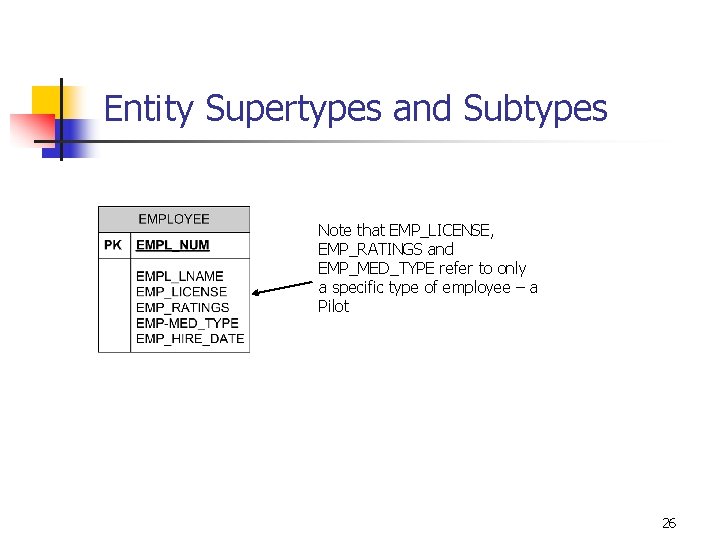
Entity Supertypes and Subtypes Note that EMP_LICENSE, EMP_RATINGS and EMP_MED_TYPE refer to only a specific type of employee – a Pilot 26
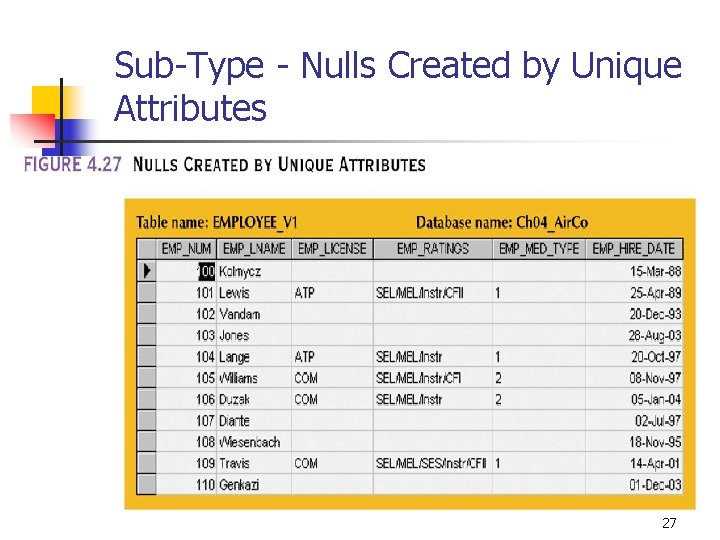
Sub-Type - Nulls Created by Unique Attributes 27
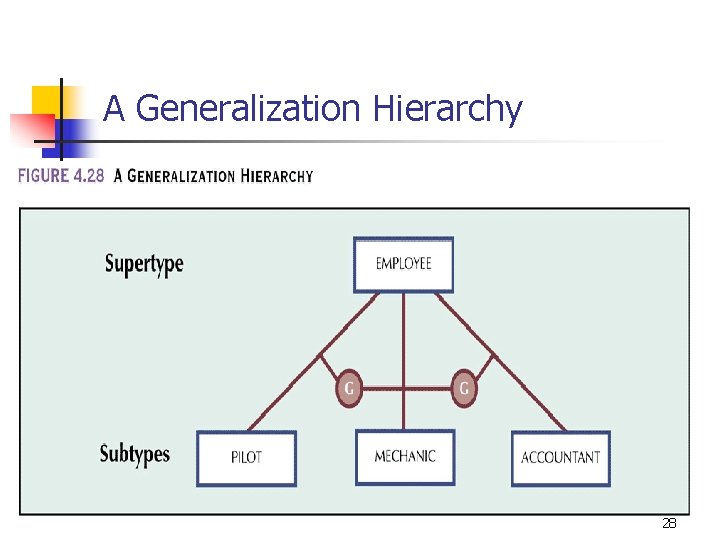
A Generalization Hierarchy 28
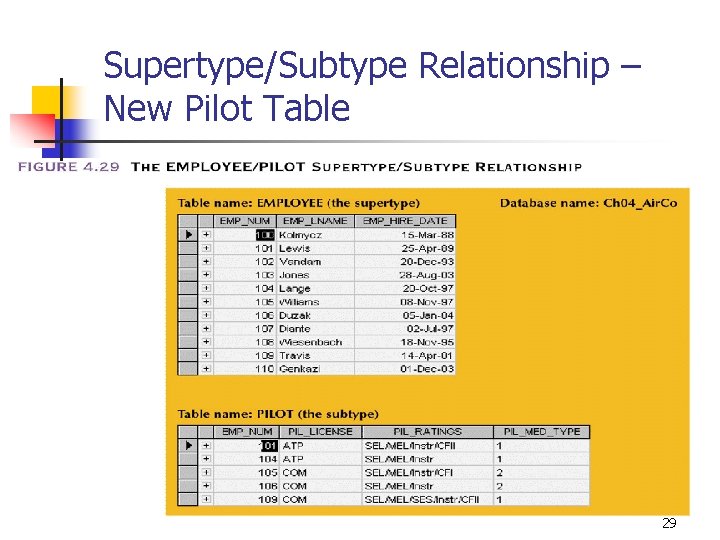
Supertype/Subtype Relationship – New Pilot Table 29
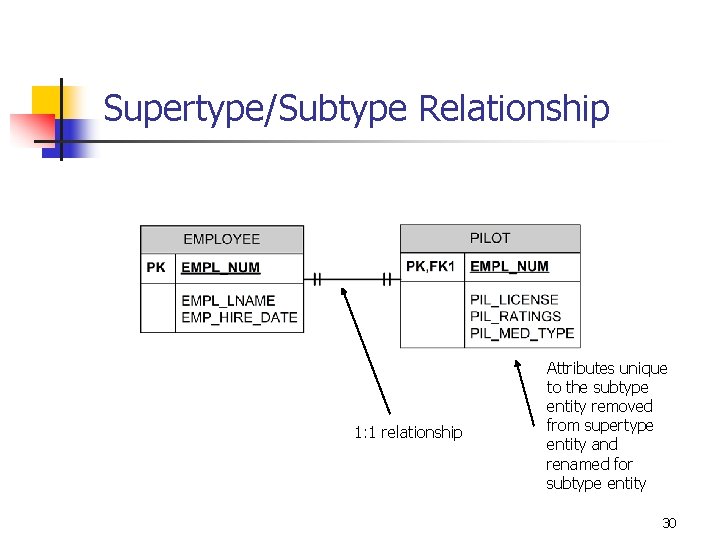
Supertype/Subtype Relationship 1: 1 relationship Attributes unique to the subtype entity removed from supertype entity and renamed for subtype entity 30
Developing an ER Diagram n n Database design is iterative rather than linear or sequential process Iterative process n n Conceptual Model: Entities, Relationships Logical Model: Entities, Attributes, Relationships, PKs and FKs identified 31
Developing an ER Diagram n Building an ERD usually involves the following activities: n n n Create detailed narrative of organization’s description of operations Identify business rules based on description of operations Identify main entities and relationships from business rules Develop initial ERD Identify attributes and primary keys that adequately describe entities Revise and review ERD 32
Summary n Entity relationship (ER) model n n Uses ERD to represent conceptual database as viewed by end user ERM’s main components: n n n Entities Attributes Relationships Includes connectivity and cardinality notations M: N relationship is valid at conceptual level (providing there is not an attribute that represents the intersection of the two entities) 33
- Slides: 33