
Database Architecture An early proposal for a standard
Database Architecture • An early proposal for a standard terminology and general architecture for database systems was produced in 1971 by the DBTG (Database Task Group) appointed by the Conference on Data Systems and Languages (CODASYL, 1971). • The DBTG recognized the need for a two level approach with a system view called schema and user views called subschemas. • The American National Standards Institute (ANSI), Standards Planning and Requirements Committee (SPARC), ANSI/X 3/SPARC, produced a similar terminology and architecture in 1975 (ANSI, 1975). • ANSI SPARC recognized the need for a three level approach with a system catalogue. • These proposals were motivated by some research experiences published by IBM user organizations Guide and Share few years back. 29 Dec 21 Jahangir Alam 1
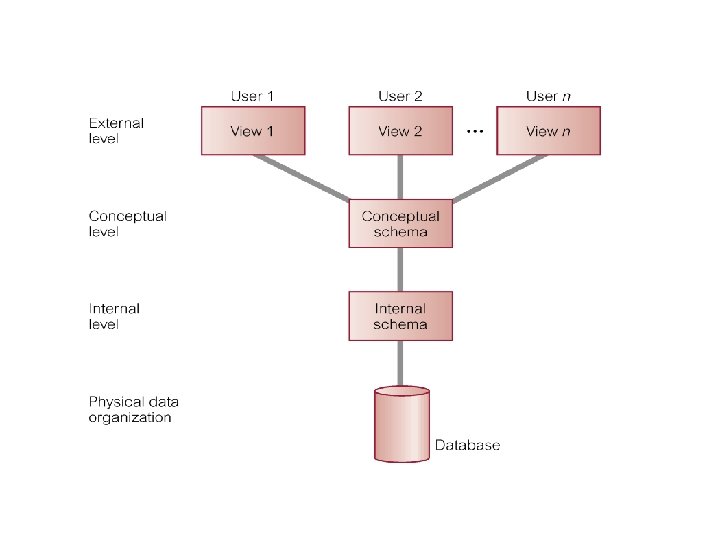
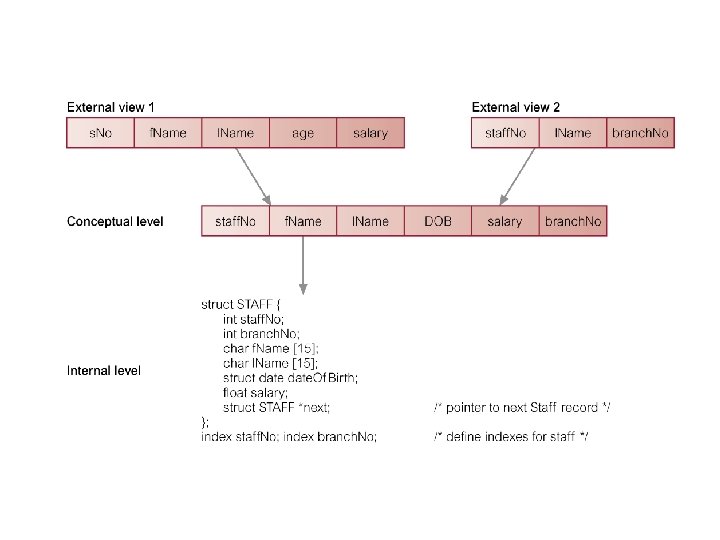
• These proposals concentrated on the need for an implementation independent layer to isolate programs from underlying representational issues (Guide/ Share, 1970). • Although the ANSI SPARC model didn’t become a standard, it still provides a basis for understanding some of the functionality of a DBMS. • For our purpose the fundamental point of these and later reports is the identification of three levels of abstraction, i. e. , three distinct levels at which data items can be described. • These levels form a Three Level Architecture comprising an External, a Conceptual and an Internal level as shown in the figure on the next page. • The way users perceive the data is called the external level. The way the DBMS and OS perceive the data is the internal level, where the data is actually stored using the appropriate data structures. The conceptual level provides both the mapping and the desired independence between external and internal levels. 29 Dec 21 Jahangir Alam 2
Objective of Three – Level Architecture The objective of three level architecture is to separate each user’s view of the database from the way the database is physically represented. This separation is essential due to the following reasons: • Each user should be able to access the same data but have a different customized view of the data. Each user should be able to change the way he or she views the data and this change should not affect other users. • Users should not have to deal directly with the physical database storage details such as indexing or hashing. In other words a user’s interaction with the database should be independent of storage considerations. • The DBA should be able to change the database storage structures without effecting user’s view 29 Dec 21 Jahangir Alam 4
• The internal structure of the database should be unaffected by changes to the physical aspects of storage such as the changeover to a new storage. • The DBA should be able to change the conceptual structure of the database without affecting of all users. 29 Dec 21 Jahangir Alam 5

THE EXTERNAL LEVEL/ VIEW • The external view consists of a number of different external views of the database. • Each user has a view of the ‘real world’ represented in a form that is familiar for that user. • The external level includes only those entities, attributes and relationships in real world that the user is interested in. • Other entities, attributes and relationships that are not of interest may be presented in the database but the user will be unaware of them. • Different views may have different representations of the same data. • For example one user may view date in the format dd mm yyyy while another may view dates as yyyy dd mm. 29 Dec 21 Jahangir Alam 6
• Some views might include calculated or derived data i. e. data not actually stored as such in the database but created when needed. • Views may even include data combined or derived from several entities. 29 Dec 21 Jahangir Alam 7
THE CONCEPTUAL LEVEL/ VIEW • This level contains the logical structure of the entire database as seen by the DBA. • It is a complete view of the data requirements of the organization that is independent of any storage considerations. • This level represents: All entities their attributes and their relationships. The constraints on the data. Semantic information of data. Security and Integrity information. • The conceptual level supports each external view, in that any data available to a user must be contained in or derivable from the conceptual level. 29 Dec 21 Jahangir Alam 8
• However, this level must not contain any storage dependent details. • For example the description of an entity should contain only data types of attributes (e. g. integer, real or character) and their length (such as the maximum number of digit or characters) but not any storage considerations such as the number of bytes occupied. 29 Dec 21 Jahangir Alam 9
THE INTERNAL LEVEL/ VIEW • The Internal level covers the physical implementation of the database to achieve optimal runtime performance and storage space utilization. • It covers the data structures and file organizations used to store data on the storage devices. • It interfaces with the operating system access methods (file management techniques for storing and retrieving data records) to place the data on the storage devices, build the indexes, retrieve the data, and so on. • The Internal Level is concerned with such things as: Storage space allocation for data and indexes. Record descriptions for storage ( with stored sizes of data items). Record Placement. Data compression & encryption techniques. 29 Dec 21 Jahangir Alam 10
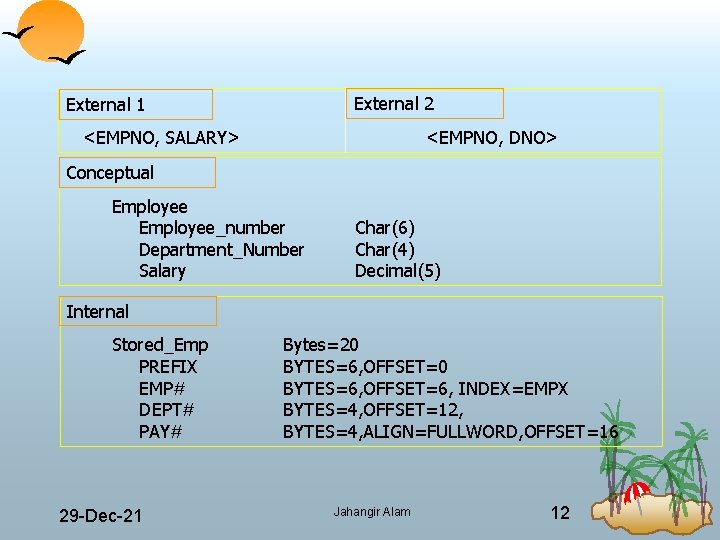
External 2 External 1 <EMPNO, SALARY> <EMPNO, DNO> Conceptual Employee_number Department_Number Salary Char(6) Char(4) Decimal(5) Internal Stored_Emp PREFIX EMP# DEPT# PAY# 29 Dec 21 Bytes=20 BYTES=6, OFFSET=6, INDEX=EMPX BYTES=4, OFFSET=12, BYTES=4, ALIGN=FULLWORD, OFFSET=16 Jahangir Alam 12
• Below the internal level there is a physical level that may be managed by the Operating System under the direction of DBMS. • However, the functions of the DBMS and the OS at the physical level are not clear cut and vary from system to system. • Some DBMSs take advantage of many of the OS access methods, while other use only the most basic ones and create their own file organizations. • The Physical Level below the DBMS consists of items only the OS knows, such as exactly how the sequencing is implemented and whether the fields of internal records are stored as contiguous bytes on disk. 29 Dec 21 Jahangir Alam 13
Schemas, Mappings and Instances • The overall description of database is called Database Schema. • There are three different types of schema in the database and these are defined according to the levels of abstraction of the three level architecture. • At the highest level we have multiple external schemas (also called subschemas) that correspond to different views of data. • At the conceptual level we have the conceptual schema, which describes all the entities, attributes and relationships together with integrity constraints. • At the lowest level of abstraction we have the internal schema which is complete description of the internal model, containing the definition of the stored records, the methods of representation, the data fields, and the indexing and hashing techniques used, if any. There is only one conceptual schema and one internal schema per database. 29 Dec 21 Jahangir Alam 14
• The DBMS is responsible for mapping between the above three types of schemas. Not only this the DBMS must check schemas for consistency. • In other words the DBMS must check that each external schema is derivable from the conceptual schema and it must use the information in the conceptual schema to map between each external schema and internal schema. • The conceptual schema is related to the internal schema through a conceptual/ internal mapping. This mapping enables the DBMS to find the actual record or combination of records in the physical storage that constitute a logical record in the conceptual schema together with any constraints to be enforced on the operations for that logical record. • It also allows any differences in entity names, attribute order, data types… to be resolved. 29 Dec 21 Jahangir Alam 15
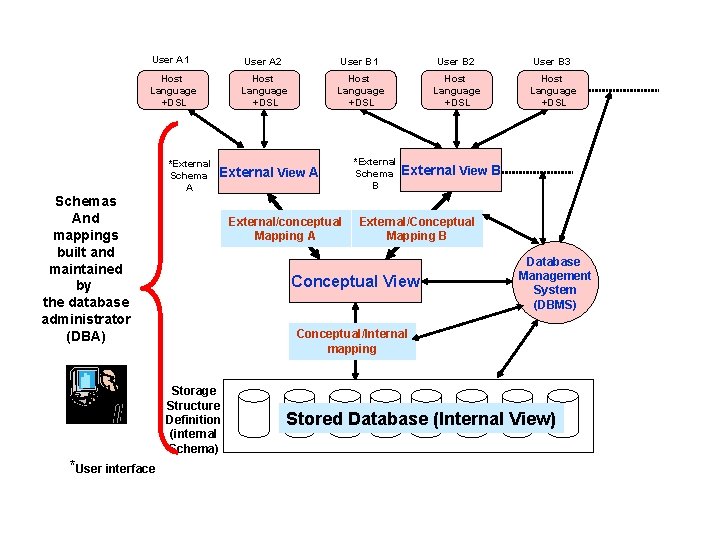
User A 1 User A 2 User B 1 User B 2 User B 3 Host Language +DSL Host Language +DSL *External Schema A External View A Schemas And mappings built and maintained by the database administrator (DBA) External/conceptual Mapping A External View B External/Conceptual Mapping B Conceptual View Database Management System (DBMS) Conceptual/Internal mapping Storage Structure Definition (internal Schema) *User interface *External Schema B Stored Database (Internal View)
• Finally, each external schema is related to the conceptual schema by the external/ conceptual mapping. This enables the DBMS to map names in the user’s view on to the relevant part of the conceptual schema. • As evident from the above two examples shown in the above two figures the names and order of fields at different levels may be different. It is the responsibility of DBMS to identify what field at one level maps to which field at the another level. • It is important to distinguish between description of the database and database itself. The description of the database is database schema. • The Schema is specified during the design process and is not expected to change frequently. However, the actual data in the database may change frequently. • The data in a database at any particular point in time is called a database instance. Thus many database instances can correspond to the same database schema. The schema is sometimes called the intension of database, while an instance is called extension (or state) of the database. 29 Dec 21 Jahangir Alam 17
Database Architecture & Data Independence • Another major objective of the three schema ANSI/ SPARC architecture is to provide data independence. • Two kinds of data independence are: Logical Data Independence Physical Data Independence • Changes to the conceptual schema, such as the addition or removal of new entities, attributes or relationships, should be possible without having to change existing external schemas or having to rewrite application programs. The conceptual/ external mapping must absorb such changes. • Clearly, the users for whom the changes have been made need to be aware of them, but what is important is that other users should not be. • Logical Data Independence refers to the immunity of the external schemas to changes in the conceptual schema. 29 Dec 21 Jahangir Alam 18
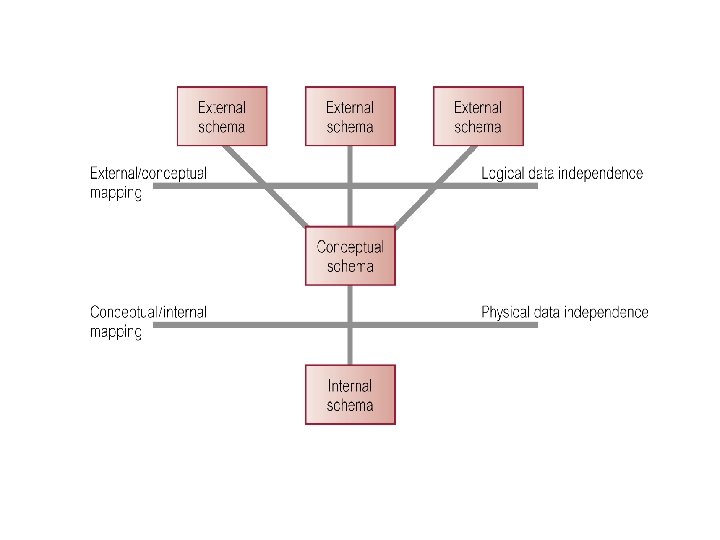
• Changes to the Internal Schema, such as using different file organizations, using different storage devices, modifying indexes or hashing algorithms should be possible without having to change the conceptual schema or external schemas. The conceptual/ internal mapping must be able to absorb them. • From the users point of view the only effect that may be noticed is a change in performance. In fact, deterioration in performance is the most common reason for internal schema changes. • Physical Data Independence refers to the immunity of the conceptual schema to changes in the internal schema. • Following figure illustrates where each type of data independence occurs in relation to the three – schema architecture. 29 Dec 21 Jahangir Alam 19
Question • In context of the ANSI/ SPARC DBMS architecture differentiate the following terms: View Level Schema 29 Dec 21 Jahangir Alam 21
DBMS Languages • A data sublanguage (DSL) consists of two parts – a Data Definition Language (DDL) and a Data Manipulation Language (DML). • The DDL is used to specify the database schema and the DML is used to both read and update the database. • These Languages are called the data sublanguages because normally (in present day DBMSs) they do not include constructs for all computing needs such as conditional or iterative statements, which are provided by the high level programming languages. • Many DBMSs have the facility for embedding the data sublanguage in a high level programming language (User Exits) such as COBOL, C, C++, Java etc. In this case the high level language is sometimes referred to as the host language. 29 Dec 21 Jahangir Alam 22
An Example • When a C – Programmer accesses a database created using ORACLE’s component SQL*Plus, he includes SQL Statements in his C Program. Then C is called the host language and the SQL statements embedded in C Program are referred to as embedded SQL statements or user exits. • For this purpose one must have pro*C compiler (or pro*HLL name in case host language is other HLL than C) installed as a component of ORACLE. • The following program illustrates this concept: 29 Dec 21 Jahangir Alam 23
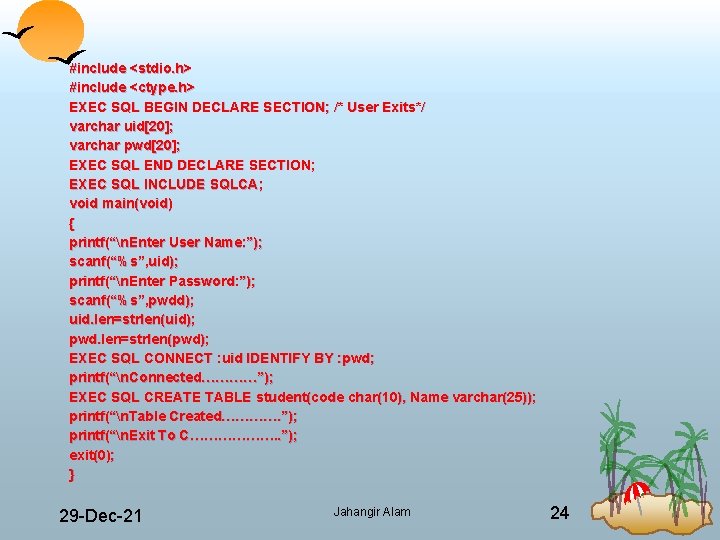
#include <stdio. h> #include <ctype. h> EXEC SQL BEGIN DECLARE SECTION; /* User Exits*/ varchar uid[20]; varchar pwd[20]; EXEC SQL END DECLARE SECTION; EXEC SQL INCLUDE SQLCA; void main(void) { printf(“n. Enter User Name: ”); scanf(“%s”, uid); printf(“n. Enter Password: ”); scanf(“%s”, pwdd); uid. len=strlen(uid); pwd. len=strlen(pwd); EXEC SQL CONNECT : uid IDENTIFY BY : pwd; printf(“n. Connected…………”); EXEC SQL CREATE TABLE student(code char(10), Name varchar(25)); printf(“n. Table Created…………. ”); printf(“n. Exit To C………………. . ”); exit(0); } 29 Dec 21 Jahangir Alam 24
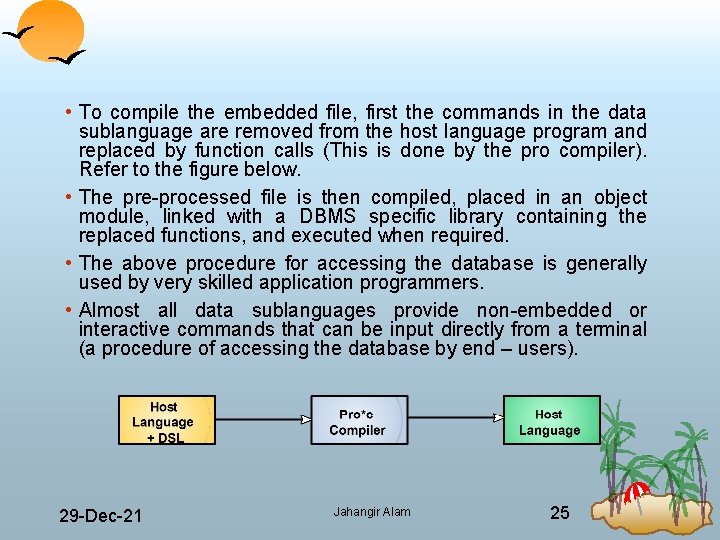
• To compile the embedded file, first the commands in the data sublanguage are removed from the host language program and replaced by function calls (This is done by the pro compiler). Refer to the figure below. • The processed file is then compiled, placed in an object module, linked with a DBMS specific library containing the replaced functions, and executed when required. • The above procedure for accessing the database is generally used by very skilled application programmers. • Almost all data sublanguages provide non embedded or interactive commands that can be input directly from a terminal (a procedure of accessing the database by end – users). 29 Dec 21 Jahangir Alam 25
More on DBMS Languages • Once the design of a database is completed and a DBMS is chosen to implement the database, the first order of the day is to specify the conceptual schema and the internal schema for the database and any mapping between the two. • In many DBMSs where no strict separation of levels is maintained, only the DDL is used by the DBA to define both the schemas. • In DBMSs where a clear separation is maintained between the conceptual and internal levels, the DDL is used to specify the conceptual schema only. Another language called the storage definition language (SDL) is used to specify the internal schema. The mappings between the two schemas may be specified in either one of these languages. • For a true three schema architecture we would need a third language, the view definition language (VDL) to specify user views (external schemas) and their mappings to the conceptual schema. 29 Dec 21 Jahangir Alam 26
• But, in most of the DBMSs the DDL is used to define both the external schemas and mappings discussed in the above point. • In the current DBMSs the above types of languages are usually not considered distinct language rather a comprehensive integrated language is used that includes constructs for conceptual schema definition, external schema definition and data manipulation. • Storage Definition is typically kept separate, since it is used to define the physical storage structures to fine tune the performance of the database system and is typically utilized by the DBA. • A typical example of a comprehensive database language is the SQL relational database language which represents a combination of DDL, VDL and DML as well as statements for constraints specification. • The SDL was a component in earlier versions of SQL but has been removed from the language to keep it at conceptual and external levels only. 29 Dec 21 Jahangir Alam 27
• The above discussion on database language indicates that DDL and DML are the two integral parts of a database language so they need to discussed in much details. 29 Dec 21 Jahangir Alam 28
The Data Definition Language (DDL) • The database schema is specified by a set of definitions expressed by means of a special language, called the data definition language. • The DDL is used to define a schema or to modify an existing one. It can’t be used to manipulate the data. • The result of the compilation of the DDL statements is a set of tables stored in a special file collectively called the system catalog. • The System Catalog integrates the meta data that is data that describe objects in the database and makes it easier for those objects to be accessed or manipulated. • The meta data contains definitions of records, data items and other objects that are of interest to the user or are required by the DBMS. 29 Dec 21 Jahangir Alam 29
• The DBMS normally consults the system catalog before the actual data is accessed in the database. • The term data dictionary and data directory are also used to describe the system catalog. (We shall discuss system catalogs in detail at a later stage). • At a theoretical level we could identify different DDLs for each schema in the three – schema architecture, namely a DDL for external schemas, a DDL for conceptual schema, and a DDL for the internal schema. • However, in practice there is one comprehensive DDL that allows specification of at least the external and conceptual schemas. 29 Dec 21 Jahangir Alam 30
The Data Manipulation Language (DML) • Data manipulation operations usually include the following: Insertion of the new data in database. Modification of data stored in database. Retrieval (Query) of data contained in the database. Deletion of data from the database. • Therefore one of the most important functions of DBMS is to support data manipulation language in which the user can construct statements that will cause the above data manipulation to occur. • Data Manipulation at higher levels namely at conceptual level and at the external levels is obvious. But what sort of data manipulation at internal level? ? 29 Dec 21 Jahangir Alam 31
• The answer is that at the internal level the DBA must define the smart procedures that allow efficient access of data thereby improving the performance of the database. • The part of DML that involves data retrieval is called a query language. The term ‘query’ is therefore reserved to denote a retrieval statement expressed in a query language. • The term ‘query language’ and ‘DML’ are commonly used interchangeably, although this is technically incorrect. • DMLs are distinguished by their underlying retrieval constructs. We can identify two types of DML – procedural (Low Level DML) and non – procedural (High Level DML). • The prime difference between these two types of manipulation languages is that procedural languages specify how the output of a DML statement must be obtained, however non – procedural DMLs describe only what output is to be obtained. • Typically, procedural languages treat records individually, while non – procedural languages operate on sets of records. 29 Dec 21 Jahangir Alam 32
Procedural or Low Level DML • With a procedural DML the user or more precisely the programmer specifies what data is needed and how to obtain it. • This means that the user must express all the data access operations that are to be used by calling appropriate procedures to obtain the information required. • This type of DML typically retrieves individual records or objects from the database and processes each separately. • Clearly these DMLs need to use the programming language constructs such as looping to retrieve and process each record from a set of records. • Typically they are embedded with conventional High Level Programming Languages so that they could be able to use the native constructs of a High Level Language. Some of them provide their own constructs to serve the purpose. 29 Dec 21 Jahangir Alam 33
• They are also called record at a time DMLs because of their nature of processing a record at a time. • Network and Hierarchical DMLs are normally procedural. Example: IBM’s IMS (Information Management System) was the leading DBMS based on Hierarchical Data Model. Its Data Manipulation Language was DL/1 and it was procedural DML. Note: We shall explore IMS and DL/1 in detail when we shall be discussing Data Modeling. 29 Dec 21 Jahangir Alam 34
Non procedural Data Manipulation Languages • Non procedural DMLs allow the required data to be specified in a single retrieval or update step. • With these sort of DMLs the user specifies what data is required without specifying how it is to be obtained. • In case of non procedural DMLs the DBMS translates a DML statement into a procedure (or set of procedures) that manipulates the required set of records. This frees the user from having to know how data structures are internally implemented and what algorithms are required to retrieve and possibly transform the data, thus providing users with a considerable degree of data independence. • They are also known as declarative languages or set at a time or set oriented DMLs. • Relational Database Management System (RDBMS) usually include some form of non procedural DMLs typically SQL or QBE (Query by Example). They are easy to learn and use as compared to Procedural DMLs. 29 Dec 21 Jahangir Alam 35
Example: Consider following SQL statement executed on the given table STUDENT <ENo, RNo, Name, Fname, Hall, Fee> SELECT * FROM STUDENT WHERE FEE>2000. 00 When above statement is executed it displays the information of all students whose fee is greater than Rs. 2000. Thus the result is a set of records and not a single record. Thus SQL is non-procedural DML. 29 Dec 21 Jahangir Alam 36
An Important Note • We know that when data sublanguage statements are embedded in a High Level Language (HLL), the HLL is then referred to as the host language. • Some relational databases provide an integrated language as an alternative to bypass the use of a high level language with a data sublanguage. The best example is ORACLE which provides the integrated language PL/ SQL (pronounced as SEQUEL) as an alternative to the use of SQL statements with a high level language. 29 Dec 21 Jahangir Alam 37
Fourth Generation Languages (4 GLs) • There is no consensus about what constitute a fourth generation language; it is in essence a shorthand programming language. • An operation that requires hundreds of lines in a conventional programming language (3 GL) like C, generally requires significantly fewer lines in a 4 GL. • Compared with a 3 GL which is procedural, a 4 GL is non procedural. The user only defines what is to be done and not how it is to be done. • A 4 GL is expected to rely largely on much higher level components known as fourth generation tools. • The user doesn’t define the steps that a program needs to perform a task, but instead defines parameters for the tools that use them to generate an application program. • It is clamed that 4 GLs can improve the productivity by a factor of ten. 29 Dec 21 Jahangir Alam 38
• Following languages may be kept in the category of Fourth generation languages : Presentation Languages, such as query languages and report generators. Speciality Languages such as spreadsheets and database languages. Application Generators that define, insert, update and retrieve data from the database to build applications (The data control object of Visual Basic). Very high level languages that are used to generate application code (Visual Basic itself) • SQL (Structured Query Language), QBE (Query by Example), Data Control Object of VB, VB itself, Oracle’s Form, Oracle’s Menu and Oracle’s Report writer, JDBC etc. all are examples of 4 GLs. • Some of them are being discussed below: 29 Dec 21 Jahangir Alam 39
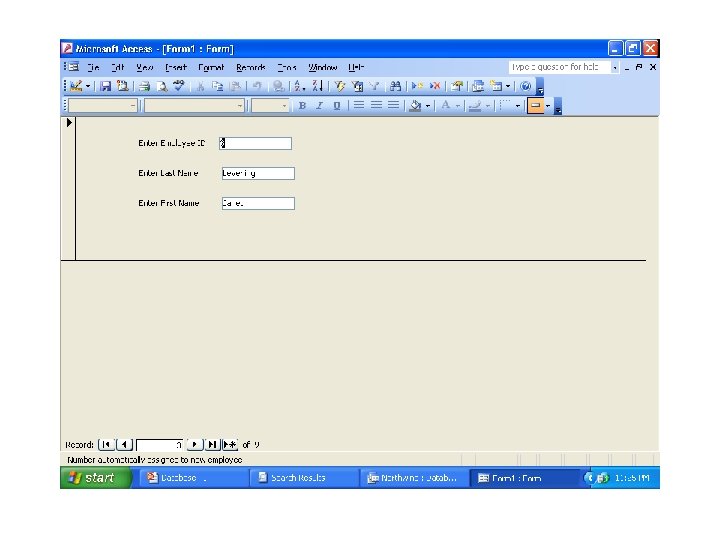
Form Generators • A forms generator is an interactive facility for rapidly creating data inputs and display layouts for screen forms. • The forms generator allows the user to define what the screen is to look like, what information is to be displayed, and where on the screen it is to be displayed. • It may also allow the definition of colors for screen elements and other characteristics, such as bold, underline and blinking etc. • The better forms generator allows the creation of derived attributes using the arithmetic operators and the specification of validation checks for data input. • A very simple form is shown below 29 Dec 21 Jahangir Alam 40
Report Generators • A Report Generator is a facility for creating reports from data stored in the database. • It is similar to a query language in that it allows the user to ask questions of the database and retrieve information from it for a report. However, in the case of a report generator we have much greater control over what the output looks like. • We can let the report generator automatically determine how the output should look like or we can create our own customized output reports using special report generator command instructions. • There are two main types of Report Generators: Language Oriented Visually Oriented 29 Dec 21 Jahangir Alam 42
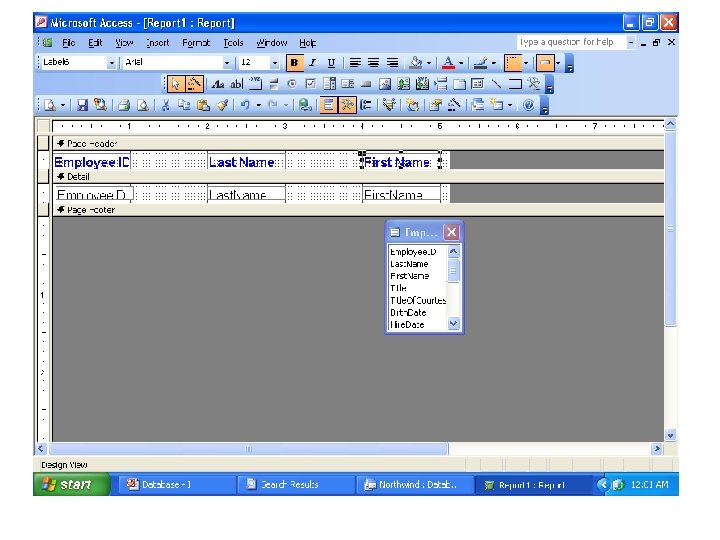
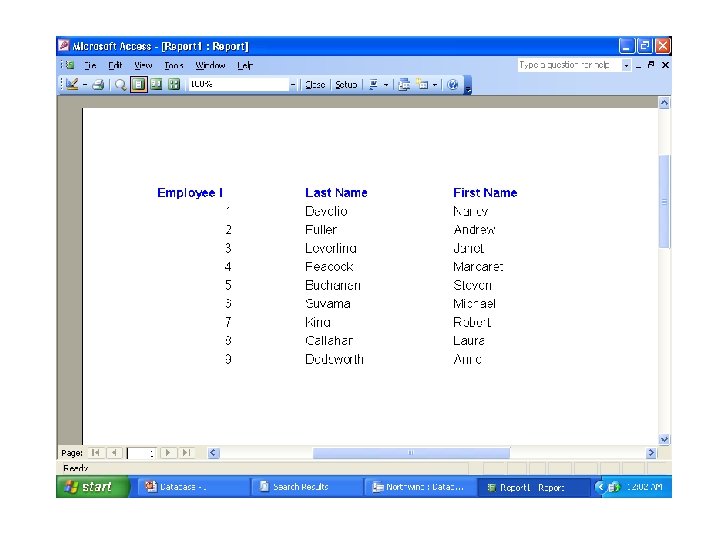
• In the first case we enter a command in a sublanguage to define what data is to be included in the report and how the report is to be laid out. The best example of this method is the REPORT FORM command of Fox. Pro. • In the second case we use a facility similar to a forms generator to define the same information. • The process of building a report using MS Access from Employee Table and how results look like after report execution is depicted in the next two figures: 29 Dec 21 Jahangir Alam 43
Graphics Generators • A graphics generator is a facility to retrieve data from the database and display the data as a graph showing trends and relationships in the data (OLAP: Online Analytical Processing). • Typically it allows the user to create bar charts, pie charts, scatter charts etc. from the data stored in the database. Application Generators • An application generator is a facility for producing a program that interfaces with the database. The use of an application generator can reduce the time it takes to design an entire software application. • Application generators typically consist of pre written modules that comprise fundamental functions that most database oriented programs use. • An example of an application generator is VB data control object. 29 Dec 21 Jahangir Alam 46
Three Level Architecture and How an Application Program Retrieves a Record (s) of Information Using DBMS: DBMS • The goal of following discussion is to illustrate how the DBMS utilizes the external schemas, the conceptual schema and the internal schema when an application program reads a record (s) of information using DBMS. • The main events that occur are as follows: 1. The application Program A issues a call to the DBMS to read a record (s). The program states the programmer name and gives the value of the key of the segment or record in question. 2. Examining the data requirements of Program A, the DBMS obtains the subschema that is used by application Program A and looks up the description of the data in question. 3. The DBMS then obtains the schema (Logical/ Conceptual Data Description) and determines which logical data types or types are needed. 29 Dec 21 Jahangir Alam 47
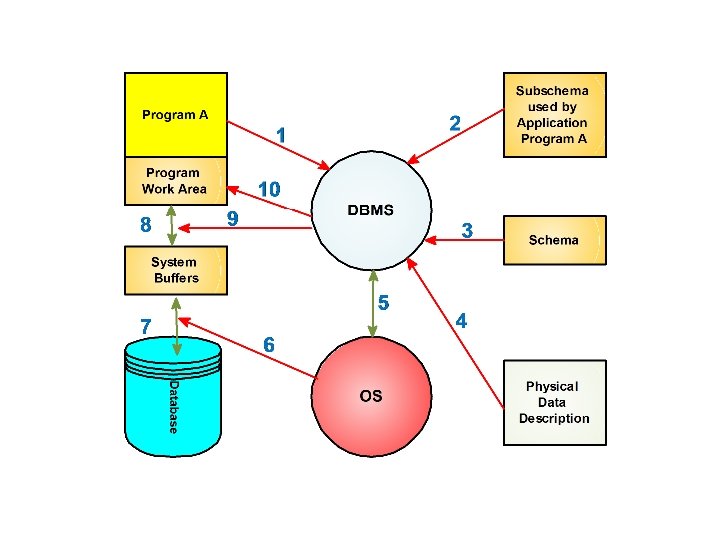
4. Then the DBMS examines the physical database description (Internal Schema) and determines which physical record or records are to read. 5. The DBMS issues a command to the Operating System, instructing it to read the requested record or records from the physical storage. 6. The Operating System interacts with the physical storage where data are kept. 7. The required data are transferred from the physical storage to the system buffers by the Operating System. 8. Comparing the subschema (external schema) and schema (conceptual schema) the DBMS derives from the data the logical record (s) needed by the application Program A. 29 Dec 21 Jahangir Alam 49
Any data transformations between the data as declared in the subschema and data as declared in the schema are made by the DBMS. 9. The DBMS transfers the data from the system buffers to the work area of application Program A. 10. The DBMS provides status information to application Program A, on the outcomes of its call including any error indications. 11. The application Program A can then operate with the data in its work area. • If an application program updates a record (s) the sequence of events is similar. It will normally read it first, modify it in the system buffers and then issues an instruction to the system to write back the modified data. 29 Dec 21 Jahangir Alam 50
Roles in Database Environment (Database People) • We have already discussed that following are the components of a database system or database environment: Hardware Software (DBMS) Data Procedures People • Here we will examine in detail the fifth component of the database environment i. e. people. • For small databases e. g. the list of students discussed time to time, one person typically defines, constructs and manipulate the database. However many persons are involved in the design, use and maintenance of a large database with few hundred users. 29 Dec 21 Jahangir Alam 51
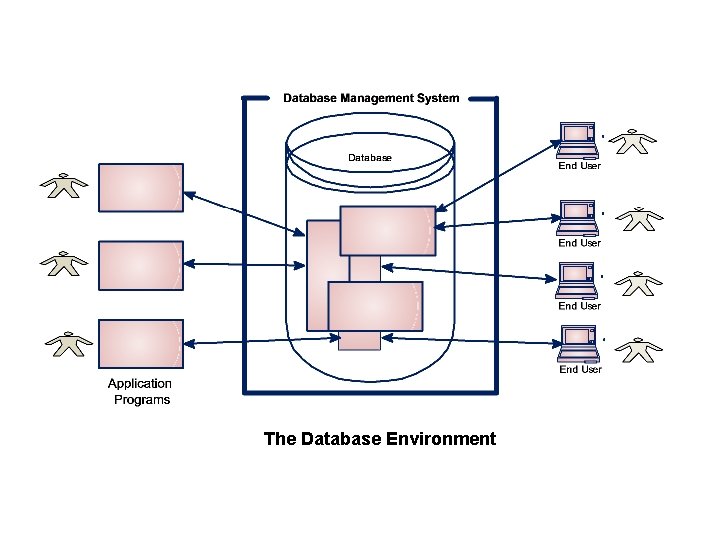
The Database Environment
• Firstly, we will identify the people whose jobs involve the day to day use of a large database system. We will call them the “Actors on the Scene” or “Database Users”. • Secondly, we will identify the people who are associated with the design, development and operation of the DBMS software and system environment. We will call them the “Workers behind the Scene”. These persons are typically not interested in the database itself. 29 Dec 21 Jahangir Alam 53
Actors on the Scene (Database Users) • We can identify four distinct types of database users: Data and Database Administrators Database Designers Application Programmers Application Developers or End Users 29 Dec 21 Jahangir Alam 54
Data and Database Administrators • The database and the DBMS are corporate resources that must be managed like any other resource. • Data Administration (DA) and Database Administration (DBA) are the roles generally associated with the management and control of a DBMS and its data. • Data Administrator is a person in the enterprise who has the central responsibility for the data. As stated earlier data is one of the most important resources of corporate, it is imperative that there should be some person who understands the data and the needs of the enterprise with respect to the data at a senior management level. The DA is that person. • Thus it is the Data Administrator’s job to decide what data should be stored in the database in the first place and to establish policies for maintaining and dealing with that data once it has been stored. 29 Dec 21 Jahangir Alam 55
• An example of such a policy might be one that dictates the enterprise which data to be made public and which data to be kept as confidential. • Note carefully that the Data Administrator is a manager (decision maker) and not a technician (although he or she certainly does need to have some appreciation of the capabilities of database system at a technical level). • The technical person responsible for implementing the data administrator’s decisions is the Database Administrator (DBA). The DBA unlike the Data Administrator is an IT professional. • The job of DBA is to create the actual database and to implement the technical controls needed to enforce various policy decisions made by the DA (Data Administrator). 29 Dec 21 Jahangir Alam 56
• The DBA is also responsible for ensuring that the DBMS operates with adequate performance and for providing a variety of technical services. • The DBA is typically assisted by a team of Application Programmers and other technical persons. • In small organizations sometimes there is no distinction between the role of DA and DBA, in others they perform their duties as stated above. • We shall later on discuss the specific responsibilities of DBA in detail. 29 Dec 21 Jahangir Alam 57
Database Designers • Database designers are responsible for identifying the data to be stored in the database and for choosing appropriate structures to represent and store this data. • In large design projects we can distinguish between two types of designer: logical database designers and physical database designers. • Logical Database Designer is concerned with identifying the data (i. e. the entities and attributes), the relationships between the data, and the constraints on the data that is to be stored in the database. In essence it can be said that Logical Database Designer derives the Conceptual View (note that not the Conceptual Schema). • The Physical Database Designer decides how the logical database design created by logical database designer is to be physically realized i. e. he decides specific storage structures and access methods for the data to achieve good performance. In essence it can be said that the physical database designer derives the Internal View (note that not the Internal Schema). 29 Dec 21 Jahangir Alam 58
• The tasks related to database designers are undertaken before the database is actually implemented and populated with data. • It is the responsibility of the database designers to communicate with all prospective database users, in order to understand their requirements and to come up with a design (certainly in consultation with the DA) that meets these requirements. • In many cases, the designers are on the staff of the DBA. • Database Designers typically interact with each potential group of users and develop a view of the database that meets the data and processing requirements of this group. These views are then analyzed and integrated with the views of other user groups. The final database design must be capable of supporting the requirements of all user groups. 29 Dec 21 Jahangir Alam 59
Application Programmers/ Developers • Once the database has been implemented, the application programs that provide the required functionality to the end users or they satisfy the personal needs of the application programmers are developed. • This is the responsibility of Application Programmers. To access the database they use some (3 GLs) programming language such as C, C++, COBOL, Java etc or some higher level “fourth generation” language (4 GL). • Such programs access the database by issuing the appropriate request – typically an embedded SQL statement – to the DBMS. 29 Dec 21 Jahangir Alam 60
End Users • The end users are the clients for the database which has been designed and implemented, and is being maintained to serve their information needs. • End users may be classified according to the way they use the system: Naive Users: • They are typically unaware of the DBMS. They access database through specially written application programs (by application programmers) which attempt to make the operations as simple as possible. • They invoke database operations by entering simple commands or choosing options from a menu. This means that they do not need to know anything about the database or DBMS. • The best example is the person booking seats on a Railway Reservation Counter. 29 Dec 21 Jahangir Alam 61
Sophisticated Users: • At the other end of the spectrum, the sophisticated end user is familiar with the structure of the database and the facilities offered by the DBMS. • Sophisticated end users may use a high level query language, such as SQL to perform the required operations. • Some sophisticated end users may even write application programs for their own use. 29 Dec 21 Jahangir Alam 62
Workers Behind the Scene • In addition to those who design, use and administer the database, others are associated with the design, development and operation of the DBMS software and system environment. • These persons are typically not interested in the database itself. We call them the “Workers Behind the Scene”, and they include the following categories: • DBMS System Designers and Implementers are persons who design and implement the DBMS modules and interface as a software package. DBMS is a complex software and it consists of many components or modules. • Tool Developers include persons who design and implement tools – the software packages that facilitate database system design and use, and help improve performance. Tools are optional packages that are purchased separately. 29 Dec 21 Jahangir Alam 63
• Operators and Maintenance Personnel are the system administrator personnel who are responsible for the actual running and maintenance of the hardware and software environment for the database system. Clearly they are nothing but the System Administrators. 29 Dec 21 Jahangir Alam 64
Specific Responsibilities of the DBA • As stated earlier, the Data Administrator (DA) is the person who makes the strategic and policy decisions regarding the data of the enterprise, and the Database Administrator (DBA) is the person who provides the necessary technical support for implementing those decisions. • Clearly, the DBA is responsible for the overall control of the system at a technical level. Here we will explore some of the responsibilities of the DBA in more detail. • Defining the Conceptual Schema: It is the Data Administrator’s job to decide exactly what information is to be held in the database. Certainly he does this in consultation with the Logical Database Designer. In other words the DA finally decides the entities of interest to the enterprise and decides the information to be recorded about these entities. 29 Dec 21 Jahangir Alam 65
This process is usually referred to as logical or conceptual database design. The outcome of the logical database design phase is the contents of the database at an abstract level (view level). The DBA then creates the corresponding conceptual schema using the conceptual DDL. The object (compiled) form of the schema will be used by the DBMS in responding to access request. The source (un compiled) form will act as a reference document for the users of the system. • Defining the Internal Schema: The DBA must also decide (definitely in consultation with the physical database designer) how the data is to be represented in the stored database. This process is usually referred to as physical database design. 29 Dec 21 Jahangir Alam 66
Having done the physical design, the DBA must then create the corresponding storage structure definition (i. e. the Internal Schema), using the DDL or SDL. In addition he or she must also define the associated conceptual/ internal mapping. In practice either the DDL or the SDL (most likely the former) will probably include the means for defining the mapping, but the two functions (creating the schema and defining the mapping) should be clearly separable. Like the conceptual schema, the internal schema and corresponding mapping will exist in both source and object form. • Liaising (Interacting) with the Users: It is the business of the DBA to liaise (interact/communicate etc. ) with the users to ensure that the data they need is available to them and to write (or help the users to write) the necessary external schemas using the DDL. 29 Dec 21 Jahangir Alam 67
In addition the corresponding external/ conceptual mappings must also be defined. In practice the external DDL will probably include the means for specify those mappings, but once again the schemas and mappings should be clearly separable. Each external schema and corresponding mapping will exist in both source and object form. Other aspects of the user liaison function include consulting on application design, providing technical education, assisting with problem determination and resolution and similar professional services. • Defining Security and Integrity Constraints: As stated earlier security and integrity constraints are regarded as part of the conceptual schema. The DDL must include facilities for specifying such constraints. 29 Dec 21 Jahangir Alam 68
• Defining dumb and reload policies: Once the enterprise is committed to a Database System, it becomes critically dependent on successful operation of that system. In the event of damage to any portion of the database – caused by human error or a failure in the hardware or operating system – it is essential to be able to repair the data concerned with the minimum of delay and with as little effect as possible on the rest of the system. For example the availability of data that has not been damaged should ideally not be affected. The DBA must define and implement an appropriate damage control scheme, typically involving the following: § Periodic unloading or dumping of the database to backup storage. § Reloading the database when necessary from most recent dump. 29 Dec 21 Jahangir Alam 69
The need for quick data recovery is one reason why it might be a good idea to spread the total data collection across several databases, instead of keeping it all at one place. The individual database might very well form the unit for dumb and reload purposes. In this connections terabyte systems – i. e. commercial database installations that store well over a trillion bytes of data already exist. It goes without saying that such VLDB (Very Large Databases) require very careful and sophisticated administration, especially when there is a requirement for continuous availability (which there usually is). • Monitoring Performance and Responding to Changes in Environment: The DBA is responsible for organizing the system in such a way as to get the performance that is “best for enterprise”, and for making the appropriate adjustments – i. e. tuning – as requirements change. 29 Dec 21 Jahangir Alam 70
For example it might be necessary to reorganize the stored database from time to ensure that performance levels remain acceptable. As already stated any change to the physical storage (internal) level of the system must be accompanied by a corresponding change to the definition of the conceptual/ internal mapping, so that the conceptual schema can remain constant. 29 Dec 21 Jahangir Alam 71
DBMS Interfaces • Interface means “how a person interacts with a particular software”. Clearly DBMS interfaces means, the ways the users and administrators of the DBMS can interact with it. • As an example consider the two interfaces (shown in the figures on the next two pages) available to access My. Sql Database Server. • User friendly interfaces provided by a DBMS may include the following: Menu Based Interfaces Form Based Interfaces Graphical User Interfaces Natural Language Interfaces for Naïve Users Interfaces for DBA 29 Dec 21 Jahangir Alam 72
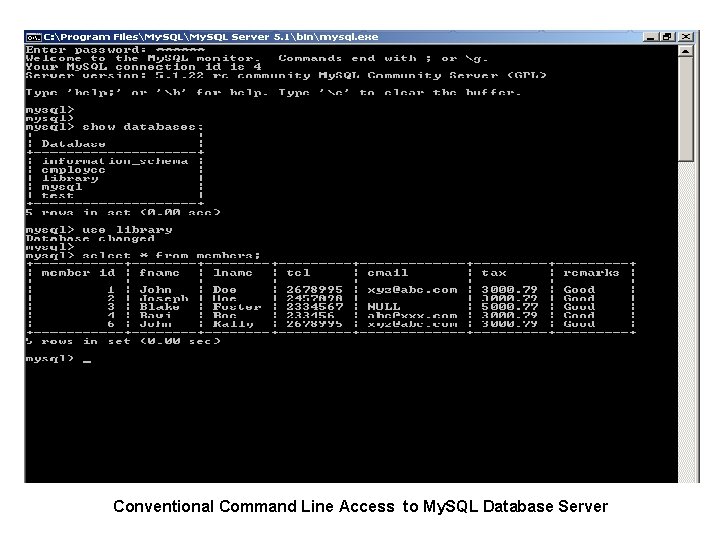
Conventional Command Line Access to My. SQL Database Server
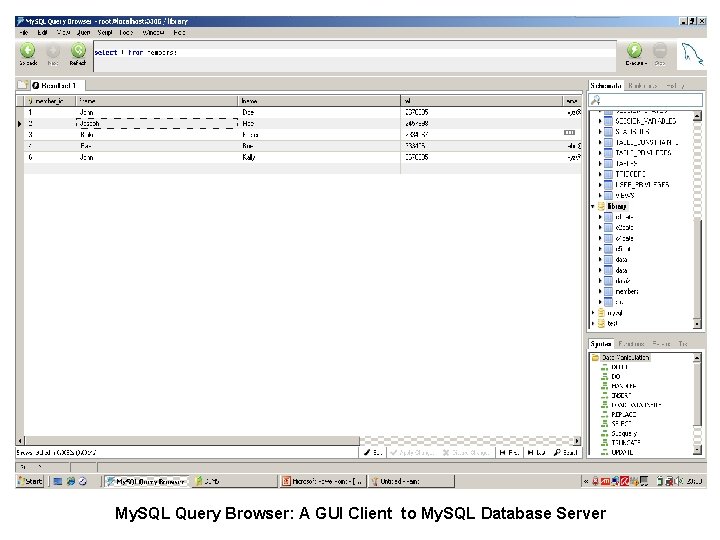
My. SQL Query Browser: A GUI Client to My. SQL Database Server
• Menu Based Interfaces: These interfaces present the user with lists of options, called menus, that lead the user through the formation of a request. Menus do away with the need to memorize the specific commands and syntax of a query language rather the query is formulated step by picking options from a menu that is displayed by the system. Pull down menus are becoming a very popular technique in window based user interfaces. They are often used in browsing interfaces, which allow a user to look through the contents of a database in an explanatory and unstructured manner. • Form Based Interfaces: A form based interface displays a form to each user. Users may fill out all of the form entries to insert new data, or they fill out only certain entries, in which case the DBMS will retrieve the matching data for the remaining entries. 29 Dec 21 Jahangir Alam 75
Forms are usually designed and programmed for naive users as interfaces to the canned transactions. Many DBMSs have forms specification languages (best example is ORACLE*Forms – a component of Oracle’s product named as Developer 2000) – special languages that help programmers to design such forms. Some systems have utilities that define a from by letting the end user interactively construct a sample form on the screen. With other systems web based form may be used. • Graphical User Interfaces: A GUI typically displays a schema to the user in the diagrammatic form. The user can then specify a query by manipulating the diagram. In many cases GUIs utilize both menus and forms 29 Dec 21 Jahangir Alam 76
• Natural Language Interfaces: These interfaces accept requests written in English or some other user oriented language and attempt to understand them. A natural language interface usually has its own schema which is similar to the database conceptual schema. The natural language interface refers to the words in its schema, as well as to a set of standard words, to interpret the request. If the interpretation is successful the interface generates a high – level query corresponding to the natural language request and submits it to the DBMS for processing, otherwise, a dialogue is started with the user to clarify the request. • Interfaces for the Naïve (Parametric) Users: Naïve users such as bank tellers, railway reservation clerks etc. often have a small set of operations that they need to perform repeatedly. Application Programmers design and implement a special interface for these known class of naïve users. Usually a small set of abbreviated commands or displayed in the form of menu is available with the goal of minimizing the number of keystrokes required for each request. For example function keys may be programmed to execute certain commands. Clearly this allows the parametric (naïve) users to proceed with a minimum number of keystrokes. 29 Dec 21 Jahangir Alam 77
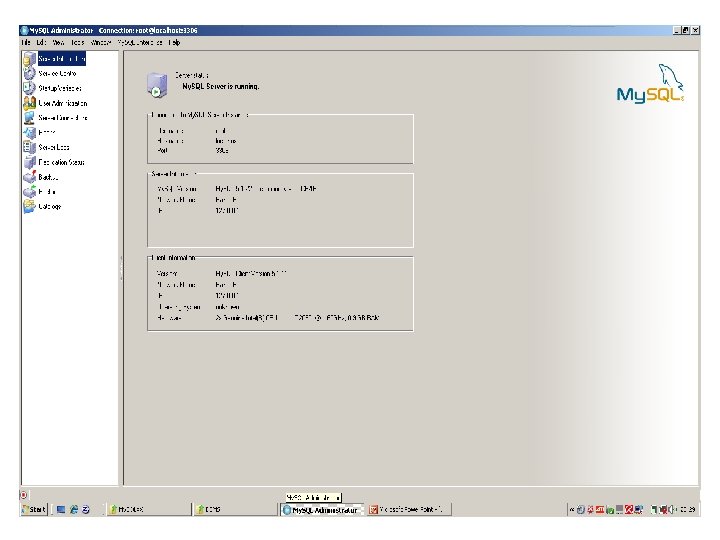
• Interfaces for DBA: Most database systems contain privileged commands that can be used only by the DBAs staff. These include commands for creating accounts, setting system parameters, granting account authorization, changing a schema and reorganizing the storage structure of a database. Some DBMSs provide simplified interfaces for performing all the tasks listed above. Such interfaces are known as Interfaces for the DBAs. An example is My. SQL Administrator, which is a GUI for DBAs and is supplied by the My. SQL AB corp. for managing the My. SQL Database Server. Following figure shows an instance of My. SQL Administrator. 29 Dec 21 Jahangir Alam 78
Components (Structure) of the DBMS • DBMSs are highly complex and sophisticated pieces of software. It is not possible to generalize the components (structure) of a DBMS as it varies greatly from system to system. • However, it is useful when trying to understand database systems to try to view the components of a DBMS and the relationships among them. • Here we shall examine a possible structure for a DBMS. 29 Dec 21 Jahangir Alam 80
• DBMS is partitioned into modules that deal with each of the responsibilities of the overall system. The functional components of DBMS can be broadly divided into two categories: Query Processor Components. Storage Manager Components. • The Query Processor Components include: • DDL Interpreter: The DDL interpreters data definition language statements and records them in a set of tables containing metadata. Clearly DDL statements are interpreted and corresponding table definitions and constraints are stored in the data dictionary. The output of DDL interpreter is in a form that can be used by other components of the DBMS. Clearly the output is in object form. 29 Dec 21 Jahangir Alam 81
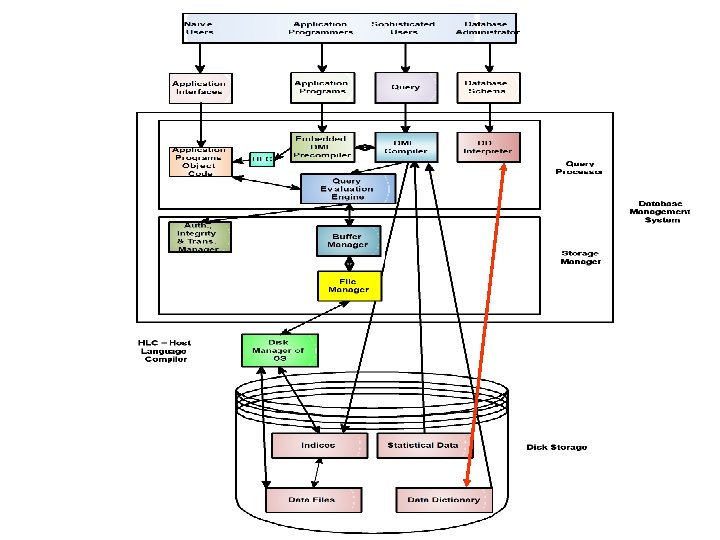
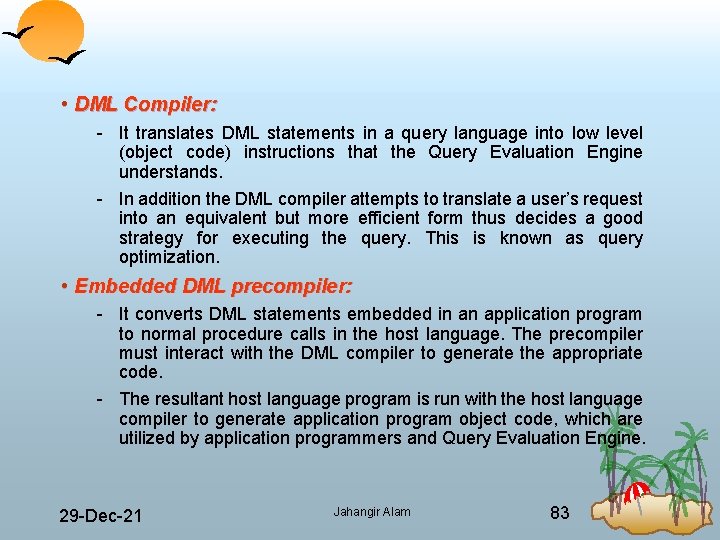
• DML Compiler: It translates DML statements in a query language into low level (object code) instructions that the Query Evaluation Engine understands. In addition the DML compiler attempts to translate a user’s request into an equivalent but more efficient form thus decides a good strategy for executing the query. This is known as query optimization. • Embedded DML precompiler: It converts DML statements embedded in an application program to normal procedure calls in the host language. The precompiler must interact with the DML compiler to generate the appropriate code. The resultant host language program is run with the host language compiler to generate application program object code, which are utilized by application programmers and Query Evaluation Engine. 29 Dec 21 Jahangir Alam 83
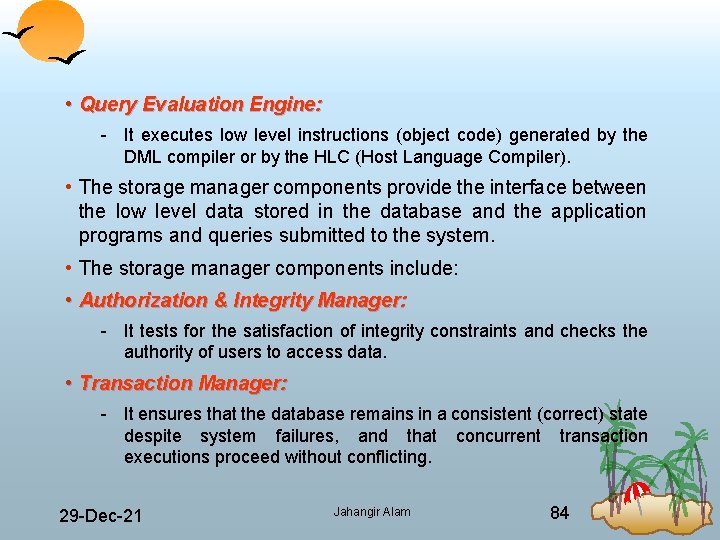
• Query Evaluation Engine: It executes low level instructions (object code) generated by the DML compiler or by the HLC (Host Language Compiler). • The storage manager components provide the interface between the low level data stored in the database and the application programs and queries submitted to the system. • The storage manager components include: • Authorization & Integrity Manager: It tests for the satisfaction of integrity constraints and checks the authority of users to access data. • Transaction Manager: It ensures that the database remains in a consistent (correct) state despite system failures, and that executions proceed without conflicting. 29 Dec 21 Jahangir Alam concurrent transaction 84
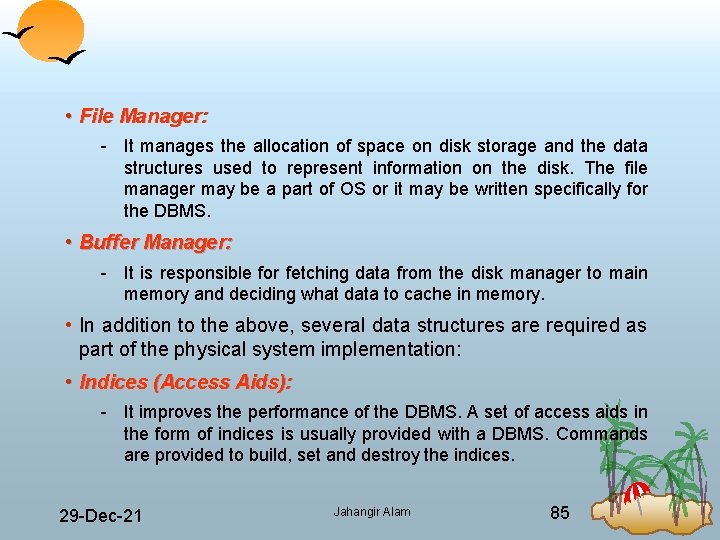
• File Manager: It manages the allocation of space on disk storage and the data structures used to represent information on the disk. The file manager may be a part of OS or it may be written specifically for the DBMS. • Buffer Manager: It is responsible for fetching data from the disk manager to main memory and deciding what data to cache in memory. • In addition to the above, several data structures are required as part of the physical system implementation: • Indices (Access Aids): It improves the performance of the DBMS. A set of access aids in the form of indices is usually provided with a DBMS. Commands are provided to build, set and destroy the indices. 29 Dec 21 Jahangir Alam 85
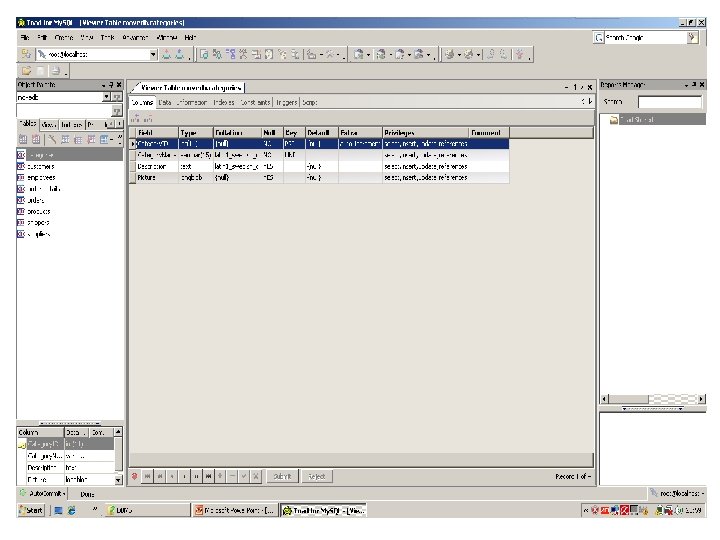
• Data Dictionary: A data dictionary keeps track of the definitions of all the data items in the database. It is a table of data elements including at least the names, data types and lengths of every data item in the subject database. The data dictionary can be viewed as being part of the database itself. Thus the database is self describing since it contains information describing its own structure. The information in the data dictionary is called ‘metadata’ or ‘data about data’. The metadata are available for query and manipulation just as other data in the database. Following table shows the data dictionary entries for the ‘categories’ table of ‘movedb’ database. 29 Dec 21 Jahangir Alam 86
• Statistical Data: It stores statistical information about the data in the database. This information is used by the query processor to select efficient ways to execute a query. • Disk Manager: The disk manager is part of the operating system and all the physical input and output operations are performed by it. The disk manager transfers the block requested by the file manager so that the file manager need not be concerned with the physical characteristics of the underlying storage media. We now discuss the steps when a user wants to access a record or a set of records from the database (consider the following figure): 1. A user’s request for the data is received by the query processor which determines the physical record(s) required. This decision requires some preliminary consultation with the data dictionary. 29 Dec 21 Jahangir Alam 88
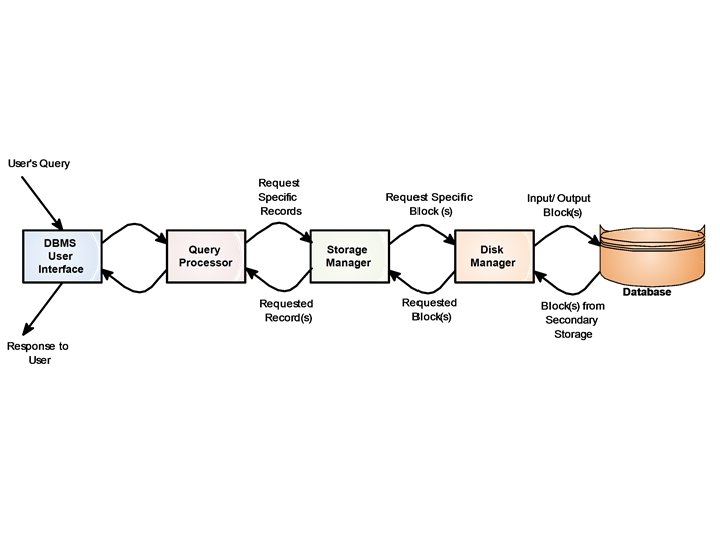
2. The query processor sends the request for a specific physical record(s) to the storage manager. The storage manager decides which physical block(s) of secondary storage devices contain the required record(s). A block is a unit of physical I/O operations between primary and secondary memory. 3. The disk manager retrieves the physical block(s) required by the storage manager and sends it back to the storage manager, which sends it to the query processor. 29 Dec 21 Jahangir Alam 90
Classification of Platforms Running DBMS • Platforms running DBMSs may broadly be classified as: Single User or PC Based Systems or PC Based Databases. Multiuser Platforms or Multiuser Databases. § Teleprocessing Systems or Centralized Databases § File Server Based Databases § Client/ Server Systems or Client/ Server Databases. 29 Dec 21 Jahangir Alam 91
Single User or PC Based Databases • When a DBMS runs on a PC the PC acts as both – the host computer and the terminal. Unlike the large systems the DBMS functions and the database application functions are combined into one unit. • Database applications on a PC handle the user input, screen output and access to the data on the disk (Only access not management. Data is still managed by the DBMS). • Combining the DBMS and application features into one unite gives DBMS a great deal of power, flexibility and speed. • MS Access is the powerful single user database 29 Dec 21 Jahangir Alam 92
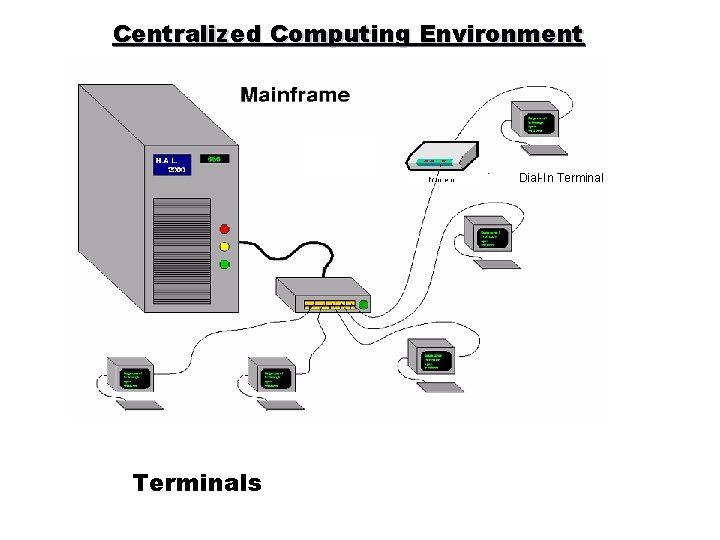
Multiuser Databases: Teleprocessing • The traditional architecture for multiuser systems was teleprocessing, where there is one computer with single CPU and a number of terminals as shown in the figure on the next page. • All processing is performed within the boundaries of the same physical computer. • User terminals are typically dumb ones, incapable of functioning on their own. They are cabled to the central computer. • The terminals send messages via the communications control subsystem of the operating system to the user’s application program, which in turn uses the services of the DBMS. In the same way messages are routed back to the user’s terminal. 29 Dec 21 Jahangir Alam 93
Centralized Computing Environment Dial In Terminals
• Unfortunately this architecture place the tremendous burden on the central computer, which not only had to run the application programs and the DBMS, but also had to carry out a significant amount of work on behalf of the terminals (such as formatting data for display on the screen). • In recent years, there have been significant advances in the development of high performance personal computers and networks. There is now an identifiable trend in industry towards downsizing, i. e. replacing expensive mainframe computers with more cost effective networks of personal computers that achieve the same or even better results. This trend has given rise to the next two architectures: File Server Based and Client/ Server Architectures. 29 Dec 21 Jahangir Alam 95
File Server Based Databases • In a file server environment, the processing is distributed about the network, typically a local area network (LAN). • The file server holds the files required by the applications and the DBMS. However, the applications and the DBMS run on each PC or workstation, they request files from the File Server when necessary. This is illustrated in the figure on the next page. • In this way the file server acts simply as a shared hard disk drive. The DBMS on each workstation or PC sends requests to the file server for all data that the DBMS requires that is stored on the disk. • This approach can generate a significant amount of network traffic , which can lead to performance problems. 29 Dec 21 Jahangir Alam 96
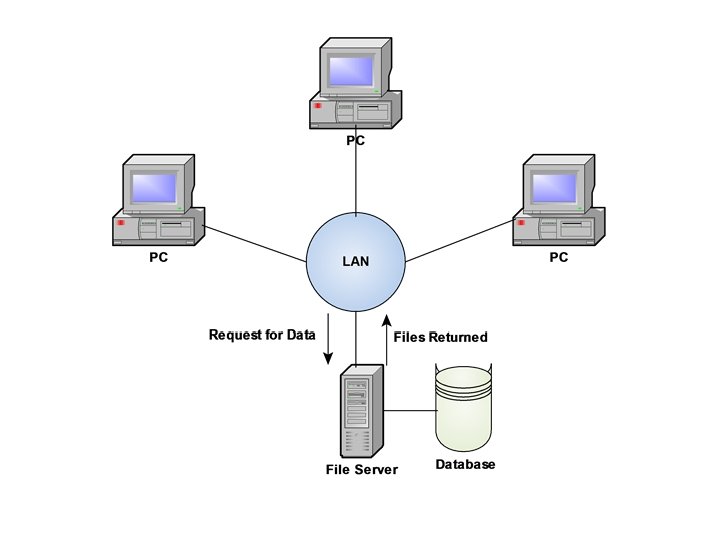
• As an example consider a user request that requires the names of staff members who work in the branch at 163 Main Street. We can express this request in SQL as: SELECT fname, lname FROM Branch WHERE STREET=‘ 163 Main Street’; • As the file server has no knowledge of SQL, the DBMS has to request the file corresponding to the BRANCH from the file server, rather than just the staff members names that satisfy the query. • Thus file server architecture has the following three disadvantages: There is large amount of network traffic generated. A full copy of DBMS is required on each node or PC. Concurrency, Recovery and Integrity control are more complex because there can be multiple DBMSs accessing the same files • Examples are – MS Access Running in a LAN environment, d. Base for LAN, Fox. Pro for LAN etc. 29 Dec 21 Jahangir Alam 98
Client/ Server Databases • To overcome the disadvantages of the first two approaches, the Client/ Server (C/S)architecture was developed. Client/ Server refers to the way in which software components interact to form a system. • As the name suggests, there is a client process, which requires some resource, and a server which provides resource. There is no requirement that the client and server must reside on the same machine. In practice, it is quite common to place a server at one site in a local area network and the clients at the other sites. Figure on the next page illustrates the C/S architecture. • In the database context, the client manages the user interface and the application logic acting as a sophisticated machine on which to run database applications. 29 Dec 21 Jahangir Alam 99
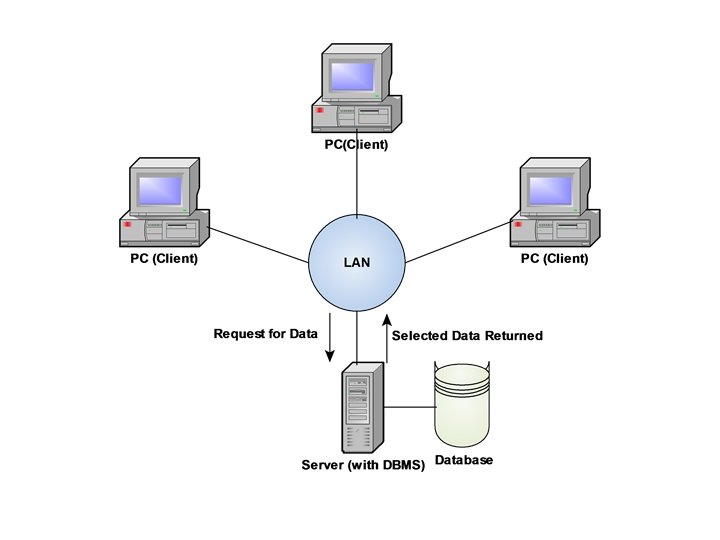
• The Client takes the user’s request, checks its syntax and transmits it to the server. It then waits for a response and formats the response for the end user. The server accepts and processes the database requests, then transmits the results back to the client. The processing involves checking authorization, ensuring integrity, maintaining system catalog and performing query and update processing. In addition it also provides concurrency and recovery control. • Table on next page summarizes client and server operations. • There are many advantages of this type of architecture. 29 Dec 21 Jahangir Alam 101
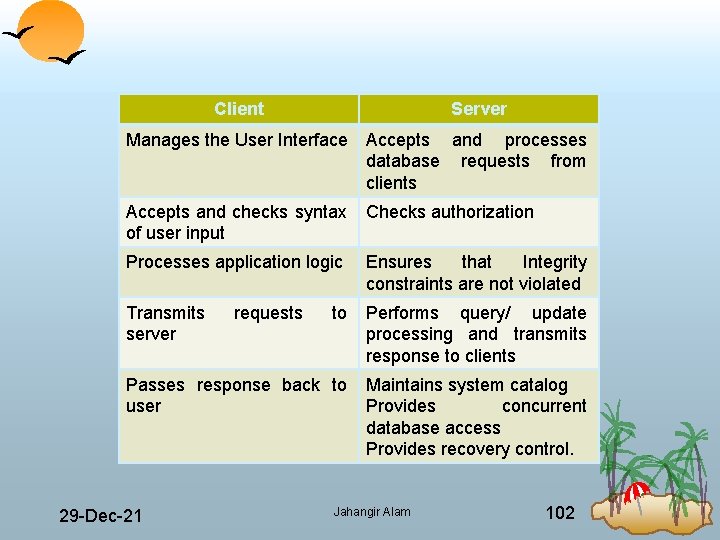
Client Server Manages the User Interface Accepts and processes database requests from clients Accepts and checks syntax of user input Checks authorization Processes application logic Ensures that Integrity constraints are not violated Transmits server to Performs query/ update processing and transmits response to clients Passes response back to user Maintains system catalog Provides concurrent database access Provides recovery control. 29 Dec 21 requests Jahangir Alam 102
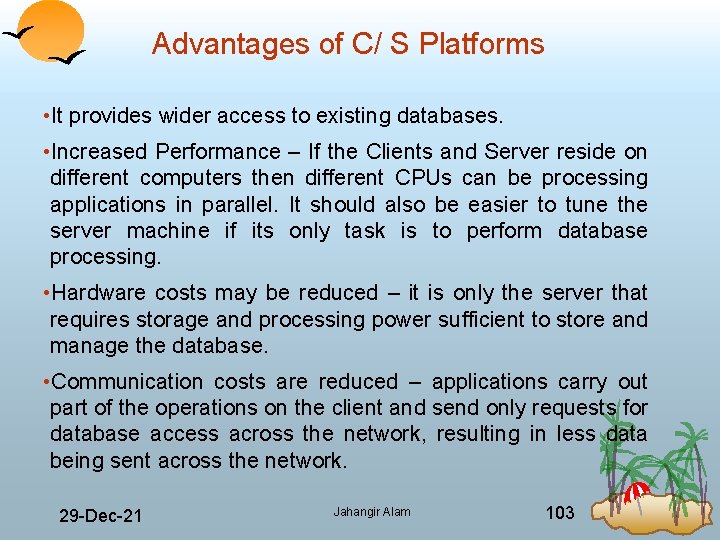
Advantages of C/ S Platforms • It provides wider access to existing databases. • Increased Performance – If the Clients and Server reside on different computers then different CPUs can be processing applications in parallel. It should also be easier to tune the server machine if its only task is to perform database processing. • Hardware costs may be reduced – it is only the server that requires storage and processing power sufficient to store and manage the database. • Communication costs are reduced – applications carry out part of the operations on the client and send only requests for database access across the network, resulting in less data being sent across the network. 29 Dec 21 Jahangir Alam 103
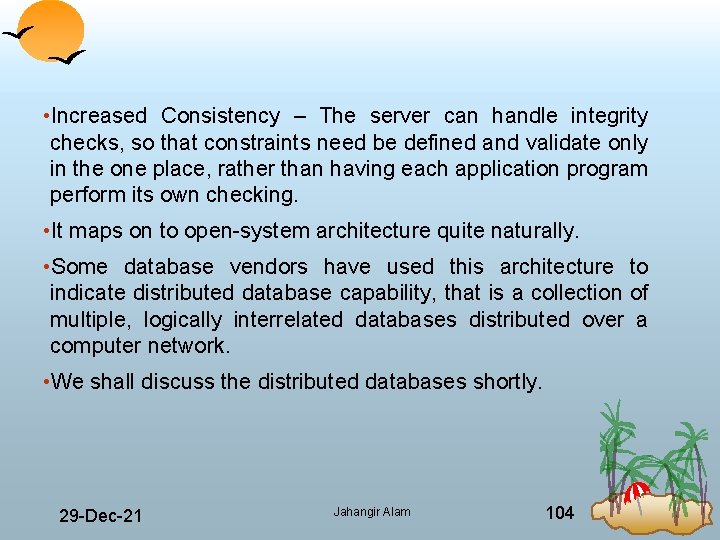
• Increased Consistency – The server can handle integrity checks, so that constraints need be defined and validate only in the one place, rather than having each application program perform its own checking. • It maps on to open system architecture quite naturally. • Some database vendors have used this architecture to indicate distributed database capability, that is a collection of multiple, logically interrelated databases distributed over a computer network. • We shall discuss the distributed databases shortly. 29 Dec 21 Jahangir Alam 104
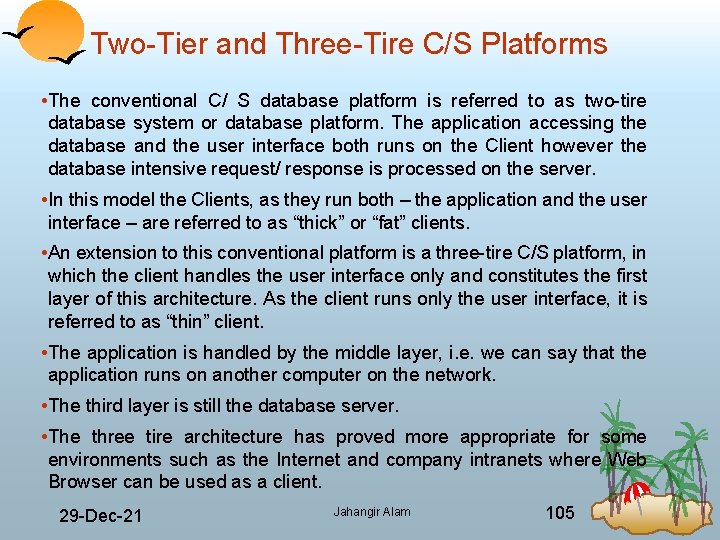
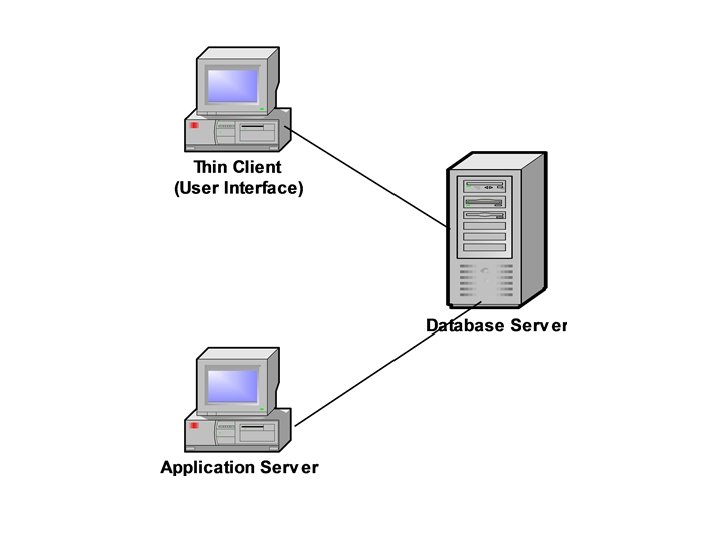
Two Tier and Three Tire C/S Platforms • The conventional C/ S database platform is referred to as two tire database system or database platform. The application accessing the database and the user interface both runs on the Client however the database intensive request/ response is processed on the server. • In this model the Clients, as they run both – the application and the user interface – are referred to as “thick” or “fat” clients. • An extension to this conventional platform is a three tire C/S platform, in which the client handles the user interface only and constitutes the first layer of this architecture. As the client runs only the user interface, it is referred to as “thin” client. • The application is handled by the middle layer, i. e. we can say that the application runs on another computer on the network. • The third layer is still the database server. • The three tire architecture has proved more appropriate for some environments such as the Internet and company intranets where Web Browser can be used as a client. 29 Dec 21 Jahangir Alam 105
Distributed Databases and Distributed DBMSs • Distributed Database is a logically interrelated collection of shared data (and a description of this data) physically distributed over a Computer Network. A Distributed Database Management System (DDBMS) is the software that permits the management of the distributed database and makes the distribution transparent to the users. • DDBMS consists of a single logical database that is split into a number of fragments. Each fragment is stored on one or more computers under the control of a separate DBMS, with the computers connected by a computer network. • Each site is capable of independently processing user requests that require access to local data (i. e. each site has some degree of local autonomy) and is also capable of processing data stored on other computers in the network. 29 Dec 21 Jahangir Alam 107
• Users access the distributed database via applications. Applications are classified as those that do not require data from other sites (local applications) and those that do require data from other sites (global applications). We require a DDBMS to have at least one global application. A DDBMS thus has the following features: A collection of logically shared data. The data is split into a number of fragments. Fragments may be replicated. Fragments/ Replicas are allocated to sites. The Sites are connected by a communications network. The Data at each site is under the control of a DBMS. The DBMS at each site can handle local applications, autonomously. Each DBMS participates in at least one global application. 29 Dec 21 Jahangir Alam 108
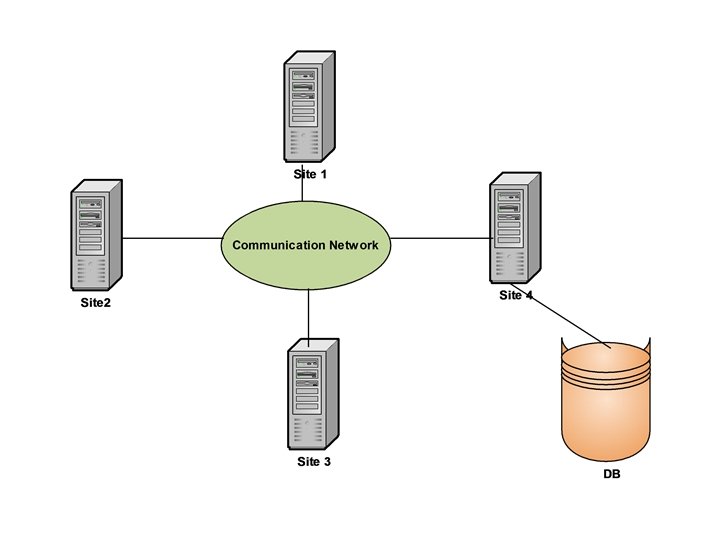
• It is not necessary for every site in the system to have its own local database as illustrated by the topology of the DDBMS shown in the figure on the next page. • From the definition of the DDBMS, the system is expected to make the distribution invisible to the user. Thus the fact that a distributed database is split into fragments that can be stored on different computers should be hidden from the user. • Thus the objective of a DDBMS is to make the distributed system appear like a centralized system. This is sometimes referred to as the fundamental principle of distributed DBMSs. 29 Dec 21 Jahangir Alam 109
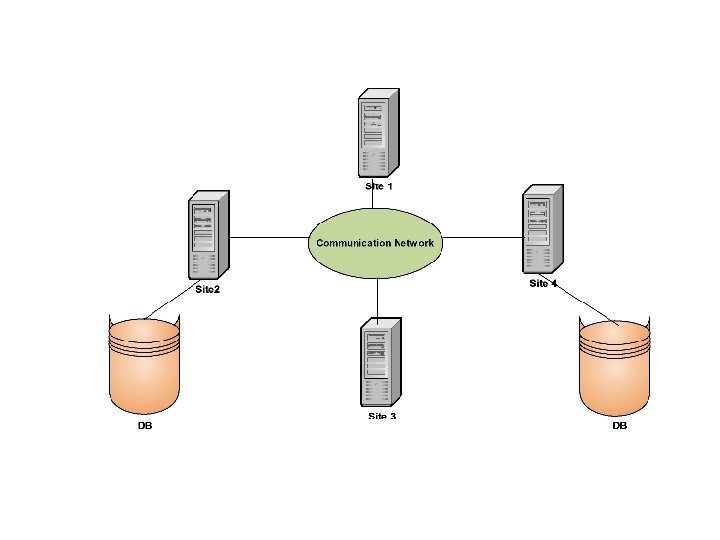
Distributed Processing • It is important to make a distinction between a distributed DBMS and distributed processing. • The key point with the definition of a distributed DBMS is that the system is physically distributed across a number of sites in the network. • If the data is centralized, even though other users may be accessing the data over the network, we do not consider this to be a distributed DBMS. This is simply the distributed processing. • Compare the topology of the figure on the next page (which has only one database at a site) to the topology of the figure on the last page (which has two databases at two different sites). 29 Dec 21 Jahangir Alam 111
Parallel DBMSs • Parallel DBMSs are based on the fact that single processor systems can no longer meet the growing requirements for cost effective scalability (ability to work under increased loads), reliability, and performance. A powerful and financially attractive alternative to a single processor driven DBMS is a parallel DBMS driven by multiple processors. • Parallel DBMSs link multiple smaller machines to achieve the same throughput as a single, larger machine, often with greater scalability and reliability than single processor DBMSs. • To provide multiple processors with common access to a single database, a parallel DBMS must provide shared resource management. 29 Dec 21 Jahangir Alam 113
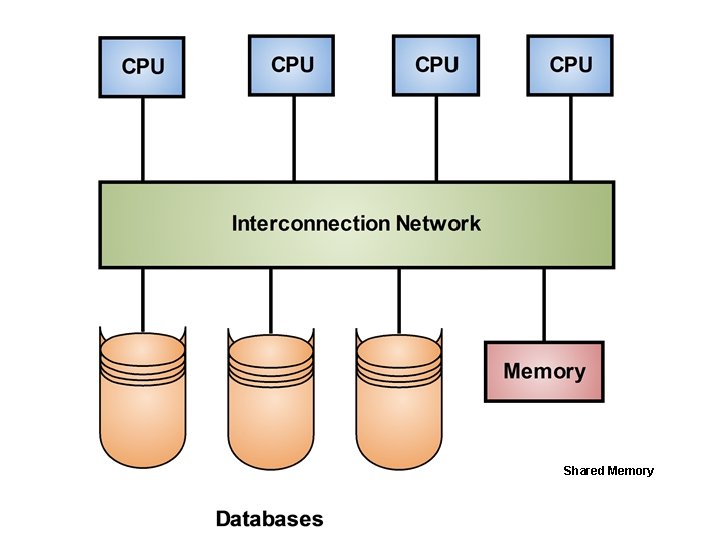
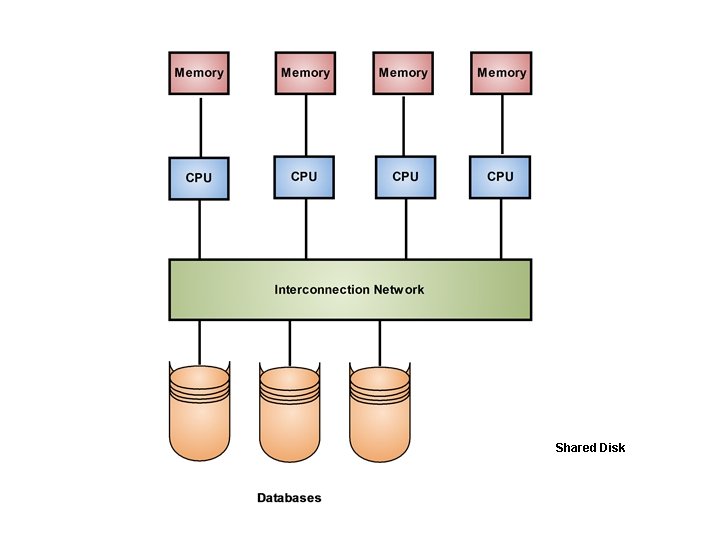
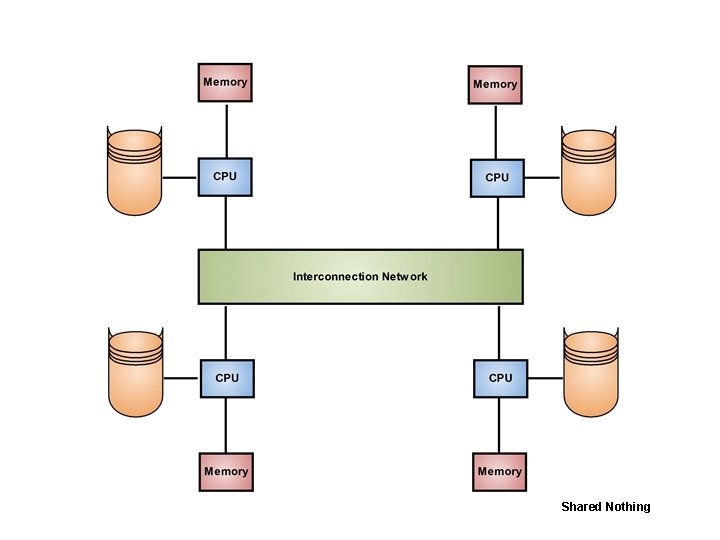
• Which resources are shared and how those shared resources are implemented, directly effects the performance and scalability of the system which in turn determines its appropriateness for a given application/ environment. • The three main architectures for parallel DBMSs are: –Shared Memory –Shared Disk –Shared Nothing • They have been shown in the following three figures on the next three pages. 29 Dec 21 Jahangir Alam 114
Shared Memory
Shared Disk
Shared Nothing
Shared Memory • It is a tightly coupled architecture in which multiple processors within a single system share memory. • Known as symmetric multiprocessing (SMP), this approach has become popular on platforms ranging from personals workstations that support a few microprocessors in parallel to large RISC (Reduced Instruction Set Computer) based machines, all the way up to the largest mainframes. • This architecture provides high speed data access for a limited number of processors, but it is not scalable beyond about 64 processors when the interconnection becomes a bottleneck. 29 Dec 21 Jahangir Alam 118
Shared Disk • It is a loosely coupled architecture optimized for applications that are inherently centralized and require high availability and performance. • Like the shared nothing architecture, the shared disk architecture eliminates the shared memory performance bottleneck. • Unlike the shared nothing architecture, however the shared disk architecture eliminates this bottleneck without introducing the overhead associated with physically partitioned data. Shared Disk systems are sometimes referred to as clusters. 29 Dec 21 Jahangir Alam 119
Shared Nothing • Often known as massively parallel processing (MPP) is a multiple processor architecture in which each processor is a part of a complete system, with its own memory and disk storage. • The database is partitioned among all disks on each system associated with the database, and is transparently available to all users on all systems. • The architecture is more scalable than shared memory and can easily support a large number of processors, however performance is optimal only when requested data is stored locally. 29 Dec 21 Jahangir Alam 120
References • Database Systems – A Practical approach to Design, Implementation and Management, Connolly, T. , Begg, C. , Third Edition, Pearson Education. • An Introduction to Database Systems, Date, C. J. , Seventh Edition, Pearson Education. • Fundamentals of Database Systems, Elmasri, R. , Navathe, S. B. , Third Edition, Pearson Education. • An Introduction to Database Systems, Desai, B. C. , Galgotia Publications. 29 Dec 21 Jahangir Alam 121
- Slides: 121