
Database Applications 15 415 The Relational Model Lecture
Database Applications (15 -415) The Relational Model Lecture 4, January 21, 2020 Mohammad Hammoud
Today… § Last Session: § The ER model § Today’s Session: § The relational model § Basic SQL § ER to relational databases § Announcements: § PS 1 is due on Sunday, January 26 by midnight § In this week’s recitation we will practice on translating ER designs into relational databases
Outline ER Model: Conceptual Design Choices and Summary The Relational Model: Introduction The Relational Model: Basic SQL ü
Why Studying the Relational Model? § Most widely used model § Vendors: IBM/Informix, Microsoft, Oracle, Sybase, etc. § “Legacy systems” in older models § E. g. , IBM’s IMS § Object-Oriented concepts have merged into § An object-relational model § Informix->IBM DB 2, Oracle 8 i
What is the Relational Model? § The relational model adopts a “tabular” representation § A database is a collection of one or more relations § Each relation is a table with rows and columns § What is unique about the relational model as opposed to older data models? § Its simple data representation § Ease with which complex queries can be expressed
Basic Constructs § The main construct in the relational model is the relation § A relation consists of: 1. A schema which includes: § The relation’s name § The name of each column § The domain of each column 2. An instance which is a set of tuples § Each tuple has the same number of columns as the relation schema

The Domain Constraints § A relation schema specifies the domain of each column which entails domain constraints § A domain constraint specifies a condition by which each instance of a relation should satisfy § The values that appear in a column must be drawn from the domain associated with that column § Who defines a domain constraint? § DBA § Who enforces a domain constraint? § DBMS
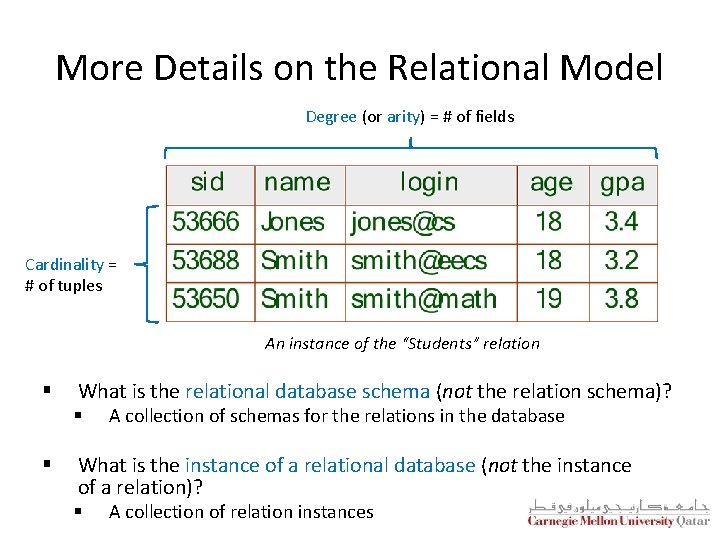
More Details on the Relational Model Degree (or arity) = # of fields Cardinality = # of tuples An instance of the “Students” relation § What is the relational database schema (not the relation schema)? § § A collection of schemas for the relations in the database What is the instance of a relational database (not the instance of a relation)? § A collection of relation instances
Outline The Relational Model: Basic SQL Translating ER Diagrams to Tables and Summary Query Languages ü
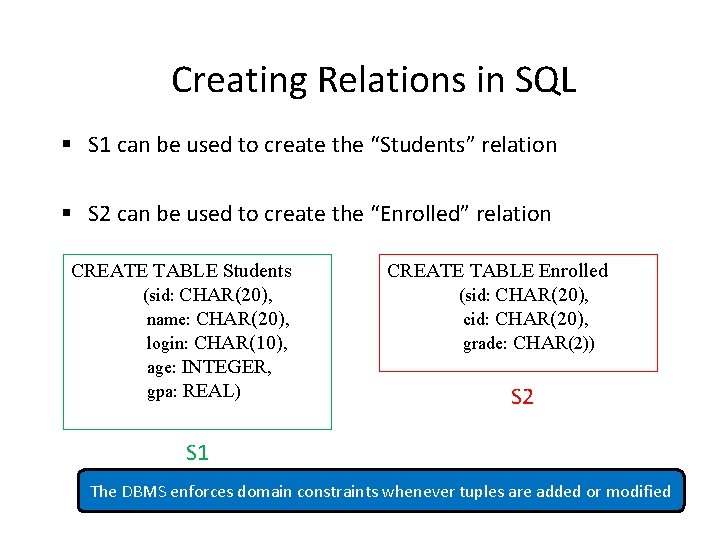
Creating Relations in SQL § S 1 can be used to create the “Students” relation § S 2 can be used to create the “Enrolled” relation CREATE TABLE Students (sid: CHAR(20), name: CHAR(20), login: CHAR(10), age: INTEGER, gpa: REAL) CREATE TABLE Enrolled (sid: CHAR(20), cid: CHAR(20), grade: CHAR(2)) S 2 S 1 The DBMS enforces domain constraints whenever tuples are added or modified
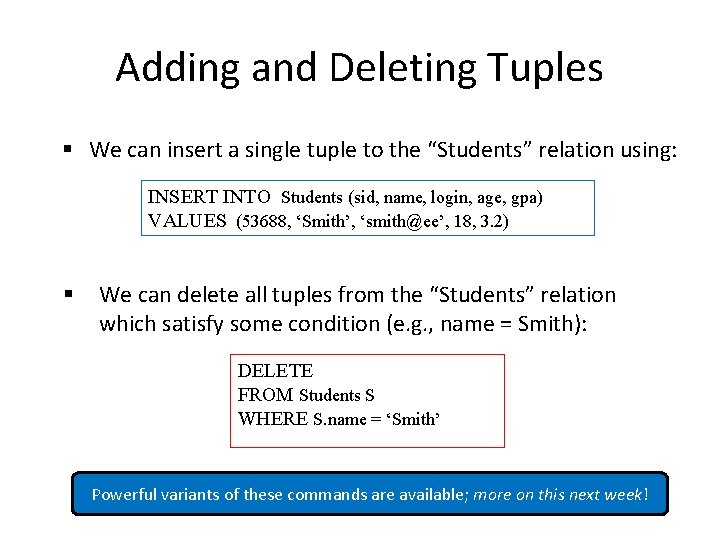
Adding and Deleting Tuples § We can insert a single tuple to the “Students” relation using: INSERT INTO Students (sid, name, login, age, gpa) VALUES (53688, ‘Smith’, ‘smith@ee’, 18, 3. 2) § We can delete all tuples from the “Students” relation which satisfy some condition (e. g. , name = Smith): DELETE FROM Students S WHERE S. name = ‘Smith’ Powerful variants of these commands are available; more on this next week!
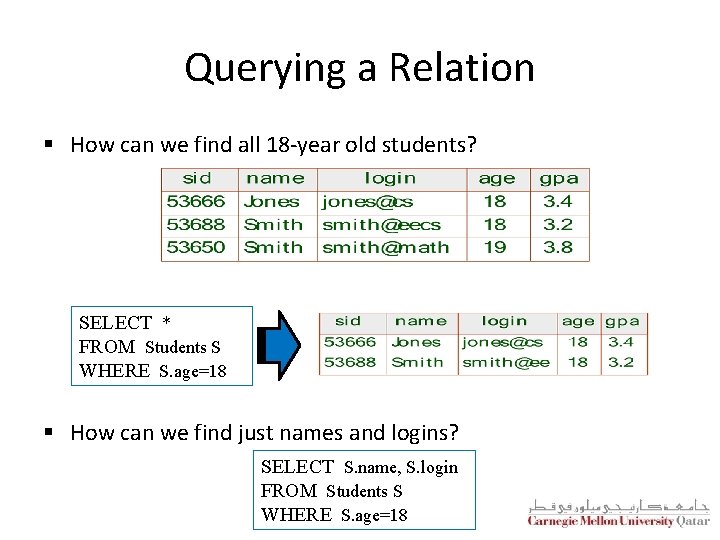
Querying a Relation § How can we find all 18 -year old students? SELECT * FROM Students S WHERE S. age=18 § How can we find just names and logins? SELECT S. name, S. login FROM Students S WHERE S. age=18
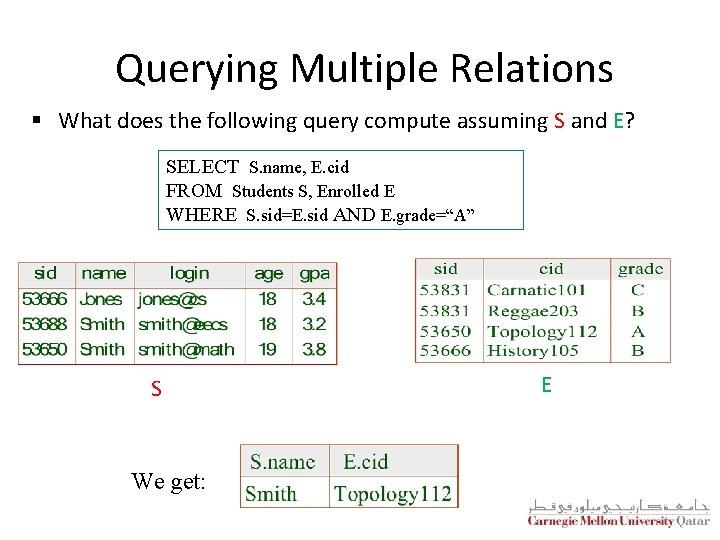
Querying Multiple Relations § What does the following query compute assuming S and E? SELECT S. name, E. cid FROM Students S, Enrolled E WHERE S. sid=E. sid AND E. grade=“A” S We get: E
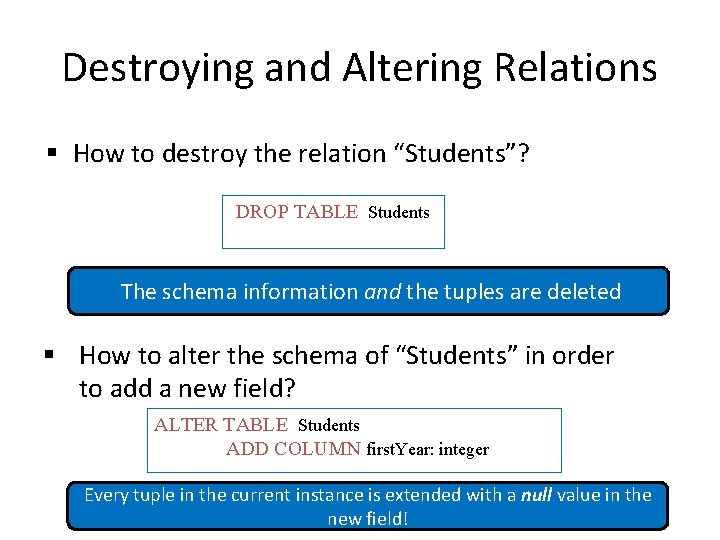
Destroying and Altering Relations § How to destroy the relation “Students”? DROP TABLE Students The schema information and the tuples are deleted § How to alter the schema of “Students” in order to add a new field? ALTER TABLE Students ADD COLUMN first. Year: integer Every tuple in the current instance is extended with a null value in the new field!
Integrity Constraints (ICs) § An IC is a condition that must be true for any instance of the database (e. g. , domain constraints) § § ICs are specified when schemas are defined ICs are checked when relations are modified § A legal instance of a relation is one that satisfies all specified ICs § DBMS should not allow illegal instances § If the DBMS checks ICs, stored data is more faithful to real-world meaning § Avoids data entry errors, too!
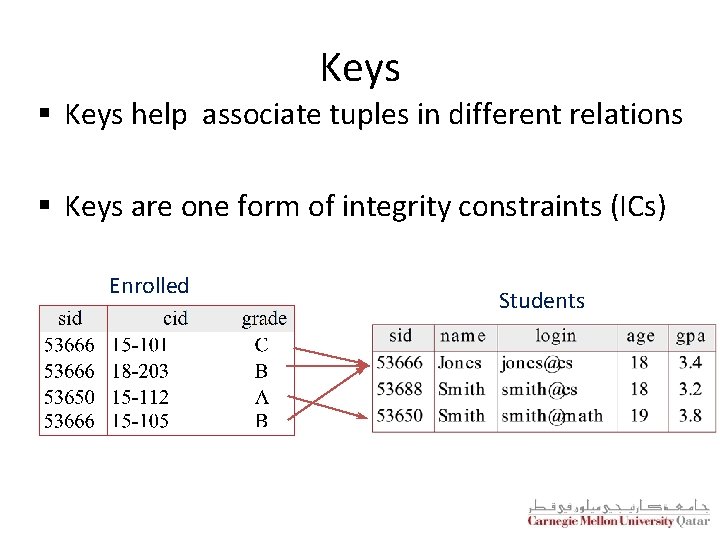
Keys § Keys help associate tuples in different relations § Keys are one form of integrity constraints (ICs) Enrolled Students
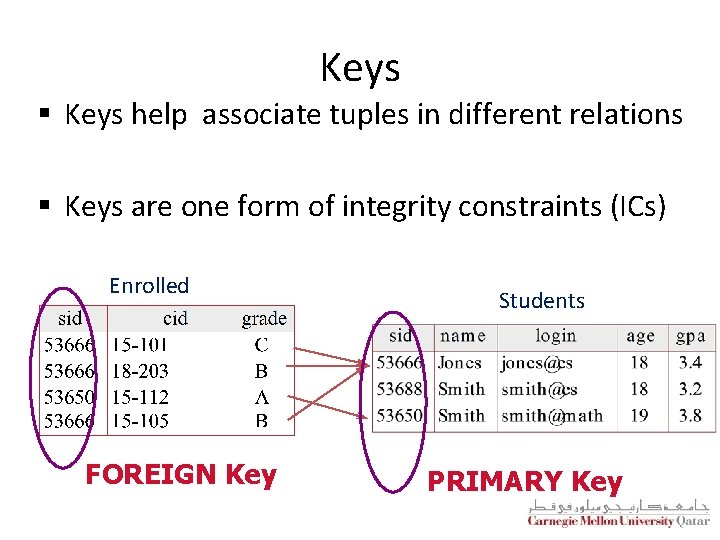
Keys § Keys help associate tuples in different relations § Keys are one form of integrity constraints (ICs) Enrolled FOREIGN Key Students PRIMARY Key
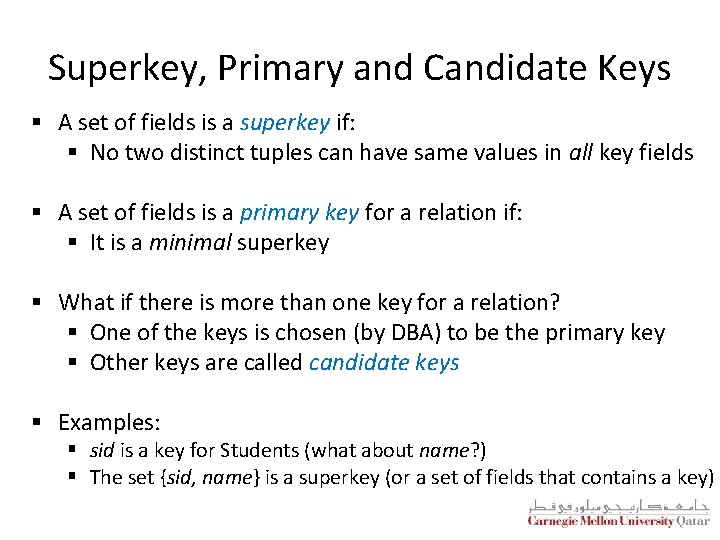
Superkey, Primary and Candidate Keys § A set of fields is a superkey if: § No two distinct tuples can have same values in all key fields § A set of fields is a primary key for a relation if: § It is a minimal superkey § What if there is more than one key for a relation? § One of the keys is chosen (by DBA) to be the primary key § Other keys are called candidate keys § Examples: § sid is a key for Students (what about name? ) § The set {sid, name} is a superkey (or a set of fields that contains a key)
Primary and Candidate Keys in SQL § Many candidate keys (specified using UNIQUE) can be designated and one is chosen as a primary key § Keys must be used carefully! § “For a given student and course, there is a single grade”
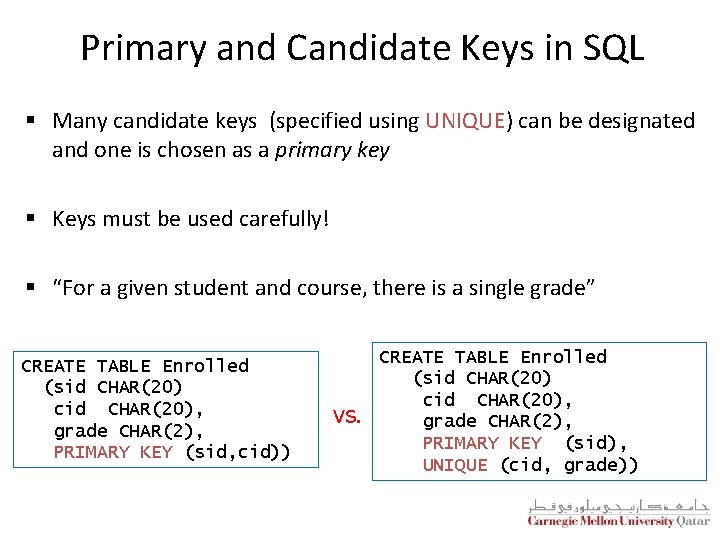
Primary and Candidate Keys in SQL § Many candidate keys (specified using UNIQUE) can be designated and one is chosen as a primary key § Keys must be used carefully! § “For a given student and course, there is a single grade” CREATE TABLE Enrolled (sid CHAR(20) cid CHAR(20), grade CHAR(2), PRIMARY KEY (sid, cid)) vs. CREATE TABLE Enrolled (sid CHAR(20) cid CHAR(20), grade CHAR(2), PRIMARY KEY (sid), UNIQUE (cid, grade))
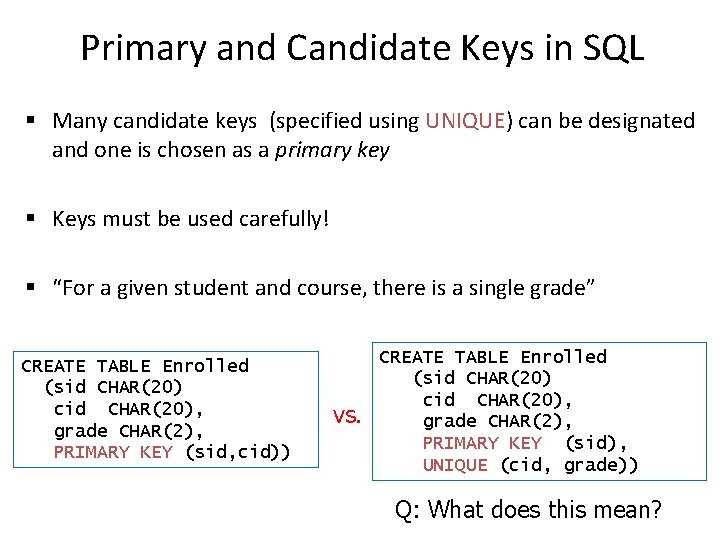
Primary and Candidate Keys in SQL § Many candidate keys (specified using UNIQUE) can be designated and one is chosen as a primary key § Keys must be used carefully! § “For a given student and course, there is a single grade” CREATE TABLE Enrolled (sid CHAR(20) cid CHAR(20), grade CHAR(2), PRIMARY KEY (sid, cid)) vs. CREATE TABLE Enrolled (sid CHAR(20) cid CHAR(20), grade CHAR(2), PRIMARY KEY (sid), UNIQUE (cid, grade)) Q: What does this mean?
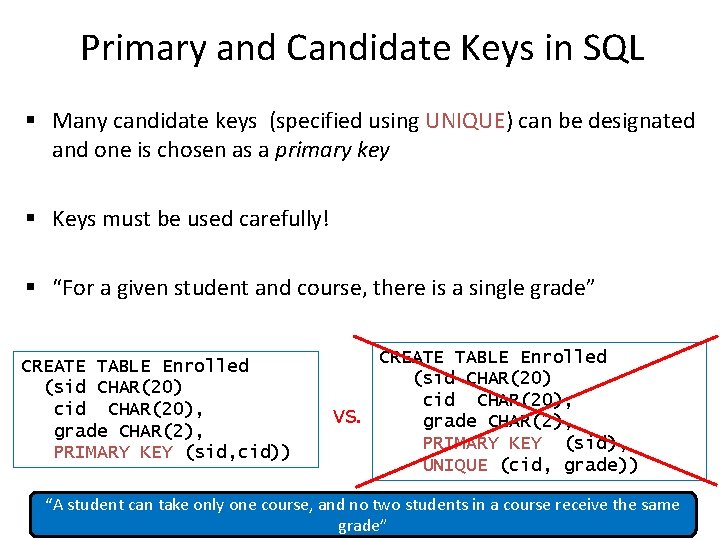
Primary and Candidate Keys in SQL § Many candidate keys (specified using UNIQUE) can be designated and one is chosen as a primary key § Keys must be used carefully! § “For a given student and course, there is a single grade” CREATE TABLE Enrolled (sid CHAR(20) cid CHAR(20), grade CHAR(2), PRIMARY KEY (sid, cid)) vs. CREATE TABLE Enrolled (sid CHAR(20) cid CHAR(20), grade CHAR(2), PRIMARY KEY (sid), UNIQUE (cid, grade)) “A student can take only one course, and no two students in a course receive the same grade”
Foreign Keys and Referential Integrity § A foreign key is a set of fields referring to a tuple in another relation § It must correspond to the primary key of the other relation § It acts like a `logical pointer’ § If all foreign key constraints are enforced, referential integrity is said to be achieved (i. e. , no dangling references)
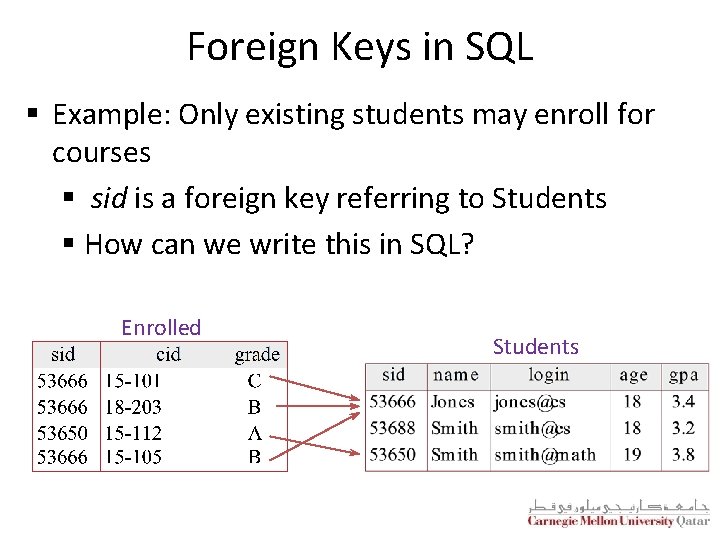
Foreign Keys in SQL § Example: Only existing students may enroll for courses § sid is a foreign key referring to Students § How can we write this in SQL? Enrolled Students
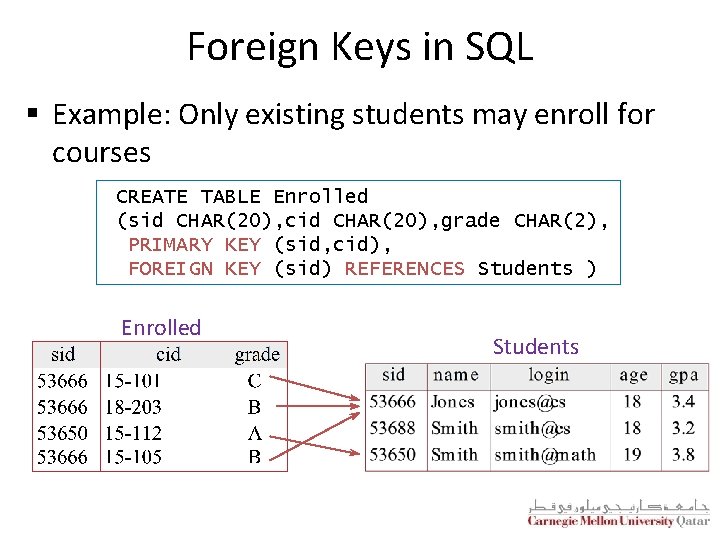
Foreign Keys in SQL § Example: Only existing students may enroll for courses CREATE TABLE Enrolled (sid CHAR(20), cid CHAR(20), grade CHAR(2), PRIMARY KEY (sid, cid), FOREIGN KEY (sid) REFERENCES Students ) Enrolled Students
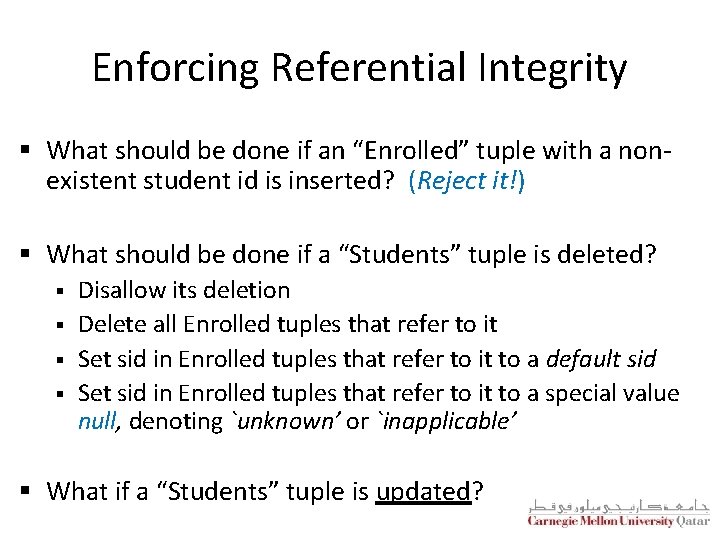
Enforcing Referential Integrity § What should be done if an “Enrolled” tuple with a nonexistent student id is inserted? (Reject it!) § What should be done if a “Students” tuple is deleted? § § Disallow its deletion Delete all Enrolled tuples that refer to it Set sid in Enrolled tuples that refer to it to a default sid Set sid in Enrolled tuples that refer to it to a special value null, denoting `unknown’ or `inapplicable’ § What if a “Students” tuple is updated?
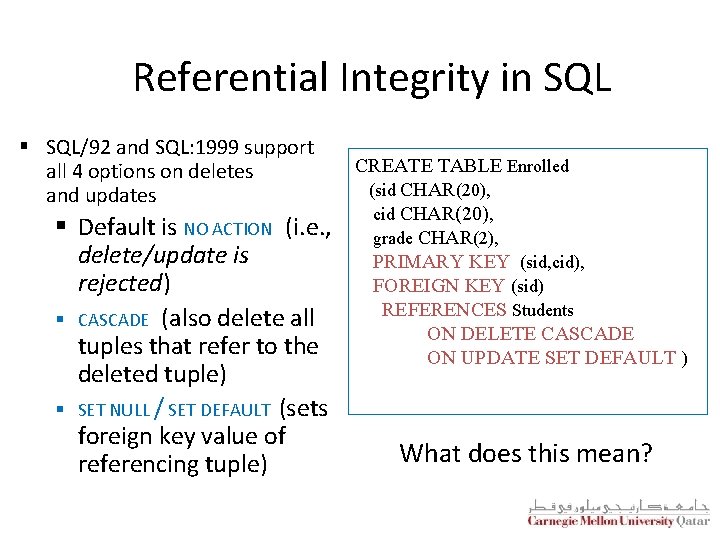
Referential Integrity in SQL § SQL/92 and SQL: 1999 support all 4 options on deletes and updates § Default is NO ACTION (i. e. , delete/update is rejected) § CASCADE (also delete all tuples that refer to the deleted tuple) § SET NULL / SET DEFAULT (sets foreign key value of referencing tuple) CREATE TABLE Enrolled (sid CHAR(20), cid CHAR(20), grade CHAR(2), PRIMARY KEY (sid, cid), FOREIGN KEY (sid) REFERENCES Students ON DELETE CASCADE ON UPDATE SET DEFAULT ) What does this mean?
Where do ICs Come From? § ICs are based upon the semantics of the real-world enterprise that is being described in the database relations § We can check a database instance to see if an IC is violated, but we can NEVER infer that an IC is true by looking at an instance § § An IC is a statement about all possible instances! From the “Students” relation, we know name is not a key, but the assertion that sid is a key is given to us § Key and foreign key ICs are the most common; more general ICs are supported too
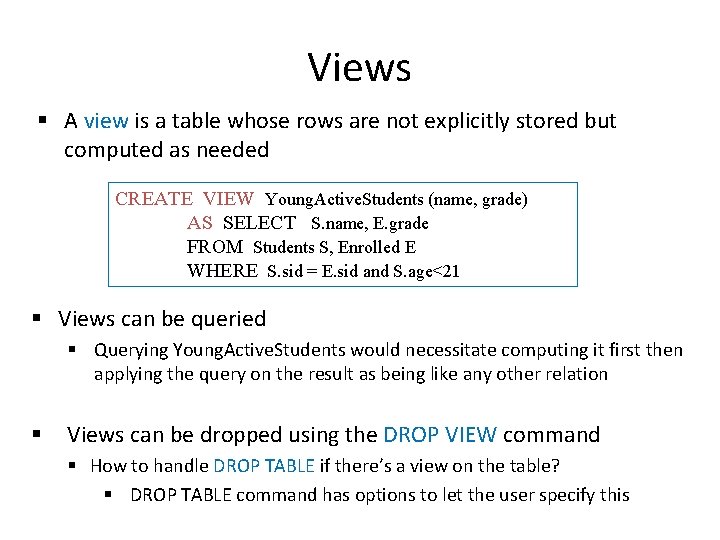
Views § A view is a table whose rows are not explicitly stored but computed as needed CREATE VIEW Young. Active. Students (name, grade) AS SELECT S. name, E. grade FROM Students S, Enrolled E WHERE S. sid = E. sid and S. age<21 § Views can be queried § Querying Young. Active. Students would necessitate computing it first then applying the query on the result as being like any other relation § Views can be dropped using the DROP VIEW command § How to handle DROP TABLE if there’s a view on the table? § DROP TABLE command has options to let the user specify this
Views and Security § Views can be used to present necessary information, while hiding details in underlying relation(s) § If the schema of an old relation is changed, a view can be defined to represent the old schema § This allows applications to transparently assume the old schema § Views can be defined to give a group of users access to just the information they are allowed to see § E. g. , we can define a view that allows students to see other students’ names and ages, but not GPAs (also students can be prevented from accessing the underlying “Students” relation)
Views and Security § Views can be used to present necessary information, while hiding details in underlying relation(s) § If the schema of an old relation is changed, a view can be defined to represent the. Logical old schema Data Independence! § This allows applications to transparently assume the old schema § Views can be defined to give a group of users access to just the information they are allowed to see § E. g. , we can define a view that allows students to see other students’ names and ages, but not GPAs (also students can be prevented from accessing the underlying “Students” relation)
Views and Security § Views can be used to present necessary information, while hiding details in underlying relation(s) § If the schema of an old relation is changed, a view can be defined to represent the. Logical old schema Data Independence! § This allows applications to transparently assume the old schema § Views can be defined to give a group of users access to just the information they are allowed to see Security! § E. g. , we can define a view that allows students to see other students’ names and ages, but not GPAs (also students can be prevented from accessing the underlying “Students” relation)
Outline The Relational Model: Basic SQL Translating ER Diagrams to Tables and Summary Query Languages ü
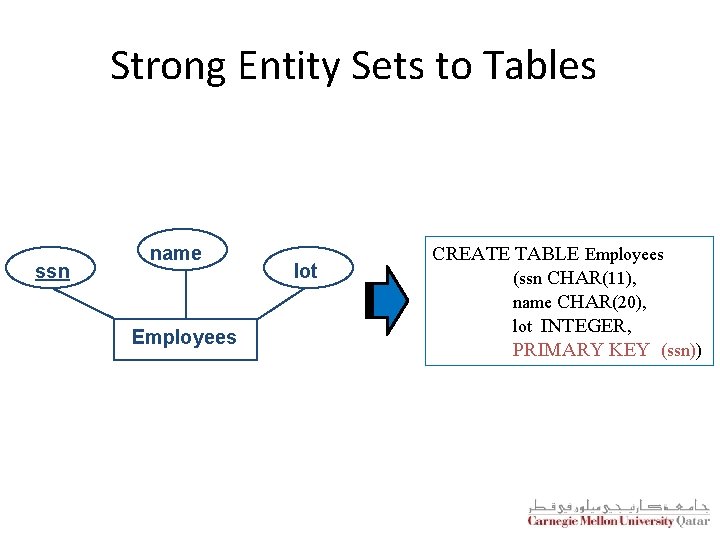
Strong Entity Sets to Tables ssn name Employees lot CREATE TABLE Employees (ssn CHAR(11), name CHAR(20), lot INTEGER, PRIMARY KEY (ssn))
Relationship Sets to Tables § In translating a relationship set to a relation, attributes of the relation must include: 1. Keys for each participating entity set (as foreign keys) § This set of attributes forms a superkey for the relation 2. All descriptive attributes § Relationship sets § 1 -to-1, 1 -to-many, and many-to-many § Key/Total/Partial participation
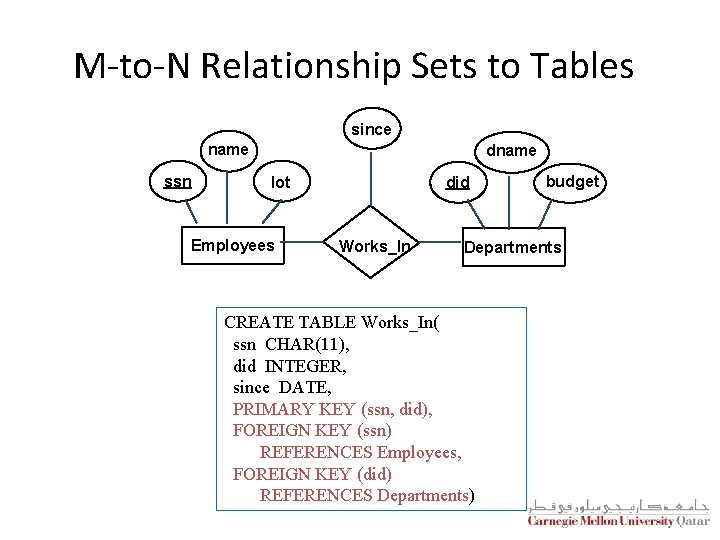
M-to-N Relationship Sets to Tables since name ssn dname did lot Employees Works_In budget Departments CREATE TABLE Works_In( ssn CHAR(11), did INTEGER, since DATE, PRIMARY KEY (ssn, did), FOREIGN KEY (ssn) REFERENCES Employees, FOREIGN KEY (did) REFERENCES Departments)
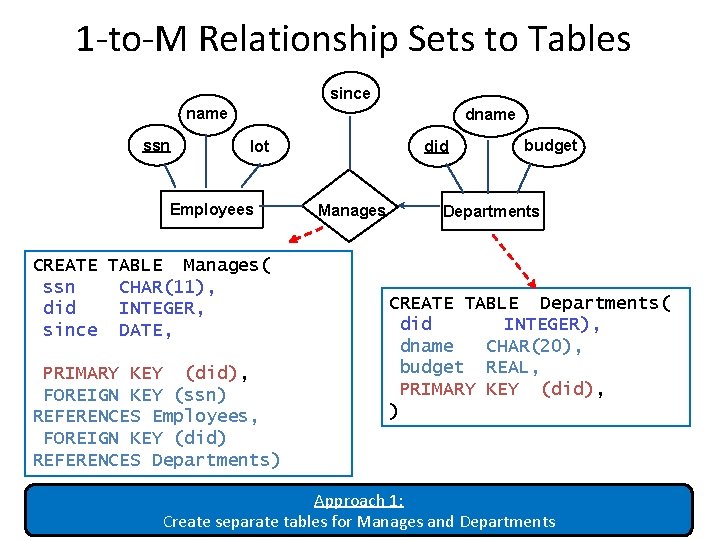
1 -to-M Relationship Sets to Tables since name ssn dname lot Employees CREATE TABLE Manages( ssn CHAR(11), did INTEGER, since DATE, PRIMARY KEY (did), FOREIGN KEY (ssn) REFERENCES Employees, FOREIGN KEY (did) REFERENCES Departments) did Manages budget Departments CREATE TABLE Departments( did INTEGER), dname CHAR(20), budget REAL, PRIMARY KEY (did), ) Approach 1: Create separate tables for Manages and Departments
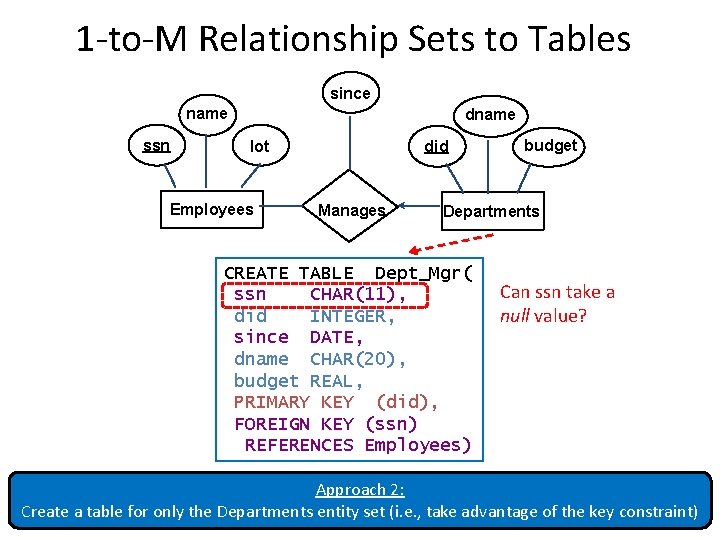
1 -to-M Relationship Sets to Tables since name ssn dname lot Employees did Manages budget Departments CREATE TABLE Dept_Mgr( ssn CHAR(11), did INTEGER, since DATE, dname CHAR(20), budget REAL, PRIMARY KEY (did), FOREIGN KEY (ssn) REFERENCES Employees) Can ssn take a null value? Approach 2: Create a table for only the Departments entity set (i. e. , take advantage of the key constraint)
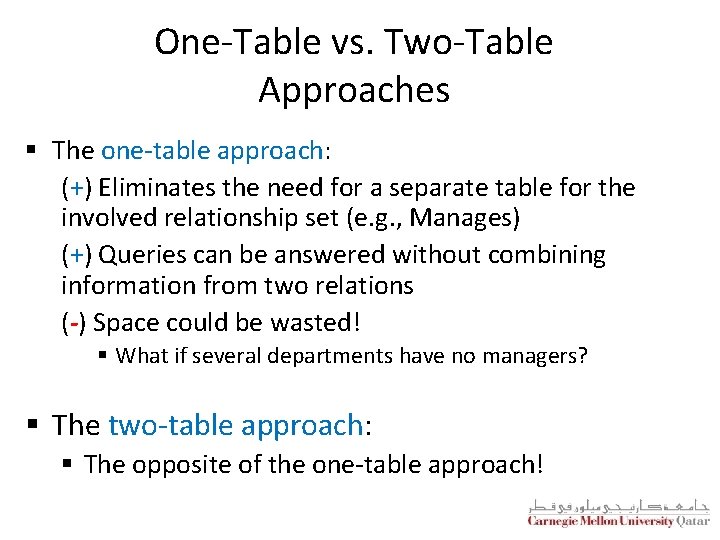
One-Table vs. Two-Table Approaches § The one-table approach: (+) Eliminates the need for a separate table for the involved relationship set (e. g. , Manages) (+) Queries can be answered without combining information from two relations (-) Space could be wasted! § What if several departments have no managers? § The two-table approach: § The opposite of the one-table approach!
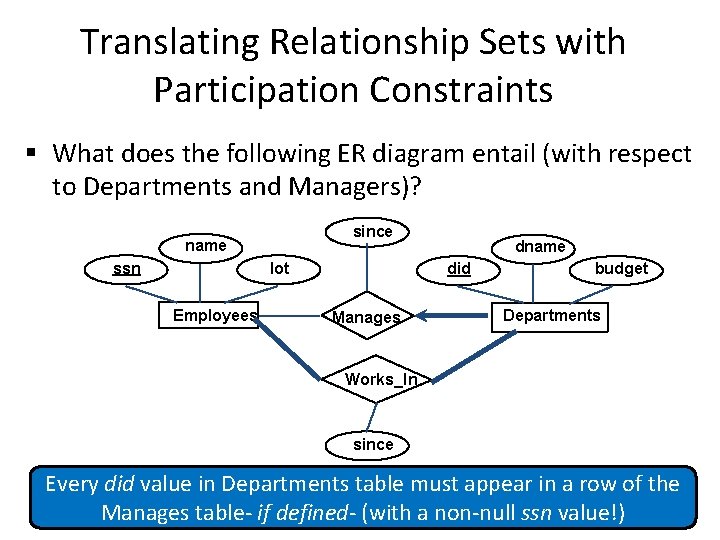
Translating Relationship Sets with Participation Constraints § What does the following ER diagram entail (with respect to Departments and Managers)? since name ssn did lot Employees dname Manages budget Departments Works_In since Every did value in Departments table must appear in a row of the Manages table- if defined- (with a non-null ssn value!)
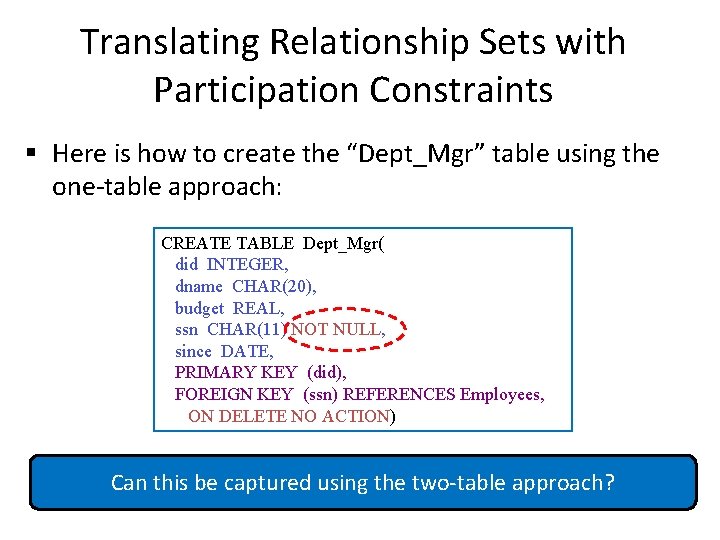
Translating Relationship Sets with Participation Constraints § Here is how to create the “Dept_Mgr” table using the one-table approach: CREATE TABLE Dept_Mgr( did INTEGER, dname CHAR(20), budget REAL, ssn CHAR(11) NOT NULL, since DATE, PRIMARY KEY (did), FOREIGN KEY (ssn) REFERENCES Employees, ON DELETE NO ACTION) Can this be captured using the two-table approach?
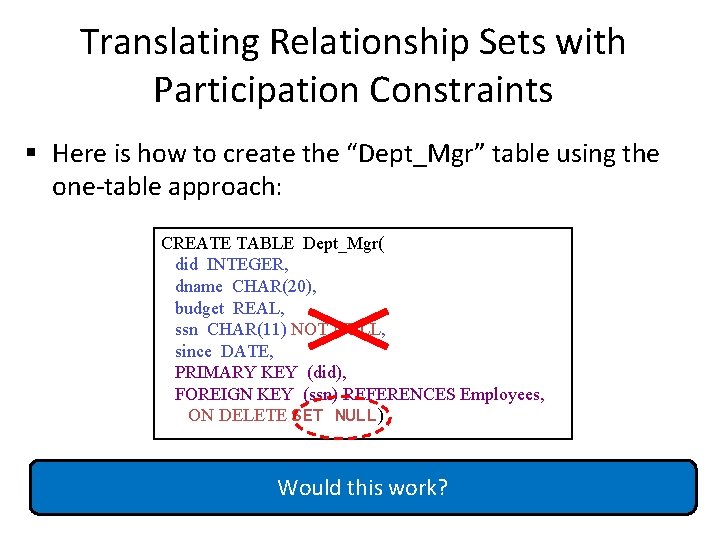
Translating Relationship Sets with Participation Constraints § Here is how to create the “Dept_Mgr” table using the one-table approach: CREATE TABLE Dept_Mgr( did INTEGER, dname CHAR(20), budget REAL, ssn CHAR(11) NOT NULL, since DATE, PRIMARY KEY (did), FOREIGN KEY (ssn) REFERENCES Employees, ON DELETE SET NULL) Would this work?
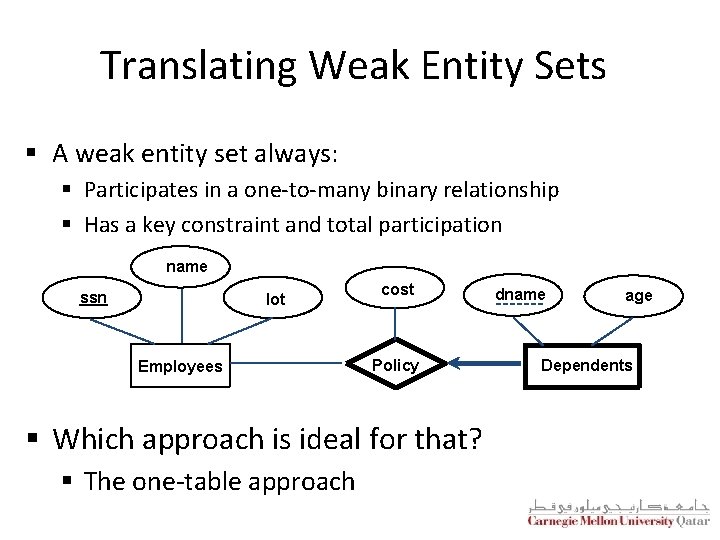
Translating Weak Entity Sets § A weak entity set always: § Participates in a one-to-many binary relationship § Has a key constraint and total participation name ssn lot Employees cost Policy § Which approach is ideal for that? § The one-table approach dname age Dependents
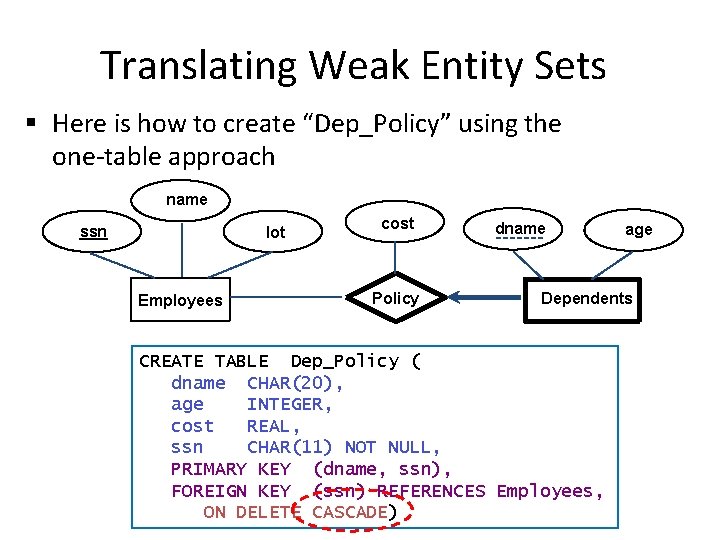
Translating Weak Entity Sets § Here is how to create “Dep_Policy” using the one-table approach name ssn lot Employees cost Policy dname age Dependents CREATE TABLE Dep_Policy ( dname CHAR(20), age INTEGER, cost REAL, ssn CHAR(11) NOT NULL, PRIMARY KEY (dname, ssn), FOREIGN KEY (ssn) REFERENCES Employees, ON DELETE CASCADE)
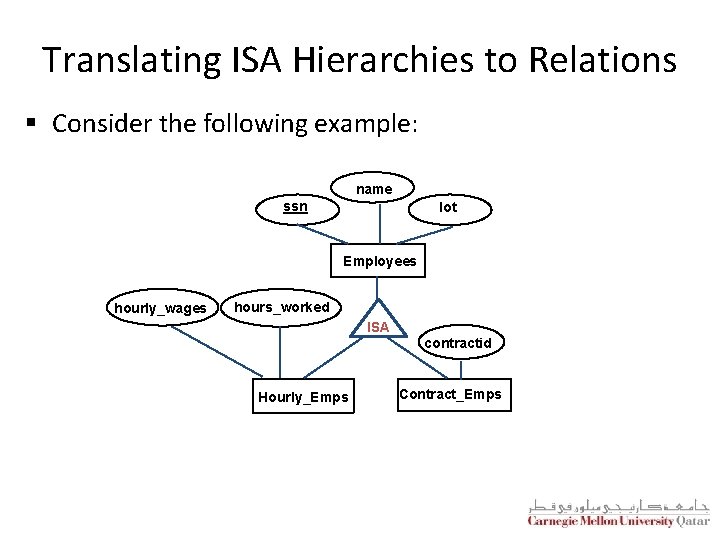
Translating ISA Hierarchies to Relations § Consider the following example: name ssn lot Employees hourly_wages hours_worked ISA Hourly_Emps contractid Contract_Emps
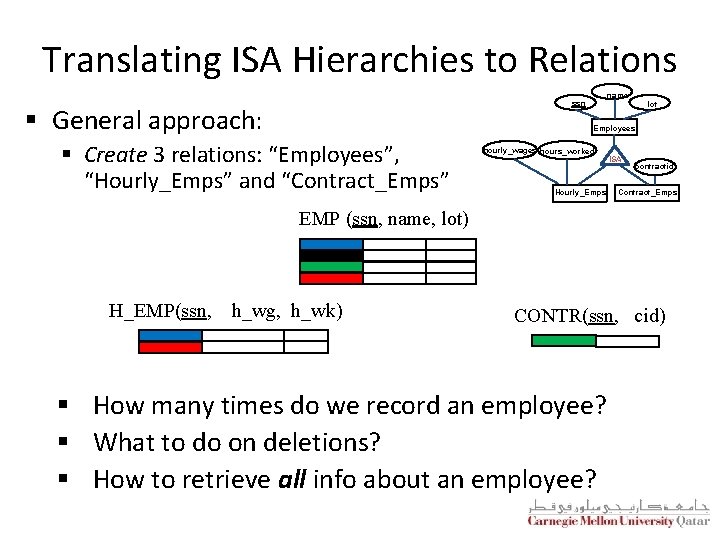
Translating ISA Hierarchies to Relations name ssn § General approach: lot Employees § Create 3 relations: “Employees”, “Hourly_Emps” and “Contract_Emps” hourly_wages hours_worked Hourly_Emps ISA contractid Contract_Emps EMP (ssn, name, lot) H_EMP(ssn, h_wg, h_wk) CONTR(ssn, cid) § How many times do we record an employee? § What to do on deletions? § How to retrieve all info about an employee?
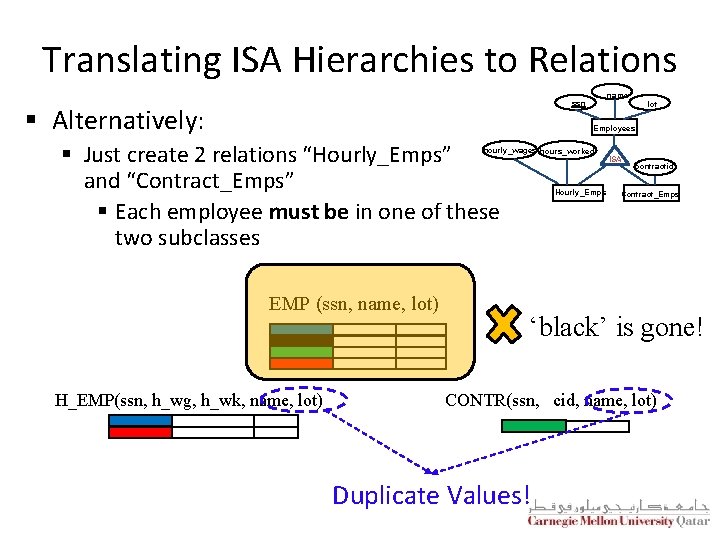
Translating ISA Hierarchies to Relations name ssn § Alternatively: lot Employees § Just create 2 relations “Hourly_Emps” and “Contract_Emps” § Each employee must be in one of these two subclasses hourly_wages hours_worked EMP (ssn, name, lot) H_EMP(ssn, h_wg, h_wk, name, lot) Hourly_Emps ISA contractid Contract_Emps ‘black’ is gone! CONTR(ssn, cid, name, lot) Duplicate Values!
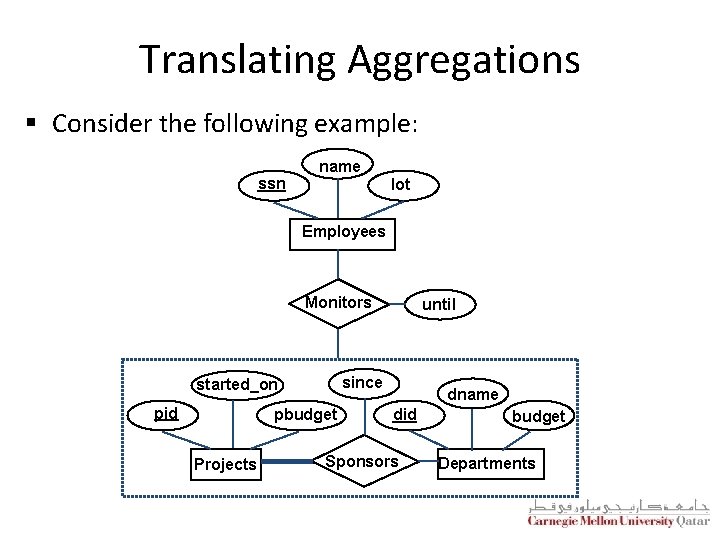
Translating Aggregations § Consider the following example: ssn name lot Employees Monitors since started_on pid pbudget Projects until dname did Sponsors budget Departments
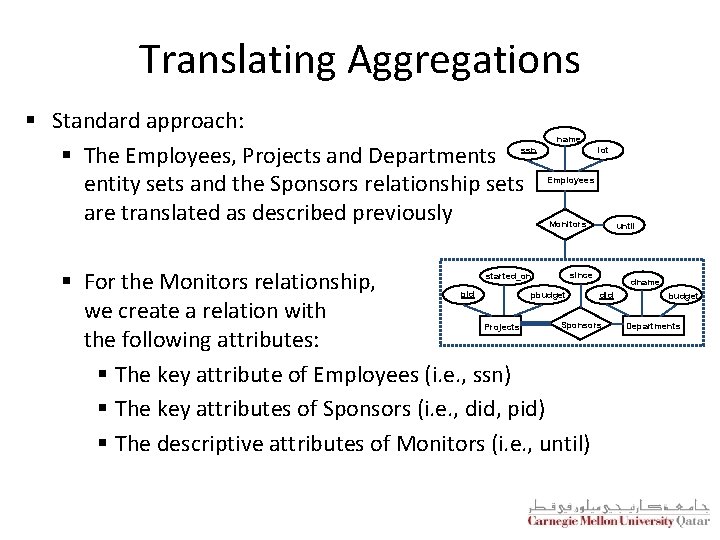
Translating Aggregations § Standard approach: § The Employees, Projects and Departments entity sets and the Sponsors relationship sets are translated as described previously name ssn lot Employees Monitors § For the Monitors relationship, we create a relation with the following attributes: § The key attribute of Employees (i. e. , ssn) § The key attributes of Sponsors (i. e. , did, pid) § The descriptive attributes of Monitors (i. e. , until) since started_on pid pbudget Projects until dname did Sponsors budget Departments
The Relational Model: A Summary § A tabular representation of data § Simple and intuitive, currently one of the most widely used § Object-Relational Mapping (ORM) hides the relational model § Non-relational No. SQL model is gaining ground § Integrity constraints can be specified (by the DBA) based on application semantics (DBMS checks for violations) § Two important ICs: primary and foreign keys § Also: not null, unique § In addition, we always have domain constraints § Mapping from ER to Relational is (fairly) straightforward!
ER to Tables - Summary of Basics § Strong entities: § Key -> primary key § (Binary) relationships: § Get keys from all participating entities: § 1: 1 -> either key can be the primary key § 1: N -> the key of the ‘N’ part will be the primary key § M: N -> both keys will be the primary key § Weak entities: § Strong key + partial key -> primary key §. . . ON DELETE CASCADE
ER to Tables - Summary of Advanced § Total/Partial participation: § NOT NULL § Ternary relationships: § Get keys from all; decide which one(s) -> primary Key § Aggregation: like relationships § ISA: § 3 tables (most general) § 2 tables (‘total coverage’)
Outline The Relational Model: Basic SQL Translating ER Diagrams to Tables and Summary Query Languages ü
Relational Query Languages § Query languages (QLs) allow manipulating and retrieving data from databases § The relational model supports simple and powerful QLs: § § Strong formal foundation based on logic High amenability for effective optimizations § Query Languages != programming languages! § § § QLs are not expected to be “Turing complete” QLs are not intended to be used for complex calculations QLs support easy and efficient access to large datasets
Formal Relational Query Languages § There are two mathematical Query Languages which form the basis for commercial languages (e. g. , SQL) § Relational Algebra § Queries are composed of operators § Each query describes a step-by-step procedure for computing the desired answer § Very useful for representing execution plans § Relational Calculus § Queries are subsets of first-order logic § Queries describe desired answers without specifying how they will be computed § A type of non-procedural (or declarative) formal query language
Next Class Relational Algebra
- Slides: 56