
Data versus Information Java Bits 1 Bits are
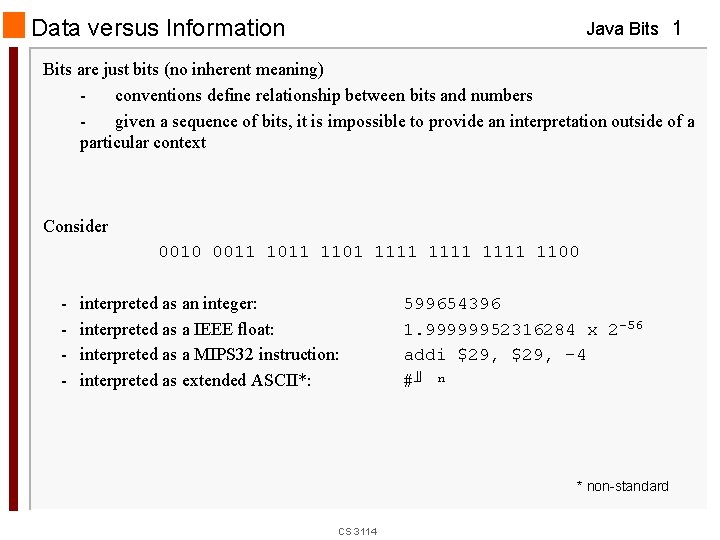
Data versus Information Java Bits 1 Bits are just bits (no inherent meaning) conventions define relationship between bits and numbers given a sequence of bits, it is impossible to provide an interpretation outside of a particular context Consider 0010 0011 1101 1111 1100 - interpreted as an integer: interpreted as a IEEE float: interpreted as a MIPS 32 instruction: interpreted as extended ASCII*: 599654396 1. 99999952316284 x 2 -56 addi $29, -4 #╜ ⁿ * non-standard CS 3114
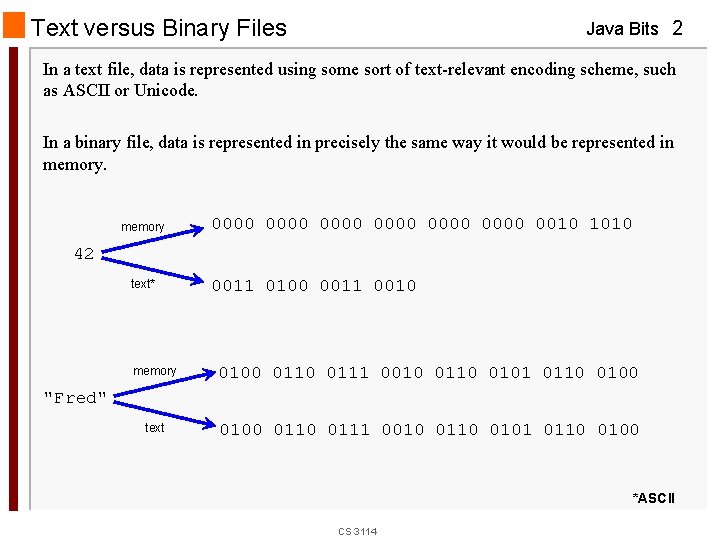
Text versus Binary Files Java Bits 2 In a text file, data is represented using some sort of text-relevant encoding scheme, such as ASCII or Unicode. In a binary file, data is represented in precisely the same way it would be represented in memory 0000 0000 0010 1010 42 text* 0011 0100 0011 0010 memory 0100 0111 0010 0101 0110 0100 text 0100 0111 0010 0101 0110 0100 "Fred" *ASCII CS 3114
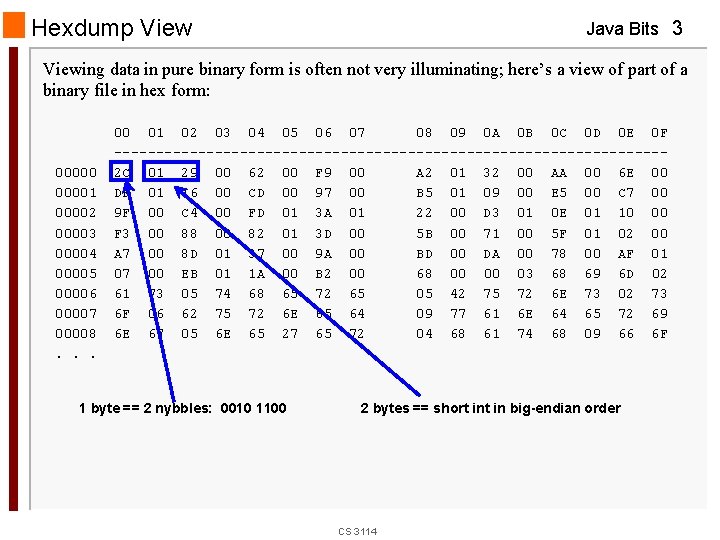
Hexdump View Java Bits 3 Viewing data in pure binary form is often not very illuminating; here’s a view of part of a binary file in hex form: 000001 00002 00003 00004 00005 00006 00007 00008. . . 00 01 02 03 04 05 06 07 08 09 0 A 0 B 0 C 0 D 0 E 0 F ---------------------------------2 C 01 29 00 62 00 F 9 00 A 2 01 32 00 AA 00 6 E 00 DF 01 16 00 CD 00 97 00 B 5 01 09 00 E 5 00 C 7 00 9 F 00 C 4 00 FD 01 3 A 01 22 00 D 3 01 0 E 01 10 00 F 3 00 88 00 82 01 3 D 00 5 B 00 71 00 5 F 01 02 00 A 7 00 8 D 01 37 00 9 A 00 BD 00 DA 00 78 00 AF 01 07 00 EB 01 1 A 00 B 2 00 68 00 00 03 68 69 6 D 02 61 73 05 74 68 65 72 65 05 42 75 72 6 E 73 02 73 6 F 06 62 75 72 6 E 65 64 09 77 61 6 E 64 65 72 69 6 E 67 05 6 E 65 27 65 72 04 68 61 74 68 09 66 6 F 1 byte == 2 nybbles: 0010 1100 2 bytes == short in big-endian order CS 3114
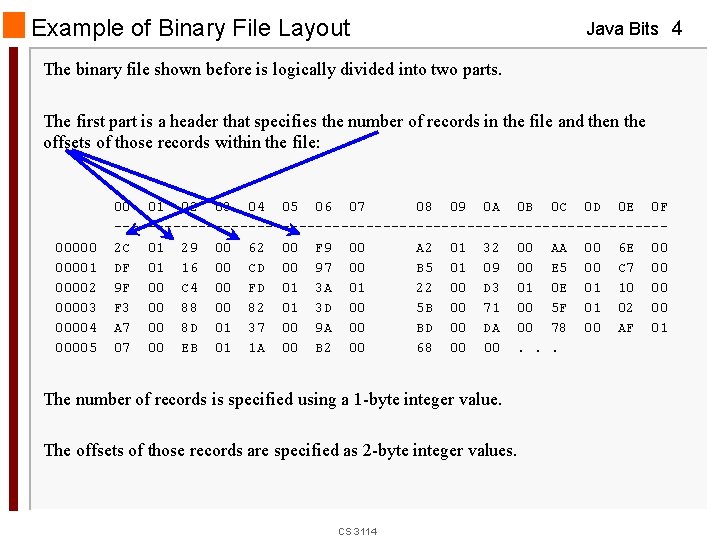
Example of Binary File Layout Java Bits 4 The binary file shown before is logically divided into two parts. The first part is a header that specifies the number of records in the file and then the offsets of those records within the file: 000001 00002 00003 00004 00005 00 01 02 03 04 05 06 07 08 09 0 A 0 B 0 C 0 D 0 E 0 F ---------------------------------2 C 01 29 00 62 00 F 9 00 A 2 01 32 00 AA 00 6 E 00 DF 01 16 00 CD 00 97 00 B 5 01 09 00 E 5 00 C 7 00 9 F 00 C 4 00 FD 01 3 A 01 22 00 D 3 01 0 E 01 10 00 F 3 00 88 00 82 01 3 D 00 5 B 00 71 00 5 F 01 02 00 A 7 00 8 D 01 37 00 9 A 00 BD 00 DA 00 78 00 AF 01 07 00 EB 01 1 A 00 B 2 00 68 00 00. . . The number of records is specified using a 1 -byte integer value. The offsets of those records are specified as 2 -byte integer values. CS 3114
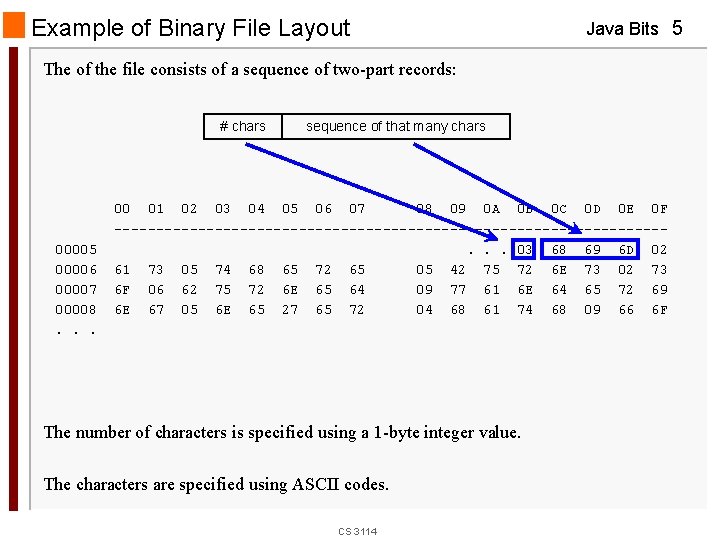
Example of Binary File Layout Java Bits 5 The of the file consists of a sequence of two-part records: # chars 00005 00006 00007 00008. . . sequence of that many chars 00 01 02 03 04 05 06 07 08 09 0 A 0 B 0 C 0 D 0 E 0 F ---------------------------------. . . 03 68 69 6 D 02 61 73 05 74 68 65 72 65 05 42 75 72 6 E 73 02 73 6 F 06 62 75 72 6 E 65 64 09 77 61 6 E 64 65 72 69 6 E 67 05 6 E 65 27 65 72 04 68 61 74 68 09 66 6 F The number of characters is specified using a 1 -byte integer value. The characters are specified using ASCII codes. CS 3114
Example: File Navigation and Binary Input Java Bits 6 The file actually contains a quotation. Each record specifies a "word" that makes up part of the quotation, and we must create the proper quotation from the file. Logically, we need to: get the # of records in the file get the offset of the first record get the record from that offset and print it go back and get the offset of the second record get the second record and print it. . . until we've processed the specified number of records CS 3114
![Java Solution Java Bits 7 public class File. Reader { public static void main(String[]](http://slidetodoc.com/presentation_image_h2/5812758376fe0a2073e69133eb7dd5ff/image-7.jpg "Java Solution Java Bits 7 public class File. Reader { public static void main(String[]")
Java Solution Java Bits 7 public class File. Reader { public static void main(String[] args) { try { byte num. Words = 0; short word. Offset = 0; byte word. Length = 0; Random. Access. File raf = new Random. Access. File("1. Data. bin", "r"); // Get the number of words in the quotation: num. Words = raf. read. Byte(); System. out. println("The number of words is: " + num. Words); . . . CS 3114
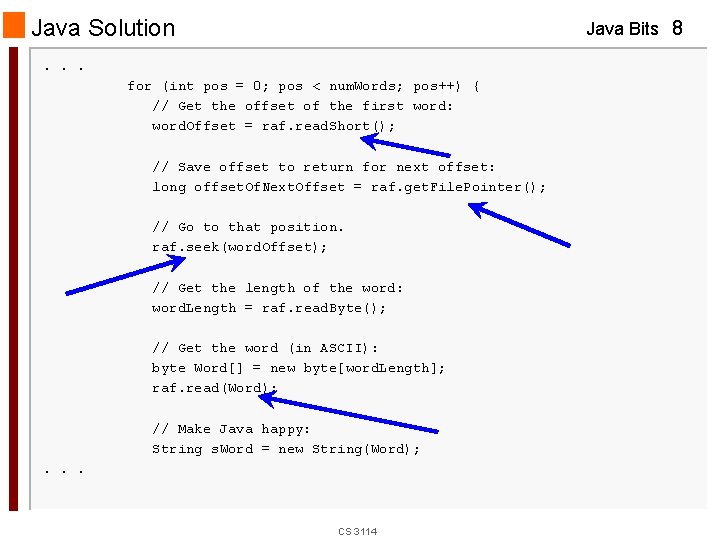
Java Solution Java Bits 8 . . . for (int pos = 0; pos < num. Words; pos++) { // Get the offset of the first word: word. Offset = raf. read. Short(); // Save offset to return for next offset: long offset. Of. Next. Offset = raf. get. File. Pointer(); // Go to that position. raf. seek(word. Offset); // Get the length of the word: word. Length = raf. read. Byte(); // Get the word (in ASCII): byte Word[] = new byte[word. Length]; raf. read(Word); // Make Java happy: String s. Word = new String(Word); . . . CS 3114
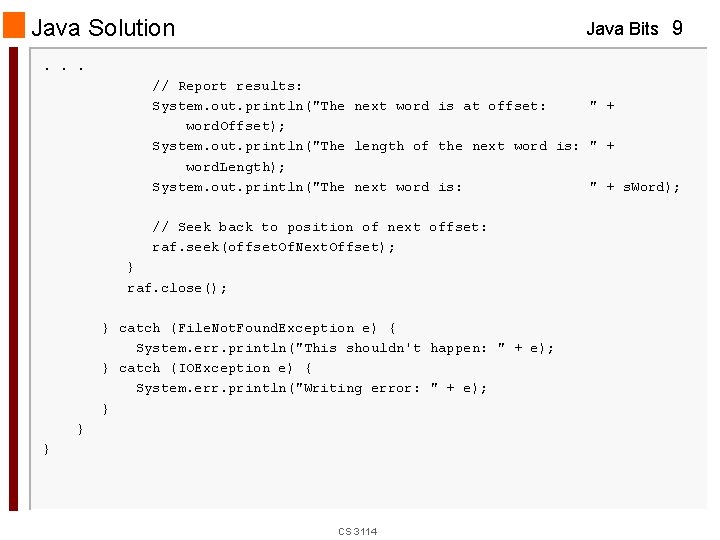
Java Solution Java Bits 9 . . . // Report results: System. out. println("The next word is at offset: " + word. Offset); System. out. println("The length of the next word is: " + word. Length); System. out. println("The next word is: " + s. Word); // Seek back to position of next offset: raf. seek(offset. Of. Next. Offset); } raf. close(); } catch (File. Not. Found. Exception e) { System. err. println("This shouldn't happen: " + e); } catch (IOException e) { System. err. println("Writing error: " + e); } } } CS 3114
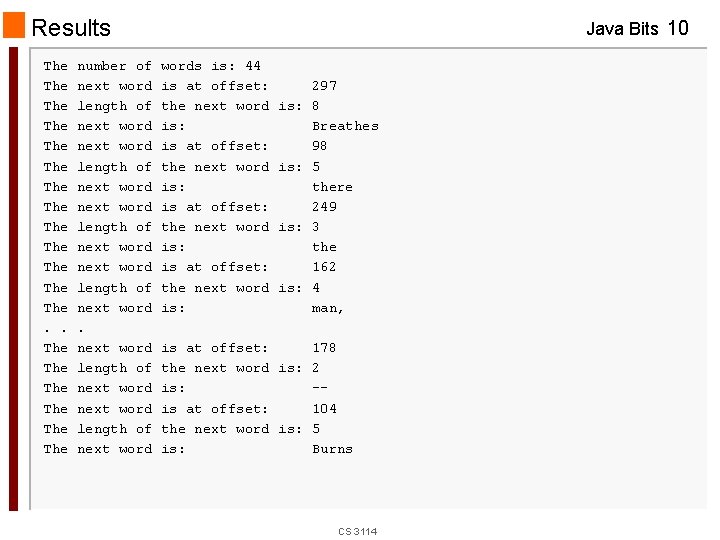
Results The The The The. . The The The number of next word length of next word Java Bits 10 words is: 44 is at offset: the next word is: is: 297 8 Breathes 98 5 there 249 3 the 162 4 man, is at offset: 178 the next word is: 2 is: -is at offset: 104 the next word is: 5 is: Burns CS 3114
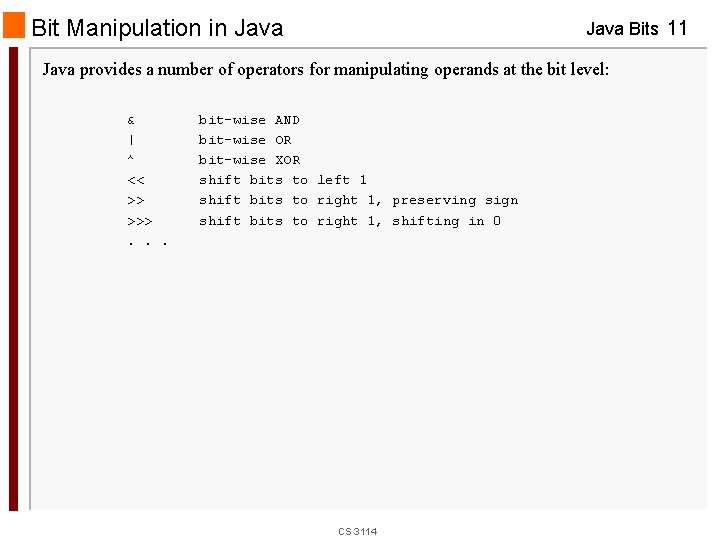
Bit Manipulation in Java Bits 11 Java provides a number of operators for manipulating operands at the bit level: & | ^ << >> >>>. . . bit-wise AND bit-wise OR bit-wise XOR shift bits to left 1 shift bits to right 1, preserving sign shift bits to right 1, shifting in 0 CS 3114
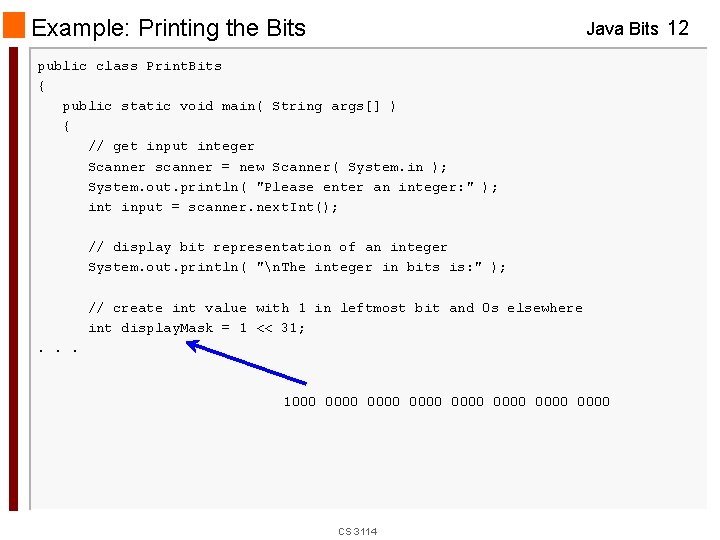
Example: Printing the Bits Java Bits 12 public class Print. Bits { public static void main( String args[] ) { // get input integer Scanner scanner = new Scanner( System. in ); System. out. println( "Please enter an integer: " ); int input = scanner. next. Int(); // display bit representation of an integer System. out. println( "n. The integer in bits is: " ); // create int value with 1 in leftmost bit and 0 s elsewhere int display. Mask = 1 << 31; . . . 1000 0000 0000 CS 3114
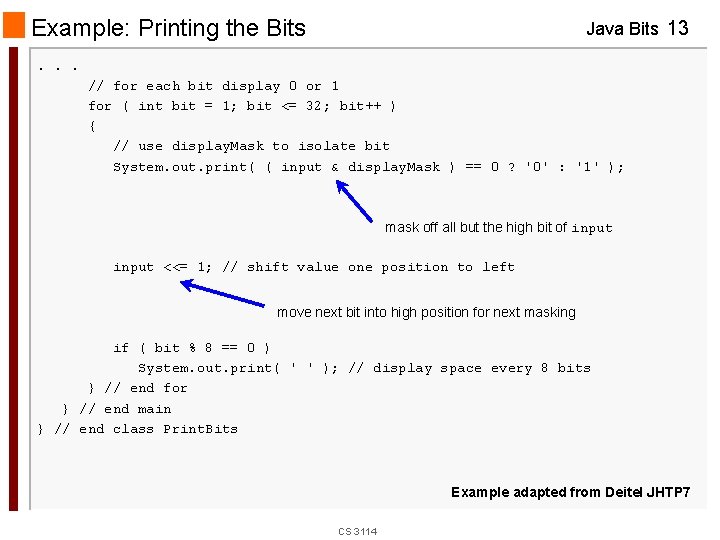
Example: Printing the Bits Java Bits 13 . . . // for each bit display 0 or 1 for ( int bit = 1; bit <= 32; bit++ ) { // use display. Mask to isolate bit System. out. print( ( input & display. Mask ) == 0 ? '0' : '1' ); mask off all but the high bit of input <<= 1; // shift value one position to left move next bit into high position for next masking if ( bit % 8 == 0 ) System. out. print( ' ' ); // display space every 8 bits } // end for } // end main } // end class Print. Bits Example adapted from Deitel JHTP 7 CS 3114
- Slides: 13