
Data Analysis Decision Support Systems Data Analysis and
- Slides: 24
Data Analysis Decision Support Systems Data Analysis and OLAP Data Warehousing
Decision Support Systems ¿ Decision-support systems are used to make business decisions, often based on data collected by on-line transaction-processing systems. ¿ Examples of business decisions: u What items to stock? u What insurance premium to change? u To whom to send advertisements? ¿ Examples of data used for making decisions u Retail sales transaction details u Customer profiles (income, age, gender, etc. ) 2
Decision-Support Systems: Overview ¿ Data analysis tasks are simplified by specialized tools and SQL extensions u Example tasks ÊFor each product category and each region, what were the total sales in the last quarter and how do they compare with the same quarter last year ÊAs above, for each product category and each customer category ¿ Statistical analysis packages (e. g. , : S++) can be interfaced with databases u Statistical analysis is a large field, but not covered here ¿ Data mining seeks to discover knowledge automatically in the form of statistical rules and patterns from large databases. ¿ A data warehouse archives information gathered from multiple sources, and stores it under a unified schema, at a single site. u Important for large businesses that generate data from multiple divisions, possibly at multiple sites 3
Data Analysis and OLAP ¿ Online Analytical Processing (OLAP) u Interactive analysis of data, allowing data to be summarized and viewed in different ways in an online fashion (with negligible delay) ¿ Data that can be modeled as dimension attributes and measure attributes are called multidimensional data. u Measure attributes Êmeasure some value Êcan be aggregated upon Êe. g. the attribute number of the sales relation u Dimension attributes Êdefine the dimensions on which measure attributes (or aggregates thereof) are viewed Êe. g. the attributes item_name, color, and size of the sales relation 4
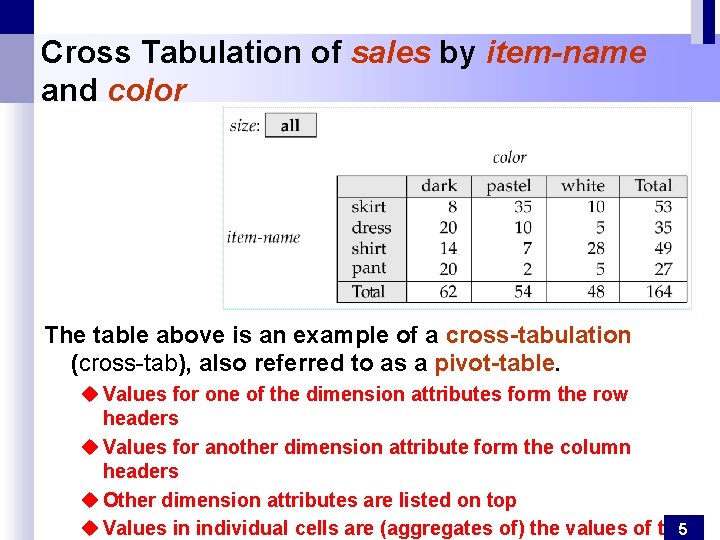
Cross Tabulation of sales by item-name and color The table above is an example of a cross-tabulation (cross-tab), also referred to as a pivot-table. u Values for one of the dimension attributes form the row headers u Values for another dimension attribute form the column headers u Other dimension attributes are listed on top u Values in individual cells are (aggregates of) the values of the 5
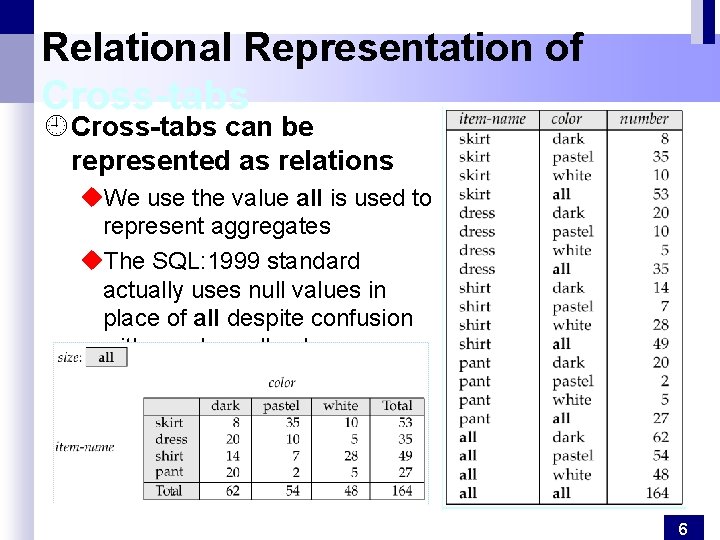
Relational Representation of Cross-tabs ¿ Cross-tabs can be represented as relations u. We use the value all is used to represent aggregates u. The SQL: 1999 standard actually uses null values in place of all despite confusion with regular null values 6
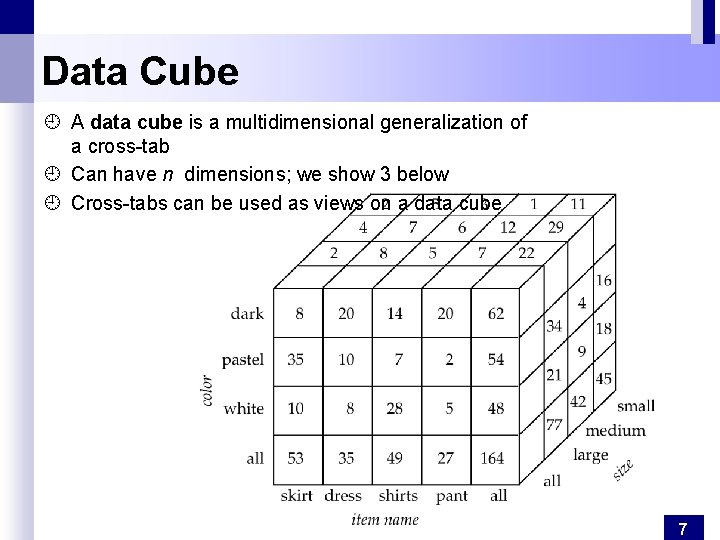
Data Cube ¿ A data cube is a multidimensional generalization of a cross-tab ¿ Can have n dimensions; we show 3 below ¿ Cross-tabs can be used as views on a data cube 7
Online Analytical Processing ¿ Pivoting: changing the dimensions used in a cross-tab is called ¿ Slicing: creating a cross-tab for fixed values only u. Sometimes called dicing, particularly when values for multiple dimensions are fixed. ¿ Rollup: moving from finer-granularity data to a coarser granularity ¿ Drill down: The opposite operation - that of moving from coarser-granularity data to finer-granularity data 8
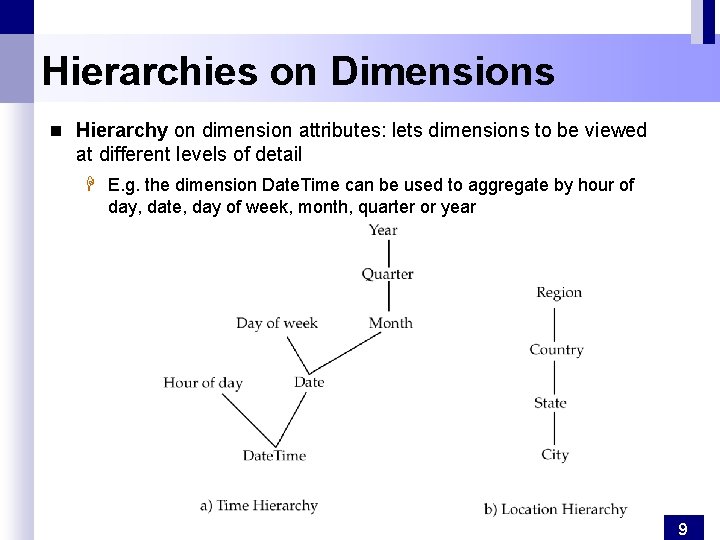
Hierarchies on Dimensions n Hierarchy on dimension attributes: lets dimensions to be viewed at different levels of detail H E. g. the dimension Date. Time can be used to aggregate by hour of day, date, day of week, month, quarter or year 9
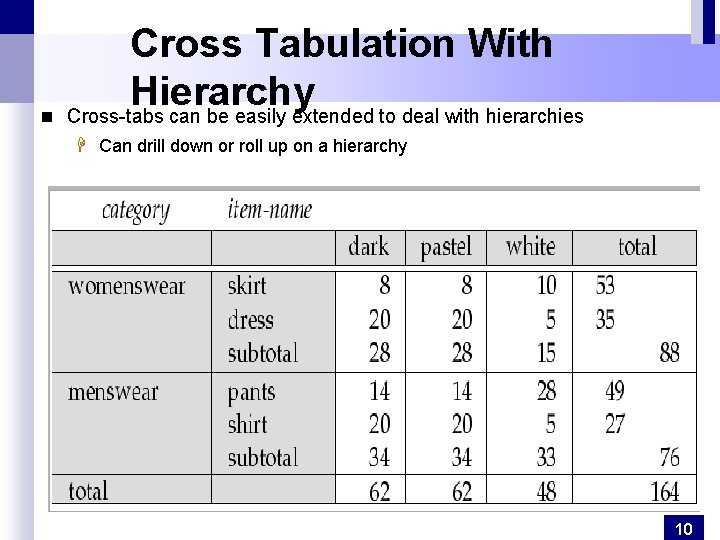
n Cross Tabulation With Hierarchy Cross-tabs can be easily extended to deal with hierarchies H Can drill down or roll up on a hierarchy 10
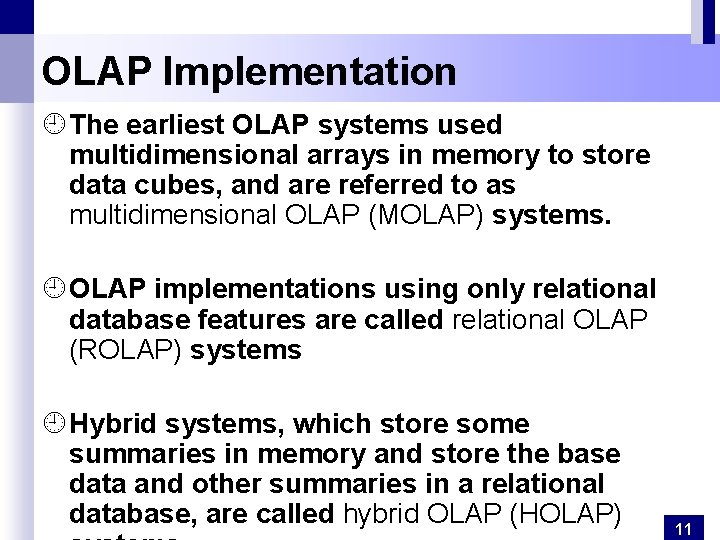
OLAP Implementation ¿ The earliest OLAP systems used multidimensional arrays in memory to store data cubes, and are referred to as multidimensional OLAP (MOLAP) systems. ¿ OLAP implementations using only relational database features are called relational OLAP (ROLAP) systems ¿ Hybrid systems, which store some summaries in memory and store the base data and other summaries in a relational database, are called hybrid OLAP (HOLAP) 11
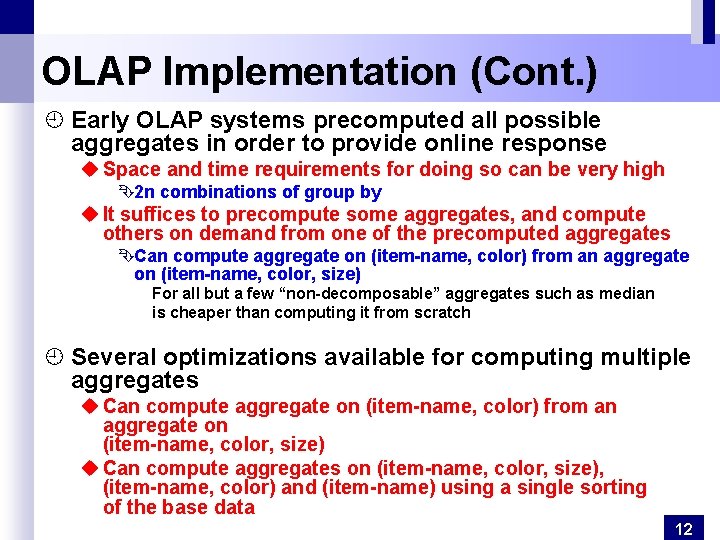
OLAP Implementation (Cont. ) ¿ Early OLAP systems precomputed all possible aggregates in order to provide online response u Space and time requirements for doing so can be very high Ê2 n combinations of group by u It suffices to precompute some aggregates, and compute others on demand from one of the precomputed aggregates ÊCan compute aggregate on (item-name, color) from an aggregate on (item-name, color, size) For all but a few “non-decomposable” aggregates such as median is cheaper than computing it from scratch ¿ Several optimizations available for computing multiple aggregates u Can compute aggregate on (item-name, color) from an aggregate on (item-name, color, size) u Can compute aggregates on (item-name, color, size), (item-name, color) and (item-name) using a single sorting of the base data 12
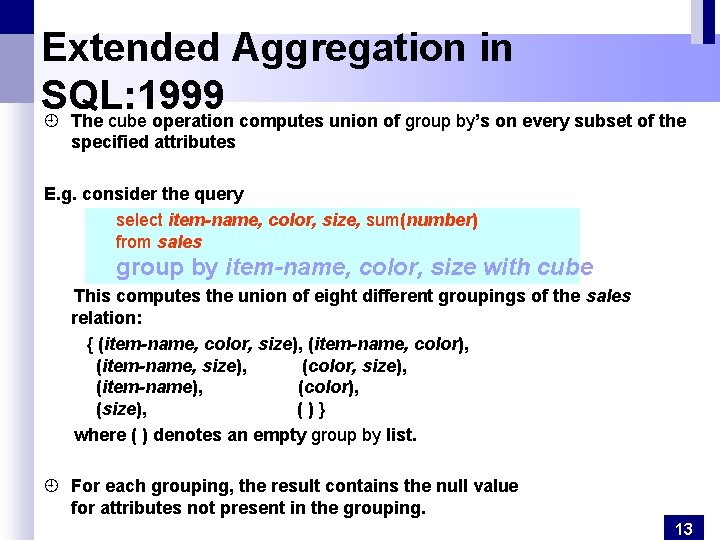
Extended Aggregation in SQL: 1999 ¿ The cube operation computes union of group by’s on every subset of the specified attributes E. g. consider the query select item-name, color, size, sum(number) from sales group by item-name, color, size with cube This computes the union of eight different groupings of the sales relation: { (item-name, color, size), (item-name, color), (item-name, size), (color, size), (item-name), (color), (size), ()} where ( ) denotes an empty group by list. ¿ For each grouping, the result contains the null value for attributes not present in the grouping. 13
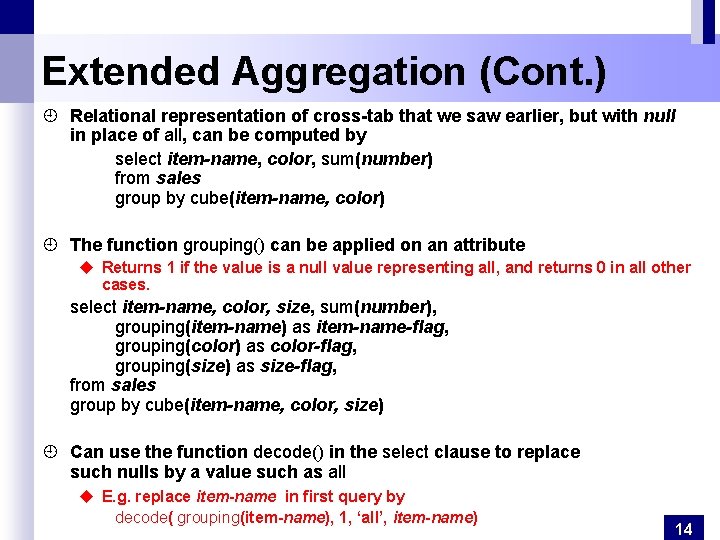
Extended Aggregation (Cont. ) ¿ Relational representation of cross-tab that we saw earlier, but with null in place of all, can be computed by select item-name, color, sum(number) from sales group by cube(item-name, color) ¿ The function grouping() can be applied on an attribute u Returns 1 if the value is a null value representing all, and returns 0 in all other cases. select item-name, color, size, sum(number), grouping(item-name) as item-name-flag, grouping(color) as color-flag, grouping(size) as size-flag, from sales group by cube(item-name, color, size) ¿ Can use the function decode() in the select clause to replace such nulls by a value such as all u E. g. replace item-name in first query by decode( grouping(item-name), 1, ‘all’, item-name) 14
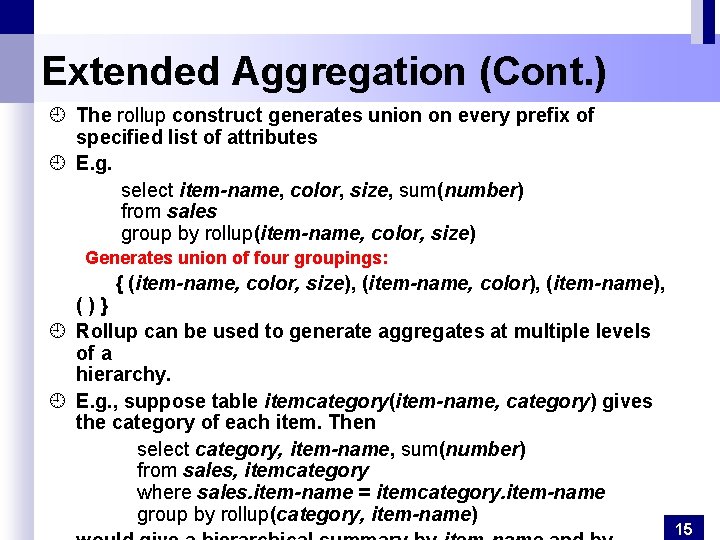
Extended Aggregation (Cont. ) ¿ The rollup construct generates union on every prefix of specified list of attributes ¿ E. g. select item-name, color, size, sum(number) from sales group by rollup(item-name, color, size) Generates union of four groupings: { (item-name, color, size), (item-name, color), (item-name), ()} ¿ Rollup can be used to generate aggregates at multiple levels of a hierarchy. ¿ E. g. , suppose table itemcategory(item-name, category) gives the category of each item. Then select category, item-name, sum(number) from sales, itemcategory where sales. item-name = itemcategory. item-name group by rollup(category, item-name) 15
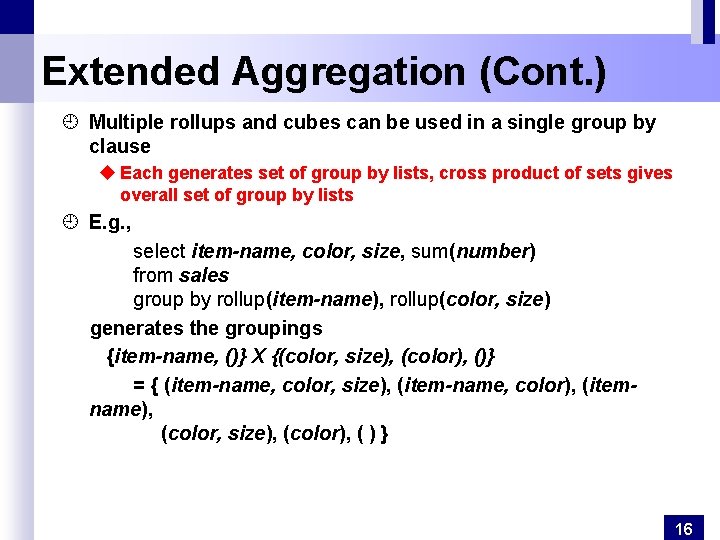
Extended Aggregation (Cont. ) ¿ Multiple rollups and cubes can be used in a single group by clause u Each generates set of group by lists, cross product of sets gives overall set of group by lists ¿ E. g. , select item-name, color, size, sum(number) from sales group by rollup(item-name), rollup(color, size) generates the groupings {item-name, ()} X {(color, size), (color), ()} = { (item-name, color, size), (item-name, color), (itemname), (color, size), (color), ( ) } 16
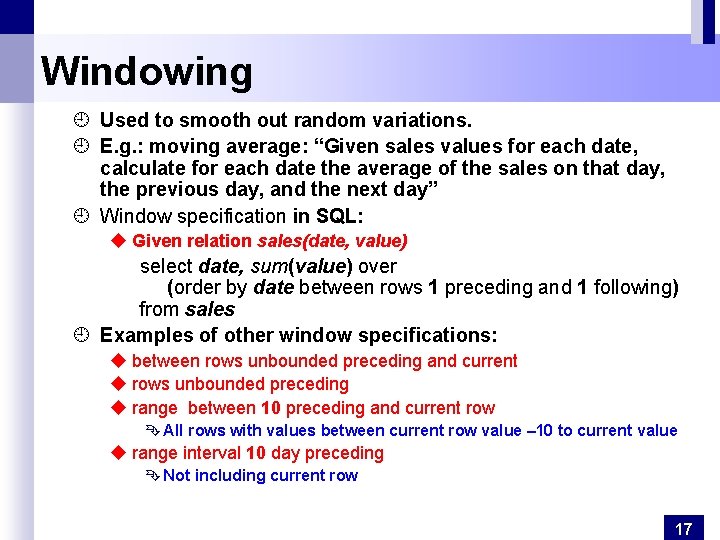
Windowing ¿ Used to smooth out random variations. ¿ E. g. : moving average: “Given sales values for each date, calculate for each date the average of the sales on that day, the previous day, and the next day” ¿ Window specification in SQL: u Given relation sales(date, value) select date, sum(value) over (order by date between rows 1 preceding and 1 following) from sales ¿ Examples of other window specifications: u between rows unbounded preceding and current u rows unbounded preceding u range between 10 preceding and current row Ê All rows with values between current row value – 10 to current value u range interval 10 day preceding Ê Not including current row 17
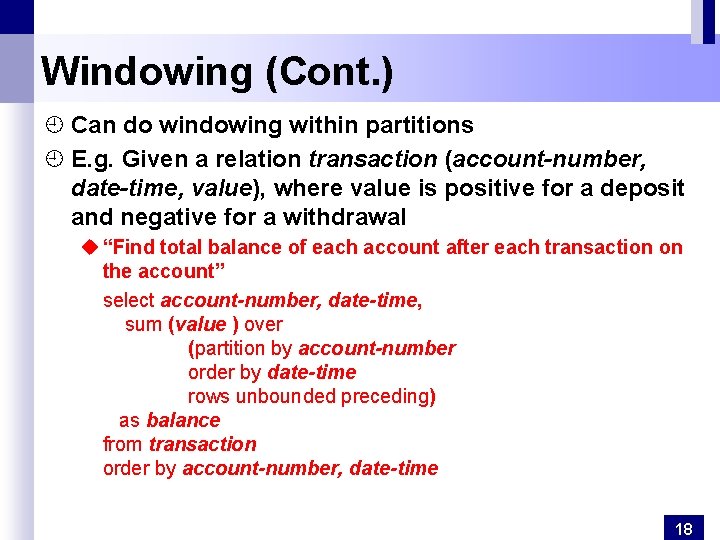
Windowing (Cont. ) ¿ Can do windowing within partitions ¿ E. g. Given a relation transaction (account-number, date-time, value), where value is positive for a deposit and negative for a withdrawal u “Find total balance of each account after each transaction on the account” select account-number, date-time, sum (value ) over (partition by account-number order by date-time rows unbounded preceding) as balance from transaction order by account-number, date-time 18
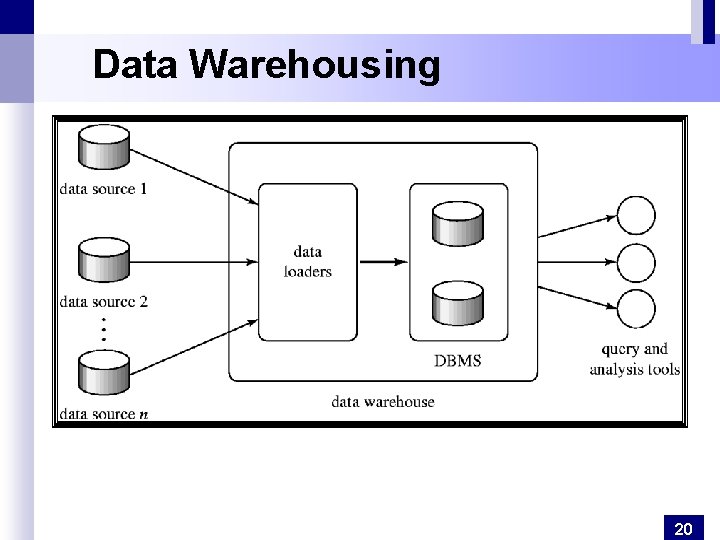
Data Warehousing ¿ Data sources often store only current data, not historical data ¿ Corporate decision making requires a unified view of all organizational data, including historical data ¿ A data warehouse is a repository (archive) of information gathered from multiple sources, stored under a unified schema, at a single site u. Greatly simplifies querying, permits study of historical trends u. Shifts decision support query load away from transaction processing systems 19
Data Warehousing 20
Design Issues ¿ When and how to gather data u. Source driven architecture: data sources transmit new information to warehouse, either continuously or periodically (e. g. at night) u. Destination driven architecture: warehouse periodically requests new information from data sources u. Keeping warehouse exactly synchronized with data sources (e. g. using two-phase commit) is too expensive ÊUsually OK to have slightly out-of-date data at warehouse ÊData/updates are periodically downloaded form online transaction processing (OLTP) systems. ¿ What schema to use 21
More Warehouse Design Issues ¿ Data cleansing u E. g. correct mistakes in addresses (misspellings, zip code errors) u Merge address lists from different sources and purge duplicates ¿ How to propagate updates u Warehouse schema may be a (materialized) view of schema from data sources ¿ What data to summarize u Raw data may be too large to store on-line u Aggregate values (totals/subtotals) often suffice u Queries on raw data can often be transformed by query optimizer to use aggregate values 22
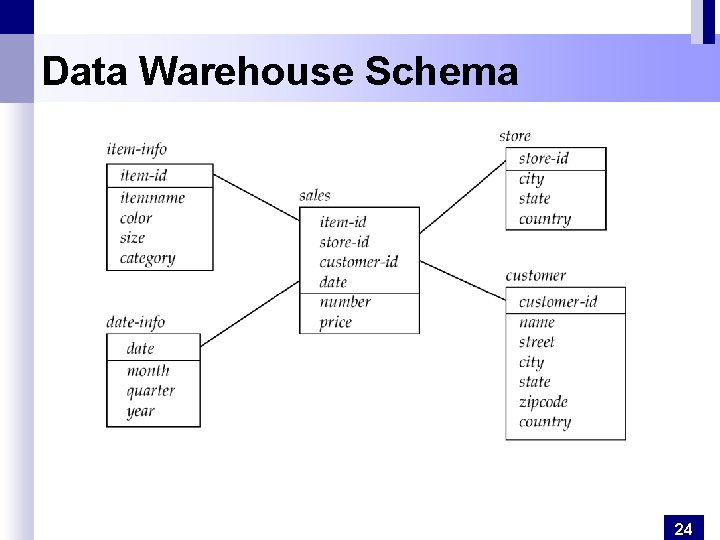
Warehouse Schemas ¿ Dimension values are usually encoded using small integers and mapped to full values via dimension tables ¿ Resultant schema is called a star schema u. More complicated schema structures ÊSnowflake schema: multiple levels of dimension tables ÊConstellation: multiple fact tables 23
Data Warehouse Schema 24