
CYBERSECURITY PROCESS FOR CONNECTING VA RESEARCH SCIENTIFIC COMPUTING
CYBERSECURITY PROCESS FOR CONNECTING VA RESEARCH SCIENTIFIC COMPUTING DEVICES Kevin Essary, Kirsten Chirea, John Fiorino IT Cybersecurity Analysts Research Support Division (RSD) Presentation to Research Stakeholders October 6, 2020 Dial in (Main): (562) 247 -8422 Dial in (Alt): (702) 489 -0006 Attendee Access Code: 287 -453 -563 Slides in “Handout” Tab
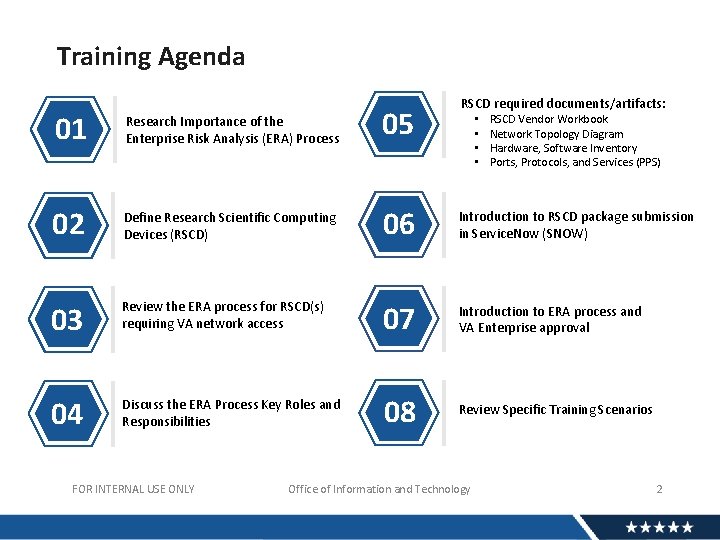
Training Agenda RSCD required documents/artifacts: 01 Research Importance of the Enterprise Risk Analysis (ERA) Process 05 02 Define Research Scientific Computing Devices (RSCD) 06 Introduction to RSCD package submission in Service. Now (SNOW) 03 Review the ERA process for RSCD(s) requiring VA network access 07 Introduction to ERA process and VA Enterprise approval 04 Discuss the ERA Process Key Roles and Responsibilities 08 Review Specific Training Scenarios FOR INTERNAL USE ONLY • • Office of Information and Technology RSCD Vendor Workbook Network Topology Diagram Hardware, Software Inventory Ports, Protocols, and Services (PPS) 2
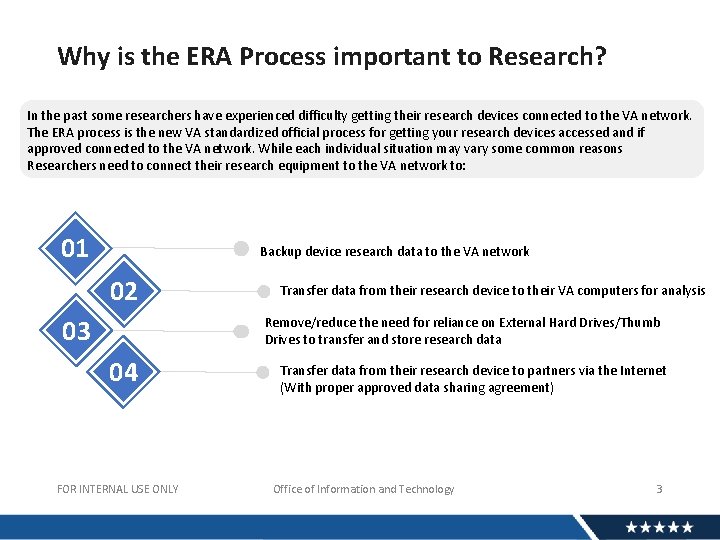
Why is the ERA Process important to Research? In the past some researchers have experienced difficulty getting their research devices connected to the VA network. The ERA process is the new VA standardized official process for getting your research devices accessed and if approved connected to the VA network. While each individual situation may vary some common reasons Researchers need to connect their research equipment to the VA network to: 01 Backup device research data to the VA network 02 03 Transfer data from their research device to their VA computers for analysis Remove/reduce the need for reliance on External Hard Drives/Thumb Drives to transfer and store research data 04 5 FOR INTERNAL USE ONLY Transfer data from their research device to partners via the Internet (With proper approved data sharing agreement) Office of Information and Technology 3
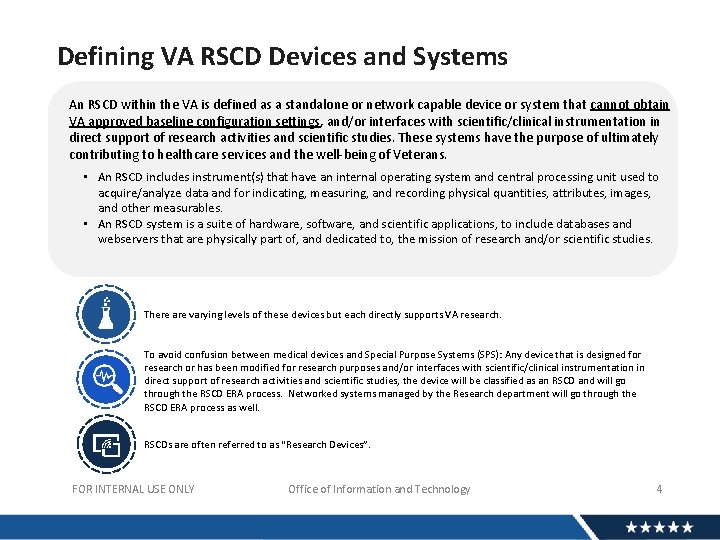
Defining VA RSCD Devices and Systems An RSCD within the VA is defined as a standalone or network capable device or system that cannot obtain VA approved baseline configuration settings, and/or interfaces with scientific/clinical instrumentation in direct support of research activities and scientific studies. These systems have the purpose of ultimately contributing to healthcare services and the well-being of Veterans. • An RSCD includes instrument(s) that have an internal operating system and central processing unit used to acquire/analyze data and for indicating, measuring, and recording physical quantities, attributes, images, and other measurables. • An RSCD system is a suite of hardware, software, and scientific applications, to include databases and webservers that are physically part of, and dedicated to, the mission of research and/or scientific studies. There are varying levels of these devices but each directly supports VA research. To avoid confusion between medical devices and Special Purpose Systems (SPS): Any device that is designed for research or has been modified for research purposes and/or interfaces with scientific/clinical instrumentation in direct support of research activities and scientific studies, the device will be classified as an RSCD and will go through the RSCD ERA process. Networked systems managed by the Research department will go through the RSCD ERA process as well. RSCDs are often referred to as “Research Devices”. FOR INTERNAL USE ONLY Office of Information and Technology 4
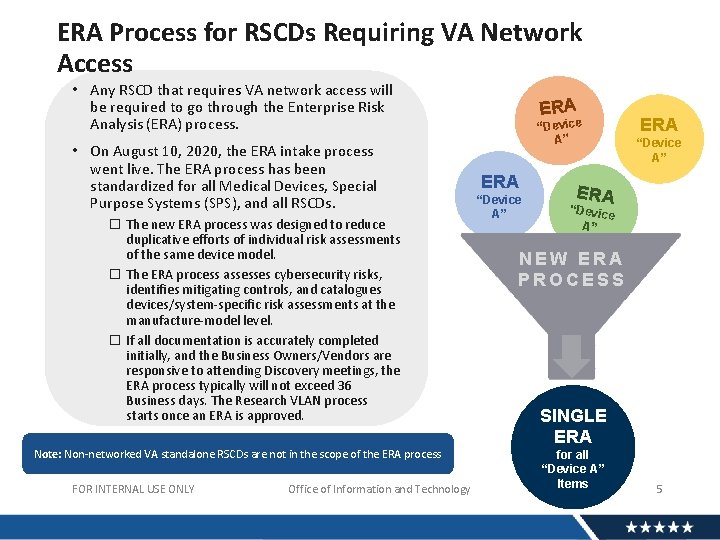
ERA Process for RSCDs Requiring VA Network Access • Any RSCD that requires VA network access will be required to go through the Enterprise Risk Analysis (ERA) process. • On August 10, 2020, the ERA intake process went live. The ERA process has been standardized for all Medical Devices, Special Purpose Systems (SPS), and all RSCDs. � The new ERA process was designed to reduce duplicative efforts of individual risk assessments of the same device model. � The ERA process assesses cybersecurity risks, identifies mitigating controls, and catalogues devices/system-specific risk assessments at the manufacture-model level. � If all documentation is accurately completed initially, and the Business Owners/Vendors are responsive to attending Discovery meetings, the ERA process typically will not exceed 36 Business days. The Research VLAN process starts once an ERA is approved. Note: Non-networked VA standalone RSCDs are not in the scope of the ERA process FOR INTERNAL USE ONLY Office of Information and Technology ERA “Device A” ERA “Devic e A” NEW ERA PROCESS SINGLE ERA for all “Device A” Items 5
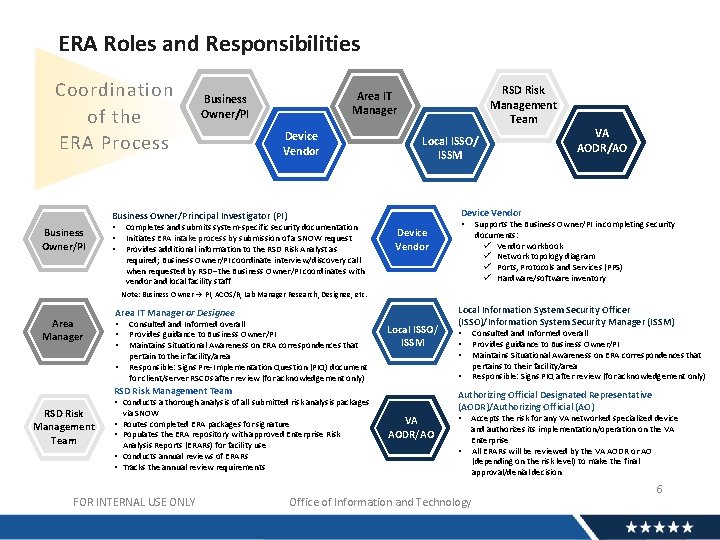
ERA Roles and Responsibilities Coordination of the ERA Process RSD Risk Management Team Area IT Manager Business Owner/PI Device Vendor Local ISSO/ ISSM Device Vendor Business Owner/Principal Investigator (PI) Business Owner/PI • • • VA AODR/AO Completes and submits system-specific security documentation Initiates ERA intake process by submission of a SNOW request Provides additional information to the RSD Risk Analyst as required; Business Owner/PI coordinate interview/discovery call when requested by RSD--the Business Owner/PI coordinates with vendor and local facility staff Device Vendor • Supports the Business Owner/PI in completing security documents: ü Vendor workbook ü Network topology diagram ü Ports, Protocols and Services (PPS) ü Hardware/software inventory Note: Business Owner PI, ACOS/R, Lab Manager Research, Designee, etc. Area Manager Area IT Manager or Designee • • Consulted and Informed overall Provides guidance to Business Owner/PI Maintains Situational Awareness on ERA correspondences that pertain to their facility/area Responsible: Signs Pre-Implementation Question (PIQ) document for client/server RSCDs after review (for acknowledgement only) Local ISSO/ ISSM via SNOW Analysis Reports (ERARs) for facility use • Conducts annual reviews of ERARs • Tracks the annual review requirements FOR INTERNAL USE ONLY Consulted and Informed overall Provides guidance to Business Owner/PI Maintains Situational Awareness on ERA correspondences that pertains to their facility/area Responsible: Signs PIQ after review (for acknowledgement only) Authorizing Official Designated Representative (AODR)/Authorizing Official (AO) • Conducts a thorough analysis of all submitted risk analysis packages • Routes completed ERA packages for signature • Populates the ERA repository with approved Enterprise Risk • • RSD Risk Management Team Local Information System Security Officer (ISSO)/Information System Security Manager (ISSM) VA AODR/AO • • Accepts the risk for any VA networked specialized device and authorizes its implementation/operation on the VA Enterprise All ERARs will be reviewed by the VA AODR or AO (depending on the risk level) to make the final approval/denial decision Office of Information and Technology 6
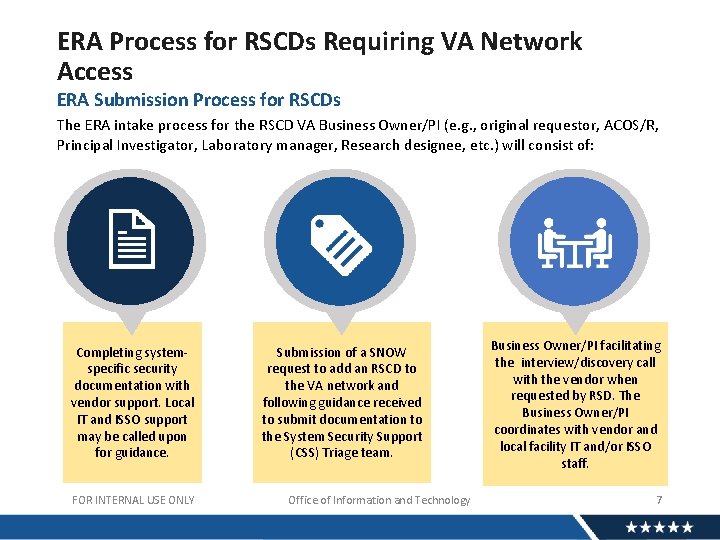
ERA Process for RSCDs Requiring VA Network Access ERA Submission Process for RSCDs The ERA intake process for the RSCD VA Business Owner/PI (e. g. , original requestor, ACOS/R, Principal Investigator, Laboratory manager, Research designee, etc. ) will consist of: Completing systemspecific security documentation with vendor support. Local IT and ISSO support may be called upon for guidance. FOR INTERNAL USE ONLY Submission of a SNOW request to add an RSCD to the VA network and following guidance received to submit documentation to the System Security Support (CSS) Triage team. Office of Information and Technology Business Owner/PI facilitating the interview/discovery call with the vendor when requested by RSD. The Business Owner/PI coordinates with vendor and local facility IT and/or ISSO staff. 7
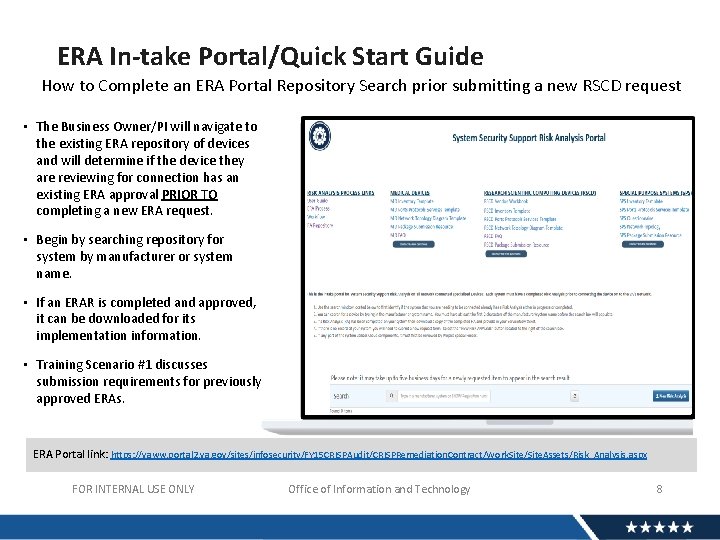
ERA In-take Portal/Quick Start Guide How to Complete an ERA Portal Repository Search prior submitting a new RSCD request • The Business Owner/PI will navigate to the existing ERA repository of devices and will determine if the device they are reviewing for connection has an existing ERA approval PRIOR TO completing a new ERA request. • Begin by searching repository for system by manufacturer or system name. • If an ERAR is completed and approved, it can be downloaded for its implementation information. • Training Scenario #1 discusses submission requirements for previously approved ERAs. ERA Portal link: https: //vaww. portal 2. va. gov/sites/infosecurity/FY 15 CRISPAudit/CRISPRemediation. Contract/Work. Site/Site. Assets/Risk_Analysis. aspx FOR INTERNAL USE ONLY Office of Information and Technology 8
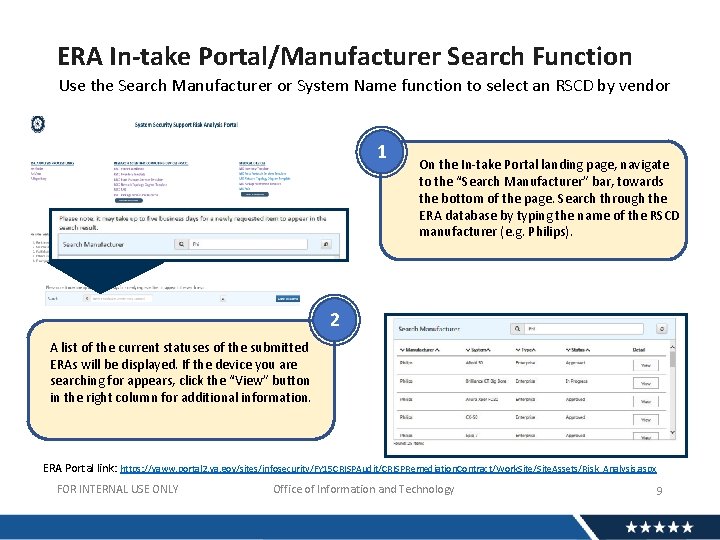
ERA In-take Portal/Manufacturer Search Function Use the Search Manufacturer or System Name function to select an RSCD by vendor 1 On the In-take Portal landing page, navigate to the “Search Manufacturer” bar, towards the bottom of the page. Search through the ERA database by typing the name of the RSCD manufacturer (e. g. Philips). 2 A list of the current statuses of the submitted ERAs will be displayed. If the device you are searching for appears, click the “View” button in the right column for additional information. ERA Portal link: https: //vaww. portal 2. va. gov/sites/infosecurity/FY 15 CRISPAudit/CRISPRemediation. Contract/Work. Site/Site. Assets/Risk_Analysis. aspx FOR INTERNAL USE ONLY Office of Information and Technology 9
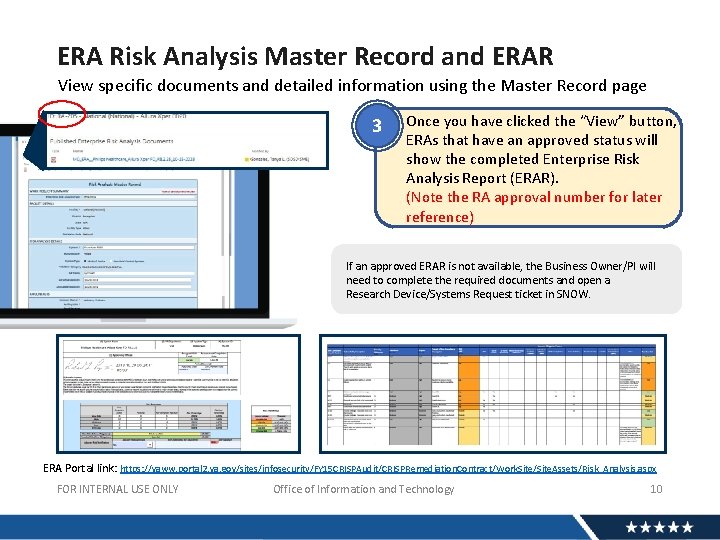
ERA Risk Analysis Master Record and ERAR View specific documents and detailed information using the Master Record page 3 Once you have clicked the “View” button, ERAs that have an approved status will show the completed Enterprise Risk Analysis Report (ERAR). (Note the RA approval number for later reference) If an approved ERAR is not available, the Business Owner/PI will need to complete the required documents and open a Research Device/Systems Request ticket in SNOW. ERA Portal link: https: //vaww. portal 2. va. gov/sites/infosecurity/FY 15 CRISPAudit/CRISPRemediation. Contract/Work. Site/Site. Assets/Risk_Analysis. aspx FOR INTERNAL USE ONLY Office of Information and Technology 10
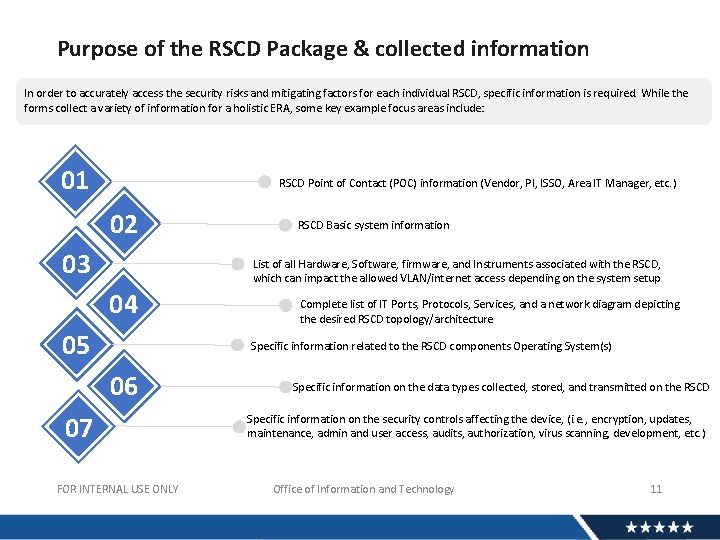
Purpose of the RSCD Package & collected information In order to accurately access the security risks and mitigating factors for each individual RSCD, specific information is required. While the forms collect a variety of information for a holistic ERA, some key example focus areas include: 01 RSCD Point of Contact (POC) information (Vendor, PI, ISSO, Area IT Manager, etc. ) 02 03 RSCD Basic system information List of all Hardware, Software, firmware, and Instruments associated with the RSCD, which can impact the allowed VLAN/internet access depending on the system setup 04 05 Complete list of IT Ports, Protocols, Services, and a network diagram depicting the desired RSCD topology/architecture Specific information related to the RSCD components Operating System(s) 06 07 FOR INTERNAL USE ONLY Specific information on the data types collected, stored, and transmitted on the RSCD Specific information on the security controls affecting the device, (i. e. , encryption, updates, maintenance, admin and user access, audits, authorization, virus scanning, development, etc. ) Office of Information and Technology 11
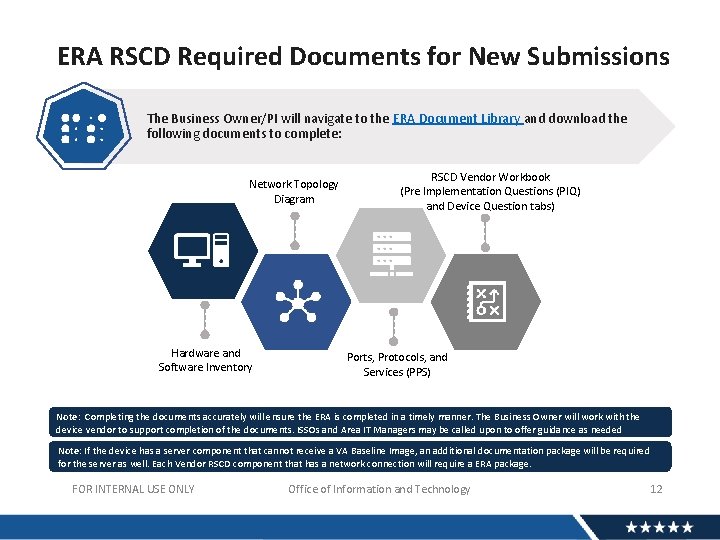
ERA RSCD Required Documents for New Submissions The Business Owner/PI will navigate to the ERA Document Library and download the following documents to complete: Network Topology Diagram Hardware and Software Inventory RSCD Vendor Workbook (Pre Implementation Questions (PIQ) and Device Question tabs) Ports, Protocols, and Services (PPS) Note: Completing the documents accurately will ensure the ERA is completed in a timely manner. The Business Owner will work with the device vendor to support completion of the documents. ISSOs and Area IT Managers may be called upon to offer guidance as needed Note: If the device has a server component that cannot receive a VA Baseline Image, an additional documentation package will be required for the server as well. Each Vendor RSCD component that has a network connection will require a ERA package. FOR INTERNAL USE ONLY Office of Information and Technology 12
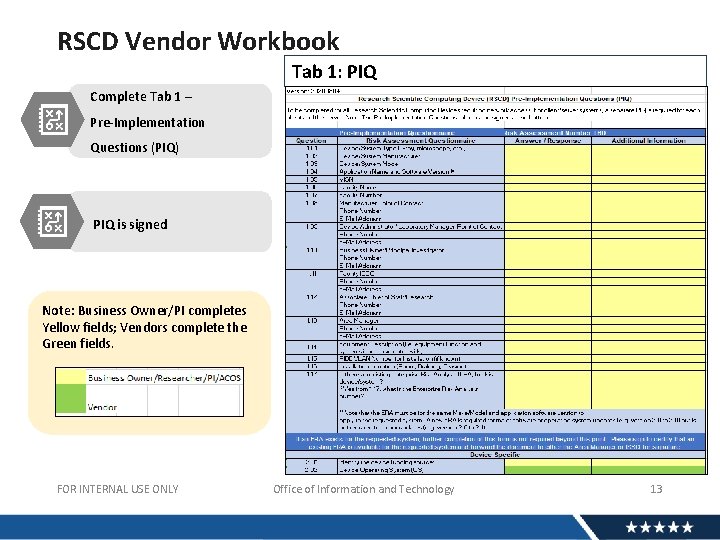
RSCD Vendor Workbook Tab 1: PIQ Complete Tab 1 – Pre-Implementation Questions (PIQ) PIQ is signed Note: Business Owner/PI completes Yellow fields; Vendors complete the Green fields. FOR INTERNAL USE ONLY Office of Information and Technology 13
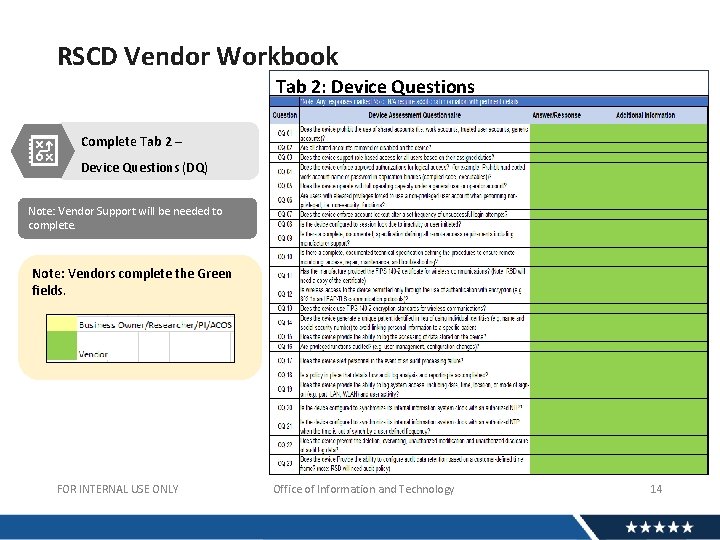
RSCD Vendor Workbook Tab 2: Device Questions Complete Tab 2 – Device Questions (DQ) Note: Vendor Support will be needed to complete. Note: Vendors complete the Green fields. FOR INTERNAL USE ONLY Office of Information and Technology 14
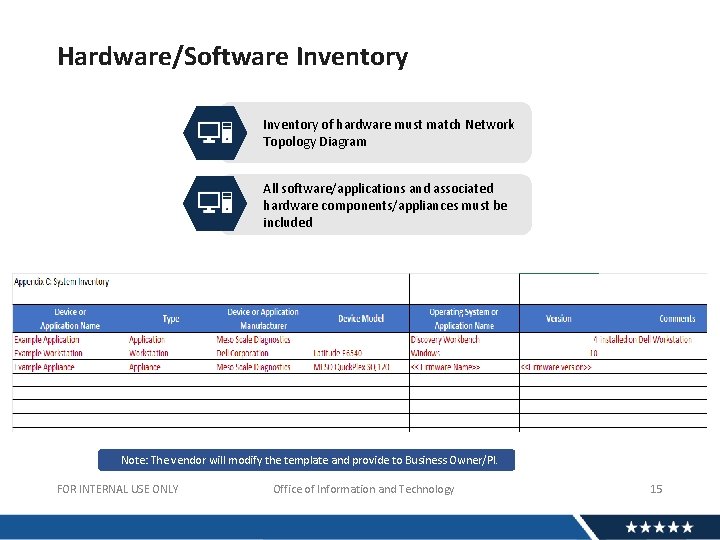
Hardware/Software Inventory of hardware must match Network Topology Diagram All software/applications and associated hardware components/appliances must be included Note: The vendor will modify the template and provide to Business Owner/PI. FOR INTERNAL USE ONLY Office of Information and Technology 15
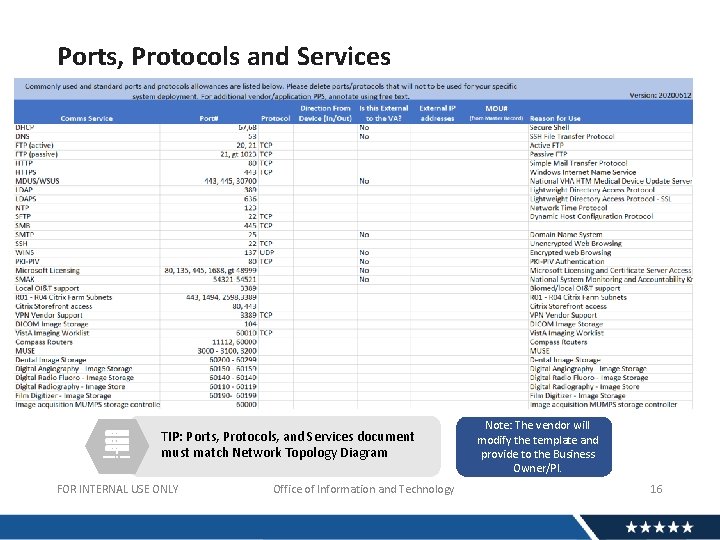
Ports, Protocols and Services TIP: Ports, Protocols, and Services document must match Network Topology Diagram FOR INTERNAL USE ONLY Office of Information and Technology Note: The vendor will modify the template and provide to the Business Owner/PI. 16
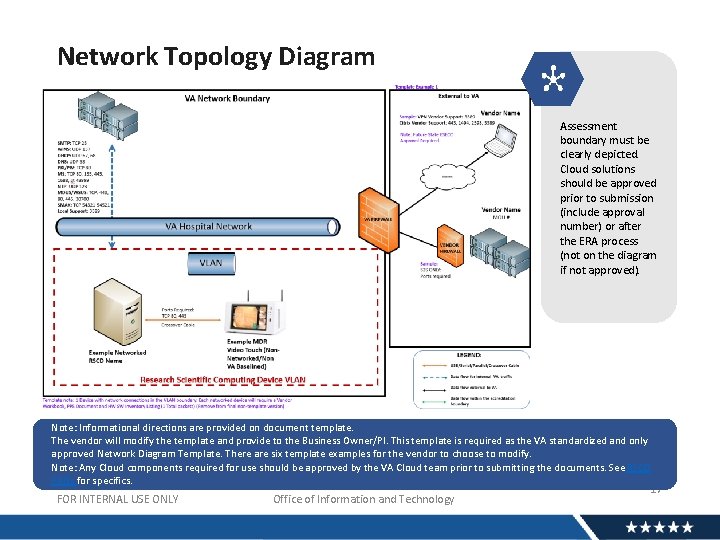
Network Topology Diagram Assessment boundary must be clearly depicted. Cloud solutions should be approved prior to submission (include approval number) or after the ERA process (not on the diagram if not approved). Note: Informational directions are provided on document template. The vendor will modify the template and provide to the Business Owner/PI. This template is required as the VA standardized and only approved Network Diagram Template. There are six template examples for the vendor to choose to modify. Note: Any Cloud components required for use should be approved by the VA Cloud team prior to submitting the documents. See RSCD FAQs for specifics. FOR INTERNAL USE ONLY Office of Information and Technology 17
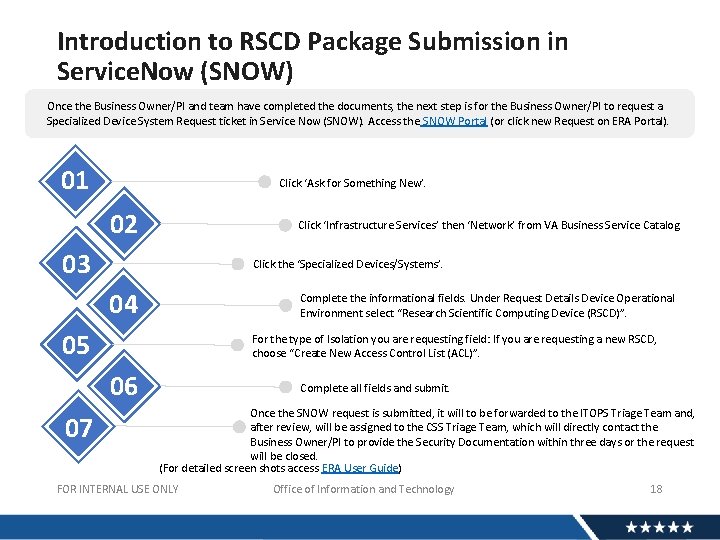
Introduction to RSCD Package Submission in Service. Now (SNOW) Once the Business Owner/PI and team have completed the documents, the next step is for the Business Owner/PI to request a Specialized Device System Request ticket in Service Now (SNOW). Access the SNOW Portal (or click new Request on ERA Portal). 01 Click ‘Ask for Something New’. 02 Click ‘Infrastructure Services’ then ‘Network’ from VA Business Service Catalog. 03 Click the ‘Specialized Devices/Systems’. 04 Complete the informational fields. Under Request Details Device Operational Environment select “Research Scientific Computing Device (RSCD)”. 05 For the type of Isolation you are requesting field: If you are requesting a new RSCD, choose “Create New Access Control List (ACL)”. 06 07 Complete all fields and submit. Once the SNOW request is submitted, it will to be forwarded to the ITOPS Triage Team and, after review, will be assigned to the CSS Triage Team, which will directly contact the Business Owner/PI to provide the Security Documentation within three days or the request will be closed. (For detailed screen shots access ERA User Guide) FOR INTERNAL USE ONLY Office of Information and Technology 18
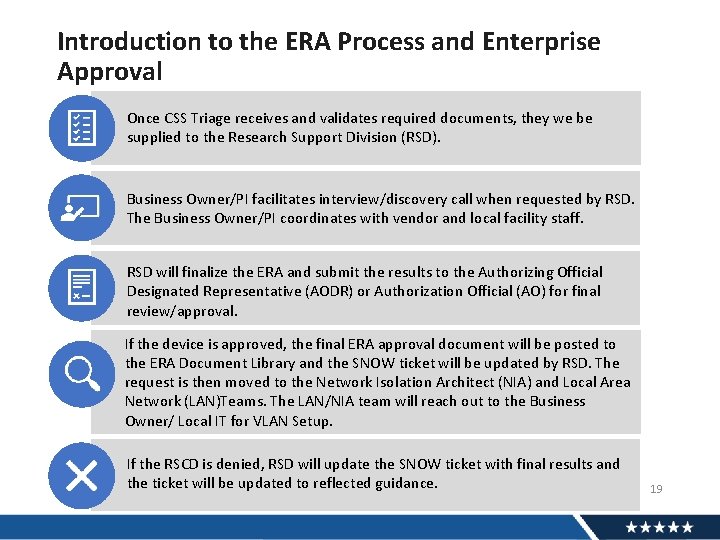
Introduction to the ERA Process and Enterprise Approval Once CSS Triage receives and validates required documents, they we be supplied to the Research Support Division (RSD). Business Owner/PI facilitates interview/discovery call when requested by RSD. The Business Owner/PI coordinates with vendor and local facility staff. RSD will finalize the ERA and submit the results to the Authorizing Official Designated Representative (AODR) or Authorization Official (AO) for final review/approval. If the device is approved, the final ERA approval document will be posted to the ERA Document Library and the SNOW ticket will be updated by RSD. The request is then moved to the Network Isolation Architect (NIA) and Local Area Network (LAN)Teams. The LAN/NIA team will reach out to the Business Owner/ Local IT for VLAN Setup. If the RSCD is denied, RSD will update the SNOW ticket with final results and Office of Information and Technology the ticket will be updated to reflected guidance. FOR INTERNAL USE ONLY 19
Training Scenario #1 SCENARIO: A Principal Investigator was reviewing the ERA Portal and noticed the exact same RSCD that the facility would like to have put on the network is listed with an approved Enterprise Risk Analysis Report (ERAR) already on the portal. What steps are needed to get the RSCD on the network at the facility? If an ERA has already been completed on the same RSCD, review the completed approved ERAR guidance from the ERA Portal and reference the approval number. The following information will be required: Open a Service NOW (SNOW) request for the RSCD: • Attach the ERAR document, and in enter the ERA approval number (Approved ERA Number Field) • In the “Notes/Comments” field list if the intended configuration will match that of the approved ERA, if a different configuration is required state the required configuration changes in the field. • Complete the Vendor Workbook (Tab 1 PIQ all yellow fields completed and document signed) and attach to the SNOW request. Note: See FAQ #13 for specific detailed information regarding this requirement. FOR INTERNAL USE ONLY Office of Information and Technology 20
Training Scenario #2 SCENARIO: An existing VA Research DNA sequencing machine (RSCD system) was purchased with VA funding and has been used as a standalone device for three years. You would like to have the device and all components added to the VA network in order to access the results directly from a different VA workstation that is on the VA network. Is an ERA required to get this DNA sequencing machine added to the VA network? Yes. Any RSCD that needs to be added to the VA network must go through the ERA process regardless of the system type and funding source. FOR INTERNAL USE ONLY Office of Information and Technology 21
Training Scenario #3 SCENARIO: A Principal Investigator is being approved for a research study and a Research cardiac echo cardiogram device (which is an RSCD device) will be provided by the study sponsor. The RSCD device will need to be added to the VA network so the data can directly be pulled from the device. Would an ERA be the correct method of getting this device added to the VA network? Yes. Any RSCD that needs to be added to the VA network must go through the ERA process. The device can be provided by a Study Sponsor, Affiliate, Non-Profit, or by VA. Each RSCD will require an approved ERA before being added to the VA network. FOR INTERNAL USE ONLY Office of Information and Technology 22
Training Scenario #4 SCENARIO: A VA Research lab would like to purchase an animal MRI RSCD that has an additional server. The vendor mentioned that the server must keep its vendor-supplied setup (a VA baseline image cannot be applied to the server or the RSCD). Both the RSCD device and server will need to be added to the VA network so data can be sent to and pulled from the server. Would two ERAs be required for getting both devices added to the VA network? Yes. Each component (RSCD and server) will require an approved ERA before being added to the VA network. The RSCD and the server will each need a complete set of security documents approved for their ERAs. Note: If a server component can have a VA baseline security image added, it will not require the security documents to be completed. Both sets of documents can be submitted on the same SNOW request. FOR INTERNAL USE ONLY Office of Information and Technology 23
Training Scenario #5 SCENARIO: A VA Research lab has an ICON MRI system RSCD that was purchased several years ago. Who can I reach out to for technical questions to support completion of the Vendor Workbook form? Your primary contact is the device manufacturer/vendor. Contact the device vendor and ask for a device Point of Contact (POC) you can work with to complete the required ERA forms. Device vendor support is required for the Security Assessments to be completed accurately on their devices. When an ERA is completed by VA on their device, other VA facilities can utilize the same device, shortening the process for vendors and additional VA Research facilities. Note: Medical device and SPS vendors all have the same level of support to their customers. The vendors can complete the green fields (or supply answers) on the vendor workbook tabs, assist you with the PPS form, the Hardware/Software Inventory form, and the Network Topology diagram. Each vendor has a technician who knows the specific information about their device who can support you. FOR INTERNAL USE ONLY Office of Information and Technology 24
Training Scenario #6 SCENARIO: VA Research staff would like to purchase a blood analyzer as an RSCD. The blood analyzer does not need to connect to the VA network and will be used as a standalone device. Does the blood analyzer need to go through the ERA process? No. Only VA networked RSCD devices should be submitted though the ERA process. Standalone RSCD devices should not be submitted for ERAs. Follow your local facility policy for standalone devices. If the Researcher would like the device to be added to the VA network at a later date, the ERA process should be initiated at that point prior to the device being added to the network. FOR INTERNAL USE ONLY Office of Information and Technology 25
Training Scenario #7 SCENARIO: A VA Research laboratory currently has a Mac Desktop purchased with grant funding that contains various specialized research applications including imaging analysis tools, statistical tools, etc. (it is not used for any office business). The Mac is currently connected to a DSL connection for software/OS updates. The PI who is also the system administrator for the device would like for the device to be added to the VA network for data backups to be stored on a VA Server. Is the ERA process the correct manner to add this device to the VA network? Yes. When a research computer (windows or Mac) is being used exclusively for research purposes using specialized research applications such as data analysis tools, statistical tools, etc. , it can be submitted through the ERA process. If the ERA is approved, the RSCD will be placed on a Research VLAN (RIDE) on the VA network. RIDE (Research Device Isolation Environment) is the VLAN for RSCDs (similar to MDIA/SDIA). Note: Typically, these systems are maintained by a researcher with admin rights. A system administrator should be identified as they will be required to ensure the system is updated regularly. Note: VA-owned OI&T-issued PCs and Laptops are outside the scope of this example. 26 FOR INTERNAL USE ONLY Office of Information and Technology
Training Scenario #8 SCENARIO: A VA Research laboratory currently has an OI&Tpurchased and maintained business-use desktop PC with a VA Gold Image Baseline. The PI would like for some specialized research software (imaging analysis) to be installed on the device. The software is listed as denied/unapproved for use in TRM. Is the ERA process the correct manner for this software to be installed on this OI&T-purchased desktop? No. OI&T-Purchased and Managed business-use devices are handled by normal OI&T processes. • • If specialized software is required for the desktop system, an approved TRM software request is required. Ensure the TRM request is for the current/most recent version of the software. If a previous version was unapproved by TRM, it is recommended that you submit a current version for approval with your specific business justification. If the software is approved by TRM, work with your local IT to have the software installed on the desktop PC. If the software remains unapproved by TRM, follow TRM guidance to work with your ISSO and Area Manager to discuss the possibility of opening a POA&M for the “TRM Unapproved Technology”. 27 FOR INTERNAL USE ONLY Office of Information and Technology
Training Scenario #9 SCENARIO: A VA Research laboratory needs to purchase an x-ray machine (considered a medical device) with the intent to physically modify the RSCD hardware (instead of using the equipment as-is with FDA 510 K certification) in a manner that it will be utilized exclusively for VA Research purposes. Should the device be submitted as a medical device or as an RSCD? When a medical device is altered for Research purposes, or it will be utilized exclusively for research, it is considered an RSCD and will go through the RSCD evaluation process. If the ERA is approved, the RSCD will be placed on a Research VLAN (RIDE) on the VA network. RIDE (Research Device Isolation Environment) is the VLAN for RSCDs (similar to MDIA/SDIA). If a medical device will be utilized primarily for clinical care/medical use and only occasionally used for VA Research, the device should be classified as a medical device and should be submitted as such. FOR INTERNAL USE ONLY Office of Information and Technology 28
Training Scenario #10 SCENARIO: A VA Research laboratory needs to purchase a monitoring system (temperature, carbon dioxide, etc. ). The device will be placed on the VA network to alert staff as needed. Should the device be submitted as an SPS or as an RSCD? It depends. If the device will be an expansion of a currently approved SPS system that is maintained by the local facility staff, and only additional monitors/sensors are required for the Research department, follow the existing process at the local facility. If the system will be a completely new purchase and will be maintained and operated exclusively by the local facility Research office to support research, the device will need to go through the RSCD ERA evaluation process. As per the definition of RSCDs: These devices can’t contain VA approved baseline configuration settings and they directly support Research activities and studies. If the ERA is approved, the RSCDs will be placed on a Research VLAN (RIDE) on the VA Network. FOR INTERNAL USE ONLY Office of Information and Technology 29
Training Scenario #11 SCENARIO: A VA Research laboratory was awarded a grant to upgrade all of the Research microscopes. The new confocal and electron microscopes will all connect to a VA laptop via USB and/or a serial cable. Do the microscopes need to go through the ERA process? No. Devices that directly connect to a VA workstation/laptop are handled by normal processes that typically don’t require special authorization other than a USB exemption request (USB exemption for workstation/laptop) (see local facility ITOPS/EPAS requirements). Additionally, if specialized software is required for the VA laptops to support the microscopes, a TRM software request should be submitted. FOR INTERNAL USE ONLY Office of Information and Technology 30
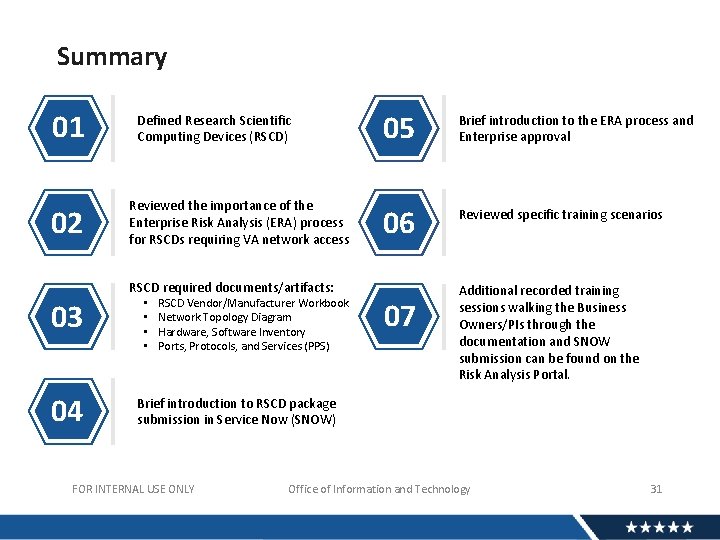
Summary 01 02 Defined Research Scientific Computing Devices (RSCD) Reviewed the importance of the Enterprise Risk Analysis (ERA) process for RSCDs requiring VA network access 05 Brief introduction to the ERA process and Enterprise approval 06 Reviewed specific training scenarios RSCD required documents/artifacts: 03 04 • • RSCD Vendor/Manufacturer Workbook Network Topology Diagram Hardware, Software Inventory Ports, Protocols, and Services (PPS) 07 Additional recorded training sessions walking the Business Owners/PIs through the documentation and SNOW submission can be found on the Risk Analysis Portal. Brief introduction to RSCD package submission in Service Now (SNOW) FOR INTERNAL USE ONLY Office of Information and Technology 31
References • System Security Support Risk Analysis Portal • Service Now (SNOW) Portal • Enterprise Risk Analysis User guide • RSCD FAQs • Research Support Division (RSD) Risk Management Team: OISISPSSSSRSDRSCDRisk. Management. Team@va. gov FOR INTERNAL USE ONLY Office of Information and Technology 32
QUESTIONS? 33
AVAILABILITY OF RECORDING • A recording of this session and the associated handouts will be available on ORPP&E’s Education and Training website approximately one-week post-webinar • An archive of this and other webinars can be found here: https: //www. research. va. gov/programs/orppe/education/webi nars/archives. cfm
- Slides: 34