
CWMP BOF April 26 2012 Cupertino CA PWG
CWMP BOF April 26, 2012 Cupertino, CA PWG F 2 F Meeting Copyright © 2012 The Printer Working Group. All rights reserved. 1
Agenda • • • CWMP BOF Overview Current Activities Status Next Steps Supplement • • CWMP Overview – more details Why use CWMP for Printers/MFDs? Benefits of CWMP for Printers/MFDs Collaboration Approach CWMP Functionality Celstream’s Print Service Attribute Table Previous meeting slides for backup Copyright © 2012 The Printer Working Group. All rights reserved. 2
CWMP BOF Overview • CWMP is a standard internet application protocol developed by Broadband Forum (BBF). • CWMP allows all IT devices in a customer’s premise be remotely managed by a central Auto-Configuration Server (ACS) over the Internet. • CWMP BOF is providing guidance for developing the standard CWMP data model for MFD services based on PWG Semantic Model. • MFD’s CWMP data model enables MFDs of all brands be remotely deployed, installed, and managed through entire life cycle like all other IT devices (routers, PCs, servers, smart phones, Set. Tops, …, etc. ). • Once the recommended CWMP data model for MFD services have been developed, BBF members from PWG will propose the data model to BBF as a standard. Copyright © 2012 The Printer Working Group. All rights reserved 3
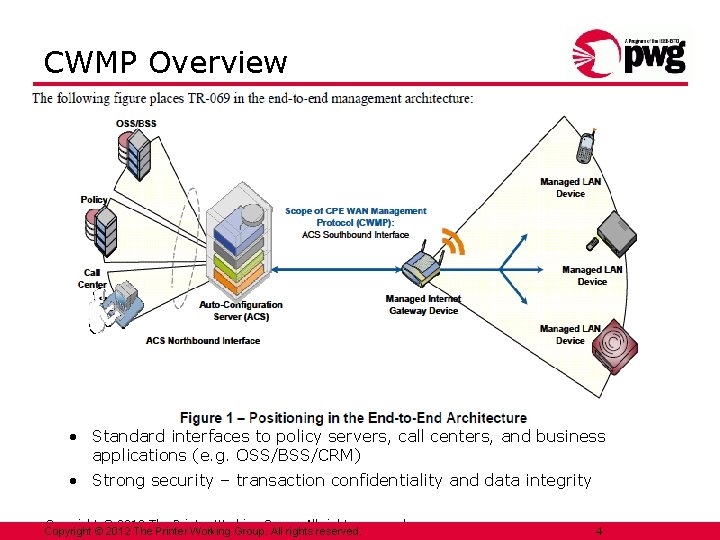
CWMP Overview • CWMP (CPE WAN Management Protocol) is a Broadband Forum standard (TR-069) that defines a set of WAN management interfaces between an Auto-Configuration Server (ACS) and a s. CWMP-enabled CPEs (Customer Premise Equipments). • CWMP supports service contract based remote and secure management and provisioning of CPEs throughout their entire lifecycle – deployment, installation, management, and support. • A CWMP ACS can support all of the following functionality: • • • Auto-configuration and dynamic provisioning of CPEs and services Software/Firmware image management of CPEs Software module management of services Status and performance monitoring of CPEs and services Diagnostics execution and reporting for CPEs Standard interfaces to policy servers, call centers, and business applications (e. g. OSS/BSS/CRM) • Strong security – transaction confidentiality and data integrity Copyright © 2012 The Printer Working Group. All rights reserved. 4
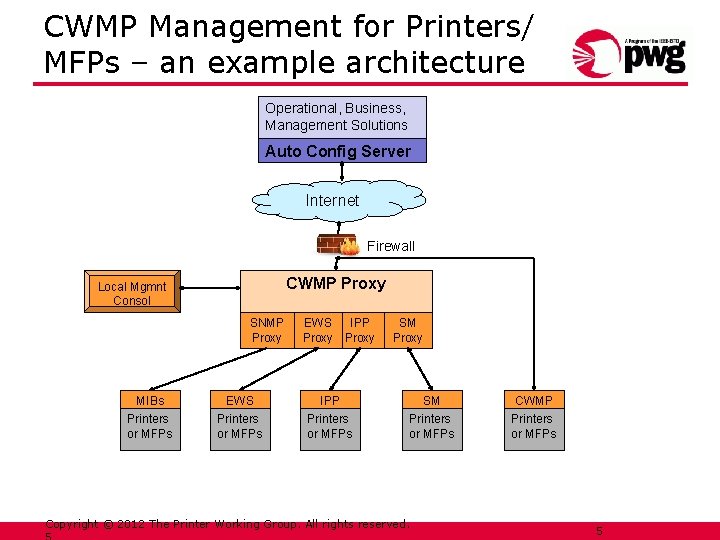
CWMP Management for Printers/ MFPs – an example architecture Operational, Business, Management Solutions Auto Config Server Internet Firewall CWMP Proxy Local Mgmnt Consol SNMP Proxy MIBs Printers or MFPs EWS IPP Proxy IPP Printers or MFPs SM Proxy SM Printers or MFPs Copyright © 2012 The Printer Working Group. All rights reserved. CWMP Printers or MFPs 5
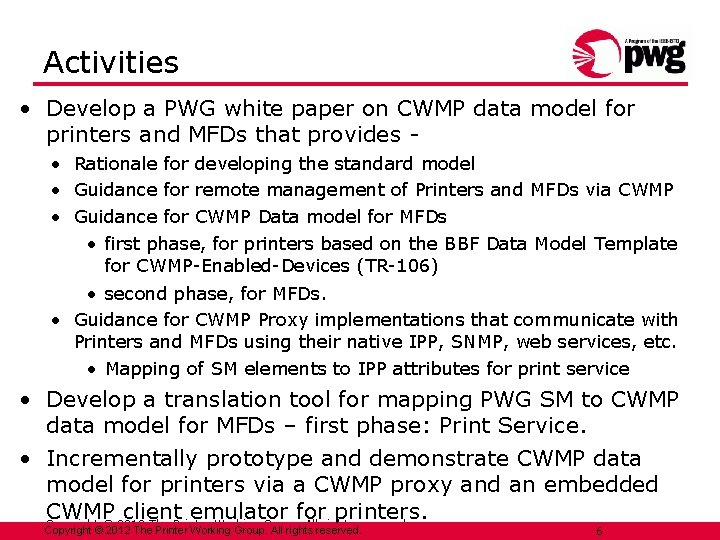
Activities • Develop a PWG white paper on CWMP data model for printers and MFDs that provides • Rationale for developing the standard model • Guidance for remote management of Printers and MFDs via CWMP • Guidance for CWMP Data model for MFDs • first phase, for printers based on the BBF Data Model Template for CWMP-Enabled-Devices (TR-106) • second phase, for MFDs. • Guidance for CWMP Proxy implementations that communicate with Printers and MFDs using their native IPP, SNMP, web services, etc. • Mapping of SM elements to IPP attributes for print service • Develop a translation tool for mapping PWG SM to CWMP data model for MFDs – first phase: Print Service. • Incrementally prototype and demonstrate CWMP data model for printers via a CWMP proxy and an embedded CWMP client emulator for printers. Copyright © 2012 The Printer Working Group. All rights reserved. 6
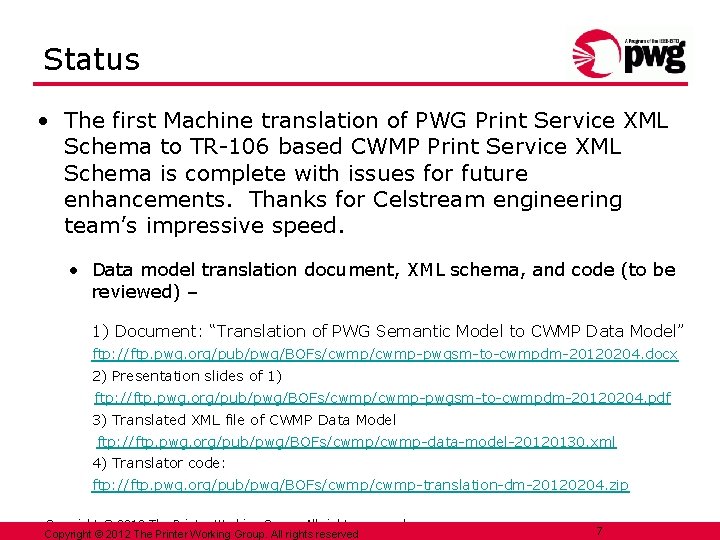
Status • The first Machine translation of PWG Print Service XML Schema to TR-106 based CWMP Print Service XML Schema is complete with issues for future enhancements. Thanks for Celstream engineering team’s impressive speed. • Data model translation document, XML schema, and code (to be reviewed) – 1) Document: “Translation of PWG Semantic Model to CWMP Data Model” ftp: //ftp. pwg. org/pub/pwg/BOFs/cwmp-pwgsm-to-cwmpdm-20120204. docx 2) Presentation slides of 1) ftp: //ftp. pwg. org/pub/pwg/BOFs/cwmp-pwgsm-to-cwmpdm-20120204. pdf 3) Translated XML file of CWMP Data Model ftp: //ftp. pwg. org/pub/pwg/BOFs/cwmp-data-model-20120130. xml 4) Translator code: ftp: //ftp. pwg. org/pub/pwg/BOFs/cwmp-translation-dm-20120204. zip Copyright © 2012 The Printer Working Group. All rights reserved 7
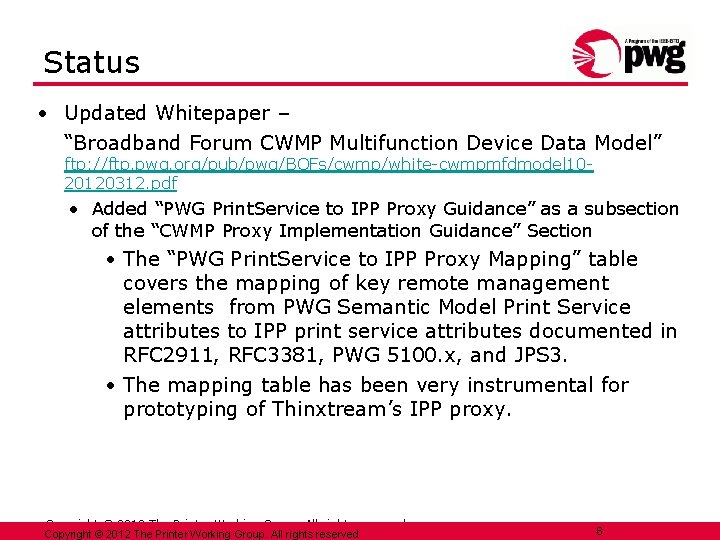
Status • Updated Whitepaper – “Broadband Forum CWMP Multifunction Device Data Model” ftp: //ftp. pwg. org/pub/pwg/BOFs/cwmp/white-cwmpmfdmodel 1020120312. pdf • Added “PWG Print. Service to IPP Proxy Guidance” as a subsection of the “CWMP Proxy Implementation Guidance” Section • The “PWG Print. Service to IPP Proxy Mapping” table covers the mapping of key remote management elements from PWG Semantic Model Print Service attributes to IPP print service attributes documented in RFC 2911, RFC 3381, PWG 5100. x, and JPS 3. • The mapping table has been very instrumental for prototyping of Thinxtream’s IPP proxy. Copyright © 2012 The Printer Working Group. All rights reserved 8
Status • Thinxtream has previously provided a list of management elements for printers implemented in a CWMP proxy for printers. SNMP/HTTP protocols were used to gather data from printer MIB/EWS for these management elements. • Thinxtream has then implemented the PWG standard CWMP data model (machine translated from PWG SM) for printers in the CWMP proxy. • Thinxtream has further demonstrated that a local or remote CWMP management app can get and set the printer/print service properties in the CWMP data model of the CWMP proxy that communicates with printers via SNMP or HTTP with EWS. • Thinxtream has recently added to the CWMP proxy the capability of getting the printer/print service properties in the CWMP data model of the CWMP proxy that uses IPP to communicate with physical printers. Copyright © 2012 The Printer Working Group. All rights reserved. 9
CWMP Demo CWMP mapping to SNMP MIBs, IPP and native TR 069 stack Copyright © 2012 The Printer Working Group. All rights reserved.
Disclaimer • This is a technology demonstration and only selected IPP attributes mapped to CWMP Data Model are implemented. • IPP capable local and remote printers will be used and will be subject to the capabilities they support. • This is not meant to demonstrate the Thinxtream Device. Maestro solution, but restricted to CWMP and PWG standards mapping. Copyright © 2012 The Printer Working Group. All rights reserved.
Demo Objectives • Demonstrate a potential CWMP Data Model for MFDs that is compliant to PWG standards • Communication to/from an ACS server (implemented in the Device. Maestro server) • Communication through a proxy to printers • via SNMP to talk printer MIBs • and/or embedded web servers via http • Via IPP to an IPP compliant device • Communication directly with an embedded TR 069 client emulator. Copyright © 2012 The Printer Working Group. All rights reserved.
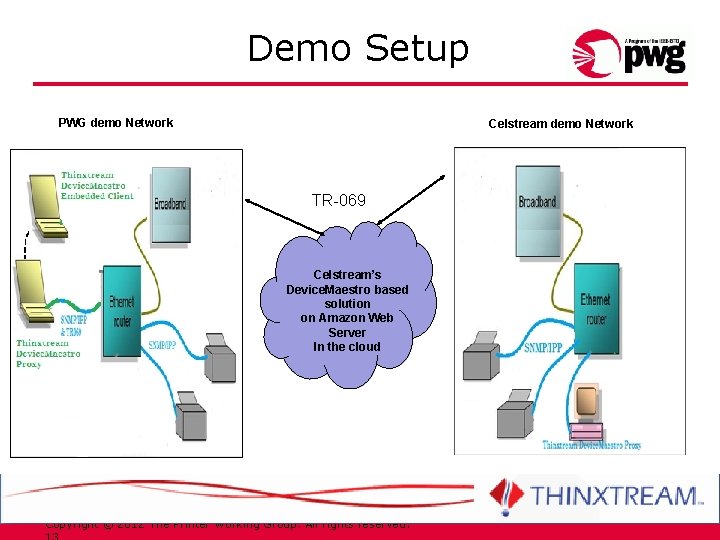
Demo Setup PWG demo Network Celstream demo Network TR-069 Celstream’s Device. Maestro based solution on Amazon Web Server In the cloud Copyright © 2012 The Printer Working Group. All rights reserved.
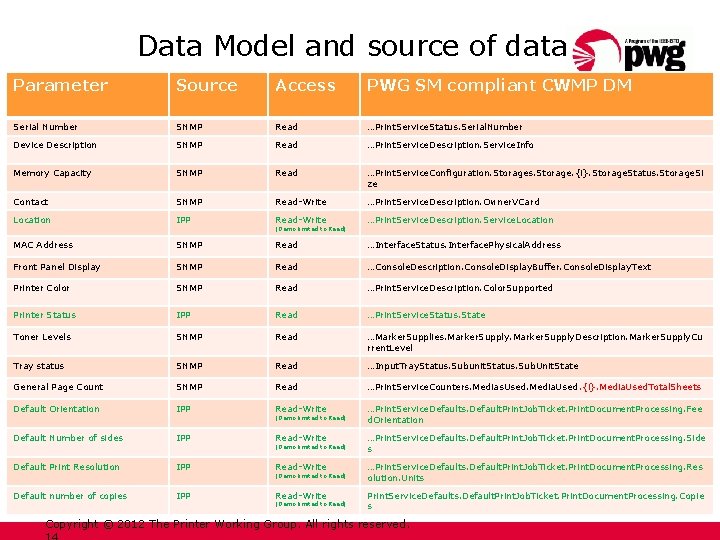
Data Model and source of data Parameter Source Access PWG SM compliant CWMP DM Serial Number SNMP Read …Print. Service. Status. Serial. Number Device Description SNMP Read …Print. Service. Description. Service. Info Memory Capacity SNMP Read …Print. Service. Configuration. Storages. Storage. {i}. Storage. Status. Storage. Si ze Contact SNMP Read-Write …Print. Service. Description. Owner. VCard Location IPP Read-Write …Print. Service. Description. Service. Location MAC Address SNMP Read …Interface. Status. Interface. Physical. Address Front Panel Display SNMP Read …Console. Description. Console. Display. Buffer. Console. Display. Text Printer Color SNMP Read …Print. Service. Description. Color. Supported Printer Status IPP Read …Print. Service. Status. State Toner Levels SNMP Read …Marker. Supplies. Marker. Supply. Description. Marker. Supply. Cu rrent. Level Tray status SNMP Read …Input. Tray. Status. Subunit. Status. Sub. Unit. State General Page Count SNMP Read …Print. Service. Counters. Medias. Used. Media. Used. {i}. Media. Used. Total. Sheets Default Orientation IPP Read-Write …Print. Service. Defaults. Default. Print. Job. Ticket. Print. Document. Processing. Fee d. Orientation Default Number of sides IPP Read-Write …Print. Service. Defaults. Default. Print. Job. Ticket. Print. Document. Processing. Side s Default Print Resolution IPP Read-Write …Print. Service. Defaults. Default. Print. Job. Ticket. Print. Document. Processing. Res olution. Units Default number of copies IPP Read-Write Print. Service. Defaults. Default. Print. Job. Ticket. Print. Document. Processing. Copie s (Demo limited to Read) (Demo limited to Read) Copyright © 2012 The Printer Working Group. All rights reserved.
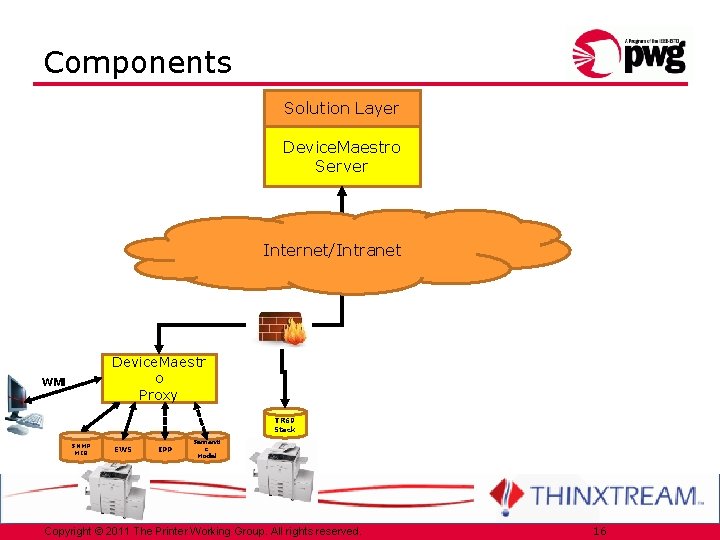
Components Solution Layer Device. Maestro Server Internet/Intranet Device. Maestr o Proxy WMI TR 69 Stack SNMP MIB EWS IPP Semanti c Model Copyright © 2011 The Printer Working Group. All rights reserved. 16
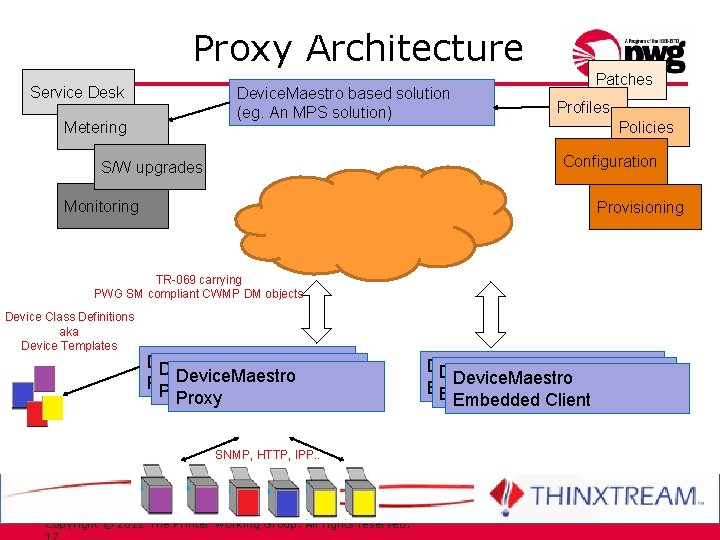
Proxy Architecture Service Desk Device. Maestro based solution (eg. An MPS solution) Metering Patches Profiles Policies Configuration S/W upgrades Monitoring Provisioning TR-069 carrying PWG SM compliant CWMP DM objects Device Class Definitions aka Device Templates Device. Maestro Proxy SNMP, HTTP, IPP. . Copyright © 2012 The Printer Working Group. All rights reserved. Device. Maestro Embedded Client Embedded. Client
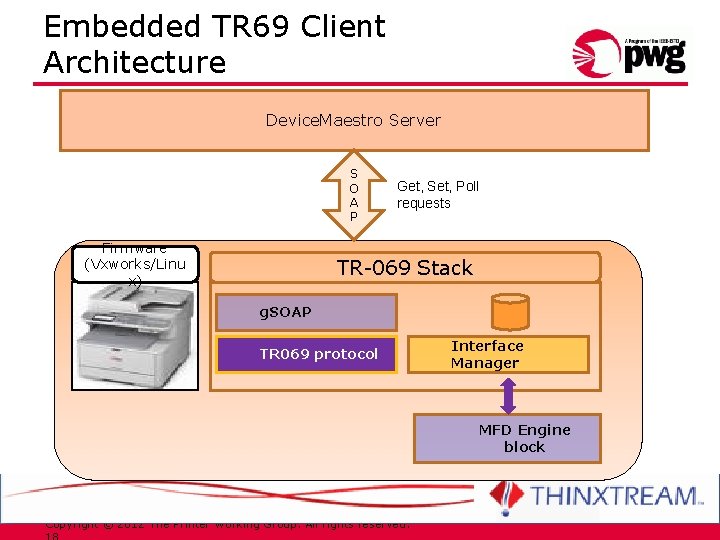
Embedded TR 69 Client Architecture Device. Maestro Server S O A P Firmware (Vxworks/Linu x) Get, Set, Poll requests TR-069 Stack g. SOAP TR 069 protocol Interface Manager MFD Engine block Copyright © 2012 The Printer Working Group. All rights reserved.
Demo Copyright © 2012 The Printer Working Group. All rights reserved.
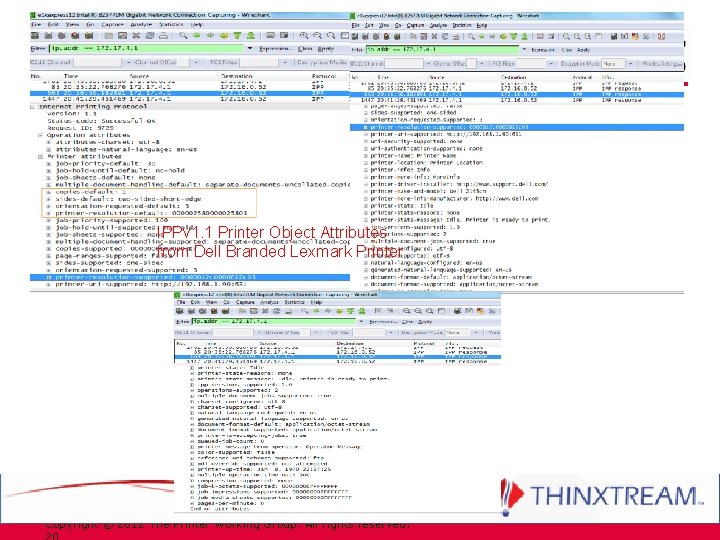
IPPv 1. 1 Printer Object Attributes from Dell Branded Lexmark Printer Copyright © 2012 The Printer Working Group. All rights reserved.
Next Steps • Continue to update the whitepaper. • Update and enhance the PWG SM to CWMP data model machine translator whenever necessary. • More progressive prototyping with demonstration of CWMP data model for IPP printers connected to a CWMP proxy. • Next teleconference: Friday May 11, 10 am EST? Copyright © 2012 The Printer Working Group. All rights reserved 21
Supplements Copyright © 2012 The Printer Working Group. All rights reserved 22
CWMP Overview • CWMP (CPE WAN Management Protocol) is a Broadband Forum standard (TR-069) that defines a set of WAN management interfaces between an Auto-Configuration Server (ACS) and a set of CWMP-enabled CPEs (Customer Premise Equipments) • CWMP supports service contract based remote and secure management and provisioning of CPEs throughout their entire lifecycle – deployment, installation, management, and support • CWMP supports all of the following functionality via an ACS: • • • Auto-configuration and dynamic provisioning of CPEs and services Software/Firmware image management of CPEs Software module management of services Status and performance monitoring of CPEs and services Diagnostics execution and reporting of CPEs Standard interfaces to policy servers, call centers, and business applications (e. g. OSS/BSS/CRM) • Strong security – transaction confidentiality and data integrity Copyright © 2012 The Printer Working Group. All rights reserved. 23
CWMP Overview • Protocol message exchange: SOAP over HTTP 1. 1 • Security Mechanisms • TLS 1. 2 or higher is RECOMMENDED • Alternative authentication using shared secrets via HTTP is also supported for lower security environments • Data Model • Data hierarchy • Root object: “Device” – common objects (in TR-181) – components (in TR-143 & 157) – single “Services” object • Each Service Object – objects - sub-objects - parameters • Object Versioning – two integers (Object. Name: Major. Minor) • Profiles – define conformance requirements for object Copyright © 2012 The Printer Working Group. All rights reserved. 24
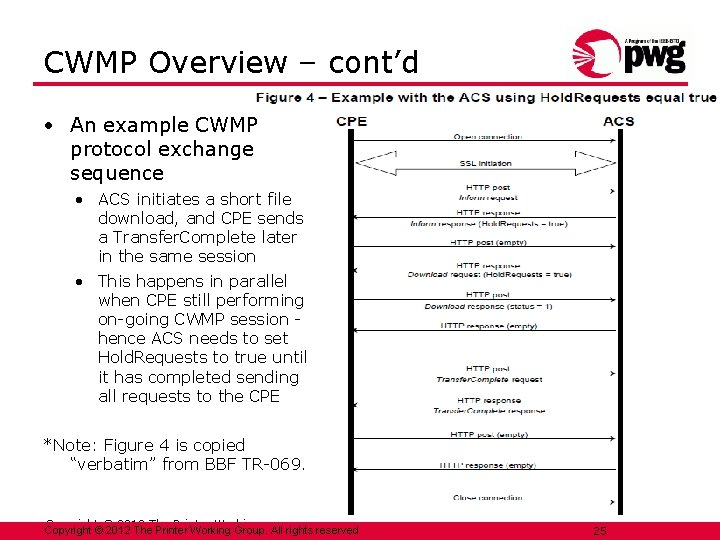
CWMP Overview – cont’d • An example CWMP protocol exchange sequence • ACS initiates a short file download, and CPE sends a Transfer. Complete later in the same session • This happens in parallel when CPE still performing on-going CWMP session hence ACS needs to set Hold. Requests to true until it has completed sending all requests to the CPE *Note: Figure 4 is copied “verbatim” from BBF TR-069. Copyright © 2012 The Printer Working Group. All rights reserved 25
Why use CWMP for Printers/MFDs? • In recent years the telecom industry and IT MSPs have migrated to using CWMP to remotely and securely manage and provision all kinds of devices in home, SOHO, SMB, and enterprise environments based on service contracts • CWMP is supported in routers, bridges, cable modems, DSL modems, and Internet/residential gateways, set-top boxes, IP phones, cell phones, storage devices, PCs and laptops • Standard CWMP data models for Printers and MFDs are important – to ensure interoperability of all CWMP-based solutions across all imaging products • Devices supporting CWMP-based management must implement: • A set of standard interfaces between ACS and all CPEs • CWMP device data model(s) to expose device/service info to ACS Copyright © 2012 The Printer Working Group. All rights reserved 26
Benefits of CWMP for Printers/MFDs • Enables Telecom and IT MSPs (Managed Service Providers) to include Printers/MFDs in their service offerings. • Enables MPS (Managed Print Service) providers to include mainstream IT devices in their service offerings. • CWMP serves as a common protocol to simplify remote administration and problem resolution for both customers and service providers. • Customers benefit since they are no longer locked into one vendor for their IT devices. • Advanced remote management capabilities help reduce service dispatch and other customer support costs. Copyright © 2012 The Printer Working Group. All rights reserved 27
Collaboration Approach • PWG and Thinxtream participants collaborate closely • CWMP BOF calls at 8 am US PST 11 am US EST on Friday roughly bi-weekly (w/ participation of Bangalore engineers) • CWMP whitepaper updates to document technical progress • Architecture and pseudo-code for machine translation tool • New focus – Printer data model for first phase • Current CWMP BOF participants • PWG: Ira Mc. Donald (Samsung), Nancy Chen (Oki Data), Bill Wagner (TIC) • Others are welcome! • Thinxtream: Ranga Raj (CTO), Anil Takkar (Product Manager), Laxman Bhat, Subramanyan Krishnan, Nagaraj Ghatigar Copyright © 2012 The Printer Working Group. All rights reserved. 28
CWMP Functionality • Auto-configuration and Dynamic Service Provisioning • • At the time of CPE connection Re-provision and re-configure at subsequent time Asynchronous ACS-initiated re-provisioning Based on the requirements of a specific CPE or on collective criteria, e. g. vendor, model, software version, etc. • Straightforward future extensions • Software/firmware image management • ACS initiated and optional CPE initiated download of img file • Version identification • Notification of download success/failure Copyright © 2012 The Printer Working Group. All rights reserved. 29
CWMP Functionality – cont’d • Software module management • • • Install, update, uninstall software modules in CPE Notify ACS of success/failure Start and stop applications Enable/disable execution environment Inventory software modules available • Status and performance monitoring • CPEs make information available to ACS for monitoring • ACS monitors CPE’s status and performance statistics • CPE actively notifies ACS of change to CPE state Copyright © 2012 The Printer Working Group. All rights reserved. 30
CWMP Functionality – cont’d • Diagnostics reporting • CPEs make information available to ACS for diagnostics • ACS diagnoses and resolves CPE’s connectivity/service issues • ACS instructs CPEs to execute defined diagnostic tests • Standard interfaces to operational/business support systems, policy servers, and call centers for: • • Order fulfillment Billing Subscriber management Change management Manufacturer management Service level agreement management Performance analysis Copyright © 2012 The Printer Working Group. All rights reserved. 31
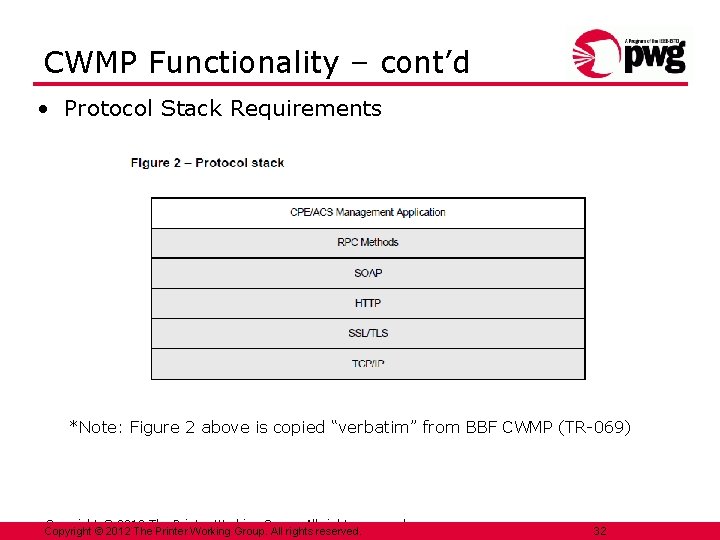
CWMP Functionality – cont’d • Protocol Stack Requirements *Note: Figure 2 above is copied “verbatim” from BBF CWMP (TR-069) Copyright © 2012 The Printer Working Group. All rights reserved. 32
CWMP Functionality – cont’d • Security Mechanisms • Use TLS/1. 2 for secure transport between CPE and ACS (RECOMMENDED) • Provides transaction confidentiality, data integrity • Supports certificate-based authentication of CPE and ACS • Alternative authentication in HTTP layer between the CPE and ACS – based on shared secrets Copyright © 2012 The Printer Working Group. All rights reserved. 33
Status • Review issues of the first Machine translation • How to fill “Access” attribute of parameters and objects? • How to fill active. Notify, forced. Inform and requirement attributes for translated objects and parameters? • How to fill description text of objects? manually? Skip? • Naming optimization needed • How to translate “choice” in complex type? • How to translate “union” member types – either NMTOKEN or string => all string? • How to take advantage of object-oriented structure for CWMP data models used in BBF CWMP namespace Copyright © 2012 The Printer Working Group. All rights reserved 34
Status • Guidance whitepaper in progress – “Broadband Forum CWMP Multifunction Device Data Model” ftp: //ftp. pwg. org/pub/pwg/BOFs/cwmp/white-cwmpmfdmodel 1020111205. pdf • Considering the following changes in CWMP data model – • Power Management elements: • Read-only Power Log to be added to Processor subunit • All other power management elements already in all subunits • Support of Capabilities but not Capabilities. Ready • Add Capabilities. Factory: • “as-shipped” capabilities of the device, before any site admin configuration • For recovery of factory defaults when necessary • Read-Only • No Media. Col. Database: just Media and Media. Type • Exclude Active. Jobs (but keep Job. History): • Focus on Service and Device management (instead of full MPS) Copyright © 2012 The Printer Working Group. All rights reserved 35
Status • Celstream has provided a top-level list of management elements for printers implemented in a CWMP proxy. • Received a list of Printer management elements generated in the WIMS WG to be considered in PWG SM – ftp: //ftp. pwg. org/pub/pwg/wims/white/Management_elements-20120116. pdf • Observed that printers and MFDs have more network configuration elements than what are included in the common device data model of BBF CWMP. • Will consider including additional printer network and font configuration elements added to PWG SM when that occurs. • Future – BBF CWMP Data Model for Printers (TR-xxx) • BBF members (from PWG) should propose a new BBF project Copyright © 2012 The Printer Working Group. All rights reserved. 36
Status • Current approach for BBF data model for Printers 1) Define translation rules for PWG complex datatypes and element groups 2) Machine-translate all PWG SM XML schema well known values and datatypes into control files for the tool 3) Machine-translate the Print. Service subtree of the PWG SM XML schema into the equivalent BBF model/object/subobject/parameter statements, with BBF parameters mapped one -to-one from PWG SM simple XML elements. • Thinxtream software team has developed the first version of machine-translation tool 4) Hand-edit machine-translated CWMP data model to fix artifacts and add XML documentation (e. g. , PWG SM mapping notes) • Ira, Nancy, Bill, Pete (? ) and perhaps others to ensure the closest mapping from the PWG semantic model XML schema Copyright © 2012 The Printer Working Group. All rights reserved 37
TR 069 Embedded Stack Details • POSIX compliant cross platform implementation • Tested on Embedded Linux and Vx. Works • Can work on other RTOS platforms • Implemented in C • The distribution has TR 069 and g. SOAP stack • If device has inbuilt g. SOAP, then TR 069 stack can use existing g. SOAP implementation • The “Interface Manager” is a device specific implementation to handle device status and configuration parameter values besides other CWMP functions • Stack size • TR 069 Size: ~300 KB, g. SOAP Size: 177 KB • Memory usage : ~450 KB Copyright © 2011 The Printer Working Group. All rights reserved.
- Slides: 37