
Customer Contract Management Scenario Overview Click process chevrons
- Slides: 17
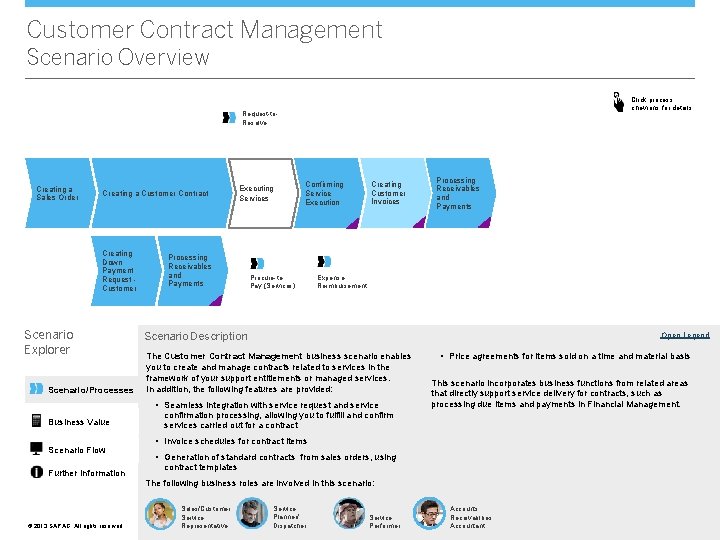
Customer Contract Management Scenario Overview Click process chevrons for details Request-to. Resolve Creating a Sales Order Creating a Customer Contract Creating Down Payment Request Customer Scenario Explorer Scenario/Processes Executing Services Processing Receivables and Payments Confirming Service Execution Procure-to. Pay (Services) Creating Customer Invoices Expense Reimbursement Scenario Description Open Legend The Customer Contract Management business scenario enables you to create and manage contracts related to services in the framework of your support entitlements or managed services. In addition, the following features are provided: • Seamless integration with service request and service Business Value Scenario Flow Further Information Processing Receivables and Payments • Price agreements for items sold on a time and material basis This scenario incorporates business functions from related areas that directly support service delivery for contracts, such as processing due items and payments in Financial Management. confirmation processing, allowing you to fulfill and confirm services carried out for a contract • Invoice schedules for contract items • Generation of standard contracts from sales orders, using contract templates The following business roles are involved in this scenario: © © 2013 SAP AG. All rights reserved. Sales/Customer Service Representative Service Planner/ Dispatcher Service Performer Accounts Receivablbes Accountant
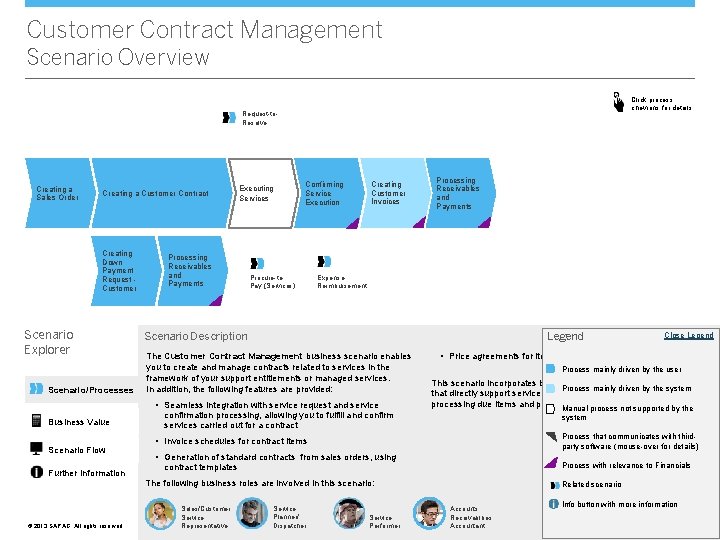
Customer Contract Management Scenario Overview Click process chevrons for details Request-to. Resolve Creating a Sales Order Creating a Customer Contract Creating Down Payment Request Customer Scenario Explorer Scenario/Processes Executing Services Processing Receivables and Payments Confirming Service Execution Procure-to. Pay (Services) Creating Customer Invoices Expense Reimbursement Scenario Description Legend The Customer Contract Management business scenario enables you to create and manage contracts related to services in the framework of your support entitlements or managed services. In addition, the following features are provided: • Seamless integration with service request and service Business Value Scenario Flow Further Information Processing Receivables and Payments confirmation processing, allowing you to fulfill and confirm services carried out for a contract • Price agreements for items sold on a time and material basis Process mainly driven by the user This scenario incorporates business functions from related areas Process mainly driven by the system that directly support service delivery for contracts, such as processing due items and payments in Financial Management. Manual process not supported by the system Process that communicates with thirdparty software (mouse-over for details) • Invoice schedules for contract items • Generation of standard contracts from sales orders, using Process with relevance to Financials contract templates The following business roles are involved in this scenario: © © 2013 SAP AG. All rights reserved. Sales/Customer Service Representative Service Planner/ Dispatcher Close Legend Service Performer Related scenario Accounts Receivablbes Accountant Info button with more information <Role Name>
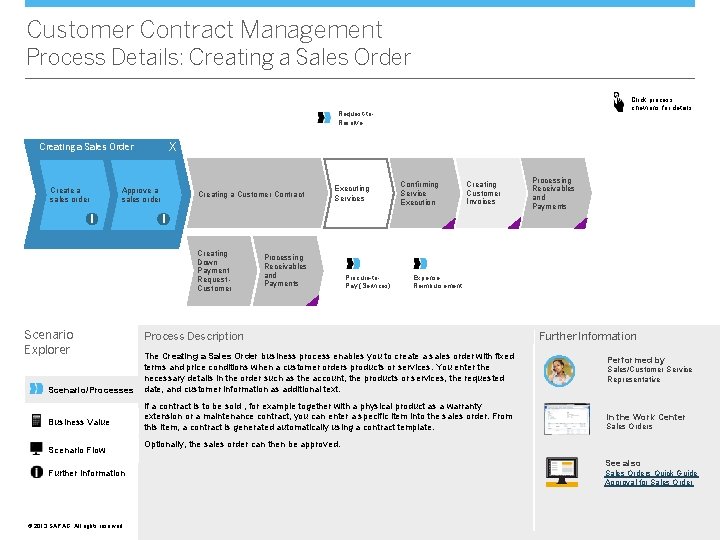
Customer Contract Management Process Details: Creating a Sales Order Click process chevrons for details Request-to. Resolve X Creating a Sales Order Create a sales order Approve a sales order i Creating a Customer Contract Scenario/Processes Business Value Scenario Flow Further Information © © 2013 SAP AG. All rights reserved. Confirming Service Execution Creating Customer Invoices Processing Receivables and Payments i Creating Down Payment Request Customer Scenario Explorer Executing Services Processing Receivables and Payments Procure-to. Pay (Services) Expense Reimbursement Process Description The Creating a Sales Order business process enables you to create a sales order with fixed terms and price conditions when a customer orders products or services. You enter the necessary details in the order such as the account, the products or services, the requested date, and customer information as additional text. If a contract is to be sold , for example together with a physical product as a warranty extension or a maintenance contract, you can enter a specific item into the sales order. From this item, a contract is generated automatically using a contract template. Further Information Performed by Sales/Customer Service Representative In the Work Center Sales Orders Optionally, the sales order can then be approved. See also Sales Orders Quick Guide Approval for Sales Order
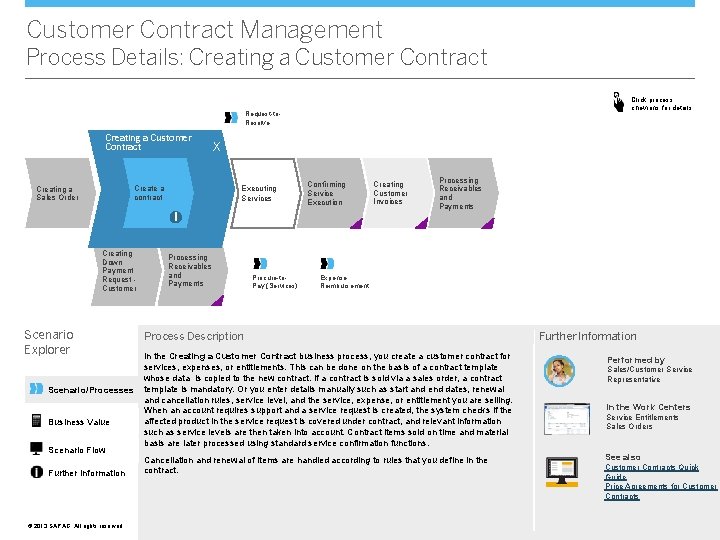
Customer Contract Management Process Details: Creating a Customer Contract Click process chevrons for details Request-to. Resolve Creating a Customer Contract Executing Services Create a contract Creating a Sales Order X Confirming Service Execution Creating Customer Invoices Processing Receivables and Payments i Creating Down Payment Request Customer Scenario Explorer Scenario/Processes Business Value Scenario Flow Further Information © © 2013 SAP AG. All rights reserved. Processing Receivables and Payments Procure-to. Pay (Services) Expense Reimbursement Process Description In the Creating a Customer Contract business process, you create a customer contract for services, expenses, or entitlements. This can be done on the basis of a contract template whose data is copied to the new contract. If a contract is sold via a sales order, a contract template is mandatory. Or you enter details manually such as start and end dates, renewal and cancellation rules, service level, and the service, expense, or entitlement you are selling. When an account requires support and a service request is created, the system checks if the affected product in the service request is covered under contract, and relevant information such as service levels are then taken into account. Contract items sold on time and material basis are later processed using standard service confirmation functions. Cancellation and renewal of items are handled according to rules that you define in the contract. Further Information Performed by Sales/Customer Service Representative In the Work Centers Service Entitlements Sales Orders See also Customer Contracts Quick Guide Price Agreements for Customer Contracts
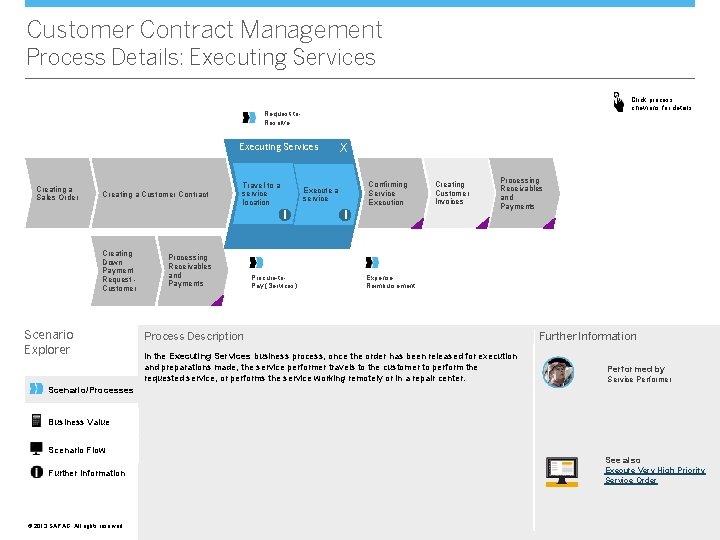
Customer Contract Management Process Details: Executing Services Click process chevrons for details Request-to. Resolve Executing Services Creating a Sales Order Creating a Customer Contract Travel to a service location Scenario Explorer Processing Receivables and Payments Confirming Service Execution Execute a service i Creating Down Payment Request Customer X Procure-to. Pay (Services) i Creating Customer Invoices Processing Receivables and Payments Expense Reimbursement Process Description In the Executing Services business process, once the order has been released for execution and preparations made, the service performer travels to the customer to perform the requested service, or performs the service working remotely or in a repair center. Further Information Performed by Service Performer Scenario/Processes Business Value Scenario Flow See also Further Information © © 2013 SAP AG. All rights reserved. Execute Very High Priority Service Order
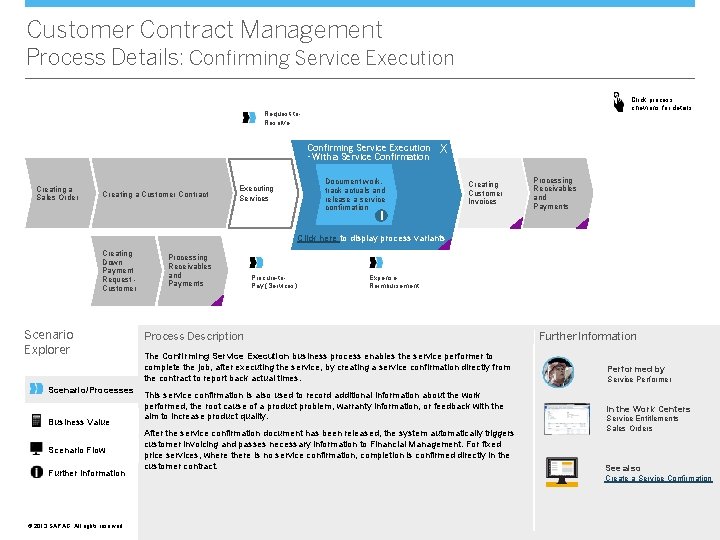
Customer Contract Management Process Details: Confirming Service Execution Click process chevrons for details Request-to. Resolve Confirming Service Execution - With a Service Confirmation Creating a Sales Order Creating a Customer Contract Executing Services X Document work, track actuals and release a service confirmation Creating Customer Invoices i Processing Receivables and Payments Click here to display process variants Creating Down Payment Request Customer Scenario Explorer Scenario/Processes Business Value Scenario Flow Further Information © © 2013 SAP AG. All rights reserved. Processing Receivables and Payments Procure-to. Pay (Services) Expense Reimbursement Process Description Further Information The Confirming Service Execution business process enables the service performer to complete the job, after executing the service, by creating a service confirmation directly from the contract to report back actual times. Performed by This service confirmation is also used to record additional information about the work performed, the root cause of a product problem, warranty information, or feedback with the aim to increase product quality. In the Work Centers After the service confirmation document has been released, the system automatically triggers customer invoicing and passes necessary information to Financial Management. For fixed price services, where there is no service confirmation, completion is confirmed directly in the customer contract. Service Performer Service Entitlements Sales Orders See also Create a Service Confirmation
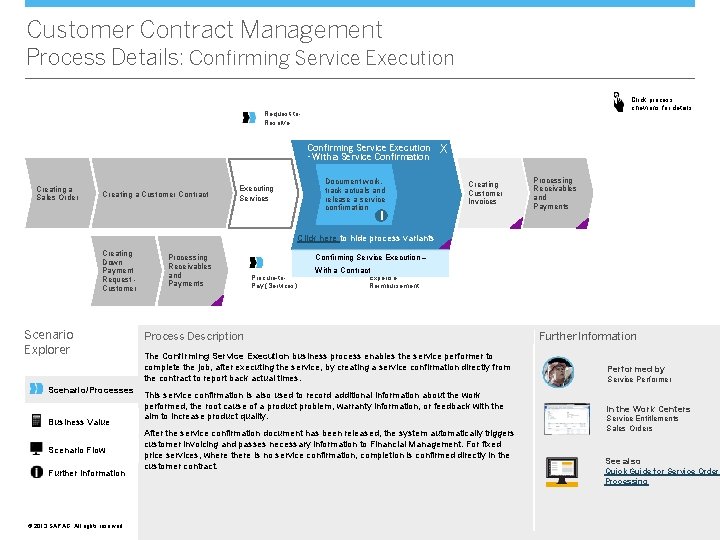
Customer Contract Management Process Details: Confirming Service Execution Click process chevrons for details Request-to. Resolve Confirming Service Execution - With a Service Confirmation Creating a Sales Order Creating a Customer Contract Executing Services Document work, track actuals and release a service confirmation X Creating Customer Invoices i Processing Receivables and Payments Click here to hide process variants Creating Down Payment Request Customer Scenario Explorer Scenario/Processes Business Value Scenario Flow Further Information © © 2013 SAP AG. All rights reserved. Processing Receivables and Payments Confirming Service Execution – Procure-to. Pay (Services) With a Contract Expense Reimbursement Process Description Further Information The Confirming Service Execution business process enables the service performer to complete the job, after executing the service, by creating a service confirmation directly from the contract to report back actual times. Performed by This service confirmation is also used to record additional information about the work performed, the root cause of a product problem, warranty information, or feedback with the aim to increase product quality. In the Work Centers After the service confirmation document has been released, the system automatically triggers customer invoicing and passes necessary information to Financial Management. For fixed price services, where there is no service confirmation, completion is confirmed directly in the customer contract. Service Performer Service Entitlements Sales Orders See also Quick Guide for Service Order Processing
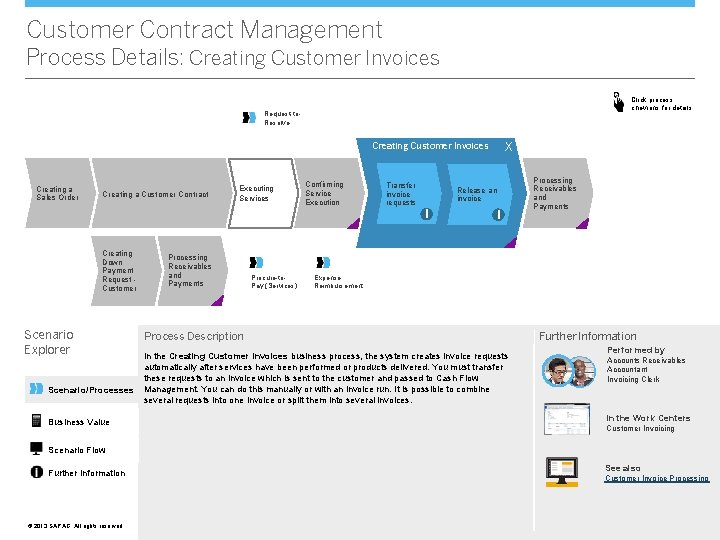
Customer Contract Management Process Details: Creating Customer Invoices Click process chevrons for details Request-to. Resolve X Creating Customer Invoices Creating a Sales Order Creating a Customer Contract Executing Services Confirming Service Execution Transfer invoice requests Release an invoice i Creating Down Payment Request Customer Scenario Explorer Scenario/Processes Business Value Processing Receivables and Payments Procure-to. Pay (Services) i Processing Receivables and Payments Expense Reimbursement Process Description In the Creating Customer Invoices business process, the system creates invoice requests automatically after services have been performed or products delivered. You must transfer these requests to an invoice which is sent to the customer and passed to Cash Flow Management. You can do this manually or with an invoice run. It is possible to combine several requests into one invoice or split them into several invoices. Further Information Performed by Accounts Receivables Accountant Invoicing Clerk In the Work Centers Customer Invoicing Scenario Flow Further Information © © 2013 SAP AG. All rights reserved. See also Customer Invoice Processing
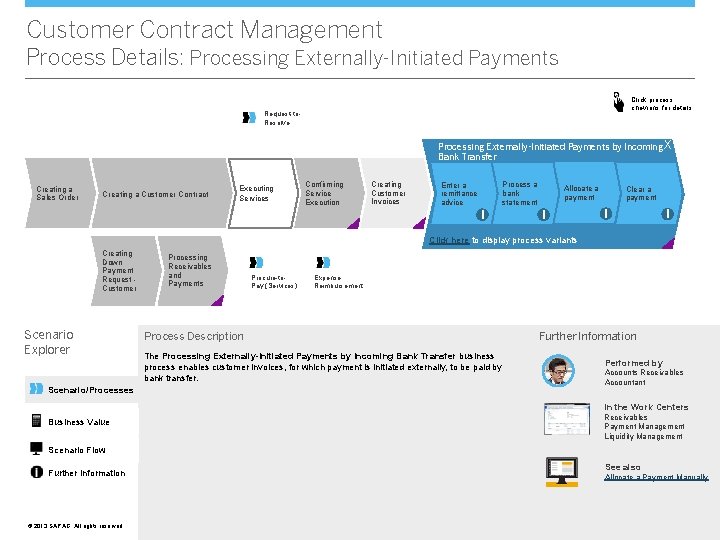
Customer Contract Management Process Details: Processing Externally-Initiated Payments Click process chevrons for details Request-to. Resolve X Processing Externally-Initiated Payments by Incoming X Bank Transfer Creating a Sales Order Creating a Customer Contract Executing Services Confirming Service Execution Creating Customer Invoices Process a bank statement Enter a remittance advice i Allocate a payment i Clear a payment i i Click here to display process variants Creating Down Payment Request Customer Scenario Explorer Scenario/Processes Processing Receivables and Payments Procure-to. Pay (Services) Expense Reimbursement Process Description The Processing Externally-Initiated Payments by Incoming Bank Transfer business process enables customer invoices, for which payment is initiated externally, to be paid by bank transfer. Further Information Performed by Accounts Receivables Accountant In the Work Centers Business Value Receivables Payment Management Liquidity Management Scenario Flow Further Information © © 2013 SAP AG. All rights reserved. See also Allocate a Payment Manually
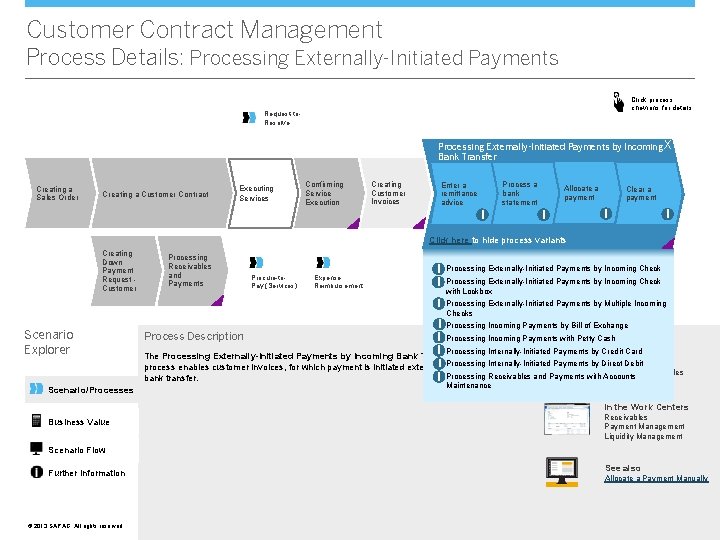
Customer Contract Management Process Details: Processing Externally-Initiated Payments Click process chevrons for details Request-to. Resolve X Processing Externally-Initiated Payments by Incoming X Bank Transfer Creating a Sales Order Creating a Customer Contract Executing Services Confirming Service Execution Creating Customer Invoices Process a bank statement Enter a remittance advice i Allocate a payment i Clear a payment i i Click here to hide process variants Creating Down Payment Request Customer Scenario Explorer Scenario/Processes Processing Receivables and Payments Procure-to. Pay (Services) Expense Reimbursement i i Processing Externally-Initiated Payments by Incoming Check i Processing Externally-Initiated Payments by Multiple Incoming Checks Processing Externally-Initiated Payments by Incoming Check with Lockbox i Processing Incoming Payments by Bill of Exchange Further Information i Processing Incoming Payments with Petty Cash i Processing Internally-Initiated Payments by Credit Card The Processing Externally-Initiated Payments by Incoming Bank Transfer business Performed Payments by Direct Debit by i Processing process enables customer invoices, for which payment is initiated externally, to be paid. Internally-Initiated by Accounts Receivables Processing Receivables and Payments with Accounts i bank transfer. Accountant Process Description Maintenance In the Work Centers Business Value Receivables Payment Management Liquidity Management Scenario Flow Further Information © © 2013 SAP AG. All rights reserved. See also Allocate a Payment Manually
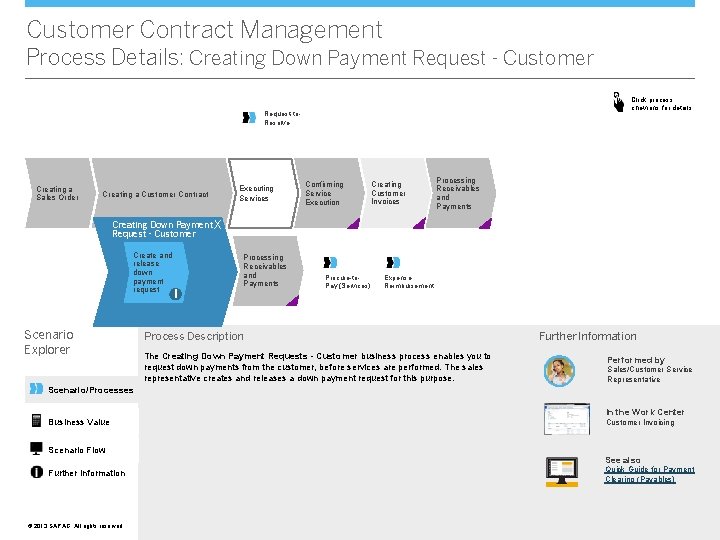
Customer Contract Management Process Details: Creating Down Payment Request - Customer Click process chevrons for details Request-to. Resolve Creating a Sales Order Creating a Customer Contract Executing Services Confirming Service Execution Creating Customer Invoices Processing Receivables and Payments Creating Down Payment X Request - Customer Create and release down payment request Scenario Explorer Processing Receivables and Payments i Procure-to. Pay (Services) Expense Reimbursement Process Description The Creating Down Payment Requests - Customer business process enables you to request down payments from the customer, before services are performed. The sales representative creates and releases a down payment request for this purpose. Further Information Performed by Sales/Customer Service Representative Scenario/Processes Business Value Scenario Flow Further Information © © 2013 SAP AG. All rights reserved. In the Work Center Customer Invoicing See also Quick Guide for Payment Clearing (Payables)
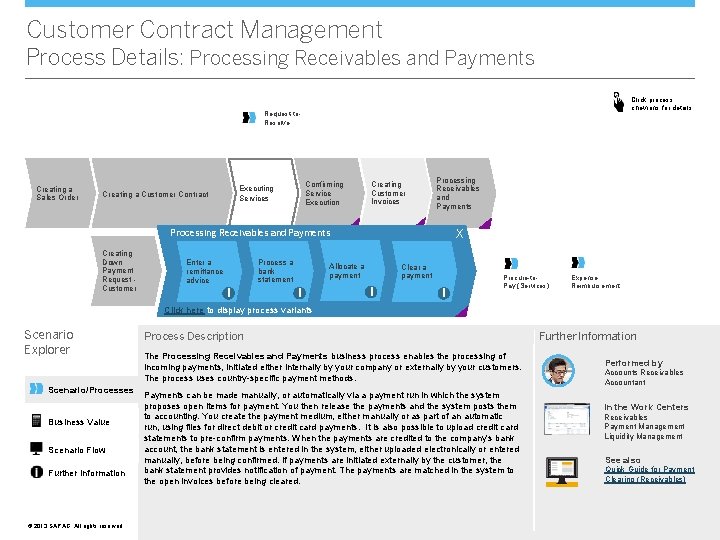
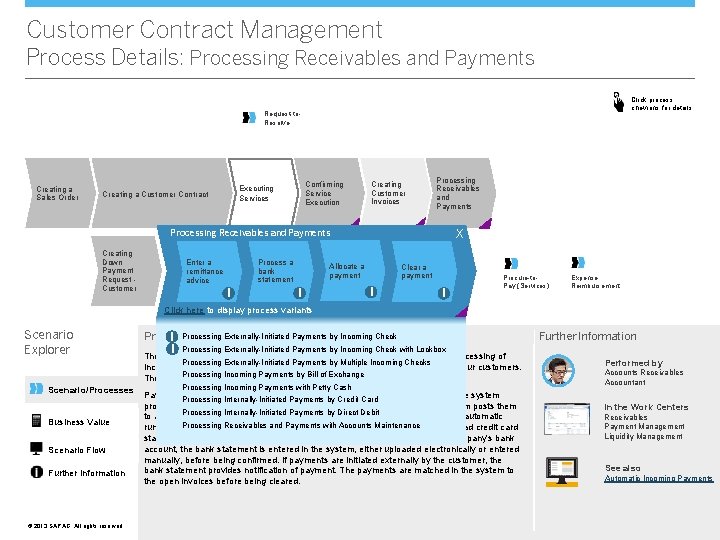
Customer Contract Management Process Details: Processing Receivables and Payments Click process chevrons for details Request-to. Resolve Creating a Sales Order Confirming Service Execution Executing Services Creating a Customer Contract Creating Customer Invoices Processing Receivables and Payments X X Processing Receivables and Payments Creating Down Payment Request Customer Process a bank statement Enter a remittance advice i Procure-to. Allocate a Pay (Services) payment i i Expense Clear a Reimbursement payment i Procure-to. Pay (Services) Expense Reimbursement Click here to display process variants Scenario Explorer Scenario/Processes Business Value Scenario Flow Further Information © © 2013 SAP AG. All rights reserved. Process Description The Processing Receivables and Payments business process enables the processing of incoming payments, initiated either internally by your company or externally by your customers. The process uses country-specific payment methods. Payments can be made manually, or automatically via a payment run in which the system proposes open items for payment. You then release the payments and the system posts them to accounting. You create the payment medium, either manually or as part of an automatic run, using files for direct debit or credit card payments. It is also possible to upload credit card statements to pre-confirm payments. When the payments are credited to the company's bank account, the bank statement is entered in the system, either uploaded electronically or entered manually, before being confirmed. If payments are initiated externally by the customer, the bank statement provides notification of payment. The payments are matched in the system to the open invoices before being cleared. Further Information Performed by Accounts Receivables Accountant In the Work Centers Receivables Payment Management Liquidity Management See also Quick Guide for Payment Clearing (Receivables)
Customer Contract Management Process Details: Processing Receivables and Payments Click process chevrons for details Request-to. Resolve Creating a Sales Order Confirming Service Execution Executing Services Creating a Customer Contract Creating Customer Invoices Processing Receivables and Payments X X Processing Receivables and Payments Creating Down Payment Request Customer Process a bank statement Enter a remittance advice i Procure-to. Allocate a Pay (Services) payment i i Expense Clear a Reimbursement payment i Procure-to. Pay (Services) Expense Reimbursement Click here to display process variants Scenario Explorer Scenario/Processes Business Value Scenario Flow Further Information © © 2013 SAP AG. All rights reserved. Process Description Externally-Initiated Payments by Incoming Check Process Description i Processing i Further Information Processing Externally-Initiated Payments by Incoming Check with Lockbox The Processing Receivables and Payments business process enables the processing of Processing Externally-Initiated Payments by Multiple Incoming Checks incoming payments, initiated either internally by your company or externally by your customers. Processing Incoming Payments by Bill methods. of Exchange The process uses country-specific payment Processing Incoming Payments with Petty Cash Payments can be made manually, or automatically via a payment run in which the system Processing Internally-Initiated Payments by Credit Card proposes open items for payment. You then release the payments and the system posts them Processing Internally-Initiated Payments by Direct Debit to accounting. You create the payment medium, either manually or as part of an automatic Receivables Payments with Accounts Maintenance run, using. Processing files for direct debit orand credit card payments. It is also possible to upload credit card statements to pre-confirm payments. When the payments are credited to the company's bank account, the bank statement is entered in the system, either uploaded electronically or entered manually, before being confirmed. If payments are initiated externally by the customer, the bank statement provides notification of payment. The payments are matched in the system to the open invoices before being cleared. Performed by Accounts Receivables Accountant In the Work Centers Receivables Payment Management Liquidity Management See also Automatic Incoming Payments
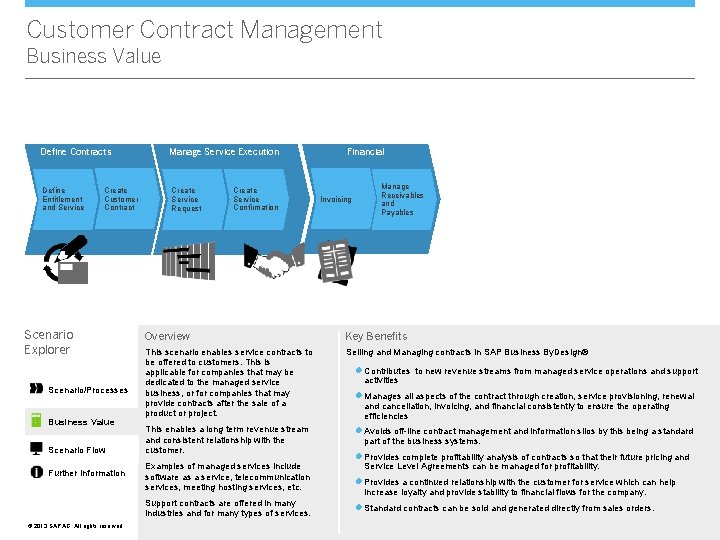
Customer Contract Management Business Value Define Contracts Define Entitlement and Service Create Customer Contract Scenario Explorer Scenario/Processes Business Value Scenario Flow Further Information Manage Service Execution Create Service Request Create Service Confirmation Invoicing Manage Receivables and Payables Overview Key Benefits This scenario enables service contracts to be offered to customers. This is applicable for companies that may be dedicated to the managed service business, or for companies that may provide contracts after the sale of a product or project. Selling and Managing contracts in SAP Business By. Design® This enables a long term revenue stream and consistent relationship with the customer. Examples of managed services include software as a service, telecommunication services, meeting hosting services, etc. Support contracts are offered in many industries and for many types of services. © © 2013 SAP AG. All rights reserved. Financial l Contributes to new revenue streams from managed service operations and support activities l Manages all aspects of the contract through creation, service provisioning, renewal and cancellation, invoicing, and financial consistently to ensure the operating efficiencies l Avoids off-line contract management and information silos by this being a standard part of the business systems. l Provides complete profitability analysis of contracts so that their future pricing and Service Level Agreements can be managed for profitability. l Provides a continued relationship with the customer for service which can help increase loyalty and provide stability to financial flows for the company. l Standard contracts can be sold and generated directly from sales orders.
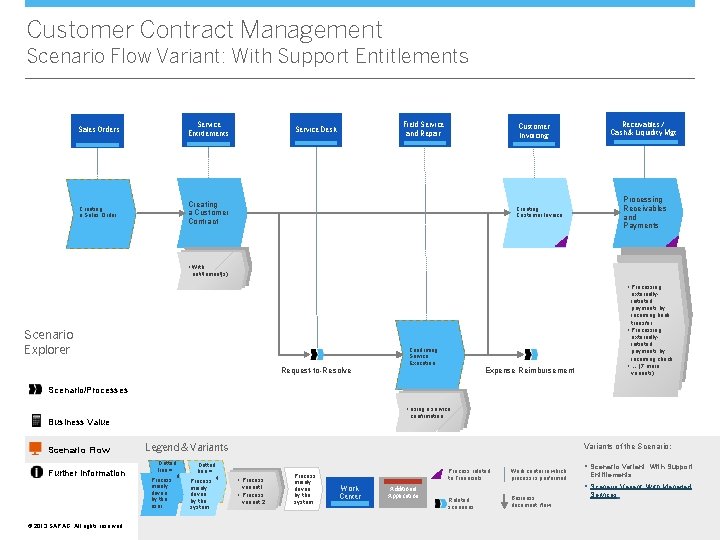
Customer Contract Management Scenario Flow Variant: With Support Entitlements Sales Orders Service Entitlements Creating a Sales Order Creating a Customer Contract Field Service and Repair Service Desk Customer Invoicing Receivables / Cash & Liquidity Mgt Processing Receivables and Payments Creating Customer Invoice • With entitlement(s) • Processing Scenario Explorer externallyinitiated payments by incoming bank transfer • Processing externallyinitiated payments by incoming check • … (7 more variants) Confirming Service Execution Request-to-Resolve Expense Reimbursement Scenario/Processes • using a service confirmation Business Value Scenario Flow Further Information © © 2013 SAP AG. All rights reserved. Legend & Variants Dotted line = optional Process mainly driven by the user Dotted line = optional Process mainly driven by the system Variants of the Scenario: • Process variant 1 • Process variant 2 Process mainly driven by the system Process related to Financials Work Center Additional Application Work center in which process is performed § Scenario Variant: With Support Entitlements § Scenario Variant: With Managed Related scenarios Business document flow Services:
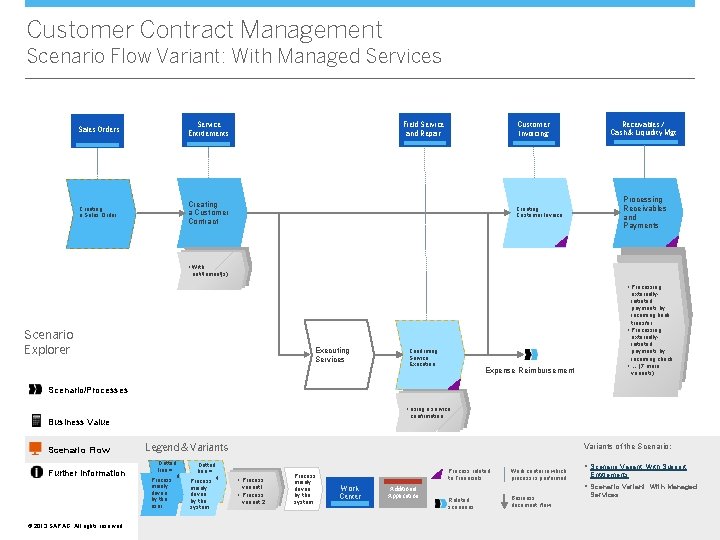
Customer Contract Management Scenario Flow Variant: With Managed Services Sales Orders Service Entitlements Creating a Sales Order Creating a Customer Contract Field Service and Repair Customer Invoicing Receivables / Cash & Liquidity Mgt Processing Receivables and Payments Creating Customer Invoice • With entitlement(s) • Processing Scenario Explorer Executing Services Confirming Service Execution externallyinitiated payments by incoming bank transfer • Processing externallyinitiated payments by incoming check • … (7 more variants) Expense Reimbursement Scenario/Processes • using a service confirmation Business Value Scenario Flow Further Information © © 2013 SAP AG. All rights reserved. Legend & Variants Dotted line = optional Process mainly driven by the user Dotted line = optional Process mainly driven by the system Variants of the Scenario: • Process variant 1 • Process variant 2 Process mainly driven by the system Process related to Financials Work Center Additional Application Work center in which process is performed § Scenario Variant: With Support Entitlements § Scenario Variant: With Managed Related scenarios Business document flow Services
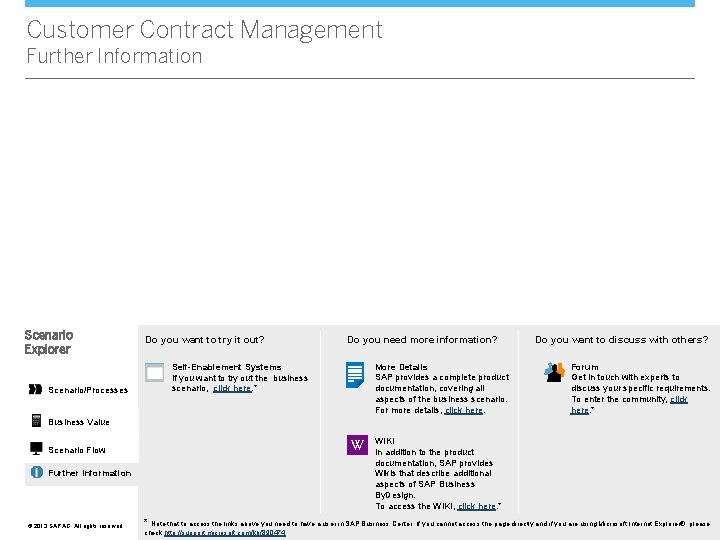
Customer Contract Management Further Information Scenario Explorer Scenario/Processes Do you want to try it out? Do you need more information? More Details SAP provides a complete product documentation, covering all aspects of the business scenario. For more details, click here. Self-Enablement Systems If you want to try out the business scenario, click here. * Do you want to discuss with others? Forum Get in touch with experts to discuss your specific requirements. To enter the community, click here. * Business Value VV Scenario Flow Further Information © © 2013 SAP AG. All rights reserved. WIKI In addition to the product documentation, SAP provides Wikis that describe additional aspects of SAP Business By. Design. To access the WIKI, click here. * * Note that to access the links above you need to have a user in SAP Business Center. If you cannot access the page directly and if you are using Microsoft Internet Explorer®, please check http: //support. microsoft. com/kb/890474.