
CSE 687 Object Oriented Design Class Notes Chapter
CSE 687 – Object Oriented Design Class Notes Chapter 1 - Modules Jim Fawcett copyright (c) 1994 - 2003 Chapter 1 - Modules
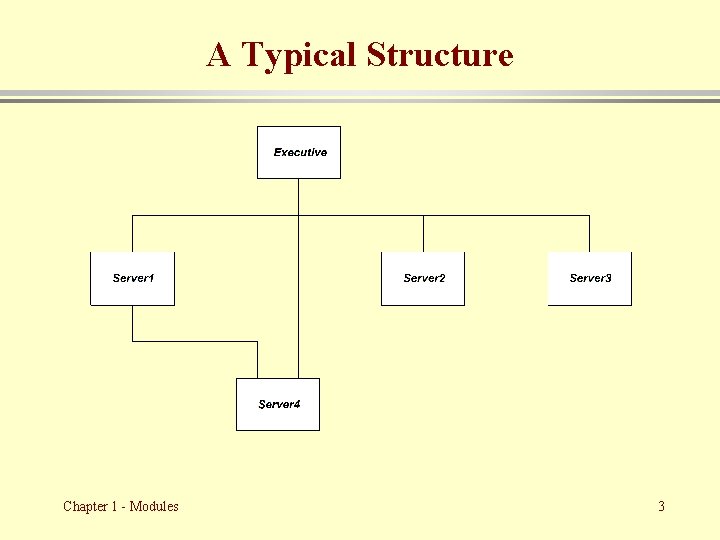
Module Definition · A Module is a physical package of source code into files. · A server module provides services to higher level modules. · An executive module coordinates the activities of the program’s server modules. Chapter 1 - Modules
A Typical Structure Chapter 1 - Modules 3
Include Relationships Chapter 1 - Modules

Module Definition · A Module is a physical package of source code into files. – Each reusable module should focus on a single activity, e. g. , it is cohesive. Most server modules should attempt to be reusable. – Not all modules should try to be reusable. Executive modules are not - they must focus on all of the program’s responsiblities – but at a very high level. · A server module provides services to higher level modules. A C++ module consists of: – A header file (. h extension) • • Provides a typed interface, provided to ensure type consistency with all modules using its services. Announces the services of the module to potential users through a manual page and function and class declarations. – An implementation file (. cpp extension) that provides the module’s services through global function and class member function implementations. • • · This file provides a prologue, the modules definitions, and a test stub. Test stubs are used for construction tests to quickly check the correctness of recently added code or modifications. An executive module coordinates the activities of the program’s server modules. – Often an executive module only has an implementation file since it has no need to announce it’s services. Chapter 1 - Modules
A Note about this Definition · In all of the design courses covered by this web site, we use the definition for modules provided on the previous page, and you are expected to implement all of your submitted projects in this modular fashion. · However, not everyone uses this definition. For example, throughout Microsoft’s. Net literature they use the term module to mean a binary file that becomes part of an assembly, e. g. , a dll or an exe. · Some others use the preceding definition in a looser way, for example, allowing multiple header files for a single implementation file. This is expressly forbidden by our definition. Chapter 1 - Modules
Limitation of Single File Program · What’s wrong with a single file program? – Nothing, but as programs grow larger, this format becomes very limiting. – Programs grow too large to comprehend as a single entity. – Eventually, as file size grows, a compiler can not swallow the whole file. Chapter 1 - Modules
Limitation of Single File Program · Solution: – break programs up into modules – Modules allow a program to be decomposed into smaller units of understanding, test, release, and configuration management. – In C++ each server module consists of two files: – A header file contains all public declarations so other modules know how to use this module’s services – an implementation file contains all data and function definitions; that is, it provides the services that the header file announces Chapter 1 - Modules
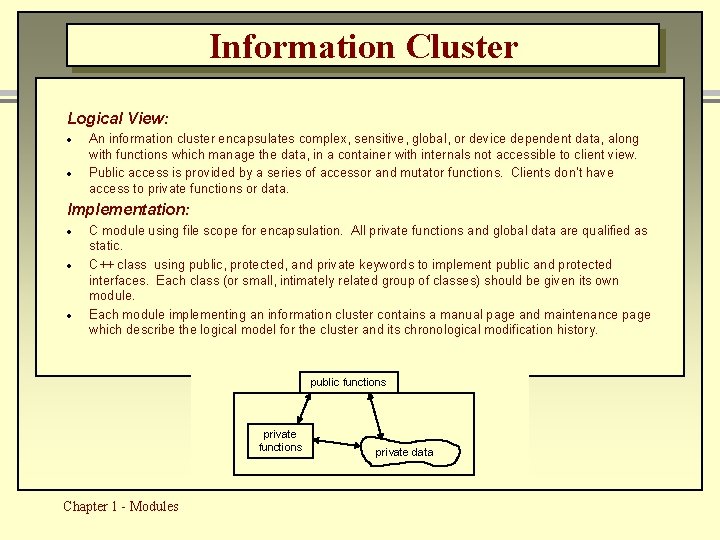
Information Cluster Logical View: · · An information cluster encapsulates complex, sensitive, global, or device dependent data, along with functions which manage the data, in a container with internals not accessible to client view. Public access is provided by a series of accessor and mutator functions. Clients don’t have access to private functions or data. Implementation: · · · C module using file scope for encapsulation. All private functions and global data are qualified as static. C++ class using public, protected, and private keywords to implement public and protected interfaces. Each class (or small, intimately related group of classes) should be given its own module. Each module implementing an information cluster contains a manual page and maintenance page which describe the logical model for the cluster and its chronological modification history. public functions private functions Chapter 1 - Modules private data
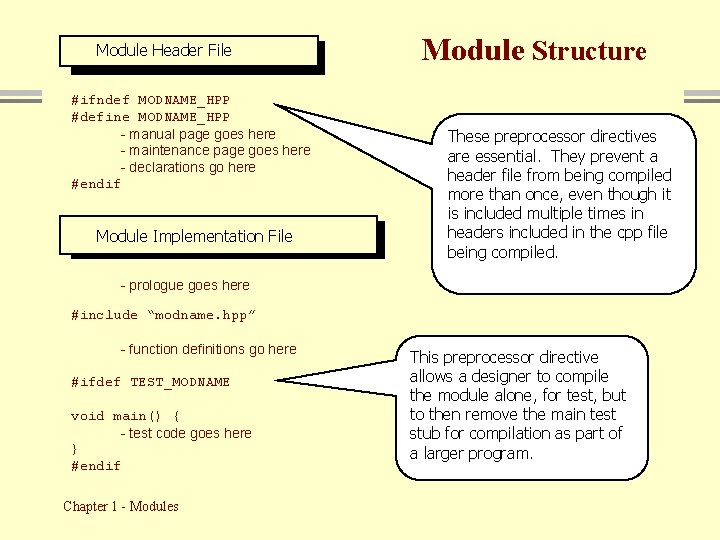
Header File: Header modname. hpp Module File #ifndef MODNAME_HPP #define MODNAME_HPP - manual page goes here - maintenance page goes here - declarations go here #endif Implementation File: modname. cpp Module Implementation File Module Structure These preprocessor directives are essential. They prevent a header file from being compiled more than once, even though it is included multiple times in headers included in the cpp file being compiled. - prologue goes here #include “modname. hpp” - function definitions go here #ifdef TEST_MODNAME void main() { - test code goes here } #endif Chapter 1 - Modules This preprocessor directive allows a designer to compile the module alone, for test, but to then remove the main test stub for compilation as part of a larger program.
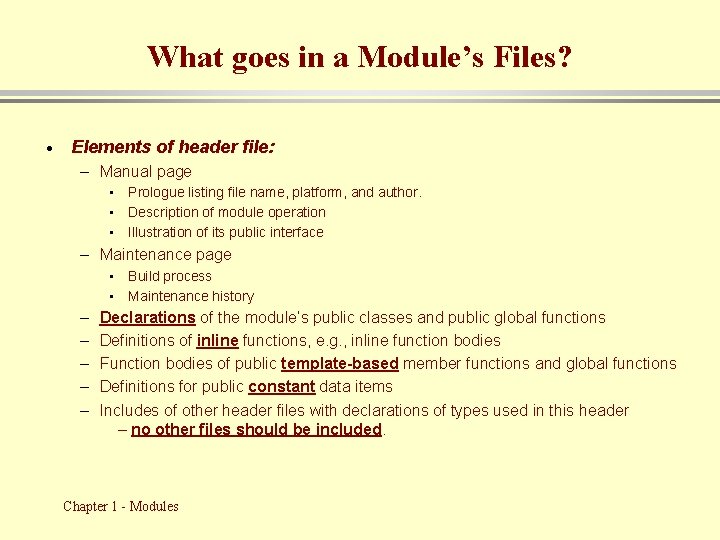
What goes in a Module’s Files? · Elements of header file: – Manual page • Prologue listing file name, platform, and author. • Description of module operation • Illustration of its public interface – Maintenance page • Build process • Maintenance history – – – Declarations of the module’s public classes and public global functions Definitions of inline functions, e. g. , inline function bodies Function bodies of public template-based member functions and global functions Definitions for public constant data items Includes of other header files with declarations of types used in this header – no other files should be included. Chapter 1 - Modules
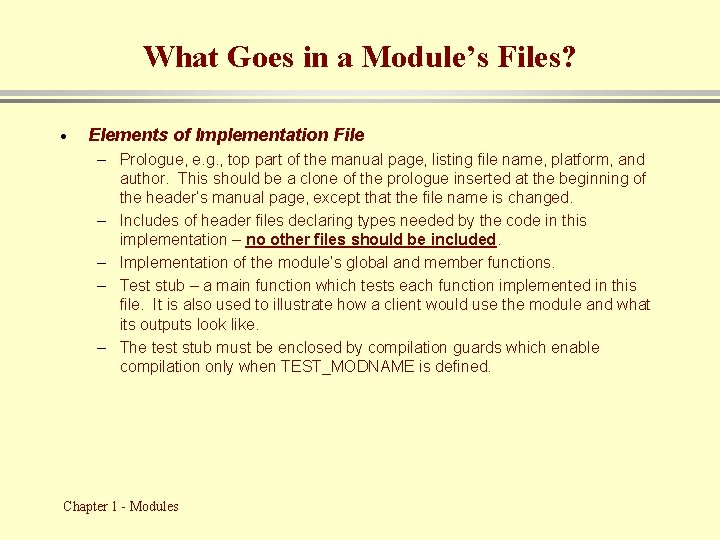
What Goes in a Module’s Files? · Elements of Implementation File – Prologue, e. g. , top part of the manual page, listing file name, platform, and author. This should be a clone of the prologue inserted at the beginning of the header’s manual page, except that the file name is changed. – Includes of header files declaring types needed by the code in this implementation – no other files should be included. – Implementation of the module’s global and member functions. – Test stub – a main function which tests each function implemented in this file. It is also used to illustrate how a client would use the module and what its outputs look like. – The test stub must be enclosed by compilation guards which enable compilation only when TEST_MODNAME is defined. Chapter 1 - Modules
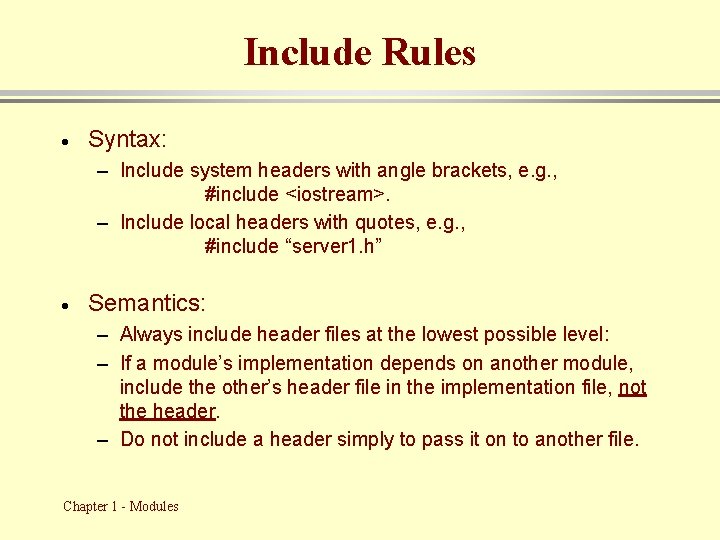
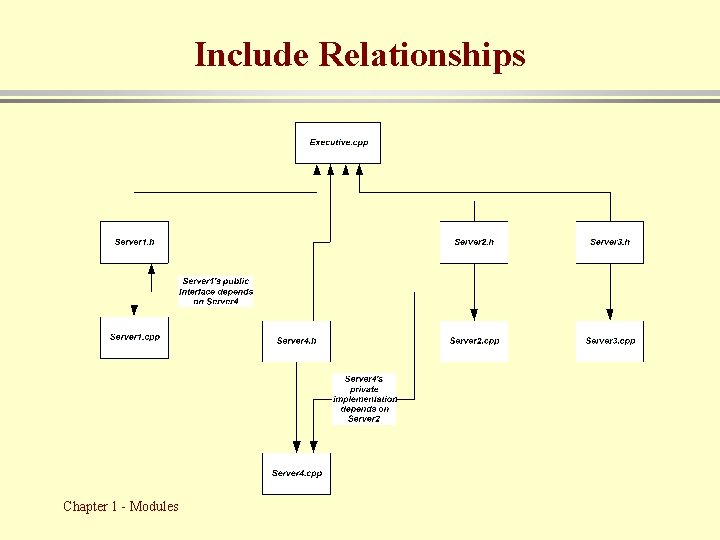
Include Rules · Syntax: – Include system headers with angle brackets, e. g. , #include <iostream>. – Include local headers with quotes, e. g. , #include “server 1. h” · Semantics: – Always include header files at the lowest possible level: – If a module’s implementation depends on another module, include the other’s header file in the implementation file, not the header. – Do not include a header simply to pass it on to another file. Chapter 1 - Modules
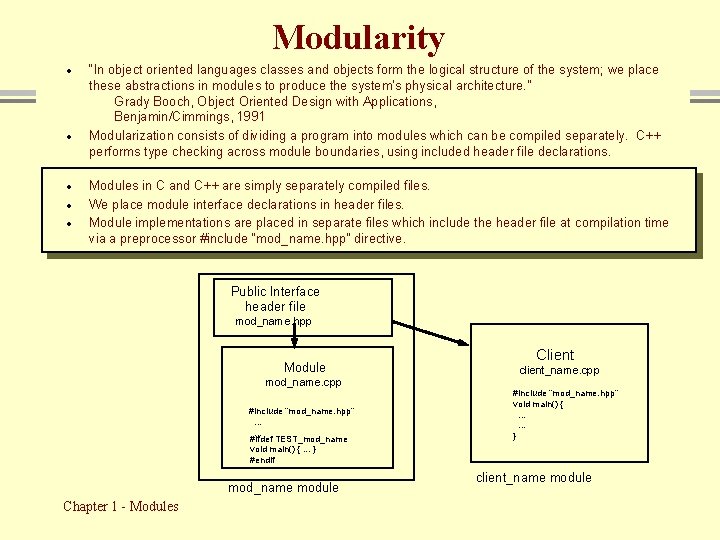
Modularity · · · “In object oriented languages classes and objects form the logical structure of the system; we place these abstractions in modules to produce the system's physical architecture. ” Grady Booch, Object Oriented Design with Applications, Benjamin/Cimmings, 1991 Modularization consists of dividing a program into modules which can be compiled separately. C++ performs type checking across module boundaries, using included header file declarations. Modules in C and C++ are simply separately compiled files. We place module interface declarations in header files. Module implementations are placed in separate files which include the header file at compilation time via a preprocessor #include “mod_name. hpp” directive. Public Interface header file mod_name. hpp Module mod_name. cpp #include “mod_name. hpp”. . . #ifdef TEST_mod_name void main() {. . . } #endif mod_name module Chapter 1 - Modules Client client_name. cpp #include “mod_name. hpp” void main() {. . . } client_name module
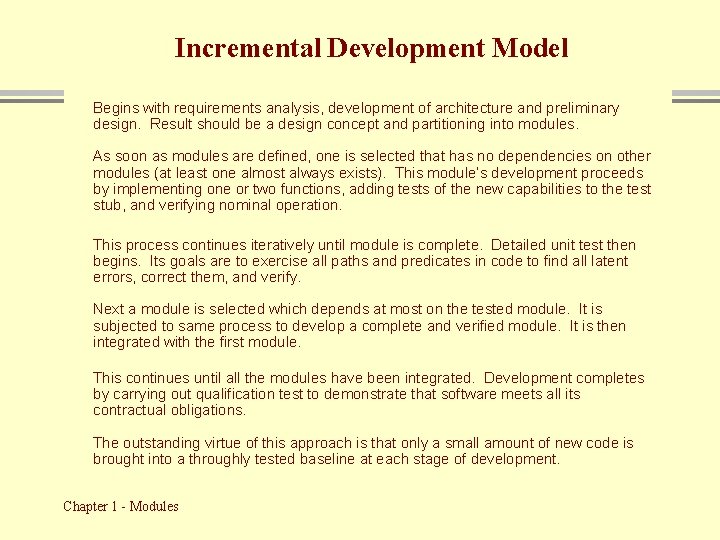
Incremental Development Model Begins with requirements analysis, development of architecture and preliminary design. Result should be a design concept and partitioning into modules. As soon as modules are defined, one is selected that has no dependencies on other modules (at least one almost always exists). This module’s development proceeds by implementing one or two functions, adding tests of the new capabilities to the test stub, and verifying nominal operation. This process continues iteratively until module is complete. Detailed unit test then begins. Its goals are to exercise all paths and predicates in code to find all latent errors, correct them, and verify. Next a module is selected which depends at most on the tested module. It is subjected to same process to develop a complete and verified module. It is then integrated with the first module. This continues until all the modules have been integrated. Development completes by carrying out qualification test to demonstrate that software meets all its contractual obligations. The outstanding virtue of this approach is that only a small amount of new code is brought into a throughly tested baseline at each stage of development. Chapter 1 - Modules
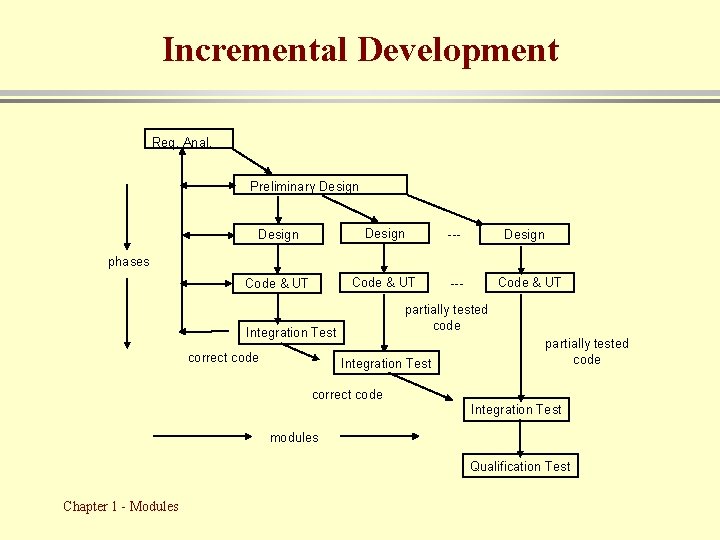
Incremental Development Req. Anal. Preliminary Design --- Code & UT --- Design phases partially tested code Integration Test correct code Code & UT Integration Test partially tested code correct code Integration Test modules Qualification Test Chapter 1 - Modules
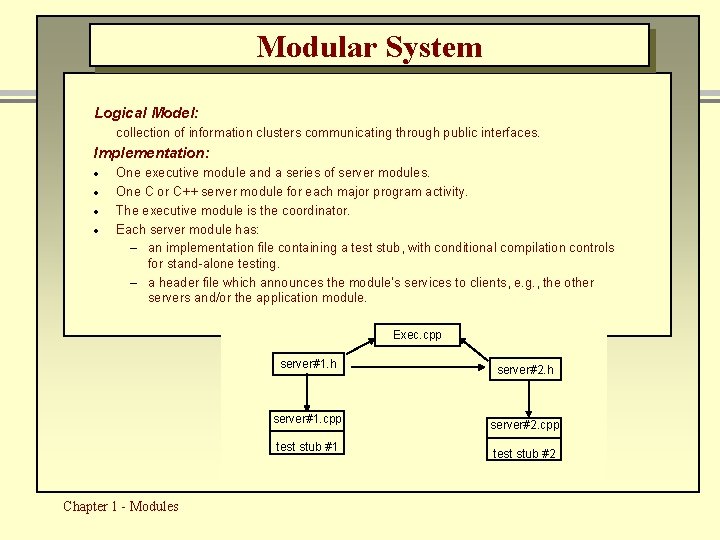
Modular System Logical Model: collection of information clusters communicating through public interfaces. Implementation: · · One executive module and a series of server modules. One C or C++ server module for each major program activity. The executive module is the coordinator. Each server module has: – an implementation file containing a test stub, with conditional compilation controls for stand-alone testing. – a header file which announces the module’s services to clients, e. g. , the other servers and/or the application module. Exec. cpp server#1. h server#1. cpp test stub #1 Chapter 1 - Modules server#2. h server#2. cpp test stub #2
Limitations of Modules · What’s wrong with modular decomposition? – nothing, but this format alone is not very flexible – modules are defined statically (at compile time) – new instances can not be created at run time – this means that the flexability afforded by run-time creation of data does not extend to modules which contain both functions and data Chapter 1 - Modules
Limitations of Modules · Solution: – classes support declaration of objects which can be defined either statically or dynamically – classes define both functions and data. An object, which is simply an instance of a class, can be defined statically in static memory, in local memory (on the stack), or dynamically on the heap, just like any intrinsic data type – a program can define as many objects as it needs up to the amount that your computer memory can hold – The classes you define will, of course, be packaged in modules. Chapter 1 - Modules
Module Example · The following slide shows the decomposition of a Catalogue program. – Catalog simply walks a directory sub-tree and collects an ordered list of directories and their contents. • When it completes, it holds the catalog information in an STL data structure for any subsequent processing the designer might like to add. – It nicely illustrates the use of classes and modules for the logical and physical packaging of the program. – Besides being a nice illustration of a modular program, it also provides a lot of functionality you will need in Project #1. Chapter 1 - Modules
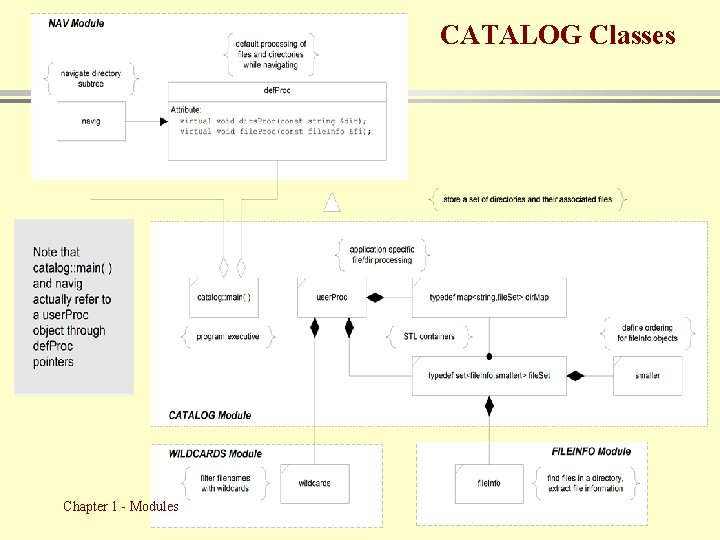
CATALOG Classes Chapter 1 - Modules
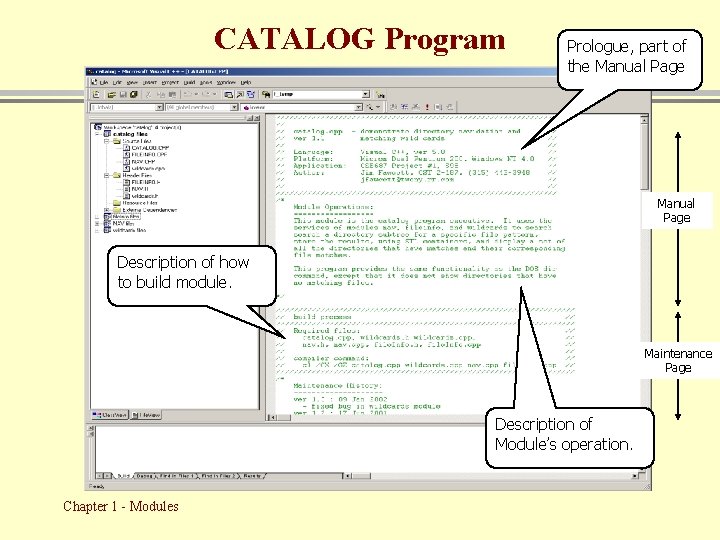
CATALOG Program Prologue, part of the Manual Page Description of how to build module. Maintenance Page Description of Module’s operation. Chapter 1 - Modules
End of Modules Presentation Chapter 1 - Modules 23
- Slides: 23