
CSCE 436 Advanced Embedded Systems Lecture 14 Lab
CSCE 436 – Advanced Embedded Systems Lecture 14 – Lab 2 – Data Acquisition, Storage and Display Prof Jeffrey Falkinburg Avery Hall 368 472 -5120
Lesson Outline n n Time Logs! Lab 2 – Data Acquisition, Storage and Display CSCE 436 – Advanced Embedded Systems 2
Lab 2 – Data Acquisition, Storage and Display CSCE 436 – Advanced Embedded Systems 3
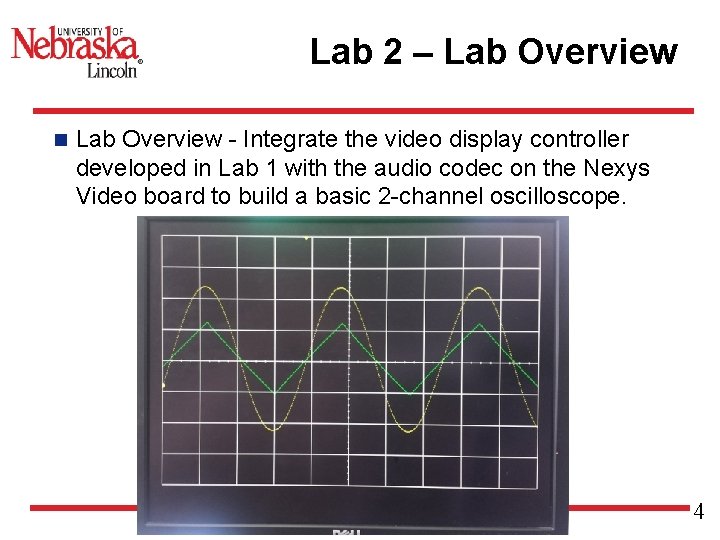
Lab 2 – Lab Overview n Lab Overview - Integrate the video display controller developed in Lab 1 with the audio codec on the Nexys Video board to build a basic 2 -channel oscilloscope. CSCE 436 – Advanced Embedded Systems 4
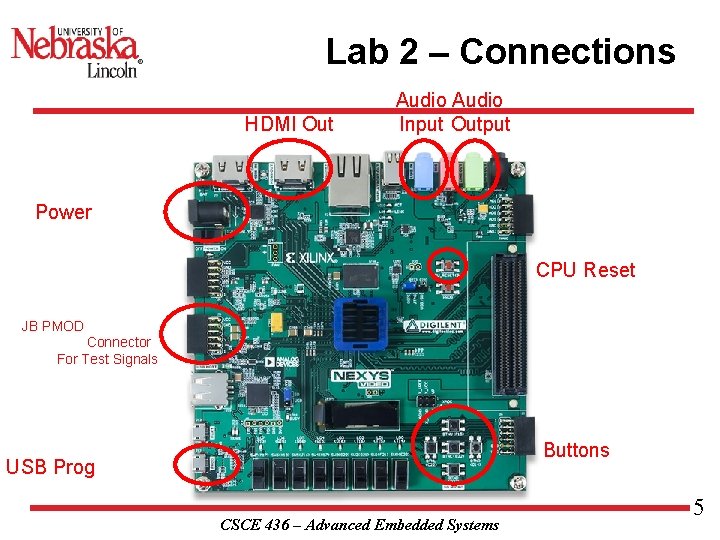
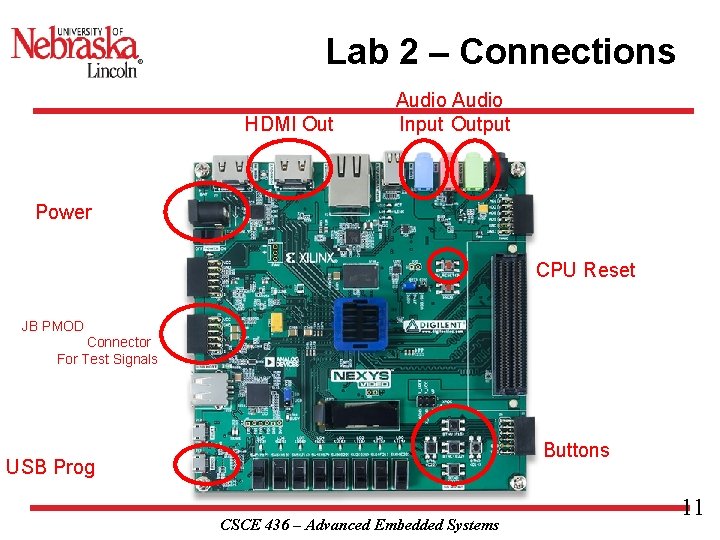
Lab 2 – Connections HDMI Out Power Audio Input Output CPU Reset JB PMOD Connector For Test Signals Buttons USB Prog CSCE 436 – Advanced Embedded Systems 5
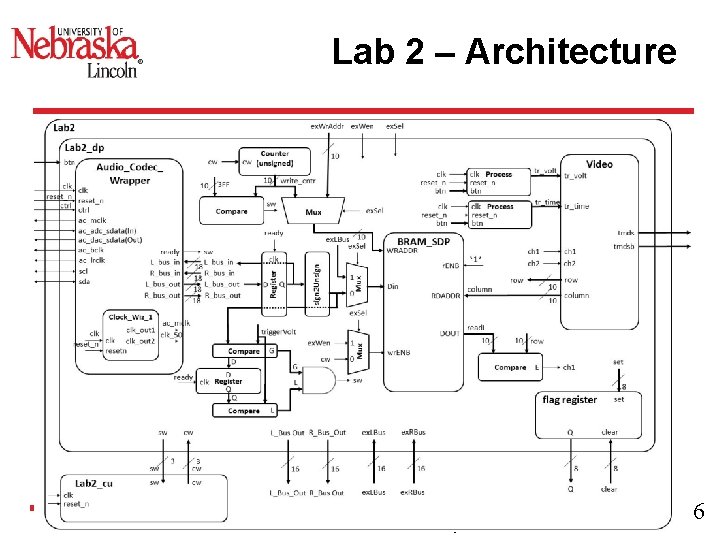
Lab 2 – Architecture CSCE 436 – Advanced Embedded Systems 6
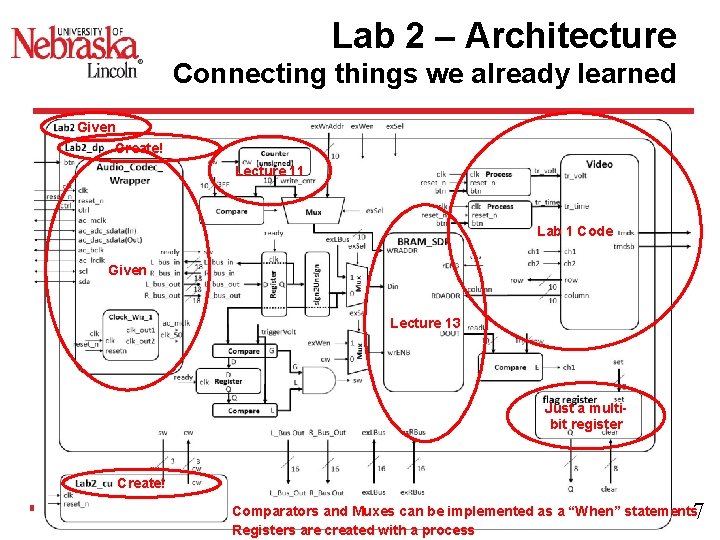
Lab 2 – Architecture Connecting things we already learned Given Create! Lecture 11 Lab 1 Code Given Lecture 13 Just a multibit register Create! 7 Comparators and Muxes can be implemented as a “When” statements CSCE 436 –are Advanced Systems Registers created. Embedded with a process
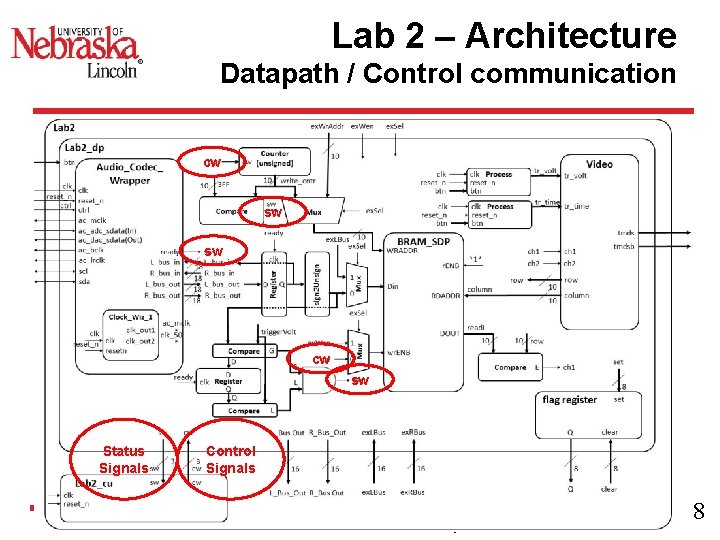
Lab 2 – Architecture Datapath / Control communication cw sw sw cw sw Status Signals Control Signals CSCE 436 – Advanced Embedded Systems 8
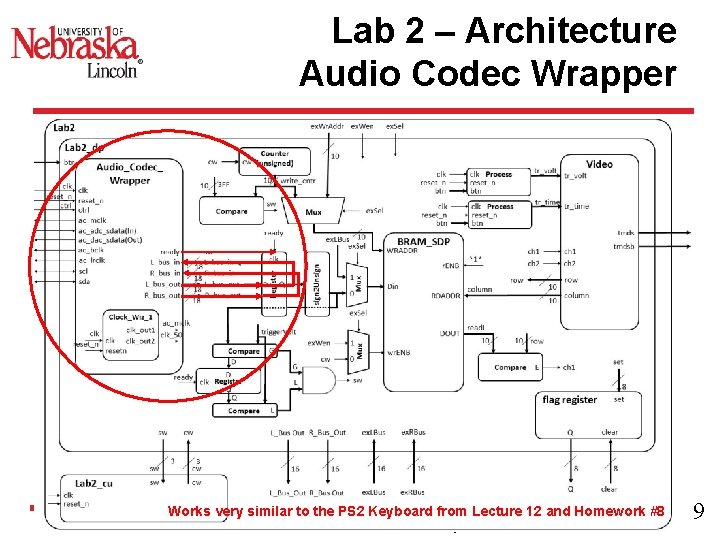
Lab 2 – Architecture Audio Codec Wrapper Works very similar to the PS 2 Keyboard from Lecture 12 and Homework #8 CSCE 436 – Advanced Embedded Systems 9
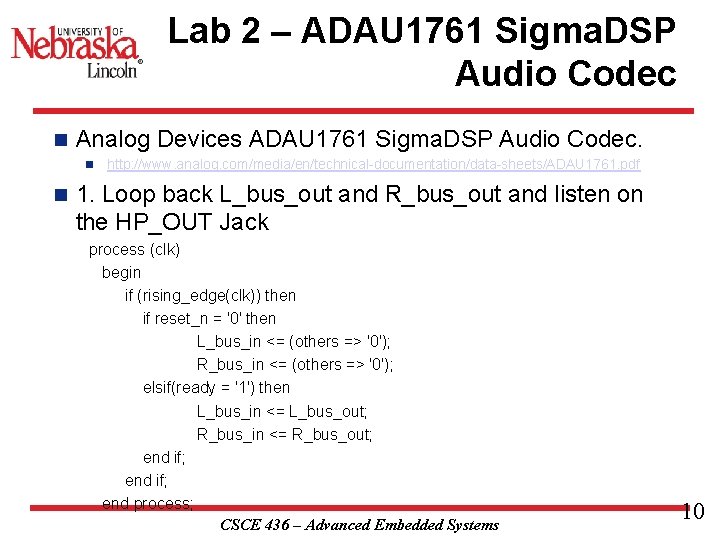
Lab 2 – ADAU 1761 Sigma. DSP Audio Codec n Analog Devices ADAU 1761 Sigma. DSP Audio Codec. n n http: //www. analog. com/media/en/technical-documentation/data-sheets/ADAU 1761. pdf 1. Loop back L_bus_out and R_bus_out and listen on the HP_OUT Jack process (clk) begin if (rising_edge(clk)) then if reset_n = '0' then L_bus_in <= (others => '0'); R_bus_in <= (others => '0'); elsif(ready = '1') then L_bus_in <= L_bus_out; R_bus_in <= R_bus_out; end if; end process; CSCE 436 – Advanced Embedded Systems 10
Lab 2 – Connections HDMI Out Power Audio Input Output CPU Reset JB PMOD Connector For Test Signals Buttons USB Prog CSCE 436 – Advanced Embedded Systems 11
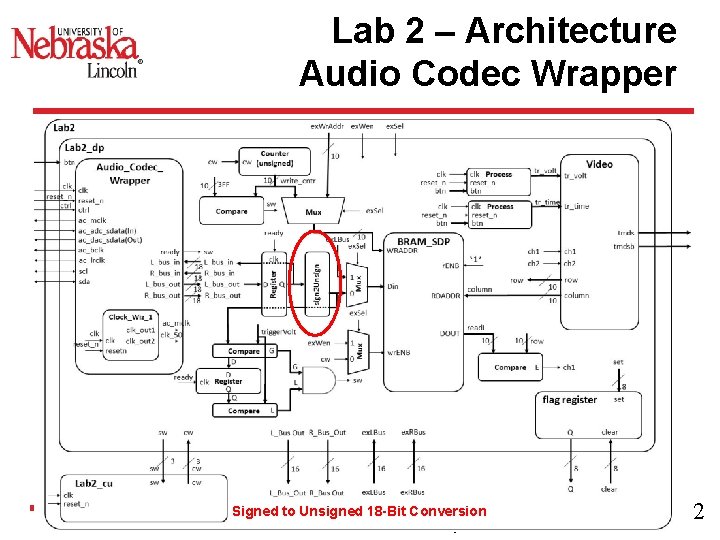
Lab 2 – Architecture Audio Codec Wrapper Signed to Unsigned 18 -Bit Conversion CSCE 436 – Advanced Embedded Systems 12
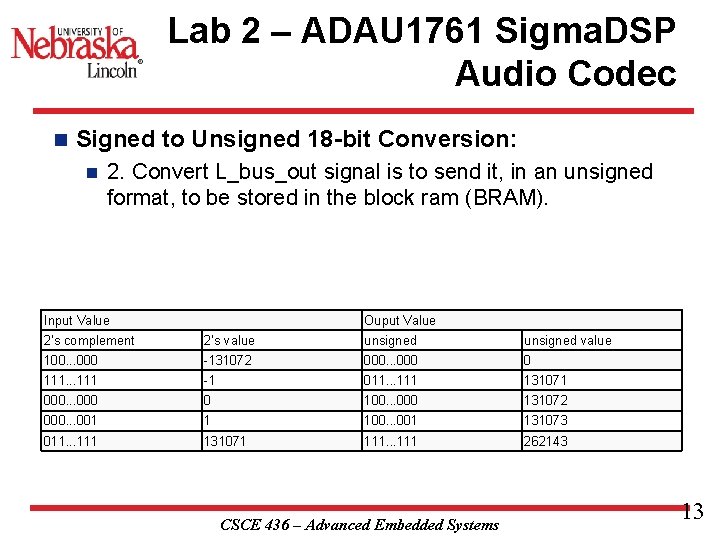
Lab 2 – ADAU 1761 Sigma. DSP Audio Codec n Signed to Unsigned 18 -bit Conversion: n 2. Convert L_bus_out signal is to send it, in an unsigned format, to be stored in the block ram (BRAM). Input Value Ouput Value 2's complement 2's value unsigned value 100. . . 000 -131072 000. . . 000 0 111. . . 111 -1 011. . . 111 131071 000. . . 000 0 100. . . 000 131072 000. . . 001 1 100. . . 001 131073 011. . . 111 131071 111. . . 111 262143 CSCE 436 – Advanced Embedded Systems 13
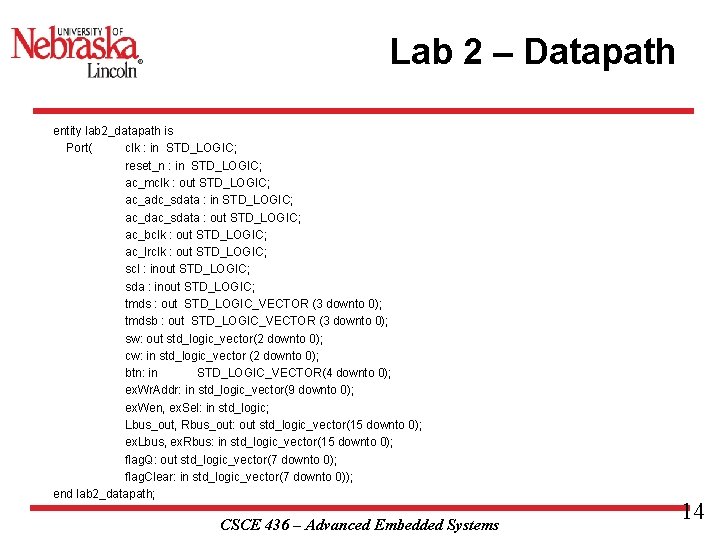
Lab 2 – Datapath entity lab 2_datapath is Port( clk : in STD_LOGIC; reset_n : in STD_LOGIC; ac_mclk : out STD_LOGIC; ac_adc_sdata : in STD_LOGIC; ac_dac_sdata : out STD_LOGIC; ac_bclk : out STD_LOGIC; ac_lrclk : out STD_LOGIC; scl : inout STD_LOGIC; sda : inout STD_LOGIC; tmds : out STD_LOGIC_VECTOR (3 downto 0); tmdsb : out STD_LOGIC_VECTOR (3 downto 0); sw: out std_logic_vector(2 downto 0); cw: in std_logic_vector (2 downto 0); btn: in STD_LOGIC_VECTOR(4 downto 0); ex. Wr. Addr: in std_logic_vector(9 downto 0); ex. Wen, ex. Sel: in std_logic; Lbus_out, Rbus_out: out std_logic_vector(15 downto 0); ex. Lbus, ex. Rbus: in std_logic_vector(15 downto 0); flag. Q: out std_logic_vector(7 downto 0); flag. Clear: in std_logic_vector(7 downto 0)); end lab 2_datapath; CSCE 436 – Advanced Embedded Systems 14
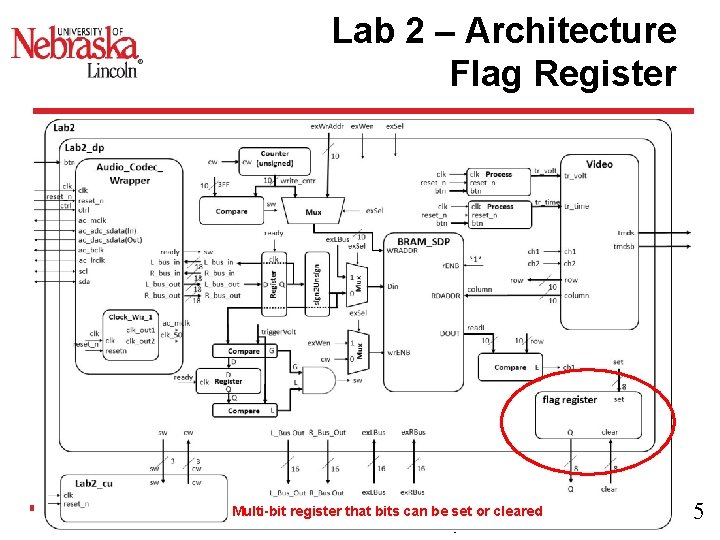
Lab 2 – Architecture Flag Register Multi-bit register that bits can be set or cleared CSCE 436 – Advanced Embedded Systems 15
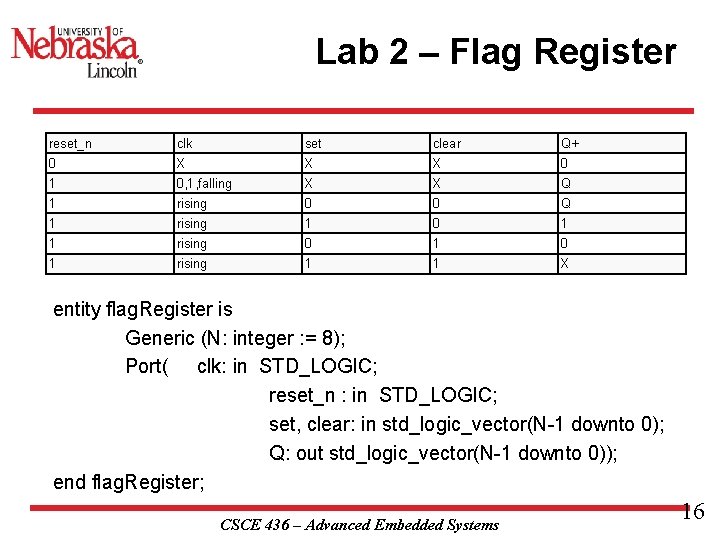
Lab 2 – Flag Register reset_n clk set clear Q+ 0 X X X 0 1 0, 1, falling X X Q 1 rising 0 0 Q 1 rising 1 0 1 1 rising 0 1 rising 1 1 X entity flag. Register is Generic (N: integer : = 8); Port( clk: in STD_LOGIC; reset_n : in STD_LOGIC; set, clear: in std_logic_vector(N-1 downto 0); Q: out std_logic_vector(N-1 downto 0)); end flag. Register; CSCE 436 – Advanced Embedded Systems 16
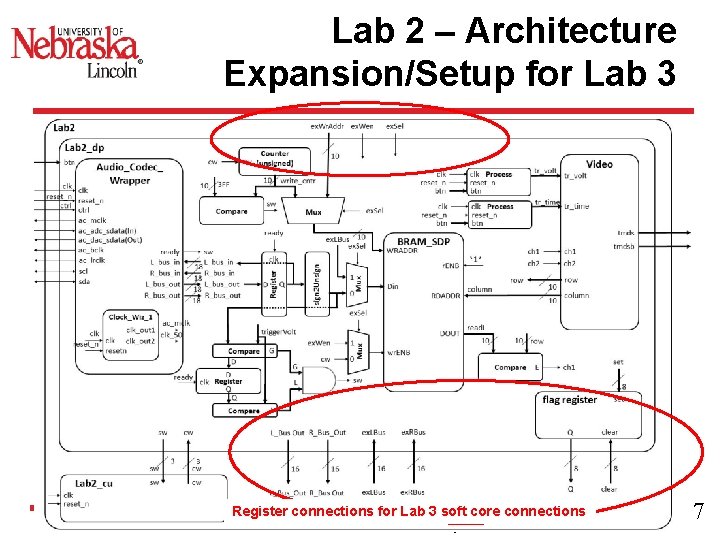
Lab 2 – Architecture Expansion/Setup for Lab 3 Register connections for Lab 3 soft core connections CSCE 436 – Advanced Embedded Systems 17
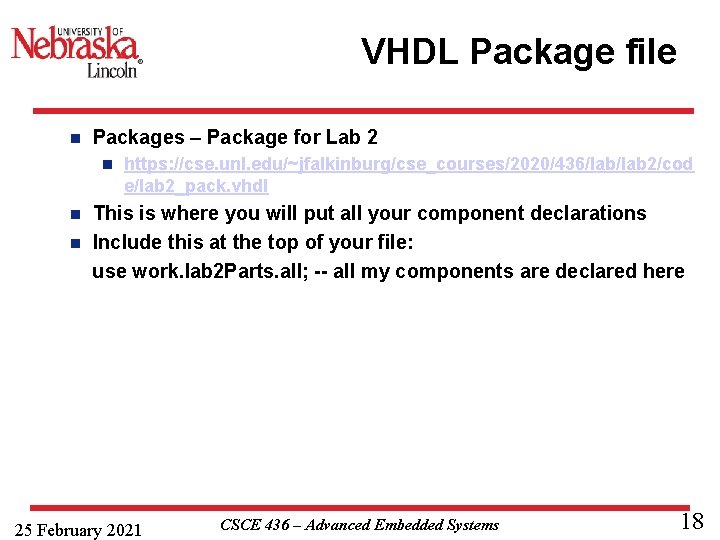
VHDL Package file n Packages – Package for Lab 2 n https: //cse. unl. edu/~jfalkinburg/cse_courses/2020/436/lab 2/cod e/lab 2_pack. vhdl This is where you will put all your component declarations n Include this at the top of your file: use work. lab 2 Parts. all; -- all my components are declared here n 25 February 2021 CSCE 436 – Advanced Embedded Systems 18
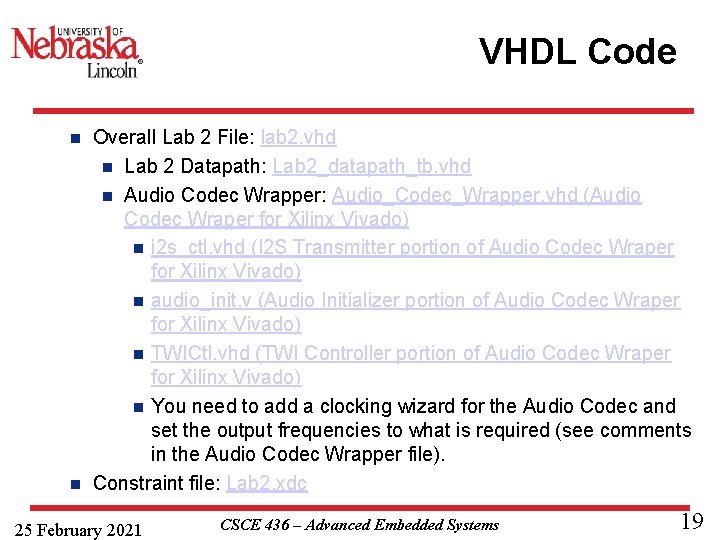
VHDL Code Overall Lab 2 File: lab 2. vhd n Lab 2 Datapath: Lab 2_datapath_tb. vhd n Audio Codec Wrapper: Audio_Codec_Wrapper. vhd (Audio Codec Wraper for Xilinx Vivado) n i 2 s_ctl. vhd (I 2 S Transmitter portion of Audio Codec Wraper for Xilinx Vivado) n audio_init. v (Audio Initializer portion of Audio Codec Wraper for Xilinx Vivado) n TWICtl. vhd (TWI Controller portion of Audio Codec Wraper for Xilinx Vivado) n You need to add a clocking wizard for the Audio Codec and set the output frequencies to what is required (see comments in the Audio Codec Wrapper file). n Constraint file: Lab 2. xdc n 25 February 2021 CSCE 436 – Advanced Embedded Systems 19
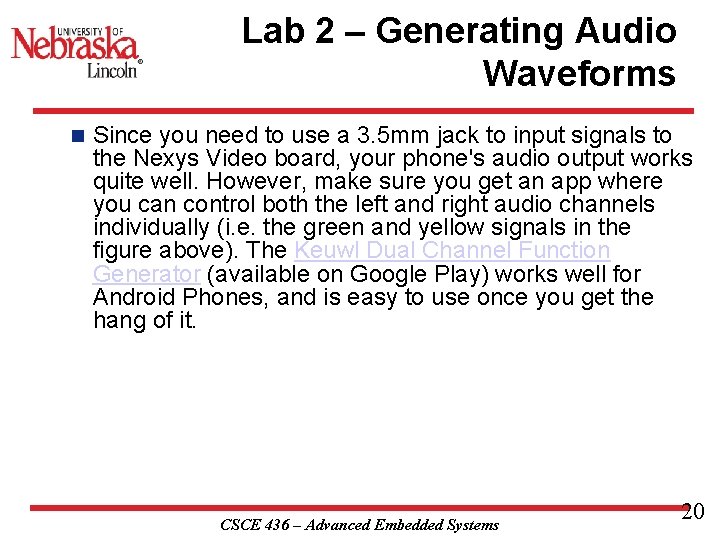
Lab 2 – Generating Audio Waveforms n Since you need to use a 3. 5 mm jack to input signals to the Nexys Video board, your phone's audio output works quite well. However, make sure you get an app where you can control both the left and right audio channels individually (i. e. the green and yellow signals in the figure above). The Keuwl Dual Channel Function Generator (available on Google Play) works well for Android Phones, and is easy to use once you get the hang of it. CSCE 436 – Advanced Embedded Systems 20
Lab 2 – Requirements Gate Check 1 n Gate Checks for Required Functionality n n There are 2 gate checks associated with this lab, each worth 5 points - see the rubric below. Gate Check 1 n By COB Lesson 14, you must have started a Lab 2 Vivado project and downloaded the template files and drop in your Video, VGA, Scopeface, dvid, and tdms files from Lab 1 into your Lab 2 project in order to test your Lab 1 Scopeface works when you implement you Audio Code Wrapper. Notice from the block diagram…you will copy your Video instantiation and button processes from Lab 1 into your Lab 2 Datapath. You will also have to reimplement the Lab 1 Clocking Wizard in you Lab 2 project. Doing this will eliminate a lot of errors from undriven output signals on lab 2 top. CSCE 436 – Advanced Embedded Systems 21
Lab 2 – Requirements Gate Check 1 n Next, you will need to have implement another Clocking Wizard and the Audio Codec Wrapper inside the Datapath entity to get your Audio Codec to begin functioning. Once you fully implement the Audio Codec Wrapper, you will drop in the Loopback process and make connections to loopback the serial ADC input back out to the DAC output (i. e. send the signal back into the Codec). Once you implement the design on the board, you can verify functionality by applying an audio signal to the audio line in jack (blue) and listening to it on the audio line out jack (Green) using a standard oscilloscope. Additionally your Scopeface and Button inputs from Lab 1 should be functional as well. CSCE 436 – Advanced Embedded Systems 22
Lab 2 – Requirements Gate Check 2 n NOTE: THIS IS THE HARDEST PART! By BOC Lesson 16, you must have implemented and connected the left channel BRAM and BRAM Address Counter to write Audio Codec data to BRAM. Once implemented, you can verify your BRAM works by using the given datapath testbench and watching the BRAM write address increment and data be written/read from the BRAM. CSCE 436 – Advanced Embedded Systems 23
Lab 2 – Requirements Gate Check 2 Cont n Gate Check 2 n Once this is working, you must implement Video entity (from Lab 1) to take the left channel output from BRAM and send it to the Channel 1 waveform to be displayed when the read. L value equals the row value. Once implemented, this functionality can be verified first with the given datapath testbench to verify the channel 1 values are being updated properly when read. L equals the row value. Additionally, you may try to implement this on the hardware and verify that your scopeface is still present and some values are being displayed for Channel 1 (at this point the waveform will be scrolling across the display or may be scaled wrong). CSCE 436 – Advanced Embedded Systems 24
Lab 2 – Requirements Required Functionality n Get a single channel of the oscilloscope to display with reliable triggering that holds the waveform at a single point on the left edge of the display. A 220 Hz waveform should display something similar to what is shown in the screenshot at the top of this page. Additionally, you must have the following done: n Use a package file to contain all your component declarations. n Use separate datapath and control unit. CSCE 436 – Advanced Embedded Systems 25
Lab 2 – Requirements Required Functionality Cont 1 n Required Functionality n Your datapath must use processes which are similar to our basic building block (counter, register, mux, etc. ). I do not want to see one massive process that attempts to do all the work in the datapath. n Testbench for the flag. Register. n Testbench for the control unit. CSCE 436 – Advanced Embedded Systems 26
Lab 2 – Requirements Required Functionality Cont 2 n Required Functionality n Testbench for the datapath unit showing data (different value than what is given in the testbench) coming out of the audio codec and being converted from signed to unsigned and then to std_logic_vector to go into your BRAM. Include calculations to back up what the waveform shows. CSCE 436 – Advanced Embedded Systems 27
Lab 2 – Requirements Required Functionality Cont 3 n Required Functionality n For Bonus Points: Testbench for the datapath unit showing that same data coming out of the BRAM. Make sure you show the read address and the data values coming out. This will require you to set your control words on the testbench. Additionally, you will have to drive the pixel_clock on the Video Module. Once you get the datapath testbench running you will notice that DCM module doesn't put out a clock in the Video Module. CSCE 436 – Advanced Embedded Systems 28
Lab 2 – Requirements B-Level Functionality n B-level Functionality Meet all the requirements of required functionality n Add a second channel (in green). n Integrate the button debouncing strategy in HW #7 to debounce the buttons controlling the trigger time and trigger voltage. n Move the cursors on the screen. n CSCE 436 – Advanced Embedded Systems 29
Lab 2 – Requirements A-Level Functionality n A-level Functionality Meet all the requirements of B-level functionality. n Use the trigger voltage marker to establish the actual trigger voltage used to capture the waveform. As the trigger is moved up and down, you should see the point at which the waveform intersects the left side of the screen change. n CSCE 436 – Advanced Embedded Systems 30
Lab 2 – Requirements Turn In n Turn In Requirements All your work in this lab is to be submitted using Bitbucket. The main part of the lab is your README, documenting your design. Your README must include the following: n Introduction - Provide a brief overview of the problem. n Implementation - Provide block-diagram of your solution using the signal names in your code. The block diagram given above is somewhat incomplete, so make sure to include corrections to it. For each module that you built, explain its overall purpose, inputs, outputs, and behavior. Include all your vhdl files (code and testbench), wcfg file, and bit files. Put these in a folder called "code". n CSCE 436 – Advanced Embedded Systems 31
Lab 2 – Requirements Turn In Cont 1 n Turn In Requirements Test/Debug - Briefly describe the methods used to verify system functionality. n List the major problems you encountered and how you fixed them. This should cover all the problems you encountered in the lab and how you fixed them. Break each problem and solution into separate paragraphs. n Capability - Well you have built a oscilloscope, what are its capabilities? n n The horizontal axis represents time. There are 10 major divisions on the display; how long does each major division represent? CSCE 436 – Advanced Embedded Systems 32
Lab 2 – Requirements Turn In Cont 2 n Turn In Requirements n Capability Continued n Each major time division is split into 4 minor division, how long does each minor division represent? n Generate a sine wave that can be fully captured on your display (like the yellow channel in the image at the top of this web page). record its height in major and minor vertical divisions. Measure this same audio output using the break out audio cable. Record the peak-to-peak voltage. Compute the number of volts in each major and minor vertical division. 33 CSCE 436 – Advanced Embedded Systems
Lab 2 – Requirements Turn In Cont 3 n Turn In Requirements n Capability Continued n Starting at address 0, how long does it take to fill the entire memory with audio samples (coming in at 48 k. Hz)? n How long does it take to completely draw the display once? n The question is likely relevant to Lab 3 - how long is the vsynch signal held low? n Conclusion - Explain what your learned from this lab and what changes you would recommend in future years to this lab or the lectures leading up to this lab. CSCE 436 – Advanced Embedded Systems 34
- Slides: 34