
CSC 128 Fundamentals Of Computer Problem Solving CHAPTER
CSC 128 Fundamentals Of Computer Problem Solving CHAPTER 2 BASIC ELEMENTS OF A COMPUTER PROGRAM CHAPTER 2 BASIC ELEMENTS OF A COMPUTER PROGRAM
CSC 128 Fundamentals Of Computer Problem Solving Chapter Outline CHAPTER 2 BASIC ELEMENTS OF A COMPUTER PROGRAM Identifier, variable, constants and reserved words Rules for naming identifiers Declaring data variables and constants Basic data types –integer, float, double, bool, char , string • Arithmetic operators – addition, subtraction, multiplication, division, modulus • Assignment expression • •
CSC 128 Fundamentals Of Computer Problem Solving Chapter Outline • • CHAPTER 2 BASIC ELEMENTS OF A COMPUTER PROGRAM Precedence & associatively Assignment statement Introduce some mathematical library functions Input/output statement Formatting output Programming process, debugging and error handling Three types of control structure – sequential, selection, repetition/looping
CSC 128 Fundamentals Of Computer Problem Solving CHAPTER 2 BASIC ELEMENTS OF A COMPUTER PROGRAM Chapter Outcome At the end of this chapter, student should be able to: • Identify the basic elements needed in writing a program • Understand apply the input/output statement • Justify the process of error handling • Write a simple program
CSC 128 Fundamentals Of Computer Problem Solving CHAPTER 2 BASIC ELEMENTS OF A COMPUTER PROGRAM Identifier, variable, constants and reserved words • Names created by the programmer to variables, constants etc. • Use meaningful and descriptive identifiers to make a program easier to understand. • An identifier in C++ is case sensitive. • For example, the identifier Area is not the same identifier as area or AREA.
CSC 128 Fundamentals Of Computer Problem Solving CHAPTER 2 BASIC ELEMENTS OF A COMPUTER PROGRAM Rules for naming identifier • An identifier may contain letters, numbers and only the special character underscore (_). • Must begin with a letter or underscore and may NOT begin with a number. • An identifier may NOT contain blanks (no space between identifiers) • An identifier may NOT be a special/reserved word. • No identifier may be declared twice in the same declaration part.
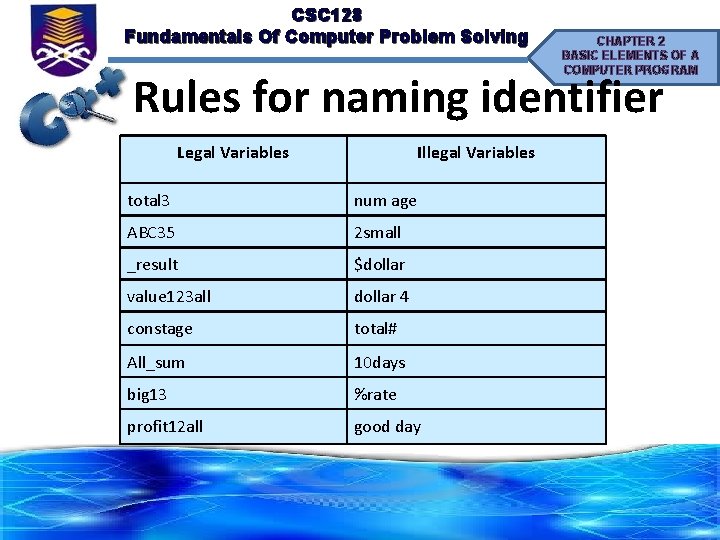
CSC 128 Fundamentals Of Computer Problem Solving CHAPTER 2 BASIC ELEMENTS OF A COMPUTER PROGRAM Rules for naming identifier Legal Variables Illegal Variables total 3 num age ABC 35 2 small _result $dollar value 123 all dollar 4 constage total# All_sum 10 days big 13 %rate profit 12 all good day
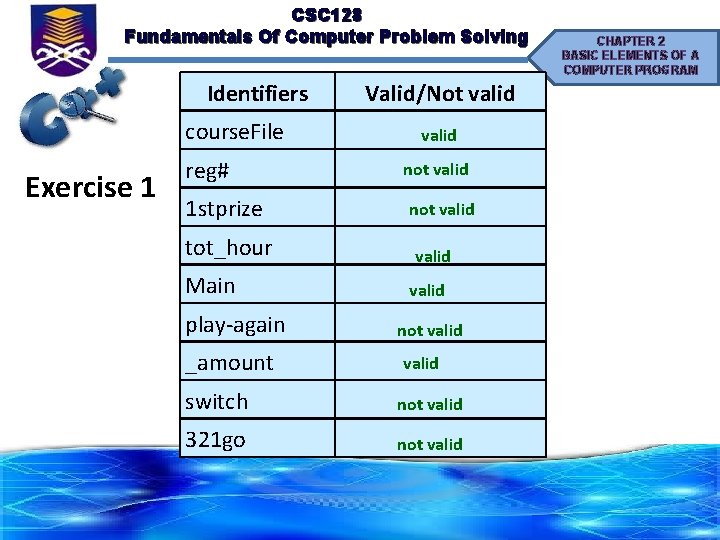
CSC 128 Fundamentals Of Computer Problem Solving Identifiers course. File Exercise 1 reg# 1 stprize tot_hour Main play-again _amount Valid/Not valid not valid switch not valid 321 go not valid CHAPTER 2 BASIC ELEMENTS OF A COMPUTER PROGRAM
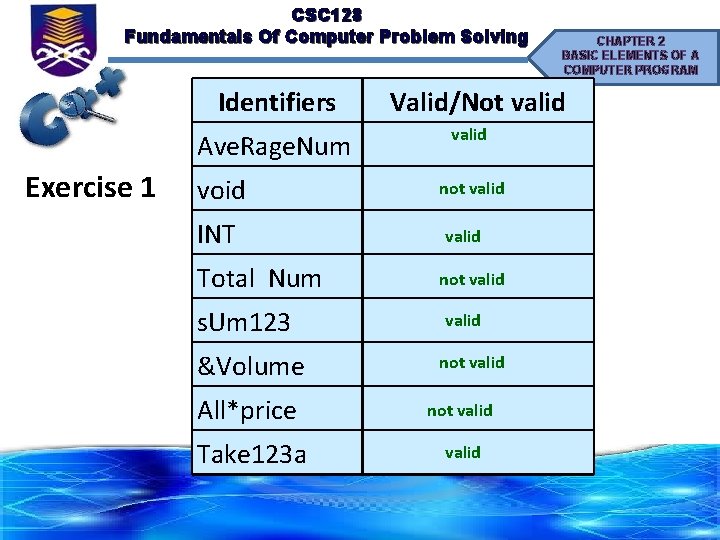
CSC 128 Fundamentals Of Computer Problem Solving Identifiers Ave. Rage. Num Exercise 1 void INT Total Num s. Um 123 &Volume CHAPTER 2 BASIC ELEMENTS OF A COMPUTER PROGRAM Valid/Not valid not valid All*price not valid Take 123 a valid
CSC 128 Fundamentals Of Computer Problem Solving Special Symbol /Syntax Rules CHAPTER 2 BASIC ELEMENTS OF A COMPUTER PROGRAM • To write a meaningful program, you must learn the programming language’s special symbol & words and syntax rules. • The syntax rules tells you which statements (instructions) are legal, or accepted by the programming language, and which are not. • Like in any language (spoken or artificial) some words in C++ have a fixed meaning. • In programming languages these words are called special / reserved words • Special words & symbol state by C++ have their own special meaning which refers to appropriate instruction. • This word that cannot be used as a variable name.
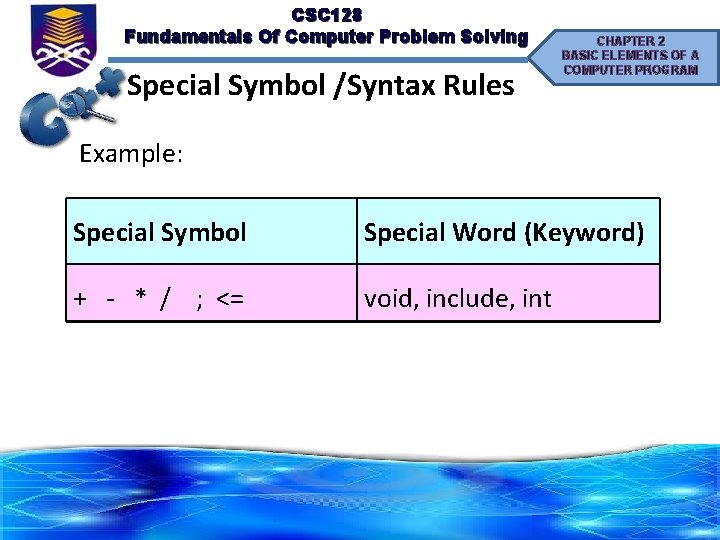
CSC 128 Fundamentals Of Computer Problem Solving Special Symbol /Syntax Rules CHAPTER 2 BASIC ELEMENTS OF A COMPUTER PROGRAM Example: Special Symbol Special Word (Keyword) + - * / ; <= void, include, int
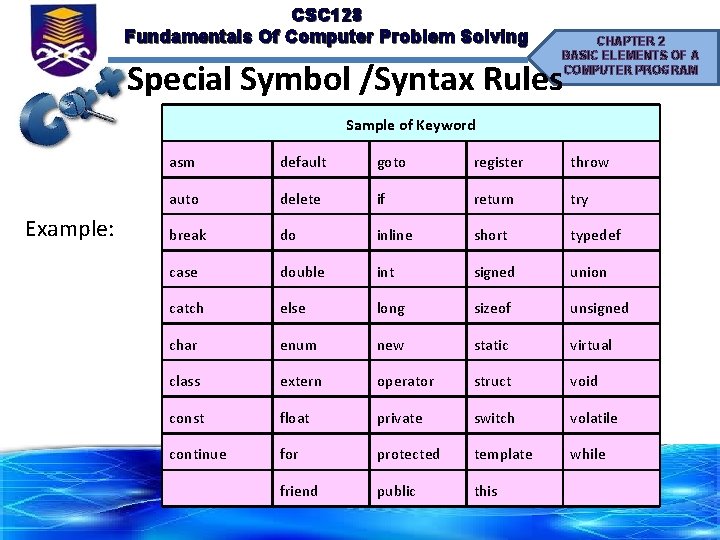
CSC 128 Fundamentals Of Computer Problem Solving CHAPTER 2 BASIC ELEMENTS OF A COMPUTER PROGRAM Special Symbol /Syntax Rules Sample of Keyword Example: asm default goto register throw auto delete if return try break do inline short typedef case double int signed union catch else long sizeof unsigned char enum new static virtual class extern operator struct void const float private switch volatile continue for protected template while friend public this
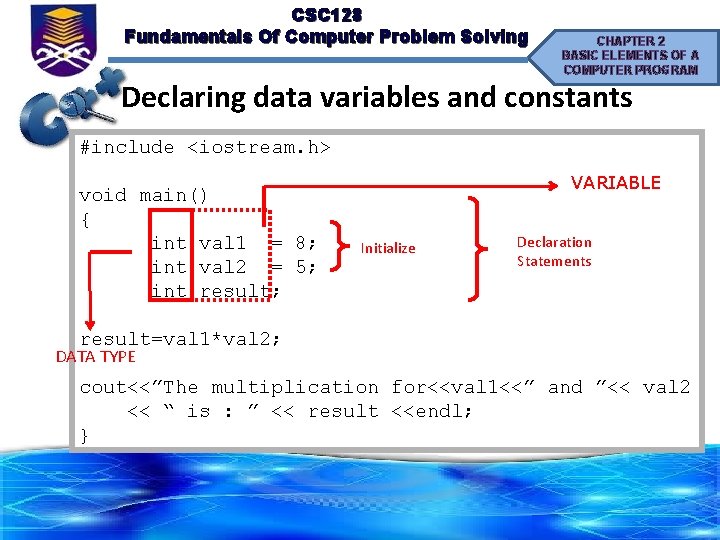
CSC 128 Fundamentals Of Computer Problem Solving CHAPTER 2 BASIC ELEMENTS OF A COMPUTER PROGRAM Declaring data variables and constants #include <iostream. h> void main() { int val 1 = 8; int val 2 = 5; int result; VARIABLE Initialize Declaration Statements result=val 1*val 2; DATA TYPE cout<<”The multiplication for<<val 1<<” and ”<< val 2 << “ is : ” << result <<endl; }
CSC 128 Fundamentals Of Computer Problem Solving CHAPTER 2 BASIC ELEMENTS OF A COMPUTER PROGRAM Declaring data variables and constants • Can be used to store data in a program. • They can also be seen as names associated with a particular memory location in the memory of the computer. • A data structure that holds data that can change while the program is running. • When programming in C++, you must select a type of variable called a data type that best fits the nature of data itself.
CSC 128 Fundamentals Of Computer Problem Solving Declaring variables CHAPTER 2 BASIC ELEMENTS OF A COMPUTER PROGRAM • Need (compulsory) to be declared in a program's declaration part in order to be used in the statement part. • To declare any variable, we need to specify the type and followed by variable. • Declaring a variable must include with data type followed by the name of variable, and a semicolon. • Syntax: type variable_name;
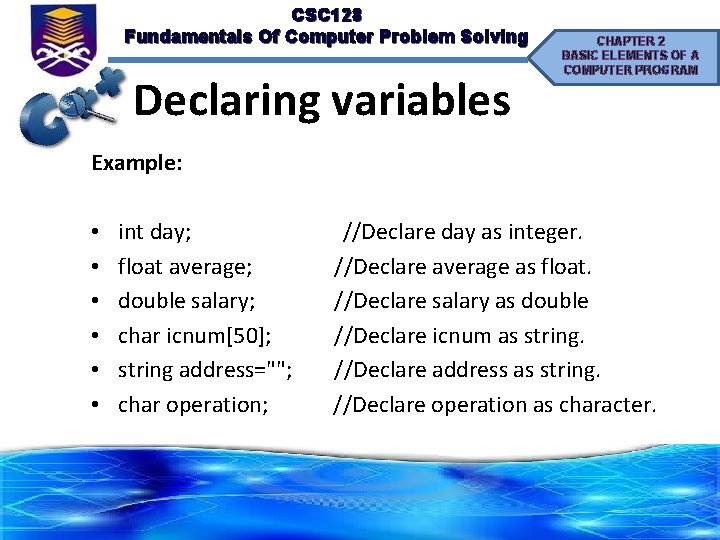
CSC 128 Fundamentals Of Computer Problem Solving Declaring variables CHAPTER 2 BASIC ELEMENTS OF A COMPUTER PROGRAM Example: • • • int day; //Declare day as integer. float average; //Declare average as float. double salary; //Declare salary as double char icnum[50]; //Declare icnum as string address=""; //Declare address as string. char operation; //Declare operation as character.
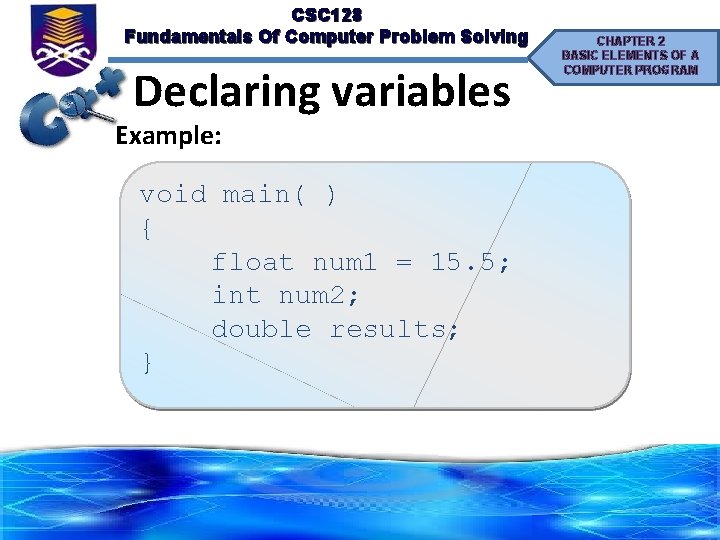
CSC 128 Fundamentals Of Computer Problem Solving Declaring variables Example: void main( ) { float num 1 = 15. 5; int num 2; double results; } CHAPTER 2 BASIC ELEMENTS OF A COMPUTER PROGRAM
CSC 128 Fundamentals Of Computer Problem Solving Constant CHAPTER 2 BASIC ELEMENTS OF A COMPUTER PROGRAM • Provide a way to define a variable which cannot be modified by any other part in the program code. • Can be defined by placing the keyword const in front of any variable declaration. • May not have its value changed while the programming is running. • Constant are usually define in capital letter. • Example to define a constant: const int DAY_PER_WEEK = 7;
CSC 128 Fundamentals Of Computer Problem Solving Constant CHAPTER 2 BASIC ELEMENTS OF A COMPUTER PROGRAM • Constant is a value that never changes -> fixed value. • Example: = 3. 142 • Replaced with: const double PI=3. 142;
CSC 128 Fundamentals Of Computer Problem Solving Constant CHAPTER 2 BASIC ELEMENTS OF A COMPUTER PROGRAM • All constant and variables to be used in a C++ program must be defined prior their use in the program. • The reason that we must defined: – First, the compiler must know the value of a constant before it is used and must reserve memory location to store variables. – Second, the compiler must know the data type of the constant and variables so that it knows their attributes and behavior.
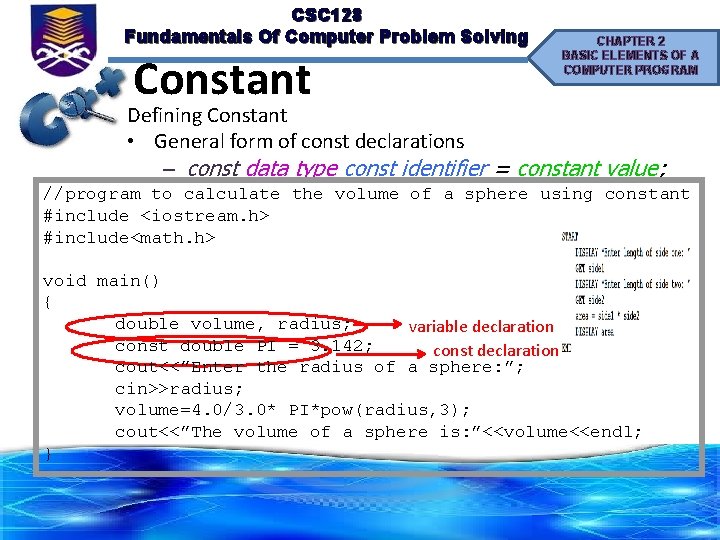
CSC 128 Fundamentals Of Computer Problem Solving Constant CHAPTER 2 BASIC ELEMENTS OF A COMPUTER PROGRAM Defining Constant • General form of const declarations – const data type const identifier = constant value; //program to calculate the volume of a sphere using constant #include <iostream. h> #include<math. h> void main() { double volume, radius; variable declaration const double PI = 3. 142; const declaration cout<<”Enter the radius of a sphere: ”; cin>>radius; volume=4. 0/3. 0* PI*pow(radius, 3); cout<<”The volume of a sphere is: ”<<volume<<endl; }
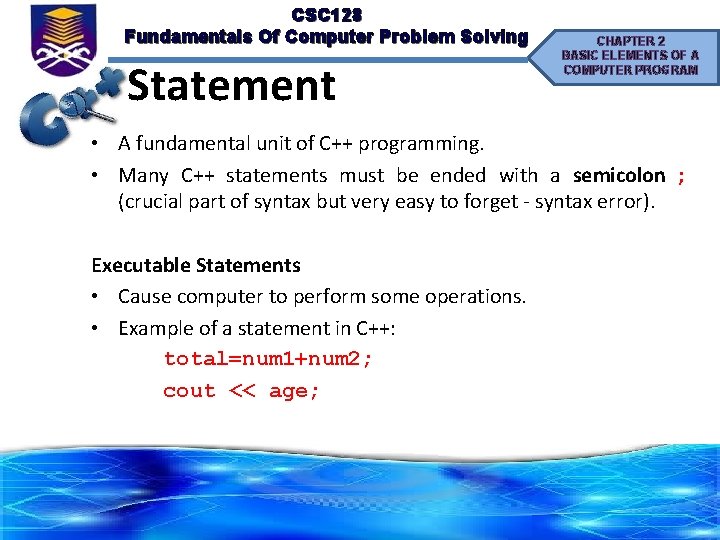
CSC 128 Fundamentals Of Computer Problem Solving Statement CHAPTER 2 BASIC ELEMENTS OF A COMPUTER PROGRAM • A fundamental unit of C++ programming. • Many C++ statements must be ended with a semicolon ; (crucial part of syntax but very easy to forget - syntax error). Executable Statements • Cause computer to perform some operations. • Example of a statement in C++: total=num 1+num 2; cout << age;
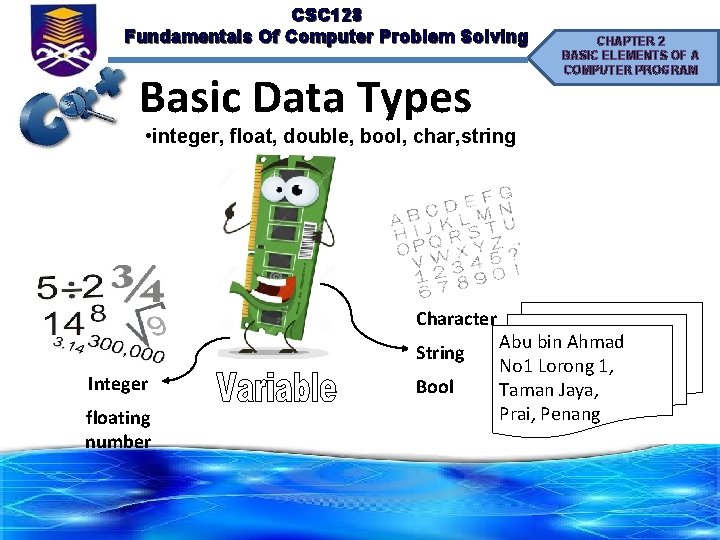
CSC 128 Fundamentals Of Computer Problem Solving Basic Data Types CHAPTER 2 BASIC ELEMENTS OF A COMPUTER PROGRAM • integer, float, double, bool, char, string Character String Integer floating number Bool Abu bin Ahmad No 1 Lorong 1, Taman Jaya, Prai, Penang
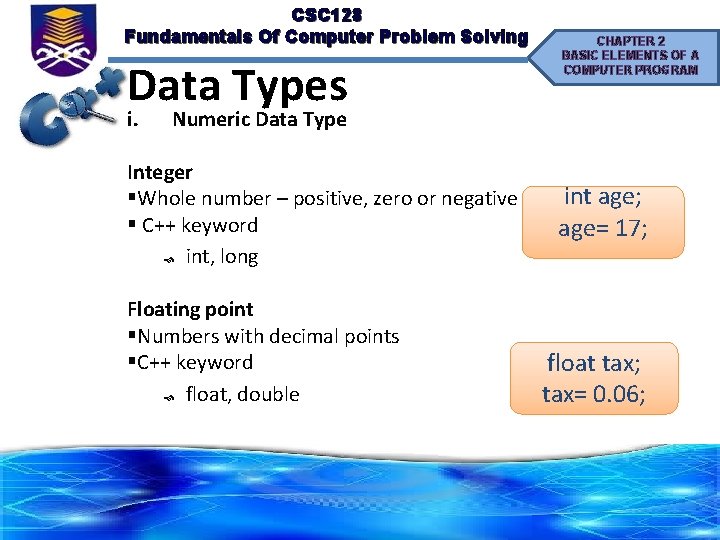
CSC 128 Fundamentals Of Computer Problem Solving Data Types i. CHAPTER 2 BASIC ELEMENTS OF A COMPUTER PROGRAM Numeric Data Type Integer §Whole number – positive, zero or negative § C++ keyword int, long Floating point §Numbers with decimal points §C++ keyword float, double int age; age= 17; float tax; tax= 0. 06;
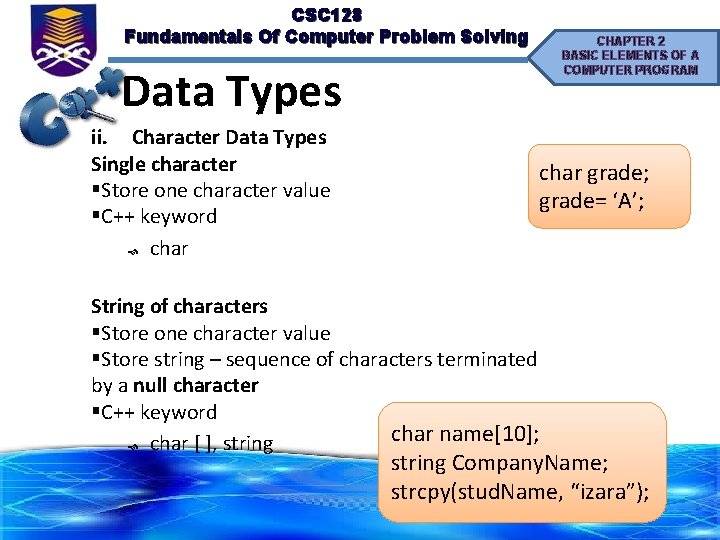
CSC 128 Fundamentals Of Computer Problem Solving CHAPTER 2 BASIC ELEMENTS OF A COMPUTER PROGRAM Data Types ii. Character Data Types Single character §Store one character value §C++ keyword char grade; grade= ‘A’; String of characters §Store one character value §Store string – sequence of characters terminated by a null character §C++ keyword char name[10]; char [ ], string Company. Name; strcpy(stud. Name, “izara”);
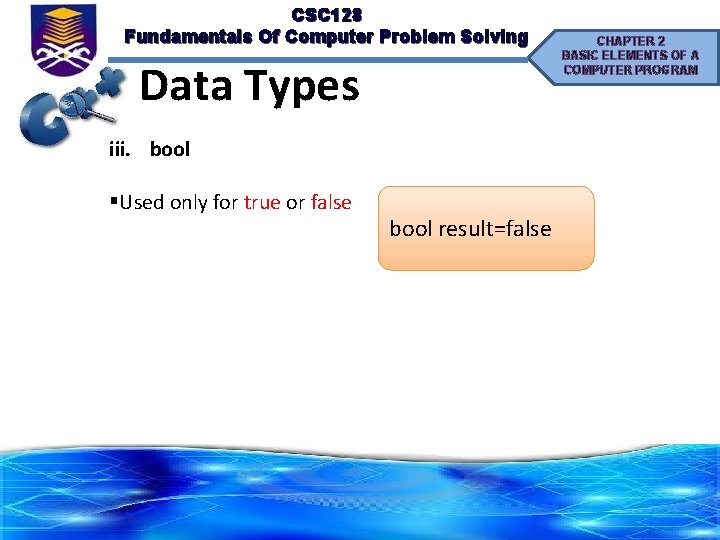
CSC 128 Fundamentals Of Computer Problem Solving Data Types iii. bool §Used only for true or false bool result=false CHAPTER 2 BASIC ELEMENTS OF A COMPUTER PROGRAM
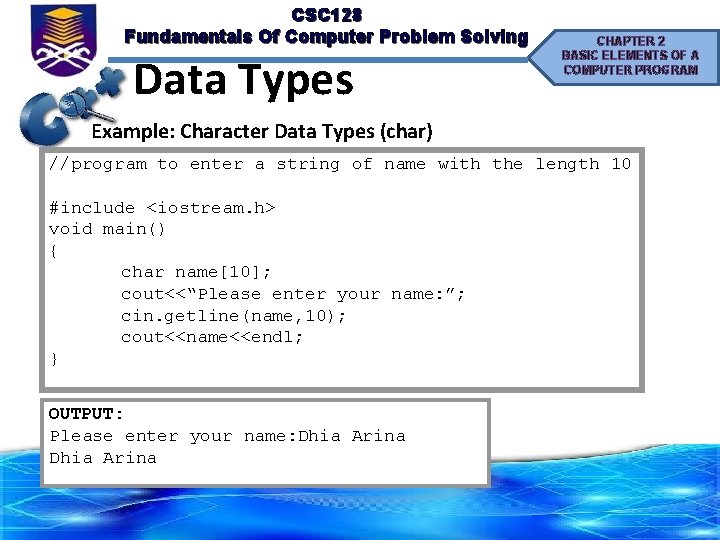
CSC 128 Fundamentals Of Computer Problem Solving Data Types CHAPTER 2 BASIC ELEMENTS OF A COMPUTER PROGRAM Example: Character Data Types (char) //program to enter a string of name with the length 10 #include <iostream. h> void main() { char name[10]; cout<<“Please enter your name: ”; cin. getline(name, 10); cout<<name<<endl; } OUTPUT: Please enter your name: Dhia Arina
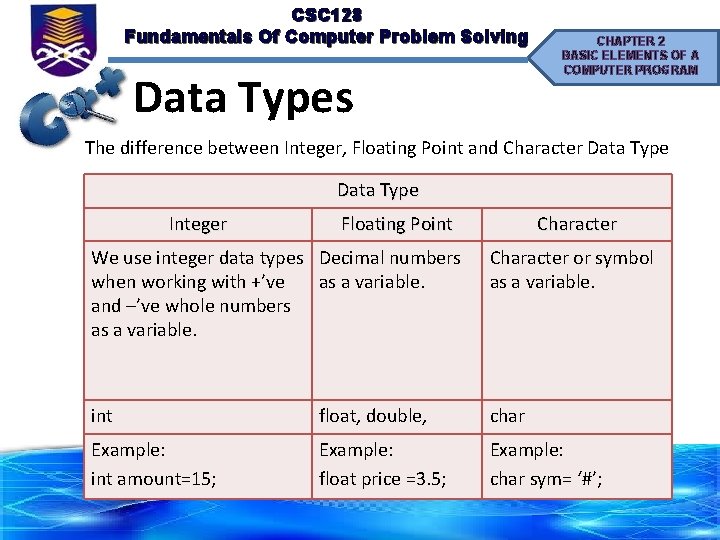
CSC 128 Fundamentals Of Computer Problem Solving Data Types CHAPTER 2 BASIC ELEMENTS OF A COMPUTER PROGRAM The difference between Integer, Floating Point and Character Data Type Integer Floating Point Character We use integer data types Decimal numbers when working with +’ve as a variable. and –’ve whole numbers as a variable. Character or symbol as a variable. int float, double, char Example: int amount=15; Example: float price =3. 5; Example: char sym= ‘#’;
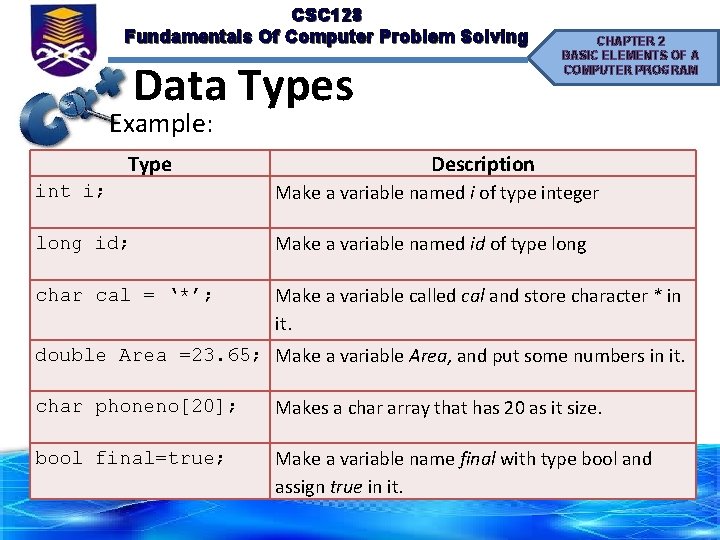
CSC 128 Fundamentals Of Computer Problem Solving Data Types CHAPTER 2 BASIC ELEMENTS OF A COMPUTER PROGRAM Example: Type Description int i; Make a variable named i of type integer long id; Make a variable named id of type long char cal = ‘*’; Make a variable called cal and store character * in it. double Area =23. 65; Make a variable Area, and put some numbers in it. char phoneno[20]; Makes a char array that has 20 as it size. bool final=true; Make a variable name final with type bool and assign true in it.
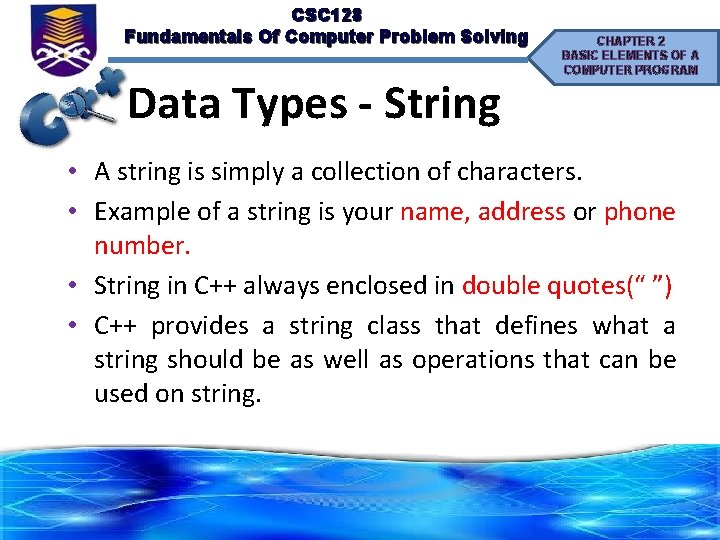
CSC 128 Fundamentals Of Computer Problem Solving Data Types - String CHAPTER 2 BASIC ELEMENTS OF A COMPUTER PROGRAM • A string is simply a collection of characters. • Example of a string is your name, address or phone number. • String in C++ always enclosed in double quotes(“ ”) • C++ provides a string class that defines what a string should be as well as operations that can be used on string.
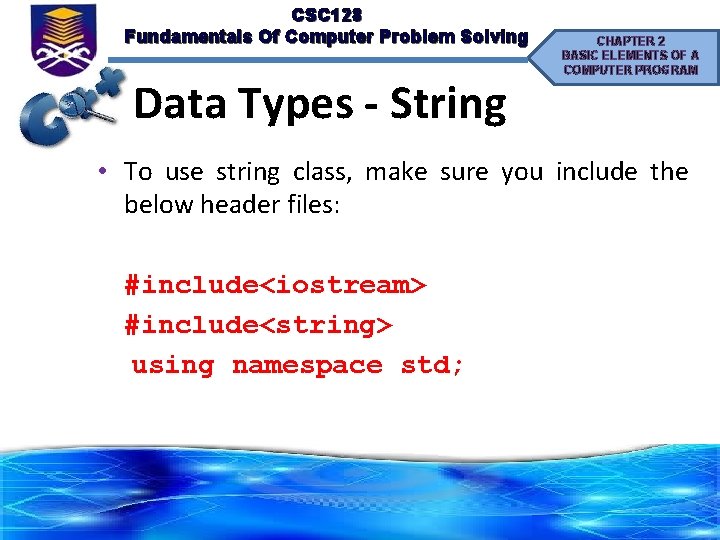
CSC 128 Fundamentals Of Computer Problem Solving Data Types - String CHAPTER 2 BASIC ELEMENTS OF A COMPUTER PROGRAM • To use string class, make sure you include the below header files: #include<iostream> #include<string> using namespace std;
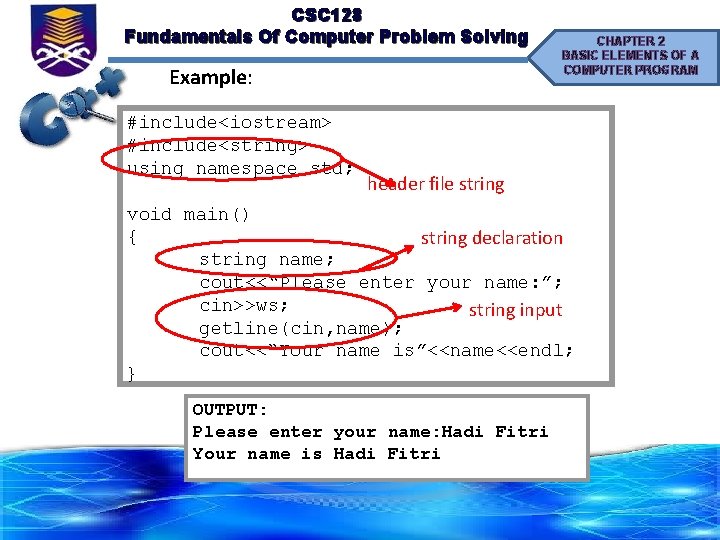
CSC 128 Fundamentals Of Computer Problem Solving Example: #include<iostream> #include<string> using namespace std; CHAPTER 2 BASIC ELEMENTS OF A COMPUTER PROGRAM header file string void main() { string declaration string name; cout<<“Please enter your name: ”; cin>>ws; string input getline(cin, name); cout<<“Your name is”<<name<<endl; } OUTPUT: Please enter your name: Hadi Fitri Your name is Hadi Fitri
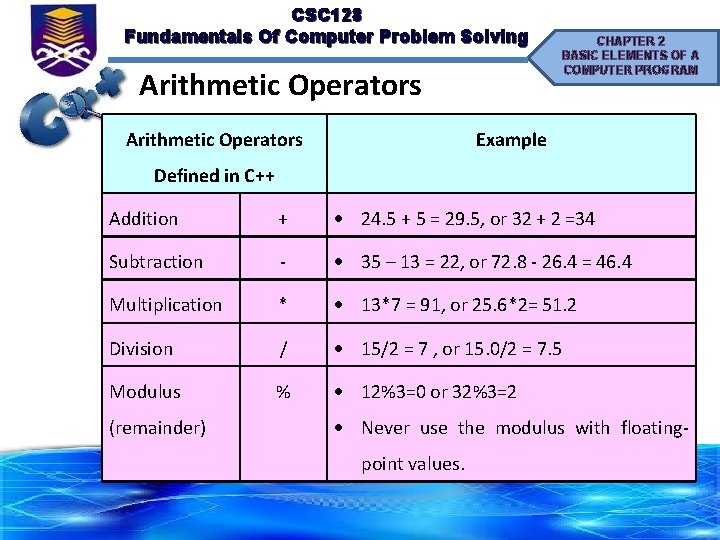
CSC 128 Fundamentals Of Computer Problem Solving Arithmetic Operators CHAPTER 2 BASIC ELEMENTS OF A COMPUTER PROGRAM Example Defined in C++ Addition + 24. 5 + 5 = 29. 5, or 32 + 2 =34 Subtraction - 35 – 13 = 22, or 72. 8 - 26. 4 = 46. 4 Multiplication * 13*7 = 91, or 25. 6*2= 51. 2 Division / 15/2 = 7 , or 15. 0/2 = 7. 5 Modulus % 12%3=0 or 32%3=2 (remainder) Never use the modulus with floatingpoint values.
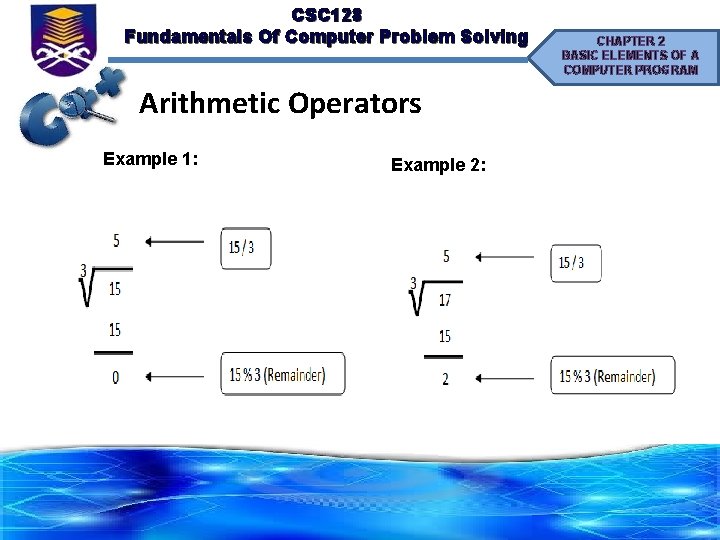
CSC 128 Fundamentals Of Computer Problem Solving CHAPTER 2 BASIC ELEMENTS OF A COMPUTER PROGRAM Arithmetic Operators Modulus Division • Specified with the percentage sign (%). • The operation that gives the remainder of a division of two integer values.
CSC 128 Fundamentals Of Computer Problem Solving Arithmetic Operators Example 1: Example 2: CHAPTER 2 BASIC ELEMENTS OF A COMPUTER PROGRAM
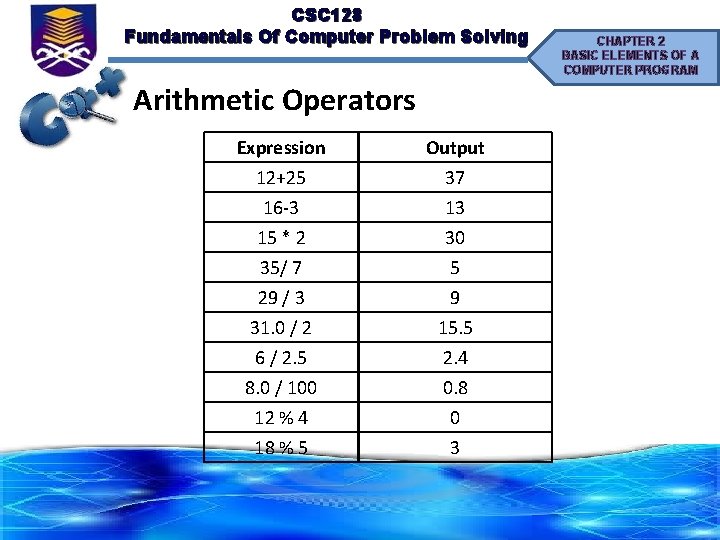
CSC 128 Fundamentals Of Computer Problem Solving Arithmetic Operators Expression 12+25 16 -3 15 * 2 35/ 7 29 / 3 31. 0 / 2 6 / 2. 5 8. 0 / 100 12 % 4 18 % 5 Output 37 13 30 5 9 15. 5 2. 4 0. 8 0 3 CHAPTER 2 BASIC ELEMENTS OF A COMPUTER PROGRAM
CSC 128 Fundamentals Of Computer Problem Solving CHAPTER 2 BASIC ELEMENTS OF A COMPUTER PROGRAM Arithmetic Expression • Variables and constants of integral and floating point types can be combined into expressions using arithmetic operators. • In C++, we have to represent the algebraic expression by using the valid syntax. • At a low level, a computer is not able to perform an arithmetic operation on two different data types of data.
CSC 128 Fundamentals Of Computer Problem Solving Arithmetic Expression CHAPTER 2 BASIC ELEMENTS OF A COMPUTER PROGRAM • In general, only variables and constants of the same type should be combined in an expression. The compiler has strict type checking rules to check for this. • In cases where mixed numeric types appear in an expression, the compiler replaces all variables with copies of the highest precision type. • Just as there is a need for a hierarchy of operations, there is also a need for a hierarchy of types.
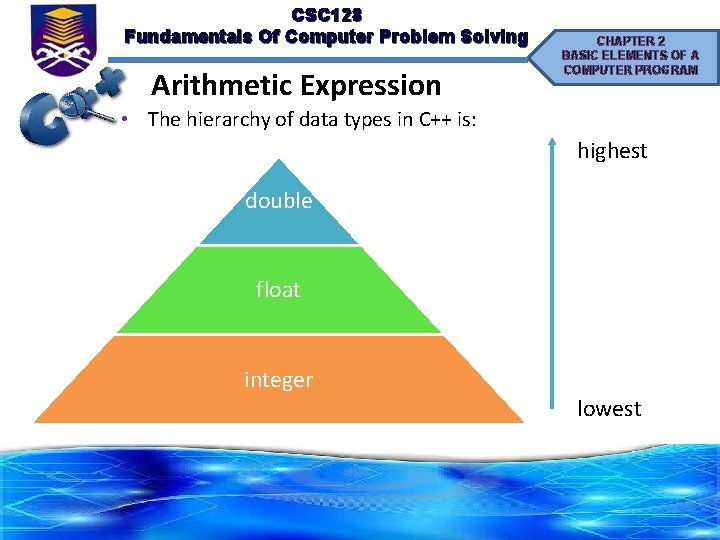
CSC 128 Fundamentals Of Computer Problem Solving Arithmetic Expression CHAPTER 2 BASIC ELEMENTS OF A COMPUTER PROGRAM • The hierarchy of data types in C++ is: highest double float integer lowest
CSC 128 Fundamentals Of Computer Problem Solving CHAPTER 2 BASIC ELEMENTS OF A COMPUTER PROGRAM Arithmetic Expression Mixed-type Expression • In a mixed-type expression like (2 / 4. 0), the operand lower in hierarchy gets promoted to the higher type before the operation is carried out. • So, the expression (2 / 4. 0) is converted to (2. 0 / 4. 0) before the division is performed. • The division is, therefore, float division which results in the float value of 0. 5. If one operand has a long, double, or signed modifier, the other is promoted as well.
CSC 128 Fundamentals Of Computer Problem Solving Arithmetic Expression CHAPTER 2 BASIC ELEMENTS OF A COMPUTER PROGRAM • Type changes can be made explicit by placing the value to be changed in parentheses and placing the name of the new type before it. • This is called type casting or type conversion. • Syntax: (type) expression; type (expression);
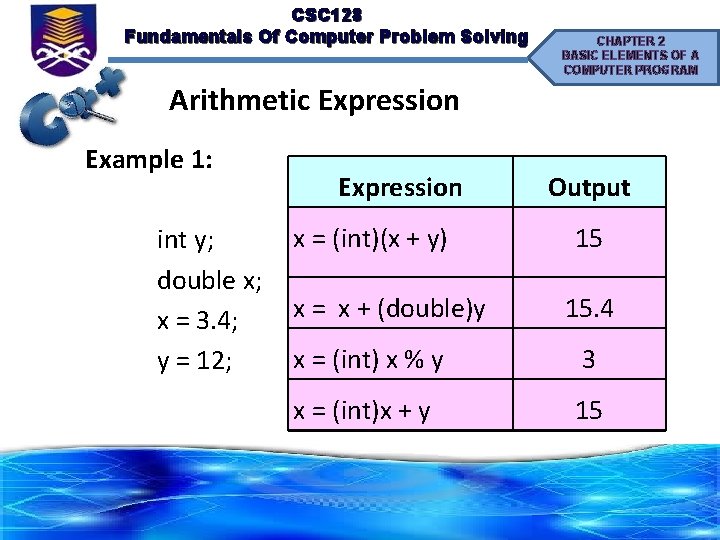
CSC 128 Fundamentals Of Computer Problem Solving CHAPTER 2 BASIC ELEMENTS OF A COMPUTER PROGRAM Arithmetic Expression Example 1: Expression x = (int)(x + y) int y; double x; x = x + (double)y x = 3. 4; x = (int) x % y y = 12; x = (int)x + y Output 15 15. 4 3 15
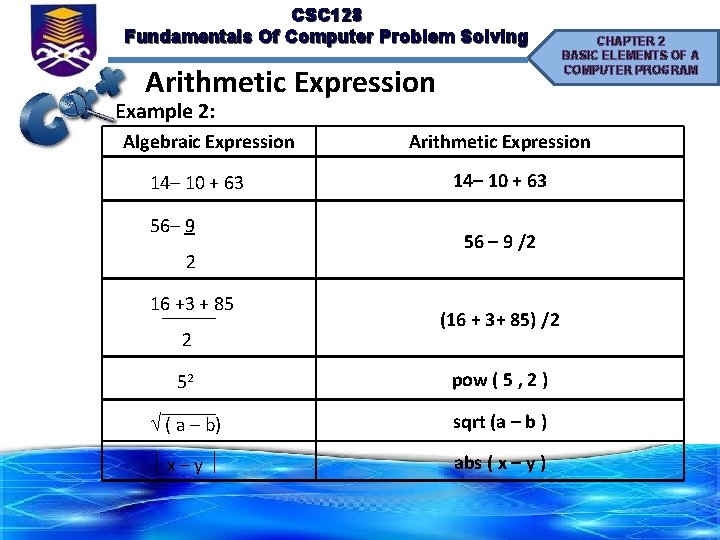
CSC 128 Fundamentals Of Computer Problem Solving Arithmetic Expression Example 2: Algebraic Expression 14– 10 + 63 56– 9 2 16 +3 + 85 2 CHAPTER 2 BASIC ELEMENTS OF A COMPUTER PROGRAM Arithmetic Expression 14– 10 + 63 56 – 9 /2 (16 + 3+ 85) /2 52 pow ( 5 , 2 ) ( a – b) sqrt (a – b ) x – y abs ( x – y )
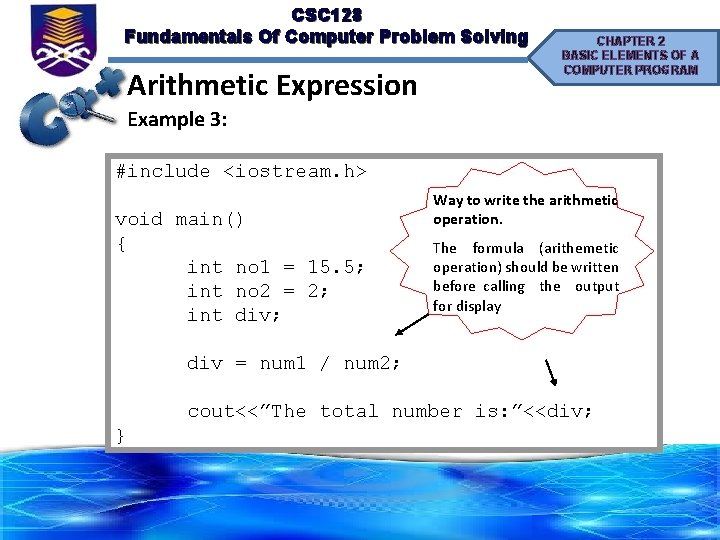
CSC 128 Fundamentals Of Computer Problem Solving Arithmetic Expression CHAPTER 2 BASIC ELEMENTS OF A COMPUTER PROGRAM Example 3: #include <iostream. h> void main() { int no 1 = 15. 5; int no 2 = 2; int div; Way to write the arithmetic operation. The formula (arithemetic operation) should be written before calling the output for display div = num 1 / num 2; cout<<”The total number is: ”<<div; }
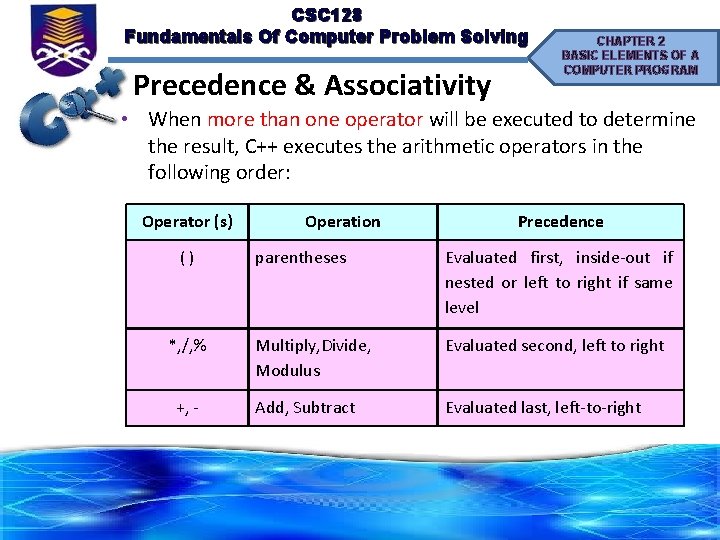
CSC 128 Fundamentals Of Computer Problem Solving Precedence & Associativity CHAPTER 2 BASIC ELEMENTS OF A COMPUTER PROGRAM • When more than one operator will be executed to determine the result, C++ executes the arithmetic operators in the following order: Operator (s) ( ) *, /, % +, - Operation Precedence parentheses Evaluated first, inside-out if nested or left to right if same level Multiply, Divide, Modulus Evaluated second, left to right Add, Subtract Evaluated last, left-to-right
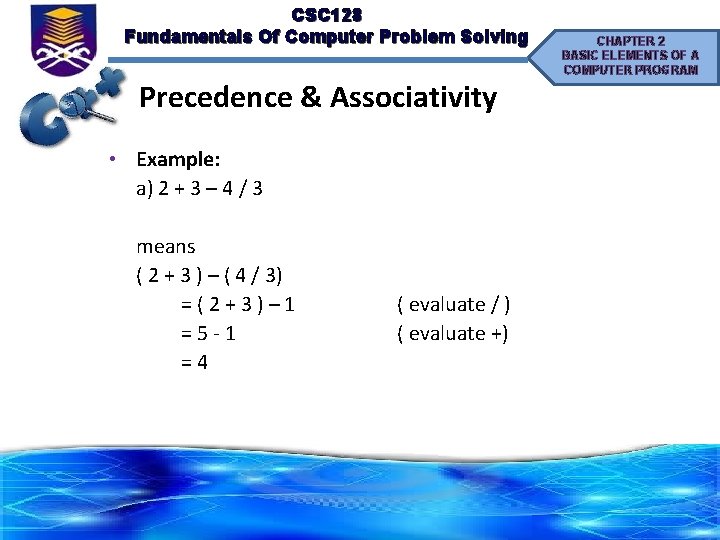
CSC 128 Fundamentals Of Computer Problem Solving Precedence & Associativity • Example: a) 2 + 3 – 4 / 3 means ( 2 + 3 ) – ( 4 / 3) = ( 2 + 3 ) – 1 = 5 - 1 = 4 ( evaluate / ) ( evaluate +) CHAPTER 2 BASIC ELEMENTS OF A COMPUTER PROGRAM
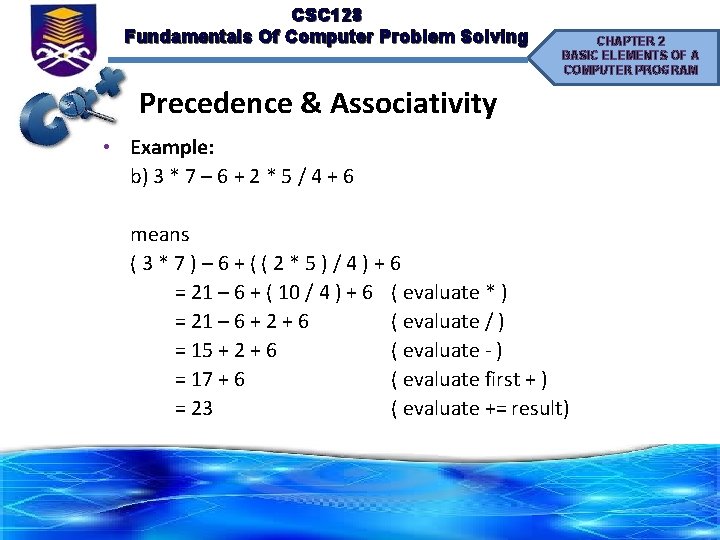
CSC 128 Fundamentals Of Computer Problem Solving CHAPTER 2 BASIC ELEMENTS OF A COMPUTER PROGRAM Precedence & Associativity • Example: b) 3 * 7 – 6 + 2 * 5 / 4 + 6 means ( 3 * 7 ) – 6 + ( ( 2 * 5 ) / 4 ) + 6 = 21 – 6 + ( 10 / 4 ) + 6 ( evaluate * ) = 21 – 6 + 2 + 6 ( evaluate / ) = 15 + 2 + 6 ( evaluate - ) = 17 + 6 ( evaluate first + ) = 23 ( evaluate += result)
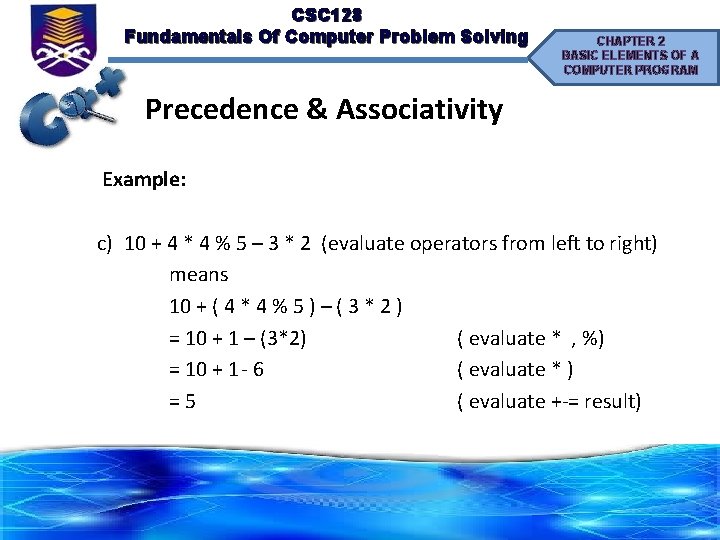
CSC 128 Fundamentals Of Computer Problem Solving CHAPTER 2 BASIC ELEMENTS OF A COMPUTER PROGRAM Precedence & Associativity Example: c) 10 + 4 * 4 % 5 – 3 * 2 (evaluate operators from left to right) means 10 + ( 4 * 4 % 5 ) – ( 3 * 2 ) = 10 + 1 – (3*2) ( evaluate * , %) = 10 + 1 - 6 ( evaluate * ) = 5 ( evaluate +-= result)
CSC 128 Fundamentals Of Computer Problem Solving Assignment Statement CHAPTER 2 BASIC ELEMENTS OF A COMPUTER PROGRAM • It is essential that every variable in a program is given a value explicitly before any attempt is made to use it. • It is also very important that the value assigned is of the correct type. • The most common form of statement in a program uses the assignment operator, =, and either an expression or a constant to assign a value to a variable: variable = expression; (eg: int num=6) variable = constant; (eg: const double PI=3. 142)
CSC 128 Fundamentals Of Computer Problem Solving Assignment Statement CHAPTER 2 BASIC ELEMENTS OF A COMPUTER PROGRAM • The assignment statement may be used to give a variable its first value in a program. • This first value assignment is called initialization, and in C++ all variables must be explicitly initialized. In C++ here is how it is done: //price is declared to be of n type double price; */Now the memory cell named price contains the value 59. 99*/ price = 59. 99;
CSC 128 Fundamentals Of Computer Problem Solving Assignment Statement CHAPTER 2 BASIC ELEMENTS OF A COMPUTER PROGRAM • The declaration statement and initialization can be combined into one statement as follow: double price = 37. 99;
CSC 128 Fundamentals Of Computer Problem Solving Assignment Statement CHAPTER 2 BASIC ELEMENTS OF A COMPUTER PROGRAM • A variable can store only one value at a time. Suppose mark, a variable of type float, the following statements executed in sequence mark= 85. 5 mark = 75. 5; • First, the value 85. 5 will be assigned to mark and then assign the value 75. 5 to mark. The value 85. 5 would be lost and score would retain the value 75. 5.
CSC 128 Fundamentals Of Computer Problem Solving Assignment Statement CHAPTER 2 BASIC ELEMENTS OF A COMPUTER PROGRAM • Two variables can also store the same value. Suppose num 1 and num 2 are of type int. • Then the following statements cause the number stored in the location reserved for num 1 to be fetched from memory and stored in the location reserved for num 2. The contents of num 1 are unchanged. num 1 = 65; num 2 = num 1; //the value of num 1 is 65 //the value of num 2 takes the value of num 1=65 • Note that only a variable name may appear on the left side of the equal sign in an assignment statement.
CSC 128 Fundamentals Of Computer Problem Solving Assignment Statement CHAPTER 2 BASIC ELEMENTS OF A COMPUTER PROGRAM Example 1: #include <iostream. h> void main() { int x, y; x = 6; y = 2 + x; } cout<<”x is: ”<<x<<” and y is: ”<<y<<endl;
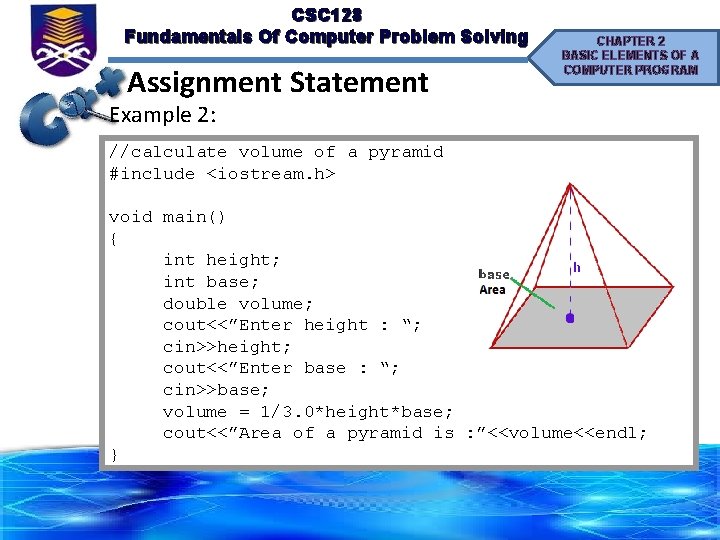
CSC 128 Fundamentals Of Computer Problem Solving Assignment Statement CHAPTER 2 BASIC ELEMENTS OF A COMPUTER PROGRAM Example 2: //calculate volume of a pyramid #include <iostream. h> void main() { int height; int base; double volume; cout<<”Enter height : “; cin>>height; cout<<”Enter base : “; cin>>base; volume = 1/3. 0*height*base; cout<<”Area of a pyramid is : ”<<volume<<endl; }
CSC 128 Fundamentals Of Computer Problem Solving Assignment Statement CHAPTER 2 BASIC ELEMENTS OF A COMPUTER PROGRAM • When we write the program, sometimes we need to modify certain value for any variable, which is the origin value is added or multiply and then the result will be assigned into the origin variable. • For example: total = total + 7; • When this sequence of symbols is used as an assignment statement in C++ the interpretation is different. • The statement above is interpreted by the compiler as: – Retrieve from memory the contents of memory cell count. – Add five to that number (the value of count). – Store the result in the memory cell named count.
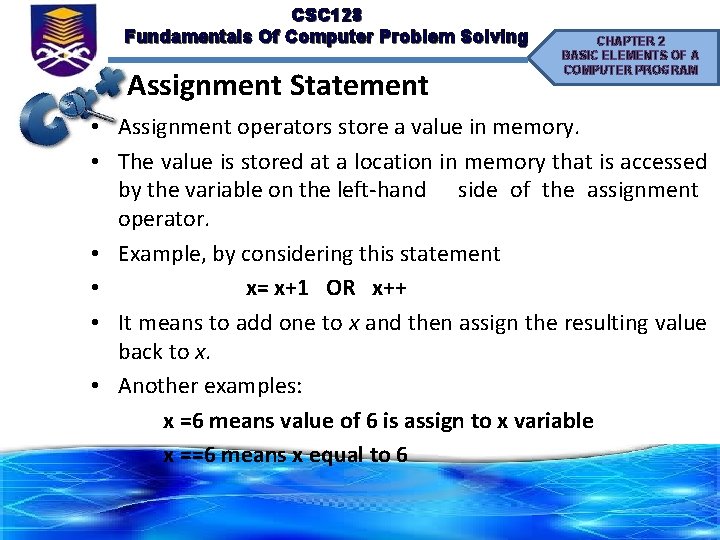
CSC 128 Fundamentals Of Computer Problem Solving Assignment Statement CHAPTER 2 BASIC ELEMENTS OF A COMPUTER PROGRAM • Assignment operators store a value in memory. • The value is stored at a location in memory that is accessed by the variable on the left-hand side of the assignment operator. • Example, by considering this statement • x= x+1 OR x++ • It means to add one to x and then assign the resulting value back to x. • Another examples: x =6 means value of 6 is assign to x variable x ==6 means x equal to 6
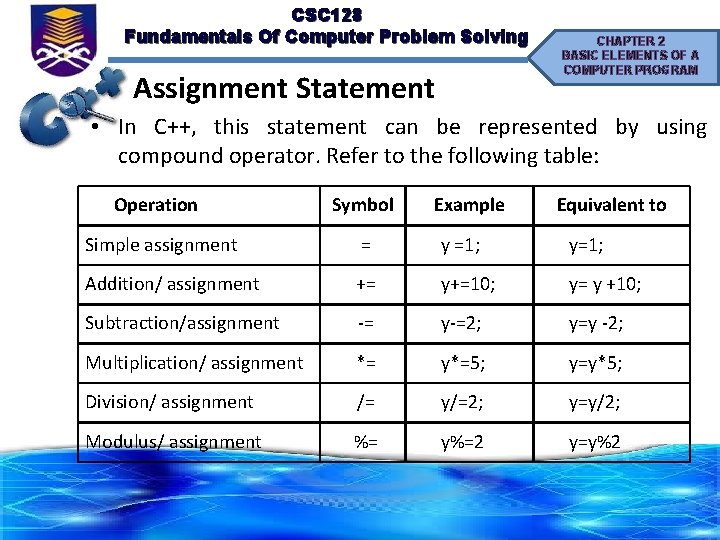
CSC 128 Fundamentals Of Computer Problem Solving Assignment Statement CHAPTER 2 BASIC ELEMENTS OF A COMPUTER PROGRAM • In C++, this statement can be represented by using compound operator. Refer to the following table: Operation Symbol Example Equivalent to Simple assignment = y =1; y=1; Addition/ assignment += y+=10; y= y +10; Subtraction/assignment -= y-=2; y=y -2; Multiplication/ assignment *= y*=5; y=y*5; Division/ assignment /= y/=2; y=y/2; Modulus/ assignment %= y%=2 y=y%2
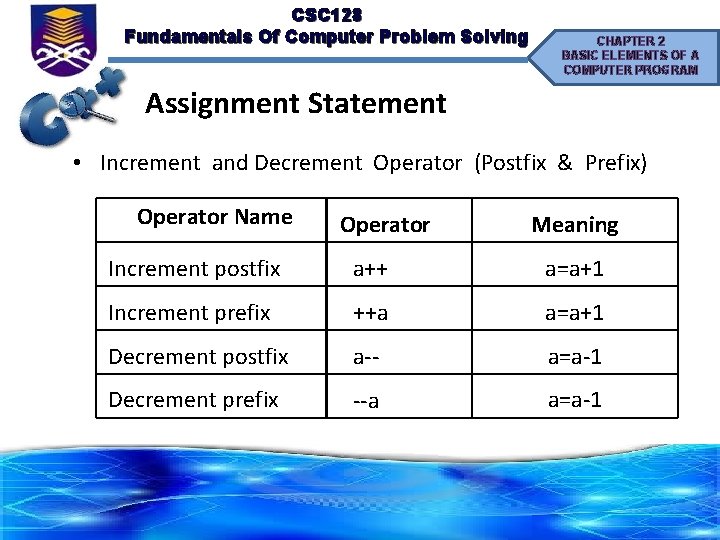
CSC 128 Fundamentals Of Computer Problem Solving CHAPTER 2 BASIC ELEMENTS OF A COMPUTER PROGRAM Assignment Statement • Increment and Decrement Operator (Postfix & Prefix) Operator Name Operator Meaning Increment postfix a++ a=a+1 Increment prefix ++a a=a+1 Decrement postfix a-- a=a-1 Decrement prefix --a a=a-1
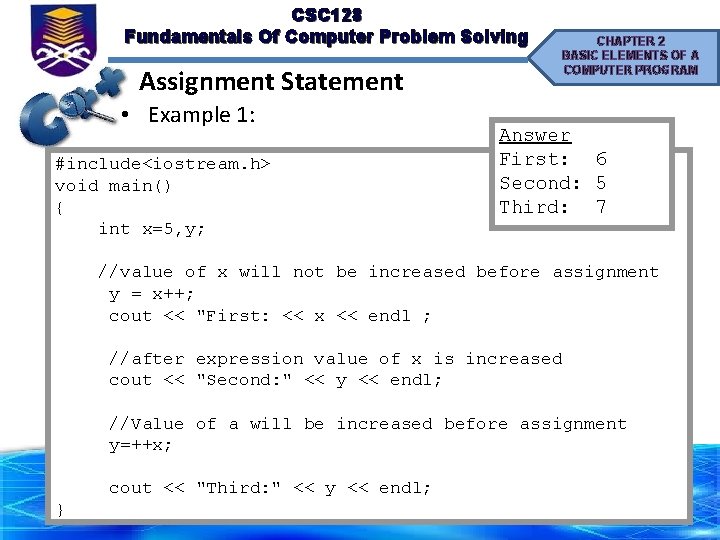
CSC 128 Fundamentals Of Computer Problem Solving Assignment Statement • Example 1: #include<iostream. h> void main() { int x=5, y; CHAPTER 2 BASIC ELEMENTS OF A COMPUTER PROGRAM Answer First: 6 Second: 5 Third: 7 //value of x will not be increased before assignment y = x++; cout << "First: << x << endl ; //after expression value of x is increased cout << "Second: " << y << endl; //Value of a will be increased before assignment y=++x; cout << "Third: " << y << endl; }
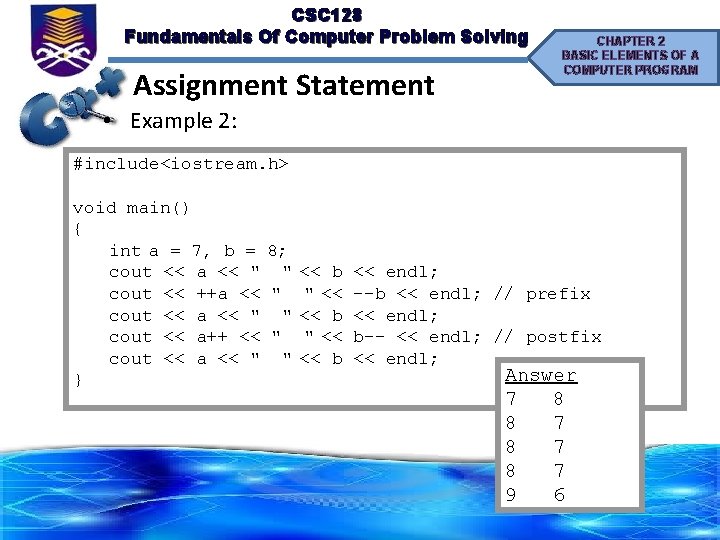
CSC 128 Fundamentals Of Computer Problem Solving Assignment Statement CHAPTER 2 BASIC ELEMENTS OF A COMPUTER PROGRAM • Example 2: #include<iostream. h> void main() { int a = 7, b = 8; cout << a << " " << b << endl; cout << ++a << " " << --b << endl; // prefix cout << a << " " << b << endl; cout << a++ << " " << b-- << endl; // postfix cout << a << " " << b << endl; Answer } 7 8 8 7 9 6
CSC 128 Fundamentals Of Computer Problem Solving CHAPTER 2 BASIC ELEMENTS OF A COMPUTER PROGRAM Mathematical Library Functions • Mathematical function perform an arithmetic operation • All the arithmetical function from math. h header file are listed in the following table:
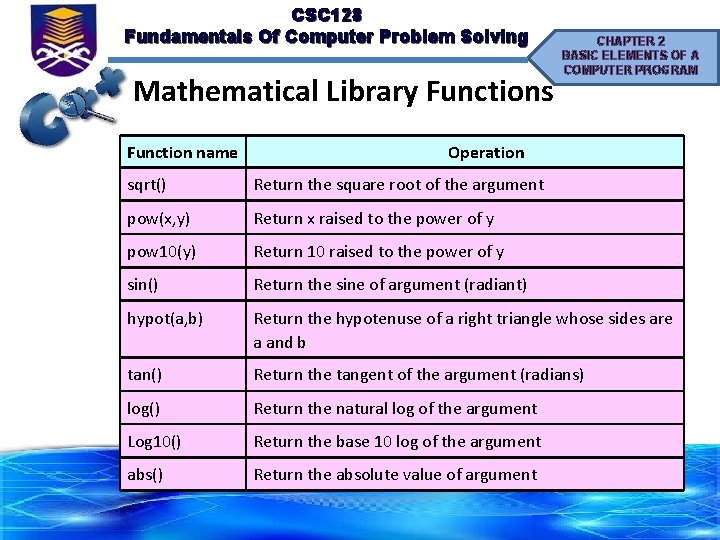
CSC 128 Fundamentals Of Computer Problem Solving Mathematical Library Functions Function name CHAPTER 2 BASIC ELEMENTS OF A COMPUTER PROGRAM Operation sqrt() Return the square root of the argument pow(x, y) Return x raised to the power of y pow 10(y) Return 10 raised to the power of y sin() Return the sine of argument (radiant) hypot(a, b) Return the hypotenuse of a right triangle whose sides are a and b tan() Return the tangent of the argument (radians) log() Return the natural log of the argument Log 10() Return the base 10 log of the argument abs() Return the absolute value of argument
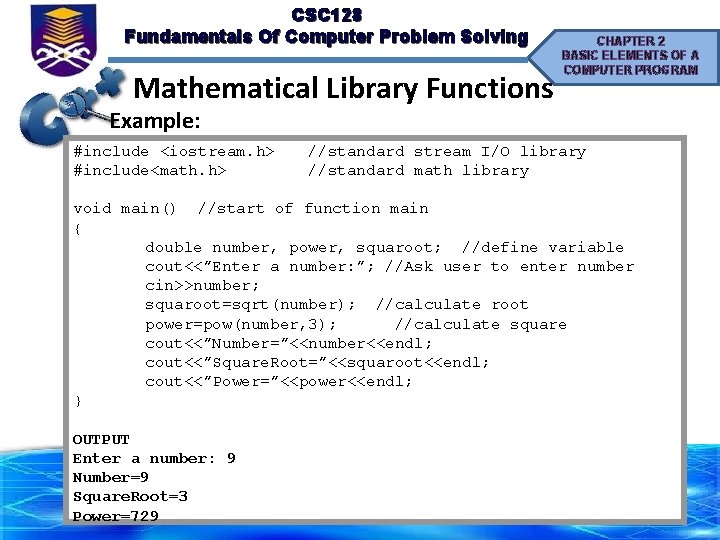
CSC 128 Fundamentals Of Computer Problem Solving Mathematical Library Functions CHAPTER 2 BASIC ELEMENTS OF A COMPUTER PROGRAM Example: #include <iostream. h> //standard stream I/O library #include<math. h> //standard math library void main() //start of function main { double number, power, squaroot; //define variable cout<<”Enter a number: ”; //Ask user to enter number cin>>number; squaroot=sqrt(number); //calculate root power=pow(number, 3); //calculate square cout<<”Number=”<<number<<endl; cout<<”Square. Root=”<<squaroot<<endl; cout<<”Power=”<<power<<endl; } OUTPUT Enter a number: 9 Number=9 Square. Root=3 Power=729
CSC 128 Fundamentals Of Computer Problem Solving Input / Output Statement CHAPTER 2 BASIC ELEMENTS OF A COMPUTER PROGRAM • Provides fundamental input and output capability • Getting data into the system is called (input) reading. – besides getting data from users, data from problems can be done in 3 ways: • initialize the value (changes can be done to the value) OR • declare the value as constant (changes cannot be done to the value) OR • assign the value directly into the formula
CSC 128 Fundamentals Of Computer Problem Solving CHAPTER 2 BASIC ELEMENTS OF A COMPUTER PROGRAM Input / Output Statement • Generating data from the system is called (output) writing. • By using input and output object, you will ready to write some interactive C++ programs • Provided to C++ programmers by the standard library, which is a part of all C++ implementation. • This capability can be done by including a header files: #include<iostream. h>
CSC 128 Fundamentals Of Computer Problem Solving CHAPTER 2 BASIC ELEMENTS OF A COMPUTER PROGRAM Using cin statement • To get data from user and store into a variable • Standard input stream, cin, is used to represent input statement • The cin statement is used to get input from the user using the keyboard. • The stream extraction operator, >> is capable of handling all of the basic data types in a way that is transparent to the programmer. • The general format for cin statement is as follow: – cin >>num 1; – cin>>num 1>>num 2;
CSC 128 Fundamentals Of Computer Problem Solving Using cin statement CHAPTER 2 BASIC ELEMENTS OF A COMPUTER PROGRAM • Other examples of cin statement : cin >> x. Num; cin >> the. Results; cin >> thistotal; • If input of more than one data element is desired in one statement, the stream extraction operator can be concatenated as follows: cin >> x. Num >> the. Results >> thistotal;
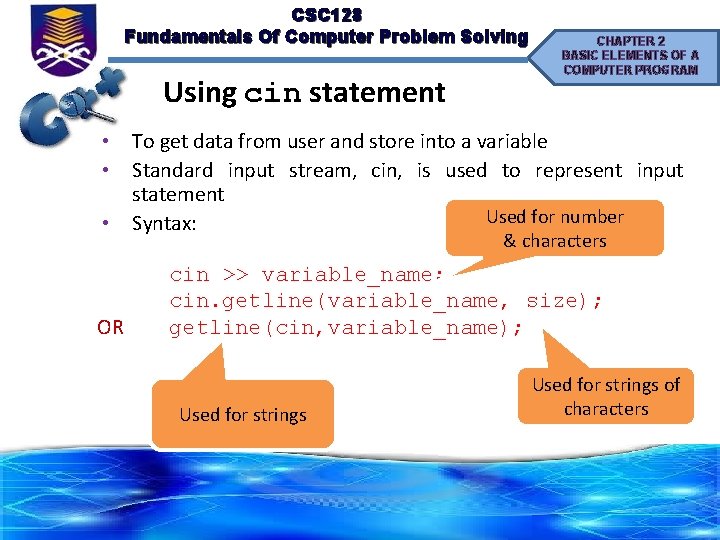
CSC 128 Fundamentals Of Computer Problem Solving Using cin statement CHAPTER 2 BASIC ELEMENTS OF A COMPUTER PROGRAM • To get data from user and store into a variable • Standard input stream, cin, is used to represent input statement Used for number • Syntax: & characters OR cin >> variable_name; cin. getline(variable_name, size); getline(cin, variable_name); Used for strings of characters
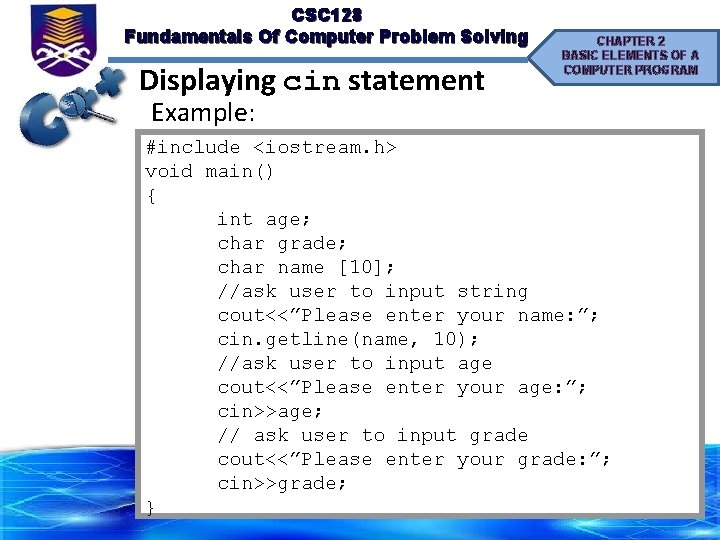
CSC 128 Fundamentals Of Computer Problem Solving Displaying cin statement CHAPTER 2 BASIC ELEMENTS OF A COMPUTER PROGRAM Example: #include <iostream. h> void main() { int age; char grade; char name [10]; //ask user to input string cout<<”Please enter your name: ”; cin. getline(name, 10); //ask user to input age cout<<”Please enter your age: ”; cin>>age; // ask user to input grade cout<<”Please enter your grade: ”; cin>>grade; }
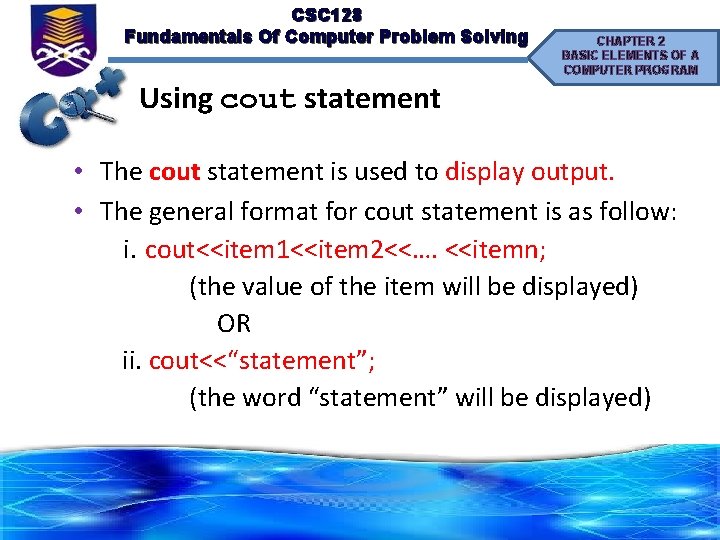
CSC 128 Fundamentals Of Computer Problem Solving CHAPTER 2 BASIC ELEMENTS OF A COMPUTER PROGRAM Using cout statement • The cout statement is used to display output. • The general format for cout statement is as follow: i. cout<<item 1<<item 2<<…. <<itemn; (the value of the item will be displayed) OR ii. cout<<“statement”; (the word “statement” will be displayed)
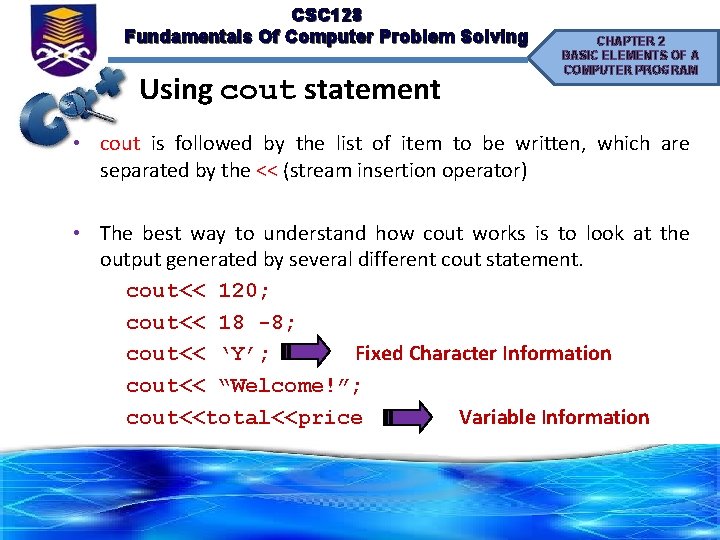
CSC 128 Fundamentals Of Computer Problem Solving Using cout statement CHAPTER 2 BASIC ELEMENTS OF A COMPUTER PROGRAM • cout is followed by the list of item to be written, which are separated by the << (stream insertion operator) • The best way to understand how cout works is to look at the output generated by several different cout statement. cout<< 120; cout<< 18 -8; cout<< ‘Y’; Fixed Character Information cout<< “Welcome!”; cout<<total<<price Variable Information
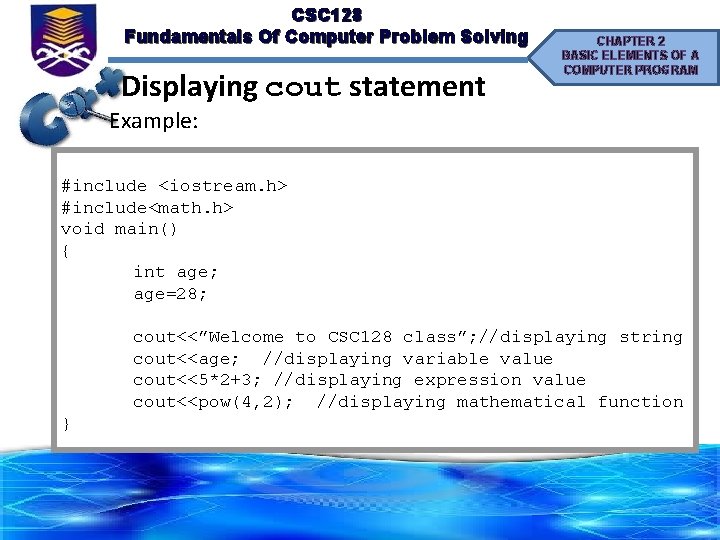
CSC 128 Fundamentals Of Computer Problem Solving Displaying cout statement CHAPTER 2 BASIC ELEMENTS OF A COMPUTER PROGRAM Example: #include <iostream. h> #include<math. h> void main() { int age; age=28; cout<<”Welcome to CSC 128 class”; //displaying string cout<<age; //displaying variable value cout<<5*2+3; //displaying expression value cout<<pow(4, 2); //displaying mathematical function }
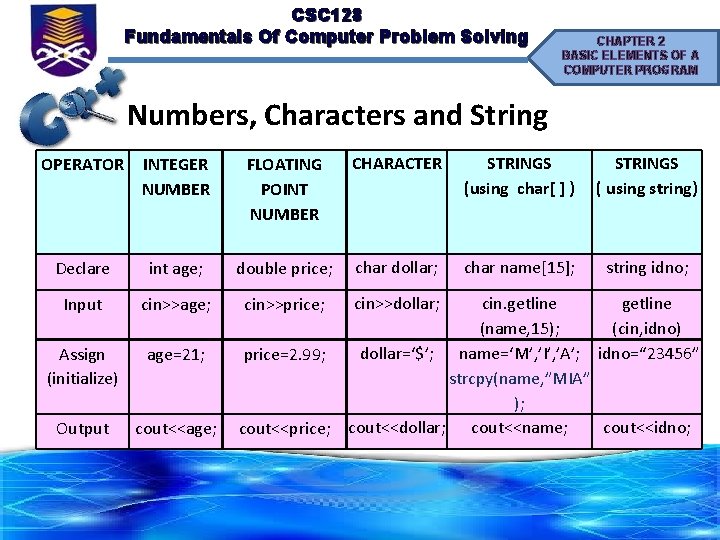
CSC 128 Fundamentals Of Computer Problem Solving CHAPTER 2 BASIC ELEMENTS OF A COMPUTER PROGRAM Numbers, Characters and String OPERATOR INTEGER NUMBER FLOATING POINT NUMBER CHARACTER STRINGS (using char[ ] ) STRINGS ( using string) Declare int age; double price; char dollar; char name[15]; string idno; Input cin>>age; Assign (initialize) age=21; Output cout<<age; cin. getline (name, 15); (cin, idno) dollar=‘$’; name=‘M’, ’I’, ’A’; idno=“ 23456” price=2. 99; strcpy(name, ”MIA” ); cout<<idno; cout<<price; cout<<dollar; cout<<name; cin>>price; cin>>dollar;
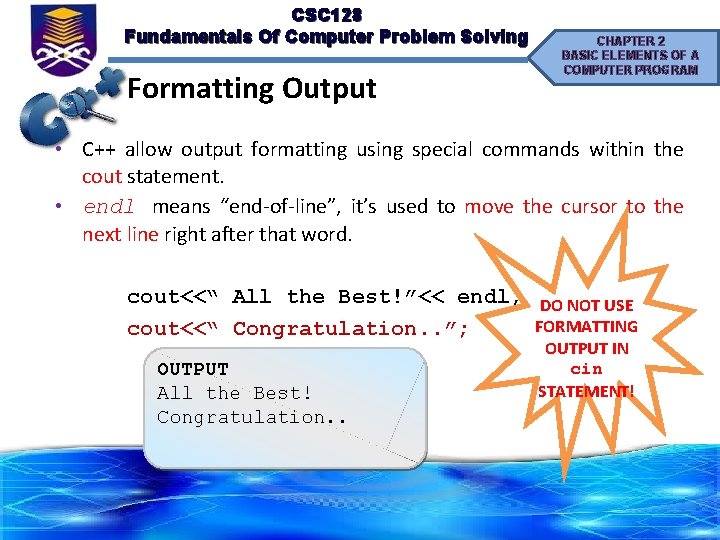
CSC 128 Fundamentals Of Computer Problem Solving Formatting Output CHAPTER 2 BASIC ELEMENTS OF A COMPUTER PROGRAM • C++ allow output formatting using special commands within the cout statement. • endl means “end-of-line”, it’s used to move the cursor to the next line right after that word. cout<<“ All the Best!”<< endl; DO NOT USE FORMATTING cout<<“ Congratulation. . ”; OUTPUT All the Best! Congratulation. . OUTPUT IN cin STATEMENT!
CSC 128 Fundamentals Of Computer Problem Solving CHAPTER 2 BASIC ELEMENTS OF A COMPUTER PROGRAM Escape Sequence • Escape sequences symbol also can be used to format the output • To use these escape sequence, simply include them as part of a string or insert as single character.
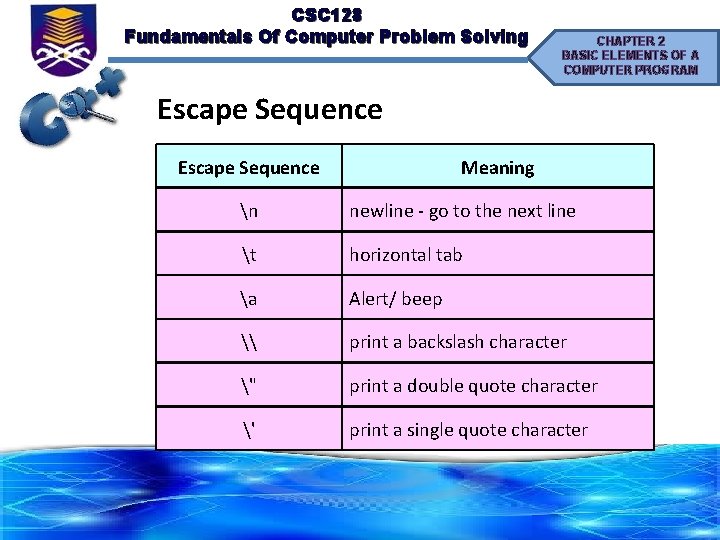
CSC 128 Fundamentals Of Computer Problem Solving CHAPTER 2 BASIC ELEMENTS OF A COMPUTER PROGRAM Escape Sequence Meaning n newline - go to the next line t horizontal tab a Alert/ beep \ print a backslash character " print a double quote character ' print a single quote character
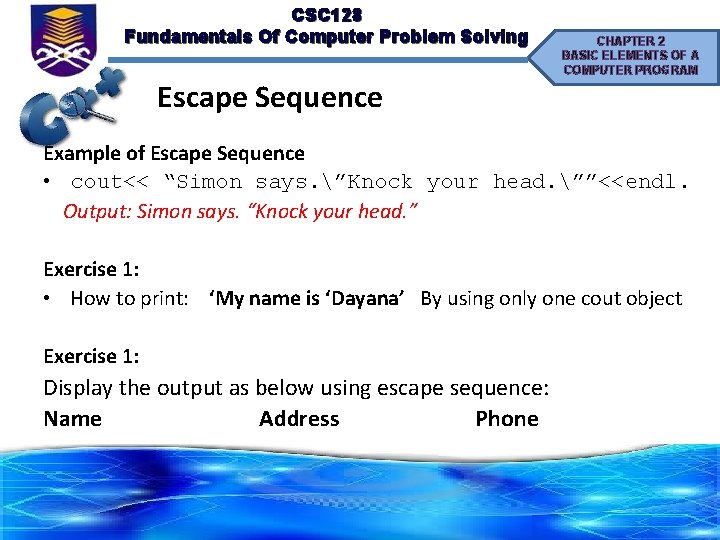
CSC 128 Fundamentals Of Computer Problem Solving Escape Sequence CHAPTER 2 BASIC ELEMENTS OF A COMPUTER PROGRAM Example of Escape Sequence • cout<< “Simon says. ”Knock your head. ””<<endl. Output: Simon says. “Knock your head. ” Exercise 1: • How to print: ‘My name is ‘Dayana’ By using only one cout object Exercise 1: Display the output as below using escape sequence: Name Address Phone
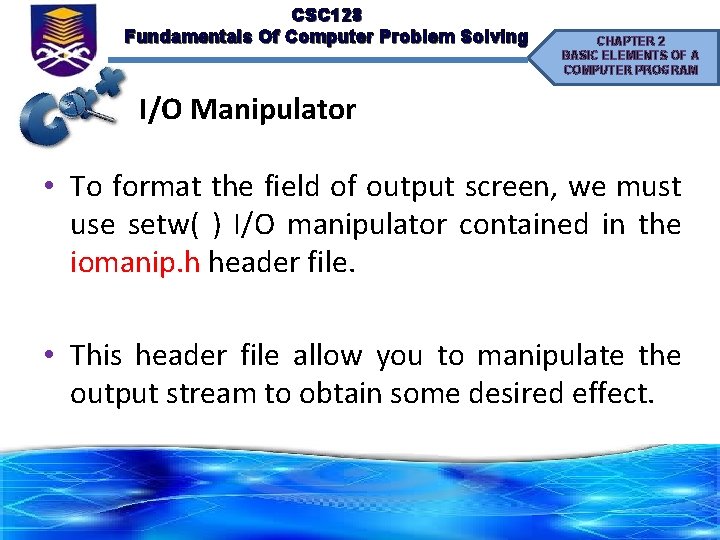
CSC 128 Fundamentals Of Computer Problem Solving CHAPTER 2 BASIC ELEMENTS OF A COMPUTER PROGRAM I/O Manipulator • To format the field of output screen, we must use setw( ) I/O manipulator contained in the iomanip. h header file. • This header file allow you to manipulate the output stream to obtain some desired effect.
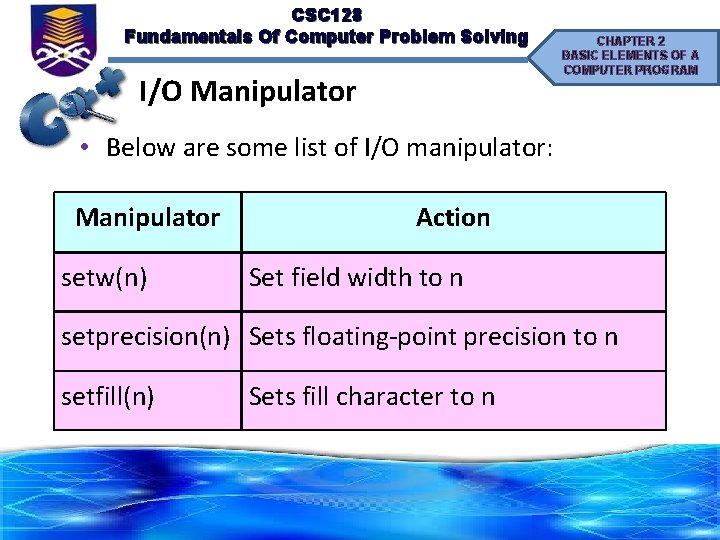
CSC 128 Fundamentals Of Computer Problem Solving I/O Manipulator CHAPTER 2 BASIC ELEMENTS OF A COMPUTER PROGRAM • Below are some list of I/O manipulator: Manipulator setw(n) Action Set field width to n setprecision(n) Sets floating-point precision to n setfill(n) Sets fill character to n
CSC 128 Fundamentals Of Computer Problem Solving CHAPTER 2 BASIC ELEMENTS OF A COMPUTER PROGRAM I/O Manipulator • Most system divides a page of text output into twenty five rows and eighty columns. Example: • Suppose you want to create three column of output: person’s name, person’s address and person’s phone number.
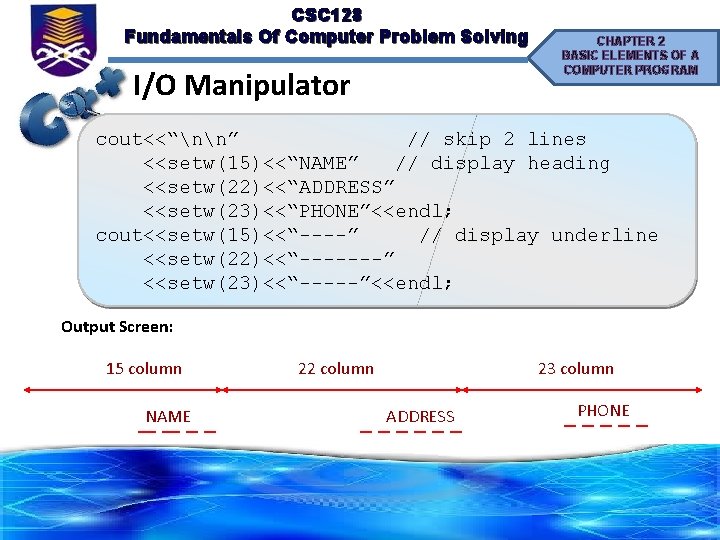
CSC 128 Fundamentals Of Computer Problem Solving I/O Manipulator CHAPTER 2 BASIC ELEMENTS OF A COMPUTER PROGRAM cout<<“nn” // skip 2 lines <<setw(15)<<“NAME” // display heading <<setw(22)<<“ADDRESS” <<setw(23)<<“PHONE”<<endl; cout<<setw(15)<<“----” // display underline <<setw(22)<<“-------” <<setw(23)<<“-----”<<endl; Output Screen: 15 column NAME 22 column 23 column ADDRESS PHONE
CSC 128 Fundamentals Of Computer Problem Solving CHAPTER 2 BASIC ELEMENTS OF A COMPUTER PROGRAM I/O Manipulator setfill(n) • Specifies character for blank space in field • Single quotes required around character enclosed in parentheses Example: num = 3. 85; cout<<setw(10)<<setfill(‘*’)<<num; Output: ******3. 85
CSC 128 Fundamentals Of Computer Problem Solving CHAPTER 2 BASIC ELEMENTS OF A COMPUTER PROGRAM I/O Manipulator Generating Decimal Point Value cout. setf(ios: : fixed); cout. precision(n); • Statement cout. setf(ios: : fixed) forces the compiler to generate a fixed decimal output without exponential, or e, notation. • Meanwhile cout. precision(n) dictates the number of decimal places to the right of decimal point to be generated.
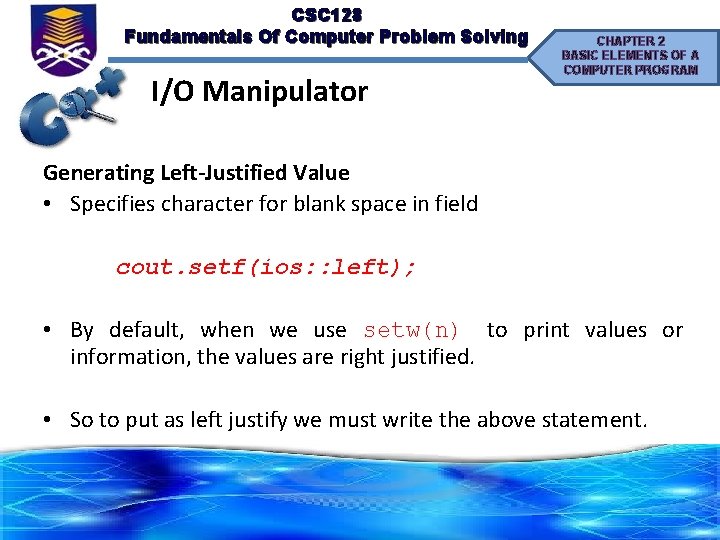
CSC 128 Fundamentals Of Computer Problem Solving I/O Manipulator CHAPTER 2 BASIC ELEMENTS OF A COMPUTER PROGRAM Generating Left-Justified Value • Specifies character for blank space in field cout. setf(ios: : left); • By default, when we use setw(n) to print values or information, the values are right justified. • So to put as left justify we must write the above statement.
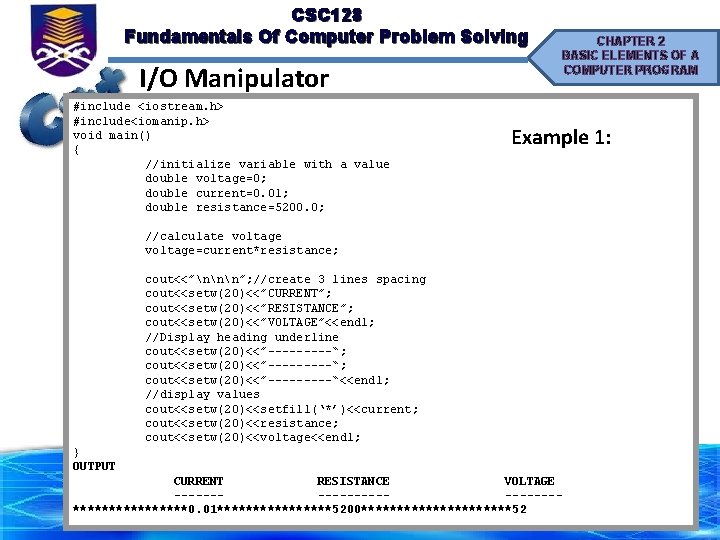
CSC 128 Fundamentals Of Computer Problem Solving I/O Manipulator #include <iostream. h> #include<iomanip. h> void main() { //initialize variable with a value double voltage=0; double current=0. 01; double resistance=5200. 0; CHAPTER 2 BASIC ELEMENTS OF A COMPUTER PROGRAM Example 1: //calculate voltage=current*resistance; cout<<”nnn”; //create 3 lines spacing cout<<setw(20)<<”CURRENT”; cout<<setw(20)<<”RESISTANCE”; cout<<setw(20)<<”VOLTAGE”<<endl; //Display heading underline cout<<setw(20)<<”---------“; cout<<setw(20)<<”-----“<<endl; //display values cout<<setw(20)<<setfill(‘*’)<<current; cout<<setw(20)<<resistance; cout<<setw(20)<<voltage<<endl; } OUTPUT CURRENT RESISTANCE VOLTAGE -----------********0. 01********5200***********52
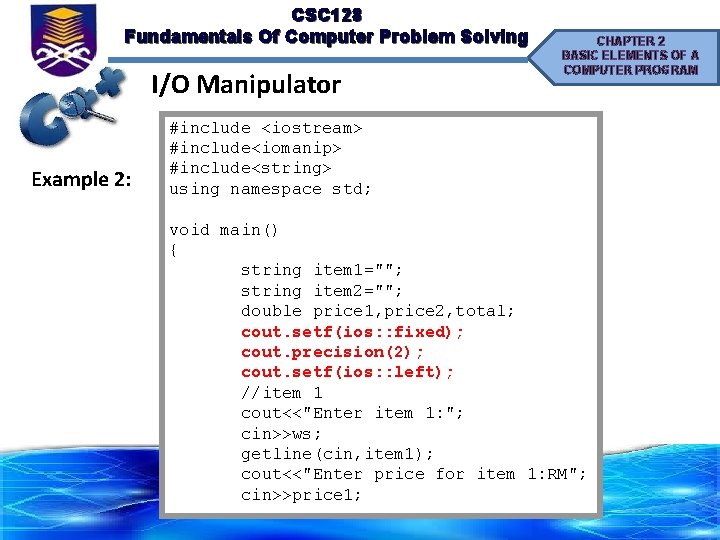
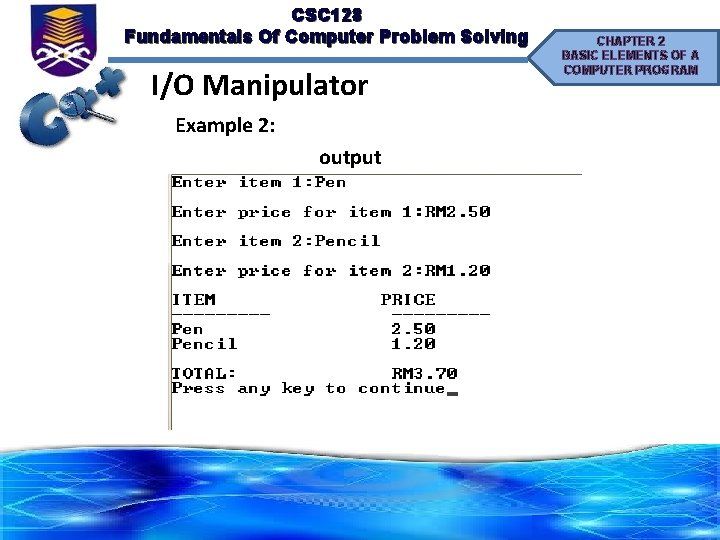
CSC 128 Fundamentals Of Computer Problem Solving I/O Manipulator Example 2: CHAPTER 2 BASIC ELEMENTS OF A COMPUTER PROGRAM #include <iostream> #include<iomanip> #include<string> using namespace std; void main() { string item 1=""; string item 2=""; double price 1, price 2, total; cout. setf(ios: : fixed); cout. precision(2); cout. setf(ios: : left); //item 1 cout<<"Enter item 1: "; cin>>ws; getline(cin, item 1); cout<<"Enter price for item 1: RM"; cin>>price 1;
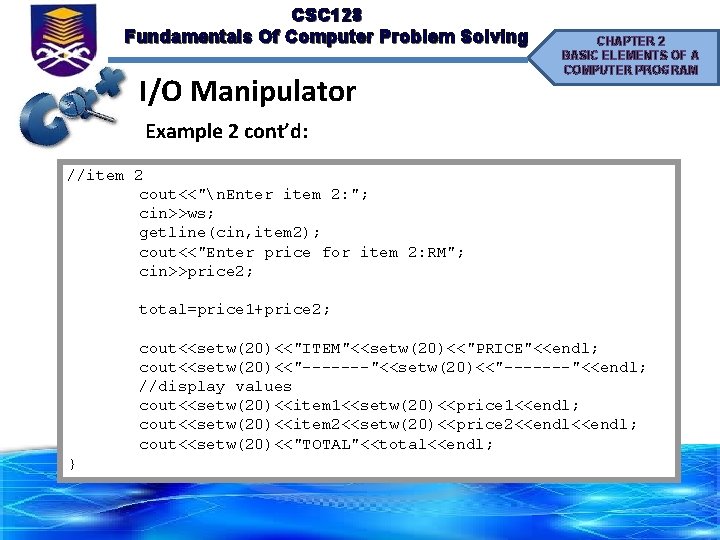
CSC 128 Fundamentals Of Computer Problem Solving I/O Manipulator CHAPTER 2 BASIC ELEMENTS OF A COMPUTER PROGRAM Example 2 cont’d: //item 2 cout<<"n. Enter item 2: "; cin>>ws; getline(cin, item 2); cout<<"Enter price for item 2: RM"; cin>>price 2; total=price 1+price 2; cout<<setw(20)<<"ITEM"<<setw(20)<<"PRICE"<<endl; cout<<setw(20)<<"-------"<<endl; //display values cout<<setw(20)<<item 1<<setw(20)<<price 1<<endl; cout<<setw(20)<<item 2<<setw(20)<<price 2<<endl; cout<<setw(20)<<"TOTAL"<<total<<endl; }
CSC 128 Fundamentals Of Computer Problem Solving I/O Manipulator Example 2: output CHAPTER 2 BASIC ELEMENTS OF A COMPUTER PROGRAM
CSC 128 Fundamentals Of Computer Problem Solving CHAPTER 2 BASIC ELEMENTS OF A COMPUTER PROGRAM Programming Process, Debugging and Error Handling • The process of tracing, identifying and correcting errors in the programs is called debugging. Compiling • Before debugging, users need to compile their program first. • Compile is done once users have finished writing a program. • Use the steps below to compile a program:
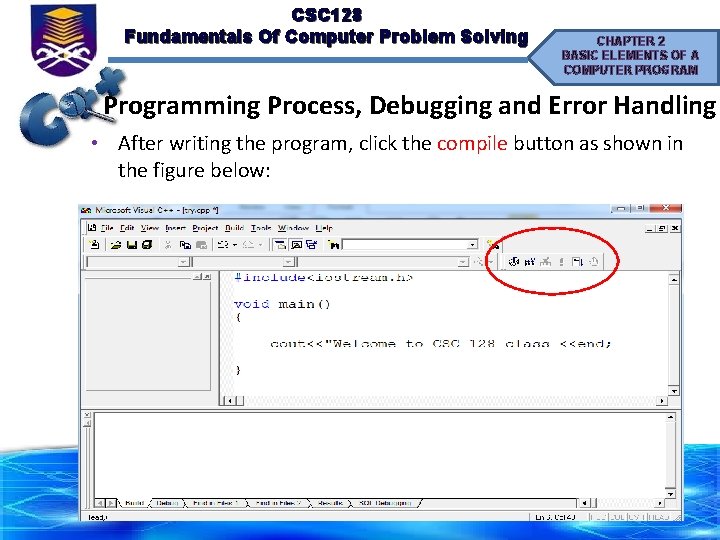
CSC 128 Fundamentals Of Computer Problem Solving CHAPTER 2 BASIC ELEMENTS OF A COMPUTER PROGRAM Programming Process, Debugging and Error Handling • After writing the program, click the compile button as shown in the figure below:
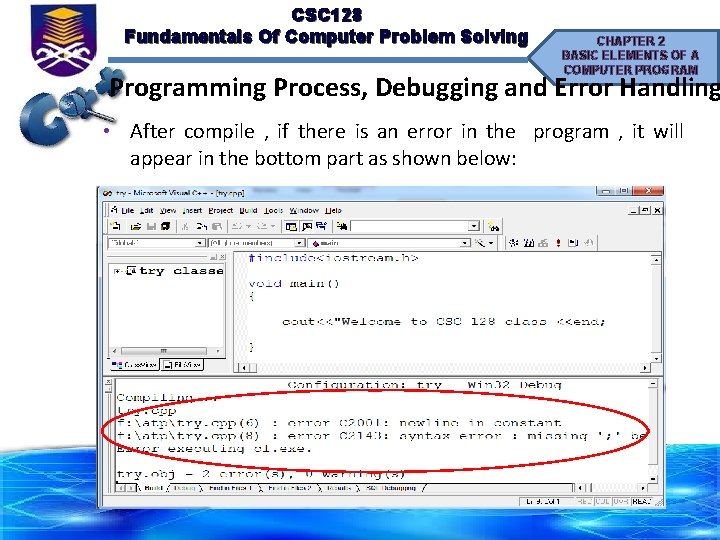
CSC 128 Fundamentals Of Computer Problem Solving CHAPTER 2 BASIC ELEMENTS OF A COMPUTER PROGRAM Programming Process, Debugging and Error Handling • After compile , if there is an error in the program , it will appear in the bottom part as shown below:
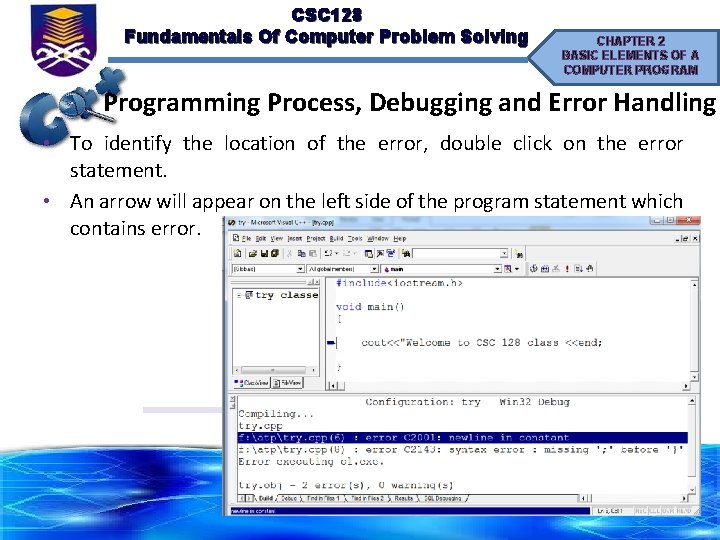
CSC 128 Fundamentals Of Computer Problem Solving CHAPTER 2 BASIC ELEMENTS OF A COMPUTER PROGRAM Programming Process, Debugging and Error Handling • To identify the location of the error, double click on the error statement. • An arrow will appear on the left side of the program statement which contains error.

CSC 128 Fundamentals Of Computer Problem Solving CHAPTER 2 BASIC ELEMENTS OF A COMPUTER PROGRAM Programming Process, Debugging and Error Handling • After correcting (process called debugging) the errors , we have to compile again the program until the message shown there is no errors in the program
CSC 128 Fundamentals Of Computer Problem Solving CHAPTER 2 BASIC ELEMENTS OF A COMPUTER PROGRAM Programming Process, Debugging and Error Handling Types of Error 1. Syntax errors – Errors related with violations of syntax rules. 2. Logical errors – Errors in the logic of a program. – Output produced is wrong 3. Run time errors – Errors caused program instructions that require the computer to do something illegal such as an attempt to divide a number by 0. – In this case, the implementation of program will stop automatically and display a certain messages.
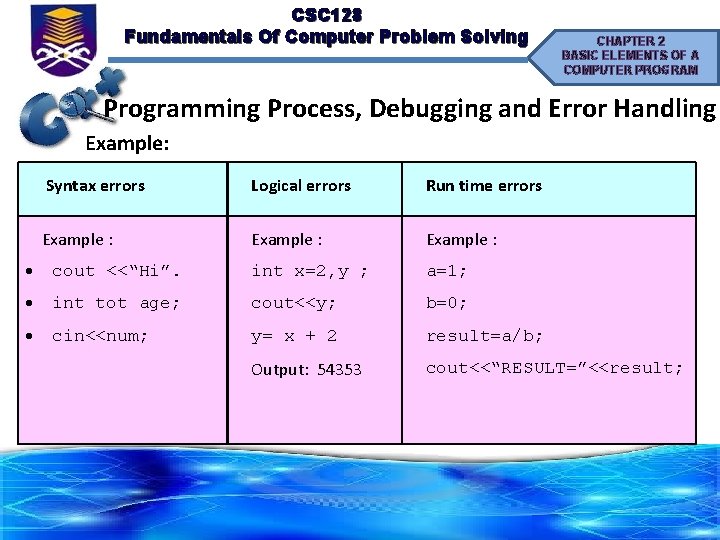
CSC 128 Fundamentals Of Computer Problem Solving CHAPTER 2 BASIC ELEMENTS OF A COMPUTER PROGRAM Programming Process, Debugging and Error Handling Example: Syntax errors Logical errors Run time errors Example : cout <<“Hi”. int x=2, y ; a=1; int tot age; cout<<y; b=0; cin<<num; y= x + 2 result=a/b; Output: 54353 cout<<“RESULT=”<<result;
CSC 128 Fundamentals Of Computer Problem Solving CHAPTER 2 BASIC ELEMENTS OF A COMPUTER PROGRAM Three Types Of Control Structure • A control structure is simply a pattern for controlling the flow of a program module. • 4 fundamental control structure of programming language are: § Sequence - Statements are executed in the order in which they have appear § Selection (decision) - The next statement to be executed is based on a condition § Iteration (looping) - The repetition of a statement or a group of a statement
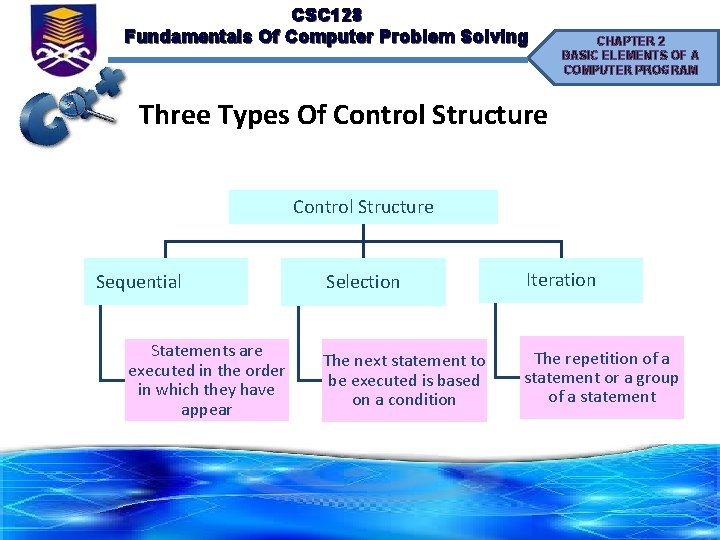
CSC 128 Fundamentals Of Computer Problem Solving CHAPTER 2 BASIC ELEMENTS OF A COMPUTER PROGRAM Three Types Of Control Structure Sequential Statements are executed in the order in which they have appear Selection Iteration The next statement to be executed is based on a condition The repetition of a statement or a group of a statement
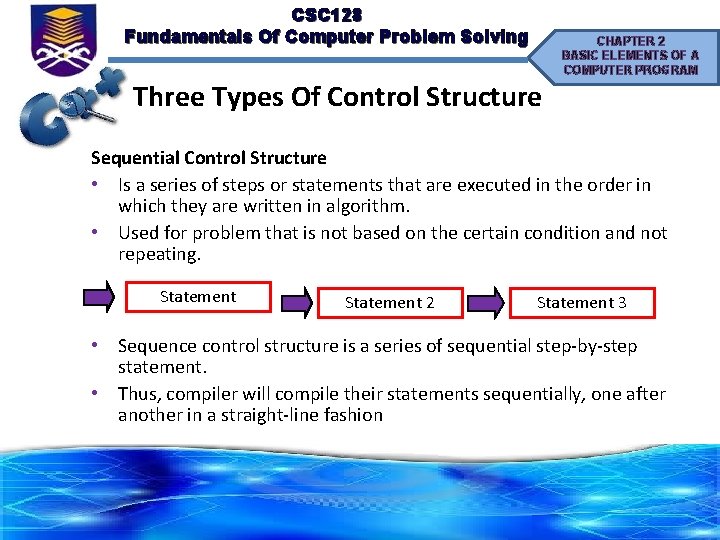
CSC 128 Fundamentals Of Computer Problem Solving CHAPTER 2 BASIC ELEMENTS OF A COMPUTER PROGRAM Three Types Of Control Structure Sequential Control Structure • Is a series of steps or statements that are executed in the order in which they are written in algorithm. • Used for problem that is not based on the certain condition and not repeating. Statement 2 Statement 3 • Sequence control structure is a series of sequential step-by-step statement. • Thus, compiler will compile their statements sequentially, one after another in a straight-line fashion
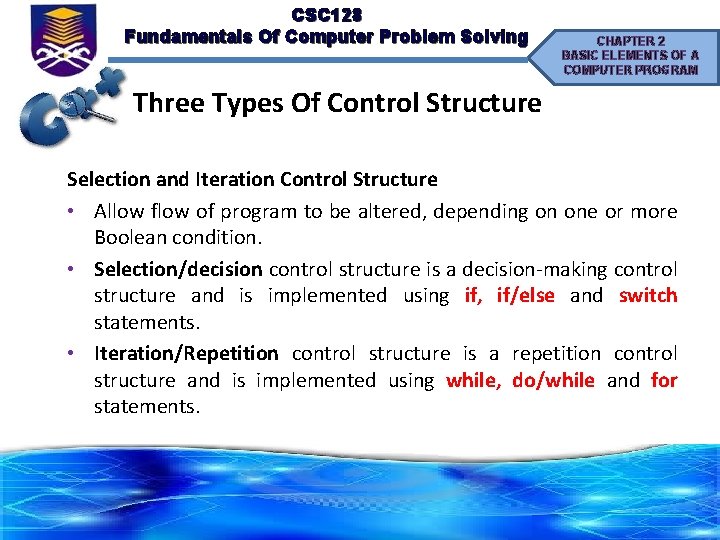
CSC 128 Fundamentals Of Computer Problem Solving CHAPTER 2 BASIC ELEMENTS OF A COMPUTER PROGRAM Three Types Of Control Structure Selection and Iteration Control Structure • Allow flow of program to be altered, depending on one or more Boolean condition. • Selection/decision control structure is a decision-making control structure and is implemented using if, if/else and switch statements. • Iteration/Repetition control structure is a repetition control structure and is implemented using while, do/while and for statements.

CSC 128 Fundamentals Of Computer Problem Solving Question 1: CHAPTER 2 BASIC ELEMENTS OF A COMPUTER PROGRAM Write a C++ assignment statement for each of the following algebraic equation Algebraic Expression Assignment Statement G=4*pow(PI, 2)*(pow(a, 3)*(pow(p, 2)*(x+y))) V=(pow(a, 2)/pow(b, 3)*sqrt(S*(S-a)))+c*d K = (L + M 3 + 5 RB) / 3 FC 2 K=(L+M*3+5*R*B)/(3*F*C*2)
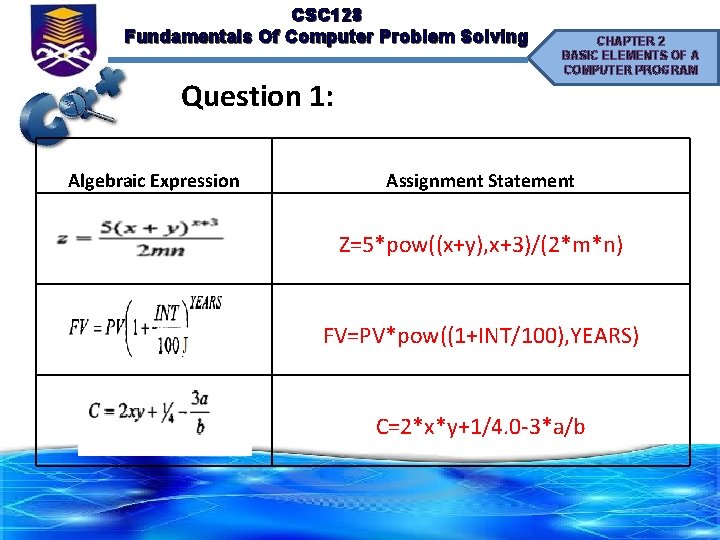
CSC 128 Fundamentals Of Computer Problem Solving Question 1: Algebraic Expression CHAPTER 2 BASIC ELEMENTS OF A COMPUTER PROGRAM Assignment Statement Z=5*pow((x+y), x+3)/(2*m*n) FV=PV*pow((1+INT/100), YEARS) C=2*x*y+1/4. 0 -3*a/b
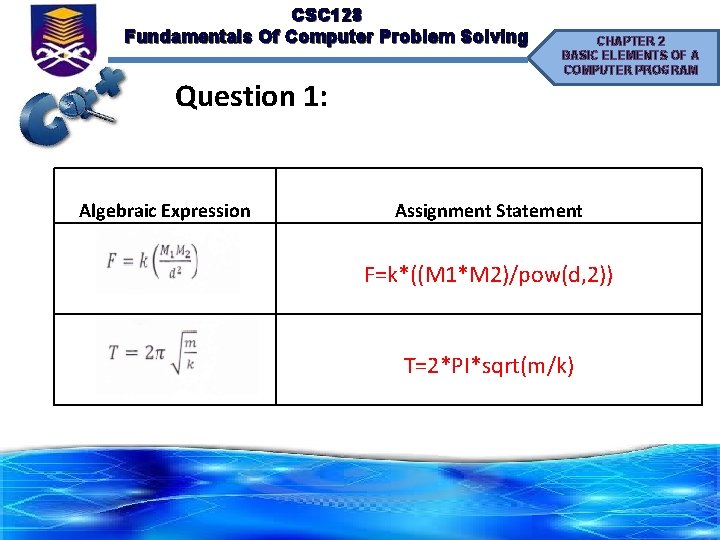
CSC 128 Fundamentals Of Computer Problem Solving Question 1: Algebraic Expression CHAPTER 2 BASIC ELEMENTS OF A COMPUTER PROGRAM Assignment Statement F=k*((M 1*M 2)/pow(d, 2)) T=2*PI*sqrt(m/k)
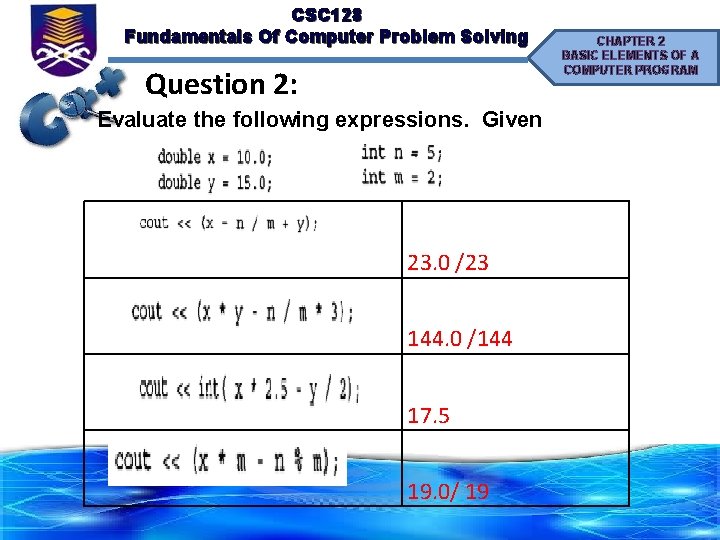
CSC 128 Fundamentals Of Computer Problem Solving Question 2: Evaluate the following expressions. Given 23. 0 /23 144. 0 /144 17. 5 19. 0/ 19 CHAPTER 2 BASIC ELEMENTS OF A COMPUTER PROGRAM
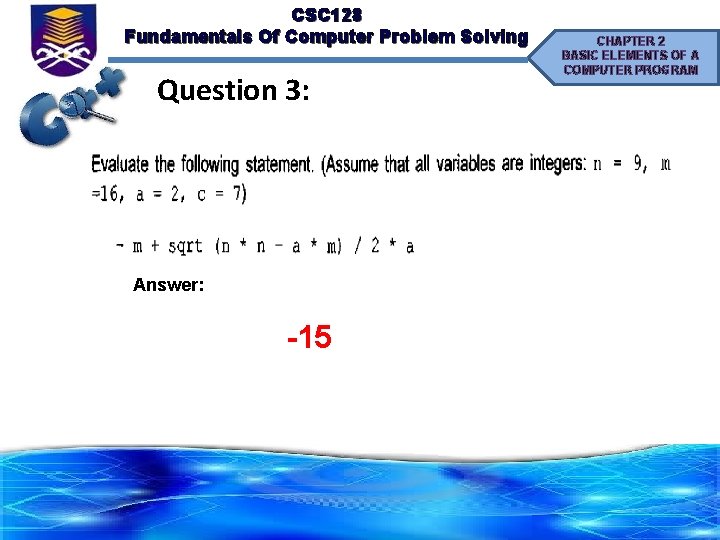
CSC 128 Fundamentals Of Computer Problem Solving Question 3: Answer: -15 CHAPTER 2 BASIC ELEMENTS OF A COMPUTER PROGRAM
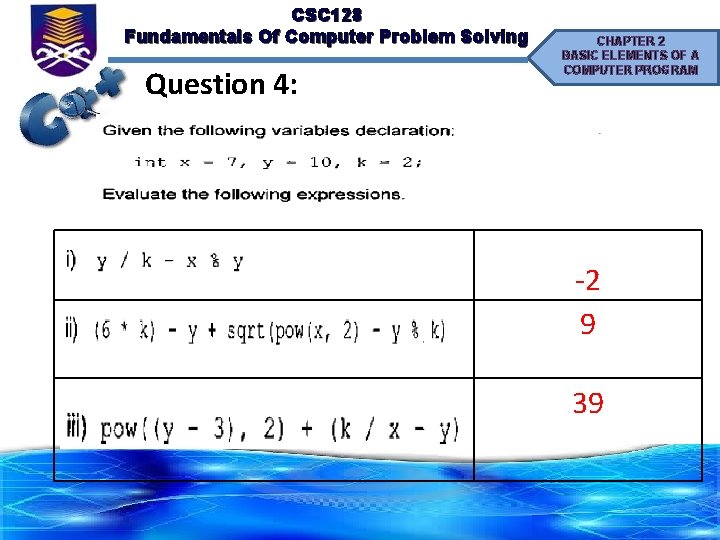
CSC 128 Fundamentals Of Computer Problem Solving Question 4: CHAPTER 2 BASIC ELEMENTS OF A COMPUTER PROGRAM -2 9 39
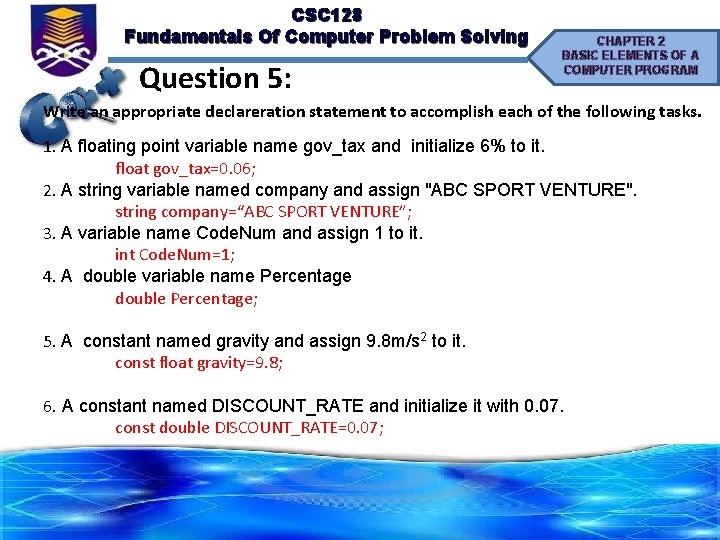
CSC 128 Fundamentals Of Computer Problem Solving Question 5: CHAPTER 2 BASIC ELEMENTS OF A COMPUTER PROGRAM Write an appropriate declareration statement to accomplish each of the following tasks. 1. A floating point variable name gov_tax and initialize 6% to it. float gov_tax=0. 06; 2. A string variable named company and assign "ABC SPORT VENTURE". string company=“ABC SPORT VENTURE”; 3. A variable name Code. Num and assign 1 to it. int Code. Num=1; 4. A double variable name Percentage double Percentage; 5. A constant named gravity and assign 9. 8 m/s 2 to it. const float gravity=9. 8; 6. A constant named DISCOUNT_RATE and initialize it with 0. 07. const double DISCOUNT_RATE=0. 07;
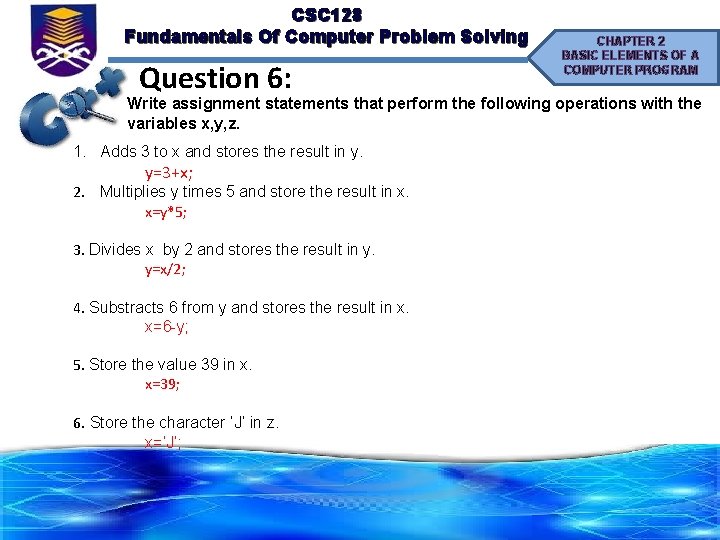
CSC 128 Fundamentals Of Computer Problem Solving Question 6: CHAPTER 2 BASIC ELEMENTS OF A COMPUTER PROGRAM Write assignment statements that perform the following operations with the variables x, y, z. 1. Adds 3 to x and stores the result in y. y=3+x; 2. Multiplies y times 5 and store the result in x. x=y*5; 3. Divides x by 2 and stores the result in y. y=x/2; 4. Substracts 6 from y and stores the result in x. x=6 -y; 5. Store the value 39 in x. x=39; 6. Store the character ‘J’ in z. x=‘J’;
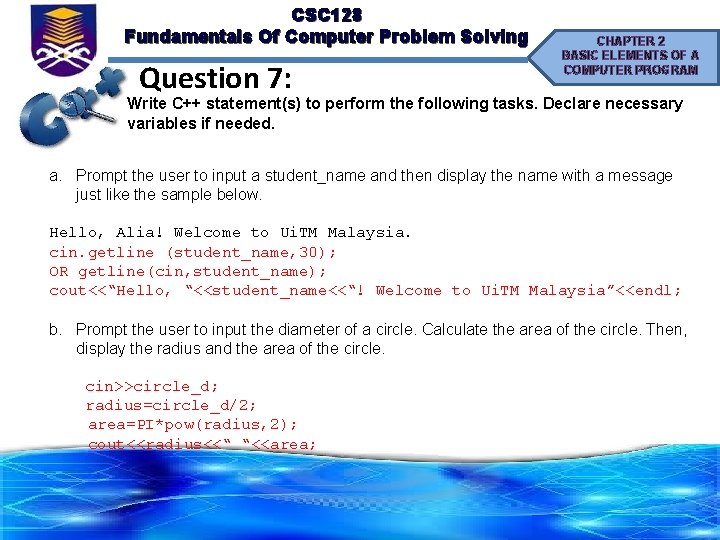
CSC 128 Fundamentals Of Computer Problem Solving Question 7: CHAPTER 2 BASIC ELEMENTS OF A COMPUTER PROGRAM Write C++ statement(s) to perform the following tasks. Declare necessary variables if needed. a. Prompt the user to input a student_name and then display the name with a message just like the sample below. Hello, Alia! Welcome to Ui. TM Malaysia. cin. getline (student_name, 30); OR getline(cin, student_name); cout<<“Hello, “<<student_name<<“! Welcome to Ui. TM Malaysia”<<endl; b. Prompt the user to input the diameter of a circle. Calculate the area of the circle. Then, display the radius and the area of the circle. cin>>circle_d; radius=circle_d/2; area=PI*pow(radius, 2); cout<<radius<<“ “<<area;
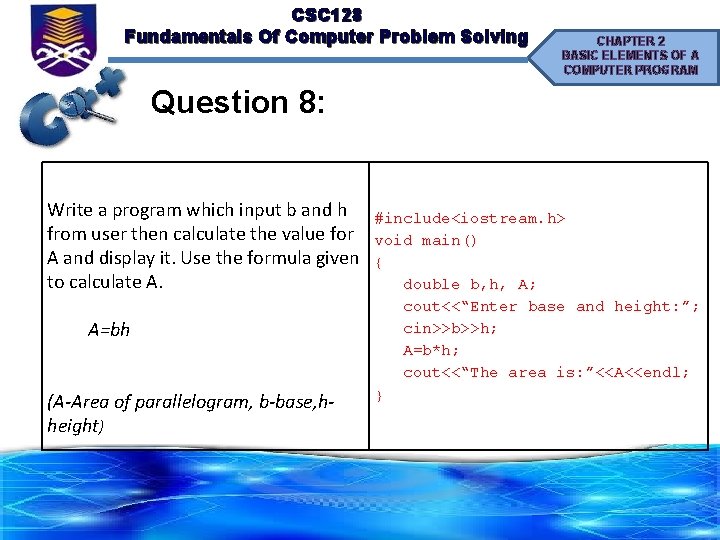
CSC 128 Fundamentals Of Computer Problem Solving CHAPTER 2 BASIC ELEMENTS OF A COMPUTER PROGRAM Question 8: Write a program which input b and h from user then calculate the value for A and display it. Use the formula given to calculate A. A=bh (A-Area of parallelogram, b-base, hheight) #include<iostream. h> void main() { double b, h, A; cout<<“Enter base and height: ”; cin>>b>>h; A=b*h; cout<<“The area is: ”<<A<<endl; }
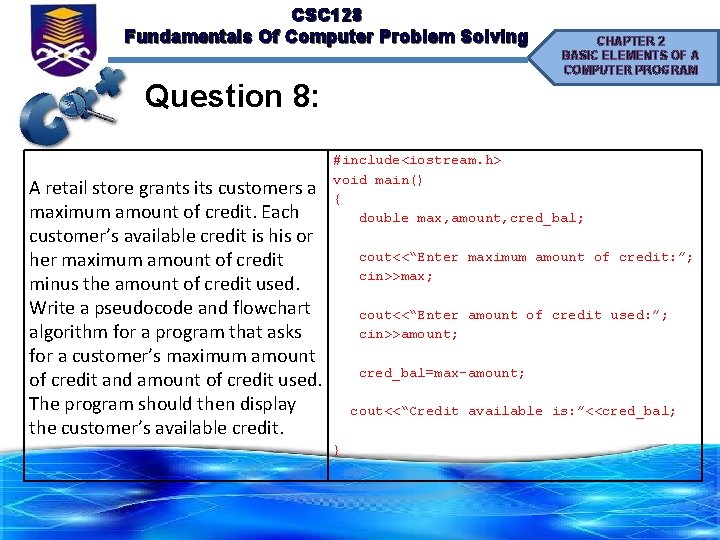
CSC 128 Fundamentals Of Computer Problem Solving CHAPTER 2 BASIC ELEMENTS OF A COMPUTER PROGRAM Question 8: A retail store grants its customers a maximum amount of credit. Each customer’s available credit is his or her maximum amount of credit minus the amount of credit used. Write a pseudocode and flowchart algorithm for a program that asks for a customer’s maximum amount of credit and amount of credit used. The program should then display the customer’s available credit. #include<iostream. h> void main() { double max, amount, cred_bal; cout<<“Enter maximum amount of credit: ”; cin>>max; cout<<“Enter amount of credit used: ”; cin>>amount; cred_bal=max-amount; cout<<“Credit available is: ”<<cred_bal; }
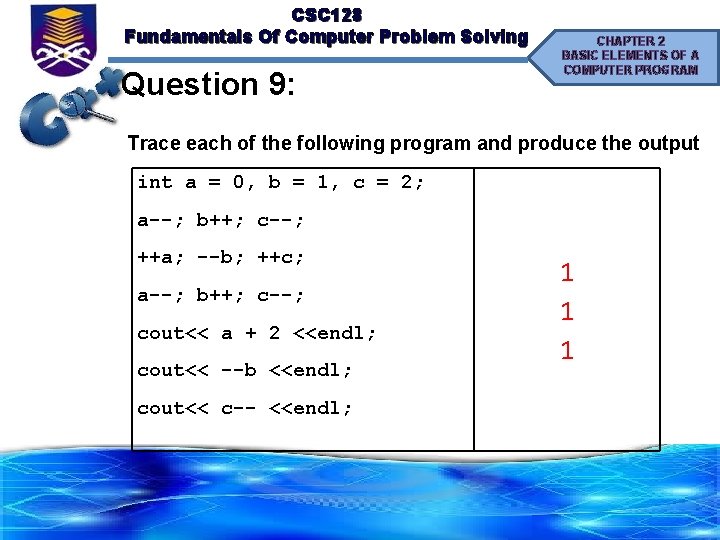
CSC 128 Fundamentals Of Computer Problem Solving Question 9: CHAPTER 2 BASIC ELEMENTS OF A COMPUTER PROGRAM Trace each of the following program and produce the output int a = 0, b = 1, c = 2; a--; b++; c--; ++a; --b; ++c; a--; b++; c--; cout<< a + 2 <<endl; cout<< --b <<endl; cout<< c-- <<endl; 1 1 1
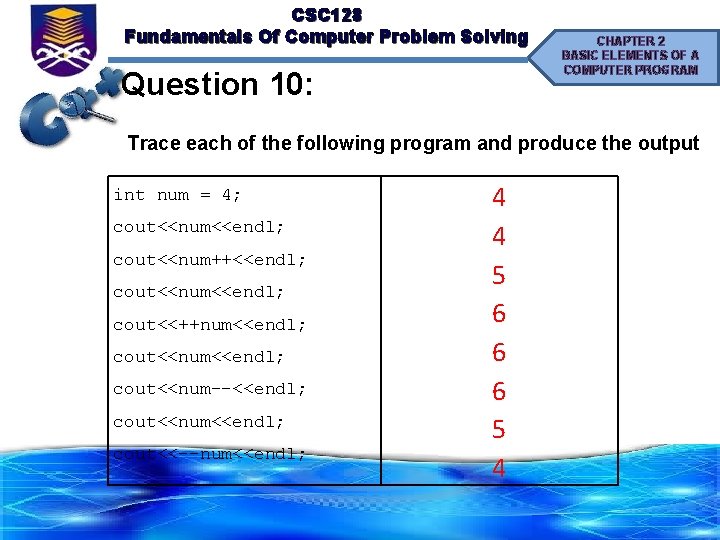
CSC 128 Fundamentals Of Computer Problem Solving Question 10: CHAPTER 2 BASIC ELEMENTS OF A COMPUTER PROGRAM Trace each of the following program and produce the output int num = 4; cout<<num<<endl; cout<<num++<<endl; cout<<num<<endl; cout<<++num<<endl; cout<<num--<<endl; cout<<num<<endl; cout<<--num<<endl; 4 4 5 6 6 6 5 4
- Slides: 113