
CS 6456 Graduate Operating Systems Brad Campbell bradjcvirginia
CS 6456: Graduate Operating Systems Brad Campbell – bradjc@virginia. edu https: //www. cs. virginia. edu/~bjc 8 c/class/cs 6456 -f 19/
What is virtualization? • Virtualization is the ability to run multiple operating systems on a single physical system and share the underlying hardware resources 1 • Allows one computer to provide the appearance of many computers. • Goals: • Provide flexibility for users • Amortize hardware costs • Isolate completely separate users 1 VMWare white paper, Virtualization Overview
Formal Requirements for Virtualizable Third Generation Architectures • “First, the VMM provides an environment for programs which is essentially identical with the original machine; • second, programs run in this environment show at worst only minor decreases in speed; • and last, the VMM is in complete control of system resources. ”
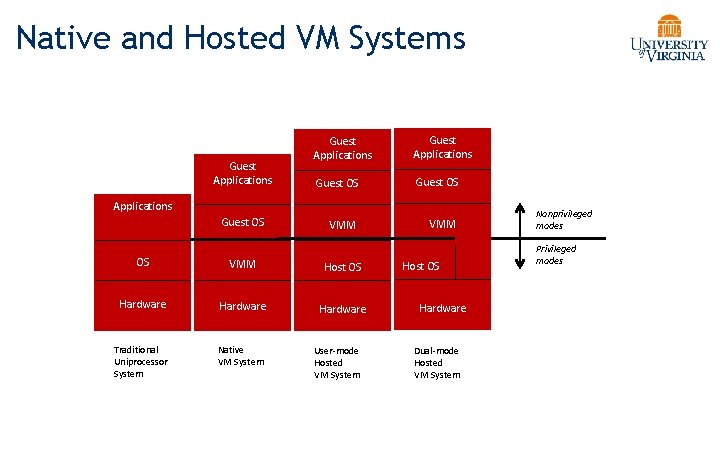
Native and Hosted VM Systems Guest Applications Guest OS VMM Applications Guest OS OS VMM Host OS Hardware Traditional Uniprocessor System Native VM System User-mode Hosted VM System Host OS Hardware Dual-mode Hosted VM System Nonprivileged modes Privileged modes

VMM Platform Types • Hosted Architecture • Install as application on existing x 86 “host” OS, e. g. Windows, Linux, OS X • Small context-switching driver • Leverage host I/O stack and resource management • Examples: VMware Player/Workstation/Server, Microsoft Virtual PC/Server, Parallels Desktop • Bare-Metal Architecture • “Hypervisor” installs directly on hardware • Acknowledged as preferred architecture for high-end servers • Examples: VMware ESX Server, Xen, Microsoft Viridian (2008)
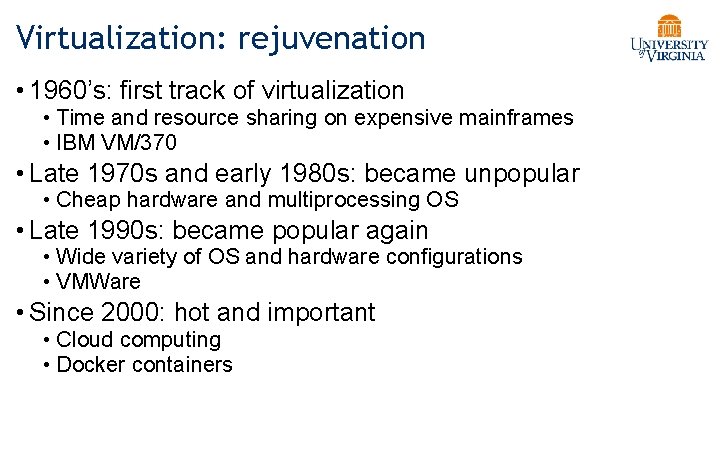
Virtualization: rejuvenation • 1960’s: first track of virtualization • Time and resource sharing on expensive mainframes • IBM VM/370 • Late 1970 s and early 1980 s: became unpopular • Cheap hardware and multiprocessing OS • Late 1990 s: became popular again • Wide variety of OS and hardware configurations • VMWare • Since 2000: hot and important • Cloud computing • Docker containers
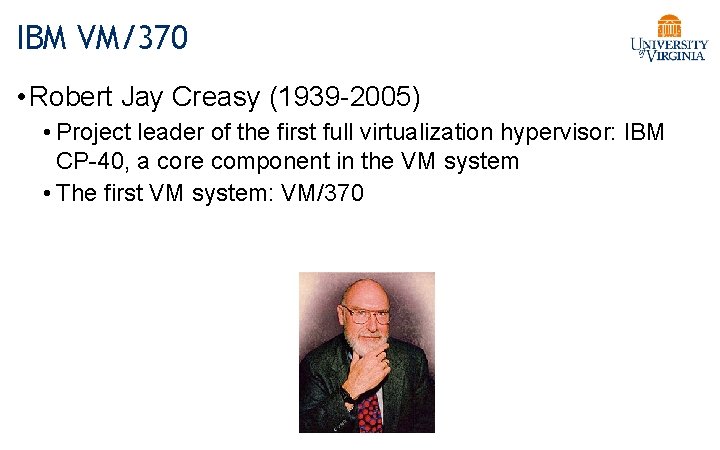
IBM VM/370 • Robert Jay Creasy (1939 -2005) • Project leader of the first full virtualization hypervisor: IBM CP-40, a core component in the VM system • The first VM system: VM/370
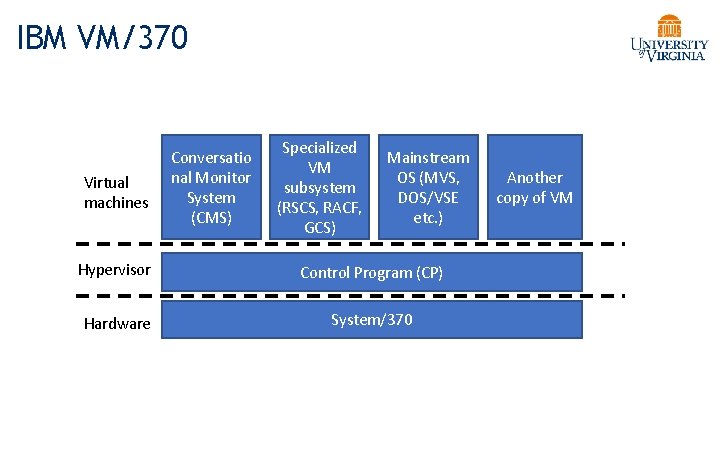
IBM VM/370 Virtual machines Conversatio nal Monitor System (CMS) Specialized VM subsystem (RSCS, RACF, GCS) Mainstream OS (MVS, DOS/VSE etc. ) Hypervisor Control Program (CP) Hardware System/370 Another copy of VM
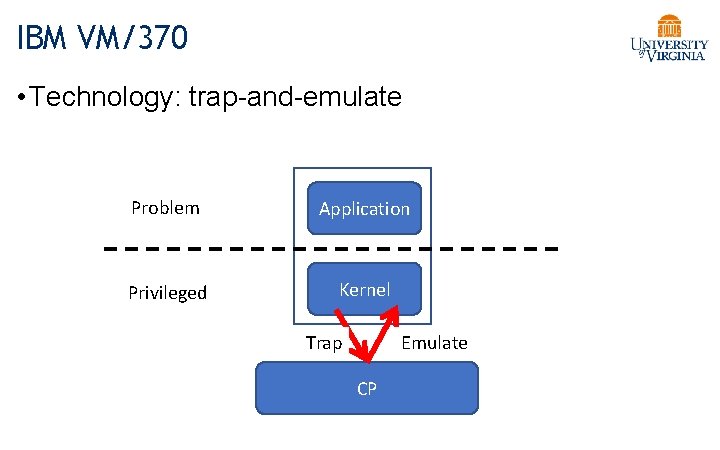
IBM VM/370 • Technology: trap-and-emulate Problem Application Privileged Kernel Trap Emulate CP
Virtualization on x 86 architecture • Challenges • Correctness: not all privileged instructions produce traps! • Example: popf • popf does different things in kernel mode vs. user mode • Performance: • System calls: traps in both enter and exit (10 X) • I/O performance: high CPU overhead • Virtual memory: no software-controlled TLB
Virtualization on x 86 architecture • Solutions: • Dynamic binary translation & shadow page table • Para-virtualization (Xen) • Hardware extension
Dynamic binary translation • Idea: intercept privileged instructions by changing the binary • Cannot patch the guest kernel directly (would be visible to guests) • Solution: make a copy, change it, and execute it from there • Use a cache to improve the performance
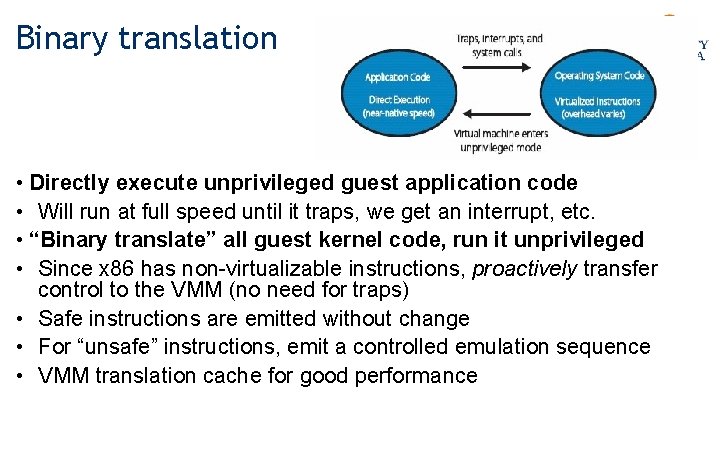
Binary translation • Directly execute unprivileged guest application code • Will run at full speed until it traps, we get an interrupt, etc. • “Binary translate” all guest kernel code, run it unprivileged • Since x 86 has non-virtualizable instructions, proactively transfer control to the VMM (no need for traps) • Safe instructions are emitted without change • For “unsafe” instructions, emit a controlled emulation sequence • VMM translation cache for good performance
How does VMWare do this? • Binary – input is x 86 “hex”, not source • Dynamic – interleave translation and execution • On Demand – translate only what about to execute (lazy) • System Level – makes no assumptions about guest code • Subsetting – full x 86 to safe subset • Adaptive – adjust translations based on guest behavior
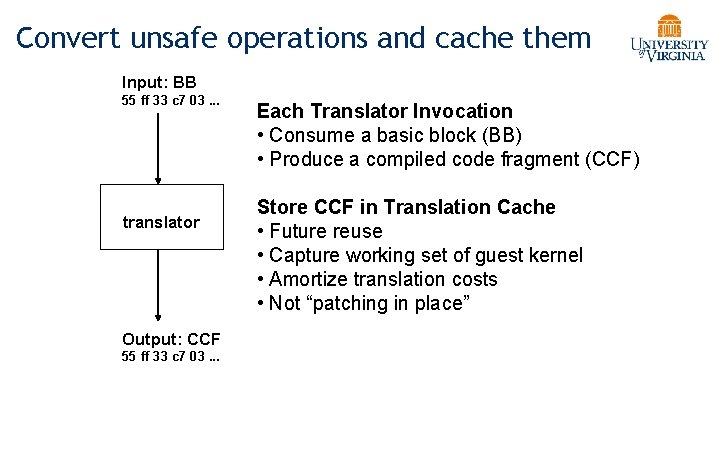
Convert unsafe operations and cache them Input: BB 55 ff 33 c 7 03. . . translator Output: CCF 55 ff 33 c 7 03. . . Each Translator Invocation • Consume a basic block (BB) • Produce a compiled code fragment (CCF) Store CCF in Translation Cache • Future reuse • Capture working set of guest kernel • Amortize translation costs • Not “patching in place”
Dynamic binary translation • Pros: • Make x 86 virtualizable • Can reduce traps • Cons: • Overhead • Hard to improve system calls, I/O operations • Hard to handle complex code
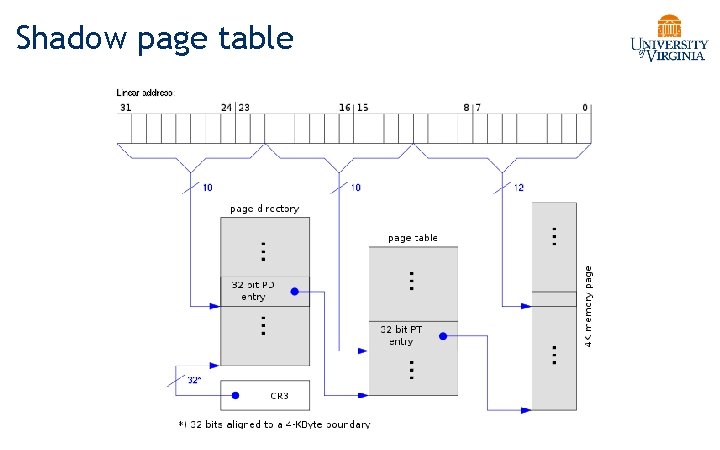
Shadow page table
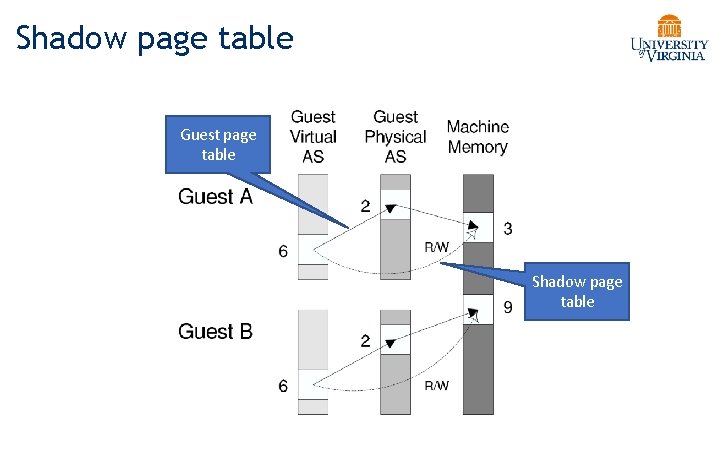
Shadow page table Guest page table Shadow page table
Shadow page table • Pros: • Transparent to guest VMs • Good performance when working set is stable • Cons: • Big overhead of keeping two page tables consistent • Introducing more issues: hidden fault, double paging …
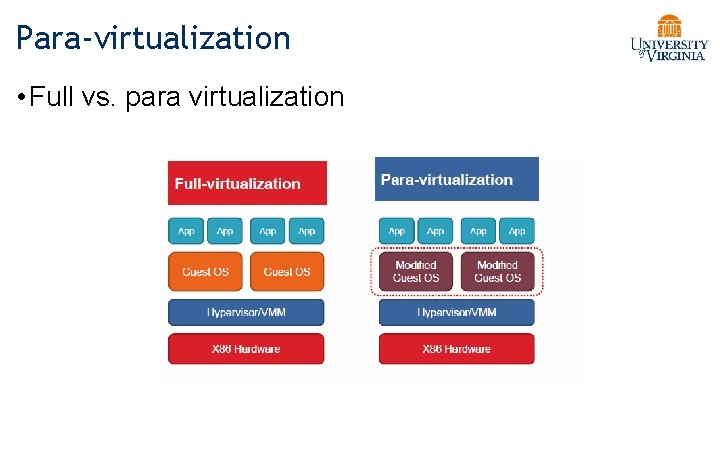
Para-virtualization • Full vs. para virtualization
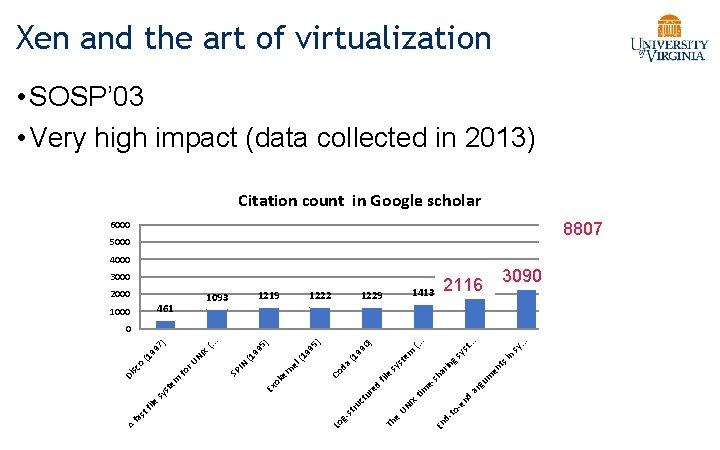
Xen and the art of virtualization • SOSP’ 03 • Very high impact (data collected in 2013) Citation count in Google scholar 6000 5153 8807 5000 4000 3000 2000 461 1000 1229 1222 1219 1093 2286 3090 1796 2116 1413 -e n to d. En (2 00 3) Xe n . . . sy ts en m ar gu d tim IX UN e Th in ys gs ar in esh e fil ed ur ct ru st g. Lo t. . em st sy da Co el rn ke Ex o e fil st fa A (. . (1 99 0) ) (1 99 5) (1 SP IN sy st em Di fo sc o r. U NI X (1 99 (. . 7) . 0
Overview of the Xen approach • Support for unmodified application binaries (but not OS) • Keep Application Binary Interface (ABI) • Modify guest OS to be aware of virtualization • Get around issues of x 86 architecture • Better performance • Keep hypervisor as small as possible • Device driver is in Dom 0
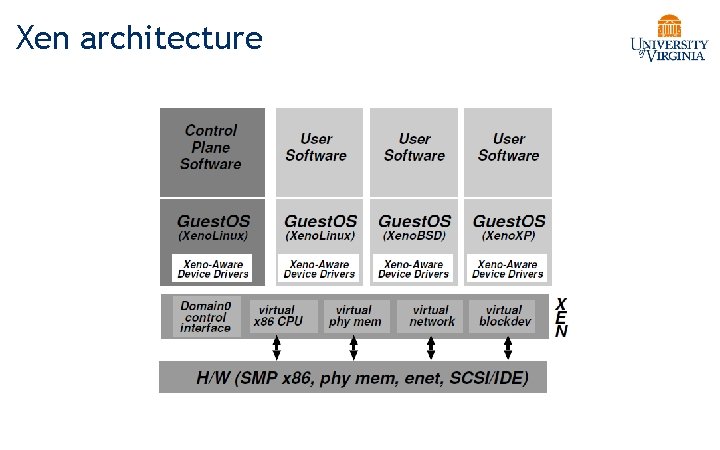
Xen architecture
Virtualization on x 86 architecture • Challenges • Correctness: not all privileged instructions produce traps! • Example: popf • Performance: • System calls: traps in both enter and exit (10 X) • I/O performance: high CPU overhead • Virtual memory: no software-controlled TLB
CPU virtualization • Protection • Xen in ring 0, guest kernel in ring 1 • Privileged instructions are replaced with hypercalls • Exception and system calls • Guest OS registers handles validated by Xen • Allowing direct system call from app into guest OS • Page fault: redirected by Xen
Memory virtualization • Xen exists in a 64 MB section at the top of every address space • Guest sees real physical address • Guest kernels are responsible for allocating and managing the hardware page tables. • After registering the page table to Xen, all subsequent updates must be validated.
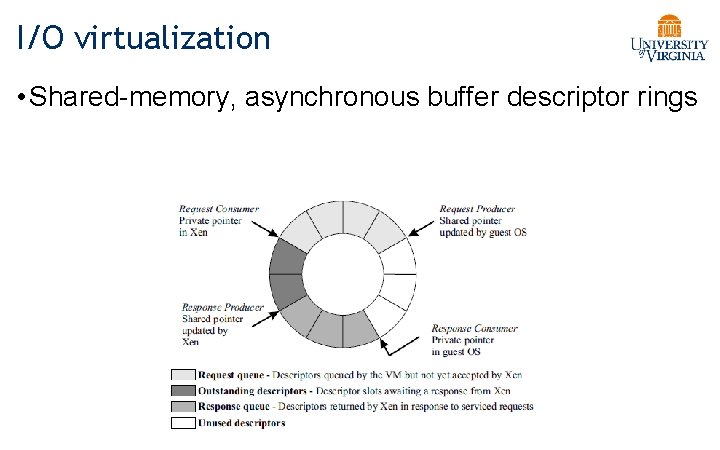
I/O virtualization • Shared-memory, asynchronous buffer descriptor rings
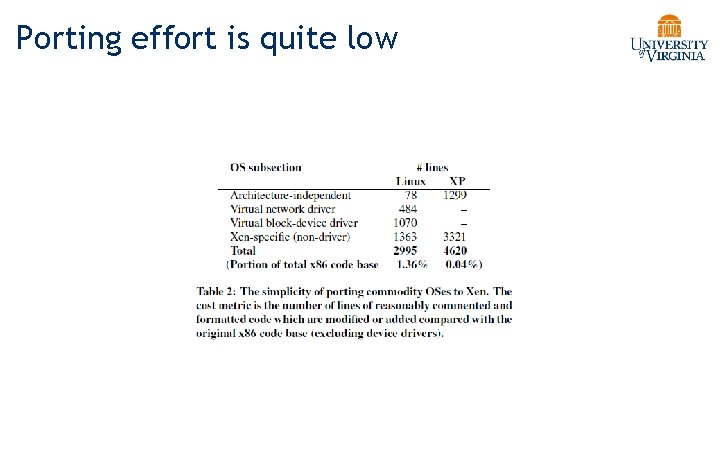
Porting effort is quite low
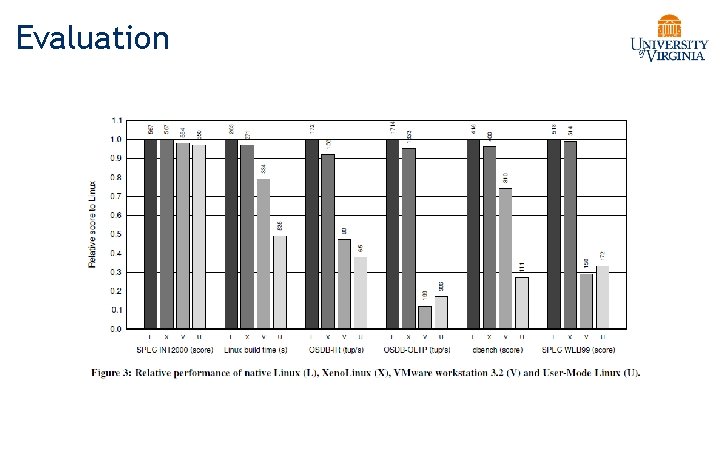
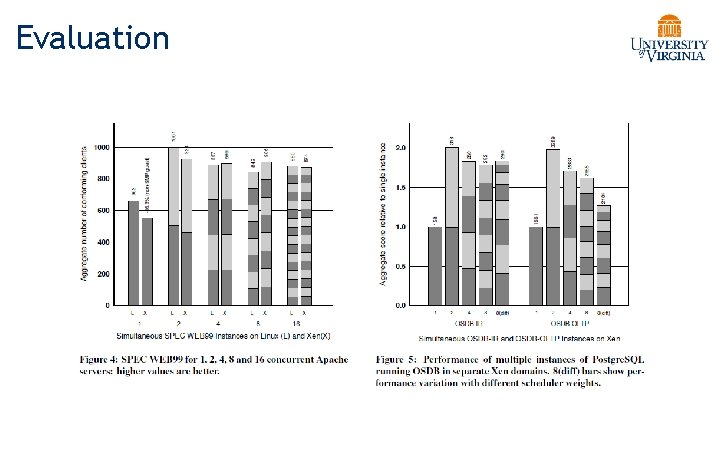
Evaluation
Evaluation
Conclusion • x 86 architecture makes virtualization challenging • Full virtualization • unmodified guest OS; good isolation • Performance issue (especially I/O) • Para virtualization: • Better performance (potentially) • Need to update guest kernel • Full and para virtualization will keep evolving together
• Corollary: How often do we lose our audience? • My tip: put the point of the slide directly in the title • “Evaluation” vs. • “Xen is 1. 1 x to 3 x more performant than VMWare”
Instead: Leverage hardware support • First generation - processor • Second generation - memory • Third generation – I/O device
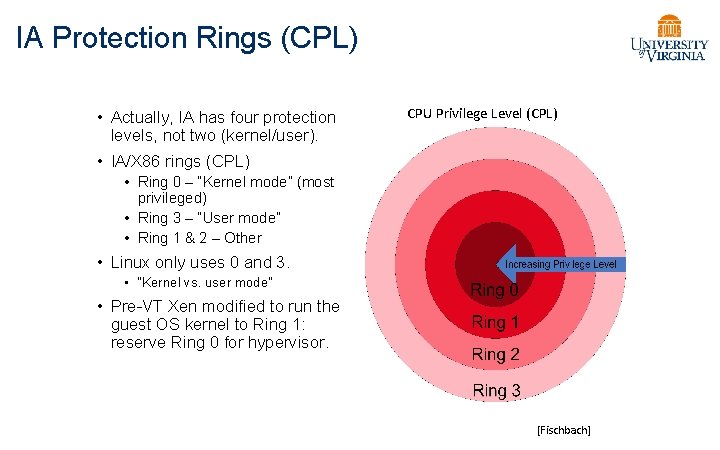
IA Protection Rings (CPL) • Actually, IA has four protection levels, not two (kernel/user). • IA/X 86 rings (CPL) CPU Privilege Level (CPL) • Ring 0 – “Kernel mode” (most privileged) • Ring 3 – “User mode” • Ring 1 & 2 – Other • Linux only uses 0 and 3. • “Kernel vs. user mode” • Pre-VT Xen modified to run the guest OS kernel to Ring 1: reserve Ring 0 for hypervisor. [Fischbach]
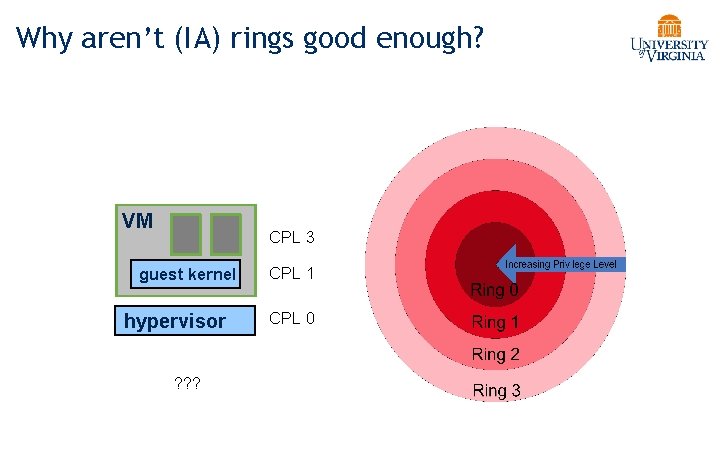
Why aren’t (IA) rings good enough? VM CPL 3 guest kernel hypervisor ? ? ? CPL 1 CPL 0
A short list of pre-VT problems Early IA hypervisors (VMware, Xen) had to emulate various machine behaviors and generally bend over backwards. • IA 32 page protection does not distinguish CPL 0 -2. • Segment-grained memory protection only. • Ring aliasing: some IA instructions expose CPL to guest! • Or fail silently… • Syscalls don’t work properly and require emulation. • sysenter always transitions to CPL 0. (D’oh!) • sysexit faults if the core is not in CPL 0. • Interrupts don’t work properly and require emulation. • Interrupt disable/enable reserved to CPL 0.
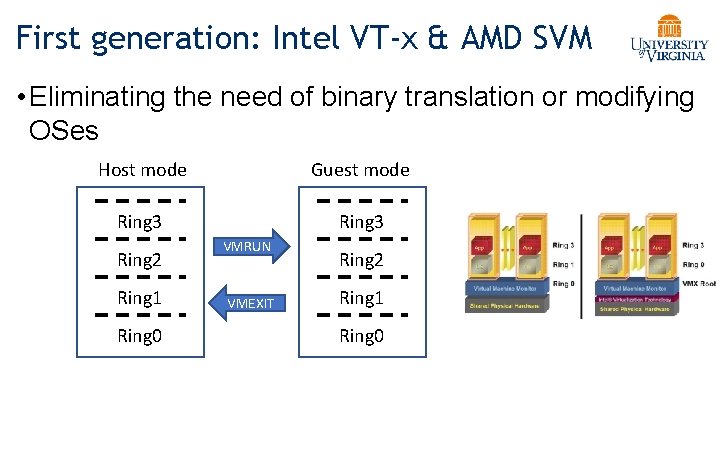
First generation: Intel VT-x & AMD SVM • Eliminating the need of binary translation or modifying OSes Host mode Guest mode Ring 3 Ring 2 Ring 1 Ring 0 VMRUN VMEXIT Ring 2 Ring 1 Ring 0
VT in a Nutshell • New VM mode bit • Orthogonal to CPL (e. g. , kernel/user mode) • If VM mode is off host mode • Machine “looks just like it always did” (“VMX root”) • If VM bit is on guest mode • • • Machine is running a guest VM: “VMX non-root mode” Machine “looks just like it always did” to the guest, BUT: Various events trigger gated entry to hypervisor (in VMX root) A “virtualization intercept”: exit VM mode to VMM (VM Exit) Hypervisor (VMM) can control which events cause intercepts Hypervisor can examine/manipulate guest VM state and return to VM (VM Entry)
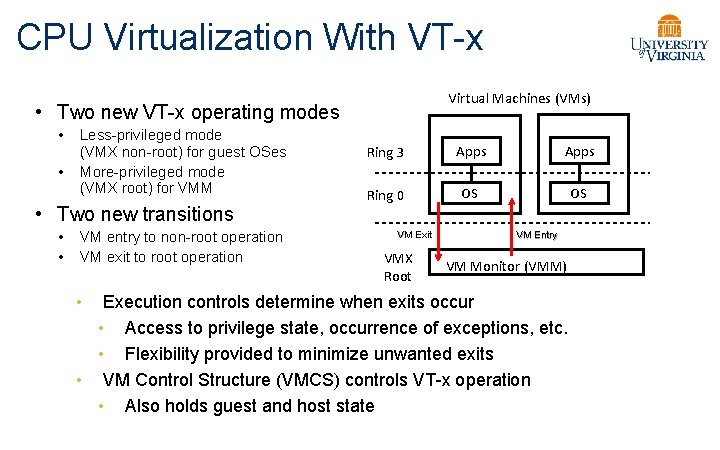
CPU Virtualization With VT-x Virtual Machines (VMs) • Two new VT-x operating modes • • Less-privileged mode (VMX non-root) for guest OSes More-privileged mode (VMX root) for VMM • Two new transitions • • VM entry to non-root operation VM exit to root operation Ring 3 Apps Ring 0 OS OS VM Exit VMX Root VM Entry VM Monitor (VMM) Execution controls determine when exits occur • Access to privilege state, occurrence of exceptions, etc. • Flexibility provided to minimize unwanted exits • VM Control Structure (VMCS) controls VT-x operation • Also holds guest and host state •
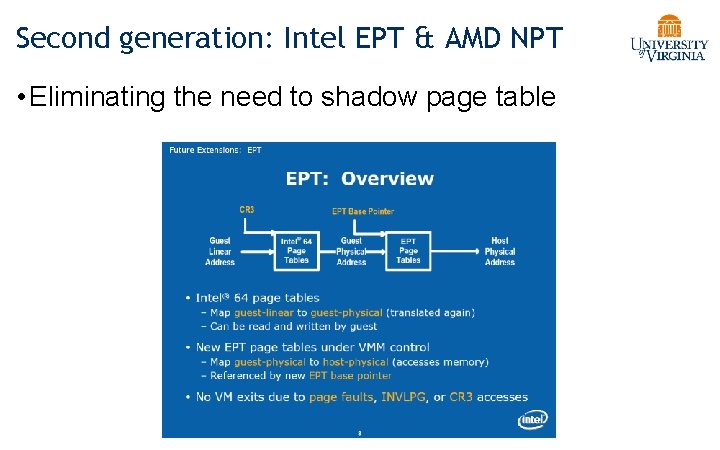
Second generation: Intel EPT & AMD NPT • Eliminating the need to shadow page table
Third generation: Intel VT-d & AMD IOMMU • I/O device assignment • VM owns real device • DMA remapping • Support address translation for DMA • Interrupt remapping • Routing device interrupt OSDI’ 12
pp as a “process” in guest mode, and let it use all CPL
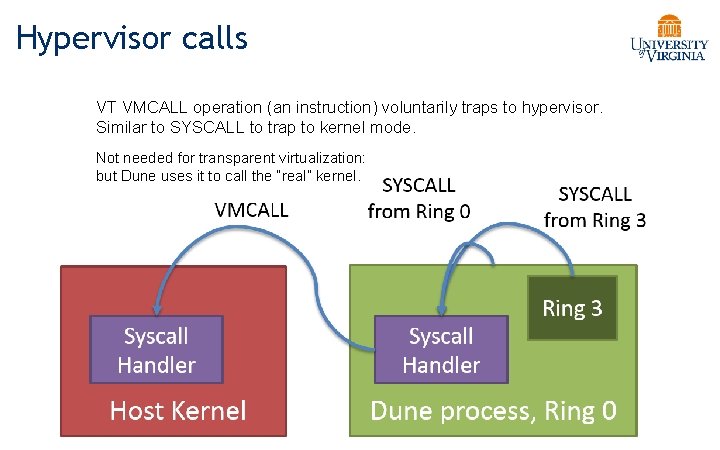
Hypervisor calls VT VMCALL operation (an instruction) voluntarily traps to hypervisor. Similar to SYSCALL to trap to kernel mode. Not needed for transparent virtualization: but Dune uses it to call the “real” kernel.

- Slides: 45