
CS 4513 Distributed Computer Systems Introduction Outline Overview
CS 4513 Distributed Computer Systems Introduction
Outline • Overview • Goals • Software • Client Server
The Rise of Distributed Systems • Computer hardware prices falling, power increasing • Network connectivity increasing • • It is easy to connect hardware together Definition: a distributed system is – If cars the same, Rolls Royce would cost 1 dollar and get 1 billion miles per gallon (with 200 page manual to open the door) – Everyone is connected with fat pipes – A collection of independent computers that appears to its users as a single coherent system.
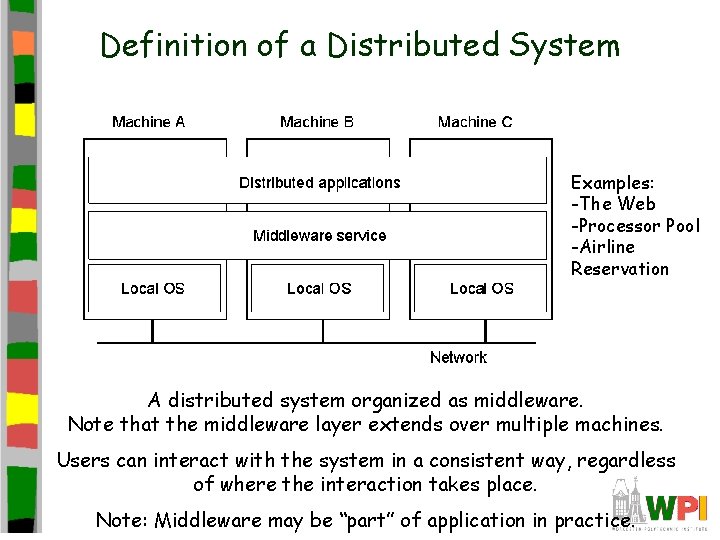
Definition of a Distributed System Examples: -The Web -Processor Pool -Airline Reservation A distributed system organized as middleware. Note that the middleware layer extends over multiple machines. Users can interact with the system in a consistent way, regardless of where the interaction takes place. Note: Middleware may be “part” of application in practice.

Transparency in a Distributed System Transparency Description Access Hide differences in data representation and how a resource is accessed Location Hide where a resource is located Migration Hide that a resource may move to another location Relocation Hide that a resource may be moved to another location while in use Replication Hide that a resource may be shared by several competitive users Concurrency Hide that a resource may be shared by several competitive users Failure Hide the failure and recovery of a resource Persistence Hide whether a (software) resource is in memory or on disk Different forms of transparency in a distributed system.
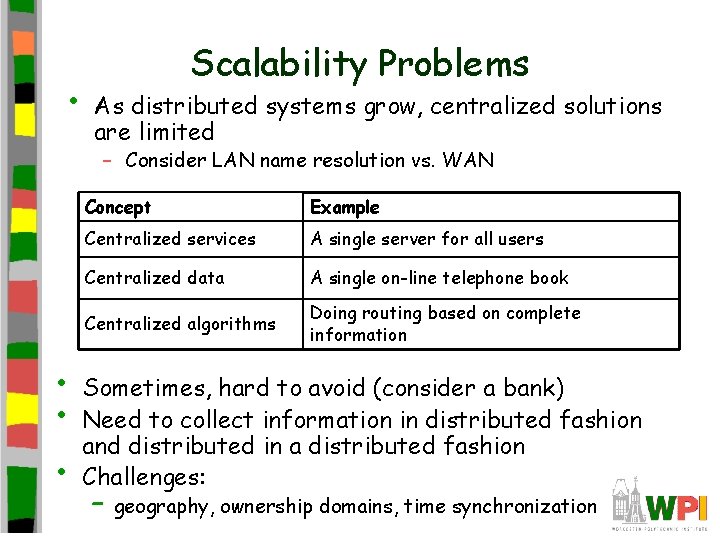
• Scalability Problems As distributed systems grow, centralized solutions are limited – Consider LAN name resolution vs. WAN • • • Concept Example Centralized services A single server for all users Centralized data A single on-line telephone book Centralized algorithms Doing routing based on complete information Sometimes, hard to avoid (consider a bank) Need to collect information in distributed fashion and distributed in a distributed fashion Challenges: – geography, ownership domains, time synchronization
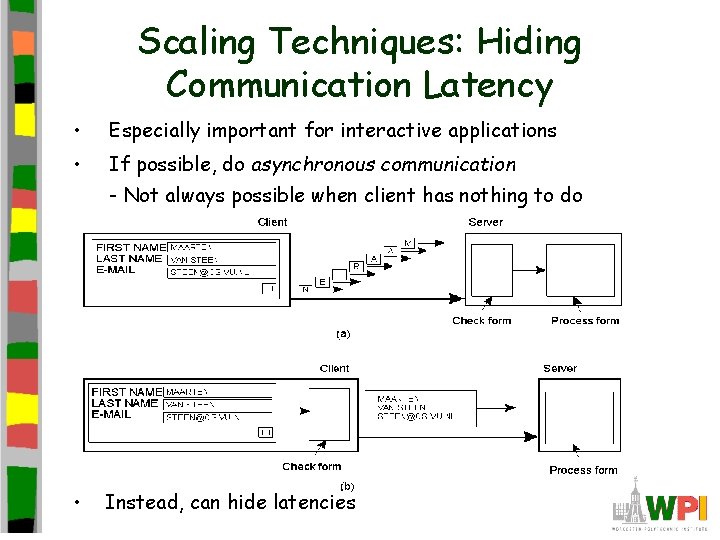
Scaling Techniques: Hiding Communication Latency • Especially important for interactive applications • If possible, do asynchronous communication - Not always possible when client has nothing to do • Instead, can hide latencies
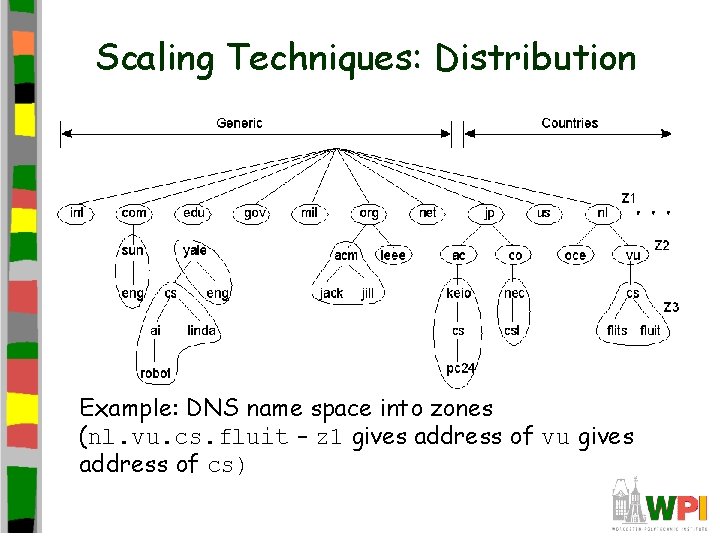
Scaling Techniques: Distribution 1. 5 Example: DNS name space into zones (nl. vu. cs. fluit – z 1 gives address of vu gives address of cs)
Scaling Techniques: Replication • Copy of information to increase availability and decrease centralized load – Example: P 2 P networks (Gnutella +) distribute copies uniformly or in proportion to use – Example: CDNs (akamai) – Example: Caching is a replication decision made by client • Issue: Consistency of replicated information – Example: Web Browser cache
Outline • Overview • Goals • Software • Client Server (done)
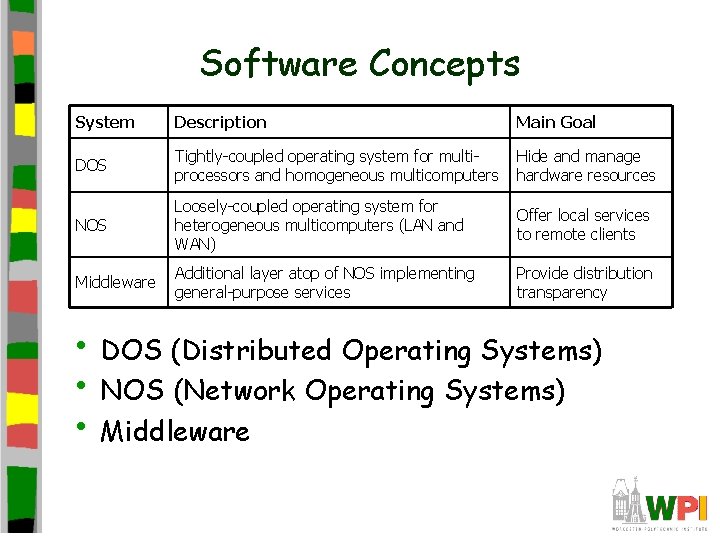
Software Concepts System Description Main Goal DOS Tightly-coupled operating system for multiprocessors and homogeneous multicomputers Hide and manage hardware resources NOS Loosely-coupled operating system for heterogeneous multicomputers (LAN and WAN) Offer local services to remote clients Middleware Additional layer atop of NOS implementing general-purpose services Provide distribution transparency • DOS (Distributed Operating Systems) • NOS (Network Operating Systems) • Middleware
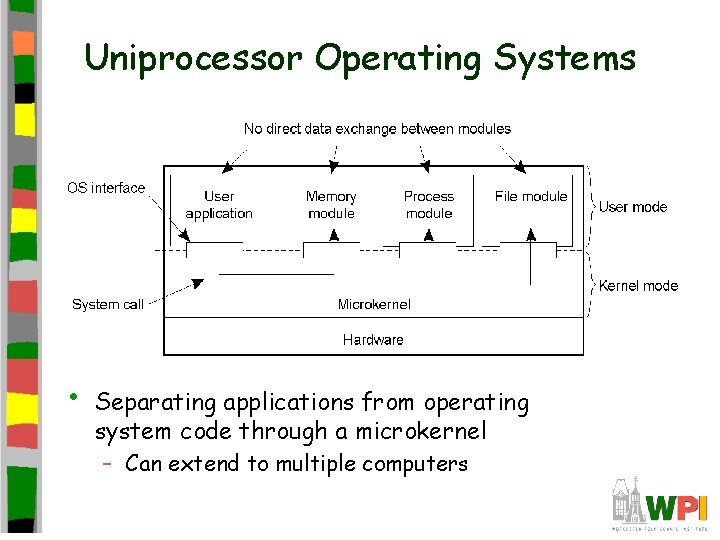
Uniprocessor Operating Systems • Separating applications from operating system code through a microkernel – Can extend to multiple computers
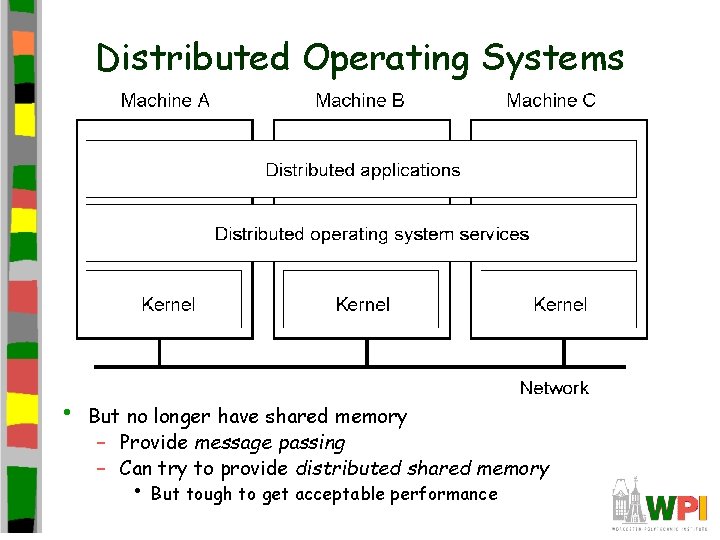
Distributed Operating Systems • But no longer have shared memory – Provide message passing – Can try to provide distributed shared memory • But tough to get acceptable performance
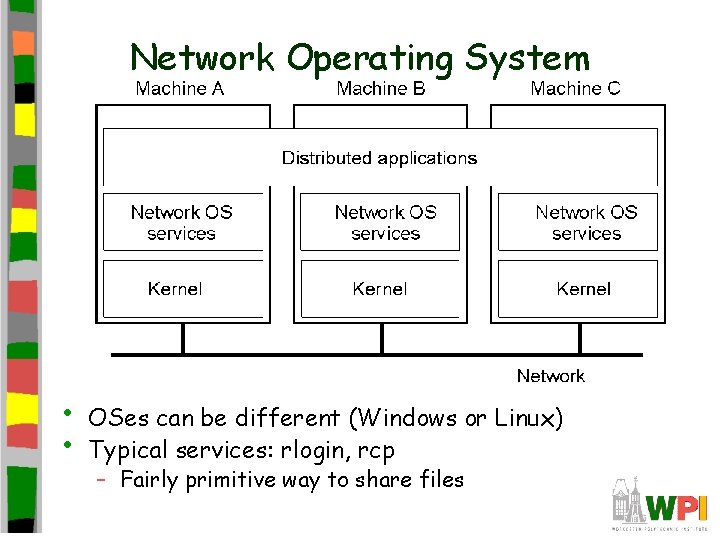
Network Operating System • • OSes can be different (Windows or Linux) Typical services: rlogin, rcp – Fairly primitive way to share files
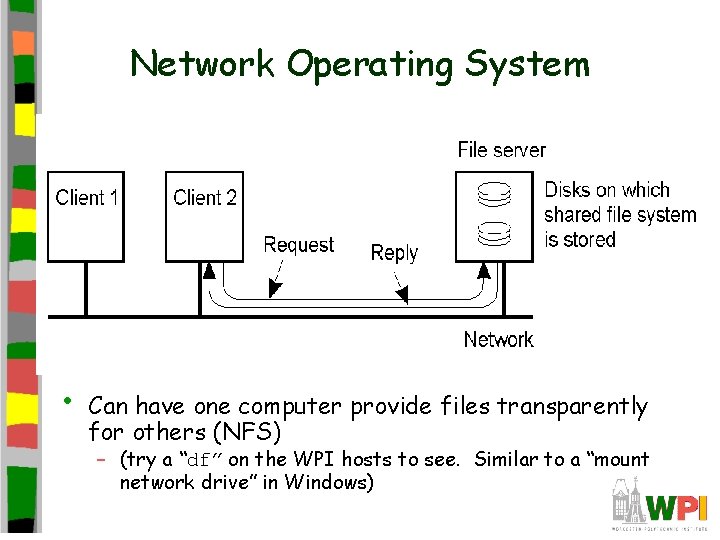
Network Operating System • Can have one computer provide files transparently for others (NFS) – (try a “df” on the WPI hosts to see. Similar to a “mount network drive” in Windows)
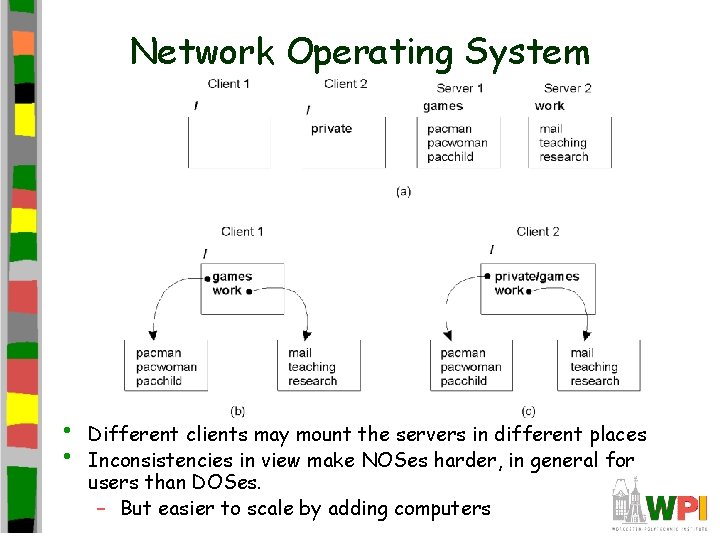
Network Operating System • • Different clients may mount the servers in different places Inconsistencies in view make NOSes harder, in general for users than DOSes. – But easier to scale by adding computers
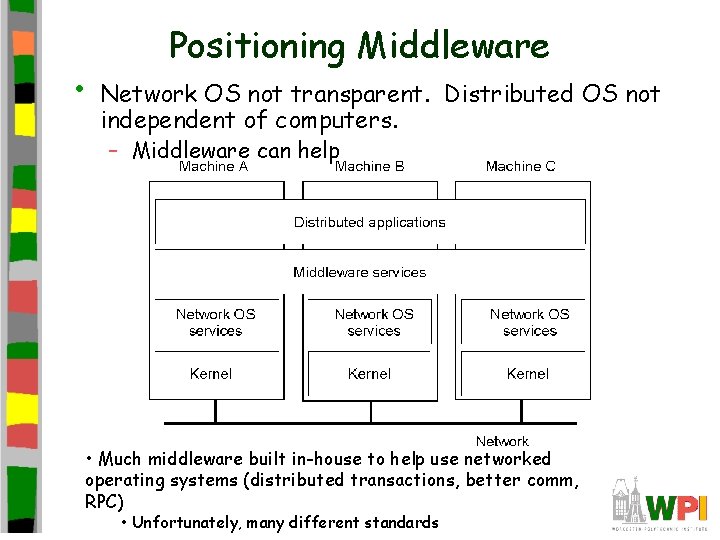
• Positioning Middleware Network OS not transparent. Distributed OS not independent of computers. – Middleware can help • Much middleware built in-house to help use networked operating systems (distributed transactions, better comm, RPC) • Unfortunately, many different standards
Outline • Overview • Goals • Software • Client Server (done)
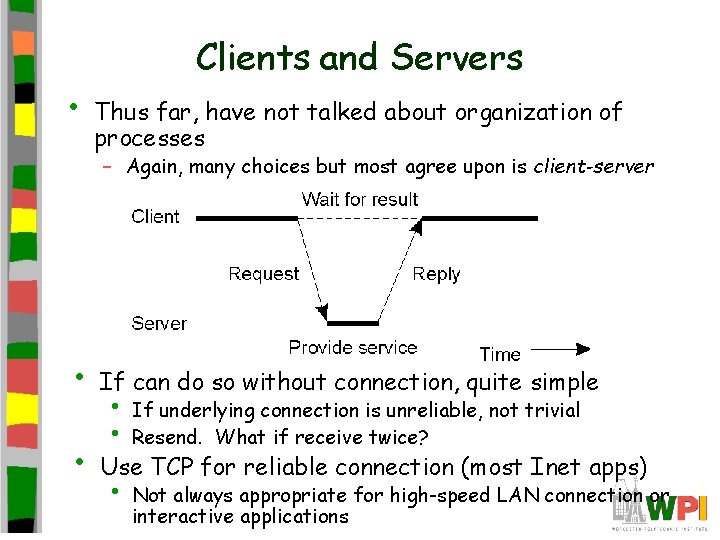
• Clients and Servers Thus far, have not talked about organization of processes – Again, many choices but most agree upon is client-server • If can do so without connection, quite simple • Use TCP for reliable connection (most Inet apps) • • • If underlying connection is unreliable, not trivial Resend. What if receive twice? Not always appropriate for high-speed LAN connection or interactive applications
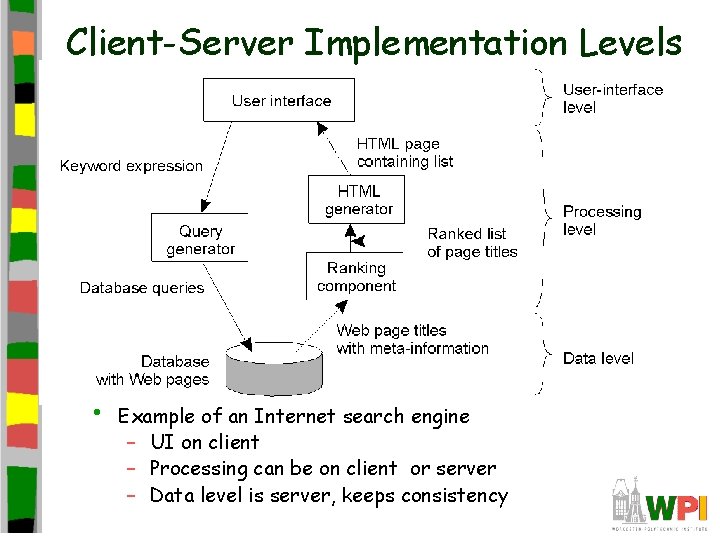
Client-Server Implementation Levels • Example of an Internet search engine – UI on client – Processing can be on client or server – Data level is server, keeps consistency
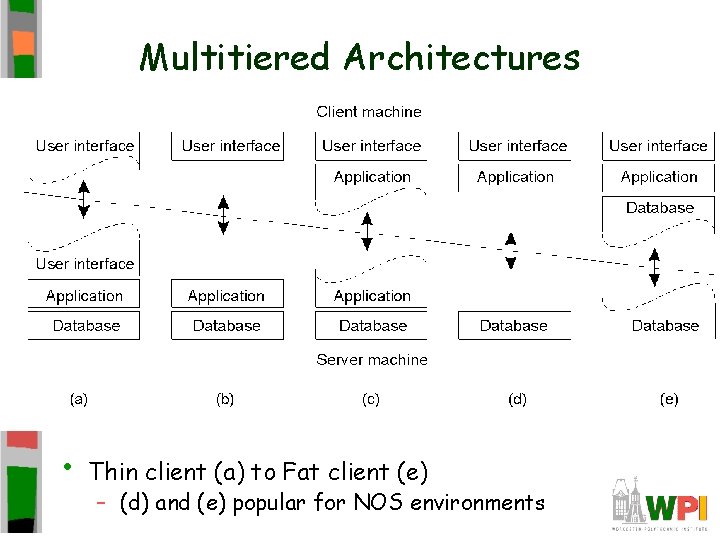
Multitiered Architectures • Thin client (a) to Fat client (e) – (d) and (e) popular for NOS environments
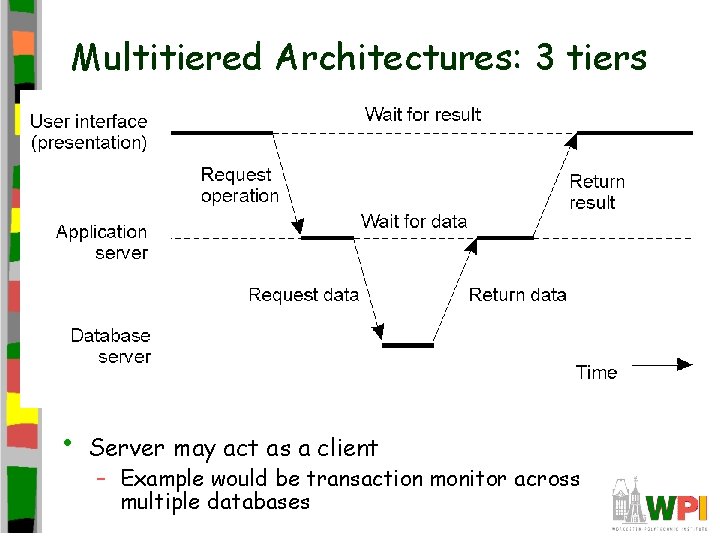
Multitiered Architectures: 3 tiers • Server may act as a client – Example would be transaction monitor across multiple databases
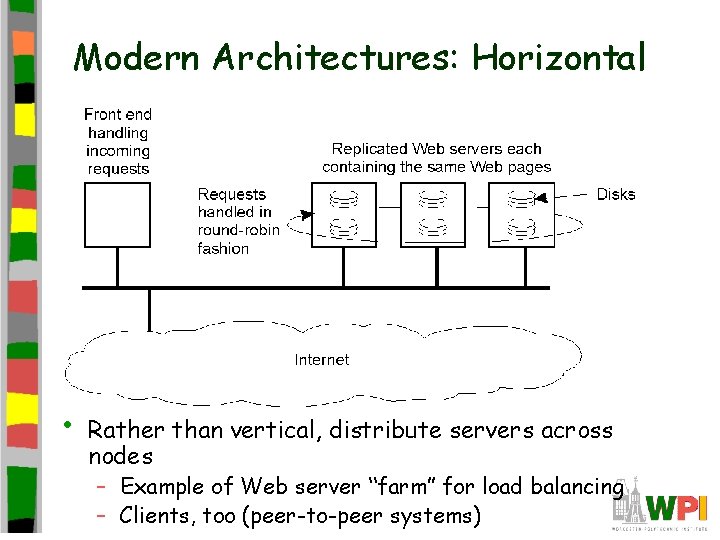
Modern Architectures: Horizontal • Rather than vertical, distribute servers across nodes – Example of Web server “farm” for load balancing – Clients, too (peer-to-peer systems)
- Slides: 23