
CS 356 Computer Network Architectures Lecture 8 Learning




- Slides: 50
CS 356: Computer Network Architectures Lecture 8: Learning Bridges and ATM Ch 3. 1 Xiaowei Yang xwy@cs. duke. edu
Overview • Past lectures – Single link networks • Point-to-point, shared media – Ethernet, token ring, wireless networks • Encoding, framing, error detection, reliability – Delay-bandwidth product, sliding window, exponential backoff, carrier sense collision detection, hidden/exposed terminals – Packet switching: how to connect multiple links • • Connectionless: Datagram Connection-oriented: Virtual circuits Source routing Pros and cons
Datagram switching • Every packet contains the destination address – A global unique identifier – Ethernet has 48 -bit addresses • A switch maintains a forwarding table that maps a packet to an output port
Switch 2’s forwarding table Destination Port ------------------A 3 B 0 C 3 D 3 E 2 F 1 G 0 H 0 Forwarding Table for Switch 2 Q: how does a switch compute the table?
Today • Datagram switching: how switches compute the switching table – Ethernet bridges – Spanning tree algorithm • Virtual circuit switching – Asynchronous Transfer Mode (ATM)
Ethernet Bridges • An Ethernet Bridge is a packet switching device that connects multiple Ethernet segments – Bridge is a historic name – Newer devices are also called Local Area Network (LAN) switches • An extended LAN – Ethernet LANs connected by bridges
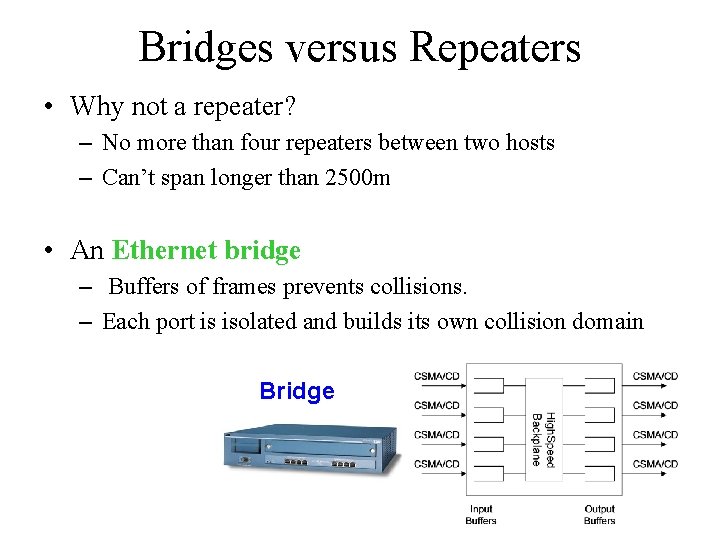
Bridges versus Repeaters • Why not a repeater? – No more than four repeaters between two hosts – Can’t span longer than 2500 m • An Ethernet bridge – Buffers of frames prevents collisions. – Each port is isolated and builds its own collision domain Bridge
Learning Bridges • Overall design goal: complete transparency • “Plug-and-play” • Self-configuring without hardware or software changes • Bridges should not impact operations of existing LANs • Three parts to learning bridges: • (1) Forwarding of Frames • (2) Learning of Addresses • (3) Spanning Tree Algorithm
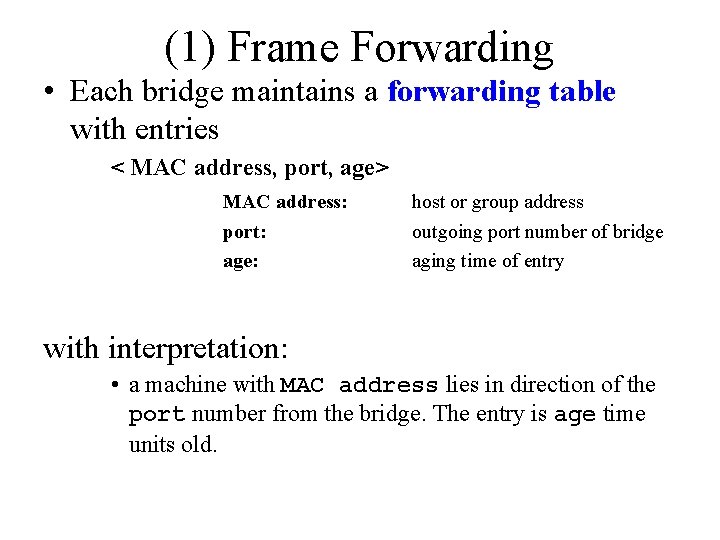
(1) Frame Forwarding • Each bridge maintains a forwarding table with entries < MAC address, port, age> MAC address: host or group address port: age: outgoing port number of bridge aging time of entry with interpretation: • a machine with MAC address lies in direction of the port number from the bridge. The entry is age time units old.
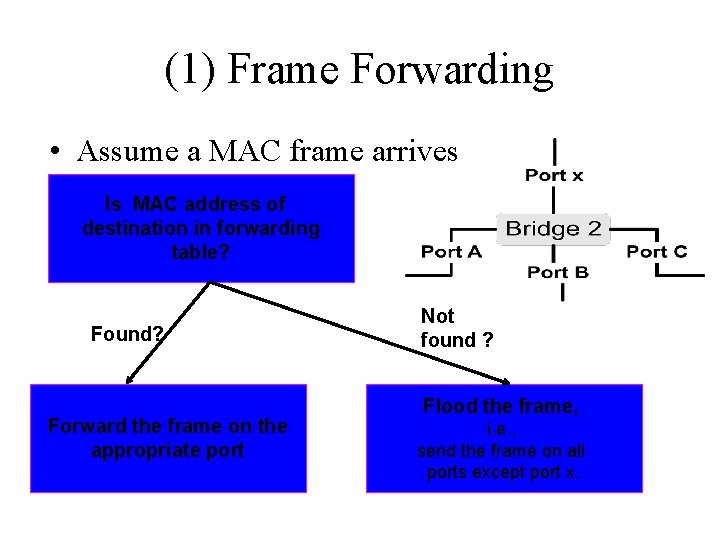
(1) Frame Forwarding • Assume a MAC frame arrives on. Isport x. MAC address of destination in forwarding table? Found? Forward the frame on the appropriate port Not found ? Flood the frame, i. e. , send the frame on all ports except port x.
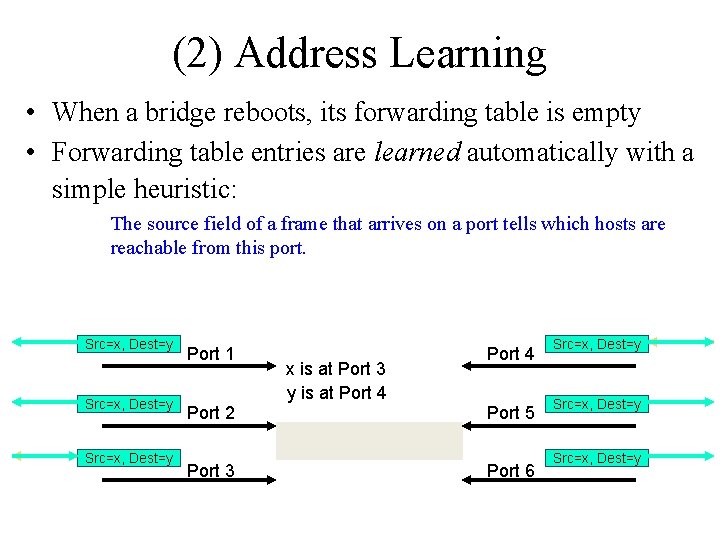
(2) Address Learning • When a bridge reboots, its forwarding table is empty • Forwarding table entries are learned automatically with a simple heuristic: The source field of a frame that arrives on a port tells which hosts are reachable from this port. Src=x, Dest=y Src=y, Dest=y Src=x, Dest=x Port 1 Port 2 Port 3 x is at Port 3 y is at Port 4 Port 5 Port 6 Src=x, Dest=y Src=y, Dest=x Src=x, Dest=y
(2) Address Learning Algorithm: • For each frame received, the source stores the source field in the forwarding table together with the port where the frame was received. • All entries are deleted after some time (default is 15 seconds). – What if the host moved?
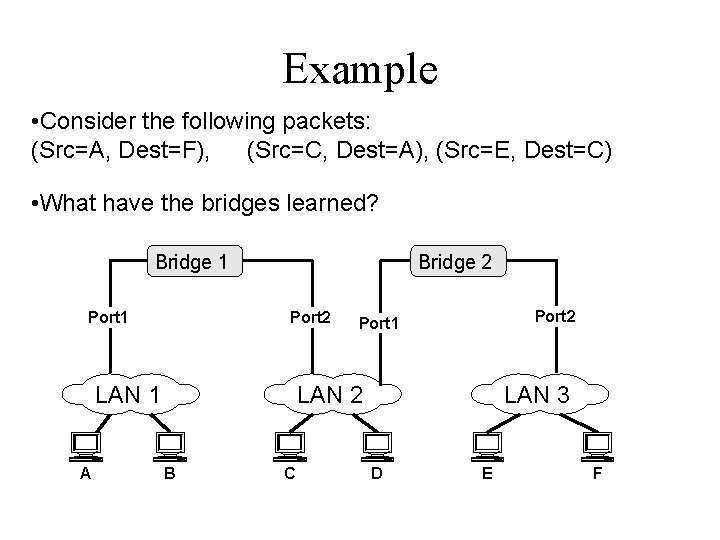
Example • Consider the following packets: (Src=A, Dest=F), (Src=C, Dest=A), (Src=E, Dest=C) • What have the bridges learned? Bridge 1 Port 1 Bridge 2 Port 2 LAN 1 A Port 2 Port 1 LAN 2 B C LAN 3 D E F
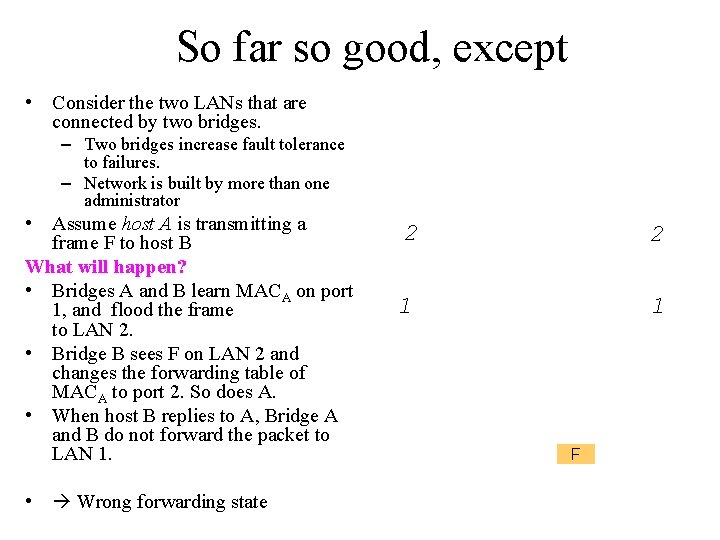
So far so good, except • Consider the two LANs that are connected by two bridges. – Two bridges increase fault tolerance to failures. – Network is built by more than one administrator • Assume host A is transmitting a frame F to host B What will happen? • Bridges A and B learn MACA on port 1, and flood the frame to LAN 2. • Bridge B sees F on LAN 2 and changes the forwarding table of MACA to port 2. So does A. • When host B replies to A, Bridge A and B do not forward the packet to LAN 1. • Wrong forwarding state 2 2 1 1 F
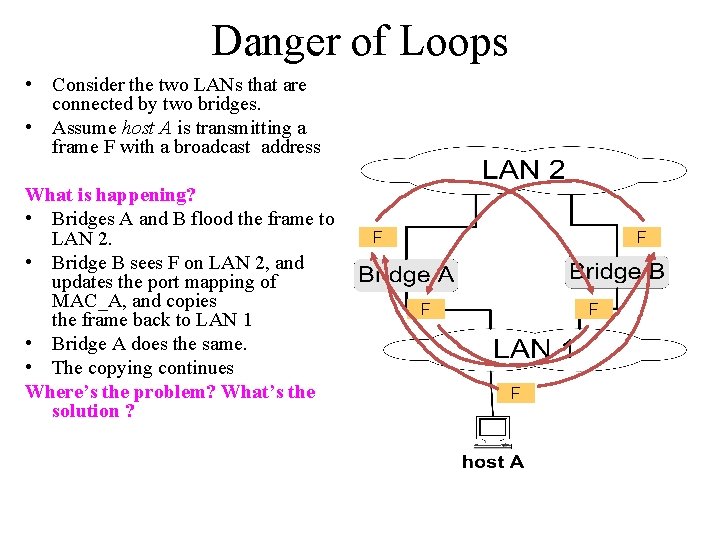
Danger of Loops • Consider the two LANs that are connected by two bridges. • Assume host A is transmitting a frame F with a broadcast address What is happening? • Bridges A and B flood the frame to LAN 2. • Bridge B sees F on LAN 2, and updates the port mapping of MAC_A, and copies the frame back to LAN 1 • Bridge A does the same. • The copying continues Where’s the problem? What’s the solution ? F F F
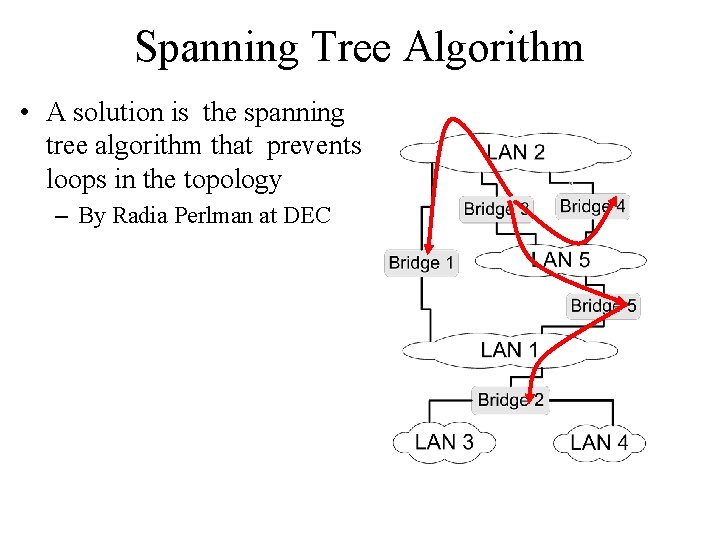
Spanning Tree Algorithm • A solution is the spanning tree algorithm that prevents loops in the topology – By Radia Perlman at DEC
Algorhyme (the spanning tree poem) • I think that I shall never see A graph more lovely than a tree. A tree whose crucial property Is loop-free connectivity. A tree that must be sure to span So packets can reach every LAN. First, the root must be selected. By ID, it is elected. Least-cost paths from root are traced. In the tree, these paths are placed. A mesh is made by folks like me, Then bridges find a spanning tree. • —Radia Perlman
Graph theory on spanning tree • For any connected graph consisting of nodes and edges connecting pairs of nodes, a spanning tree of edges maintains the connectivity of the graph but contains no loops – N-node’s graph, N-1 edges on a spanning tree
The protocol • IEEE 802. 1 d has an algorithm that organizes the bridges as spanning tree in a dynamic environment – Note: Trees don’t have loops • Bridges exchange messages to configure the bridge (Configuration Bridge Protocol Data Unit, Configuration BPDUs) to build the tree – Select ports they use to forward packets
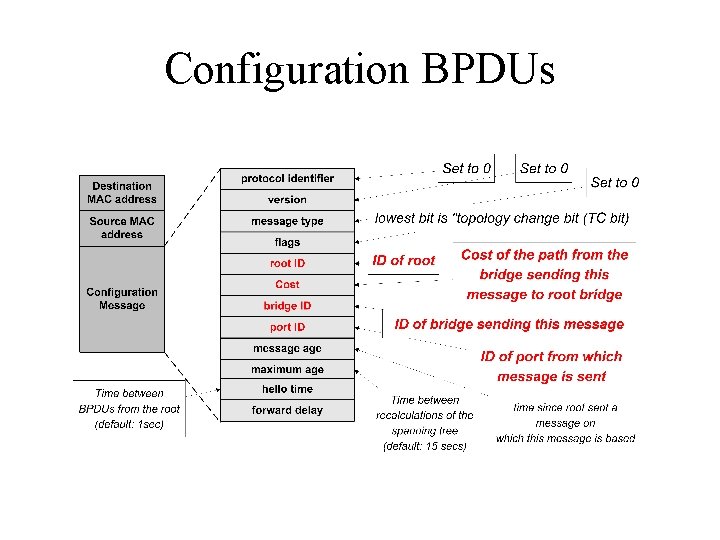
Configuration BPDUs
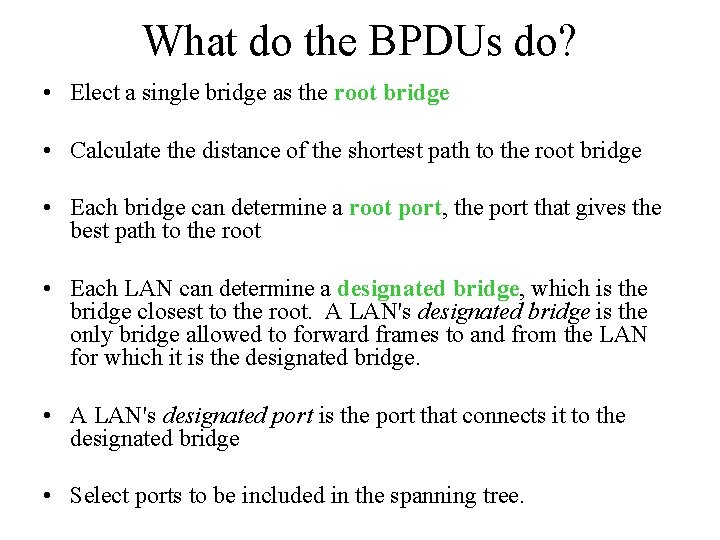
What do the BPDUs do? • Elect a single bridge as the root bridge • Calculate the distance of the shortest path to the root bridge • Each bridge can determine a root port, the port that gives the best path to the root • Each LAN can determine a designated bridge, which is the bridge closest to the root. A LAN's designated bridge is the only bridge allowed to forward frames to and from the LAN for which it is the designated bridge. • A LAN's designated port is the port that connects it to the designated bridge • Select ports to be included in the spanning tree.
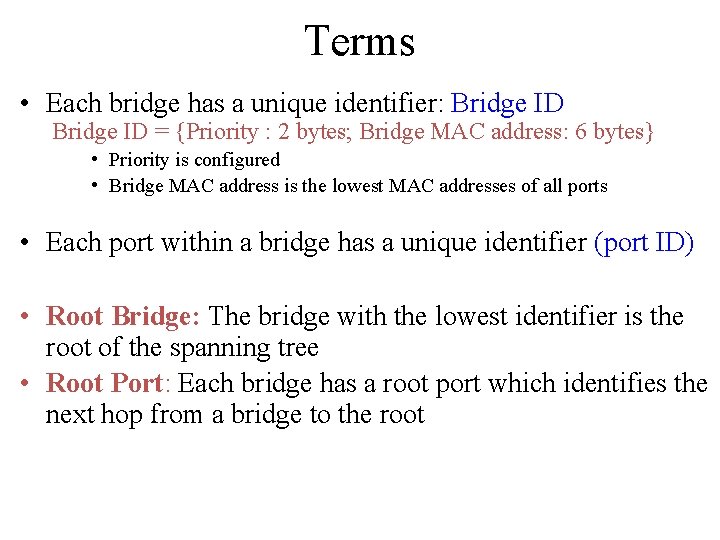
Terms • Each bridge has a unique identifier: Bridge ID = {Priority : 2 bytes; Bridge MAC address: 6 bytes} • Priority is configured • Bridge MAC address is the lowest MAC addresses of all ports • Each port within a bridge has a unique identifier (port ID) • Root Bridge: The bridge with the lowest identifier is the root of the spanning tree • Root Port: Each bridge has a root port which identifies the next hop from a bridge to the root
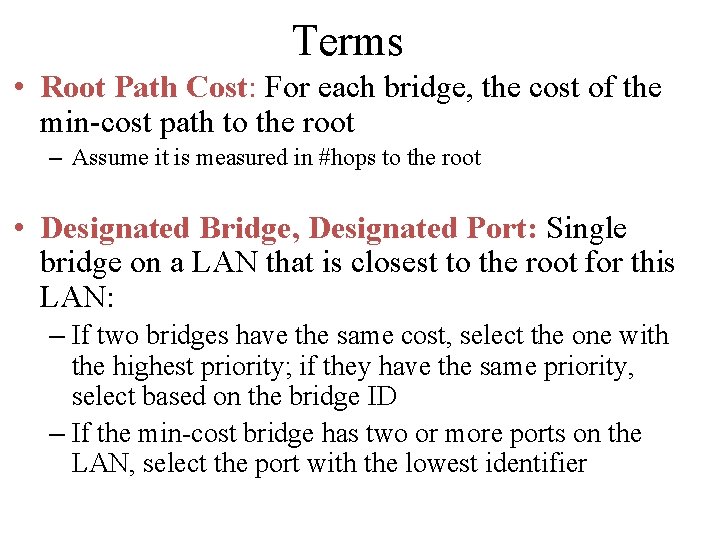
Terms • Root Path Cost: For each bridge, the cost of the min-cost path to the root – Assume it is measured in #hops to the root • Designated Bridge, Designated Port: Single bridge on a LAN that is closest to the root for this LAN: – If two bridges have the same cost, select the one with the highest priority; if they have the same priority, select based on the bridge ID – If the min-cost bridge has two or more ports on the LAN, select the port with the lowest identifier
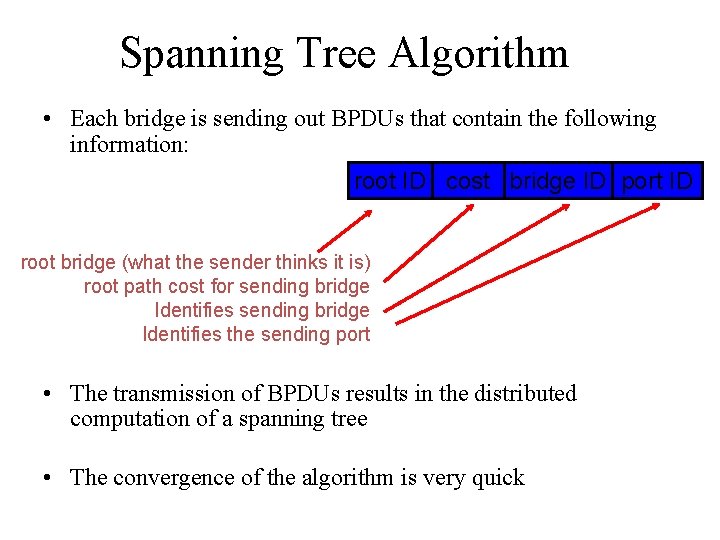
Spanning Tree Algorithm • Each bridge is sending out BPDUs that contain the following information: root ID cost bridge ID port ID root bridge (what the sender thinks it is) root path cost for sending bridge Identifies the sending port • The transmission of BPDUs results in the distributed computation of a spanning tree • The convergence of the algorithm is very quick
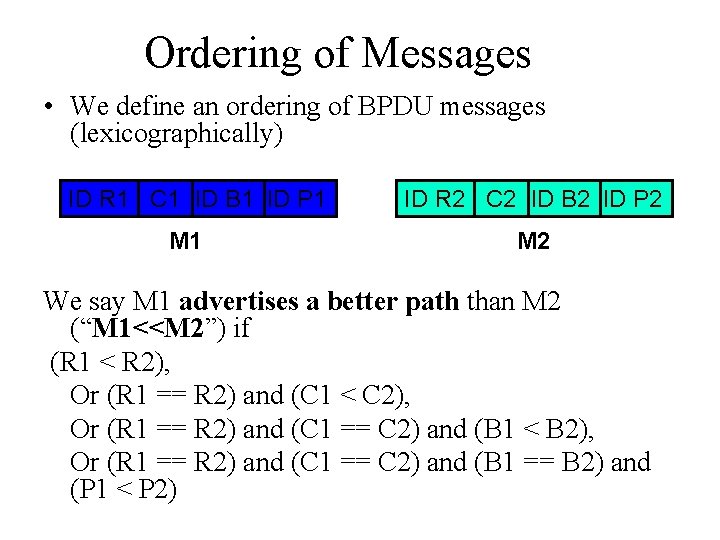
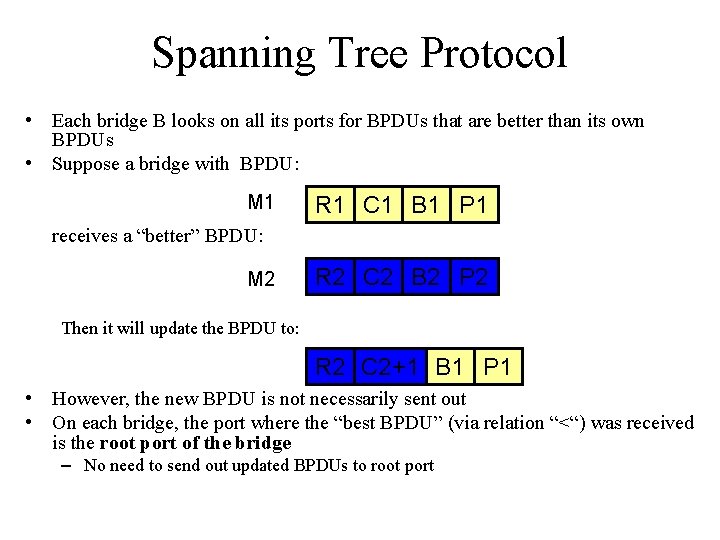
Ordering of Messages • We define an ordering of BPDU messages (lexicographically) ID R 1 C 1 ID B 1 ID P 1 M 1 ID R 2 C 2 ID B 2 ID P 2 M 2 We say M 1 advertises a better path than M 2 (“M 1<<M 2”) if (R 1 < R 2), Or (R 1 == R 2) and (C 1 < C 2), Or (R 1 == R 2) and (C 1 == C 2) and (B 1 < B 2), Or (R 1 == R 2) and (C 1 == C 2) and (B 1 == B 2) and (P 1 < P 2)
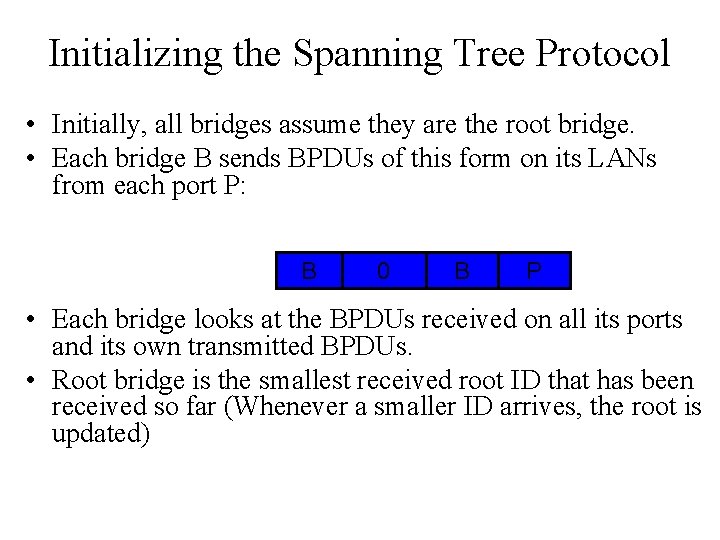
Initializing the Spanning Tree Protocol • Initially, all bridges assume they are the root bridge. • Each bridge B sends BPDUs of this form on its LANs from each port P: B 0 B P • Each bridge looks at the BPDUs received on all its ports and its own transmitted BPDUs. • Root bridge is the smallest received root ID that has been received so far (Whenever a smaller ID arrives, the root is updated)
Spanning Tree Protocol • Each bridge B looks on all its ports for BPDUs that are better than its own BPDUs • Suppose a bridge with BPDU: M 1 R 1 C 1 B 1 P 1 receives a “better” BPDU: M 2 R 2 C 2 B 2 P 2 Then it will update the BPDU to: R 2 C 2+1 B 1 P 1 • However, the new BPDU is not necessarily sent out • On each bridge, the port where the “best BPDU” (via relation “<“) was received is the root port of the bridge – No need to send out updated BPDUs to root port
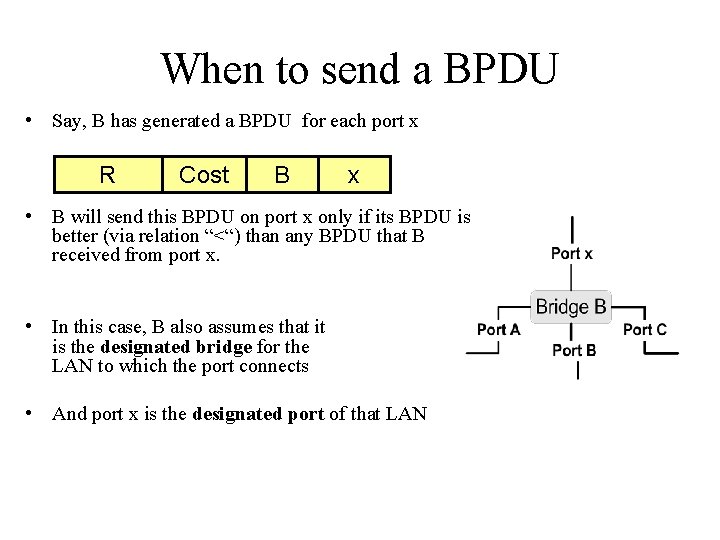
When to send a BPDU • Say, B has generated a BPDU for each port x R Cost B x • B will send this BPDU on port x only if its BPDU is better (via relation “<“) than any BPDU that B received from port x. • In this case, B also assumes that it is the designated bridge for the LAN to which the port connects • And port x is the designated port of that LAN
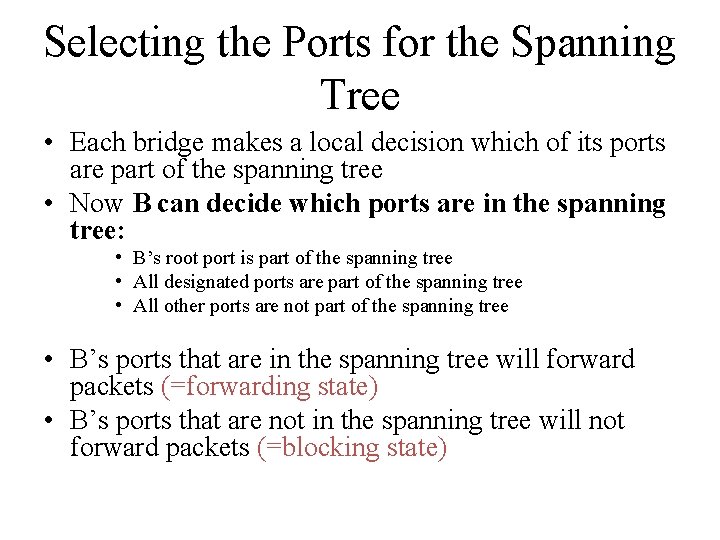
Selecting the Ports for the Spanning Tree • Each bridge makes a local decision which of its ports are part of the spanning tree • Now B can decide which ports are in the spanning tree: • B’s root port is part of the spanning tree • All designated ports are part of the spanning tree • All other ports are not part of the spanning tree • B’s ports that are in the spanning tree will forward packets (=forwarding state) • B’s ports that are not in the spanning tree will not forward packets (=blocking state)
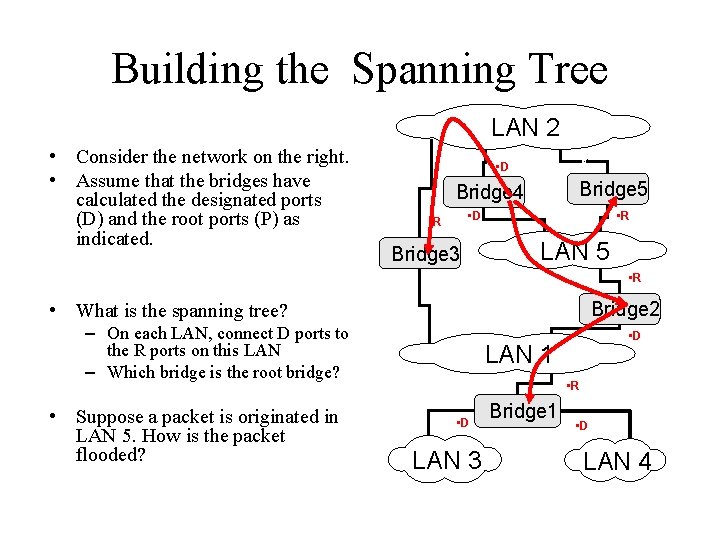
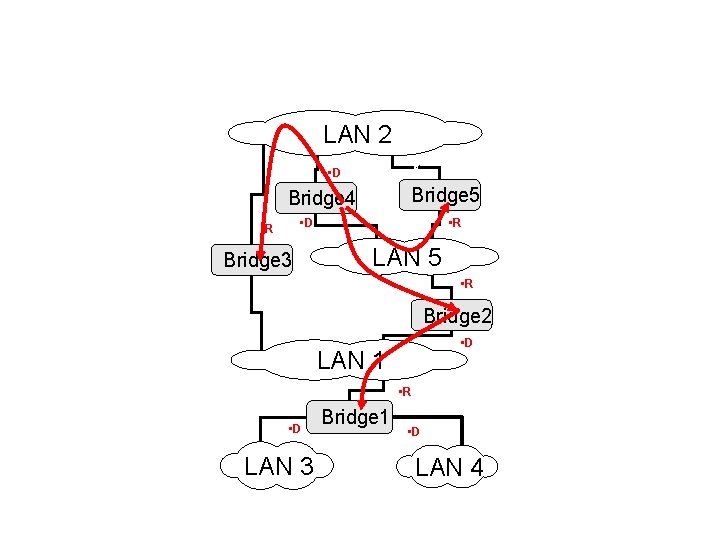
Building the Spanning Tree LAN 2 • Consider the network on the right. • Assume that the bridges have calculated the designated ports (D) and the root ports (P) as indicated. • d • D Bridge 5 Bridge 4 • D • R Bridge 3 • R LAN 5 • R • What is the spanning tree? Bridge 2 – On each LAN, connect D ports to the R ports on this LAN – Which bridge is the root bridge? • Suppose a packet is originated in LAN 5. How is the packet flooded? • D LAN 1 • R • D LAN 3 Bridge 1 • D LAN 4
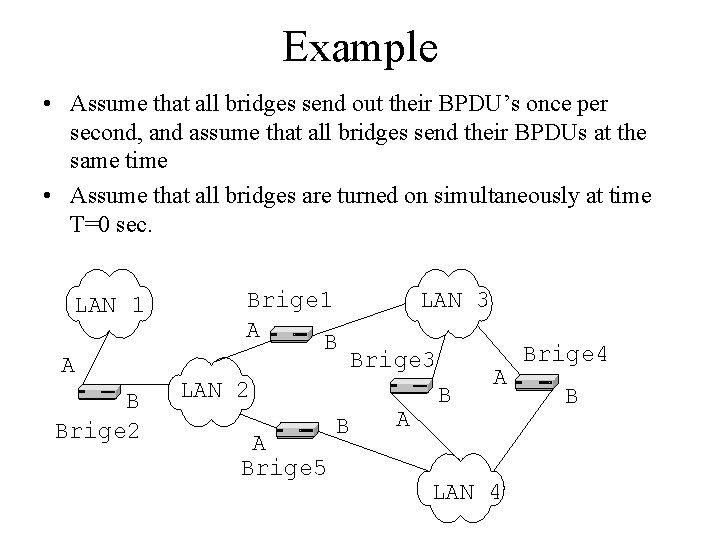
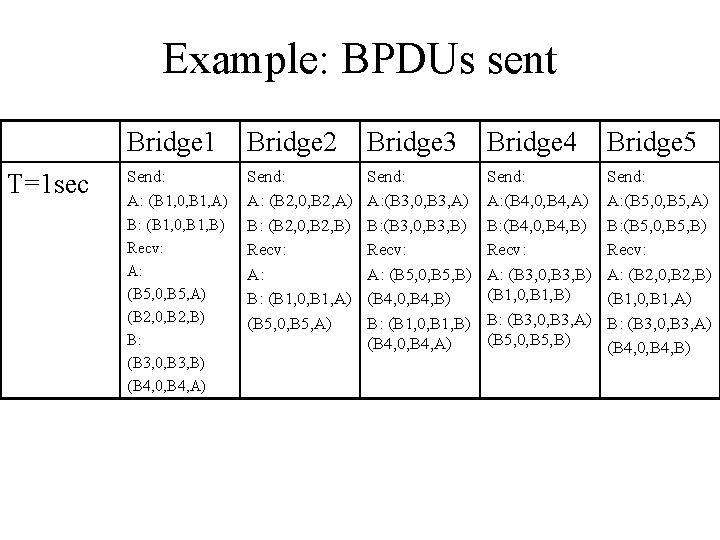
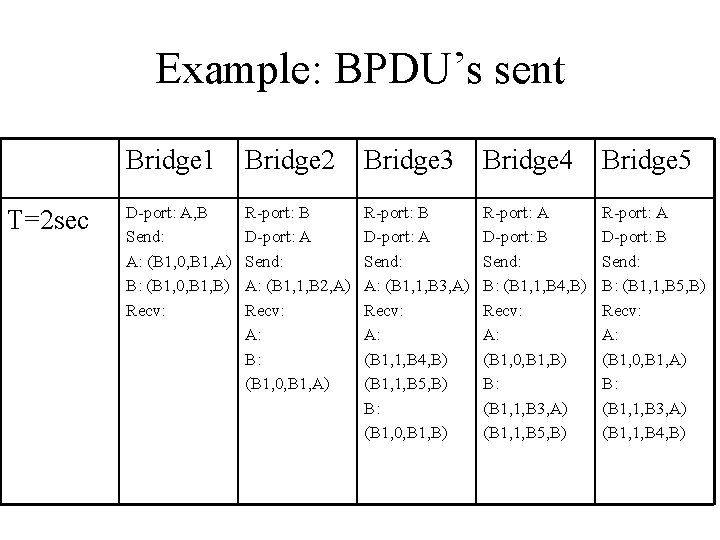
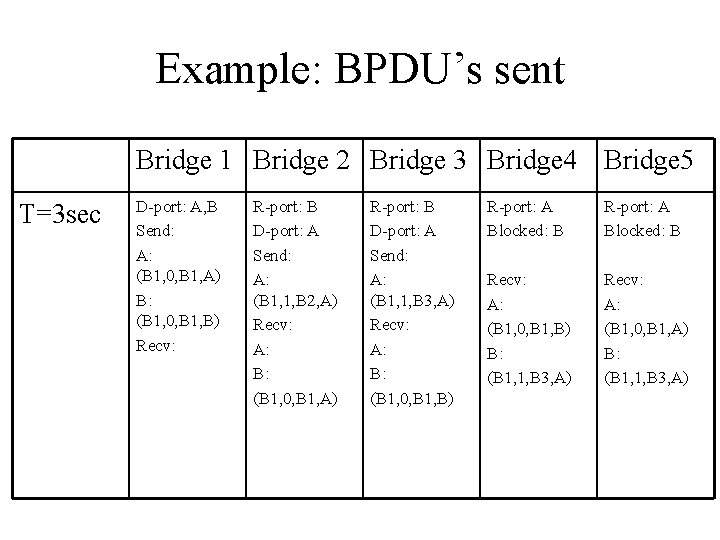
Example • Assume that all bridges send out their BPDU’s once per second, and assume that all bridges send their BPDUs at the same time • Assume that all bridges are turned on simultaneously at time T=0 sec. LAN 1 A B Brige 2 Brige 1 A B LAN 3 Brige 3 LAN 2 A Brige 5 B A LAN 4 Brige 4 B
Example: BPDUs sent Bridge 1 Bridge 2 Bridge 3 Bridge 4 Bridge 5 T=1 sec
Example: BPDUs sent Bridge 1 Bridge 2 Bridge 3 Bridge 4 Bridge 5 T=1 sec
Example: BPDUs sent Bridge 1 Bridge 2 Bridge 3 Bridge 4 Bridge 5 T=3 sec
Example: BPDUs sent T=1 sec Bridge 1 Bridge 2 Bridge 3 Bridge 4 Bridge 5 Send: A: (B 1, 0, B 1, A) Send: A: (B 2, 0, B 2, A) B: (B 2, 0, B 2, B) Recv: A: B: (B 1, 0, B 1, A) (B 5, 0, B 5, A) Send: A: (B 3, 0, B 3, A) B: (B 3, 0, B 3, B) Recv: A: (B 5, 0, B 5, B) (B 4, 0, B 4, B) B: (B 1, 0, B 1, B) (B 4, 0, B 4, A) Send: A: (B 4, 0, B 4, A) B: (B 4, 0, B 4, B) Recv: A: (B 3, 0, B 3, B) (B 1, 0, B 1, B) B: (B 3, 0, B 3, A) (B 5, 0, B 5, B) Send: A: (B 5, 0, B 5, A) B: (B 5, 0, B 5, B) Recv: A: (B 2, 0, B 2, B) (B 1, 0, B 1, A) B: (B 3, 0, B 3, A) (B 4, 0, B 4, B) B: (B 1, 0, B 1, B) Recv: A: (B 5, 0, B 5, A) (B 2, 0, B 2, B) B: (B 3, 0, B 3, B) (B 4, 0, B 4, A)
Example: BPDU’s sent T=2 sec Bridge 1 Bridge 2 Bridge 3 Bridge 4 Bridge 5 D-port: A, B Send: A: (B 1, 0, B 1, A) B: (B 1, 0, B 1, B) Recv: R-port: B D-port: A Send: A: (B 1, 1, B 2, A) Recv: A: B: (B 1, 0, B 1, A) R-port: B D-port: A Send: A: (B 1, 1, B 3, A) Recv: A: (B 1, 1, B 4, B) (B 1, 1, B 5, B) B: (B 1, 0, B 1, B) R-port: A D-port: B Send: B: (B 1, 1, B 4, B) Recv: A: (B 1, 0, B 1, B) B: (B 1, 1, B 3, A) (B 1, 1, B 5, B) R-port: A D-port: B Send: B: (B 1, 1, B 5, B) Recv: A: (B 1, 0, B 1, A) B: (B 1, 1, B 3, A) (B 1, 1, B 4, B)
Example: BPDU’s sent Bridge 1 Bridge 2 Bridge 3 Bridge 4 Bridge 5 T=3 sec D-port: A, B Send: A: (B 1, 0, B 1, A) B: (B 1, 0, B 1, B) Recv: R-port: B D-port: A Send: A: (B 1, 1, B 2, A) Recv: A: B: (B 1, 0, B 1, A) R-port: B D-port: A Send: A: (B 1, 1, B 3, A) Recv: A: B: (B 1, 0, B 1, B) R-port: A Blocked: B Recv: A: (B 1, 0, B 1, B) B: (B 1, 1, B 3, A) Recv: A: (B 1, 0, B 1, A) B: (B 1, 1, B 3, A)
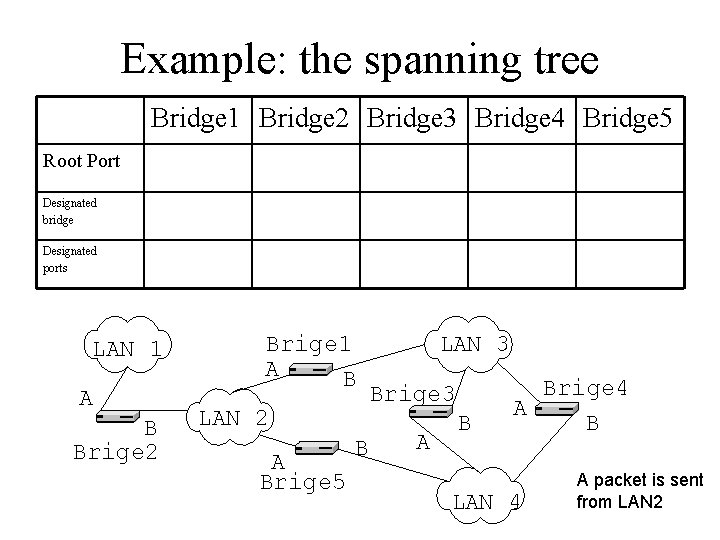
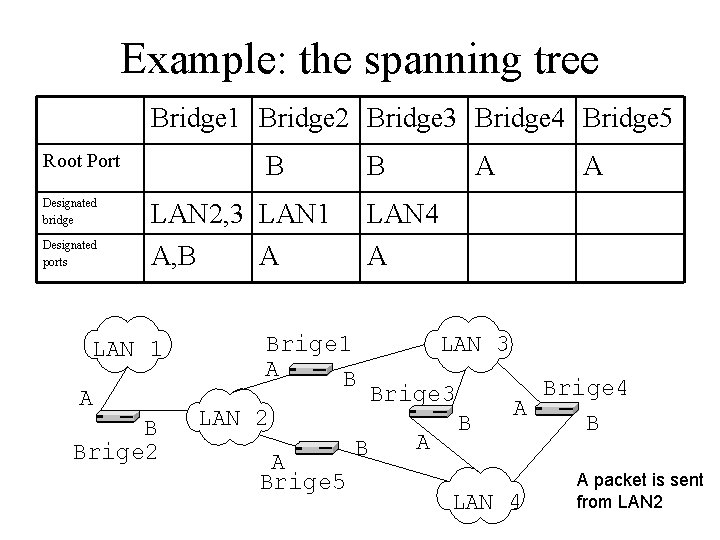
Example: the spanning tree Bridge 1 Bridge 2 Bridge 3 Bridge 4 Bridge 5 Root Port Designated bridge Designated ports LAN 1 A B Brige 2 Brige 1 A B LAN 2 A Brige 5 B LAN 3 Brige 3 A B Brige 4 A B LAN 4 A packet is sent from LAN 2
Example: the spanning tree Bridge 1 Bridge 2 Bridge 3 Bridge 4 Bridge 5 Root Port B B A Designated bridge LAN 2, 3 LAN 1 LAN 4 Designated ports A, B A LAN 1 A B Brige 2 A Brige 1 A B LAN 2 A Brige 5 B A LAN 3 Brige 3 A B Brige 4 A B LAN 4 A packet is sent from LAN 2
Limitations of bridges • Scalability – Broadcast packets reach every host! • Security – Every host can snoop • Non-heterogeneity – Can’t connect ATM networks
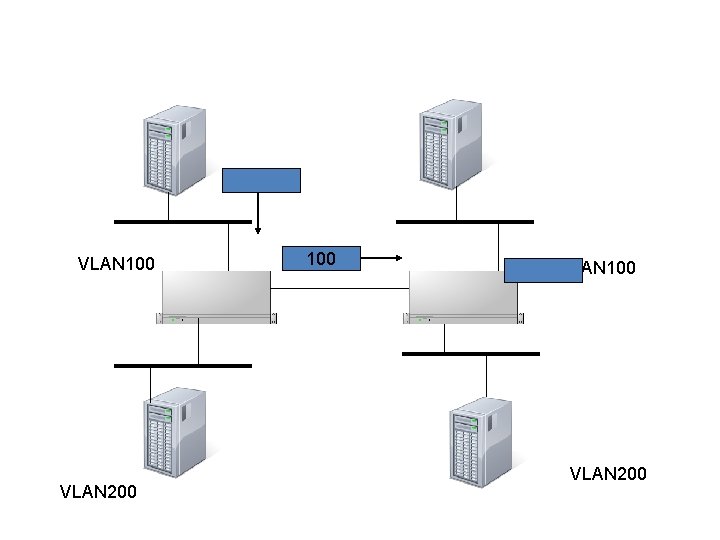
Virtual LANs • To address the scalability and security issues • A bridge’s port is configured to have a VLAN ID • Each VLAN has a spanning tree • A VLAN header is inserted to a packet • Packets are flooded to ports with the same VLAN ID
VLAN 100 VLAN 200
Today • Case study – Ethernet bridges – Spanning tree algorithm • Asynchronous Transfer Mode (ATM) – A fixed packet size network – Connection oriented • Using signaling to setup a virtual circuit
ATM Cells • Fixed-size packets – 5 bytes header – 48 bytes payload • If payload smaller than 48 B, uses padding • If greater than 48 B, breaks it
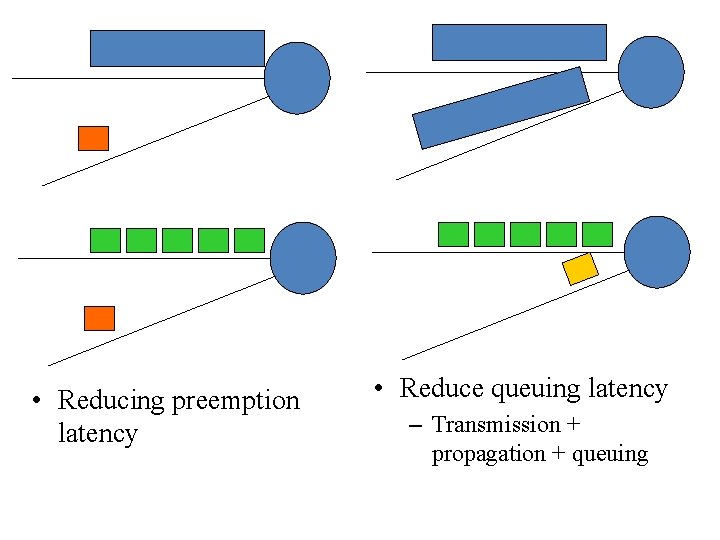
Why small, fixed-length packets? • Cons: maximum efficiency 48/53=90. 6% • Pros: – Suitable for high-speed hardware implementation – Many switching elements doing the same thing in parallel – Reducing priority packet latency • Good for Qo. S – Reducing transmission latency
• Reducing preemption latency • Reduce queuing latency – Transmission + propagation + queuing
Why 48 bytes • It’s from the telephone technology • Thought data would be mostly voice • A compromise – US: 64 bytes – Europe: 32 bytes – 64+32 = 48 bytes
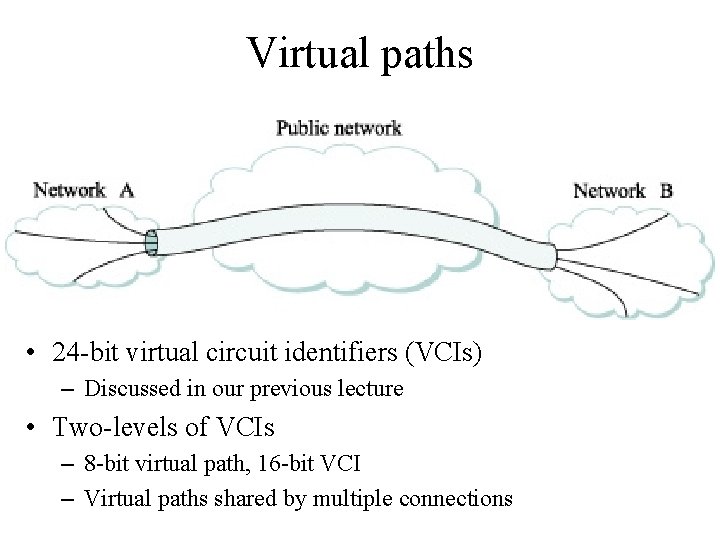
Virtual paths • 24 -bit virtual circuit identifiers (VCIs) – Discussed in our previous lecture • Two-levels of VCIs – 8 -bit virtual path, 16 -bit VCI – Virtual paths shared by multiple connections
Summary • Case study – Ethernet bridges – Spanning tree algorithm • Asynchronous Transfer Mode (ATM) – A fixed packet size network – Connection oriented • Using signaling to setup a virtual circuit • Next lecture – Internetworking
LAN 2 • d • D Bridge 5 Bridge 4 • D • R Bridge 3 • R LAN 5 • R Bridge 2 • D LAN 1 • R • D LAN 3 Bridge 1 • D LAN 4